Quick verdict
Gling is worth a serious look if your real editing problem is not “I need another video app,” but “I waste too much time cutting dead air, repeated lines, filler words, and awkward takes from talking-head footage.”
That is the right way to judge it.
Gling is not a general AI video generator in the same sense as tools that turn scripts into scenes, avatars, or marketing clips. It is closer to an AI-assisted rough-cut editor for creators who already record footage and need help cleaning it before the final polish. If your source material is a tutorial, commentary video, podcast, lesson, or YouTube-style talking-head recording, the product fit is easy to understand.
The catch is that editing speed only matters if the cuts are useful enough to trust. I would not buy Gling only because the pricing looks simple or because annual billing lowers the monthly equivalent. The better test is to run one real raw recording through the free path and see whether the transcript, cut suggestions, captions, and export options actually match the way you edit.
For my money, Gling makes the most sense for solo creators and editors who want a faster first pass, not a replacement for every creative decision. It becomes weaker if you need advanced motion work, deep timeline control, team approvals, brand governance, or a full repurposing suite.
Next step: If Gling sounds like the right kind of editing shortcut, test the current plan path before committing to a larger monthly or annual workflow.
Review snapshot
| Review point | Practical take |
|---|---|
| Best for | YouTube creators, video podcasters, educators, and marketers editing speech-heavy footage |
| Not ideal for | Cinematic editors, team review workflows, advanced VFX work, or script-to-video generation |
| Main use case | Turning raw talking-head footage into a cleaner rough cut |
| Free path | Free plan with 1 hour of AI-edited media per month and watermarked exports |
| Paid path | Plus, Pro, and Elite plans are mostly about monthly media-hour limits and watermark-free export |
| Main strength | Fast removal of bad takes, silences, filler words, and transcript-based edits |
| Main concern | Monthly hour limits, unused-hour rules, watermark restrictions, and unclear refund protection |
| Direct comparison | Descript is the more obvious transcript-editing comparison if available in your workflow |
| Adjacent routes | Fliki, Pictory, and AKOOL fit different video-creation jobs |
| Best next step | Test one real raw recording before buying annual billing |
What is Gling?
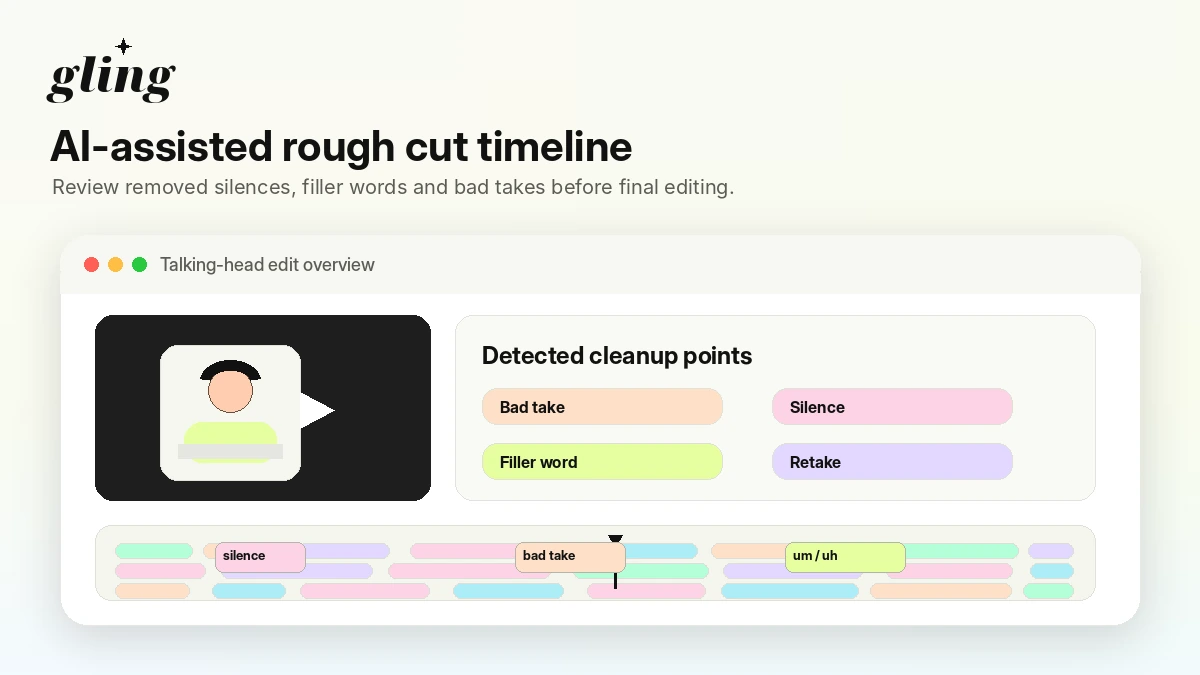
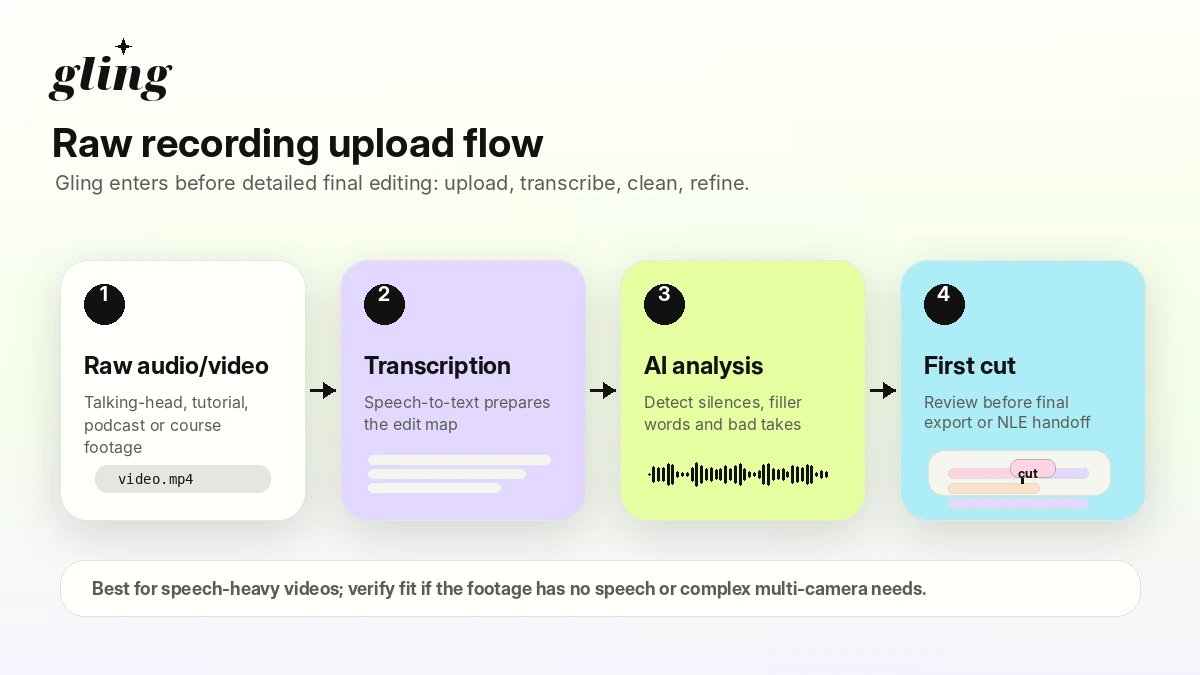
Gling is an AI-assisted video editor built around creator footage, especially speech-heavy YouTube videos. The core promise is simple: upload raw footage, let Gling transcribe and analyze it, remove bad takes, silences, and filler words, then refine and export the result.
The important detail is that Gling starts from recorded material.
That separates it from many AI video tools. It is not primarily an avatar generator, a text-to-video system, or a brand campaign builder. It is a cleanup layer for creators who already recorded a video and want the boring part of the edit to move faster.
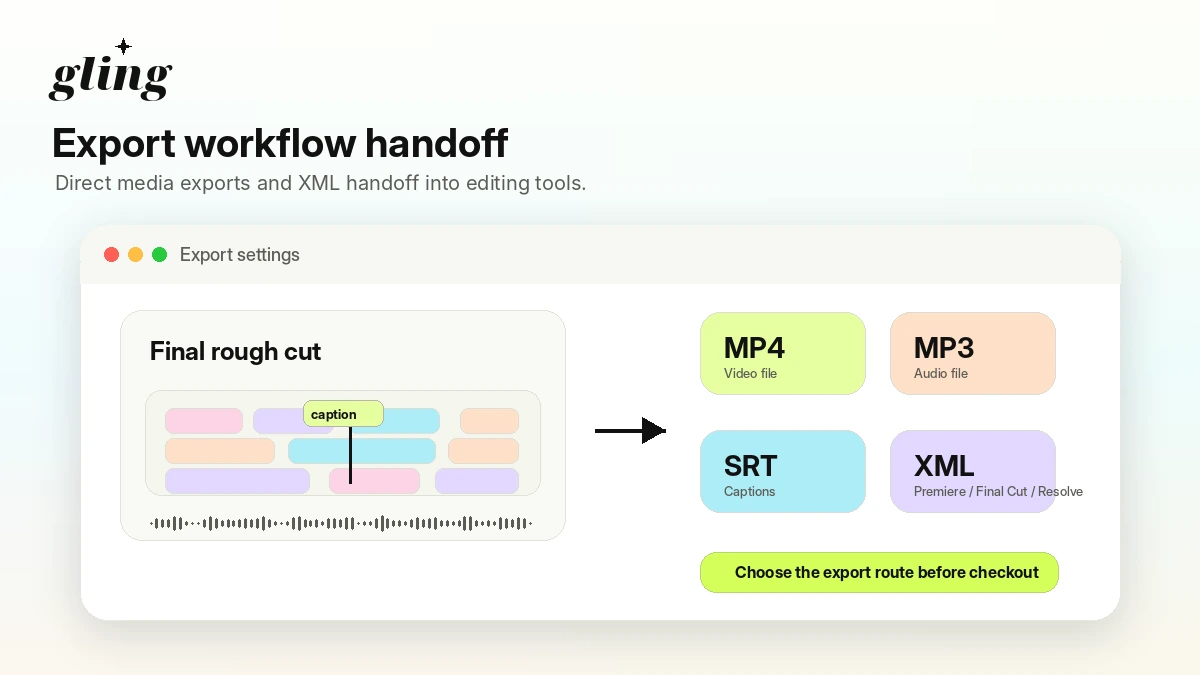
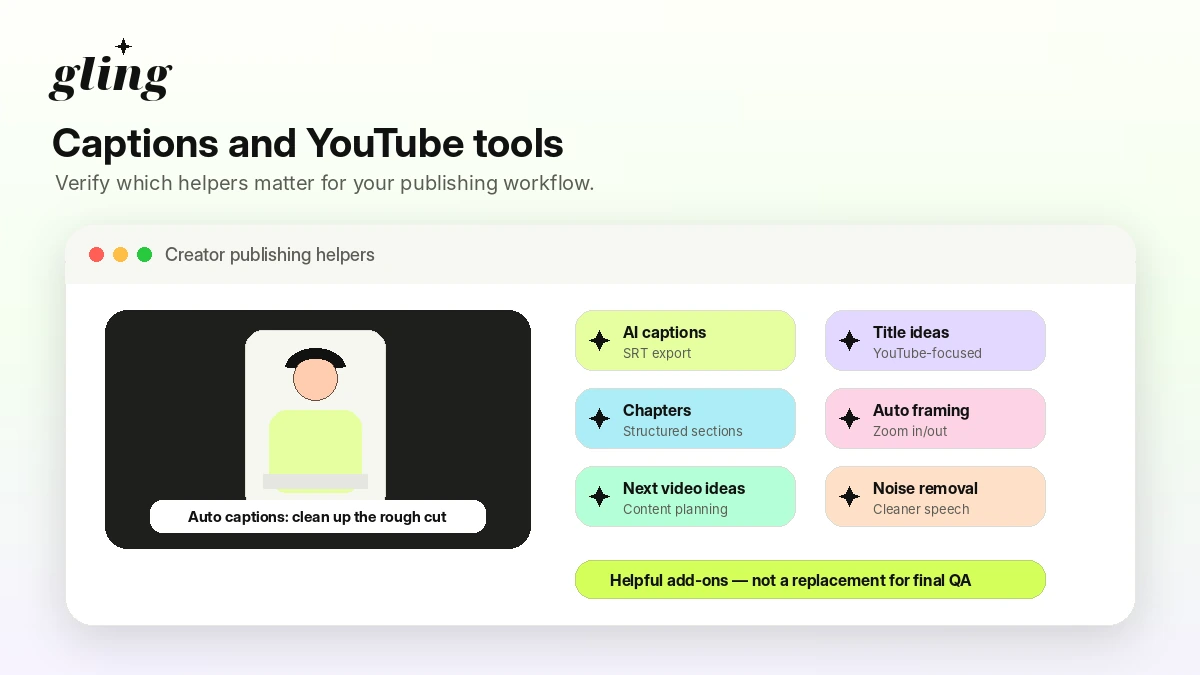
Official product pages position Gling around YouTube creators, rough-cut cleanup, captions, auto framing, noise reduction, title and chapter helpers, and export paths to MP4, MP3, SRT, and XML workflows. That is a useful bundle if your editing work begins with a real person speaking on camera.
Our review approach compares public product pages, pricing details, feature documentation, checkout logic, buyer workflow fit, and nearby alternatives. We do not treat a low monthly price, annual discount, or coupon route as proof that the product fits the creator.
The common misunderstanding is thinking “AI video editor” means Gling will handle every kind of editing work. It will not. The stronger expectation is narrower: it can help you get from messy raw footage to a cleaner first cut faster.
Who should use Gling?
Gling makes the most sense for creators who repeatedly edit similar types of footage.
A YouTube creator recording tutorials, commentary, explainers, product reviews, or talking-head lessons is the cleanest fit. If your videos contain long sections of speech, repeated lines, pauses, and filler words, Gling is solving a real editing problem.
A video podcaster can also benefit, especially when the goal is to clean up a single-speaker or simple interview recording before doing final edits elsewhere. In this case, the buyer should verify export behavior and whether the rough cut saves enough time to keep using it each week.
A course creator or educator may use Gling for lesson cleanup. Long instructional recordings often contain pauses and retakes. Gling can help here if the transcript is accurate and the automatic cuts do not create too much review work.
A solo marketer may find it useful for recorded explainers, webinars, demos, or founder-led videos. The tool fits best when the video starts as raw recorded footage and needs cleanup before publishing.
An editor may use Gling as a pre-editing assistant before moving into Premiere Pro, Final Cut Pro, or DaVinci Resolve. That buyer should test XML export early, because the handoff matters more than the pricing table.
Who should avoid Gling?
I would avoid Gling if your main need is cinematic editing, advanced motion graphics, heavy color work, visual effects, or deep timeline control. Gling may help with speech cleanup, but it is not trying to replace a professional editing suite.
I would also be careful if your workflow is mostly short-form clip discovery. Gling can help with creator editing, but if your real job is finding viral moments, formatting multi-platform shorts, and managing social repurposing, a different tool may fit better.
Teams that need approvals, comments, permissions, client review, and brand governance should slow down. Gling looks more like a creator-first desktop workflow than a full team operations platform.
Buyers who expect unlimited exports on the free plan should check the details carefully. The free plan is useful for testing, but watermarked exports and export restrictions can make it too limited for normal publishing.
And if you only edit one video every now and then, a paid subscription may be more than you need. The plan math becomes easier only when you know you will use the included media hours consistently.
How Gling fits into a real workflow
A sensible Gling workflow starts before the upload.
Pick a real raw recording. Not a clean demo file. Use a video with pauses, retakes, filler words, background noise, and the kind of pacing you normally produce. That is the only way to see whether the tool fits your work.
Then the process usually looks like this:
- Upload the raw audio or video file.
- Let Gling transcribe and analyze the footage.
- Review the suggested cuts for bad takes, silences, and filler words.
- Adjust the edit manually where the AI made the wrong call.
- Add or review captions, framing, chapter ideas, or title helpers if relevant.
- Export directly as a media file or move the project into a traditional editor.
- Watch the final video like a human editor, not just like a software user.
The buyer mistake is assuming the AI cut is the finished edit. I would treat Gling as a first-pass assistant. If it removes enough dead space and obvious retakes, it can save time. If it creates cuts you constantly need to repair, the price matters less because the workflow is not actually smoother.
Workflow test: Before comparing paid tiers, try Gling with one real recording that includes the messy parts of your normal editing process.
Real-world buyer scenarios
A weekly YouTube educator is one of the better Gling buyers. The content format is predictable, the raw footage is speech-heavy, and every saved editing hour compounds over time. The buyer should still check whether the Plus or Pro media-hour limit fits the real monthly recording volume.
A creator who records occasional talking-head videos is different. The free plan may be enough to test the tool, but paying monthly may not make sense unless the creator publishes often enough to use the included hours.
A video podcaster has a more nuanced decision. Gling can help clean dead air and repeated phrases, but multicam edits, branding, pacing, clips, intros, and sponsor segments may still need a full editor. This buyer should judge Gling as a rough-cut assistant, not a complete podcast production system.
A marketer turning webinars or demos into cleaner videos may benefit if the footage is mostly one speaker and the goal is a polished enough export. If the job is more about repurposing into short clips, adding templates, or creating video from scripts, an adjacent tool like Pictory or Fliki may deserve comparison.
Key features that actually matter
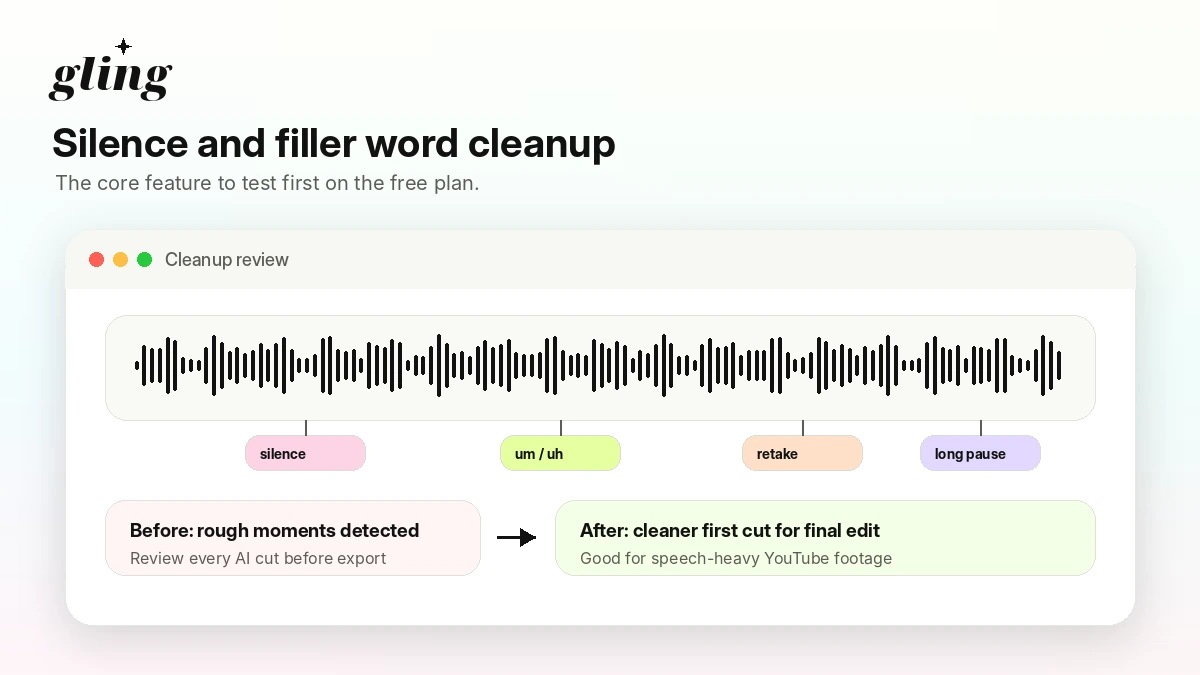
Bad-take and silence removal
This is the feature that makes or breaks Gling for most buyers. If the tool correctly removes awkward pauses, repeated lines, and filler words, it can shorten the most boring part of editing.
Buyer note: test this with your own speaking style. Accent, pacing, audio quality, and recording habits can all affect how useful the automatic cut feels.
Text-based trimming
Transcript-based editing matters because many creators find it easier to edit speech from text than from a traditional timeline. This can make Gling less intimidating for beginners and faster for creators who already know the content structure.
Buyer note: transcript accuracy is not a small detail. If the transcript is weak, the editing experience becomes slower.
Captions and subtitle export
Gling includes AI captions and SRT export, which can help YouTube creators and educators who need captions as part of the publishing workflow.
Buyer note: captions should still be checked manually before publishing, especially for names, technical terms, accents, and brand language.
Auto framing and noise cleanup
Auto framing and speech enhancement can make creator footage feel more polished without turning Gling into a full post-production suite.
Buyer note: these are useful extras, but they should not be the main reason to buy unless they improve the videos you actually publish.
Export paths into larger editing workflows
MP4, MP3, SRT, and XML export support can make Gling useful before a final edit in Premiere Pro, Final Cut Pro, or DaVinci Resolve.
Buyer note: if XML handoff is central to your workflow, test it before paying annually.
Pricing and plan value
Gling pricing is easier to judge when you ignore plan names for a moment and look at media hours.
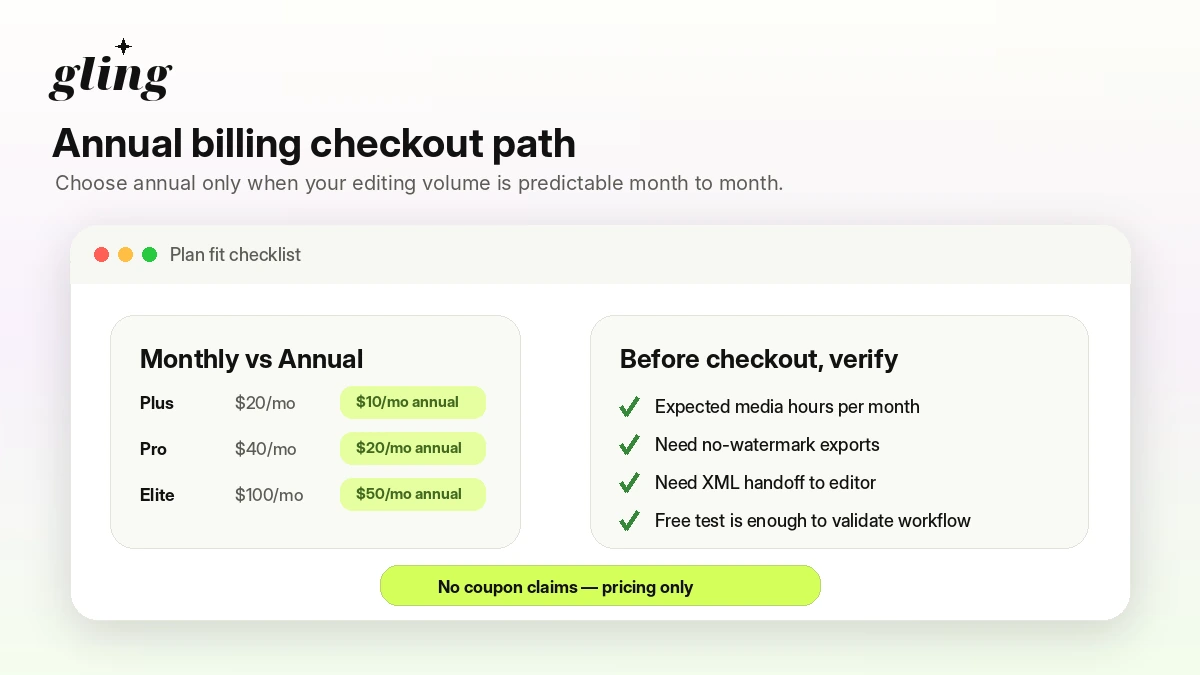
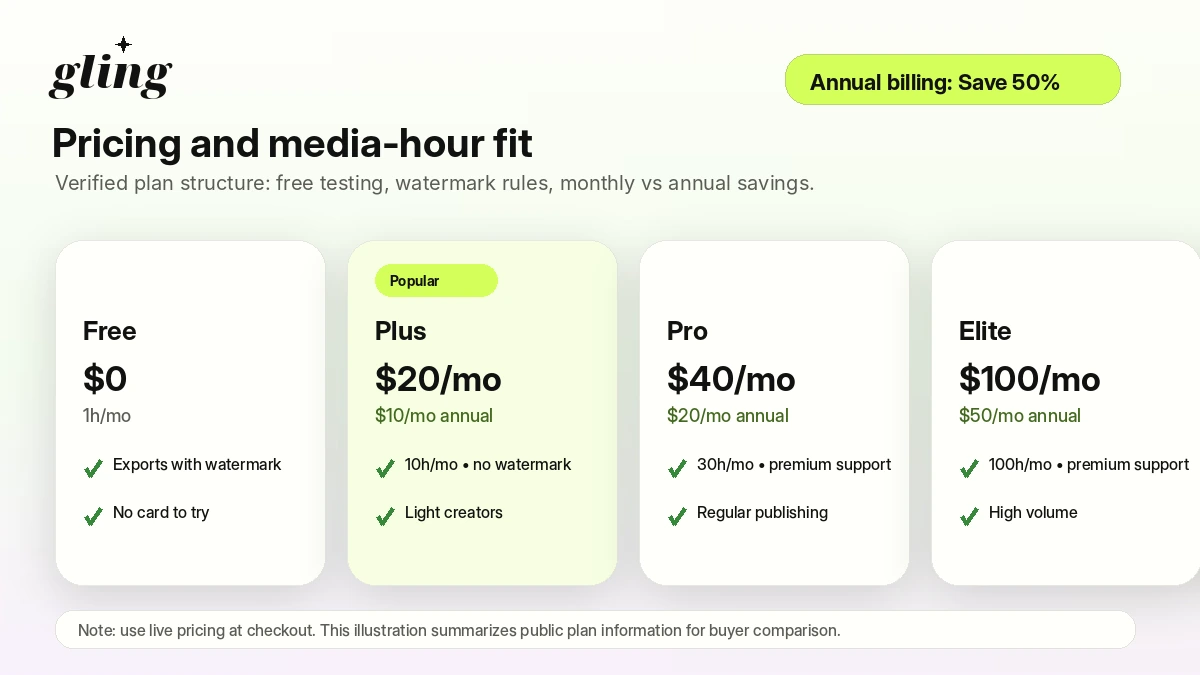
At the time of review, Gling’s public pricing page shows a Free plan at $0, Plus at $20/month, Pro at $40/month, and Elite at $100/month on monthly billing. The annual toggle shows lower monthly equivalents: Plus at $10/month, Pro at $20/month, and Elite at $50/month when paid annually.
The free plan includes 1 hour of AI-edited media per month and watermarked exports. Gling’s pricing FAQ also says the first video edited in Gling has none of the usual free export restrictions, which makes the first test more useful than a basic locked demo.
The paid plans are mostly about volume:
- Plus: 10 hours of AI-edited media per month.
- Pro: 30 hours of AI-edited media per month and premium support.
- Elite: 100 hours of AI-edited media per month and premium support.
The part I would check first is not the discount. It is the number of raw footage hours you actually edit in a normal month.
Annual billing can look attractive because the monthly equivalent drops sharply. But unused paid-plan hours do not roll over, according to Gling’s pricing FAQ. That means a creator who edits inconsistently can overbuy very easily.
Pricing check: If Gling fits your footage type, compare monthly and annual plans against your real upload volume before choosing a paid tier.
Free plan, trial, coupon, and checkout notes
Gling has a real free test path, and that matters. You can use it to see whether the tool understands your footage before entering payment information.
The free path is not the same as a full production plan. The public pricing FAQ says free exports include a watermark and that free users cannot export to Premiere, Final Cut, or Resolve, although the first video edited in Gling is described as having none of those restrictions. I would treat that first project as your serious test.
The safest order is:
- Start free.
- Use real footage.
- Check cut quality, transcript accuracy, captions, and export behavior.
- Estimate monthly raw media hours.
- Compare Plus, Pro, and Elite.
- Check the Gling coupon page only after workflow fit is clear.
I would not buy Gling because of a coupon alone. A discount can improve the purchase, but it does not fix a workflow mismatch. If the AI cleanup does not save you editing time, even the cheaper annual plan is not the right deal.
What I would check before buying Gling
If I were buying Gling for a real creator workflow, I would check these points before paying:
- Whether the free test handles my normal speaking style, recording quality, and pacing.
- Whether watermarked free exports are enough for evaluation.
- Whether Plus, Pro, or Elite matches my real monthly raw footage volume.
- Whether unused paid hours matter for my publishing schedule.
- Whether I need XML export into Premiere Pro, Final Cut Pro, or DaVinci Resolve.
- Whether captions, auto framing, AI B-roll, and YouTube helpers are features I will actually use.
- Whether the current refund, cancellation, and annual billing terms are clear enough before committing.
The easy mistake is choosing the annual plan because the displayed monthly equivalent looks much cheaper. The better path is to prove the editing workflow first, then choose the billing interval.
A simple test before paying
Before paying, I would run a small test like this:
- Choose a raw video that represents your normal work, not your cleanest recording.
- Upload it to Gling and let the AI create the first cut.
- Review the removed silences, filler words, and bad takes.
- Check whether transcript edits feel faster than timeline edits.
- Try captions or SRT export if subtitles matter to your workflow.
- Test MP4 or XML export depending on how you finish videos.
- Estimate how many hours of similar footage you edit per month.
That test will tell you more than the pricing table. Gling only deserves a paid plan if it saves time on the kind of raw material you actually produce.
Pros explained
The first real pro is focus. Gling is not trying to be every video tool at once. Its strongest promise is narrow: clean speech-heavy creator footage faster.
The second pro is the free entry path. A free plan with a meaningful first project lets creators judge the workflow before paying, which is exactly how this category should be evaluated.
The third pro is export flexibility. MP4, MP3, SRT, and XML workflows make Gling more useful for creators who want AI cleanup but still finish in another editor.
The fourth pro is pricing readability. The plan ladder is not mysterious. Free, Plus, Pro, and Elite are mainly separated by monthly usage volume and support level.
These strengths matter most when the buyer already has a repeatable video process. They matter less if the buyer is still unsure whether editing recorded footage is the real bottleneck.
Cons explained
The biggest con is that Gling’s free path is still limited. Watermarks and export restrictions can make free testing useful for evaluation but not enough for normal publishing.
The second con is media-hour pressure. Paid plans have monthly limits, and unused hours do not roll over. A creator who publishes inconsistently should be careful with larger plans.
The third con is category fit. Gling is not a replacement for advanced editing, social repurposing, avatar video, or full brand video production. It solves one creator editing problem better than it solves every video problem.
The fourth con is refund uncertainty. The public pricing FAQ clearly discusses cancellation and continued access through the remaining subscription period, but a simple public refund window was not obvious enough to rely on. Buyers should check current checkout and terms before annual billing.
None of these cons make Gling a bad product. They just define the right buyer.
Green flags and red flags
Green flags:
- You record speech-heavy videos every month.
- You spend too much time cutting pauses, filler words, and retakes.
- You prefer transcript-based editing for rough cuts.
- You want captions or SRT export as part of your process.
- You finish in another editor and need a cleaner handoff.
Red flags:
- You mostly need advanced timeline control or cinematic finishing.
- You want script-to-video generation rather than raw-footage cleanup.
- Your monthly footage volume is inconsistent.
- You are buying mainly because annual billing looks cheaper.
- You have not tested export behavior with your real editing stack.
This is the buyer protection point: Gling looks strongest when the editing pain is specific. If the pain is vague, another video tool may be a better fit.
Gling vs alternatives
Gling’s closest comparison is not always another “AI video” product. The better comparison depends on the job.
Descript vs Gling
Descript is the more direct conceptual comparison for buyers who want text-based editing, transcript workflows, and broader creator editing features. Gling may feel simpler if the main job is cleaning talking-head footage quickly. Descript may be stronger if the buyer wants a broader editing and content workflow.
Fliki vs Gling
Fliki is an adjacent route, not a one-to-one replacement. It makes more sense when the workflow starts from text, scripts, voiceover, or content generation. Gling makes more sense when you already recorded footage and need to clean it.
Pictory vs Gling
Pictory is also adjacent. It can fit marketers who want to turn scripts, webinars, or long-form content into templated videos. Gling is more creator-editing focused. If your source material is raw camera footage, Gling is usually the more natural starting point.
AKOOL vs Gling
AKOOL is relevant for avatar, brand video, and visual campaign generation. It is not the same buyer job. Compare AKOOL if you need generated video assets. Compare Gling if the problem is cleaning your recorded footage.
CapCut or a traditional editor vs Gling
CapCut, Premiere Pro, Final Cut Pro, and DaVinci Resolve remain stronger when you need full editing control. Gling can sit before those tools. It is not automatically a replacement for them.
Trust, refund, and buyer-risk notes
Gling has a clearer pricing page than many AI tools, but clear pricing does not remove buyer risk.
The first risk is plan volume. Plus, Pro, and Elite are tied to monthly media-hour limits. If you overestimate your publishing output, you may pay for hours you do not use.
The second risk is export fit. A creator who only needs MP4 exports has a different decision from an editor who depends on XML handoff. Test the actual path before relying on it.
The third risk is free-plan expectation. The free plan is useful, but watermark and export limitations mean it should be treated as a test route, not a full creator workflow.
The fourth risk is refund clarity. I would not assume refund protection unless the live checkout or current terms clearly confirm it. For annual billing, that matters.
The fifth risk is category confusion. Gling is not the same kind of tool as script-to-video, avatar generation, or marketing video repurposing platforms. Buying the wrong category is worse than choosing the wrong plan.
Do not buy on headline price alone. Test the workflow, confirm the plan limit, and only then check the current deal path.
Final verdict
I would consider Gling if you regularly edit talking-head, tutorial, commentary, podcast, or lesson-style footage and want a faster first cut. The product has a clear job: reduce the dull trimming work before you publish or finish the video elsewhere.
I would skip Gling if your main need is cinematic editing, team approval, social clipping strategy, avatar generation, or script-to-video production. That is not where Gling is strongest.
I would compare it with Descript if transcript-based editing is the main decision. I would compare adjacent DealBestDaily routes like Fliki, Pictory, or AKOOL only if your buyer job moves away from cleaning recorded footage and toward generated or templated video creation.
The safest next step is simple: use the free path with one real raw recording, check the cut quality, test export behavior, estimate monthly media hours, and only then decide whether Plus, Pro, Elite, or no paid plan makes sense.
