
SellerPic Pricing, Visual Workflow & Buyer Fit
SellerPic is an AI product photography and ecommerce visual studio for turning product images into model photos, lifestyle scenes, AI ads, short videos, virtual try-on visuals, background edits, and social-ready product assets. It is most relevant for Shopify merchants, fashion sellers, marketplace brands, and small ecommerce teams that need more product visuals than a normal photoshoot budget can comfortably support.

Fit → price → checkout
Use these routes after the official-site check: coupon first, review for fit, compare if unsure.
SellerPic pricing snapshot
Fast commercial checks before pricing, coupons, or a deeper review.
SellerPic product tour
The main tour video is worth watching before comparing plans because SellerPic's value depends on whether the generated product visuals look usable with your own catalog images. Pay attention to how the tool handles model swaps, product-photo cleanup, image-to-video output, and export quality. The goal is not just to admire the demo, but to decide whether your store could replace or supplement real photoshoots without burning credits on repeated retries.
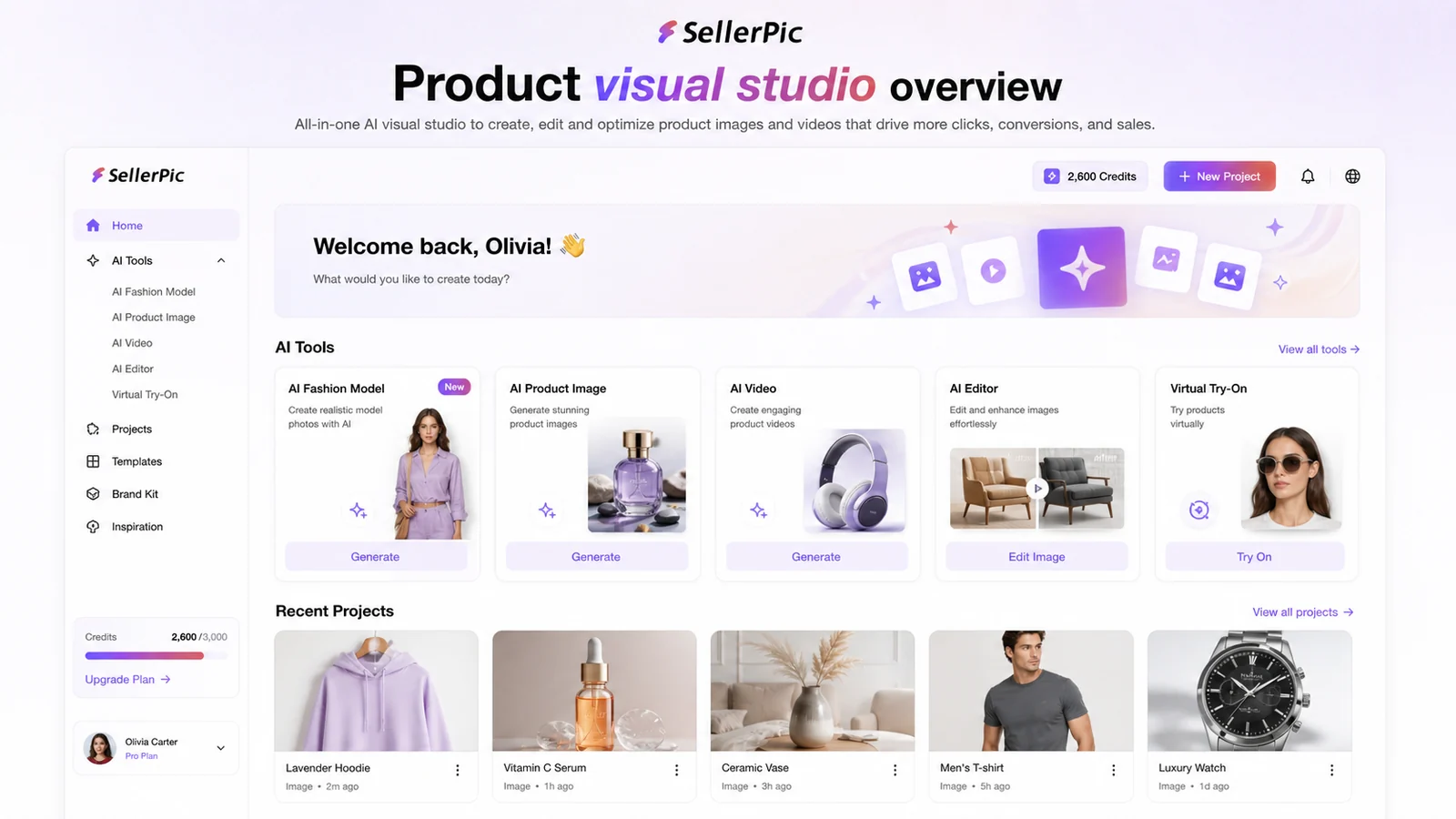
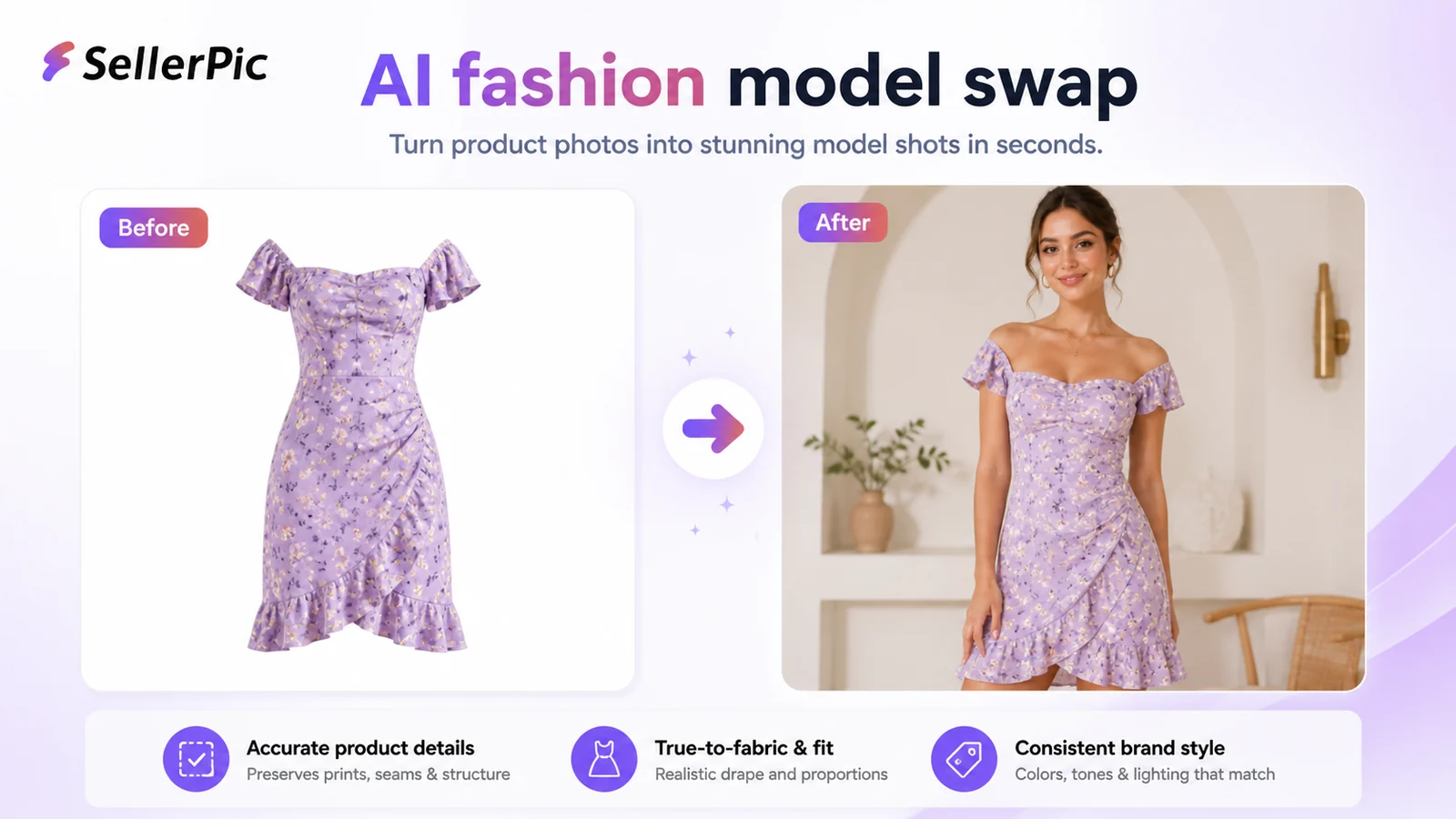

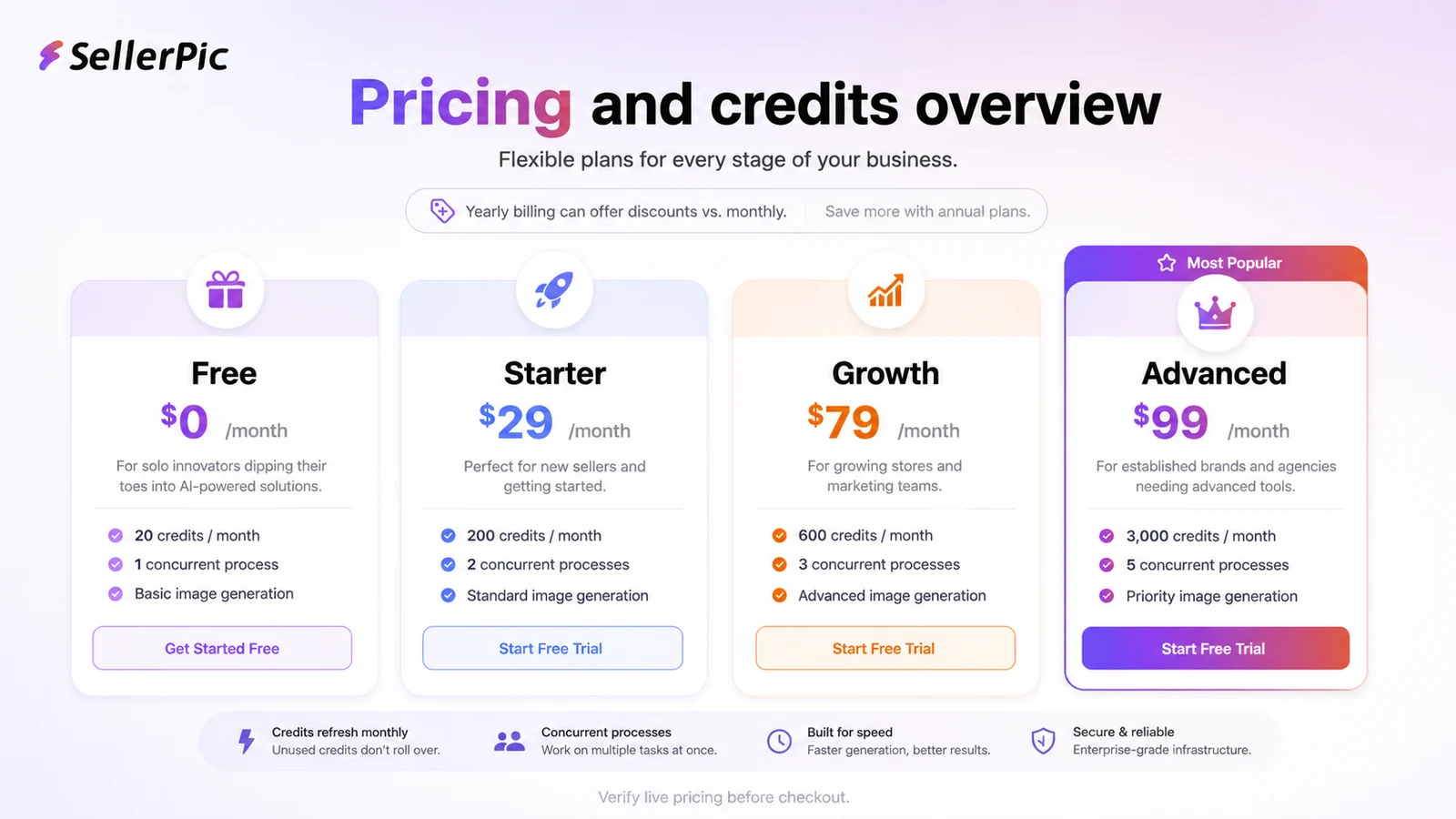
SellerPic should be evaluated as an ecommerce visual production tool, not just another AI image generator. The buyer question is whether it can reliably turn existing product assets into better model photos, lifestyle shots, videos, and social ads without creating too much review work or credit waste. That makes pricing, credit burn, channel-specific checkout, and refund limits just as important as output quality.
What SellerPic actually does
SellerPic helps ecommerce sellers create product visuals from existing images. The core workflow includes AI fashion model swaps, virtual try-on, lifestyle scenes, product-in-hand shots, product spotlight images, background replacement, background removal, retouching, image extension, short videos, and AI ad-style creatives. This is most useful when a store needs many commercial visuals but cannot afford a new photoshoot for every collection, campaign, or product variation.
- AI model swaps for apparel and product visuals.
- Virtual try-on and product-in-hand style scenes.
- Background tools, retouching, image extension, and 4K output.
- Image-to-video and short social video workflows.
Pricing and credits need a careful read
SellerPic pricing looks simple at first, but the real buying decision is credit usage. The Shopify listing shows a free plan and paid tiers starting at $29/month, while the help center explains that different tools consume credits at different rates. A still image can be inexpensive, but video generation, master mode, LipSync, 4K downloads, and repeated retries can change the real cost quickly. Buyers should not compare plans by monthly price alone.
- Free access is useful for testing, but not proof that paid use will be economical.
- Image operations and video operations do not consume credits at the same pace.
- Annual billing can lower the price, but it also increases refund risk if the workflow disappoints.
- Web, Shopify, and app-store checkout details should be checked separately.
Why the product tour video is useful
The main tour video is useful because it shows the practical rhythm of turning product photos into ecommerce-ready visuals. Watch how much manual setup is needed, whether outputs require repeated regeneration, and whether the tool helps with your exact product type. A buyer selling jewelry, apparel, handbags, shoes, or accessories should look for different evidence than a buyer selling generic physical goods.
Best fit buyers
SellerPic is strongest for ecommerce teams that already know visual content is a bottleneck. A Shopify merchant with many SKUs, a fashion store testing models across markets, or a small brand creating social ads can get more value than a casual user who only wants one polished image. The tool is also more convincing when someone on the team can review and reject outputs quickly instead of publishing every generated image blindly.
- Fashion sellers comparing model styles, poses, and market-specific visuals.
- Shopify stores that need product images and short videos for listings and social posts.
- Small teams replacing part of a photoshoot workflow, not all product-quality control.
- Marketing teams that want rapid image testing before ordering a real shoot.
Refund and checkout risks
SellerPic's refund policy is stricter than many buyers may expect. The payment help page says refunds are generally unavailable because AI generation costs and GPU processing cannot be refunded by upstream providers. That does not mean support will never review a duplicate or incorrect purchase, but buyers should not treat SellerPic as a tool they can freely buy, generate heavily, and refund later.
- Canceling keeps access until the end of the current billing cycle.
- Normal AI generation usage should be treated as non-refundable.
- Duplicate or incorrect purchases should be raised quickly with support and order details.
- Annual billing should come after testing, not before.
Best next step
The best next step is to test SellerPic with a small set of real product photos and measure output quality, editing time, credit consumption, and export needs. If the results are promising, compare Starter, Growth, and Advanced by monthly credits, video needs, own-model limits, and support priority. If the product fit is still unclear, read the review before visiting the coupon path. If the workflow already fits, check the live pricing and offer route before checkout.
- Use real product photos for the first test.
- Track how many credits one publishable output actually costs.
- Compare Shopify, web, and app billing before subscribing.
- Read review content first if product fit is still uncertain.
Best savings path from this store page
This is the clearest savings route to check once the product already looks like a fit.
The Starter yearly route is the lower paid path for sellers who need more credits than the free plan but do not yet need Growth or Advanced capacity.
Growth yearly plan path
Advanced yearly plan path
Use comparison routes when the category fit is still open
Use these comparison routes when the product still looks plausible, but the category fit is not fully settled.
Better for buyers who want a broader creative photo-editing workspace with background removal, image generation, mobile apps, and API credits.
Better for general AI image generation and creative assets when ecommerce model swaps are not the main use case.
Better for business portraits and team headshots rather than product photos, fashion model swaps, or social product ads.
Better for broader creative AI art and image generation experiments when the buyer is not specifically building ecommerce product visuals.
Verification points worth checking before you click out
Where this store usually fits best in the workflow
Use SellerPic to test how the same apparel product looks on different AI models, scenes, and customer-facing visual styles before publishing campaign images.
Use the Shopify path to turn existing product photos into cleaner listing assets, lifestyle images, and social visuals while keeping track of credits and export needs.
Use image-to-video and video templates when a static product photo needs to become a short ad or social clip, but estimate credit usage carefully first.
Use background removal, background replacement, magic eraser, retouching, image extender, and enhancer tools for faster cleanup before final human review.
Practical checkpoints before and after signup
- Collect a few real product photos from different categories, not only the easiest hero image.
- Decide whether the test is about model swaps, listing photos, videos, ads, or editing cleanup.
- Check whether you are entering through the web app, Shopify app, or app-store path.
- Track how many credits are spent before one output is good enough to publish.
- Review product accuracy, garment shape, background realism, and platform ad compliance before using outputs commercially.
- Compare image and video workflows separately because their credit use differs.
- Compare Starter, Growth, and Advanced by monthly credits, video concurrency, own-model limits, and support priority.
- Verify the live annual discount and whether it applies to your checkout channel.
- Read the refund policy before committing to annual billing or large-scale generation.
Fast-read signals for workflow fit and buying friction
Questions readers usually ask before choosing this store
What is SellerPic best for?
SellerPic is best for ecommerce sellers that need many product visuals, model shots, lifestyle scenes, short product videos, and social ad assets without arranging a full photoshoot for every product update. It is especially relevant to fashion, accessory, and Shopify-style workflows.
Does SellerPic have a free plan?
Yes. The Shopify listing shows a Free plan with 20 credits, schedules, and one concurrent video generation path. Buyers should still verify the current web and app checkout because plan details can vary by channel and promotion.
How should I think about SellerPic pricing?
Treat the monthly price and the credit model together. The Shopify listing shows Starter, Growth, and Advanced tiers, but the better buying question is how many still images, videos, 4K downloads, LipSync outputs, and retries your store will need each month.
Does SellerPic offer refunds?
SellerPic's payment help page says refunds are generally not available because AI model generation and GPU processing costs are not refundable. Duplicate or incorrect purchases may be raised with support, but buyers should test carefully before paying for annual or high-volume use.
What is the safest next step before buying SellerPic?
Start with the free plan, upload real product images, measure output quality and credit usage, then compare live pricing across web, Shopify, and app billing routes. If the workflow fits, check the DealBestDaily coupon path before checkout; if not, compare alternatives first.
Choose the next route that matches what you still need to decide
The strongest next click depends on whether you still need product judgment, a savings route, or a broader category comparison.