Quick verdict
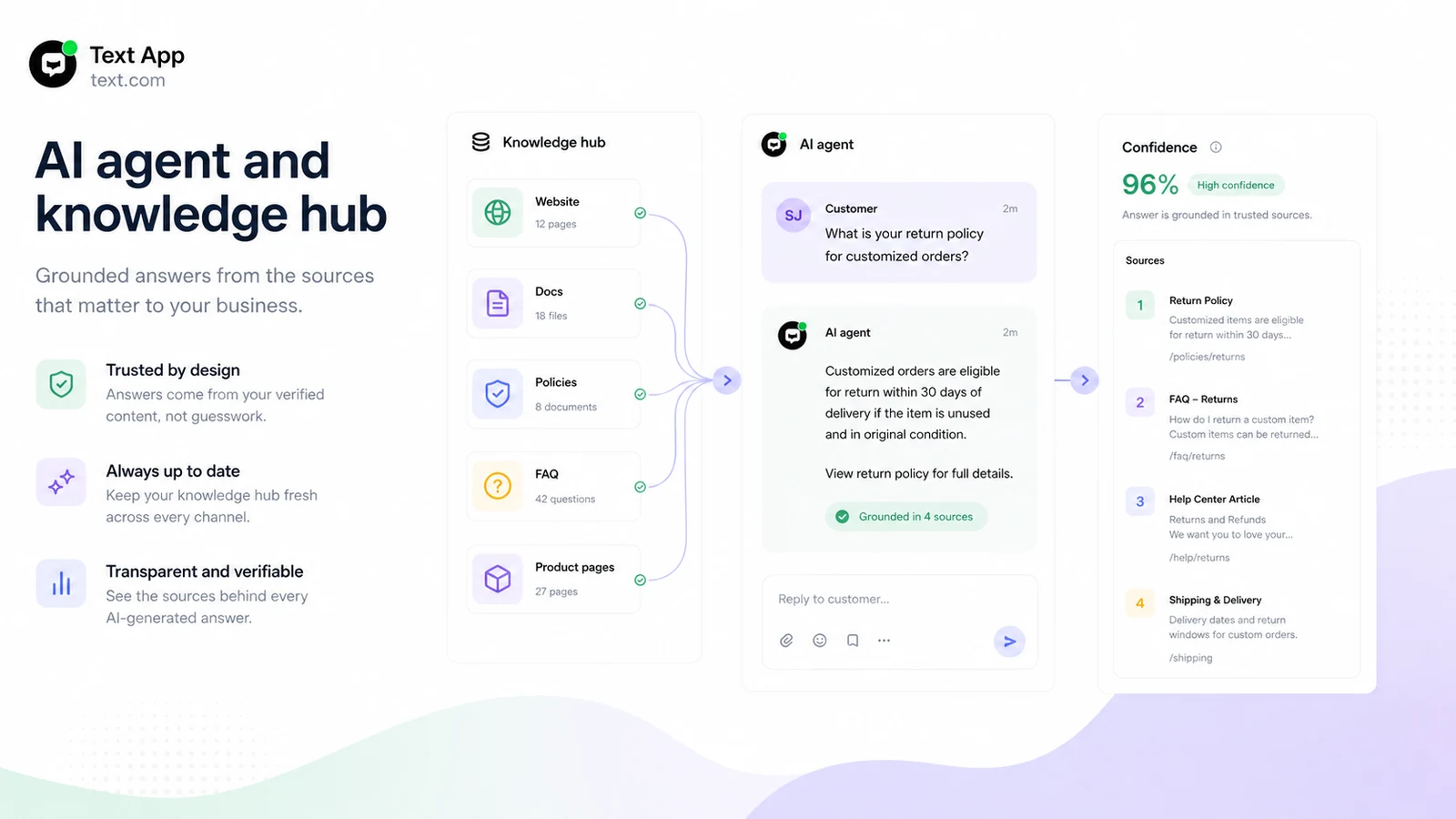
Text App is worth a serious look if your team wants AI customer service automation inside a real support workspace, not just a small chatbot dropped onto a website.
That is the key distinction.
The product is currently presented as an AI-first customer service platform built around AI agents, live chat, help desk tickets, customer context, workflows, and human handoff. That can be useful for ecommerce, SaaS, and service teams that already deal with repeat support questions and want AI to reduce the routine load without removing human judgment from difficult cases.
I would be more careful if you only need a simple FAQ widget. Text App is not priced or positioned like a tiny side tool. The buying decision depends on whether your team has enough customer conversations, clean enough help content, and enough operational pressure to justify per-user pricing after the trial.
The strongest reason to consider Text App is the combined workspace. AI agents, live chat, tickets, inbox context, workflows, and MCP access can matter when support is tied to revenue and retention. The main caution is that the trial has to do real work. Paid-service fees are described as non-refundable, so I would not use the paid plan as the testing ground.
The safer path is simple: use the 14-day no-card trial with real customer questions, test human handoff, compare plan limits, then decide whether Text App deserves a paid seat in your support stack.
Next step: If Text App still fits your support workflow, test the official trial and verify the current plan limits before choosing paid billing.
Review snapshot
| Review point | Practical take |
|---|---|
| Best for | Support, sales, ecommerce, SaaS, and service teams that want AI agents plus human handoff |
| Not ideal for | Buyers who only need a basic FAQ bot or a low-cost standalone chatbot |
| Main use case | AI-assisted customer service, live chat, help desk ticketing, and workflow automation |
| Trial path | 14-day free trial with no credit card required |
| Paid entry | Essential starts at the lowest public tier, with pricing shown per user and lower annual billing during this review update |
| Main strength | AI agents and support operations live in one customer service workspace |
| Main concern | Per-user cost, AI limits, workflow limits, and non-refundable paid fees need careful checking |
| Direct alternatives to compare | Chatbase, Chaindesk, Droxy |
| Best next step | Run the trial with real support content before moving to a paid plan |
What is Text App?
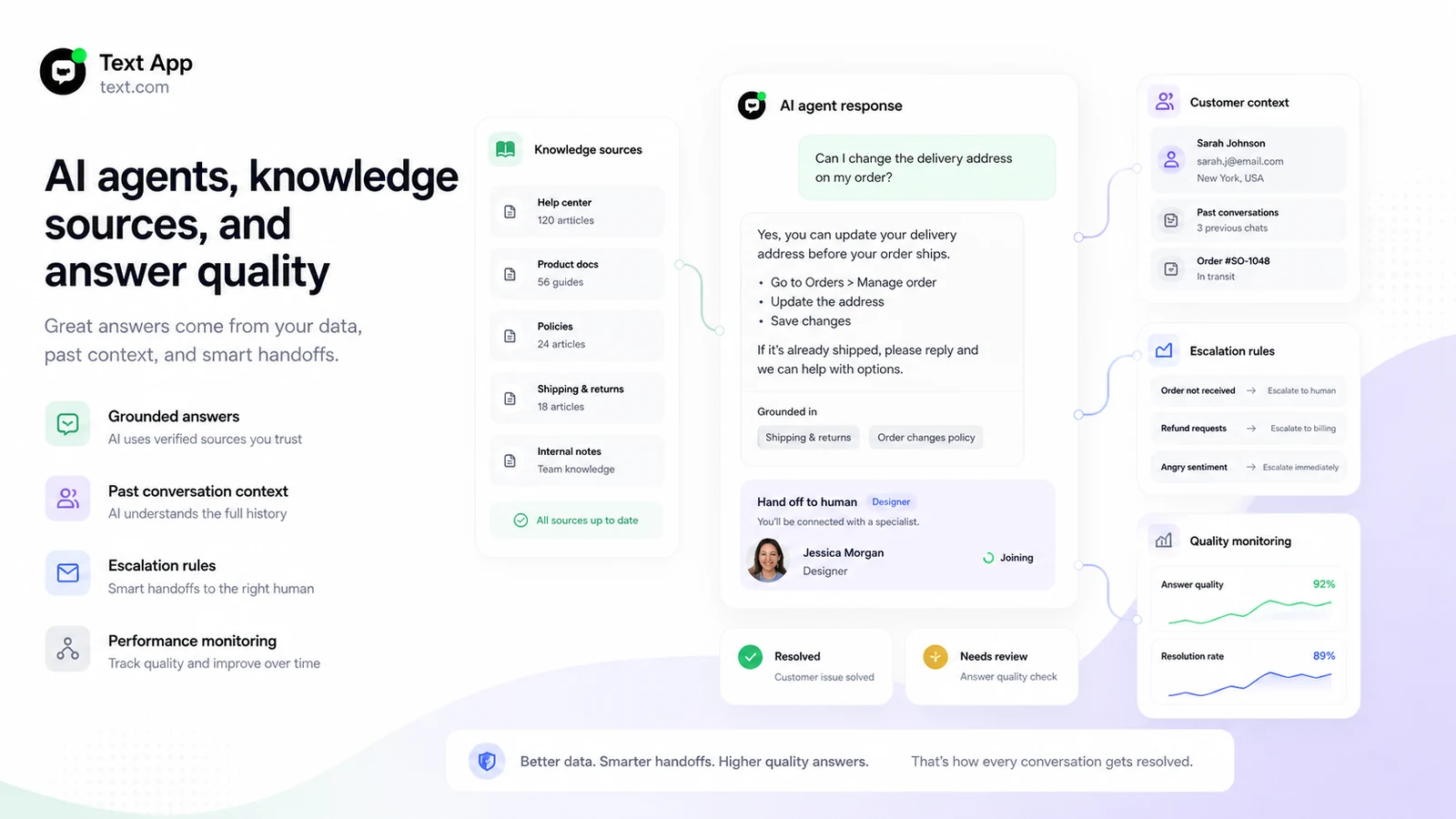
Text App is best understood as an AI customer service platform for teams that want AI agents, live chat, help desk tickets, customer context, workflows, and human support in one place.
It is not just a website chatbot.
The current homepage frames Text around the idea that support can become a sales and retention channel, not only a cost center. The official feature pages then back that up with AI agents, AI live chat, AI help desk, inbox context, workflows, desktop app support, and MCP access for connecting AI assistants to tickets, archived chats, team resources, and metadata.
That makes the product more ambitious than a simple embedded bot. It is trying to sit closer to the support operating layer: customer asks a question, AI handles what it can, the team sees context, unresolved cases become tickets, workflows handle repeated actions, and reporting helps the team understand what is happening.
Our review approach: we compare public product pages, pricing details, help documentation, terms, privacy language, buyer workflow fit, and nearby alternatives. We do not treat a trial, annual discount, or partner offer as proof that the platform fits the buyer.
The practical buyer question is not “does Text App have AI?” It does. The better question is whether your support process is mature enough for Text App to improve it.
If your policies are outdated, your help center is thin, and your team has no clear handoff rules, the AI agent may expose that weakness instead of solving it. If your documentation is clean and your team handles repeat questions every day, Text App becomes more interesting.
Who should use Text App?
Text App fits teams with real support volume.
An ecommerce team may use it to answer shipping, return, product-fit, order-status, and pre-sale questions while keeping human agents available for high-value or frustrated customers. The product makes sense here because live chat and AI handoff are tied to revenue, not just ticket deflection.
A SaaS team may use Text App to support onboarding questions, account issues, pricing confusion, technical routing, and repeat product questions. The platform is more useful when support, sales, and customer success all need the same customer context.
A service business may use it when website visitors ask similar questions again and again but still need a human path for nuanced cases. AI can reduce repetition, but the human handoff still protects trust.
A growing support team may find value in the help desk and workflow pieces. Once there are multiple agents, recurring tags, ticket statuses, follow-up patterns, and internal collaboration needs, Text App becomes more than a chat widget.
A technical or operations-minded team may also care about Workflows, MCP, and API-related access. Those features matter only when the buyer has a real plan for connected support actions, reporting, or assistant access to tickets and chat history.
Who should avoid Text App?
I would avoid Text App if your main need is a small FAQ bot for a low-traffic site. In that case, a leaner support-agent builder may be easier to test and cheaper to maintain.
I would also be careful if your team has no clean knowledge base yet. AI agents need good source material. If your policies are scattered across old docs, private messages, and inconsistent pages, your first project is documentation cleanup.
Very small teams should think twice before treating the lowest annual price as the real cost. Text App uses a per-user model, and the practical cost depends on how many people need access, which AI features matter, and whether the team needs Growth or Enterprise limits.
Buyers who want refund flexibility should slow down. The current terms describe paid-service fees as upfront and non-refundable. That does not mean the product is risky by itself, but it does mean the trial matters more.
I would also avoid committing to annual billing if you have not tested escalation quality. AI customer service tools often look impressive when the question is easy. The real evaluation starts when customers ask messy, policy-sensitive, or emotionally charged questions.
How Text App fits into a real workflow
A useful Text App workflow starts before the first customer message.
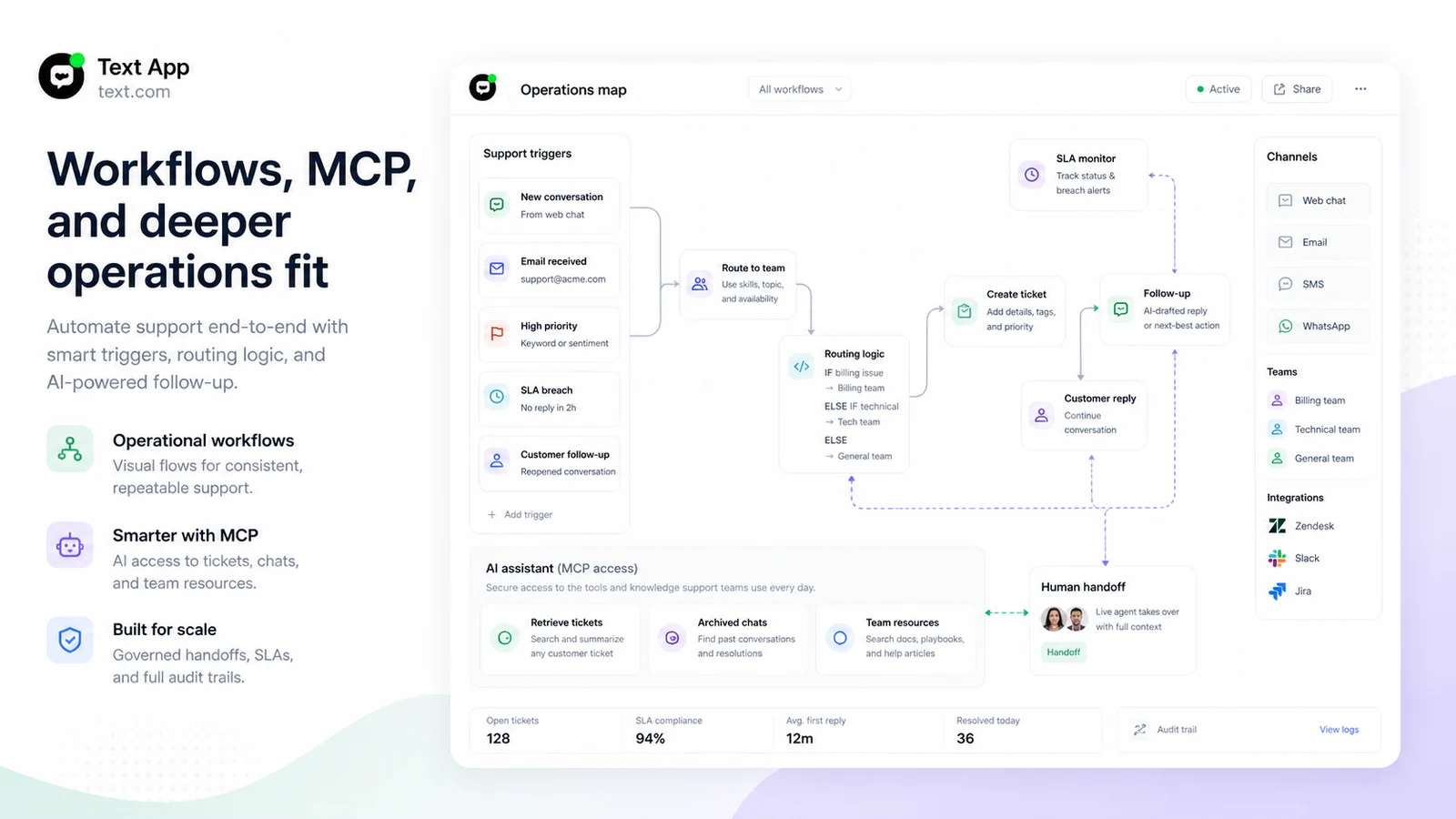
First, the team chooses one support area that is repetitive enough to automate: returns, shipping status, account questions, onboarding, plan questions, or common troubleshooting. Then it connects clean knowledge sources and defines escalation rules.
After that, the AI agent can answer routine questions, live chat keeps conversations moving, the inbox preserves context, and tickets handle cases that need follow-up. Human agents stay in the loop when the customer needs judgment, empathy, exception handling, or a final business decision.
That is where Text App is strongest. It is not only answering questions. It is helping a support team manage the flow from chat to ticket to follow-up.
The weak workflow is different: install a widget, connect vague source material, let the AI answer too much, and assume automation equals better service. That can create faster replies with worse trust.
Before paying, I would test one narrow support path. Ask real customer questions. Try a refund question, a product-fit question, a policy exception, and a frustrated-customer message. Then check whether Text App helps the team respond better or simply adds another system to monitor.
Workflow check: Use the trial with one real support scenario before comparing annual savings or partner offer routes.
Real-world buyer scenarios
Ecommerce team handling repetitive pre-sale questions
An ecommerce team may get the same product-fit, shipping, return, and order-status questions every day. Text App can fit if AI answers the routine questions and live agents step in for complex or high-intent shoppers.
The risk is policy quality. If return rules, shipping timelines, and product details are unclear, the AI agent may give answers that sound confident but still need cleanup. The team should test with real customer questions during the trial.
SaaS team combining support and sales chat
A SaaS team may want website chat to answer plan questions, route technical issues, and capture leads. Text App can make sense when the team wants one workspace for AI replies, human follow-up, tickets, and customer context.
The caution is plan fit. If the team needs more AI-agent resolutions, campaigns, reporting, API calls, or advanced workflows, the lowest tier may not be enough.
Service business with high-touch customer cases
A service business may use Text App to handle intake questions and reduce repetitive back-and-forth. That can work well when the business has clear service descriptions, pricing ranges, booking rules, and escalation paths.
It becomes weaker if every customer case is highly custom. AI can still collect details, but the buyer should not expect it to replace judgment-heavy consultation.
Operations team connecting workflows and AI assistants
An operations team may care about Workflows and MCP because support data is useful beyond the chat window. Tickets, chat transcripts, tags, and team resources can feed better internal search and process automation.
This is a more advanced buying case. I would verify exact plan limits, permissions, and technical needs before building a process around it.
Key features that actually matter
AI agents for support and sales
Text App’s AI agent is the headline feature because it is designed to answer questions, use business knowledge, preserve context, and hand cases to humans when needed.
Buyer note: judge the AI by difficult real questions, not demo-friendly prompts. The best test is whether it reduces agent work without creating trust issues.
Live chat and unified inbox
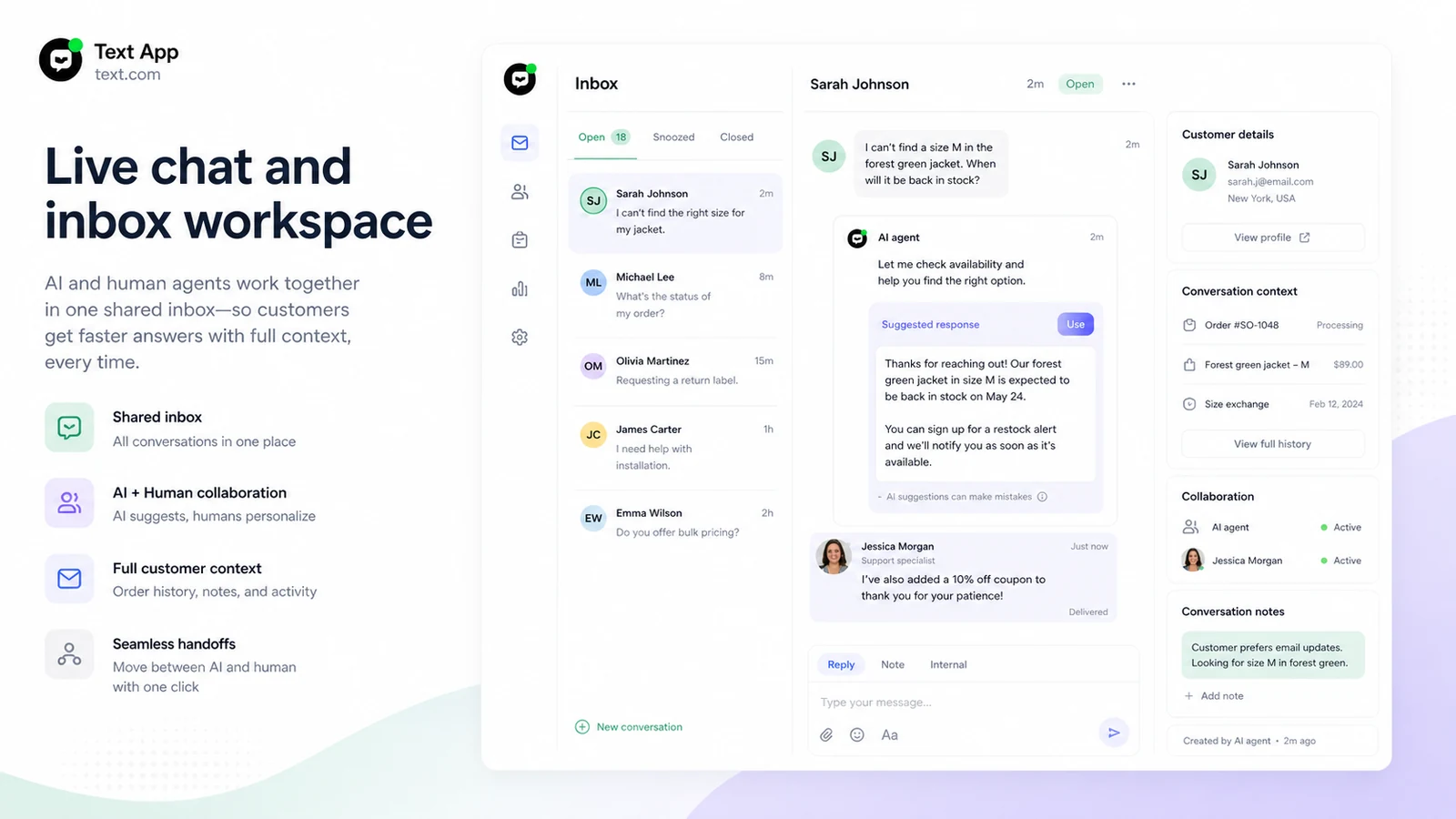
Live chat matters because customer service often starts in a real-time conversation. Text App combines chat, AI help, customer context, and handoff in one workspace.
Buyer note: check whether agents can see enough history, customer details, tags, and ticket context to take over smoothly.
Help desk ticketing
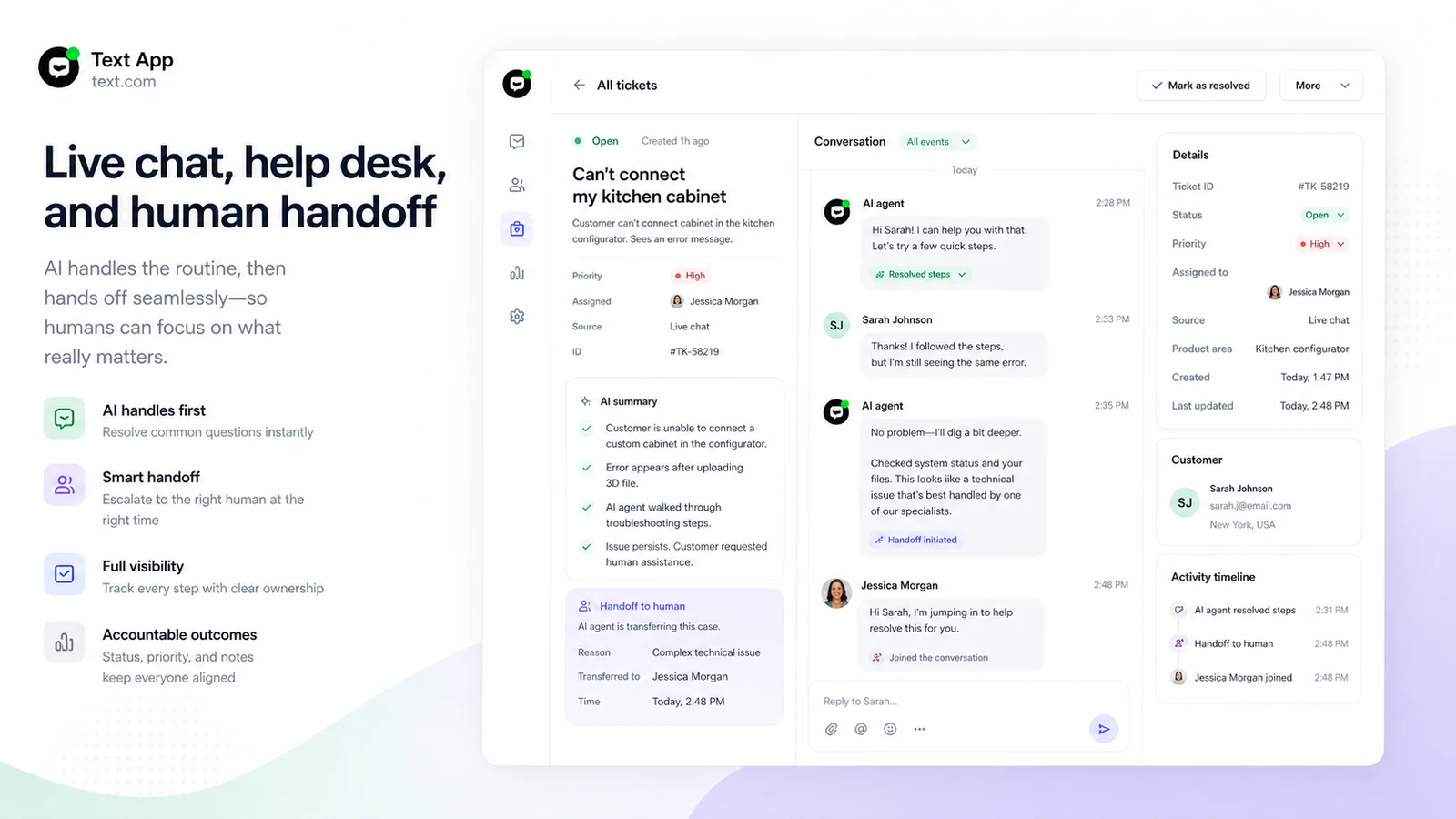
The help desk layer matters when conversations become unresolved cases. Tickets, assignment, priority, status, and reporting help a team avoid losing customer issues after the first reply.
Buyer note: this is one reason Text App is broader than a basic chatbot. It is also why the platform may be more than a very small site needs.
Reply suggestions and AI text editing
Reply suggestions can help agents respond faster using the company’s own business information. AI text editing can also improve tone, clarity, and consistency.
Buyer note: suggestions still need human review. In customer support, a polished wrong answer is worse than a slower accurate one.
Workflows, MCP, and API-related operations
Workflows let teams connect triggers and actions. MCP can give AI assistants permission-aware access to tickets, archived chats, team resources, and metadata. API-related capabilities may matter when Text App becomes part of a broader support system.
Buyer note: do not assume these features belong in every plan or every setup. Verify limits before planning a workflow that depends on them.
Pricing and plan value
Text App’s pricing should be judged by support workflow value, not only by the lowest visible monthly number.
During this review update, the public pricing page showed Essential at $19 per user per month when billed yearly, Growth at $79 per user per month when billed yearly, and Enterprise as a custom annual plan. The page also promoted yearly billing savings and a 14-day free trial with no credit card required.
That structure creates a reasonable trial-first path, but the paid decision needs care. Per-user pricing can look modest for one seat and very different for a team. The real cost also depends on AI-agent resolutions, reply suggestions, AI text editing, workflows, campaigns, API calls, live visitor tracking, reporting, and Enterprise needs.
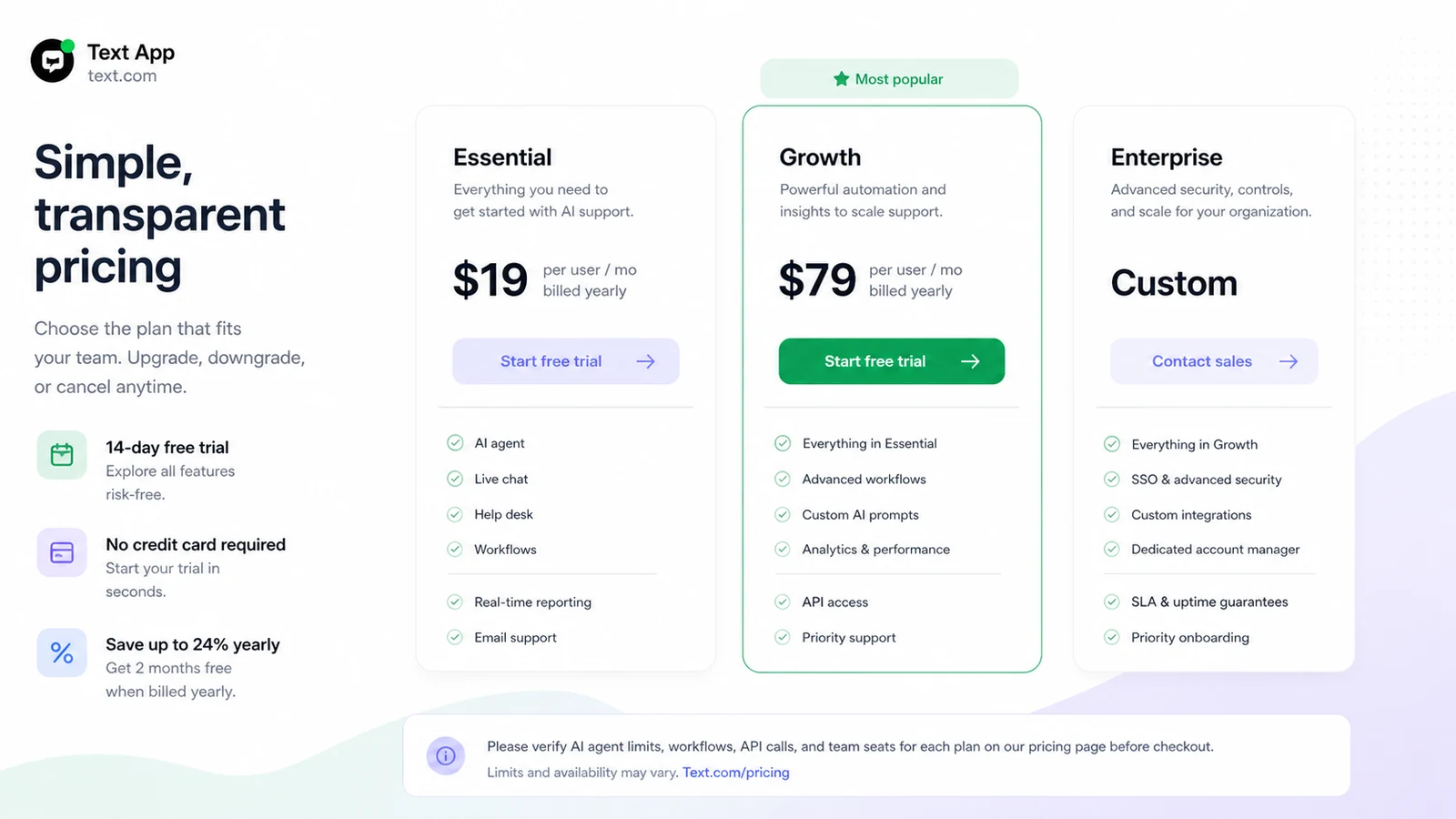
The Essential plan may make sense for a team starting with automation, especially if the use case is narrow and the team wants to test AI support inside a broader workspace.
Growth becomes more relevant when the team needs higher AI usage, stronger reporting, more automation, campaigns, or a more serious customer service rollout.
Enterprise should be treated as a separate buying conversation. If compliance, customization, higher scale, or procurement matters, do not assume the public plan table answers every question.
The trial is the important piece. Because paid fees are described as non-refundable, I would use the 14-day window with real traffic, real documents, real tickets, and real team members. Do not save the hardest questions for after payment.
Pricing check: If the workflow test looks promising, compare Text App plans against real seats, AI-agent usage, workflows, and support volume before paid billing.
Free plan, trial, coupon, and checkout notes
Text App’s safest entry point is the 14-day trial with no credit card required.
That is useful. It lets a cautious buyer test the platform without immediately creating paid billing exposure. But a trial only helps if it is used like a real rollout, not a casual demo.
I would test these before touching annual billing:
- one real website or support channel
- one clean knowledge source
- one common customer question category
- one escalation path to a human agent
- one ticket follow-up workflow
- one reporting review at the end of the test
The coupon path is secondary. Text’s clearest official savings route is annual billing, not a dependable public coupon-code strategy. If there are current offers available through DealBestDaily, I would check them only after product fit is clear.
Do not let a partner offer pull you into a paid plan before the trial proves the support workflow. With a customer service platform, a lower price does not help if the AI agent gives weak answers, the handoff feels clumsy, or the team never adopts the inbox.
Checkout order: Validate the trial first, then check whether any current offer improves a plan you already know you need.
What I would check before buying Text App
If I were buying Text App for a real support workflow, I would check these items before paying:
- Whether the AI agent answers your real customer questions accurately.
- Whether your help articles, product pages, policies, and ticket history are clean enough to support automation.
- Whether Essential has enough AI-agent resolutions, reply suggestions, AI text editing, workflows, campaigns, and reporting for your team.
- Whether Growth is needed because of usage volume rather than feature curiosity.
- Whether your team needs MCP, API access, advanced workflow actions, or Enterprise review.
- Whether cancellation timing and non-refundable paid fees fit your buying risk.
- Whether Chatbase, Chaindesk, or Droxy would be a cleaner match for a narrower AI support-agent project.
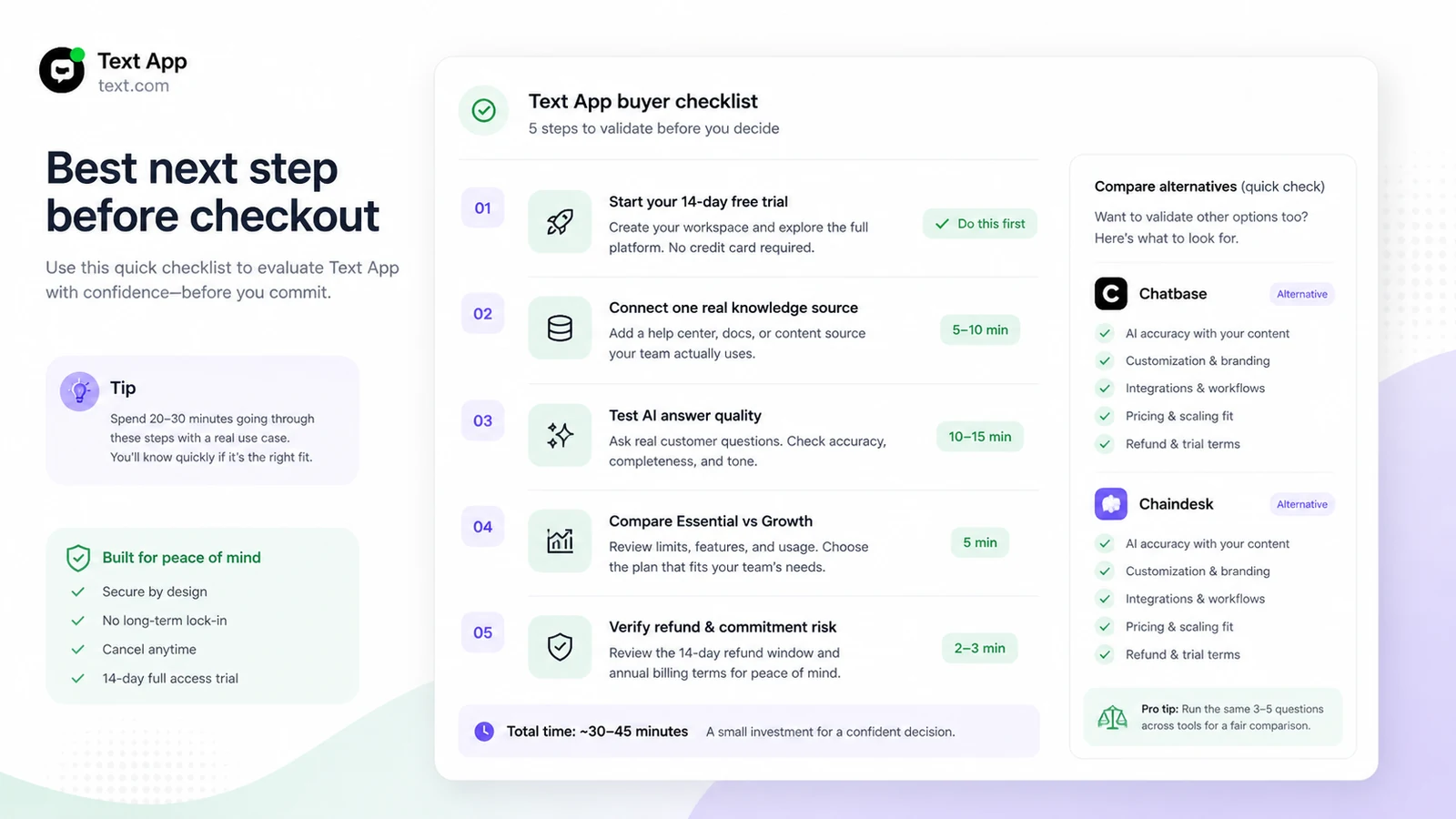
The easy mistake is judging Text App by the promise of AI automation. The better test is whether automation improves the customer’s experience and the agent’s workflow at the same time.
A simple test before paying
Before paying, I would run a small trial test like this:
- Choose one support topic that creates repeated questions, such as returns, shipping, onboarding, billing, or product selection.
- Add the clearest help articles, product pages, policies, and internal notes available for that topic.
- Ask the AI agent 20 to 30 real customer questions, including edge cases.
- Hand several conversations from AI to a human agent and check whether context is preserved.
- Turn unresolved cases into tickets and test assignment, priority, and follow-up.
- Try one workflow, such as tagging a ticket, routing a VIP customer, or sending a follow-up to a team tool.
- Review which answers were useful, which needed correction, and which plan limits would matter at real volume.
That test should reveal whether Text App is a support multiplier or just another tool your team has to manage.
Pros explained
The first major pro is the combined workspace. Text App brings AI agents, live chat, help desk, inbox, workflows, and human handoff together. That matters when a team is tired of splitting chat, tickets, and automation across separate tools.
The second pro is the trial structure. A 14-day no-card trial is helpful because buyers can test with real support content before paid billing. For a platform with limited refund flexibility, that trial is not a bonus. It is the safety path.
The third pro is operational depth. Workflows, MCP, and API-related capabilities make Text App more interesting for teams that want AI to support actual service operations, not only answer surface-level questions.
The fourth pro is customer context. AI replies become more useful when agents can see chat history, tickets, customer details, and business knowledge in the same environment.
The final pro is category fit. Text App is clearly aimed at customer service and sales support. That is better than a generic AI assistant being stretched into a support role.
Cons explained
The first con is cost uncertainty at team scale. Per-user pricing can look acceptable at one or two seats, then change quickly when more agents, supervisors, or workflows are involved.
The second con is refund risk. The current terms describe paid-service fees as upfront and non-refundable, with no credits or prorated adjustments for unused time. That puts pressure on the buyer to test carefully before paying.
The third con is knowledge quality. Text App can only work well if your support content is accurate, current, and structured enough for AI-assisted service. If the source material is weak, the platform may create more review work.
The fourth con is overbuying risk. A small site that only needs a basic FAQ chatbot may not need live chat, help desk, workflows, MCP, and a broader customer service workspace.
The fifth con is rollout complexity. The more advanced features are useful only if the team has ownership, process discipline, and time to configure them properly.
Green flags and red flags
Green flags:
- Your team handles repeated customer questions every week.
- You already have clear help docs, policies, product pages, or ticket history.
- You need AI support plus human handoff, not AI-only replies.
- You want live chat, tickets, inbox, and workflows in one customer service process.
- You can use the trial with real support content before paying.
Red flags:
- You only want a simple chatbot for a small site.
- Your support documentation is outdated or scattered.
- You are buying mainly because annual billing lowers the monthly number.
- You need refund flexibility after payment.
- You cannot clearly define which support workflow Text App should improve first.
Text App vs alternatives
Chatbase vs Text App
Chatbase is a more direct comparison if your main job is building an AI support agent from documents, website content, or knowledge sources.
Chatbase may be cleaner for buyers who want a focused chatbot/agent builder without adopting a broader help desk and live chat workspace. Text App makes more sense when live agents, tickets, inbox context, and workflows are part of the buying need.
Chaindesk vs Text App
Chaindesk is worth comparing if you want a leaner AI support chatbot path and care more about agent setup than a full customer service workspace.
Text App may still win if your team needs human handoff, tickets, shared inbox context, customer-service reporting, and operational workflows. Chaindesk may feel lighter if the job is mainly AI question answering.
Droxy vs Text App
Droxy is another direct customer-facing AI agent comparison. It may fit buyers who want AI agents across support and lead-capture workflows but do not necessarily need Text’s broader service positioning.
Text App looks stronger when the buyer wants the support desk, live chat, team inbox, and AI operations in one place. Droxy may be worth comparing if AI-agent deployment and multichannel routing are the bigger priority.
Intercom or Zendesk as adjacent routes
Intercom and Zendesk are broader customer-service ecosystems, but they are adjacent comparison routes rather than simple one-to-one replacements. They may be better for teams already committed to mature help desk operations, enterprise procurement, or a specific customer communication stack.
The tradeoff is that a larger ecosystem can be more powerful but also more expensive and more complex. Text App sits in the middle: more operational than a simple chatbot, but still positioned around AI-first support and sales service.
Trust, refund, and buyer-risk notes
The biggest trust note is that Text App has a credible official footprint, detailed feature pages, current help documentation, and public pricing. That makes the product easier to evaluate than many small AI customer service tools.
The biggest buyer-risk note is billing. The trial is friendly because it does not require a credit card, but paid-service fees are described as non-refundable. I would treat that as a clear signal: validate before paying, not after.
Privacy also matters because customer service tools process customer conversations, contact details, chat content, user behavior, and support metadata. Text’s privacy policy describes roles around client, authorized-user, guest-user, and end-user data. Support teams still need to make sure their own privacy policy, consent approach, data handling, and connected systems are appropriate.
For AI reliability, do not judge only by easy questions. Ask policy exceptions. Ask ambiguous refund questions. Ask product-fit questions with incomplete details. Ask account-sensitive questions. The AI should know when to answer and when to hand off.
For annual billing, I would wait until the team proves three things: the AI agent answers common questions well, human handoff feels reliable, and the plan limits match real support volume.
Final verdict
I would consider Text App if your team needs an AI-first customer service platform that combines AI agents, live chat, help desk tickets, customer context, workflows, and human handoff.
I would skip it if you only need a basic FAQ bot, if your support content is not ready, or if your team cannot use the 14-day trial seriously before paid billing.
I would compare it with Chatbase or Chaindesk if the main need is a focused AI support-agent builder. I would compare it with Droxy if you want another customer-facing AI agent route. I would look at larger customer-service ecosystems only if your team needs a more mature enterprise support stack.
The safest next step is not to chase the lowest plan or a possible offer first. Start with the trial, connect real support content, test real customer questions, check handoff and tickets, then decide whether Text App is strong enough to become part of your customer service workflow.
