Quick verdict
Chatbase is worth considering if your support problem is repetitive enough to justify an AI agent, not just a chatbot that looks good on a landing page.
That distinction matters. A website widget can feel useful in a demo, but the buying decision is really about support volume, training data quality, escalation rules, message credits, and whether the agent can connect with the systems your team already uses.
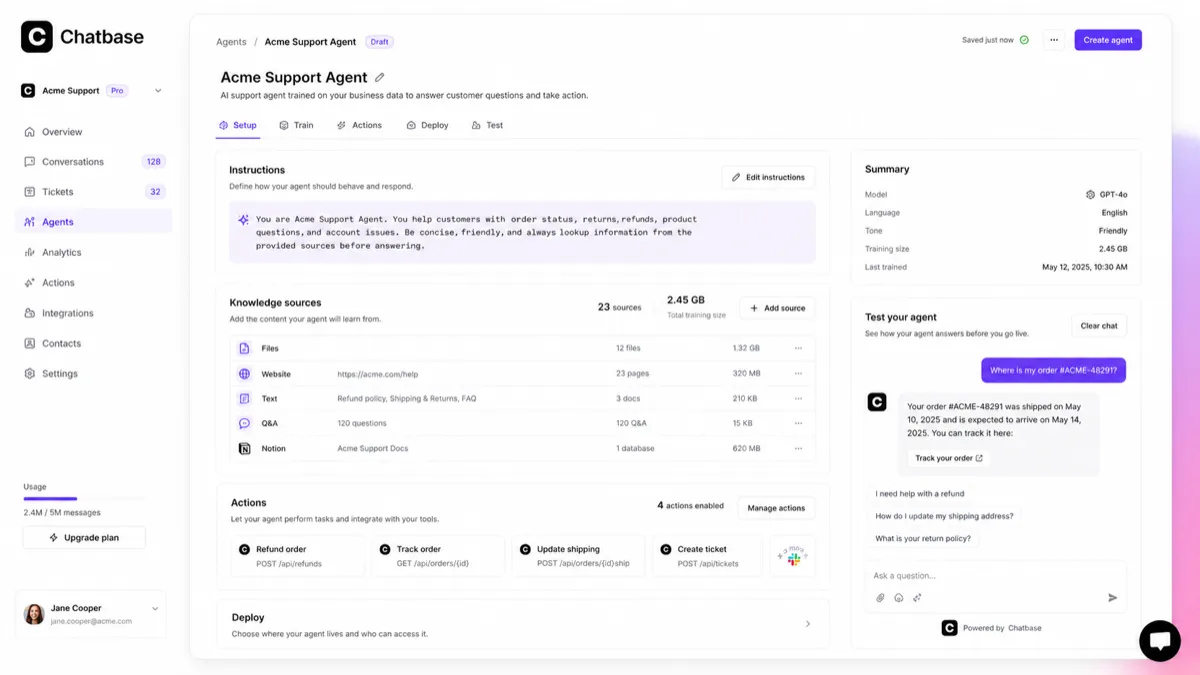
The strongest reason to look at Chatbase is that it is built around AI support agents trained on business data. It can sit in a real customer service workflow: answer common questions, collect leads, use actions, connect with tools, surface analytics, and route harder cases toward human support. That makes it more serious than a static FAQ bot.
The caution is cost and rollout discipline. The free plan is useful for testing, but production support can quickly become a plan-limit question. Message credits, AI actions, training size, members, API access, advanced integrations, auto-recharge credits, extra agents, and branding removal can all affect the real price.
For my money, Chatbase makes the most sense when you already know which support questions you want to automate. If you are still cleaning up help docs, policies, product pages, and escalation rules, the safer move is to fix those first, then test Chatbase with a small real workflow.
Next step: If Chatbase still fits your support workflow, build a small test agent before comparing paid tiers.
Review snapshot
| Review point | Practical take |
|---|---|
| Best for | Teams that want an AI support agent trained on business data |
| Not ideal for | Buyers who only need a simple FAQ page or one low-traffic widget |
| Main use case | Customer support deflection, lead capture, website assistance, and support workflow automation |
| Free path | Free plan for testing one small agent with limited monthly credits and training size |
| Paid path | Paid tiers become relevant when credits, actions, integrations, API, analytics, and support volume matter |
| Main strength | Clear support-agent positioning with training data, actions, integrations, analytics, and deployment paths |
| Main concern | Real cost depends on credits, add-ons, billing interval, and production support needs |
| Best direct alternatives to compare | Chaindesk, SiteSpeakAI, Chatsimple, CustomGPT |
| Best next step | Test real support questions before choosing annual billing or add-ons |
What is Chatbase?
Chatbase is best understood as an AI support-agent platform for businesses that want to train an agent on their own business data and deploy it across customer-facing channels.
It is not only a “paste your website and get a bot” tool. The more useful version of Chatbase is a support layer: train the agent on documents, websites, help center content, product information, or databases; embed it on a website; connect actions and integrations; track conversations; review weak answers; and improve the agent over time.
The common misunderstanding is expecting Chatbase to fix messy support knowledge automatically. It can help make your knowledge base more useful to customers, but it still depends on the quality of the source material. If your docs are outdated, refund policy is unclear, product pages contradict each other, or internal team handoff rules are not defined, the agent can only go so far.
Our review approach compares public product pages, pricing details, help documentation, terms, privacy language, buyer workflow fit, and nearby alternatives. We do not treat a coupon, annual discount, or low entry tier as proof that the product fits the buyer. With Chatbase, my confidence is strongest around the product’s role and support-agent workflow. I am more cautious around long-term value because real cost depends on volume, add-ons, and plan limits.
Who should use Chatbase?
Chatbase makes sense for small businesses and support teams that answer the same customer questions again and again. Shipping status, onboarding steps, account setup, pricing questions, booking questions, product availability, troubleshooting, and policy explanations are the kinds of repetitive support areas where an AI agent can create leverage.
It can also fit SaaS and ecommerce teams that want a website support layer before the customer opens a ticket. In that case, Chatbase is not replacing the whole support team. It is reducing the first layer of repetitive questions and collecting enough context for a better human handoff.
Lead-focused websites may also find a use case here. If visitors ask similar pre-sales questions before booking a demo, downloading a resource, or choosing a plan, Chatbase can help guide those conversations. The buyer should still measure whether the agent improves qualified conversations, not just whether it increases chat activity.
Technical or operations teams may consider Chatbase when API access, custom actions, webhooks, and integrations are part of the plan. This is where the product becomes more than a support widget. But it also means the buyer must confirm which plan includes the required access before building around it.
Finally, Chatbase fits buyers who are willing to review conversations after launch. The agent should improve over time. If nobody on the team will monitor weak answers, unresolved questions, escalation failures, or credit usage, the product may look better during setup than it performs in production.
Who should avoid Chatbase?
I would be careful with Chatbase if you only need a basic static FAQ page. If customers rarely ask questions, or if the same information is already clear on the site, paying for a support-agent platform may be unnecessary.
I would also slow down if your support knowledge is messy. A good AI agent needs reliable source material. If your policies, docs, pricing pages, order rules, and product instructions are not ready, the tool may expose those gaps instead of solving them.
Very price-sensitive buyers should be cautious too. The free plan is useful, but it is limited. Paid use is tied to message credits, training size, AI actions, seats, and add-ons. If your traffic is unpredictable, calculate the production path before assuming the entry tier will hold up.
Teams that need full help desk control, complex routing logic, strict visual conversation flows, or mature omnichannel support may need to compare broader platforms. Chatbase has useful support-agent depth, but it is not automatically the strongest fit for every service operation.
I would also avoid jumping into annual billing before testing. The terms language around fees is not the kind of refund flexibility I would want to discover after payment. Use the free path first, then compare paid tiers with real support data.
How Chatbase fits into a real workflow
A strong Chatbase workflow starts before the agent is created.
First, choose one support area that is narrow enough to test. For example: product setup questions, refund policy questions, shipping questions, onboarding steps, or billing FAQs. Then clean the source material. That means current docs, accurate policies, clear product pages, and human handoff rules.
Next, train the agent and test messy customer questions. Do not only test perfect demo questions. Ask the kinds of questions real users ask: incomplete, impatient, misspelled, mixed with edge cases, or missing context.
Then inspect the output. Are answers grounded in the right sources? Does the agent avoid overpromising? Does it know when to escalate? Does it collect useful lead or support context? Does it reduce repetitive work, or does it create another queue the team must review?
Finally, compare usage against the plan. Message credits, action limits, training size, seats, API access, and add-ons matter more after you understand the real workflow. This is why the free plan is useful: it gives you a test lane before the subscription decision.
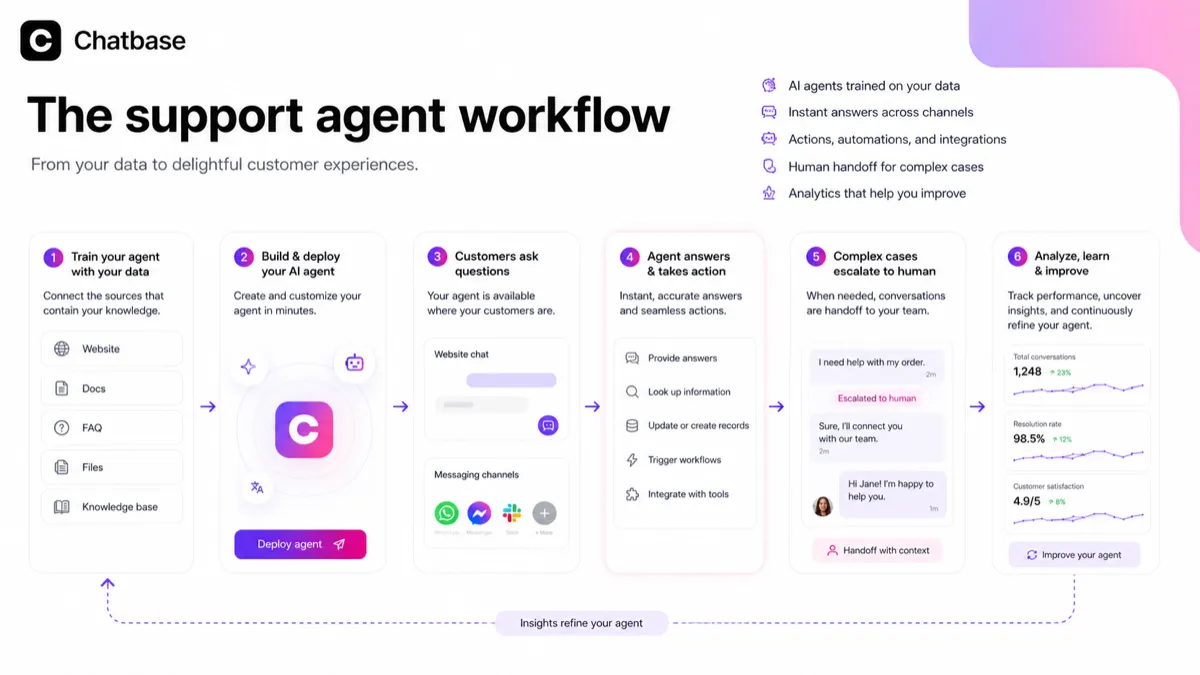
Workflow check: If you cannot define one support area to automate, do not start with a paid rollout. Start with a small agent and judge the answers first.
Real-world buyer scenarios
A SaaS team with repeated onboarding questions
A SaaS team may get the same onboarding questions every week: where to find settings, how billing works, how integrations are configured, or how to fix common setup problems. Chatbase can fit if the documentation is accurate and the team wants to deflect repetitive support before a human gets involved.
The failure point is stale documentation. If onboarding instructions change often but nobody updates the sources, the agent can become confidently unhelpful. This buyer should test the agent against recent tickets before paying.
An ecommerce store trying to reduce simple tickets
An ecommerce store may want Chatbase for order questions, product recommendations, shipping policies, return guidance, or lead capture. This can work when the agent is connected to the right product and policy information.
The buyer should be careful with edge cases. If the agent answers a return, warranty, or delivery question too loosely, the business may create customer frustration instead of reducing it. Escalation rules matter.
A service business using chat for lead qualification
A consultant, agency, clinic, local service company, or B2B service provider may use Chatbase to qualify website visitors before booking. The agent can answer common service questions and collect lead information.
The risk is treating chat activity as conversion. More conversations are not always better. The buyer should measure booked calls, qualified leads, and reduced manual replies, not just the number of chats.
A technical team planning API or action-based workflows
A technical buyer may want Chatbase because of API access, actions, webhooks, or integrations with systems like support tools, CRM tools, automation tools, or internal data. That can make Chatbase much more valuable.
But this is also where plan verification becomes important. Confirm API access, action limits, integration access, data permissions, and escalation behavior before building a support workflow around it.
Key features that actually matter
Business-data training
Chatbase can train an agent on your documents, website, help content, databases, and business knowledge. This is the heart of the product.
The buyer note is simple: the agent is only as useful as the source material. Clean, current, specific content gives the agent a better chance. Weak source content turns the agent into a polished interface for confusion.
Website widget and deployment paths
The website widget is useful because it places answers where customers already have questions. For many buyers, this is the first practical deployment path.
Where it may disappoint is if the team expects a widget alone to solve support. The widget is only the front door. The real work is training, reviewing, improving, and deciding what should escalate to humans.
AI actions and integrations
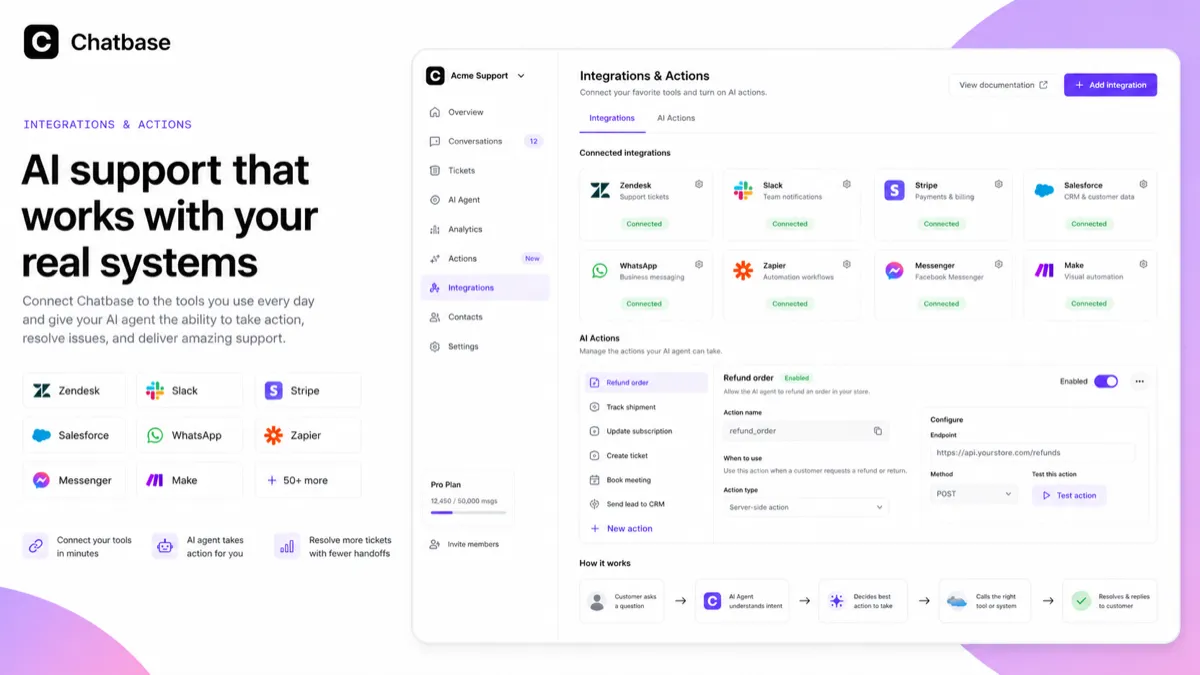
AI actions and integrations are where Chatbase becomes more operational. Instead of only answering questions, an agent can interact with business workflows, collect leads, use supported integrations, or connect to external systems.
Buyer note: check the plan table. Actions, advanced integrations, API access, and workflow depth are not just feature names. They affect which tier is realistic.
Analytics and conversation review
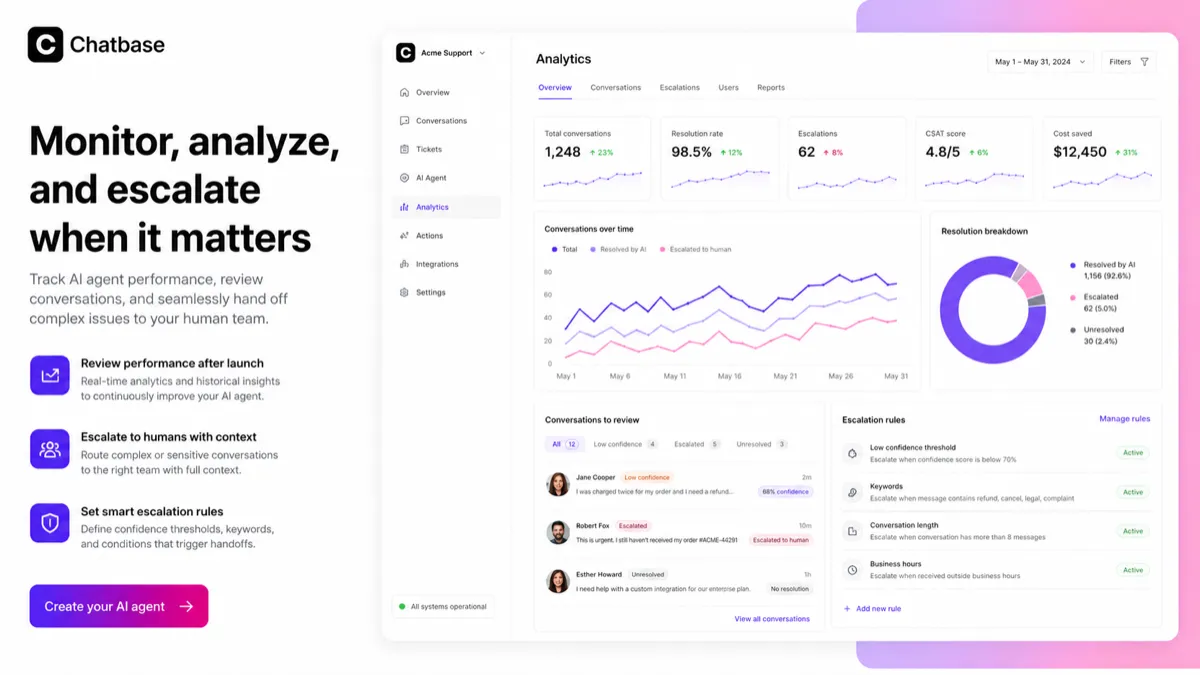
Analytics matter after launch. A support agent should reveal which questions customers ask, where answers fail, which sources need improvement, and which conversations should be escalated.
This is useful only if someone owns the review process. Without a weekly review habit, analytics become a dashboard that buyers stop checking.
API access and custom workflows
The REST API is important for buyers that want custom chat experiences, programmatic agent management, conversation retrieval, lead handling, or deeper support automation.
I would not plan around API access until confirming the exact plan, limits, and technical scope. For non-technical buyers, this may not matter. For technical teams, it can be the difference between a simple chatbot and real support infrastructure.
Pricing and plan value
Chatbase pricing is not hard to understand, but it is easy to underestimate.
The official pricing page shows a Free plan at $0/month with limited model access, 50 message credits per month, 1 member, and 400 KB per AI agent. It also notes that free-plan agents may be deleted after 14 days of inactivity.
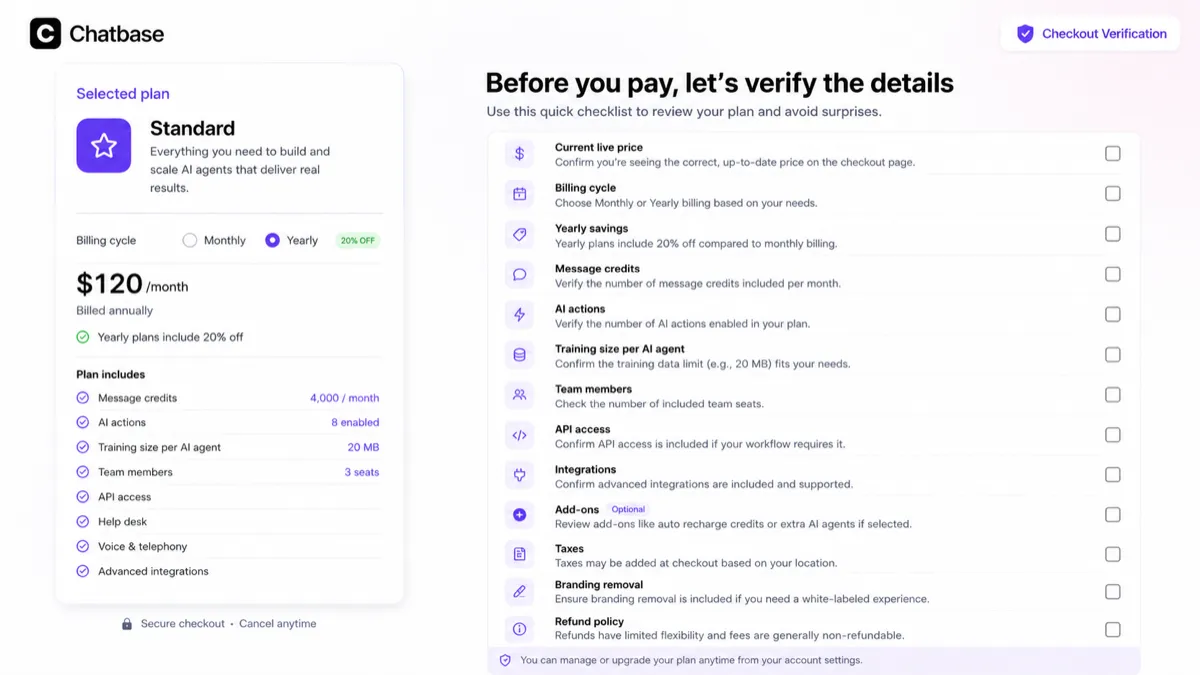
The paid annual pricing shown during this review was Hobby at $32/month billed annually, Standard at $120/month billed annually, and Pro at $400/month billed annually. Enterprise is sales-led. The pricing page also highlights 20% off yearly plans.
The practical difference between tiers is not just price. Hobby adds advanced models, more credits, AI actions, more training size, members, integrations, basic analytics, and attachments. Standard becomes more serious for support teams because it adds higher message credits, help desk, voice, telephony, API access, personalization, auto retraining, and advanced integrations. Pro raises usage and adds deeper analytics and source-related features.
Add-ons matter too. Chatbase lists auto-recharge credits, extra agents, and removing “Powered by Chatbase” branding as paid add-ons. This is why I would not judge the product by the plan card alone. A buyer with higher volume, multiple agents, brand requirements, or custom workflows may have a different real cost than the headline tier suggests.
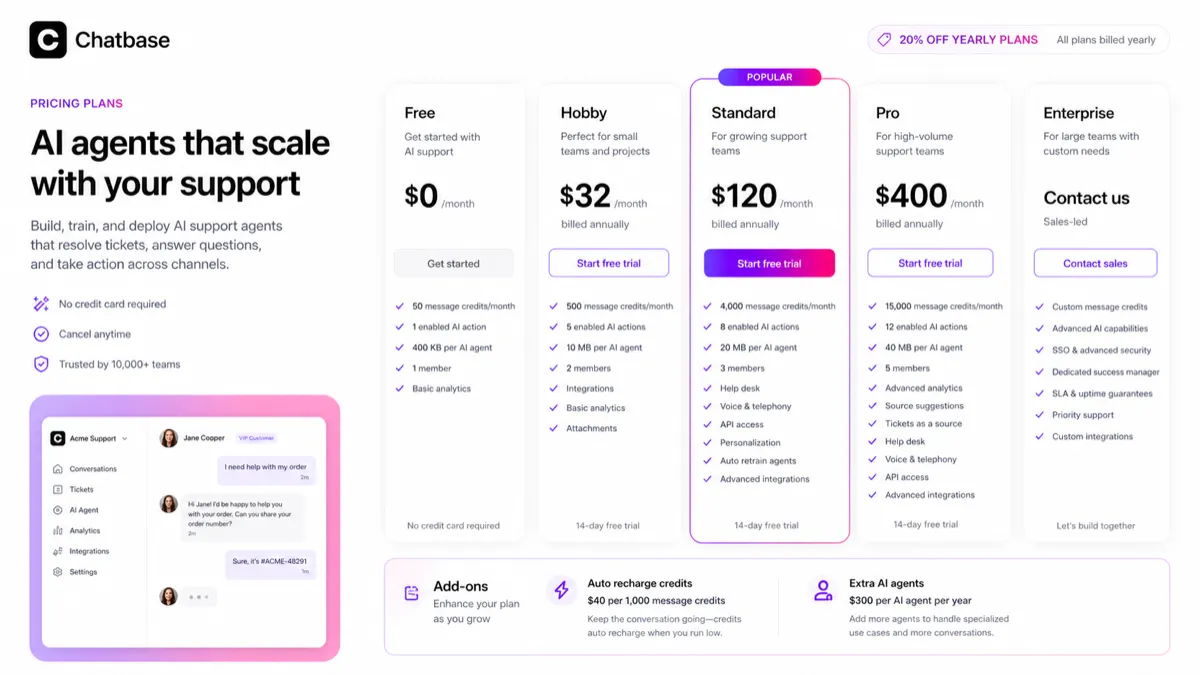
Pricing check: Compare Chatbase only after estimating message volume, required actions, integrations, seats, and add-ons for your real support workflow.
Check Chatbase pricing Check current offers Read store guide
Free plan, trial, coupon, and checkout notes
The free plan is the right starting point for most buyers. Not because it proves long-term value, but because it lets you test the most important question: can Chatbase answer real customer questions from your source material?
A free test should include actual support questions, not only polished examples. Check groundedness, tone, source relevance, escalation behavior, lead collection, and whether the agent creates fewer repetitive replies for your team.
The coupon path should come later. Chatbase may have public deal or partner savings signals, and the store route may surface active offers. But a coupon should not drive the purchase. A discount can improve a good fit. It cannot make a weak support workflow ready.
Annual billing deserves special caution. The official yearly discount can be attractive, but the safer path is to test first, compare credits and add-ons, and then decide whether the commitment makes sense.
The terms language also matters. Chatbase’s terms describe payment obligations as non-cancellable and fees as non-refundable except where explicitly stated in the agreement. That does not mean every situation is identical, but it does mean buyers should avoid assuming refund flexibility.
What I would check before buying Chatbase
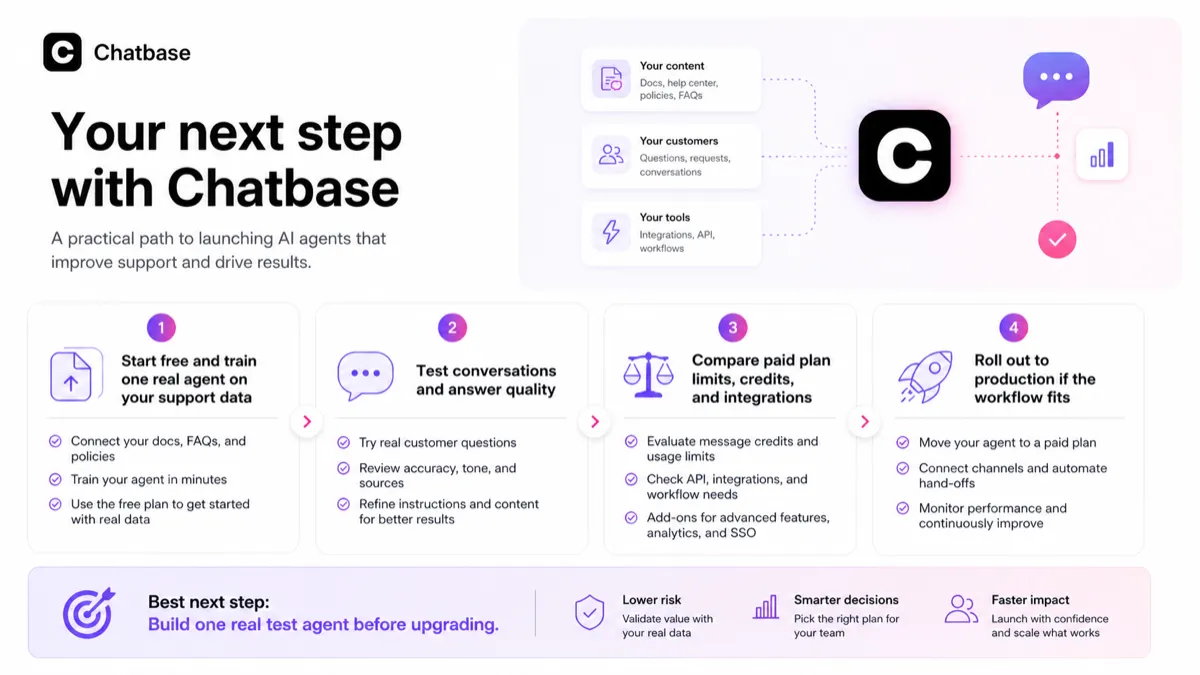
If I were buying Chatbase for a real support workflow, I would check these points before moving beyond the free plan:
- Whether one test agent can answer messy real customer questions accurately.
- Whether my help docs, policies, product pages, and support articles are clean enough to train from.
- Monthly support volume, expected message credits, and whether auto-recharge may be needed.
- Training content size, number of agents, workspace seats, and AI action limits.
- Whether required integrations are included in the plan I intend to buy.
- Whether API access is necessary and which plan includes it.
- Add-on costs for extra agents, message credits, and branding removal.
- Refund, cancellation, and renewal language before annual billing.
A simple test before paying
Before paying, I would run a small Chatbase test like this:
- Pick one support area with clear source material.
- Train one agent using real docs, website pages, or support content.
- Ask 25 to 50 real customer-style questions, including edge cases.
- Mark which answers are correct, incomplete, unsafe, or need escalation.
- Check whether lead capture or handoff makes the support process better.
- Estimate monthly message credits using your real support volume.
- Compare paid tiers only after the agent proves it can reduce work.
The point of this test is not to make the free plan do everything. The point is to prevent the wrong paid plan. If the agent fails with your own support content, upgrading too early will not solve the real problem.
Pros explained
The first major pro is focus. Chatbase is clearly built around AI support agents. That makes it easier to evaluate than broad AI tools that try to do everything. The buyer can ask a sharper question: will this reduce customer support friction?
The second pro is the free path. A limited free plan is still valuable because the buyer can test one real agent before paying. In this category, that is important. A support-agent tool should prove answer quality before subscription pressure enters the conversation.
The third pro is workflow depth. Training data, actions, integrations, analytics, human routing, API access, and deployment paths give Chatbase more room than a simple FAQ widget. For the right team, that depth can matter.
The fourth pro is pricing visibility. The plan table is detailed enough for buyers to compare credits, actions, training size, members, and add-ons. I prefer that over vague pricing pages that force buyers into a demo before they can even estimate fit.
Cons explained
The biggest con is that plan fit can become complicated. A buyer may start with a simple price comparison, but real value depends on credits, actions, training size, seats, integrations, API access, analytics, add-ons, and support volume.
The second con is refund flexibility. The terms language is not something I would ignore. If fees are generally non-refundable unless explicitly stated, buyers should treat the free plan as the real trial lane.
The third con is control. Some teams may need more structured live chat, help desk ownership, visual conversation flow design, or enterprise-grade support operations than Chatbase provides by default. In those cases, compare broader customer service suites before committing.
The fourth con is source-material dependency. Chatbase can surface answers from your business data, but it cannot make contradictory docs trustworthy. Teams with messy knowledge bases should fix the material before expecting automation to work.
Green flags and red flags
Green flags:
- You already know the top repetitive support questions.
- Your help docs and policies are accurate enough to train from.
- You can test the free plan against real customer questions.
- You need more than a static FAQ widget.
- Integrations, actions, analytics, or API access are part of the workflow.
- Someone on your team will review conversations after launch.
Red flags:
- You are buying because a discount path exists.
- You cannot estimate monthly support volume.
- Your knowledge base is outdated or contradictory.
- You need a generous refund path after purchase.
- You expect the AI agent to make final decisions without escalation.
- You need complex visual flows or mature omnichannel help desk control before confirming fit.
Chatbase vs alternatives
Chatbase should be compared with tools that solve the same support-agent job first. Some adjacent customer service or chatbot platforms may be relevant, but they are not always one-to-one replacements.
Chaindesk vs Chatbase
Chaindesk is a direct comparison if you want another no-code AI support agent or chatbot platform trained on business data. Compare it when your main question is setup simplicity, data-source handling, deployment style, and pricing.
Chatbase may still make sense if you like its support-agent positioning, actions, analytics, integrations, and plan structure. I would compare both with the same test questions before deciding.
SiteSpeakAI vs Chatbase
SiteSpeakAI is a relevant direct alternative for website support automation. It may appeal to buyers who want to compare support-agent setup, source syncing, live chat, human escalation, or pricing structure.
Chatbase may be stronger when its AI actions, advanced integrations, API access, and support-agent workflow match your rollout. The tradeoff is whether the added depth is worth the plan and add-on complexity.
Chatsimple vs Chatbase
Chatsimple is a lighter comparison for website chat, lead capture, and visitor assistance. It may be easier to judge if the buyer wants a sales or website-assistant layer rather than a deeper support infrastructure path.
Chatbase is the stronger comparison when the buyer needs support-agent depth: data training, actions, analytics, integrations, escalation, and volume planning.
CustomGPT vs Chatbase
CustomGPT is an adjacent but still useful comparison for buyers who care deeply about private-data retrieval, knowledge-base chat, and grounded answers from company content.
Chatbase is more clearly positioned around customer support agents and business workflows. CustomGPT may be a better comparison when the job is internal knowledge retrieval or controlled private-data chat rather than support automation.
Broader help desk routes
If the buyer needs mature live chat, ticketing, omnichannel support, customer satisfaction workflows, or enterprise service operations, broader platforms like Intercom, Zendesk, Tidio, Crisp, or other customer support suites may be more relevant.
Those are adjacent routes, not always direct replacements. The question changes from “which AI support agent should I use?” to “which customer service platform should own the whole support operation?”
Trust, refund, and buyer-risk notes
The main trust point in Chatbase’s favor is that the product has a clear public role. The homepage, docs, pricing page, API documentation, and marketplace context all point toward AI support agents trained on business data.
The main buyer risk is not that the product is unclear. It is that implementation fit can be underestimated.
Pricing should be verified live because plan limits, billing toggles, add-ons, credits, integrations, and annual savings can change. Do not rely on old comparison articles or coupon pages for final numbers.
Refund language deserves a careful read. Chatbase’s terms describe payment obligations as non-cancellable and fees as non-refundable except where explicitly stated. That makes the free plan and small workflow test more important.
Privacy and data handling also matter. Support conversations may include customer information, account questions, order details, or business-specific data. Before deploying Chatbase in a sensitive support flow, review the privacy policy, DPA, data-processing practices, permissions, and what information your agent should never answer without human review.
Finally, keep human escalation in the workflow. An AI support agent should reduce repetitive load. It should not become the final authority on billing, refunds, legal commitments, medical advice, financial advice, or high-risk customer decisions.
Final verdict
I would consider Chatbase if you have repeated support questions, clean source material, and a real plan to review and improve the agent after launch. It is especially interesting for small businesses, SaaS teams, ecommerce teams, and service companies that want a support-agent layer before a human ticket.
I would skip or delay Chatbase if your knowledge base is messy, your support volume is too low, or you need a broad help desk platform with strict workflow control before you need an AI agent. I would also avoid annual billing until the free test proves the agent can answer real customer questions accurately.
I would compare Chatbase with Chaindesk, SiteSpeakAI, Chatsimple, and CustomGPT if you are still deciding between AI support-agent tools. If the real need is broader customer service infrastructure, compare adjacent help desk platforms too.
The safest next step is simple: build a free test agent, ask real customer questions, check the answers, estimate credits, and only then move to pricing or current offers. Chatbase can be a strong support automation tool, but only if the support workflow is ready for it.
