Quick verdict
CustomGPT.ai is worth a serious look if your business wants a managed AI agent trained on its own content, but it is not the kind of tool I would judge by the chatbot promise alone.
The real question is narrower: do you have a repeated support, knowledge-base, internal-document, or website-question problem that is expensive enough to justify a managed RAG platform?
If the answer is yes, CustomGPT.ai has a believable role. It can ingest business content, create custom agents, deploy them through website chat or private access, and support more technical workflows through its RAG API. That makes it more serious than a lightweight FAQ bot. It also means the buying decision has more moving parts: source quality, query volume, document limits, team seats, storage, add-ons, analytics, branding, security, and trial timing.
The strongest reason to consider CustomGPT.ai is focus. It is built for businesses that want answers grounded in their own approved content. The main caution is cost control. The official pricing page lists Standard and Premium plans, plus Enterprise and add-ons, so the headline monthly price is only the start of the decision.
For my money, the safest path is not to buy because the platform sounds powerful. Start with one real agent use case, test it during the 7-day trial, and only then decide whether Standard, Premium, Enterprise, or an alternative makes more sense.
Next step: If CustomGPT.ai fits a real support or knowledge workflow, test the live buyer route before choosing a plan.
Review snapshot
| Review point | Practical take |
|---|---|
| Best for | Businesses building support bots, internal knowledge agents, website chat, or managed RAG workflows |
| Not ideal for | Solo users, casual chatbot tests, teams without clean knowledge sources, or buyers needing a large free plan |
| Main use case | Turning approved websites, help docs, files, and knowledge bases into source-grounded AI agents |
| Starting price | Standard is currently listed at $99/month, or $89/month equivalent when billed annually |
| Trial path | 7-day free trial, with credit card required and auto-charge after the trial if not canceled |
| Main strength | Managed RAG depth, broad source ingestion, citations, deployment options, and API access |
| Main concern | Plan limits, add-ons, trial conversion, source quality, and refund/overage exposure |
| Best alternatives to compare | Chaindesk, Chatbase, Cody |
| Best next step | Build one narrow test agent before choosing a paid rollout |
What is CustomGPT.ai?
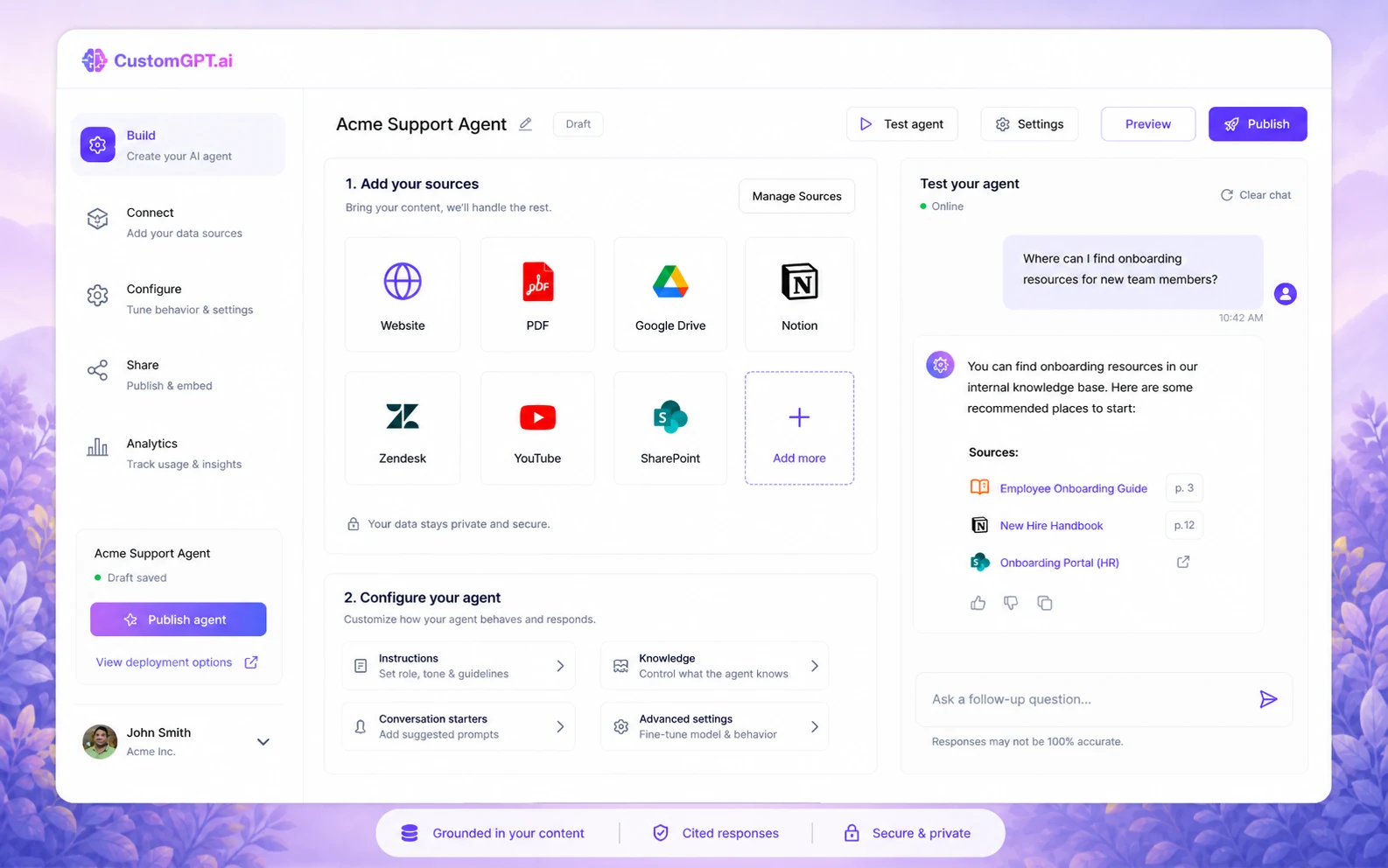
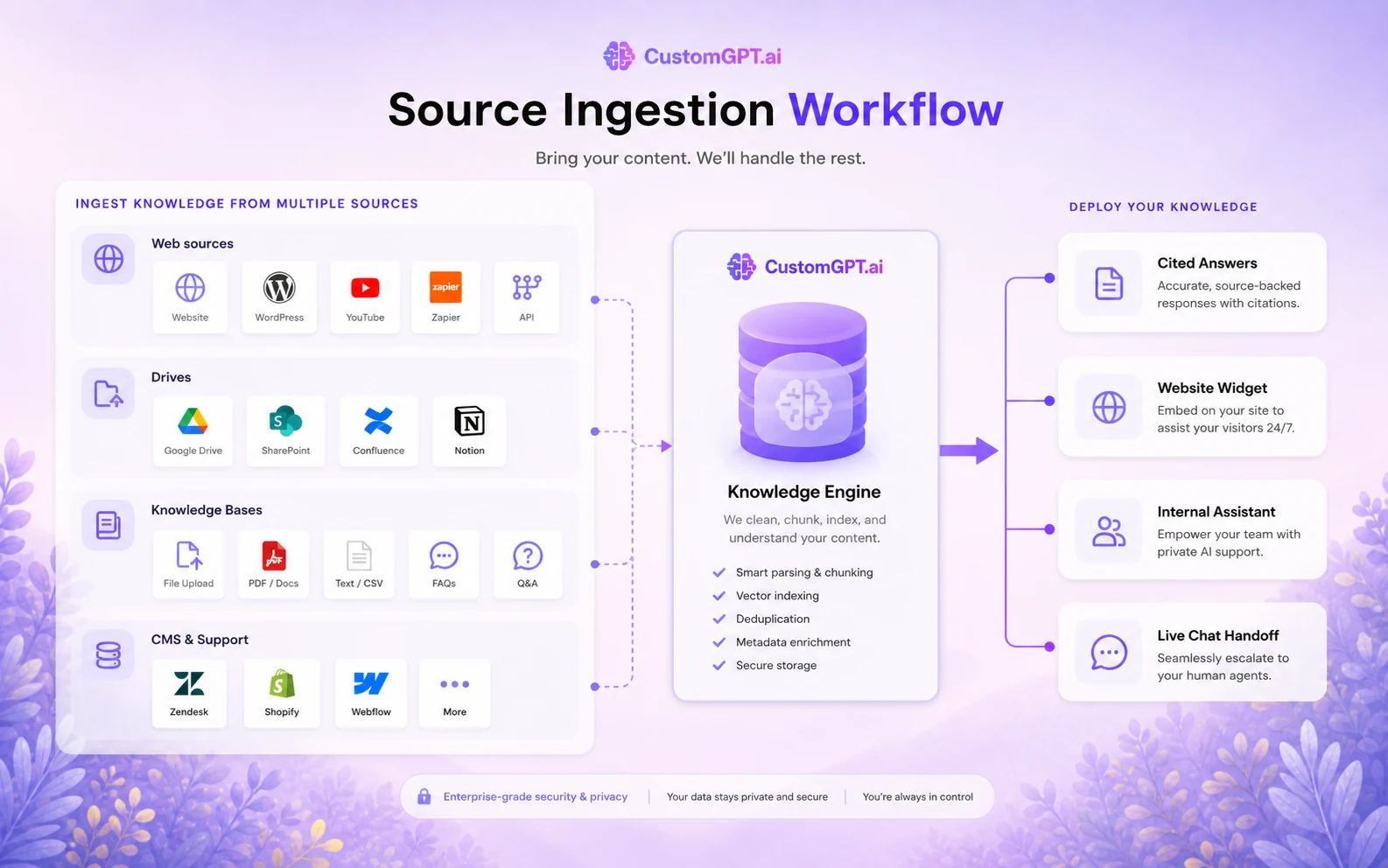
CustomGPT.ai is best understood as a managed RAG and business AI-agent platform. In plain language, it helps a company create AI agents that answer from company-controlled content: websites, PDFs, Office documents, help centers, knowledge bases, YouTube content, ecommerce sources, internal documents, and connected tools.
That is different from asking a general chatbot to “know your business.”
The buying promise is that CustomGPT.ai can reduce repeated questions by grounding answers in your own sources and giving the team deployment options: website embed, live chat, public or private agents, intranet-style use, Slack deployment, and API workflows. The product is strongest when the buyer already has useful business knowledge and wants to make it easier to access.
It is not a magic support department.
If your help articles are outdated, your policies conflict, your product docs are messy, or no one owns knowledge-base maintenance, CustomGPT.ai will not automatically fix the underlying content problem. A managed RAG platform reduces the engineering burden. It does not remove the operational responsibility.
Our review approach: we compare public product pages, pricing details, help documentation, deal terms, buyer workflow fit, and nearby alternatives. We do not treat a trial, coupon, or low monthly equivalent as proof that a product fits the buyer. With CustomGPT.ai, my confidence is strongest around category fit and public plan structure; I am more cautious around live checkout conditions, add-on exposure, and how well each buyer’s own source content will perform.
Who should use CustomGPT.ai?
CustomGPT.ai makes the most sense for buyers who can name the knowledge problem before they open the pricing page.
A customer support team is the clearest fit. If the team answers the same product, policy, setup, account, or troubleshooting questions every week, CustomGPT.ai can become a useful support layer. The condition is that the source material must be current and approved. If the help center is old, the agent can only be as good as the content it is trained on.
An operations or enablement team can also use it for internal knowledge access. This is a strong use case when employees keep asking where to find policy details, onboarding steps, product rules, or internal process notes. The buyer should verify private deployment, access controls, source permissions, and conversation retention before putting sensitive internal material into the workflow.
An ecommerce team may use CustomGPT.ai for product guidance, policy questions, store support, or post-purchase help. This can work well when Shopify, Zendesk, help-center content, and product documentation are kept clean. It becomes weaker when the store catalog changes often and no one monitors whether the agent is answering from current data.
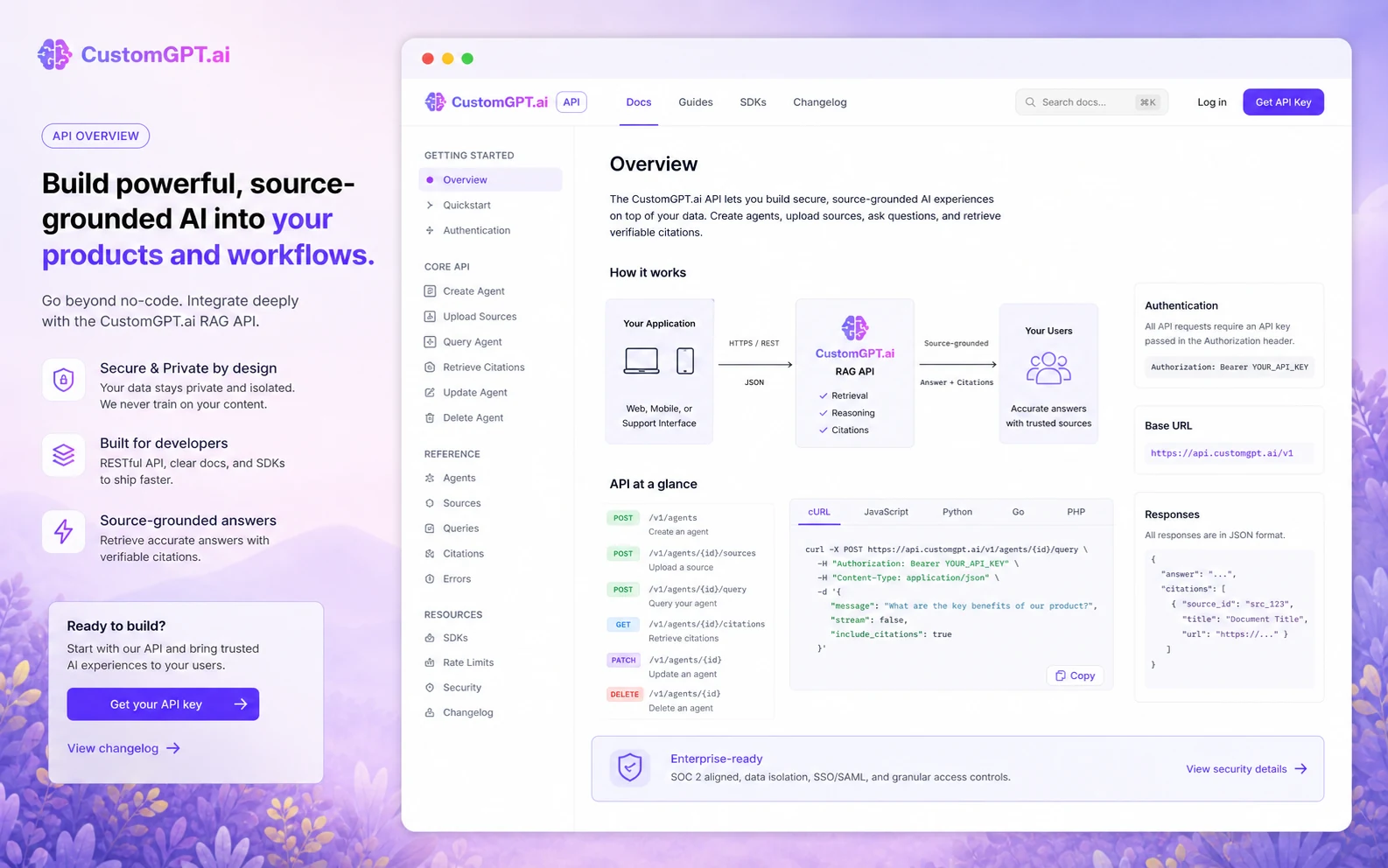
A technical team may care about the RAG API. That route is more serious than a website widget. It makes sense if the team wants to integrate source-grounded answers into an app, support workflow, or internal system without building retrieval infrastructure from scratch. Before paying for that reason, I would confirm API access, rate limits, support expectations, and whether the plan fits expected usage.
Who should avoid CustomGPT.ai?
I would be careful with CustomGPT.ai if you only want a cheap personal chatbot. The product is priced and positioned more like a business platform than a casual AI toy. A lighter tool may be enough if your goal is a simple website FAQ bot or a small side-project assistant.
I would also avoid starting here if your source content is not ready. This is the buyer mistake I see often with knowledge tools: the team buys the system before cleaning the knowledge base. Then the software gets blamed for weak answers that came from weak inputs.
Small teams should be cautious if they cannot monitor usage. The pricing page includes limits for agents, queries, documents, storage, team members, and add-ons. If nobody owns usage monitoring, the first paid month may not reflect the true cost of a larger rollout.
CustomGPT.ai is also not the cleanest fit if you need a large permanent free plan. The public path is a short trial, not a long-term free tier. That is fine for a serious business evaluation, but it is not ideal for a buyer who wants to experiment casually for months.
Finally, I would slow down if privacy, access control, or regulated data is central to the use case. CustomGPT.ai has strong public security messaging, but sensitive deployments still need a careful review of retention settings, access permissions, DPA requirements, private ingestion, SSO, and enterprise terms.
How CustomGPT.ai fits into a real workflow
The best CustomGPT.ai workflow starts before the agent is created.
First, choose one narrow business problem. Do not begin with “let’s train an AI on everything.” That sounds ambitious, but it usually creates a messy evaluation. A better starting point is one support queue, one documentation area, one internal policy library, or one website question flow.
Second, clean the sources. Remove old policy pages, duplicate files, outdated pricing references, and conflicting instructions. A RAG agent can retrieve from your content, but it cannot know which outdated document should have been deleted.
Third, build the first agent with approved content only. Test it with real questions, not friendly demo questions. Include common customer questions, edge cases, questions it should refuse, and questions where citations matter.
Fourth, review the answers as a business process. Are citations pointing to the right sources? Does the answer say “I don’t know” when it should? Does it over-answer? Does it miss important context? Does the team know how to correct weak responses?
Fifth, decide deployment. A website chat widget is different from a private internal agent. A Slack deployment is different from an API integration. Each path creates a different support, privacy, and maintenance burden.
Workflow check: If you already know the first agent use case, test CustomGPT.ai with real questions before comparing annual billing or add-ons.
Real-world buyer scenarios
A support team with repeated product questions
This is the most natural CustomGPT.ai buyer. The team has product docs, support articles, policy pages, and repeated customer questions. The platform may help reduce repetitive tickets if the agent can answer from approved sources and route harder cases to a human process.
The risk is stale content. If return policies, pricing, product availability, or setup steps change often, someone must own the source update process.
An internal operations team with scattered documentation
An operations team may want employees to ask questions against onboarding material, SOPs, training docs, and internal policies. CustomGPT.ai can fit here when private access, source control, citations, and team permissions are handled carefully.
The risk is permission drift. Internal knowledge tools can become risky when sensitive documents are indexed too broadly or when conversation logs are not reviewed against company policy.
A SaaS company adding a website assistant
A SaaS team may use CustomGPT.ai as a website assistant for documentation, feature explanations, onboarding questions, or lead qualification. The product’s deployment options and integrations can be useful here.
The risk is expectation. A website assistant can help visitors, but it should not be treated as a full replacement for support, onboarding, sales, or product education until the team has measured answer quality and handoff behavior.
A technical team evaluating managed RAG
A developer or product team may compare CustomGPT.ai with building a RAG system internally. This is where API access matters. The appeal is speed: use a managed retrieval layer rather than building ingestion, retrieval, citations, and agent deployment from scratch.
The risk is lock-in and usage economics. Before building around the API, technical buyers should test rate limits, response behavior, error handling, monitoring, SDK fit, and whether the plan can support production usage.
Key features that actually matter
Source-grounded agent creation
The core value is the ability to build agents from business-owned content. CustomGPT.ai supports a wide range of source types, including websites, documents, knowledge bases, media, and connected platforms.
Buyer note: this feature matters only if your sources are clean enough to trust. I would test citation quality before judging the platform by setup speed.
Website embed and live chat deployment
CustomGPT.ai is not limited to a private dashboard. It can be deployed as a website embed, live chat experience, public or private agent, and other deployment surfaces.
Buyer note: a public-facing agent needs a stricter QA process than an internal test agent. Check refusal behavior, citation visibility, lead capture, handoff expectations, and how the agent handles unknown answers.
Plan limits and usage analytics
The pricing structure includes practical limits: agents, queries, documents, processing, storage, team members, analytics history, and add-ons. This is not a small detail. It is the buying decision.
Buyer note: count your expected questions and source volume before paying. A small trial may not reveal the cost of a larger deployment.
RAG API and developer path
The API path is a real differentiator for teams that want to place source-grounded answers inside a product, internal tool, or custom support workflow. CustomGPT.ai publicly documents its RESTful API, SDK path, and sandbox-style testing.
Buyer note: API access is valuable only when the team has a real integration plan. If you only need a website assistant, the no-code deployment route may be simpler.
Security, privacy, and enterprise controls
CustomGPT.ai publicly highlights SOC 2 Type II, GDPR alignment, encryption, privacy controls, private deployment, SSO, DPA, and enterprise security options. That is important for business buyers.
Buyer note: public security signals are helpful, but they do not replace your own compliance review. Ask how data is stored, who can access conversations, what is retained, and what enterprise features are included in the plan you intend to buy.
Pricing and plan value
CustomGPT.ai pricing is clearer than many AI-agent platforms, but it still deserves careful reading.
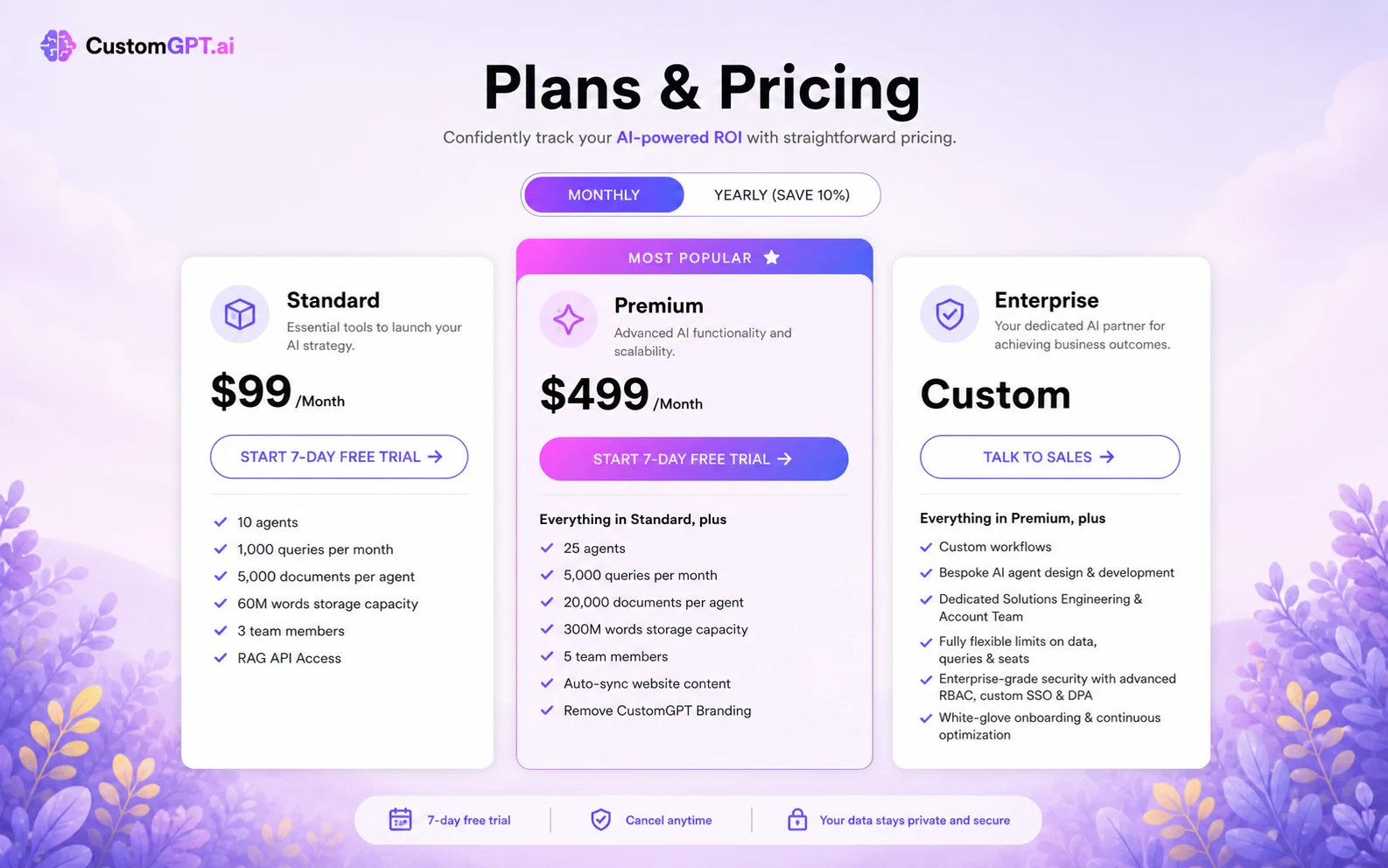
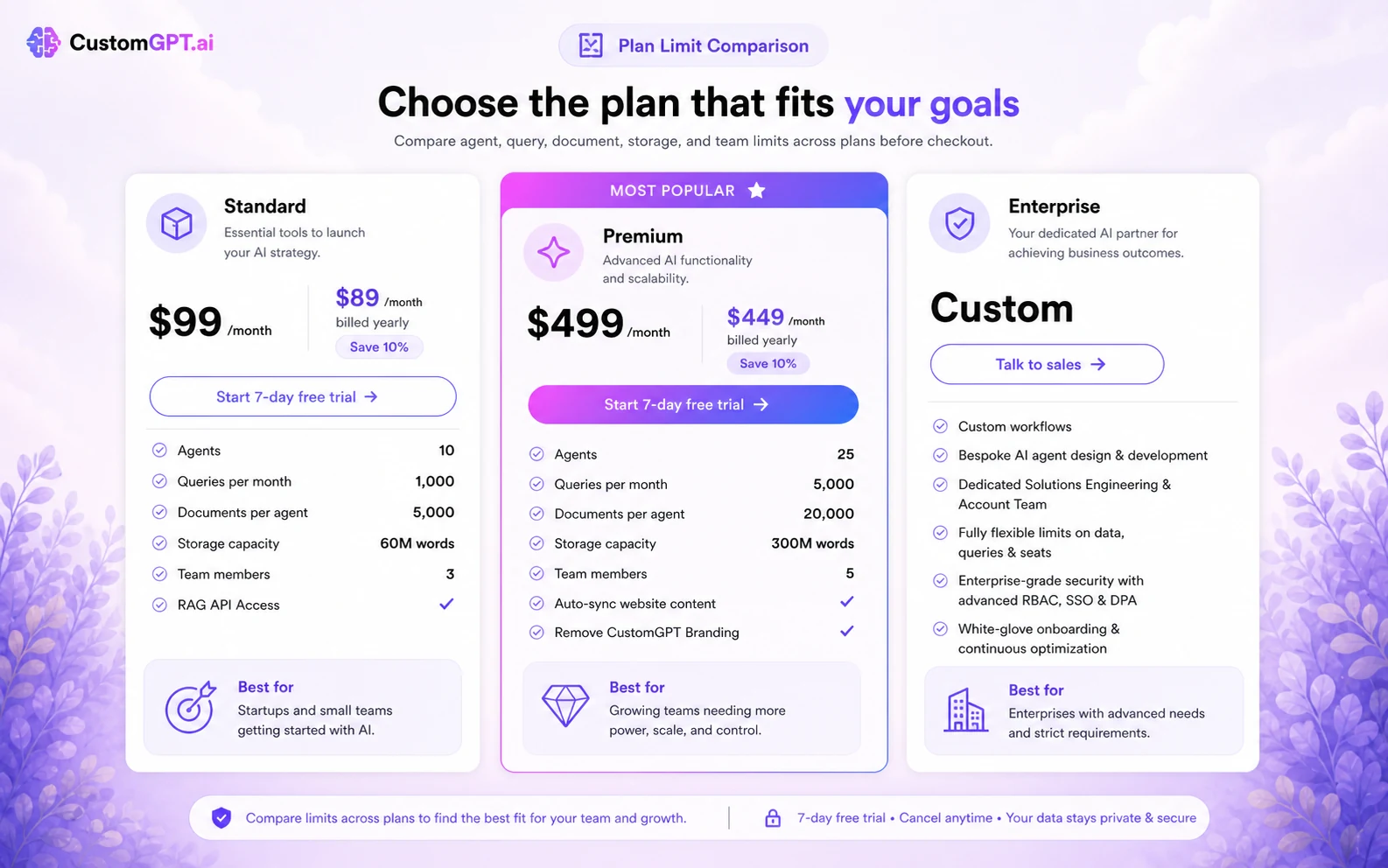
The current public pricing page lists Standard at $99/month when billed monthly, or $89/month equivalent when billed annually. Premium is listed at $499/month, or $449/month equivalent when billed annually. Enterprise is custom. The pricing page also shows limits for agents, documents, monthly processing, storage, queries, image citations, team members, analytics, integrations, security controls, and support.
That means the headline price is not enough.
The Standard plan can make sense for a smaller business testing a real AI-agent use case. It is not a casual price, but it may be reasonable if the agent reduces repeated support questions or helps employees find approved information faster.
Premium becomes more relevant when the buyer needs more agents, more queries, more documents, more storage, auto-sync, branding removal, fuller analytics, or stronger team needs. Enterprise is the path to evaluate when security, SSO, DPA, private ingestion, custom limits, and hands-on implementation support matter.
The add-ons are the part I would read twice. Extra queries, extra storage, extra documents, extra agents, and extra seats can change the economics. A buyer who only looks at the base monthly plan may underestimate the real cost of scaling.
I would not jump straight to annual billing unless the trial proves the agent can answer real questions from real sources. Annual billing can reduce the visible monthly equivalent, but it also makes a weak fit more expensive to unwind.
Pricing check: Before choosing Standard, Premium, or Enterprise, verify current plan limits and add-on exposure against your expected agent usage.
Free plan, trial, coupon, and checkout notes
CustomGPT.ai currently positions the evaluation path around a 7-day free trial rather than a lasting public free plan. That is not automatically bad. For a business platform, a short trial can be enough if the buyer enters with a focused test plan.
But the trial is not something I would start casually.
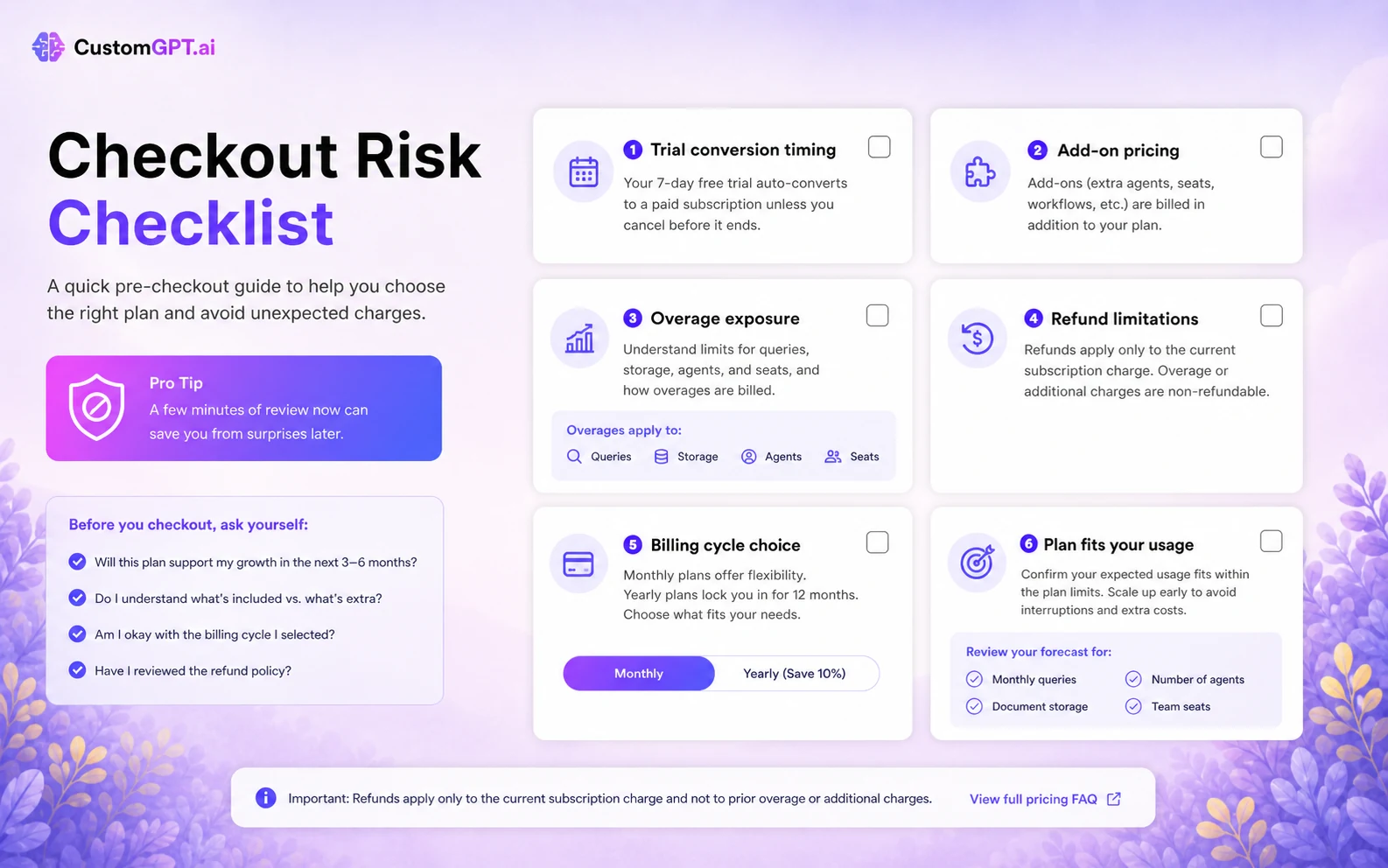
The pricing FAQ says credit card information is required for the trial and that the selected plan is charged after the trial period ends unless the buyer cancels. That makes the trial useful, but also time-sensitive. If you start it without a source list, test questions, and a decision owner, seven days can disappear quickly.
The better trial approach is simple:
- Pick one agent use case.
- Upload or connect only approved sources.
- Ask real questions from customers or employees.
- Check citations and refusal behavior.
- Compare query and document limits against expected usage.
- Set a cancellation reminder before the trial converts.
Public coupon codes are not the route I would rely on for this product. The safer savings path is trial testing, monthly-vs-annual comparison, plan selection, and live checkout verification. A current offer may improve the purchase, but it should not decide the purchase.
If the product still fits after testing, you can check the CustomGPT.ai coupon page for active offers. I would only do that after the workflow fit is clear.
Checkout order: Prove the agent works with your own content first. Then compare the store route, trial terms, and current offer path.
What I would check before buying CustomGPT.ai
If I were buying CustomGPT.ai for a real business workflow, I would check seven things before paying.
-
Source readiness. Are the help docs, policies, product pages, PDFs, and knowledge-base articles current enough to trust?
-
Citation usefulness. Do answers point back to the right sources, or do they sound confident without enough evidence?
-
Plan limits. Do the agent, query, document, storage, processing, and team-seat limits match the real rollout, not just the trial?
-
Trial timing. Who owns the 7-day test, and when will the team decide whether to cancel, continue monthly, or upgrade?
-
Add-on exposure. What happens if query volume, document volume, storage, or team seats grow after launch?
-
Privacy and access. Which documents should be private, who can query the agent, and how are conversation logs handled?
-
Alternative fit. Would a simpler chatbot builder, a support-first tool, or an internal knowledge assistant solve the problem with less cost or setup?
A simple test before paying
Before paying, I would run a small test like this:
- Choose one high-value use case, such as customer support FAQs, onboarding questions, or internal policy lookup.
- Prepare a clean source set with no outdated documents or conflicting instructions.
- Create the first agent and test it with 25 to 50 real questions.
- Include questions where the right response should be “I don’t know” or “contact support.”
- Check citations, not just answer fluency.
- Review usage against the plan’s query and document limits.
- Decide whether the agent saved time, reduced confusion, or simply added another tool to maintain.
That test is more useful than browsing feature lists. CustomGPT.ai can look strong on paper, but the only evaluation that matters is whether it answers your real questions from your real sources well enough to justify the operational cost.
Pros explained
Strong business-agent fit
CustomGPT.ai has a clear role for businesses that want answers from their own content. This is stronger than a generic chatbot pitch because the product is built around knowledge ingestion, citations, deployment, and business use cases.
It stops being enough when the company has no maintained knowledge base. The platform can organize and retrieve from sources, but the buyer still has to provide trustworthy material.
Clearer plan structure than many AI-agent tools
The public pricing table makes it possible to compare agents, documents, queries, storage, team seats, analytics, integrations, and add-ons. That helps buyers make a more rational plan decision.
The caution is that clear does not mean cheap. The real cost depends on source volume, query volume, team usage, and whether add-ons become necessary.
Broad source and deployment support
CustomGPT.ai supports a practical range of business sources and deployment paths. That matters when the buyer wants more than a basic website bot.
It stops being enough when the team cannot maintain those sources. Broad ingestion can create broad responsibility.
API access for deeper workflows
The RAG API gives CustomGPT.ai a stronger technical story than tools that only offer a widget. For teams with developer resources, this can support custom product, internal, or support experiences.
The buyer check is implementation readiness. API access does not remove the need for monitoring, error handling, cost control, and support ownership.
Cons explained
The trial is short and billing-sensitive
A 7-day trial can be useful, but it is easy to waste. The buyer needs a test plan before starting because the trial converts to the selected paid plan if not canceled.
This matters most for teams that need approvals, source cleanup, or multiple stakeholders. Seven days is not long if the knowledge base is not ready.
Costs can grow after the first plan
Standard and Premium pricing are visible, but add-ons and higher usage can change the practical cost. Extra queries, documents, storage, agents, and seats should be reviewed before rollout.
This matters most for growing support teams, ecommerce sites, SaaS docs, and internal knowledge systems where usage may expand quickly.
Source quality is still the buyer’s job
CustomGPT.ai can help retrieve from approved sources, but it cannot guarantee that the approved sources are accurate. If your documentation is stale, the agent may repeat stale information.
This matters for pricing, refunds, legal language, product availability, and policy-heavy use cases.
Refund and overage language needs attention
The refund FAQ says refunds apply to the current subscription charge, not prior-month overages or additional charges. That is a practical buyer risk, especially if usage expands during testing or rollout.
This does not make the product bad. It means buyers should manage limits deliberately.
Green flags and red flags
Green flags
CustomGPT.ai is a stronger fit when the buyer has a real knowledge base, repeated questions, and a team willing to maintain the agent after launch.
It is also a good sign if the buyer can name the first use case clearly. “Support policy questions from our help center” is much better than “we want an AI chatbot.”
Another green flag is technical clarity. If the team knows whether it needs a widget, live chat, private agent, Slack deployment, or API integration, the plan decision becomes more grounded.
Red flags
The biggest red flag is buying before cleaning the content. If nobody owns documentation quality, the agent may become another place where outdated information spreads.
Another red flag is choosing annual billing before the trial proves real usage. The lower monthly equivalent looks appealing, but annual savings matter only after product fit is proven.
I would also slow down if the team cannot explain who monitors usage, add-ons, failed answers, privacy settings, and source updates after launch.
CustomGPT.ai vs alternatives
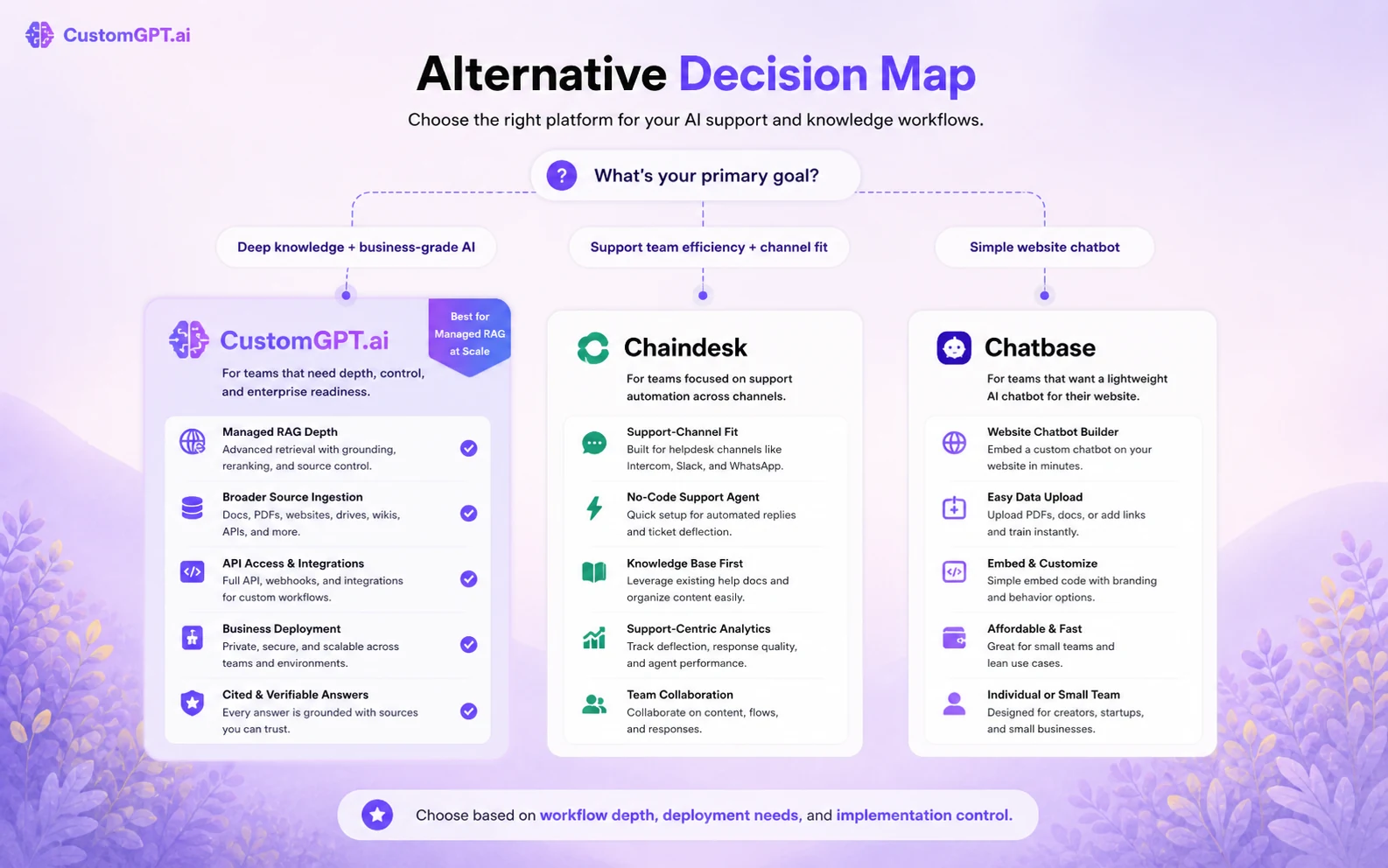
CustomGPT.ai belongs in the business AI-agent and managed RAG category. The most useful comparisons are not always the cheapest chatbot tools. The better comparison depends on the buyer job.
Chaindesk vs CustomGPT.ai
Chaindesk is the more natural comparison if the buyer wants a no-code support agent with visible customer-support workflow framing. It may feel easier to evaluate for teams that mainly want a support bot and channel-based deployment.
CustomGPT.ai may still be stronger if source breadth, API access, citations, enterprise security signals, and managed RAG depth matter more than simple support-bot setup. Start with the Chaindesk store page if support workflow simplicity is your main comparison point.
Chatbase vs CustomGPT.ai
Chatbase is a direct comparison for buyers who want a simpler custom chatbot builder path. It may be more approachable if the goal is a website assistant trained on a focused set of pages or files.
CustomGPT.ai becomes more interesting when the buyer needs more business-source depth, deployment control, API access, and enterprise-style security language. If your use case is lightweight, compare the Chatbase store page before assuming CustomGPT.ai is necessary.
Cody vs CustomGPT.ai
Cody is closer to an internal business knowledge assistant. It may fit teams that want employees to query internal documents, processes, or operational knowledge without building a public website support experience first.
CustomGPT.ai feels broader when the buyer needs both customer-facing deployment and managed RAG infrastructure. If your priority is internal knowledge access, read the Cody review before choosing a more outward-facing agent platform.
Building your own RAG system vs CustomGPT.ai
A custom build gives more control, but it also brings engineering cost: ingestion, chunking, retrieval quality, citations, UI, authentication, monitoring, model routing, logging, and maintenance.
CustomGPT.ai is more appealing when the team wants a managed route and would rather spend engineering time on business logic than retrieval infrastructure. A custom build makes more sense when the company has unusual data, strict architecture requirements, or enough engineering capacity to own the entire stack.
Trust, refund, and buyer-risk notes
The trust picture is relatively strong on public signals. CustomGPT.ai publishes security and privacy messaging around SOC 2 Type II, GDPR, encryption, privacy controls, private agents, and enterprise deployment options. Its documentation also goes deep enough to show this is not only a thin landing-page product.
Still, business buyers should not skip due diligence.
For sensitive content, ask how files are stored, who can access conversations, how long logs are retained, how permissions work, whether a DPA is needed, and which features require Premium or Enterprise. If you are connecting Google Drive, SharePoint, Notion, Zendesk, Shopify, or internal policy documents, source permissions matter as much as chatbot quality.
The refund language also deserves attention. The FAQ states that customers are responsible for managing accounts, credit limits, and overages, and that refunds apply to the current subscription charge rather than prior-month overages or additional charges. That is a clear reason to set usage boundaries before a larger rollout.
My practical risk read is simple: CustomGPT.ai looks credible for serious business-agent use, but the buyer still needs a controlled rollout. Start narrow, monitor usage, verify answers, review terms, and avoid expanding until the first agent has proven value.
Final verdict
I would consider CustomGPT.ai if your business has a repeated question problem and enough clean source content to train a useful agent. Support teams, internal knowledge teams, SaaS companies, ecommerce operators, and technical buyers evaluating managed RAG should all give it a careful look.
I would skip it if you only want a cheap chatbot experiment, if your documentation is messy, or if nobody on the team will own source updates and usage monitoring after launch.
I would compare it with Chaindesk if support workflow simplicity matters most, Chatbase if you want a lighter website chatbot builder, and Cody if internal knowledge access is the main job.
The safest next step is a narrow trial. Pick one source set, ask real questions, review citations, check usage limits, and only then decide whether the current CustomGPT.ai plan, offer path, or a nearby alternative is the better buyer route.
