
CustomGPT Pricing, Plans & Agent Fit
CustomGPT.ai is a business-focused RAG chatbot and AI agent platform for turning approved company content into support bots, website chat widgets, internal knowledge assistants, and API-powered workflows. The store page should treat it as a serious implementation decision, because the real buying question is not whether the product can create a chatbot, but whether the buyer has clean knowledge sources, enough usage capacity, the right team controls, and a plan that fits their support or knowledge workflow.
Fit → price → checkout
Use these routes after the official-site check: coupon first, review for fit, compare if unsure.
CustomGPT.ai pricing snapshot
Fast commercial checks before pricing, coupons, or a deeper review.
CustomGPT.ai product tour
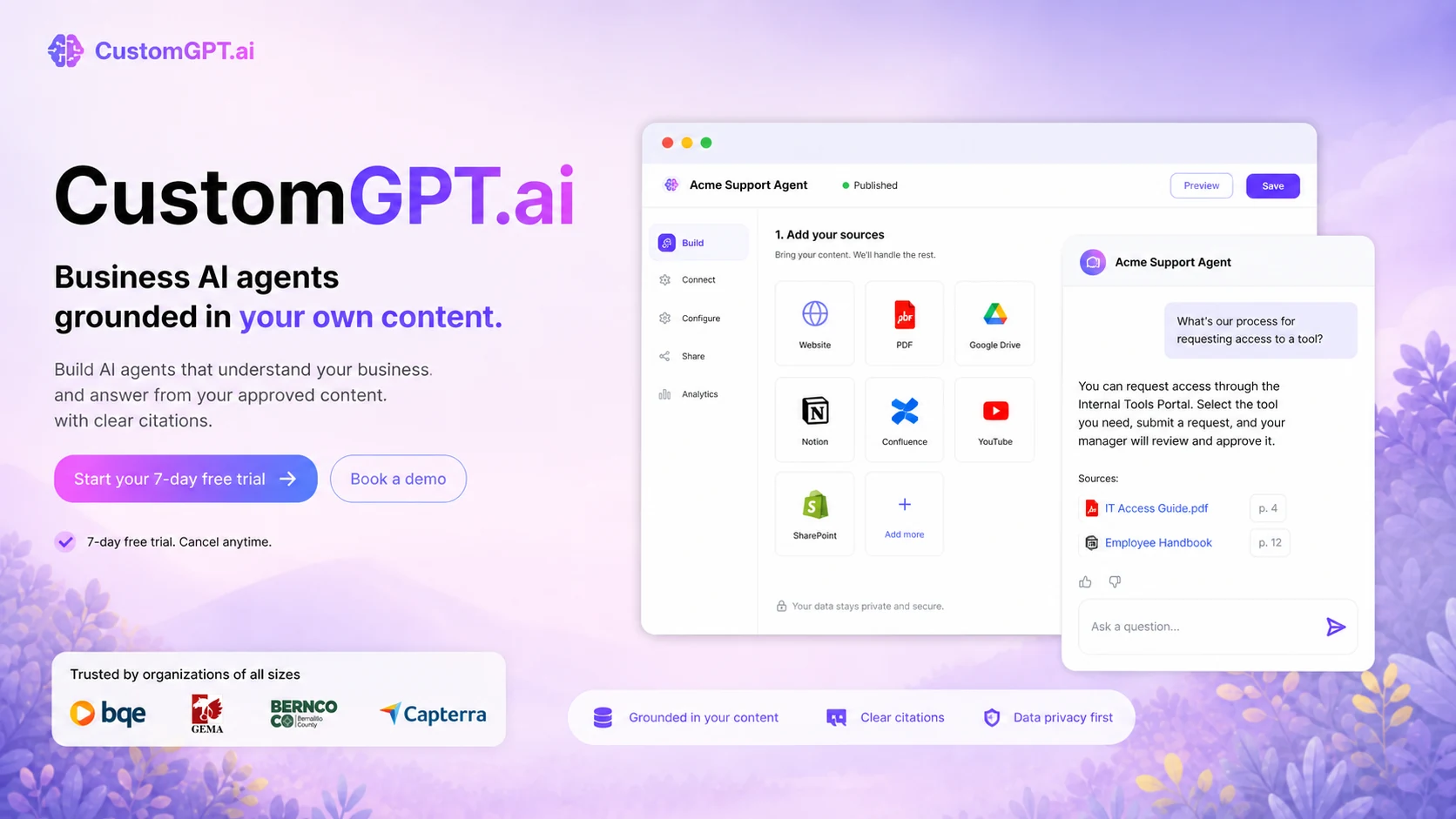
The product tour is useful if you want to see whether CustomGPT.ai feels like a practical business agent builder or only a generic chatbot promise. Watch for how the web app handles agent creation, source ingestion, deployment choices, and whether the interface looks manageable for the team that will maintain the knowledge base after launch.
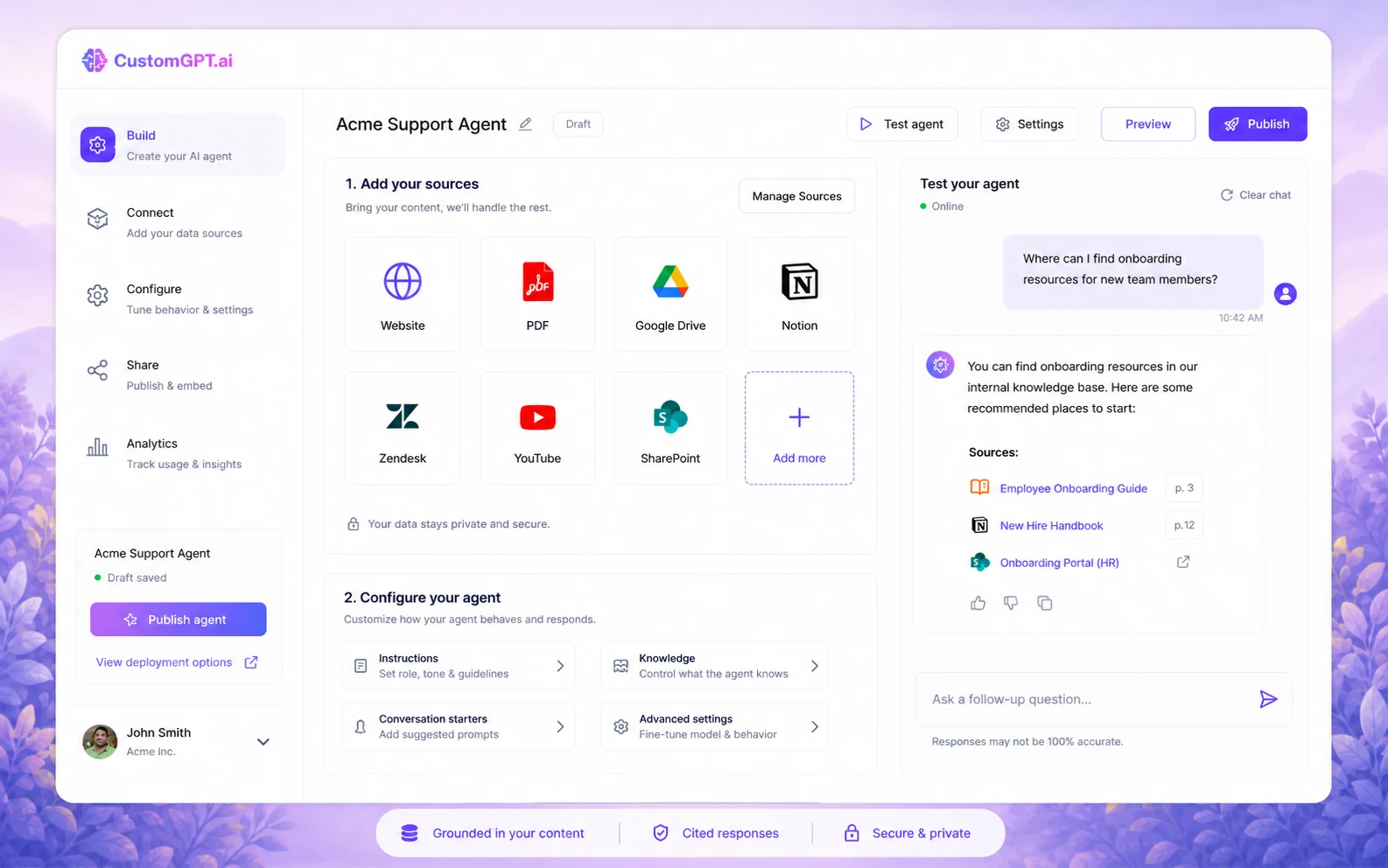
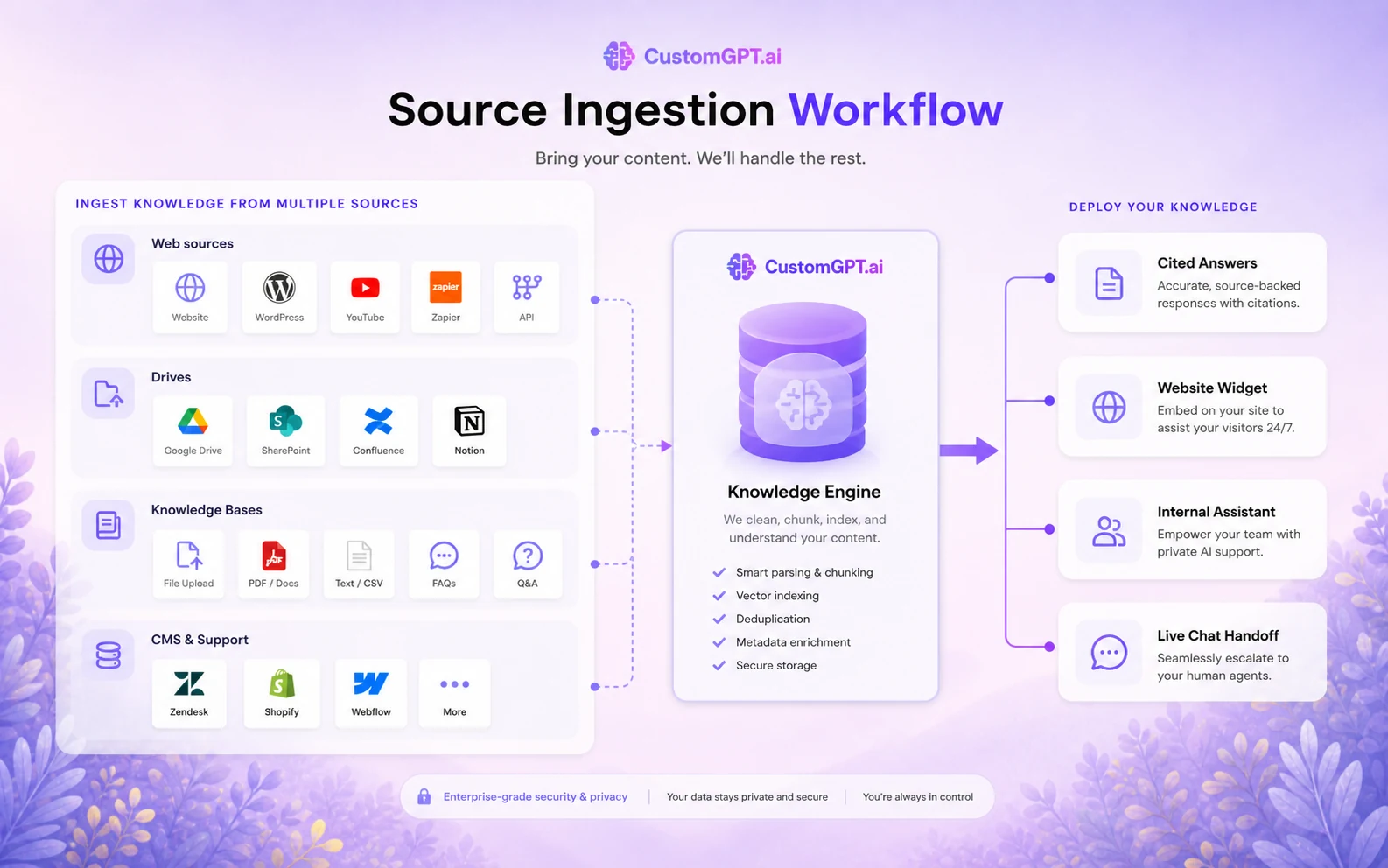
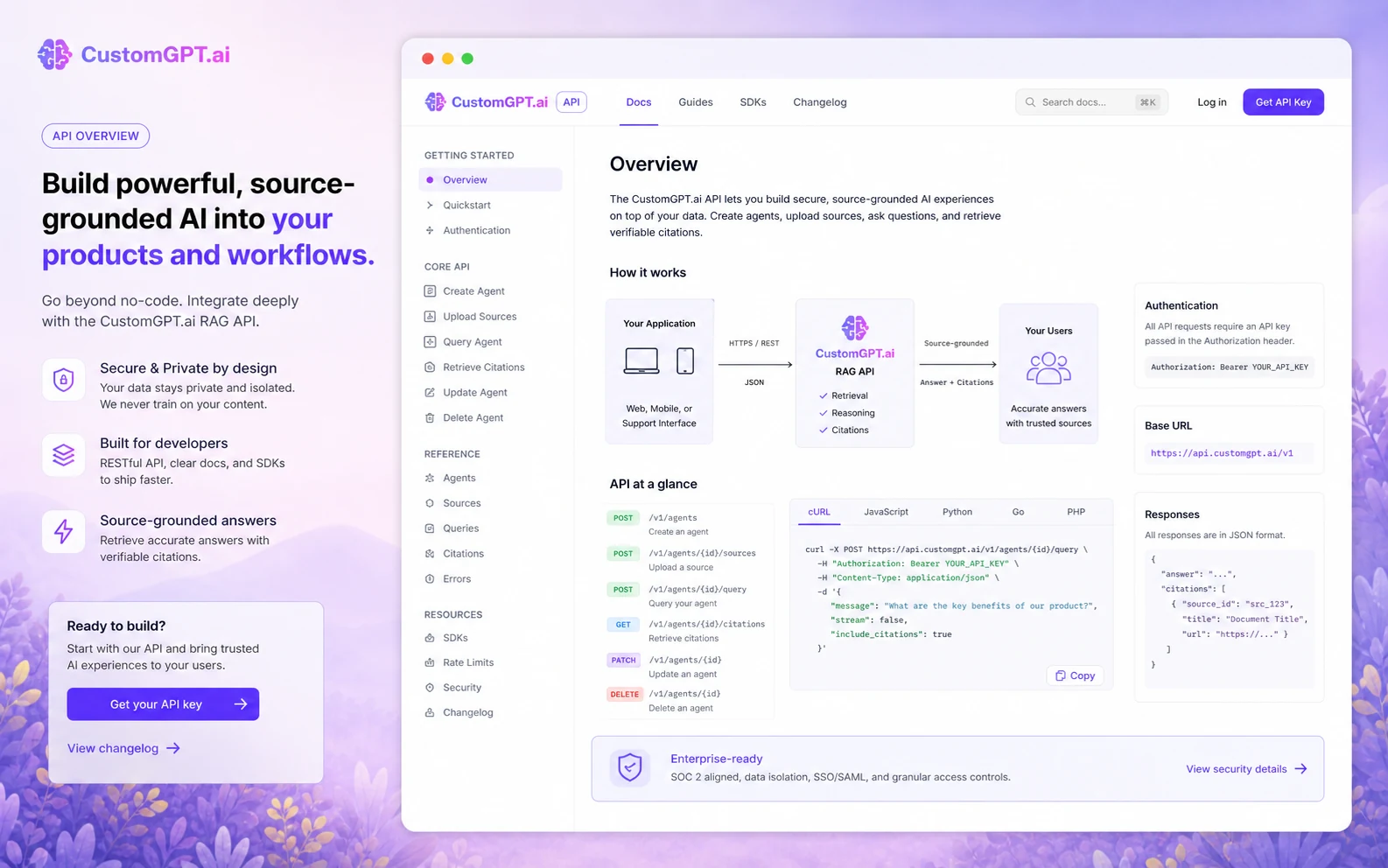
CustomGPT.ai should be evaluated as a managed RAG and business-agent platform. The practical question is whether it can turn your approved company knowledge into useful answers with enough citations, source control, team access, deployment flexibility, and cost predictability to justify moving beyond a trial.
What CustomGPT.ai actually does
CustomGPT.ai helps businesses create AI agents trained on their own content, then deploy those agents through website widgets, private or public access, live chat, intranet use, and API workflows. It is not just a generic chatbot page. The stronger use case is a support or knowledge assistant that answers from controlled sources and gives the buyer a way to manage accuracy, citations, analytics, and deployment.
- Use it when repeated support, knowledge-base, or internal-document questions are consuming team time.
- Judge the product by source quality, citation behavior, query volume, and deployment control.
- Do not expect clean answers if the underlying documents, policies, or help articles are outdated.
Pricing and trial fit
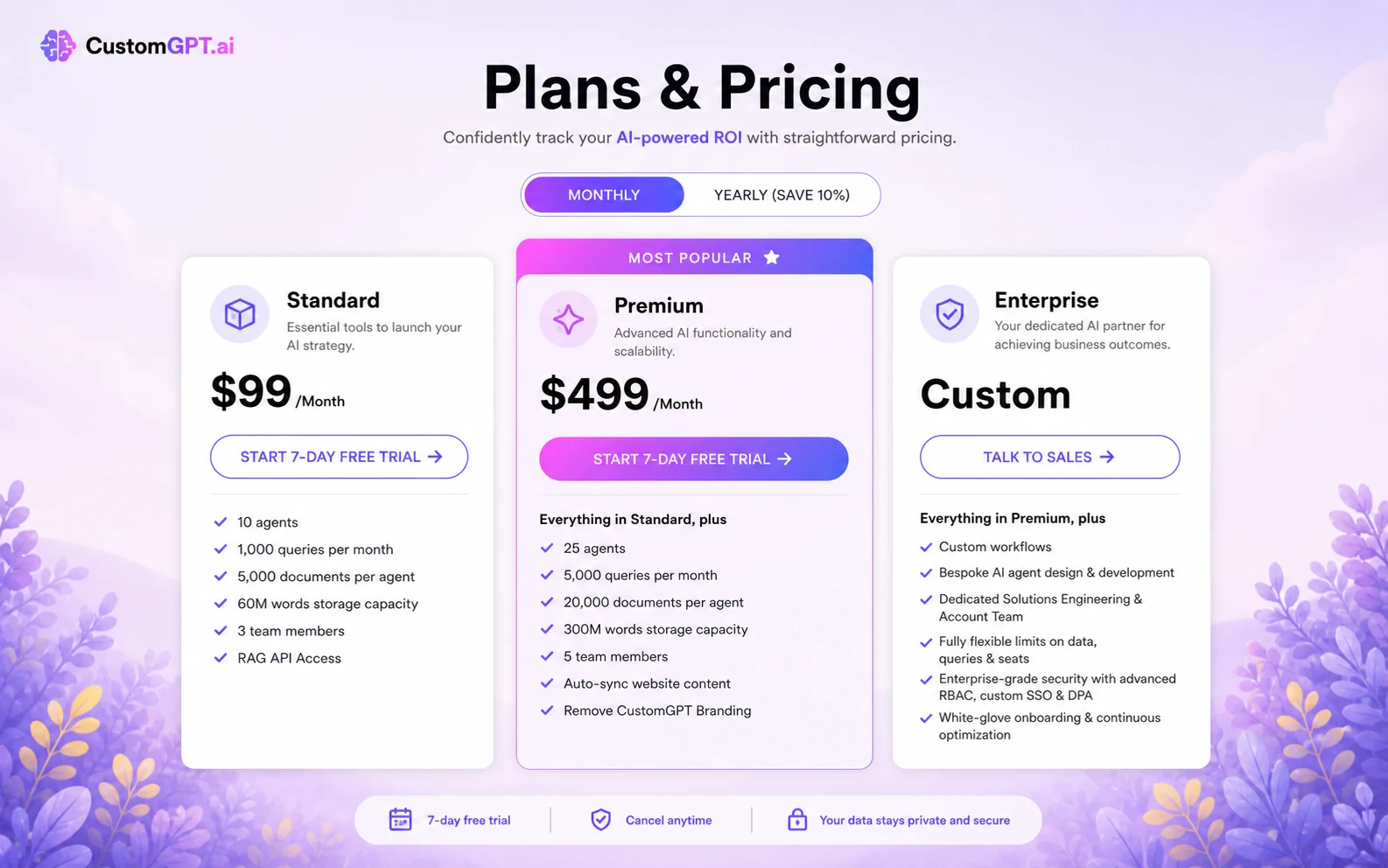
CustomGPT.ai's paid public pricing starts with Standard at $99/month, or $89/month equivalent when billed annually. Premium is $499/month, or $449/month equivalent when billed annually, while Enterprise is quoted through sales. The 7-day free trial is useful for testing setup, but buyers should treat it as a focused proof window because the FAQ says the trial converts to the selected plan after it ends unless the buyer cancels.
- Standard is the first paid path for teams testing a real AI-agent use case.
- Premium becomes more relevant when agents, queries, documents, auto-sync, and branding needs increase.
- Enterprise is the path to evaluate when SSO, custom security, private ingestion, or advanced deployment matters.
Knowledge sources decide answer quality
CustomGPT.ai supports many content sources, including websites, PDFs, Office documents, YouTube, Google Drive, Notion, Zendesk, Confluence, Shopify, SharePoint, and more. That range is helpful, but it also creates a buyer responsibility. If the source material is messy, duplicated, outdated, or legally sensitive, the agent may still give answers that require review. Buyers should clean the knowledge base before treating automation as a cost-saving shortcut.
- Prepare source content before judging the platform.
- Test difficult edge questions, not only clean FAQ examples.
- Check whether citations point back to the right approved documents.
Video walkthrough: check the API and rollout path
This second video is useful for buyers who are deciding whether CustomGPT.ai belongs only as a no-code widget or whether it can support a deeper RAG workflow. Watch for the developer setup, interface assumptions, and whether the API path looks realistic for the team that would maintain the agent after launch.
- Use the video to judge developer fit before assuming API access solves the whole rollout.
- Look for how the workflow connects a front-end experience to CustomGPT.ai's RAG layer.
- Ask whether your team can monitor, update, and debug the agent after the first build.
Refund, overages, and checkout caution
CustomGPT.ai's pricing FAQ says refunds are only applicable to the current subscription charge and not for prior-month overage charges or additional charges added to the account. That matters because content indexing, queries, add-ons, extra seats, extra agents, and storage can affect the total cost once the tool moves beyond a small trial. Buyers should confirm the current checkout terms, plan limits, and overage exposure before paying.
- Check refund language before entering a paid billing cycle.
- Review add-on prices for extra queries, storage, documents, agents, and seats.
- Do not assume a trial test represents the cost of a larger rollout.
Best alternatives and next step
CustomGPT.ai sits closest to buyers comparing business AI agents, support chatbots, and managed RAG workflows. Chaindesk may be easier to compare when the buyer wants a no-code support agent with visible channel and support-workflow framing. Chatbase is a natural alternative when the buyer wants a simpler chatbot builder feel. The safest next step is to use CustomGPT.ai's trial on one real knowledge source, then read the review or compare the coupon path only after the product fits the workflow.
- Choose CustomGPT.ai when managed RAG, source breadth, API access, and business deployment matter.
- Compare Chaindesk when support-channel fit and no-code agent deployment are the main buying pressure.
- Compare Chatbase when the buyer wants a simpler website chatbot builder path.
Best savings path from this store page
This is the clearest savings route to check once the product already looks like a fit.
The Standard monthly route costs more per month than yearly billing but can be safer for buyers who are still validating the workflow.
Custom enterprise pricing route
Demo call with free demo agent path
Use comparison routes when the category fit is still open
Use these comparison routes when the product still looks plausible, but the category fit is not fully settled.
Chaindesk is the more natural comparison when the buyer wants a support-focused no-code agent with visible channel and handoff workflow framing.
Chatbase deserves the next tab when the buyer wants a simpler website chatbot builder path before evaluating a deeper managed RAG workflow.
Verification points worth checking before you click out
Where this store usually fits best in the workflow
CustomGPT.ai fits buyers who want a chatbot to answer from help articles, product docs, FAQs, policies, or support knowledge without sending every repeated question to a human agent.
Operations and enablement teams can use CustomGPT.ai to make internal documents easier to query, but the source library must be kept accurate and permission-aware.
The platform is useful when the buyer needs website embedding, live chat widget deployment, public or private agents, and a clearer support entry point for visitors.
Technical teams can evaluate CustomGPT.ai when they want managed retrieval, SDKs, and API access without building the full data ingestion and retrieval stack internally.
Practical checkpoints before and after signup
- Choose one narrow use case, such as support FAQs, onboarding questions, or internal policy lookup.
- Prepare clean source content and remove outdated or conflicting documents before judging answer quality.
- Write a test list of real questions, including edge cases and questions the agent should refuse.
- Check answer accuracy, citations, source coverage, and how quickly the team can correct weak responses.
- Review the selected plan's agent, query, document, storage, team-seat, and analytics limits.
- Set a cancel reminder because the FAQ says the trial converts to the selected paid plan after 7 days.
- Compare Standard, Premium, Enterprise, and annual billing against real expected usage rather than a small demo.
- Confirm add-on pricing and refund language, especially if higher volume could trigger additional costs.
- Decide whether the next click should be the review page, pricing page, coupon path, or an alternative comparison.
- Monitor query usage, failed answers, missing sources, and support-ticket deflection before expanding usage.
- Assign ownership for source updates so the agent does not answer from stale documentation.
- Recheck plan fit before renewal, especially if agents, documents, or team seats have grown.
Fast-read signals for workflow fit and buying friction
Questions readers usually ask before choosing this store
What does CustomGPT.ai actually do?
CustomGPT.ai helps businesses create AI agents and chatbots trained on their own content, then deploy them through widgets, private or public agents, live chat, intranet use, or API workflows. It is best understood as a managed RAG and business knowledge-agent platform.
Does CustomGPT.ai have a free plan or free trial?
The public pricing page and FAQ list a 7-day free trial. The page does not present a lasting free plan in the same way some lightweight chatbot tools do, so buyers should treat the trial as a short evaluation window and confirm cancellation timing before testing.
How much does CustomGPT.ai cost?
Public pricing currently lists Standard at $99/month, Premium at $499/month, and Enterprise by contact. Annual billing shows lower monthly equivalents of $89/month for Standard and $449/month for Premium, with add-ons available for extra queries, storage, documents, agents, and seats.
What should buyers verify before paying for CustomGPT.ai?
Buyers should verify answer quality from their own sources, citation behavior, plan limits, team seats, query volume, document capacity, auto-sync needs, API requirements, add-on costs, trial conversion timing, and refund language before choosing a paid plan.
Is CustomGPT.ai better than simpler chatbot builders?
It can be a better fit when the buyer needs managed RAG, source breadth, API access, business deployment options, and more serious team controls. A simpler chatbot builder may be a better fit if the buyer only wants a lightweight website FAQ bot with less implementation work.
Choose the next route that matches what you still need to decide
The strongest next click depends on whether you still need product judgment, a savings route, or a broader category comparison.