
Chaindesk Pricing, Plans & Support Fit
Chaindesk is a no-code AI chatbot and agent platform for support, lead capture, shared inbox work, and knowledge-base automation. It is best evaluated as a customer support workflow tool, not just a generic ChatGPT wrapper, because the buying decision depends on data sources, message credits, team seats, integrations, handoff needs, and how well the bot stays grounded in your own knowledge base.
Fit → price → checkout
Use these routes after the official-site check: coupon first, review for fit, compare if unsure.
Chaindesk pricing snapshot
Fast commercial checks before pricing, coupons, or a deeper review.
Chaindesk product tour for support chatbot fit
Watch the product tour as a support workflow test, not as a simple feature demo. The buyer question is whether Chaindesk can ingest your real knowledge sources, answer common customer questions, route conversations across the channels you use, and still give your team enough control before you compare paid plans.


Chaindesk should be evaluated as a support automation platform. The practical buying question is whether it can turn your own support docs, files, pages, and connected sources into reliable chatbot answers, while still giving your team enough handoff, channel, and API control.
What Chaindesk actually does
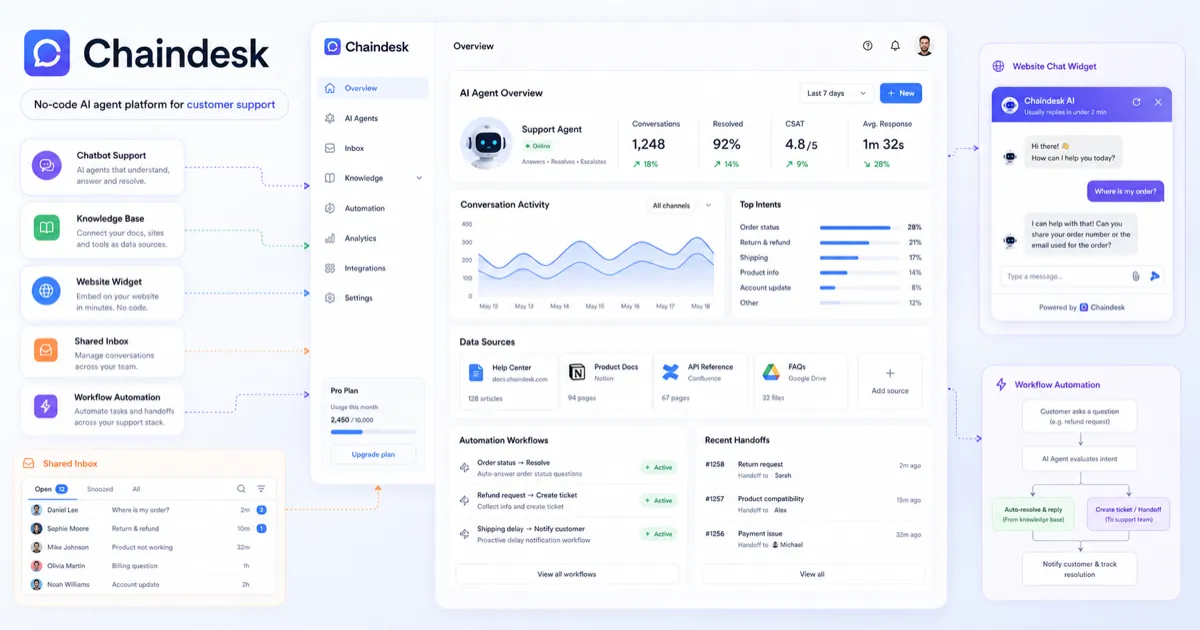
Chaindesk lets buyers create custom AI agents trained on company data, connect knowledge sources, deploy the bot on websites or support channels, and monitor conversations when human takeover is needed. The homepage highlights importing data, customizing the agent, deploying it to existing tools, and monitoring conversations, so the product is best judged by support workflow fit rather than by chatbot novelty alone.
- Use it when repeated support questions are slowing down the team.
- Judge it by source quality, channel fit, message volume, and human handoff.
- Do not assume the bot will fix weak documentation or unclear support processes by itself.
Pricing path and free plan fit
Chaindesk's free plan is useful for initial testing because it includes one agent, one datastore, and 200 monthly message credits. Paid pricing starts at Growth for $49/month, then Pro at $99/month and Enterprise at $499/month. The decision pressure is not only the monthly price. Buyers should compare credits, agents, datastores, storage, website page-loader limits, team seats, dedicated support, and whether yearly billing is worth the 20 percent saving.
- Free is useful for setup validation and answer testing.
- Growth is the first serious paid path for small business support automation.
- Pro and Enterprise make more sense when support volume, team seats, or knowledge scale increase.
Video walkthrough: use the demo as a buyer test
The second video is useful if you want to see the setup process from a practical buyer angle. Watch how the agent is trained on custom data, how the initial bot is created, and whether the workflow looks realistic for the person on your team who would maintain it after launch.
Knowledge sources and answer reliability
Chaindesk supports data sources such as files, Notion, Google Drive, Zendesk Help Center, public URLs, and other structured sources. This is the core buyer value, but it is also the main risk. If the source material is incomplete, old, or written for internal staff rather than customers, the AI agent may produce answers that sound confident but still require correction.
- Prepare approved support articles before testing the bot.
- Check whether auto-sync is available on the plan you actually want.
- Ask the bot real customer questions, including edge cases, before trusting it publicly.
Team support, shared inbox, and handoff
Chaindesk is stronger for support teams than for casual solo use because the platform includes shared inbox positioning, team seats on paid plans, and human handoff. This matters when the bot should reduce ticket volume without blocking customers who need a human reply. Buyers should check whether the chosen plan includes enough seats and whether handoff fits the team's existing support process.
- Growth includes team seats, while the free plan does not include team seats.
- Human handoff matters when support questions involve billing, account access, or sensitive issues.
- Teams should test whether the bot creates fewer handoffs or simply moves the workload elsewhere.
API and integration fit
Chaindesk publishes API documentation with authenticated endpoints for conversations, messages, agents, datasources, and datastores. The official site also highlights integrations such as WhatsApp, Slack, Telegram, Crisp, Zendesk, Shopify, WordPress, Notion, Google Drive, and YouTube. This makes Chaindesk more interesting for buyers who want support automation inside an existing workflow, but it also means technical buyers should verify the exact endpoint and channel requirements before planning a rollout.
- Use the API docs when Chaindesk needs to connect to internal systems.
- Verify channel support before paying for a workflow that depends on one integration.
- Check whether the integration needs a paid plan, extra configuration, or custom support.
Safest next step with Chaindesk
The safest next step is to create a free account, build one agent around a narrow support use case, and test it with real customer questions. If the answer quality and maintenance effort look acceptable, compare Growth and Pro by usage credits, datastores, team seats, and annual savings. If fit is still unclear, read the Chaindesk review before opening the coupon or deal path.
- Start with the free plan and one real customer-support scenario.
- Move to the review page when fit, reliability, or alternatives still need deeper judgment.
- Use the coupon or pricing path only after the product has cleared the workflow test.
Best savings path from this store page
This is the clearest savings route to check once the product already looks like a fit.
A public affiliate coupon source reports a Chaindesk checkout code for eligible plans. Treat this as a researched coupon path and verify it in checkout before relying on it.
Start with the free plan
Reported yearly billing discount path
Use comparison routes when the category fit is still open
Use these comparison routes when the product still looks plausible, but the category fit is not fully settled.
Chatbase is the closer comparison when the buyer mainly wants a chatbot trained on website or documentation content with a different pricing and setup style.
ChatSimple is worth checking when lead capture, website visitor engagement, and simpler sales-chat flows matter more than deep support operations.
CustomGPT deserves a look when the buyer wants a knowledge-base chatbot with a heavier emphasis on custom GPT-style search and source-grounded answers.
Verification points worth checking before you click out
Where this store usually fits best in the workflow
Chaindesk fits teams that receive the same product, billing, onboarding, or policy questions often enough that a trained AI agent could reduce human replies.
Businesses can use Chaindesk as a website widget when visitors need quick answers from approved company data before contacting support or sales.
Chaindesk can help teams turn files, URLs, and connected tools into a searchable assistant, but only when the source material is accurate and maintained.
Technical buyers can evaluate Chaindesk for API-connected conversations, agents, datasources, and datastores when support automation needs to connect to a larger system.
Practical checkpoints before and after signup
- Confirm that Chaindesk is being evaluated for a real support or knowledge-base workflow, not a vague chatbot experiment.
- Compare Chatbase and ChatSimple if the buyer is still unsure whether Chaindesk is the right support automation style.
- Open the documentation before judging price because setup, integrations, and API needs may change the best plan.
- Create one agent and one datastore around a narrow support use case.
- Ask real customer questions and track whether the answers are accurate, grounded, and useful enough to reduce human work.
- Watch how quickly the 200 monthly free message credits are used during realistic testing.
- Compare Growth, Pro, and Enterprise by message credits, agents, datastores, storage, page-loader limits, team seats, and support level.
- Check whether annual billing savings justify the longer commitment.
- Read the Terms because purchases are described as non-refundable.
- Launch on the smallest practical channel first, then expand to more integrations only after answer quality is stable.
- Monitor handoff volume to see whether Chaindesk is actually reducing work or simply moving work to another inbox.
- Re-check pricing and credits before scaling across teams, languages, or high-traffic pages.
Fast-read signals for workflow fit and buying friction
Questions readers usually ask before choosing this store
What does Chaindesk actually do?
Chaindesk helps buyers create AI chatbots and agents trained on company data, then deploy them on websites or connected support channels. It is most useful when a team wants to reduce repeated support questions without replacing every human support interaction.
Does Chaindesk have a free plan?
Yes. The pricing page lists a free plan with 200 monthly message credits, one agent, one datastore, and limited storage and page-loading capacity. Buyers should treat it as a setup and answer-quality test before choosing a paid plan.
How much does Chaindesk cost?
Public pricing currently shows Free at $0/month, Growth at $49/month, Pro at $99/month, and Enterprise at $499/month. The pricing page also says yearly billing saves 20 percent, so buyers should compare plan limits and billing interval before checkout.
Does Chaindesk offer refunds?
Chaindesk's Terms say all purchases are non-refundable and that subscription cancellation takes effect at the end of the current paid term. Buyers should verify the current terms at checkout and test the free plan before paying.
What should buyers verify before paying for Chaindesk?
Buyers should verify message credit needs, agent and datastore limits, website page-loader limits, team seats, auto-sync requirements, required integrations, API needs, annual billing savings, and refund terms before selecting a paid plan.
Choose the next route that matches what you still need to decide
The strongest next click depends on whether you still need product judgment, a savings route, or a broader category comparison.