Quick verdict
Cody is worth considering if your real problem is not “I need another AI chat tool,” but “my team keeps searching through documents, pages, manuals, support notes, and process knowledge to answer the same questions.”
That is the difference that matters.
Cody is currently presented as a business AI assistant trained on your company knowledge. The buying case is strongest when you already have useful source material and want a searchable assistant for internal questions, support workflows, onboarding, troubleshooting, website answers, or automation. It is weaker when the documentation is messy, outdated, or unapproved, because Cody can only work from the material you give it.
The free account makes this easier to evaluate than many paid-first tools. I would not start by comparing plans. I would start by building one small knowledge base, asking five to ten real questions your team already receives, and checking whether the answers are clear enough to trust.
The main strength is focus: Cody is not just a blank AI workspace. It is aimed at business knowledge retrieval, source-backed answers, team access, widgets, and API-connected workflows. The main caution is usage math. Credits, documents, website pages, team seats, conversation logs, model access, and refund terms matter more than the headline monthly price.
The safest next step is to test Cody free, then review the Cody store guide only after you know the assistant can answer from your material.
Next step: If Cody fits your business knowledge problem, test the official workflow first and then compare plan limits before checkout.
Review snapshot
| Review point | Practical take |
|---|---|
| Best for | Teams that want a business AI assistant trained on documents, website pages, and internal knowledge |
| Not ideal for | Buyers who only need a general AI writer, casual chatbot, or broad all-in-one AI workspace |
| Main use case | Answering repeated business questions from source material instead of searching manually |
| Free path | Free personal account with limited credits, documents, and widget testing path |
| Paid path | Paid plans make sense when credits, team seats, documents, website pages, widgets, or API use justify the cost |
| Main strength | Clear knowledge-base positioning with source checks, widgets, integrations, and API documentation |
| Main concern | Weak source material and underestimated credit usage can make the tool feel less useful than expected |
| Best direct alternatives to compare | Chatbase, Chaindesk, CustomGPT |
| Adjacent routes | 1min.AI or Aikeedo only if the buyer wants a broader AI workspace or AI SaaS-building route |
| Best next step | Build a small knowledge base and ask real workflow questions before upgrading |
What is Cody?
Cody is best understood as a business knowledge assistant. It lets a buyer train an AI assistant on company documents, website content, process notes, support material, and internal knowledge so people can ask questions and receive answers grounded in that source base.
It is not simply a general AI writing tool. It can help with writing, brainstorming, and support tasks, but the buyer reason to consider Cody is stronger than that: your organization has useful knowledge spread across too many places, and people waste time finding the right answer.
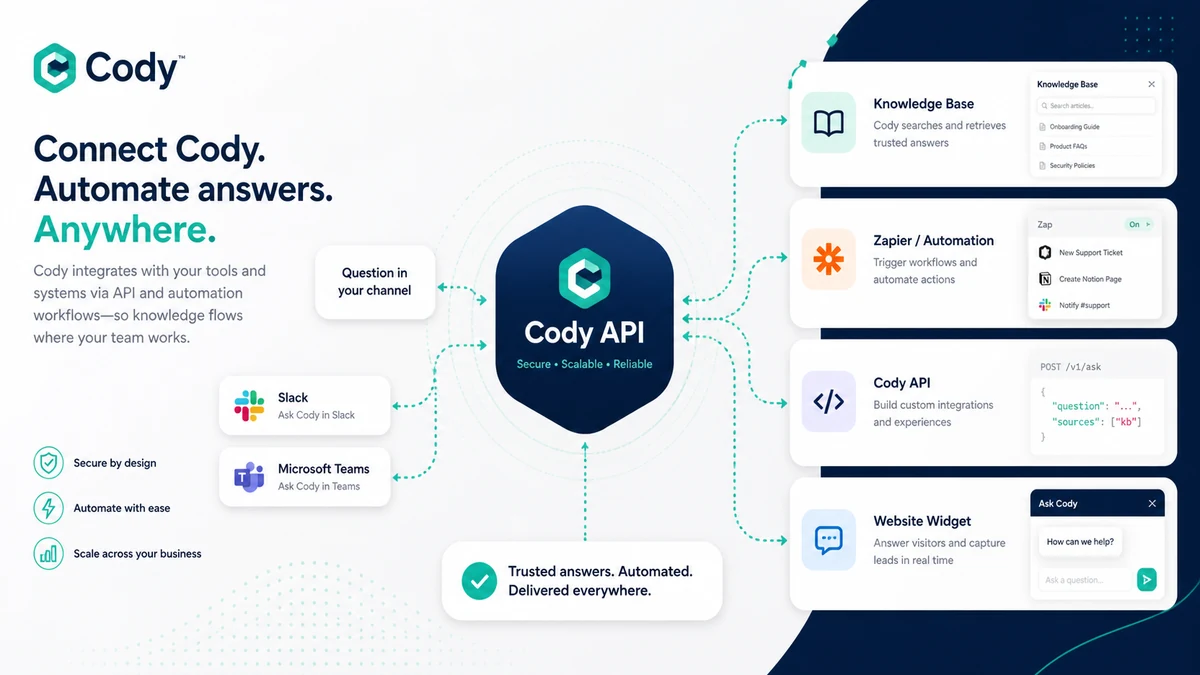
The official positioning leans into that promise. Cody describes itself as an intelligent assistant like ChatGPT, but trained on a business, team, processes, and clients. It also highlights document uploads, website crawling, source references for answers, team use, website widgets, Slack-style workflows, Zapier, and API access.
That creates a very specific buying question.
Not “is Cody smart?” Most modern AI tools can sound smart in a demo.
The better question is: can Cody retrieve the right information from your material, show enough source context, and reduce repeated search or support work without creating another channel your team forgets to maintain?
Our review approach: we compare public product pages, pricing details, documentation, deal terms, buyer workflow fit, and nearby alternatives. We do not treat a free account, coupon path, or low starting price as proof that the product fits the buyer.
Who should use Cody?
Cody makes the most sense for teams with existing knowledge that is useful but hard to access.
A small business with manuals, policies, sales notes, onboarding docs, FAQs, and product pages may use Cody as an internal question-answer layer. The condition is simple: the documents need to be current enough that the answer can be trusted.
A support team may find Cody useful when customers or employees ask the same questions repeatedly. The website widget and source-backed answers are the parts I would test first. If the answers are vague, unsupported, or based on stale pages, the widget becomes risky.
An operations or HR team may use Cody for onboarding, policies, internal process lookup, and training questions. This can work well when the source material is approved and maintained. It can work poorly when policies are scattered across old PDFs and nobody owns updates.
A founder may use Cody to test whether a lightweight business assistant can reduce repetitive questions before hiring support or operations help. The free account is useful here because it creates a low-risk test path.
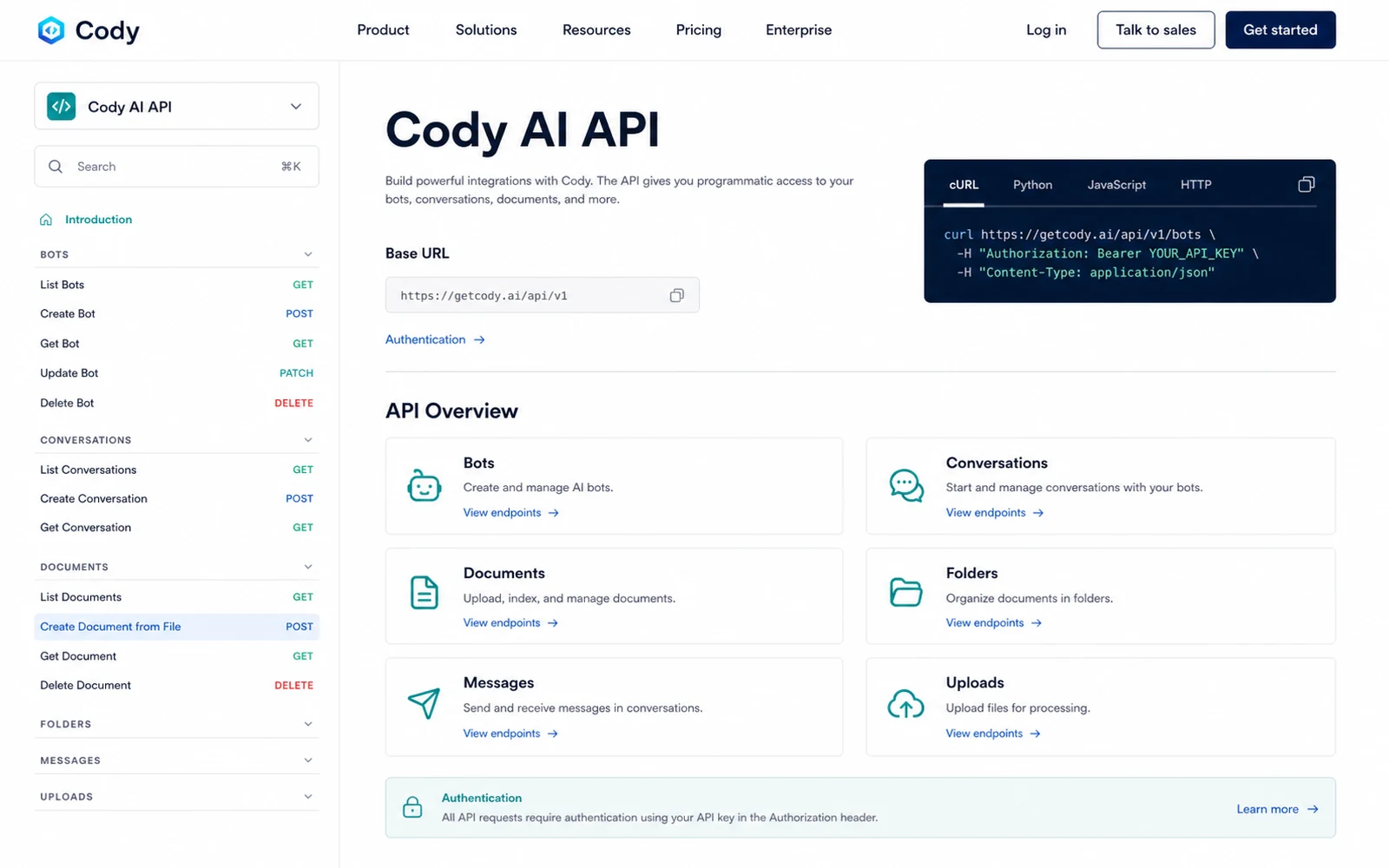
A technical buyer may also consider Cody if API access, Zapier workflows, or Slack-connected processes matter. The official API documentation and integration material make this buying case more credible than a tool that only offers a web chat interface.
Who should avoid Cody?
I would avoid Cody if you only need a general AI assistant for casual writing, brainstorming, or one-off questions. A dedicated knowledge assistant is usually more valuable when it is tied to a repeated business workflow.
I would also be careful if your documentation is messy. Cody can organize access to knowledge, but it cannot magically fix outdated policies, conflicting instructions, or files that were never approved. In that case, the first project is documentation cleanup, not a paid AI assistant.
Teams that need a mature customer support platform should compare Cody with support-focused chatbot tools before paying. Cody can support website and team workflows, but a buyer focused only on public support automation may want to compare Chatbase or Chaindesk first.
Buyers who need a guaranteed refund path should slow down. Cody’s terms use stricter refund language than a simple money-back guarantee, so I would treat the free account as the real test lane before paying.
Finally, Cody is not the cleanest fit for buyers who want a broad AI workspace with many unrelated tools. If you want image generation, writing utilities, transcription, design tools, and chat in one place, Cody is too focused. That focus is a strength for business knowledge retrieval, but not for every AI-tools buyer.
How Cody fits into a real workflow
A good Cody workflow starts before anyone opens the paid plan page.
The first step is choosing a narrow knowledge area. Do not upload every company file at once. Pick one use case: support FAQs, onboarding docs, sales process notes, internal policies, product documentation, or website pages.
Then ask real questions. Not demo questions. Real ones.
For example:
- What does a new employee need to know in week one?
- What should support say when a customer asks about setup?
- Which policy explains this process?
- What product documentation answers this issue?
- Which page should a sales rep reference before replying?
After that, the buyer should check three things: answer quality, source clarity, and credit usage. If the answer is useful but hard to verify, the workflow still needs caution. If the answer is accurate but consumes credits faster than expected, the pricing decision changes. If the answer is vague, the source material may need cleanup before Cody can be trusted.
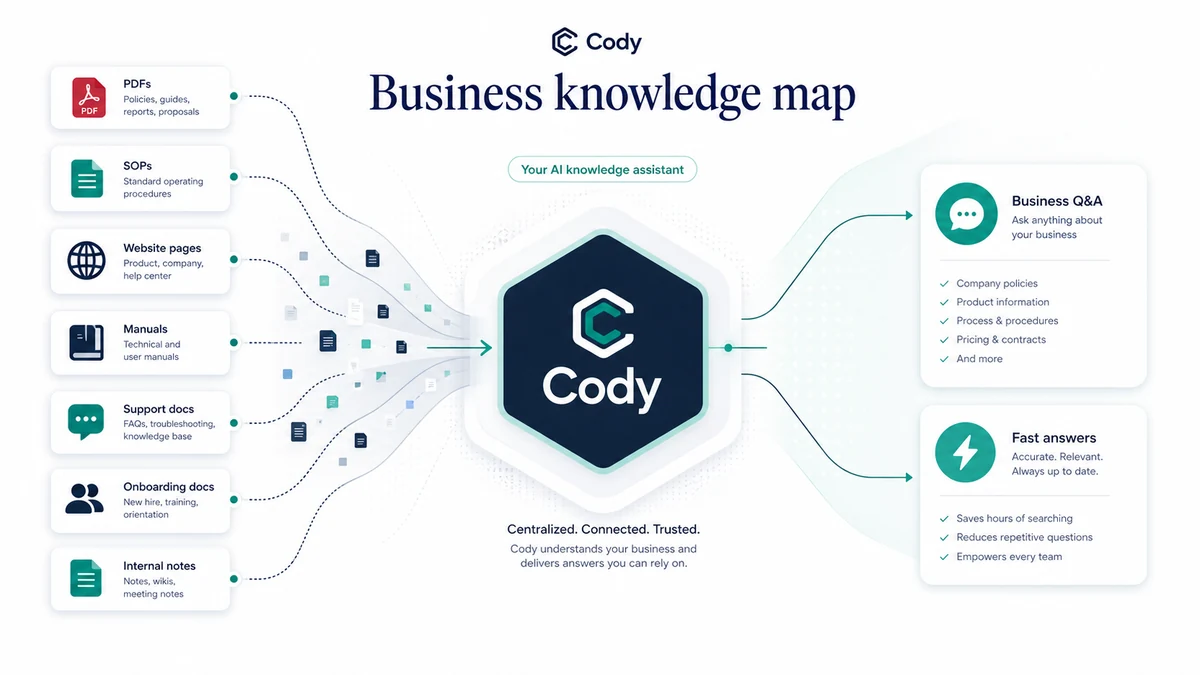
The strongest workflow fit is repeated knowledge retrieval. The weakest workflow fit is using Cody as a novelty chatbot for a few days, then forgetting to update the source base.
Workflow check: Build one small assistant from current source material before you compare Basic, Premium, or Advanced.
Real-world buyer scenarios
A small team answering repeated internal questions
This is one of Cody’s strongest fits. A team has useful documents, but people still ask the same operational questions in chat, email, or meetings. Cody can act as a searchable assistant if the documents are organized and current.
The risk is ownership. Someone has to keep the knowledge base clean. If nobody owns it, the assistant slowly becomes less reliable.
A support team testing a website knowledge widget
Cody can be useful when a buyer wants visitors, customers, or employees to ask questions from a trained knowledge base. The website widget can reduce repetitive support work if the answers are accurate enough and source-backed enough.
The test should not be “does the widget load?” The test should be “does the widget answer real customer questions in a way support would approve?”
A founder comparing free vs paid workflow value
A founder may like Cody because the free account makes it possible to test a focused use case before paying. That is the right way to evaluate it.
The mistake would be upgrading too quickly because the first demo answer feels impressive. I would ask enough real questions to understand credit consumption and answer consistency before choosing a monthly plan.
A technical team considering API or Zapier automation
Cody becomes more interesting when it is part of a connected workflow. API access and Zapier examples make it relevant for teams that want business knowledge inside automations, not just inside a chat page.
The tradeoff is usage planning. Automation can increase query volume quickly, so credits and model access need to be checked before building around it.
Key features that actually matter
Business knowledge training
Cody’s main feature is the ability to train an assistant on business material. That includes documents, website content, and other knowledge sources.
This matters because the buyer is not paying for generic AI conversation. The buyer is paying for faster access to specific knowledge.
Buyer note: test Cody with a narrow, current, high-value knowledge set before uploading a messy archive.
Source-backed answers
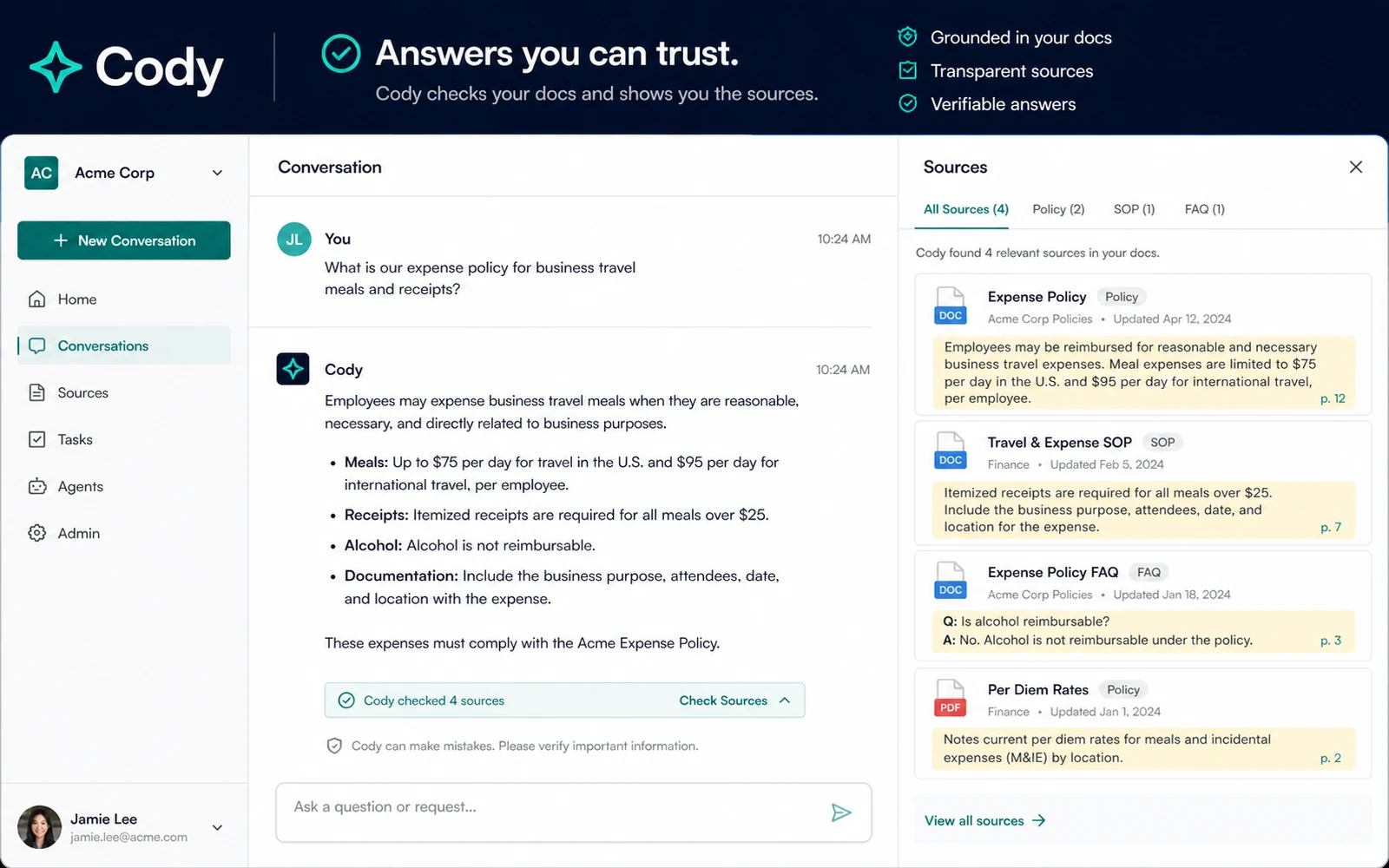
For a business assistant, source clarity matters more than polished wording. If a team cannot tell where an answer came from, it becomes harder to trust the assistant in support, HR, operations, or sales workflows.
Cody’s source-checking angle is a meaningful part of the buying case. It helps the tool feel more accountable than a blank chatbot.
Buyer note: judge Cody by whether answers are easy to verify, not only by whether they sound confident.
Website widget
The website widget can be useful if Cody needs to answer public or semi-public questions from website content or a selected knowledge base.
This feature matters for buyers who want a lightweight support route. It matters less for teams that only need internal lookup.
Buyer note: check widget limits, customization, branding, website-page limits, and whether the answers are safe enough for visitors.
Team access and conversation logs
Team seats and conversation logs are easy to overlook in a pricing table. They become important when Cody moves beyond one founder or one tester.
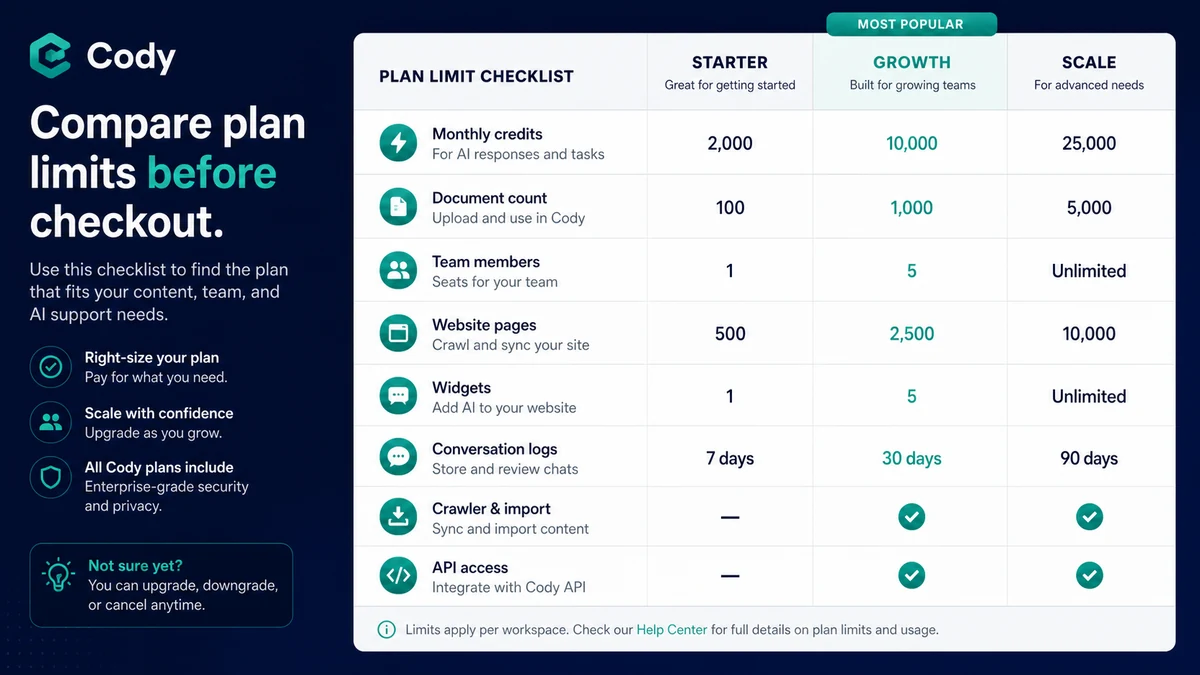
A 14-day log may be enough for a small test. A longer log may matter for reviewing answer patterns, support questions, onboarding gaps, or team adoption.
Buyer note: decide who will review conversations and improve the knowledge base after launch.
API and Zapier workflows
Cody’s API documentation and Zapier material make it more credible for buyers who want automation. This can include workflows connected to Slack, content operations, internal tools, customer support flows, or custom apps.
This is not automatically necessary. Some buyers only need the web app or widget.
Buyer note: use the API path only when the workflow justifies the added planning around credits, authentication, data handling, and maintenance.
Pricing and plan value
Cody’s current public pricing page is fairly clear compared with many AI tools, but the buyer still needs to do the usage math.
The free account is the best starting point for most buyers. It gives a low-risk way to test whether Cody can handle your documents, answer real questions, and support a simple widget use case. I would treat it as a proof lane, not a finished business rollout.
The Basic plan is the first paid decision point. It can make sense for a small team that has already tested Cody and needs more credits, more documents, team members, widget customization, and API access. The key question is whether the credit limit and team access match real monthly use.
Premium becomes more relevant when the buyer needs more team members, a longer conversation log, more documents, website crawling, recurring website imports, multiple embedded widgets, branding removal, and more model access.
Advanced is a stronger fit for larger usage patterns: more team members, more website pages, more embedded widget coverage, longer logs, and heavier workflows.
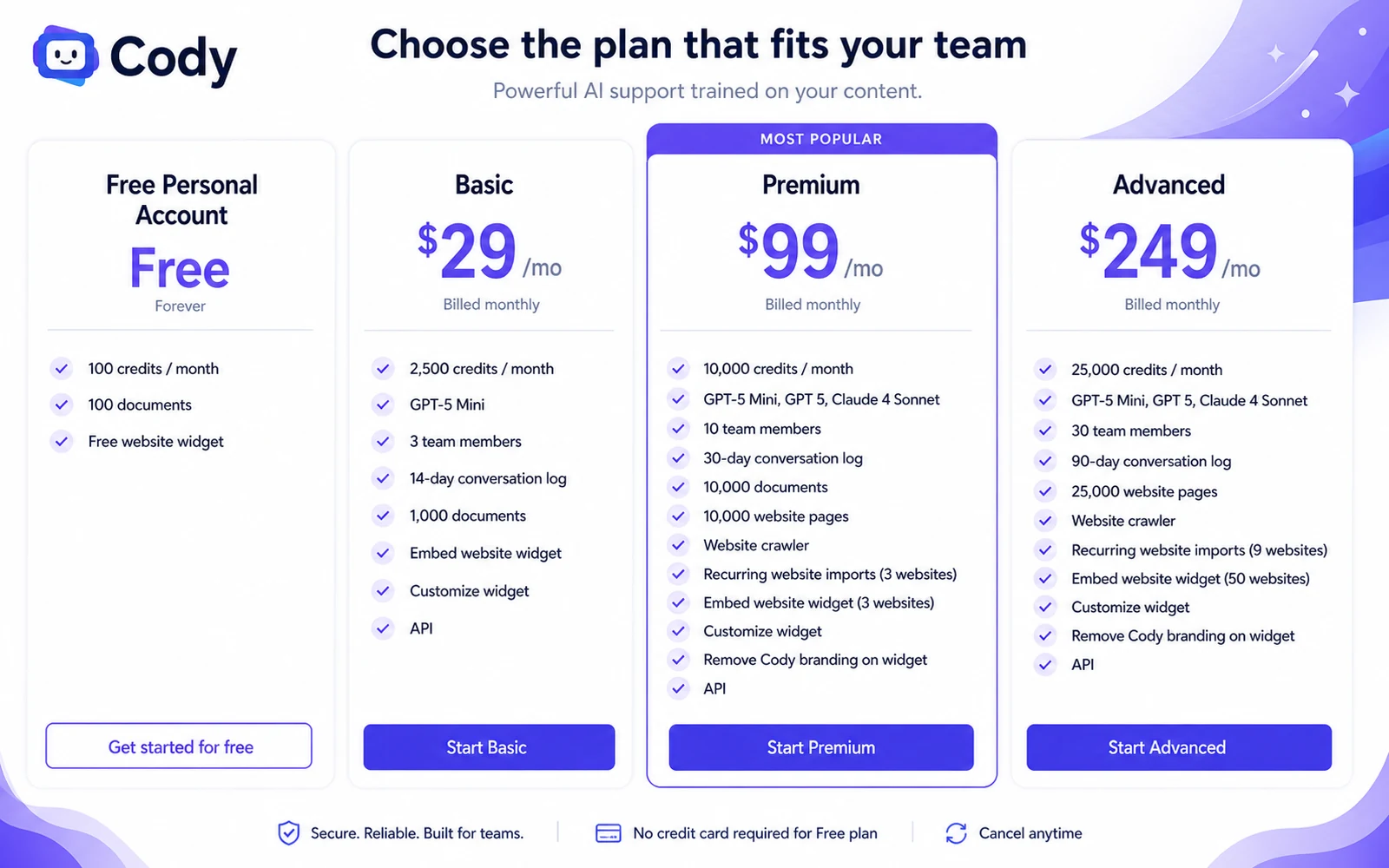
For my money, Cody’s pricing question is not “which plan looks cheapest?” It is “how many useful answers will the team need each month, and what source base will those answers depend on?”
That is why I would start free, move monthly before annual commitment, and avoid upgrading until the first knowledge-base test produces answers that actually save time.
Pricing check: If Cody’s free test works, compare credits, documents, widgets, team seats, and API needs before selecting a paid plan.
Free plan, trial, coupon, and checkout notes
Cody’s free account is the most important savings path because it lets buyers test fit before paying. A coupon or checkout offer can improve the purchase, but it should not be the reason to buy.
The free account should answer practical questions:
- Can Cody ingest the documents you care about?
- Are the answers specific enough to be useful?
- Are sources easy enough to check?
- Do credits run out quickly under real use?
- Does the website widget make sense for your workflow?
- Do team members actually use the assistant after the first test?
If those answers are weak, a paid discount does not solve the problem.
If those answers are strong, then the Cody coupon page can be worth checking before checkout. I would still treat public offer claims as secondary to the live pricing page, plan limits, and refund language.
Cody’s terms also deserve attention. The public terms say payments are nonrefundable except as provided in the agreement. That does not mean no buyer can ever resolve a billing issue, but it does mean I would not treat Cody as a casual paid test if the free account has not already proven workflow fit.
Checkout order: Test Cody free, confirm answer quality, compare plan limits, then check current offers only after the workflow is clear.
What I would check before buying Cody
If I were buying Cody for a real business workflow, I would check these points before paying:
- Source readiness: Are the documents, website pages, manuals, and process notes current enough for an AI assistant to use?
- Question quality: Do real staff or customer questions produce useful answers, or only generic responses?
- Source clarity: Can the team quickly verify where Cody’s answer came from?
- Credit usage: How many credits does a realistic day or week consume?
- Plan limits: Do documents, website pages, widgets, team members, and conversation logs match the actual workflow?
- API and automation needs: Is API access truly required, or is the web app/widget enough?
- Refund and billing terms: Are you comfortable paying after reading the current terms?
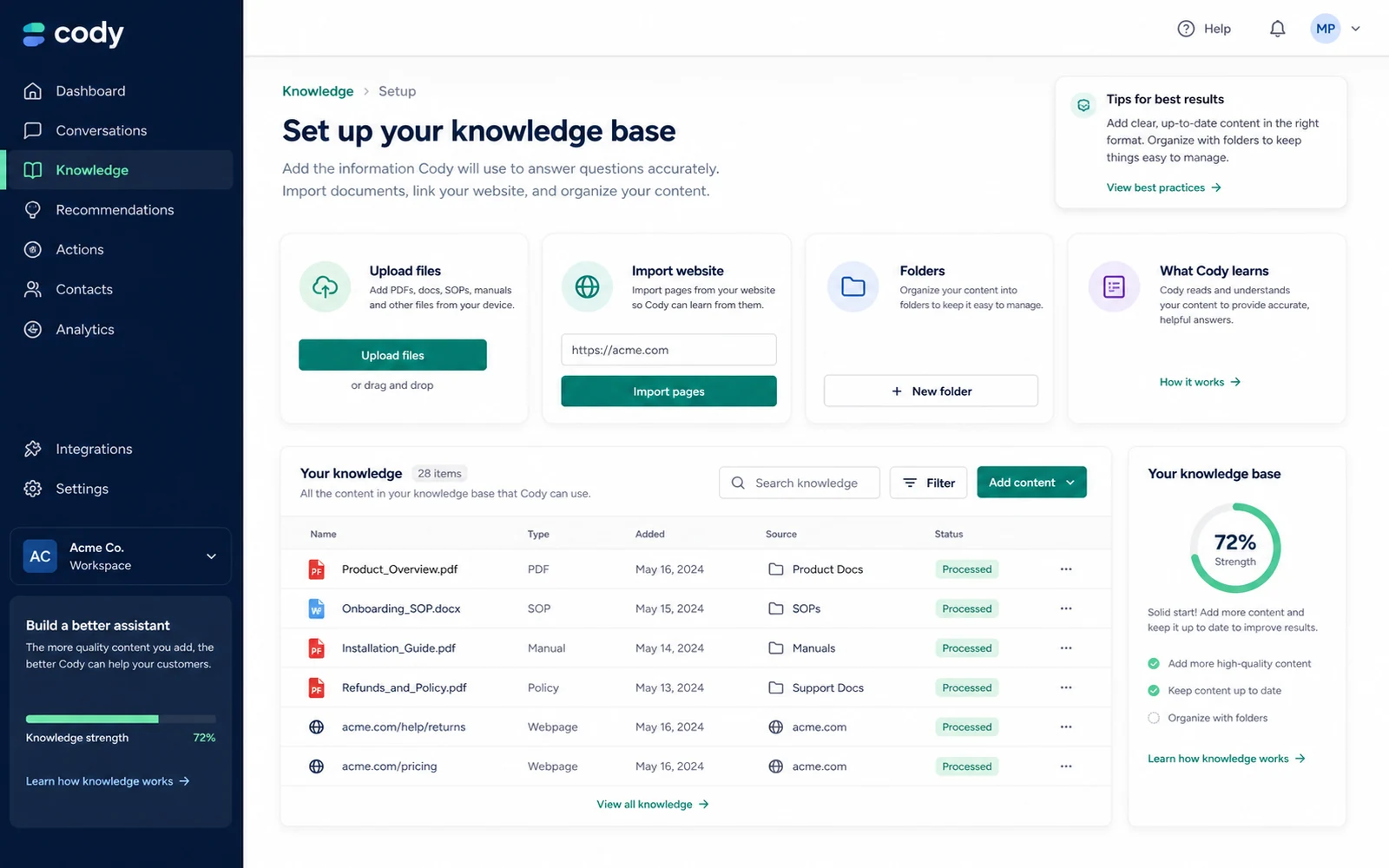
The biggest buyer mistake is treating Cody like a magic layer over messy knowledge. The better way to judge it is to test one well-defined knowledge area first.
A simple test before paying
Before paying, I would run a small test like this:
- Pick one narrow knowledge area, such as onboarding, support FAQs, product docs, or internal policy.
- Upload only current, approved source material.
- Write ten real questions that people already ask.
- Ask Cody those questions and review both the answer and the source context.
- Track how many credits the test consumes.
- Invite one or two real users to try the assistant.
- Decide whether the assistant saves time or simply adds another place to check.
This test is intentionally small. That is the point.
If Cody works in one narrow workflow, scaling makes sense. If it fails in a narrow workflow, a larger upload will not automatically fix it.
Pros explained
Cody has a clear knowledge-base job
Cody is easier to evaluate because its core job is specific: train an AI assistant on business knowledge and use it to answer questions. That is more concrete than a vague “AI productivity” promise.
It matters when a team has repeated knowledge questions. It matters less when the buyer only wants general writing help.
The free account lowers early risk
The free account is useful because it lets a buyer test documents, credits, and widget basics before paying. That is the right fit for a product whose value depends on source quality.
The limit is that free testing is not the same as full rollout. A small free test should guide the paid decision, not replace it.
Plan limits are visible enough to evaluate
Cody’s public pricing page shows concrete plan pressure points: credits, documents, team seats, website pages, conversation logs, widgets, model access, and API access.
That helps buyers compare value more honestly. The caution is that visible limits still require real usage testing.
API and Zapier support improve the automation case
Cody has a more credible automation angle than a simple chat-only tool because it publishes API documentation and integration workflows.
This matters for technical teams. It does not matter as much for a buyer who only wants a private Q&A assistant.
Cons explained
Source quality can make or break the product
Cody’s value depends heavily on the knowledge base. If the documents are outdated, contradictory, or vague, the assistant may produce answers that sound useful but do not solve the real problem.
The fix is not always a better plan. Sometimes the fix is better documentation.
The entry paid plan may be smaller than it looks
The Basic plan can be enough for some teams, but credits, team access, documents, widget use, and conversation logs may become constraints quickly.
A small team should test realistic use before assuming the entry paid plan covers daily operations.
Refund comfort is limited
Cody’s terms are not written like a simple no-questions money-back promise. That means buyers should not use the paid plan as the first serious test.
The safer path is free account first, then paid only when the workflow is proven.
Cody is not a broad AI toolbox
Some buyers may expect a general AI suite. Cody is more focused than that.
That focus is good when you need business knowledge retrieval. It is limiting when you want many unrelated AI tools in one subscription.
Green flags and red flags
Green flags
Cody is a stronger buying signal when:
- Your team already has useful documentation.
- People ask the same support, onboarding, sales, or operations questions repeatedly.
- You can test answer quality with real questions before paying.
- The website widget or API access connects to a real workflow.
- Someone owns knowledge-base updates after launch.
Red flags
I would slow down if:
- Your documents are outdated or scattered across conflicting versions.
- You are choosing a plan mainly because the price looks low.
- You have not estimated credit usage.
- You need heavy support automation but have not compared support-focused chatbot tools.
- You are uncomfortable with stricter refund language.
Green flags and red flags are especially important with Cody because the product can look impressive in a demo while still failing if the business process around it is weak.
Cody vs alternatives
Cody belongs in the business knowledge assistant and knowledge-base chatbot category. The closest comparisons are tools that also help buyers turn documents, websites, and support content into answer systems.
Chatbase vs Cody
Chatbase is usually the cleaner comparison if the buyer is focused on customer-facing AI chatbot deployment from website or support content. If your main need is a public chatbot for visitors, Chatbase may feel more direct.
Cody may still make sense if internal knowledge, team workflows, source checking, API use, and broader business assistant use cases matter more than only website support.
Chaindesk vs Cody
Chaindesk is worth comparing when the buyer’s main goal is support automation and helpdesk-style answer flows. It may be a closer fit for teams that think in terms of customer conversations, support processes, and automation around service.
Cody may be the stronger fit when the workflow is broader: onboarding, internal lookup, support docs, operations, Slack-style workflows, and business knowledge retrieval.
CustomGPT vs Cody
CustomGPT is a strong comparison when source-grounded answers and business knowledge retrieval are the central decision. Buyers should compare setup, source handling, website content ingestion, team features, and answer verification.
Cody may appeal to buyers who want a blend of knowledge assistant, team use, widget deployment, API documentation, and simple free testing.
Adjacent route: 1min.AI
1min.AI is not a direct replacement for Cody if the buyer wants a dedicated knowledge-base assistant. It is more of an adjacent route for buyers who want a broader AI workspace with multiple AI utilities.
Choose that direction only if your real need is broad AI access rather than source-grounded business answers.
Adjacent route: Aikeedo
Aikeedo is an adjacent route for buyers thinking about owning or building an AI SaaS-style system, not simply using a knowledge assistant inside their company.
That is a different buyer job. It can be relevant, but it should not be presented as a one-to-one Cody alternative.
Trust, refund, and buyer-risk notes
My confidence is strongest around Cody’s product role, pricing visibility, and knowledge-base workflow fit. The public positioning, pricing page, documentation hub, API reference, and integration material are enough to understand what Cody is trying to be.
I am more cautious around long-term value because that depends on each buyer’s documents, users, credit consumption, and maintenance habits.
The refund language is another reason to test first. Cody’s public terms say payments are nonrefundable except as provided in the agreement. That makes the free account more important. It is not just a nice bonus; it is the safest evaluation path.
Data handling also deserves attention. Any product trained on business documents needs a privacy and governance check before sensitive material is uploaded. Buyers should review the current privacy policy, security page, and internal data rules before using Cody with confidential company information.
The final risk is overbuying. A business AI assistant sounds strategic, but it only becomes valuable when someone maintains the knowledge base and reviews weak answers. Without that owner, Cody can become another tool that looked useful during setup and faded after the first week.
Final verdict
I would consider Cody if your team already has useful business knowledge and needs a faster way to answer repeated questions from documents, website pages, support notes, policies, or internal processes.
I would skip Cody if your main need is casual AI writing, broad AI tools, or a chatbot that does not depend on company source material. I would also pause if your documents are not ready, because Cody’s usefulness depends on the quality of what you feed it.
I would compare Cody with Chatbase if public website chatbot deployment is the main job. I would compare it with Chaindesk if support automation matters most. I would compare it with CustomGPT if source-grounded knowledge retrieval is the core requirement.
The safest next step is not to buy the biggest plan. Start with the free account, build one small assistant from current source material, ask real questions, and check answer quality, source clarity, and credit usage. If that test saves time, Cody becomes worth a serious plan comparison. If the test feels vague, fix the documentation or compare alternatives before paying.
