Cody Pricing, Plans & Knowledge Fit
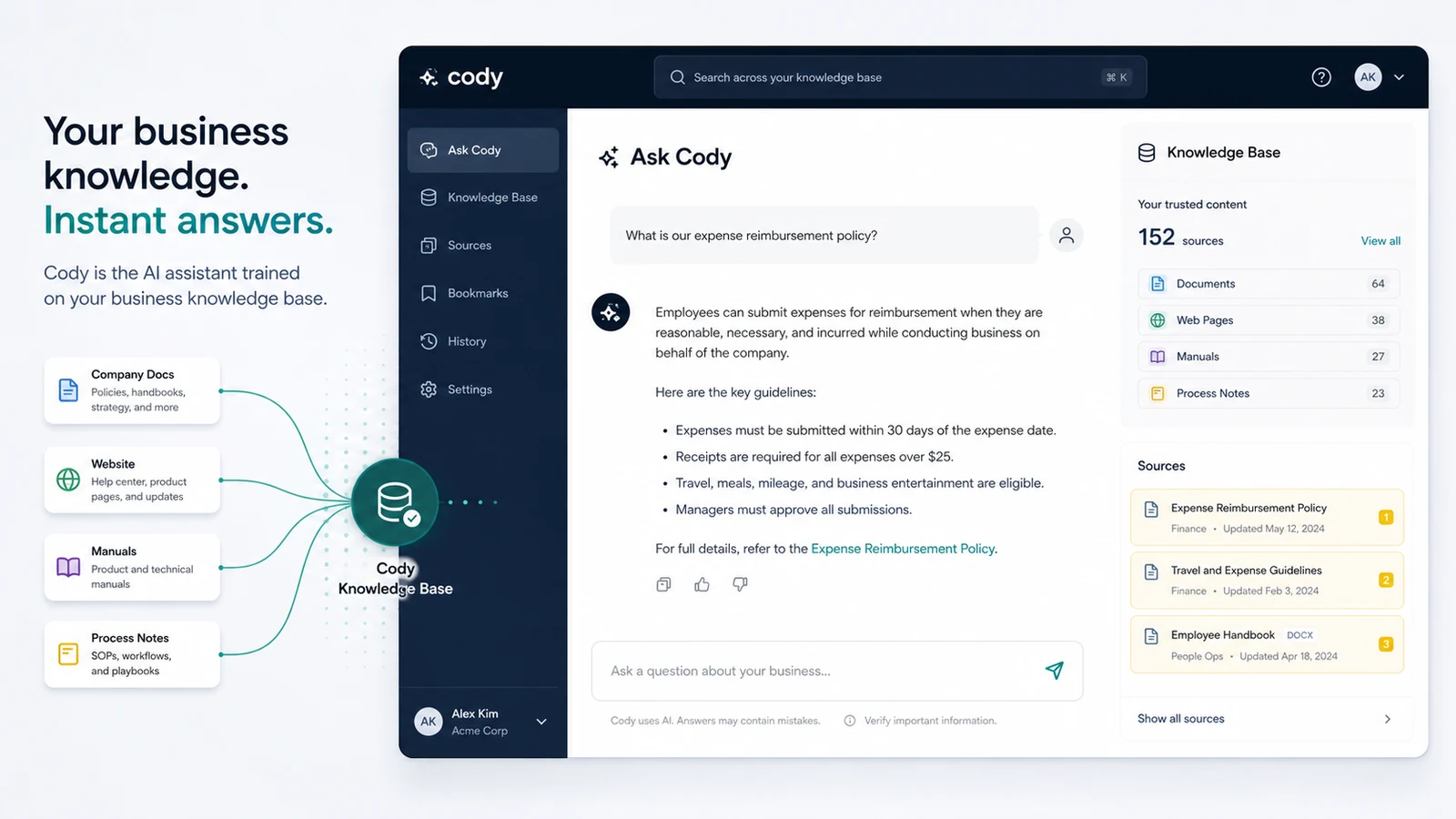
Cody is a business AI assistant that can be trained on a company's documents, website content, processes, and internal knowledge. It fits buyers who want a searchable knowledge assistant or embeddable chatbot for support, onboarding, internal questions, and repeat business workflows, not buyers who only need a casual AI writing tool.
Fit → price → checkout
Use these routes after the official-site check: coupon first, review for fit, compare if unsure.
Cody pricing snapshot
Fast commercial checks before pricing, coupons, or a deeper review.
Cody product tour for knowledge-base AI fit
Watch the tour as a practical knowledge-base test. The useful question is whether Cody can turn your own documents, website pages, and internal processes into answers your team would actually trust. Pay attention to how the bot is trained, how sources are handled, and whether the workflow feels manageable before you compare paid plan limits.
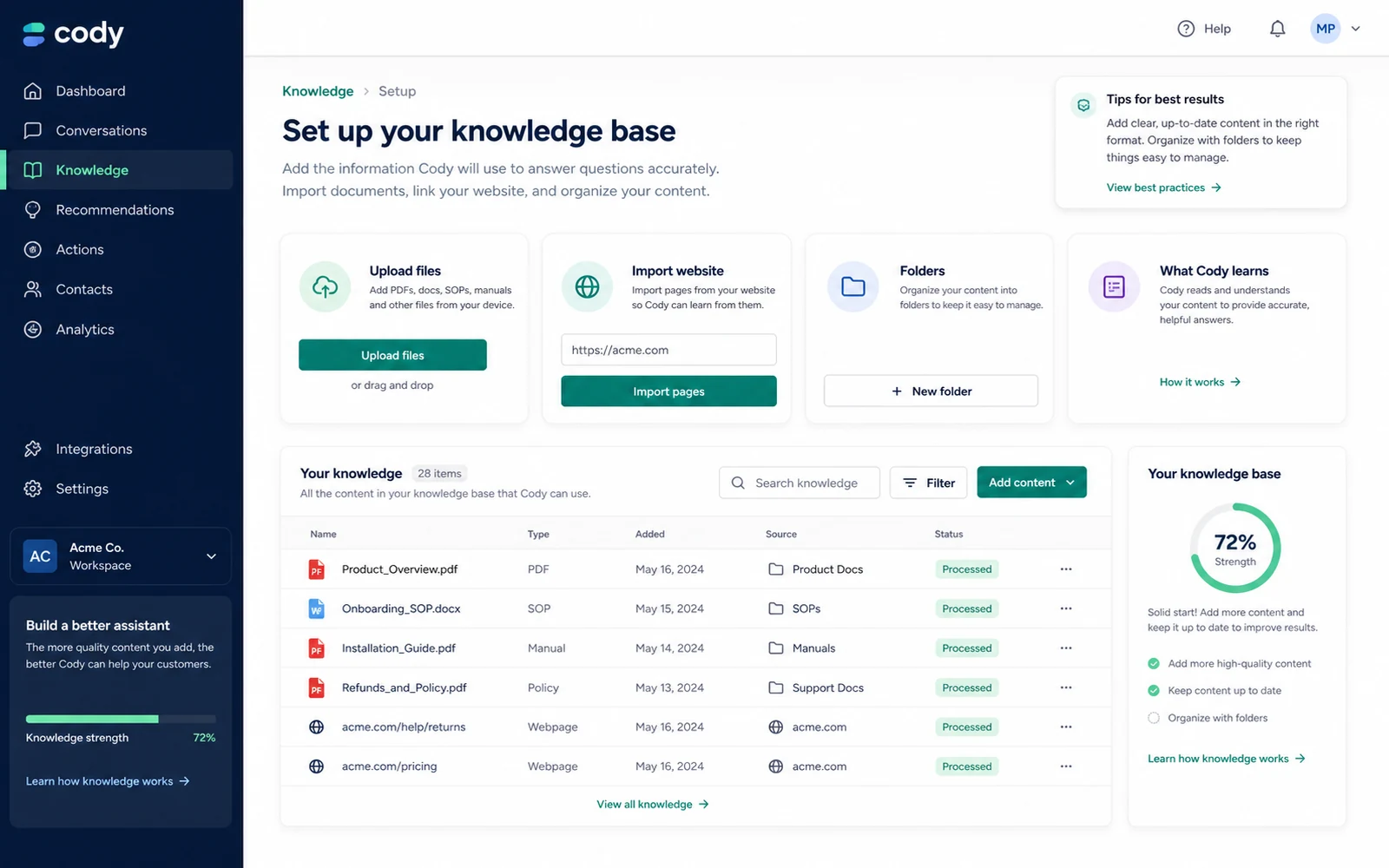
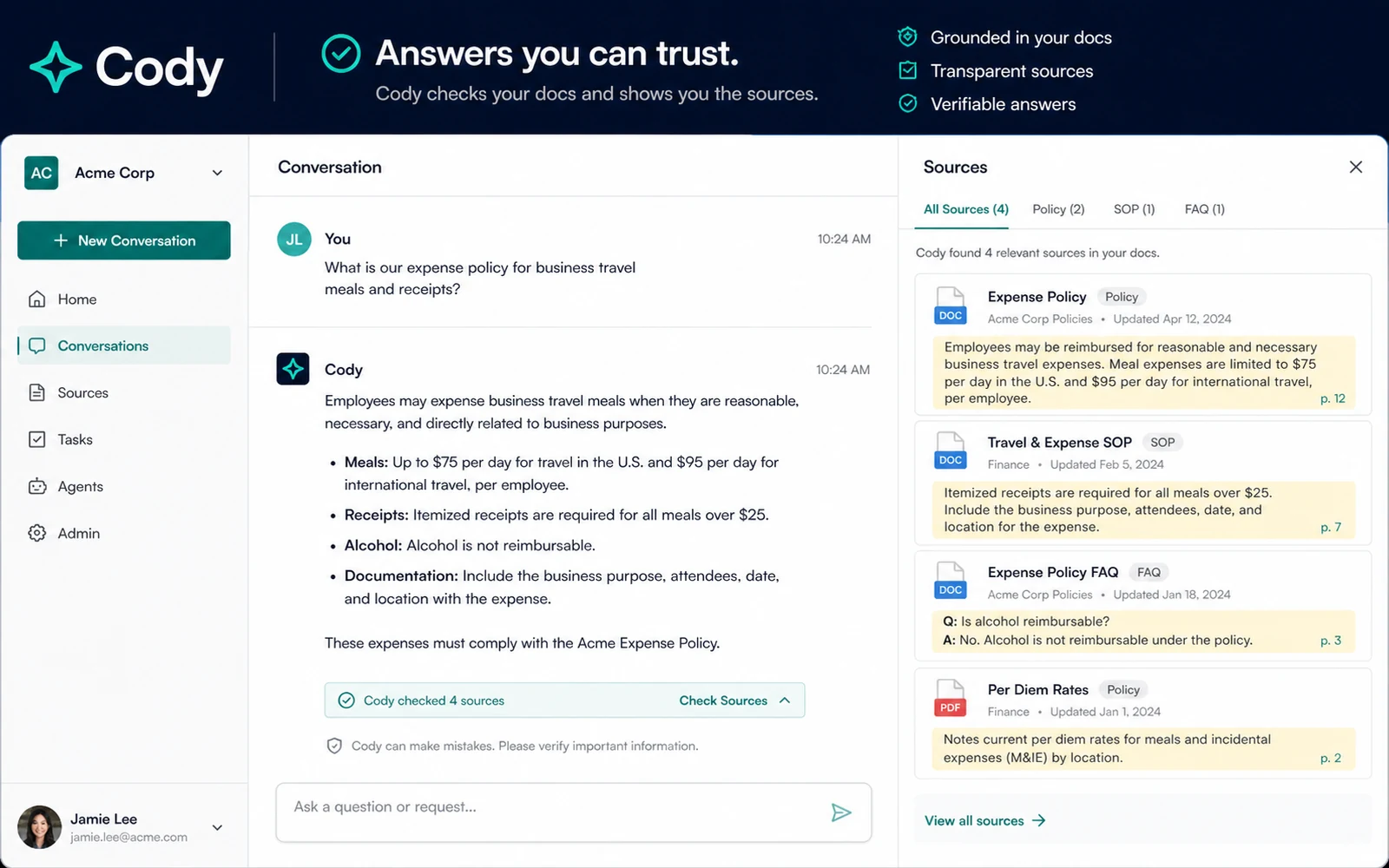
Cody should be evaluated as a business knowledge assistant, not as a generic AI chatbot. The strongest buying case appears when a team already has useful documents, website pages, manuals, support notes, or process knowledge, but people still waste time searching for answers.
What Cody actually does
Cody lets buyers build an AI assistant trained on business knowledge. The official homepage describes uploading documents, importing website content, checking sources, sharing bots with a team or customers, and using Cody for support, onboarding, troubleshooting, brainstorming, and internal knowledge work. The practical test is simple: can it answer repeat questions from your own material with enough source clarity to reduce manual search time?
- Use Cody when company knowledge exists but is hard for people to find quickly.
- Judge the tool by document ingestion, answer quality, source checks, and team adoption.
- Compare it against customer chatbot tools if your main need is public website support rather than internal knowledge.
Pricing path and free account fit
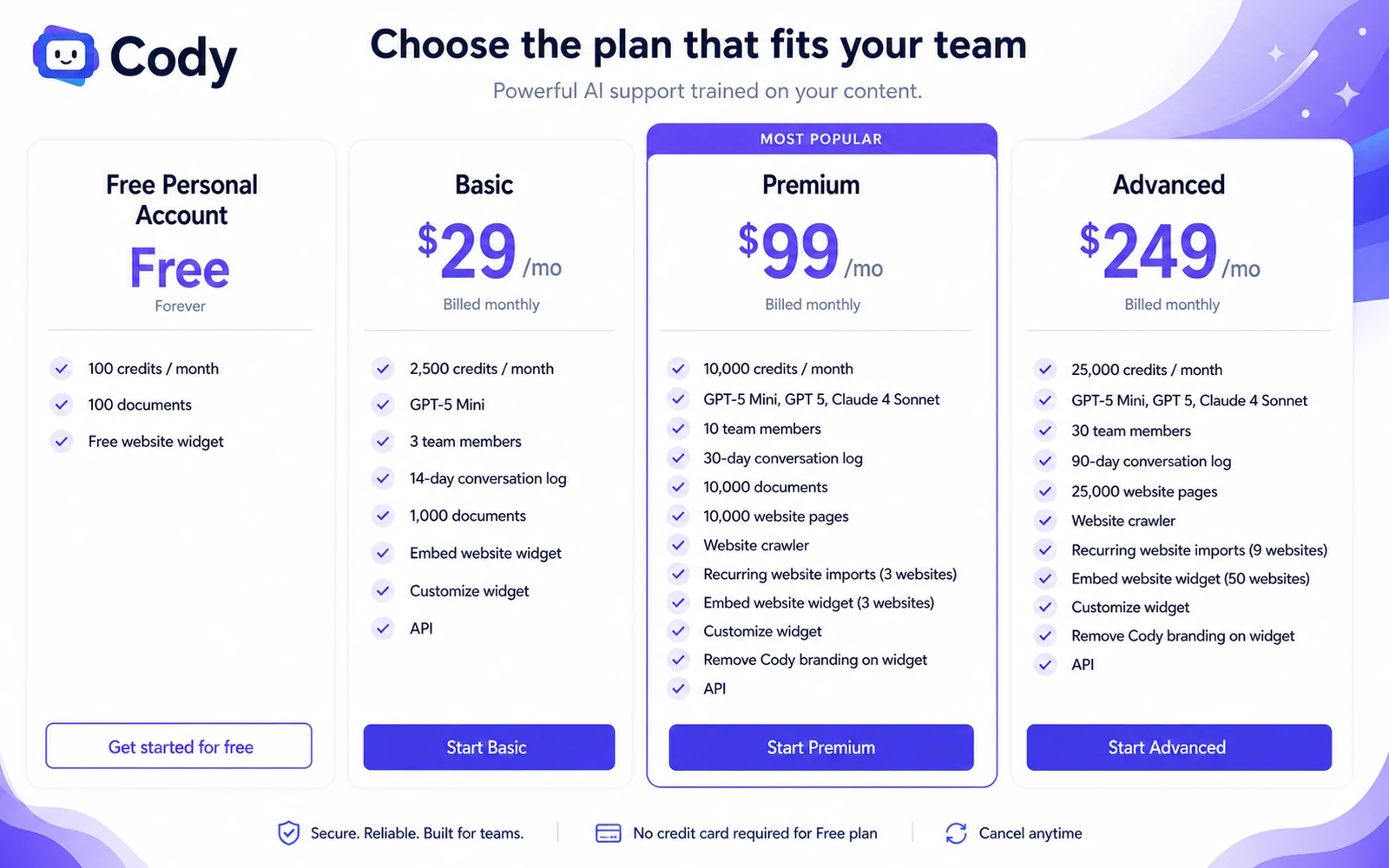
Cody's pricing page shows a free personal account with 100 credits per month, 100 documents, and a free website widget. Paid plans start at $29/month for Basic, then move to $99/month for Premium and $249/month for Advanced. The key buying pressure is not only price. Buyers should compare credits, document count, team seats, website crawling, conversation logs, widget limits, and whether API access is part of the workflow.
- Use the free account to test whether Cody understands your documents well enough.
- Use Basic when a small team needs more credits, more documents, and API access.
- Use Premium or Advanced only when larger teams, crawler limits, website pages, or widget scale justify the jump.
Video guide for business workflow fit
This second video is useful if you want to see Cody through a working-business lens rather than only a feature list. Watch for how the assistant is set up, how business knowledge is used, and whether the workflow looks like something your team would maintain after the first week. That matters because a knowledge assistant fails quietly when nobody updates the sources or checks the answers.
Where Cody fits best
Cody fits strongest in teams that already repeat the same knowledge questions across support, onboarding, HR, sales, IT, or internal operations. It is less compelling when the buyer has no clean knowledge base yet, or when the problem is broad content creation rather than source-grounded answers. For many teams, the first practical use case is not replacing employees. It is reducing the time people spend hunting through PDFs, old pages, and internal notes.
- Good fit for internal knowledge lookup, customer support content, training bots, and website widget answers.
- Weaker fit for one-off writing, creative ideation, or teams without maintained documentation.
- Best evaluated with real questions from staff, customers, or onboarding workflows.
API and automation check
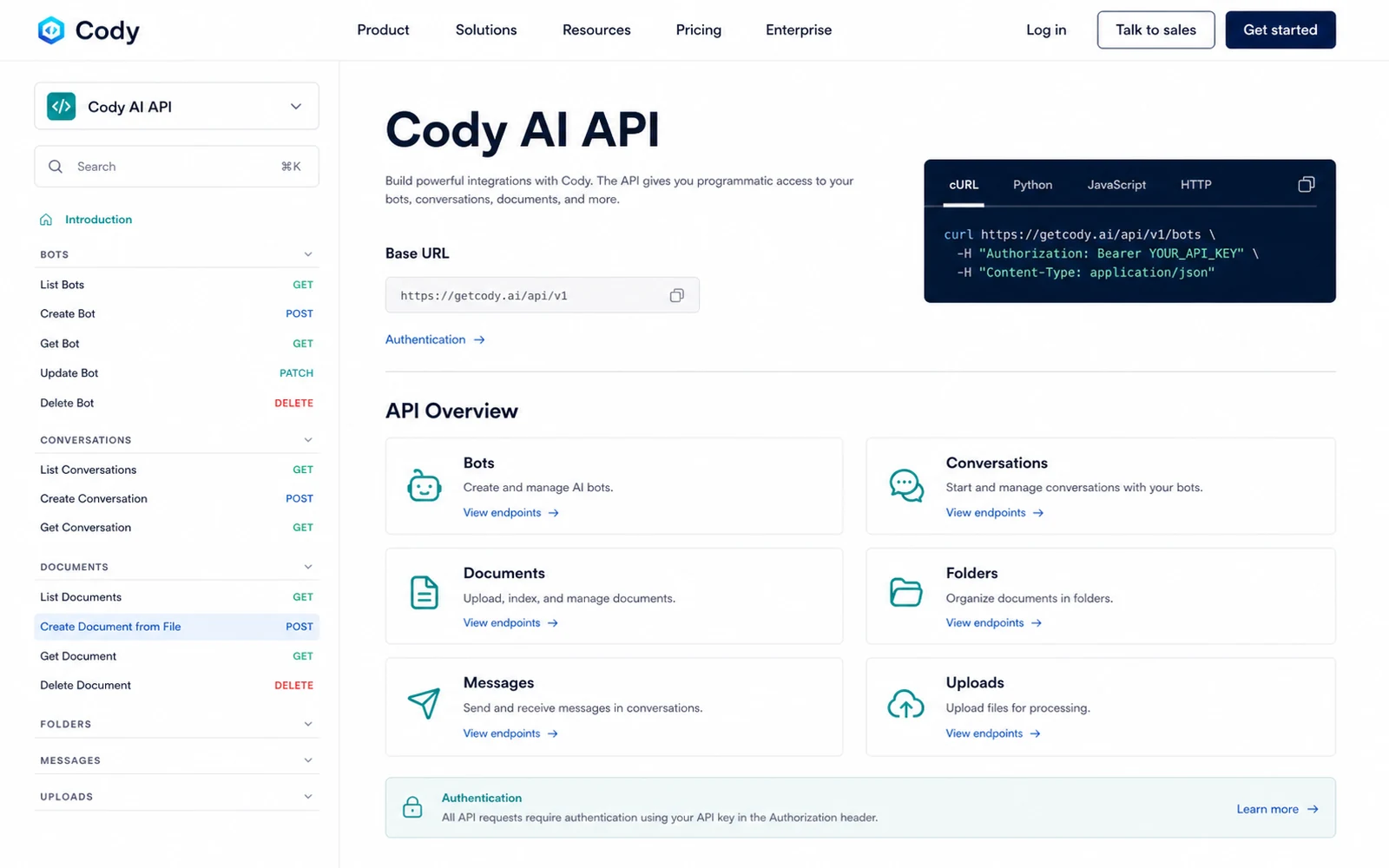
Cody has a stronger technical buying case than a simple chat widget because it publishes API documentation and workflow material around integrations such as Zapier. The official Zapier article shows Cody being used in a workflow that starts from a Slack message and turns it into a LinkedIn post. That does not mean every buyer needs automation, but it does mean technical teams should verify API scope before choosing Cody only as a web chatbot.
- Check the API documentation if Cody needs to connect with internal systems or apps.
- Review Zapier and Slack-style workflows when the buyer needs automation, not just a web chat screen.
- Confirm plan limits and credits before building business processes around API usage.
Safest next step before checkout
The safest next step is to join free, build one small assistant from current source material, and ask questions that match your actual business workflow. If Cody answers with useful context and the source-checking feels trustworthy, then compare Basic, Premium, and Advanced by limits. If the first test feels vague, the better move is to fix the documentation or compare alternative knowledge-base chatbot tools before paying.
- Join free and test a narrow knowledge base before comparing paid plans.
- Move to the review route if fit is still unclear after the first workflow test.
- Use the coupon or pricing route only after plan limits and refund risk are understood.
Best savings path from this store page
This is the clearest savings route to check once the product already looks like a fit.
Cody's pricing page offers a free personal account with monthly credits, documents, and a free website widget. Use it before committing to a paid team plan.
Entry paid plan
Higher-usage plan path
Use comparison routes when the category fit is still open
Use these comparison routes when the product still looks plausible, but the category fit is not fully settled.
Better known for buyers focused on customer-facing AI chatbots trained on site or support content.
Often a closer fit when the main goal is support automation and helpdesk-style answer flows.
Worth comparing when source-grounded answers and business knowledge retrieval matter more than broad assistant features.
A broader AI workspace angle, useful if the buyer wants many AI tools rather than a dedicated business knowledge assistant.
Verification points worth checking before you click out
Where this store usually fits best in the workflow
Cody can help teams answer repeated questions from uploaded files, process notes, and internal documentation, but it needs clean source material to be useful.
The free widget and paid embed options make Cody relevant for buyers who want customers or employees to ask questions from a trained knowledge base.
HR, training, and operations teams can test Cody with policies, manuals, and onboarding material before deciding whether paid plan limits justify rollout.
Teams with technical needs can inspect the API documentation and Zapier-style workflow examples before relying on Cody inside broader business processes.
Practical checkpoints before and after signup
- Choose a small, current document set rather than uploading every file at once.
- Write five to ten real questions that staff or customers already ask.
- Check whether answers cite useful sources and avoid vague generic responses.
- Track how quickly free credits are consumed by real questions.
- Compare credits, documents, team members, website-page imports, crawler needs, and widget limits.
- Read refund language and pricing terms before assuming a paid plan is low risk.
- Assign someone to update the knowledge base and review low-confidence answers.
- Watch conversation logs so the assistant improves the workflow instead of adding another unchecked channel.
Fast-read signals for workflow fit and buying friction
Questions readers usually ask before choosing this store
What does Cody actually do?
Cody lets buyers create an AI assistant trained on their own business knowledge, including documents, website content, processes, and support material. It is best judged as a knowledge-base assistant rather than a generic AI chat tool.
Does Cody have a free plan?
Yes. Cody's pricing page says the free personal account includes 100 credits per month, 100 documents, and a free website widget. Treat it as a test path for answer quality and workflow fit before paying.
What is Cody's starting paid price?
The public pricing page lists Basic at $29/month, Premium at $99/month, and Advanced at $249/month. Buyers should compare usage limits, documents, team seats, model access, website crawling, and widget needs before choosing.
What should buyers verify before checkout?
Buyers should verify live pricing, credit limits, document limits, team access, widget requirements, API needs, and refund language. The Terms say payments are nonrefundable except as provided in the agreement.
Is Cody better than a normal chatbot tool?
Cody may be better if the buyer needs business knowledge retrieval, source checking, API access, and internal workflow support. A more customer-support-focused chatbot may be a better fit if the only goal is a public website support widget.
Choose the next route that matches what you still need to decide
The strongest next click depends on whether you still need product judgment, a savings route, or a broader category comparison.