Quick verdict
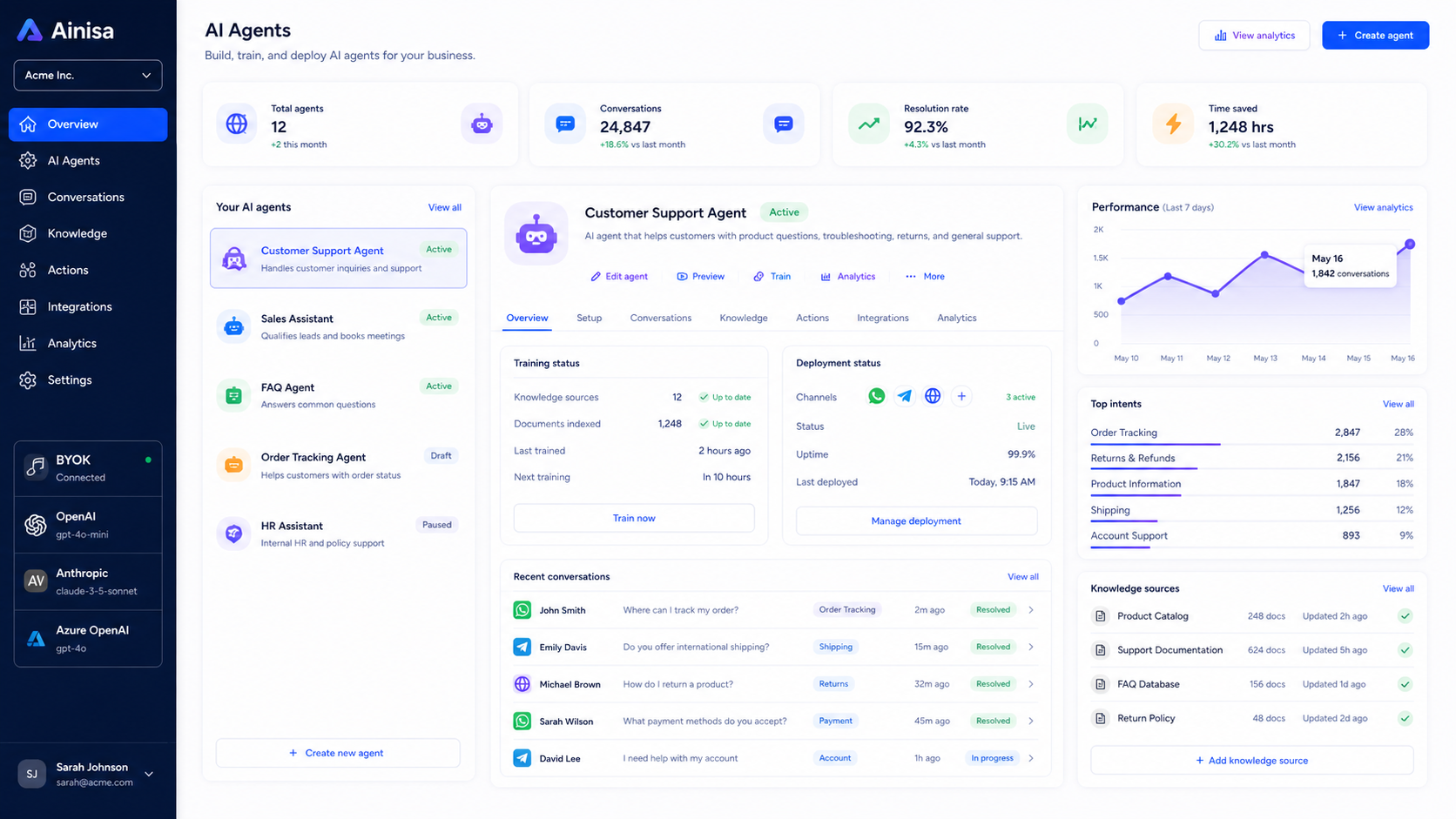
Ainisa is worth considering if you are not just looking for another chatbot widget, but for a business AI agent that can sit in front of real customer conversations.
That distinction matters.
The strongest reason to look at Ainisa is its combination of no-code agent creation, customer-channel deployment, and a bring-your-own-key pricing model. In plain English, the product is trying to help a business train an AI assistant on its own knowledge, connect that assistant to channels such as a website, Telegram, or WhatsApp, and then let the assistant answer questions or trigger workflow actions.
I would be more careful if you are buying only because the pricing page says you can start free, or because a partner deal looks attractive. Ainisa still requires setup. You need business documents, product information, FAQs, policies, model-provider keys, channel decisions, and testing before putting an AI agent in front of customers.
For my money, Ainisa makes the most sense for e-commerce stores, SaaS teams, agencies, and service businesses that already know which support, sales, or lead-capture conversations they want to automate. It is less convincing as a casual productivity tool or a quick FAQ bot for someone who does not want to think about API keys, usage costs, WhatsApp setup, or customer handoff logic.
The safest next step is simple: test the workflow before chasing the deal. Use the Ainisa store guide to understand the buyer route, but judge the tool by whether it can handle one real customer conversation from start to finish.
Next step: If Ainisa looks like a real fit for your support, sales, or lead-capture workflow, check the live product route before choosing a plan.
Review snapshot
| Review point | Practical take |
|---|---|
| Best for | Businesses that want AI agents for customer support, lead capture, sales questions, and messaging-channel automation |
| Not ideal for | Buyers who only need a personal AI assistant, a prompt library, or a very basic FAQ widget |
| Main use case | Training a customer-facing AI assistant and connecting it to website, Telegram, WhatsApp, and workflow actions |
| Pricing model | Free-start positioning with BYOK usage; paid and partner routes need live verification |
| Main strength | Clearer AI-cost visibility because OpenAI or Anthropic usage is handled separately from the platform fee |
| Main concern | Setup friction, channel requirements, third-party costs, and different refund rules by purchase path |
| Best direct alternatives to compare | Chatbase, Chaindesk, ChatSimple |
| Best next step | Build a small test agent before annual billing, partner deal, or lifetime checkout |
What is Ainisa?
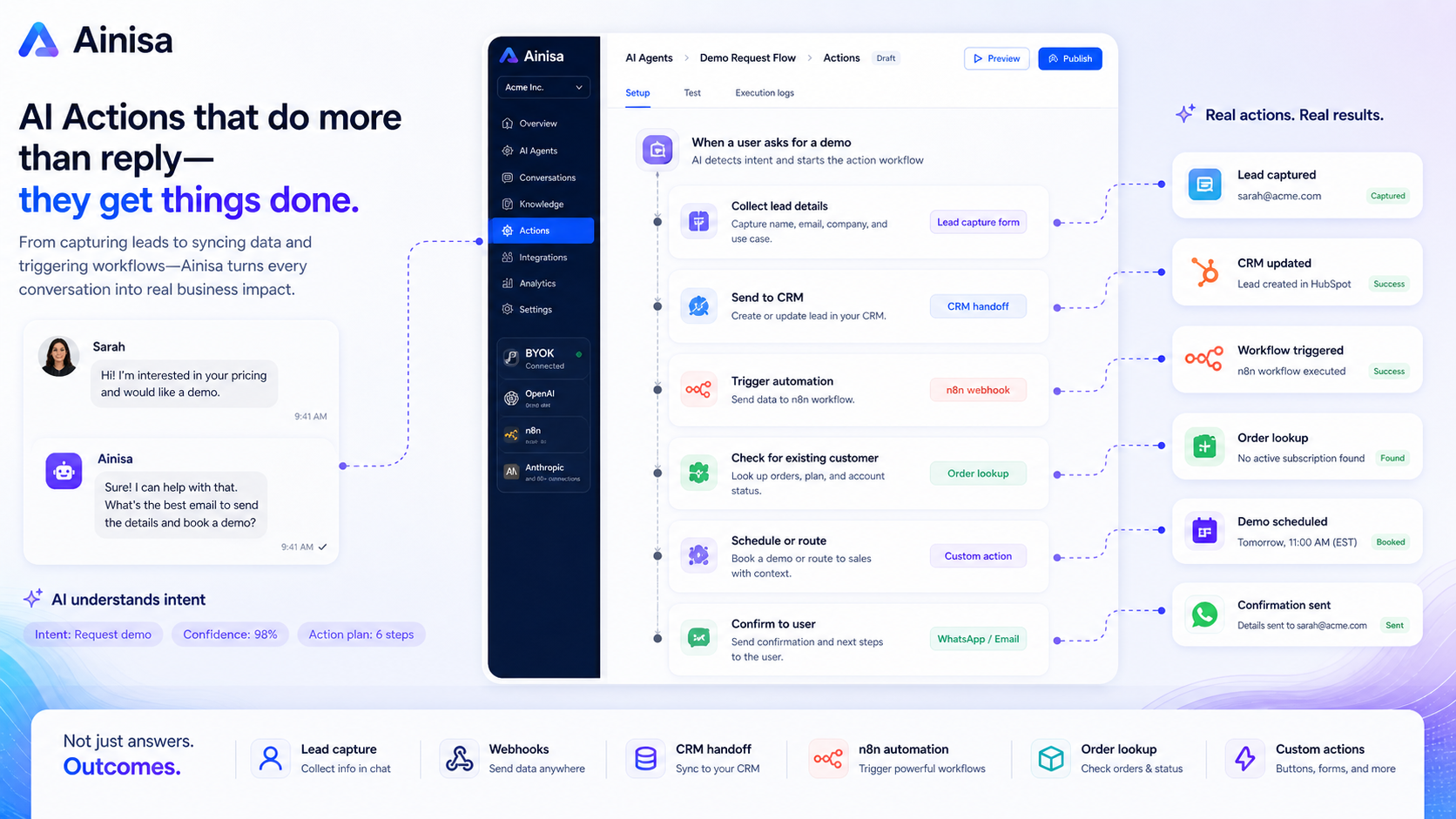
Ainisa is best understood as a no-code AI agent platform for businesses that want to automate customer-facing conversations.
That is different from a prompt library. It is also different from a simple chatbot that only answers a few static FAQs. The product is built around trained AI assistants, business knowledge, messaging-channel deployment, and actions that can move a conversation into a business workflow.
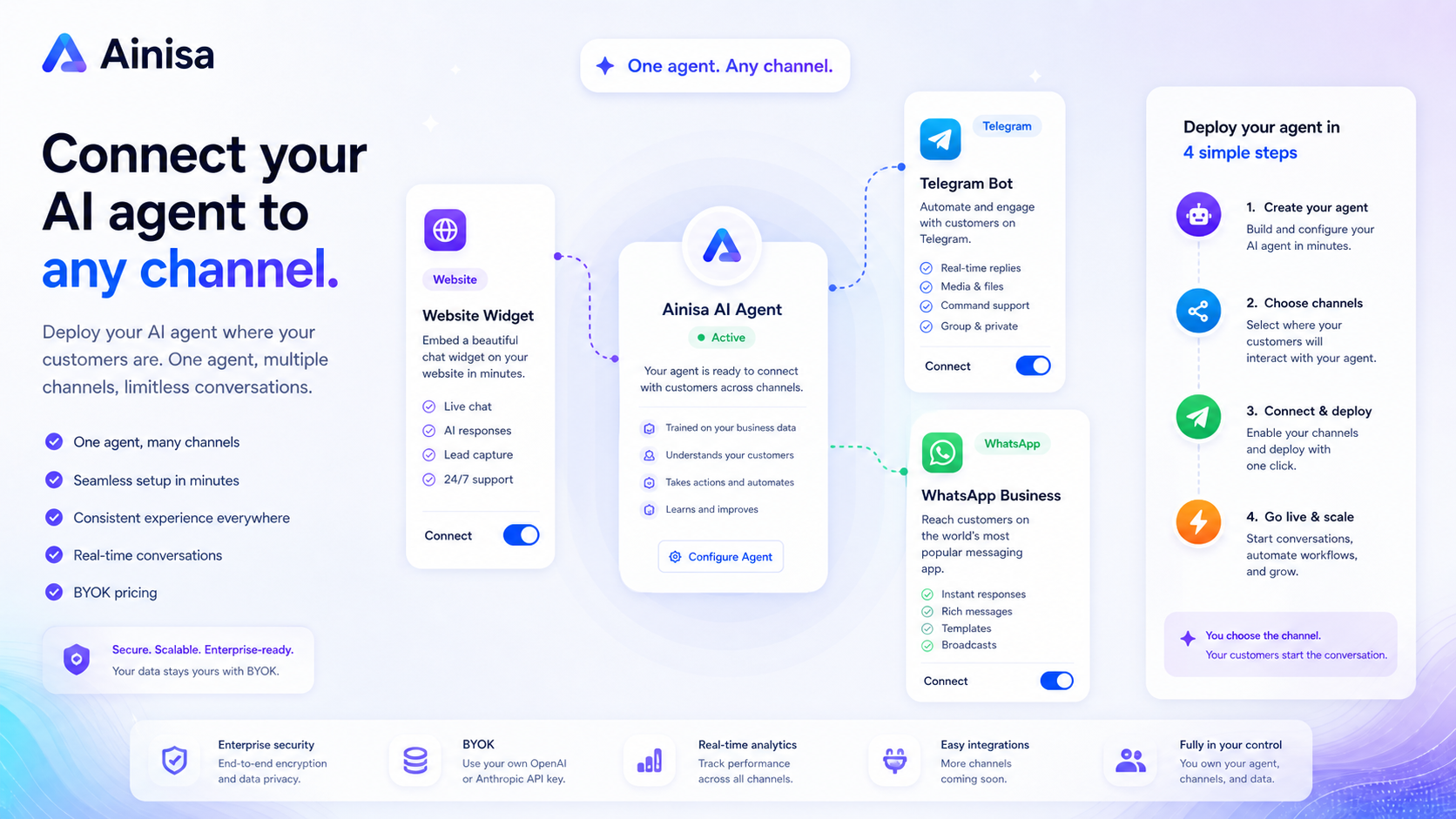
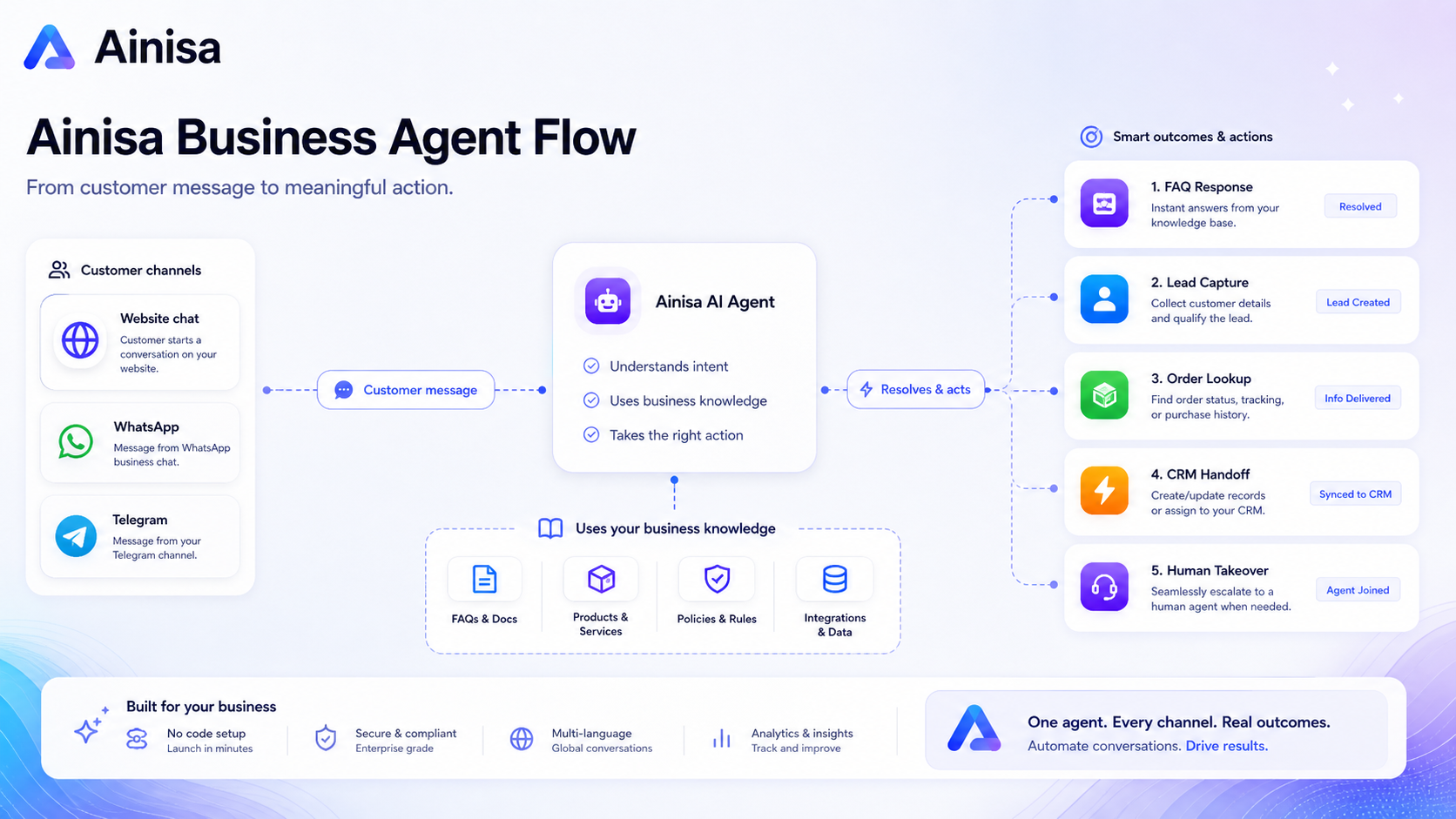
A practical Ainisa setup may include an AI assistant trained on product pages, FAQs, order rules, support policies, onboarding documents, or sales information. The assistant can then be deployed into customer channels such as a website widget, Telegram, or WhatsApp. The more advanced buyer angle is that Ainisa can support actions such as CRM lead creation, n8n webhooks, forms, buttons, product search, order status lookup, and other API-style workflows.
The common wrong expectation is that Ainisa will be useful just because it is “no-code.” No-code does not mean no planning. A customer-facing agent still needs clear business rules, good source material, safe fallback behavior, and testing before it answers real customers.
Our review approach: we compare public product pages, pricing details, help documentation, terms, deal conditions, buyer workflow fit, and nearby alternatives. We do not treat a coupon, lifetime deal, or low entry price as proof that the product fits a business.
My confidence is strongest around Ainisa’s product role: a BYOK AI agent builder for customer conversations. I am more cautious around long-term value because live pricing, partner deals, message volume, channel availability, and refund terms can change faster than editorial copy.
Who should use Ainisa?
Ainisa is most interesting for buyers who already have a customer conversation problem.
E-commerce stores with repeated product and order questions
An e-commerce store may use Ainisa to answer product questions, policy questions, shipping questions, or order-related requests. The fit becomes stronger if the store has clear documentation and enough repeated support volume to justify an AI assistant.
The condition is important: the store needs clean product data, support policies, and escalation rules. If those are missing, the agent may sound confident while still failing on the details that customers actually care about.
SaaS teams handling onboarding and support questions
A SaaS company may use Ainisa for onboarding questions, feature explanations, setup guidance, or pre-sales qualification. This can be useful when the same questions appear again and again in chat.
Before paying, I would check whether Ainisa can connect to the channels the SaaS team already uses, whether internal docs are ready for training, and whether the team knows when a human should take over.
Agencies building AI assistants for clients
Agencies may like Ainisa because the product is not only a single business chatbot. It can fit repeatable client deployments where each client needs an assistant trained on its own business knowledge.
The risk is operational. Client deployments require support, maintenance, usage monitoring, and clear ownership. If an agency sells the agent before testing channel setup, message volume, and handoff rules, it can create more work than it saves.
Founders who want messaging-channel automation without custom development
Ainisa may fit founders who want to connect website chat, Telegram, or WhatsApp without building a custom backend. The product becomes more valuable when the founder needs AI actions, forms, lead capture, or workflow triggers rather than only basic answers.
I would still start small. One assistant. One channel. One workflow. Then expand.
Who should avoid Ainisa?
Ainisa is not the tool I would pick for every AI productivity buyer.
You should probably avoid it if you only want a personal writing assistant, prompt library, or general AI workspace. Ainisa is aimed at business agents and customer conversations, not casual solo productivity.
You should also be careful if you dislike API-key setup. The BYOK model can be a strength, but it means the buyer needs an OpenAI or Anthropic account, an API key, and a willingness to monitor usage costs separately from the platform subscription.
I would slow down if WhatsApp, Instagram, or Facebook are the only reason you are buying. Messaging-channel tools often depend on Meta accounts, policy rules, phone number setup, permissions, and live platform status. Verify the exact active integration you need before building your customer workflow around it.
Ainisa may also be too much if you only need a small FAQ bot on a website. In that case, a simpler tool such as Chatbase or ChatSimple may be easier to justify.
Finally, do not buy Ainisa only because a partner deal or lifetime route appears attractive. The easy mistake is to treat the deal as the decision. The better way is to confirm that your business can set up, train, test, and maintain the agent.
How Ainisa fits into a real workflow
A good Ainisa workflow does not start at checkout. It starts with the customer conversation you want to automate.
The cleaner process looks like this:
- Choose one customer-facing use case, such as support FAQs, lead qualification, product search, or booking guidance.
- Collect the business knowledge the agent needs: FAQs, product information, policies, order rules, service descriptions, and escalation rules.
- Add the model provider key and configure the assistant.
- Train or connect the assistant to the relevant business material.
- Deploy to one channel first, such as the website widget or Telegram.
- Test with real customer-style questions before launch.
- Add AI actions only when the basic answers are reliable.
- Review conversations, adjust the knowledge base, and monitor AI provider usage costs.
That workflow is why Ainisa is more serious than a quick chatbot demo. The product becomes useful when it sits inside a repeated business process. It becomes weaker when the buyer expects one setup screen to solve messy support or sales operations.
Workflow check: If your business can name one support, sales, or lead-capture conversation worth automating, Ainisa is worth testing before you compare longer-term plans.
Real-world buyer scenarios
Scenario 1: An online store wants fewer repetitive support chats
A store owner may want an AI agent that answers product questions, shipping questions, return-policy questions, and basic order-related questions. Ainisa can make sense here if the store already has clear FAQs and product information.
Where it may fail is messy documentation. If the store has inconsistent policies, old product descriptions, and unclear escalation rules, the agent can only work with imperfect source material. Before paying, the store should test common questions and check when the conversation should route to a human.
Scenario 2: A SaaS founder wants pre-sales qualification
A SaaS founder may use Ainisa to answer “Does this work for my use case?” questions, collect emails, route trial users, or help visitors choose a plan. This is more valuable than a basic FAQ because lead capture and AI actions can connect the chat to a business workflow.
The risk is over-automation. Some pre-sales questions are nuanced. If the AI assistant qualifies the wrong lead or gives unclear product advice, the founder may lose trust. A small test with real visitor questions is more useful than a polished demo.
Scenario 3: An agency wants a repeatable chatbot package
An agency may see Ainisa as a way to offer AI agents to local businesses, e-commerce brands, or SaaS clients. The BYOK model can be attractive because clients can separate platform fees from AI provider usage.
The agency should still verify team seats, client separation, support expectations, white-label needs, integrations, and long-term maintenance. Selling an AI agent is easy. Supporting it after launch is the real work.
Scenario 4: A business wants WhatsApp automation
A buyer focused on WhatsApp should be especially practical. The value is clear if customers already use WhatsApp heavily. But setup may involve WhatsApp Business, Meta requirements, phone number handling, template or policy rules, and ongoing monitoring.
I would not choose Ainisa only because it mentions WhatsApp. I would verify the exact integration status, setup requirements, message costs, and fallback behavior before making WhatsApp the main automation channel.
Key features that actually matter
BYOK pricing model
Ainisa’s bring-your-own-key model is one of the main reasons to compare it with more bundled chatbot platforms.
Instead of hiding AI usage inside a credit system, Ainisa asks the buyer to connect a model provider key, such as OpenAI or Anthropic. The benefit is more visibility: you can see the platform fee separately from model usage. The risk is that you now have another cost layer to monitor.
Buyer note: BYOK is useful only if someone on your team tracks usage. If your message volume grows and nobody watches provider costs, the headline platform price can become misleading.
Website, Telegram, and WhatsApp deployment
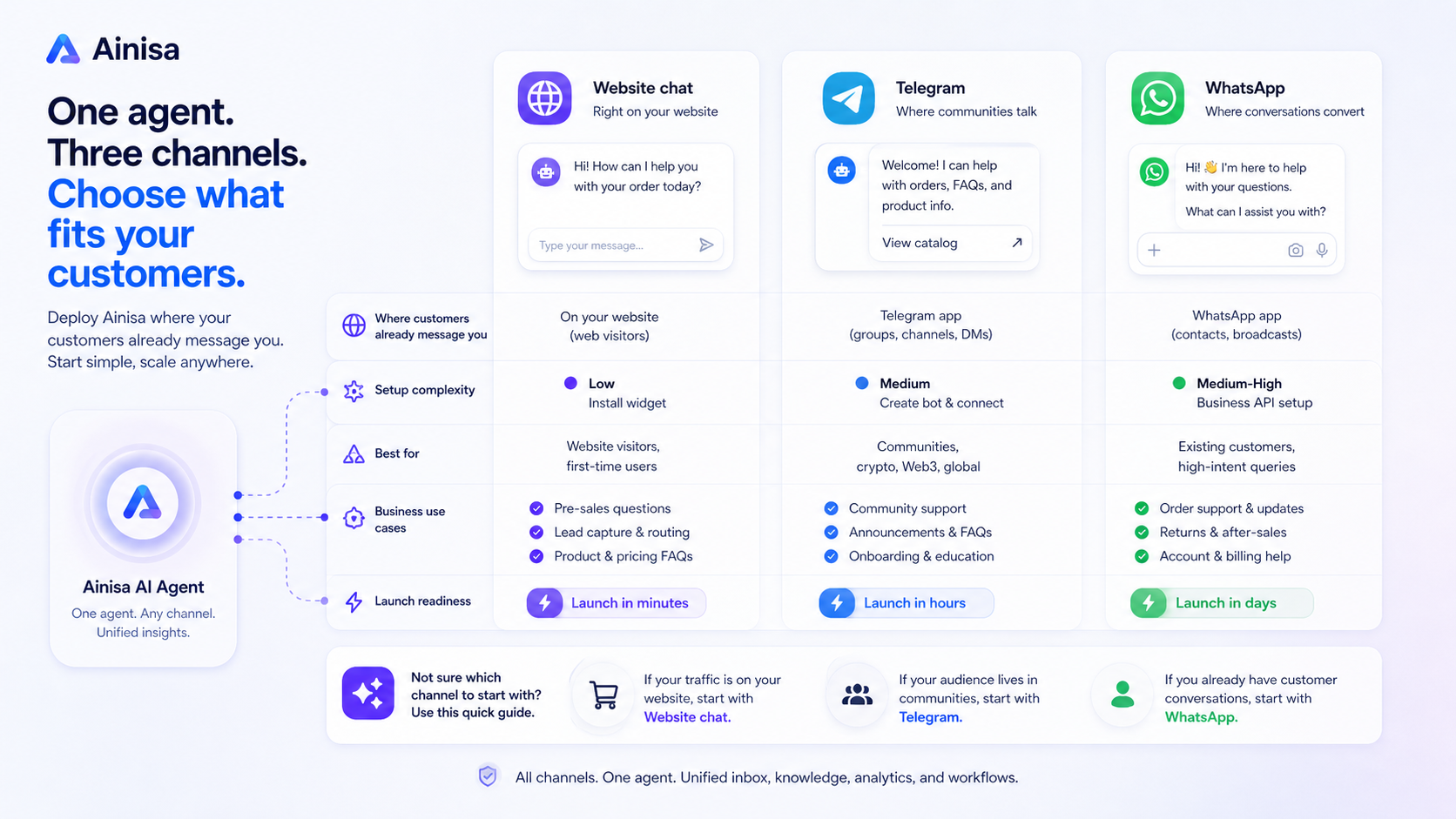
Ainisa is strongest when your customer conversation already happens in a channel the product supports. Website chat is the simplest buyer path. Telegram can fit communities, founder-led businesses, and support flows. WhatsApp can matter for businesses where customers already expect messaging support.
Buyer note: verify the exact active channel before buying. Marketing pages and docs can move at different speeds, especially around Meta-related integrations.
AI actions and workflow triggers
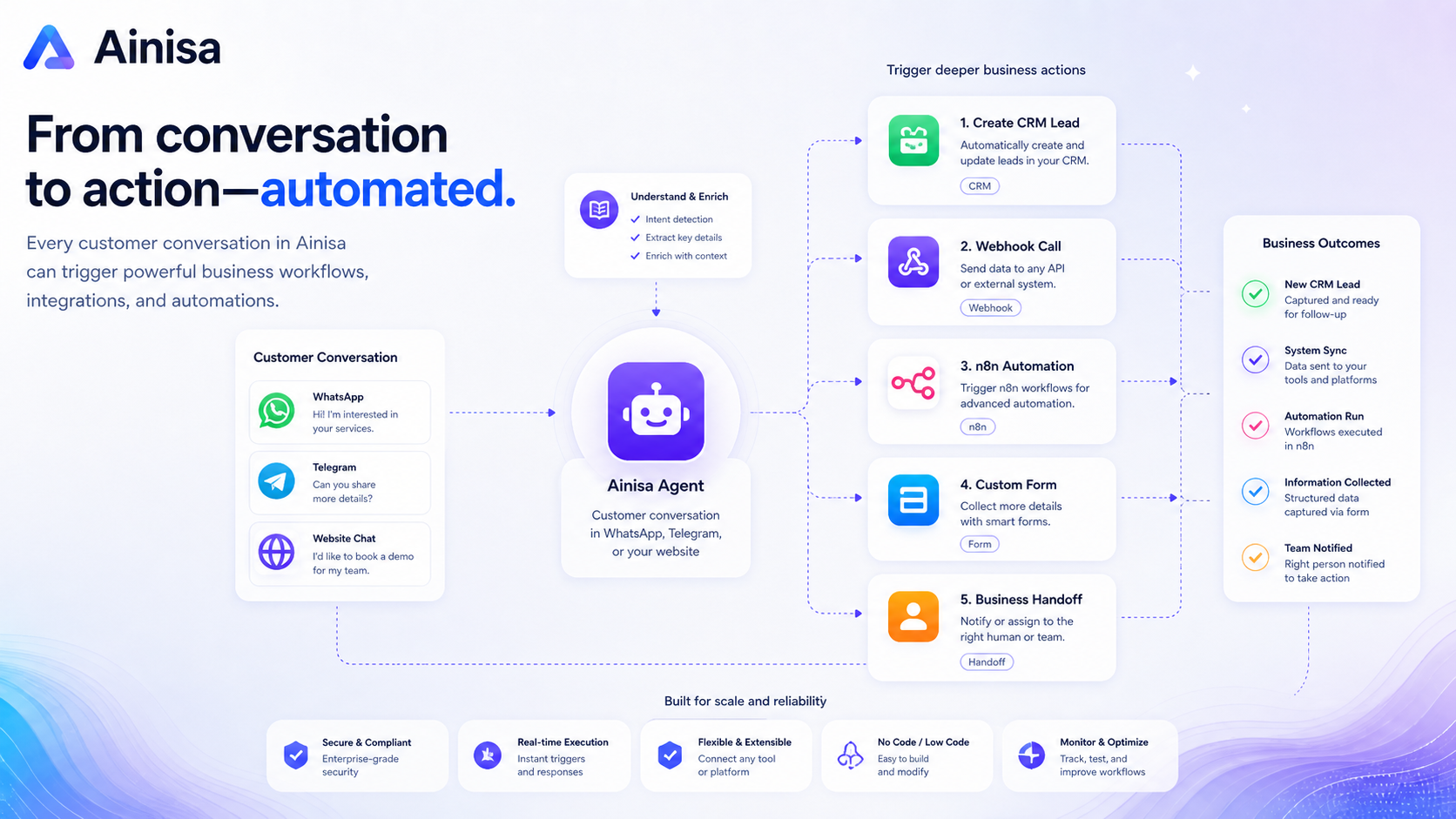
The more interesting part of Ainisa is not basic answering. It is the ability to let an agent trigger actions: create a CRM lead, call an API endpoint, trigger an n8n webhook, show forms, display buttons, fetch product data, or hand structured information to another system.
That is where Ainisa can move from chatbot to workflow layer.
Buyer note: action logic needs careful testing. A bad FAQ answer is annoying. A bad automated action can affect sales, support, data quality, or customer trust.
Business knowledge and training material
Ainisa depends heavily on the information you give it. Product descriptions, FAQs, policies, onboarding docs, service details, and internal processes all matter.
If your business knowledge is clean, the agent has a better chance of being useful. If your information is scattered, outdated, or contradictory, the tool may expose that mess rather than solve it.
Buyer note: before comparing plans, audit your source material. The best agent platform cannot rescue unclear business documentation.
Human handoff and team review
For customer-facing automation, human handoff is not optional. There will be edge cases, frustrated customers, sensitive questions, and moments where a human should take over.
Ainisa becomes more credible when the buyer treats it as a first-response and workflow-assist layer, not as a full support replacement.
Buyer note: define handoff rules before launch. Decide what the agent should never answer alone.
Pricing and plan value
The pricing question with Ainisa is less about the first visible price and more about the total cost of running an AI agent.
Ainisa’s public positioning includes a free-start path and a BYOK model. That means the platform fee is only one part of the decision. You also need to think about OpenAI or Anthropic usage, WhatsApp Business or Meta-related costs when relevant, and any third-party automation tools connected to the workflow.
That is not necessarily bad. In fact, the transparency can be a strength. BYOK pricing can be cleaner than platforms that wrap everything into credits and make heavy usage harder to understand.
But it changes the buyer’s job.
Before paying, I would estimate:
- How many customer conversations the agent will handle each month.
- Which AI provider and model you plan to use.
- How many assistants or agents you need.
- Which channels matter now, not theoretically later.
- Whether AI actions, forms, API calls, or n8n workflows are part of the use case.
- Whether the team needs seats, handoff, analytics, or priority support.
- Whether a partner lifetime deal has different limits from a subscription plan.
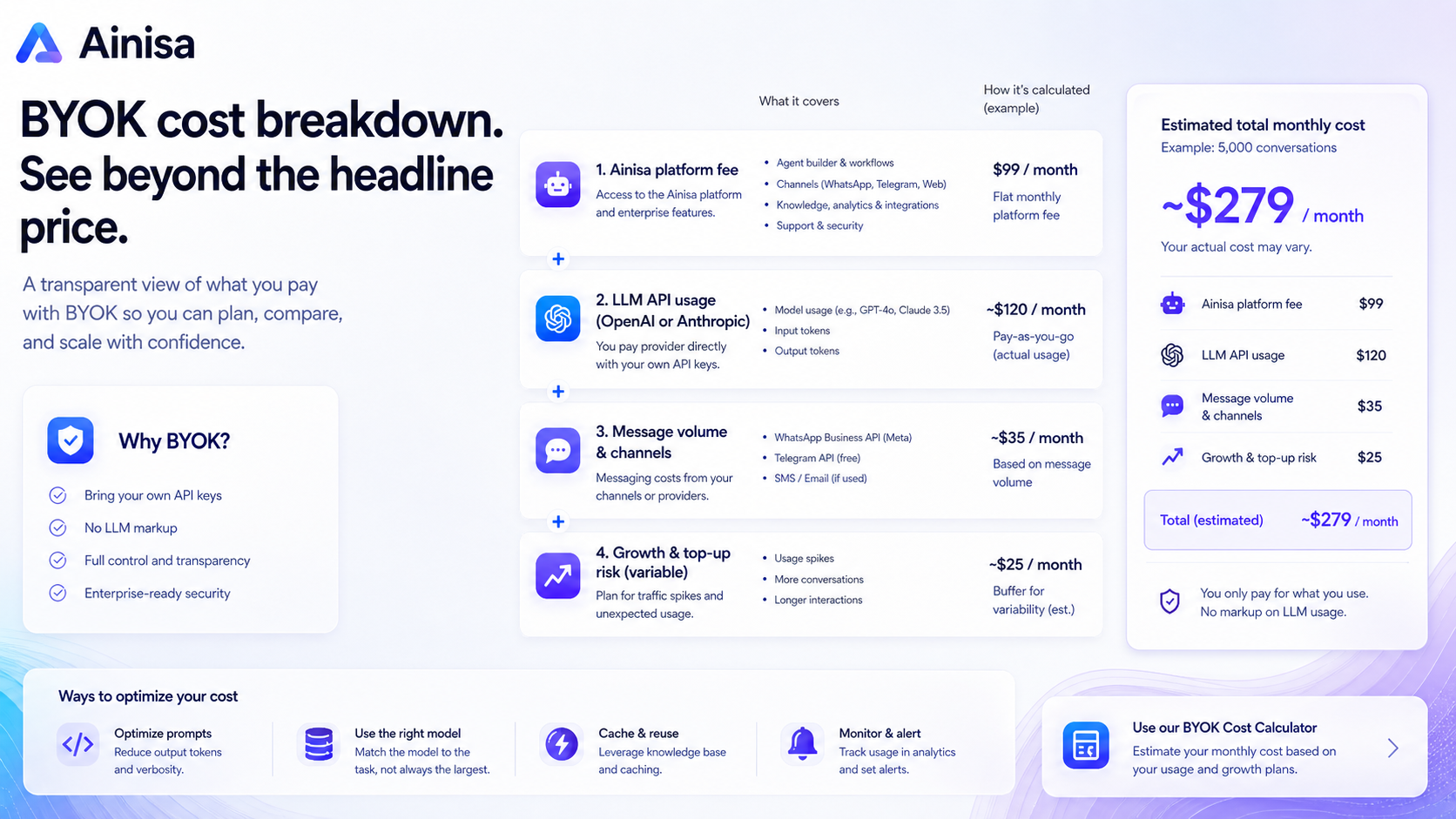
The free path is useful for testing setup friction. It is not enough to prove long-term value. A paid plan makes sense only after the agent can handle a real business workflow and you understand the monthly cost shape.
Annual billing or lifetime access may be attractive, but I would not start there unless the workflow has already been tested. The best deal is not the lowest visible price. The best deal is the route that matches your usage, channel setup, support needs, and refund risk.
Pricing check: If Ainisa still fits after the workflow test, compare live pricing with separate AI provider costs before choosing monthly, annual, or partner deal checkout.
Free plan, trial, coupon, and checkout notes
Ainisa’s free-start positioning is useful, but I would treat it as a setup test rather than a full buying signal.
Use the free or lowest-risk path to answer practical questions:
- Can you connect the model provider key without friction?
- Does the assistant understand your business documents?
- Can it answer real customer questions without sounding generic?
- Is the channel you need available and practical?
- Do AI actions work safely with test data?
- Can a human review or take over when needed?
- Does the estimated AI provider usage look affordable?
The coupon path should come later. Ainisa may have partner deal routes, annual savings, or active offers, but those should not drive the decision. A discount only improves a purchase that already fits.
Refund terms deserve extra attention. Ainisa publishes different rules depending on the purchase path. A promotional lifetime license may have a specific money-back window and usage limits. Monthly and annual subscriptions may follow a no-refund cancellation policy, with access continuing through the paid period rather than prorated refunds.
That difference matters. If you are buying a partner deal, read the partner terms. If you are buying a subscription, read the subscription refund and cancellation language. Do not assume one checkout route has the same protection as another.
Deal check: Look at current offers only after Ainisa fits your workflow, your channel, and your expected message volume.
What I would check before buying Ainisa
If I were buying Ainisa for a real business workflow, I would check these items before paying.
First, I would check the exact channel requirement. Website, Telegram, and WhatsApp are not the same buying decision. Each has different setup friction and customer expectations.
Second, I would estimate AI provider usage. BYOK can save money compared with marked-up credits, but only if usage is monitored.
Third, I would review plan limits. Agent count, integrations, messages, team seats, storage, training capacity, AI actions, and support level can all affect value.
Fourth, I would check refund and cancellation terms for the exact purchase path. A lifetime partner deal and a normal subscription can have different rules.
Fifth, I would test one AI action with safe sample data before connecting anything to production systems.
Sixth, I would compare Ainisa with simpler chatbot tools if the main use case is only a trained website FAQ bot.
Seventh, I would avoid annual billing or lifetime checkout until the agent has handled realistic test conversations.
A simple test before paying
Before paying for Ainisa, I would run a small test like this:
- Pick one use case, such as product questions, demo booking, lead capture, or support FAQs.
- Gather 10 to 20 real customer questions from email, chat, support tickets, or sales calls.
- Prepare clean source material: FAQs, product info, policies, pricing notes, and escalation rules.
- Create one assistant and connect only the channel you actually need first.
- Ask the real customer questions and mark which answers are useful, incomplete, or unsafe.
- Test one action, such as sending a lead to a CRM endpoint or triggering an n8n workflow, using sample data only.
- Estimate monthly usage and decide whether the plan still looks fair after AI provider costs.
This kind of test will tell you more than a polished homepage. If the agent handles the basic workflow, Ainisa becomes much more interesting. If the test shows unclear answers, channel friction, or messy business rules, fix those before paying for a bigger plan.
Pros explained
BYOK can make AI usage more transparent
Ainisa’s BYOK model is a real advantage for buyers who want cost visibility. Instead of guessing how a credit system maps to model usage, the buyer can connect a provider key and see the AI cost layer separately.
That matters when message volume grows.
It stops being enough if nobody on the team monitors usage. BYOK is not magic savings. It is cost control with responsibility attached.
The product is aimed at business workflows, not generic chat
Ainisa is more compelling when it is used for customer support, lead qualification, sales guidance, or channel-based automation. The product is not trying to be a personal writing app.
That focus helps the buying decision. You can ask a clear question: do we have repeated customer conversations worth automating?
It stops being enough if your business workflow is not documented or if the agent cannot safely handle edge cases.
AI actions make the platform more useful than a basic chatbot
CRM lead creation, n8n webhook automation, forms, buttons, order-related flows, and API actions can turn conversations into business processes.
That is the difference between an AI that talks and an AI that helps move work forward.
It stops being enough if the buyer has no one to define, test, and maintain those actions.
Messaging-channel support is commercially useful
Website chat is useful. Telegram and WhatsApp can be more valuable if customers already use them.
Ainisa’s channel angle matters because customer support and lead capture often happen where the customer already is, not where the business wishes they were.
It stops being enough if the channel you need is not active, not properly configured, or not compliant with the required platform rules.
Cons explained
Setup friction is real
Ainisa is no-code, but it still requires setup. The buyer needs model-provider keys, business documents, channel configuration, assistant behavior, and test conversations.
This is not a reason to dismiss the product. It is a reason to avoid casual buying.
The buyer who should care most is the non-technical founder who wants an instant support replacement. Ainisa can help, but it still needs ownership.
Total cost can be misunderstood
The platform fee is not the whole cost. AI provider usage, Meta or WhatsApp-related costs, third-party automation tools, and implementation time may all affect the real monthly cost.
This is especially important for growing message volume. A small test can look cheap. A busy customer channel can create a different cost picture.
Refund protection depends on the purchase path
Ainisa’s refund language differs by purchase type. Lifetime promotional routes and normal subscriptions may not carry the same rules.
That matters because buyers often remember the best-sounding refund window and forget the usage limits or subscription cancellation rules.
Before checkout, read the exact terms for the route you are using.
Simpler alternatives may be better for lighter needs
If your goal is only a trained FAQ bot on a website, Ainisa may be more product than you need. A simpler chatbot builder may be faster to set up, easier to explain to a team, and cheaper to operate.
This is where the buying decision should be honest. More automation depth is only valuable when you actually use it.
Green flags and red flags
Green flags:
- You already know which support, sales, or lead-capture workflow you want to automate.
- Your business has clean FAQs, policies, product data, and escalation rules.
- Customers already use the channels Ainisa supports.
- You want BYOK cost visibility and are willing to monitor provider usage.
- You need actions, forms, CRM handoff, or n8n workflows rather than only basic answers.
Red flags:
- You are buying only because a lifetime deal or coupon route looks attractive.
- You do not want to manage API keys or separate AI provider billing.
- Your support information is messy or undocumented.
- You need a guaranteed enterprise SLA but are not on a custom enterprise agreement.
- You only need a lightweight FAQ bot and do not plan to use AI actions or messaging-channel automation.
The biggest buyer mistake here is comparing only feature lists. Ainisa should be compared by workflow. If your workflow is real, the feature depth matters. If the workflow is vague, the features become noise.
Ainisa vs alternatives
Chatbase vs Ainisa
Chatbase is usually the cleaner direct comparison if the buyer mainly wants a trained website chatbot. If your goal is to upload documents, train a bot, and place it on a site quickly, Chatbase may feel simpler.
Ainisa may still make more sense if BYOK pricing, WhatsApp or Telegram, AI actions, or business workflow automation matter more than the fastest chatbot setup.
The tradeoff is depth versus simplicity. Chatbase is easier to understand. Ainisa may be more flexible when customer conversations need to trigger real actions.
Chaindesk vs Ainisa
Chaindesk is worth comparing if the buyer wants an AI support-agent workflow and cares about how support conversations are managed. It may be a more natural comparison for teams thinking in terms of customer support operations.
Ainisa may still be stronger for buyers who want BYOK cost visibility, messaging-channel deployment, and no-code actions around lead capture or automation.
The tradeoff is support-desk feel versus agentic workflow breadth.
ChatSimple vs Ainisa
ChatSimple may fit buyers who want a lighter sales-chat experience and do not need deep AI actions or BYOK complexity.
Ainisa may be better if the buyer wants to turn conversations into CRM leads, n8n triggers, forms, or channel-aware automations.
The tradeoff is speed versus control. ChatSimple may be easier for basic sales chat. Ainisa is more interesting when the workflow needs more structure.
Adjacent route: ManyChat-style automation
ManyChat is not a one-to-one replacement for Ainisa, but it is an adjacent route for buyers who think primarily in terms of social messaging automation. If the buyer’s main problem is campaign flows, social inboxes, or marketing automation, a social automation platform may be worth comparing.
Ainisa is more relevant when the buyer wants trained AI agents and BYOK model control rather than campaign-first messaging automation.
Adjacent route: developer-led AI agent builds
A developer-led build is another adjacent route. It may fit companies with complex data, security, compliance, or internal-system requirements.
Ainisa is the more practical path if the buyer wants no-code setup and can accept platform constraints. A custom build is more flexible, but it usually costs more and requires ongoing technical ownership.
Trust, refund, and buyer-risk notes
There are a few trust and risk points I would keep separate.
First, BYOK is useful, but it changes responsibility. Ainisa may not charge the AI usage markup, but the buyer still pays the model provider and must monitor usage.
Second, channel dependencies matter. WhatsApp, Instagram, Facebook, Telegram, AI providers, and infrastructure services can affect the final customer experience. If your business depends on one channel, test that channel carefully.
Third, support expectations should be realistic. If your business needs guaranteed response times, uptime commitments, or procurement-grade documentation, check whether the plan you are buying includes that level of support.
Fourth, data and API-key handling deserve attention. Any tool that stores provider keys, business knowledge, customer chats, or workflow configuration should be reviewed carefully by teams with privacy or compliance requirements.
Fifth, refund rules are not one-size-fits-all. Partner lifetime deals and subscriptions can have different cancellation and refund expectations. Read the exact terms before choosing annual billing or a lifetime purchase.
Finally, be careful with homepage badges and broad security language. Badges can be useful signals, but they are not the same as a full security review. If you are handling sensitive customer data, verify the privacy policy, terms, data storage, key handling, and support scope before launching.
Final verdict
I would consider Ainisa if your business has a real customer conversation to automate and you want an AI agent that can connect to channels, use your own model provider key, and eventually trigger actions beyond simple replies.
I would skip it if you only want a basic FAQ bot, a personal productivity assistant, or a tool that works without setup thinking. Ainisa can reduce manual support and lead-capture work, but it does not remove the need for clean documentation, channel testing, and human oversight.
I would compare it with Chatbase if website chatbot simplicity matters most. I would compare it with Chaindesk if support-agent workflow is the priority. I would compare it with ChatSimple if you mainly need lightweight sales chat. I would look at adjacent social automation or custom-build routes only if your buyer job moves beyond no-code AI agents.
The safest next step is to create one small agent for one real workflow before paying for a larger plan or lifetime route. If that test works, Ainisa becomes a serious option. If the test exposes messy source material, channel friction, unclear costs, or weak handoff rules, fix those before checkout.
