
Text App Pricing, Plans & Support Fit
Text App is an AI-first customer service platform for teams that want AI agents, live chat, help desk ticketing, workflows, customer context, and human handoff in one support workspace. It is not just a lightweight chatbot. The commercial question is whether your team has enough customer conversations, clean enough knowledge sources, and enough support or sales pressure to justify a per-user plan after the trial.

Fit → price → checkout
Use these routes after the official-site check: coupon first, review for fit, compare if unsure.
Text App pricing snapshot
Fast commercial checks before pricing, coupons, or a deeper review.
Text App product tour
This walkthrough is useful if you are trying to decide whether Text App can replace scattered chat, ticket, and automation tools rather than simply add another chatbot. Watch for how Text frames AI agents beside human agents, how customer context is kept inside one workspace, and whether the setup path feels realistic for your support team before you compare annual pricing.

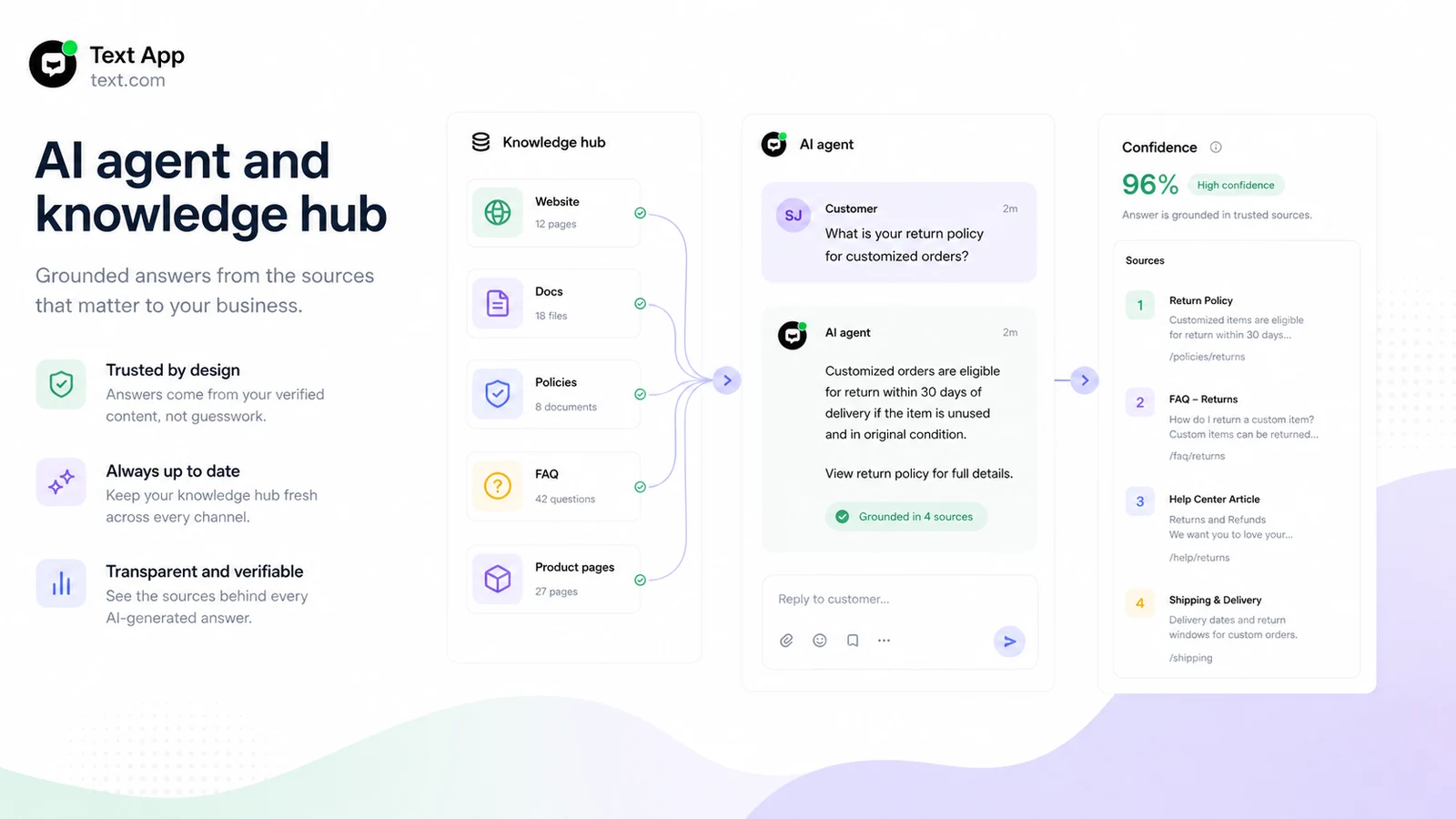
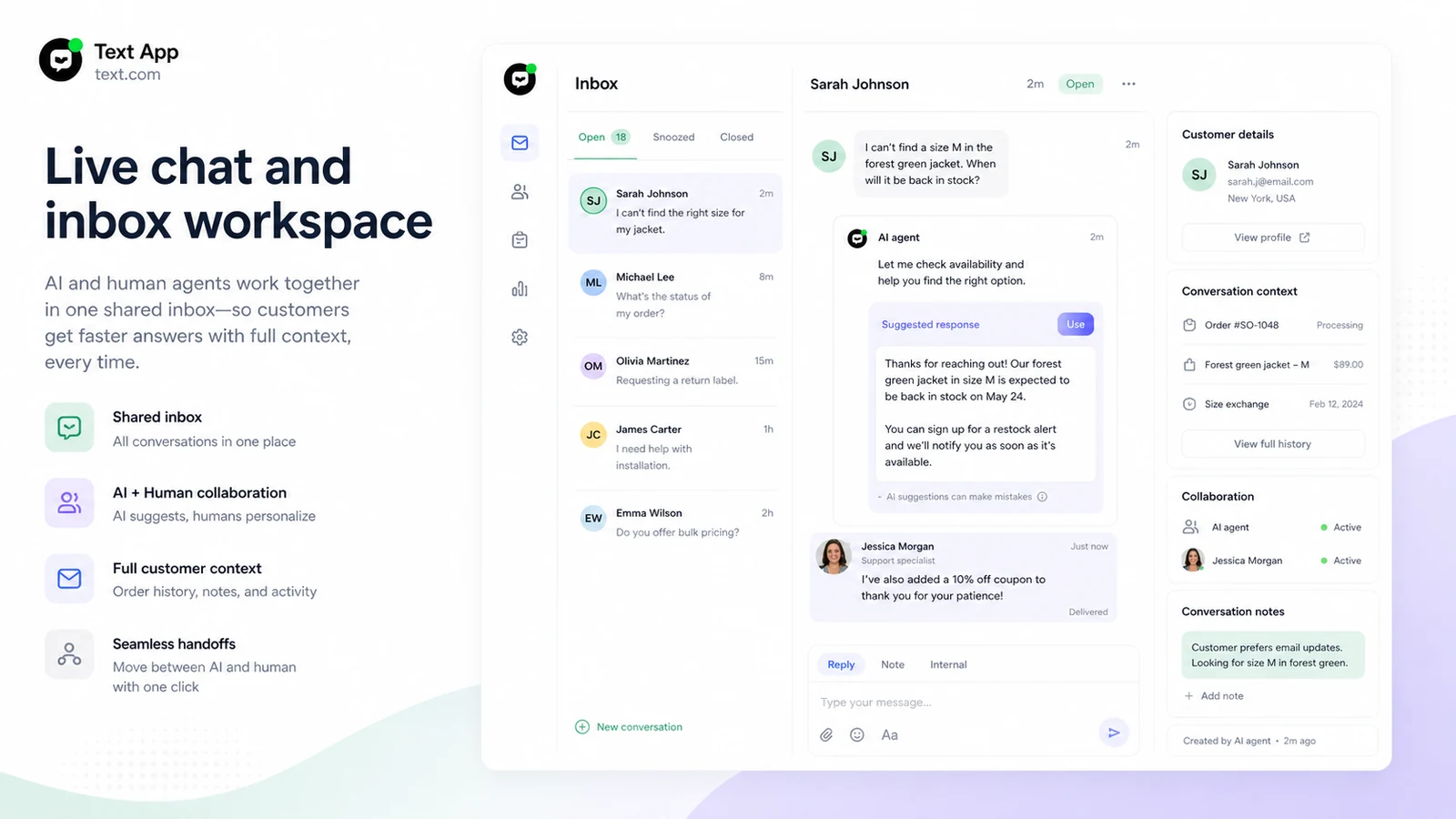
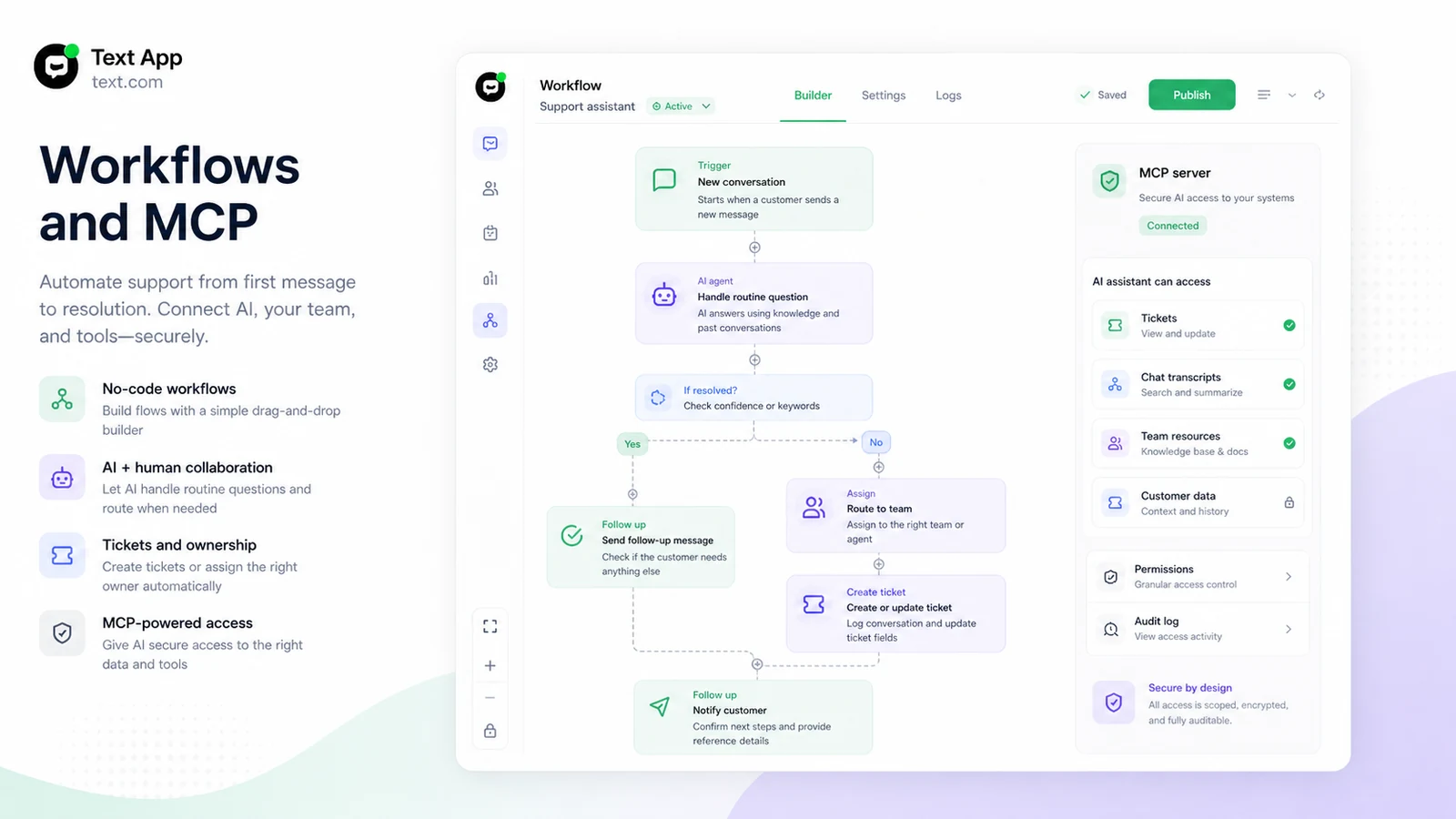
Text App should be evaluated as a customer service operating layer, not as a generic AI chatbot. It brings AI agents, live chat, help desk tickets, customer context, workflows, and automation into one workspace. That makes it attractive when support volume is real and repeatable, but it also means the buyer should test the trial with actual customer questions before treating the paid plan as a safe default.
What Text App actually does
Text App helps teams automate customer service and sales conversations while keeping human agents in the loop. The AI agent can work from knowledge sources, respond to routine questions, and pass context to the team when a case needs judgment. The live chat, help desk, inbox, workflows, and desktop app make the product broader than a small website bot, which is why the buying decision should start with support workflow fit.
- AI agents for customer service and sales automation
- Live chat and shared inbox for customer conversations
- Help desk ticketing, assignment, rules, and prioritization
- Workflow automation for repetitive support operations
Pricing and trial fit
The official pricing path is easy to misunderstand because the lowest visible paid price is per user and tied to annual billing. During this update, Essential started at $19 per user per month when billed yearly, Growth was $79 per user per month when billed yearly, and Enterprise was custom. The useful first move is the 14-day no-card trial. Use it to test knowledge quality, handoff, ticket flow, and team usage before you consider annual savings.
- No permanent free plan was shown in the current pricing material
- The trial is the safer validation path before paid billing
- Annual billing can lower the price but increases commitment risk
- The paid value depends on team seats, AI limits, API calls, and workflows
AI agents, knowledge sources, and answer quality
Text App's AI-agent value depends heavily on the quality of the knowledge you connect. The official feature pages emphasize knowledge hub grounding, customer context, past ticket awareness, web search, personalization, and performance tracking. The video in this section is worth watching if you want to understand how AI agents fit inside support operations, not just how a chat window looks. Pay attention to how tasks are triggered, how context is preserved, and how the AI stays useful when a customer moves from a routine question to a support case.
- Knowledge quality affects whether the AI resolves cases or creates extra cleanup work
- Context and past conversation history matter for reducing repeated customer questions
- Performance reporting is important after launch because AI agents need monitoring
Live chat, help desk, and human handoff
The strongest buyer case for Text App is the combination of AI and human support in one workspace. Live chat helps teams engage customers in real time, while help desk features such as ticket rules, assignment, prioritization, filters, and ticket details keep unresolved issues organized. This matters when automation is supposed to reduce busywork without hiding urgent or sensitive cases from the team.
- Live chat supports website conversations, customer details, campaigns, and AI reply help
- Help desk features support ticket rules, assignment, prioritization, filters, and status tracking
- Human handoff is the key safety check for complex cases
Workflows, MCP, and deeper operations fit
Text App becomes more interesting when your team needs workflows and deeper AI assistant access. The help center describes Workflows as a no-code way to connect triggers and actions, and the MCP server as a secure way to let AI assistants access tickets, archived chat transcripts, team resources, and metadata with scoped permissions. This is useful for teams that want support automation to do work, not only answer messages.
- Workflows can automate repetitive support actions with triggers and actions
- MCP support can connect AI assistants to Text data with access controls
- Technical buyers should verify API-call limits and available tools by plan
Best next step before checkout
The safest next step is not the coupon path first. Start with the Text App trial, connect one real knowledge source, test the AI agent with real customer questions, and check whether human handoff and tickets feel reliable. Then compare Essential and Growth against your expected team size and automation volume. If the product still fits, move to the pricing or deal path with clearer confidence.
- Start with the review page if workflow fit is still unclear
- Use the trial to validate answer quality and handoff before annual billing
- Compare Chatbase and Chaindesk if you mainly need a support-agent builder
- Use the coupon path only after the product fit is already clear
Best savings path from this store page
This is the clearest savings route to check once the product already looks like a fit.
Text offers a free 14-day starting path with no credit card required, giving teams a safer way to test AI-powered service before paying.
Save up to 24% yearly
Essential from $19/user/month yearly
Use comparison routes when the category fit is still open
Use these comparison routes when the product still looks plausible, but the category fit is not fully settled.
Chatbase is often the cleaner comparison when the buyer mainly wants an AI support-agent builder with message credits, agent training, integrations, and a free-plan test path.
Chaindesk deserves the next tab when the buyer wants a leaner AI support chatbot and needs to compare setup friction against Text App's broader service workspace.
Verification points worth checking before you click out
Where this store usually fits best in the workflow
Text App fits teams that want AI agents to handle repetitive customer questions while keeping live agents available for complex or high-value conversations.
The product makes sense for ecommerce and SaaS teams that want website chat to capture leads, answer buying questions, and support customers in one workflow.
Text App can support teams that need tickets, assignment, priority rules, filters, and follow-up processes rather than isolated bot conversations.
Workflows and MCP access make the platform more relevant for buyers who want connected support actions, not just AI-generated replies.
Practical checkpoints before and after signup
- Confirm that Text App is the right product, not a generic text-message or writing app.
- Read the pricing page, Terms of Use, AI agent page, live chat page, help desk page, and workflow documentation before writing buyer claims.
- Compare Text App with Chatbase and Chaindesk if the main need is support-agent automation.
- Use the 14-day no-card trial with real support data, not sample questions only.
- Check AI-agent resolution limits, API calls, workflows, campaigns, live visitor tracking, reporting, and team seats before choosing Essential or Growth.
- Verify refund and cancellation language before annual billing because paid fees are described as non-refundable.
- Start with one narrow customer-support use case such as order status, returns, product questions, or account help.
- Monitor unresolved questions, customer satisfaction, human handoff quality, and ticket cleanup before expanding automation.
- Re-check pricing at renewal if team size, support volume, or AI resolution usage increases.
Fast-read signals for workflow fit and buying friction
Questions readers usually ask before choosing this store
What does Text App actually do?
Text App is an AI-first customer service platform that combines AI agents, live chat, help desk tickets, workflows, customer context, and human handoff. It is built for teams that want to automate routine support and sales conversations while keeping agents involved when cases need judgment.
Does Text App have a free plan?
The current official pricing material emphasizes a 14-day free trial with no credit card required, not a permanent free plan. Buyers should use the trial to test real support questions, knowledge sources, handoff, and ticket workflow before entering paid billing.
How much does Text App start at?
During this update, the official pricing page showed Essential at $19 per user per month when billed yearly. Growth was shown at $79 per user per month when billed yearly, and Enterprise was custom. Buyers should verify the billing toggle and current plan limits before checkout.
Is Text App better than a simple AI chatbot?
It can be better when the buyer needs live chat, tickets, shared inbox, customer context, workflows, AI agent grounding, and human handoff. If the buyer only needs a basic FAQ bot or a small website widget, simpler tools may be easier and cheaper to test.
What should buyers verify before paying for Text App?
Buyers should verify team seats, AI-agent resolutions, API-call limits, workflow limits, campaigns, reporting, Enterprise requirements, refund language, and whether annual billing makes sense after the trial. The safest path is to validate one real support workflow before choosing a paid tier.
Choose the next route that matches what you still need to decide
The strongest next click depends on whether you still need product judgment, a savings route, or a broader category comparison.