Quick verdict
Relevance AI is worth a serious look if you are trying to build an AI workforce around a real business process, not just play with another agent demo.
That is the first line I would draw.
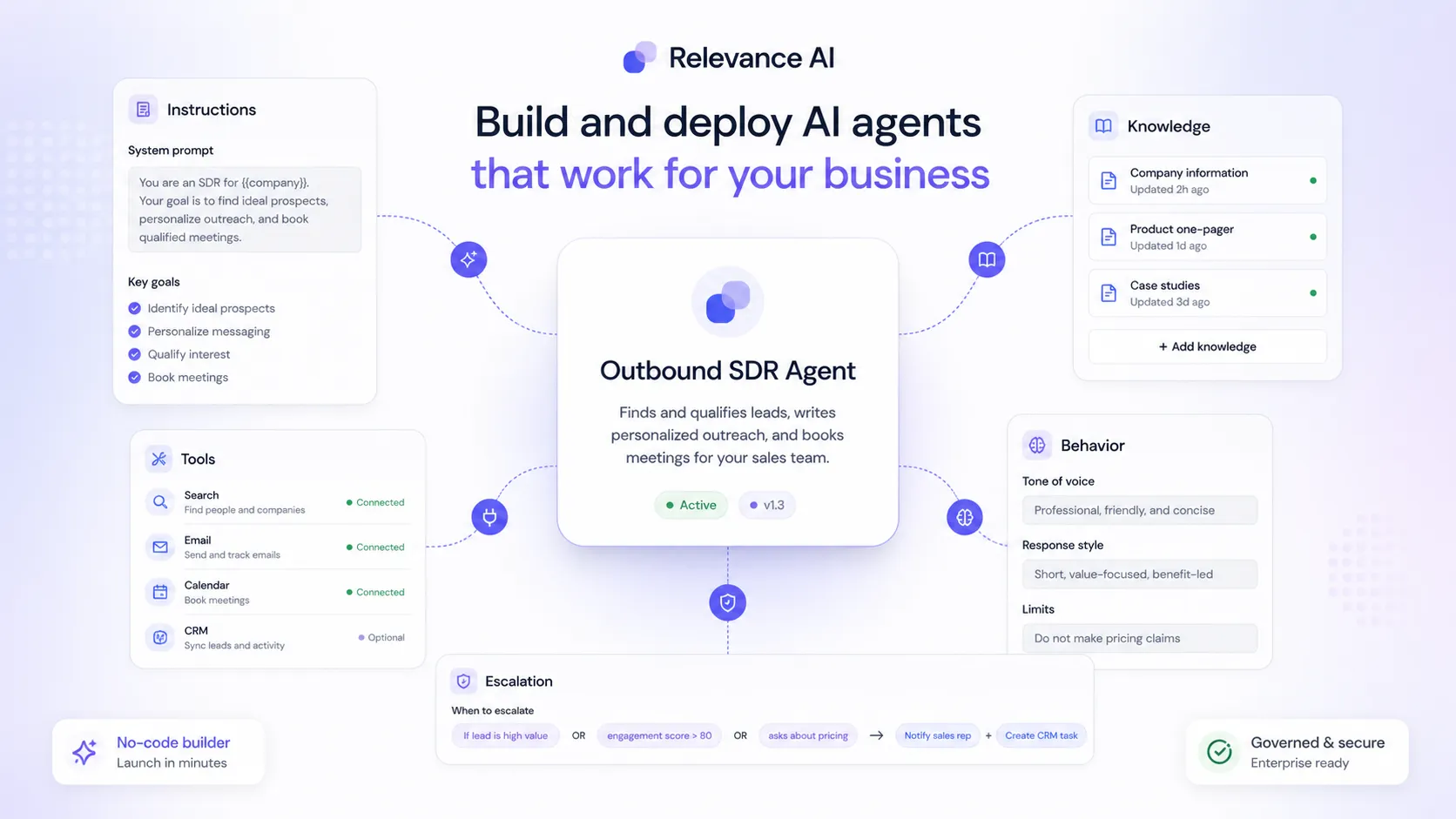
The product is not best understood as a simple chatbot builder. It is a low-code and no-code platform for building AI agents, giving them tools, connecting them to knowledge, linking them into workforces, and letting them run structured tasks across sales, GTM, support, research, and internal operations.
That can be useful.
It can also be too much.
The buying decision should not be “does the demo look impressive?” Most AI agent demos look impressive for five minutes. The better question is whether you can name one workflow that wastes time today, define the data source, describe the agent’s job, decide where a human should approve or review the output, and estimate how often that workflow will run.
If you can do that, Relevance AI becomes interesting. If you cannot, the free plan is probably a better place to pause than the checkout page.
The pricing model also deserves more attention than the headline monthly number. Relevance AI currently separates platform usage into Actions and Vendor Credits. Actions are the work your agents perform. Vendor Credits cover AI model and tool costs. That is more transparent than a vague “AI credits” bucket, but it also means the real cost depends on how much work your agents actually do.
For my money, Relevance AI makes the most sense for teams that already have a workflow owner: a sales ops lead, GTM operator, founder, support manager, automation builder, or technical operator who can turn a process into instructions, tools, guardrails, and review rules.
I would be more cautious if you only need a website chat widget, a simple FAQ assistant, or a personal productivity bot. In those cases, Relevance AI may be broader than the job requires.
Next step: If Relevance AI still sounds like a fit, start by checking the live platform and pricing path before assuming the annual headline price reflects your real workflow cost.
Review snapshot
| Review point | Practical take |
|---|---|
| Best for | GTM, sales, support, operations, research, and automation teams building agents around repeatable workflows |
| Not ideal for | Buyers who only need a simple website chatbot, FAQ bot, or casual AI assistant |
| Main product role | Low-code and no-code AI workforce platform for agents, tools, knowledge, integrations, approvals, and workforces |
| Free path | Useful for learning the interface and testing one narrow workflow before paying |
| Pricing risk | Real cost depends on Actions, Vendor Credits, top-ups, users, workforces, collaboration, and billing interval |
| Strongest buyer angle | Delegating defined business work to AI agents with human oversight |
| Biggest caution | A team without a mapped workflow can burn time and credits without building a useful operating layer |
| Best alternatives to compare | Chaindesk, Chatbase, CustomGPT, Make |
| Safest next step | Build one real agent on the free plan, measure usage, then compare Pro, Team, or Enterprise needs |
What is Relevance AI?
Relevance AI is an AI workforce platform for building agents and multi-agent teams that can complete defined tasks with tools, integrations, knowledge sources, triggers, and human oversight.
That wording matters because “AI agent” has become a loose category.
Some products call themselves agent platforms when they are mostly chatbots with a few actions attached. Some are developer frameworks that require more engineering than a business team can realistically manage. Relevance AI sits closer to the middle: it gives non-technical and semi-technical teams a visual, low-code way to build agents, equip them with tools, connect data, create workforces, and trigger them inside business processes.
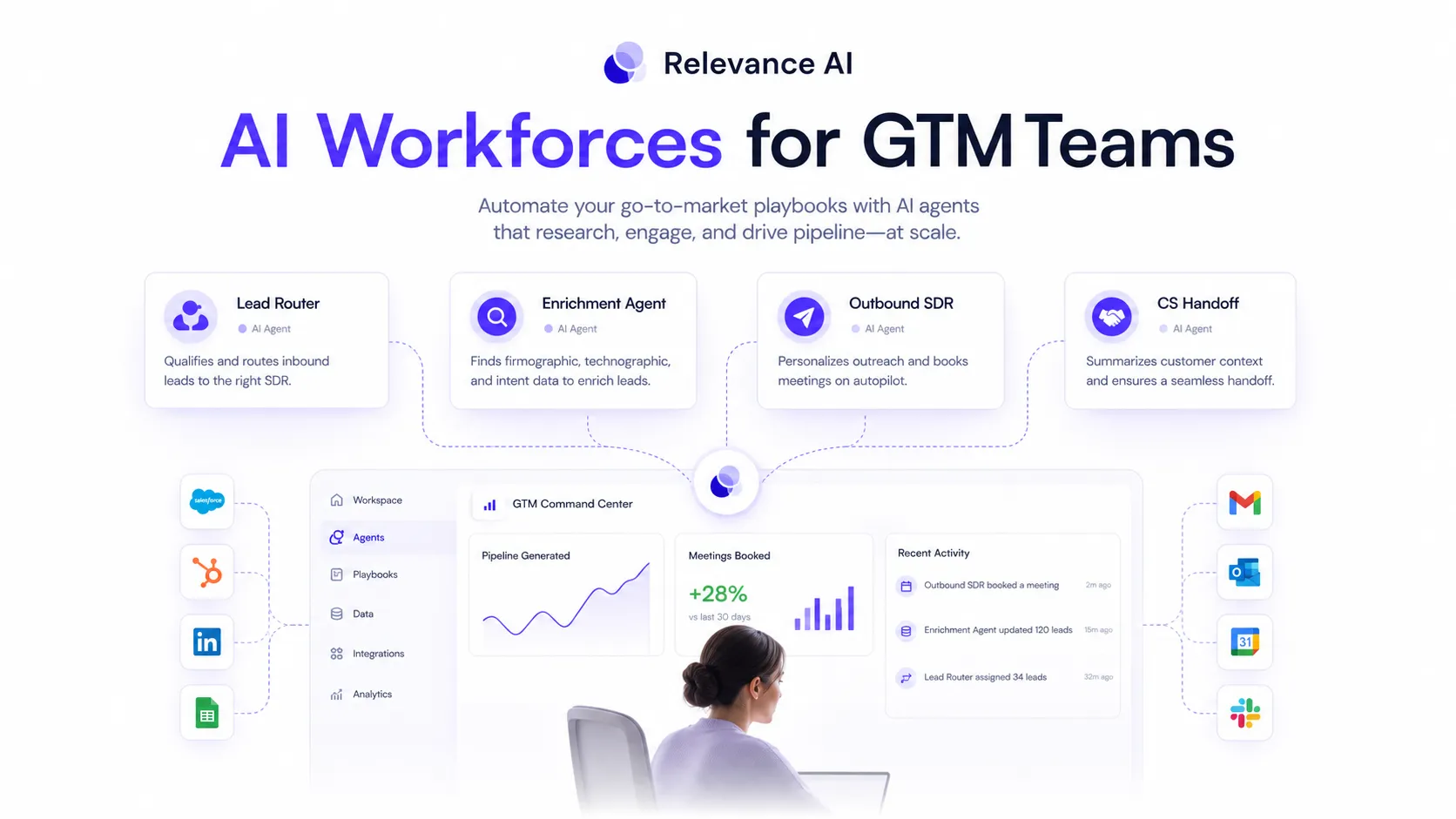
Its official positioning is especially strong around GTM and sales workflows: account research, lead routing, CRM enrichment, outbound support, inbox management, customer support, and operational handoffs. That does not mean it can only be used for GTM. But the current public positioning makes it clear that Relevance AI is not trying to be a lightweight general assistant first.
It is trying to become an operating layer for delegated work.
That is why I would not judge it by the homepage alone. The homepage can make agent building feel almost instant. The real buyer test is slower: can your team define the work clearly enough that an agent can run it safely, repeatedly, and measurably?
A sales team might use Relevance AI to research accounts, enrich contacts, draft outreach, route leads, and update systems. A support team might use it to triage common requests and escalate uncertain cases. An operations team might use it to process internal research, coordinate tasks, or summarize structured information. A technical team might use the API and SDK path to connect agents into external workflows.
Those are meaningful use cases. They are also use cases where vague setup creates messy results.
The tool is only as useful as the workflow you give it.
Who should use Relevance AI?
Relevance AI makes the most sense for buyers who already have a repeatable process that could be partially delegated.
A GTM operator is a natural fit. If your team repeatedly researches accounts, scores leads, enriches CRM data, prepares outreach, checks replies, or routes prospects, Relevance AI gives you a way to turn those steps into agent work instead of one-off prompting.
A small sales team may also find value if the founder or sales lead is doing too much manual prep work. The product can help only if the workflow is narrow enough to test. “Help with sales” is too broad. “Research new inbound accounts, summarize firmographic data, flag fit, and prepare the next step for human review” is closer to something an agent can own.
A support or customer success team may consider Relevance AI when routine requests, handoffs, summaries, and escalations are becoming repetitive. I would still be careful here. Support workflows touch customers directly, so approval rules, logs, escalation behavior, and tone control matter more than raw automation speed.
A technical or semi-technical team may like the API and SDK route. Relevance AI supports Relevance API keys, custom API keys, Python and JavaScript SDK usage, and custom endpoints, so it can be extended beyond the dashboard when a team has the right implementation discipline.
A business operator who understands automation but does not want to build everything from scratch may also fit. Relevance AI’s marketplace, templates, integrations, and no-code builder lower the barrier compared with building agents entirely in code.
The common thread is not company size.
It is workflow clarity.
If you can name the job, input, tool, output, owner, review rule, and success metric, Relevance AI is worth testing.
Who should avoid Relevance AI?
I would avoid Relevance AI if your real need is only a simple website chatbot.
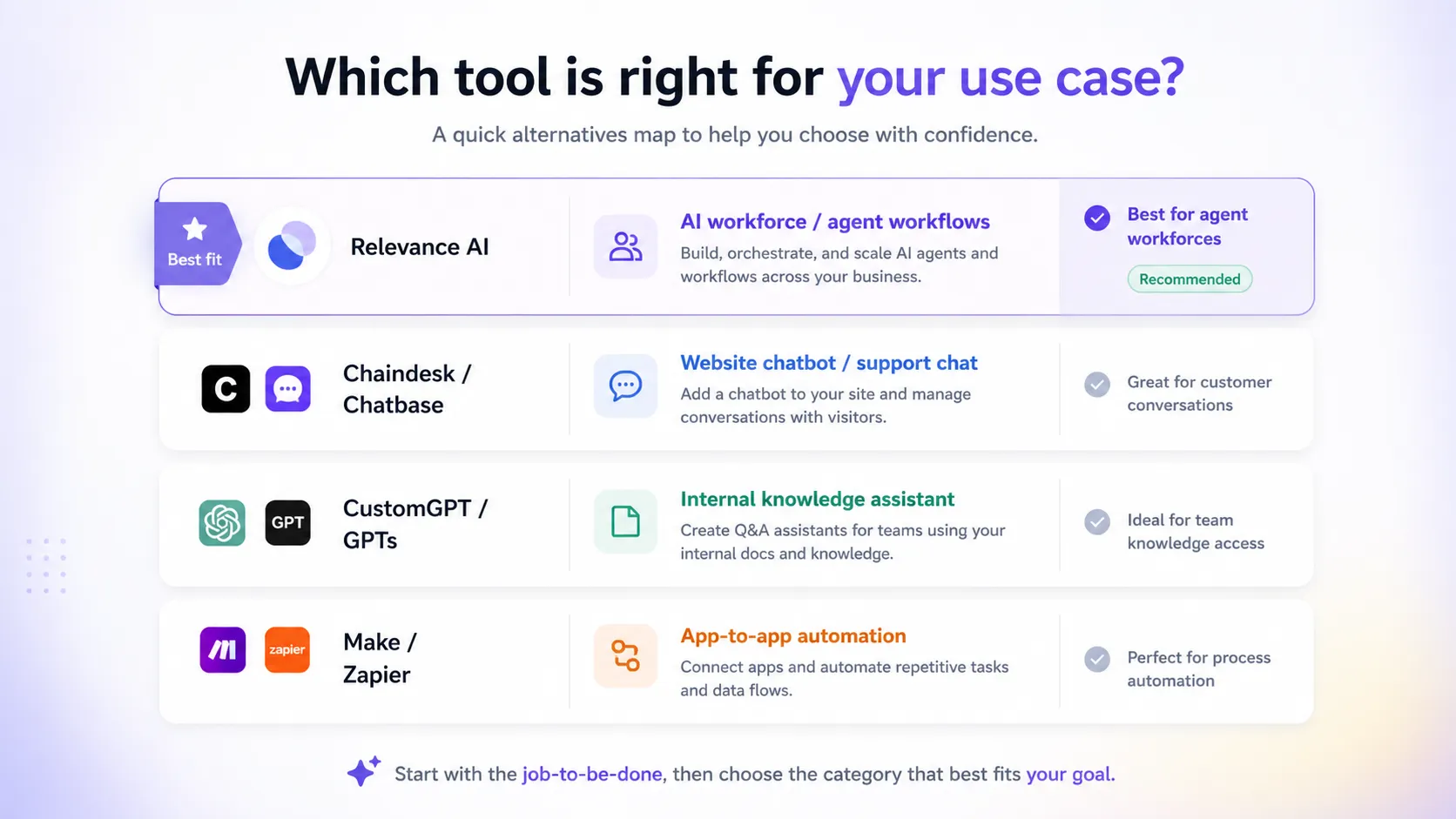
That buyer should probably compare lighter tools first. Chaindesk or Chatbase may be easier to evaluate if the job is “answer visitor questions from our help docs.” Relevance AI can support chat-style use cases, but buying an AI workforce platform for a narrow FAQ bot may add more setup than the problem deserves.
I would also be careful if your team has not mapped the first workflow. A common AI-agent mistake is buying the platform before naming the job. The result is usually a messy experiment: several agents, many templates, some impressive demos, but no measurable operating gain.
Solo users should be cautious too. Relevance AI has a free plan, and that is the right place to explore. But a solo buyer who does not need workforces, collaboration, shared projects, scheduling, escalations, or higher usage may not benefit from moving into a paid plan quickly.
Teams with strict procurement or refund requirements should read the terms before upgrading. The public pricing page is clear about plan tiers, but the terms do not present a simple consumer-style money-back promise. Vendor Credits and subscription handling also need to be understood before a team commits real budget.
Finally, I would slow down if sensitive customer, sales, or internal data will be connected. Relevance AI has security documentation and SOC 2 Type II positioning, which is a positive signal. But agents that touch CRM, email, Slack, customer records, or internal systems should be evaluated with permissions, retention, deletion, and escalation rules in mind.
This is not a toy once it touches real operations.
How Relevance AI fits into a real workflow
Relevance AI works best when the workflow starts outside the product.
That sounds odd, but it is important.
The right starting point is not “build an agent.” The right starting point is “which job should stop wasting human time?”
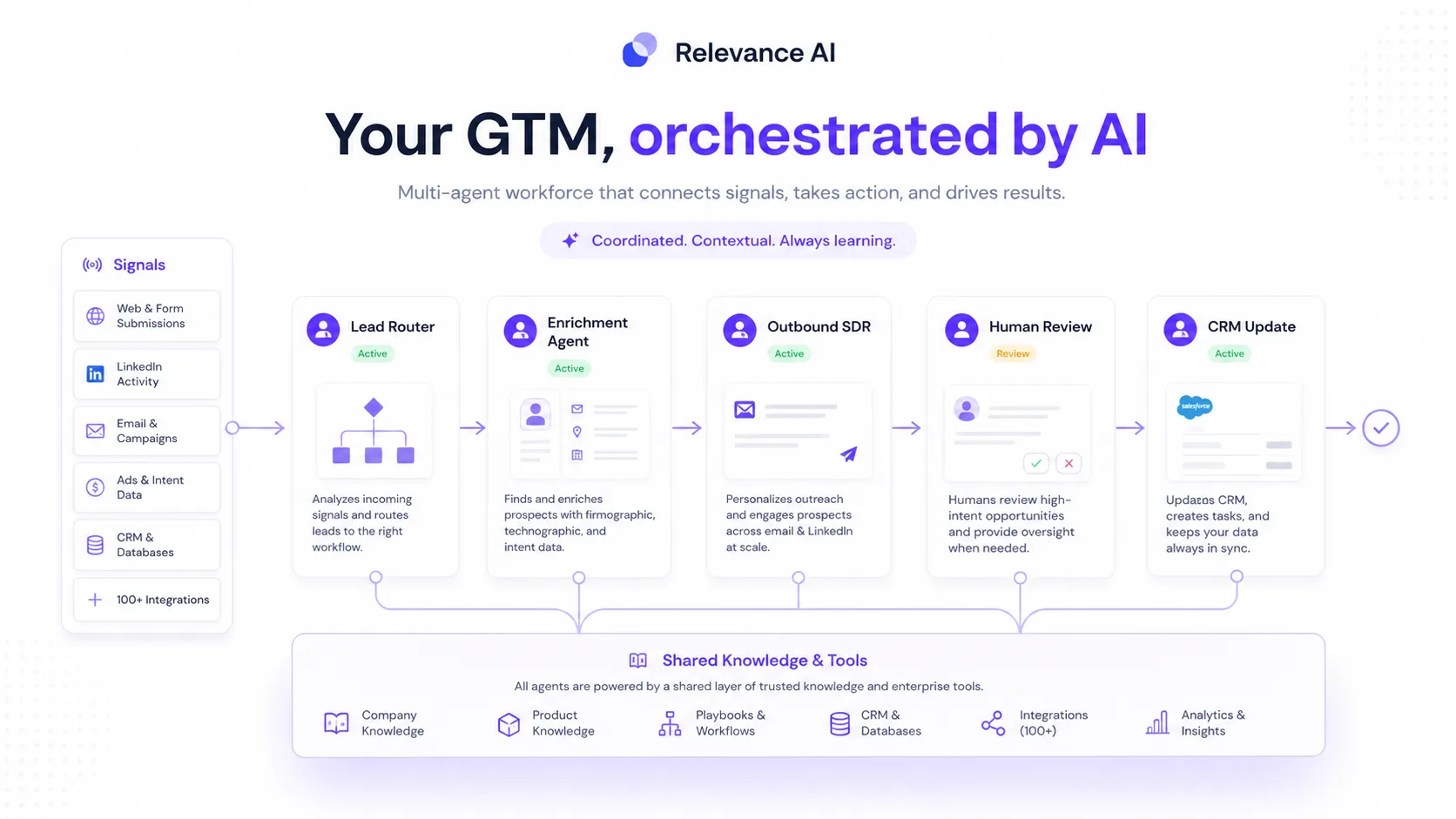
For example, a GTM workflow might look like this:
- A new account enters the CRM.
- An agent researches the company.
- Another step enriches missing details.
- A scoring rule classifies fit.
- A draft outreach note is prepared.
- A human reviews the summary.
- The approved next step is routed to sales.
That is the kind of structured workflow where Relevance AI can make sense. The agent is not just chatting. It has a job, tools, context, and a handoff.
A support workflow might be different. An agent could classify requests, search knowledge, draft a response, and escalate uncertain cases. But I would not let it run unchecked at first. The better setup is controlled: agent drafts, human reviews, rules improve, then automation expands only where confidence is earned.
An operations workflow might involve research, summarization, scheduling, document processing, or status handoffs. Again, the value depends on repetition. If the workflow happens once, it may not justify the setup. If it happens every week or every day, the platform becomes more interesting.
This is where Relevance AI is different from a casual AI assistant. A casual assistant helps you complete one task at a time. Relevance AI is trying to help you create repeatable delegation.
That is more powerful.
It is also less forgiving.
A vague prompt in a chat assistant wastes a minute. A vague agent connected to tools can waste credits, create messy outputs, or push work into the wrong place. The buyer should treat setup quality as part of the cost.
Workflow check: Before choosing a paid plan, test one real agent with a narrow job and measure whether it saves time after setup.
Key features that matter
The feature list is broad, but I would focus on the parts that affect the buyer decision.
The first is the agent builder. Relevance AI lets buyers build agents from scratch, templates, marketplace assets, or natural-language instructions through Invent. This is useful because many teams know the process they want to automate but do not want to write code for every step.
The second is tools. Agents become more useful when they can act. Relevance AI’s tool layer lets agents call integrations, APIs, code steps, and business systems rather than only generate text. This is one reason it should not be evaluated like a simple chatbot.
The third is workforces. A workforce lets multiple agents collaborate across a larger process. This matters when one agent should research, another should enrich, another should draft, and another should route or summarize. It is also where setup complexity increases.
The fourth is knowledge. Agents need trusted context. Relevance AI supports knowledge sources so agents can work from company-specific information instead of only relying on the model’s general knowledge. For support, sales, research, and internal operations, this can be the difference between useful output and generic output.
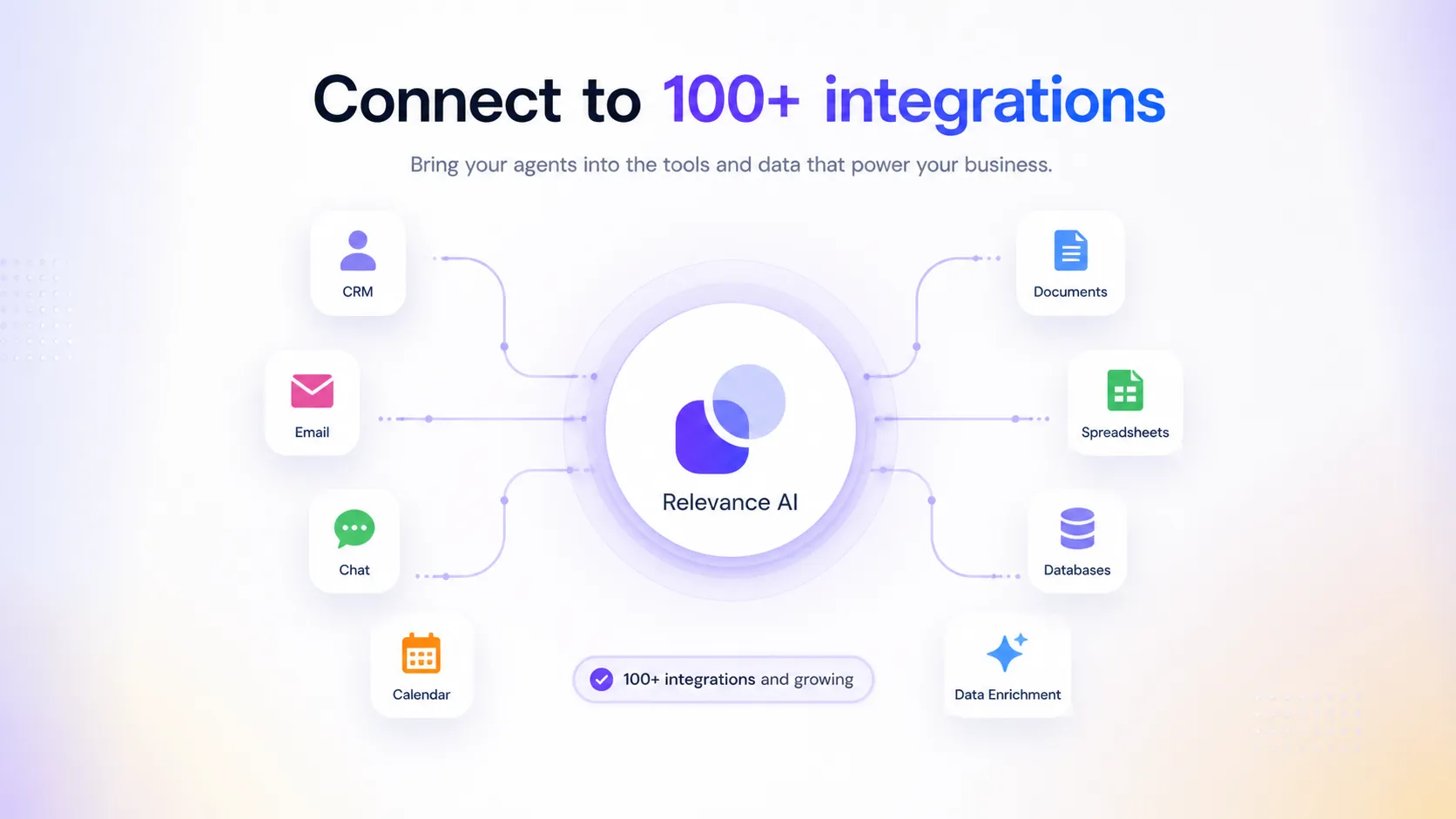
The fifth is integrations and triggers. Relevance AI publicly promotes more than 2,000 integrations and positions triggers, actions, and LLMs as the parts that power work across the buyer’s stack. This matters because agents only become operational when they can connect to the systems where work already happens.
The sixth is oversight: scheduling, smart escalations, approvals, activity tracking, analytics, and enterprise controls depending on plan. This is not just nice-to-have. The more an agent acts inside a business workflow, the more you need visibility and control.
The final feature group is API access. Relevance AI supports custom API keys, Relevance API keys, and SDK usage for Python or JavaScript. That gives technical teams a path beyond the visual builder. I would not treat that as a beginner feature, but it matters for serious workflow deployment.
The practical takeaway is simple: Relevance AI is strongest when the buyer needs agents that can do work, not just answer questions.
Pricing and plan value
This is the section I would read twice before buying.
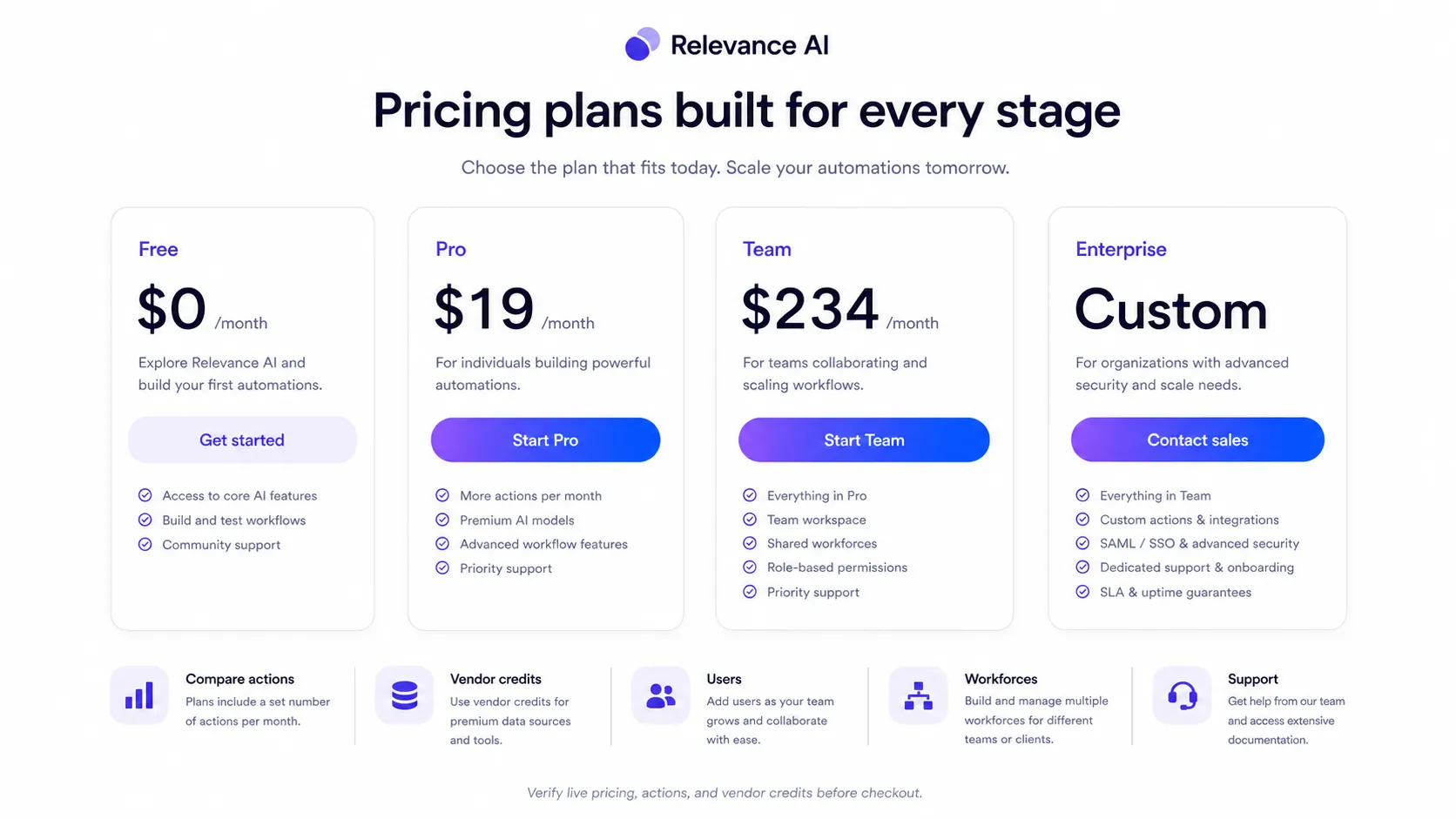
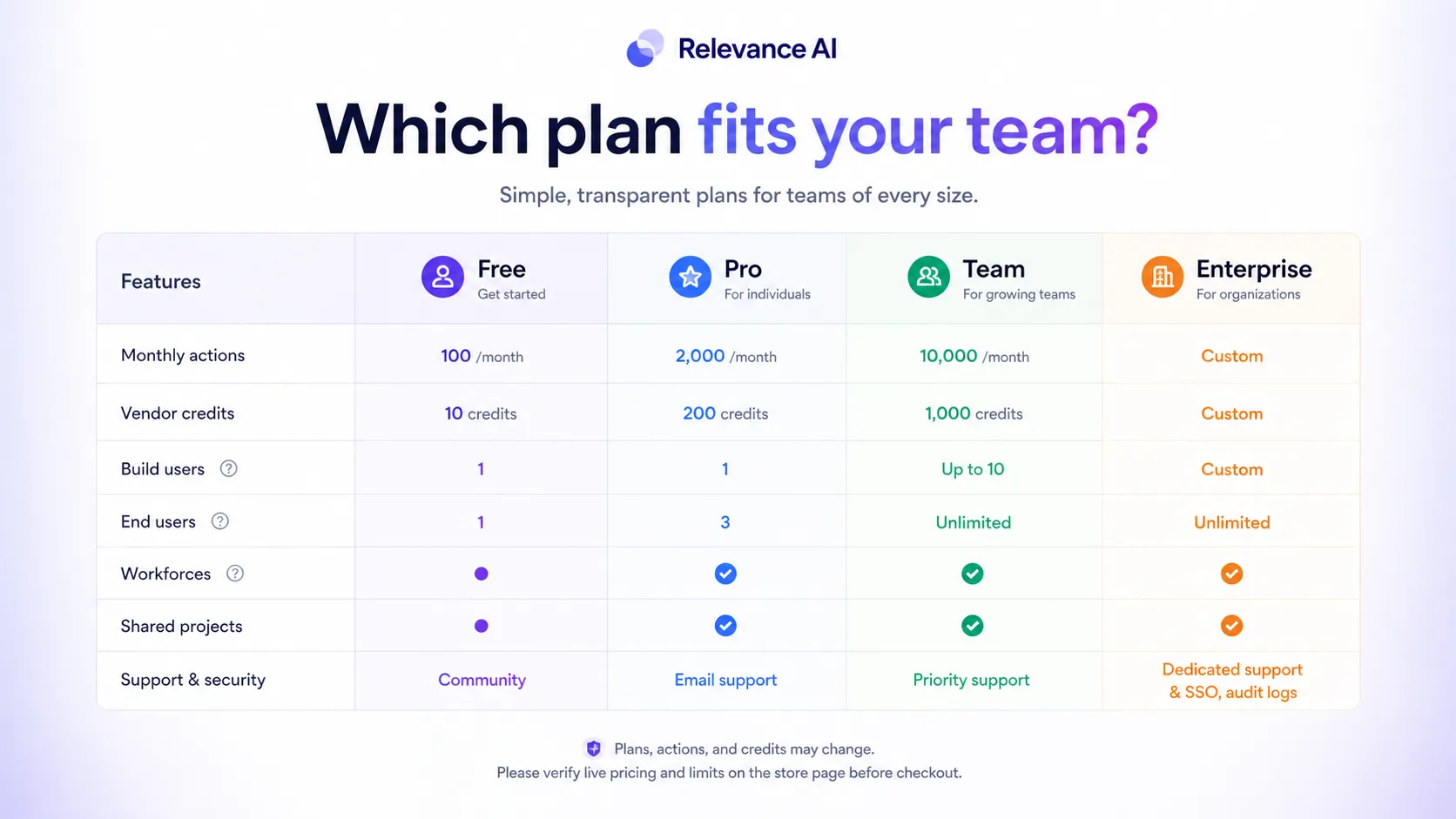
Relevance AI currently has a free plan, a Pro plan, a Team plan, and an Enterprise path. The public pricing page shows Free at $0/month, Pro at $19/month in the current discounted annual framing, Team at $234/month in that same annual-discounted view, and Enterprise as custom.
Do not stop there.
The important part is usage.
The Free plan is useful for learning the builder, cloning marketplace assets, and testing one small workflow. It includes limited monthly Actions, one workforce, one user and project, task history, marketplace access, community access, and a one-time Vendor Credit allowance. That is enough to learn whether the interface and agent concept make sense.
Pro is the first serious builder plan. It adds larger annual action capacity, Vendor Credits, unlimited workforces, two build users, scheduling, chat mode, smart escalations, activity center, premium app triggers, and bring-your-own LLM support. That is where Relevance AI starts to look practical for someone building recurring automations.
Team is for collaboration and heavier workloads. It adds a larger action and Vendor Credit allocation, five build users, 45 end users, shared projects, calling and meeting agents, A/B testing, analytics, and priority support. This is the plan I would evaluate only after a team knows the first workflow is worth scaling.
Enterprise is the route for unlimited users and projects, enterprise triggers, evaluations, work-hour controls, multi-org management, enterprise security, dedicated account support, custom implementation, and more controlled deployment.
The most important detail is the split between Actions and Vendor Credits. Actions represent what the agents do. Vendor Credits cover AI model and tool costs. Relevance AI’s docs explain that Vendor Credits are the cost of running the AI model and tools, and that paid users can bring their own API keys to bypass Vendor Credits.
That is a helpful model if you understand your workflow.
It is risky if you do not.
A simple agent might consume a predictable amount. A multi-step workforce that calls several tools, triggers often, uses premium models, and runs across many users can consume more than expected. Relevance AI does provide usage monitoring and top-up paths, but the buyer still needs to estimate.
The cheapest plan is not automatically the best deal. The best deal is the plan that matches one proven workflow.
Pricing check: If your first workflow is mapped, compare Actions and Vendor Credits before choosing between Free, Pro, Team, or Enterprise.
Check current pricing Check current offers Read pricing notes
Free plan, coupon, and checkout notes
The free plan is the safest starting point for most buyers.
Not because free is always enough. It probably will not be enough for a serious team rollout. But it gives you a way to answer the only question that matters early: can Relevance AI complete one narrow job well enough to deserve more setup time and budget?
I would use the free plan to build one agent, not five. Choose one workflow that happens repeatedly and has a clear result. For example:
- Research a new account and summarize fit.
- Enrich missing CRM fields for a small sample.
- Draft a support response from a knowledge source.
- Summarize incoming leads and route the next step.
- Prepare a recurring internal research brief.
Then check the result with a human. Did it save time? Did it make mistakes? Did the setup take longer than expected? Did usage stay within reasonable limits? Did the handoff feel safe?
Only after that would I think about Pro or Team.
For coupon logic, I would be careful. Relevance AI’s strongest savings path is not a random public code claim. It is the free plan, annual-discounted pricing when it makes sense, included Vendor Credits, and a live checkout check. Public coupon listings should be treated as leads to verify, not guaranteed savings.
A discount can improve the purchase. It should not be the reason you buy.
Refund expectations also need a sober read. The terms discuss fees, Vendor Credits, renewals, cancellations, and credit behavior, but this does not read like a simple consumer SaaS “try it and get your money back anytime” model. If your team needs a specific refund window, confirm it before paying.
Also check what happens to unused Vendor Credits if the subscription is cancelled or terminated. For a usage-based agent platform, unused credit handling matters more than it might on a simpler SaaS subscription.
Checkout note: Treat any coupon route as secondary until the workflow fit, billing interval, Actions, Vendor Credits, and cancellation expectations are clear.
What I would check before buying Relevance AI
Before paying, I would make a short checklist and refuse to upgrade until each item has a real answer.
First, what is the workflow? If the answer is “we want AI agents,” that is not enough. The answer should name the task, input, tool, output, owner, review point, and success metric.
Second, how often will it run? Monthly plan value changes dramatically depending on whether an agent runs ten times, one hundred times, or thousands of times.
Third, how many Actions will the workflow consume? If you cannot estimate this after a free test, you do not know which plan is safe.
Fourth, how many Vendor Credits will it use? Model and tool costs matter, especially if your workflow uses more expensive models or multi-step tool chains.
Fifth, do you need bring-your-own LLM? That can change the cost model, but it is available on paid plans, not the free plan.
Sixth, which integrations are required? Relevance AI promotes broad integration coverage, but the buyer should verify the exact CRM, email, calendar, Slack, data, sales, or support tools they need.
Seventh, who builds and who uses? Pro includes fewer builder seats than Team, and Team introduces end users and shared projects. If several people will depend on the workflow, seat and collaboration limits matter.
Eighth, what security controls are required? If agents will touch customer records or internal data, check SOC 2, GDPR positioning, data ownership, retention, deletion, region, SSO, RBAC, audit logs, and enterprise controls.
Ninth, what happens if you cancel? Review subscription renewal, credit expiration, Vendor Credit behavior, and refund expectations before upgrading.
Tenth, who is responsible when the agent is wrong? This is not a pricing question, but it may be the most important one. Every serious agent workflow needs an owner.
Pros and cons explained
The biggest strength of Relevance AI is that it treats agents as work systems, not just chat boxes.
That sounds like a small distinction, but it changes the buyer fit. A chat widget answers questions. An agent workforce can research, classify, route, write, update, trigger, escalate, and coordinate. Relevance AI gives buyers a structure for that broader use case.
The second strength is accessibility. A no-code or low-code builder, marketplace, templates, and natural-language agent creation make the platform approachable for business operators who understand the workflow but do not want to build everything from scratch.
The third strength is the connection layer. Integrations, custom API keys, Relevance API keys, SDKs, and bring-your-own LLM support give more technical buyers a way to extend the platform beyond the basic dashboard.
The fourth strength is the free plan. It is not a full proof of production cost, but it is enough to test whether the agent idea works at all.
The fifth strength is trust posture. SOC 2 Type II documentation, data ownership language, retention controls, region selection, and enterprise options make Relevance AI easier to evaluate for teams than a lighter, less-documented agent toy.
The cons are just as real.
The first is complexity. Relevance AI is not the fastest answer for buyers who only need a simple chatbot. A broader platform can become a burden if the use case is narrow.
The second is pricing interpretation. Actions and Vendor Credits are sensible once you understand them, but they add a learning curve. A buyer has to think about usage, top-ups, model costs, rollover behavior, and subscription status.
The third is setup discipline. Agents need clear instructions, tools, data, permissions, and escalation rules. A buyer who skips that work may blame the platform for a workflow that was never defined.
The fourth is refund uncertainty. I would not rely on a simple money-back assumption without checking current terms or asking sales.
The fifth is category hype. AI workforce platforms are attracting a lot of attention. That makes it easier for buyers to overestimate what they can automate in week one.
Green flags and red flags
A green flag is that Relevance AI has a clear product philosophy. It is not merely selling “AI productivity.” It is selling agent-based delegation for business workflows.
Another green flag is the usage transparency. Splitting work into Actions and Vendor Credits gives buyers a more concrete way to think about cost than a single mystery credit number.
The integration story is also a green flag. Agents need access to the buyer’s stack, and Relevance AI’s public integration positioning is broad enough to make serious testing worthwhile.
Security documentation is another positive. For a tool that can touch business data, SOC 2 Type II positioning, data ownership language, export/deletion controls, retention details, and enterprise security paths are important signals.
The red flags are mostly about buyer readiness.
If your team cannot name the first workflow, pause.
If nobody owns agent quality, pause.
If the buyer cannot estimate usage after testing, pause.
If the team expects a fully autonomous worker with no review path, pause.
If the purchase is being justified by a discount rather than a repeated workflow, pause.
The product can be strong and still be wrong for the buyer.
Relevance AI vs alternatives
Relevance AI should be compared against different tools depending on the job.
If the buyer mainly needs website chat or support Q&A, Chaindesk may be the simpler comparison. It is more focused on customer assistance and knowledge-base style support. Relevance AI may be more powerful, but power is not always the point.
If the buyer wants an embedded chatbot that can answer customer questions from uploaded or connected content, Chatbase may be easier to evaluate. Chatbase fits the “put a chatbot on the site” decision more cleanly than a broader workforce platform.
If the buyer wants a controlled knowledge assistant rather than a full agent workforce, CustomGPT may be a better fit. That is especially true when the main job is trusted question answering from company content rather than multi-agent task execution.
If the buyer mostly needs app-to-app automation, Make remains a serious alternative. Make is not the same category as Relevance AI, but it may be stronger when the workflow is deterministic, integration-heavy, and does not require agent reasoning as the core layer.
Relevance AI is the better candidate when the buyer wants agents to own reasoning-heavy steps across a repeatable process: research, classify, enrich, draft, route, escalate, summarize, and coordinate.
It is not automatically better because it is broader.
It is better when the job actually needs an AI workforce.
Review methodology and evidence confidence
This review treats Relevance AI as a commercial investigation, not a hands-on performance test.
I am not claiming that I ran production workflows inside a paid Relevance AI account. The safer judgment comes from comparing the public product positioning, official documentation, pricing structure, terms, security docs, third-party directory signals, and the buyer workflow implied by the product category.
The evidence confidence is high for product category, public pricing structure, plan names, Actions, Vendor Credits, integrations, API/SDK support, and security documentation because these are described in official public sources.
The evidence confidence is moderate for buyer experience patterns because third-party reviews and community discussion exist, but agent platforms can change quickly and experiences depend heavily on the workflow a buyer builds.
The evidence confidence is limited for actual production ROI. No public pricing page can tell you whether your agent will save enough time to justify the plan. That depends on your workflow, data quality, review rules, and usage volume.
That is why I would treat the free plan as a workflow test, not a casual trial.
Final verdict
Relevance AI is a strong candidate if you are ready to build an AI workforce around a defined process.
It is not the tool I would choose just because the AI agent category is hot. The product becomes compelling when a buyer has a clear workflow: lead research, account enrichment, outbound prep, support triage, internal research, CRM updates, routing, customer success handoffs, or technical automation that benefits from agents with tools and oversight.
I would consider Relevance AI if you can map one real workflow, test it on the free plan, estimate Actions and Vendor Credits, and identify which paid feature actually unlocks the next step.
I would skip it if you only need a basic chatbot, do not know what to automate, or want a simple subscription with no usage modeling.
I would compare it with Chaindesk or Chatbase for website support chat, CustomGPT for knowledge-assistant work, and Make for traditional integration automation.
The safest path is not complicated: start free, build one narrow agent, measure the work it actually saves, then check pricing and offers only after the workflow fit is clear.
