Quick verdict
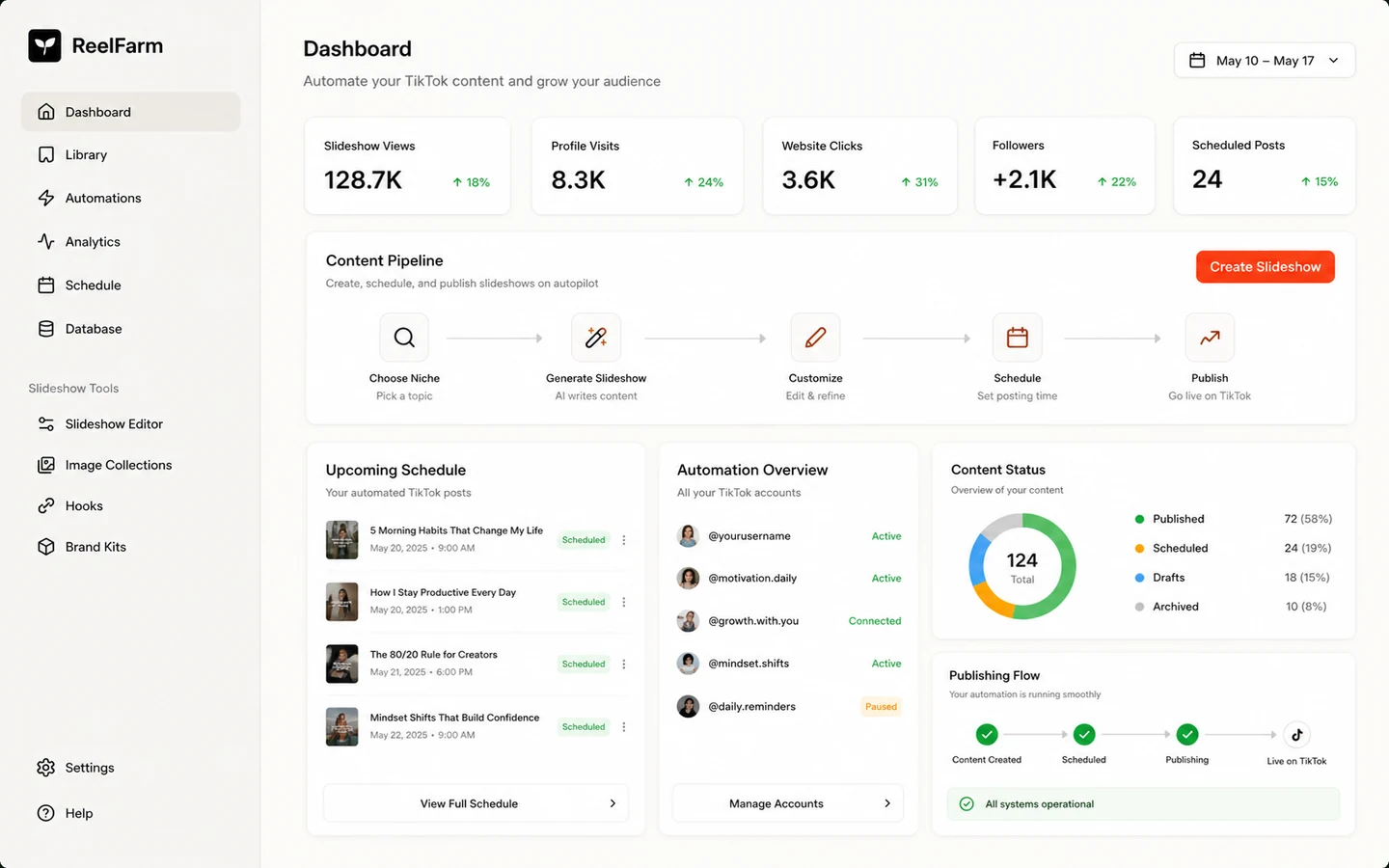
ReelFarm is worth considering if your real problem is not “I need one nice video.” It is worth considering if your problem is more specific: you need a repeatable way to create TikTok-oriented slideshow, hook, demo, or faceless short-form posts that can send traffic back to a website, app, product, or campaign.
That distinction changes the whole review.
I would not judge ReelFarm as a general AI video generator. The stronger buyer question is whether it gives you a practical publishing rhythm. If you already have a niche, a destination page, a content angle, and a reason to post often, ReelFarm can make sense. If you are still unsure what you want to say on TikTok, the tool may simply help you produce more content without making the strategy better.
The main strength is focus. ReelFarm is built around TikTok automation, slideshows, posting, team use, and workflow scale. The main caution is that the plan name is less important than the operating limits: monthly videos, AI credits, TikTok automations, account workflow, API access, and refund eligibility.
The safest next step is not to chase a coupon first. Test the workflow, compare the plan limits, and only then check whether the current pricing or offer path makes the purchase more reasonable.
Next step: If ReelFarm still looks like the right TikTok workflow tool, verify the current plan limits and buyer route before checkout.
Review snapshot
| Review point | Practical take |
|---|---|
| Best for | Creators, founders, marketers, and agencies testing repeatable TikTok slideshow or faceless posting workflows |
| Not ideal for | Buyers who need one polished brand film, deep editing control, full UGC ad production, or human-style avatar storytelling |
| Main use case | Turning short-form ideas into repeatable TikTok posts and automations |
| Starting price | Public pricing starts at $19/month for Starter, with higher tiers for more videos, credits, and automations |
| Free path | ReelFarm promotes a free signup or trial-style entry, but buyers should verify current limits in the account flow |
| Main strength | Focused TikTok automation and slideshow workflow rather than a broad creative suite |
| Main concern | Credits, automation limits, refund rules, content rights, and API access need careful verification |
| Best alternatives to compare | Revid AI for short-form workflow, AKOOL for avatar-led video, broader creative tools for design-heavy output |
| Best next step | Create a few posts for a real niche before moving from a small plan to a scaling tier |
What is ReelFarm?
ReelFarm is best understood as an AI TikTok automation and short-form video workflow tool for people who want to create posts repeatedly, not just make a single video asset.
Its public positioning is direct: automate TikToks that drive traffic to a website, app, or business. The product centers on slideshow creation, TikTok publishing, automation, scheduling, team members, multiple TikTok accounts, AI UGC-style assets, hook/demo videos, and API-based workflows.
That makes it different from a traditional video editor. It is not trying to be Premiere Pro. It is also not the first tool I would pick if the buyer wants a highly polished cinematic ad, a deep avatar performance, or a full multi-platform creative suite. ReelFarm is closer to a content operations tool for people who believe short-form volume, testing, and repeatable formats can create traffic.
Our review approach: we compare public product pages, pricing details, API documentation, terms, buyer workflow fit, and nearby alternatives. We do not treat a low monthly price, a free entry path, or a coupon route as proof that the product fits the buyer.
The common wrong expectation is thinking ReelFarm will solve the whole TikTok problem. It will not. It may help with production and automation. The buyer still has to choose the niche, avoid low-quality posting, review rights and platform rules, warm up accounts carefully, and decide whether the output is good enough for the audience.
Who should use ReelFarm?
Founders using TikTok as a traffic channel
ReelFarm makes sense for a founder who already knows where TikTok traffic should go. That might be a SaaS landing page, Shopify product, app download page, newsletter, or content site.
The condition is important: the traffic goal should exist before the tool. If the founder only wants to “try TikTok” without a clear angle, ReelFarm may produce content faster than the strategy can absorb.
Before paying, I would check whether the Starter plan gives enough videos, slideshows, credits, and automation capacity to test one serious content idea.
Creators testing faceless slideshow formats
A creator who wants to test list-style, educational, product-led, or niche slideshow content may find ReelFarm useful. The tool fits the kind of workflow where the creator cares about posting consistently without filming every piece manually.
The risk is sameness. Faceless TikTok formats can work, but they can also become forgettable if every post feels like template output. A careful creator should judge sample posts by audience usefulness, not just production speed.
Agencies managing multiple TikTok accounts
Agencies may be one of the more natural fits because ReelFarm includes team and account workflow language. Multiple TikTok accounts, team members, scheduling, and automations are more relevant when a buyer manages several clients or content streams.
The agency should not assume the cheapest plan is enough. The real test is monthly content volume, number of accounts, review workflow, client approval, and who takes responsibility when a post goes live.
Technical teams exploring API workflows
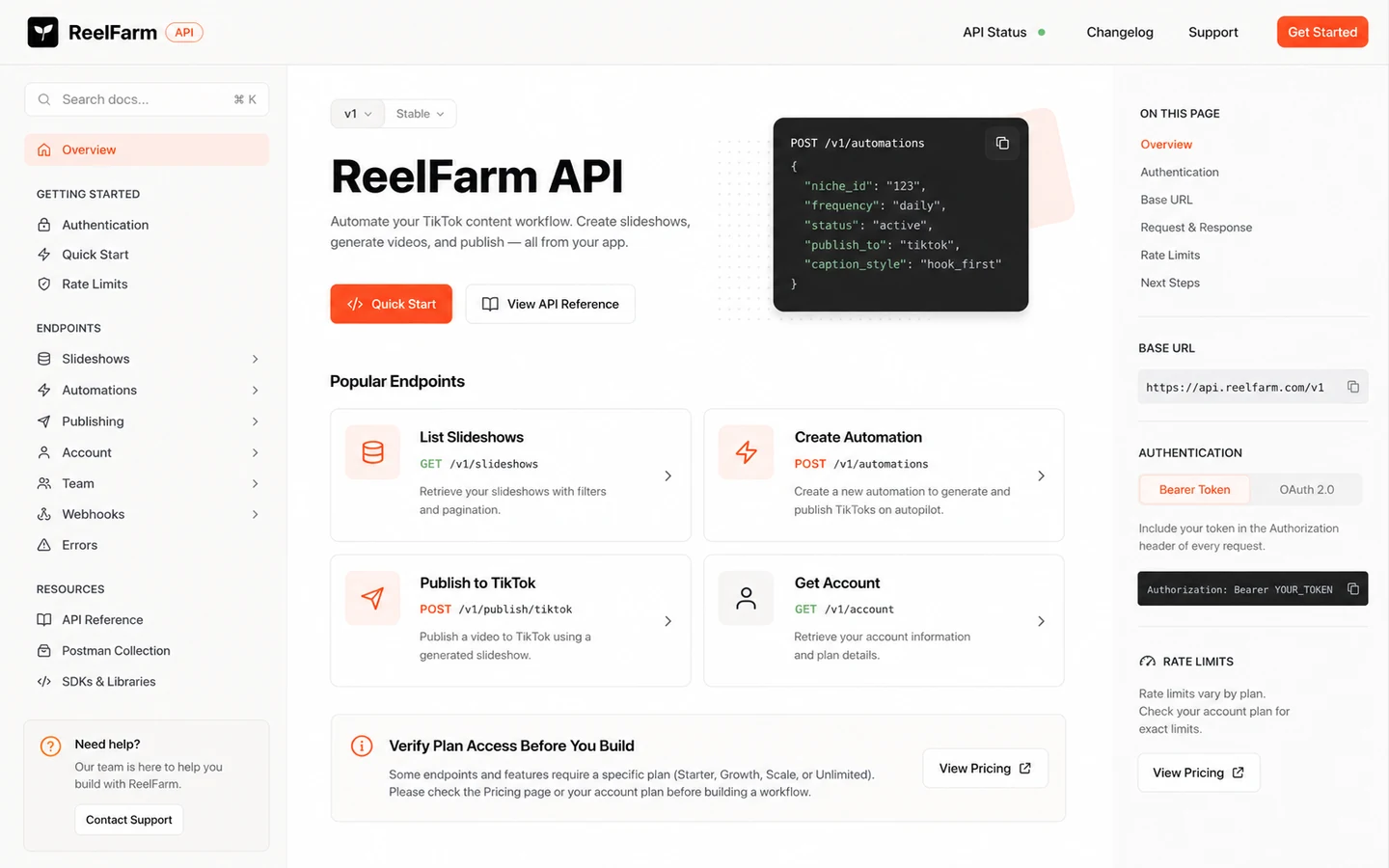
ReelFarm publishes API documentation for slideshows, automations, schedules, videos, TikTok publishing, collections, and account workflows. That makes it worth checking for technical buyers who want to connect short-form content generation into a larger system.
I would be careful here. Public plan messaging and API documentation should both be checked before buying for API use. If your workflow depends on API access, do not rely on a casual assumption from a pricing card alone.
Who should avoid ReelFarm?
ReelFarm is not the first tool I would choose if you only need one polished brand video. The product is more useful when repeated posting matters. If the job is a launch film, sales page explainer, or high-trust brand asset, a manual editor or a different AI video platform may be a better fit.
I would also be careful if you need human-style UGC with strong spoken delivery, emotional nuance, or full ad direction. ReelFarm can support short-form and UGC-style assets, but its clearest strength is TikTok automation and slideshow-style output. If your main requirement is a talking avatar or polished paid-ad creative, compare alternatives first.
Buyers who do not understand TikTok account health should slow down. ReelFarm’s own FAQ-style guidance talks about warming up accounts and avoiding risky account history. Automation can help production, but it cannot guarantee reach, trust, or platform safety.
Commercial users should also be cautious with visual rights. ReelFarm’s terms discuss moodboard images and recommend using properly licensed content for public or commercial use. That is not a small detail if you publish for clients or paid campaigns.
Finally, skip the impulse purchase if you are only here because of a discount. A cheaper month does not fix a poor content strategy, low account readiness, or output quality that does not match your niche.
How ReelFarm fits into a real workflow
A realistic ReelFarm workflow starts before the dashboard.
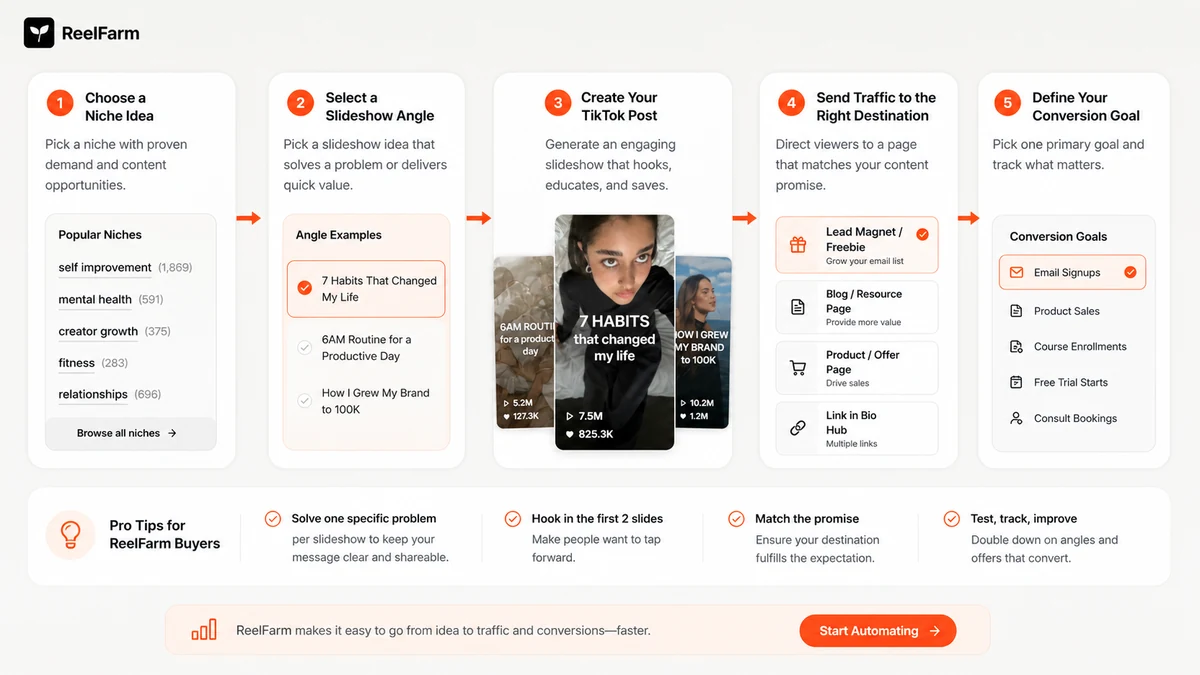
The buyer should first decide the niche, target audience, content angle, and destination page. ReelFarm is much easier to judge when the post has a job: teach something, tease a product, drive curiosity, send traffic, or test hooks.
After that, the workflow looks more like this:
- Define a short-form content angle.
- Create or generate slideshow/video ideas.
- Build a few posts inside ReelFarm.
- Review the visuals, captions, hooks, and publishing schedule.
- Connect TikTok carefully, especially if the account is new.
- Publish a small batch rather than flooding the account.
- Watch analytics and audience response.
- Adjust the format before scaling volume.
The best use is not blind automation. The best use is repeatable review. Create a few posts, look at the quality, check whether the output feels native to your niche, then decide whether to post daily or across more accounts.
The easy mistake is assuming more videos equals a better TikTok strategy. It does not. ReelFarm can help create and publish more, but the buyer still has to decide whether more is useful.
Workflow check: If ReelFarm looks useful, test it with one real niche and one real traffic destination before scaling multiple accounts.
Real-world buyer scenarios
Scenario 1: A SaaS founder trying TikTok for traffic
A SaaS founder might use ReelFarm to create educational slideshows around pain points, product examples, or quick workflow tips. This can make sense if the founder already has a landing page and knows which audience problem to target.
Where it may fail: if the content becomes generic product spam. The founder should test whether ReelFarm can create posts that feel useful before treating it as a growth channel.
Scenario 2: A creator running faceless niche pages
A faceless creator may care less about cinematic production and more about cadence. ReelFarm can support that style if the content format is clear and the account can handle repeated posting.
The buyer check is quality fatigue. If the posts feel too similar after a week, the creator may need stronger hooks, better source images, or a different creative process.
Scenario 3: A small agency managing client accounts
An agency may like ReelFarm because team members, account workflows, and automations can reduce manual work. This is where the higher tiers may make more sense than Starter.
The risk is client responsibility. Agencies should build a review step before publishing, especially when using AI-generated visuals, moodboard-style assets, or claims tied to a client’s product.
Scenario 4: A technical marketer building an automation system
A technical marketer may look at ReelFarm’s API and imagine a content engine connected to a database, campaign calendar, or internal tool.
That can be interesting, but it is not a casual subscription decision. Confirm API access, authentication, plan requirements, rate limits, and actual endpoint fit before designing a process around it.
Key features that actually matter
TikTok automation
The core feature is not just video creation. It is the ability to connect production with TikTok posting. That matters for buyers who want a repeatable schedule instead of downloading assets and manually uploading everything.
Buyer note: automation should not remove review. It should reduce repetitive work while leaving the final publishing decision with a person.
Slideshow creation
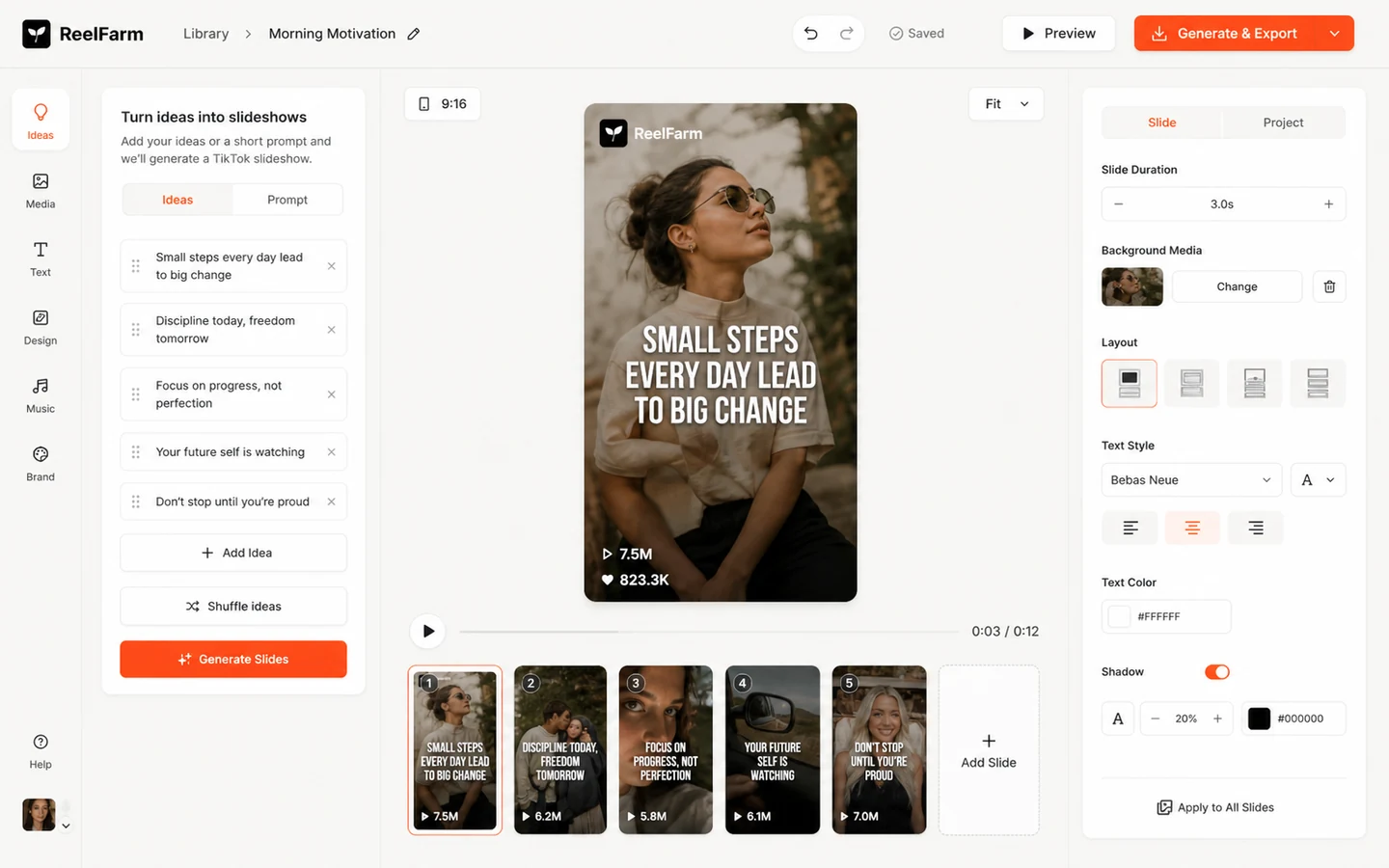
ReelFarm’s slideshow editor is central to the product’s practical value. Slideshow content is one of the clearest fits for faceless TikTok pages, list-based formats, product explainers, and simple traffic campaigns.
Where it may disappoint: if your niche needs highly original creative direction, emotional storytelling, or premium brand design. Slideshow automation is useful, but it can become formulaic.
Hook and demo videos
Hook/demo workflows are useful for products and apps that need to explain value quickly. This is more commercially interesting than generic short-form posting because it connects video output to a buyer action.
Buyer note: test this with a real product message. A generated demo-style post is only useful if the hook is believable and the traffic destination is ready.
Team members and TikTok account workflows
ReelFarm’s team and account language makes it more relevant for agencies and growth teams. Unlimited team members and account workflows can matter when several people create, review, or manage content.
The risk is governance. Just because team members can collaborate does not mean the approval workflow is automatically safe for client publishing.
API access and Skill.md
The API path is one of ReelFarm’s more interesting signals for technical buyers. The docs describe endpoints for slideshows, automations, schedules, videos, TikTok publishing, collections, and account operations.
Buyer note: there is a public detail to verify carefully. ReelFarm’s homepage pricing cards show API-related language broadly, while the API documentation says API access is available on Growth, Scale, and Unlimited plans. If API access is essential, check the live dashboard and plan rules before paying.
Analytics
Analytics matter because TikTok automation without performance feedback can become a content treadmill. ReelFarm’s analytics positioning can help buyers see which posts perform better.
Still, I would treat analytics as a learning tool, not proof that automation is working. Early TikTok performance can be affected by account history, content topic, consistency, timing, and platform behavior.
Pricing and plan value
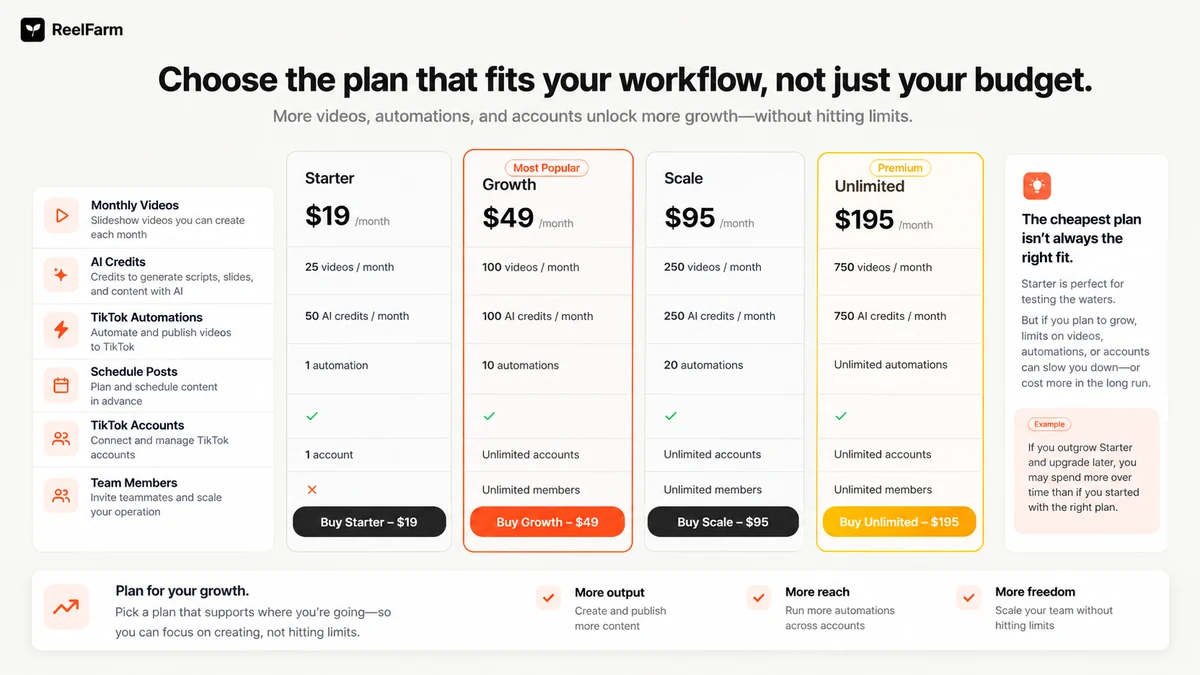
ReelFarm’s public pricing starts at $19/month for Starter, followed by Growth at $49/month, Scale at $95/month, and Unlimited at $195/month.
The headline price is easy to understand. The real buying decision is not.
Starter includes 25 slideshows or videos per month, AI credits, one TikTok automation, slideshow creation, hook/demo videos, publishing, team member support, and scheduling according to the current pricing section. Growth raises the monthly output and automation limits, while Scale and Unlimited are built for heavier usage.
The plan logic is simple: ReelFarm becomes more expensive when you need more volume and more automation. That is fair enough, but the buyer should calculate usage before paying. If you plan to post once a day, 25 monthly outputs may not leave much room for testing, mistakes, revisions, or multiple content angles.
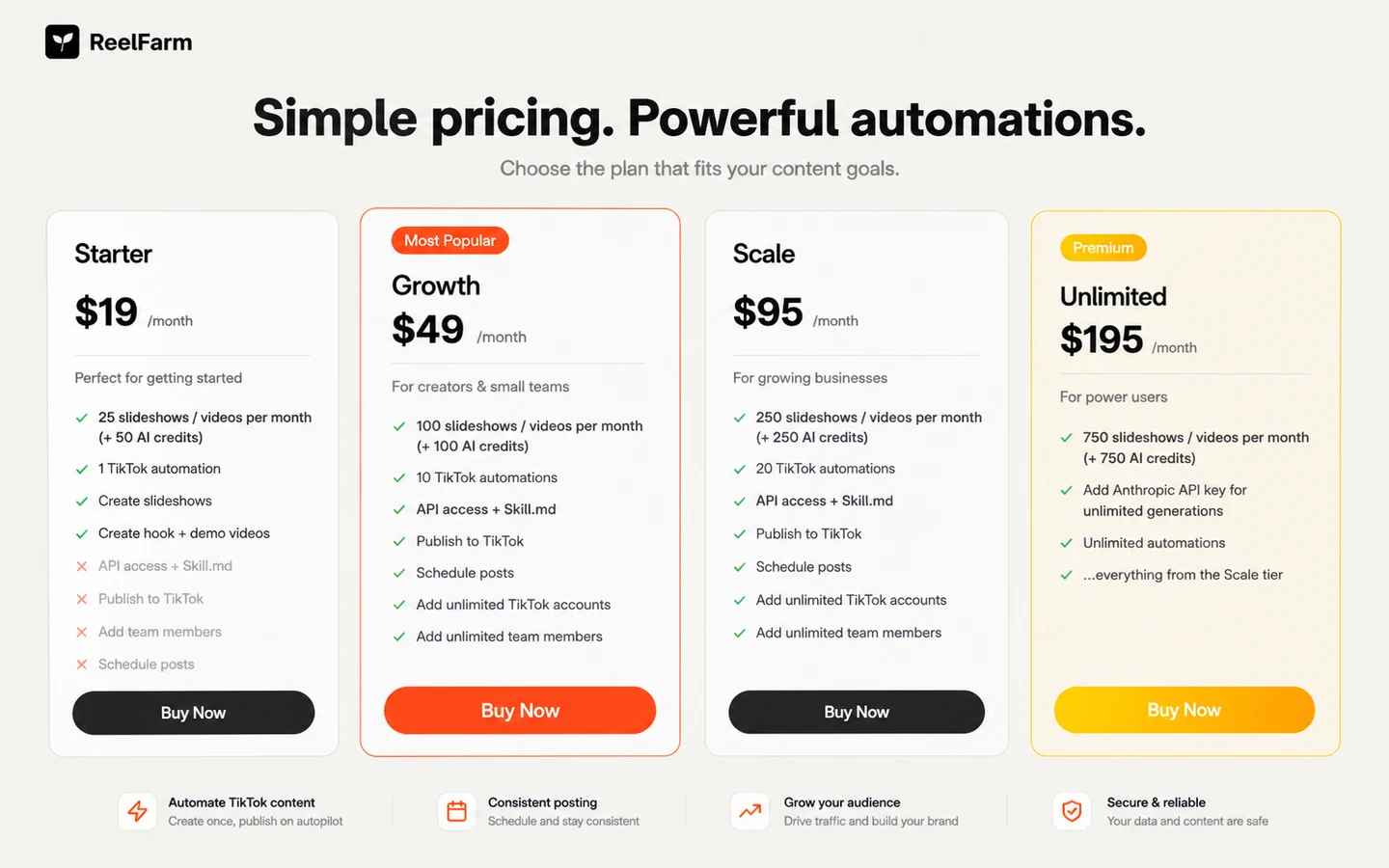
The Starter plan is best treated as a test lane. It may be enough for a small proof of workflow. It is probably not enough for a buyer who wants to run several TikTok pages, daily posts, or agency workflows.
Growth or Scale may make sense if the buyer knows the content format works and needs a consistent schedule. Unlimited should be justified by real operational need, not fear of running out.
My pricing caution is stronger around API use and refunds. If you are buying because of API access, verify the exact plan requirement. If you are buying because the first month feels inexpensive, read the refund and credit rules before using a large share of the account.
Pricing check: Do not choose a ReelFarm plan by price alone. Compare your expected posting cadence against videos, AI credits, automations, accounts, and API needs.
Check ReelFarm pricing Check current offers Read store guide
Free plan, trial, coupon, and checkout notes
ReelFarm promotes a free entry path, but I would not treat that as a full buying answer. A free signup or trial-style path is useful for inspecting the workflow, not for proving long-term value.
Use the free entry point to answer practical questions:
- Can you create posts that match your niche?
- Does the slideshow output feel useful or generic?
- Does the TikTok workflow make sense for your account?
- Do you understand how credits are consumed?
- Can you review and approve posts before they go live?
- Would you repeat this process weekly?
If the answer is no, a discount will not fix the mismatch.
The coupon path should come after workflow fit. ReelFarm does not appear to be a product where the public coupon code is the main story. The safer order is: test workflow, compare plan limits, read terms, then check the current deal route.
Refunds deserve attention. ReelFarm’s terms say refunds are prorated up to a 25% credit usage threshold, that AI-generated images and videos are non-refundable once generated, and that used AI-generated content credits cannot be restored. That means a buyer should not burn through credits casually and then assume the purchase can be reversed.
Checkout order: Treat active offers as a final verification step, not the reason to buy ReelFarm before the workflow is clear.
What I would check before buying ReelFarm
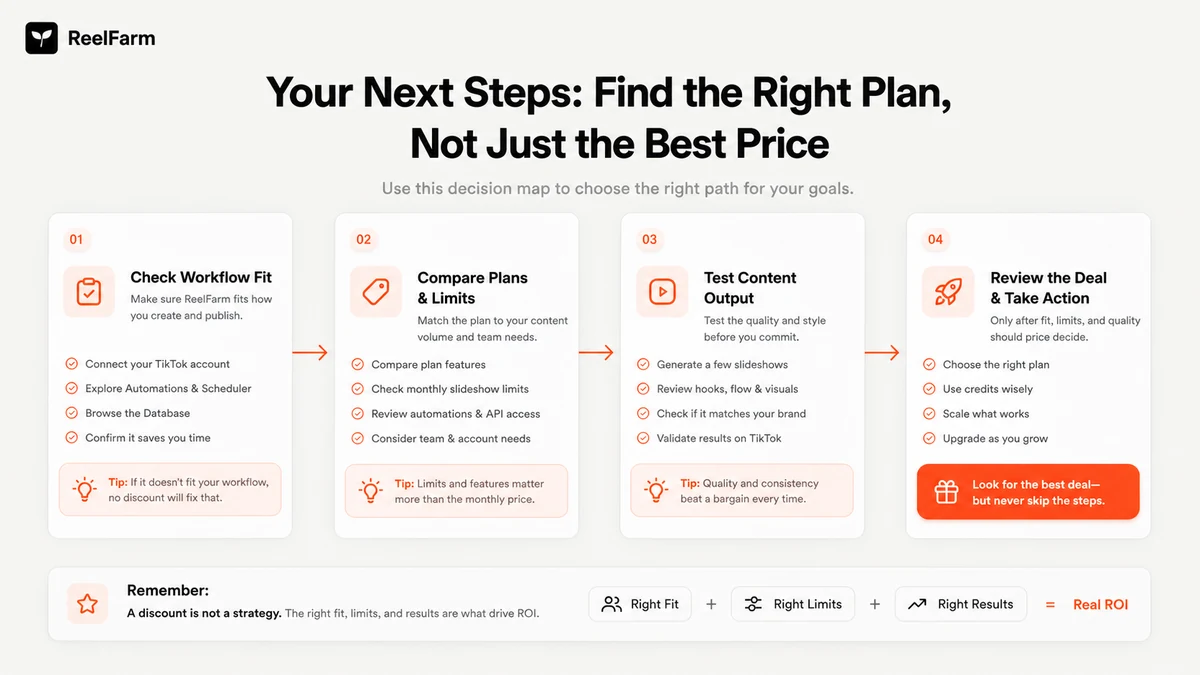
If I were buying ReelFarm for a real workflow, I would check seven things before paying.
First, I would calculate the posting cadence. A buyer who wants one post every few days has a different plan need from a buyer posting daily across multiple accounts.
Second, I would compare video, slideshow, and AI credit limits. Credits can feel abstract until you start generating, revising, and testing.
Third, I would confirm TikTok automation limits. One automation may be enough for a small test. It is not the same as running a serious multi-account operation.
Fourth, I would verify API access if the workflow depends on it. The public API docs and pricing cards should be checked together before treating API use as confirmed.
Fifth, I would read the refund terms before generating heavily. Refund eligibility is affected by usage, and generated AI content is treated carefully in the terms.
Sixth, I would review content rights. If moodboard images or AI-generated assets are used commercially, the buyer should understand licensing responsibility and consider replacing uncertain visuals with properly licensed assets.
Seventh, I would compare alternatives before upgrading. ReelFarm may be the right TikTok automation tool, but not every buyer needs TikTok automation more than an avatar tool, video editor, or broader creative suite.
A simple test before paying
Before paying for a higher ReelFarm tier, I would run a small test like this:
- Choose one niche and one traffic destination.
- Draft three to five TikTok post ideas that match a real campaign.
- Create a small batch inside ReelFarm.
- Review the visuals, hooks, captions, and slideshow rhythm manually.
- Publish cautiously rather than pushing everything at once.
- Watch early engagement, but do not overreact to one post.
- Calculate how many posts you would realistically need next month.
This test is deliberately boring. That is the point.
A tool like ReelFarm becomes valuable when the workflow survives boring reality: weekly content planning, account warm-up, review steps, posting cadence, and measurement. If the tool only feels exciting during a demo, I would not move straight to a bigger plan.
Pros explained
ReelFarm solves a narrow repeated problem
The strongest pro is focus. ReelFarm is not trying to be every kind of video tool. It is built around TikTok automation, slideshows, scheduling, and traffic-oriented short-form output.
That matters when the buyer has a repeated publishing problem. It matters less when the buyer wants a one-time asset.
Pricing is visible enough to compare
Public pricing makes ReelFarm easier to evaluate than tools that hide everything behind sales calls. Starter, Growth, Scale, and Unlimited give buyers a visible ladder.
The limitation is that visible pricing does not automatically mean simple economics. Credits, output limits, automations, and API access still require a careful read.
Team and account workflows can support agencies
Unlimited team member language and multiple account workflows make ReelFarm more interesting for agencies or small teams than a basic single-user generator.
This stops being enough if the team needs deeper approvals, compliance review, client sign-off, or advanced brand governance.
API documentation gives technical buyers a real check point
The API docs are a useful signal because technical buyers can inspect whether ReelFarm could plug into a larger system.
The buyer still needs to verify plan access and practical limits. Documentation is not the same as a confirmed business workflow.
Cons explained
Credit and automation limits can change the value quickly
The $19 entry price looks simple, but the workflow is limited by monthly outputs, AI credits, and automations. If your plan runs out before your content calendar does, the cheap plan becomes only a trial lane.
This matters most for daily posting, agencies, and multiple-account strategies.
API access needs careful verification
API access appears in ReelFarm’s public ecosystem, but buyers should verify the exact plan requirement because API documentation and pricing-card language can be interpreted differently.
If the API is only a nice extra, this is not a big issue. If the API is the reason you are buying, it becomes a major checkout check.
Refunds are not frictionless
ReelFarm’s terms place restrictions around credit usage, generated AI content, and older subscription payments. That is normal enough for AI generation tools, but it changes buyer behavior.
Do not generate heavily until you know the tool fits.
Creative depth may not match every use case
ReelFarm can support short-form content, but it is not automatically the best choice for polished UGC ads, talking avatar campaigns, cinematic edits, or heavily branded creative.
This is where alternatives matter. The right tool depends on whether your bottleneck is TikTok posting, avatar production, ad creative, or manual editing.
Green flags and red flags
Green flag: you already know your TikTok content angle and need a tool to help you publish repeatedly.
Green flag: you can test with a small plan before scaling.
Green flag: your workflow benefits from team members, multiple accounts, scheduling, or API experimentation.
Green flag: you understand that ReelFarm is a production and automation tool, not a guarantee of reach.
Red flag: you want a tool to invent the strategy for you.
Red flag: you plan to publish commercially without checking rights around images, AI assets, and platform rules.
Red flag: you need polished avatar-led UGC and are judging ReelFarm as if it were a full AI ad studio.
Red flag: you are buying only because the entry price looks low.
ReelFarm vs alternatives
ReelFarm’s direct comparison set depends on the buyer job. If the job is TikTok slideshow automation, the alternatives are different from the tools you would compare for avatar ads, cinematic videos, or full creative design.
Revid AI vs ReelFarm
Revid AI is one of the more natural short-form video comparisons if the buyer wants a broader video creation workflow before committing to ReelFarm’s TikTok automation angle.
ReelFarm may still make more sense if TikTok publishing, automations, and account workflow are the center of the decision. Revid AI may be the better route if the buyer wants short-form video creation without being as locked into the TikTok automation frame.
If that is the decision, compare ReelFarm with the Revid AI review before choosing a plan.
AKOOL vs ReelFarm
AKOOL is a better comparison when the buyer wants avatar-led or branded AI video output. That is a different problem from faceless TikTok slideshow automation.
ReelFarm may still win for buyers who want repeatable TikTok posts, traffic experiments, and scheduling. AKOOL may be the stronger route for branded avatars, visual presentation, and more polished AI video campaigns.
If avatar-led video matters more than TikTok automation, read the AKOOL review before paying for ReelFarm.
PromeAI vs ReelFarm
PromeAI is more of an adjacent creative-generation route than a direct TikTok automation replacement. It may matter for buyers who need visuals, design exploration, or creative assets before making short-form content.
ReelFarm is the cleaner fit when the goal is publishing TikTok content repeatedly. PromeAI is more relevant when the buyer’s bottleneck is creative asset generation or visual ideation, not posting cadence.
Manual editing vs ReelFarm
Manual editing is still the stronger path when brand nuance, visual polish, or storytelling quality matters more than output volume.
ReelFarm wins when repetition and speed matter. Manual work wins when a few important videos need to feel custom, controlled, and brand-safe.
Trust, refund, and buyer-risk notes
My confidence is strongest around ReelFarm’s product role: it is clearly positioned around TikTok automation, slideshow generation, posting, team workflows, and short-form traffic. My confidence is more cautious around long-term buyer value because plan limits, account performance, API access, and refund eligibility depend on how the buyer uses the product.
There are four risk areas I would not ignore.
First, refund eligibility is tied to usage. ReelFarm’s terms say refunds are prorated up to a credit-usage threshold and that AI-generated images and videos are non-refundable once generated. This means the buyer should test carefully before burning through credits.
Second, platform compliance remains the user’s responsibility. ReelFarm can connect to TikTok and YouTube workflows, but the buyer still has to comply with those platforms’ rules.
Third, content rights matter. ReelFarm’s terms say moodboard images are provided as-is and recommend replacing them with properly licensed content for public or commercial use. For client work, that is a serious buyer check.
Fourth, API and automation assumptions should be verified. If you only need the visual editor, this may not matter. If your business process depends on API access or multiple automations, verify the current plan and docs before checkout.
Do not buy ReelFarm as a shortcut around strategy, compliance, or creative review. Buy it only if it fits a workflow you can actually maintain.
Final verdict
I would consider ReelFarm if TikTok consistency is the bottleneck, your niche is clear, and you want a tool that can turn repeatable ideas into slideshow-style or short-form posts without building the whole workflow manually.
I would start small if the plan limits are enough for a real test. Starter can make sense when you need proof of workflow, not full-scale production. Growth or Scale makes more sense only after you know the format works and the monthly output limit fits the schedule.
I would skip ReelFarm if you need one polished brand film, a high-end video editor, deep creative control, or avatar-led UGC that feels like a real creator delivering a scripted pitch. In those cases, compare Revid AI, AKOOL, or a broader creative workflow tool first.
The safest next step is to test the workflow before chasing a deal. Build a few posts for a real niche, check the output quality, understand credit usage, read the refund and content-rights terms, and only then decide whether the current plan and offer route are worth it.
