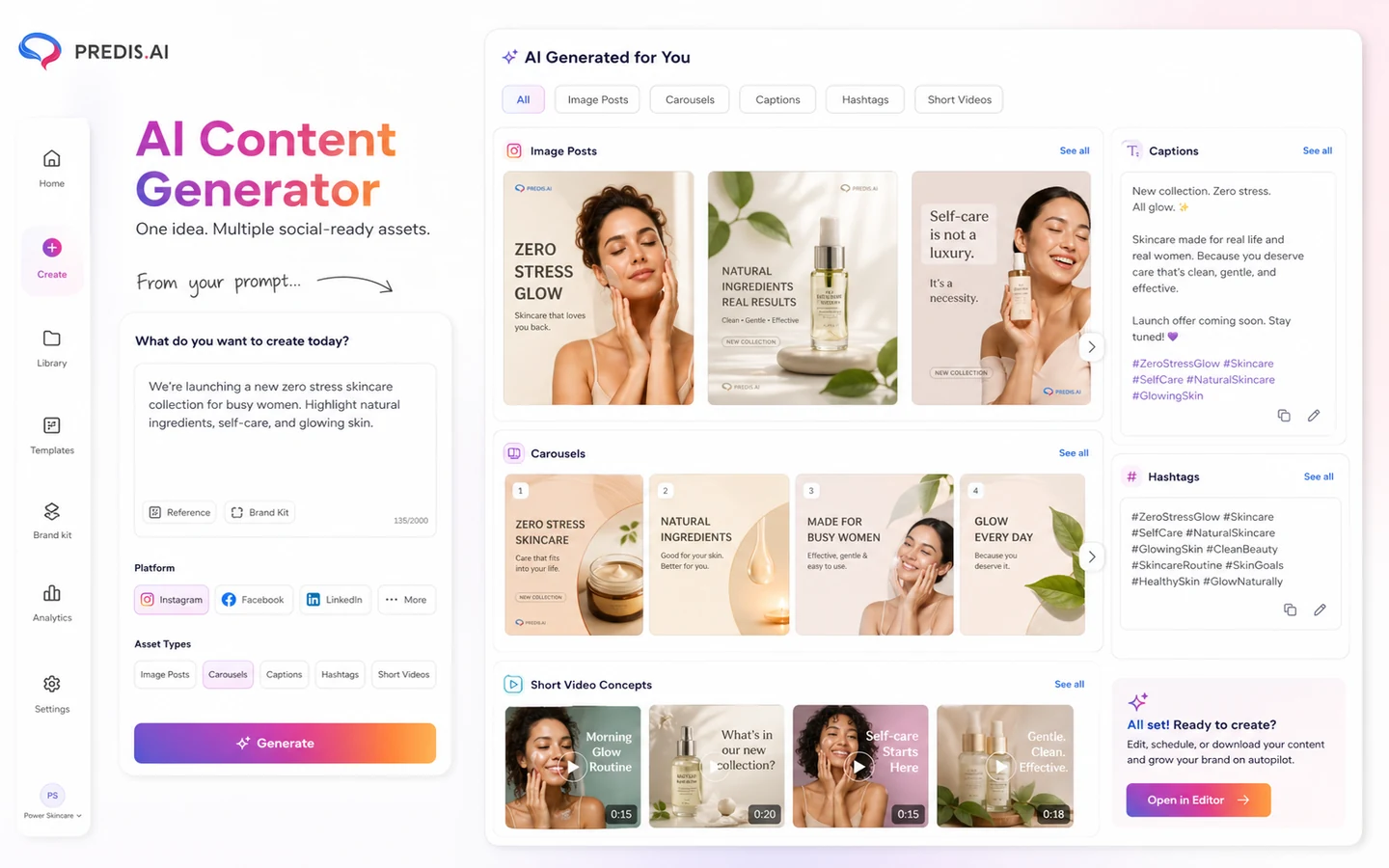
Quick verdict
Predis.ai is worth considering if your real bottleneck is not just writing captions, but producing a steady stream of social posts, short videos, carousels, ad creatives, hashtags, competitor ideas, and scheduled content across channels.
That is the important distinction.
A lot of AI social media tools look useful on the homepage because they promise faster content. Predis.ai is more interesting when you judge it as a workflow: brand setup, creative generation, editing, calendar planning, auto-posting, competitor analysis, and possibly API-based content creation. If those pieces connect to work you already repeat every week, the tool can save time.
If you only need a basic scheduler or a few polished templates, I would be more cautious. Predis.ai can do a lot, but the buying decision is not only about feature count. Credits, brands, social channel limits, auto-posting access, add-ons, and refund terms matter more than the plan name.
For my money, the safest way to evaluate Predis.ai is to use the trial period with real content: one static post, one carousel, one product or campaign video, one scheduled post, and one competitor analysis run. If that test feels useful, then compare Core, Rise, and Enterprise+ against your real monthly cadence. If the workflow feels too broad, a simpler design or scheduling tool may be the cleaner choice.
Next step: If Predis.ai still fits your social content workflow, verify the current pricing, credits, and offer path before choosing a plan.
Review snapshot
| Review point | Practical take |
|---|---|
| Best for | Small businesses, ecommerce brands, creators, and agencies that need recurring AI social content |
| Not ideal for | Buyers who only need a simple scheduler, a design template tool, or occasional caption help |
| Main use case | Turning prompts, product details, or campaign ideas into social posts, videos, carousels, captions, and schedules |
| Pricing model | Public plans use credits, brands, social channels, competitor runs, add-ons, and yearly/monthly billing differences |
| Trial path | A 7-day $0 entry path is shown publicly, but buyers should verify live checkout terms |
| Main strength | Combines creation, editing, scheduling, ecommerce content, competitor analysis, and API options |
| Main concern | Credits and auto-posting limits can change the real value of a plan |
| Direct alternative | Simplified for broader design and marketing content workflows |
| Adjacent routes | HoppyCopy for email copy, Gallabox for WhatsApp automation, ActiveCampaign for CRM/email automation |
| Best next step | Test real social assets during the trial before annual billing |
What is Predis.ai?
Predis.ai is an AI social media content platform for creating posts, videos, carousels, captions, hashtags, ad creatives, and ecommerce-oriented social assets. It also adds planning and publishing features around that creation layer, including calendar workflows, auto-posting, competitor analysis, Shopify-style ecommerce use cases, mobile apps, and API documentation for teams that want programmatic generation.
That makes it different from a plain AI caption writer.
The better way to understand Predis.ai is as a creation-plus-publishing workflow. You give it a prompt, product idea, or brand context, then use the output as a starting point for social creatives. The value depends on how close those outputs are to usable after editing, and whether the built-in planning and scheduling features reduce the number of tools your team needs to touch.
It is not a full CRM. It is not an email automation platform. It is not only a Canva-style design tool. It is also not a guarantee that every AI-generated post will match your brand or convert in paid campaigns.
Our review approach compares public product pages, pricing details, help documentation, buyer workflow fit, marketplace signals, and nearby alternatives. I would not treat a discounted plan or a coupon path as proof that Predis.ai fits. The better test is whether it can produce the exact social assets your team repeatedly needs.
Who should use Predis.ai?
Predis.ai makes the most sense for small businesses that publish often but do not have a dedicated design and social production team. If you need weekly posts, carousels, campaign visuals, short videos, and captions, a single workflow can be useful. The condition is that you must be willing to edit. AI output still needs brand judgment.
Ecommerce teams are another strong fit. Predis.ai can turn product information into social posts and videos, which is useful when a store has many products and limited creative bandwidth. Before paying, I would test at least a few real product pages or campaign ideas, not just generic prompts.
Agencies can also benefit when they manage recurring content calendars for several clients. The buyer check here is plan fit. Brand limits, social channels, team members, auto-posting, and credits can become more important than the monthly price.
Social marketers who want creative variation for ads may find value too. Predis.ai can help generate ideas and formats quickly, but speed does not prove performance. Ad-market validation still happens outside the tool.
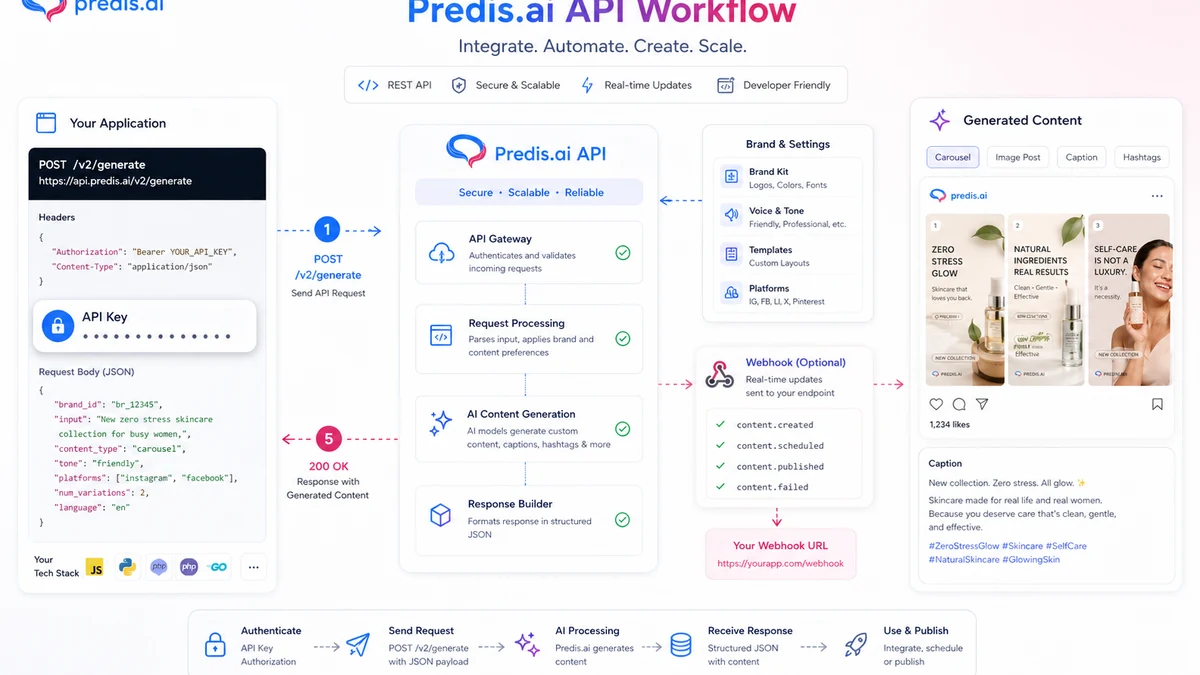
Developers or platforms may care about the API path. Predis.ai publishes API documentation for content creation, authorization, webhooks, brand setup, and rate limiting. That makes it more flexible than a dashboard-only tool, but API access, pricing, and limits should be verified before building around it.
Who should avoid Predis.ai?
I would avoid Predis.ai if you only need a basic scheduler. If finished creative assets already exist and the only job is publishing them, a lighter scheduling tool may be cleaner.
I would also be careful if you dislike credit-based usage. Credits are not a small detail here. Static posts, videos, resizing, regeneration, auto-publishing, voiceovers, and avatar-style content can affect usage differently. If your team creates a lot of video, the entry plan may feel smaller than it looks.
Predis.ai is also not the obvious first choice for teams that mainly need email campaigns, WhatsApp sales flows, or CRM automation. In those cases, a tool like HoppyCopy, Gallabox, or ActiveCampaign may match the buyer job better.
Large teams with strict approval workflows, governance, or deep reporting needs should slow down. Predis.ai may still help with creative generation, but enterprise social operations usually need more than content creation.
Finally, buyers who expect a refund safety net should be cautious. Predis.ai publicly emphasizes trial-first evaluation and non-refundable payments. That makes the trial window more important than usual.
How Predis.ai fits into a real workflow
A practical Predis.ai workflow starts before the prompt.
First, define the content types you actually need: static posts, carousels, product videos, ad creatives, memes, captions, hashtags, or scheduled posts. Then set up the brand context so the output has a better chance of matching your look and tone. After that, generate a small batch of content, edit the pieces that look close, resize or adapt them for the right platforms, and place the best ones into a calendar.
The decision point comes after that.
If Predis.ai reduces the number of manual steps, it can be a useful part of the workflow. If you still need to redesign every creative, rewrite every caption, and move everything into another scheduler, the tool becomes less compelling.
For ecommerce users, I would test one real product workflow. Can a product become a usable Instagram post, a short video, and a caption without too much cleanup? For agencies, I would test one client brand, one campaign, and one scheduled publishing flow. For ad teams, I would test creative variety but avoid assuming that AI-generated ads will perform until campaign data proves it.
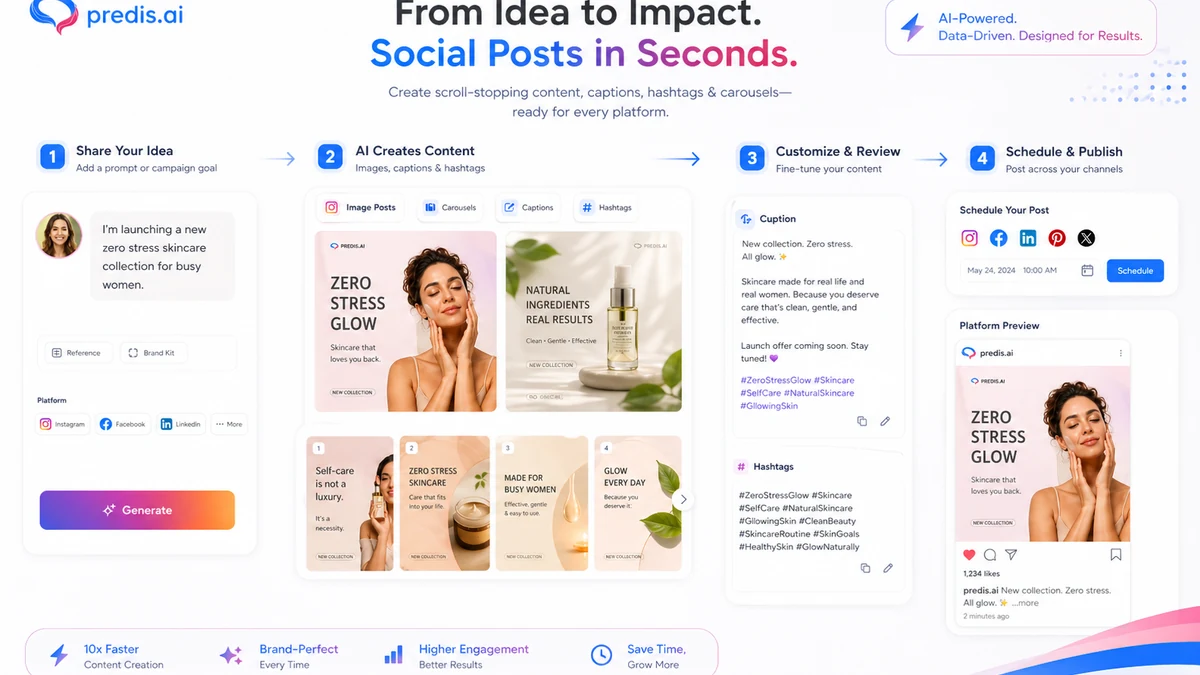
Workflow test: Use Predis.ai with one real brand or product before judging the paid plan from the pricing table alone.
Real-world buyer scenarios
A small ecommerce brand may use Predis.ai to turn product pages into posts, product videos, and captions. This can be useful if the store publishes regularly but does not have a design team. The risk is credit usage. Product videos and repeated edits can consume the plan faster than simple posts.
A solo marketer may use Predis.ai to keep several channels active. In this case, the value is not only generation. The calendar and scheduling layer matter because the marketer needs publishing discipline, not just creative ideas. The buyer should check whether the plan supports enough channels and whether auto-posting is included.
An agency may use Predis.ai for first-draft creative production across client accounts. That can save time, but only if brand controls and editing are strong enough for client work. Agencies should be especially careful with brand limits, team workflow, approval needs, and social channel add-ons.
A developer or platform owner may evaluate the API route. This is a different buying decision from normal dashboard usage. The question is not “can the app generate a post?” The question is whether API pricing, keys, webhooks, brand setup, and rate limits fit the system being built.
Key features that actually matter
AI social post and video generation
Predis.ai can generate social posts, images, videos, carousels, captions, and hashtags from a simple input. This is the main reason most buyers will look at the product.
The buyer note is simple: do not judge this feature from a generic demo. Test it with your brand, your product, and your normal publishing standard.
Brand setup and reusable style
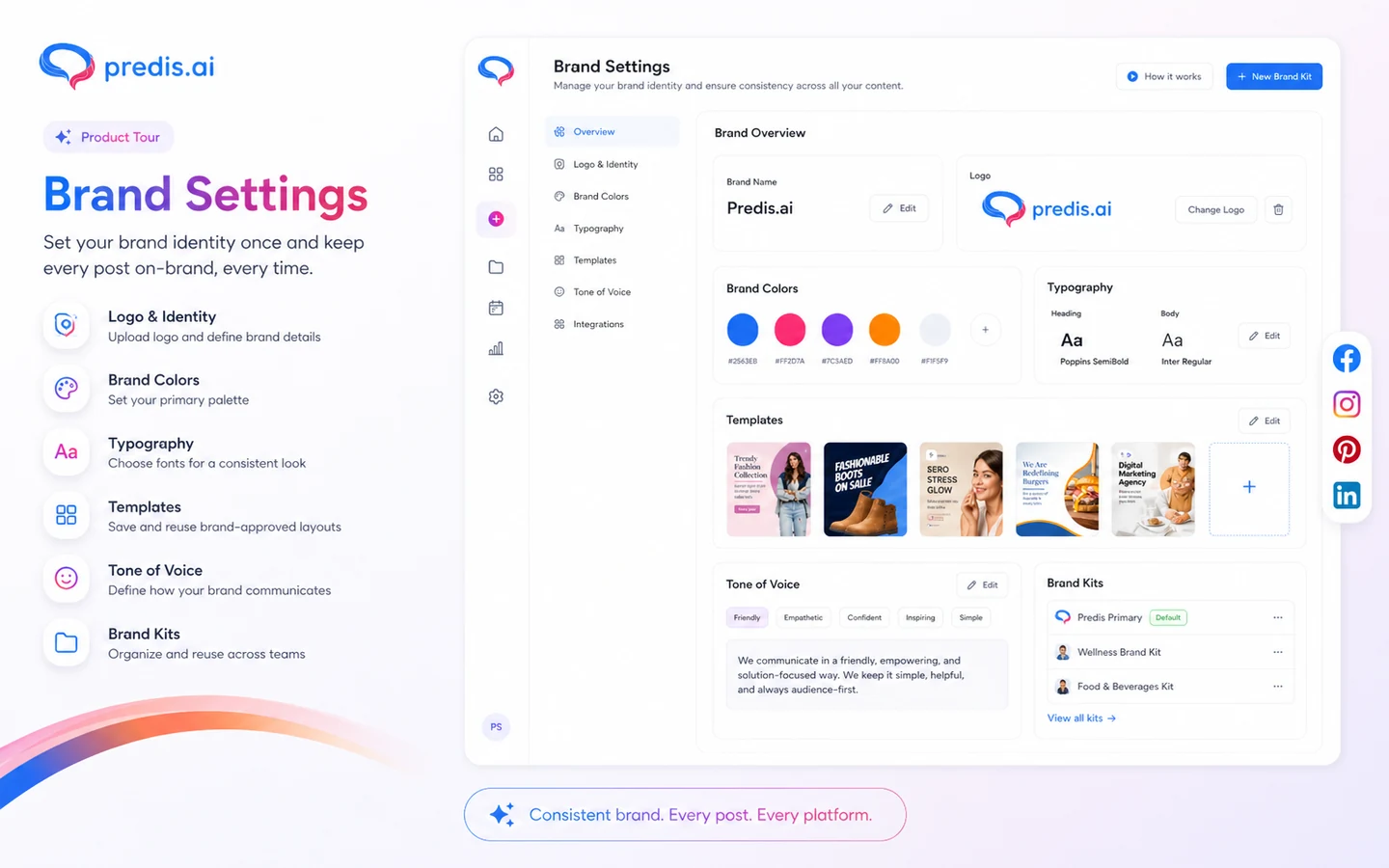
Brand setup matters because social content is not only text. Colors, logo, tone, and message consistency decide whether AI output feels usable or disposable.
This matters most for agencies and ecommerce teams. If every client or product line needs a separate brand setup, plan limits become a real buying factor.
Calendar and auto-posting
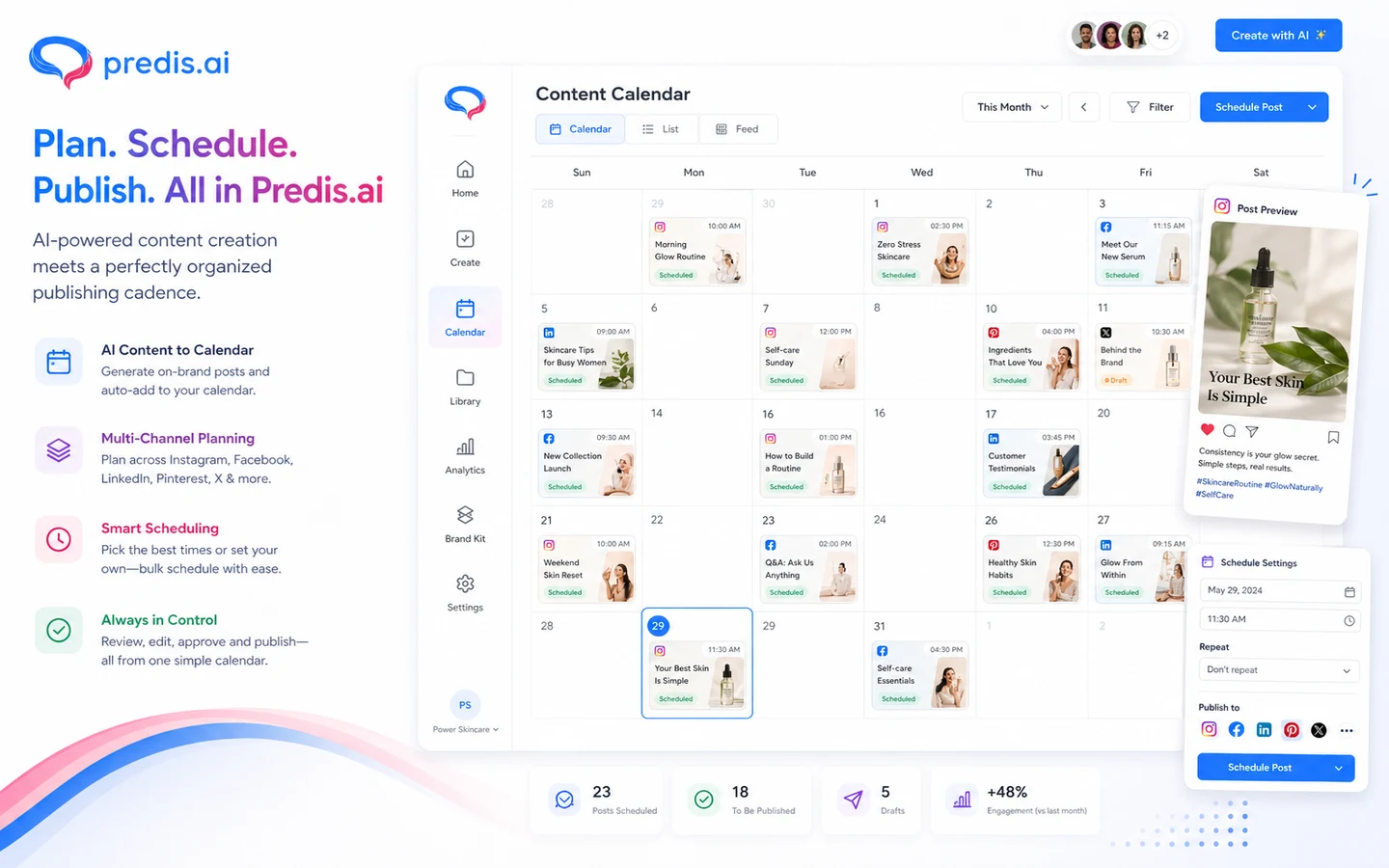
The content calendar helps connect creation with publishing. Auto-posting can reduce manual work, but the public plan grid makes it clear that automation access varies by plan.
Buyer note: Core may be enough for testing content generation, but it is not automatically enough for buyers who want hands-off publishing.
Competitor analysis
Competitor analysis can help buyers look beyond their own prompts and see what other accounts are doing. That is useful for idea generation, not a replacement for strategy.
The risk is treating competitor analysis runs as a magic content strategy. Use it for patterns, hooks, and creative direction, then still make brand-specific decisions.
API access
Predis.ai has developer documentation for API-based content creation, authorization, webhooks, brand setup, and rate limiting. This is useful for teams that want to embed content generation inside another product or workflow.
Buyer note: API access should be checked separately from normal app pricing. Do not assume dashboard plan limits and API needs are the same.
Pricing and plan value
At the time of review, the public Predis.ai pricing page shows Core at $19/month when billed yearly, Rise at $40/month when billed yearly, and Enterprise+ at $212/month when billed yearly. The page also shows a $0 for 7 days entry path, credits, brand limits, social channel limits, competitor analysis runs, add-ons, and API references.
The headline price is not the whole decision.
Core is the cheaper entry plan, but it lists one brand, no auto-posting, 10 publish channels, and 60 competitor analysis runs per month. That may be enough for buyers who only want to test generation and manual publishing. It is less convincing for someone who wants an automated calendar.
Rise looks more natural for buyers who need recurring scheduling because it adds more credits, more brands, auto-posting, more channels, and more competitor analysis runs. Enterprise+ is more relevant for agencies or larger teams that need higher capacity.
Credits are the most important pricing variable. If your workflow is mostly static posts, the plan may stretch further. If you create videos, resize content often, regenerate visuals, use voiceovers, or test UGC avatar-style content, the effective cost can rise. Extra social channels and extra credits are also add-ons, so the real budget can move above the plan headline.
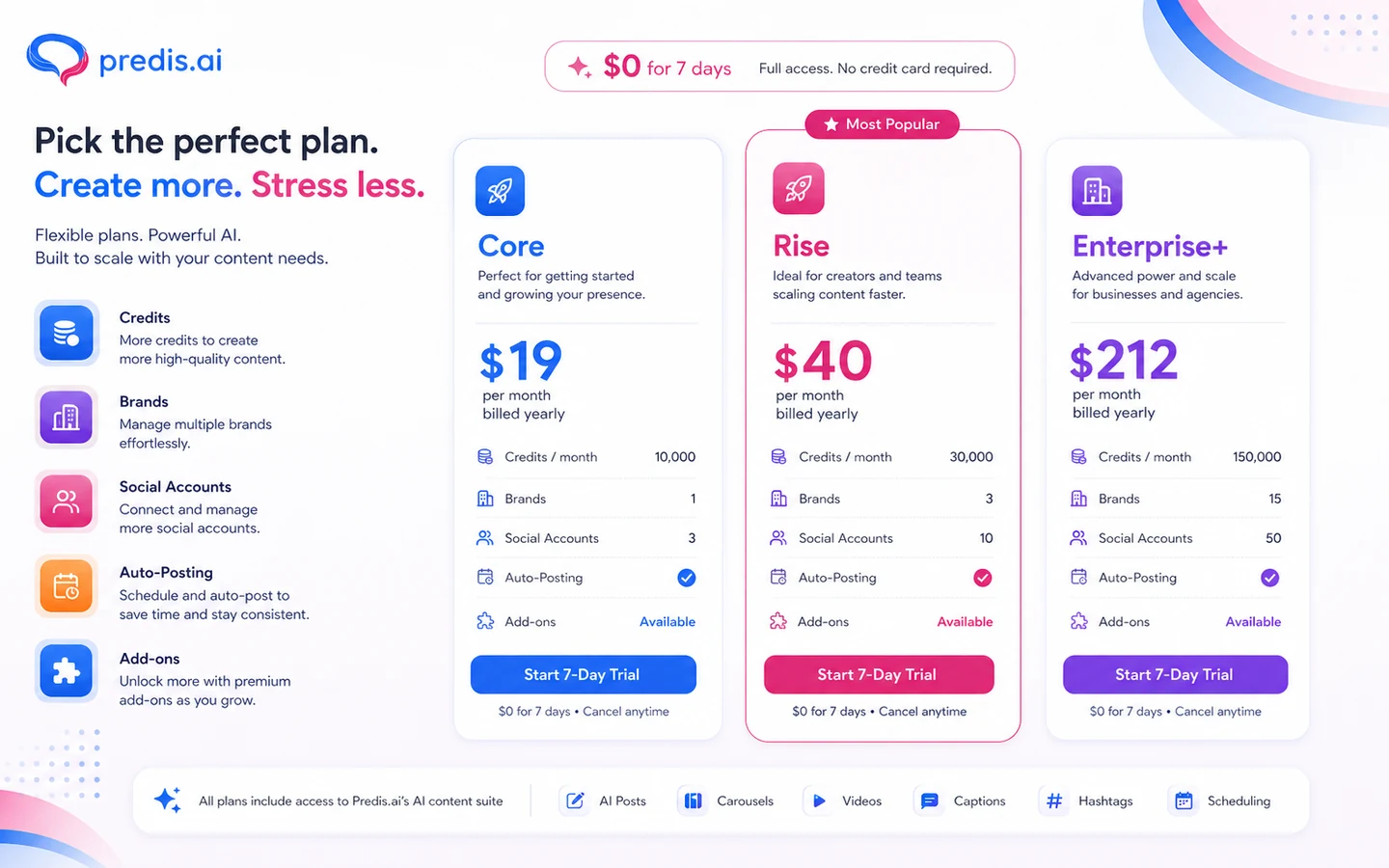
Pricing check: Before paying, compare the live plan grid against your real content mix, especially if video, auto-posting, or multiple brands matter.
Check Predis.ai pricing Check current offers Read store guide
Free plan, trial, coupon, and checkout notes
Predis.ai publicly presents a 7-day $0 trial path on paid plan entry points. I would treat that as the real decision window. A trial is useful only if you run the kind of content your business actually needs, not if you play with a few sample prompts.
The coupon path should come after workflow fit. A current offer can improve the purchase, but it should not push you into a plan that lacks the right credits, channels, or auto-posting capacity.
The checkout order I would use is:
- Test real content during the trial.
- Compare Core and Rise based on auto-posting and credits.
- Estimate add-ons before choosing annual billing.
- Read the current refund and cancellation terms.
- Check the Predis.ai coupon page only after the plan fit is clear.
Do not expose or rely on a coupon code as the buying reason. The safer path is to verify the live buyer route and use the discount as a secondary check.
What I would check before buying Predis.ai
If I were buying Predis.ai for a real workflow, I would check these points first:
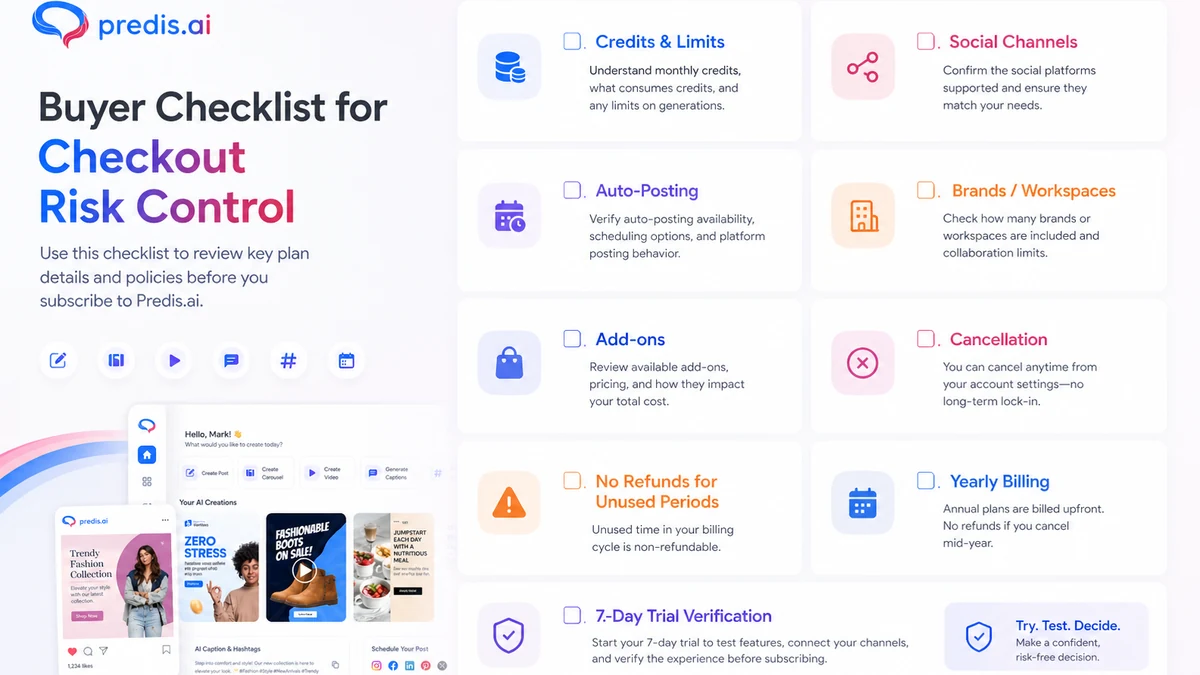
- Whether Core is enough, or whether auto-posting makes Rise the more realistic plan.
- How many credits my normal mix of posts, videos, resizing, regeneration, and publishing would use.
- Whether unused credits expire at the end of the monthly cycle.
- How many brands and social channels I need today, not in an optimistic future plan.
- Whether extra social channels or extra credits are needed before checkout.
- Whether API access is included or separately priced for my use case.
- Whether the no-refund language makes monthly testing safer than annual billing.
A simple test before paying
Before paying, I would run a small test like this:
- Create one static post from a real campaign idea.
- Generate one carousel that matches your brand style.
- Create one short video or product video if video is part of the buying reason.
- Edit the output and track how much manual cleanup is required.
- Schedule one post to a real or test channel if publishing matters.
- Run one competitor analysis check and see whether the insight changes your plan.
- Estimate how many credits the same workflow would consume across one month.
The goal is not to make a perfect post. The goal is to learn whether Predis.ai saves enough time inside your real process to justify a paid plan.
Pros explained
The strongest pro is workflow breadth. Predis.ai combines generation, editing, planning, scheduling, ecommerce content, and competitor analysis in one place. That matters when a buyer wants fewer disconnected tools.
The second pro is ecommerce fit. Product-to-social workflows can save time when stores need regular posts, videos, and campaign creatives. This becomes valuable when the product catalog is large enough to make manual social production painful.
The third pro is plan transparency around limits. The pricing page publishes credits, brands, channel limits, competitor analysis runs, and add-ons. That does not make pricing simple, but it gives buyers enough to do a serious plan-fit check.
The fourth pro is API availability. For a normal creator, API access may not matter. For agencies, SaaS teams, or automation builders, it can make Predis.ai more flexible than a dashboard-only content generator.
Cons explained
The biggest con is that credits can become the real price. A buyer who mostly creates simple images may experience the plan differently from a buyer who creates videos, resizes content, regenerates visuals, and publishes frequently.
The second con is that Core is not the obvious automation plan. It can be useful for testing, but buyers who expect auto-posting should not assume the entry tier covers the workflow.
The third con is refund flexibility. When a product has trial-first and non-refundable payment language, you need to make the buying decision before payment, not after.
The fourth con is category overlap. Predis.ai touches design, copy, scheduling, ads, ecommerce, and API generation. That can be helpful, but it can also be too broad if your actual need is only one small piece.
Green flags and red flags
Green flags:
- You already publish social content every week.
- You need posts, videos, captions, hashtags, and scheduling together.
- You have ecommerce products that can become repeatable social assets.
- You are willing to edit AI output before publishing.
- You can estimate credit needs before choosing annual billing.
Red flags:
- You only need a scheduler for finished assets.
- You are buying because of a discount before testing output quality.
- You expect AI creatives to replace brand or ad-performance judgment.
- You need advanced team approvals or enterprise social governance before confirming the plan.
- You dislike credit-based tools and do not want to track usage.
Predis.ai vs alternatives
Predis.ai should be compared based on buyer job, not just feature count.
Simplified vs Predis.ai
Simplified is the closer broad marketing design comparison. It may be better if you want a wider design and content workspace. Predis.ai may be better if the specific bottleneck is AI social content, ecommerce posts, short videos, scheduling, competitor analysis, and social channel workflow.
HoppyCopy vs Predis.ai
HoppyCopy is an adjacent route, not a direct replacement. It is stronger when the buyer job is email marketing copy. Predis.ai is stronger when the buyer needs social creatives, captions, carousels, videos, and publishing support.
Gallabox vs Predis.ai
Gallabox is also adjacent. It fits WhatsApp conversations, customer messaging, and sales or support automation better than social creative production. Predis.ai fits the content side of social marketing more naturally.
ActiveCampaign vs Predis.ai
ActiveCampaign is the better fit for CRM, email automation, customer journeys, and lifecycle marketing. Predis.ai is more useful when the issue is creating social assets and keeping social channels active.
Trust, refund, and buyer-risk notes
Predis.ai is not a tool I would buy on the headline price alone.
The first risk is plan fit. Credits, brands, channels, competitor analysis runs, auto-posting, and add-ons can matter more than the plan label. A buyer who needs video and automation should not compare plans the same way as a buyer who only needs static social posts.
The second risk is billing. Public pricing can show discounted yearly views, regular anchor prices, and promotional trial language. Buyers should verify the live checkout page before committing, especially before annual billing.
The third risk is refund expectation. Predis.ai publicly states that payments are non-refundable and that unused periods are not refunded. That does not make the product bad, but it does make trial testing and cancellation timing important.
The fourth risk is social account access. Predis.ai says it uses official social platform APIs for auto-posting, but buyers should still verify which channels, account permissions, and publishing actions are supported for their specific setup.
The fifth risk is output quality. AI-generated posts can save time, but weak creative still needs human editing. Do not use Predis.ai as a replacement for brand review, campaign strategy, or ad-performance validation.
Final verdict
Predis.ai makes sense if your team needs a practical social content engine: AI posts, videos, carousels, captions, hashtags, ecommerce content, competitor analysis, and scheduling in one workflow.
I would consider it if you publish often, need faster creative production, and can test real content during the trial. I would be more careful if you only need a scheduler, if your workflow is mostly email or CRM automation, or if you dislike credit-based pricing.
The buyer mistake to avoid is choosing a plan because the monthly price looks reasonable. With Predis.ai, the better question is whether credits, channels, brands, auto-posting, and add-ons support your real content cadence.
The safest path is to trial Predis.ai with real posts, videos, and scheduling needs before paying. If the workflow feels natural and the credit math works, it can be a useful AI social media tool. If the trial exposes too much editing, too many limits, or the wrong workflow fit, compare a simpler social design or automation route before committing.
