Predis.ai Pricing, Plans & Creator Fit
Predis.ai is an AI social media content and ad creative platform for turning prompts, product information, and brand inputs into posts, videos, carousels, captions, hashtags, competitor insights, and scheduled social content. It is best understood as a creation-plus-publishing workflow for marketers and ecommerce teams, not just a lightweight caption generator.

Fit → price → checkout
Use these routes after the official-site check: coupon first, review for fit, compare if unsure.
Predis.ai pricing snapshot
Fast commercial checks before pricing, coupons, or a deeper review.
Predis.ai product tour
The product tour should help buyers see Predis.ai as a social content workflow, not just a prompt box. The useful screens are the creative generator, brand setup, content calendar, competitor analysis, and pricing/credit model because those are the areas that decide whether the plan is actually worth paying for.
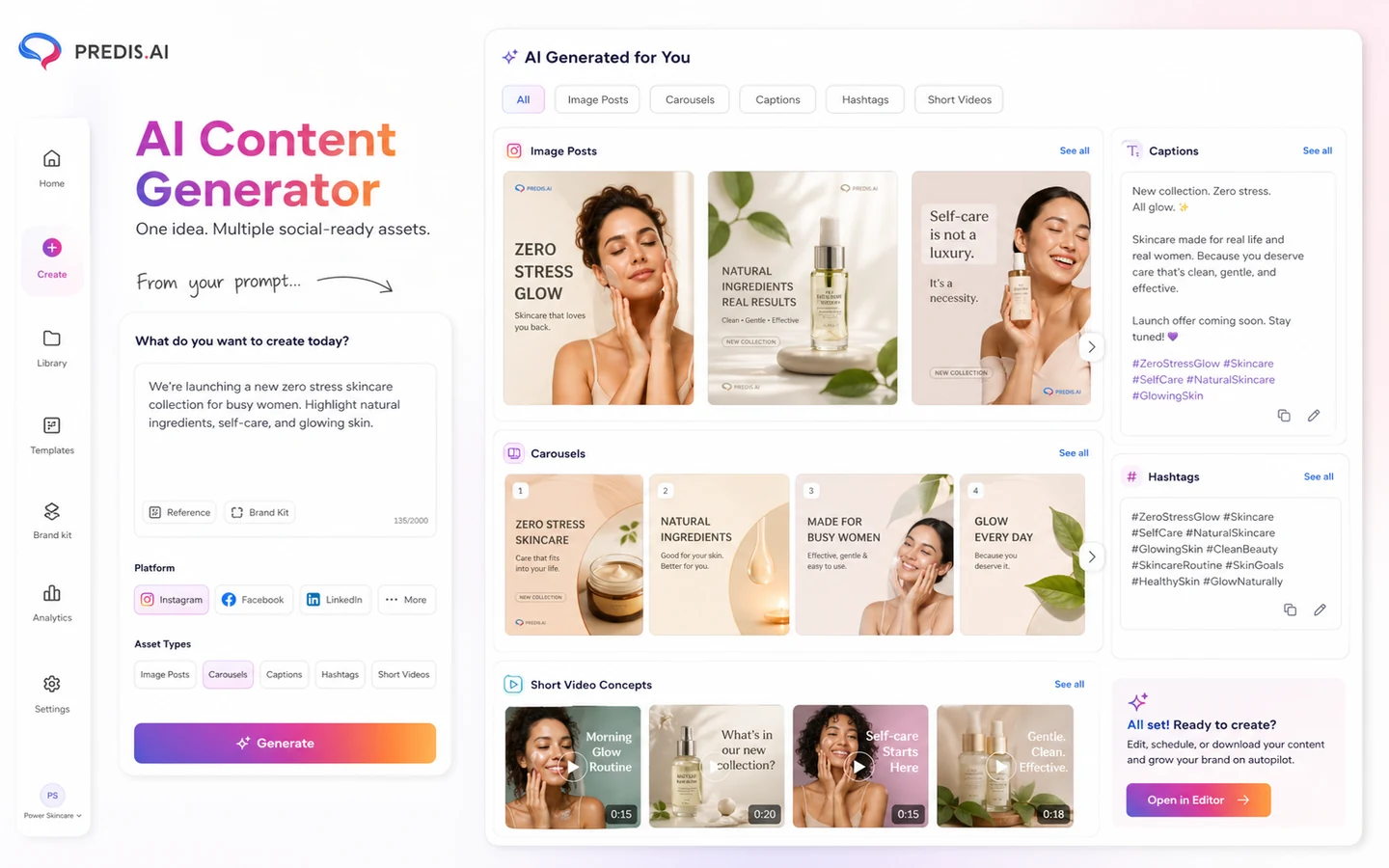
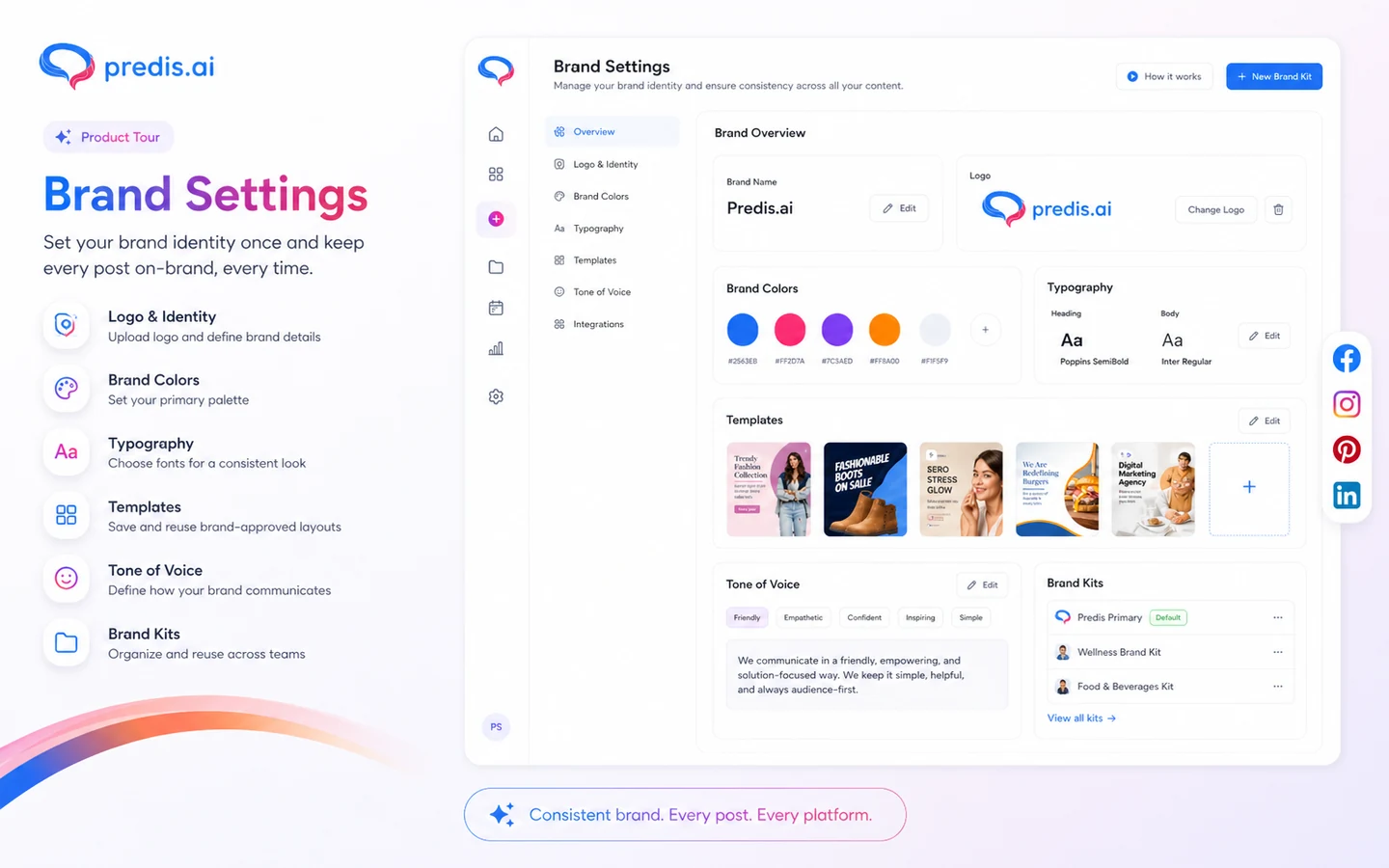
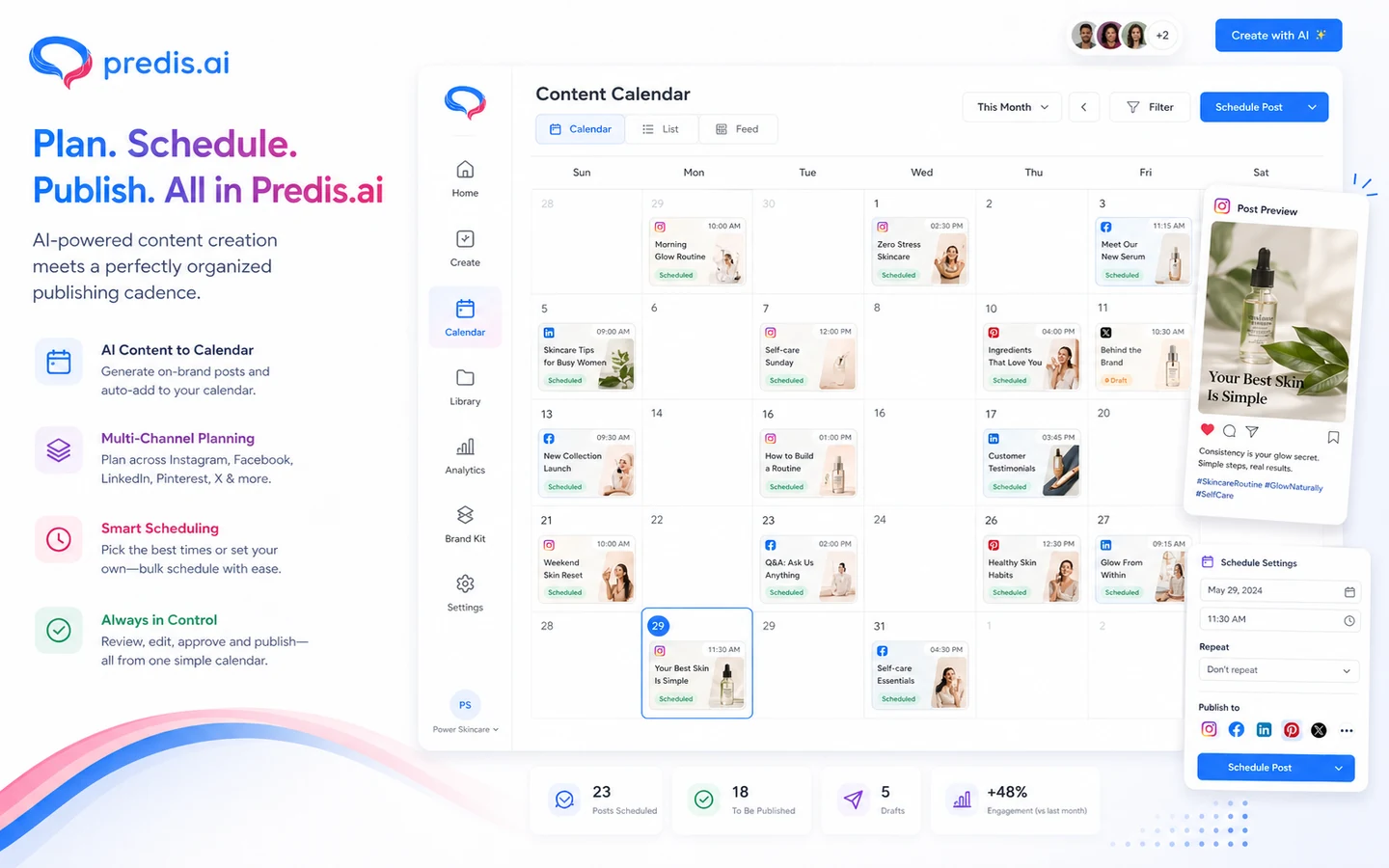
Predis.ai is easiest to evaluate when you separate three questions. First, do you need AI to create social creatives, or only to write captions? Second, do you need publishing and scheduling inside the same tool? Third, can the credit and channel limits support the content volume you actually plan to run? The store page should help buyers answer those questions before moving to a review, pricing, or offer path.
What Predis.ai actually does
Predis.ai turns short inputs, product information, and brand context into social media posts, videos, carousels, memes, captions, hashtags, and ad creatives. The broader value is not only generation. It also supports editing, planning, scheduling, competitor analysis, ecommerce product workflows, mobile apps, Shopify usage, and API-based content creation.
That makes it a better fit for buyers who need a repeatable social workflow than for someone who only wants one caption for one post.
- Generates social images, videos, carousels, memes, captions, and hashtags.
- Supports ecommerce product-to-post and product-to-video workflows.
- Adds planning, calendar, scheduling, and competitor analysis around creation.
- Offers API routes for teams building automated content workflows.
Best-fit buyers
Predis.ai fits small businesses, ecommerce brands, solo marketers, content teams, and agencies that need more content than they can comfortably produce by hand. It is especially relevant when the same product, offer, or campaign must become multiple platform formats.
The tool makes less sense if your team already has a strong design department, a mature scheduler, and a separate analytics workflow. In that case, Predis.ai may duplicate pieces of the stack instead of replacing the slow part.
- Useful for ecommerce brands turning product details into posts and short videos.
- Useful for agencies managing repeatable client calendars.
- Useful for marketers who need captions, hashtags, creatives, and scheduling together.
- Less useful for one-off design tasks or teams with no consistent publishing cadence.
Pricing and plan-fit logic
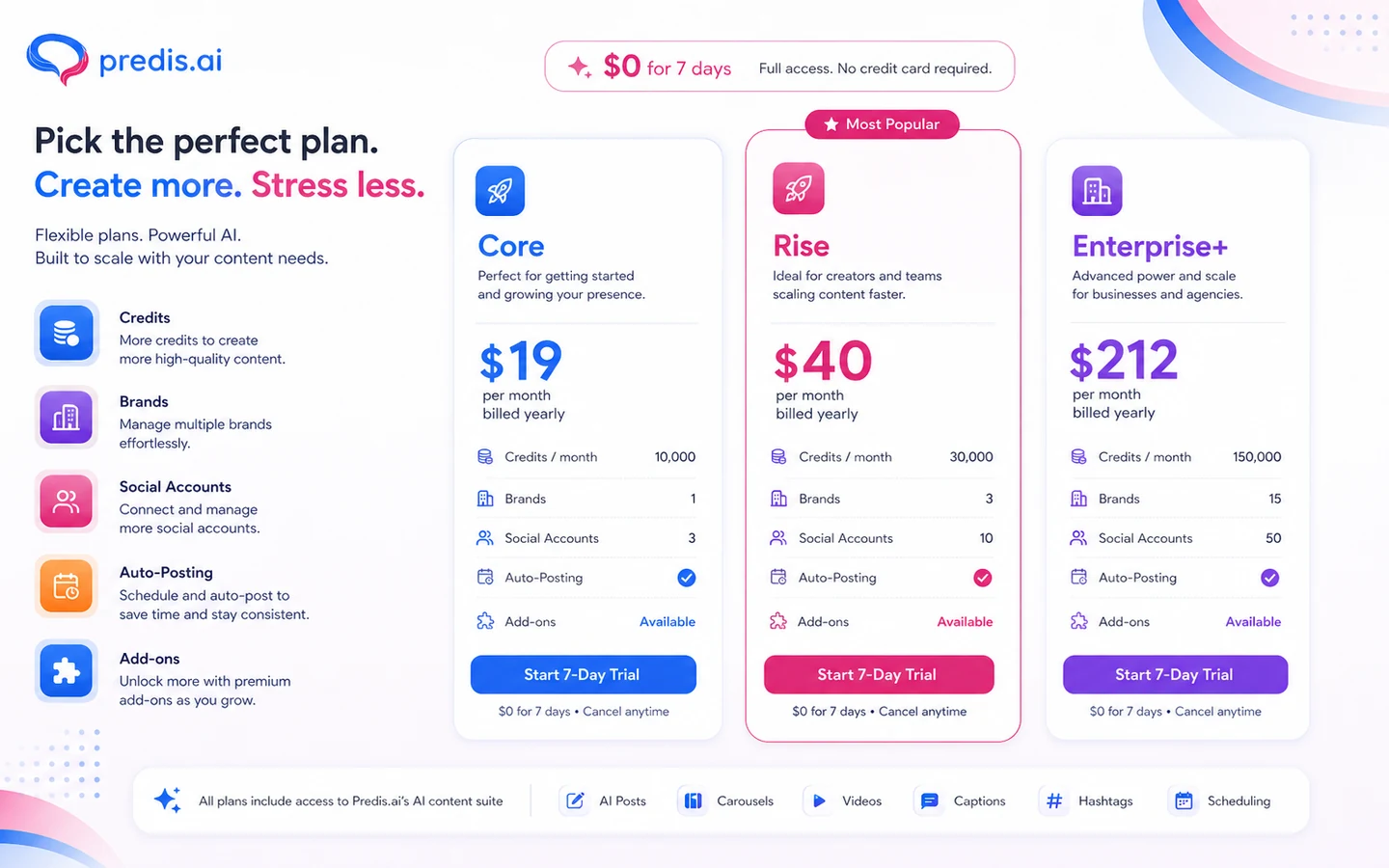
The public pricing page currently shows Core, Rise, and Enterprise+ with discounted annual monthly prices and $0 for 7 days. Core starts at $19 per month when billed yearly, but it also lists no auto-posting, one brand, and ten social accounts. Rise increases credits, brands, auto-post allowance, channel publishing, and competitor analysis. Enterprise+ expands those limits further.
The headline price is only one part of the decision. Buyers should check credits, video use, social channels, brands, auto-posting, competitor analysis, add-ons, and whether API access is included for their use case.
- Core is the cheapest public paid tier but does not include auto-posting.
- Rise is the more natural fit when scheduling automation matters.
- Enterprise+ is more relevant for larger brand or agency workflows.
- Extra credits and extra social channels can raise the real monthly cost.
Product tour video
A walkthrough is useful for Predis.ai because the buying question is workflow fit, not whether AI can generate a caption. Watch how brand settings, content creation, editing, scheduling, and competitor analysis connect. If those steps feel natural, the paid plan is easier to justify. If the workflow feels heavier than your current setup, a lighter social tool may be safer.
API and automation path
Predis.ai also has a developer path. The public developer docs describe a RESTful JSON API, authorization with API keys, webhook configuration, rate limiting, brand setup, template retrieval, and content creation endpoints. That matters for SaaS teams, agencies, and ecommerce operators who want to generate content programmatically instead of manually logging in for each post.
API access should still be verified at checkout because pricing, limits, and required account setup can differ from normal dashboard usage.
- REST API path for content generation.
- API key authorization.
- Webhook lifecycle for generated posts.
- Brand setup for branded output.
Buyer risks before checkout
The main risk is buying too quickly because the page looks like a simple social media tool. Predis.ai can generate many formats, but each buyer should test the formats they actually need. A brand that mainly creates product videos has a different credit profile from a brand that mainly publishes static posts. A solo marketer has a different channel limit problem from an agency with many client accounts.
The refund risk also deserves attention. Predis.ai states no refunds for unused periods on its auto-post page, so the trial should be treated as the real decision window.
- Generate real examples during the trial, not just sample prompts.
- Check unused credit behavior and renewal timing.
- Confirm channel publishing needs before choosing Core.
- Review add-on cost if you manage many social accounts.
Safest next step
The safest next step is to open the current pricing page, start with the 7-day trial if available, and run a small real-world test: one product post, one carousel, one short video, one scheduled post, and one competitor analysis run. That test will reveal more than a discount code search.
If the output quality and workflow are strong, move to the review page for deeper positioning or the offer route to check the current commercial path. If the workflow feels too broad, compare a simpler social scheduler or a design-first alternative before paying.
- Trial with real content before annual billing.
- Check review if fit is still unclear.
- Check offer route only after workflow fit is clear.
- Compare simpler alternatives if you do not need AI video or competitor analysis.
Best savings path from this store page
This is the clearest savings route to check once the product already looks like a fit.
Predis.ai lists the Core annual path at a reduced monthly equivalent compared with its crossed-out price, making it the lower-risk paid upgrade for smaller content workflows.
Rise annual plan discount
Enterprise annual plan discount
Use comparison routes when the category fit is still open
Use these comparison routes when the product still looks plausible, but the category fit is not fully settled.
Simplified is broader for all-in-one marketing design and writing, while Predis.ai is more focused on social creatives, videos, scheduling, competitor analysis, and ecommerce content.
HoppyCopy is a better fit for email marketing copy workflows, while Predis.ai makes more sense for social posts, ads, videos, and publishing calendars.
Gallabox is stronger for WhatsApp conversations and sales/support automation, while Predis.ai is stronger for creating and scheduling social media content.
ActiveCampaign is more complete for CRM and email automation, while Predis.ai is more useful when the bottleneck is social creative production.
Verification points worth checking before you click out
Where this store usually fits best in the workflow
Predis.ai can help ecommerce teams turn products into social posts, videos, captions, hashtags, and a content calendar. The buyer should test product data quality and video credit consumption before scaling the workflow.
Agencies can use Predis.ai when multiple clients need recurring social assets. The important checks are brand limits, social account limits, team members, approval workflow needs, and whether Rise or Enterprise+ fits the client load.
Marketers can use Predis.ai to produce creative variations for social ad concepts. It is still important to validate performance outside the tool because generation speed is not the same as ad-market proof.
Developers can explore Predis.ai when social content generation needs to sit inside another app or workflow. API pricing, rate limits, authorization, webhooks, and brand setup should be verified before committing.
Practical checkpoints before and after signup
- List the exact content types you need: static posts, carousels, videos, captions, hashtags, ecommerce posts, or ad creatives.
- Check whether auto-posting is required, because Core lists no auto-posting.
- Compare credits against your expected monthly output.
- Generate real brand posts instead of judging sample outputs.
- Test one scheduled post and one calendar workflow if publishing matters.
- Create at least one video if video output is part of the buying reason.
- Confirm live monthly versus yearly pricing.
- Review add-on costs for extra credits and social channels.
- Check no-refund language and renewal timing before annual billing.
- Track credit consumption by content type during the first month.
- Standardize brand templates before scaling output across channels.
- Review plan fit again before adding more brands or client accounts.
Fast-read signals for workflow fit and buying friction
Questions readers usually ask before choosing this store
What is Predis.ai best for?
Predis.ai is best for buyers who need AI-generated social media posts, short videos, carousels, captions, hashtags, ad creatives, scheduling, and competitor analysis in one workflow. It is most useful when the buyer has a recurring publishing cadence, not just a one-off caption need.
Does Predis.ai have a free plan or trial?
The public pricing page currently shows $0 for 7 days on paid plan entry points. Treat that as the main low-risk testing path and verify the live checkout before assuming the exact trial terms are unchanged.
How much does Predis.ai cost?
Predis.ai currently lists Core from $19 per month when billed yearly, Rise from $40 per month when billed yearly, and Enterprise+ from $212 per month when billed yearly. The real cost depends on credits, brands, social channels, auto-posting needs, add-ons, and whether the buyer chooses annual or monthly billing.
Are Predis.ai credits important?
Yes. Credits are central to the buying decision because different actions consume credits differently. Static posts, videos, voiceovers, UGC avatar videos, resizing, editing, and product visuals can affect monthly usage in different ways.
What should buyers verify before paying for Predis.ai?
Buyers should verify live pricing, billing interval, trial terms, no-refund language, credit usage, unused credit behavior, social account limits, brand limits, auto-posting access, API access, and add-on costs before checkout.
Choose the next route that matches what you still need to decide
The strongest next click depends on whether you still need product judgment, a savings route, or a broader category comparison.