Quick verdict
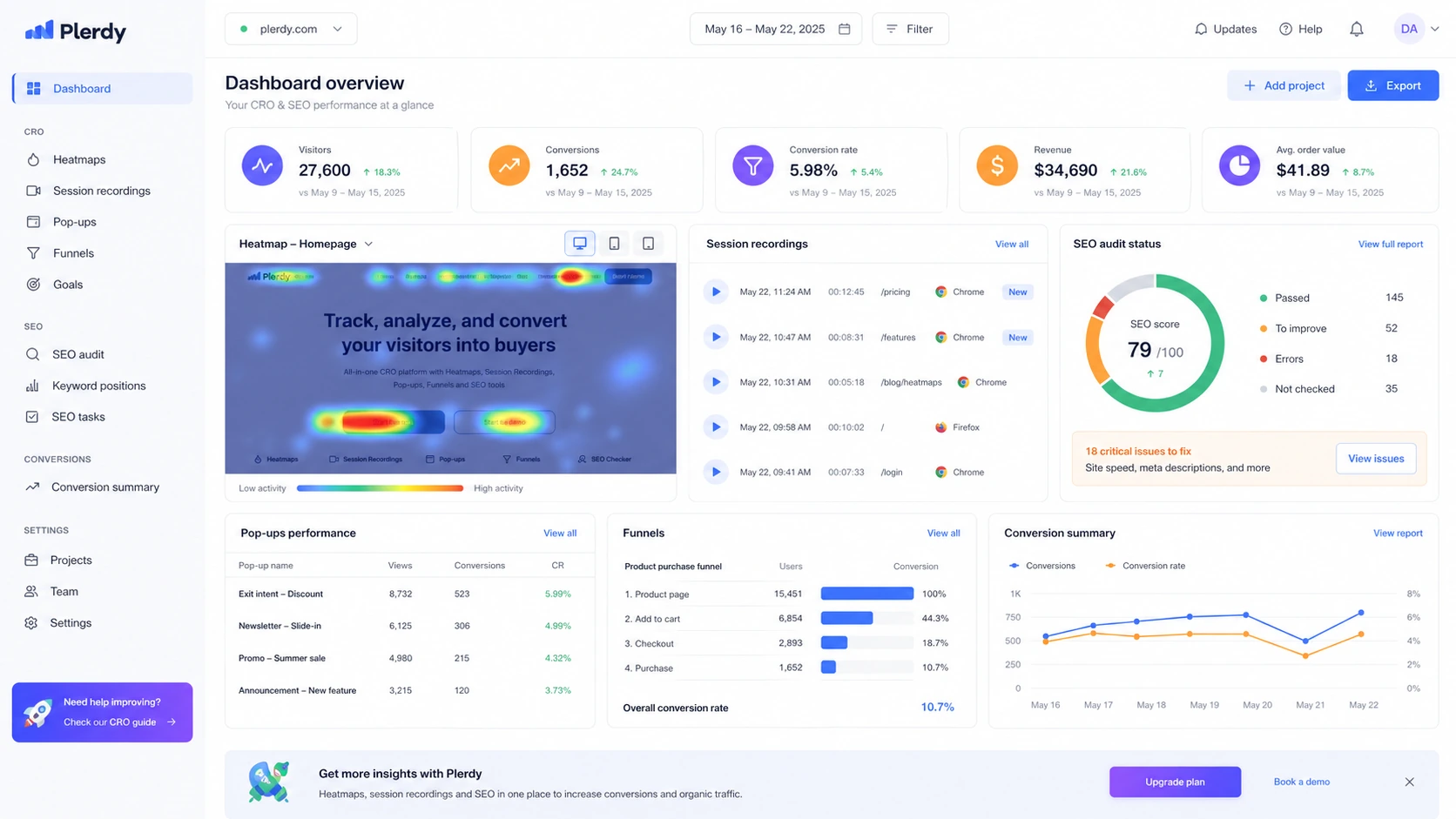
Plerdy is worth a serious look if you do not just want to know how many people visited a page, but why those visitors clicked, ignored, hesitated, scrolled, abandoned, or converted.
That is the useful part.
The risky part is buying it like a cheap heatmap tool and then discovering that the real value depends on traffic volume, replay limits, add-ons, storage, support, and whether your team has the habit of turning behavior data into actual website changes.
Based on the public product information, Plerdy is best treated as an all-in-one CRO and SEO behavior analytics workspace. It can cover heatmaps, session replay, pop-ups, conversion tracking, e-commerce behavior, SEO audits, A/B testing, Chrome analysis tools, and AI-assisted UX checks. That is a lot of ground. It can be efficient if those jobs belong together in your workflow. It can also be more platform than you need if your real problem is only rank tracking, a basic SEO crawl, or a few casual visitor recordings.
For my money, the safest way to judge Plerdy is not by the number of tools on the pricing page. The better question is narrower: can you install it on a real page, collect enough visitor behavior, and use those findings to improve content, layout, calls to action, product pages, or funnels?
If the answer is yes, Plerdy can make sense. If the answer is no, a free plan, annual discount, or coupon path will not fix the mismatch.
Next step: If Plerdy still fits your CRO or SEO workflow, verify the current plan limits and tracking setup before checkout.
Review snapshot
| Review point | Practical take |
|---|---|
| Best for | CRO teams, SEO teams, e-commerce stores, marketers, and agencies that need behavior evidence before changing pages |
| Not ideal for | Buyers who only need rank tracking, a technical crawler, or a one-time curiosity heatmap |
| Main use case | Understanding visitor behavior, conversion friction, page UX, SEO issues, pop-ups, and funnels in one workspace |
| Free path | Free forever plan for testing setup and basic usage limits |
| Trial path | 14-day free trial with no credit card required on public pricing language |
| Paid path | Startup, Scale, Thrive, and Enterprise packages depend on traffic, heatmap, replay, storage, and add-on needs |
| Main strength | Combines CRO, UX analytics, session replay, SEO audit, pop-ups, e-commerce tracking, and A/B testing |
| Main concern | Plan limits and support/setup quality need live verification before annual billing |
| Direct alternatives | Hotjar, Microsoft Clarity, other heatmap and session replay tools |
| Adjacent routes | ConvertMate for e-commerce conversion workflow; Keyword.com for rank tracking |
| Best next step | Install tracking on one revenue-relevant page before choosing a paid package |
What is Plerdy?
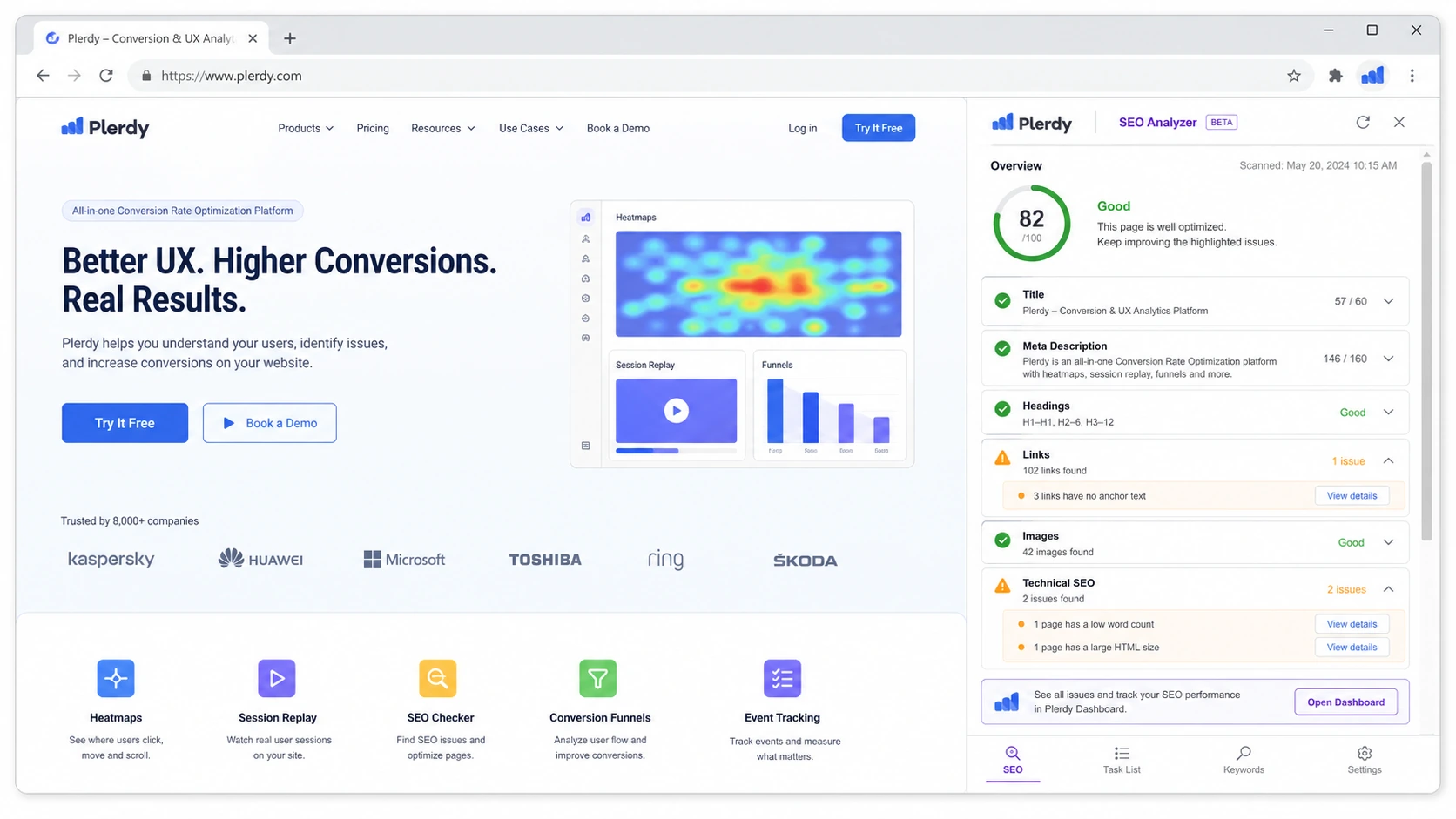
Plerdy is a website optimization platform that combines CRO tools, behavior analytics, SEO checks, pop-ups, e-commerce tracking, session replay, and heatmap analysis.
That description matters because Plerdy is easy to misunderstand.
It is not only a heatmap widget. It is not only an SEO checker. It is not only a popup tool. It sits between several buying categories: website analytics, UX research, conversion optimization, e-commerce tracking, and SEO monitoring. The official product pages and app listings present it around heatmaps, replay, SEO, pop-ups, funnel analysis, A/B testing, e-commerce tracking, Chrome analysis tools, and AI UX assistance.
The best way to think about it is this: Plerdy helps you see what visitors do on your pages, then gives you several ways to turn that evidence into site changes.
That can be useful for a landing page, product page, SaaS signup page, blog money page, checkout path, or lead form. A normal analytics tool can tell you that people left. A behavior analytics tool can help show what they clicked before leaving, where they stopped scrolling, whether they ignored a CTA, whether a mobile layout causes friction, or whether a popup is helping or annoying visitors.
Our review approach compares public product pages, pricing details, support and refund language, marketplace signals, buyer workflow fit, and nearby alternatives. I would not treat the feature list alone as proof that Plerdy is the right purchase. With this kind of tool, the real proof is whether the buyer can turn recordings, heatmaps, and SEO/CRO signals into better pages.
The common wrong expectation is that Plerdy will automatically fix conversion problems. It will not. It can show patterns, surface friction, and give you tools to test. The buyer still needs judgment, traffic, and a process for making changes.
Who should use Plerdy?
Plerdy makes sense for buyers who already have pages worth improving.
A CRO specialist is the obvious fit. If your work involves spotting weak calls to action, confusing page sections, form hesitation, scroll-depth drop-offs, or checkout friction, Plerdy gives you multiple evidence layers in one place. Heatmaps show attention patterns. Session replay shows real journeys. Funnels and conversion tools help connect behavior to outcomes.
An SEO team can also use Plerdy when search work does not stop at rankings. If a page earns traffic but visitors do not engage, SEO alone is not enough. Plerdy becomes more useful when the team wants to connect page-level optimization with clicks, scrolling, engagement, and conversion behavior. The condition is that the team should not expect Plerdy to replace a full crawler, backlink suite, or rank tracker.
E-commerce teams are another strong fit. Product pages, category pages, collection pages, carts, and checkout-adjacent experiences often need visual evidence. If shoppers miss an important option, scroll past the buying section, rage click an element, or abandon a funnel, behavior tools can reveal what a revenue dashboard hides.
Agencies may like Plerdy because visual proof is easier to explain to clients than raw analytics. A heatmap, session clip, funnel drop-off, or SEO issue can make a recommendation feel less like opinion. The condition is that the agency needs a repeatable reporting process, not just a dashboard screenshot once a quarter.
Marketers who run landing pages, lead magnets, pop-ups, and paid traffic campaigns may also get value. Plerdy is especially relevant when the buyer wants to test whether traffic quality, layout, message, popup timing, or CTA placement is causing a conversion problem.
Who should avoid Plerdy?
I would be careful with Plerdy if your site has too little traffic to make behavior data useful.
A heatmap from a handful of visits can be interesting, but it is not enough to make confident layout decisions. The same applies to session recordings. A few recordings can reveal obvious bugs, but they can also make you overreact to one unusual visitor. Plerdy is stronger when enough traffic flows through the pages you plan to study.
I would also avoid buying it if you only want keyword rank tracking. Plerdy has SEO-oriented tools, but a dedicated rank tracker or SEO platform may be cleaner if rankings, SERP movement, or search visibility reporting are the main job. Inside DealBestDaily, that is where a route like Keyword.com becomes a more natural comparison.
The platform may also be too broad if your team only wants a simple free behavior analytics layer. Microsoft Clarity, for example, may be enough for some buyers who mainly want session recordings and heatmaps without the CRO, SEO, popup, and add-on structure.
I would slow down if you are buying only because of the annual discount. Plerdy’s annual savings can be attractive, but annual billing makes sense only after tracking works, the team likes the dashboard, support responds well enough, and the plan limits match real monthly usage.
Finally, Plerdy is not ideal for buyers who will not act on the data. The easy mistake is thinking that a heatmap tool improves a website by existing. It does not. Someone still has to inspect the evidence, decide what matters, make a change, and compare behavior after the change.
How Plerdy fits into a real workflow
A practical Plerdy workflow starts before the dashboard.
First, choose one page that matters: a product page, pricing page, landing page, category page, signup page, lead form, checkout step, or high-traffic SEO article. Do not start with a random page that gets no meaningful traffic.
Second, install tracking through the route that matches your site. That might be a script, Google Tag Manager, Shopify, WordPress, or another supported setup. This step matters more than buyers expect. If tracking is incomplete, blocked, slow to collect, or missing key pages, the dashboard will look less useful than the product page suggests.
Third, collect enough behavior data. For heatmaps, you want click and scroll patterns that reflect real visitor behavior. For session replay, you want enough recordings to spot repeated friction rather than isolated odd behavior. For SEO checks, you want the reports to connect to pages you are actually improving.
Fourth, review the evidence with a decision in mind. Look for ignored CTAs, weak page sections, dead clicks, rage clicks, mobile layout problems, scroll-depth issues, form hesitation, checkout friction, or traffic sources that behave differently.
Fifth, make one clear change. Do not change everything at once. Adjust copy, layout, CTA placement, popup timing, form fields, product-page information, or internal links. Then let more traffic collect and compare behavior again.
That is where Plerdy makes more sense. It is not a dashboard you open for curiosity. It is a feedback loop.
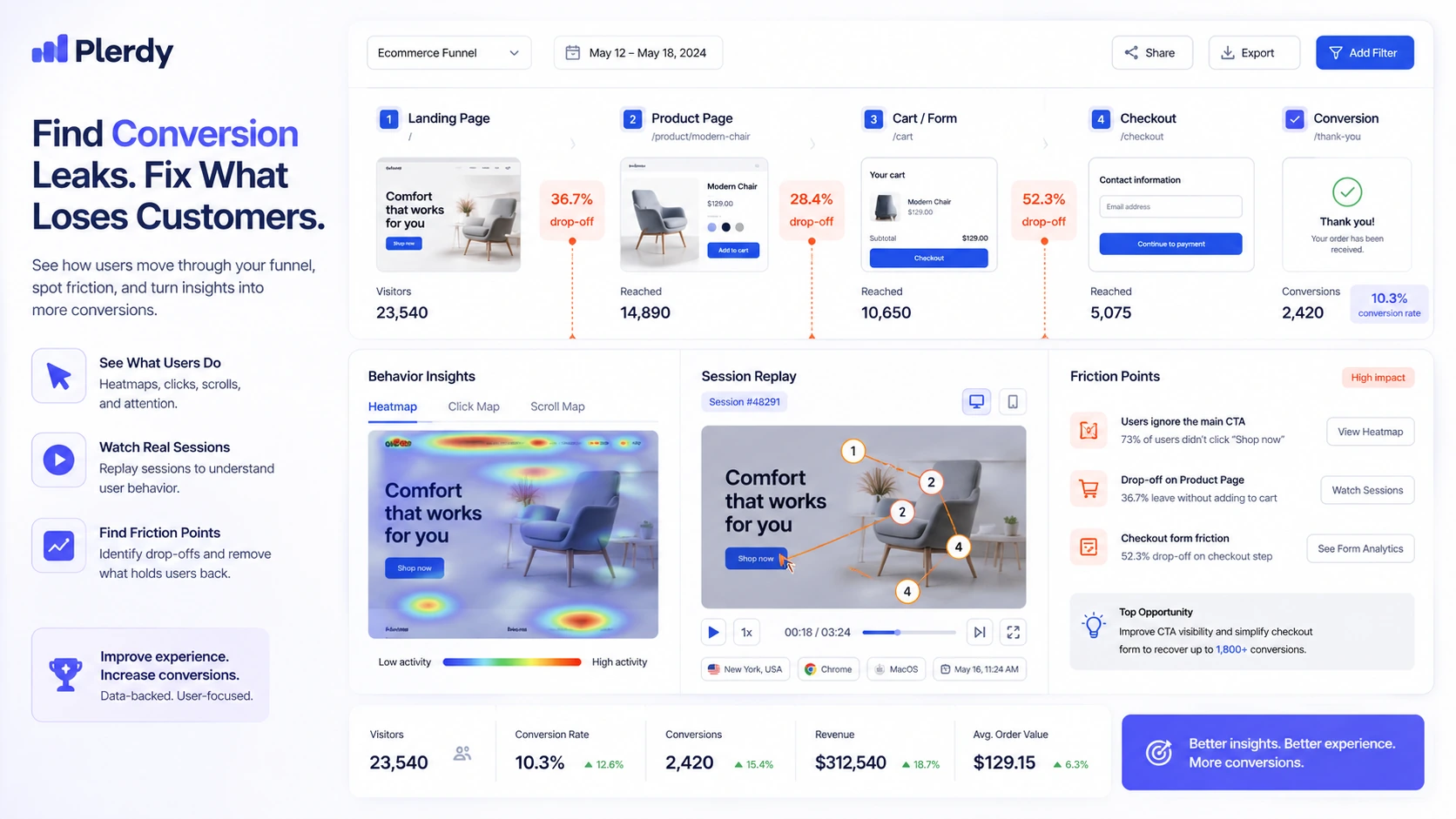
Workflow check: Before choosing a paid package, use Plerdy on one page where visitor behavior can change a real business decision.
Real-world buyer scenarios
A Shopify store trying to improve product pages
This is one of the more believable Plerdy use cases. A store owner may know that product pages get traffic, but not why shoppers do not add to cart. Plerdy can help inspect clicks, scroll depth, session behavior, pop-up timing, and e-commerce signals.
The risk is assuming the tool will diagnose the whole store automatically. It will not. The buyer still needs to compare behavior across products, devices, traffic sources, and offers. The plan decision should also account for pageviews, video sessions, pop-up limits, and whether the Shopify setup captures the right behavior.
An SEO team with traffic but weak engagement
A page can rank and still fail. Visitors may bounce because the introduction is too slow, the CTA is buried, the comparison table is ignored, or the mobile layout makes the next step hard to see.
Plerdy can help an SEO team move beyond keyword reporting into behavior review. That is useful when the team wants to improve search pages that already get traffic. But if the buyer mainly needs rank tracking, competitor keyword data, or technical crawling, Plerdy may be adjacent rather than central.
An agency preparing client recommendations
Agencies often need visual evidence. A client may ignore a generic recommendation like “move the CTA higher,” but a heatmap or replay clip can make the problem obvious.
Plerdy can support that kind of client-facing CRO explanation. The buyer should still verify guest access, report sharing, site limits, storage, and support responsiveness before relying on it across multiple clients.
A small business owner curious about heatmaps
This buyer should start free.
Curiosity is not a bad reason to test Plerdy, but it is a weak reason to pay annually. A small business owner should install it, watch whether useful data appears, and decide whether the tool changes actual page decisions. If it only becomes another dashboard, the free path may be enough.
Key features that actually matter
Heatmaps and click behavior
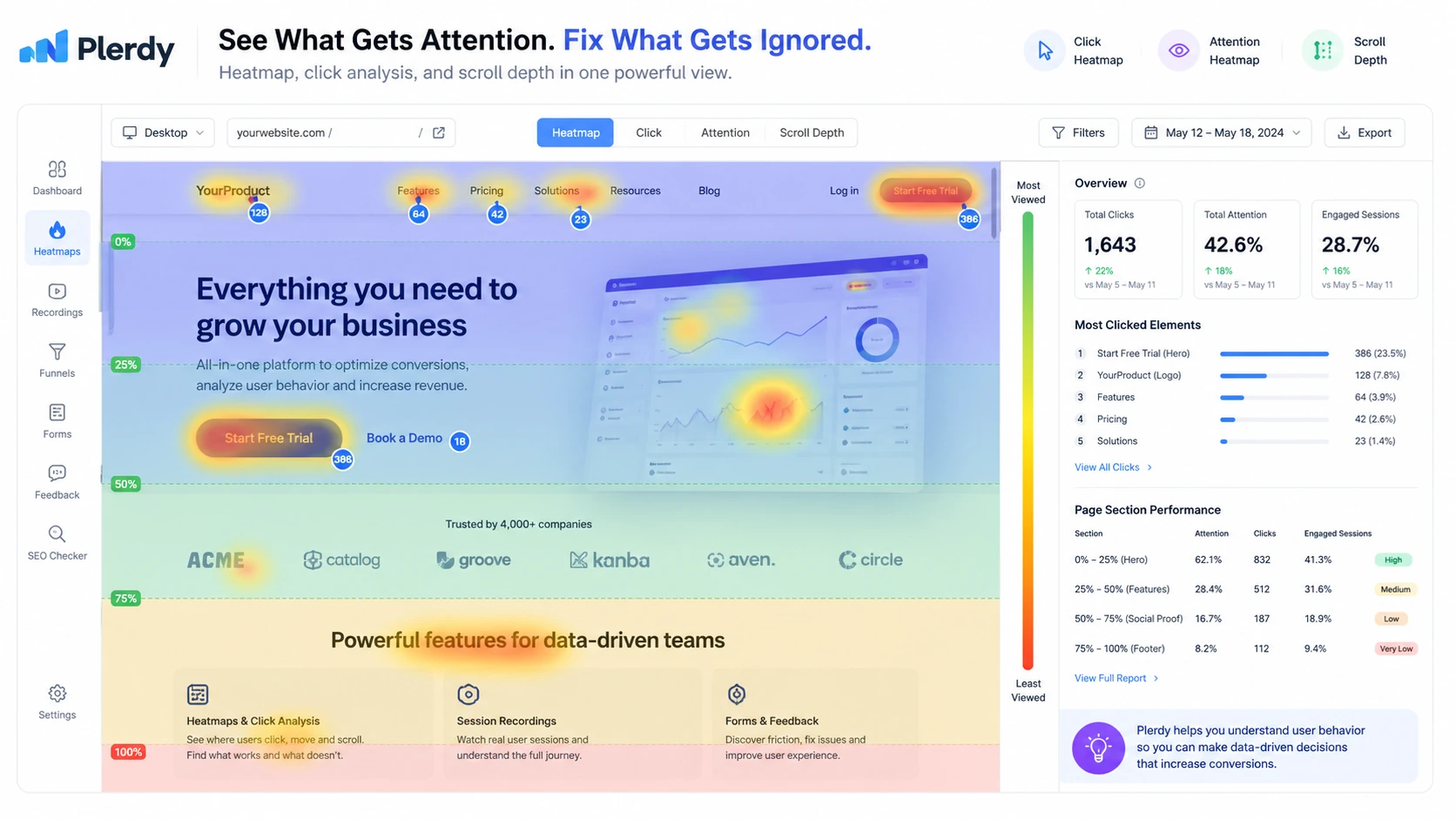
Heatmaps are the feature most buyers will understand first. They show where users click, how attention concentrates, and which page sections may be ignored.
The practical value is not the color pattern itself. The value is noticing when the behavior conflicts with your intended page design. If users do not click your main CTA, click non-clickable elements, skip the product details, or miss an important form step, the heatmap can help you decide what to test next.
Buyer note: heatmaps need enough traffic. Do not make major layout decisions from a tiny sample.
Session replay
Session replay is often more useful than a static heatmap when something feels broken but the aggregate chart does not explain why.
Watching recordings can reveal hesitation, rage clicks, mobile friction, confusing navigation, form problems, or areas where visitors repeatedly get stuck. For e-commerce and lead generation pages, this can be more actionable than a generic conversion rate report.
Buyer note: session replay limits matter. Check how many recordings your plan includes and how long data is stored.
SEO audit and page checks
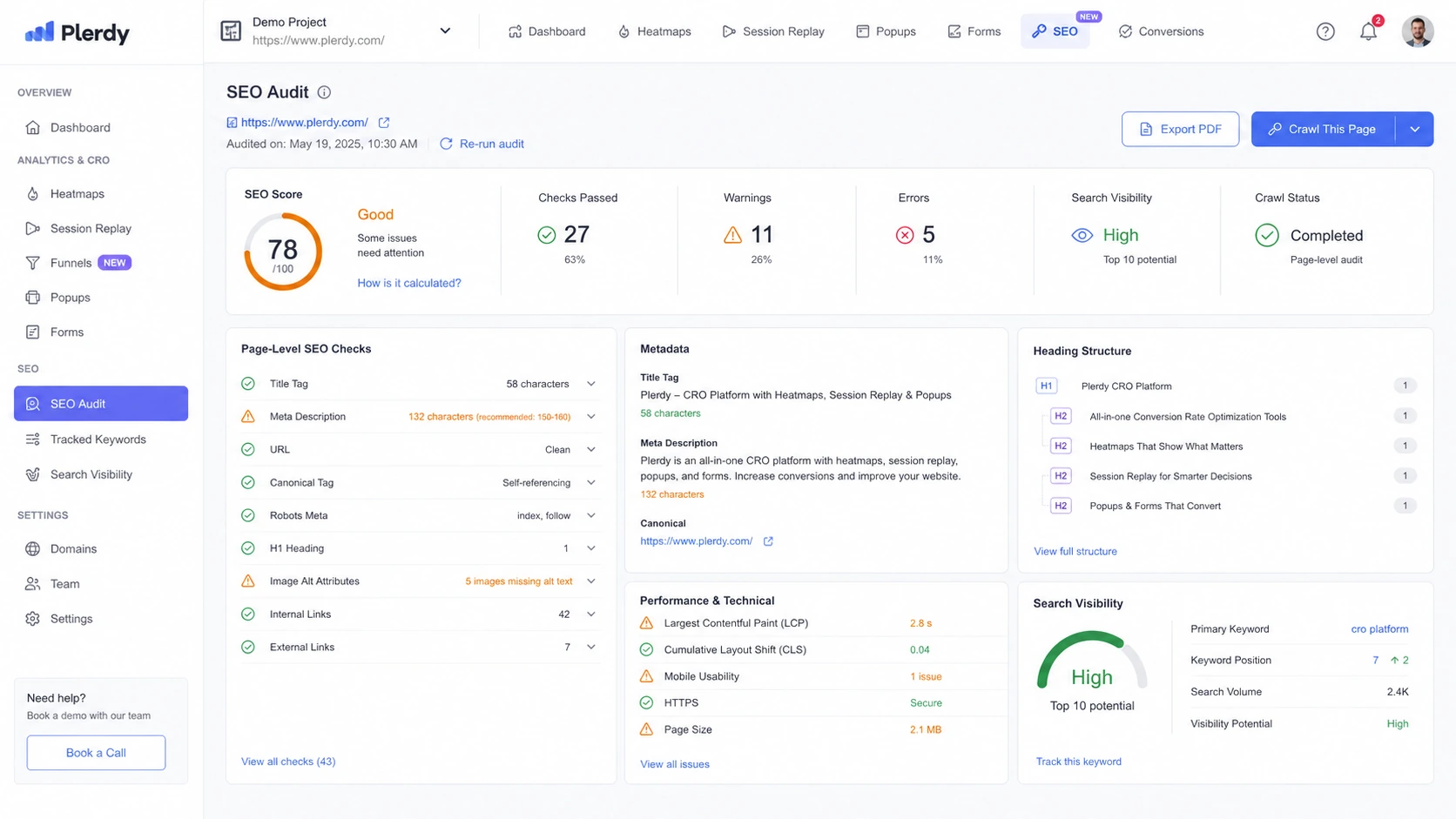
Plerdy’s SEO layer is useful when SEO and UX work belong together. A marketer can inspect page issues, then review how real users behave on that page.
That said, I would not treat Plerdy as a full replacement for a deep SEO suite unless your workflow is mostly page-level optimization. Dedicated SEO tools may go deeper into crawling, backlink data, competitor research, rank tracking, or keyword discovery.
Buyer note: this is a good combined workflow feature, not necessarily the deepest standalone SEO stack.
Pop-ups, funnels, and conversion tracking
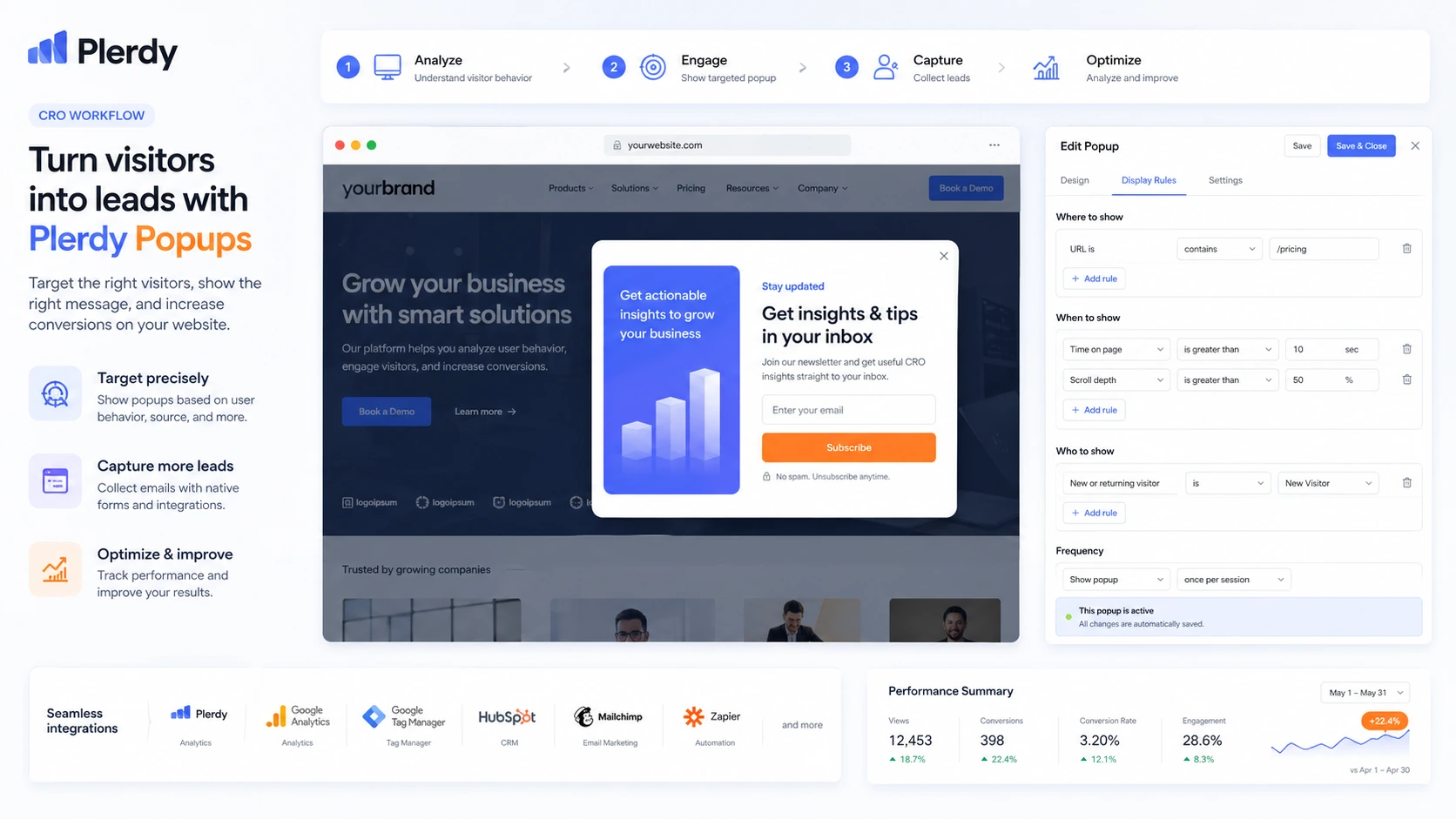
Plerdy becomes more interesting when buyers use it to test conversion prompts, funnels, and visitor behavior together. A popup is not useful by itself. It is useful when you can see whether it appears at the right time, supports the visitor journey, and contributes to leads or sales without hurting the experience.
Funnels also help buyers stop guessing where visitors drop off. This matters for checkout paths, signup flows, product discovery, and lead-generation journeys.
Buyer note: confirm pop-up, lead, conversion, and e-commerce tracking limits before paying.
A/B testing and AI UX assistance
Plerdy includes A/B testing and AI UX Assistant capacity in the public pricing structure. These can be helpful when the buyer wants a more complete optimization loop: observe behavior, form a hypothesis, test a change, and inspect results.
The caution is that AI UX suggestions and tests should not replace human judgment. A suggestion can be a useful prompt, but the buyer still needs to check brand fit, conversion intent, page context, and traffic volume.
Buyer note: AI UX Assistant capacity and add-ons may affect plan fit, so verify them before checkout.
Pricing and plan value
Plerdy’s pricing is attractive at first glance because there is a free forever entry point and a 14-day free trial path, but the real pricing question is not the headline number.
The real pricing question is usage.
At the time of review, the public pricing page showed a Free plan at $0 forever, then paid packages including Startup from $21/month on the annual path, Scale from $42/month, Thrive from $70/month, and higher Enterprise packages. The same pricing page also showed monthly prices before annual savings, add-ons for areas such as SERP Checker, Chrome SEO Analyzer, Chrome UX Analyzer, pop-ups, AI UX Assistant, video sessions, and heatmap capacity.
That structure is flexible, but it means buyers need to check more than the first price.
A small site may use the free plan to test installation, basic heatmap collection, SEO audit orientation, and dashboard comfort. A serious CRO workflow will usually need more capacity. A growing e-commerce store should compare pageviews, session replay volume, heatmap daily limits, storage, pop-ups, conversions, AI UX capacity, and e-commerce tracking against real traffic.
The 14-day trial is useful because it gives buyers a chance to test tracking before paying. The pricing FAQ also says the trial uses Scale-like limits and then adjusts to Free after the trial period. That makes the trial a good way to test whether a paid workflow feels realistic.
Annual billing can lower the monthly equivalent, but I would not start there blindly. For my money, annual billing makes sense only after three checks: tracking works on the pages that matter, the team has reviewed enough data to find useful patterns, and support feels responsive enough for the setup you need.
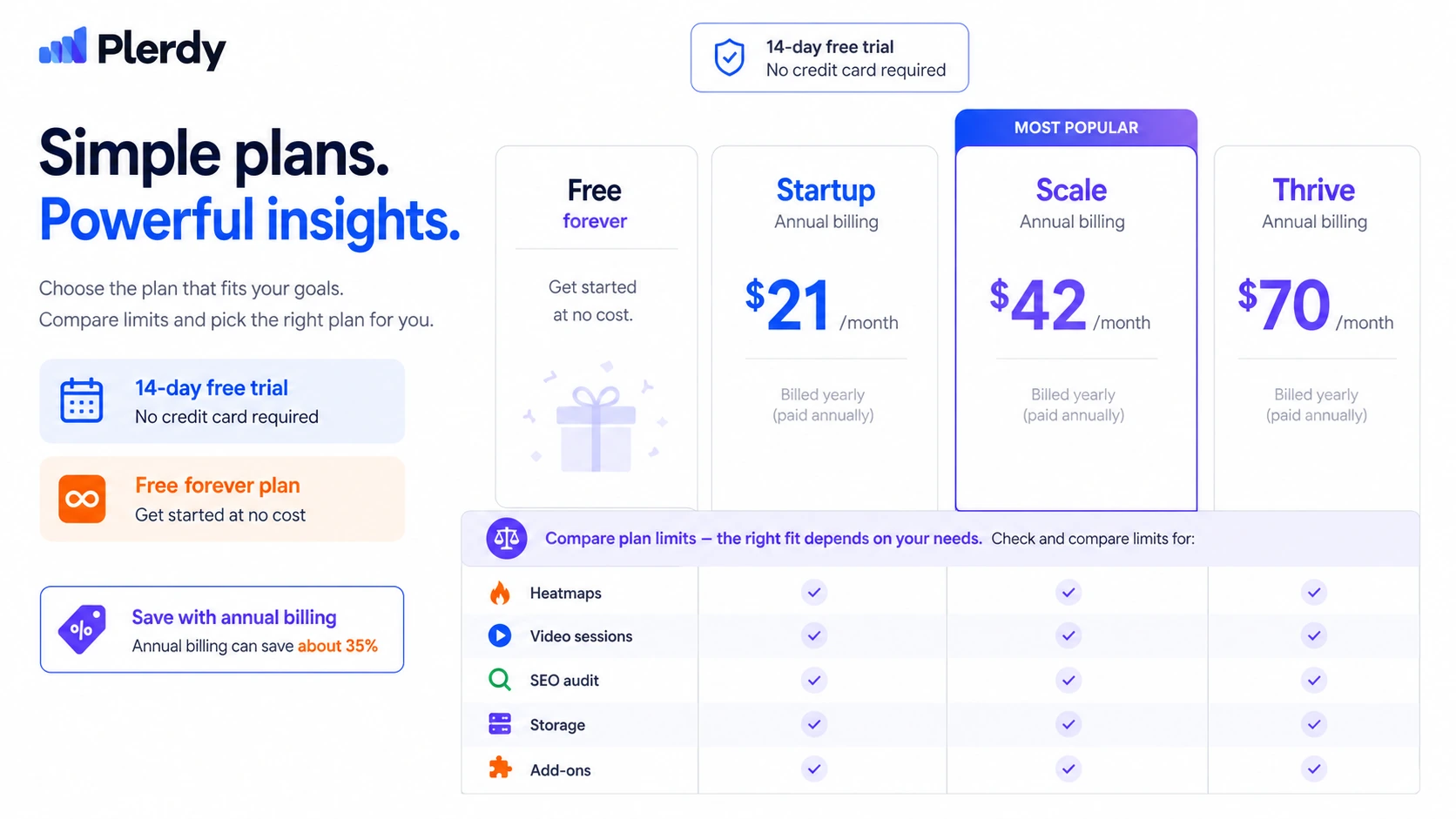
Pricing check: If Plerdy looks useful, compare the live package limits against your daily traffic before choosing monthly or annual billing.
Free plan, trial, coupon, and checkout notes
Plerdy’s free plan is not just a throwaway demo. It is useful for checking whether installation works, whether the dashboard makes sense, and whether the first behavior signals are worth deeper review.
The 14-day trial is better when you need to test a more serious workflow. I would use it on a live page with meaningful traffic, not a low-value test page. The goal is to see whether Plerdy produces evidence you can actually use.
The coupon path should come after that decision, not before it. A discount can improve the purchase, but it should not be the reason you buy a CRO tool. If the team will not review heatmaps or recordings, even a cheap plan is waste.
The current checkout order I would use is simple:
- Start with free or trial.
- Install tracking on a real page.
- Confirm useful data is collected.
- Review whether the dashboard supports your workflow.
- Compare plan limits against traffic.
- Check refund and cancellation language.
- Only then look at the Plerdy coupon page or current offer route.
Buyers should also check add-ons before checkout. SERP Checker, AI UX Assistant, video sessions, heatmap capacity, and pop-up limits can affect the real cost depending on the workflow.
What I would check before buying Plerdy
If I were buying Plerdy for a real website optimization workflow, I would check these points before paying.
- Traffic volume: Does the site receive enough visits on the pages that matter to make heatmaps and replays useful?
- Tracking setup: Can Plerdy capture the right pages through Shopify, WordPress, GTM, or manual installation?
- Replay limits: Will the selected plan capture enough recordings to find repeated issues, not just isolated behavior?
- Heatmap limits: Are daily heatmap limits enough for the pages and traffic sources you care about?
- SEO depth: Is Plerdy’s page-level SEO layer enough, or do you still need a dedicated SEO platform?
- Add-ons: Do you need SERP Checker, AI UX Assistant capacity, extra video sessions, extra heatmap limits, or popup capacity?
- Support and refund path: Can you get a support response during trial, and do you understand the refund request process before annual billing?
Support is worth testing early. Public app-store feedback is not one-sided: there are positive comments about usefulness and support, but also some complaints about support response and recording issues. That does not mean buyers should avoid Plerdy. It means a serious buyer should ask one real setup question during the trial instead of discovering support fit after payment.
A simple test before paying
Before paying for Plerdy, I would run a small test like this:
- Pick one page that affects revenue, leads, signups, or product discovery.
- Install Plerdy through the route your site will use in production.
- Let enough real traffic collect to make the heatmap meaningful.
- Watch a practical sample of session replays across desktop and mobile.
- Identify one repeated friction point, not five random guesses.
- Make one page change based on the evidence.
- Review whether Plerdy helped you make a better decision than analytics alone.
If that test produces a useful decision, a paid plan becomes easier to justify. If it only creates more dashboard noise, stay free or compare alternatives.
This is especially important for agencies. A client-facing CRO tool should not merely look good in a proposal. It should help explain decisions, support recurring reviews, and create a better workflow than the agency already has.
Pros explained
Plerdy combines several website optimization jobs
The biggest advantage is consolidation. Heatmaps, session replay, pop-ups, SEO audit, e-commerce tracking, funnels, conversions, and A/B testing can sit inside one platform.
That matters if your workflow naturally connects those jobs. For example, a product page may need SEO cleanup, click analysis, session review, popup testing, and funnel monitoring. Using one platform can reduce tool-switching.
It stops being enough if you need deep specialist capability in only one area. A full SEO crawler, enterprise experimentation platform, or standalone product analytics system may still go deeper.
The free and trial paths reduce first-purchase risk
Plerdy’s free plan and 14-day trial are useful because buyers can test the core workflow before paying. That is exactly how a CRO platform should be evaluated.
Do not use the trial only to click around the dashboard. Install tracking, collect data, and make at least one real page decision. That is the only way to know whether the product fits.
Visual evidence can improve decision quality
A heatmap or replay can expose problems that standard analytics hides. Maybe users click an image that is not clickable. Maybe the CTA is ignored. Maybe mobile visitors never reach the comparison section. Maybe checkout friction is visible only when watching a session.
This is where Plerdy can earn its keep. It gives buyers a way to move from opinion to evidence.
It can work for several buyer types
Plerdy is not limited to one role. CRO teams, SEO teams, marketers, e-commerce operators, UX specialists, and agencies can all find a path into the product.
The buyer still needs to choose one primary job. If everyone uses it for everything, nobody may own the workflow.
Cons explained
Plan limits can become the real buying constraint
The first visible price is not the whole decision. Heatmaps, video sessions, SEO audit volume, pop-ups, conversions, e-commerce tracking, storage, and add-ons all affect fit.
This is not unusual for analytics software, but it means buyers should compare limits against actual traffic before paying.
Plerdy may be too broad for narrow needs
If you only need heatmaps, Plerdy may feel broader than necessary. If you only need SEO crawling or rank tracking, it may not be the most focused tool. If you only need free session recordings, another option may be enough.
The breadth is a strength only when the buyer uses it.
Behavior analytics still require human judgment
Plerdy can surface clues. It cannot decide every page change for you.
A heatmap may show low clicks, but the reason still needs interpretation. A replay may show confusion, but the fix still needs design judgment. AI UX suggestions may help, but they should not replace testing, brand context, or conversion strategy.
Support confidence deserves a trial check
Marketplace reviews show positive experiences, but also some negative comments around support and recording behavior. That mixed signal is not a deal-breaker. It is a reason to test support before paying annually.
Ask a real question during the trial. That small step can save frustration later.
Green flags and red flags
Green flags for Plerdy are clear.
Your site has enough traffic. You know which pages matter. You already make CRO or SEO changes. Your team can review heatmaps and recordings on a schedule. You want behavior evidence, not just analytics numbers. You need a combined CRO and SEO workflow instead of isolated tools.
Those are good signs.
Red flags are also clear.
You are buying because the pricing looks cheap. You do not know which page to test. Your traffic is too low for meaningful patterns. Nobody on the team owns optimization. You want a rank tracker but are attracted to Plerdy’s broader feature set. You plan to choose annual billing before testing tracking. You expect the tool to fix conversion problems automatically.
The easy mistake is buying the platform before defining the workflow.
The better approach is to ask one practical question: what decision will Plerdy help us make next week?
Plerdy vs alternatives
Hotjar vs Plerdy
Hotjar is the more obvious comparison if the buyer mainly wants heatmaps, session recordings, surveys, and user feedback around behavior analytics.
Plerdy may make more sense when the buyer wants CRO behavior data plus SEO checks, pop-ups, funnels, e-commerce tracking, A/B testing, and Chrome analysis tools in the same workspace. The tradeoff is focus. Hotjar may feel cleaner for behavior analytics only; Plerdy may feel broader for optimization teams that want several jobs connected.
Microsoft Clarity vs Plerdy
Microsoft Clarity is a strong comparison for buyers who want a free behavior analytics layer with heatmaps and session recordings.
Plerdy is more commercial and broader. It adds paid plan structure, SEO/CRO tooling, pop-ups, add-ons, and optimization workflows that may matter to a marketing or agency team. The tradeoff is cost and complexity. If free behavior analytics is enough, Clarity may be the safer first step.
ConvertMate vs Plerdy
ConvertMate is an adjacent route for buyers thinking about e-commerce conversion and product-page improvement.
Plerdy is stronger when the buyer needs to inspect on-page behavior, clicks, scrolls, replays, funnels, and UX evidence directly. ConvertMate may be more relevant if the buyer wants a workflow aimed more narrowly at store content, conversion, and product-page optimization. These are not perfect one-to-one replacements; the better choice depends on whether you need evidence collection or conversion execution.
Keyword.com vs Plerdy
Keyword.com is the cleaner route when rank tracking is the main job.
Plerdy can support SEO work, but it is not primarily a rank tracker. If your team mainly needs keyword position monitoring, SERP visibility, and reporting, Keyword.com may be more direct. If the issue is what search visitors do after landing on the page, Plerdy becomes more relevant.
Dedicated SEO suites vs Plerdy
Broader SEO suites may be better when the buyer needs technical crawling, competitor keyword research, backlink analysis, and deep search reporting.
Plerdy is better framed as a page and behavior optimization platform with SEO features. That framing is important. It keeps buyers from expecting it to replace every SEO tool they already use.
Trust, refund, and buyer-risk notes
Plerdy’s public pricing and support language gives buyers several useful checkpoints, but I would still treat checkout carefully.
The pricing page shows free access, paid packages, add-ons, a 14-day trial, and no-card trial language. It also makes clear that certain limits can be increased through add-ons. That is flexible, but it also means the live pricing table matters. Buyers should not assume the cheapest paid package includes every limit they need.
Refund language also deserves attention. Plerdy’s FAQ says refund requests should be submitted through support in the account and can cover payments made in the last 30 days. Another FAQ page says buyers are entitled to a refund within 30 days if the product does not meet expectations or if they change their mind. That is buyer-friendly on the surface, but I would still verify the exact process inside the account before paying annually.
Data and privacy also matter because Plerdy collects website behavior signals. Teams with strict compliance requirements should review privacy, data retention, access, masking, and tracking settings before installing it on sensitive pages.
Support is a practical risk, not just a policy issue. Shopify app feedback includes both positive reviews and complaints. That is why I would use the trial to test support. Ask one real setup or billing question. The answer may tell you more about day-to-day fit than the feature list.
Finally, do not confuse a tool with a process. Plerdy can collect evidence, but it cannot force your team to use that evidence. The buyer risk is not only overpaying. It is paying for a dashboard that nobody turns into decisions.
Final verdict
Plerdy is a strong consideration if you need a combined CRO, UX analytics, heatmap, session replay, SEO audit, popup, and website optimization workflow.
I would consider it if your site has enough traffic, your team reviews pages regularly, and you want behavior evidence before changing layouts, CTAs, forms, product pages, or funnels. It is especially appealing for e-commerce teams, marketers, CRO specialists, and agencies that need visual proof to support optimization decisions.
I would skip it if you only need a narrow rank tracker, a simple technical SEO crawl, or free behavior recordings for occasional curiosity. I would also slow down if you are tempted by annual billing before installing tracking on a real page.
I would compare it with Hotjar or Microsoft Clarity if behavior analytics is the main job. I would compare it with Keyword.com if search ranking visibility matters more. I would compare it with ConvertMate if e-commerce conversion execution is the bigger question.
The safest next step is simple: start with the free plan or trial, track one page that actually matters, and judge Plerdy by the quality of the decision it helps you make. If it gives you evidence you can act on, the paid plan becomes easier to justify. If it only gives you another dashboard to check, stay free or choose a narrower tool.
