Keyword.com Pricing, Plans & SEO Fit
Keyword.com is a rank tracking and search visibility platform for SEO teams, agencies, consultants, ecommerce teams, and businesses that need provable ranking data. Its strongest fit is not casual keyword checking. It is for teams that need ongoing Google rank tracking, local and mobile visibility, AI search visibility, share of voice, client reporting, and API or dashboard workflows.
Fit → price → checkout
Use these routes after the official-site check: coupon first, review for fit, compare if unsure.
Keyword.com pricing snapshot
Fast commercial checks before pricing, coupons, or a deeper review.
Keyword.com product tour
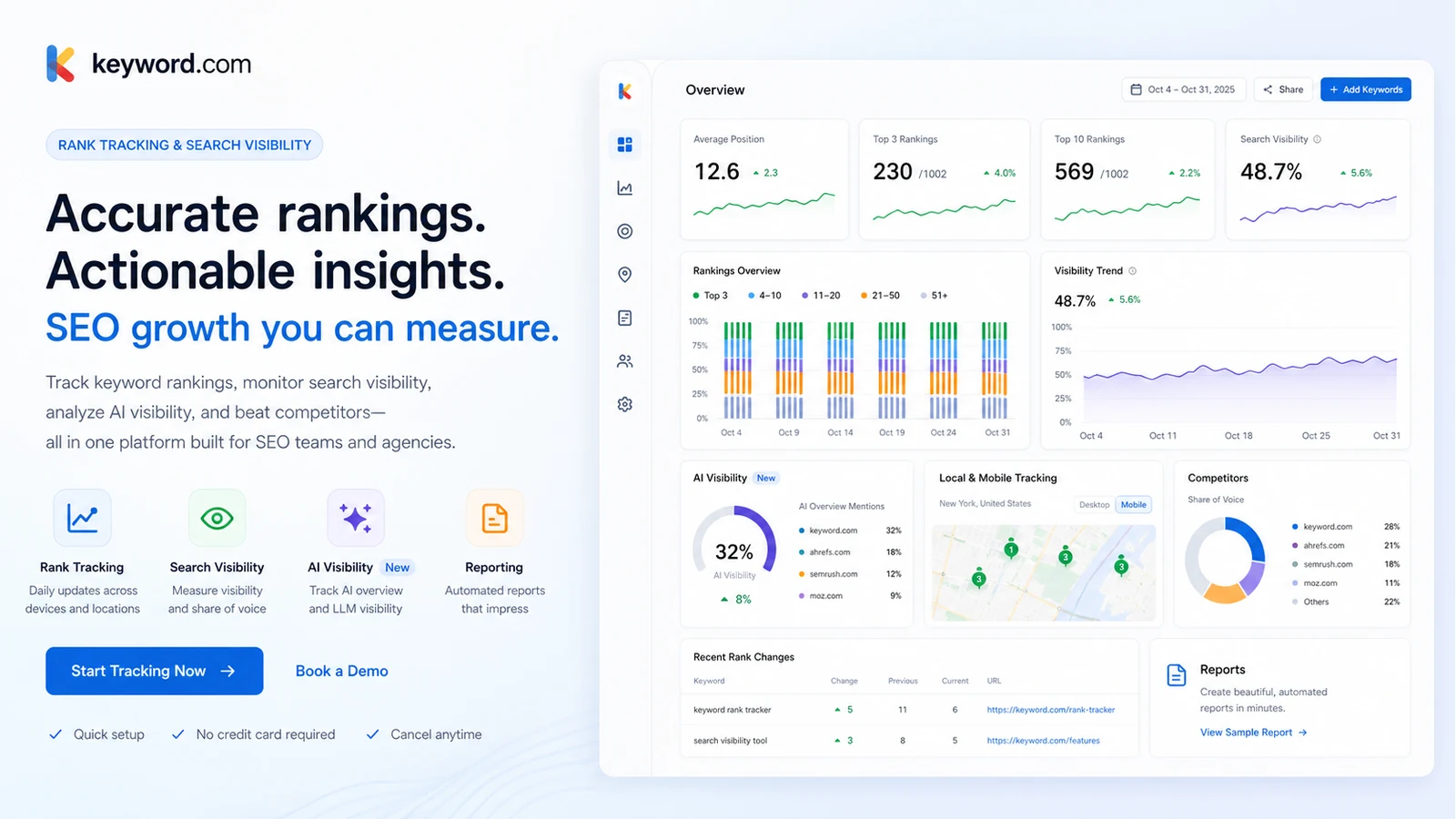
The product tour keeps the buying decision grounded in how Keyword.com works as a rank tracking and visibility platform. Buyers should look for the dashboard workflow, ranking update cadence, AI visibility signals, client reporting options, and plan limits before treating the tool as a simple keyword checker.
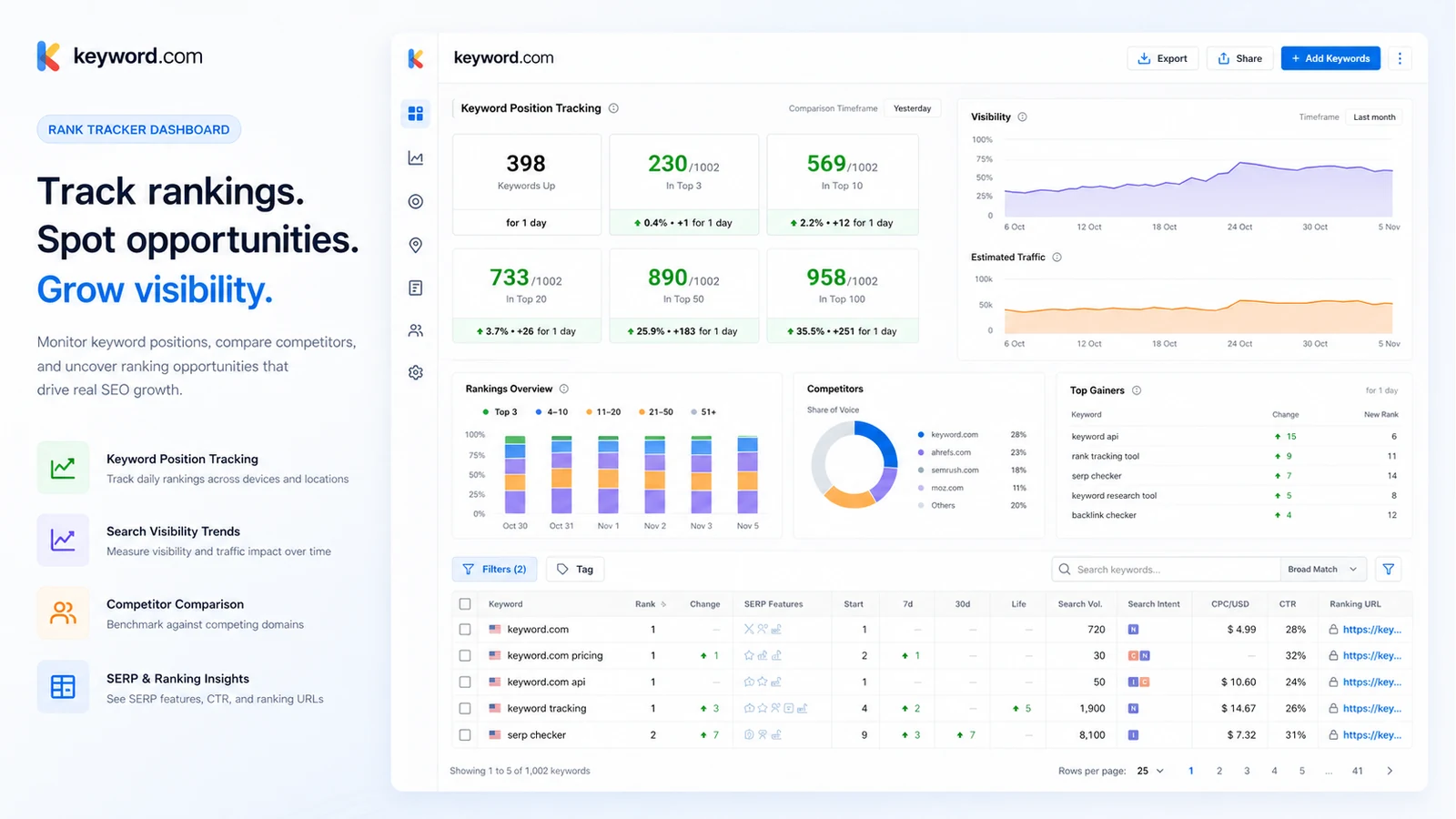
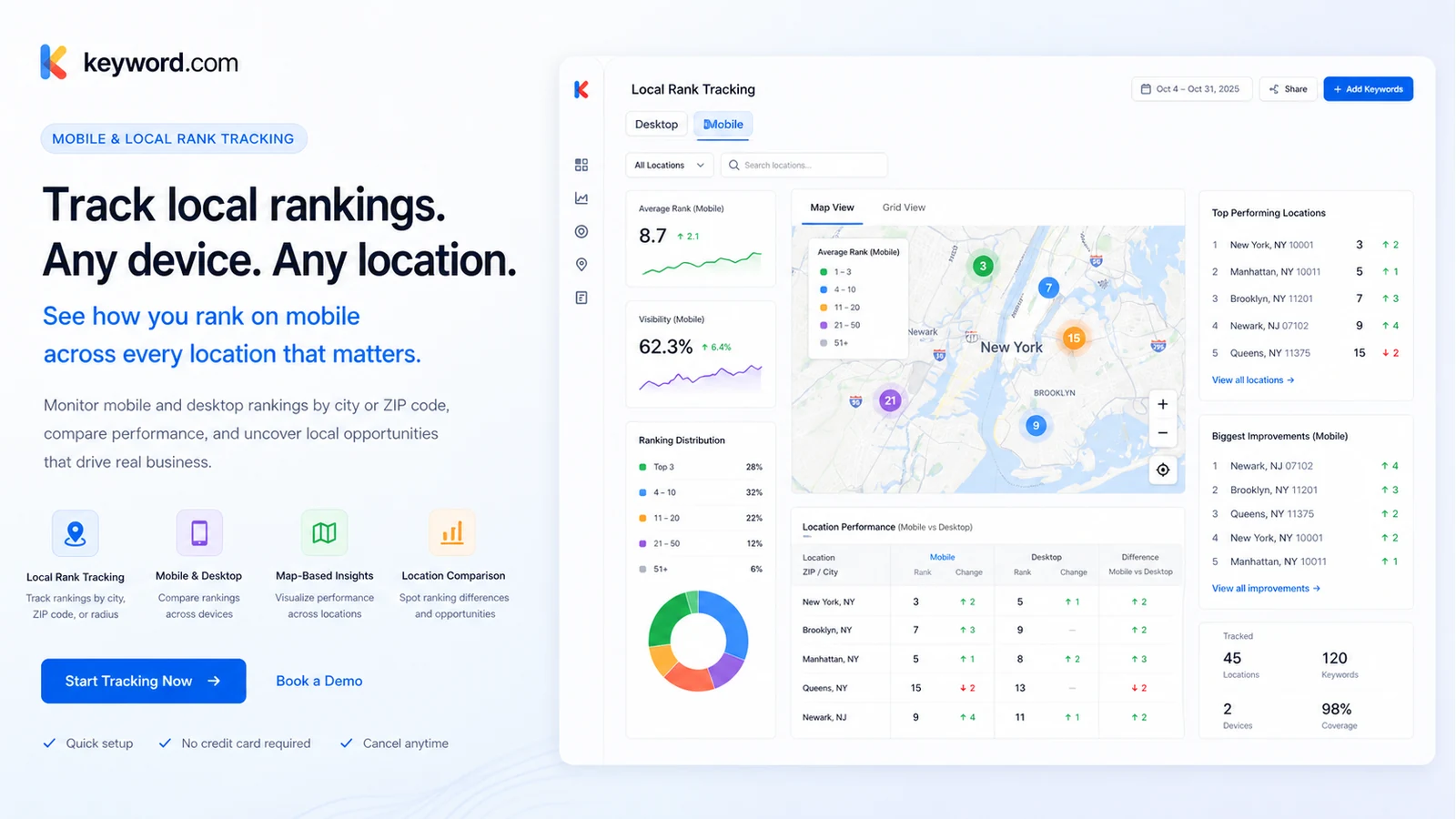
Keyword.com belongs on a buyer shortlist when rank tracking is a real operating habit, not a vanity dashboard. The product is built for teams that need to monitor Google visibility, compare competitors, report rankings to clients or stakeholders, and now track brand visibility inside AI search surfaces. The buying decision comes down to keyword volume, update cadence, reporting needs, AI credit usage, and whether the buyer needs a focused rank tracker instead of a broader SEO suite.
What Keyword.com actually does
Keyword.com tracks how keywords, pages, competitors, and brands perform across Google search and AI search contexts. Its core job is visibility monitoring: add keywords or AI prompts, choose locations and devices when needed, review ranking movement, and turn that data into reports that clients or internal teams can trust. That makes it closer to a rank tracking and visibility layer than a content optimizer or backlink tool.
- Tracks Google keyword rankings over time.
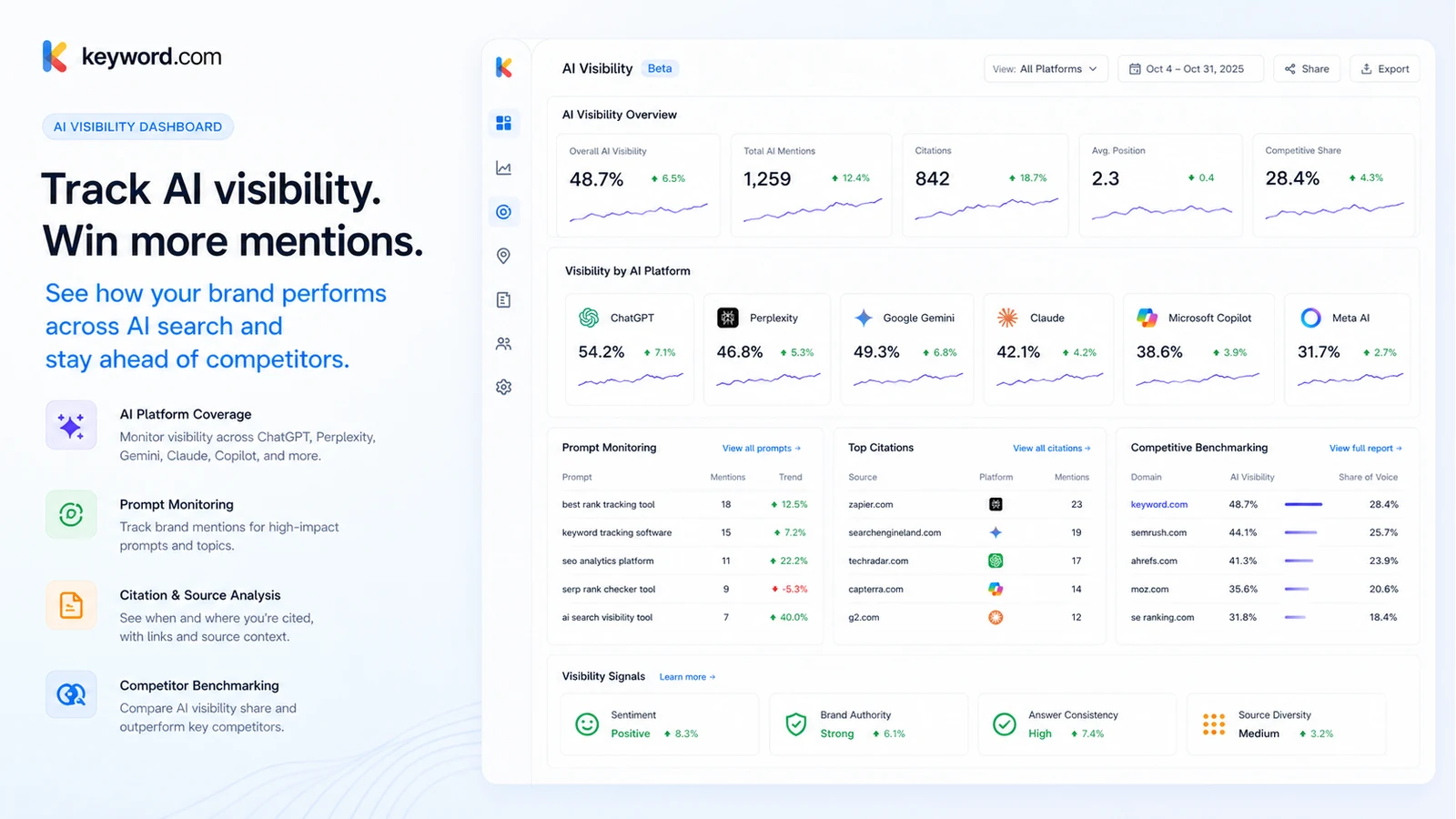
- Monitors AI visibility across supported AI search engines.
- Supports local, mobile, SERP feature, share of voice, and reporting workflows.
- Offers API and integrations for teams that need data outside the native dashboard.
Who gets the most value from it
The strongest fit is an SEO agency, consultant, growth team, or in-house SEO team that already reviews search visibility every week or month. These buyers care about ranking movement, mobile and local differences, competitor visibility, share of voice, and client-ready reporting. Keyword.com is less compelling when nobody owns the follow-up work after rankings change.
- Agencies managing ongoing SEO retainers.
- In-house teams tracking keywords across products, locations, or content groups.
- Consultants who need defensible ranking data for client conversations.
- Teams adding AI visibility checks to an existing Google SERP workflow.
Pricing and plan fit
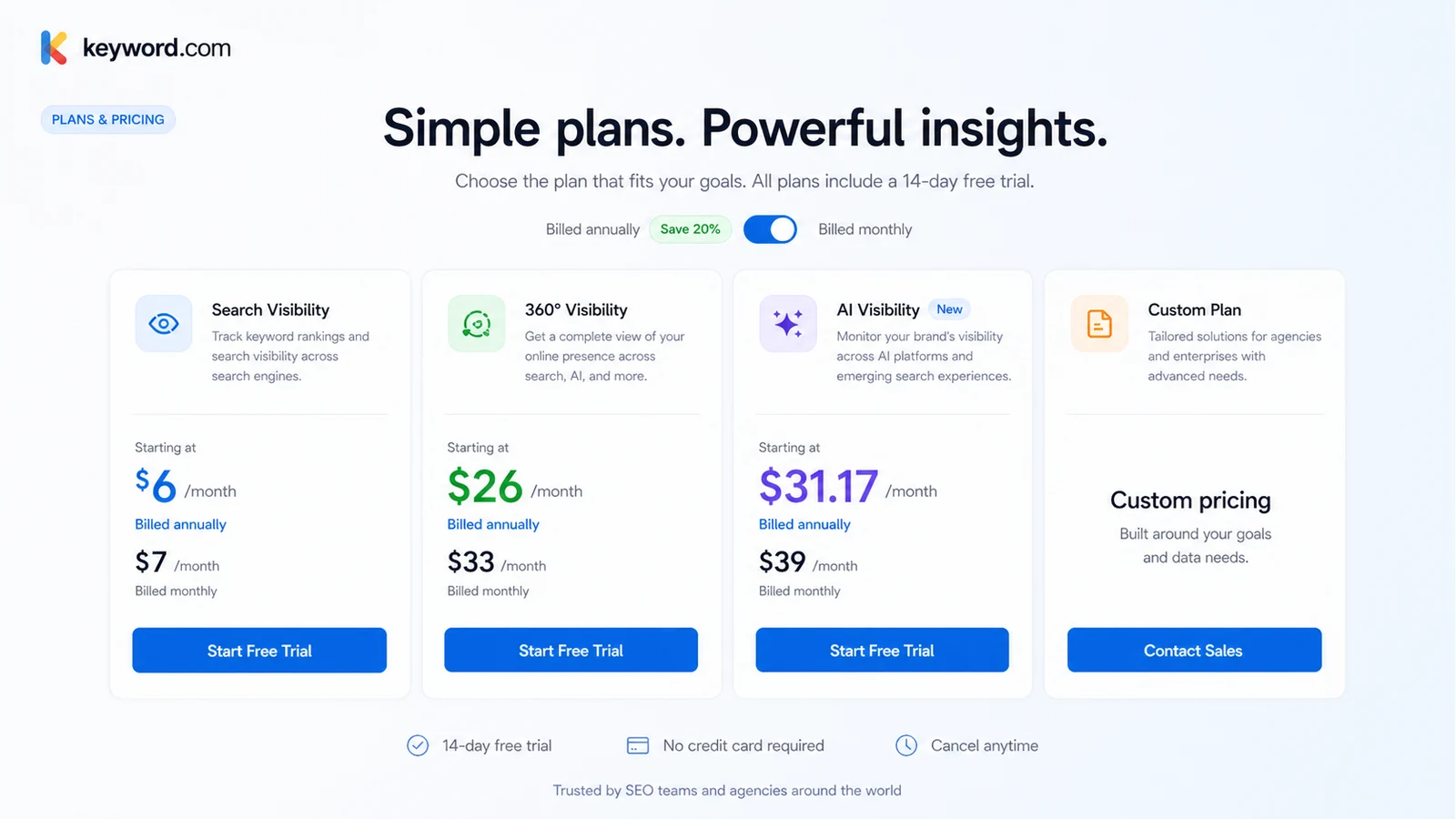
The pricing decision is more layered than a single monthly number. Search Visibility is the lower-cost route for focused Google rank tracking. 360° Visibility combines Google tracking with AI visibility credits. AI Visibility is a separate path for teams that mainly want prompt and AI search monitoring. Larger teams can also move toward custom pricing. The buyer needs to compare keyword count, credit usage, update frequency, reporting needs, and billing interval before choosing.
- Search Visibility starts at $6/month billed annually or $7/month monthly.
- 360° Visibility starts at $26/month billed annually or $33/month monthly.
- AI Visibility starts at $31.17/month billed annually or $39/month monthly.
- Custom plans are shown from $490/month for larger requirements.
AI visibility is a separate buying question
Keyword.com's AI visibility workflow tracks how a brand appears in AI-generated answers, including prompt monitoring, citation analysis, competitor benchmarking, and sentiment signals. That is useful for teams moving into answer engine optimization, but it also adds credit planning. A buyer should estimate how many prompts, engines, and refresh cycles are needed before treating AI visibility as a must-have add-on.
- Track brand visibility in AI-generated answers.
- Compare competitor appearance and citations.
- Review sentiment and prompt performance.
- Estimate AI credit needs before upgrading.
Reporting and client delivery
Reporting is one of the more important reasons to consider Keyword.com. The support documentation describes ViewKeys for live client dashboards, scheduled reports, manual PDF and CSV exports, and embedded reports for portals. Agencies should test reporting before buying a larger package because the value is not only in the rank data. It is in how easily the data can be shared with clients, executives, or internal teams.
- ViewKeys for live client dashboards.
- Scheduled reports for recurring updates.
- Manual PDF, CSV, and text exports.
- Embedded dashboards for portals or internal reporting.
What to verify before checkout
The safest checkout path is simple: start the trial, build one realistic project, add real keywords and locations, test AI visibility only if it is part of the buyer's strategy, and generate a report that mirrors the eventual workflow. Then review the paid plan, annual saving, AI credit requirement, and non-refundable terms. That reduces the risk of buying too much rank tracking capacity or paying for AI visibility before the team has a clear use case.
- Check the live pricing page and billing toggle.
- Confirm keyword package, update frequency, and AI credit needs.
- Test reports with real stakeholders before upgrading.
- Read the non-refundable terms before annual billing.
Best next step for a buyer
Buyers who already know they need rank tracking can start with the trial and test one live project. Buyers still comparing categories should read the full Keyword.com review first, then compare alternatives such as Nightwatch, Seobility, SEOTesting.com, or Rank Math depending on whether they need rank tracking, broader SEO auditing, testing, or WordPress-focused SEO tools. The coupon or offer path comes last, after the workflow fit is clear.
- Start with the review if workflow fit is still unclear.
- Use the trial if Keyword.com already looks like a serious option.
- Compare alternatives by workflow, not only price.
- Move to the deal path only after the plan choice is clear.
Best savings path from this store page
This is the clearest savings route to check once the product already looks like a fit.
Keyword.com pricing shows annual billing with a 20% saving cue across its main plan comparison table.
Search Visibility from $6/month annually
360° Visibility from $26/month annually
Use comparison routes when the category fit is still open
Use these comparison routes when the product still looks plausible, but the category fit is not fully settled.
Nightwatch is the closer comparison when the buyer wants another dedicated rank tracker with agency-friendly reporting and location tracking.
Seobility is worth comparing when the buyer wants broader SEO auditing and site monitoring instead of focused rank tracking depth.
SEOTesting.com fits buyers who care more about SEO experiments, Search Console analysis, and testing workflows than classic rank tracking.
Rank Math is a better fit for WordPress SEO setup and on-site optimization, not for dedicated multi-client rank tracking.
Verification points worth checking before you click out
Where this store usually fits best in the workflow
Agencies can use Keyword.com to track client rankings, create ViewKey dashboards, schedule reports, and show ranking movement without manually rebuilding report decks every week.
In-house teams can monitor keyword groups, competitor movement, SERP features, and share of voice across content categories or product lines.
Growth and content teams can monitor how a brand appears in AI-generated answers, then compare citations, competitors, sentiment, and prompt-level visibility over time.
Local SEO teams can compare rankings by device and location, which is useful when desktop rankings do not reflect mobile or local search behavior.
Practical checkpoints before and after signup
- List the exact keywords, locations, devices, competitors, and AI prompts that need tracking.
- Decide whether the buyer needs Google rank tracking only or Google plus AI visibility.
- Compare Keyword.com against at least one focused rank tracker and one broader SEO platform.
- Create one real project rather than testing with random sample keywords.
- Run at least one client-style or executive-style report to judge output quality.
- Check whether the update cadence and reporting options match the team's workflow.
- Verify the current pricing toggle, keyword package, AI credit volume, and custom plan threshold.
- Review the non-refundable terms before annual billing.
- Confirm whether API access, team access, and reporting features are included in the selected plan.
- Review whether tracked rankings lead to actual content, technical, local, or reporting decisions.
- Re-check plan size when keyword volume, locations, clients, or AI prompt monitoring expands.
- Avoid carrying unused keyword or AI credit capacity into renewal.
Fast-read signals for workflow fit and buying friction
Questions readers usually ask before choosing this store
What is Keyword.com best for?
Keyword.com is best for SEO teams, agencies, consultants, and growth teams that need recurring rank tracking, visibility monitoring, client reporting, or AI visibility checks. It is not mainly for one-off keyword research.
Does Keyword.com have a free plan?
A permanent free plan was not verified on the public pricing page. Keyword.com does show a 14-day free trial with no credit card required, including 100 keywords and 20 credits, which is the safest first step before paid billing.
How much does Keyword.com start at?
The public pricing page shows Search Visibility from $6 per month when billed annually, or $7 per month on monthly billing, for the smallest listed package. Buyers should verify the live plan selector because keyword volume, update cadence, and AI credits can change the real cost.
Is Keyword.com good for AI visibility tracking?
Yes, if the buyer has a clear AI search monitoring workflow. Keyword.com includes AI visibility tracking paths for prompts, AI platforms, citations, competitors, sentiment, and reporting, but buyers should estimate credit usage before upgrading.
What should buyers check before paying?
Buyers should test a real project during the trial, compare Search Visibility versus 360° Visibility, calculate AI credit needs, verify reporting requirements, and read the non-refundable terms before choosing monthly or annual billing.
Choose the next route that matches what you still need to decide
The strongest next click depends on whether you still need product judgment, a savings route, or a broader category comparison.