Quick verdict
Keyword.com is worth a serious look if rank tracking is already part of your SEO operating rhythm.
That is the important condition.
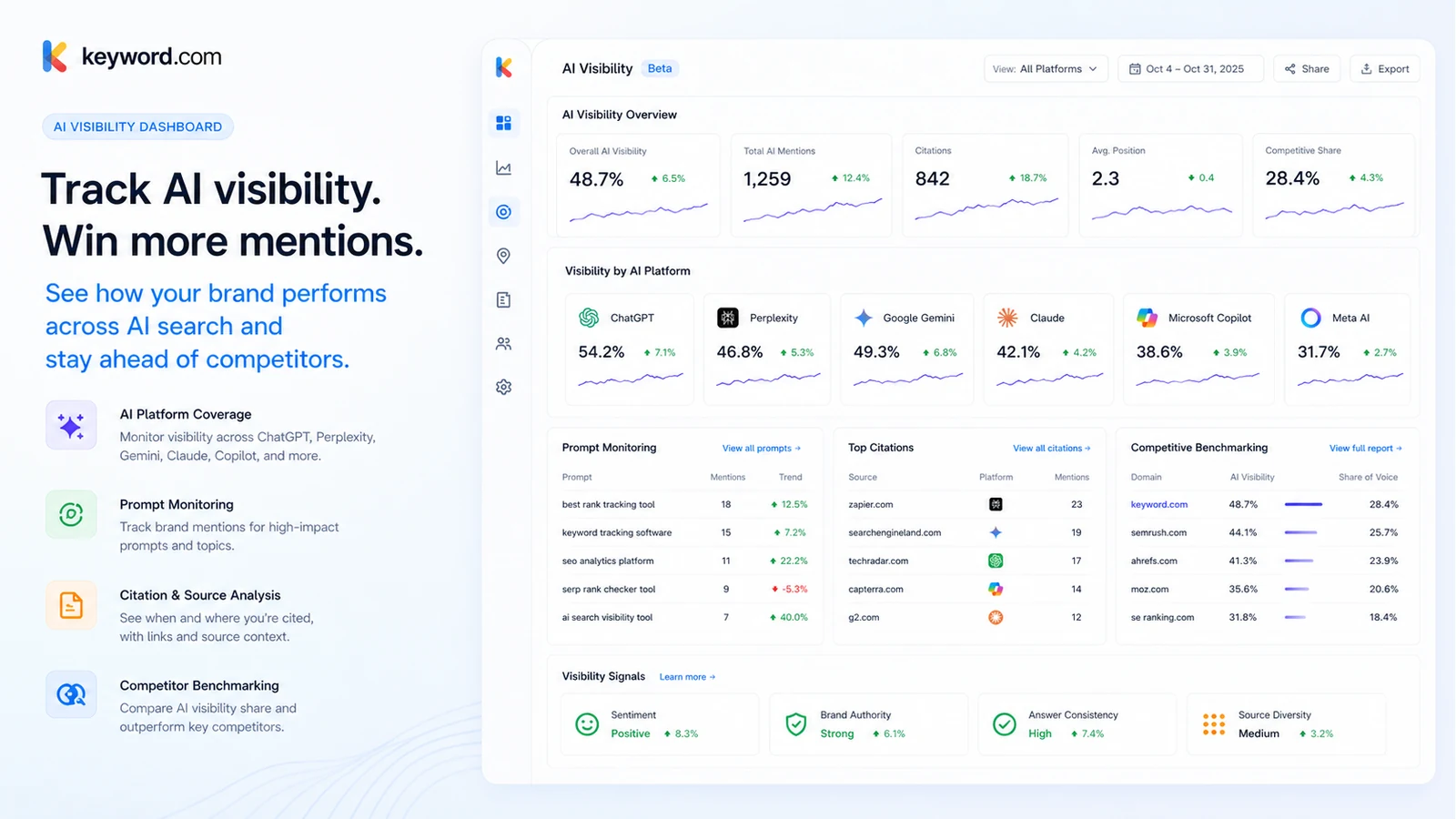
This is not the kind of product I would judge as a casual keyword checker. Keyword.com makes more sense when a team needs to monitor keyword movement, competitor visibility, SERP features, local or mobile rankings, AI search visibility, and reporting output over time. If that data turns into client conversations, content refreshes, local SEO decisions, or internal performance reviews, the product has a clear job.
If you only want to check a few rankings once in a while, the fit is weaker. A paid rank tracker can quickly become another dashboard you open for a week and then ignore. The easy buyer mistake here is comparing the lowest monthly price without asking whether you need weekly or daily tracking, reporting, AI visibility credits, API access, or client-ready exports.
For my money, Keyword.com is most interesting for SEO agencies, consultants, in-house SEO teams, and growth teams that need provable visibility data. Its stronger side is the combination of Google rank tracking, local and mobile tracking, ViewKey-style reporting, share of voice, integrations, API options, and the newer AI visibility layer. The caution is that AI visibility is a separate buying question, and the refund terms make the 14-day trial more important than any later regret.
I would start with a real project, not a sample project. Add actual keywords, locations, competitors, and one reporting scenario. Then decide whether Search Visibility, 360° Visibility, AI Visibility, or a larger plan fits the way your team actually works.
Next step: If Keyword.com looks like a real fit, test the current buyer route with a real project before choosing monthly or annual billing.
Review snapshot
| Review point | Practical take |
|---|---|
| Best for | SEO agencies, consultants, in-house SEO teams, and growth teams with recurring tracking needs |
| Not ideal for | One-off keyword checks, casual site owners, or buyers who need a full SEO suite in one tool |
| Main use case | Tracking Google rankings, SERP visibility, AI visibility, local/mobile performance, and client reports |
| Free trial | 14-day free trial with no credit card required |
| Starting price | Search Visibility starts at $6/month billed annually, or $7/month monthly, on the public pricing page |
| AI path | AI Visibility is available as its own plan or as part of 360° Visibility |
| Main strength | Focused rank tracking plus agency reporting and AI visibility options |
| Main concern | Non-refundable paid fees, AI credit planning, and plan-fit complexity |
| Direct alternatives | Nightwatch, Seobility, SEOTesting.com, Rank Math |
| Best next step | Test one real tracking and reporting workflow during the trial |
What is Keyword.com?
Keyword.com is a keyword rank tracking and search visibility platform for SEO professionals, agencies, consultants, in-house teams, and enterprises that need to monitor visibility across Google search and AI search surfaces.
The product’s core job is not writing content, crawling an entire website, or replacing a broad SEO suite. It is about visibility monitoring: where keywords rank, how competitors move, which SERP features appear, how rankings differ by device or location, and how a brand appears inside AI-generated answers.
That distinction matters because rank tracking tools can look deceptively simple from the outside. You add keywords, get positions, and review movement. But in a real SEO workflow, the value comes from what happens after the data appears. Does the team refresh a page? Change internal links? Explain movement to a client? Prioritize local pages? Build a report? Compare Google visibility against AI visibility?
Keyword.com belongs in that second category. It is useful when rankings become part of a decision loop.
Our review approach compares public product pages, pricing details, help documentation, terms, buyer workflow fit, and nearby alternatives. We do not treat a low entry price, AI visibility claim, or coupon route as proof that the product fits the buyer. The better question is whether Keyword.com gives you visibility data you will actually use.
The common wrong expectation is to treat it as an all-in-one SEO platform. It is not that. If you need backlink research, deep technical crawling, content optimization, or WordPress on-page setup, you may need a different tool or a complementary stack. If you need focused ranking and visibility data, Keyword.com becomes much more relevant.
Who should use Keyword.com?
SEO agencies are the most obvious fit. Agencies need ranking history, client dashboards, scheduled reports, and clear evidence when rankings move. Keyword.com becomes more valuable when an agency manages multiple clients and needs a repeatable way to show progress without rebuilding reports manually every month.
SEO consultants should also consider it if rank tracking is part of their client delivery. The product can help turn ranking data into a defensible conversation: here is where the client moved, here is how competitors changed, here are the keywords worth watching, and here is where AI visibility may be changing the search landscape.
In-house SEO teams can use Keyword.com when ranking visibility affects roadmap decisions. A small team tracking product categories, content groups, local markets, or competitor movement may prefer a focused rank tracker over a heavier suite if other SEO functions are already covered elsewhere.
Growth and content teams exploring AI search visibility may find the 360° Visibility or AI Visibility path useful. That said, they should not buy the AI layer just because it sounds current. They should first list the prompts, brands, competitors, engines, and reporting questions they actually need to monitor.
Technical or reporting teams may care about the API route. If rankings need to flow into internal dashboards, client portals, or BI tools, Keyword.com has a stronger story than a simple dashboard-only rank tracker. The condition is that someone on the team must own setup, data mapping, and maintenance.
Who should avoid Keyword.com?
Keyword.com is not ideal for buyers who only need a one-time keyword position check. If you are checking five keywords once before updating a blog post, a paid subscription may be heavier than the job requires.
It is also not the best first choice for site owners who want one broad SEO platform to do everything. Keyword.com has visibility and reporting depth, but it is not trying to replace a full backlink research platform, site crawler, content optimizer, and WordPress SEO plugin in one purchase.
Buyers who want a generous refund safety net should be careful. The current terms describe paid fees as non-refundable, including unused portions of monthly and annual subscription terms. That does not make the product bad, but it changes how I would buy it. I would use the trial seriously before paying.
Teams with unclear AI visibility needs should slow down before choosing an AI-focused plan. AI search monitoring can be useful, but credit usage, prompt selection, engine coverage, refresh cadence, and reporting expectations need planning. Without that, AI visibility can become a novelty metric rather than an operating signal.
Finally, very small site owners may be better served by simpler tools if they will not act on the data. Rank tracking only pays for itself when someone uses the ranking movement to make better SEO decisions.
How Keyword.com fits into a real workflow
A good Keyword.com workflow does not start with the pricing page. It starts with the SEO decision you need to make repeatedly.
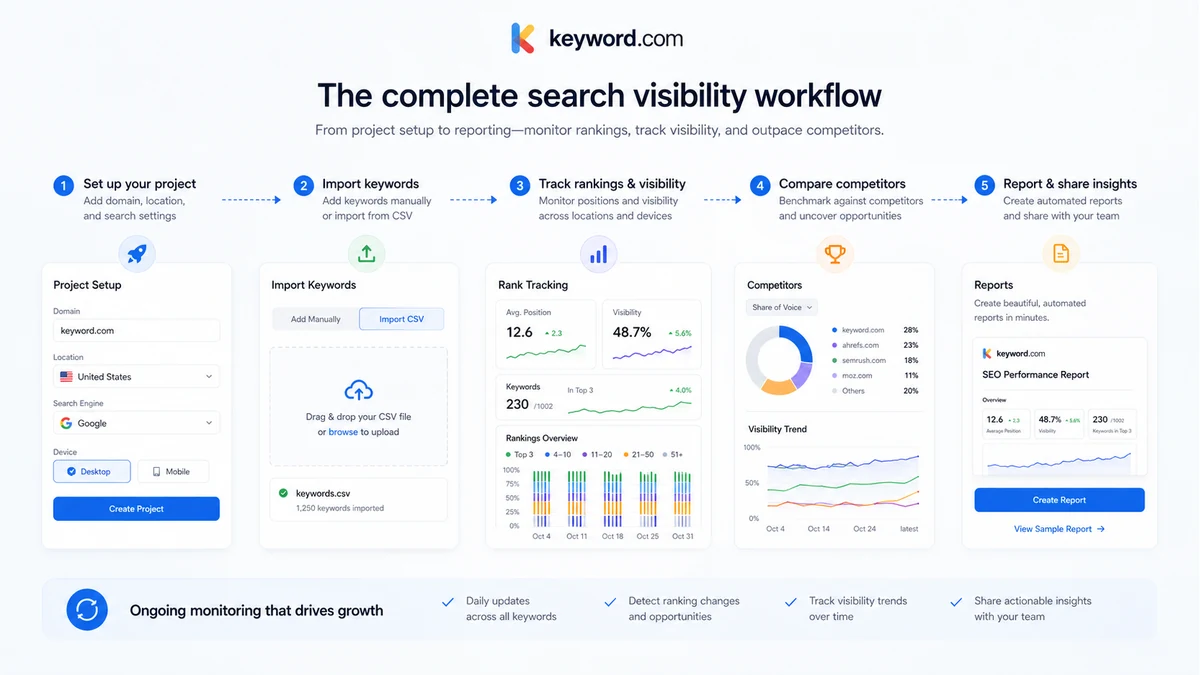
For an agency, that might be monthly client reporting. The workflow would look like this: add client projects, group keywords by campaign or service, select locations and devices, monitor ranking movement, compare competitors, generate ViewKeys or scheduled reports, and use the data during client calls.
For an in-house SEO team, the workflow may be more operational. Add keyword groups for product lines or content clusters, watch ranking movement after site changes, monitor SERP features, compare share of voice, then connect ranking movement with content refreshes or technical fixes.
For an AI visibility workflow, the process changes again. The team needs to define prompt sets, competitors, target topics, and engines worth monitoring. Then the question becomes whether AI visibility data changes content, PR, brand, or authority-building decisions.
That is why I would not judge Keyword.com by the dashboard alone. The real test is whether the tool supports the decision loop after the dashboard updates.
Real-world buyer scenarios
Agency reporting for multiple clients
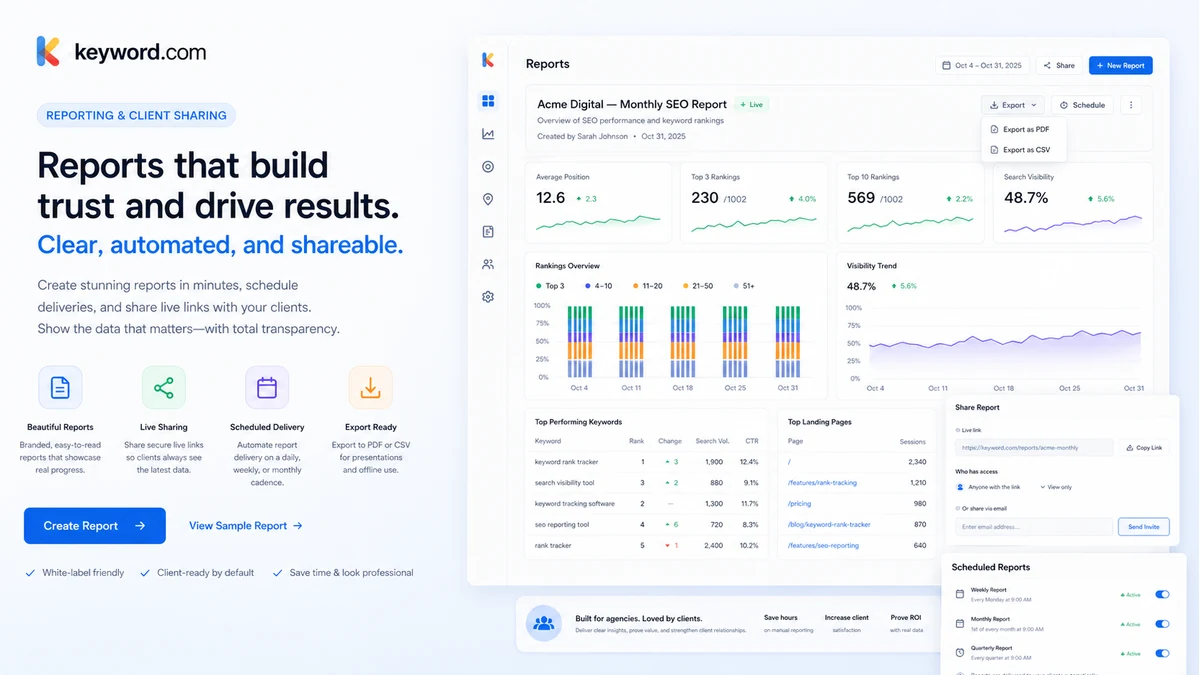
An agency managing retainers is one of the stronger Keyword.com scenarios. The agency needs to track many campaigns, share ranking movement, and make reporting feel transparent. ViewKeys, scheduled reports, exports, branded reporting, and integrations can matter more than the raw keyword count.
The risk is buying too small a plan or underestimating reporting needs. If the agency promises weekly client updates, it should test report output during the trial before committing.
In-house SEO visibility monitoring
An in-house team may use Keyword.com to monitor product pages, content clusters, local rankings, branded terms, non-branded commercial terms, and competitor shifts. This works best when ranking movement feeds a real internal process.
Where it may fail is ownership. If nobody checks ranking changes or connects them to roadmap decisions, the tool becomes passive reporting.
AI search visibility tracking
A team moving into GEO or answer engine optimization may use Keyword.com to monitor brand visibility across AI answers. This is useful when the company has a real prompt set, competitor list, and reporting question.
The caution is credit planning. AI visibility is not only a feature checkbox. Buyers should estimate how many prompts, engines, and refresh cycles they need before choosing a package.
API and dashboard workflows
A technical team may want ranking or AI visibility data inside a custom dashboard. Keyword.com’s API paths make this a stronger use case, especially for agencies or software-driven reporting teams.
The buyer check is setup effort. API access is only useful if the team can maintain the integration and explain the data clearly to stakeholders.
Key features that actually matter
Google rank tracking
Keyword.com’s foundation is Google keyword rank tracking. Buyers can monitor keyword positions, track movement, compare competitors, and review ranking data over time.
Buyer note: this matters most when you track keywords tied to decisions. A random keyword list will not prove much. A carefully grouped project can show whether SEO work is moving in the right direction.
Local, mobile, and SERP feature tracking
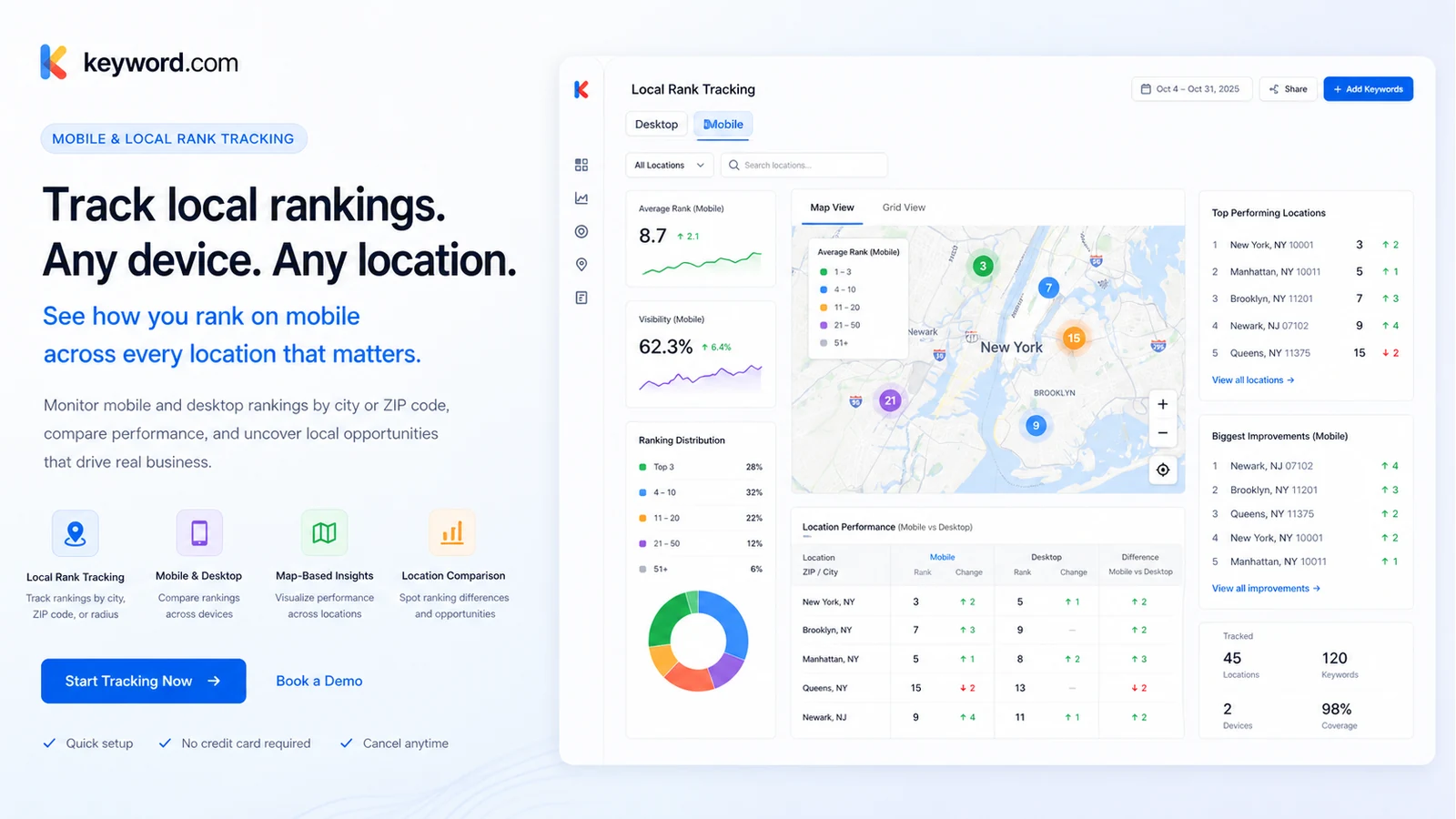
Local and mobile tracking matter because rankings are not always the same across devices, cities, ZIP codes, or search contexts. SERP feature monitoring also matters when visibility is affected by AI Overviews, local packs, snippets, or other SERP elements.
Buyer note: local SEO teams should test real locations during the trial. Desktop national rankings may not reflect the results that matter to a local client.
AI visibility tracking
Keyword.com now has a clear AI visibility angle. It can help teams monitor how brands and competitors appear in AI search contexts, with attention to prompts, citations, sentiment, and competitive visibility.
Buyer note: AI visibility should be bought with a plan, not a vague fear of missing out. List the prompts and engines first, then estimate credit usage.
Reporting and ViewKeys
Reporting is one of the most buyer-relevant parts of Keyword.com. ViewKeys, scheduled reports, PDF and CSV exports, embedded reports, branded reporting, and integrations can turn ranking data into something clients and stakeholders can understand.
Buyer note: agencies should test the report output before upgrading. The value is not only accurate data; it is how easily that data can be shared.
API and integrations
Keyword.com supports API and integration workflows for teams that want ranking or AI visibility data outside the native dashboard. This can matter for agencies, internal dashboards, BI workflows, and client portals.
Buyer note: API access is not a casual feature. Confirm plan access, setup effort, and whether your team actually needs programmatic data before treating it as a must-have.
Pricing and plan value
Keyword.com’s pricing is clear enough to evaluate, but not simple enough to judge from the lowest number alone.
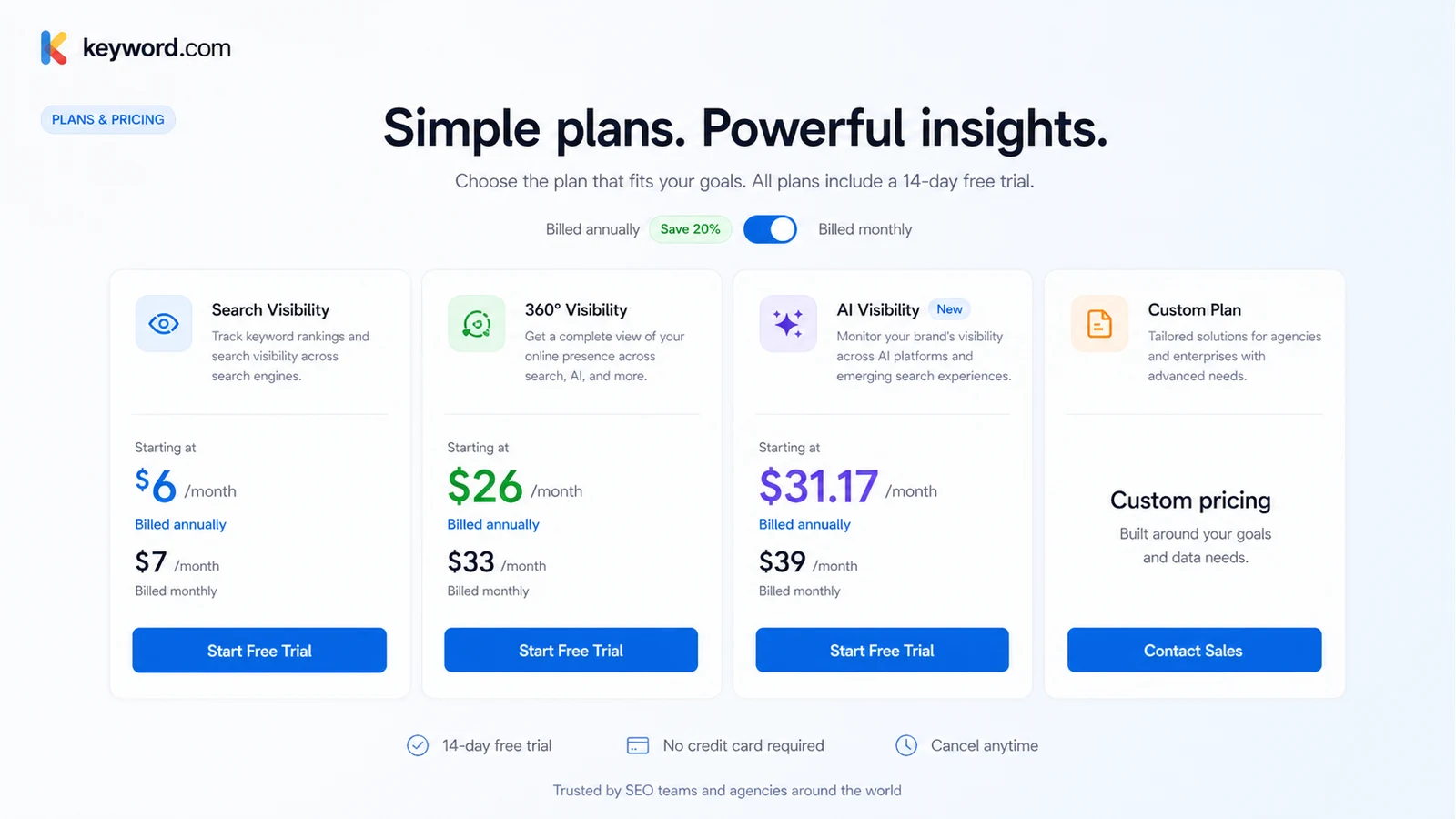
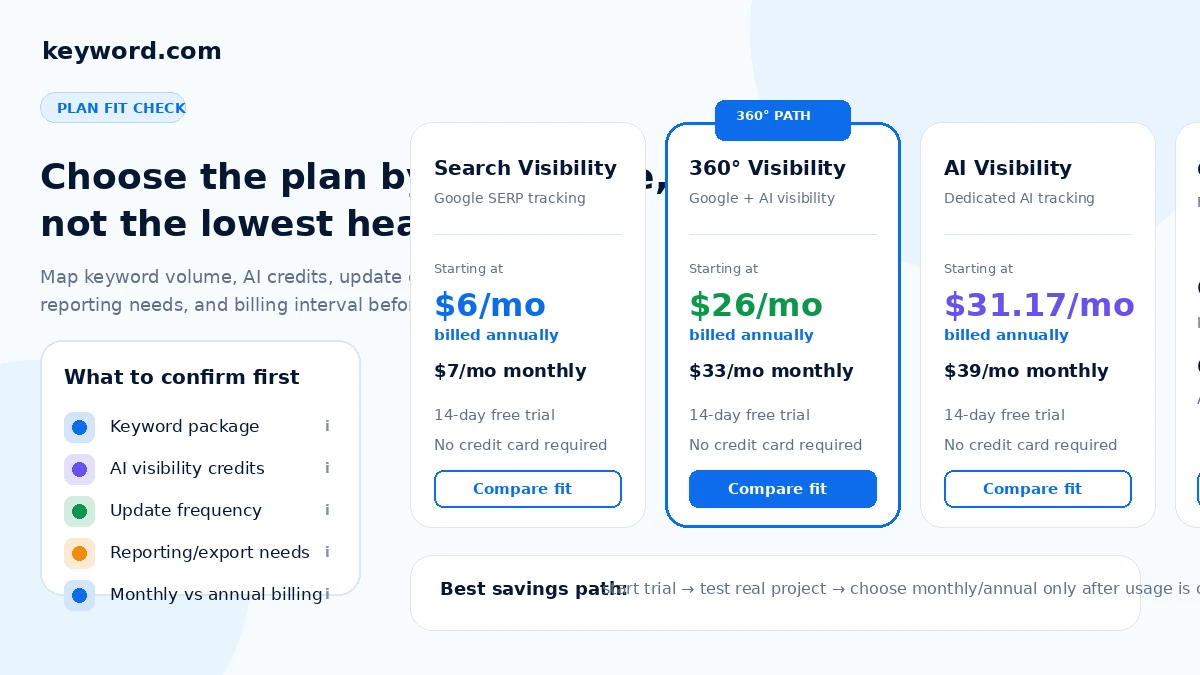
At the time of review, the public pricing page shows Search Visibility starting at $6/month when billed annually, or $7/month on monthly billing. That lower-cost path is for focused Google search visibility tracking. It can be the right entry point if your main job is rank tracking, not AI visibility.
360° Visibility starts at $26/month when billed annually, or $33/month monthly. This is the broader path that combines Google tracking with AI visibility credits. It is more relevant when a team wants to monitor both traditional search and AI search in the same workflow.
AI Visibility starts at $31.17/month when billed annually, or $39/month monthly. This is for buyers who primarily care about AI search visibility rather than Google rank tracking. A Custom plan is also shown from $490/month for larger teams, and API-only access is shown separately from $46/month.
The pricing question is not only “what is the cheapest plan?” The better question is: which plan matches your keyword volume, update frequency, reporting workflow, AI credits, and client or stakeholder expectations?
I would be careful with annual billing until the trial proves the workflow. Annual billing can lower the effective monthly cost, but the terms make paid fees a serious commitment. A small Search Visibility plan may be enough for a focused project. A team with many clients, locations, reports, or AI prompts may outgrow that path quickly.
Pricing check: If Keyword.com still fits your workflow, verify the current plan table, keyword package, AI credits, and billing terms before checkout.
Check Keyword.com pricing Check current offers Read store guide
Free plan, trial, coupon, and checkout notes
Keyword.com does not need to be judged from a coupon first. The safer entry point is the 14-day free trial with no credit card required.
That trial is important because paid fees are described as non-refundable. I would use the trial to set up one real project, not a dummy test. Add real keywords, locations, competitors, and at least one reporting scenario. If AI visibility matters, add real prompts and compare credit usage against the plan options.
A public coupon code was not something I would treat as the main savings path. The better savings path is workflow-first: test the tool, choose the smallest plan that matches real usage, compare monthly against annual only after the trial, and use the Keyword.com coupon page only after the buying logic is clear.
The order matters.
First, prove the need. Second, choose the plan. Third, check the current deal route. A discount can make a good purchase better, but it should not make a weak workflow look strong.
What I would check before buying Keyword.com
If I were buying Keyword.com for a real SEO workflow, I would check these points before paying:
- Whether the 14-day trial can cover one real project from setup to reporting.
- Whether Search Visibility is enough, or whether 360° Visibility is needed for Google plus AI monitoring.
- How many keywords, locations, devices, competitors, and projects the team actually needs.
- Whether AI visibility credits match the prompt count, engine coverage, and refresh expectations.
- Whether weekly updates are enough, or whether daily tracking and on-demand refreshes matter.
- Whether ViewKeys, scheduled reports, PDF exports, CSV exports, branding, or embedded reports are needed for client delivery.
- Whether the team is comfortable with the current non-refundable payment language before choosing annual billing.
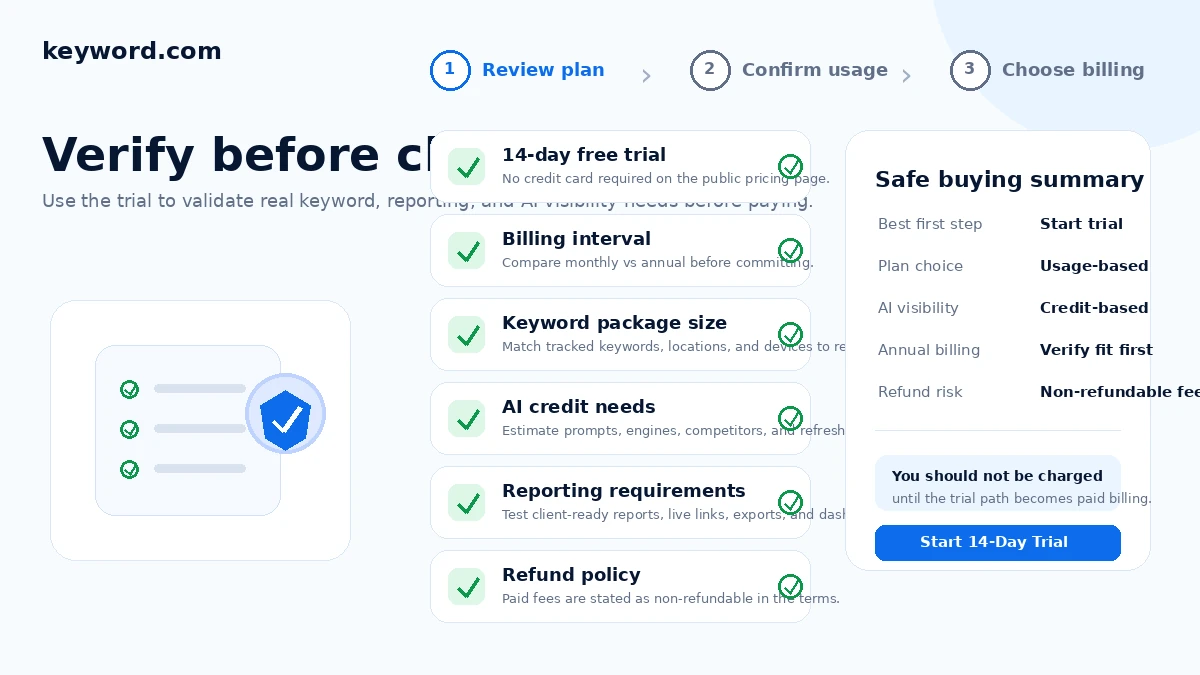
The biggest mistake would be buying from the headline price while ignoring the real operational variables. Rank tracking looks cheap when the keyword set is small. It becomes a different decision when you add clients, locations, daily updates, AI prompts, reporting, and API workflows.
A simple test before paying
Before paying, I would run a small but realistic test like this:
- Pick one real project, not a sample domain.
- Add a keyword set that represents the actual campaign.
- Include the locations, devices, and competitors you would use after subscribing.
- Let the ranking workflow run long enough to judge update cadence and table clarity.
- Create one client-style or stakeholder-style report.
- If AI visibility matters, add a small prompt set and estimate credit usage.
- Compare the result against the plan you think you need.
This test does not need to be complicated. It just needs to be real. If Keyword.com helps you answer a client, prioritize a page, monitor a location, or build a report with less friction, the case for paying becomes stronger. If the trial only produces interesting numbers with no follow-up action, the paid plan is harder to justify.
Pros explained
The first real pro is focus. Keyword.com is not trying to be every SEO tool at once. That makes it easier to evaluate as a rank tracking and visibility platform. If your job is monitoring rankings and reporting visibility, that focus is useful.
The second pro is the trial path. A 14-day trial with no credit card required gives buyers a practical way to test a real project before paid billing. With strict refund language, that trial is not a minor detail. It is the safest evaluation window.
The third pro is reporting depth. ViewKeys, scheduled reports, manual exports, embedded reports, branded reporting, and integrations are especially relevant for agencies and stakeholder-heavy teams. Rank tracking data is more valuable when it can be delivered clearly.
The fourth pro is the AI visibility layer. Search is changing, and teams that already monitor Google rankings may want to track brand visibility in AI-generated answers too. Keyword.com’s 360° and AI-focused paths give buyers a way to bring those questions into the same visibility conversation.
The fifth pro is API and integration flexibility. This matters less to casual buyers, but more to teams that need to automate reporting, build dashboards, or feed ranking data into a broader system.
Cons explained
The first con is that Keyword.com is not a complete SEO suite. Buyers who want backlink research, full technical audits, content optimization, and on-page WordPress setup may need another tool alongside it.
The second con is pricing complexity once AI visibility enters the decision. Search Visibility is simple enough, but 360° Visibility, AI credits, prompt tracking, custom plans, and API paths require more careful thinking. A buyer can easily underestimate the plan needed for real use.
The third con is refund flexibility. The current terms describe paid fees as non-refundable. That makes the trial more important and makes annual billing something I would avoid until usage is proven.
The fourth con is that rank tracking only has value when someone acts on it. If your team does not review ranking changes, build reports, refresh content, or use visibility data in decisions, Keyword.com may become another paid dashboard.
The fifth con is that AI visibility is still a developing category. The data can be useful, but buyers should not assume it carries the same decision weight as traditional rank tracking. It needs context, prompt discipline, and careful interpretation.
Green flags and red flags
Green flags:
- You already report rankings to clients or stakeholders every month.
- You need local, mobile, SERP feature, or competitor visibility tracking.
- You want to compare Google visibility with AI visibility in one workflow.
- You need ViewKeys, scheduled reports, exports, or embedded reporting.
- You have a real keyword list and a clear owner for follow-up decisions.
Red flags:
- You are only checking rankings casually.
- You want one tool to replace your entire SEO stack.
- You are buying annual billing before testing the trial.
- You cannot estimate keyword volume, update cadence, or AI credit usage.
- You want AI visibility because it sounds trendy, not because it affects a real strategy.
The green flags are mostly workflow signals. The red flags are mostly overbuying signals. That is how I would judge Keyword.com: not by whether the feature list is attractive, but by whether the buyer has a repeatable reason to use the data.
Keyword.com vs alternatives
Nightwatch vs Keyword.com
Nightwatch is the closest direct comparison if the buyer wants another dedicated rank tracking platform with agency-friendly reporting and local tracking depth. I would compare Nightwatch first if location-level visibility and rank tracking workflow are the main buying criteria.
Keyword.com may still make more sense if the buyer wants its specific mix of Google rank tracking, AI visibility, reporting, and API paths. The tradeoff is plan fit and whether Keyword.com’s AI visibility angle matters to your current work.
Seobility vs Keyword.com
Seobility is a broader SEO auditing and site monitoring route. It can be a better fit for buyers who want technical checks, site audits, and general SEO monitoring rather than a dedicated rank tracking and AI visibility workflow.
Keyword.com is stronger when rank tracking, visibility reporting, client delivery, and AI visibility are the core job. Seobility is the broader SEO health route; Keyword.com is the visibility tracking route.
SEOTesting.com vs Keyword.com
SEOTesting.com is more focused on Search Console analysis, SEO testing, and measuring the impact of changes. It is a better comparison for teams that care about experiments, content refreshes, and GSC-based decision-making.
Keyword.com may be stronger when the buyer needs independent rank tracking, local and device monitoring, share of voice, reporting, or AI visibility. These tools can complement each other, but they solve different buyer problems.
Rank Math vs Keyword.com
Rank Math is an adjacent route, not a direct replacement. It is better for WordPress SEO setup, on-page optimization, schema, redirects, and publishing-side SEO controls.
Keyword.com is better for ongoing visibility tracking and reporting. A WordPress site could use Rank Math for on-site SEO and Keyword.com for rank tracking, but I would not treat one as a full substitute for the other.
Trust, refund, and buyer-risk notes
The main trust point in Keyword.com’s favor is that the product has a clear public identity. It is a rank tracking and visibility platform with defined pricing paths, documented reporting workflows, API pages, integrations, and support articles. That makes it easier to evaluate than a vague AI SEO tool with unclear scope.
The main buyer-risk point is the payment language. If paid fees are non-refundable, the trial becomes the buyer’s real protection. I would not subscribe casually and hope to sort out workflow fit later.
Plan limits are the second risk. Keyword count, update cadence, AI credits, reporting needs, API use, and custom options can change the real cost. Buyers should avoid comparing Keyword.com only against tools with a single headline price.
Data and reporting expectations also matter. If rankings are shared with clients, confirm how ViewKeys, branding, scheduled reports, exports, permissions, and embedded reports work before promising anything externally.
AI visibility deserves a separate caution. It can be useful, but it should not be treated as a perfect scorecard for brand authority. AI answer surfaces shift, prompt sets matter, and citations can change. Use it as a monitoring layer, not as a final truth machine.
Finally, do not let the coupon or offer path lead the decision. The Keyword.com store guide and current plan table are more important than chasing a discount before the workflow fit is clear.
Final verdict
I would consider Keyword.com if ranking visibility already affects how your team works.
That includes agencies reporting to clients, consultants building SEO proof, in-house teams monitoring search performance, and growth teams beginning to track AI search visibility alongside Google rankings. In those situations, Keyword.com has a clear role: it helps turn visibility data into reporting and decisions.
I would skip it if you only need occasional keyword checks, if nobody will act on the tracked data, or if you need a broad SEO platform more than a focused rank tracker. I would also slow down before choosing annual billing until the trial proves the real project, reporting workflow, update cadence, and AI credit need.
I would compare Keyword.com with Nightwatch if dedicated rank tracking is the main question, Seobility if broader SEO auditing matters more, SEOTesting.com if experiments and Search Console workflows matter more, and Rank Math if the real need is WordPress SEO setup.
The safest next step is not to start with the coupon. Start with one real tracking workflow. If Keyword.com helps you explain rankings, make decisions, report visibility, or monitor AI search in a way your team will actually use, then the paid plan becomes a practical decision rather than a hopeful subscription.
