Quick verdict
Nightwatch is worth a serious look if rank tracking is not just a side task in your SEO workflow.
That is the real dividing line.
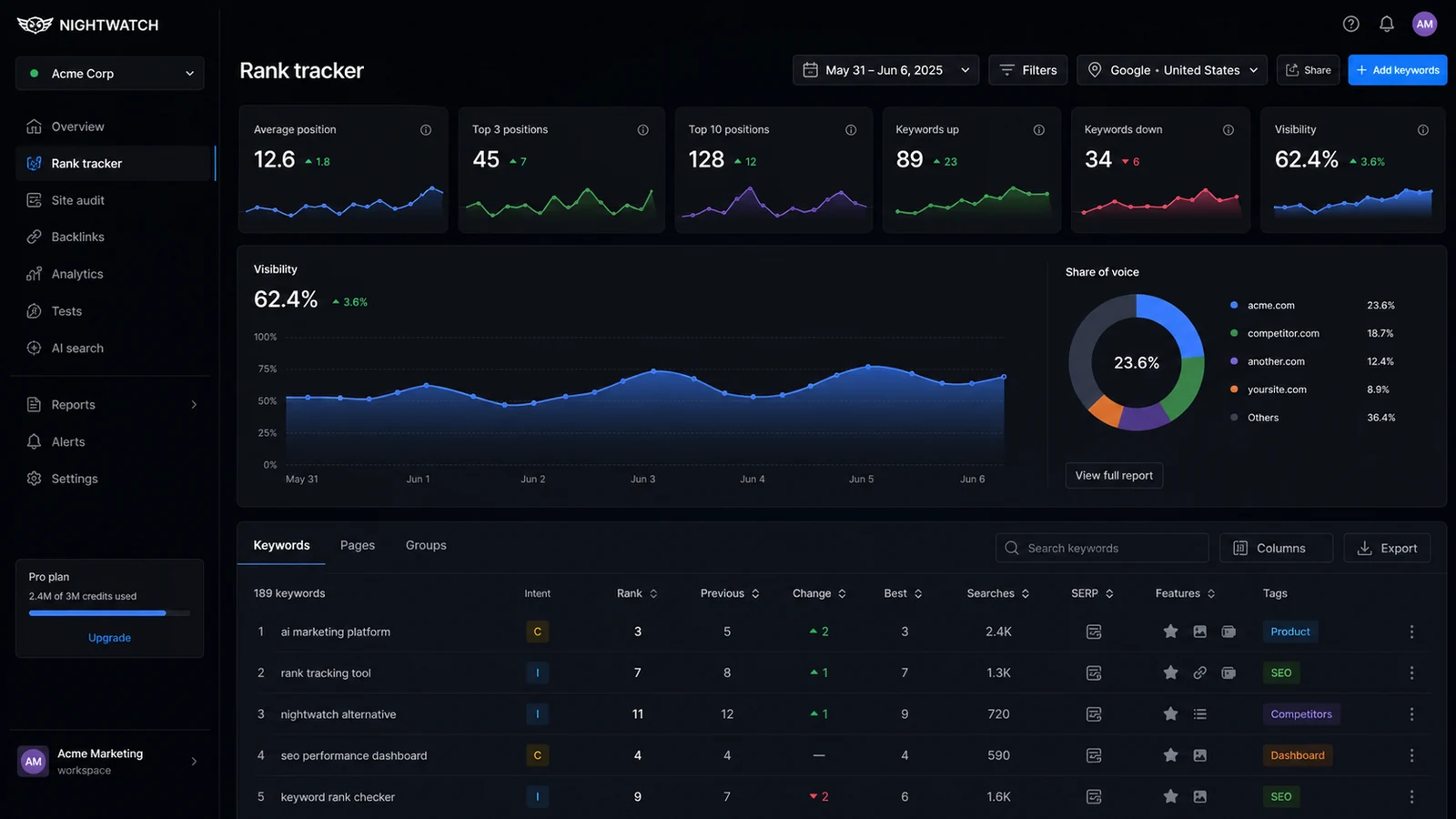
If you manage multiple clients, track local rankings, report keyword movement to stakeholders, or need a cleaner way to monitor visibility across search engines and AI platforms, Nightwatch has a believable role. It is not trying to be a lightweight free SERP checker. It is built more like a visibility monitoring platform for people who need daily ranking data, segmentation, reporting, exports, and now AI search tracking layered into the same decision process.
I would be more cautious if you only want to check a few keywords once in a while. In that situation, the tool may be stronger than your actual need. A rank tracker becomes valuable when the data changes what you do next: update a page, investigate a traffic drop, explain client movement, compare locations, or decide whether a campaign is working.
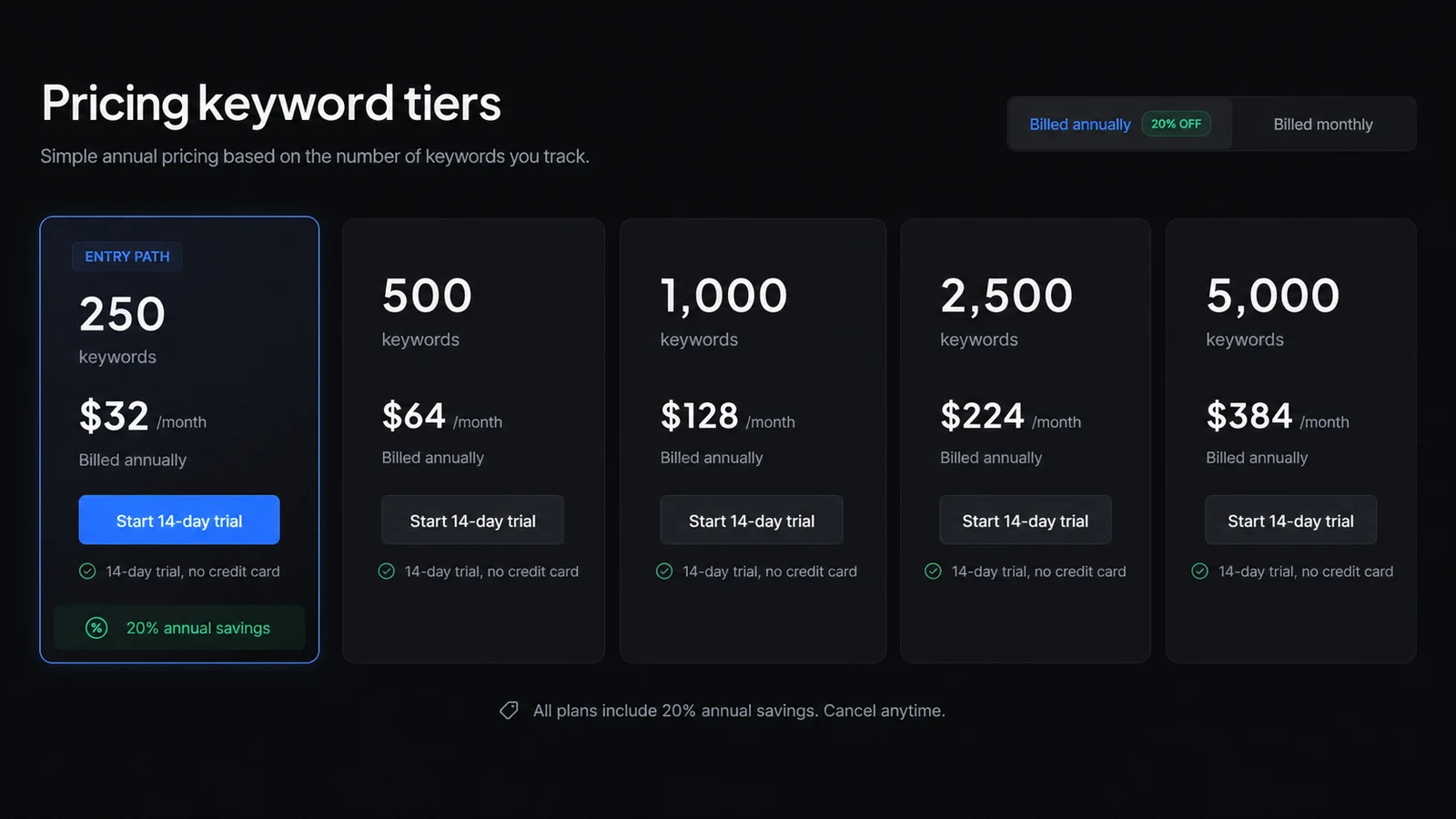
The strongest reason to consider Nightwatch is its depth around rank tracking and reporting. The main buying caution is plan fit. The public pricing page currently shows a 250-keyword entry tier at $32/month when billed annually, plus a separate AI Tracking add-on. That means the cheapest visible plan is not automatically the real cost for your workflow.
The safer path is simple: use the trial, build one real dashboard, create one report, test the locations and search engines that matter, and only then decide whether monthly, annual, or AI Tracking spend makes sense.
Next step: If Nightwatch fits the kind of SEO monitoring you repeat every month, verify the current buyer route before choosing a paid plan.
Review snapshot
| Review point | Practical take |
|---|---|
| Best for | SEO agencies, consultants, and in-house teams that need recurring rank tracking and reports |
| Not ideal for | Beginners who only need occasional manual keyword checks |
| Main use case | Monitoring rankings across search engines, devices, locations, competitors, and campaigns |
| Pricing note | Public pricing currently starts at $32/mo billed annually for 250 keywords |
| Trial path | 14-day no-credit-card trial |
| Main strength | Detailed rank tracking, segmentation, reporting, Looker Studio, API, and AI visibility path |
| Main concern | Annual billing, keyword tier fit, AI add-on cost, and refund wording need review |
| Direct alternative to compare | Keyword.com for rank-tracking-focused buyers |
| Adjacent routes | ConvertMate for ecommerce SEO automation; broader SEO suites for research/backlink workflows |
| Best next step | Test one real ranking and reporting workflow during the trial |
What is Nightwatch?
Nightwatch is an SEO rank tracking and visibility monitoring platform for teams that need to follow keyword movement across search engines, devices, locations, competitors, and reporting workflows.
The current public positioning is broader than a classic rank tracker. Nightwatch presents itself around search engine and AI rankings, with product areas for rank tracking, AI Tracking, SEO Agent, keyword research, prompt research, site audit, reporting, Looker Studio, and search simulation. In plain buyer language, it is a platform for watching where your website or brand appears, explaining movement, and turning that data into SEO decisions.
It is not an AI writer. It is not a content optimization editor. It is not a one-click SEO fix.
That matters because the buying mistake here is easy: a buyer sees rank tracking, signs up, adds a few keywords, and then never builds a habit around the data. In that case, even a good rank tracker becomes an expense that does not change the business.
Our review approach compares public product pages, pricing details, help documentation, buyer workflow fit, reporting needs, and nearby alternatives. I would not judge Nightwatch by its homepage alone. The better question is whether your SEO work has enough keyword volume, local variation, competitor movement, and reporting pressure to justify a paid monitoring system.
Who should use Nightwatch?
Nightwatch makes the most sense for SEO agencies managing multiple clients.
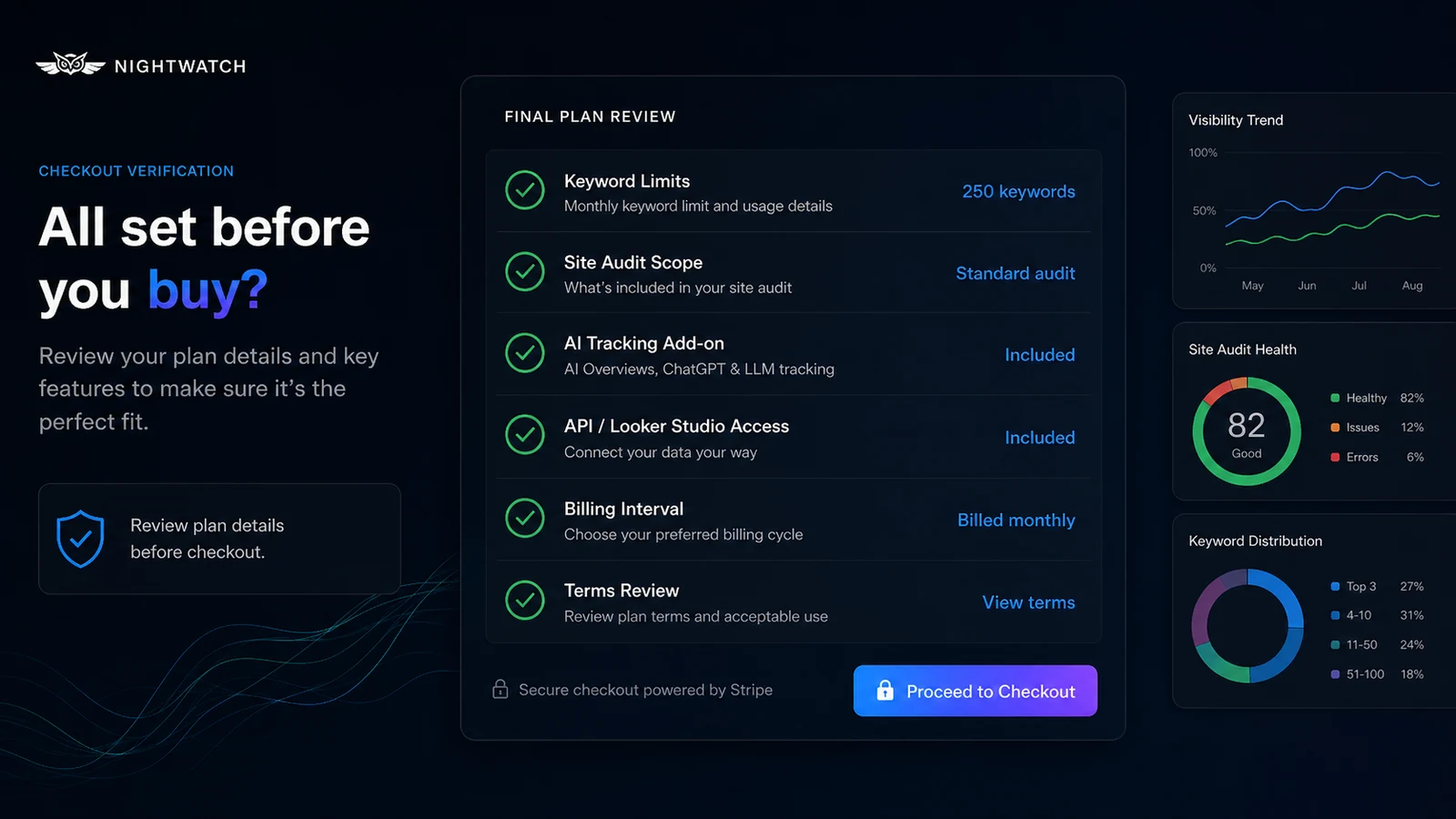
For agencies, the value is not only daily ranking data. It is the ability to organize clients, keywords, competitors, locations, reports, and stakeholder communication in a repeatable system. White-label reporting, unlimited user seats, client-facing exports, and Looker Studio can matter more than the headline keyword count if reporting is part of the service you sell.
It also fits in-house SEO teams that monitor several product lines, regions, or content clusters. A team that needs to understand movement across locations or devices will usually need more than a casual SERP checker. Nightwatch’s segmentation and local tracking angle are useful when one blended ranking average would hide the actual problem.
Consultants can use it when rank movement is part of ongoing retainers. If you need to show whether work is moving the right keywords, whether competitors are gaining, or whether local visibility is changing, a structured tracker can make the conversation cleaner.
Nightwatch may also fit teams exploring AI search visibility. The AI Tracking add-on is not automatically necessary for every buyer, but it becomes relevant if your team is already tracking classic rankings and now wants to understand how the brand appears inside AI-generated answers.
The condition is simple: you need a recurring workflow. If you will not review the data, share the reports, or act on ranking movement, the platform’s strengths will not matter much.
Who should avoid Nightwatch?
I would be careful with Nightwatch if you are brand new to SEO and only want to check where one page ranks today.
The platform is designed around monitoring, not casual curiosity. A beginner can still learn from it, but the buying decision is harder to justify if there is no campaign, no reporting cadence, no keyword list, and no plan to act on the results.
Small site owners with only a handful of keywords should also slow down. The public entry tier may look reasonable, but a simpler keyword checker or broader SEO suite might be enough until the site has more pages, locations, or campaigns to monitor.
Teams looking for content writing help should avoid treating Nightwatch as an AI writing platform. It can support SEO visibility decisions, but it will not replace a writing workflow, editor, content brief tool, or on-page optimization platform.
Buyers who need guaranteed refund protection should also be cautious. Nightwatch offers a no-credit-card trial, which is helpful, but its terms do not present refunds as something buyers should rely on. For my money, that makes the trial more important, not less.
Finally, I would avoid jumping straight to annual billing if your keyword volume or reporting workflow is still uncertain. Annual savings only help after you know the tool is part of work you will actually repeat.
How Nightwatch fits into a real workflow
A good Nightwatch workflow starts before you open the dashboard.
First, define what you actually need to track: websites, locations, devices, competitors, keywords, and client or stakeholder reporting needs. If you skip this step, you may choose the wrong keyword tier or test the tool with data that does not represent your real work.
Then set up one real campaign. Not a toy test. Add the keywords that matter to a current site, choose the locations and devices that affect your business, and add competitors you actually watch. If local SEO matters, test specific areas rather than relying only on broad country-level rankings.
After the first tracking period, the real work begins. You are looking for patterns: which keyword groups moved, which locations changed, where competitors gained, which pages need attention, and whether the ranking data matches what you see in traffic or conversion reports.
For agencies, the next step is reporting. Build one white-label report, schedule it, and see whether it reduces manual client updates. For in-house teams, connect the data to the way stakeholders already review SEO performance. If the Nightwatch view does not become part of recurring decisions, the subscription will feel easier to cancel.
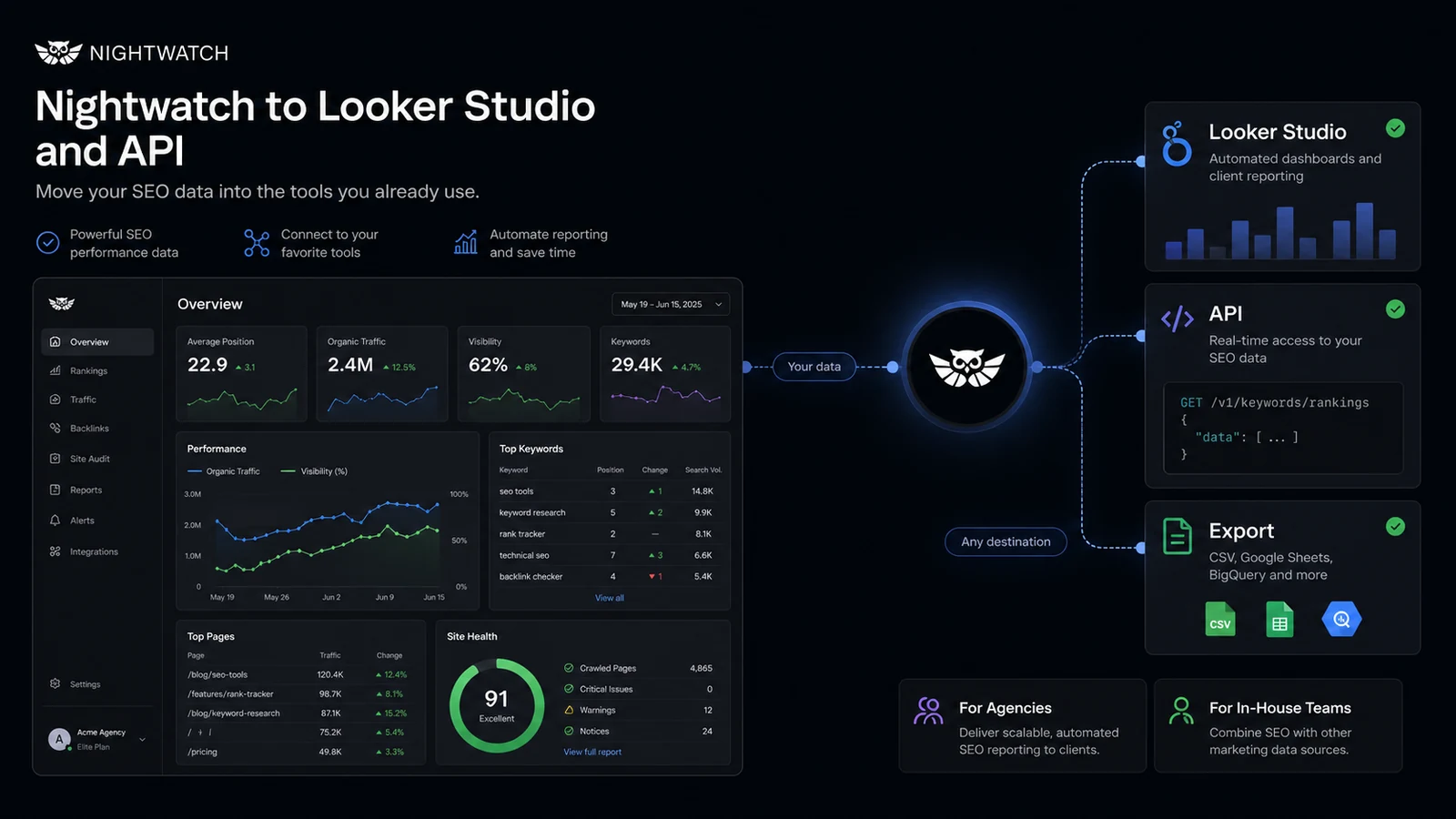
Workflow check: If your SEO team can test a real campaign during the trial, Nightwatch is easier to judge before annual billing.
Real-world buyer scenarios
An agency managing local SEO clients
This is one of the clearest Nightwatch fits.
An agency tracking local rankings across cities, ZIP codes, search engines, and devices needs more than a rough keyword position. If the client asks why rankings improved in one service area but not another, location-aware tracking and clear reporting can save time.
The risk is undercounting keyword volume. Agencies often start with a small keyword set, then add locations, competitors, and client reporting needs. Before paying annually, I would check whether the selected tier covers the real number of tracked keywords and sites.
An in-house SEO team watching product-line movement
Nightwatch can also make sense for in-house teams that need to track categories, content groups, product lines, or regional campaigns.
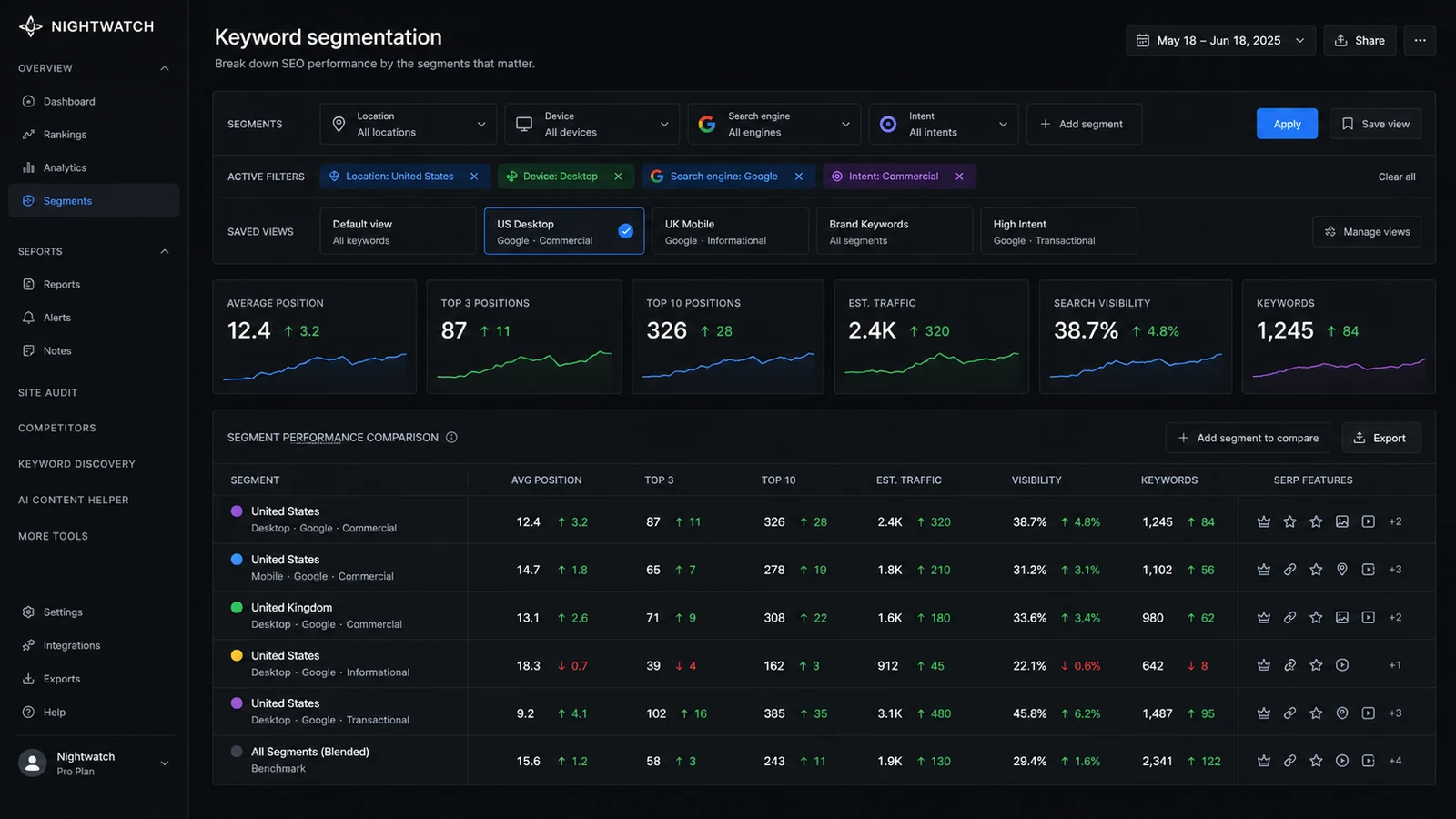
The value is segmentation. Instead of saying “rankings are up” or “rankings are down,” the team can separate branded terms, non-branded terms, local terms, commercial terms, or priority content groups. That makes the data more useful in planning meetings.
The potential mismatch is workflow maturity. If the team does not already review SEO performance regularly, a rank tracker will not create that habit by itself.
A consultant building monthly client reports
A consultant can use Nightwatch to create a repeatable reporting layer. This is useful when monthly deliverables include ranking movement, competitor changes, and explanations of SEO progress.
The caution is that reports only help if they answer the client’s actual questions. A visually clean report that does not explain what changed, why it matters, and what happens next is still weak consulting.
A team exploring AI visibility
Nightwatch’s AI Tracking add-on is interesting for teams asking a newer question: how does the brand appear inside AI-generated answers?
This is not the same as classic rank tracking. It involves prompts, mentions, share of voice, sentiment, sources, and generative rankings. I would treat this as an advanced add-on, not a default requirement for every SEO buyer. Test classic rank tracking first unless AI visibility is already part of your strategy.
Key features that actually matter
Precision rank tracking
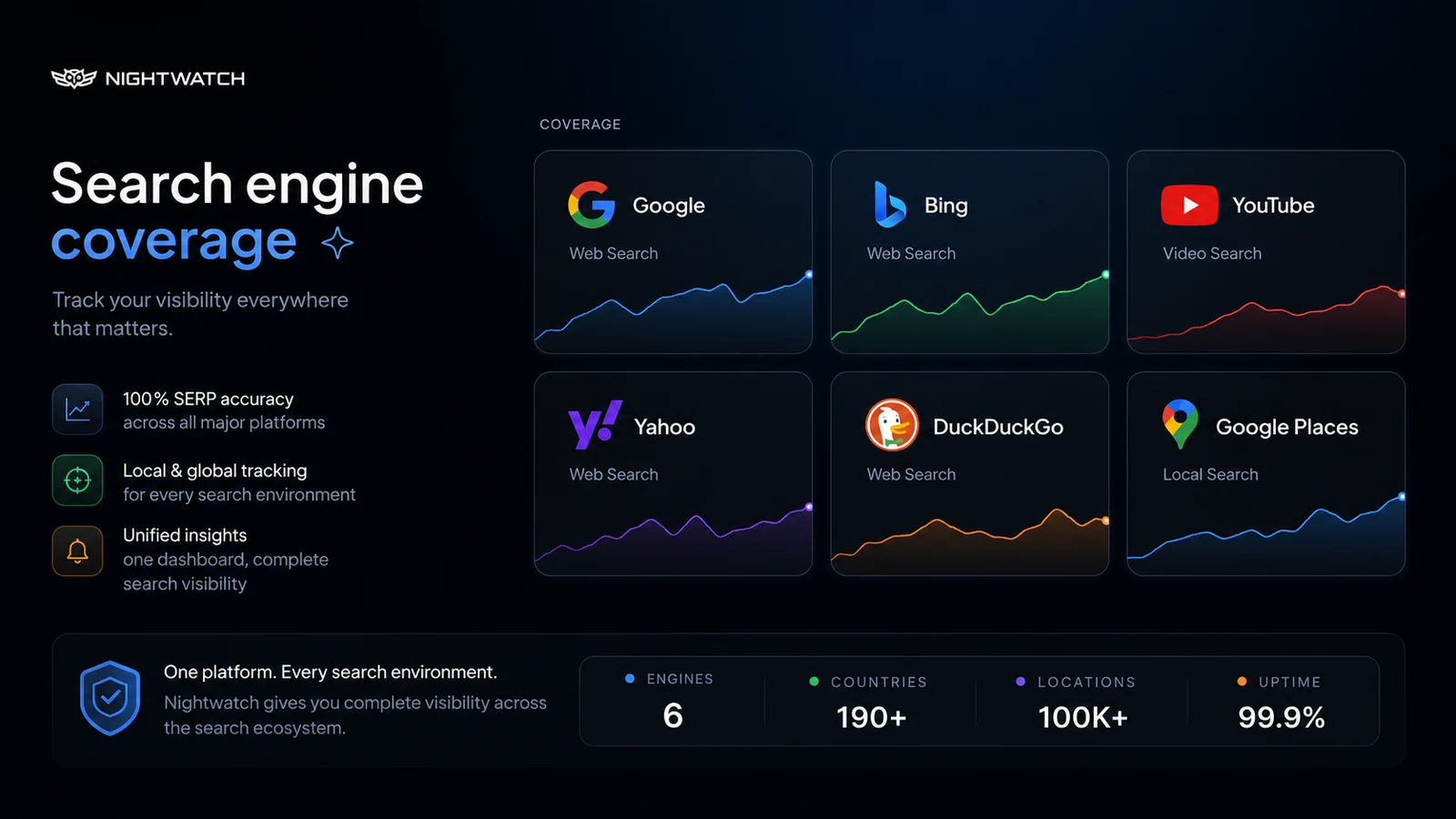
Nightwatch’s main job is still rank tracking. It supports tracking across major search engines and devices, with strong emphasis on local accuracy and location granularity.
This matters for buyers who need to understand search visibility beyond a single national keyword position. A local SEO campaign, a multi-location business, or an agency account can look very different depending on where the search is simulated.
Buyer note: Do not pay for precision you will not use. If your SEO workflow only needs rough trend checks, a lighter tool may be enough.
Segmentation and keyword grouping
Segmentation is where rank tracking becomes more useful. Nightwatch can help teams slice keyword movement by intent, group, location, device, or saved view.
This matters because SEO decisions are rarely made from one average. A site may improve for informational content while losing commercial intent terms. A city may improve while another drops. A competitor may gain in one keyword cluster but not another.
Buyer note: During the trial, build the exact segments you would use in reports. If segmentation feels unnecessary, the platform may be more than you need.
Reporting and white-label workflows
Nightwatch is especially relevant for agencies because reporting is part of the product value. White-label reports, exports, scheduled reports, and client-friendly data reduce the manual work of turning rank movement into communication.
This feature matters when reporting is part of a paid client relationship. It matters less if you only need to look at rankings privately once a week.
Buyer note: Test one actual report before paying. Do not assume a reporting feature fits your client workflow just because it exists.
Looker Studio and API access
Nightwatch’s visible entry tier includes Looker Studio integration and API access, which can matter for teams that want ranking data inside a broader reporting stack.
This is not a small detail. If your agency or in-house team already uses dashboards, client portals, or internal reporting systems, API and Looker Studio access can make Nightwatch more valuable than a simple standalone tracker.
Buyer note: Verify current plan access and technical setup before making this a deciding factor. A connector only matters if someone will maintain the reporting workflow.
AI Tracking
Nightwatch now positions itself around both search engine and AI rankings. The AI Tracking add-on monitors prompts, AI platforms, visibility, share of voice, sentiment, sources, and generative ranking signals.
That is useful for teams already thinking beyond classic blue-link SEO. It is not something every small website owner needs on day one.
Buyer note: Because AI Tracking is priced separately, treat it as a specific use-case decision. Do not add it just because AI visibility sounds important.
Pricing and plan value
Nightwatch pricing is straightforward enough to understand, but not simple enough to ignore.
At the time of this review, the public pricing page shows the 250-keyword tier at $32/month when billed annually, or $384/year. The visible entry tier includes 250 daily tracked keywords, 50 tracked websites, 5 tracked competitors, 25 site audit pages, Google/YouTube/Bing tracking, Google Analytics integration, Looker Studio integration, unlimited white-label reports, unlimited user seats, and API access.
That is a strong feature set for a buyer who will actually use the reporting layer. It is less compelling if you only need a few keyword checks.
The first pricing question is keyword volume. Count real keywords, locations, devices, and clients before you choose a tier. If one keyword tracked across several locations or devices expands the practical monitoring load, the entry plan may not cover your real use for long.
The second question is billing interval. The pricing page presents annual billing as the savings path, but the better decision is whether the tool has proven itself in your workflow. Annual billing can be smart after the trial. It is risky before the process is clear.
The third question is AI Tracking. The pricing page shows an AI Tracking add-on beta at $99/month for 100 prompts. That may make sense for advanced GEO or LLM visibility tracking, but it changes the total cost. Buyers focused on AI search should compare the add-on cost against the actual number of prompts, brands, and competitors they want to monitor.
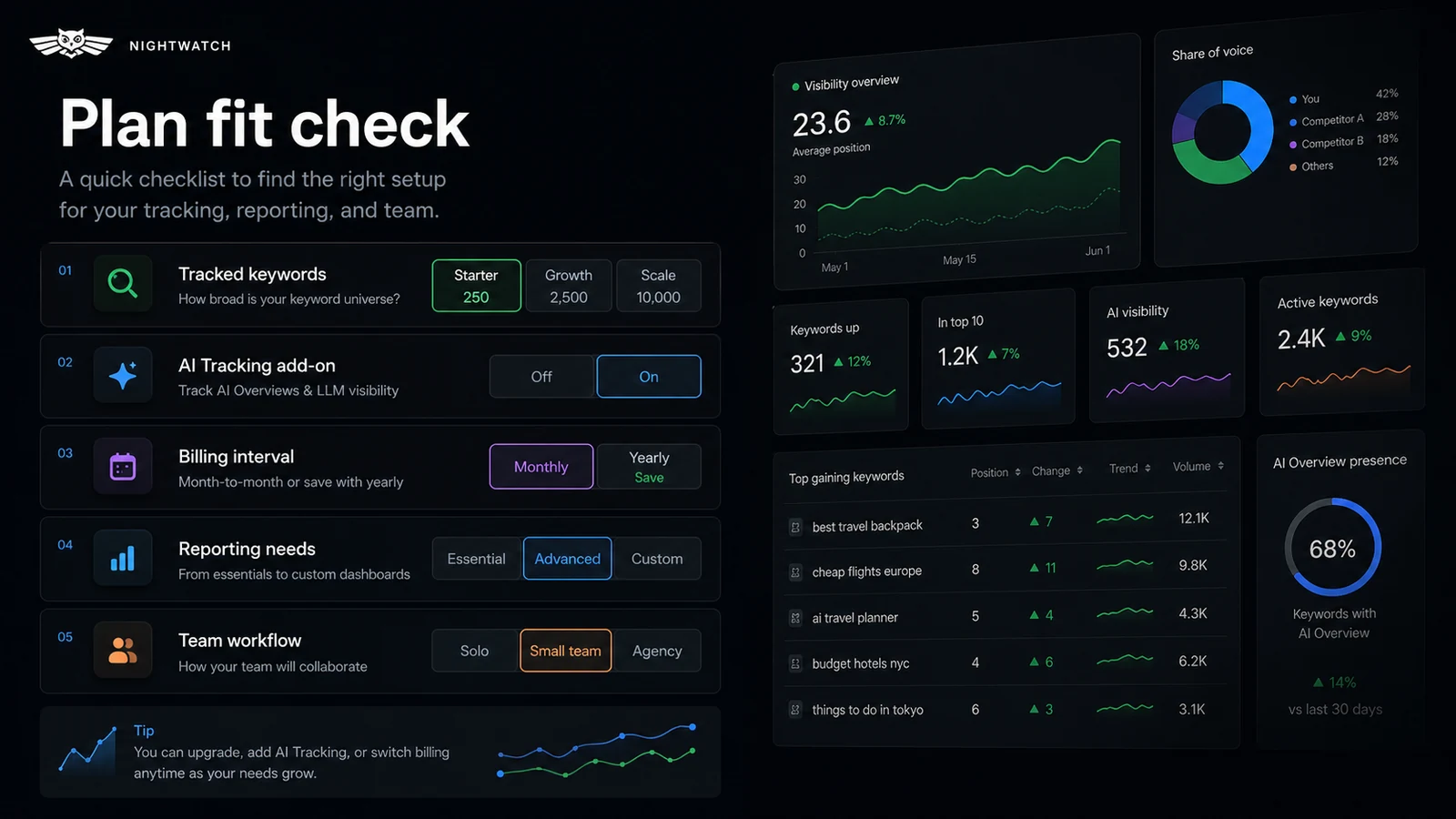
Pricing check: If Nightwatch still looks like a fit, confirm the current keyword tier, billing interval, and AI Tracking cost before checkout.
Check Nightwatch pricing Check current offers Read store guide
Free plan, trial, coupon, and checkout notes
Nightwatch does not present a permanent free plan as the main public buyer path. The practical entry point is the 14-day trial.
That trial matters. The help documentation says no credit card is required to begin, and the trial gives access to the selected plan during the trial period. For buyers who are cautious about refund terms, this is the safer risk-control mechanism.
A coupon or seasonal offer can make the purchase cheaper, but it should not drive the decision. Nightwatch’s public pricing page currently emphasizes annual billing savings and may show seasonal promotion messaging. Treat those as checkout items, not proof that the product fits your workflow.
The order I would use is:
- Confirm keyword volume and reporting needs.
- Start the no-credit-card trial.
- Build a real dashboard and report.
- Check whether AI Tracking is actually needed.
- Compare current pricing, annual billing, and any active offer.
- Read refund and cancellation wording before paying.
If the tool does not change how you monitor SEO after the trial, a discount will not fix the mismatch.
What I would check before buying Nightwatch
If I were buying Nightwatch for a real SEO workflow, I would check these points before paying:
- Keyword count: Does the selected tier cover your real keywords, locations, devices, and client sites?
- Tracked websites: Are 50 websites enough, or will agency/client growth require a higher tier?
- Competitor tracking: Are 5 competitors enough for your actual campaigns?
- Site audit pages: Is the visible page allowance enough for the sites you want to monitor?
- Reporting workflow: Can you build the white-label, scheduled, or Looker Studio reports you actually need?
- AI Tracking: Do you need AI search visibility now, and does the separate add-on cost make sense?
- Refund terms: Are you comfortable relying on the trial rather than expecting a guaranteed refund?
A simple test before paying
Before paying, I would run a practical trial test like this:
- Choose one real website or client campaign.
- Add the keyword groups you already care about.
- Include the locations and devices that affect the business.
- Add competitors you would actually mention in a report.
- Build one segment that separates a meaningful keyword group.
- Create one report or dashboard you would send to a client or stakeholder.
- Decide whether the data changes your next SEO action.
The last step is the most important.
A rank tracker is not valuable because it collects numbers. It is valuable when those numbers help you decide what to fix, explain, prioritize, or defend. If the trial produces interesting data but no action, Nightwatch may not be the right purchase yet.
Pros explained
Strong local and daily rank tracking
Nightwatch’s rank tracking depth is the main reason to consider it. Daily updates, local precision, device coverage, and multi-engine tracking are useful when SEO decisions depend on where a ranking appears, not just whether a keyword moved.
This matters most for local campaigns, agencies, and teams tracking multiple markets. It matters less for a small site with a few broad national keywords.
Reporting is built into the workflow
The platform is not only a dashboard for internal SEO people. White-label reporting, exports, Looker Studio, and API access make it more useful for teams that need to communicate rank movement.
That is a real buying advantage if reports are part of your deliverable. It is less important if you do not share ranking data with clients or stakeholders.
The trial is genuinely useful for risk reduction
A 14-day no-credit-card trial is a meaningful plus because it lets buyers test the platform without leaning on refund assumptions.
This is especially useful because Nightwatch’s terms do not make refund protection the comfortable fallback. The trial is where buyers should pressure-test the tool.
AI visibility tracking creates a growth path
Nightwatch’s AI Tracking add-on gives SEO teams a path to monitor AI and LLM visibility without abandoning classic rank tracking.
This is not essential for every buyer. But for teams already thinking about GEO, AI search answers, prompt visibility, and brand presence in AI responses, it makes Nightwatch feel more current than a rank tracker frozen in older SEO workflows.
Cons explained
Pricing depends heavily on real keyword volume
The entry tier looks clear, but the practical cost depends on how many keywords, locations, devices, websites, and competitors you need.
This is where buyers can underestimate spend. If you manage multiple clients or local campaigns, the number of tracked keyword checks can grow quickly.
AI Tracking adds another cost layer
The AI Tracking add-on is useful, but it is not free by default. Buyers who came to Nightwatch specifically for AI visibility should not judge the price only by the classic rank tracking tier.
For those buyers, the real comparison is the base plan plus AI Tracking against specialized AI visibility tools or broader SEO platforms adding similar features.
Refund protection should not be assumed
Nightwatch’s terms say the company is not obligated to provide a refund at any time. That does not mean every buyer will have a bad billing experience, but it does mean the refund policy should not be treated as the main safety net.
Use the trial. Build the real workflow before paying.
It may be too much for very light SEO use
Nightwatch is stronger when SEO monitoring is recurring and structured. A beginner or small site owner who only wants occasional position checks may not need this much platform.
In that case, a simpler tracker, a lower-cost keyword checker, or a broader SEO suite already in the workflow may be enough.
Green flags and red flags
Green flags:
- You manage multiple SEO campaigns or client sites.
- Local ranking accuracy matters to your decisions.
- You need reports that can be shared with clients or stakeholders.
- You already have a monthly SEO review process.
- You want to compare classic search visibility with AI visibility over time.
- You will use the trial to build a real dashboard, not just browse features.
Red flags:
- You only want to check a handful of keywords once.
- You are buying mainly because of a discount or seasonal offer.
- You have not counted real keyword volume by location and device.
- You expect refunds to protect you after skipping the trial.
- You need content generation or writing help rather than rank monitoring.
- You want AI Tracking but have not budgeted for the separate add-on.
Nightwatch vs alternatives
Keyword.com vs Nightwatch
Keyword.com is the cleaner direct comparison if your main need is rank tracking and you want to compare keyword limits, reporting, and pricing without paying for a broader SEO visibility workspace.
Nightwatch may still make more sense if local precision, segmentation, Looker Studio, API access, and AI Tracking are important to your workflow. If your buying question is “Which rank tracker should I use?”, compare Nightwatch with Keyword.com before committing.
AccuRanker vs Nightwatch
AccuRanker is another strong rank tracking comparison, especially for teams that care about speed, large-scale tracking, and enterprise-style rank data.
Nightwatch may feel more approachable for teams that want rank tracking, reporting, and AI visibility in a single modern SEO monitoring workflow. AccuRanker may be the stronger comparison if rank tracking speed and scale are the primary concern.
Advanced Web Ranking vs Nightwatch
Advanced Web Ranking is a long-running rank tracking platform and makes sense as a comparison for agencies and teams that want established rank monitoring and reporting.
Nightwatch may be more attractive if the buyer likes its newer interface, AI Tracking direction, and local precision story. Advanced Web Ranking may be better if the team already knows that classic rank tracking and reporting depth are the main priorities.
Semrush or Ahrefs vs Nightwatch
Semrush and Ahrefs are adjacent routes, not direct one-to-one replacements for Nightwatch.
They make more sense when the buyer needs broader SEO research: keyword discovery, backlink analysis, competitor research, content gaps, site audits, and campaign planning. Nightwatch makes more sense when rank tracking, location-aware monitoring, and reporting are the center of the workflow.
If you already pay for a broad SEO suite, the question is not whether Nightwatch has more features. The question is whether it gives better rank tracking and reporting than the tool you already use.
ConvertMate vs Nightwatch
ConvertMate is an adjacent route for buyers closer to ecommerce SEO automation. It is not a direct rank tracker replacement.
If your main job is monitoring keyword visibility across campaigns, Nightwatch is the more relevant product. If your main job is improving ecommerce pages and automating product SEO workflows, ConvertMate may be the better direction to explore.
Trust, refund, and buyer-risk notes
The trust picture is mixed in a practical way.
On the product side, Nightwatch has strong public material: a current homepage, pricing page, help docs, terms, API references, and third-party review presence. Product Hunt describes it as a search visibility tracker for SEO professionals, and user reviews on platforms like G2 and Capterra commonly point to rank tracking, local SEO, reporting, and ease of use as strengths.
On the purchase side, the biggest caution is refund language. Nightwatch’s terms say it is not obligated to provide a refund at any time. That does not erase the value of the product, but it changes how I would buy it.
I would not skip the trial.
I would also be careful with annual billing until the workflow is proven. Annual billing is a useful savings path only after you know the platform fits your team’s monthly habits.
Data and reporting buyers should also read the terms around ownership, attribution, API use, and acceptable access. Nightwatch is a data product, and teams using exports, API, or public reporting should understand how the data can be used and attributed.
For AI Tracking, the risk is not only price. AI visibility data is still an emerging category. Treat it as directional intelligence, not a perfect map of every AI answer across every user, model, and context.
Final verdict
I would consider Nightwatch if rank tracking is part of a real SEO operation.
That means agencies, consultants, in-house teams, local SEO operators, and reporting-heavy marketers are the natural fit. If daily ranking movement, location precision, competitor tracking, white-label reports, Looker Studio, API access, or AI visibility monitoring would change your work, Nightwatch deserves the trial.
I would skip it if you only need a simple keyword position check, if you are still learning basic SEO, or if your team will collect ranking data without acting on it. In those cases, the tool may be good, but the purchase may still be wrong.
I would compare it with Keyword.com if you want a direct rank tracking alternative, AccuRanker or Advanced Web Ranking if scale and rank monitoring are the main questions, and broader SEO suites if your real need is keyword research, backlinks, or content planning.
The safest next step is not to hunt for a coupon first. Start with the no-credit-card trial, build one real dashboard and report, check your keyword tier, verify the AI Tracking cost if needed, and only then decide whether Nightwatch belongs in your SEO stack.
