
Plerdy Pricing, Plans & UX Analytics Fit
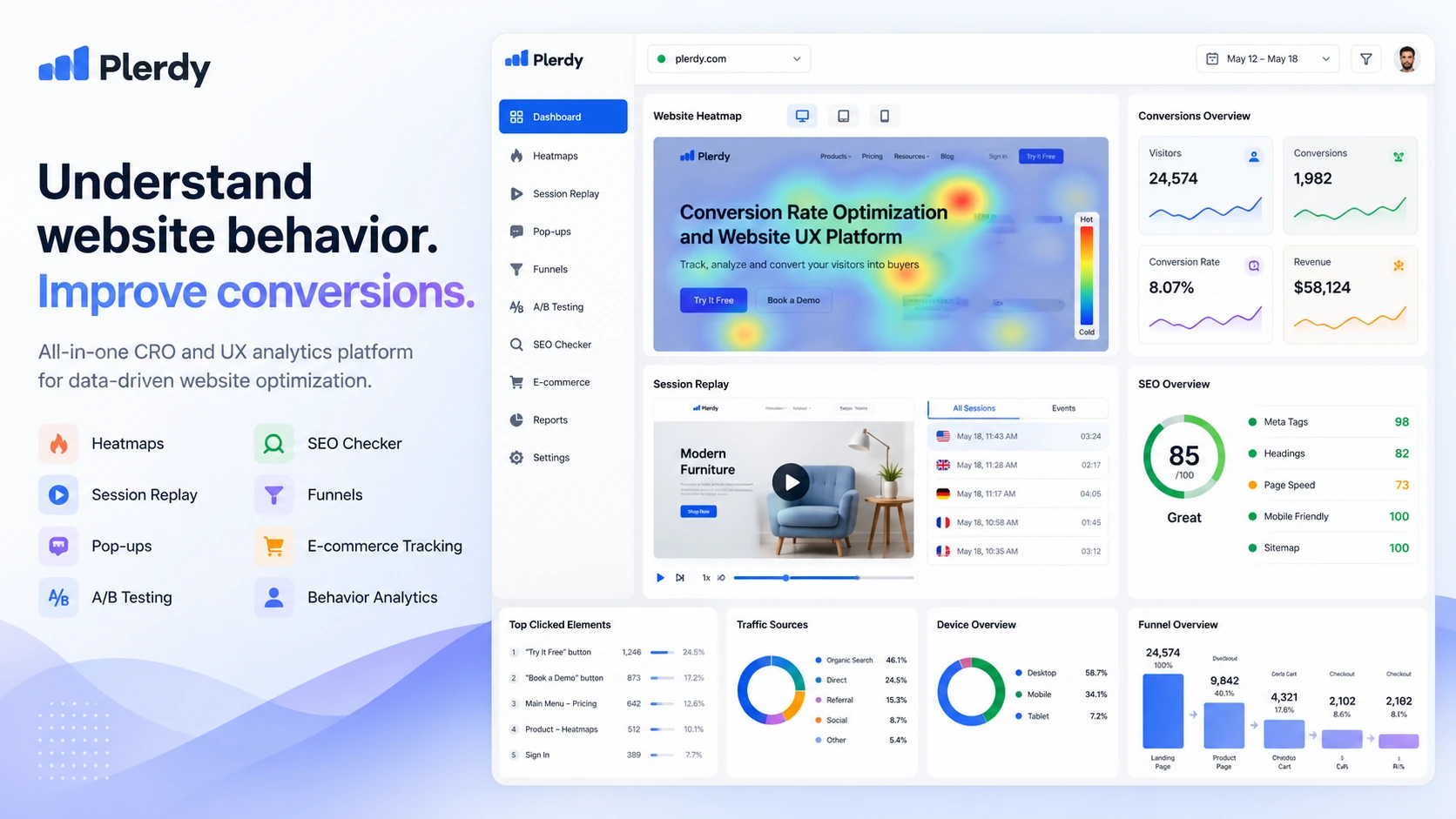
Plerdy is best understood as a combined CRO, UX behavior analytics, and SEO monitoring platform. It is useful when a buyer wants heatmaps, session replay, SEO audit, pop-ups, conversion tracking, A/B testing, and e-commerce behavior data in one stack instead of stitching together separate tools for every website optimization question.
Fit → price → checkout
Use these routes after the official-site check: coupon first, review for fit, compare if unsure.
Plerdy pricing snapshot
Fast commercial checks before pricing, coupons, or a deeper review.
Plerdy product tour for CRO and SEO buyers
The strongest Plerdy visuals are the behavior analytics screens that show where visitors click, scroll, hesitate, and leave, plus the SEO and conversion tools that turn those signals into site changes. Buyers should use the tour to decide whether they need one combined CRO and SEO workspace or a narrower tool.
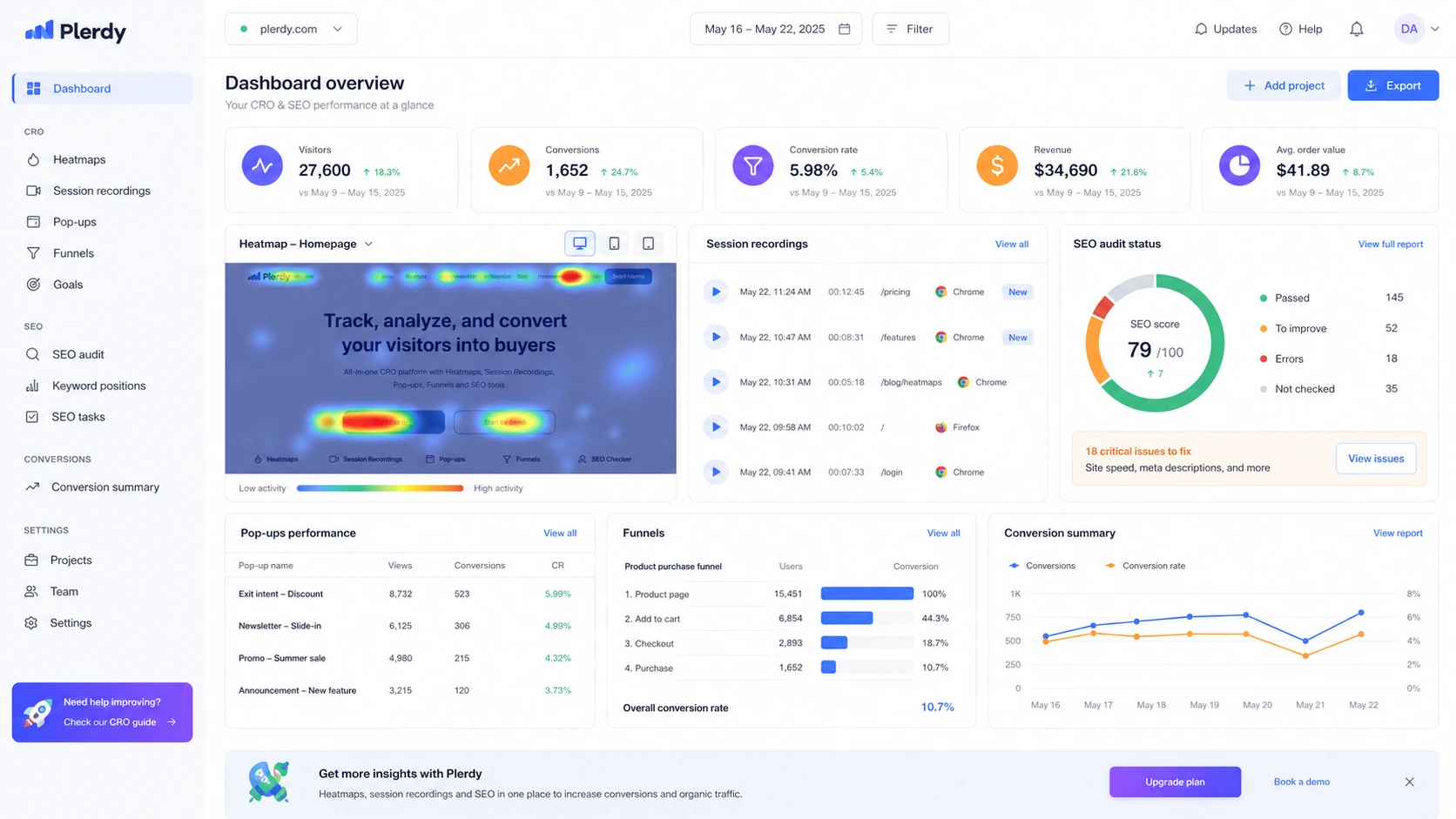
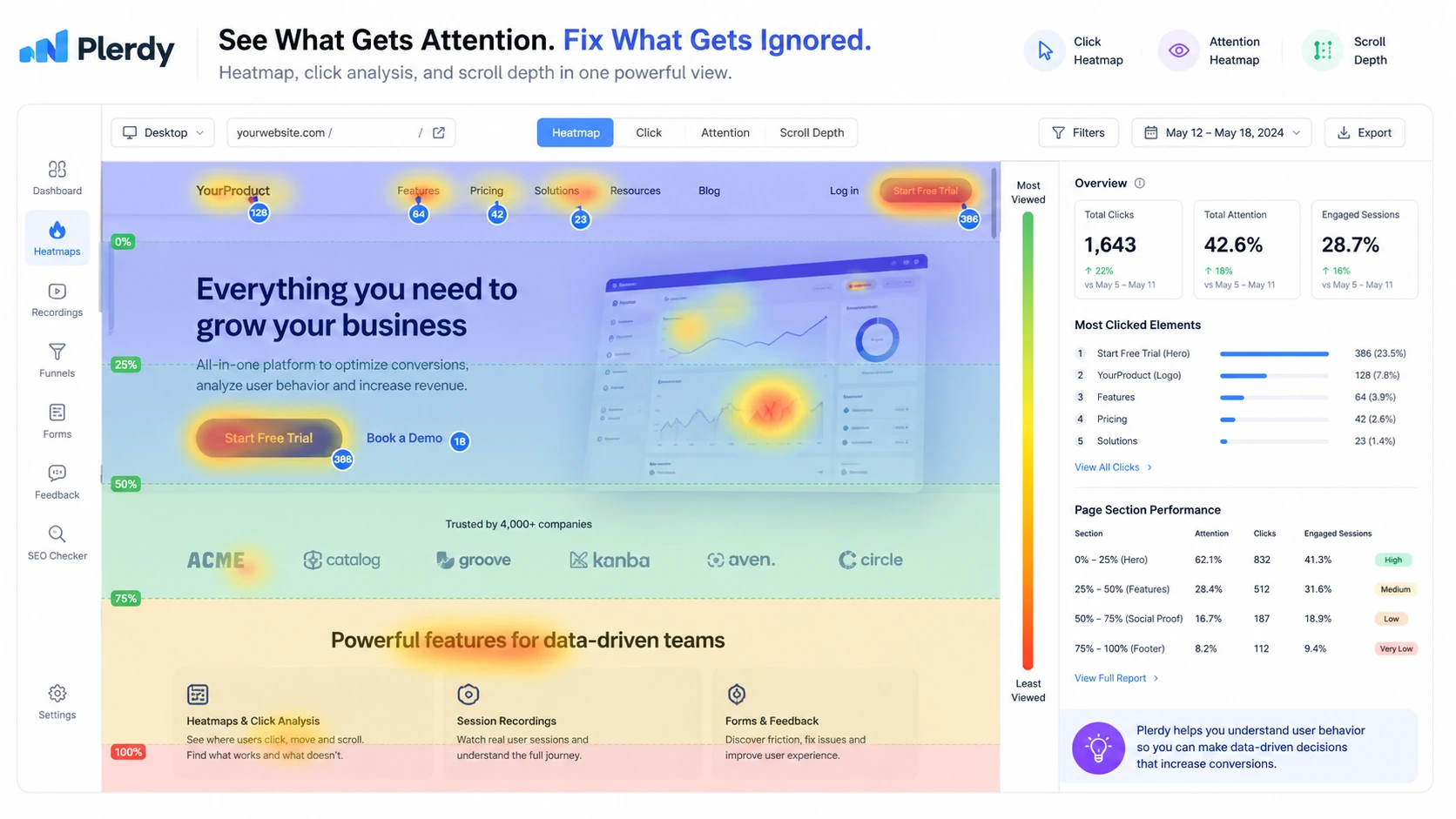
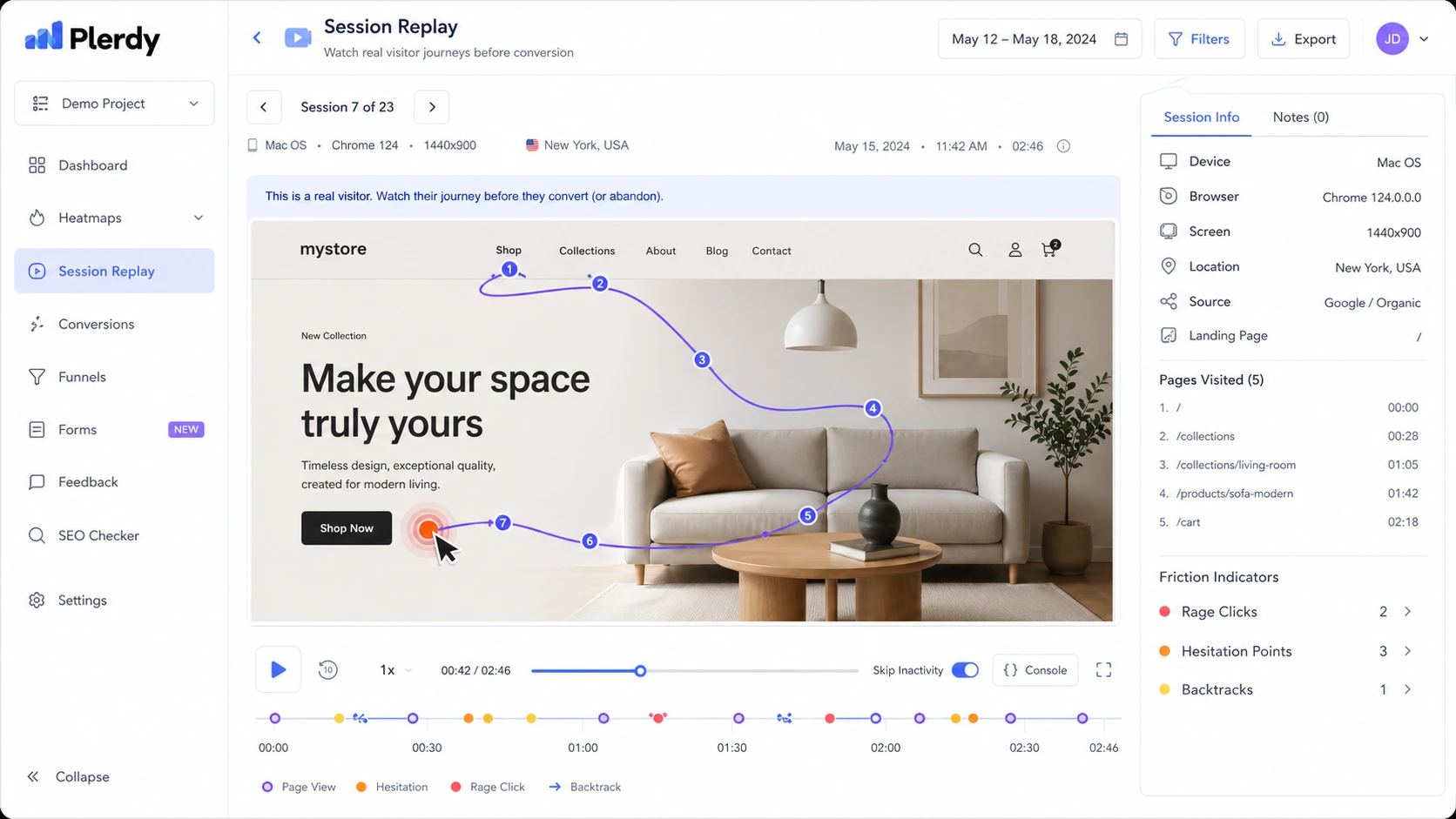
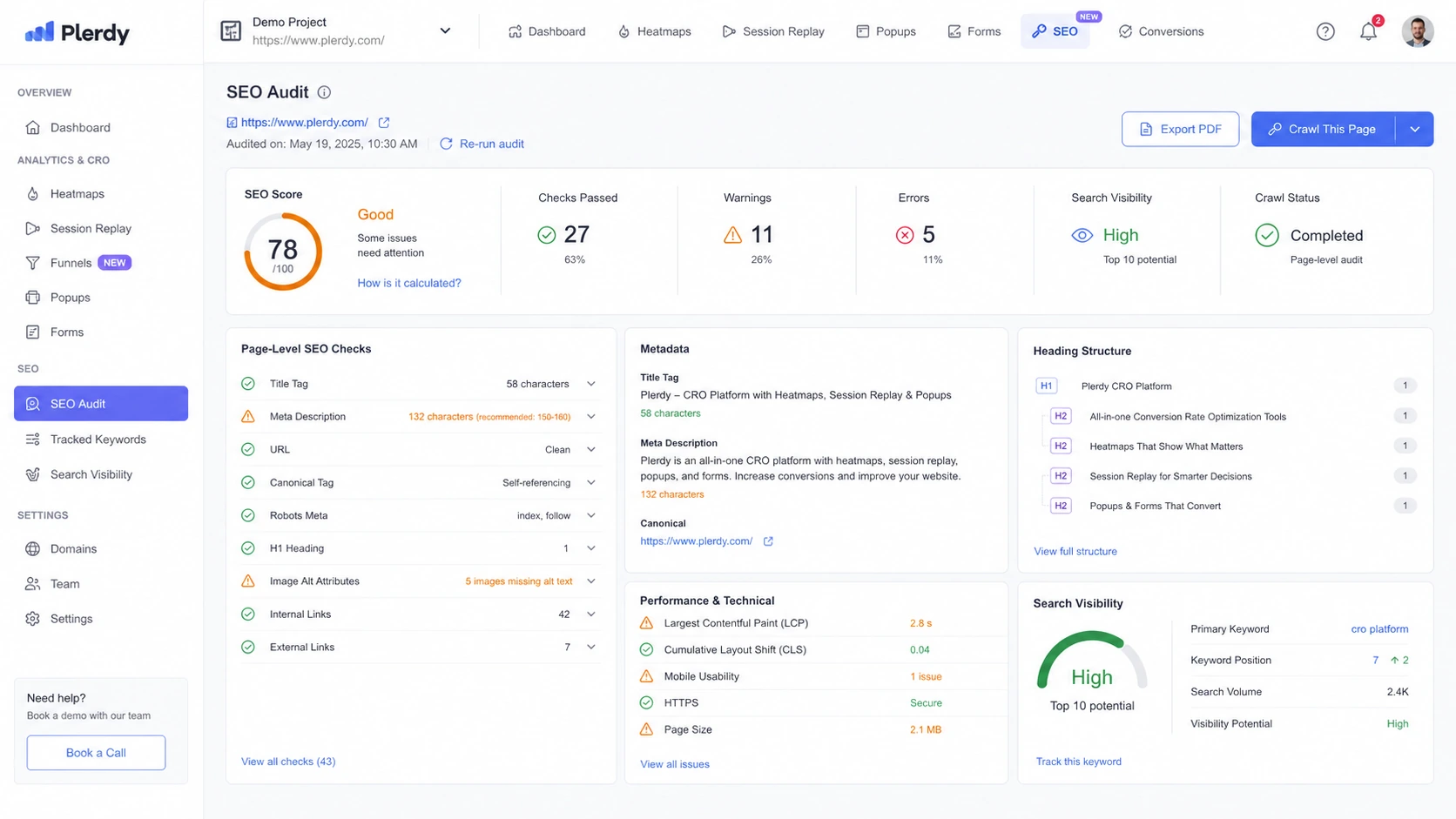
Plerdy is a practical store-page candidate because the buying decision is not only about price. A buyer needs to know whether they want heatmaps, session replays, SEO audits, pop-ups, funnels, e-commerce tracking, and A/B testing in one place, and whether their traffic volume is high enough to make those insights useful. The free plan and trial are useful, but the real decision is package limits, add-ons, and whether the team will actually turn behavior data into website changes.
What Plerdy actually does
Plerdy helps website owners see how visitors behave on real pages and connect that behavior to CRO and SEO decisions. Its public product and app listings describe heatmaps, session replay, click and scroll tracking, popup forms, SEO auditing, e-commerce tracking, funnels, A/B testing, and AI-assisted UX analysis. That mix makes it different from a narrow SEO tool or a simple analytics dashboard.
The buyer-fit question is simple: do you need a visual behavior layer for your website, or are you only looking for one isolated SEO report? Plerdy makes more sense when the team has pages to improve, traffic to study, and a habit of testing changes.
- Use heatmaps to spot where visitors click, scroll, ignore, or get stuck.
- Use session replay to inspect real visitor journeys and friction.
- Use SEO audit and related tools when page optimization is part of the same workflow.
- Use pop-ups, funnels, and e-commerce tracking when conversion work matters.
Pricing and plan fit
Plerdy has a generous-looking public entry path, but buyers should read the limits carefully. The pricing page shows a free forever plan, paid packages, add-ons, annual discounts, a 14-day trial, and no-card trial access. The lowest practical paid path depends on site traffic, video session needs, daily heatmap limits, SEO audit volume, storage, pop-up needs, and whether AI UX Assistant or SERP Checker add-ons are required.
This is why the safest checkout step is not just finding the lowest visible price. A small site can start with the free plan or trial. A growing store or agency should compare package limits against actual GA4 sessions and expected optimization work.
- Start with Free if you only need to test installation and basic collection.
- Use the 14-day trial when you need serious package limits before paying.
- Check annual billing because the pricing FAQ lists a 35% annual discount.
- Review add-ons before checkout if your SEO, replay, or heatmap needs exceed the base package.
Best fit buyers
Plerdy fits teams that need to connect behavior evidence with marketing decisions. SEO teams can use page audit signals and visibility checks. CRO specialists can watch heatmaps, replays, and funnels. E-commerce teams can look for product-page and checkout friction. Agencies can turn visual evidence into client recommendations.
The platform becomes weaker when the buyer has no clear optimization cadence. If nobody will review recordings, tag issues, test changes, or compare before-and-after results, Plerdy risks becoming another dashboard that looks useful but does not change the site.
- Strong fit for e-commerce stores improving product, cart, and landing pages.
- Strong fit for marketers who need visual proof before changing page content.
- Strong fit for agencies that need client-friendly CRO evidence.
- Weaker fit for buyers who only need a simple keyword tracker.
Video guide for heatmap setup
The heatmap setup workflow is a good second video to review after the general product tour. It clarifies whether Plerdy feels easy enough to install and evaluate before a buyer commits to a paid package. The key thing to watch is not only the interface, but how quickly a real site can move from tracking code to usable behavior evidence.
What buyers should verify before checkout
Before paying, buyers should verify five practical points: tracking setup, data limits, billing interval, add-ons, and refund process. Plerdy's FAQ says the tracking code can be added manually, through GTM, Shopify app, or WordPress plugin, and the pricing page explains package limits and add-on paths. That makes the pre-check fairly clear if the buyer takes time to test.
The important caution is support and setup. Public app-store reviews include both positive and negative support comments, so a serious buyer should ask at least one support or setup question during the trial. That small test can reveal whether Plerdy is comfortable enough for the team before annual billing.
- Install Plerdy on a real page, not just a test page with no traffic.
- Check whether heatmaps and replays capture the pages that drive revenue or leads.
- Verify whether the plan includes enough storage and daily limits for your traffic.
- Ask support a real setup question before committing to a longer billing term.
Relevant alternatives
Plerdy overlaps with tools in several directions, so the right alternative depends on the buyer's main problem. If the goal is pure heatmaps and session behavior, a dedicated behavior analytics tool may feel cleaner. If the goal is SEO crawling or rank tracking, a specialist SEO suite may go deeper. If the goal is conversion testing at scale, an experimentation platform may be more focused.
Inside the current DealBestDaily structure, ConvertMate and Keyword.com are the closest routed alternatives. ConvertMate makes more sense when the buyer is thinking about e-commerce conversion workflow and content-to-sales optimization. Keyword.com makes more sense when rank tracking and search visibility are the main need.
- Compare ConvertMate if e-commerce conversion and product-page improvement are the main priority.
- Compare Keyword.com if keyword rank tracking is more important than user behavior evidence.
- Compare dedicated heatmap tools if SEO audit and pop-up features are not needed.
- Compare broader SEO suites if crawling, backlink, and competitive keyword depth are the priority.
Safest next step
The safest next step is to open Plerdy's official pricing page, start with the free plan or 14-day trial, and test tracking on a real page that matters to revenue or leads. After that, compare the plan limits against actual traffic and decide whether annual billing is justified.
If fit is still unclear, read the Plerdy review before clicking a deal route. If the product already fits and you only need the current savings path, move to the coupon or pricing route and verify the final checkout price, refund path, and add-ons before paying.
- Use the store page for fit and pricing orientation.
- Use the review page for deeper tradeoffs.
- Use the coupon or pricing path only after plan fit is clear.
- Re-check live pricing before every annual purchase or renewal.
Best savings path from this store page
This is the clearest savings route to check once the product already looks like a fit.
Plerdy official pricing and FAQ language show a 35% annual subscription discount, making yearly billing the strongest official no-code savings route for committed users.
Startup from $21/month yearly
Thrive from $70/month yearly
Use comparison routes when the category fit is still open
Use these comparison routes when the product still looks plausible, but the category fit is not fully settled.
ConvertMate is the better comparison when the buyer cares most about e-commerce conversion workflow and store revenue improvement, while Plerdy deserves the closer look when behavior analytics, heatmaps, replay, SEO audit, and CRO tooling need to sit in one platform.
Keyword.com is the cleaner alternative when rank tracking is the core requirement, while Plerdy is stronger when the buyer needs to connect SEO work with on-page visitor behavior and conversion friction.
Verification points worth checking before you click out
Where this store usually fits best in the workflow
Use Plerdy when the team wants page-level SEO checks alongside behavioral evidence from heatmaps, clicks, scrolls, and visitor sessions.
Use Plerdy to find weak calls to action, confusing page sections, checkout friction, and visitor hesitation before changing layouts or messages.
Use Plerdy when product pages, carts, funnels, and pop-ups need closer inspection and the buyer wants to connect visitor behavior with sales impact.
Use Plerdy when an agency needs visual proof for client recommendations, especially when explaining why a page, CTA, or funnel should change.
Practical checkpoints before and after signup
- Clarify whether the main job is CRO, UX analytics, SEO audit, pop-ups, e-commerce tracking, or a combined workflow.
- Compare site traffic and expected video session volume against the package limits.
- Check whether add-ons are needed for SERP tracking, AI UX analysis, extra heatmaps, or replay volume.
- Install the tracking code through the route that matches your stack, such as GTM, Shopify, WordPress, or manual script.
- Track at least one page that affects revenue, leads, signups, or product discovery.
- Ask support a real setup or reporting question to judge responsiveness before annual billing.
- Review heatmaps and replays on a schedule instead of letting reports sit unused.
- Turn findings into page changes, then compare behavior again after enough traffic collects.
- Re-check plan limits and add-ons before renewal or when traffic grows.
Fast-read signals for workflow fit and buying friction
Questions readers usually ask before choosing this store
What is Plerdy best for?
Plerdy is best for teams that want to combine heatmaps, session replay, SEO audit, pop-ups, conversion tracking, and e-commerce behavior insights in one website optimization workflow. It is especially useful when a buyer wants to understand why visitors click, scroll, hesitate, or leave.
Does Plerdy have a free plan or trial?
Yes. Plerdy's official pricing page shows a free forever plan and a 14-day free trial with no credit card required. The free path is useful for setup testing, while the trial is better for checking larger package limits before paying.
How should buyers compare Plerdy pricing?
Do not judge Plerdy only by the first visible price. Compare free, monthly, yearly, and add-on paths against your daily pageviews, video sessions, SEO audit volume, storage needs, pop-up limits, and whether AI UX Assistant or SERP Checker capacity matters.
Are public Plerdy coupon codes available?
A stable official public coupon code was not confirmed during this pass. The safer savings path is to check the free plan, 14-day trial, annual discount, add-ons, and any live DealBestDaily route before checkout.
What should buyers verify before paying for Plerdy?
Buyers should verify tracking setup on a real site, plan limits, billing interval, add-on needs, support responsiveness, and the 30-day refund request process. If the team will not actively review heatmaps and replays, a paid plan may not be worth it yet.
Choose the next route that matches what you still need to decide
The strongest next click depends on whether you still need product judgment, a savings route, or a broader category comparison.