Quick verdict
Pineapple Builder is worth a close look if your main problem is simple: you need a business website online quickly, and you do not want to spend days learning a heavier website platform before you can publish anything.
That is the clean version of the decision.
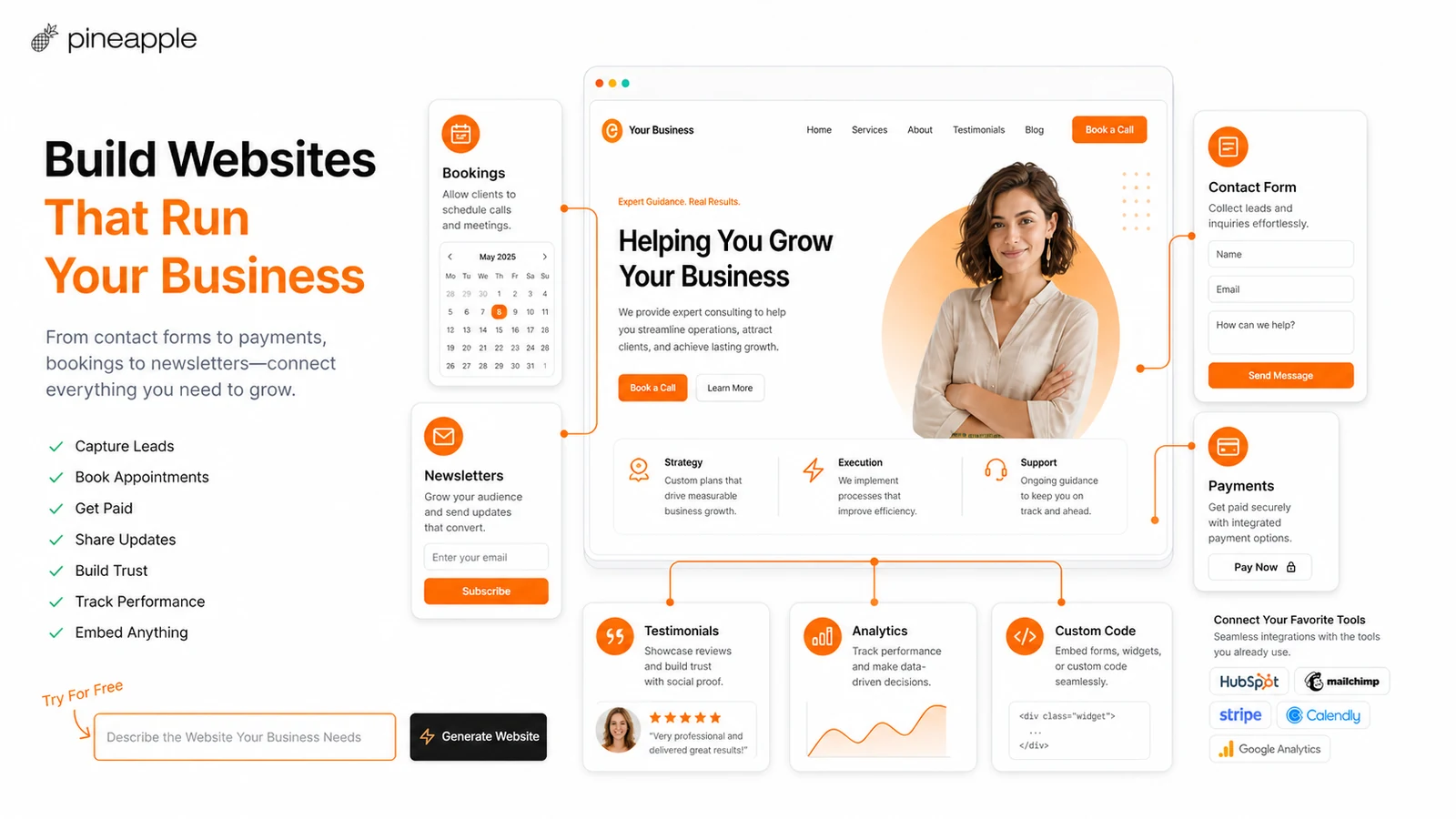
The more careful version is this: Pineapple Builder makes the most sense when speed matters more than deep control. It can help a small business owner, freelancer, consultant, creator, or solo operator move from a short business description to a hosted website with AI-generated copy, a simple editor, custom domain support on paid plans, SEO, analytics, forms, widgets, and blogging features depending on the plan.
I would not judge it only by the first AI-generated draft.
The real test is what happens after the first draft appears. Can you edit the sections without fighting the builder? Can you connect the domain? Can you capture leads? Can you track visitors? Can you publish blog posts if content is part of the plan? And can you live with a simpler builder instead of a larger platform like Wix, Squarespace, Webflow, Framer, or WordPress?
For my money, Pineapple Builder is most interesting as a fast-launch tool for relatively straightforward websites. It is not the platform I would choose first for complex ecommerce, advanced membership logic, a deeply custom brand system, or a site that needs long-term developer-level flexibility.
The safer path is to build one free test page first. If the editor feels controllable and the site structure fits your business, then compare Basic and Grow. If the free experience already feels too boxed-in, a paid plan probably will not fix the deeper mismatch.
Next step: If Pineapple Builder still matches the type of site you want to launch, test the current website-building flow before choosing a paid plan.
Visit Pineapple Builder Read store guide Check current offers
Review snapshot
| Review point | Practical take |
|---|---|
| Best for | Small business websites, landing pages, portfolios, service pages, and light blog-supported sites |
| Not ideal for | Deep design systems, complex ecommerce, custom backend logic, heavy CMS workflows, or full site export needs |
| Main use case | Generating and launching a simple hosted website with AI-assisted copy, layout, editing, SEO, analytics, and integrations |
| Free path | Starter is useful for testing, but it is intentionally limited |
| Paid path | Basic fits landing pages and small sites; Grow fits blogging, larger email collection, uploads, and more AI capacity |
| Main strength | Speed and simplicity for buyers who want a practical website without learning a full site stack |
| Main concern | Plan limits, refund wording, long-term customization, and whether the builder can support the site after launch |
| Alternatives to compare | Wix, Squarespace, Webflow, Framer, WordPress, Durable, 10Web, Mixo, Dorik |
| Best next step | Build one free test page, then compare Basic versus Grow only if the editor feels usable |
What is Pineapple Builder?
Pineapple Builder is an AI website builder for people who want to create and publish a website without handling code, hosting, SSL setup, SEO basics, and multiple growth tools separately.
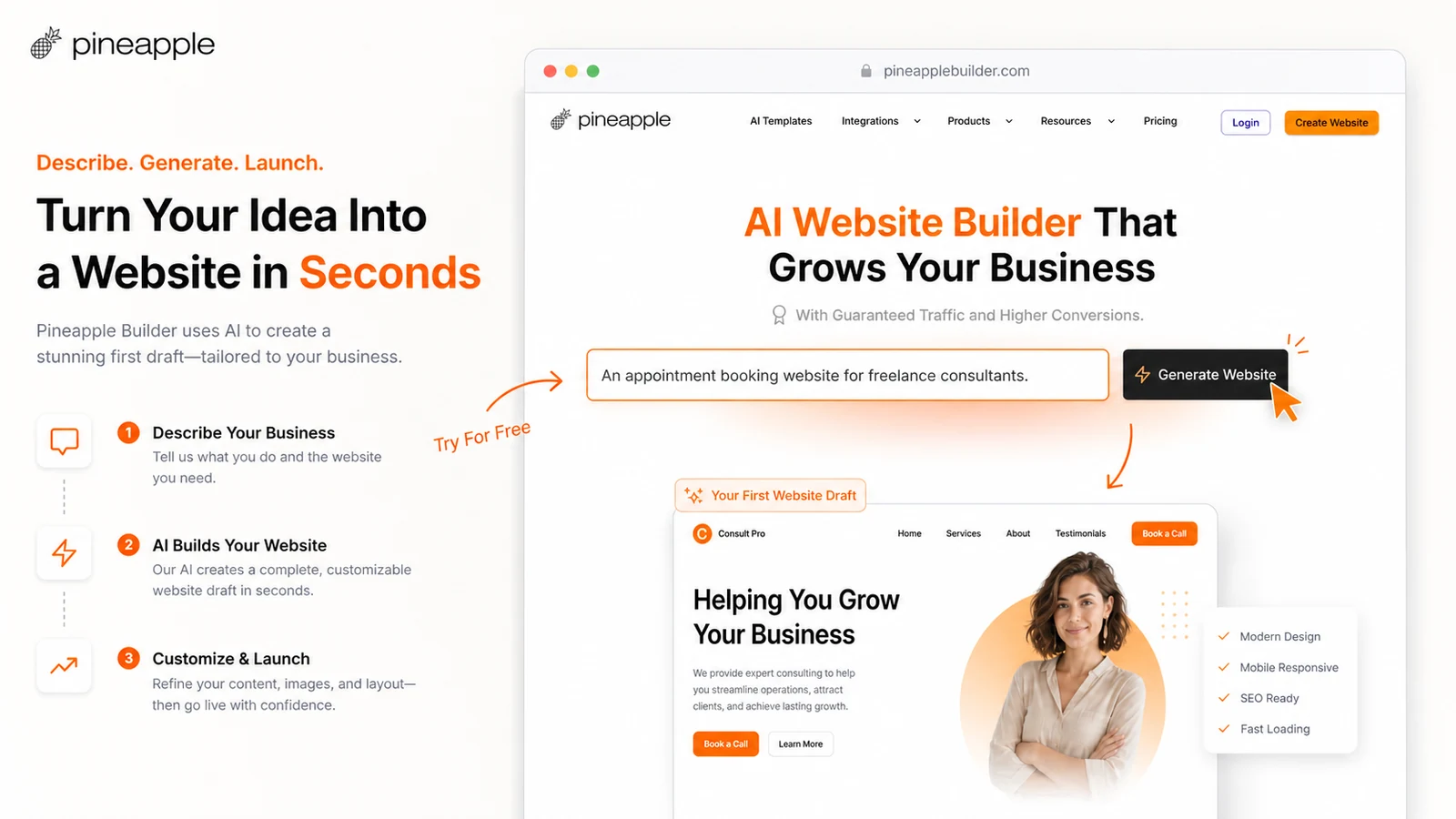
The homepage frames the workflow around three ideas: generate, customize, and grow. You describe the business, Pineapple Builder creates a site direction, and then you edit the result with a simpler visual editor and AI-assisted tools. Paid plans can add the more serious website pieces: custom domain, contact forms, widgets, code embeds, SEO, GDPR-friendly analytics, hosting, SSL, blogging, CMS-style pages, and more AI capacity.
That gives Pineapple Builder a clearer role than a toy AI generator.
It is trying to be a small business website system, not just a one-shot page maker. The product is aimed at service businesses, freelancers, creators, personal websites, digital product sellers, consultants, SaaS landing pages, beauty services, local businesses, and similar buyers who need something public and usable without hiring a designer or developer.
Still, I would keep the category in perspective. Pineapple Builder is not a full replacement for every website platform. It is closer to a fast AI-assisted path for simpler business sites. That can be a very good thing if your real problem is launch speed. It can become a limitation if your real problem is design depth, content scale, ecommerce logic, platform ecosystem, or long-term ownership.
The buying decision should start with the kind of website you actually need.
Who should use Pineapple Builder?
Pineapple Builder fits buyers who are blocked by setup work.
A local service owner may not care about advanced layout systems. They need a homepage, service page, contact form, custom domain, basic SEO, testimonials, and maybe a booking or payment embed. For that buyer, a fast AI-generated first version can be more useful than a flexible platform that takes weeks to understand.
A freelancer or creator may use Pineapple Builder to publish a portfolio, offer page, lead capture page, or simple personal site. The value is not that the AI writes perfect copy. It is that the tool reduces the blank-page problem and gets the site into an editable shape faster.
A solo founder may use it to test a landing page for a new idea. In that case, the best feature may be speed: publish a page, collect emails, test messaging, and avoid overbuilding before the offer is proven.
A small business that wants blogging may consider the Grow plan. But this is where I would slow down a little. Blogging sounds simple on a pricing page. In practice, a blog workflow needs categories, metadata, internal linking, analytics, indexing, and a publishing rhythm. If Pineapple Builder gives you enough for light content growth, it can make sense. If content is going to become the engine of the business, compare it with a dedicated CMS before you commit.
Who should avoid Pineapple Builder?
I would avoid Pineapple Builder if you already know you need deep control.
That includes businesses with advanced ecommerce, custom checkout logic, complex memberships, multiple content types, custom databases, multi-language site management at scale, advanced design systems, or heavy SEO/content operations. Those buyers may feel the speed at the beginning and the limits later.
I would also be careful if you need to own and move the full website outside the platform. The terms state that storing the Pineapple Builder website on third-party IT systems and using it on a third-party server is prohibited. For some buyers, that is normal SaaS builder behavior. For others, especially technical founders and agencies, it is a serious ownership check.
There is another group I would not push toward a paid plan too quickly: buyers who have not clarified the site job.
If you only know “I need a website,” Pineapple Builder may feel attractive because it creates something quickly. But a quick site is not automatically the right site. Before paying, decide whether the website needs to generate leads, book calls, sell products, collect emails, publish blog content, host gated pages, support ads, or act as a simple credibility page.
The plan decision changes depending on that answer.
How Pineapple Builder fits into a real website workflow
The best Pineapple Builder workflow is not “let AI build everything and move on.”
It is more grounded than that.
- Describe the business, audience, offer, tone, and target action.
- Generate the first website draft.
- Review whether the sections match the real buyer journey.
- Rewrite weak claims and generic copy.
- Adjust the design enough to match the brand.
- Add the business essentials: domain, contact path, forms, widgets, analytics, SEO settings, and legal pages.
- Publish only after the site can support the business outcome.
- Revisit Basic versus Grow if blogging or content growth becomes part of the plan.
This is where Pineapple Builder can be genuinely useful. It reduces the first-draft burden. It does not remove the need to think like a business owner.
The mistake is treating the AI draft as the finish line.
A generated site can look presentable and still miss the real conversion path. Maybe the headline is too vague. Maybe the service description sounds generic. Maybe the call to action is unclear. Maybe the form is missing. Maybe the business needs a booking embed or payment link. Maybe the homepage is fine, but the site still lacks the supporting pages customers expect.
Pineapple Builder is strongest when it gets you to a workable draft quickly and then gives you enough control to finish the job.
Workflow check: Use Pineapple Builder only after you know the site you want to publish. A fast AI draft is helpful when the editing path stays simple.
Features that matter most
The feature list is not complicated, but the buyer interpretation matters.
The AI generation flow matters because it removes the hardest first step for many small business owners: turning a blank page into a structured website. You describe the business, and the system generates a starting point. That is useful, especially for buyers who struggle with copy, layout, and page structure.
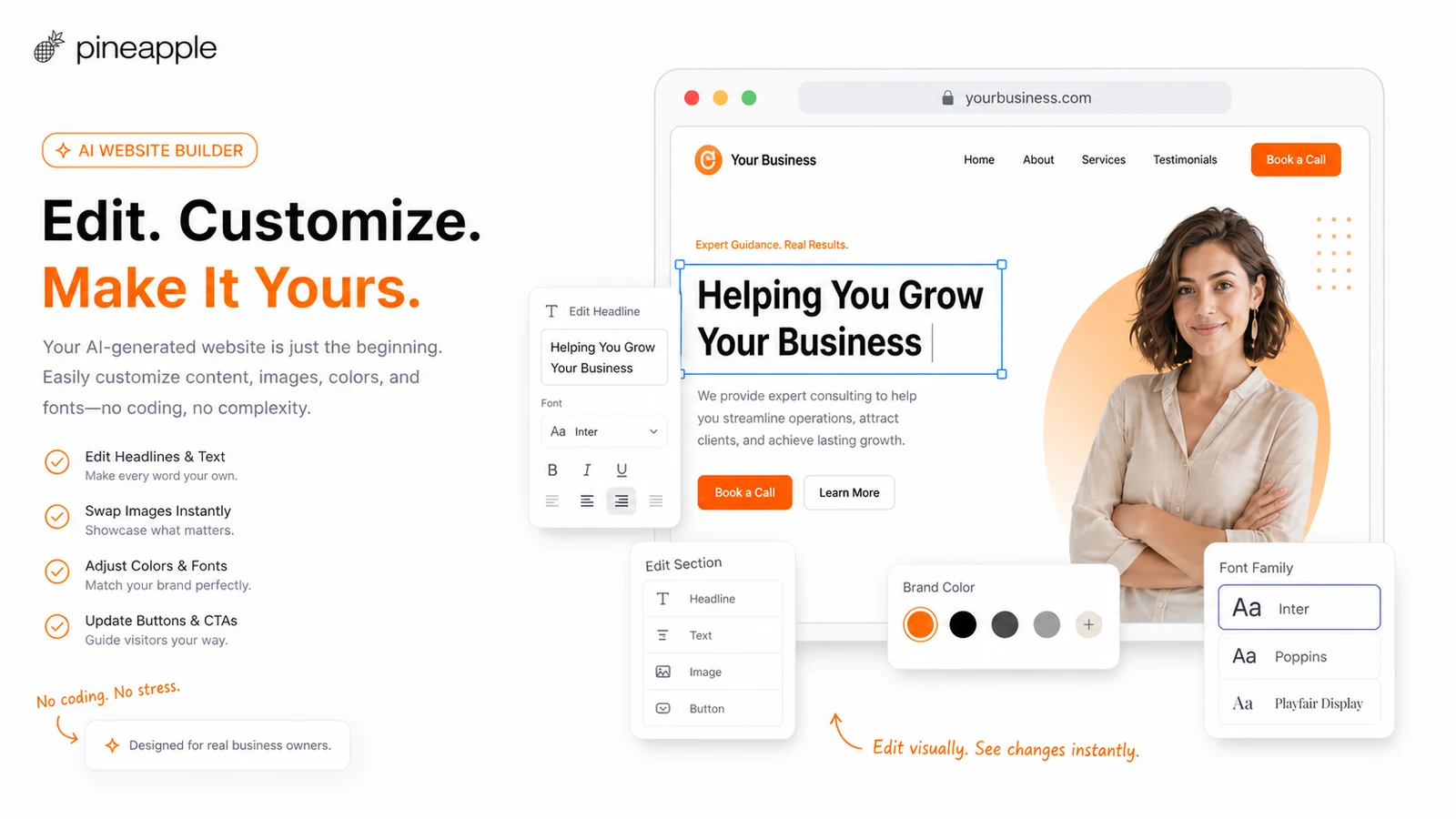
The editor matters more than the generator. A rough first draft is fine if you can control it afterward. Pineapple Builder advertises a simple editor, AI-assisted changes, style adjustments, drag-and-drop editing, and section additions. This is the part I would test carefully before paying.
Custom domain support matters because a real business site usually needs a branded domain, not only a Pineapple subdomain. The pricing page places custom domain support in the paid path, and the docs show a guided domain configuration process. That makes Basic the first serious plan for many buyers.
Forms, widgets, and code embeds matter because a business website needs to do something. A site that cannot capture leads, connect booking tools, add payments, embed calendars, or use marketing tools may look nice but fail commercially. Paid plans include widgets and code embeds, so verify your must-have tools before checkout.
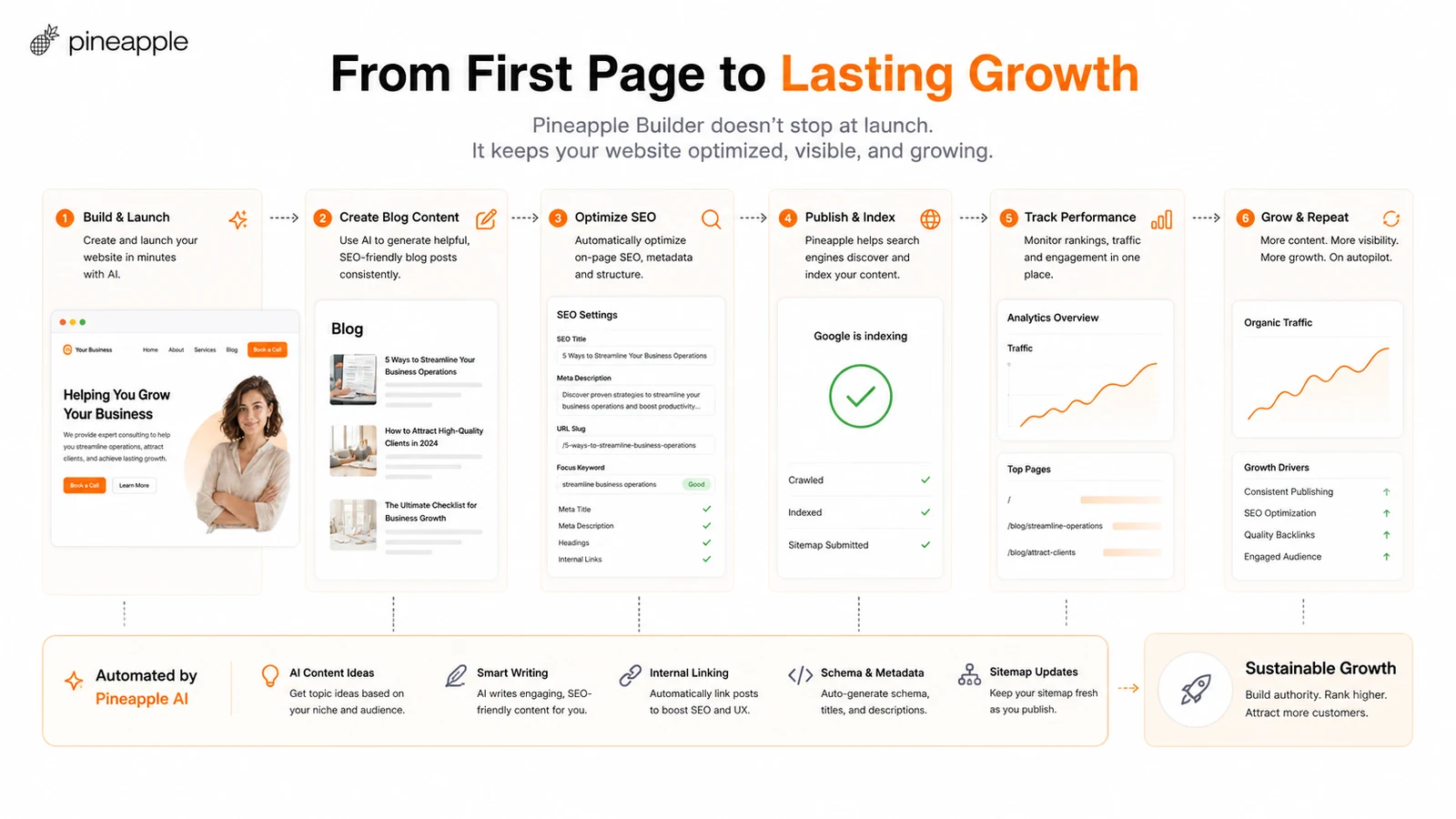
SEO and analytics matter if the site is more than a brochure. Pineapple Builder promotes SEO tags, social cards, sitemap and robots support, fast loading, GDPR-friendly analytics, Google Analytics integration, and funnel tracking. That is useful for a small business, but I would not automatically compare it with a mature SEO stack.
Blogging matters only if you will actually publish. Grow adds unlimited blog posts, AI Blogger, Blog and Pages CMS, more AI tokens, larger email collection, and larger uploads. If content growth is part of the plan, Grow deserves a closer look. If you only need a service page, Basic may be enough.
Pricing and plan value
The pricing decision is where buyers can easily choose too quickly.
Pineapple Builder currently has a free Starter path, a Basic paid path, and a Grow paid path. Starter is free, but the pricing page makes the limitation clear: one page, Pineapple domain, Pineapple branding, simple editor, email support, no AI features, no SEO, no analytics, no contact forms, and no widgets or code embeds.
That means Starter is not really a full business-site plan.
It is a fit test.
Basic is the first plan I would compare if you want a real public website. It adds the pieces most buyers expect: unlimited pages, protected pages, AI-powered editor, AI business coach and marketer, AI designer and developer, AI image generation, custom domain, contact forms, widgets, code embeds, SEO Performance Plus, GDPR analytics, email collection, hosting, and SSL.
Grow is the better comparison if the site needs content growth. It adds more page tokens, unlimited blog posts, AI Blogger, more AI tokens, Blog and Pages CMS, higher email collection, and larger video uploads.
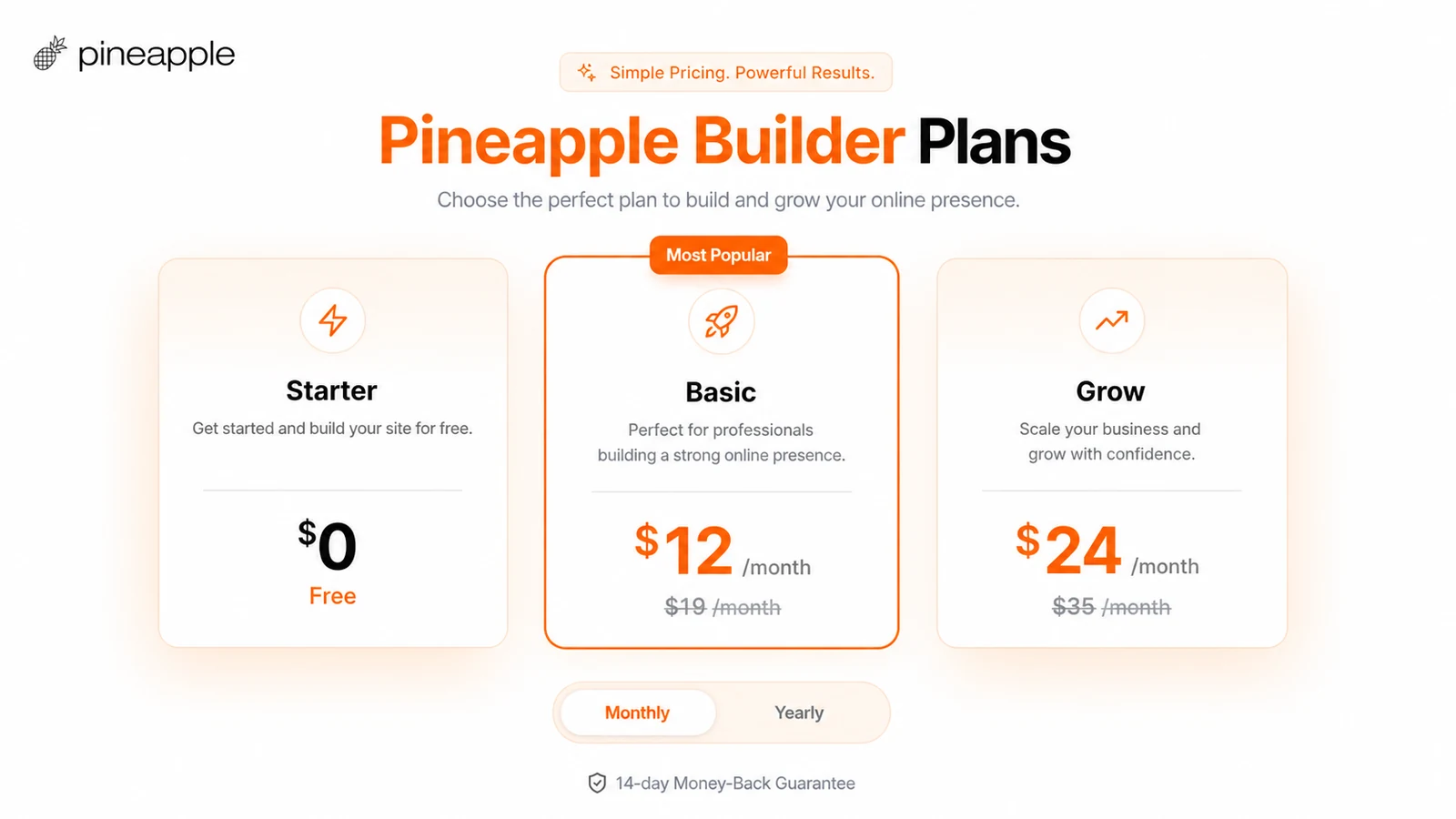
The cheapest plan is not automatically the best deal. Basic can be the smarter choice if you only need a landing page or small business site. Grow can be the smarter choice if you will publish content regularly. But if your site needs advanced ecommerce, custom logic, or platform-level flexibility, neither plan may be the best long-term answer.
I would also verify the billing interval carefully. The pricing page includes a monthly/yearly toggle and shows savings language, so the price a buyer sees should be checked against the live checkout screen before assuming the renewal cost.
Pricing check: Compare Basic and Grow by your actual website workload, not only by the displayed monthly price.
Free plan, coupon path, and checkout notes
Pineapple Builder has a useful free starting point, but I would not call it a full trial of the paid product.
Starter helps you understand the basic editor and publishing flow. That is valuable. But because it lacks AI features, SEO, analytics, contact forms, widgets, and code embeds, it does not fully answer the paid-plan question.
The right way to use the free plan is narrow: build one harmless test page and decide whether the platform feels controllable. If the structure, editor, and publishing path feel wrong, do not assume Basic or Grow will solve everything. If the free test feels promising, then compare the paid features more seriously.
On discounts, I would be careful. Pineapple Builder’s official pricing page already shows savings language, and public coupon sources may report additional checkout paths. That does not mean every discount is official, live, or better than the plan-based savings shown by Pineapple Builder itself.
A coupon can improve the purchase.
It should not be the reason you buy.
If you use a coupon route, treat it as a checkout test. Compare the final price, billing interval, renewal behavior, and plan limits against the official pricing page before paying. Also read the refund language. The pricing page displays a 14-day money-back guarantee, while the terms include stricter language around prepaid fees when a paid site is terminated or deleted before the contract expires. I would verify the live checkout/refund wording before choosing annual billing.
What I would check before buying Pineapple Builder
Before paying for Pineapple Builder, I would make a simple checklist.
First, check the website job. Is this a credibility site, landing page, portfolio, local service site, blog-supported business, digital product page, or something more complex? Pineapple Builder is much easier to judge once the site has a clear job.
Second, test editing control. Generate a page and see how hard it is to change sections, rewrite copy, adjust design, add buttons, and make the site feel like your business. AI generation is useful only if post-generation editing stays manageable.
Third, list your must-have features. Custom domain, contact form, widgets, code embeds, analytics, SEO settings, blog, CMS pages, email collection, uploads, and AI token limits all affect plan fit.
Fourth, verify ownership and portability expectations. If you expect to export the full site and host it elsewhere, read the terms first. Pineapple Builder is a hosted builder, and that matters for long-term platform choice.
Fifth, read the refund and cancellation details at checkout. Do not rely only on a pricing-page badge or an old coupon article.
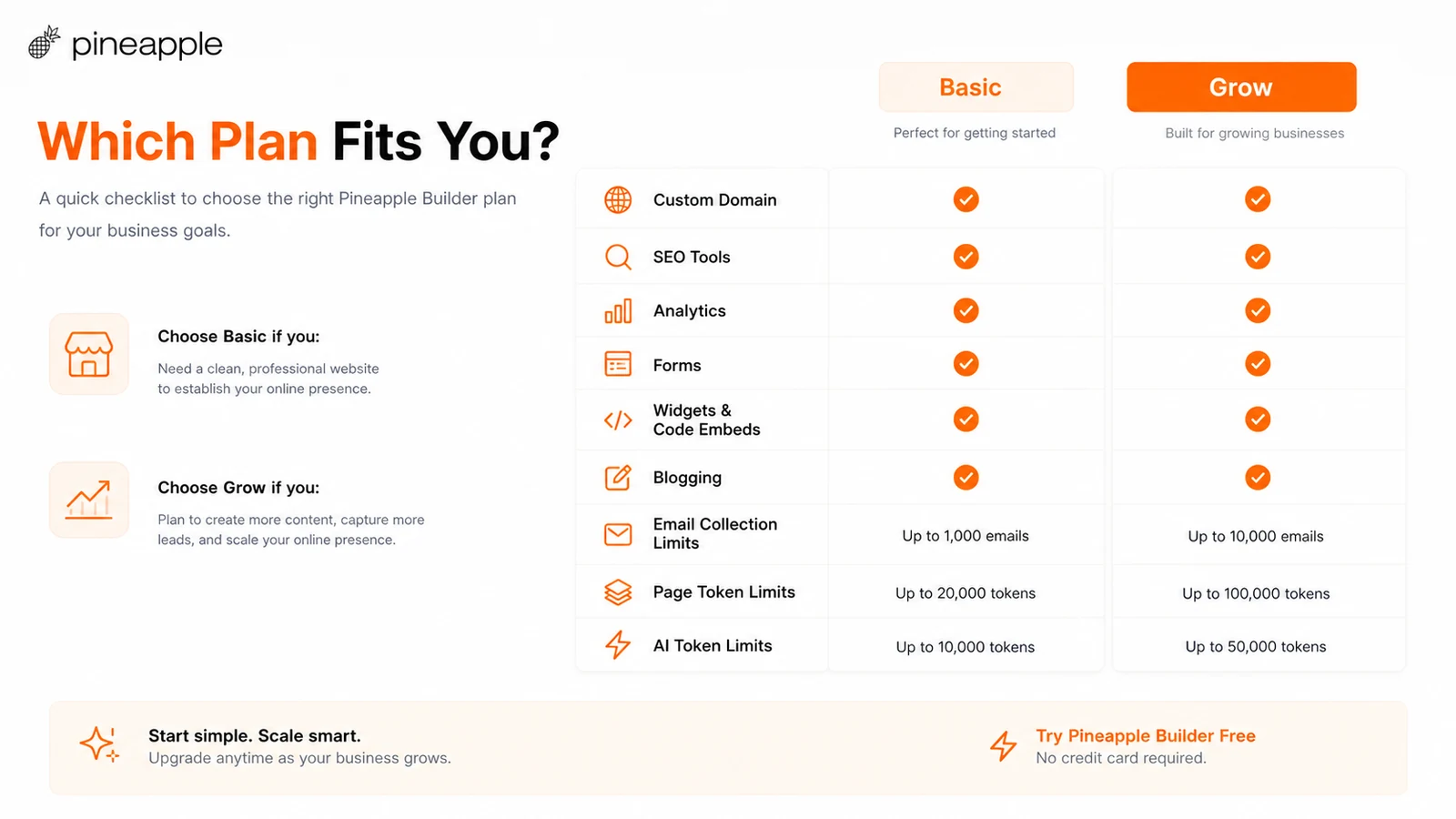
This is not overthinking the purchase. It is how you avoid buying a tool because the first draft looked good for ten minutes.
Green flags and red flags
Pineapple Builder has several green flags for the right buyer.
The free Starter path lowers the initial risk. You can test the feel of the platform before paying. The official pricing page is also clearer than many small AI website builders because it shows the main feature split between Starter, Basic, and Grow. The homepage gives a practical business-site positioning rather than pretending to be a universal website platform for every use case.
The AI generation flow is a green flag for buyers who struggle with copy and page structure. It can help them get moving.
The paid-plan feature set is also sensible for a small business site: custom domain, hosting, SSL, forms, widgets, code embeds, SEO, analytics, blogging, and email collection are the pieces that make a site useful after launch.
The red flags are mostly fit-related.
Starter is too limited for a real business site. Advanced customization is not the core strength. Complex ecommerce and custom backend workflows are not the natural use case. The hosted-platform model may bother buyers who want export freedom. Refund language deserves careful reading. And third-party reviews suggest Pineapple Builder’s simplicity is also its constraint when compared with established builders.
That is not a deal-breaker.
It is the product shape.
Pineapple Builder vs alternatives
Pineapple Builder should be compared with direct AI website builders and mature website platforms, not only with broad AI productivity tools.
Wix is the stronger comparison if you want a larger ecosystem, more templates, ecommerce options, apps, and broader site-building maturity. Pineapple Builder may feel faster for a simple AI-assisted first site, but Wix is usually safer when platform depth matters.
Squarespace is the better comparison if design polish, templates, portfolios, and small business presentation matter more than AI generation speed. Pineapple Builder may get you to a first draft faster, but Squarespace may feel more controlled for brand-sensitive sites.
Webflow is the stronger comparison if you care about design control, responsive precision, animations, CMS structure, and agency-level implementation. Pineapple Builder is easier, but Webflow is much more flexible.
WordPress is the stronger comparison if long-term ownership, plugins, custom SEO workflows, content scale, and hosting control matter. It takes more work, but it gives more control.
Durable, Mixo, Dorik, 10Web, Framer, and similar AI/no-code website builders are the closest product-category comparisons. Pineapple Builder competes here on speed, simplicity, AI-assisted business-site creation, and a clear Basic/Grow split.
Inside DealBestDaily, the adjacent routes are different. 1min.AI is broader for buyers who want many AI tools in one workspace, not a dedicated website builder. Aikeedo is more relevant if the buyer wants to build or own an AI SaaS-style product. Those are not direct Pineapple Builder replacements, but they help clarify a useful question: do you need a website, a general AI workspace, or a product-building path?
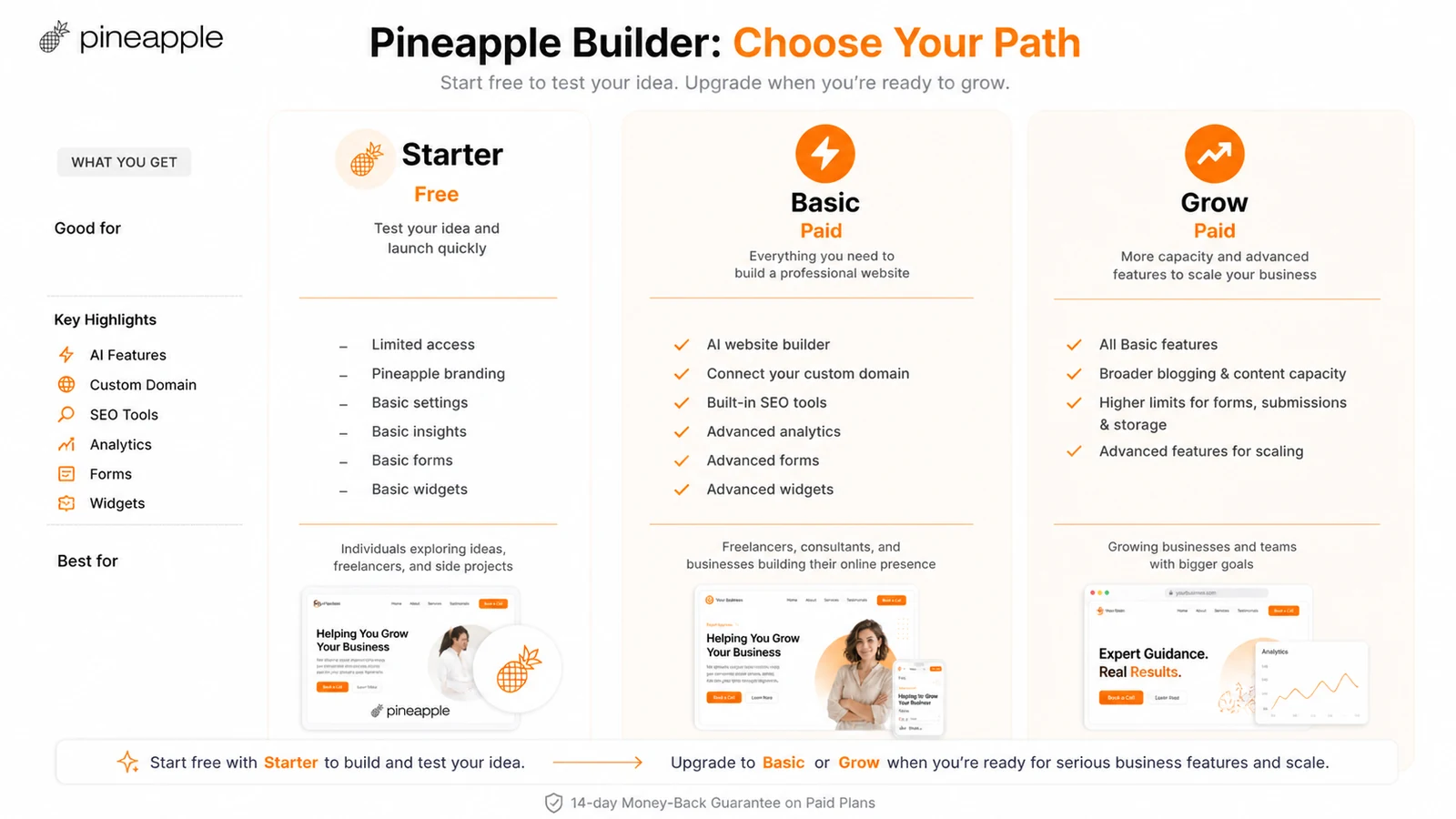
I would not label every AI tool as a direct alternative. The direct question is whether another tool builds and hosts the kind of website you need. Adjacent tools only matter if your real job is broader than website creation.
Simple test before paying
The simplest test is to create one real page.
Not a fake test. A real page for a real offer.
Use a service, product, portfolio, newsletter, local business, or consulting offer you actually might publish. Give Pineapple Builder enough context: audience, service details, proof points, tone, location if relevant, pricing or package structure, and the action you want visitors to take.
Then look at the result with a buyer’s eye.
Would a visitor understand what you do? Is the headline clear? Is the page too generic? Can you improve it quickly? Can you add the form, booking link, payment widget, newsletter capture, or analytics you need? Does the editing process feel simple enough that you would update the site next month?
If the answer is yes, Basic or Grow may be worth checking.
If the answer is no, paying will probably just move the same problem behind a billing screen.
Review methodology and evidence confidence
This review treats Pineapple Builder as an AI website builder and hosted no-code business-site platform. The judgment is based on the official homepage, pricing page, getting-started documentation, custom-domain documentation, terms, privacy policy, internal DealBestDaily store data, and current third-party review signals.
The strongest evidence is official: Pineapple Builder clearly publishes its Starter, Basic, and Grow plan structure, major plan features, free path, domain and hosting claims, SEO/analytics/blogging positioning, and money-back guarantee language. That gives reasonably high confidence around the basic plan fit.
The more cautious areas are refund handling, long-term portability, advanced customization, and how well the editor works for a specific business after the AI draft. These are areas where a buyer should run a live test and check the current checkout screen.
I would treat performance and customization claims as moderate-confidence until tested on the buyer’s own site type.
Final verdict
Pineapple Builder is a useful option if you want a fast AI-assisted website path and your site needs are relatively straightforward.
I would consider it for a local service business, freelancer portfolio, creator site, consulting page, landing page, simple business website, or light blog-supported site where speed matters and the buyer does not want to manage a heavier stack.
I would start free, not paid.
Build one test page. See whether the editor feels controllable. Confirm whether the page can support the real business action: lead capture, booking, payment, newsletter signup, blog growth, or simple credibility. Then compare Basic and Grow by features, not price alone.
I would skip Pineapple Builder if the site needs deep design control, advanced ecommerce, complex custom logic, large content operations, plugin ecosystems, or full ownership/export flexibility. In that case, Wix, Squarespace, Webflow, WordPress, Framer, Durable, or another mature site platform may be the safer comparison.
The short version is not “Pineapple Builder is good” or “Pineapple Builder is too simple.”
It is good when simple is the point.
It becomes risky when simple is not enough.