Quick verdict
MyLens is worth a closer look if your work regularly starts with dense material and ends with someone needing to understand it faster.
That is the practical buying question.
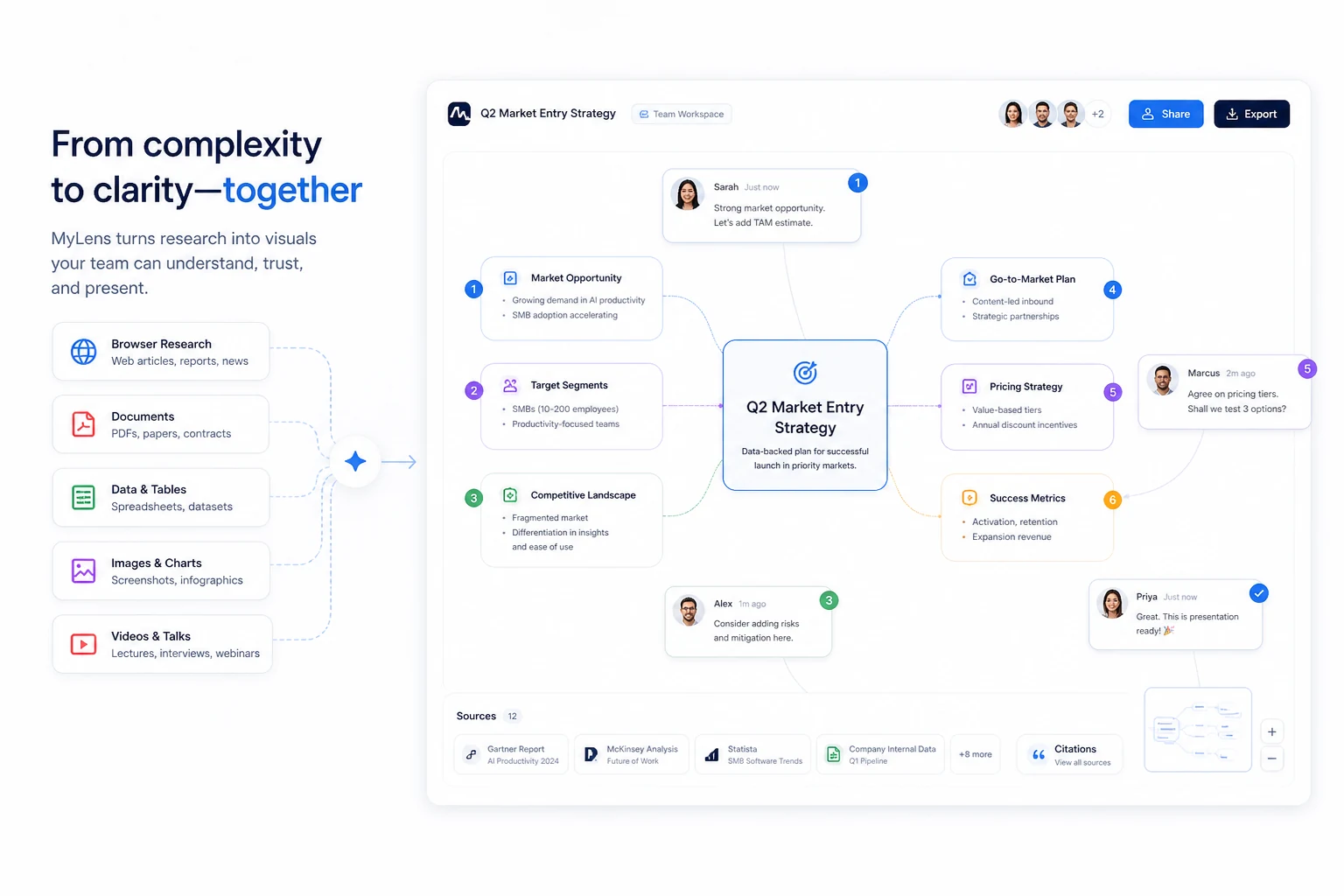
The homepage makes MyLens look like a clean AI diagram generator, but the product is really trying to solve a broader problem: turning sources into interactive visuals you can explore, expand, cite, share, and present. That can be useful if your normal work involves research papers, PDFs, webpages, spreadsheets, YouTube videos, strategy notes, lectures, client discovery material, or messy content briefs.
I would not judge MyLens only by whether the visuals look attractive. A pretty diagram is not enough. The stronger test is whether the visual helps you see structure, explain a topic, trace ideas back to the source, and reduce the time you would otherwise spend reading, summarizing, and redrawing information manually.
For my money, MyLens makes the most sense for researchers, teachers, students, consultants, marketers, analysts, and content teams who repeat this kind of source-to-explanation workflow. It is weaker for someone who only wants a one-time static mind map or a decorative graphic.
The pricing decision also deserves care. MyLens has a free plan, but the free path is intentionally limited. Paid value depends on AI actions, source size, edit access, multiple-source support, design quality, brand kit needs, and team features. The official terms also make the refund side important: fees are non-refundable once charged. That does not make MyLens a bad purchase. It just means the first serious test should happen before annual billing or a larger team plan.
Next step: If MyLens sounds useful, test it with one real but non-sensitive source before comparing paid plans.
Review snapshot
| Review point | Practical take |
|---|---|
| Best for | Researchers, teachers, students, consultants, marketers, analysts, and teams that explain complex information |
| Not ideal for | One-off static mind maps, simple diagram decoration, or backend automation needs |
| Main workflow | Turn sources into interactive timelines, mind maps, flowcharts, tables, and source-linked visuals |
| Free path | Useful for testing, but limited by AI actions, source size, one source per visual, and non-editable output |
| Paid path | Makes sense when editable visuals, larger sources, multiple sources, advanced designs, or brand/team features matter |
| Main strength | Visual understanding from source material, not just generic summarization |
| Main concern | Non-refundable fees, annual billing pressure, source privacy, and plan-limit fit |
| Alternatives to compare | 1min.AI, Aikeedo, Napkin AI, Miro AI, Gamma |
| Safer first step | Test one normal source type before choosing Pro, Growth, or Enterprise |
What is MyLens?
MyLens is an AI visual-thinking workspace. It turns sources into interactive visuals and diagrams, then lets the user explore those visuals instead of reading only a flat summary.
That wording matters because MyLens is not simply a note app, a presentation template, or a normal diagram builder. It starts from material: text, PDFs, slides, images, spreadsheets, webpages, or YouTube links. Then it tries to organize that material into a visual structure such as a timeline, mind map, flowchart, table, or explorable diagram.
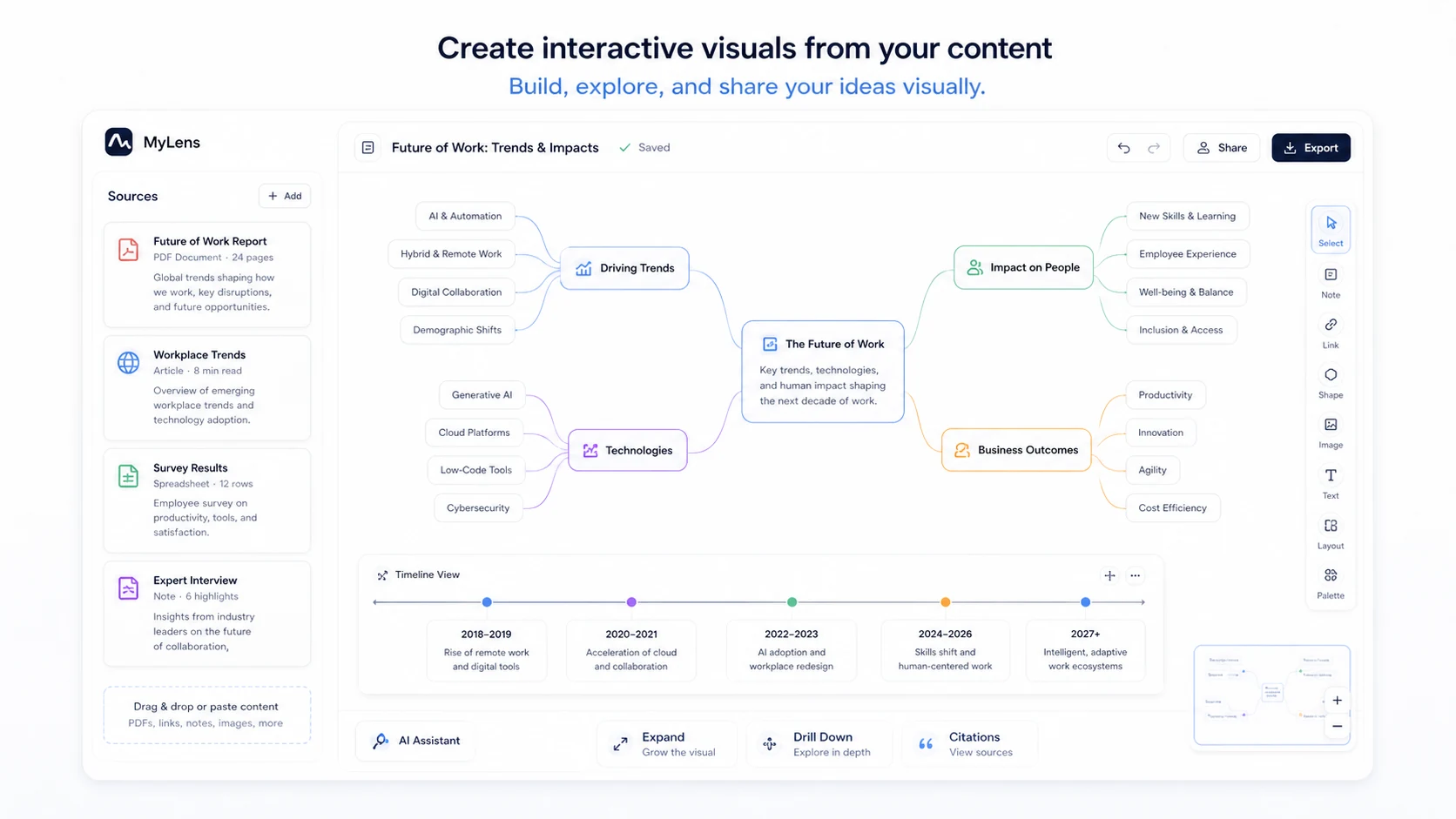
The useful part is not only the first visual. The useful part is the interaction layer. MyLens says the visuals can be clicked, expanded, drilled into, and traced back to source material. For buyers who work with complicated information, that is the more serious promise.
A normal summarizer compresses content into paragraphs. A normal diagram tool asks you to build the structure yourself. MyLens sits between those two jobs: it tries to understand the source, create a visual, and help you move through the topic in a more structured way.
That can be valuable.
It can also be overkill.
If you only need to draw a simple process chart once, MyLens may be more product than you need. But if you often read long documents, compare sources, prepare lessons, explain client research, analyze videos, or turn messy material into something other people can understand, MyLens becomes a more credible tool to evaluate.
Who should use MyLens?
MyLens is most believable when the buyer already has an information-density problem.
Researchers and analysts are an obvious fit. If you are reading documents, webpages, notes, spreadsheets, or long-form sources, a source-linked visual can help you find relationships faster. I would still verify important claims manually, but as a first-pass understanding layer, MyLens has a real job.
Teachers and students may also get value from it. A long lecture, academic article, textbook section, or YouTube explainer can become easier to study when the structure is visible. The strongest education use case is not “make studying pretty.” It is “find the key parts, revisit the source, and remember how the ideas connect.”
Consultants and marketers are another fit. Client discovery notes, competitive research, audience data, strategy documents, or campaign ideas often become more useful when they are turned into a diagram or timeline. MyLens can help if the visual becomes something you can discuss with a client or team.
Content teams may use it for research synthesis. A writer can turn a long video, PDF, or set of webpages into a visual map before outlining an article, script, campaign, or report. That is a practical use case, especially when the source-linked structure prevents the writer from trusting a vague summary too quickly.
The product also fits buyers who think visually. Some people do not want another paragraph summary. They want a map. MyLens is built for that buyer.
Who should avoid MyLens?
I would be careful with MyLens if you only need a basic mind map once in a while.
The free plan may be enough for occasional curiosity. A paid plan needs a repeatable reason. If you cannot name the source types you would use every week, the paid decision becomes weak quickly.
I would also be careful if your team needs a clearly packaged public API or backend automation route. The provided data does not position MyLens as an API-first tool. It is better understood as a web and browser-based visual workspace. If automation is the buying requirement, compare it with tools built around workflow automation before committing.
Privacy-sensitive teams should slow down as well. MyLens is a cloud-based AI workspace, and the terms include public story behavior for free-plan users. The privacy page also makes normal data-processing disclosures. That may be acceptable for many buyers, but it is not something I would ignore with client files, student data, legal material, internal research, medical notes, or confidential strategy documents.
Finally, I would not buy MyLens only because a public coupon listing exists. A discount can improve the purchase, but it should not create the purchase. With non-refundable fee terms, the safer path is to prove workflow fit first, then check the current pricing and offer route.
How MyLens fits into a real workflow
The best MyLens workflow starts before you open the tool.
Choose one source that represents your real work. Not a random demo. Not a tiny sample that makes every tool look good. Use a harmless but realistic PDF, webpage, spreadsheet, article, lesson, client-style research note, or YouTube video.
Then ask a practical question: what decision do you need the visual to help with?
For a researcher, that might be “What are the main themes across this material?” For a teacher, it might be “Can this lesson become a clear timeline or concept map?” For a consultant, it might be “Can I explain this messy discovery material to a client without rebuilding the diagram manually?” For a content marketer, it might be “Can this video or article become a useful outline structure?”
That is where MyLens can help. It turns the source into a visual, then lets you explore deeper. If the output shows the structure clearly, connects back to source material, and saves you time, the product has a real role.
But the workflow still needs human judgment.
AI-generated visuals can simplify too aggressively. They can choose the wrong hierarchy. They can make a complex source look cleaner than it actually is. They can hide nuance behind a tidy flowchart. The buyer should treat the output as a thinking aid, not a final authority.
The strongest use is: source in, visual out, human review, source check, manual edit, then share or present.
Workflow check: MyLens is easiest to judge with your own source material, not with a polished demo.
Key features that matter
The first feature that matters is broad source input. MyLens can work with text, PDFs, slides, images, spreadsheets, webpages, and YouTube links. That makes it more flexible than a tool built only around typed prompts or manual diagram creation.
The second feature is interactive exploration. A static graphic can be useful, but the MyLens promise is more interesting when the visual can be clicked, expanded, drilled into, and explored. This matters when the source is complicated enough that one summary view is not enough.
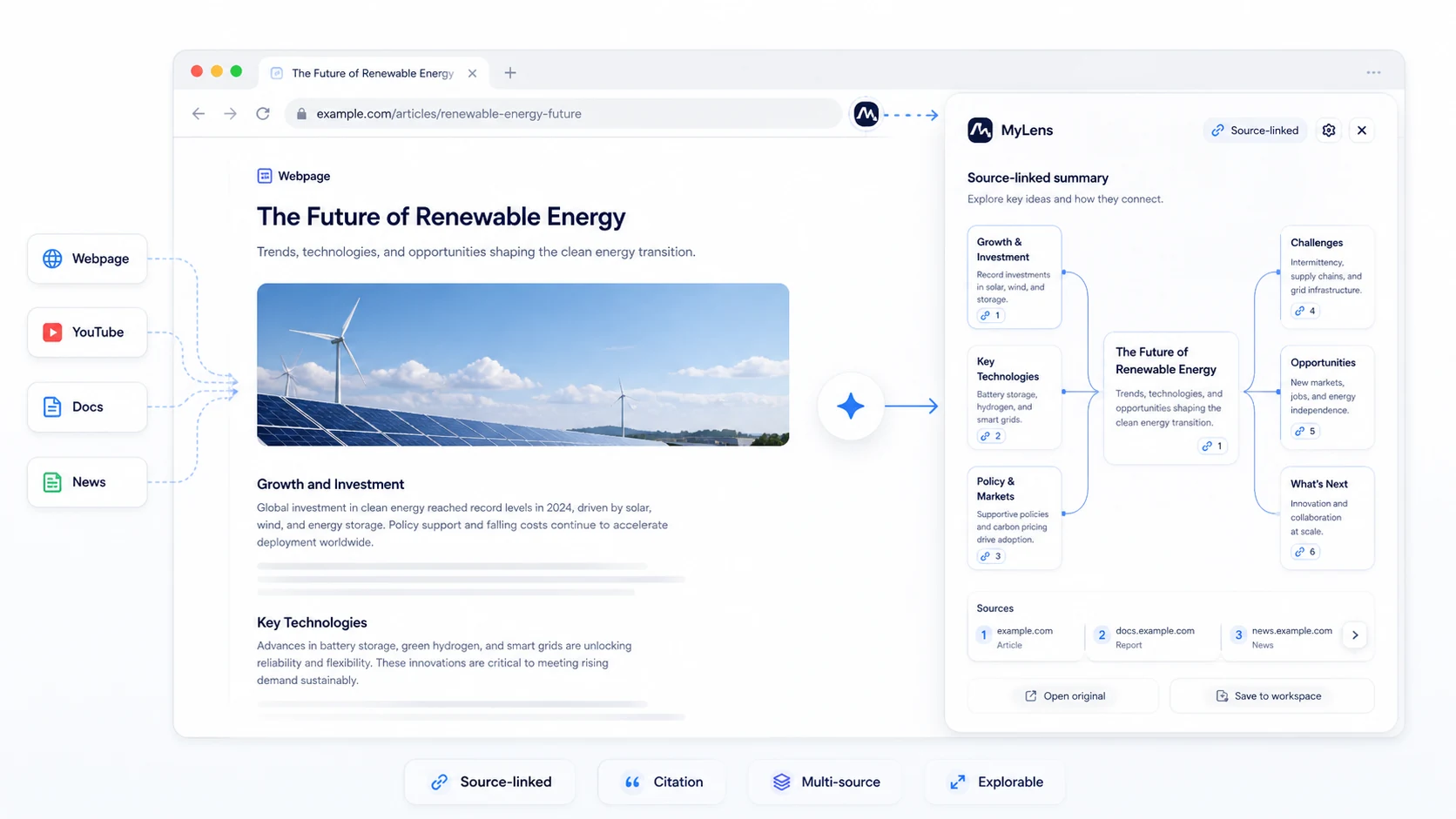
The third feature is source-linked understanding. If every insight can be traced back to the original material, the visual becomes more trustworthy. I would still check important details manually, but source linkage is a better pattern than a polished AI summary with no obvious route back to the evidence.
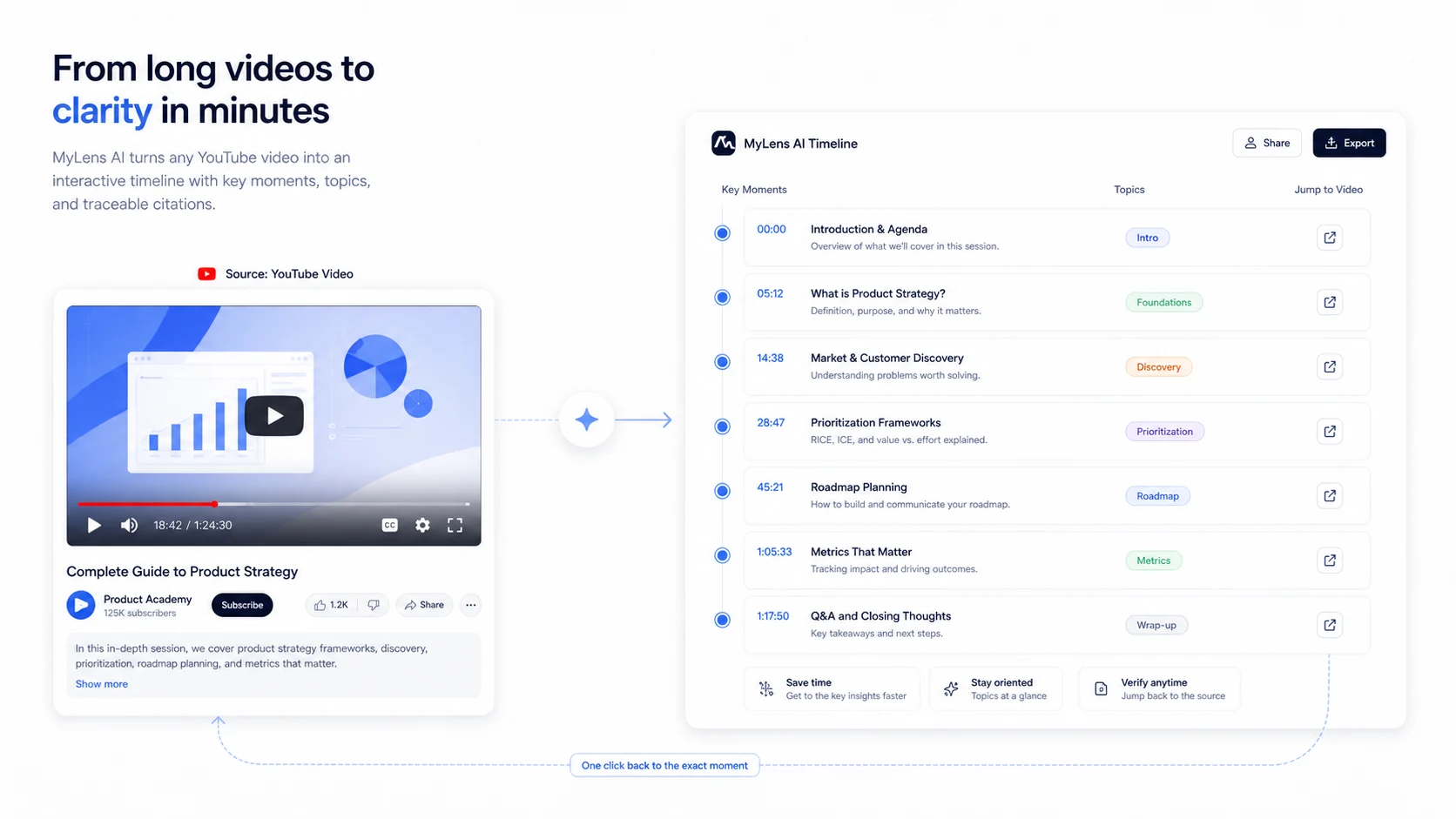
The fourth feature is YouTube timeline support. Long videos are hard to review efficiently. MyLens can turn a YouTube link into a timeline of key moments, timestamps, and expandable ideas. That can be useful for lectures, webinars, interviews, podcasts, tutorials, and research videos.
The fifth feature is the Chrome extension path. If a buyer researches inside the browser all day, it is inconvenient to copy every source into a separate workspace. The extension makes MyLens more practical for webpages, docs, news, and YouTube browsing.
The sixth feature is editability, but this is where pricing matters. The free plan is non-editable. If manual editing is central to your workflow, the free plan is mainly a test path, not the full use case.
Pricing and plan value
MyLens pricing is clear enough to evaluate, but not simple enough to ignore the details.
The free plan is $0 and gives 15 AI actions per month, basic designs, a 1K source limit, one source per visual, and non-editable output. That is useful for testing whether the product understands your source material. It is not the plan I would expect to support serious repeated work.
The Pro plan is the likely first paid comparison for most individual buyers. During this review update, the official pricing page showed Pro at $12 per member per month when billed yearly, with 300 AI actions per month, advanced designs, a 10K source limit, multiple sources per visual, powerful AI mode, manual edit, and premium features.
Growth is a much bigger jump. The official pricing page showed Growth at $120 per member per month when billed yearly, with unlimited AI actions, a 100K source limit, deep web search, brand kit support, and priority customer support. I would treat that as a serious workflow or team plan, not a casual upgrade.
Enterprise is custom and adds the kinds of controls larger buyers usually care about: SSO, enhanced security, custom AI agents, enterprise-scale sources, enterprise integrations, custom branding, and a dedicated success manager.
The cheapest plan is not automatically the best deal here. The right plan depends on where the free path breaks. If the free plan fails because the visual output is not useful, paying will not fix the mismatch. If the free plan works but blocks editing, multiple sources, larger files, or advanced designs, then Pro becomes easier to justify.
Growth needs a stronger business case. I would want to know that unlimited AI actions, larger source capacity, brand kit needs, and priority support are genuinely part of the work.
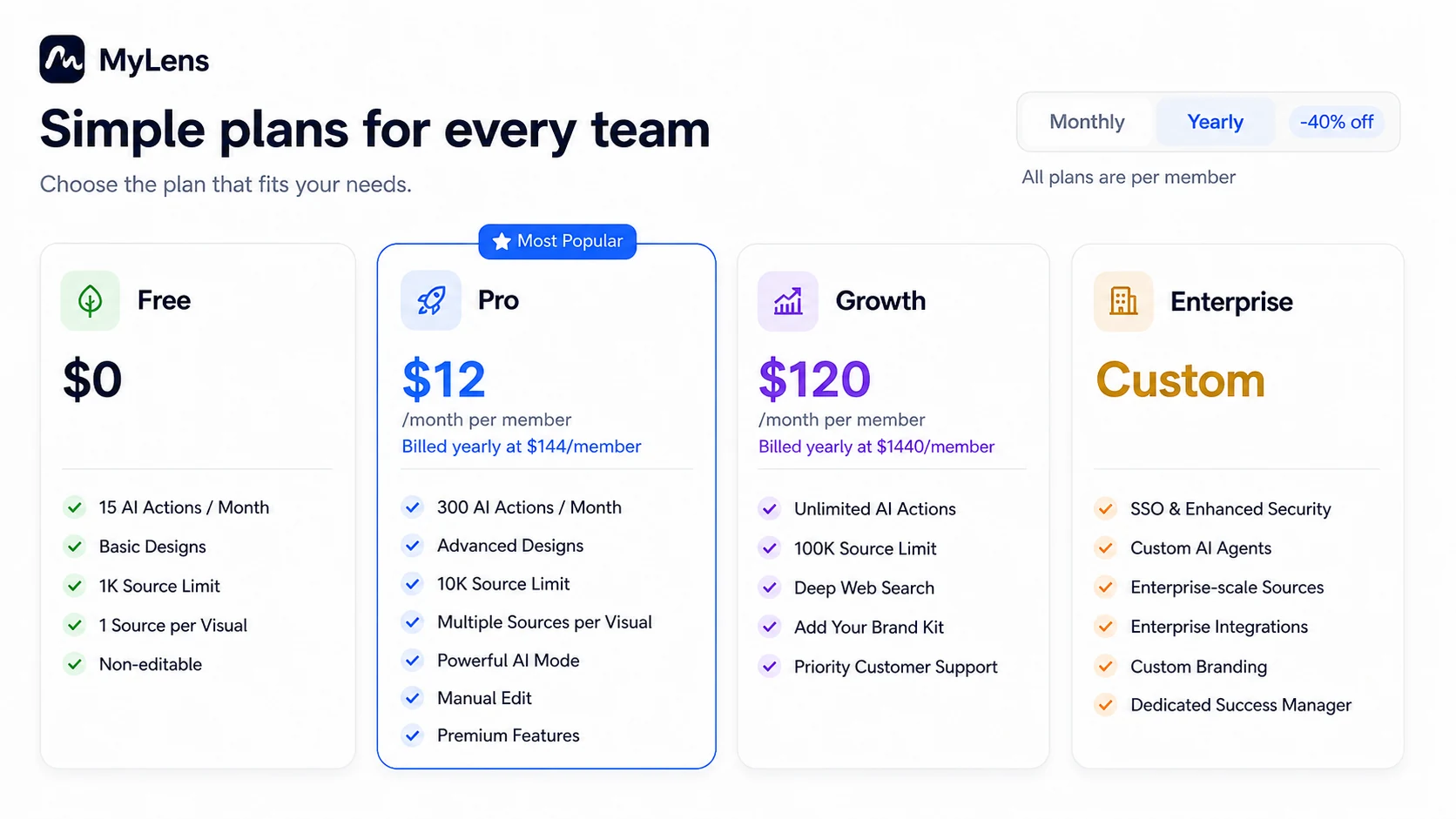
Pricing check: Use the free plan to find the first real limit, then compare that limit against Pro, Growth, or Enterprise.
Check MyLens pricing Read pricing notes Check current offers
Free plan, trial, coupon, and checkout notes
The free plan is the safest starting point for most buyers.
MyLens does not need to be judged from a sales page. It can be judged from one realistic source. If you can turn a real document, webpage, spreadsheet, or YouTube video into a visual that helps you think faster, the paid conversation becomes more grounded.
If the free plan produces visuals you would not use, stop there. A paid plan may give you more capacity and editing, but it will not necessarily change the core fit.
If the free plan works but feels constrained, then compare the paid plans by limits rather than by headline price. The practical questions are simple: Do you need more AI actions? Do you need a larger source limit? Do you need more than one source per visual? Do you need manual editing? Do you need advanced designs or brand kit support? Do you need team security controls?
Coupon paths deserve the same discipline. Public coupon directories may show MyLens codes or annual deal routes, and DealBestDaily can track the current offer path on the MyLens coupon page. But the buyer should treat any code as a checkout test, not a guaranteed saving.
I would also read the refund language before paying. The official terms say fees are non-refundable once charged and that there are no prorated refunds, credits, or partial billing adjustments. That makes annual billing and high-tier plans more serious decisions.
A discount can make a good plan cheaper. It does not make the wrong plan safe.
What I would check before buying MyLens
Before paying for MyLens, I would run five checks.
First, test source quality. Use a source that resembles your real work, not a toy example. If you normally work with long documents, use a long document within the plan limit. If you work with videos, test a real YouTube lecture, webinar, interview, or tutorial.
Second, check source traceability. When MyLens creates a visual, can you follow the important points back to the source? This matters more than polish. A beautiful visual that is hard to verify is risky for serious work.
Third, check editability. The free plan is non-editable, so buyers who need presentation-ready diagrams should decide whether Pro-level editing is truly necessary.
Fourth, check privacy and sharing behavior. The terms mention public stories for free-plan users, and those can be indexed publicly. Start with non-sensitive material until you understand public, private, shared, embedded, and indexed behavior.
Fifth, check billing risk. Monthly versus yearly pricing, coupon availability, renewal behavior, cancellation timing, and non-refundable fees all affect the real purchase decision.
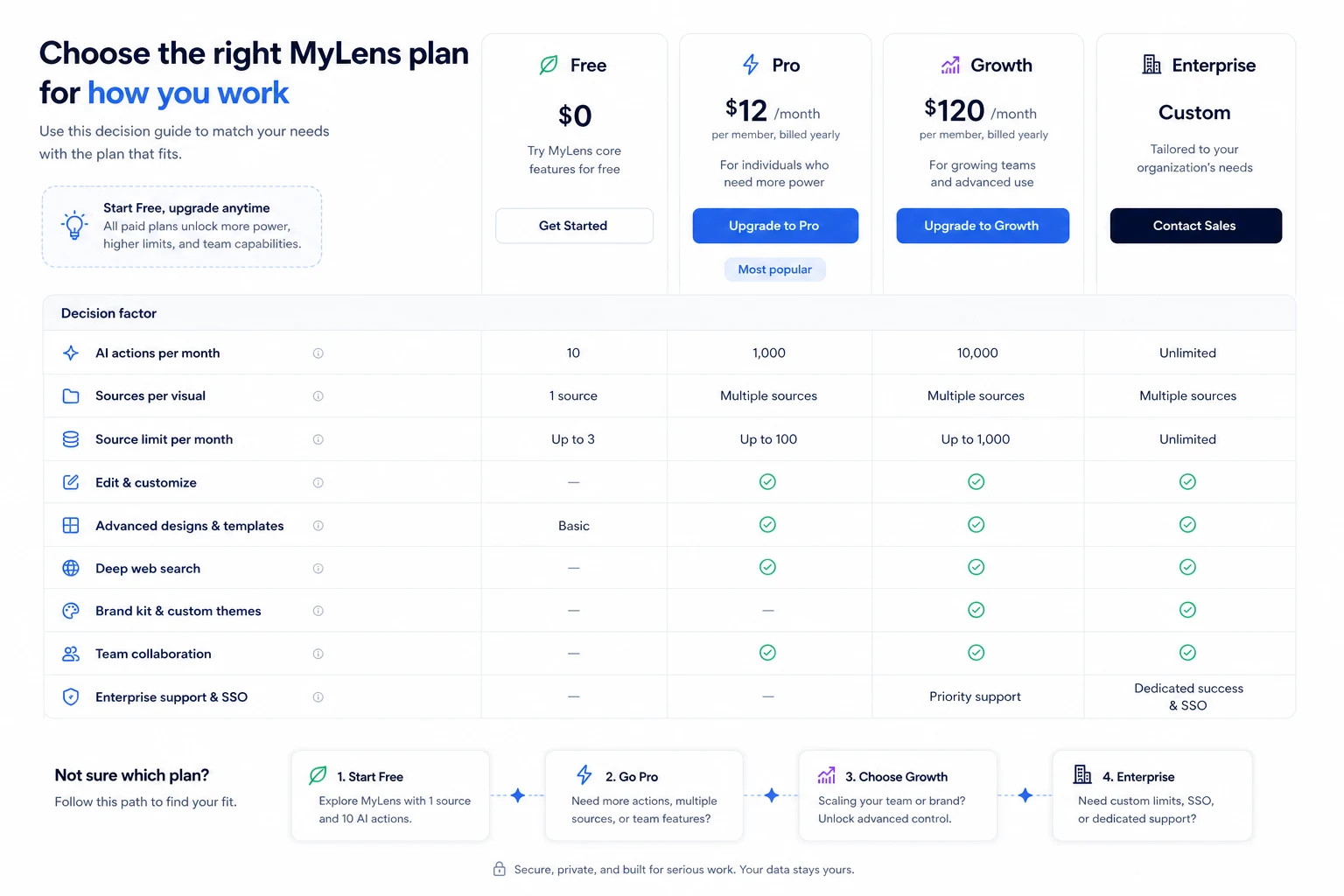
Simple test before paying
Here is the simple test I would use.
Take one non-sensitive source that represents your normal work. A public article, public YouTube lecture, sample spreadsheet, public report, or harmless internal-style note is enough. Avoid private client files, student data, legal material, confidential research, or anything that should not become public.
Create a visual in MyLens.
Then ask four questions.
Does the visual reveal structure faster than reading the source manually?
Can you trace the important points back to the original material?
Would you share this with a student, client, colleague, or team after basic review?
Did the free plan block something that you would genuinely need every week?
If the answer is mostly yes, MyLens may justify a paid plan. If the answer is mixed, stay free and compare alternatives. If the answer is no, do not let a coupon talk you into upgrading.
This test is intentionally plain. It is better than judging the product from screenshots.
Pros and cons explained
The biggest advantage of MyLens is that it matches how many people actually think. Some people do not want another chatbot answer. They want structure. They want relationships. They want a visual way to move through dense information.
The second advantage is source variety. PDFs, slides, images, spreadsheets, webpages, and YouTube links give MyLens more room to be useful than a narrow diagram tool.
The third advantage is the free entry path. Because the paid plans depend so much on workflow fit, the free plan matters. It lets buyers test the product before paying.
The fourth advantage is source-linked exploration. If the visual can connect back to the original material, it becomes more credible as a research and explanation tool.
The weaknesses are just as important.
Free-plan limits can appear quickly. If a source is too large, if you need multiple sources per visual, or if you need editing, the free path becomes a sample rather than a working plan.
Paid value is very use-case dependent. A researcher who uses MyLens every week may get real value. A casual user may not.
Refund flexibility is weak. Non-refundable fees are not unusual in SaaS, but they make plan selection more important.
And MyLens is not the obvious answer for every visual job. Sometimes a presentation tool, whiteboard tool, classic diagram builder, AI writing workspace, or research assistant will be a better fit.
Green flags and red flags
The green flags are clear.
MyLens has a specific product idea. It is not just “AI for productivity.” It turns sources into interactive visuals. That focus helps.
The pricing page is also more transparent than many AI tools. Free, Pro, Growth, and Enterprise tiers are visible, and the main limits are easy to compare.
The Chrome extension adds practical value for browser-heavy research. If MyLens only worked through manual uploads, the workflow would be more awkward.
The YouTube timeline use case is especially concrete. Long video content is a real problem for students, educators, researchers, and content teams. A source-linked timeline can be useful when it points back to exact moments rather than hiding the source behind a vague summary.
The red flags are buyer-specific.
The free plan is limited and non-editable. That is fine for testing, but it may not represent the real paid workflow.
Growth pricing is a big jump. Buyers should have a clear reason before choosing it.
Public story and sharing behavior needs care. Do not test with sensitive content until you understand visibility.
The refund language is strict. This is the part I would check before annual billing.
MyLens vs alternatives
MyLens should not be compared only with generic AI productivity tools. Its stronger comparison set depends on the buyer job.
If you want many AI tools in one workspace, 1min.AI is the broader comparison. It may make more sense when the buyer wants writing, images, chat, audio, and other AI tasks in one place. MyLens is narrower, but stronger when the job is turning sources into interactive visuals.
If you are building an AI SaaS product, Aikeedo is a different kind of alternative. It is not a direct visual-thinking replacement. It is more relevant when the buyer wants to own or launch an AI product rather than use a visual research workspace.
Napkin AI is a closer comparison if your main job is turning text into presentation-friendly visuals. It may be easier for lightweight visual creation, while MyLens is more interesting when source-linked exploration and multiple input types matter.
Miro AI is the stronger comparison for collaborative whiteboard work. If your team already lives in whiteboards, workshops, and brainstorming sessions, Miro may fit better. MyLens is stronger when the starting point is dense source material rather than open-ended collaboration.
Gamma is worth comparing when the final output is a polished presentation or deck. MyLens helps with understanding and visual structure; Gamma may be stronger when the buyer wants a finished presentation flow.
The practical split is simple: MyLens is best when the source material is the problem. Other tools may be better when collaboration, presentation design, broad AI tooling, or product-building is the real job.
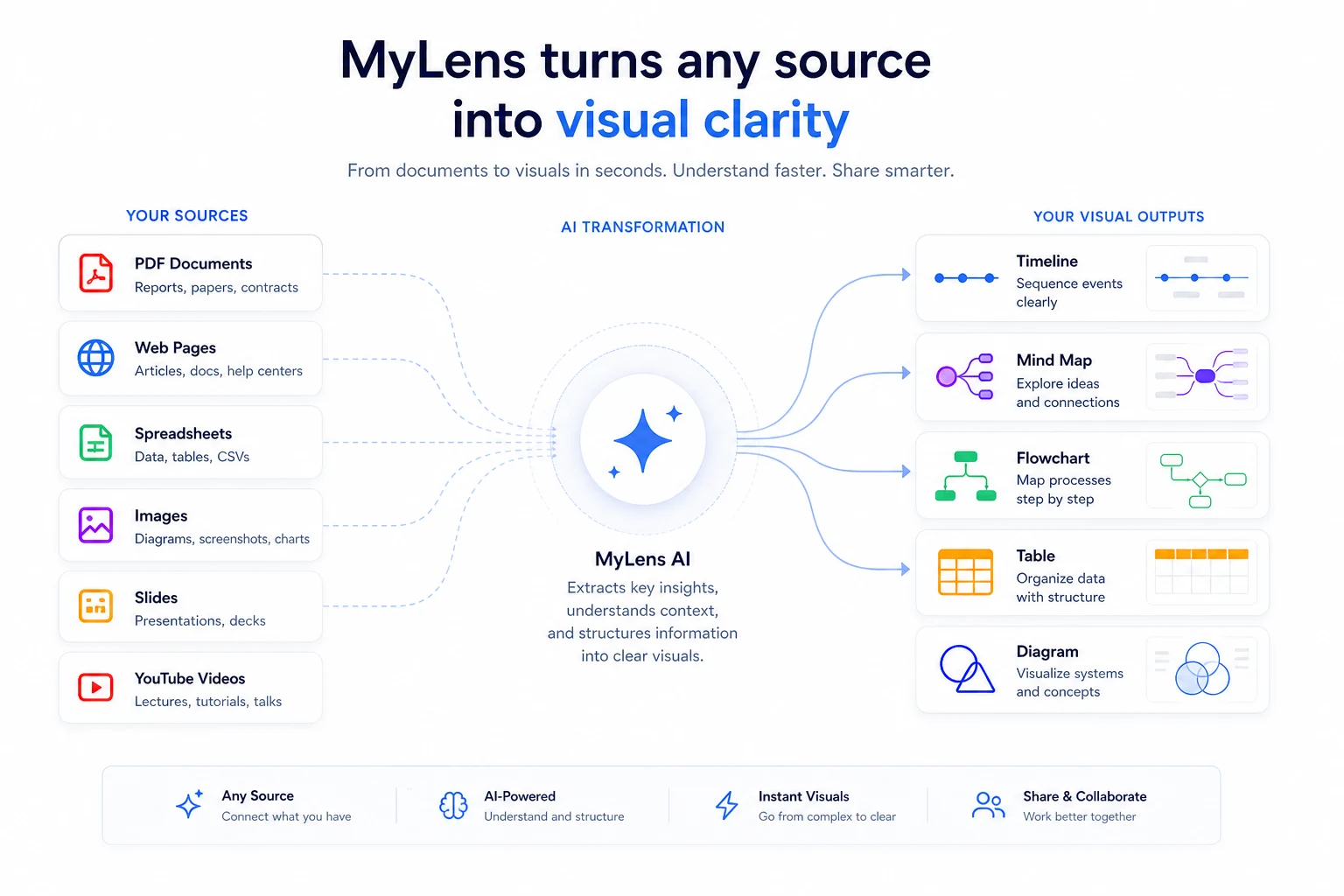
Compare before upgrading: MyLens is strongest for source-linked visuals, but another route may fit better if your main job is broader AI work, whiteboarding, or presentation building.
Evidence confidence
My confidence is high on MyLens’ current public positioning: the official site clearly presents the product as a way to turn sources into AI visuals and diagrams.
My confidence is also high on the main published pricing structure at the time of this review: Free, Pro, Growth, and Enterprise are visible, along with the main AI action and source-limit differences. Buyers should still verify the live page because SaaS pricing can change quickly.
My confidence is high on the refund caution. The terms state that fees are non-refundable once charged and that prorated refunds are not provided.
My confidence is moderate on long-term buyer satisfaction. Product Hunt feedback is positive but limited in sample size, and independent coverage generally describes useful education, research, and content workflows. That is helpful, but it is not the same as a large review base.
My confidence is mixed on enterprise readiness for every organization. The pricing page lists enterprise features such as SSO, enhanced security, custom AI agents, enterprise integrations, custom branding, and dedicated success support. Serious procurement teams should verify these details directly before rollout.
Final verdict
MyLens is a useful tool to consider when the real problem is not writing another summary, but understanding and explaining complicated source material.
That is where it has a clear lane.
I would consider MyLens if you regularly turn documents, webpages, spreadsheets, images, slides, or YouTube videos into learning material, research notes, client explanations, strategy visuals, or team presentations. The product is especially interesting when source-linked visuals help you move faster without losing the ability to verify the original material.
I would skip the paid plan if you only need a simple static mind map, if you rarely work with dense sources, if you need API-first backend automation, or if your material is too sensitive to test in a cloud AI workspace without approval.
I would be especially careful with annual billing. The free plan is not just a nice bonus here. It is the safer evaluation step. Use it to test one real workflow, check whether the output is useful, and identify the first limit that actually blocks your work.
If MyLens passes that test, Pro is the natural plan to compare first. Growth and Enterprise should be reserved for heavier source volume, brand needs, team workflows, security requirements, or serious organizational use.
A coupon or annual saving can improve the final purchase. It should not replace the workflow test.