
MyLens Pricing, Plans & Visual Fit
MyLens is an AI visual-thinking tool for turning messy sources into interactive diagrams, timelines, mind maps, flowcharts, tables, and source-linked visuals. It fits buyers who need to understand dense material faster, especially researchers, educators, consultants, creators, students, and teams that work with documents, websites, spreadsheets, images, and YouTube videos. The store decision is not just whether the visuals look attractive. The real question is whether MyLens can turn your sources into useful, editable, traceable visuals often enough to justify moving from the free plan to Pro, Growth, or Enterprise.
Fit → price → checkout
Use these routes after the official-site check: coupon first, review for fit, compare if unsure.
MyLens pricing snapshot
Fast commercial checks before pricing, coupons, or a deeper review.
MyLens product tour
The product tour video is useful if you are deciding whether MyLens is simply a diagram generator or a practical visual-thinking workspace for dense research, documents, and source material. Watch how the demo moves from raw information into interactive visuals, then pay attention to whether the output can be expanded, edited, and traced back to sources. That is the buyer decision: if MyLens reduces the time you spend reading, summarizing, and redrawing information, the paid plan deserves a closer look. If you only need one quick static diagram, the free path may be enough.
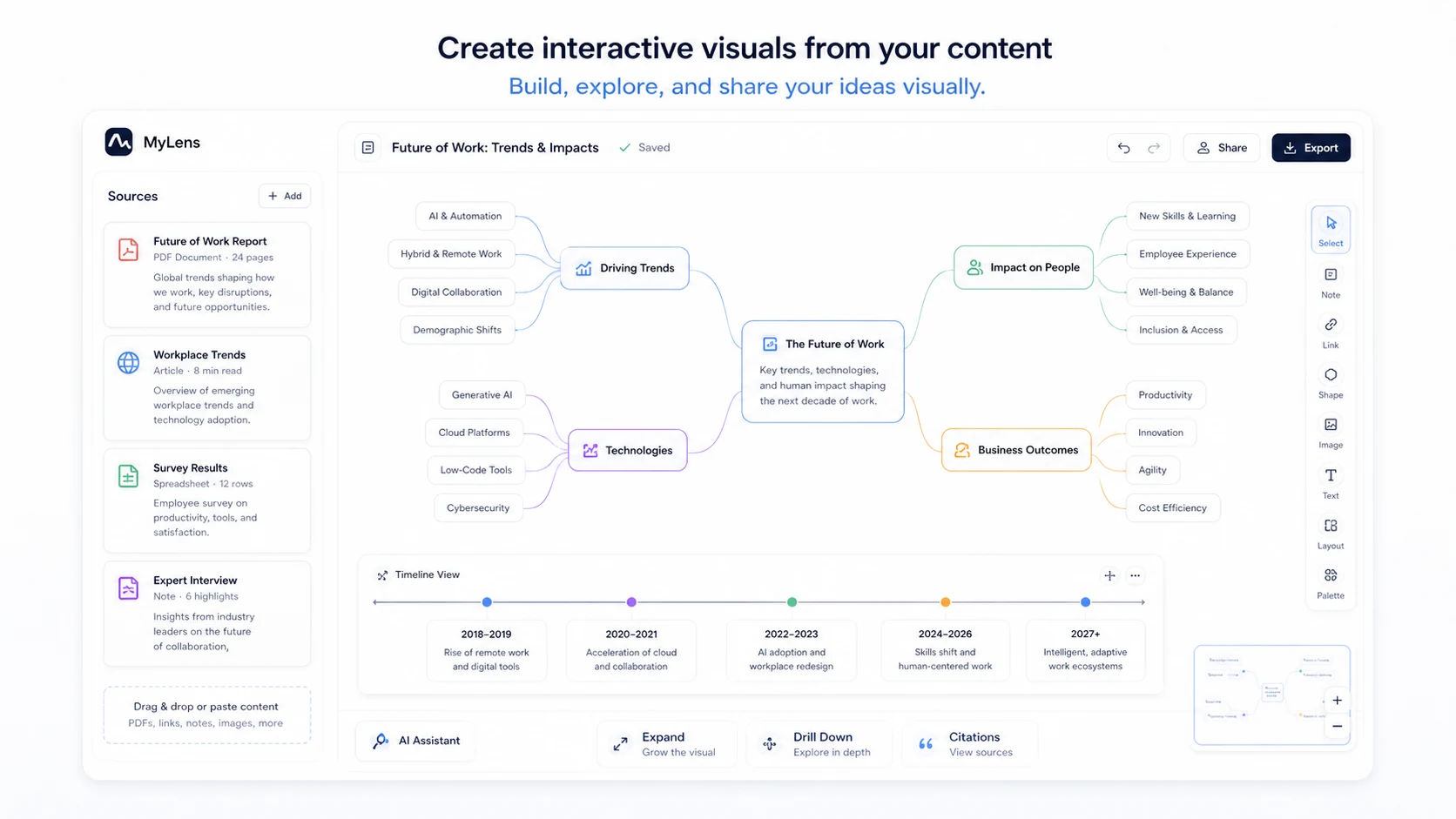
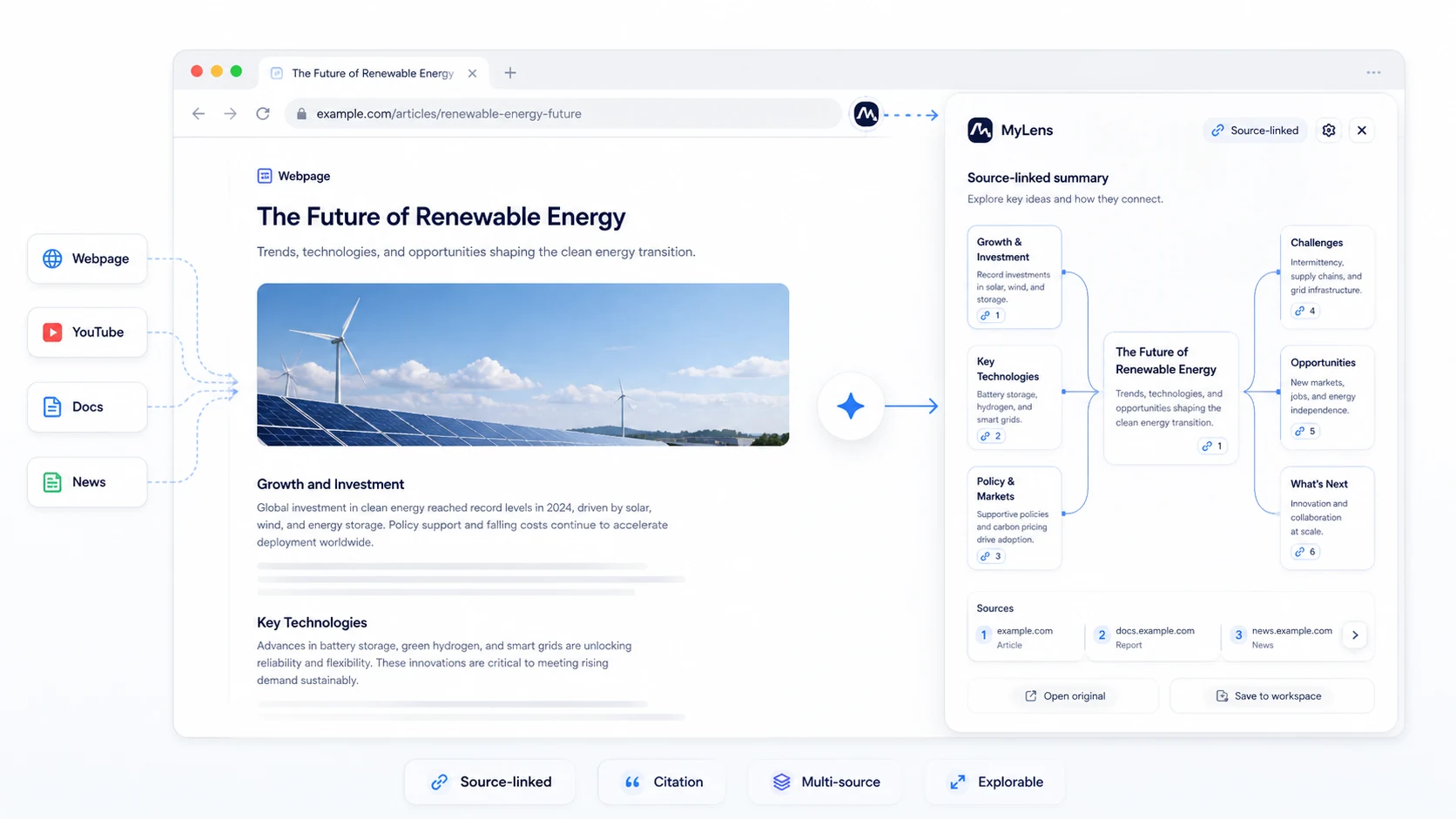
MyLens should be evaluated as an AI visual-thinking workspace, not as a normal note app or a generic summarizer. The buyer problem is simple: you have dense material and need to understand it, explain it, or present it faster. MyLens tries to solve that by turning sources into interactive timelines, mind maps, flowcharts, tables, and source-linked visuals. The free plan is useful for testing, but the paid decision depends on how often you need bigger sources, editable visuals, multiple-source diagrams, deeper analysis, and team-ready presentation output.
What MyLens actually does
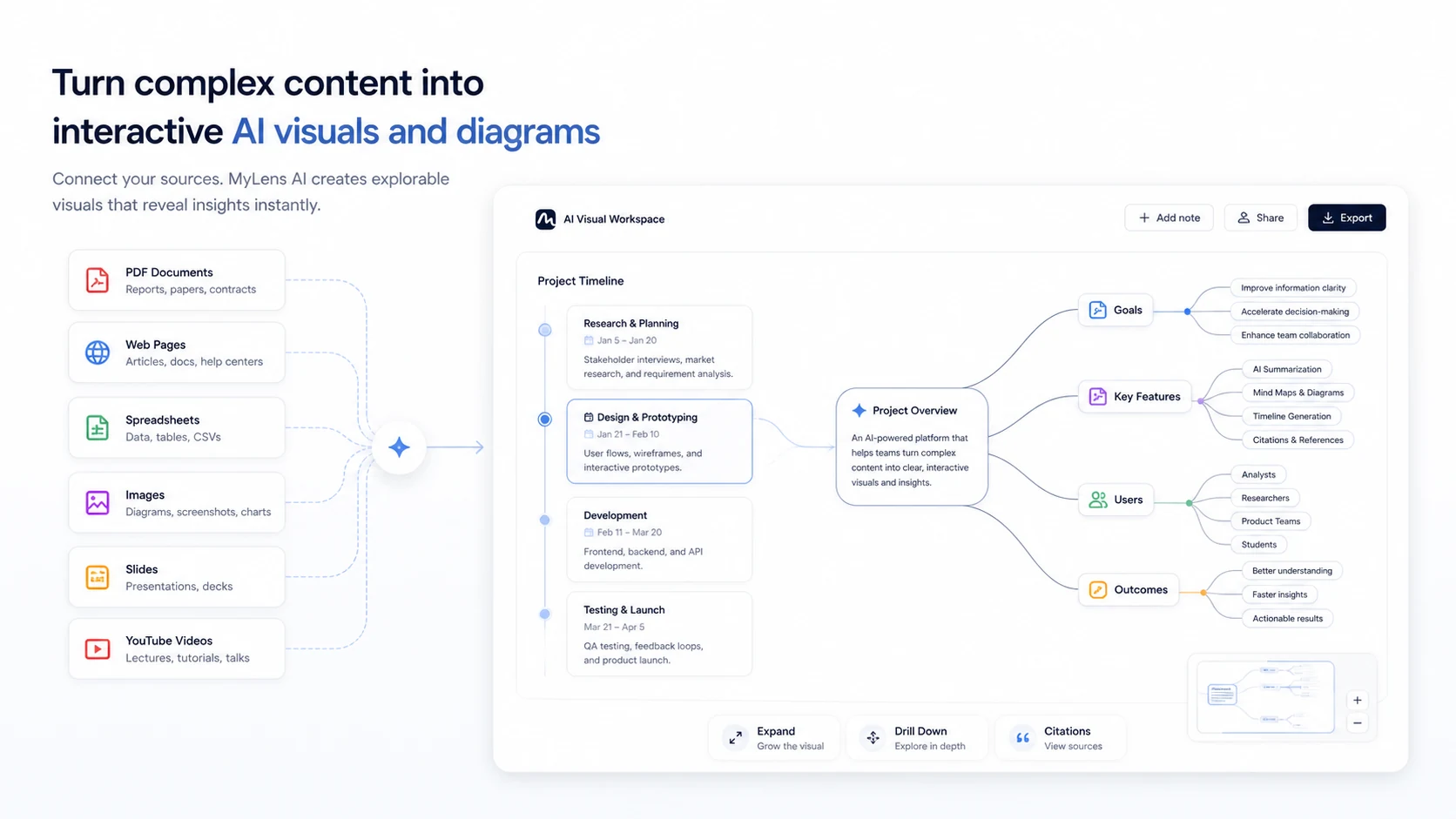
MyLens takes raw or unstructured material and turns it into visuals that are easier to explore. Official pages mention text, PDFs, slides, images, spreadsheets, webpages, and YouTube links. That makes it different from a basic diagram template tool. You are not only drawing a chart. You are asking AI to understand source material, choose a useful visual form, and keep insights connected to the original source.
- Use it to convert dense material into timelines, mind maps, flowcharts, tables, and explorable diagrams.
- Check whether source-linked citations are good enough for your research, teaching, or client workflow.
- Do not judge the product only by visual polish because the real value is whether the visual helps you understand faster.
How the pricing decision works
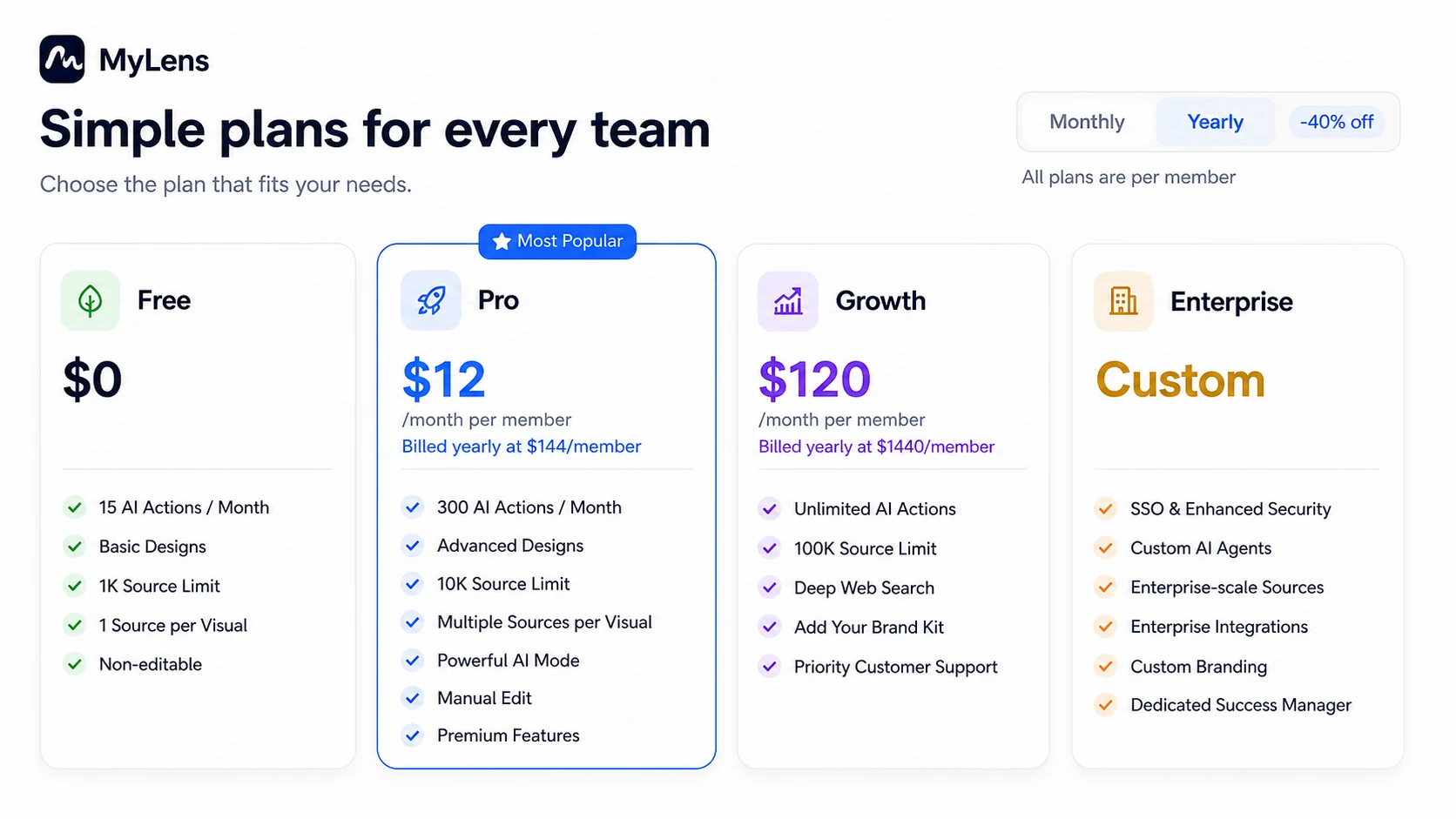
Official pricing starts with a free plan and then moves into paid per-member plans. Free is useful for testing the interface, but it comes with 15 AI actions per month, basic designs, a 1K source limit, one source per visual, and non-editable output. Pro adds more AI actions, advanced designs, a higher source limit, multiple sources per visual, powerful AI mode, manual editing, and premium features. Growth is much more expensive and fits buyers who need unlimited AI actions, larger sources, deep web search, brand kit support, and priority support.
- Compare AI actions, source limits, edit access, and multiple-source support before comparing price alone.
- Use Pro only after the free plan proves that MyLens can handle your real source material.
- Treat Growth as a higher-intensity workflow path, not a casual upgrade.
Free plan privacy and publishing checks
MyLens Terms of Use include a useful detail for cautious buyers: users on the free plan may create public stories, and those stories can be indexed by Google and accessed publicly. That does not make MyLens unsafe by itself, but it changes how you should test the product. Do not begin with sensitive client documents, private research, student data, legal notes, or internal strategy files until you understand what is public, private, shared, and indexed.
- Use non-sensitive sample material for the first test.
- Check whether a visual is private, public, shared, embedded, or indexed before using real work.
- For teams, verify security, SSO, enterprise integrations, and admin requirements before rollout.
YouTube timelines and learning workflows
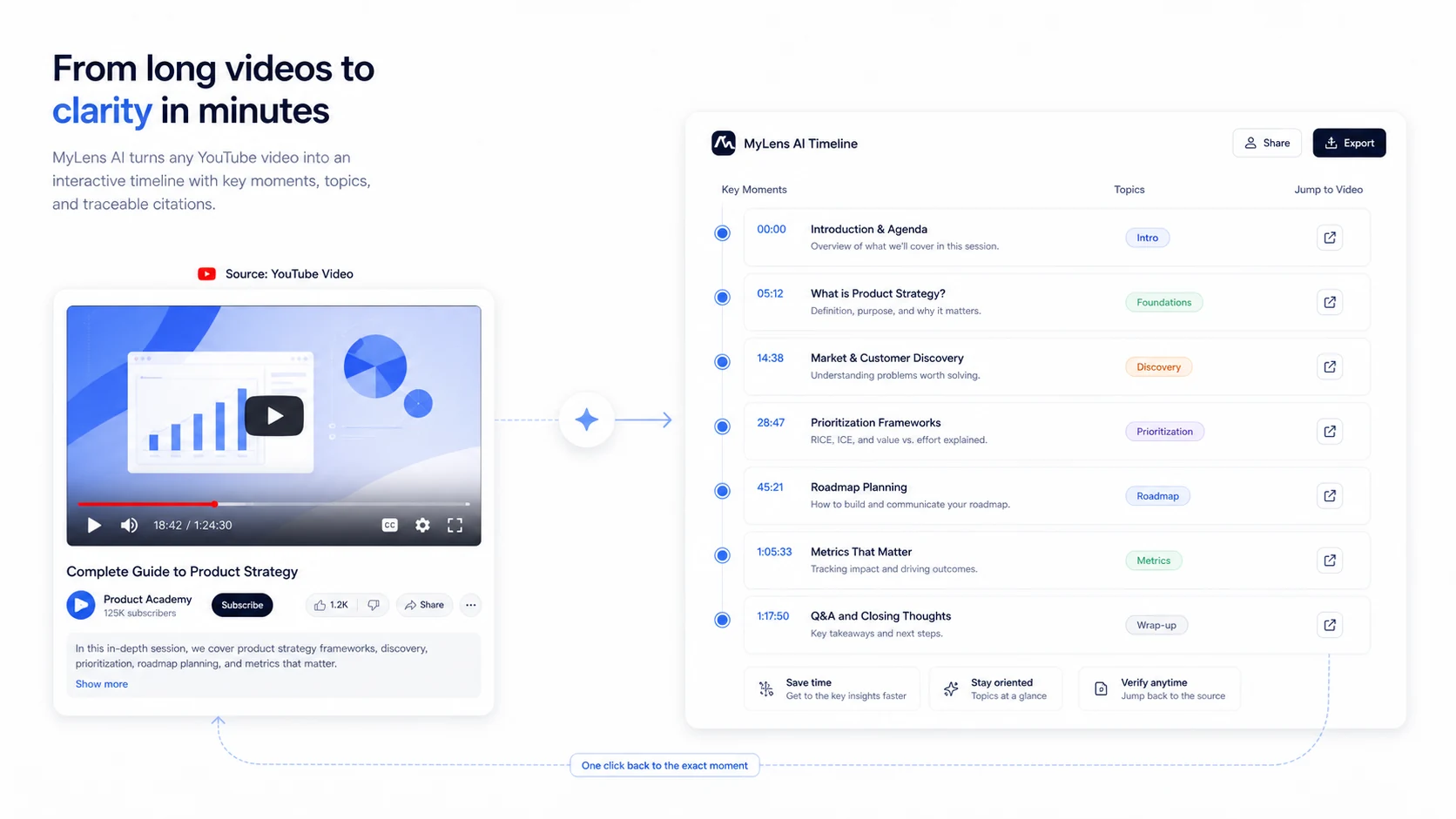
One of the clearest MyLens use cases is turning a YouTube video into an interactive timeline of key moments. The content video below is useful if you want to see whether MyLens can help you understand long lectures, webinars, tutorials, interviews, or research videos without watching every minute. Pay attention to how the timeline surfaces key ideas, expands details, and links back to source moments. That helps a buyer decide whether MyLens is a learning accelerator or just another summary layer.
- Paste a YouTube link and check whether the timeline captures the real structure of the video.
- Use citations to jump back to the original moment instead of trusting a summary blindly.
- Teachers, students, researchers, and content teams should test one long video before upgrading.
Chrome extension and browser research fit
The Chrome extension matters because many buyers do not want to upload every source manually. The extension listing says MyLens can analyze web content from places like YouTube, websites, docs, and news, then turn it into source-linked AI visualizations. This is a stronger fit for people who skim, research, compare, or explain browser content every day. It is a weaker fit if your content mostly sits in a closed internal system or needs custom API automation.
- Use the extension if your research lives across browser tabs.
- Check whether the visuals stay useful when sources are messy, long, or mixed across formats.
- Do not assume extension convenience replaces enterprise security review.
Best next step before checkout
The safest next step is to test MyLens with one real but non-sensitive source and one long video. If the visuals are accurate, editable enough, and useful for sharing, compare Pro against your expected monthly AI actions and source size. If you need brand kit, larger source limits, priority support, or enterprise controls, move slowly and verify Growth or Enterprise terms. Because the official terms say fees are non-refundable once charged, pricing confidence matters before payment.
- Run one document test, one webpage test, and one YouTube timeline test before paying.
- Check whether Pro gives enough capacity or whether Growth is the real plan for your workload.
- Confirm refund terms, public story behavior, privacy needs, and any coupon path before checkout.
Use comparison routes when the category fit is still open
Use these comparison routes when the product still looks plausible, but the category fit is not fully settled.
1min.AI is broader for buyers who want many AI tools in one workspace, while MyLens is more focused on turning sources into interactive visuals and diagrams.
Aikeedo is better suited to buyers building or owning an AI SaaS product, while MyLens is better for people who need visual understanding from existing content.
Verification points worth checking before you click out
Where this store usually fits best in the workflow
Use MyLens when you need to turn dense sources, websites, PDFs, spreadsheets, or videos into visuals that help you see structure and explain findings faster.
MyLens fits teachers, students, and course creators who want timelines, mind maps, and flowcharts from source material, especially when citations and shareability matter.
Consultants can use MyLens to turn discovery notes, webpages, and research sources into diagrams that make complex ideas easier to present and discuss.
MyLens is useful when long YouTube videos, webinars, interviews, or lectures need to become structured timelines with key moments and source references.
Practical checkpoints before and after signup
- Choose one non-sensitive source that represents your real work.
- Decide whether you need a timeline, mind map, flowchart, table, or source-linked visual.
- Check public story, sharing, and indexing behavior before using private content.
- Measure whether 15 AI actions are enough to test the core workflow.
- Compare output usefulness against manual notes, static diagrams, and simpler summarizers.
- Check whether the 1K source limit and non-editable output block your real use case.
- Upgrade to Pro only if manual editing, advanced designs, multiple sources, and higher source limits matter.
- Consider Growth only when unlimited AI actions, 100K source limit, deep web search, and brand kit support are genuinely needed.
- Read non-refundable fee terms before choosing yearly billing or a larger per-member plan.
- Verify whether SSO, enhanced security, enterprise integrations, custom AI agents, and dedicated success support are needed.
- Define which source types are allowed for upload or browser analysis.
- Review share, embed, citation, and public visibility behavior before inviting a team.
Fast-read signals for workflow fit and buying friction
Questions readers usually ask before choosing this store
What does MyLens actually do?
MyLens turns sources such as text, PDFs, slides, images, spreadsheets, webpages, and YouTube links into interactive AI visuals. The main value is helping buyers understand, explore, and present complex material through timelines, mind maps, flowcharts, tables, and source-linked diagrams.
Is MyLens free to use?
Yes. The official pricing page shows a Free plan at $0 with 15 AI actions per month, basic designs, a 1K source limit, one source per visual, and non-editable output. That makes the free plan useful for testing, but not always enough for serious editing or larger source workflows.
How should buyers compare MyLens plans?
Compare AI actions, source limits, source count per visual, edit access, advanced designs, brand kit needs, deep web search, and enterprise controls. The lowest paid price is not the whole decision because source size and editability can matter more than the headline monthly number.
Does MyLens offer refunds?
MyLens Terms of Use say all fees are non-refundable once charged and that prorated refunds, credits, or partial billing adjustments are not provided for unused time or canceled subscriptions. Buyers should verify the live terms before selecting annual billing.
What is the safest next step before buying MyLens?
Start with the free plan using non-sensitive material. Test one document, one webpage, and one YouTube video. If the visuals are useful, editable enough, and easy to verify through citations, then compare Pro, Growth, Enterprise, annual savings, and any checkout-tested coupon path.
Choose the next route that matches what you still need to decide
The strongest next click depends on whether you still need product judgment, a savings route, or a broader category comparison.