Quick verdict
Mureka is worth considering if you want fast AI music creation for videos, podcasts, lyric demos, social campaigns, or early songwriting ideas. I would not judge it only by the promise of “royalty-free” AI music or by the low-looking annual plan price.
The real question is narrower: can Mureka produce tracks that are useful enough for your actual publishing workflow, and can you clearly verify the rights, exports, and plan limits before you pay?
That is where the buying decision gets more interesting. Mureka is not just a casual text-to-song toy. Its public positioning covers AI songs, lyrics, vocals, background music, mobile creation, and a separate developer API. That gives it a wider reach than a simple stock-music replacement. It also creates more buyer checks: Basic versus Pro, MP3 versus WAV or stems, creator subscription versus API credits, and commercial-use wording versus the rules of the platform where you plan to publish.
For my money, Mureka makes the most sense when you already have a repeated use case: YouTube intros, podcast beds, ad soundtracks, demo vocals, quick campaign music, or app-level music generation. It is weaker if you expect traditional production control, guaranteed rights certainty across every publishing situation, or a refund-friendly way to experiment with API credits.
The safest next step is to test a few real prompts first, then use the Mureka store page for the current buyer route only after the output and rights language make sense.
Next step: If Mureka still fits your music workflow, test the current creator route before comparing paid plan limits.
Review snapshot
| Review point | Practical take |
|---|---|
| Best for | Creators, songwriters, marketers, podcasters, and developers who need fast AI-generated music or song ideas |
| Not ideal for | Buyers who need traditional production control, guaranteed rights comfort, or a simple refund path for API usage |
| Main use case | Turning prompts, lyrics, moods, vocals, or references into songs, background tracks, demos, and creative audio ideas |
| Free path | Useful for testing output style before choosing a paid creator plan |
| Public creator pricing | Basic and Pro are publicly presented as annual-billing plan options, with Pro unlocking more serious export and editing needs |
| Main strength | Fast music generation with vocals, lyrics, creator workflow, mobile access, and API support |
| Main concern | Rights language, export needs, annual billing, API billing separation, and refund rules require careful reading |
| Best alternatives to compare | Mubert for generative background music, Thematic for licensed creator music, Freebeat for creator-video workflows |
| Best next step | Generate a few project-specific tracks, then decide whether Basic, Pro, or the separate API path fits |
What is Mureka?
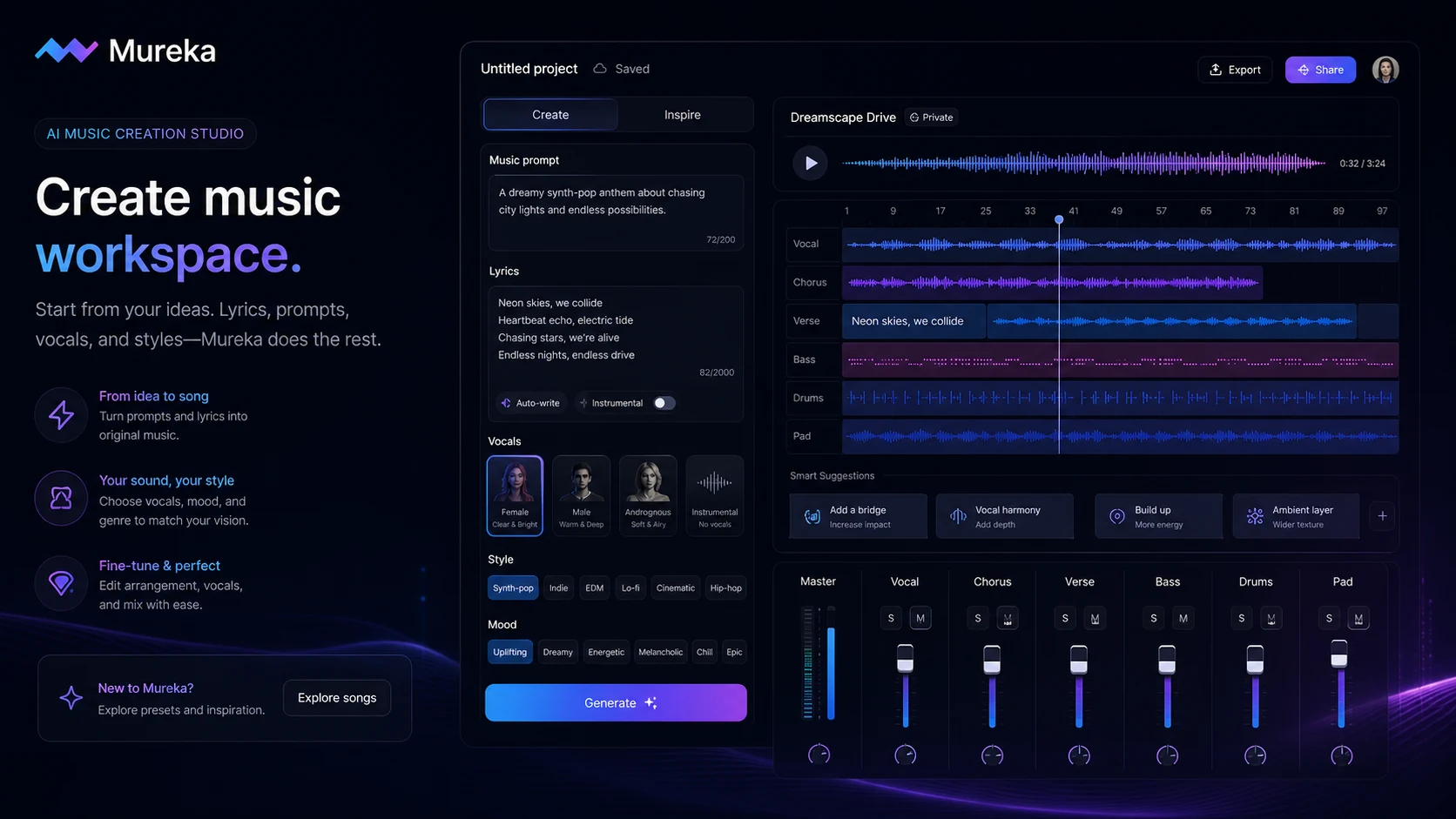
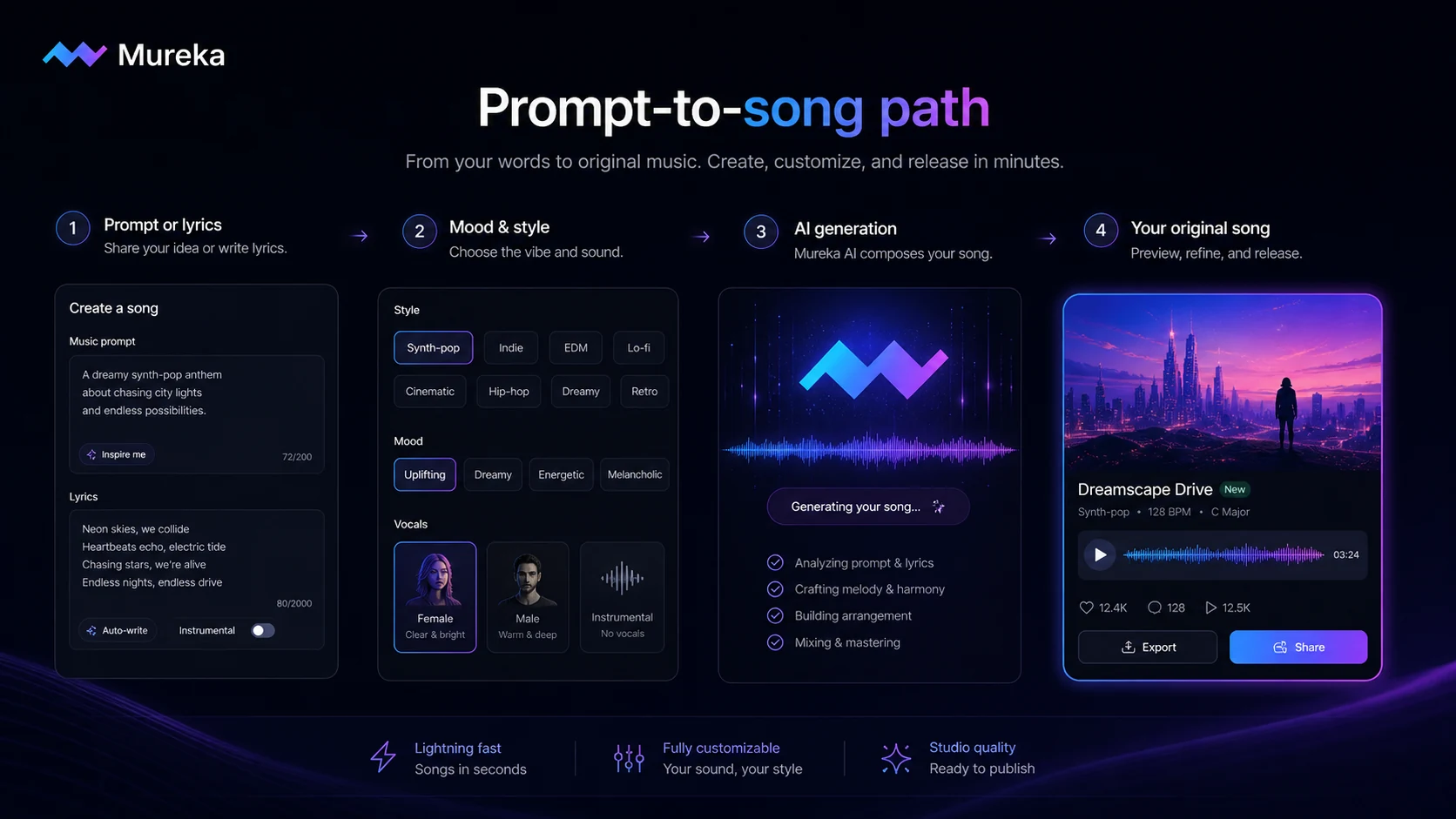
Mureka is best understood as an AI music and song-generation platform for people who want to turn ideas into usable audio faster. The core job is simple: describe a song, mood, genre, lyric, vocal direction, or reference-style idea, then let the system generate music that can become a soundtrack, demo, background bed, vocal concept, or creative starting point.
The public product positioning is broad. Mureka presents itself around AI music generation, lyrics, vocals, instrumental tracks, commercial-use music, mobile creation, and developer access through an API. That puts it closer to the AI creator stack than a normal productivity tool.
It is not a full replacement for a producer, a DAW, a session musician, a music supervisor, or a legal review process. That matters.
A buyer can be impressed by a generated track and still make a bad purchase if the export format is wrong, the rights language is unclear, the plan limit is too small, or the API cost model does not match the app they want to build. The useful way to review Mureka is not “can it make music?” It can. The better question is “does it make music that fits my project, and does the plan give me the control I need?”
Our review approach: we compare public product pages, pricing details, developer documentation, app listings, terms signals, buyer workflow fit, and nearby alternatives. We do not treat a low annual price, a free test path, or a music demo as proof that the product fits every creator. The stronger judgment comes from plan fit, export needs, rights caution, and repeatable use.
Who should use Mureka?
Mureka fits creators who need fresh music often enough that stock libraries start to feel slow or repetitive. A YouTube creator, short-form video editor, podcast producer, or ad maker may find value if Mureka can quickly create tracks that match a mood, intro, transition, or campaign idea.
It also fits songwriters and musicians who want idea generation. In that case, Mureka is not replacing craft. It is more like a fast sketchpad. You can test a lyric direction, vocal texture, genre mood, or melody concept before deciding what deserves manual work.
Marketers and small teams may also find it useful when campaign music needs to feel custom but the budget does not justify a commissioned track. This is where I would be more careful, though. Client work and paid ads raise the importance of rights language, account records, and platform rules.
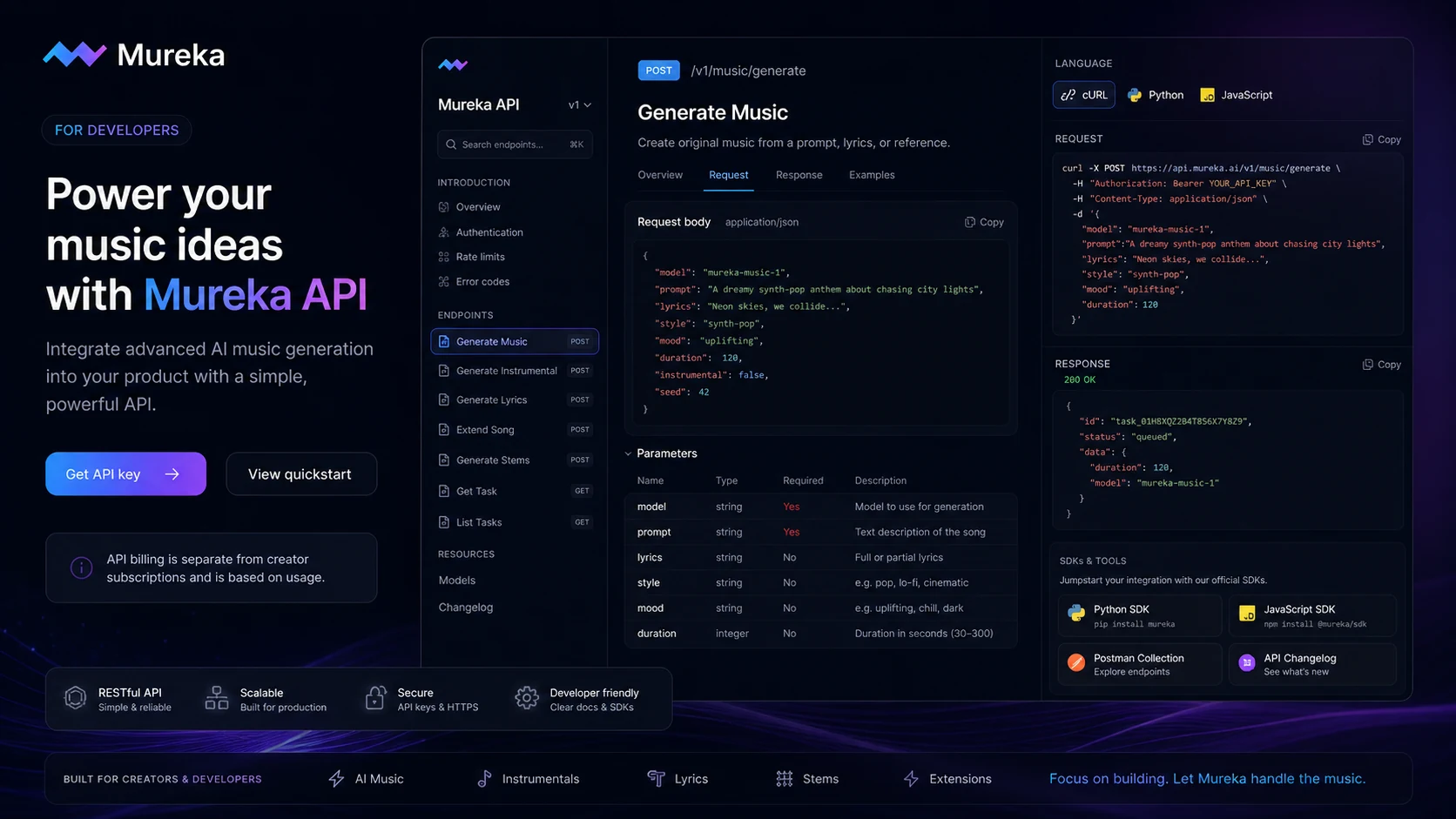
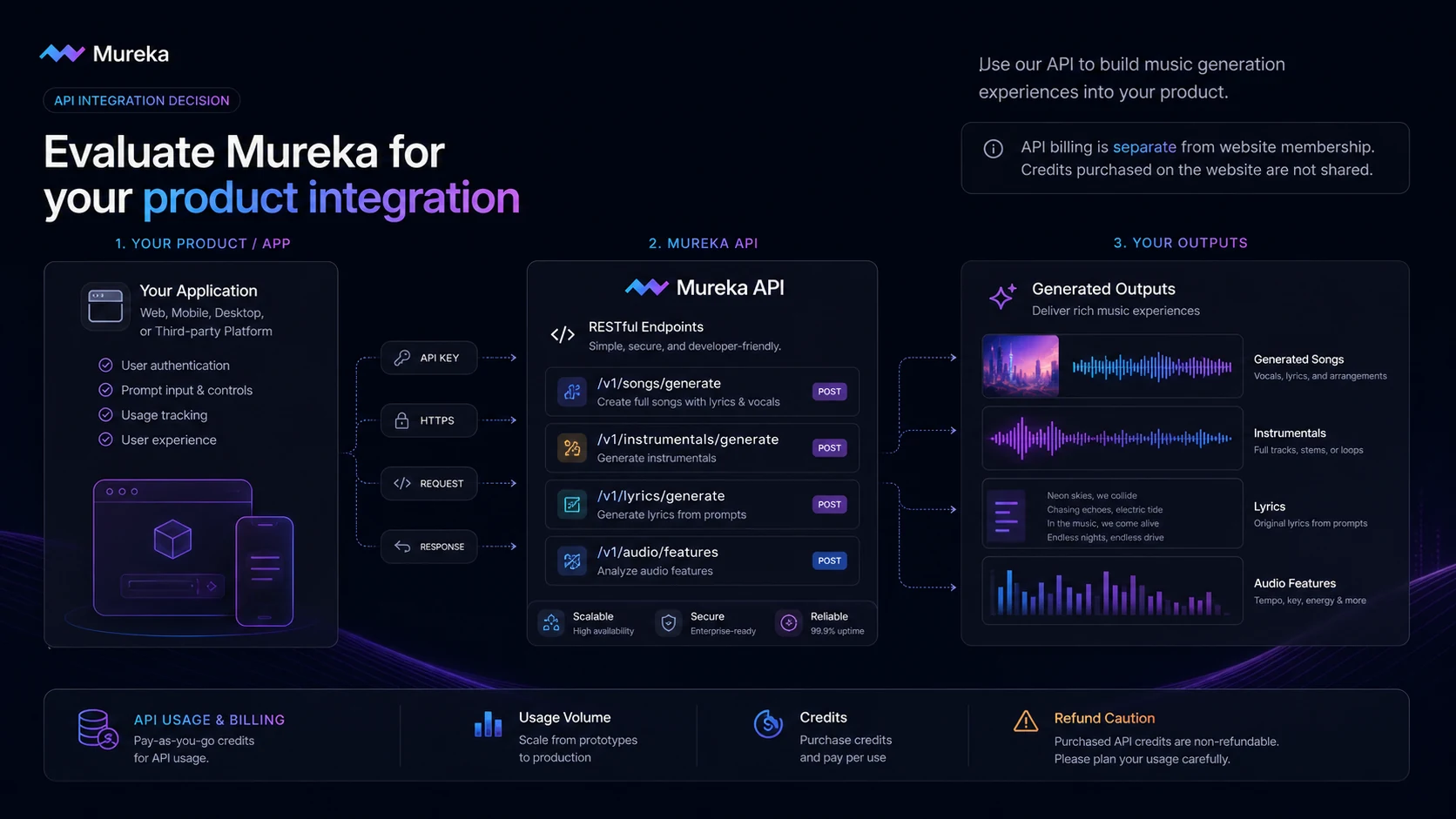
Developers are a separate audience. Mureka’s API documentation makes it relevant for apps, games, creator platforms, and audio tools that need music generation inside a product. But developers should not evaluate the API like a creator subscription. API credits, validity, concurrency, endpoint behavior, and refund risk become part of the buying decision.
Beginners can use Mureka too, especially through the web or mobile routes. The product appears designed to reduce the need for music theory or production knowledge. Still, beginners should avoid jumping straight to annual billing until they know whether the sound quality and exports match their real use case.
Who should avoid Mureka?
I would be careful with Mureka if you need exact production control from the first draft. AI music can be useful, but it can also miss emotional nuance, arrangement intent, vocal phrasing, or brand-specific taste. A serious music production workflow may still need a producer, musician, editor, or DAW-based finishing process.
I would also slow down if you need strict legal certainty. Mureka’s public pages and app listings use strong commercial-rights language, but commercial use is not a casual detail. Client campaigns, streaming distribution, ads, and platform monetization can all create different risk levels. A careful buyer should read the current terms and keep proof of the plan terms attached to generated tracks.
Mureka may not be ideal if you only need licensed music discovery. If your main goal is to find already-cleared creator music rather than generate new tracks, a route like Thematic may be a better fit.
It is also not the first choice if you want a simple “pay once and experiment safely” API buying path. The API FAQ describes a separate billing and credit system from the website membership, and API purchases are not positioned as refund-friendly. That is fine for developers who know their volume. It is risky for buyers still guessing.
Finally, avoid buying only because a plan looks cheap. A low annual equivalent does not help if you need Pro-only exports, stems, advanced editing, reference audio, voice features, or API access.
How Mureka fits into a real workflow
A practical Mureka workflow starts before you generate anything.
First, define the music job. Is this a background track for a video? A vocal demo? A podcast intro? A lyric-to-song draft? A campaign soundtrack? An API-generated asset inside another product? Each use case changes what “good enough” means.
Second, write prompts that match real work. Generic prompts may show the tool can make sound, but they do not tell you whether it can make your sound. A better test uses your actual mood, genre, duration, vocal direction, energy level, and publishing context.
Third, judge the output like a buyer. Listen for structure, vocal believability, repetitive phrasing, ending quality, mix feel, and whether the track solves a real content problem. The impressive demo is not always the usable track.
Fourth, check the plan pressure. If MP3 is enough, a lighter plan may work. If you need WAV, stems, instrumental exports, advanced editing, reference audio, or voice cloning, the Pro route becomes more relevant.
Fifth, confirm the rights and checkout route. This is especially important if the track will be used commercially, delivered to a client, uploaded to a monetized channel, or generated through the API.
Workflow check: Use Mureka with a real soundtrack, demo, or content idea before treating the paid plan as the next step.
Real-world buyer scenarios
A YouTube creator who needs background music
A YouTube creator may use Mureka to create intros, transitions, background beds, or mood-specific tracks. This can save time compared with searching stock libraries every week.
The fit depends on output consistency. If the creator needs quick custom music and is comfortable checking rights, Mureka can be useful. If the channel relies on a very specific brand sound, stock music or a human producer may still be safer.
A songwriter testing lyric and vocal ideas
A songwriter can use Mureka as a draft engine. Instead of waiting until a full production session, they can test lyrics, melodies, moods, and vocal textures quickly.
The risk is overvaluing the first impressive result. AI song drafts can inspire, but they do not replace taste, editing, arrangement, and emotional performance. I would use Mureka for direction, not final artistic judgment.
A marketer creating campaign sound options
A marketer might use Mureka to explore several sonic directions for ads, social posts, or branded content. That can be valuable when the goal is quick concept testing.
The buyer check is rights and approval. Before using generated music in paid campaigns, the team should confirm commercial-use terms, store account records, and check whether the client’s usage policy allows AI-generated audio.
A developer building music generation into a product
A developer has a different decision. The API route can be useful when music generation needs to live inside an app, game, or creator tool.
This is where the API documentation matters more than the homepage. Developers should confirm endpoints, API key handling, usage costs, concurrency, credit validity, commercial authorization, and the non-refundable nature of API purchases before building around Mureka.
Key features that actually matter
Prompt-to-music and lyric-to-song generation
The central feature is the ability to turn a prompt, lyric, genre, mood, or creative idea into a generated track. This matters because many creators do not want to start with a blank DAW session or search hundreds of licensed tracks.
The limitation is control. Prompt-based music is fast, but not always precise. The buyer note is simple: judge Mureka by whether you can get one usable track for your real project, not by whether the demo sounds impressive.
Vocal and style direction
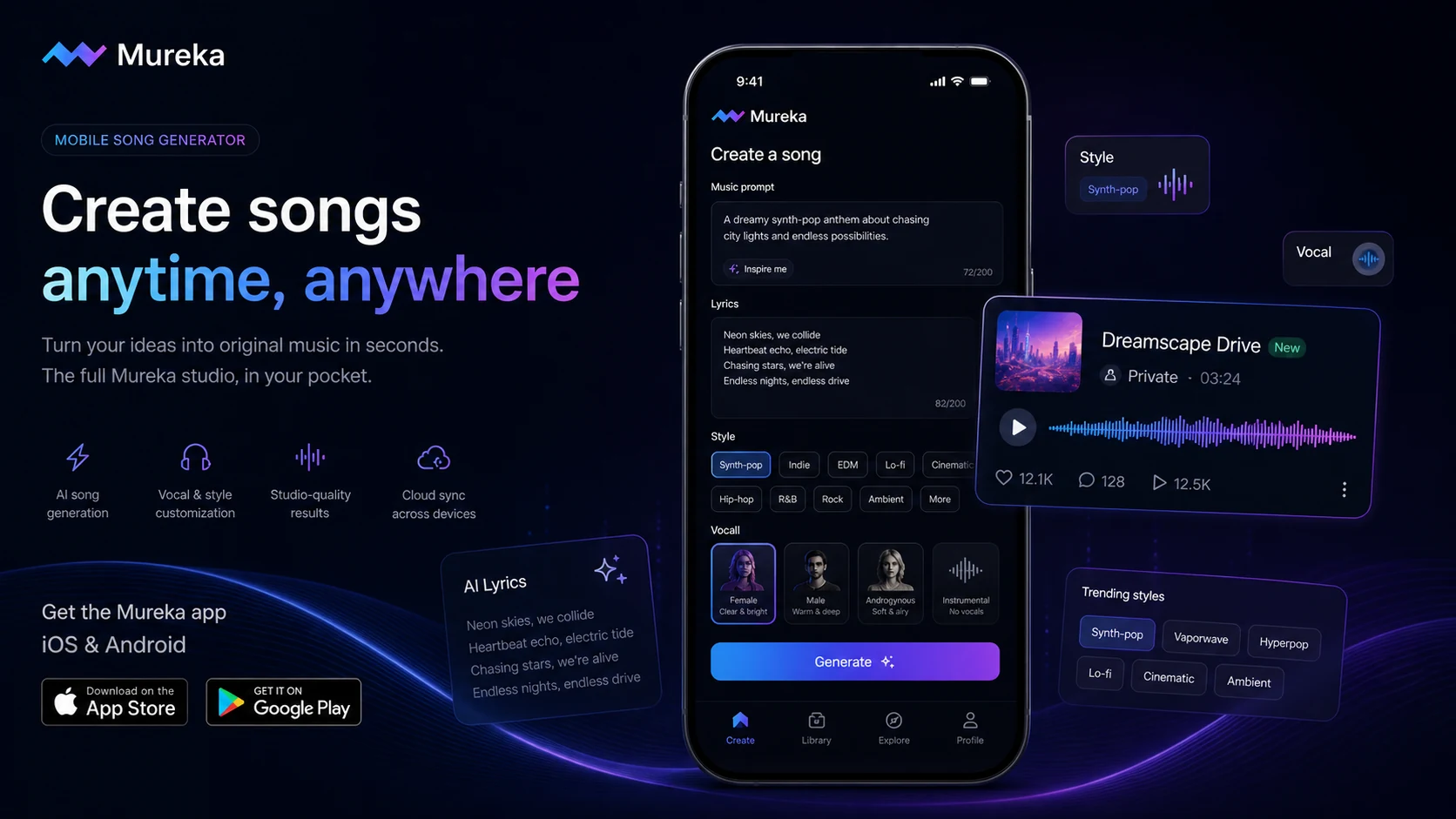
Mureka’s mobile listings emphasize vocal tone choice, style customization, and similar-song generation from reference ideas. Those features matter when the buyer wants more than generic background audio.
I would still treat vocal and style matching as a test-first feature. The closer your project depends on a specific vocal texture or emotional feel, the more important it is to test multiple outputs before paying annually.
Export formats and stems
Exports are where casual curiosity turns into workflow value. MP3 may be enough for simple social content. WAV and stems matter more if you plan to edit, mix, hand off, or combine generated music with a broader production process.
This is one reason the cheapest plan is not automatically the best deal. If the export you need sits in a higher tier, the lower plan may only prove that Mureka works, not that it works for your workflow.
Mobile app access
The iOS and Android listings make Mureka easier to test casually. That is useful for creators who draft ideas while traveling, filming, editing, or brainstorming outside a studio environment.
The buyer caution is billing. App-store purchases, web subscriptions, and API purchases can follow different routes. I would not assume one route gives the same refund, credit, or feature access as another.
Developer API
Mureka’s API platform is a real part of the product story. The documentation lists music, instrumental, lyrics, song extension, vocal cloning, stem, region editing, remix, upload, speech, podcast, and billing-related references.
That is useful for technical buyers. It also raises the risk. API keys, credit validity, separate billing, concurrency, and non-refundable purchase language make this a more serious decision than a creator plan.
Pricing and plan value
Mureka’s creator pricing is easier to understand than many AI music tools, but it still needs careful reading.
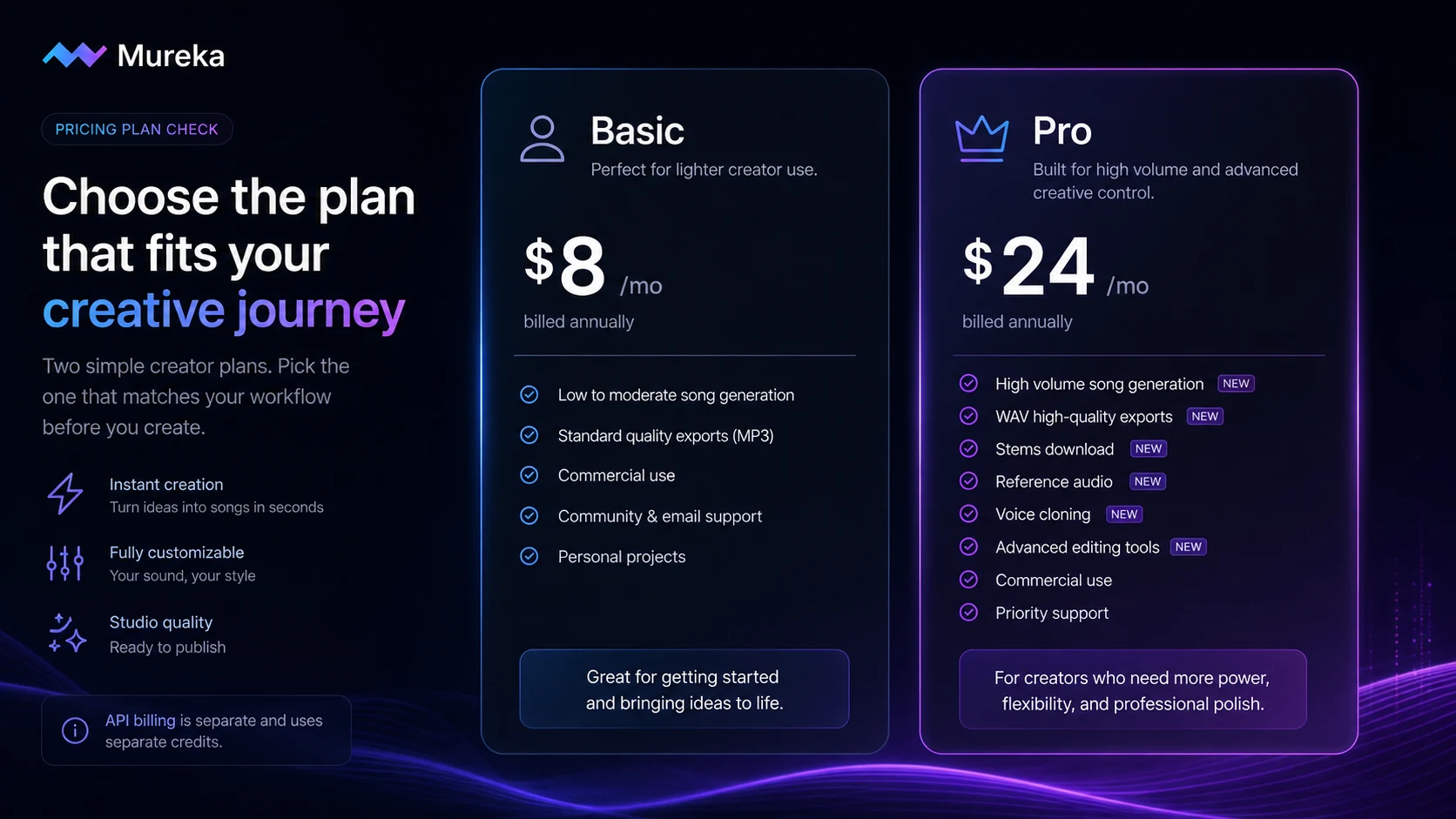
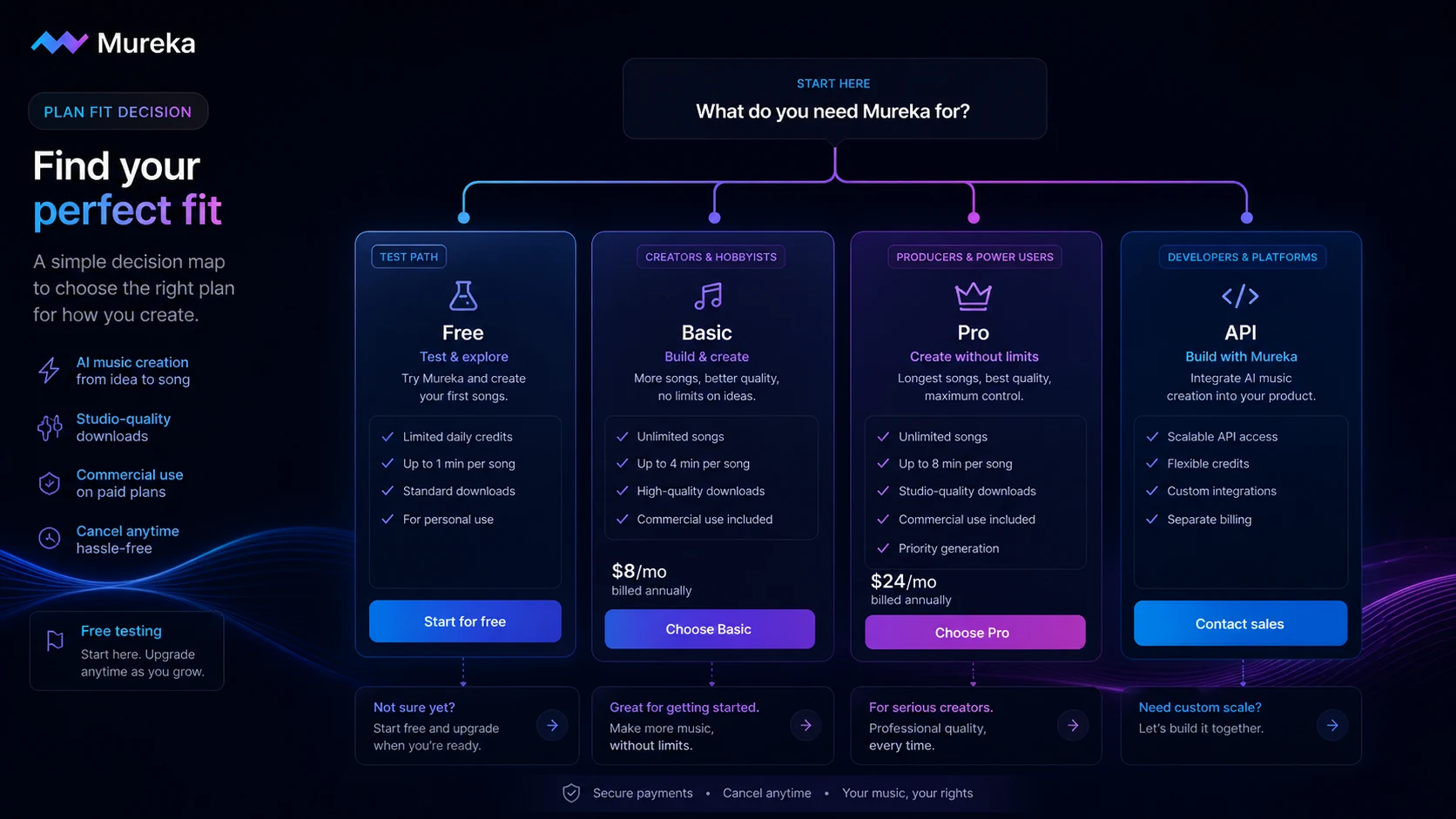
The public plan reference in the current homepage positions Basic Music & Speech at $8 per month when billed annually, and Pro at $24 per month when billed annually. Basic is the lighter creator route. Pro is where the more serious export and editing needs begin to matter.
Basic can make sense if your needs are simple: recurring music generation, lighter usage, MP3 downloads, and commercial-use positioning for everyday creator work. It is not the plan I would choose if stems, WAV, reference audio, voice cloning, or advanced editing are central to the workflow.
Pro is the more realistic plan for heavier creators, songwriters, and editors who expect to revise, export, repurpose, and hand tracks into a wider production process. The jump only makes sense if those extra controls will actually be used.
The API path should be judged separately. Mureka’s API FAQ says website membership and credits are not linked to the API platform. It also describes separate API billing, credit validity, and no-refund language. That means a developer should not look at the Basic or Pro creator plan and assume it explains API economics.
Pricing check: If Mureka passes your output test, compare the current plan limits and API rules before choosing Basic, Pro, or credits.
Free plan, trial, coupon, and checkout notes
The free path is the right first step for most buyers. Use it to test whether Mureka understands your prompts, produces usable vocal or instrumental quality, and creates tracks that match the kind of content you actually publish.
Do not use the free path to prove long-term value. A few good generations can show promise. They do not prove that the plan limits, exports, rights, and billing route are right for you.
The coupon path should come after the workflow check. Mureka is the kind of product where a discount can make a good purchase better, but it cannot fix the wrong plan. If you need stems and choose a cheaper tier without them, the discount did not save money. It delayed the real decision.
The app route also deserves attention. The App Store and Google Play listings confirm mobile availability, but app purchases can differ from web checkout. If you subscribe through a mobile store, read that store’s cancellation and refund mechanics.
For API buyers, be more careful. The API FAQ says the API platform has separate billing and credits, and that refunds are not supported for API services once purchased. That is not automatically a problem, but it means the test should happen before buying meaningful credit volume.
Offer caution: Check active offers only after Mureka fits your music use case, export needs, and rights comfort level.
What I would check before buying Mureka
If I were buying Mureka for a real creator workflow, I would check these points before annual billing or API credits.
- Whether the free path generates tracks close enough to my real content style.
- Whether I need MP3 only, or whether WAV, stems, instrumental exports, or advanced editing are required.
- Whether commercial-use wording matches my publishing route: social video, client work, ads, streaming, or app distribution.
- Whether Basic is enough, or whether Pro-only features decide the purchase.
- Whether the checkout route is web, iOS, Android, or API, because billing mechanics can differ.
- Whether API credits, validity, concurrency, and refund terms match the expected product volume.
- Whether an alternative route is safer if I mainly need licensed background music instead of generated songs.
A simple test before paying
Before paying, I would run a small test like this:
- Create one prompt for a real social video, podcast, or ad soundtrack.
- Create one lyric-based or vocal-focused track if songs matter to your workflow.
- Create one background or instrumental track that must sit under voiceover.
- Compare how many generations it takes to get a usable result.
- Check whether the usable result requires WAV, stems, reference audio, or advanced editing.
- Read the commercial-use and refund language for your exact checkout route.
- Only then decide whether Basic, Pro, or the API path makes sense.
The goal is not to find out whether Mureka can produce music. The goal is to find out whether it can produce your kind of usable music often enough to justify a plan.
Pros explained
The first real advantage is speed. Mureka can help creators move from an idea to a finished-sounding draft much faster than traditional composition or stock-library searching. That matters when the music is supporting a video, podcast, ad, or social campaign rather than becoming a standalone artistic release.
The second advantage is range. Prompting, lyrics, vocals, reference-style generation, and mobile access give buyers more ways to start. That can be useful for people who do not think like producers but know the mood or outcome they want.
The third advantage is plan clarity. Basic and Pro are easier to compare than purely usage-based systems. Buyers can at least see a creator-plan ladder before checkout.
The fourth advantage is API access. For developers, Mureka is not only a consumer creator app. The API platform creates a path for apps and products that need music generation at scale.
The final advantage is commercial-use positioning. Mureka clearly understands that creators care about rights. I still would verify the current terms, but the product is at least addressing a real buyer concern.
Cons explained
The biggest limitation is that rights are not a throwaway detail. AI-generated music can touch client work, ads, streaming platforms, creator monetization, and brand policies. A homepage statement is not enough for serious commercial use. Buyers should preserve current license evidence and check platform rules.
The second limitation is plan mismatch. Basic may look attractive, but it can become limiting if your workflow requires WAV, stems, reference uploads, voice cloning, or advanced editing. A cheaper plan is not cheaper if it blocks the work you bought the tool to do.
The third limitation is API separation. Website membership and API credits are not the same pool. Developers who miss that point may underestimate cost or assume access that does not exist.
The fourth limitation is refund risk. API services and credits are not presented as flexible, refundable experiments. That makes pre-purchase testing and small-volume validation important.
The fifth limitation is creative consistency. Like other AI music tools, output quality can vary. A few strong generations are promising, but repeated use is what proves value.
Green flags and red flags
Green flags:
- You can generate two or three tracks that fit real projects, not just demo prompts.
- The plan you choose includes the exports and editing controls you actually need.
- You understand the difference between the creator subscription and API billing.
- You have verified commercial-use language for your publishing context.
- You expect to use AI music repeatedly, not just once.
Red flags:
- You are buying because the annual monthly equivalent looks low.
- You need stems, WAV, reference audio, or voice features but are choosing a plan that may not include them.
- You are planning client or paid-ad usage without reading rights language.
- You are buying API credits before testing endpoints and expected volume.
- You expect Mureka to replace all musical judgment or production finishing.
Mureka vs alternatives
Mureka should be compared by buyer job, not just by the phrase “AI music.”
Mubert vs Mureka
Mubert is often the cleaner comparison when the buyer mainly needs generative background music, loops, or soundtrack-style audio. It may be easier to evaluate if your workflow is less about lyric-to-song drafts and more about consistent background music.
Mureka may make more sense if vocals, lyrics, song drafts, reference-style generation, and broader creator experimentation matter.
Freebeat vs Mureka
Freebeat is more relevant when the creator workflow is tied to short-form video energy, movement, or content performance. It is not necessarily a one-to-one replacement for a song-generation tool.
Mureka is stronger when the buyer wants music creation itself: lyrics, songs, vocals, instrumental ideas, and track generation.
Thematic vs Mureka
Thematic is an adjacent route, not a direct Mureka replacement. It is better when the buyer wants creator-safe music discovery and licensing rather than generating original tracks from prompts.
Mureka is better when the buyer wants to create custom music, but it also places more responsibility on the buyer to understand generated-music rights and platform policies.
Unchained Music vs Mureka
Unchained Music belongs to a different part of the music workflow. It is more relevant after the track exists, when distribution or music business infrastructure matters.
Mureka is closer to the creation stage. If your real problem starts after the music is made, Mureka may not be the main tool to solve it.
Suno and Udio as broader market comparisons
Suno and Udio are useful outside comparisons because many buyers think of them first when discussing AI songs. Mureka’s differentiator is not that it exists in a separate universe. It is that buyers should test whether its vocal style, creator controls, mobile experience, and API path fit their use case better.
Trust, refund, and buyer-risk notes
My confidence is strongest around Mureka’s product role: AI music generation for creators, songwriters, marketers, and developers. The public product pages, mobile listings, and API documentation all point in that direction.
I am more cautious around checkout mechanics, rights interpretation, and API buying. Those are the areas where buyers can make expensive assumptions.
The terms and app-store routes matter because subscription purchases, mobile purchases, and API purchases can follow different mechanics. The API FAQ is especially clear that website membership and API credits are not linked. It also says API services are non-refundable once purchased. That should change how developers test the product.
Commercial rights also deserve careful reading. Mureka’s public materials use strong ownership and commercial-use language, including for paid API calls. That is useful, but buyers still need to check the current terms for their exact account route and the rules of the platform where the music will be uploaded or monetized.
Do not buy on a headline price alone. Do not assume the free path proves paid value. Do not assume a creator plan explains the API. And do not treat one good song as proof that the product will work every month.
The safer approach is slower: test the sound, check the exports, read the rights language, then pay only if the plan fits repeated use.
Final verdict
I would consider Mureka if you need AI music often enough to make a dedicated creation tool worthwhile. It is especially interesting for creators who need background tracks, song drafts, vocal ideas, podcast beds, social content music, ad soundtracks, or developer access to music generation.
I would skip it if you only need one casual track, if you want traditional production control, if you are uncomfortable reading commercial-use terms, or if your real need is licensed music discovery rather than generation.
I would compare it with Mubert if background music is the main job, Thematic if licensing and creator-safe discovery matter more, and Freebeat if the workflow is tied more tightly to creator-video content.
The safest next step is not to buy the cheapest visible plan immediately. Generate a few real tracks, check whether Basic or Pro includes the exports you need, and verify the current checkout and rights language before committing. If you are a developer, treat the API as a separate product decision and test it with small, controlled usage before buying meaningful credits.
