Quick verdict
Mubert is worth considering if your real problem is repeatable background music, not full song production.
That distinction matters more than it first looks.
The homepage promise is attractive: generate royalty-free music quickly by mood, style, prompt, image, activity, or duration. For a YouTuber, podcaster, streamer, marketer, or app team, that can be genuinely useful. The buying decision, though, is not simply “does the track sound good?” The better question is whether the generated track is licensed for the way you plan to use it.
For my money, Mubert makes the most sense when the buyer has a repeated soundtrack workflow. A creator needs intro music, background loops, short-form video beds, or podcast underscoring. A marketer needs fast campaign music drafts. A developer wants generative music inside an app, game, AI agent, or live-streaming experience. In those cases, Mubert can save time compared with searching through stock libraries from scratch.
I would be more careful if you only need one track, if you want a finished vocal song, or if your project involves advertising, client work, apps, stock redistribution, Content ID, or standalone music releases. That is where license fit becomes the whole decision. A low monthly price does not help if the plan does not cover the final use.
The safest path is simple: test the free generator, check the current pricing page, read the license limits, then decide whether Creator, Pro, Business, single-track licensing, or API access is the right route. Use the Mubert store guide for current buyer routing before checking any coupon path.
Next step: If Mubert looks useful for your soundtrack workflow, verify the license tier and current buyer route before paying.
Review snapshot
| Review point | Practical take |
|---|---|
| Best for | Creators, marketers, streamers, agencies, and app teams that need repeatable royalty-free background music |
| Not ideal for | Finished vocal songs, one-off buyers, Content ID registration, stock redistribution, or standalone music releases |
| Main use case | Generating soundtrack beds, loops, jingles, streams, and background music by mood, style, prompt, image, or duration |
| Free path | Free plan can test quality and workflow, but commercial license fit still needs review |
| Paid path | Creator, Pro, Business, single-track, and API routes serve different rights and usage needs |
| Main strength | Fast soundtrack generation plus creator, business, and API paths |
| Main concern | License limits and non-refundable purchase language matter before checkout |
| Direct alternatives to compare | Freebeat, Soundraw, Beatoven.ai, AIVA, Thematic |
| Adjacent DealBestDaily routes | LALAL.AI for stem separation, ElevenLabs for voice, Podcastle for podcast production |
| Best next step | Generate a few real tracks, then verify license rights before choosing monthly or annual billing |
What is Mubert?
Mubert is an AI music platform for generating royalty-free background tracks, jingles, mixes, streams, and soundtrack-style audio for content and product workflows.
The creator-facing product is Mubert Render. That is where a buyer can generate a track by choosing mood, style, genre, duration, prompt, image, activity, or other controls. The practical use is background music for YouTube videos, TikTok, podcasts, explainers, livestreams, social clips, prototypes, and marketing content.
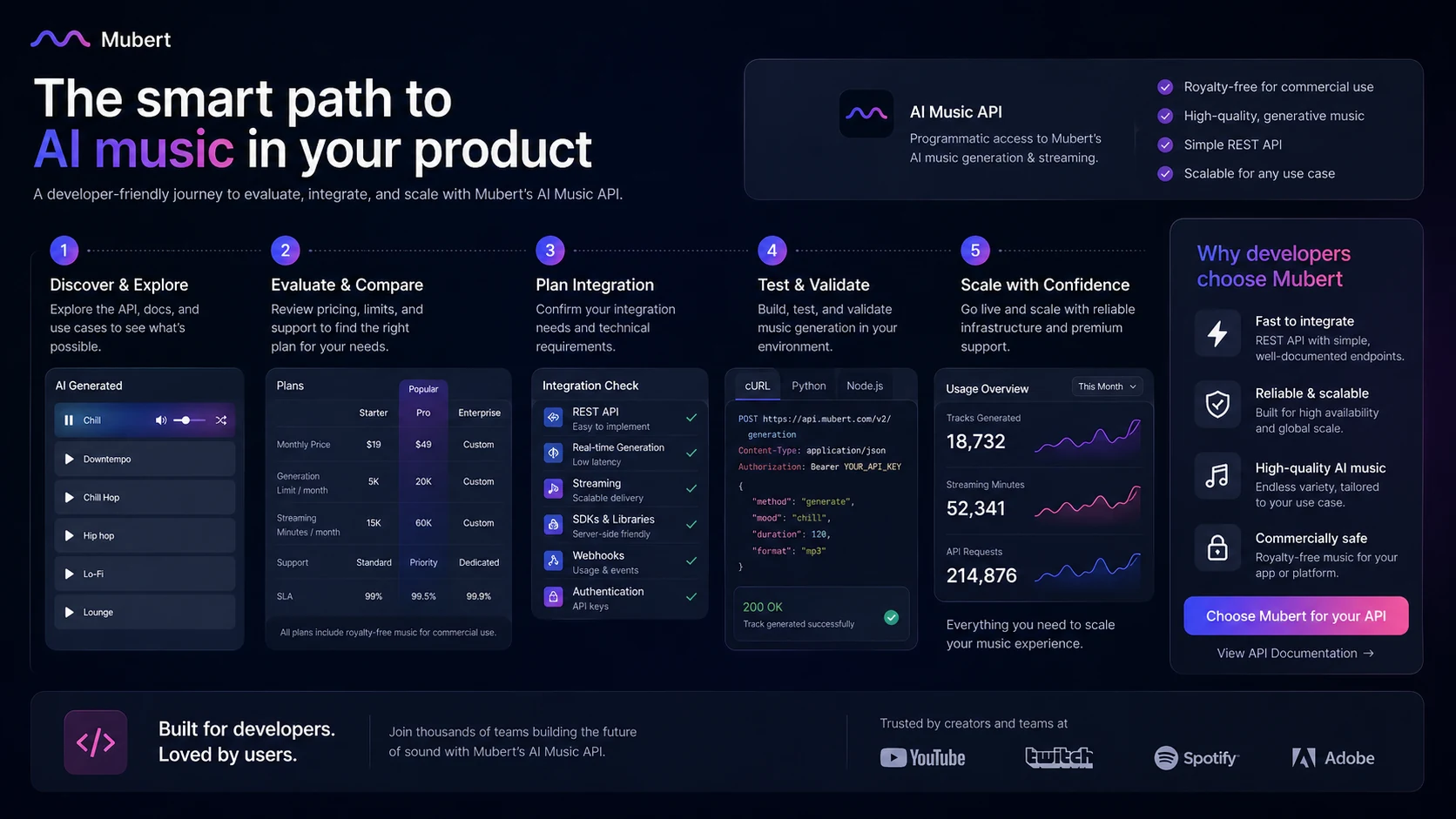
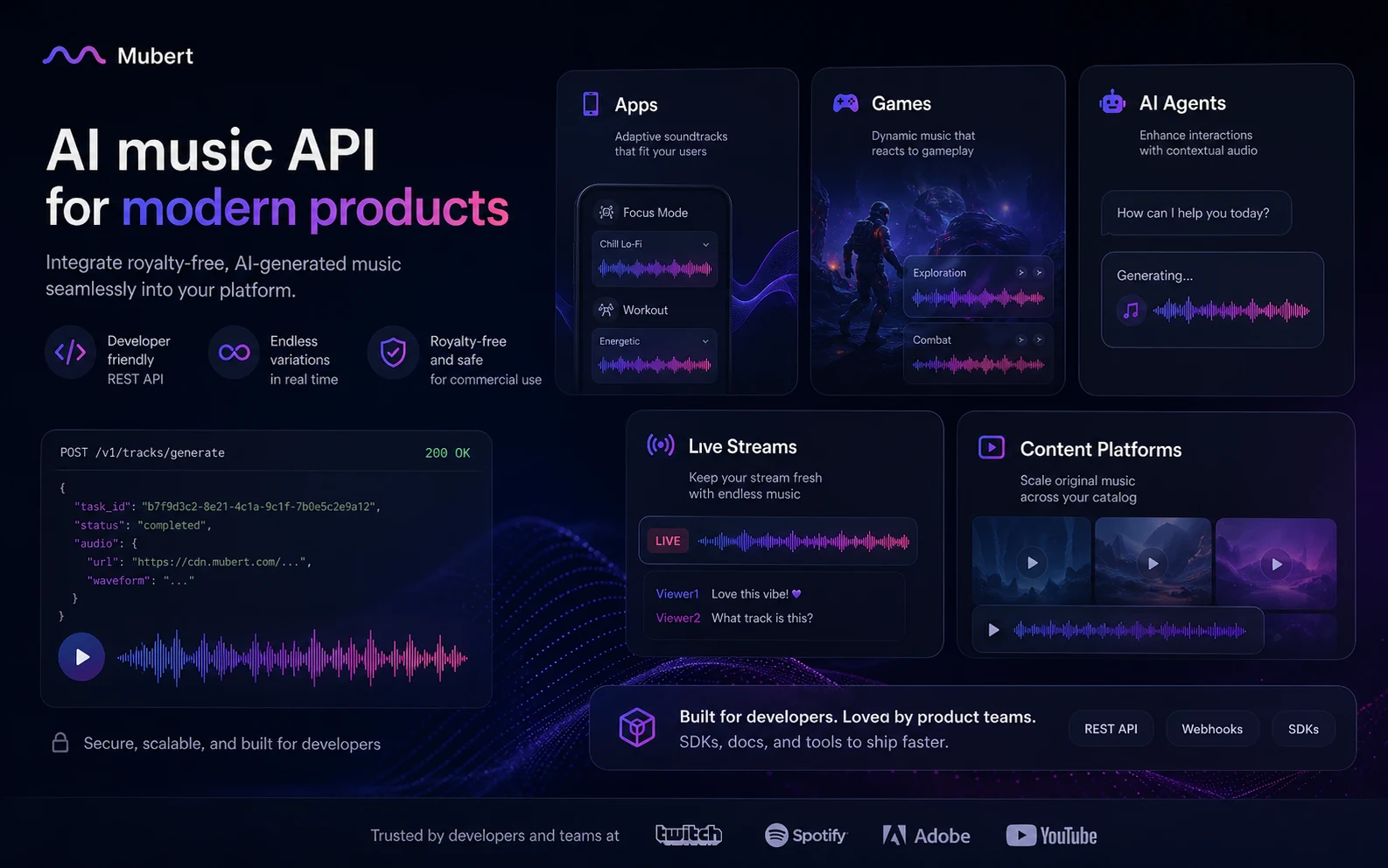
Mubert is also more than a simple web generator. The public product story includes Mubert API for apps, games, creator tools, AI agents, UGC platforms, and live-streaming products. That makes it relevant to two very different buyers: the creator who wants a downloadable soundtrack and the product team that wants music built into software.
I would not frame Mubert as a full songwriting studio. It is not the first tool I would compare if your goal is finished vocal songs, artist releases, or streaming-platform singles. It is better understood as a soundtrack generator and licensing workflow.
Our review approach compares public product pages, pricing details, license terms, refund language, buyer workflow fit, third-party feedback patterns, and nearby alternatives. We do not treat a free plan, coupon route, or low monthly price as proof that Mubert fits every project.
Who should use Mubert?
Mubert makes the most sense for creators who publish often enough to need music more than once.
YouTubers, short-form video creators, and podcasters are the obvious audience. If you need quick background tracks, intros, transitions, ambient beds, or mood-matched loops, Mubert can reduce the time spent browsing stock libraries. The condition is that you still need to confirm the plan covers your channel and monetization use.
Marketers and agencies can also find value here. Campaign drafts, explainer videos, social ads, client mockups, and branded assets often need fast music options. This is where I would slow down before paying. Advertising, client work, and branded content can require a higher tier or a more careful license check than casual creator use.
Streamers and live-content teams may care about continuous or adaptive background music. Mubert’s API positioning and real-time music language make it more interesting than a simple download-only tool. The buyer still needs to verify platform rules and the license path before using it in public monetized streams.
Developers and product teams are a separate fit. If you are building a game, app, AI agent, creator platform, UGC tool, or live audio layer, the API route may be the real reason to consider Mubert. In that case, do not judge the product by creator pricing alone. API usage, streaming minutes, sub-licensing, support, and custom terms are the buyer checks.
Who should avoid Mubert?
I would avoid paying for Mubert if you only need one casual background track. The free plan or a single-track route may be enough to evaluate the idea, but a subscription can be unnecessary if music is not a repeated need.
I would also be careful if your goal is full song creation. Mubert can generate useful background audio, but buyers looking for vocals, artist-style song structure, lyric-driven tracks, or streaming-release assets should compare AI music generators built more directly around song creation.
Mubert is also not a clean fit for buyers who want to register generated tracks with Content ID, redistribute them on stock music platforms, or release them as standalone songs on streaming services. Those restrictions matter. They are not tiny legal footnotes if your project depends on those rights.
Agencies and commercial buyers should slow down before choosing the cheapest visible plan. A creator plan may look affordable, but client work, ads, boosted posts, branded campaigns, software use, or app integration can change the license decision.
Finally, buyers who dislike non-refundable digital purchases should be cautious. Mubert’s pricing and Render terms present purchases as non-refundable because digital access is immediate. That makes the free test and license review more important before checkout.
How Mubert fits into a real workflow
A good Mubert workflow starts before the generator.
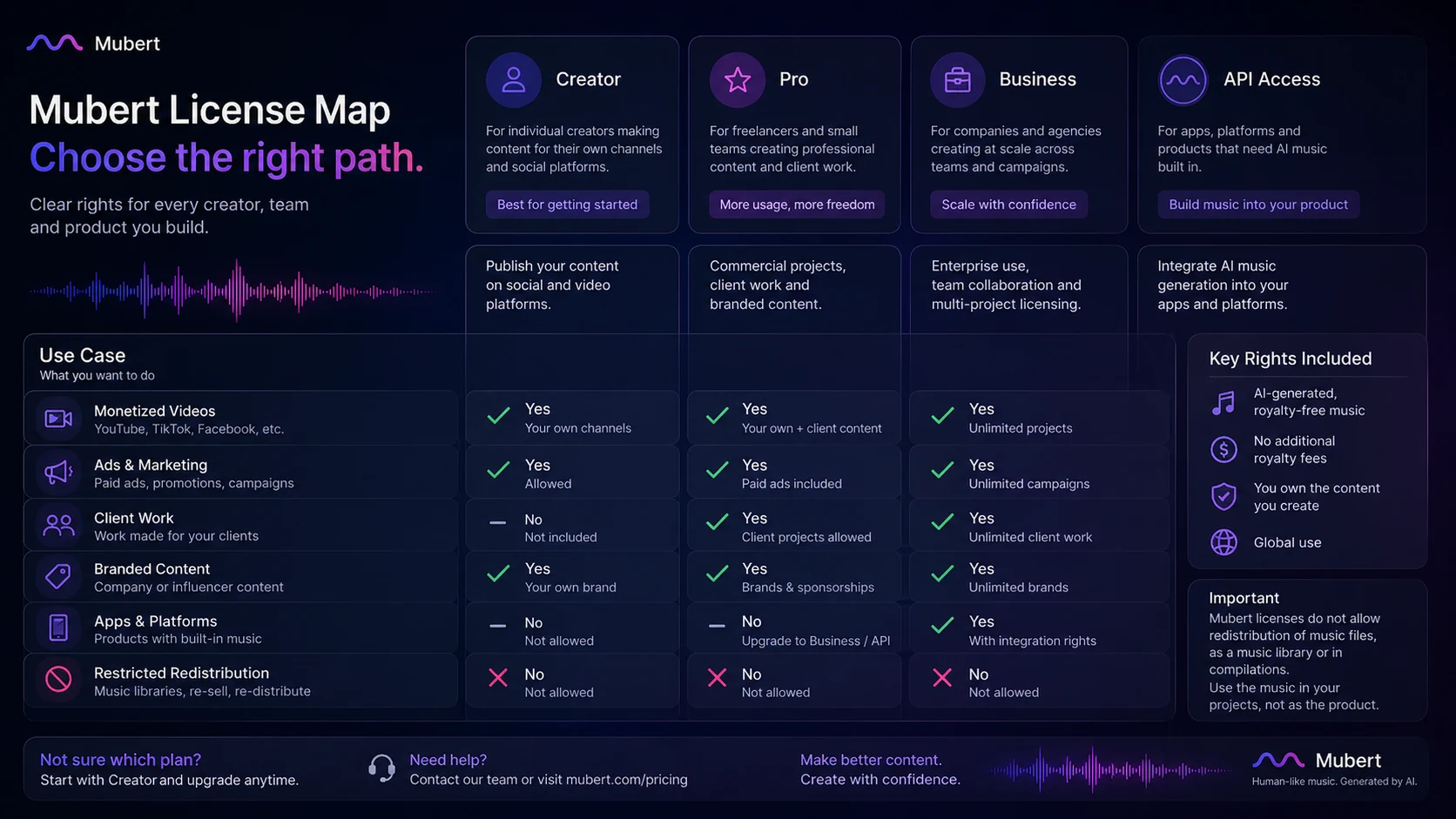
The buyer should first define the final use. Is this for a personal video, a monetized YouTube channel, a client ad, a branded campaign, a live stream, an app, or a product feature? That question decides whether you are looking at creator pricing, commercial rights, business licensing, single-track licensing, or API access.
Then the practical workflow looks like this:
- Choose one real content asset that needs music.
- Generate several tracks by mood, duration, style, prompt, or image.
- Compare whether the output fits the edit, not just whether it sounds pleasant.
- Check download format, quality, watermark behavior, and license certificate handling.
- Match the intended publishing channel to the plan rights.
- Verify whether monthly, annual, perpetual, Business, or API access fits the actual use case.
- Keep the license certificate and plan evidence connected to the published asset.
That last step is not glamorous, but it matters. The buyer mistake here is treating AI music like a quick creative toy when the real risk is rights management.
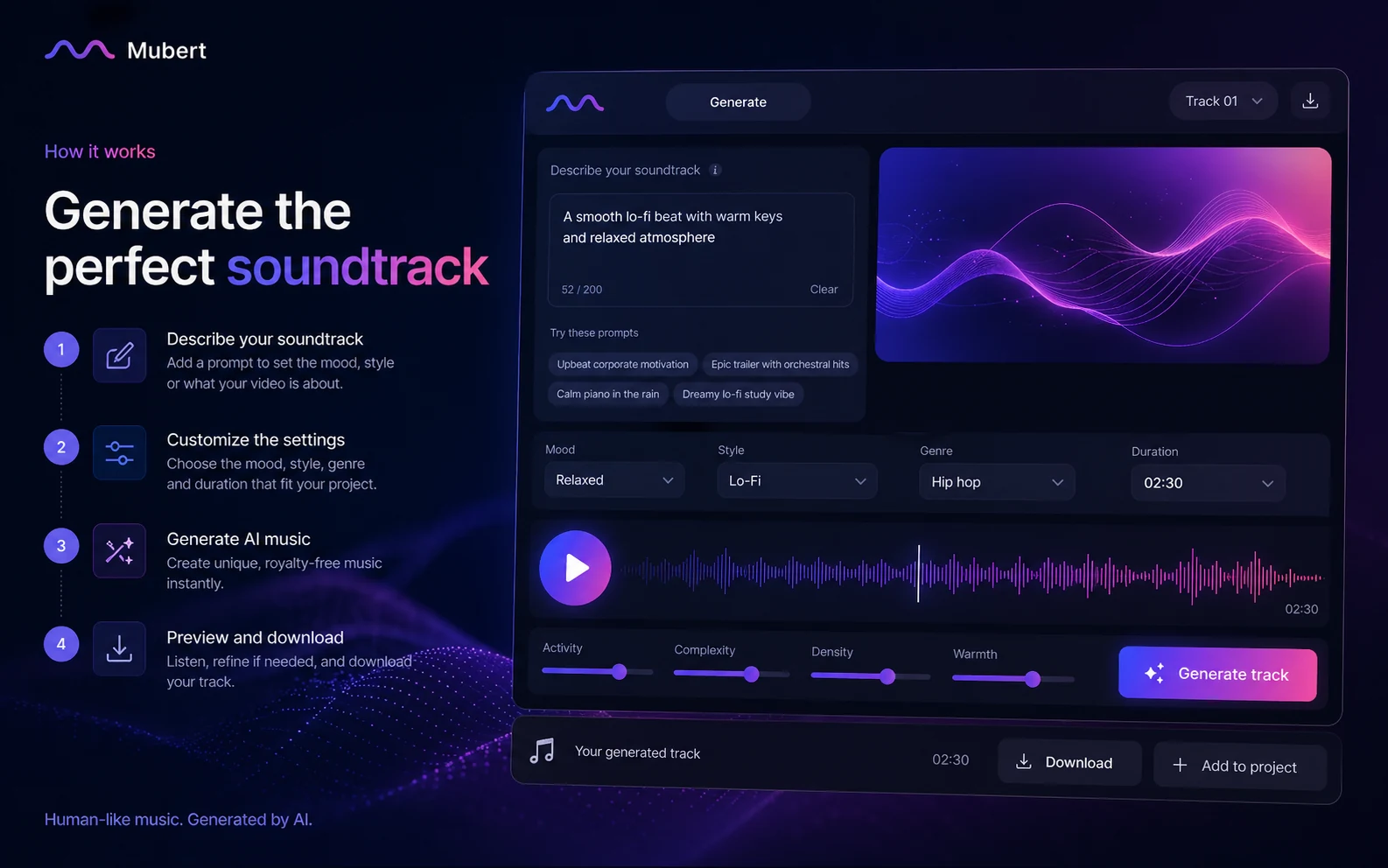
Workflow check: Test Mubert with a real video, podcast, stream, or app use case before deciding whether a creator plan, business plan, or API path is safer.
Real-world buyer scenarios
A YouTube creator has the simplest use case. You need background music for intros, tutorials, travel clips, shorts, podcast clips, or ambient sections. Mubert can be useful if you can generate tracks quickly and keep the music aligned with your channel’s tone. The check is whether the plan covers monetized social use and whether attribution or license certificate requirements fit your publishing process.
A marketing team has a more expensive decision. If the track goes into paid ads, brand campaigns, client deliverables, or boosted social posts, I would not assume a low-cost creator plan is enough. The safer route is to verify commercial rights and compare Pro, Business, or a custom path before using generated music in paid media.
A streamer may care about continuous background music and platform safety. Mubert can be interesting here because its API and streaming positioning go beyond simple downloads. The caution is that platform policies, DMCA expectations, and license terms still need to match the stream use.
A developer or app team should evaluate Mubert differently from a creator. If the goal is music inside a product, the API is the product. Pricing, generation limits, streaming minutes, sublicensing, support, webhooks, latency, curated library access, and distribution terms become more important than the ordinary creator subscription.
Key features that actually matter
Prompt, mood, style, image, and duration-based generation
Mubert’s core value is speed. You can generate background music around the kind of track you need rather than searching manually through a library.
Buyer note: this matters when you need many variations. If you only need one track, the free path or a traditional royalty-free library may be enough.
Royalty-free soundtrack positioning
The public product promise is built around royalty-free music for content. That is useful for creators who care about YouTube, TikTok, podcasts, videos, and commercial projects.
Buyer note: “royalty-free” does not mean “use anywhere in any way.” The license tier still decides what is safe.
Creator, Pro, Business, and API paths
Mubert is more structured than many casual AI music tools. It separates free testing, creator workflows, commercial needs, business usage, single-track licensing, and API use.
Buyer note: this is helpful only if you choose based on the final use case. The cheapest plan is not automatically the correct license.
API for apps and live products
Mubert API is relevant for apps, games, creator tools, live streams, AI agents, and UGC platforms. It includes developer-oriented ideas like generation limits, streaming minutes, WebRTC, curated library access, and sub-licensing paths.
Buyer note: API use should be priced and reviewed separately from normal creator use. Do not build around a creator plan unless the terms clearly support your product model.
License certificate and rights documentation
Each download is tied to a license certificate for the plan. For creators, agencies, and brands, that can be useful when a platform or client asks for proof.
Buyer note: keep the certificate connected to the published asset. Rights are easier to defend when your documentation is organized.
Pricing and plan value
At the time of review, Mubert’s public pricing presents a Free plan, Creator at $14/month, Pro at $39/month, Business at $199/month, and annual billing with savings displayed as up to 25%. Mubert also shows separate API pricing on developer pages, including a Trial API plan at $49/month, Startup at $199/month, Startup+ at $499/month, and custom options for special requirements.
The important point is that Mubert pricing is not just a price ladder. It is a license ladder.
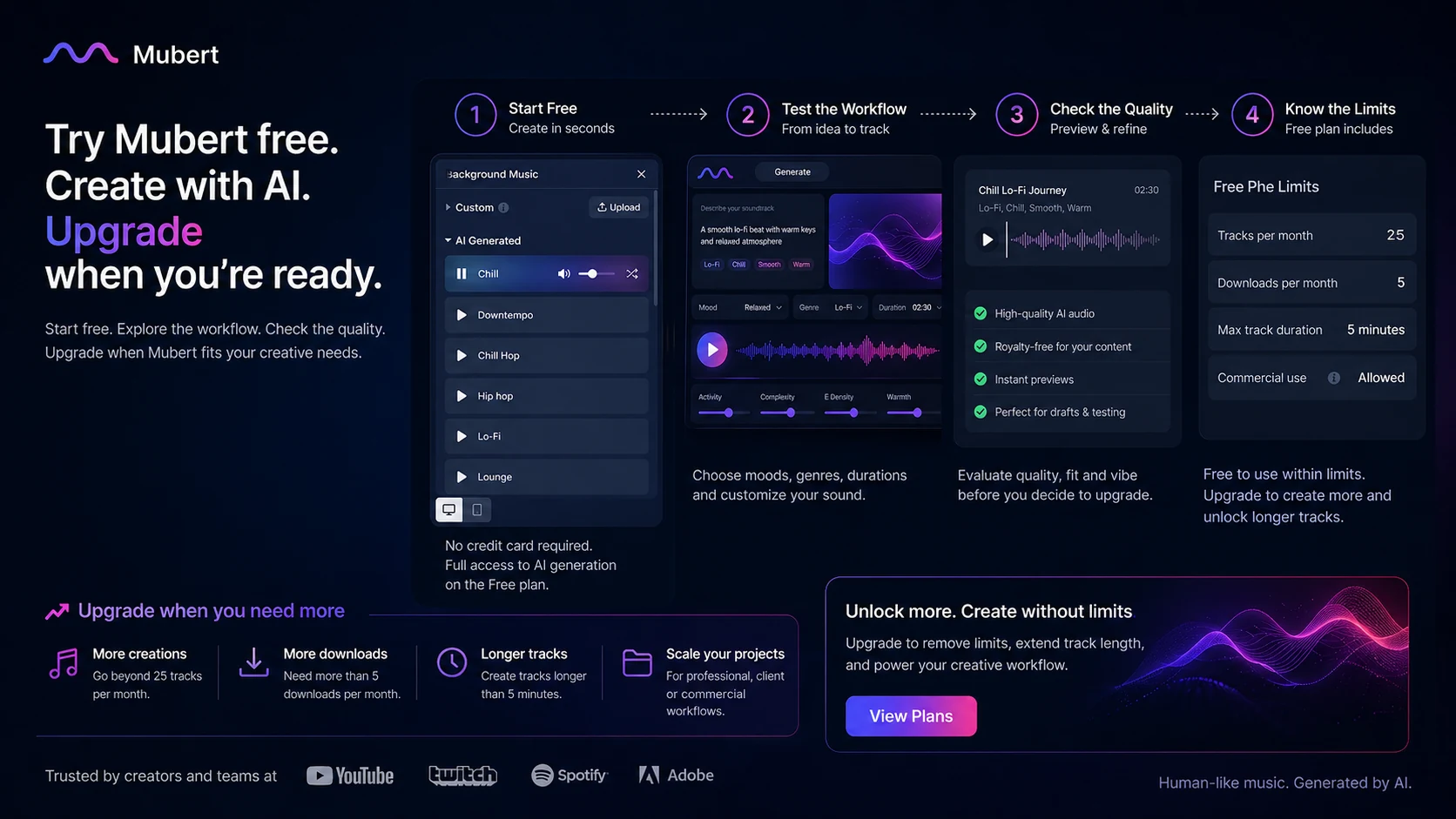
The Free plan is useful for testing output, prompt control, workflow friction, and whether the music style fits your content. It should not be treated as proof that you have the right commercial license.
Creator can make sense for many social and creator workflows, but buyers should confirm exactly what it allows today. Pro and Business become more relevant when commercial use, freelance or agency work, advertising, apps, or stronger support expectations enter the picture. API pricing becomes a different decision entirely because you are no longer only downloading music; you may be embedding generation or streaming into a product.
I would be careful with annual billing until the workflow is proven. Saving on annual billing only helps if the license is right and the tool becomes part of your normal production process.
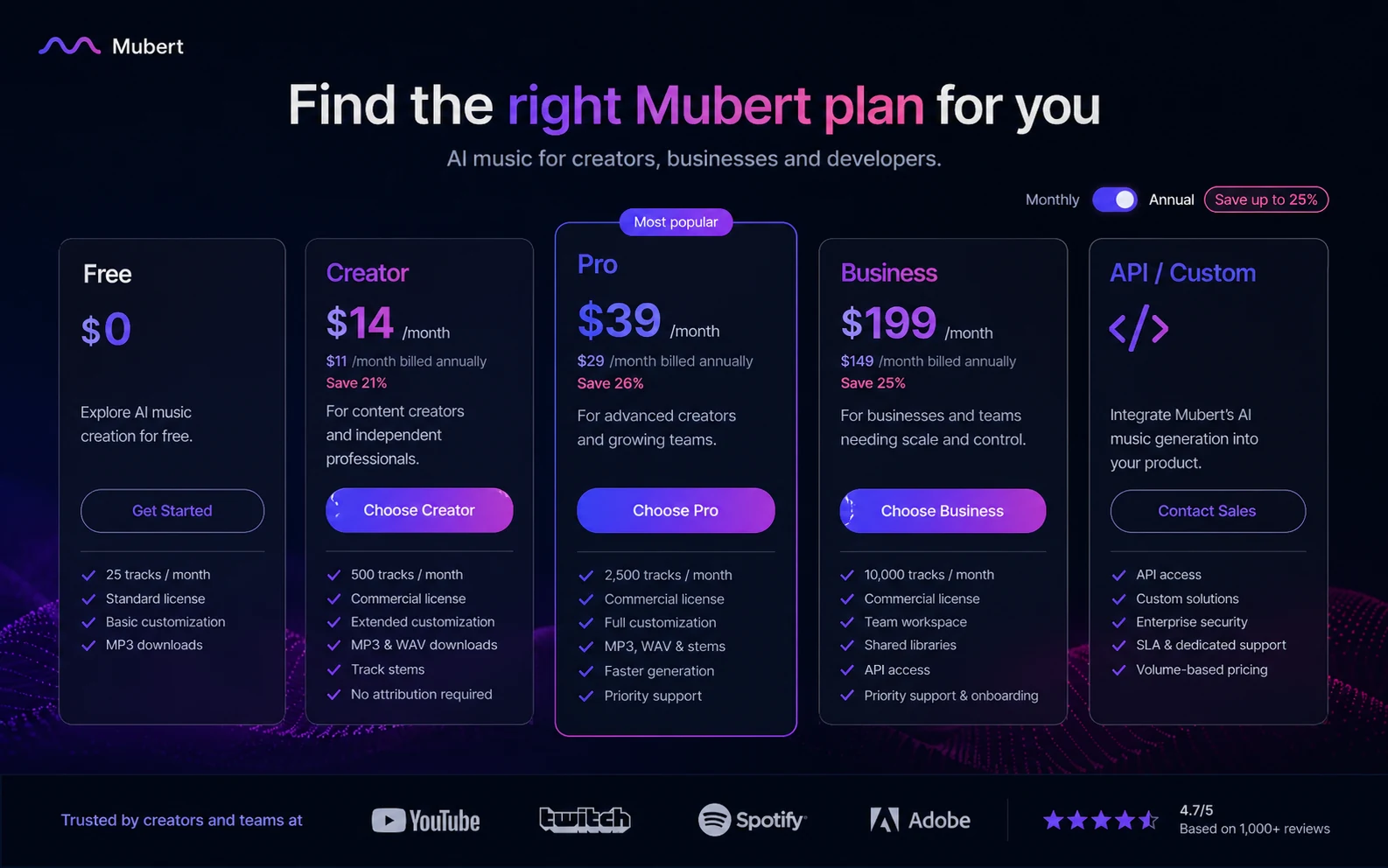
Pricing check: Before choosing Mubert, compare the current plan rights with your actual content channel, client use, ad use, app use, or API need.
Free plan, trial, coupon, and checkout notes
The free path is useful, but I would treat it as a workflow test rather than a buying decision.
Use it to generate a few tracks, test prompt behavior, compare moods, check duration control, listen for generic output, and see whether the music fits the actual edit. If the free workflow feels awkward, a coupon will not fix it.
For savings, the safer order is annual billing and plan selection first, coupon route second. I did not verify a stable public coupon code that should drive the purchase decision. If a current offer exists, use the Mubert coupon page only after you know which plan or license path fits.
The checkout risk is refund flexibility. Mubert presents purchases as non-refundable because buyers receive instant digital access. That does not mean the product is a bad fit. It means you should not use paid checkout as your first test.
What I would check before buying Mubert
If I were buying Mubert for a real content workflow, I would check these points first:
- Whether the final project is personal, monetized social content, paid advertising, client work, app use, or a product integration.
- Whether Free, Creator, Pro, Business, single-track licensing, or API access matches that use.
- Whether the plan includes enough tracks, duration, download quality, and license certificates for normal monthly work.
- Whether the project involves Content ID, standalone music release, stock redistribution, sublicensing, or app embedding.
- Whether annual billing is worth the commitment after testing real outputs.
- Whether the current refund and cancellation language is acceptable before paying.
- Whether Freebeat, Thematic, Soundraw, Beatoven.ai, AIVA, or another route fits the buyer job better.
A simple test before paying
Before paying, I would run a small test like this:
- Pick one real piece of content that needs music.
- Generate three to five tracks with different moods or prompts.
- Place the tracks inside the actual video, podcast, stream, or prototype.
- Check whether the track supports the content without feeling generic or distracting.
- Confirm whether the intended publishing channel is allowed under the plan you are considering.
- Download only after you understand the certificate and license path.
- Compare monthly versus annual pricing only after the workflow feels repeatable.
The goal is not to prove that Mubert can make music. It can. The goal is to prove that Mubert can create music you can actually publish under the rights you need.
Pros explained
Mubert’s first real strength is speed. For creators who need background audio often, generating a soundtrack by mood, prompt, duration, or style can be faster than searching a stock catalog.
The second strength is category focus. Mubert is not trying to be a full creative suite. Its value is concentrated around AI music generation, licensing, and developer use cases.
The third strength is the API path. Many AI music tools are creator toys from a product-builder point of view. Mubert becomes more interesting when you want generative music inside an app, game, stream, agent, or content platform.
The fourth strength is license documentation. For serious creators and teams, having certificates and defined license paths is more useful than vague “royalty-free” language.
Cons explained
The biggest drawback is license complexity. The buyer has to understand the difference between testing, creator use, commercial use, business use, and API use. That is not always fun, but it is necessary.
The second drawback is refund risk. Non-refundable digital-access language means buyers should test before paying and avoid annual billing until they are confident.
The third drawback is output consistency. Third-party reviews are not uniformly glowing. Some users like Mubert for fast, usable background music. Others complain about limited genre fit, repetitive or generic output, support issues, or cancellation friction. That mixed signal is exactly why the free test matters.
The fourth drawback is that Mubert is not a full song platform. Buyers who want vocals, song releases, artist-style tracks, or music redistribution rights may need a different category.
Green flags and red flags
Green flags are clear.
Mubert is a stronger fit when you already publish video, podcast, stream, or app content regularly. It is also a stronger fit when your team understands licensing, keeps certificates, and can choose a plan based on final usage rights.
Another green flag is a real API need. If music generation or streaming is part of a product experience, Mubert deserves a closer look than a simple creator-only tool.
Red flags appear when the buyer is chasing the lowest price without understanding rights. If the project involves ads, clients, apps, software, stock redistribution, Content ID, or standalone release, slow down.
I would also treat repeated weak outputs as a red flag. If your first few real prompts produce tracks that feel too generic, too mismatched, or too hard to use, do not assume a paid plan will magically fix the fit.
Mubert vs alternatives
Freebeat vs Mubert
Freebeat is a more direct comparison if the buyer wants AI music generation with a creator-first angle. Mubert may be stronger when the decision depends on structured soundtrack generation, license paths, and API usage.
If the job is simply “make background music quickly,” compare both. If the job is “embed music generation into a product,” Mubert’s API story deserves more attention.
Thematic vs Mubert
Thematic is more of a creator-safe music discovery and licensing route. Mubert is more generative.
Thematic may fit buyers who prefer choosing from music with a more traditional creator-licensing feel. Mubert fits buyers who want to generate variations by mood, duration, or prompt.
LALAL.AI vs Mubert
LALAL.AI is not a direct soundtrack generator. It is an audio separation and cleanup tool.
Compare it when your real problem is extracting vocals, instrumentals, stems, or cleaner audio from existing files. Choose Mubert when your problem is creating new background music for content.
ElevenLabs vs Mubert
ElevenLabs belongs in a different lane. It is stronger for voice, narration, dubbing, agents, and spoken audio workflows.
If your project needs a voiceover, compare ElevenLabs. If your project needs background music under that voiceover, Mubert may still be useful beside it.
Stock music libraries vs Mubert
A traditional stock music library may be better if you want handpicked tracks, recognizable production polish, or less prompt experimentation. Mubert is better when you value speed, variation, and custom duration control.
The tradeoff is control versus predictability. AI generation is flexible, but a stock library can be more dependable when you know exactly what genre or production style you want.
Trust, refund, and buyer-risk notes
The trust question with Mubert is not whether AI music is useful. It can be. The question is whether the buyer chooses the right plan and uses the output within the current license boundaries.
Pricing should be checked live because Mubert has multiple buyer paths: Free, Creator, Pro, Business, single-track licenses, annual billing, and API plans. The right path depends on the final publishing context.
Refund language is a real caution point. Mubert’s pricing and Render terms present digital purchases as non-refundable. That makes the free test, plan review, and license check more important than usual.
Data and account terms also matter for business buyers. Mubert’s terms say its services may be subject to separate product agreements, and the Render terms cover account use, license attachment, payment handling, taxes, and account risk. For most creators, that is normal terms-page material. For agencies, brands, and developers, it is worth reading before building a workflow around the tool.
AI reliability is the creative risk. A generated track can be fast, but it may not fit the edit, genre, or brand tone. Do not judge by the first successful sample. Judge by whether Mubert repeatedly creates usable tracks for your actual content.
Final verdict
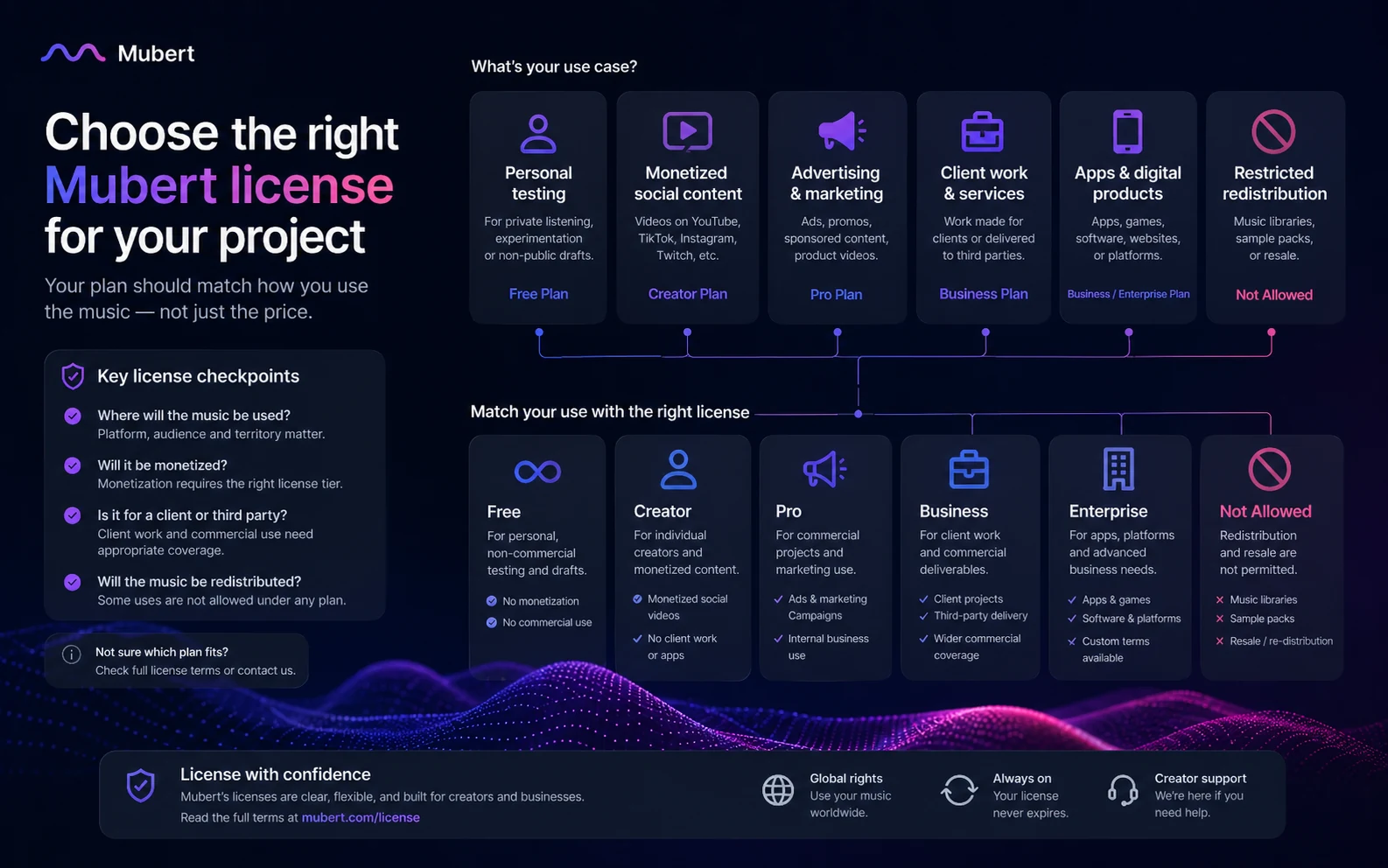
I would consider Mubert if you regularly need background music for videos, podcasts, streams, campaigns, apps, or product experiences and you are willing to choose the plan based on publishing rights.
I would skip it if you want finished vocal songs, standalone music releases, stock redistribution, Content ID use, or a one-time track without subscription or license complexity.
I would compare it with Freebeat, Soundraw, Beatoven.ai, AIVA, or Thematic if your main question is music generation and licensing. I would compare it with LALAL.AI if your problem is separating or cleaning existing audio. I would compare it with ElevenLabs if your project needs voice, narration, or dubbing.
The safest next step is not the coupon page first. It is a real free generation test, followed by a license check, followed by the pricing route that matches the final use case. If Mubert passes those checks, it can be a useful AI soundtrack tool. If it does not, a discount will not fix the mismatch.
