Quick verdict
Mindstamp is worth considering if your videos need to do something more useful than sit on a page and collect passive views.
That is the buying tension here. Mindstamp is not mainly a text-to-video generator, an AI avatar studio, or a cheap video editor. It is an interactive video platform for teams that want to add buttons, hotspots, questions, branching, lead capture, calls to action, personalization, reporting, and data workflows around videos that already exist.
For my money, that makes Mindstamp most interesting for training, onboarding, sales enablement, education, lead generation, product demos, and shoppable video. It becomes weaker when the buyer only wants short-form social clips, AI-generated footage, or a prettier hosted video player.
The main strength is that Mindstamp connects video engagement with actual buyer or learner behavior. A viewer can answer a question, click a product, choose a path, request a next step, or send data into a broader workflow. The main caution is price-fit. The public entry point is not tiny, and some advanced needs such as custom integrations, Salesforce depth, SSO, procurement support, or API access may require higher-tier or Enterprise verification.
The safest next step is not to buy because interactive video sounds impressive. Start with one real video, define the business or learning outcome, and use the trial to see whether Mindstamp changes what viewers do.
Next step: If Mindstamp fits your video workflow on paper, test the current buyer route with one real use case before choosing monthly or yearly billing.
Review snapshot
| Review point | Practical take |
|---|---|
| Best for | Training, sales, education, onboarding, and marketing teams that need interactive video outcomes |
| Not ideal for | Casual creators, one-off projects, basic video editing, or buyers who mainly need AI avatar generation |
| Main use case | Turning existing videos into clickable, trackable, branching experiences |
| Pricing note | Current public pricing shows Basic, Core, Pro, and Enterprise paths, with yearly billing lowering the effective monthly rate |
| Trial path | 7-day free trial, useful only if you test a real video workflow |
| Main strength | Interaction plus viewer data, not just video playback |
| Main concern | Plan limits, refund language, streaming minutes, integrations, API access, and annual billing commitment |
| Direct comparison logic | Compare against interactive video or video engagement tools first |
| Adjacent DealBestDaily routes | Synthesia, HeyGen, Elai, and AKOOL are more video-creation routes than direct replacements |
| Best next step | Build one test video before choosing a paid plan |
What is Mindstamp?
Mindstamp is best understood as an interactive video platform for teams that already have video content and want viewers to take measurable actions inside that content.
That distinction matters.
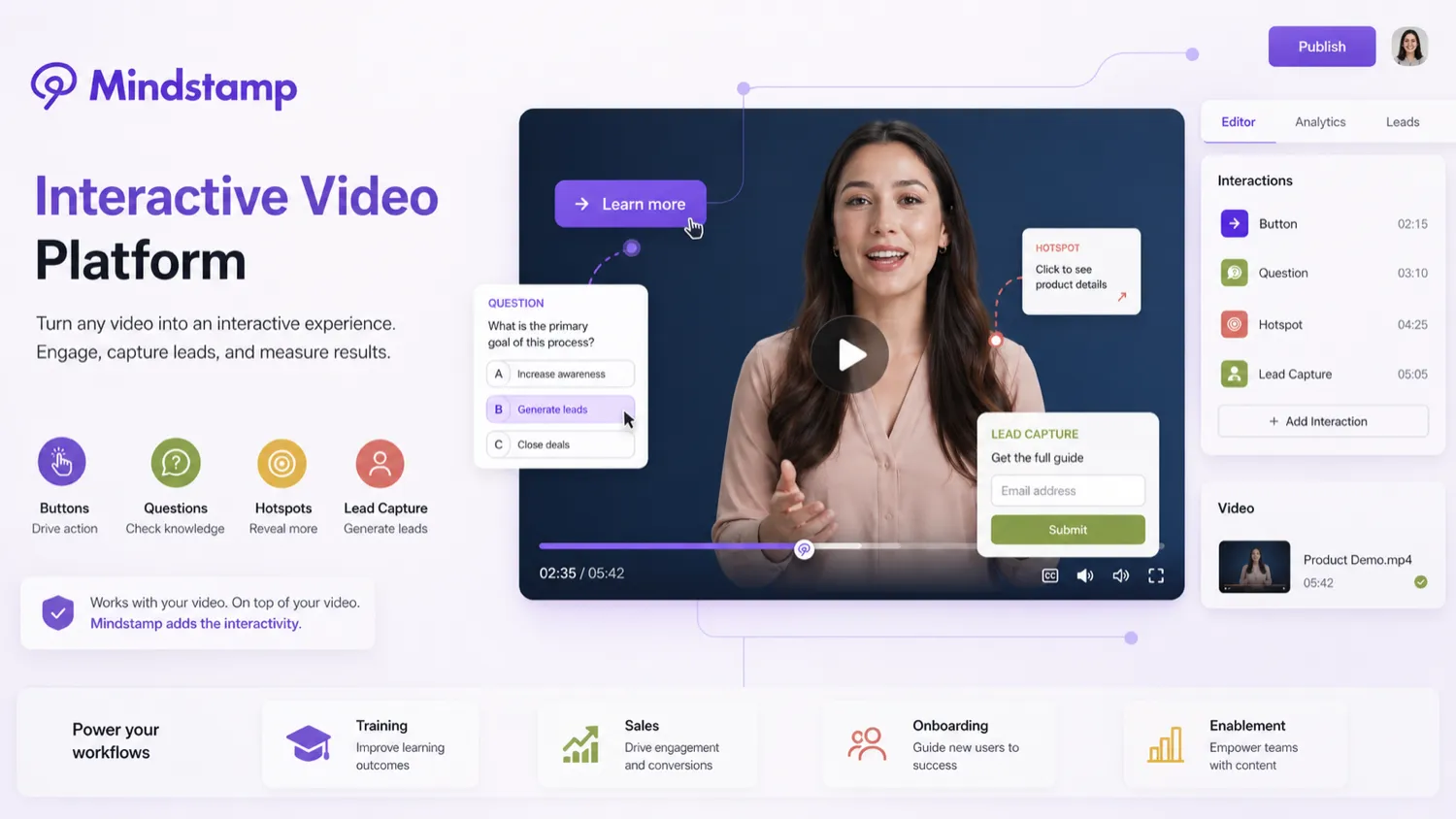
A normal video workflow asks the viewer to watch. Mindstamp asks the viewer to click, answer, choose, submit, branch, book, buy, or move into a follow-up flow. Its public positioning centers on interactive video: buttons, hotspots, questions, lead capture, branching, logic, personalization, reporting, and more. That makes it a better fit for training, education, sales, marketing, onboarding, and customer education than for simple video creation.
The wrong expectation is to compare Mindstamp like a standard AI video generator. If you need an avatar presenter, a text-to-video generator, or a fast social video tool, Mindstamp is probably not the first tab to open. If you already have videos and want them to collect responses, route viewers, measure comprehension, or trigger follow-up, then the product starts to make sense.
Our review approach compares public product pages, pricing details, help documentation, deal terms, buyer workflow fit, and nearby alternatives. We do not treat a coupon, trial, or lower annual rate as proof that the product fits the buyer.
Who should use Mindstamp?
Mindstamp is strongest for teams that can connect video interaction to a real outcome.
Training and onboarding teams are the easiest fit. If a company has onboarding videos, compliance lessons, product education, or internal training modules, Mindstamp can add questions, branching, certificates, viewer progress, and reporting. The condition is that someone will actually review the results. If nobody looks at the reports, the interactive layer becomes decoration.
Sales and marketing teams may also get value. A sales video can include a meeting link, product path, lead form, or viewer-specific call to action. A marketing video can collect names, emails, answers, and engagement data. The buyer should verify CRM, webhook, and integration access before assuming this becomes a clean follow-up system.
Course creators and educators can use Mindstamp when lessons need questions, guided paths, and comprehension checks. This is a stronger fit than a passive hosted lesson if the course depends on learner activity. It is less compelling when the course is mostly simple video playback.
Customer success and product teams can use Mindstamp for demos, walkthroughs, and guided education. A long product video can become easier to navigate when the viewer can choose the section they need, click for more context, or answer a prompt.
Agencies and consultants may consider it if interactive video becomes a repeatable service. One client project may not justify much platform overhead. A repeatable training, lead-capture, or video-funnel offer is a more credible reason to pay.
Who should avoid Mindstamp?
I would be careful with Mindstamp if you only need a basic video host. A platform like this makes sense when interaction changes the outcome. If the viewer only needs to watch a video, Mindstamp may be more tool than the job requires.
Short-form creators should also slow down. Mindstamp is not the natural first choice for TikTok-style clips, AI avatar reels, quick explainers, or fast social content production. Those buyers should compare video creation tools first.
One-off project buyers should be cautious. A single interactive video can be useful, but a monthly subscription becomes easier to justify when the workflow repeats across campaigns, lessons, demos, or onboarding paths.
Procurement-heavy teams should verify requirements early. If your organization needs SSO, custom security review, legal document signing, custom integrations, Salesforce depth, or API access, the self-service plan may not be enough. That does not make Mindstamp weak. It means the buying path may be Enterprise rather than casual checkout.
Finally, avoid buying only because a lower annual rate looks cleaner. Annual billing can be sensible after workflow proof. It is a risk if the team has not built and tested the first real interactive video.
How Mindstamp fits into a real workflow
A good Mindstamp workflow starts before the editor opens.
First, choose a video that already matters. A training module, sales demo, course lesson, onboarding clip, or product walkthrough is better than a random test asset. Then define the outcome: capture a lead, check understanding, guide the viewer to the right section, route someone to a booking page, collect an answer, or measure completion.
After that, the interactive layer becomes easier to judge. Add one or two meaningful interactions, not twenty decorative clicks. A question can test comprehension. A button can route a prospect. A hotspot can make a product video shoppable. Branching can send different viewers down different paths. Reporting can tell the team whether viewers actually engaged.
The decision point comes after publishing. Did the interaction improve the workflow, or did it simply make the video more complicated? That is the question the trial should answer.
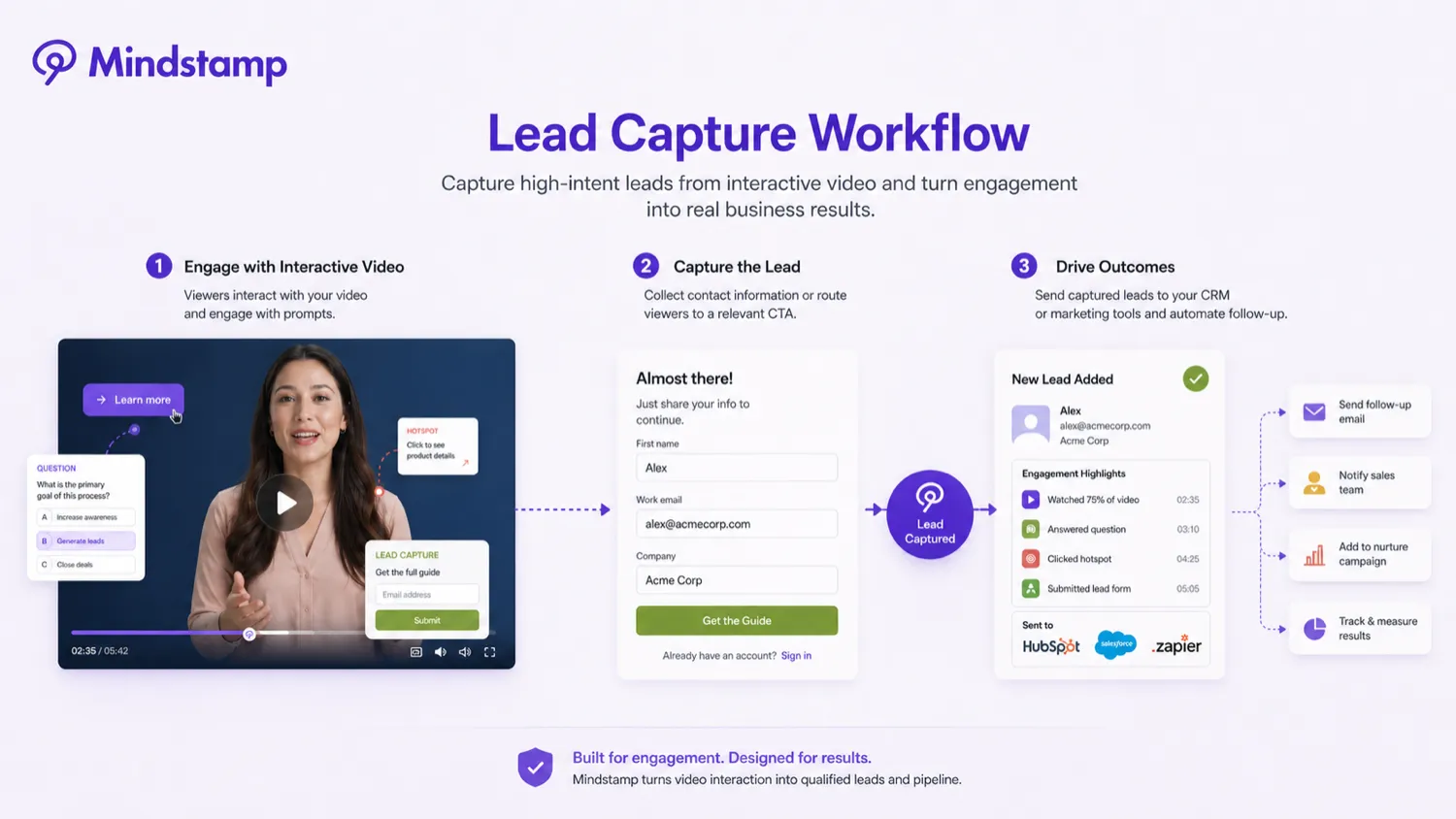
Mindstamp can save time when it replaces manual follow-up, untracked training completion, or passive video handoffs. It still needs human judgment when designing questions, deciding branch logic, interpreting responses, and deciding whether the data is meaningful.
Real-world buyer scenarios
A training team checking comprehension
A company has onboarding videos, but managers do not know whether new hires understand the material. Mindstamp can add questions, certificates, reporting, and branching. This makes sense if the training owner reviews completion and responses.
It may fail if the team only wants a prettier video page. The buyer should check reporting, exports, LMS needs, SCORM requirements, and plan limits before paying.
A sales team turning demos into action paths
A sales team may have strong product demos, but the videos do not tell the team who is interested in which feature. Mindstamp can add clickable calls to action, meeting links, lead capture, and viewer activity data.
The risk is integration depth. If the sales team expects clean CRM follow-up, it should verify HubSpot, Salesforce, webhooks, and plan-level access before building a process around the tool.
A course creator making lessons interactive
A course creator can use Mindstamp to add questions, navigation, and learner paths to existing lessons. This is useful when the course needs engagement and measurement.
It may be unnecessary if the course platform already handles quizzes, certificates, and reporting well enough. In that case, the buyer should compare feature overlap before paying for a separate interactive video layer.
A marketing team testing shoppable or lead-capture video
A marketing team can use buttons, hotspots, forms, and viewer actions to turn a product video into a conversion path. This is more interesting than a passive embed when the video supports a campaign.
The buyer should still test conversion quality. A clickable video is not automatically a better campaign. The team needs to compare the viewer response against the extra setup time and subscription cost.
Key features that actually matter
Interactive elements and hotspots
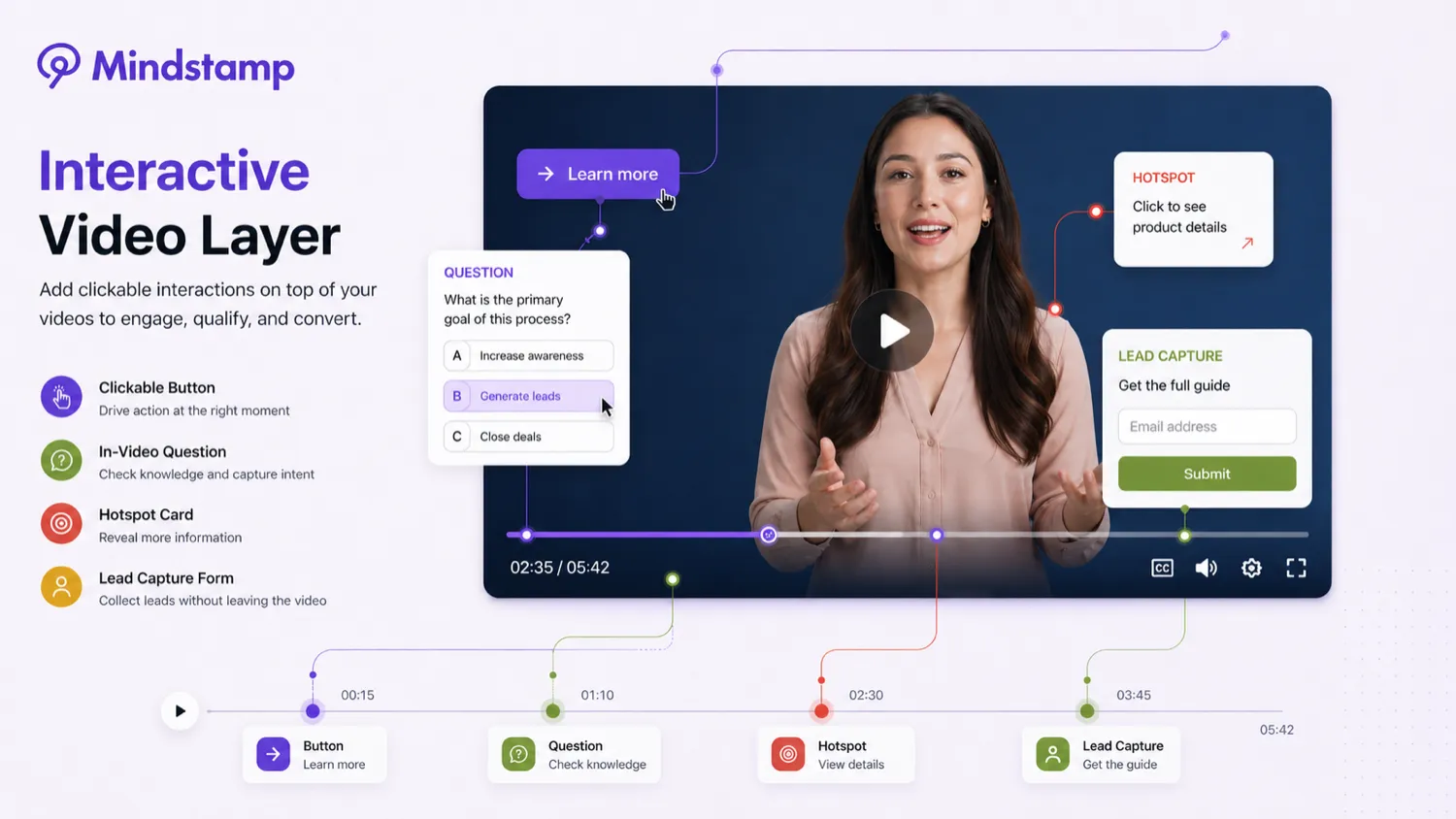
Mindstamp’s core value is the ability to add buttons, hotspots, questions, images, text, and calls to action inside a video. This matters when a viewer needs to act rather than simply watch.
Buyer note: interaction should support the goal. Too many clicks can make the experience feel busy. A few useful actions are better than a video full of distractions.
Questions, branching, and conditional logic
Questions and branching are important for training, education, qualification, and guided demos. A viewer can answer a question, choose a path, or move through different content depending on behavior.
Buyer note: branching becomes valuable only when the paths are intentional. If the team has not planned the viewer journey, the feature can create complexity without improving the outcome.
Lead capture and sales follow-up
Mindstamp can collect viewer details and support calls to action inside video. For commercial teams, this is often the reason to evaluate the platform at all.
Buyer note: lead capture is only useful if follow-up happens. Verify CRM, webhook, Zapier, HubSpot, Salesforce, and export needs before assuming the data will move cleanly into your existing workflow.
Reporting and viewer data
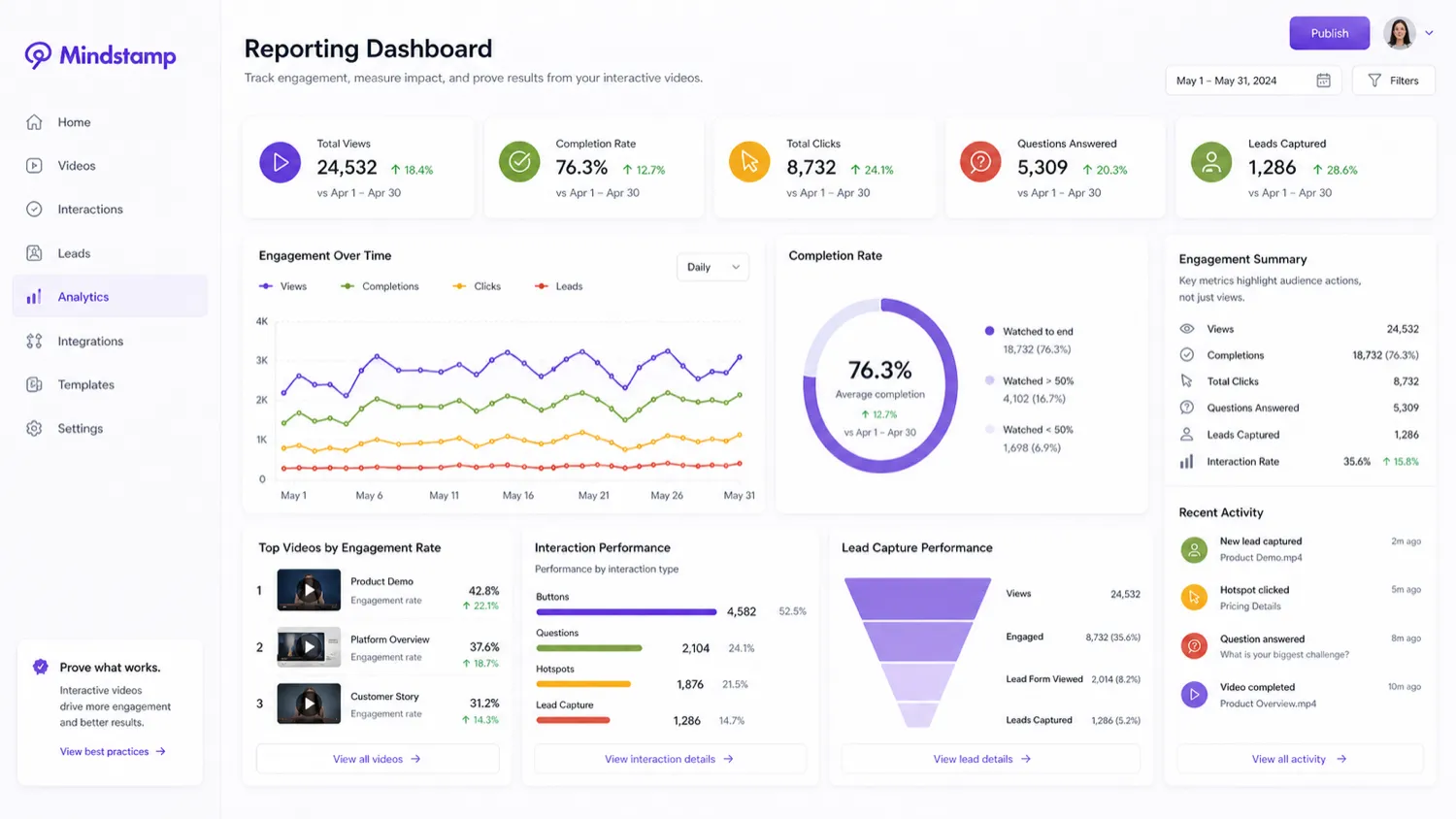
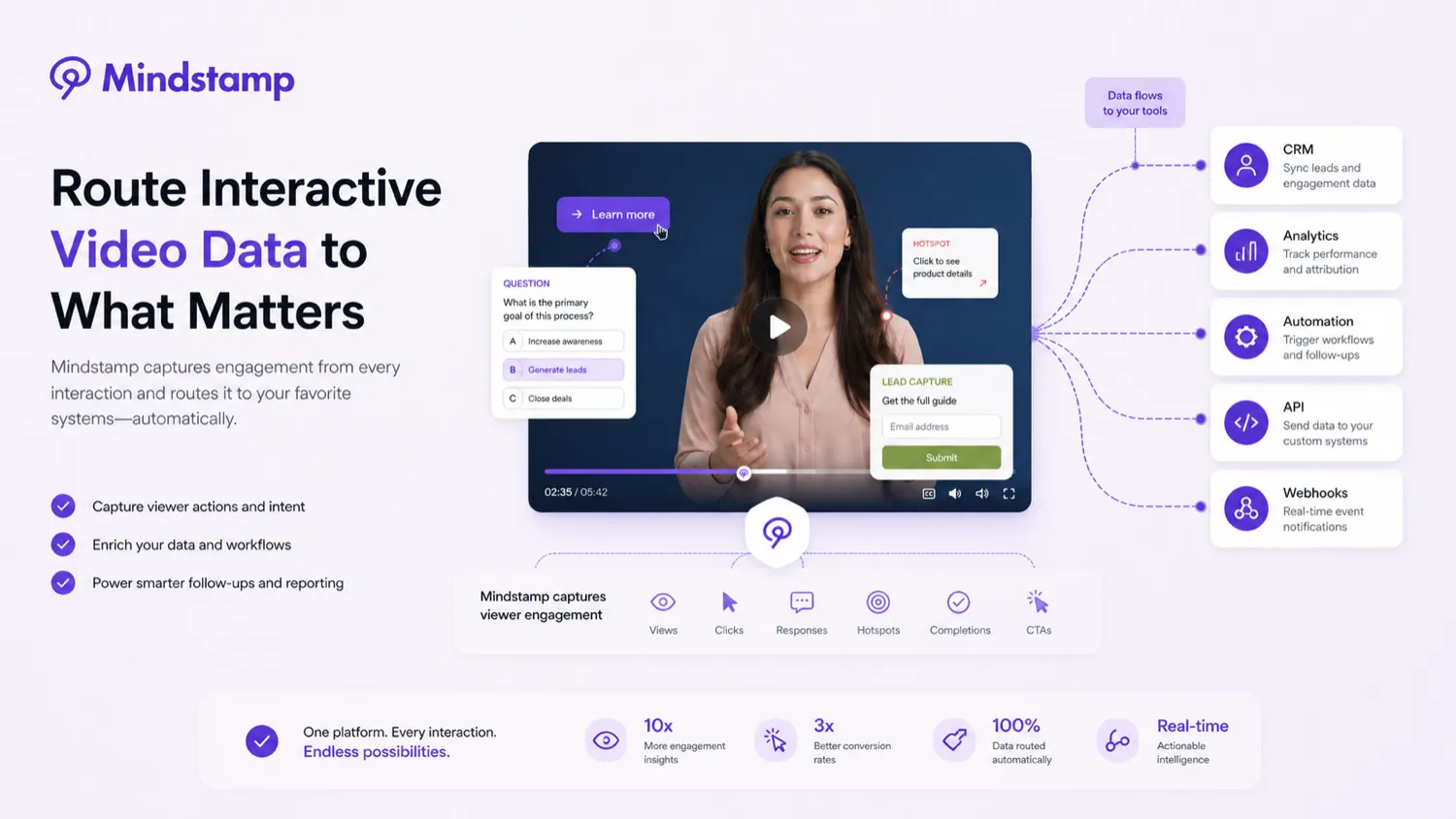
Reporting turns Mindstamp from a player into a decision tool. Viewer progress, responses, clicks, and engagement data can help training teams, marketers, and sales teams understand what happened after publishing.
Buyer note: the person buying the product should know who will review the reports and how often. Data that nobody checks does not justify much software spend.
Integrations, webhooks, and API paths
Mindstamp has integration and API depth for more serious teams, but this is where plan verification matters. Public API information currently frames API access as an Enterprise path, while help documentation also describes data access and developer workflows.
Buyer note: if API access, Salesforce integration, SSO, custom integrations, or procurement support matter, confirm the exact plan before selling the idea internally.
Pricing and plan value
Mindstamp is not a cheap impulse tool, so pricing should be judged against repeated workflow value.
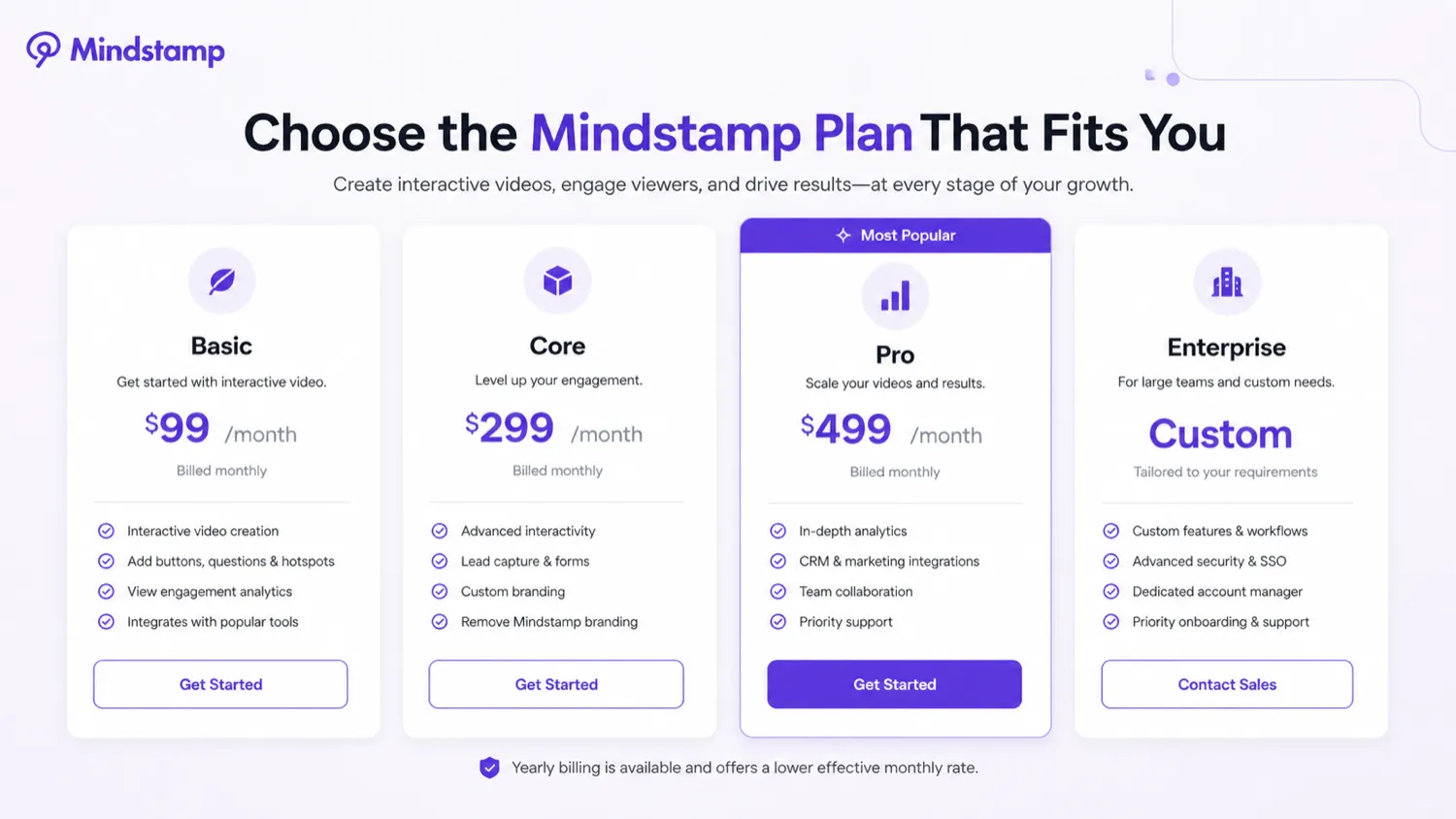
At the time of review, the public pricing page shows Basic, Core, Pro, and Enterprise paths. The yearly pricing display shows Basic at $83/month billed yearly, Core at $249/month billed yearly, and Pro at $416/month billed yearly, with Enterprise listed as a custom plan. The store data and plan context also indicate higher monthly-billed equivalents, with Basic commonly positioned around $99/month when billed monthly.
The important part is not only the headline price. The plan table changes the buyer decision through video count, admin count, max video length, streaming minutes, groups, playlists, branding, advanced reporting, webhooks, Salesforce, SSO, custom integrations, add-ons, and Enterprise support.
Basic is the first plan to evaluate if you are testing a contained workflow. It can make sense for a small team with a few important videos. Core and Pro are more realistic when the team needs more videos, more admins, deeper data workflows, or broader deployment. Enterprise should be checked when procurement, SSO, API, custom integrations, custom limits, or legal/security review matter.
I would not move to annual billing until one real workflow has been tested. The lower effective monthly rate can be useful, but only after you know the tool will stay in use.
Pricing check: If Mindstamp still looks like a fit, compare the live plan limits against your first real video project before choosing a billing period.
Check Mindstamp pricing Read store guide Check current offers
Free plan, trial, coupon, and checkout notes
Mindstamp is better approached as a trial-first purchase than a coupon-first purchase.
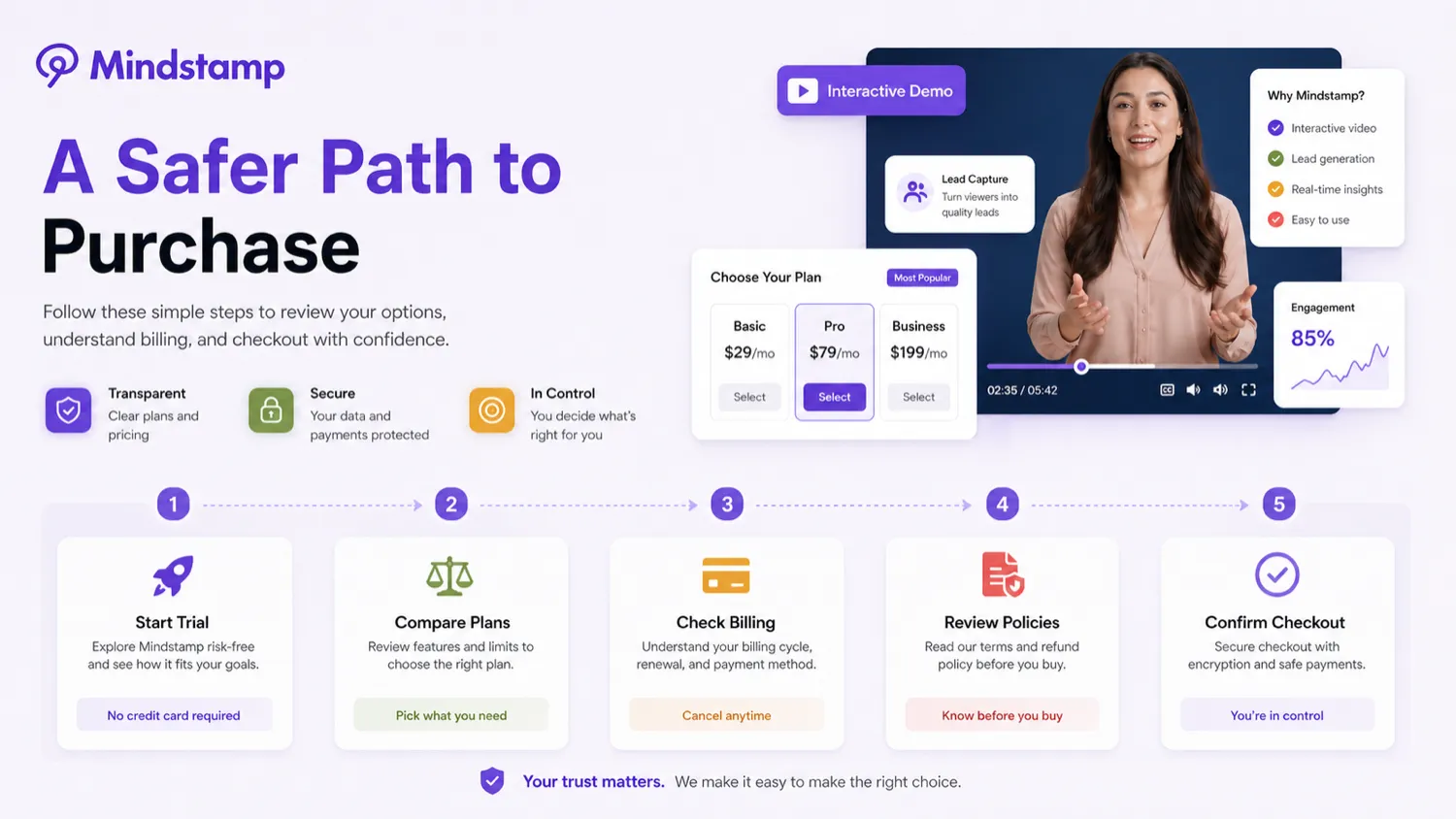
The current public pages present a 7-day free trial, and the trial page says no credit card is required. That is useful, but only if the buyer uses the trial properly. Watching the interface is not enough. Build one real interactive video, add at least one question, one call to action, and one reporting check, then decide whether the output is useful.
I did not verify a dependable public coupon code as the main savings path. The safer route is trial first, then monthly versus yearly billing comparison, then nonprofit or education discounts if relevant. If a coupon page lists active offers, treat that as a checkout check after product fit is clear, not the reason to buy.
Refund language deserves careful reading. Mindstamp’s public trial page uses money-back guarantee language, while the refund help page describes partial and discretionary refund paths with different windows for initial monthly subscriptions, renewal months, and annual subscriptions. That does not mean a refund is impossible. It means buyers should not treat refund as a simple no-risk promise.
The checkout order I would use is simple: trial result first, plan limits second, refund/cancellation terms third, annual billing last.
What I would check before buying Mindstamp
If I were buying Mindstamp for a real workflow, I would check seven things before paying.
- The first video use case. I would pick one training, sales, onboarding, education, or lead-capture video and define what success means before starting the trial.
- Plan limits. I would compare video count, admin count, max video length, streaming minutes, groups, playlists, and branding needs against Basic, Core, Pro, and Enterprise.
- Interaction depth. I would confirm whether basic buttons and questions are enough or whether conditional logic, branching, personalization, SCORM, or custom workflows matter.
- Integration needs. I would verify HubSpot, Salesforce, Zapier, webhooks, JavaScript events, exports, and API access before building a workflow around viewer data.
- Security and procurement. I would check SSO, custom security review, legal paperwork, and Enterprise requirements early if the buyer is a larger organization.
- Refund and cancellation language. I would read the live policy instead of assuming the trial page headline tells the whole story.
- Annual billing risk. I would start monthly unless the first trial project proves that interactive video will be used repeatedly.
A simple test before paying
Before paying, I would run a small test like this:
- Choose one video that already matters to your team.
- Define the goal: lead capture, quiz completion, viewer routing, booking, product click, or training proof.
- Add one question, one call to action, and one branching or navigation element.
- Publish it to a limited audience or internal test group.
- Review the reporting and viewer data.
- Check whether the data can move into your CRM, LMS, analytics, or follow-up process if needed.
- Decide whether the workflow is worth repeating before choosing monthly or yearly billing.
This test is intentionally small. Mindstamp is easier to judge when it is attached to a real outcome. If a small test does not change what your team does next, a bigger plan will not magically fix the mismatch.
Pros explained
The first real pro is focus. Mindstamp solves a specific problem: making videos interactive and measurable. That is more valuable than a generic feature list if your team depends on viewer actions.
The second pro is workflow breadth. Training teams, sales teams, educators, marketers, and onboarding teams can all use the same underlying interaction layer for different outcomes. That makes the platform easier to justify when multiple departments use video.
The third pro is the reporting and data angle. Passive video views are limited. Viewer responses, clicks, branching paths, and lead capture create better signals if the team knows what to do with them.
The fourth pro is the trial path. A 7-day trial is enough to test one focused use case, assuming the buyer starts with a real video and a clear goal.
The fifth pro is integration depth. Mindstamp becomes more useful when viewer activity can connect to CRM, analytics, webhook, or API workflows. This is not needed by every buyer, but it matters for teams that want video engagement to trigger follow-up.
Cons explained
The biggest con is cost for casual use. Mindstamp can be worth it when interactive video is part of a repeated workflow. It is harder to justify for a single campaign, one lesson, or a curiosity test.
The second con is category mismatch. Buyers looking for AI avatar video, text-to-video generation, or fast social clips may compare Mindstamp against the wrong tools. It is an interactive layer, not primarily a video creation engine.
The third con is plan complexity. The real buying decision involves videos, admins, streaming minutes, integrations, branding, reporting, and procurement needs. A buyer who only looks at the starting price may choose the wrong tier.
The fourth con is refund uncertainty. The policy is more conditional than a simple full-refund promise. That makes the trial and monthly-first path more important.
The fifth con is integration verification. API access, Salesforce, SSO, custom integrations, and procurement support should be confirmed before the team designs a process that depends on them.
Green flags and red flags
Green flags are easy to spot when the use case is concrete.
A strong buying signal is a video workflow that already repeats: onboarding every month, sales demos every week, course lessons across a cohort, or lead-generation videos across campaigns. Another green flag is a team that will actually review viewer data. Mindstamp is also more promising when the buyer already knows which system should receive the data after the video.
Red flags appear when the purchase is driven by novelty. If the main reason is “interactive video sounds cool,” slow down. If the team cannot name the first video, the first interaction, and the first metric, the trial may become aimless. If the buyer expects a cheap video editor or AI avatar creator, Mindstamp is probably the wrong first tool.
Another red flag is annual billing before workflow proof. The yearly rate can be attractive, but only after the first project proves that the tool will be used.
Mindstamp vs alternatives
Mindstamp’s alternatives need to be separated carefully. Some tools are direct interactive video or video engagement comparisons. The DealBestDaily routes below are mostly adjacent video-creation routes, not one-to-one replacements.
Synthesia vs Mindstamp
Synthesia is the better comparison if you need to generate AI avatar videos, especially for training, explainers, or corporate learning content. Mindstamp is the better fit after the video exists and needs questions, clicks, branching, lead capture, and reporting.
If your bottleneck is video production, start with the Synthesia store guide. If your bottleneck is viewer action and measurement, Mindstamp is the closer fit.
HeyGen vs Mindstamp
HeyGen is stronger for avatar-led video creation, localization, and business video generation. Mindstamp is stronger when the buyer wants to turn video into an interactive decision path.
A good workflow could use both categories: create a video in a generation platform, then use Mindstamp to add interaction. But if you only need avatar creation, the HeyGen store guide is the more natural first stop.
Elai vs Mindstamp
Elai fits teams creating structured AI videos for training, learning, and communication. Mindstamp fits teams that already have video assets and want comprehension checks, branching, viewer data, and interactive navigation.
Compare the Elai store guide if your first problem is producing training videos. Stay with Mindstamp if your first problem is making existing videos measurable.
AKOOL vs Mindstamp
AKOOL is more of a creative AI video and avatar route. It makes sense for marketing visuals, avatar content, and generative media workflows. Mindstamp is less about creative generation and more about what a viewer does after pressing play.
The AKOOL store guide is relevant when the buyer needs creative output. Mindstamp is relevant when clicks, responses, and viewer paths matter more than the original video creation step.
Trust, refund, and buyer-risk notes
Mindstamp looks trustworthy enough to evaluate seriously, but the buyer should still treat checkout as a plan-fit decision.
The first risk is pricing mismatch. The public plans differ by video count, admins, video length, streaming minutes, integrations, branding, support, and procurement options. The buyer should not assume the lowest plan covers a full team rollout.
The second risk is data workflow. If Mindstamp is used for training or sales, viewer data may matter. Buyers should verify what data is collected, how it is exported, where it needs to go, and whether privacy or compliance expectations require a higher-touch path.
The third risk is refund expectation. The help article describes partial and discretionary refund paths, not a simple universal refund guarantee. Read the live policy before relying on it, especially before annual billing.
The fourth risk is cancellation impact. If interactive videos are part of a live training, sales, or customer education workflow, cancellation is not only a billing action. The buyer should understand what happens to published videos, embeds, reporting, and access after the subscription changes.
The fifth risk is overbuilding. Interactive video can become complicated quickly. The best projects usually start with a small number of meaningful interactions and expand only after viewer behavior supports it.
Final verdict
I would consider Mindstamp if you already have videos and need viewers to do something measurable: answer questions, choose a path, submit a lead, click a product, complete training, or trigger a follow-up workflow.
I would skip Mindstamp if you mainly need AI avatar video generation, short-form clips, simple video editing, or a one-off interactive experiment. In that case, compare video creation tools first and come back to Mindstamp only if interaction becomes the real bottleneck.
I would compare it with Synthesia, HeyGen, Elai, or AKOOL if the first problem is creating the video. I would compare Mindstamp more seriously with interactive video and video engagement platforms if the first problem is viewer action, reporting, and follow-up.
The safest next step is to use the trial with one real video and one clear outcome. If that test creates useful viewer data, Mindstamp can earn its place. If it only creates a more complicated video, the store guide and current pricing page are worth reviewing again before you pay.
