
Mindstamp Pricing, Plans & Interactive Video Fit
Mindstamp is best understood as an interactive video layer, not a normal AI video generator. It helps teams take existing videos and add buttons, hotspots, questions, lead capture, branching, conditional logic, personalization, reporting, and integrations. That makes it more useful for training, sales, onboarding, education, and lead-generation workflows than for someone who simply wants to create short AI clips from text.
Fit → price → checkout
Use these routes after the official-site check: coupon first, review for fit, compare if unsure.
Mindstamp pricing snapshot
Fast commercial checks before pricing, coupons, or a deeper review.
Basic plan, billed monthly on the public pricing page.
Basic plan when billed yearly.
Useful for testing one real interactive video before payment.
There is a free trial, but no ongoing free version was verified.
Mindstamp product tour and workflow visuals
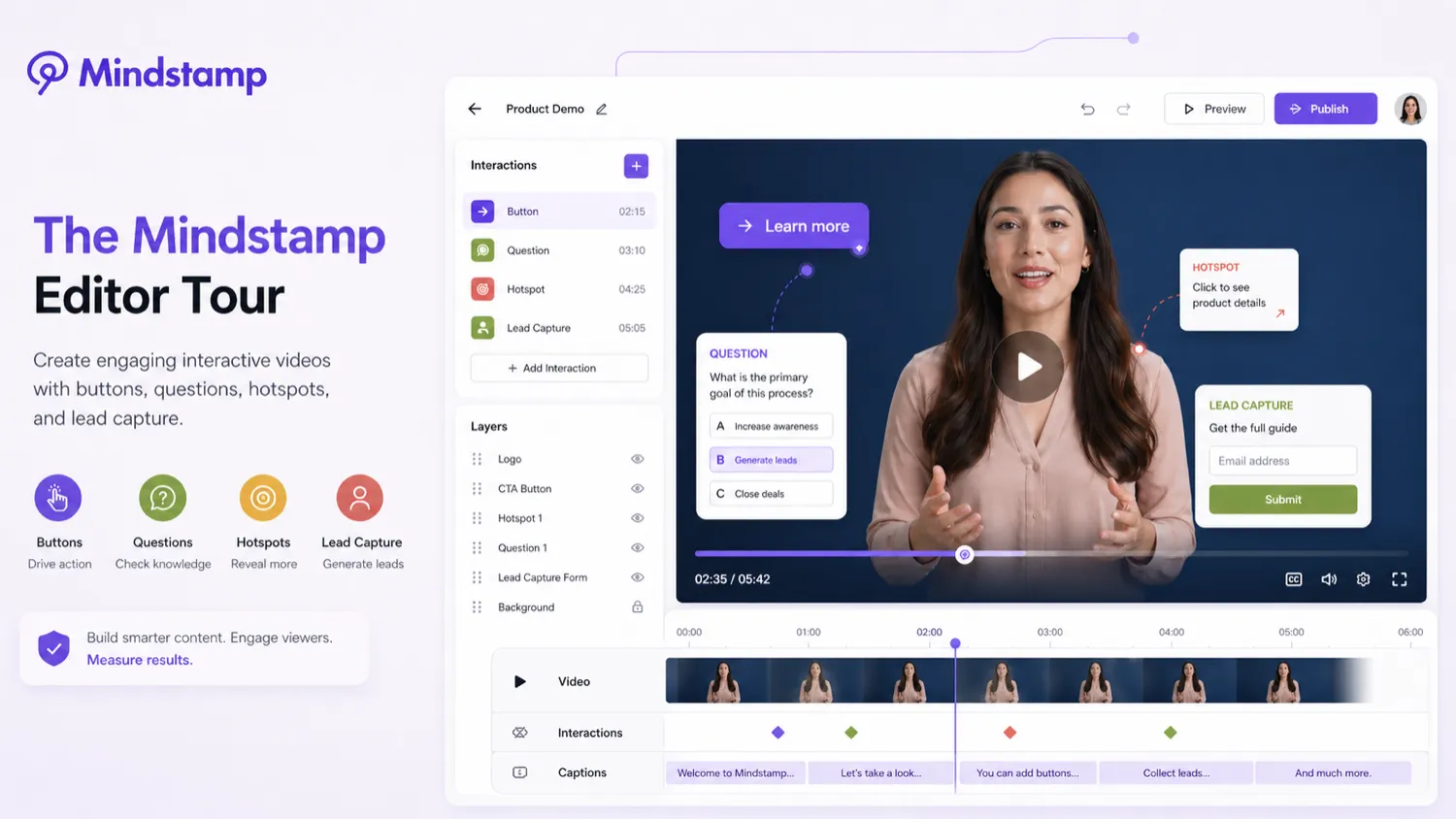
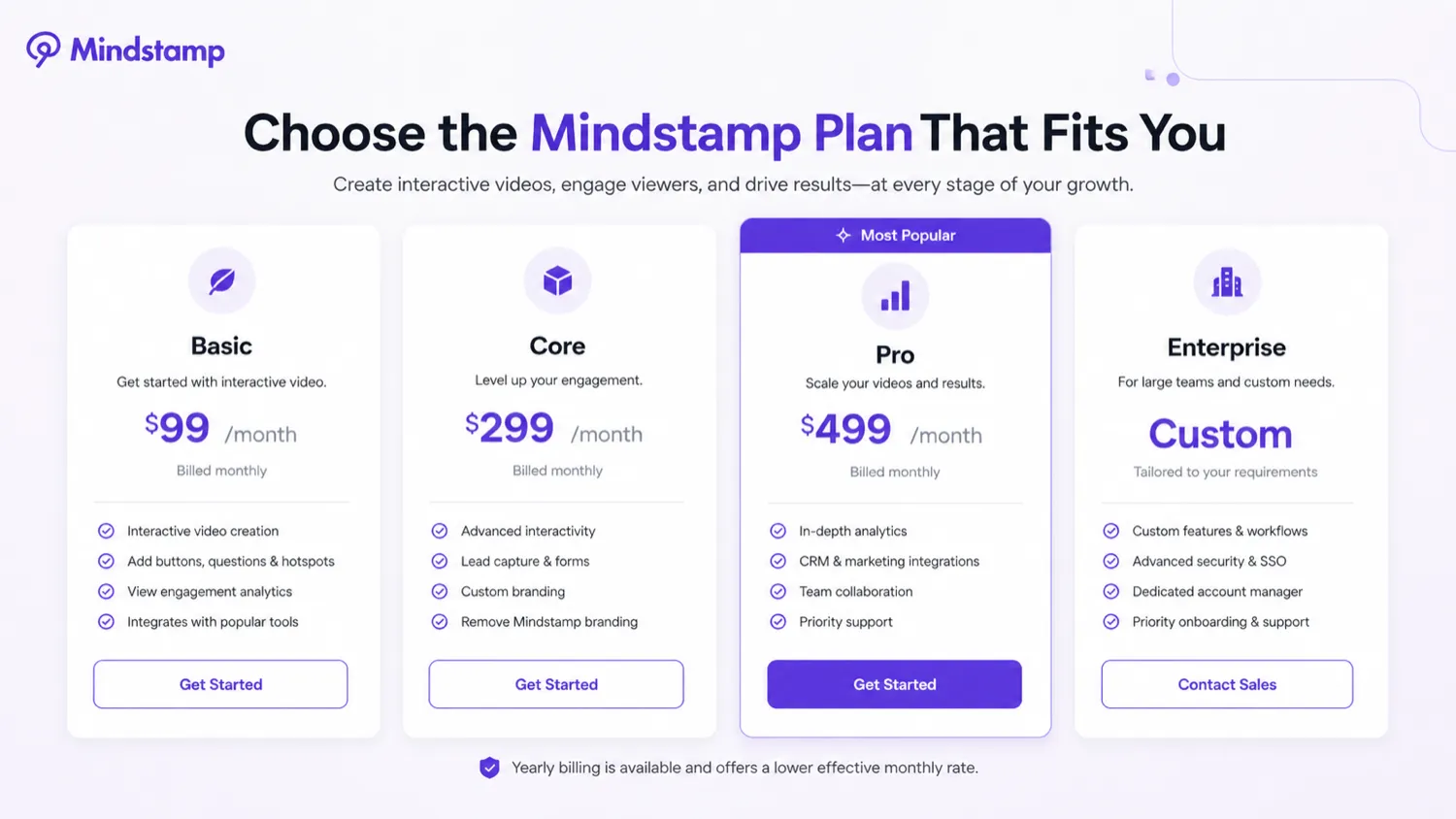
Mindstamp is easiest to judge visually because the buying question is not just feature count. Buyers need to see whether the editor, pricing table, interaction layer, and reporting flow match the way they plan to use interactive video.
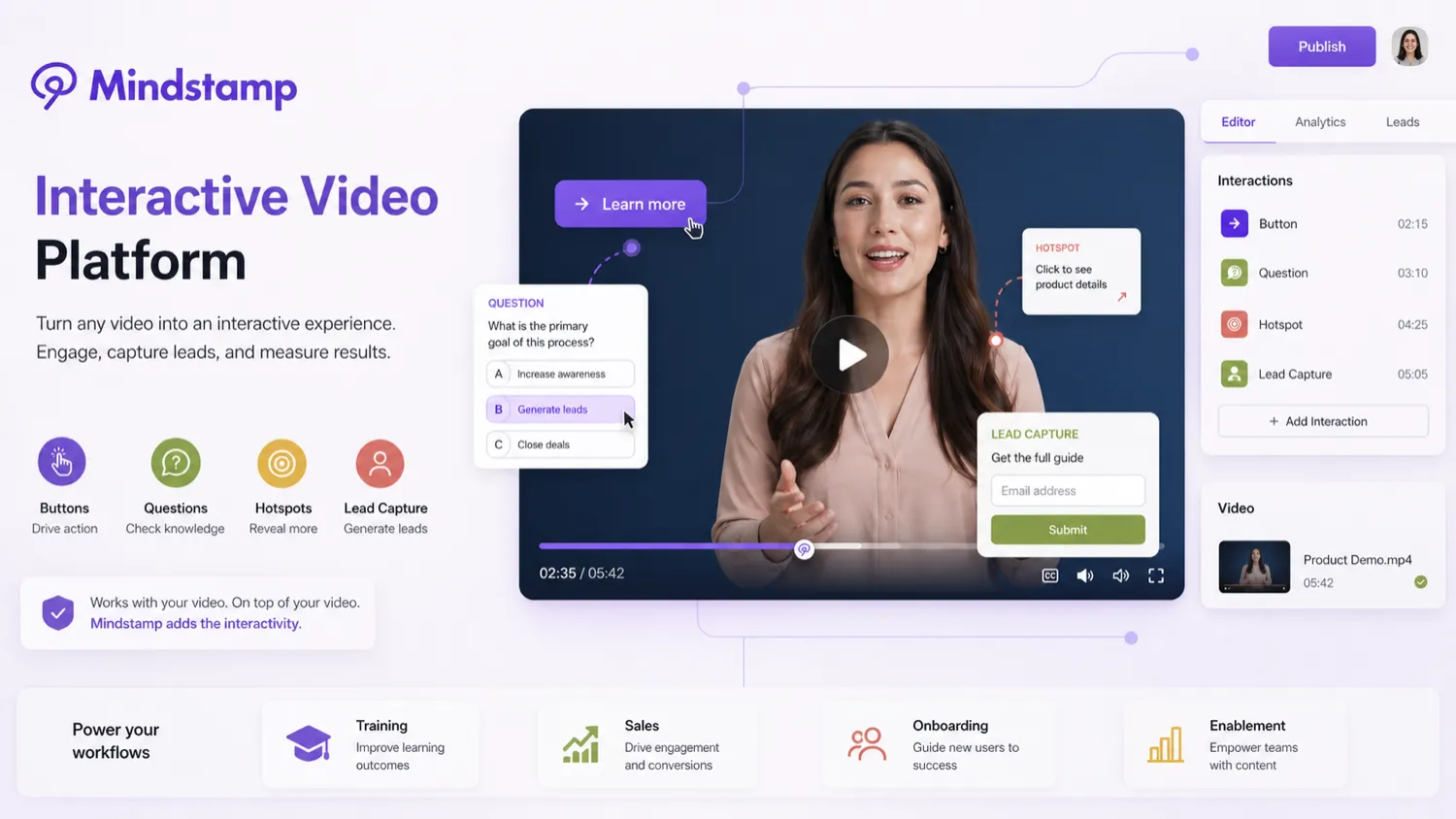
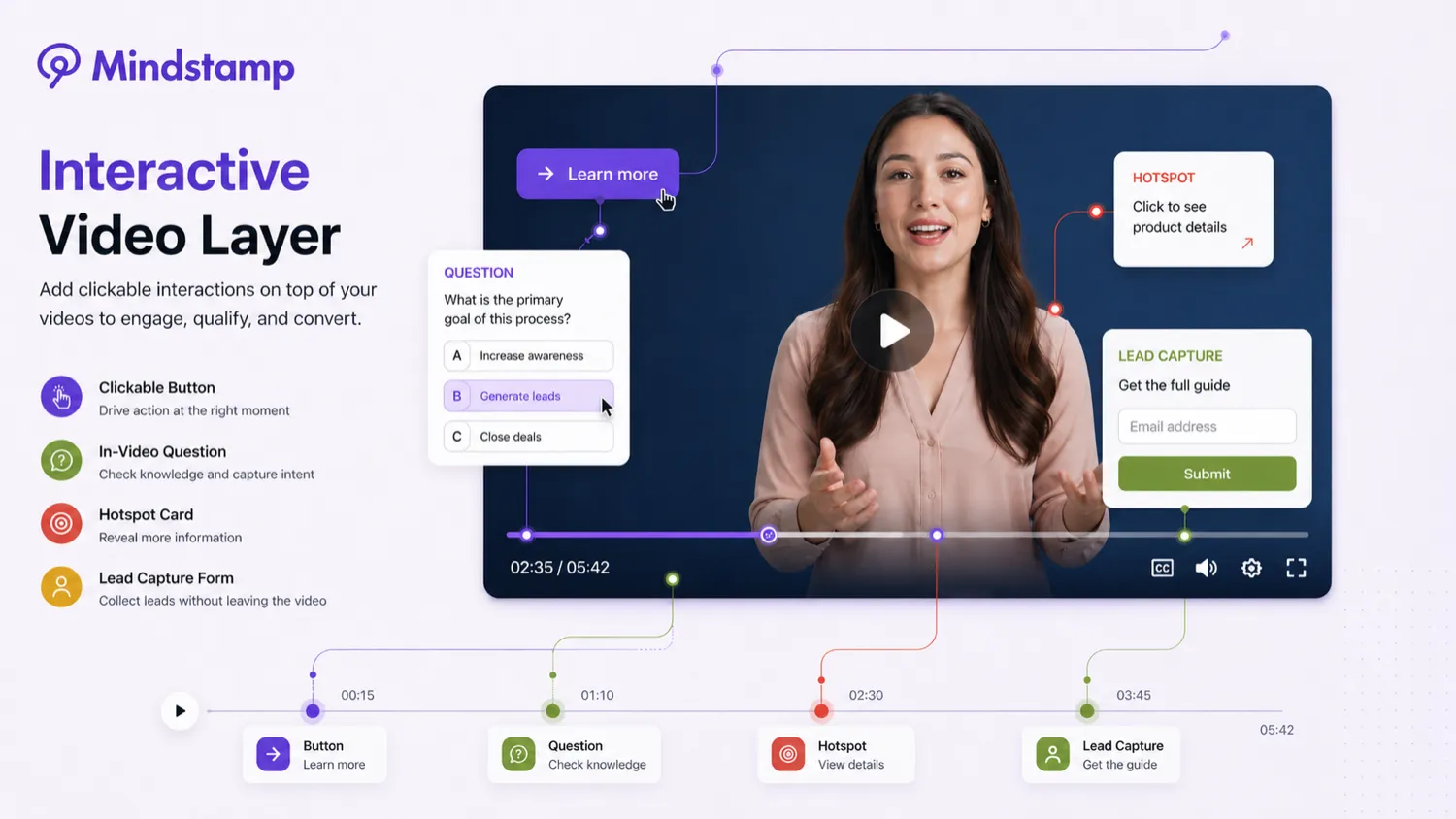
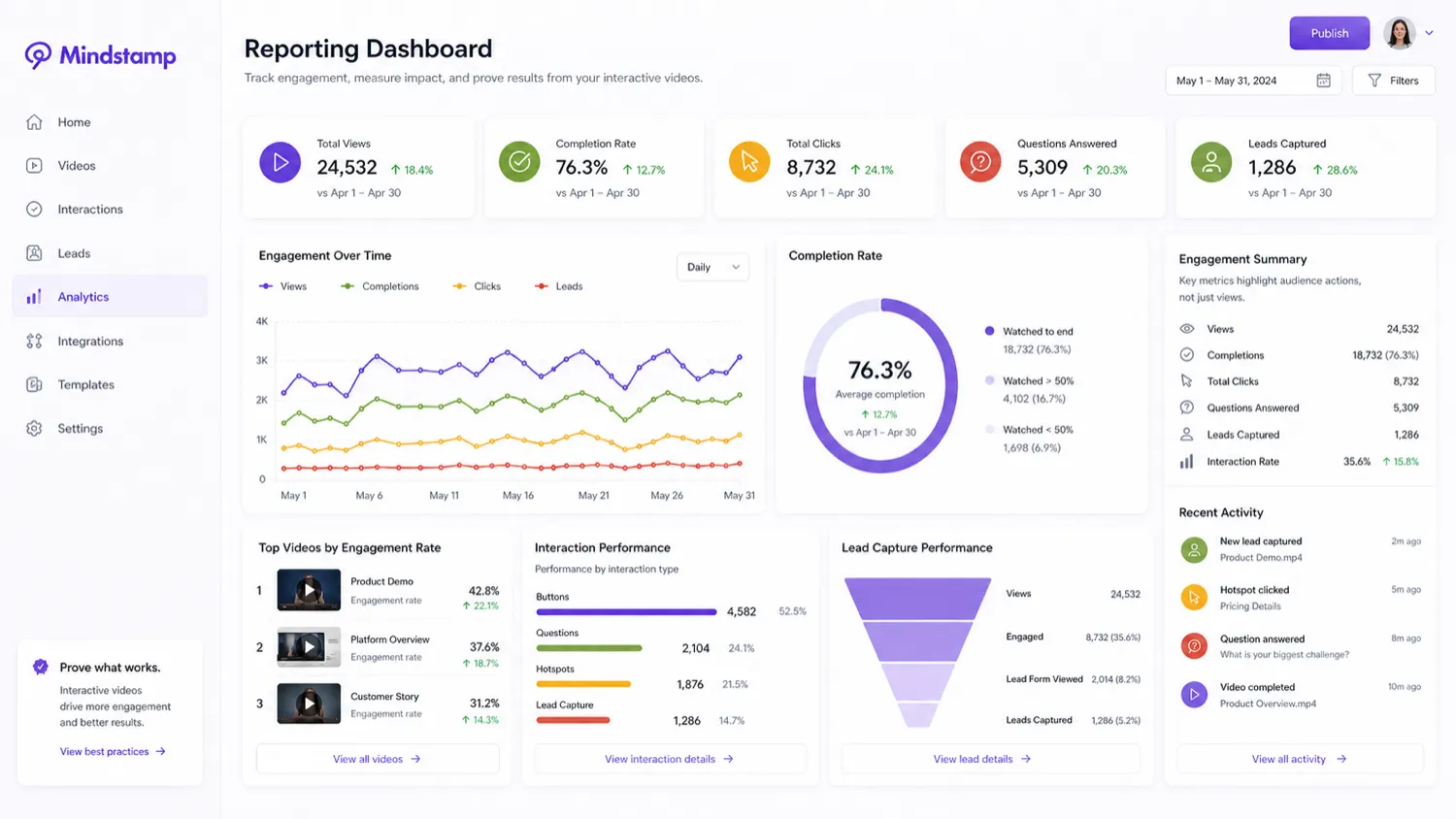
Mindstamp is a better fit when you already have videos and want them to do more work. Instead of asking the viewer to passively watch, it lets you add interaction points, capture responses, route viewers through branches, and collect data that can support training, sales, marketing, onboarding, or education workflows.
The main buying question is not whether Mindstamp has enough features. It does. The sharper question is whether your team will actually use interaction data, lead capture, branching, reporting, and integrations often enough to justify a paid plan.
What Mindstamp actually does
Mindstamp turns an existing video into an interactive experience. A buyer can add buttons, hotspots, questions, drawings, images, text, branching navigation, conditional logic, lead capture, and other overlays without rebuilding the original video from scratch.
That makes it useful for workflows where the viewer needs to take an action, answer a question, choose a path, prove comprehension, or send data into another system. It is less useful if the buyer mainly wants AI-generated footage, avatar narration, or quick social clips.
- Add clickable elements to existing videos instead of creating an entirely new video asset.
- Use questions, branching, and conditional logic to guide different viewer paths.
- Capture viewer information and interaction data for follow-up or reporting.
Pricing and plan fit
The current public pricing page shows Basic at $99/month, Core at $299/month, Pro at $499/month, and Enterprise as a custom path. Yearly billing lowers the effective monthly rate, with Basic shown at $83/month when billed yearly.
The safer buying sequence is to test one real video during the 7-day trial, then compare the paid plans based on video count, admin seats, streaming minutes, integrations, and branding needs. A headline price alone can hide the real fit problem.
- Basic is the lowest public monthly plan, but it still needs a real use case to justify the cost.
- Core and Pro make more sense when more videos, admins, integrations, or workflow depth are required.
- Enterprise should be checked when security review, custom limits, or procurement requirements matter.
Where the platform makes the most sense
Mindstamp is strongest when video is connected to a business or learning outcome. Training teams can check comprehension. Sales teams can route viewers to a meeting link. Marketers can capture leads. Educators can add questions and viewer paths. Customer success teams can turn long demos into guided experiences.
That is also why a casual creator should pause before buying. If the goal is only to publish nicer videos, Mindstamp may be too much platform for the job.
- Training and onboarding: quizzes, viewer reports, certificates, and comprehension checks.
- Marketing and sales: clickable CTAs, lead capture, personalization, and CRM follow-up.
- Education and courses: branching, questions, transcripts, and guided learning paths.
Integrations, API, and reporting checks
Mindstamp's buyer value increases when interaction data leaves the video player and becomes useful elsewhere. Its integration pages reference tools such as HubSpot, Salesforce, Zapier, Google Analytics, Segment, Webhooks, REST API, Vimeo, Wistia, Synthesia, HeyGen, YouTube, and other video sources.
The caution is plan access. A buyer should not assume every integration, API path, custom domain, branding control, or security-related workflow is available on the lowest plan. These details need a live pricing-page check before checkout.
- Check whether the integration you need is included on the plan you are considering.
- Confirm API access if you need to pull views, viewers, videos, interactions, or user data.
- Verify reporting and export needs before using Mindstamp for compliance-heavy training workflows.
Coupon, deal, and checkout reality
Mindstamp looks more like a plan-fit purchase than a coupon-first purchase. I did not verify a dependable public coupon code, so the safer savings path is the official trial, yearly billing comparison, and any organization-specific discount such as nonprofit or education pricing.
Before checkout, confirm the current price, whether the chosen plan includes the needed integrations, how the refund policy applies, and whether the content must remain viewable after cancellation. Those checks matter more than chasing a generic coupon box.
- Use the free trial to test a real video before paying.
- Compare monthly and yearly billing only after the workflow proves useful.
- Check nonprofit or education discounts if your organization qualifies.
Relevant alternatives to compare
Mindstamp should be compared against nearby video workflow tools, but the comparison needs to be fair. Synthesia and HeyGen are stronger fits when the buyer mainly needs to generate AI avatar videos. Elai also fits structured AI video creation for training-style content. AKOOL leans more toward avatar and creative marketing visuals.
Mindstamp's edge is the interactive layer after a video exists. If the buyer needs video creation first, compare generation tools. If the buyer already has videos and wants clicks, quizzes, branching, lead capture, and reporting, Mindstamp deserves the closer look.
- Choose Synthesia, HeyGen, or Elai first when video generation is the main job.
- Choose Mindstamp when interaction, viewer data, and embedded calls to action are the main job.
- Compare AKOOL when creative avatar or image-to-video marketing output is closer to the use case.
Best savings path from this store page
This is the clearest savings route to check once the product already looks like a fit.
Mindstamp confirms a 7-day free trial that can be started without a credit card. This is the safest first step for buyers who need to test interactive video elements before paying for a yearly business plan.
Use this offer as a buyer-safe entry point. Pricing, plan limits, and promotional availability can change at checkout.
Official pricing lists monthly equivalent prices billed yearly
Basic is the lowest public paid plan on the official pricing page
Use comparison routes when the category fit is still open
Use these comparison routes when the product still looks plausible, but the category fit is not fully settled.
Synthesia is a better first tab when the buyer needs AI avatar video generation; Mindstamp is the better fit when an existing video needs interaction, branching, and viewer data.
HeyGen is stronger for avatar-led creation and localization; Mindstamp is stronger when the buyer wants clickable video experiences and post-viewer activity data.
Elai fits teams creating structured AI training videos, while Mindstamp fits teams that already have videos and need quizzes, CTAs, reporting, or branching.
AKOOL belongs in the shortlist for creative avatar and marketing visuals; Mindstamp belongs in the shortlist for interactive engagement after the video exists.
Verification points worth checking before you click out
Where this store usually fits best in the workflow
Mindstamp fits training teams that want questions, branching, certificates, viewer reports, and measurable comprehension rather than passive video completion.
Sales and marketing teams can use in-video calls to action, viewer information capture, and CRM-connected follow-up to turn video engagement into a clearer next step.
Educators and course builders can add questions, navigation, transcripts, and learner-specific paths to make lessons easier to measure and revisit.
Product teams can turn long demos into guided experiences where viewers choose what they want to see, click for more context, or trigger next-step actions.
Practical checkpoints before and after signup
- Pick one real video that already matters to training, sales, education, or onboarding.
- Define what success means before opening the editor: lead capture, quiz completion, branching, or better viewer reporting.
- Build one complete interactive flow with at least one question, one call to action, and one reporting check.
- Check whether the editor is comfortable enough for the person who will maintain the videos after launch.
- Compare Basic, Core, Pro, and Enterprise against the exact video count, admin count, integrations, and streaming minutes you need.
- Read the refund language and confirm whether yearly billing is worth the commitment.
- Review viewer activity instead of only checking video views.
- Recheck plan fit when adding more videos, admins, integrations, or higher streaming volume.
Fast-read signals for workflow fit and buying friction
Questions readers usually ask before choosing this store
What does Mindstamp do?
Mindstamp lets buyers add interactive elements to existing videos, including buttons, hotspots, questions, lead capture, branching, conditional logic, personalization, and reporting. It is better understood as an interactive video platform than a standard video editor.
Does Mindstamp have a free plan or free trial?
I verified a 7-day free trial, but not an ongoing free plan. Buyers should use the trial to test one real workflow before deciding whether the paid plans justify the cost.
How much does Mindstamp cost?
At the latest editorial check, Mindstamp's public pricing page listed Basic at $99/month, Core at $299/month, Pro at $499/month, and Enterprise as a custom plan. Yearly billing showed lower effective monthly pricing, starting at $83/month for Basic.
Are Mindstamp coupon codes the best savings path?
Not usually. I did not verify a reliable public coupon code, so the safer path is to compare the free trial, yearly billing, nonprofit or education discounts, and the current plan limits before checkout.
Who should avoid Mindstamp?
Mindstamp is probably not the right first choice for buyers who only need AI video generation, avatar videos, basic editing, or a cheap one-off video project. It makes more sense when interaction data, lead capture, branching, or training measurement are part of the workflow.
Choose the next route that matches what you still need to decide
The strongest next click depends on whether you still need product judgment, a savings route, or a broader category comparison.