Quick verdict
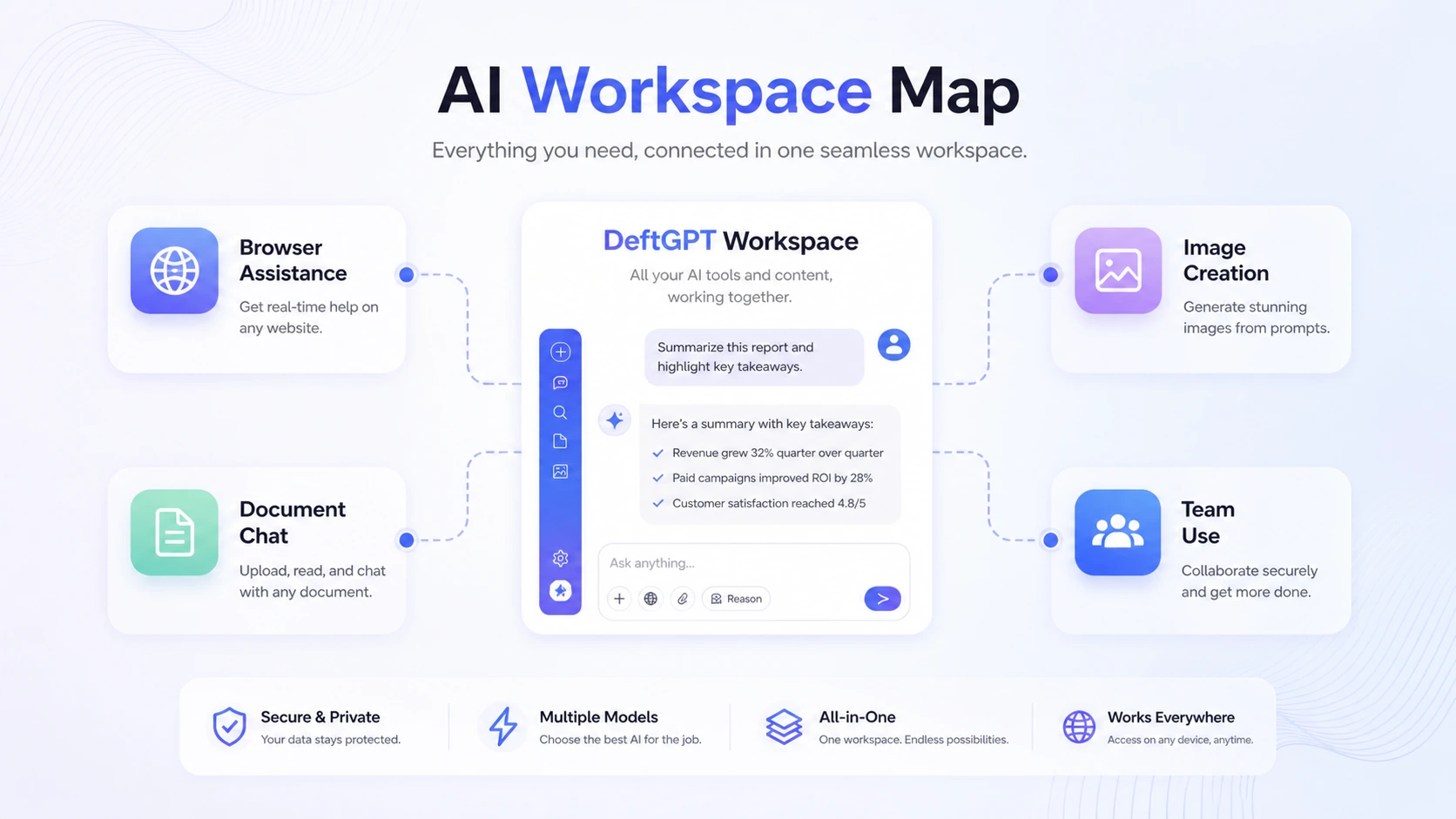
DeftGPT is worth considering if you want an AI assistant that follows you into browser work, not just another place to type prompts.
That is the real buying question here. DeftGPT looks simple on the surface: chat, document questions, image generation, Chrome extension access, and team-friendly plans. But the decision is not only whether those features exist. The decision is whether they reduce enough friction in your daily workflow to justify a paid credit plan.
I would not judge DeftGPT as a deep specialist tool. It is not the first product I would choose if you need a dedicated SEO content platform, a high-end image generator, a customer-support chatbot builder, or a developer API layer. Its better fit is narrower and more practical: browser writing, document summaries, quick research support, Gmail or Google Docs assistance, reusable prompts, and light creative help under one account.
The strongest reason to consider it is workflow proximity. If you already write, research, summarize, and communicate inside Chrome, DeftGPT can feel more useful than a separate AI tab. The main caution is pricing: credits, file limits, workspaces, team capacity, and nonrefundable subscription terms matter more than the headline monthly number.
The safest next step is to test the free plan with real work before comparing Solo, Pro, Team, or any current offer path.
Next step: If DeftGPT still fits your browser and document workflow, test the live product route before choosing a paid credit plan.
Review snapshot
| Review point | Practical take |
|---|---|
| Best for | Browser-heavy workers, students, creators, researchers, and small teams that repeat AI tasks across tabs and documents |
| Not ideal for | Buyers who need specialist SEO, advanced automation, verified developer workflows, or strict enterprise procurement |
| Main use case | AI assistance for Chrome, Gmail, Google Docs, search, document chat, prompt reuse, and light image creation |
| Pricing model | Free daily credits plus paid credit-based plans |
| Free path | Free Forever plan with daily credits for product exploration |
| Main strength | Browser-side convenience plus document and team workflows |
| Main concern | Paid value depends on real credit usage and subscription terms |
| Best direct comparisons | 1min.AI for broader all-in-one AI utility; CustomGPT for knowledge-base chatbot deployment |
| Adjacent route | Aikeedo if the buyer wants to build or own an AI SaaS system instead of using a hosted assistant |
| Best next step | Run a real week of browser, document, and creative tasks before paying |
What is DeftGPT?
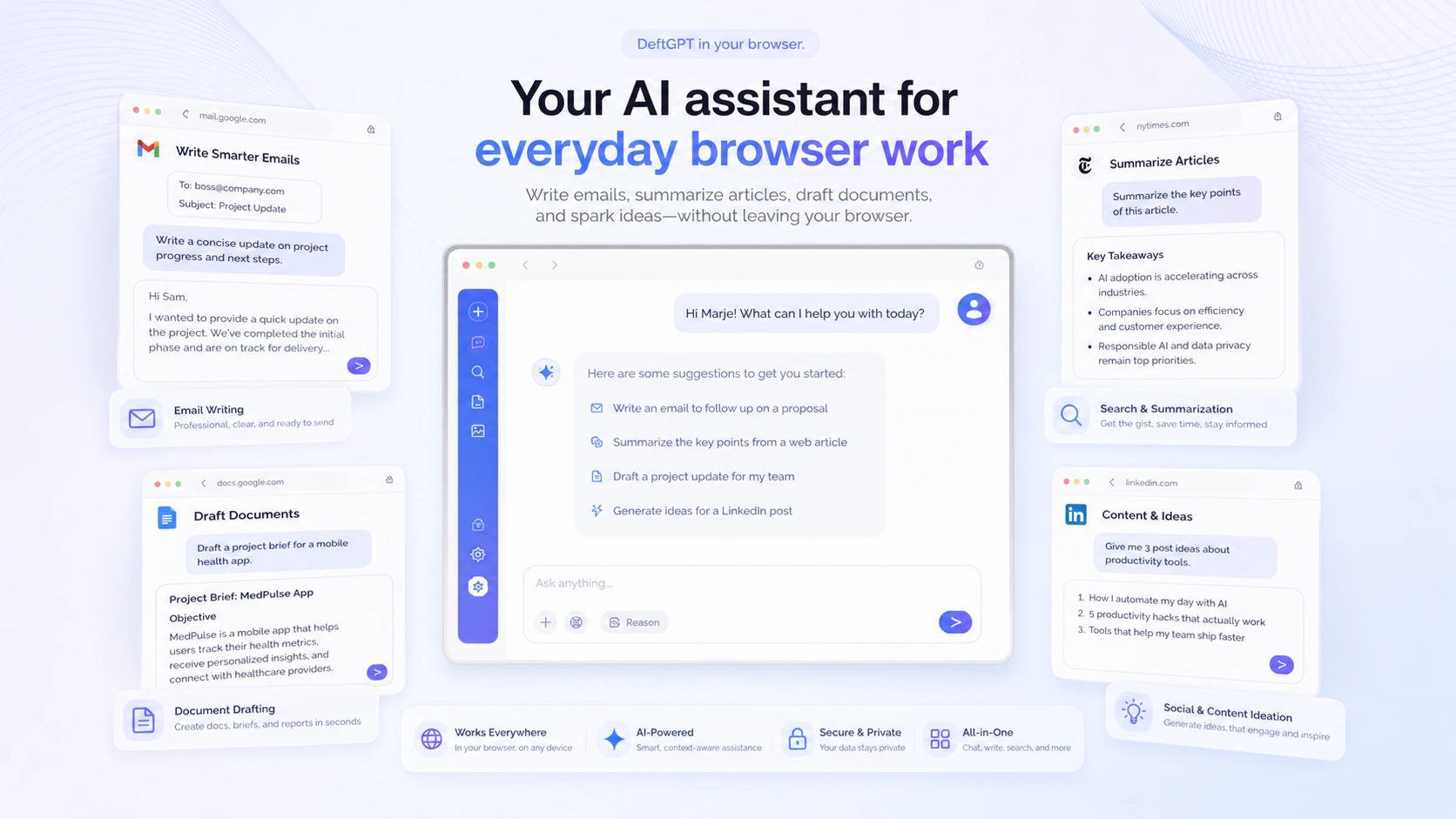
DeftGPT is best understood as a browser-friendly AI workspace for people who want chat, document questions, writing support, image generation, and team usage in one place.
The homepage positions it as an alternative to ChatGPT with features like document chat, image generation, private chats, bot role customization, and browser-based access. The Chrome extension listing gives a clearer picture of the practical workflow: Gmail help, long email and thread summaries, Google Docs and social writing, search-side answers, document chat across PDF and common file formats, and team management.
That makes DeftGPT different from a pure writing tool. It is closer to a lightweight AI productivity layer that sits across everyday work. A buyer might use it to draft an email, summarize a PDF, ask follow-up questions about a report, generate a quick image concept, or keep prompts and workspaces organized.
The common wrong expectation is thinking DeftGPT replaces every specialist AI tool. It does not. A dedicated SEO platform may handle content planning better. A specialist image generator may give deeper visual control. A support-chatbot platform may be stronger for website deployment. DeftGPT is more convincing when the buyer wants several small AI jobs handled near the browser.
Our review approach compares public product pages, pricing details, extension listings, help documentation, refund language, buyer workflow fit, and nearby alternatives. We do not treat a coupon, free plan, or low monthly price as proof that the product fits the buyer.
Who should use DeftGPT?
DeftGPT makes the most sense for buyers who already feel friction moving between browser tabs, files, and AI chat tools.
A knowledge worker who spends the day in Gmail, Google Docs, search results, reports, and social platforms may get real value from the Chrome extension. The tool becomes useful when it shortens small repeated actions: summarize this thread, draft this reply, rewrite this paragraph, ask a question about this document, or generate a quick starting point.
A student or researcher may use DeftGPT for document chat and summarization. The fit is strongest when the work involves PDFs, DOCX files, notes, or reports that need follow-up questions. Before paying, I would test the exact file types and file sizes you use. Clean documents and messy documents can feel very different.
A solo creator or marketer may find it useful for quick drafts, idea generation, and light image creation. This is not the same as a full creative suite. The value is speed and convenience, not deep brand control.
A small team may consider it if shared billing, workspaces, and organization management reduce scattered AI usage. Team value only appears when multiple people use the workspace often enough. A Team plan is not automatically better just because it has higher limits.
DeftGPT also fits buyers who want a free starting point before paying. The free plan is not a full proof of long-term value, but it is enough to test whether the product belongs in your weekly routine.
Who should avoid DeftGPT?
I would be careful with DeftGPT if you only need occasional AI chat. The free plan may cover light curiosity, and a paid plan can become unnecessary if you do not repeat the workflow.
I would also avoid treating it as a deep automation platform. Official and third-party information supports DeftGPT as a browser, document, writing, image, and team productivity workspace. I would not assume it can power custom backend workflows unless the current product documentation confirms that route for your use case.
Teams with strict procurement, compliance, data retention, admin, or security requirements should slow down. DeftGPT may be useful for small-team productivity, but a serious rollout needs a closer look at privacy, terms, workspace controls, support expectations, and plan boundaries.
Buyers who mainly need specialist output should compare before paying. If your main need is SEO content operations, choose a specialist content workflow. If your main need is customer support automation, compare tools built for knowledge-base chatbot deployment. If your main need is advanced image generation, compare creative-generation platforms first.
Finally, avoid buying because a coupon path appears. A discount can improve a good fit. It cannot fix weak usage, strict refund terms, or a plan that runs out of credits faster than expected.
How DeftGPT fits into a real workflow
A realistic DeftGPT workflow starts before checkout. I would not begin by asking which plan looks cheapest. I would begin by listing the repeated tasks that make AI useful during a normal week.
For a browser-heavy worker, the workflow might look like this:
- Use the Chrome extension while reading, writing, or searching.
- Draft or summarize inside Gmail, Google Docs, or a browser page.
- Upload a real PDF or DOCX file and ask follow-up questions.
- Generate a short piece of content or a quick image idea.
- Save or reuse prompts that produce consistent results.
- Check how many credits those tasks consume.
- Decide whether Solo, Pro, or Team actually fits the usage pattern.
That last step matters. A credit-based plan is hard to judge from the pricing table alone. A buyer who mostly drafts short replies may use DeftGPT lightly. A buyer who works with documents, images, and multiple team members can move through limits faster.
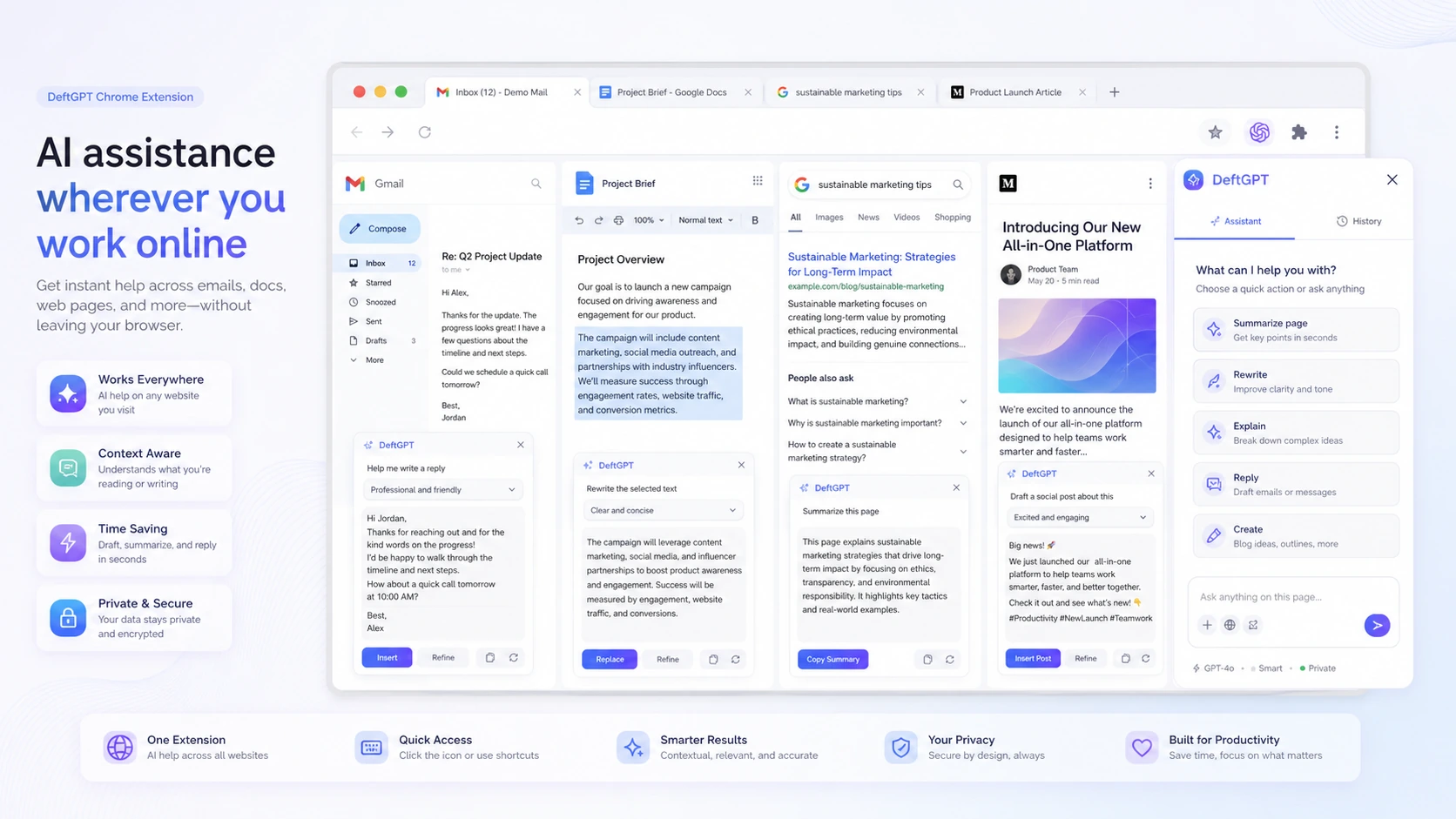
The strongest use case is not “ask AI something.” The stronger use case is “use AI where the work already happens.” If DeftGPT saves tab switching, repeated copy-paste, and prompt rewriting, the paid plan deserves a closer look. If it becomes just another separate AI dashboard, the value is weaker.
Workflow check: Use DeftGPT on one browser writing task, one document task, and one creative task before choosing a plan.
Real-world buyer scenarios
Solo marketer working across tabs
A solo marketer may use DeftGPT to draft social updates, summarize pages, reshape rough paragraphs, and create quick idea lists from the browser. This is where the Chrome extension matters most.
The risk is expecting it to replace a full SEO workflow. DeftGPT can help with quick writing and idea work, but a specialist SEO platform may still be better for keyword mapping, optimization scoring, SERP analysis, and editorial planning.
Student or researcher reading documents
A student or researcher may use DeftGPT to ask questions about PDFs, summarize reports, and turn long notes into structured takeaways. This is a believable fit if the files are clean and the questions are specific.
The buyer check is file reality. Test your own PDFs, not only a short demo document. Tables, scanned files, long reports, and formatting can change the experience.
Small team trying to centralize AI usage
A small team may consider DeftGPT if people are already using scattered AI tools separately. Shared workspaces, organization management, and unified billing can make sense.
The caution is adoption. A team plan is only useful if members actually use the same workspace. If only one or two people need AI heavily, individual plans or a different team workspace may be more sensible.
Creator who wants light visual support
DeftGPT includes image generation, which can help creators produce quick concepts. That is useful for brainstorming, content drafts, and rough visual direction.
It is not the first tool I would choose for high-control image production. If image quality, editing depth, brand consistency, or commercial creative control is the main job, compare dedicated creative-generation tools instead.
Key features that actually matter
Chrome extension workflow
The Chrome extension is one of DeftGPT’s most important buying signals. The extension positioning covers Gmail, Google Docs, search engines, social platforms, and general browser content creation.
This matters because AI assistants are easier to keep using when they appear near the work. If you have to open another tab, copy text, paste it, rewrite the prompt, copy the result, and return to the original page, the tool loses some practical value.
Buyer note: judge the extension by your own browsing rhythm. It is not enough that an extension exists. It has to feel fast enough and useful enough in the places you already work.
Document chat
DeftGPT’s document chat is useful for PDFs, Word files, text files, email files, and other document-style workflows. This can help buyers summarize, extract information, and ask follow-up questions without reading every page manually.
The feature matters most for students, researchers, analysts, consultants, and content workers who regularly handle documents. It matters less for casual users who only need quick chat answers.
Buyer note: run your own documents through the free path before paying. A tool can perform well on clean files and still feel weaker with dense reports, tables, scanned files, or formatting-heavy documents.
Prompt reuse and organized AI work
G2 reviewer themes point toward DeftGPT helping users save, organize, and reuse prompts instead of rewriting the same instructions repeatedly. That is a quiet but important productivity feature.
Prompt reuse matters when the buyer has repeated tasks: weekly summaries, standard client replies, content outlines, product descriptions, or research prompts. It reduces inconsistency and saves time.
Buyer note: this is valuable only if you build a small repeatable system. If you mostly use AI casually, prompt organization may not be enough to justify paying.
Image generation
Image generation broadens DeftGPT beyond text. For creators and marketers, this can support quick concepting, visual brainstorming, and lightweight creative output.
The caution is depth. A broad AI workspace can include image generation without matching the quality, controls, editing tools, or workflow depth of specialist image platforms.
Buyer note: test image quality separately. Do not assume the text workflow and image workflow will feel equally strong.
Team and workspace management
DeftGPT’s Team and Enterprise paths make it more relevant for shared usage than a solo-only assistant. Team management, workspaces, unified billing, and higher credit limits can help a small group centralize AI usage.
The risk is overbuying. Team plans sound efficient, but only if multiple people use the tool repeatedly. If a team buys access and only one person uses it, the economics weaken quickly.
Buyer note: run a short team pilot before assuming shared usage will happen naturally.
Pricing and plan value
DeftGPT’s pricing is easier to understand than many AI tools, but it is not something I would judge by monthly price alone.
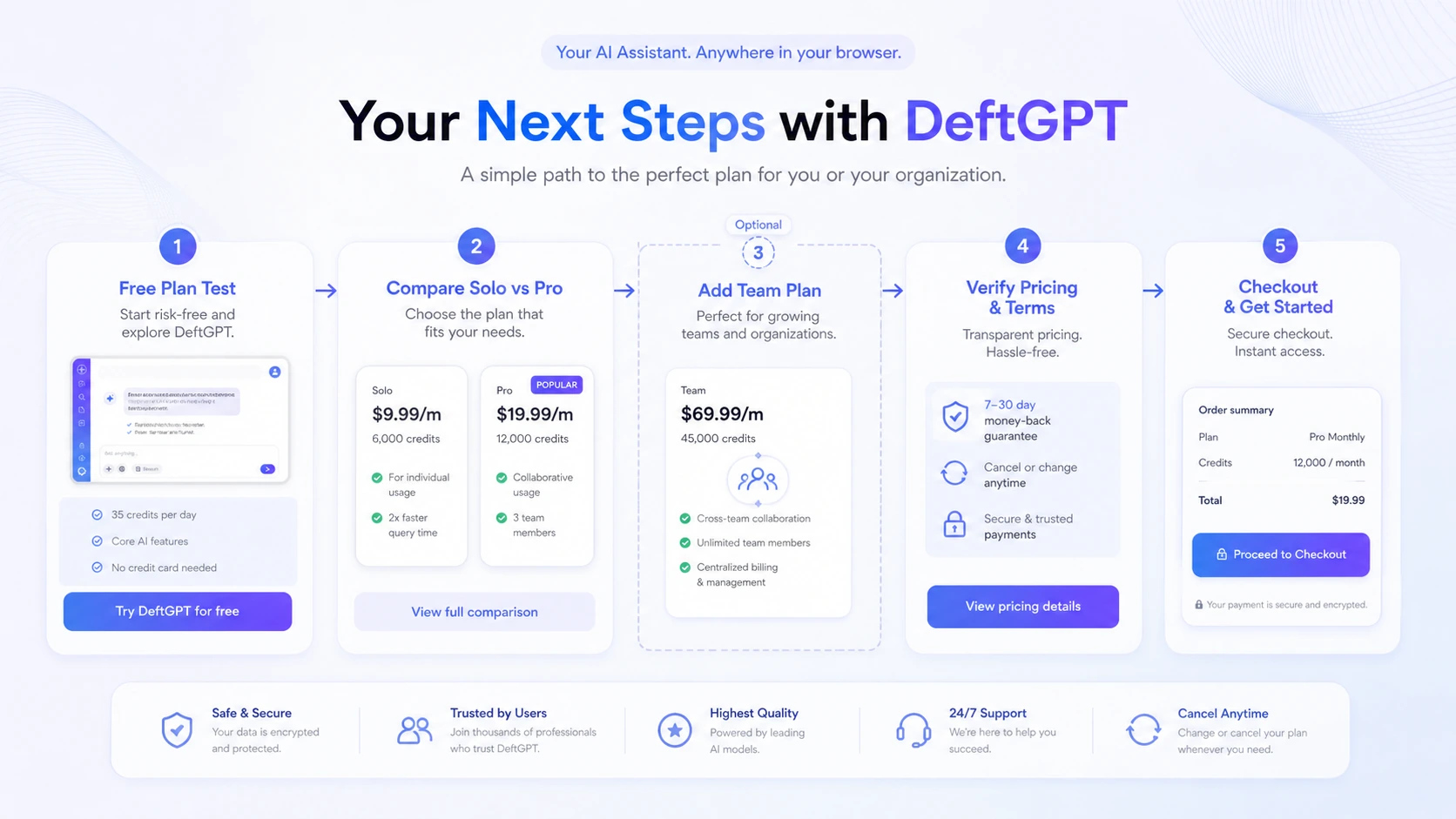
The current public pricing page shows a Free Forever plan with daily credits, then paid tiers such as Solo, Pro, Team, and Enterprise. The free plan is positioned for product exploration. Solo is the paid entry point for individual usage. Pro and Team increase credits, file and workspace capacity, collaboration, scanned PDF support, and team-oriented usage paths.
The important word is credits.
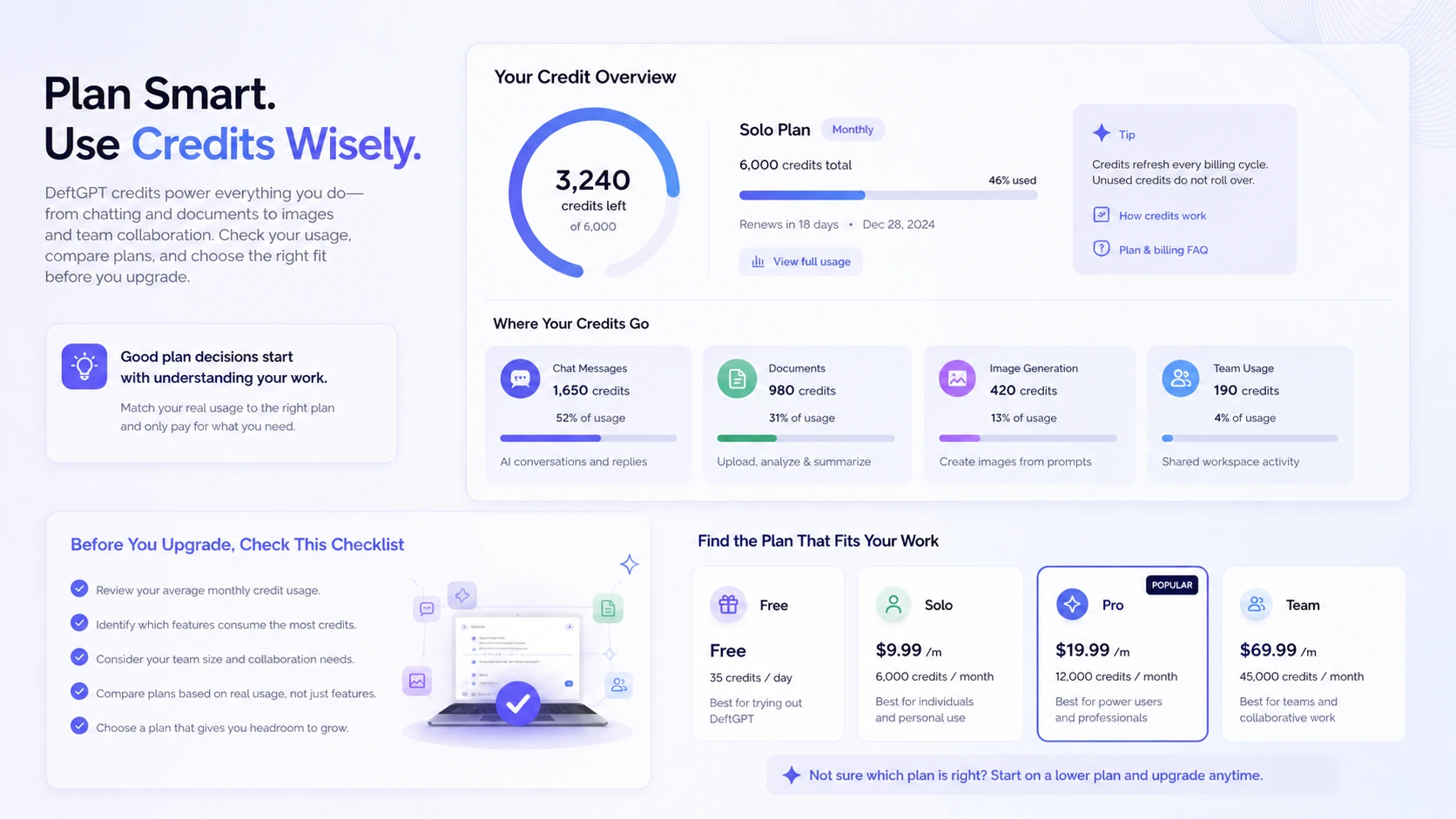
A credit-based AI workspace can look inexpensive until you measure your own usage. Browser writing, document chat, image generation, and team activity may not consume value at the same pace. A person who asks short questions may be fine on a lower tier. A person who uploads documents, uses images, and invites team members may need more headroom.
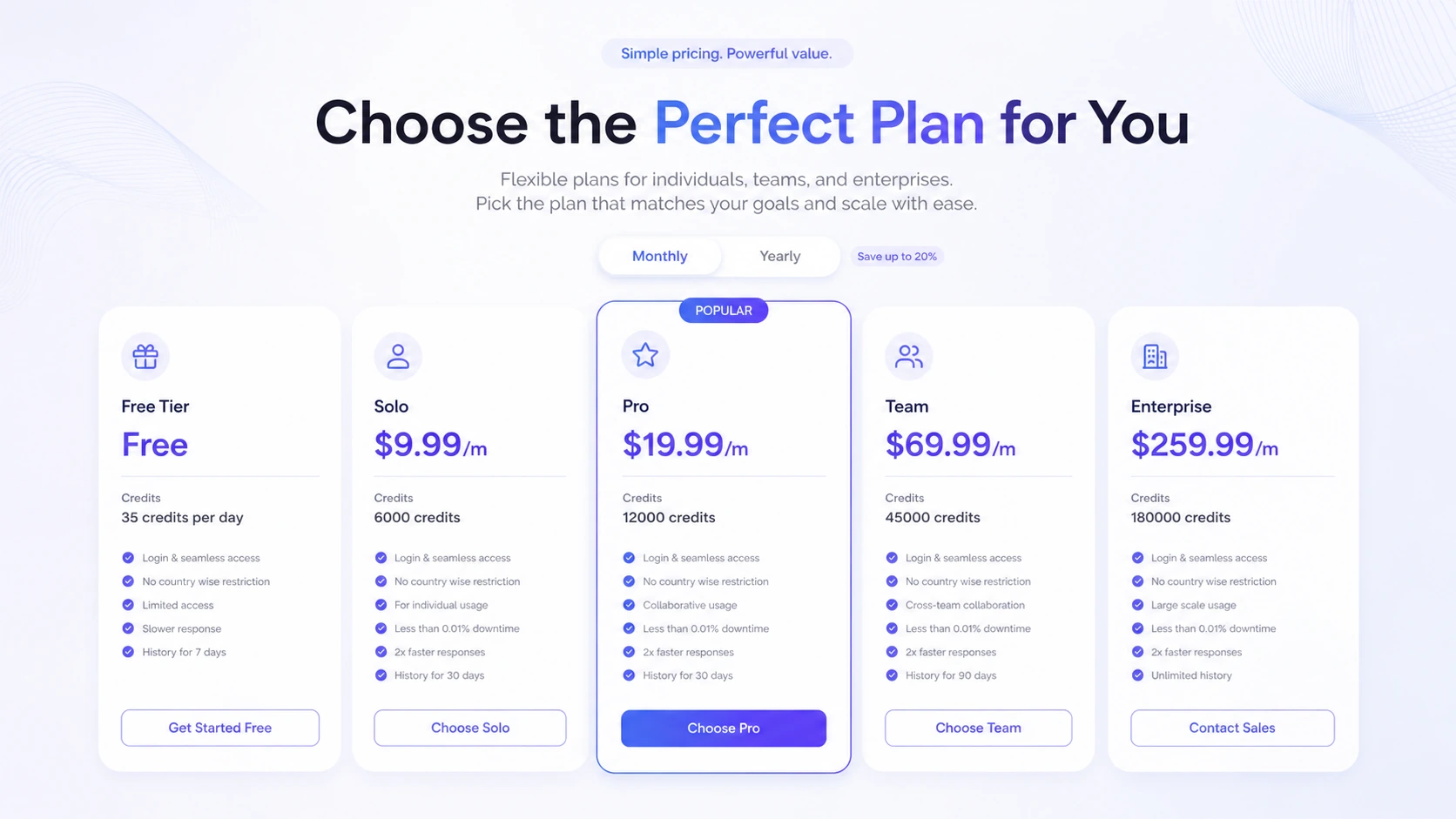
For most cautious buyers, the free plan is the correct starting point. Use it to test one real browser workflow, one real document workflow, and one creative task. Then check whether the credit allowance feels tight.
Solo makes sense if DeftGPT becomes a daily individual assistant and the credit allowance is enough. Pro makes more sense if document work, image generation, scanned PDFs, or collaboration needs become heavier. Team is only worth considering when shared usage, organization management, and unified billing matter.
I would not move to a larger plan because the feature list looks better. I would move only after the free plan shows a clear limit.
Pricing check: Before paying, compare the current DeftGPT plan limits against your real browser, document, and team usage.
Free plan, trial, coupon, and checkout notes
DeftGPT’s free plan is the safest way to evaluate the product.
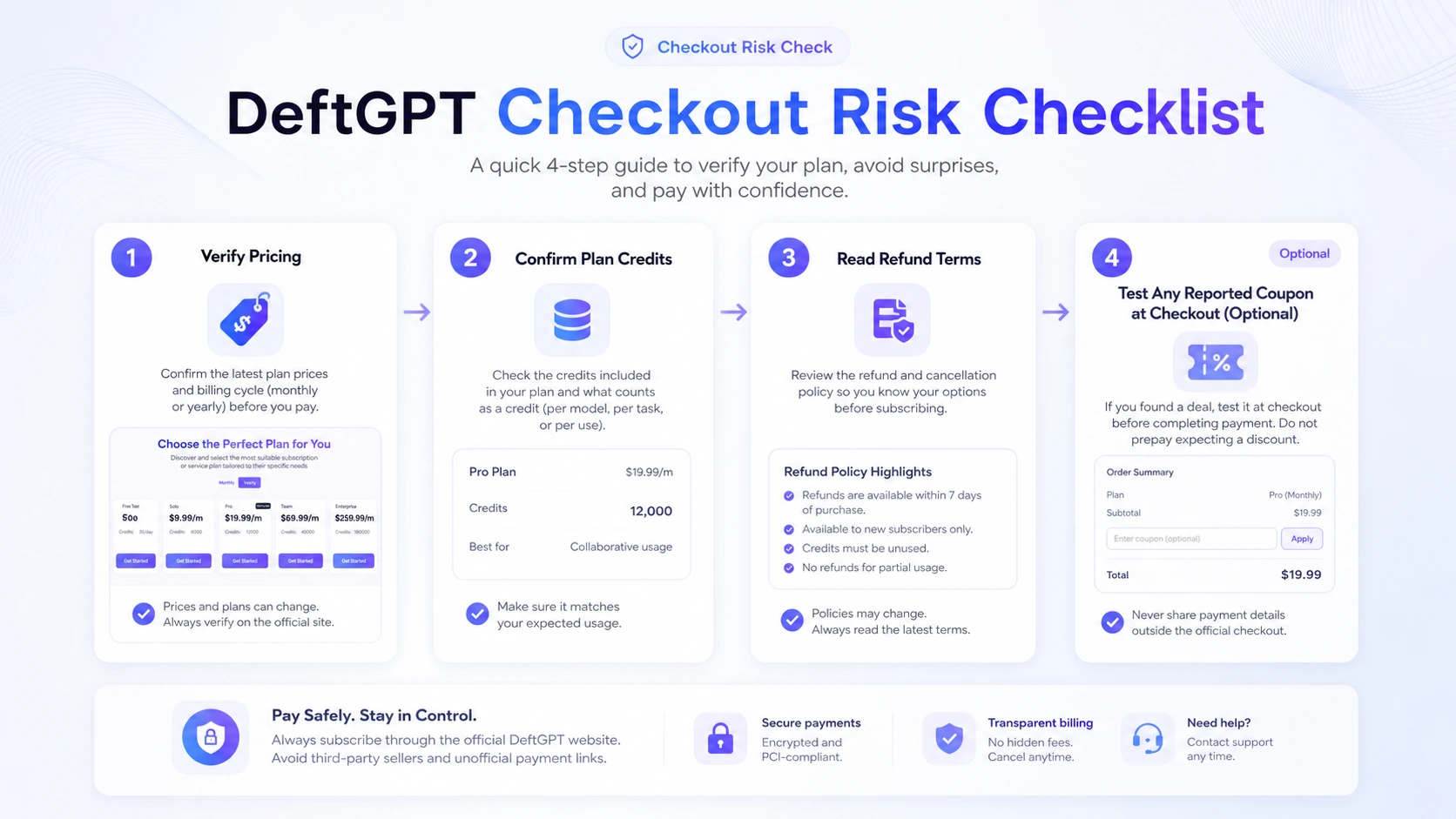
That matters more than the coupon path. Public coupon directories may report DeftGPT discount routes, but a reported code is not the same as official pricing. It is also not proof that the tool belongs in your workflow.
The cleaner buying order is:
- Test the free daily credits.
- Run real browser and document tasks.
- Watch how credits are consumed.
- Compare official plan limits.
- Read the terms before checkout.
- Only then test the current offer or coupon page.
This order protects the buyer from a common mistake: treating a discount as the decision. A coupon can reduce price, but it cannot make a browser assistant useful if you will not use it regularly.
The refund side deserves caution. DeftGPT’s terms describe subscription payments as nonrefundable, including partially used service periods after cancellation. Some secondary sources mention possible case-by-case handling, but I would not rely on that as a buying strategy.
For current deal routing, use the DeftGPT coupon page only after the product fit and plan choice already make sense.
Checkout order: Test the free credits first, choose a plan second, and treat any active offer as the final checkout check.
What I would check before buying DeftGPT
If I were buying DeftGPT for a real workflow, I would check seven things before paying.
- Credit burn: How many credits do your normal tasks use in a week?
- Document limits: Do your PDFs, DOCX files, reports, and larger files work smoothly?
- Browser fit: Does the Chrome extension save time in Gmail, Docs, search, and social writing?
- Creative fit: Is the image generation good enough for your actual needs, or only useful for rough ideas?
- Team reality: Will multiple people use the shared workspace, or is this really a solo purchase?
- Support expectations: Does the plan include the support level you need for paid usage?
- Refund risk: Are you comfortable with nonrefundable subscription terms before checkout?
The first check is the most important. If you do not know how fast your credits disappear, you do not really know which plan is good value.
A simple test before paying
Before paying for DeftGPT, I would run a small test like this:
- Use the free plan for several normal work sessions.
- Draft or rewrite a real email or document paragraph inside the browser.
- Upload one PDF or DOCX file you actually need to understand.
- Ask three follow-up questions that require specific extraction, not just summary.
- Generate one image or creative concept if that use case matters to you.
- Save or reuse one prompt for a repeated task.
- Check how many credits the test consumed and whether the output saved real time.
This test is simple, but it avoids guessing. If DeftGPT feels helpful across several small jobs, a paid plan may be reasonable. If it only feels useful once, stay on the free path or compare alternatives.
Pros explained
The free plan makes the buying decision safer
The free plan matters because DeftGPT is credit-based. You do not have to guess whether the product fits your workflow. You can test browser writing, document questions, and lightweight creative work before paying.
This stops being enough if your workflow is heavier. A few free tasks may prove that DeftGPT is useful, but they will not prove that a paid plan has enough monthly headroom.
The Chrome extension gives DeftGPT a practical angle
Browser-side AI is more useful than dashboard-only AI when the work already happens in tabs. Gmail, Google Docs, search, and social writing support can reduce friction.
This matters most for people who live in the browser. It matters less for buyers who already use a dedicated AI workspace or who prefer a specialist app.
Document chat expands the use case
Document chat makes DeftGPT more useful for research, study, reporting, and internal knowledge work. Asking questions across uploaded files is a stronger workflow than simple text generation.
The limit is document quality. Buyers should test real files before paying because formatting, length, and scanned documents can affect usefulness.
Team paths make it more than a solo assistant
DeftGPT has a team-oriented route with organization management and shared billing. That can help small teams avoid scattered individual subscriptions.
This only matters if the team actually adopts it. Shared access without repeated use is not value.
Cons explained
Credit-based value is hard to judge without testing
The biggest pricing risk is not the monthly number. It is whether credits last through real work.
A buyer who drafts short emails may use DeftGPT lightly. A buyer who uploads documents, generates images, and collaborates with others may move through credits faster. Test usage before annual or team commitment.
Refund flexibility is limited
DeftGPT’s subscription terms are not something I would treat casually. If subscription payments are nonrefundable, the buyer should use the free plan as the real trial lane.
This matters most for buyers who are tempted by a coupon or yearly billing. A lower first price still carries risk if the product does not fit.
It is broad, not deeply specialized
DeftGPT covers many AI tasks, but broad does not always mean best. Dedicated tools may be stronger for SEO content operations, high-control image generation, customer support deployment, or advanced research.
This does not make DeftGPT weak. It means the buyer should compare by job, not by feature count.
Technical buyers may need more certainty
DeftGPT is easier to justify as a hosted AI productivity workspace than as a technical platform. If your plan depends on API access, custom model routing, automation, audit controls, or backend integration, verify official documentation before building around it.
Do not assume a broad AI workspace can become a developer platform just because it offers multiple AI features.
Green flags and red flags
Green flags
- You already work heavily inside Chrome and want AI support closer to your tabs.
- You need both writing help and document questions, not just casual chat.
- You want a free starting point before paying.
- Your team needs shared AI usage without building an internal tool.
- You can measure credit use before choosing a plan.
Red flags
- You are buying only because a coupon directory reports a deal.
- You need a specialist tool for SEO, image generation, support bots, or enterprise governance.
- You expect the cheapest paid plan to cover heavy document and image workflows without testing.
- You need refundable checkout terms before trying the product.
- You plan to build technical workflows without verified API or integration support.
DeftGPT vs alternatives
DeftGPT should be compared by buyer job. It is not enough to say it is “like ChatGPT” or “an AI productivity tool.” The better question is whether you need browser access, document chat, team usage, broader media tools, or a deployable chatbot.
1min.AI vs DeftGPT
1min.AI is the stronger comparison if you want a broader all-in-one AI utility across text, image, audio, video, and multiple creative or productivity tasks.
DeftGPT may still make more sense if the buyer mainly wants Chrome-side AI assistance, document chat, and browser workflow convenience. In simple terms: 1min.AI is broader across tool types; DeftGPT is more focused on browser and document productivity.
CustomGPT vs DeftGPT
CustomGPT is a better route if the buyer wants to build a knowledge-base chatbot for website visitors, internal documentation, or customer-facing Q&A.
DeftGPT is not trying to be that same product. It is better for personal or team productivity inside browser and document workflows. If your goal is to deploy a chatbot over a knowledge base, compare the CustomGPT store route before choosing DeftGPT.
ChatGPT or Claude vs DeftGPT
ChatGPT and Claude are stronger general-purpose AI assistants if you prefer a primary AI workspace with mature model ecosystems, broad user communities, and deep general capability.
DeftGPT can still make sense if the browser extension, document chat flow, prompt reuse, and workspace packaging reduce friction for your daily work. The tradeoff is simple: a major AI assistant may be stronger as a core model workspace, while DeftGPT may be more convenient around browser tasks.
Aikeedo vs DeftGPT
Aikeedo is an adjacent route, not a direct replacement. It makes sense if you want to build or own a self-hosted AI SaaS-style product.
DeftGPT is for using a hosted AI assistant. Aikeedo is for operating an AI product environment. Those are very different decisions. Compare Aikeedo only if your question is not “Which assistant should I use?” but “Should I build or control my own AI tool?”
Specialist tools vs DeftGPT
If your main job is SEO content, image generation, academic research, or customer support automation, DeftGPT may be too broad. A specialist tool can be better when the workflow has high stakes, deep requirements, or specific output standards.
DeftGPT is best when convenience matters more than depth.
Trust, refund, and buyer-risk notes
My confidence is strongest around DeftGPT’s current public positioning as a browser-friendly AI workspace with document chat, image generation, Chrome extension access, and credit-based tiers. I am more cautious around long-term value because credit usage, plan limits, coupon conditions, and subscription terms can change faster than editorial copy.
The refund risk is the main commercial caution. Subscription payments are described as nonrefundable, and cancellation does not appear to guarantee a refund for unused time. That makes the free plan important. Use it as the real safety valve.
Privacy and data handling also deserve normal AI-tool caution. If you plan to upload sensitive documents, read the current privacy page and terms before doing so. For teams, check whether internal documents, client files, or regulated data are appropriate for the workflow.
For support, do not assume enterprise-grade service unless the plan and documentation confirm it. Free and lower-tier plans usually carry different expectations from business or enterprise usage.
Finally, keep coupon logic in the right place. A current offer can be useful at checkout, but it should come after product fit, pricing fit, and refund comfort.
Final verdict
I would consider DeftGPT if your normal work lives in the browser and you want AI help near Gmail, Google Docs, search, files, and everyday writing. It makes the most sense when several small workflows add up: drafting, summarizing, asking document questions, reusing prompts, and doing light creative work.
I would skip DeftGPT if you only need occasional chat, if you need deep specialist features, or if strict refund flexibility is important. A free plan is helpful, but a nonrefundable subscription still deserves caution.
I would compare it with 1min.AI if you want a broader all-in-one AI utility. I would compare it with CustomGPT if you need knowledge-base chatbot deployment. I would compare it with Aikeedo only if your real decision is about building or owning an AI SaaS environment rather than using a hosted assistant.
The safest next step is simple: use the free credits on real browser and document work first. If DeftGPT saves time in more than one repeated workflow, then compare Solo, Pro, or Team. If it only feels useful once or twice, stay free or choose a more focused tool.
