Quick verdict
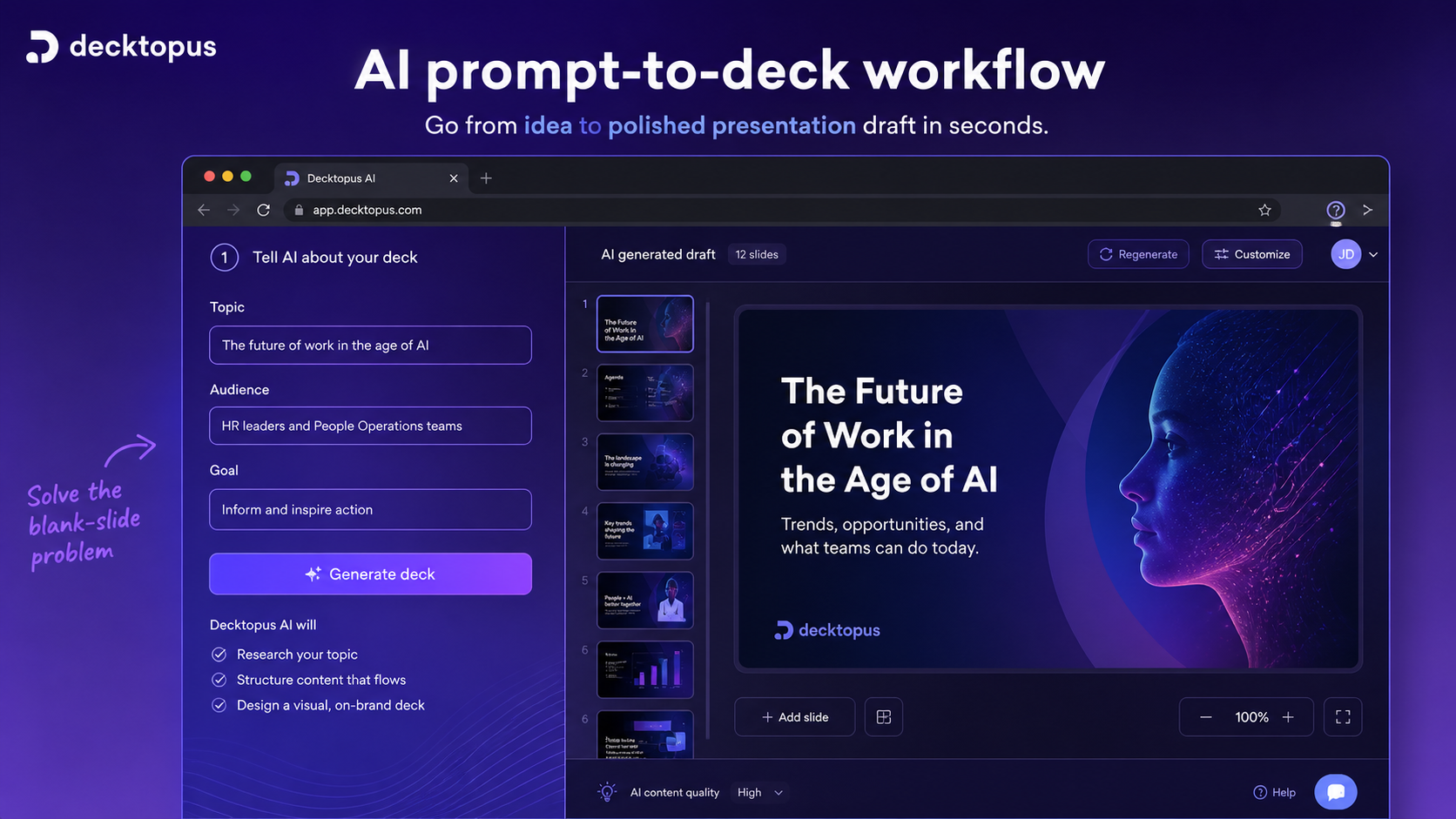
Decktopus AI is worth considering if your real problem is not “I need prettier slides once,” but “I keep needing usable presentations and I lose too much time starting from a blank deck.”
That is the buying tension here.
Decktopus can help with the first painful stretch of presentation work: turning a topic, outline, proposal brief, classroom idea, webinar plan, or pasted material into a structured deck. It is more focused than a general AI workspace and more guided than opening PowerPoint with an empty slide. For sales teams, educators, marketers, freelancers, and founders, that can be useful.
I would be careful, though, if the annual price is what pulls you in first. The current public pricing page highlights annual billing, AI credit allowances, Pro and Business paths, and a student discount route. It also includes clear no-refund language for monthly and annual subscriptions. That changes the buyer decision. You do not want to discover after payment that the generated deck style, editing flow, export path, or brand control is not enough for your actual presentations.
For my money, Decktopus AI makes the most sense after one real deck test. Not a demo topic. Not a sample prompt. Use the kind of deck you would actually send to a client, class, team, or investor. If the output gets you 70% of the way there with light editing, Decktopus deserves a closer look. If it still needs heavy redesign, compare presentation-first alternatives before paying.
Next step: If Decktopus AI still fits your presentation workflow, test the live deck-building route and verify the current plan before checkout.
Review snapshot
| Review point | Practical take |
|---|---|
| Best for | Sales decks, pitch decks, proposals, webinars, training decks, reports, and classroom presentations |
| Not ideal for | Designers who need deep manual control, advanced animation, or strict native PowerPoint production |
| Main use case | Turning a topic, brief, outline, or existing material into a structured AI-assisted presentation |
| Current annual Pro price | $14.99/month equivalent, billed annually, on the current public pricing page |
| Current annual Business price | $34.99/user/month equivalent, billed annually, on the current public pricing page |
| Main pricing variable | AI credits, billing interval, team needs, branding depth, export needs, and refund risk |
| Main strength | Fast guided deck creation with AI structure, slides, notes, visuals, sharing, and business workflow features |
| Main concern | No-refund subscription language makes testing before payment important |
| Direct alternatives to compare | Gamma, Beautiful.ai, Tome, Presentations.AI, Plus AI, Canva presentation workflows |
| Adjacent routes | 1min.AI for broader AI utility, Aikeedo for AI business infrastructure |
What is Decktopus AI?
Decktopus AI is best understood as an AI presentation maker for people who want help turning a prompt, topic, outline, or pasted content into a usable slide deck.
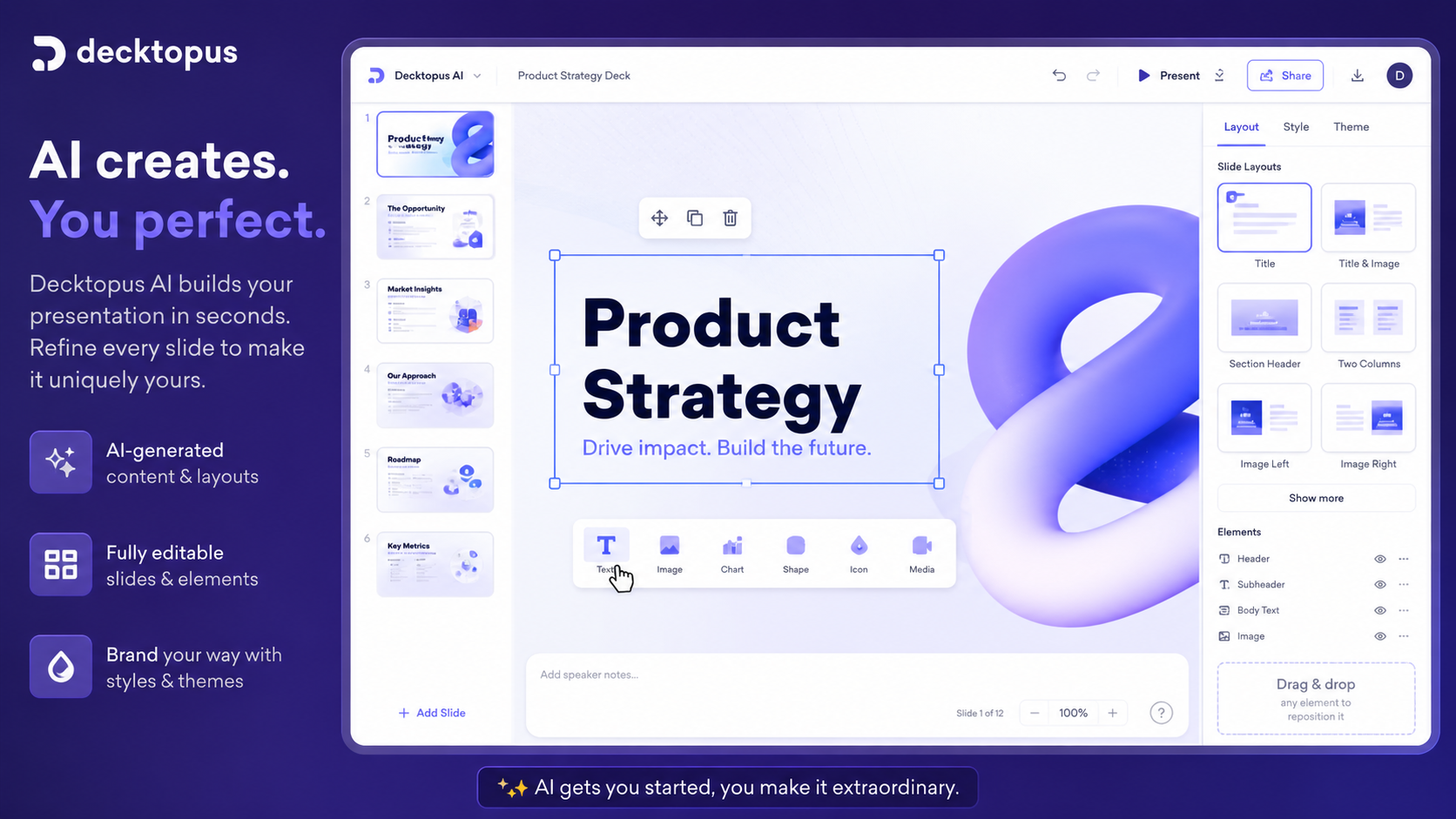
It is not just a blank slide editor. The product is built around guided presentation creation: choose or describe the presentation goal, let the tool generate a structured deck, then edit, style, share, export, and organize the output. Its current public positioning also stretches into business presentation workflows such as proposals, forms, lead generation, custom domains, analytics, and team organization.
That makes it different from a general AI writing assistant. The job is narrower: help a buyer produce a presentation faster.
The common wrong expectation is that an AI presentation maker will remove the need for judgment. It will not. A slide deck is not only text on rectangles. It has audience logic, story order, design rhythm, brand expectations, and a final delivery context. Decktopus can reduce the blank-slide problem, but the buyer still needs to decide whether the deck is persuasive, accurate, on-brand, and appropriate for the audience.
Our review approach: we compare public product pages, pricing details, help documentation, terms, buyer workflow fit, and nearby presentation alternatives. We do not treat an annual discount, student route, or checkout offer as proof that the product fits the buyer.
Who should use Decktopus AI?
Decktopus AI fits buyers who create presentations often enough that speed has real value.
Sales users and account executives are a natural fit. If you regularly need proposal decks, client presentations, or follow-up material, a guided deck generator can reduce setup time. The condition is that the generated structure must still match your sales style. If every output needs heavy rewriting, the time savings shrink quickly.
Marketers and webinar hosts may also benefit. Campaign summaries, webinar decks, launch overviews, and reporting presentations often need structure before polish. Decktopus can help get the first version moving, especially when the deadline is closer than the ideal design process allows.
Educators, trainers, and students are another reasonable audience. Decktopus can help turn a lesson topic, course idea, or academic outline into a more presentable deck. The current pricing page also exposes a student discount path, but that should be verified at checkout rather than assumed.
Founders and freelancers may like Decktopus when they need investor-style decks, service proposals, portfolios, or client-facing presentations without building every slide manually. This is not the same as a custom-designed pitch deck, but it can be enough for early drafts, internal use, or time-sensitive opportunities.
Small teams should consider the Business path only when the team-level features matter. Custom domains, analytics, webhooks, organization controls, team members, and branded workflows can justify the higher plan for some users. They are overkill if one person simply wants to make a few decks faster.
Who should avoid Decktopus AI?
I would avoid paying too quickly if you only need one presentation.
A one-off deck does not automatically justify a subscription, especially when refund flexibility is limited. You may be better off using a free presentation tool, a manual template, or a designer if the deck is important and highly customized.
Designers and brand teams should also be cautious. If the job requires strict layout control, complex animation, custom slide systems, deep PowerPoint-native editing, or pixel-level creative direction, Decktopus may feel too guided. Speed is helpful only when it does not fight the final design standard.
Teams that are already standardized around PowerPoint or Google Slides should test export and handoff before upgrading. A browser-based workflow is convenient, but it can become a mismatch if the final organization expects editable files inside a different ecosystem.
Buyers who are attracted mainly by a student discount, annual savings, or coupon path should slow down. A discount can make a good fit cheaper. It cannot turn a mismatched workflow into a good purchase.
Finally, I would be careful if refund flexibility matters to you. Decktopus states that monthly and annual subscriptions are not refundable. That does not make the product bad. It does mean your evaluation should happen before payment, not after.
How Decktopus AI fits into a real workflow
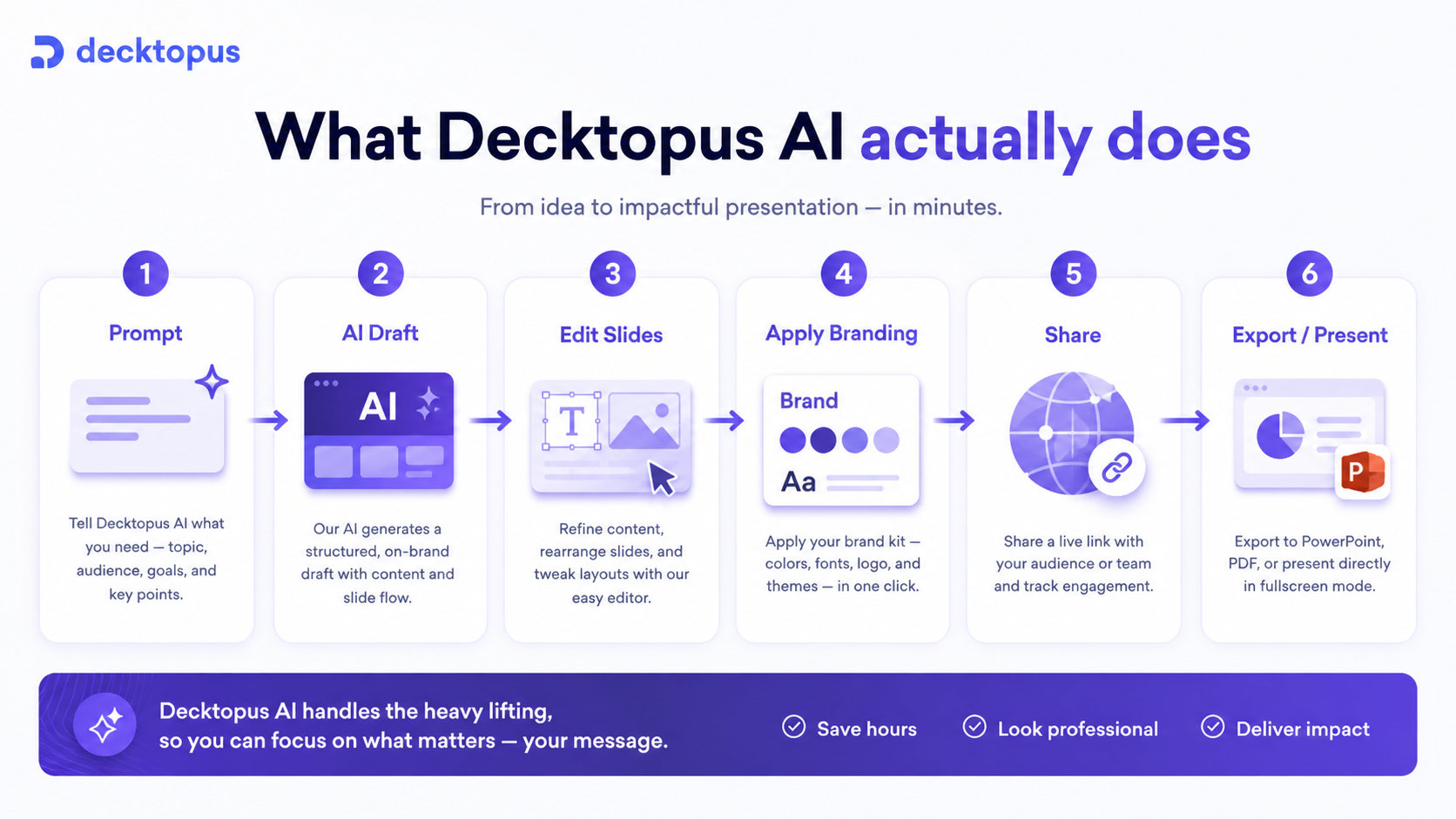
A practical Decktopus workflow starts before you open the tool.
First, define the deck type. A sales proposal, investor pitch, training deck, classroom presentation, and webinar outline all need different story logic. If you give the tool a vague topic, you should expect a vague deck.
Second, prepare the source material. That might be a pitch outline, a client brief, a lesson plan, a product description, or pasted working text from an internal document. The better the input, the more useful the first draft is likely to be.
Third, generate the deck and treat it as a structured starting point. This is the moment where Decktopus can save time. It can help with ordering, slide flow, headings, visuals, speaker notes, and presentation framing.
Fourth, edit as a human. This is not optional. Check claims, tighten the argument, remove generic phrasing, adjust the design, verify visuals, and make sure the deck fits the actual audience. A generated deck that looks polished but says little is not a useful business asset.
Fifth, decide whether the final workflow fits. If you can move from prompt to usable deck with light cleanup, Decktopus is doing its job. If you spend nearly as much time reworking the output as you would building manually, compare alternatives.
Workflow check: Before judging Decktopus by price, create or review one deck type you actually repeat and see whether the editing step feels lighter than your normal process.
Real-world buyer scenarios
A sales team building repeat proposal decks
A sales team may use Decktopus to speed up proposal creation, client education decks, and follow-up presentations. The fit gets stronger if the team also needs sharing links, forms, analytics, custom domains, or brand consistency.
The risk is generic output. A sales deck cannot sound like a template if the deal is meaningful. I would test one real proposal before expanding seats.
A teacher or trainer preparing class material
An educator can use Decktopus to turn a topic into a structured lesson deck with notes and supporting visuals. This can be useful when the goal is clarity and speed, not high-end design.
The buyer check is whether the generated structure matches the teaching style. If the tool creates a deck that still needs heavy reorganization, the time savings may not hold.
A founder preparing an early pitch
A founder may use Decktopus to create an early pitch deck, especially before hiring a designer or refining the story with advisors. This can be helpful for rough structure, but not every generated slide will be investor-ready.
The safer path is to use Decktopus for version one, then manually tighten the narrative around traction, market, positioning, and ask.
A freelancer creating client-facing presentations
A freelancer may use Decktopus for service proposals, audit presentations, onboarding decks, or portfolio-style material. The tool can reduce setup time if the freelancer repeats similar deck types.
The key check is client perception. If the deck looks too generic for a premium service, the freelancer may need a more design-focused tool or custom template system.
Key features that actually matter
AI presentation generation
The main feature is simple: Decktopus helps generate a presentation from a prompt or source material.
This matters because starting a deck is often slower than polishing one. A usable first structure can help buyers move faster, especially under deadline pressure.
Buyer note: judge the generated deck by how much human editing remains, not by whether the first output looks impressive for five seconds.
AI credits and deck volume
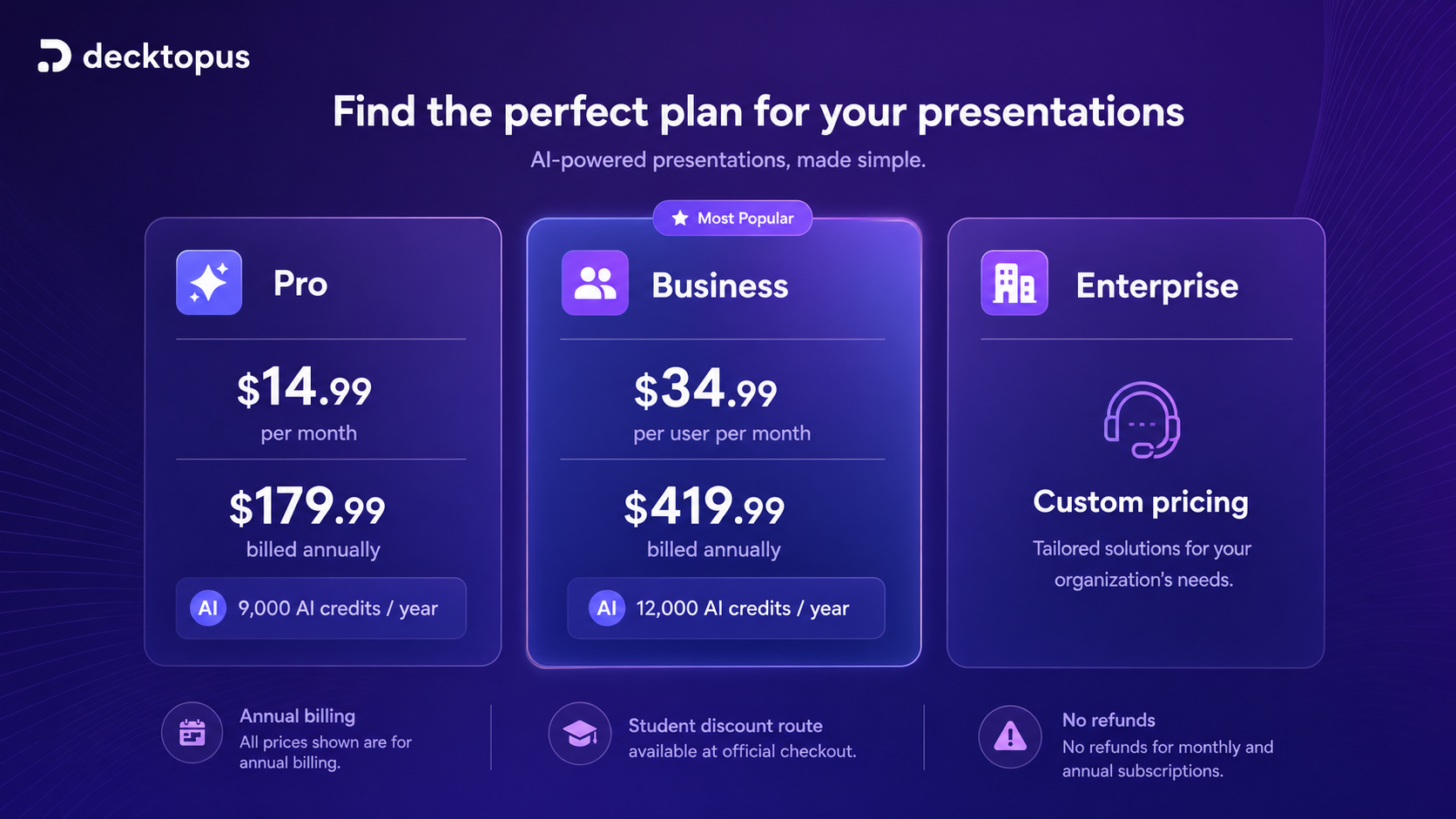
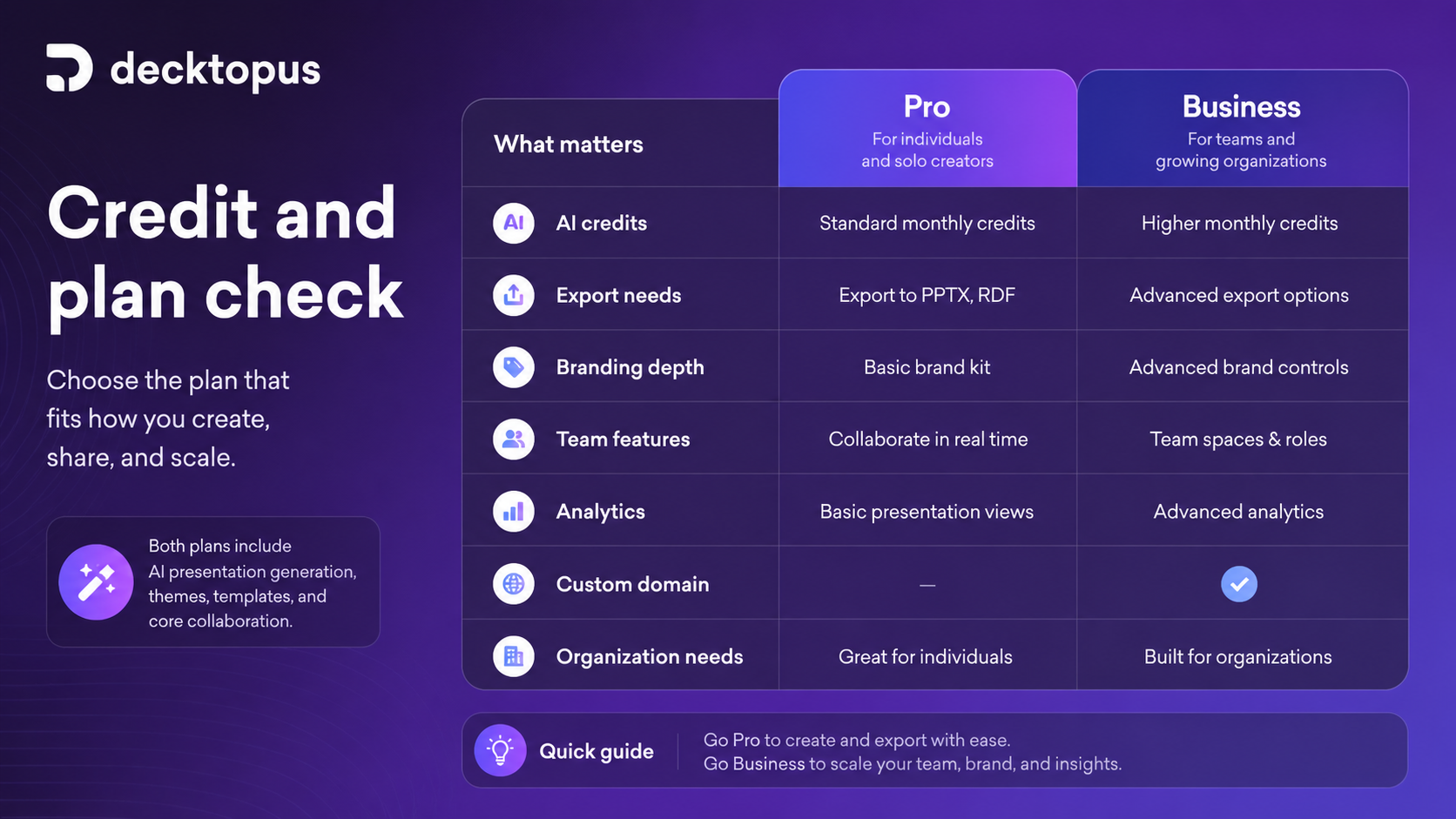
The current pricing page frames Decktopus usage around AI credits. Pro currently shows 9,000 AI credits per year and 300 AI presentations per year on the annual view. Business currently shows 12,000 AI credits per year and 400 AI presentations per year for the organization, with credits multiplying by seats.
That matters because the real question is not only “what does the plan cost?” It is “how many real decks, revisions, and AI-assisted steps will my workflow require?”
Buyer note: if your presentation volume is low, annual billing may be unnecessary. If your team produces decks regularly, credits become a serious plan-fit check.
Editing, notes, visuals, and export
Decktopus is not valuable only because it creates slides. It becomes more useful if the buyer can edit the deck comfortably, generate speaker notes, improve the story, use visuals, and export or share the final result in the expected format.
This is where some buyers will feel the difference between a fast AI deck and a finished presentation.
Buyer note: test export and handoff early. If your company, client, or school expects a specific file format or editing environment, do not assume the workflow will fit.
Business features for teams
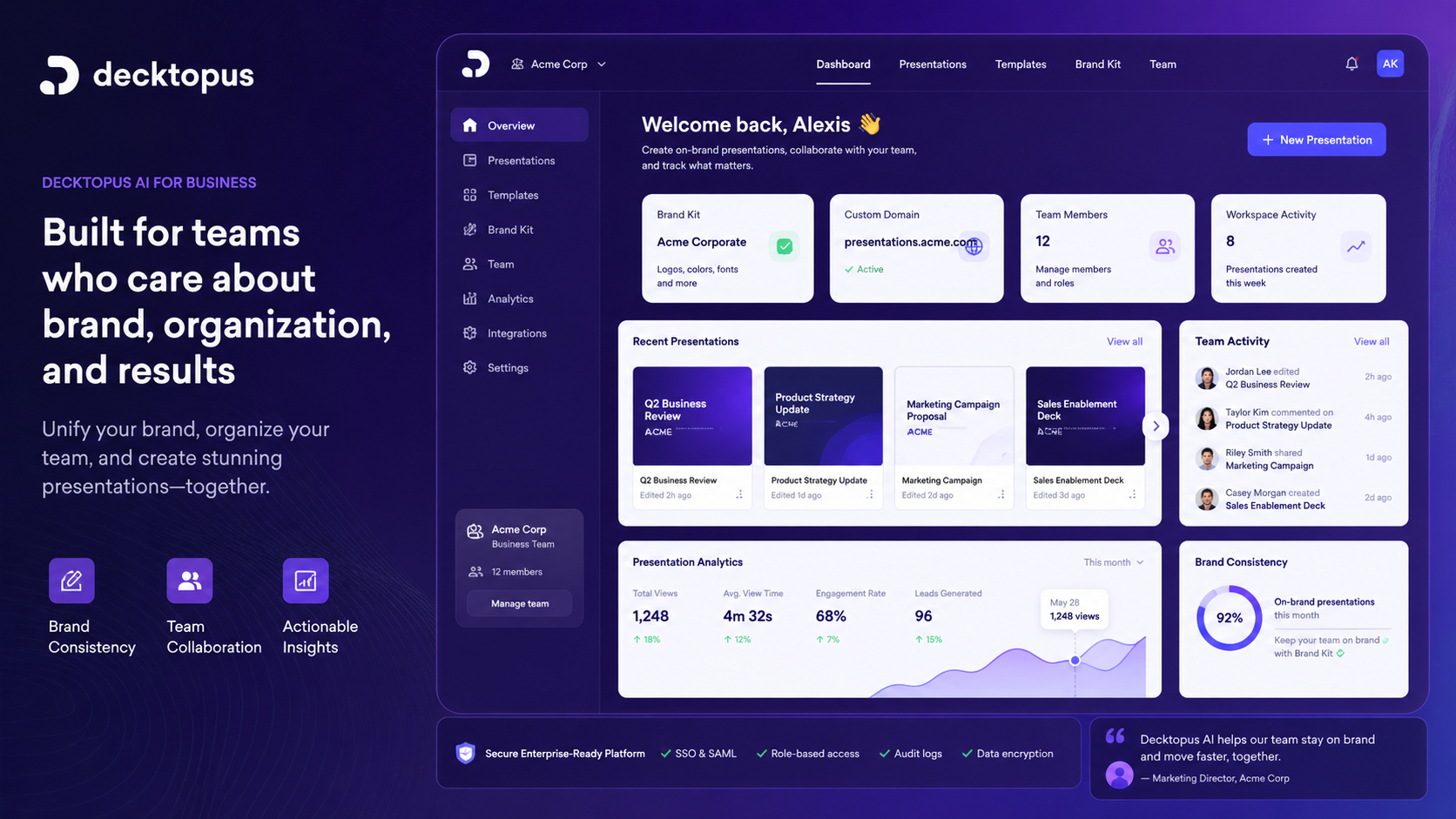
The Business path adds more team-oriented features, including organization support, custom domain connection, slide analytics, webhooks, and branding-related controls on the current pricing page.
These are meaningful if decks are part of sales, marketing, or customer-facing operations. They are less important for a solo user who only wants faster drafts.
Buyer note: do not pay for Business only because it sounds more complete. Pay for it only when team workflow, branding, analytics, or custom domain needs are real.
Cloud-based sharing
Decktopus works in the cloud, and the pricing FAQ states that users do not need to download a program to create, view, and share documents. That can be useful when decks are shared with clients, students, or colleagues who should not need extra software.
Buyer note: cloud sharing is convenient, but check whether your audience expects links, PDFs, PowerPoint files, or internal workspace access.
Pricing and plan value
The current public pricing page presents Decktopus around annual billing first.
At the time of this review, the page shows Pro at $14.99 per month equivalent, billed annually at $179.99. It shows Business at $34.99 per user per month equivalent, billed annually at $419.99. Enterprise is listed as custom.
The same pricing page also shows annual savings, AI credit limits, a student discount path, Pro and Business feature differences, and no-refund language. That combination matters.
The Pro path is the first serious individual plan. It is most relevant for solo users, teachers, students, freelancers, and professionals who need AI-assisted deck creation, downloads, and recurring presentation work.
The Business path is more relevant for teams. The current page ties Business to higher credit allowances, custom domains, slide analytics, webhooks, team and organization features, and broader business presentation use.
The annual price can look good if you already know Decktopus fits. It is riskier if you are still testing. I would not treat the annual discount as the main reason to subscribe because the refund language leaves less room for buyer regret.
There is also a difference between current public pricing and older or third-party pricing references. Some third-party directories still list monthly pricing paths such as Pro at $24.99 and Business at $49.99. That may be useful context, but the current official checkout should be the source that matters before payment.
Pricing check: If Decktopus AI looks useful, verify the current annual or monthly checkout path, credit limits, and refund terms before paying.
Check Decktopus pricing Check current offers Read store guide
Free plan, trial, coupon, and checkout notes
The safest way to evaluate Decktopus is to test the presentation workflow before committing to a paid subscription.
If a free account or entry path is available in the live product flow, use it to create one real deck. The purpose is not to see whether AI can create slides. The purpose is to see whether Decktopus can create your kind of deck with an acceptable amount of cleanup.
Coupon and discount paths should come after workflow fit. The pricing page currently exposes a student discount route, and coupon listings may appear elsewhere online. Do not treat any of that as guaranteed value until the live checkout confirms eligibility and final billing.
The actual discount code should stay inside the offer system, not in public review copy. For a reader, the better instruction is simple: check the current offers only after the product itself makes sense.
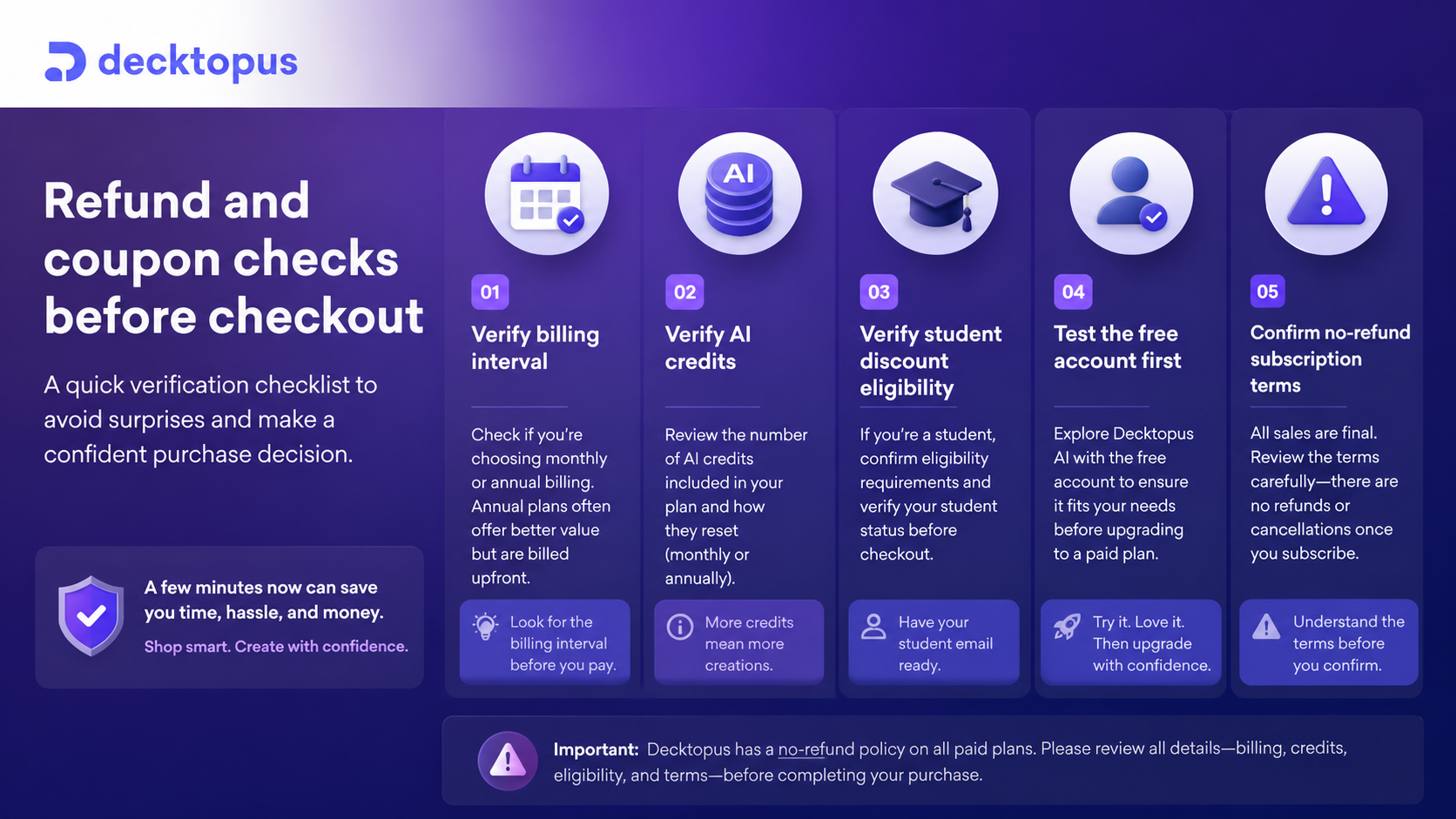
Refund terms are the bigger issue. Decktopus states that refunds are not available for both monthly and annual subscriptions. That means you should check plan limits, billing interval, export requirements, and editing comfort before paying.
Checkout order: Test the deck workflow first, then check plan limits, then look at current offers. Do not let a discount decide the purchase before the tool fits.
What I would check before buying Decktopus AI
If I were buying Decktopus for a real workflow, I would check seven things before paying.
First, I would build one real deck from my own topic. A sample prompt is too easy. A real sales, teaching, founder, or client deck reveals whether the output is actually useful.
Second, I would check editing comfort. Can I change structure, copy, visuals, slide order, and style without fighting the tool?
Third, I would verify the billing interval. The current pricing page highlights annual pricing, and annual billing is a bigger commitment when refunds are not available.
Fourth, I would compare AI credits against expected usage. If the plan looks affordable but the credit allowance does not match your deck volume, the value changes.
Fifth, I would test export and sharing. If your final audience expects a specific format, do not wait until after payment to check it.
Sixth, I would decide whether Business features are necessary. Custom domains, slide analytics, webhooks, and team organization are useful only if they support your actual process.
Seventh, I would compare direct presentation alternatives. If you want a more visual web-style output, Gamma or Tome may be closer. If you want brand-controlled business decks, Beautiful.ai or Presentations.AI may deserve a look. If you work inside Google Slides, Plus AI may be the more natural route.
A simple test before paying
Before paying, I would run a small test like this:
- Choose one deck you would actually need this month.
- Write a clear prompt with audience, goal, tone, and desired length.
- Generate the deck and measure how much of the structure is usable.
- Edit the deck for accuracy, voice, design, and audience fit.
- Check speaker notes, visuals, export, and sharing options.
- Estimate how many decks like this you would create per month or year.
- Compare Pro, Business, and direct alternatives only after that test.
This test is intentionally basic. It protects you from buying the idea of AI slides before checking the reality of your own workflow.
Pros explained
The first real pro is speed. Decktopus can help buyers get past the empty-slide stage faster, especially when the deck type is common: proposal, pitch, report, webinar, class, or training material.
The second pro is structure. A tool that suggests slide order, speaker notes, visuals, and Q&A ideas can help users who know their topic but struggle to turn it into a presentation.
The third pro is the team-oriented Business path. Custom domains, slide analytics, organization support, and webhooks may matter for teams that use presentations as part of sales or marketing operations.
The fourth pro is cloud-based sharing. If the audience can view the presentation without downloading separate software, the handoff can be easier for clients, students, or internal reviewers.
The fifth pro is that current pricing exposes credit limits instead of hiding the usage question. That does not make the plan automatically cheap, but it gives buyers something concrete to evaluate.
Cons explained
The biggest con is refund risk. When a product states that monthly and annual subscriptions are not refundable, the buyer has to test before payment. This matters even more when the page emphasizes annual billing.
The second con is customization depth. Decktopus may be fast, but buyers who need a highly customized, designer-controlled presentation system may find the guided workflow limiting.
The third con is ecosystem fit. If your team is fully built around PowerPoint, Google Slides, or a specific brand workflow, Decktopus needs to prove that export and collaboration will not create extra work.
The fourth con is credit planning. AI credits make usage measurable, but they also mean the buyer has to think about volume. A plan that looks fine for casual use may feel different for a team producing decks every week.
The fifth con is alternative pressure. AI presentation tools have become a crowded category. Decktopus is not competing only with old presentation software; it is competing with Gamma, Tome, Beautiful.ai, Presentations.AI, Canva workflows, Plus AI, and native AI inside office suites.
Green flags and red flags
Green flag: you already create presentations repeatedly and know the deck types you want to speed up.
Green flag: the first real Decktopus draft gives you a useful structure after light editing.
Green flag: your team needs business presentation features such as custom domains, analytics, team organization, or branded presentation workflows.
Green flag: you understand the AI credit model and know roughly how many decks you expect to create.
Red flag: you are paying mainly because annual pricing looks cheaper.
Red flag: you expect the AI deck to be final without editing.
Red flag: you need heavy design control, custom animation, or strict native PowerPoint production.
Red flag: you are uncomfortable with no-refund subscription language.
Red flag: you have not compared direct presentation tools, especially if your ideal output style is closer to Gamma, Beautiful.ai, Tome, or Google Slides.
Decktopus AI vs alternatives
Decktopus should be compared first against presentation-focused tools, not broad AI utilities.
Gamma vs Decktopus AI
Gamma is often the stronger comparison if you want modern, web-style presentation documents that feel less like traditional slide decks. It may be a better fit for creators and teams who want a more fluid document-presentation hybrid.
Decktopus may still make sense if your workflow is more structured around business presentations, proposals, forms, sharing links, and guided deck creation.
Beautiful.ai vs Decktopus AI
Beautiful.ai is a stronger comparison for teams that care deeply about polished business decks, smart layouts, and brand consistency. It may feel more design-system oriented.
Decktopus may be the simpler route if your main need is fast AI-assisted deck generation with business workflow features and cloud sharing.
Tome vs Decktopus AI
Tome is worth comparing if you want narrative-driven, modern presentation pages and a more experimental feel.
Decktopus may fit better when the desired output is closer to a conventional presentation, proposal, or business deck.
Presentations.AI vs Decktopus AI
Presentations.AI is a direct category comparison for buyers who want AI-generated decks with business-oriented polish and branding concerns.
Decktopus may still be attractive if its guided workflow, forms, custom domain options, analytics, and presentation-sharing features match the buyer’s process.
Plus AI vs Decktopus AI
Plus AI is a stronger comparison if your team already works inside Google Slides and wants AI help without moving to a separate workspace.
Decktopus makes more sense if you are comfortable creating and sharing decks in its own cloud environment.
1min.AI and Aikeedo as adjacent routes
Inside the broader DealBestDaily map, 1min.AI and Aikeedo are useful context, but they are not direct Decktopus replacements.
1min.AI is an adjacent route for buyers who want a broader AI utility workspace. Aikeedo is an adjacent route for buyers thinking about AI business infrastructure. Neither should be treated as the first comparison if your buyer job is simply “create better presentations faster.”
Trust, refund, and buyer-risk notes
My confidence is strongest around Decktopus AI’s category fit: it is clearly positioned as an AI presentation maker and business presentation workflow tool.
I am more cautious around long-term plan value because that depends on your deck volume, credit usage, editing comfort, export needs, and whether the current pricing page matches your actual checkout route.
The refund language is the main trust checkpoint. The pricing FAQ says monthly subscriptions are not refunded, and the same no-refund policy applies to annual subscriptions. The terms also state that refunds are not available for both monthly and annual subscriptions.
That does not mean Decktopus is unsafe. It means buyers should not treat payment as the test. The test should happen before payment.
There is also a route clarity issue. Decktopus has official pricing, help documentation, and current public positioning. Third-party pricing references can be useful, but older third-party pricing should not override the current pricing page or live checkout.
If you are a student, verify the current student discount path directly at checkout. Do not rely on copied code snippets, old coupon pages, or screenshots.
If you are a team, verify Business details before rollout: team seats, credits, organization features, custom domain needs, slide analytics, branding, export, and renewal timing.
Final verdict
I would consider Decktopus AI if you create presentations often, want a faster first draft, and can turn an AI-generated deck into a usable final version without heavy cleanup.
I would also consider it if your team needs presentation-specific business features such as custom domains, slide analytics, webhooks, branded workflows, organization support, and cloud sharing.
I would skip it if you only need one deck, need deep manual slide control, or already know your final deliverable must live inside PowerPoint or Google Slides with strict editing expectations.
I would compare it with Gamma, Beautiful.ai, Tome, Presentations.AI, Plus AI, and Canva presentation workflows before paying if output style matters more than guided generation speed.
The safest next step is not to chase the cheapest visible price. The safer step is to create one real Decktopus deck, check the editing and export workflow, verify the current pricing and refund terms, then decide whether Pro, Business, or a direct presentation alternative is the better fit.
