Quick verdict
Compass is worth considering if your team has a real software adoption problem, not just a vague interest in adding another AI tool to the stack.
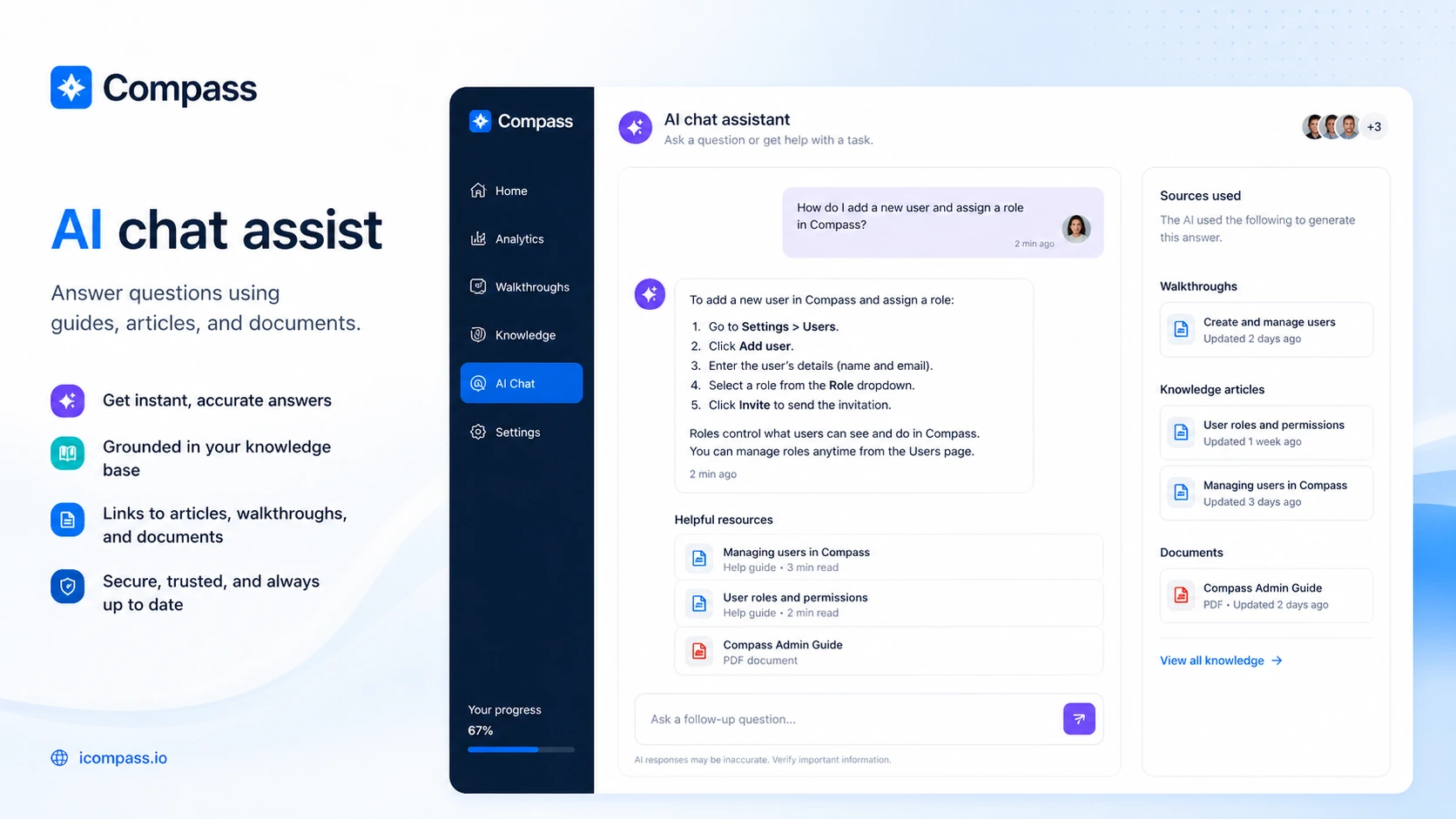
That distinction matters here. Compass is currently presented as a digital adoption and user guidance platform: walkthroughs, knowledge articles, document resources, and AI chat assist that sits close to the software workflow. The buying decision is not really “Does this look useful?” Most adoption tools look useful in a demo. The better question is whether your team has enough repeated onboarding, training, or support friction to justify building and maintaining the guidance content.
For my money, Compass makes the most sense for SaaS teams, internal operations teams, customer success teams, and software-heavy organizations where users repeatedly get stuck inside an application. It is less compelling for a small team that only needs a basic help page, a Loom walkthrough, a checklist, or a simple product-tour widget.
The strongest reason to consider Compass is that it combines multiple guidance layers in one place: step-by-step walkthroughs, knowledge articles, documents, and AI-powered assistance. The main caution is pricing and rollout clarity. The public pricing page shows a free plan, Standard, Advanced, and Enterprise options, but it also appears to repeat Standard and Advanced monthly blocks with different amounts. That is not a reason to dismiss the product, but it is a reason to verify the live checkout route before budgeting.
The safer path is simple: start with the free plan, build one real guidance workflow, confirm installation method, then compare paid plan limits against actual usage.
Next step: If Compass still fits the onboarding or user-guidance problem you are trying to solve, verify the current buyer route before comparing paid tiers.
Review snapshot
| Review point | Practical take |
|---|---|
| Best for | SaaS teams, customer success, internal enablement, and operations teams with repeated software adoption friction |
| Not ideal for | Solo users, simple products, or teams that only need basic help documentation |
| Main use case | Guided walkthroughs, knowledge resources, document support, and AI chat assist inside software workflows |
| Free path | Free plan available with limits on users, assists, guides, knowledge articles, and documents |
| Paid path | Standard and Advanced plans exist, but live pricing should be verified because public pricing blocks appear duplicated |
| Main strength | Combines adoption guidance and support resources in one workflow |
| Main concern | Setup feasibility, content maintenance, pricing clarity, and unclear refund/cancellation detail |
| Direct alternatives to compare | Product Fruits, Whatfix, Chameleon, Userlane, Userflow |
| Adjacent routes | 1min.AI for broad AI productivity; Aikeedo for building an AI SaaS system rather than guiding users inside existing software |
| Best next step | Test one real workflow before moving from free to paid |
What is Compass?
Compass is best understood as a digital adoption and user assistance platform for teams that need to guide employees or customers through software workflows.
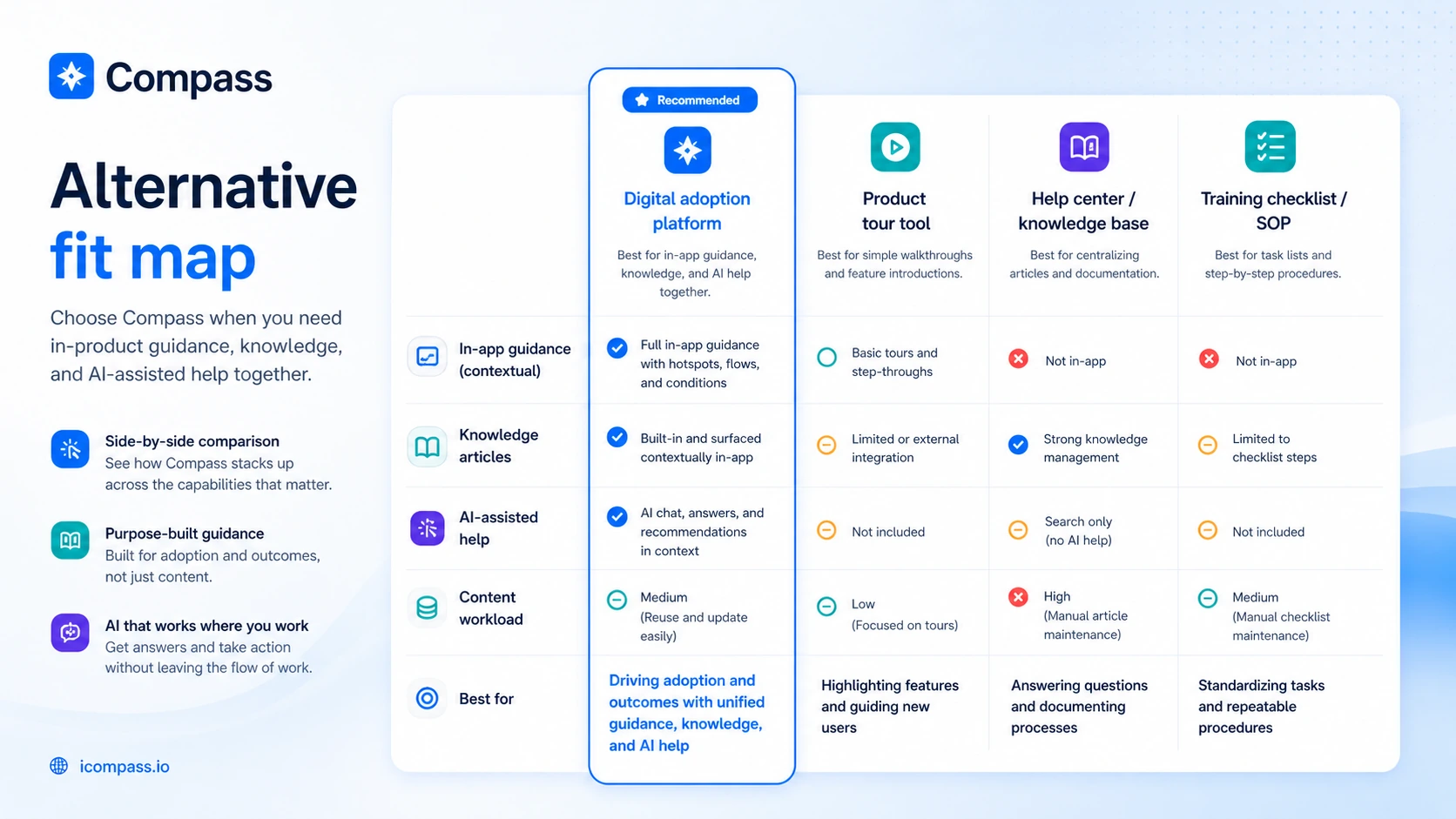
It is not a generic AI productivity assistant. It is not a personal note-taking tool. It is not simply a knowledge base. Compass sits closer to the product walkthrough and digital adoption category: guided steps, knowledge articles, document resources, and AI chat assistance built around helping users do something inside an application.
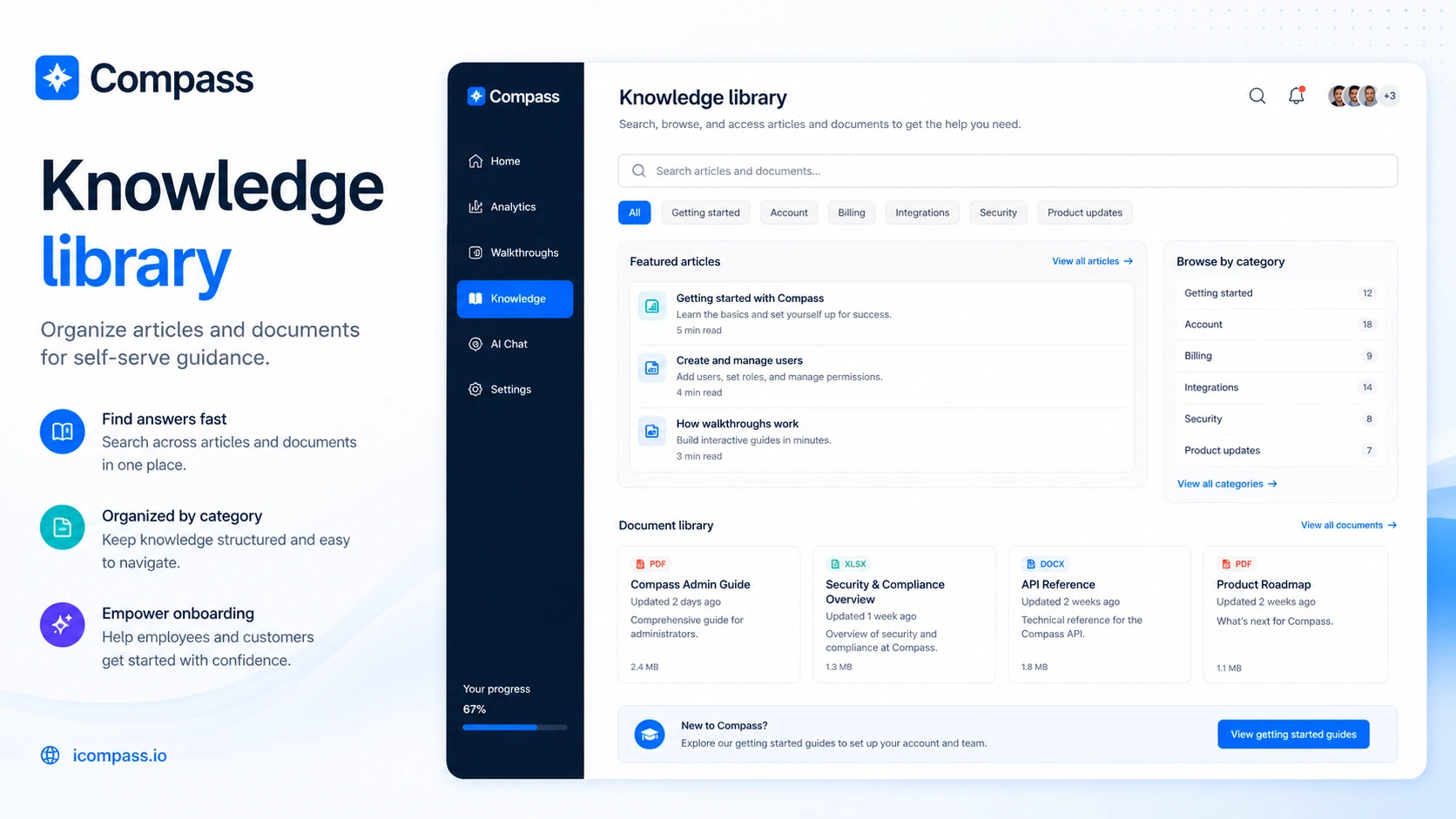
The official product language points in that direction. Compass describes application walkthroughs for simplifying complex processes, knowledge articles for self-help, a document library for manuals and technical resources, and AI-powered chat assist that draws from those walkthroughs, articles, and documents. That means the real value depends heavily on the quality of the content your team adds.
Our review approach: we compare public product pages, pricing details, buyer workflow fit, installation requirements, plan limits, and nearby alternatives. We do not treat a free plan, coupon route, or low visible price as proof that the product fits the buyer.
The common wrong expectation is thinking Compass will automatically fix onboarding because it includes AI assistance. It will not. A tool like this only becomes useful when the team already understands the workflows users struggle with and is willing to build the guidance layer carefully.
That is the first buyer check.
If you cannot name the workflows users misunderstand, you may not need Compass yet. You may need better support notes, a clearer onboarding map, or a simpler product tour first.
Who should use Compass?
Compass makes the most sense for teams that already see repeated software adoption friction.
A SaaS team can use Compass when new users keep missing important product steps, underusing features, or asking the same onboarding questions. The fit is strongest if the product has multi-step workflows that are hard to explain with a static help article alone.
A customer success team may use Compass when support tickets are not random. If the same “how do I do this?” questions appear again and again, walkthroughs and in-app guidance can reduce repeated manual explanation. The AI chat assist layer may help, but only if the source content is accurate and maintained.
An internal operations team can consider Compass when employees need help inside business software. This is especially relevant when process mistakes create operational friction, not just mild inconvenience. A browser-extension deployment path can matter here, but IT approval should be checked early.
An enablement or training team may find Compass useful when traditional documentation is not enough. Some workflows need help at the moment of work. If employees only read the guide after they are already stuck, contextual guidance can be more useful than another PDF.
A digital transformation team may also consider it when software rollout success depends on adoption, not just implementation. Buying software is easy. Getting users to follow the process consistently is harder. Compass belongs in that second conversation.
Who should avoid Compass?
I would be careful with Compass if your onboarding problem is still vague.
“Users are confused” is not enough. Which users? Which workflow? Which step? Which support ticket pattern? A digital adoption platform can become another layer of clutter if the team has not mapped the actual friction.
Small teams with simple products should also slow down. If a short help article, a product checklist, or a recorded walkthrough solves the problem, Compass may be more platform than you need.
Solo buyers looking for personal AI productivity should skip it. Compass has AI assistance, but the product role is adoption and user guidance, not everyday task management, summarization, or chat-based productivity.
Teams that cannot install a script or deploy a browser extension should verify implementation before thinking about price. A paid plan does not matter if the guidance layer cannot appear where users actually work.
Large enterprise buyers should be careful in a different way. Compass may fit, but enterprise adoption often requires procurement, security review, analytics depth, admin controls, rollout support, and contract clarity. If those are central requirements, compare Compass with more established enterprise DAP vendors before committing.
And if you are mainly looking for a coupon, pause. A current offer can help only after workflow fit is clear. It should not drive the decision.
How Compass fits into a real workflow
A practical Compass workflow starts before anyone opens the product.
First, the team chooses one workflow where users repeatedly get stuck. That might be activating a feature, completing a setup process, following an internal compliance step, or using a business tool correctly.
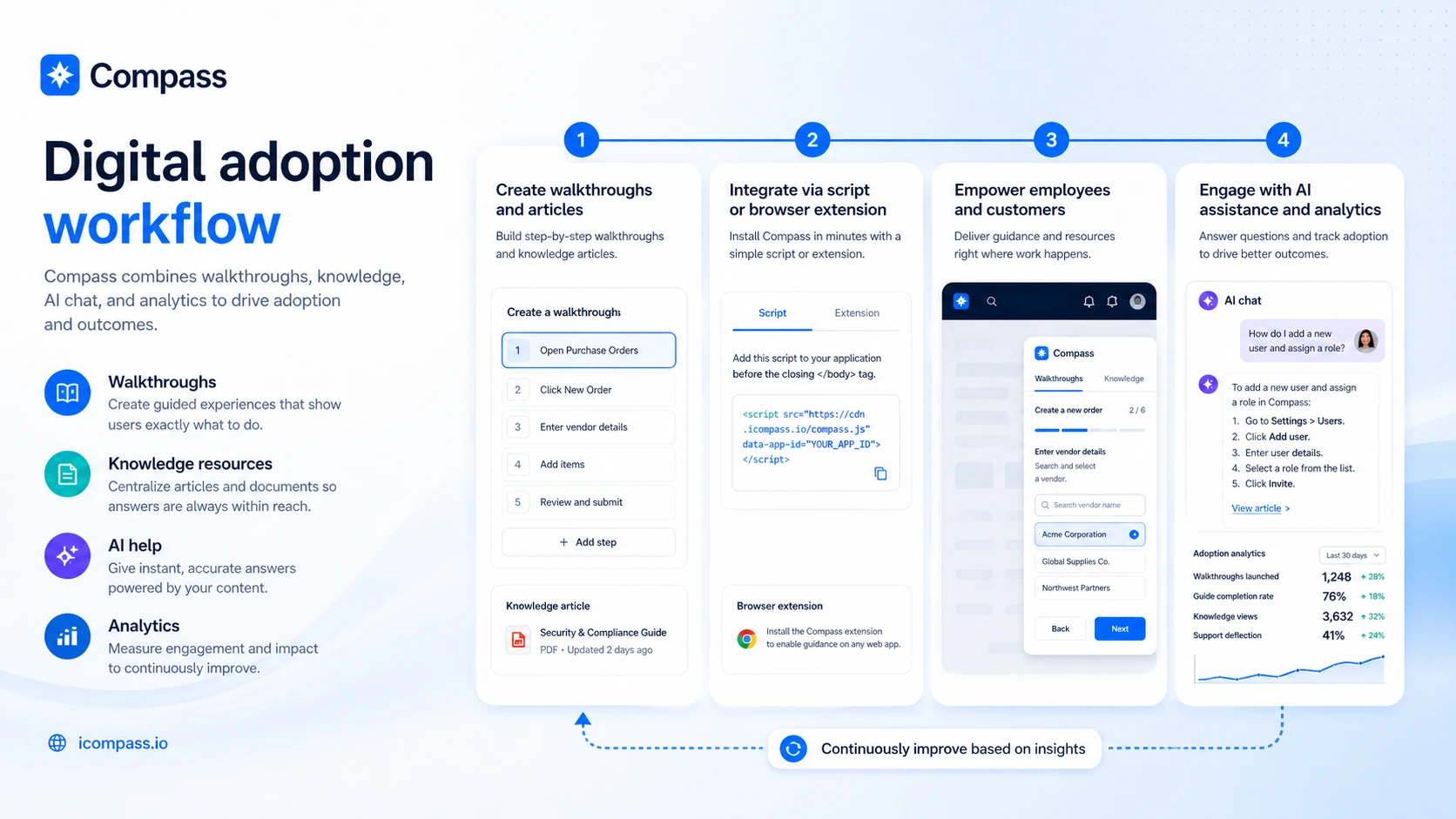
Then the team builds guidance around that workflow. In Compass terms, that may mean a walkthrough, a knowledge article, a document resource, and AI-assisted answers that rely on the content you have prepared.
After that comes implementation. Compass says it can be integrated through a script or a browser plugin. Those are very different paths. A customer-facing SaaS product may prefer script-based installation, while an internal employee rollout may depend on browser-extension deployment. Either way, the buyer should confirm ownership, security review, and approval process before assuming rollout will be easy.
Then comes the human part: watching whether users actually engage with the guidance and whether support friction decreases. If users ignore the guidance, if the content is too broad, or if the AI assist does not have strong source material, the tool may not deliver enough value.
The easy mistake is buying the platform before proving the workflow.
The better path is narrower. Build one guide. Add one article. Connect one document. Test whether AI chat assist gives useful answers from that material. If that small test feels valuable, paid plan comparison becomes more meaningful.
Workflow check: Compass is easier to judge after you test one real onboarding or support problem, not after browsing the feature list alone.
Real-world buyer scenarios
A SaaS team onboarding new customers
A SaaS team may use Compass to guide users through first-run setup, key feature activation, or complex configuration tasks. This is a good fit when customers repeatedly fail at the same steps.
Where it may fail: if the product is simple enough that a basic checklist works. Compass is more interesting when users need contextual help while they are doing the task.
Before paying, I would check whether the team can add the script to the application and whether the free plan is enough to test a real user journey.
An operations team training employees on internal software
Internal software adoption is often messy. Employees may not read documentation, processes may be inconsistent, and support questions may repeat across departments.
Compass can fit if the company needs guidance inside the workflow rather than another training deck. The browser plugin path may be relevant here, especially when the team does not own the underlying application code.
Where it may fail: IT approval, extension deployment, security review, and content ownership. If no one is responsible for maintaining the guidance material, the platform can become stale.
A customer success team reducing support repetition
Compass may help when support questions are predictable and tied to specific product actions. Walkthroughs can guide users, articles can explain context, documents can support deeper references, and AI chat assist can surface answers faster.
The buyer check is whether the source content is specific enough. AI help is only as useful as the material behind it. If the team uploads vague documentation, the assistance layer may disappoint.
A digital transformation team rolling out new systems
For software rollouts, the problem is often not buying the tool. It is getting people to use it correctly.
Compass can fit a change-management workflow when adoption, process consistency, and self-help matter. But larger rollouts should compare Compass with enterprise DAP options such as Whatfix or Userlane if governance, analytics depth, and implementation support are central.
Key features that actually matter
Application walkthroughs
Walkthroughs are the core Compass feature from a buyer perspective. They help users complete multi-step tasks inside software.
This matters when the workflow is complex enough that static documentation is not enough. A good walkthrough can reduce confusion, support tickets, and training repetition.
Buyer note: do not judge walkthrough value from the existence of the feature. Judge it by whether your team can build guides for real friction points and keep them updated when the product changes.
Knowledge articles
Compass includes knowledge articles that can support both internal users and customers. This gives the platform more depth than a basic tour-only tool.
The benefit is that users can access explanation, context, and self-help resources near the place where they need help. That can be useful when a workflow requires more than step-by-step clicks.
Buyer note: knowledge articles only help if the team writes them well. Weak documentation does not become strong documentation because it sits inside a platform.
Document library
The document library matters for teams with manuals, policies, technical references, process documents, or training files.
This is especially relevant for internal enablement and regulated workflows, where users may need supporting material beyond a short tooltip.
Buyer note: verify whether the document structure matches how your team already stores and updates training material. If the content library becomes another separate place to maintain, adoption may suffer.
AI-powered chat assist
Compass’s AI chat assist is interesting because it is positioned around the walkthroughs, knowledge articles, and documents the team creates.
That is the right conceptual model. The AI layer should not be judged as a magic support replacement. It should be judged as a retrieval and assistance layer built on top of specific guidance content.
Buyer note: test with narrow, high-quality source material first. If the answers are useful in a controlled workflow, the feature may deserve a wider rollout. If answers are vague, the issue may be the content base, not only the chat interface.
Segmentation and targeted content
Compass says segments can help show different content based on application URL. This matters when users should see guidance that matches their workflow, role, application, or context.
Segmentation can prevent the guidance layer from becoming noisy. A finance user, support user, or new customer may need different help.
Buyer note: segmentation is only useful when the team has a plan for who should see what. If every user sees every guide, the experience can become cluttered.
Pricing and plan value
Compass pricing deserves a careful read.
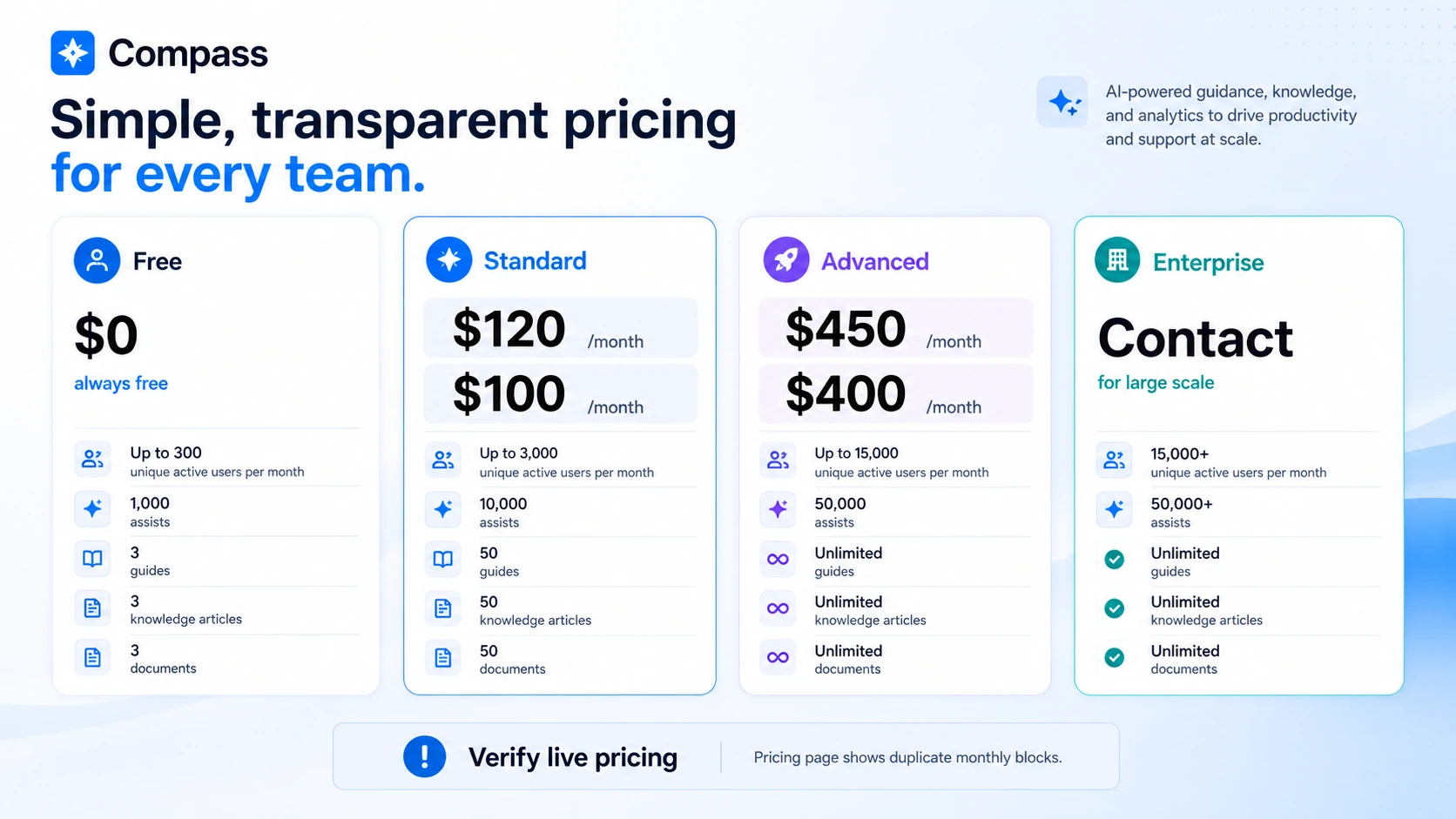
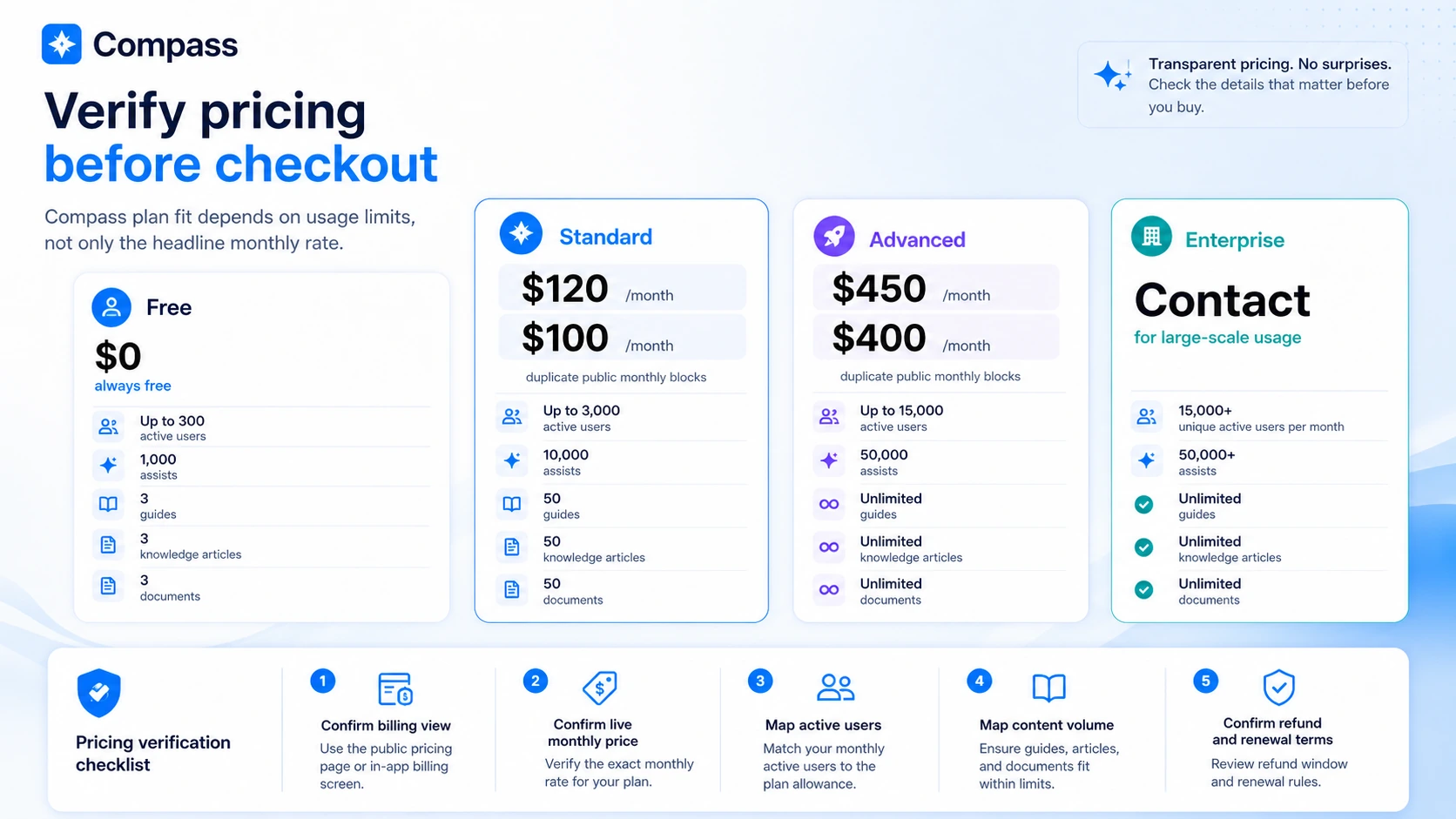
The public pricing page shows a Free plan at $0 with limits around active users, assists, guides, knowledge articles, and documents. It also lists Standard, Advanced, and Enterprise paths. The issue is that the public pricing page appears to repeat Standard and Advanced monthly pricing blocks with different amounts: one set shows Standard at $120 monthly and Advanced at $450 monthly, while another shows Standard at $100 monthly and Advanced at $400 monthly.
That does not mean the product is overpriced. It means buyers should not quote the pricing page casually without checking the live billing view or asking Compass to confirm the current amount.
The free plan is the most sensible starting point. It is not there to prove long-term value. It is there to test whether Compass can solve one real onboarding, support, or employee-training workflow.
A paid Standard plan may make sense if the team has enough active users and guidance content to outgrow the free plan. Advanced becomes more relevant when a team needs higher user volume, more assists, unlimited guides, more knowledge content, and a broader rollout.
Enterprise should be treated as a sales conversation, not a simple checkout path. Larger companies should ask about deployment, security review, analytics, onboarding support, contract terms, and cancellation conditions.
The cheapest paid option is not automatically the best deal. The best deal is the plan that matches actual adoption volume and does not create unused platform cost.
Pricing check: Before moving from free to paid, verify the current Standard and Advanced amounts, billing interval, usage limits, and rollout requirements.
Free plan, trial, coupon, and checkout notes
Compass has a free plan, and that is the best starting point for most buyers.
The free path is useful because Compass is a workflow-fit product. You cannot evaluate it well by looking only at feature names. You need to know whether your team can build guidance, install the platform, and create content users actually use.
A free plan should answer practical questions:
- Can your team build a walkthrough without too much friction?
- Can you create useful knowledge articles and document resources?
- Does the AI chat assist respond well when the source material is narrow and clear?
- Can the platform be installed through the script or browser-plugin route your environment allows?
- Do real users engage with the guidance?
A public coupon code was not reliable enough to make it central to the decision. That is fine. For Compass, the safer savings path is free-plan testing, live pricing verification, and correct plan selection.
If you use the Compass coupon page, treat it as a final offer check after product fit is clear. Do not start there.
Refund and cancellation details should also be confirmed before paid rollout. When a product affects customer onboarding or employee workflows, a mistaken purchase can cost more than the monthly subscription. It can create content work, deployment work, and internal change-management work.
Offer check: Use the coupon route only after Compass still makes sense as a digital adoption fit. A discount should not replace pricing, setup, and rollout checks.
What I would check before buying Compass
If I were buying Compass for a real team workflow, I would check seven things before moving to a paid plan.
First, I would confirm the current pricing. The visible pricing page has duplicated Standard and Advanced amounts, so I would not finalize a budget until the live checkout or sales team confirms the current numbers.
Second, I would map expected usage. Active users, assists, guides, knowledge articles, and documents are the plan limits that matter. A plan that looks affordable can become too small if the rollout grows quickly.
Third, I would confirm installation method. Script installation and browser-plugin deployment are not the same operational task. The right path depends on whether you own the application, whether IT approves extensions, and whether security review is required.
Fourth, I would identify content ownership. Someone must maintain the walkthroughs, articles, and documents. If no one owns that work, the platform value drops.
Fifth, I would test the AI chat assist with narrow source material. Vague source content will produce weaker help. Strong source content is the real asset.
Sixth, I would ask about refund, cancellation, renewal, and enterprise terms. Public pages did not give enough clarity for me to treat paid checkout as risk-free.
Seventh, I would compare direct alternatives. If the need is simple product tours, a lighter onboarding tool may be enough. If the need is enterprise adoption, a heavier DAP may be safer.
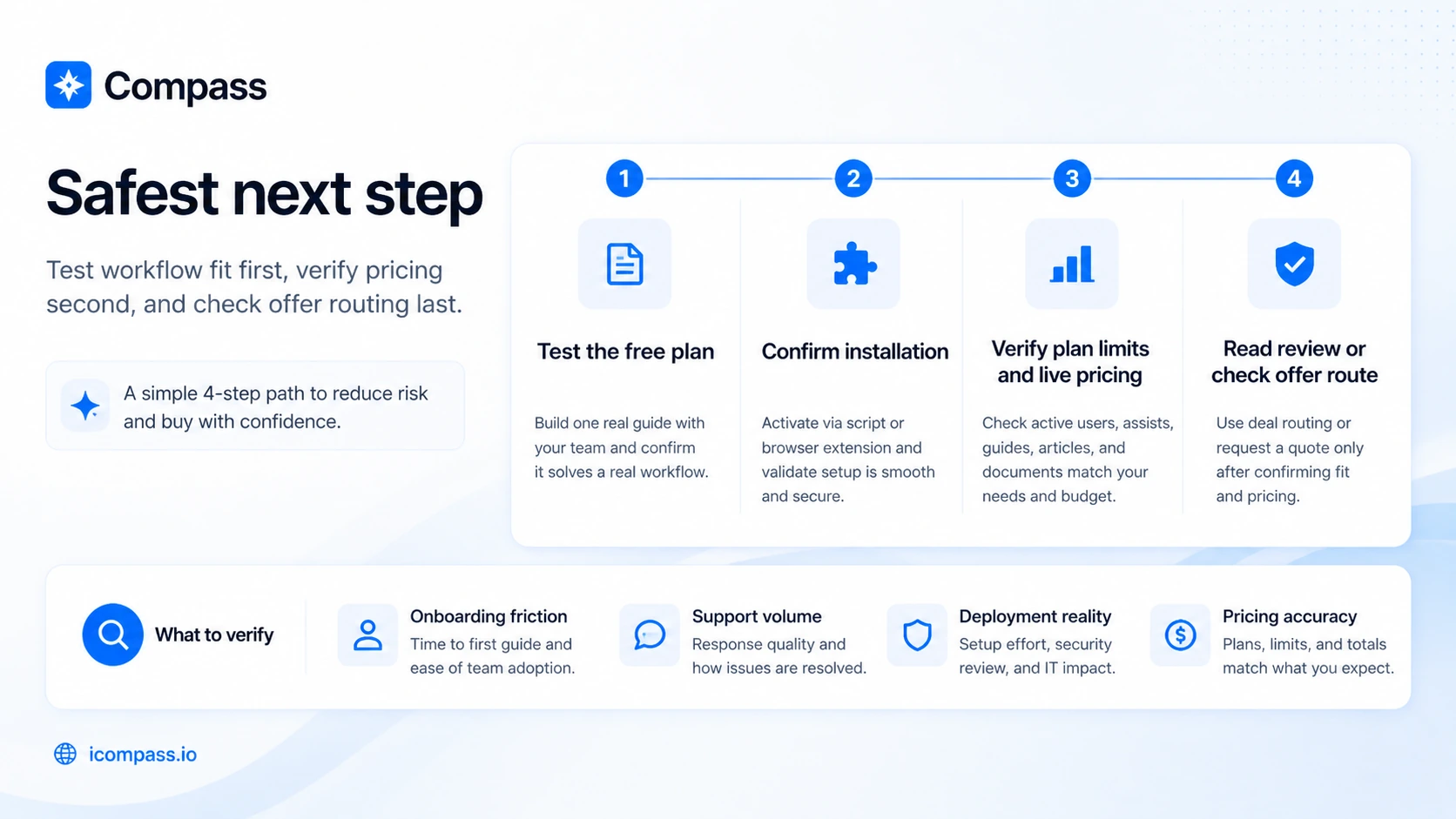
A simple test before paying
Before paying, I would run a small Compass test like this:
- Pick one workflow where users repeatedly get stuck.
- Build one walkthrough for that workflow.
- Add one knowledge article that explains the “why,” not only the clicks.
- Add one document or resource users often need.
- Test AI chat assist with questions users actually ask.
- Confirm whether the script or browser plugin can be deployed in the real environment.
- Review whether users complete the workflow with less help.
That test is more useful than browsing every feature.
If the small workflow succeeds, Compass becomes easier to justify. If the small workflow fails, upgrading to a paid plan probably will not fix the underlying mismatch.
Pros explained
Compass brings guidance and support content together
The biggest strength is the combined workflow. Walkthroughs, articles, documents, and AI chat assist belong together in the adoption problem.
That matters because user confusion is rarely solved by one content format. Some users need a step-by-step guide. Some need a deeper article. Some need a document. Some need a quick answer while working.
This stops being enough if the content is weak. Compass can organize and deliver help, but the team still has to create useful help.
The free plan reduces early risk
A free plan matters here because Compass is hard to judge from marketing copy alone. You need to see whether the platform fits your actual workflow.
The free plan is best used as a controlled test, not as a full rollout. Its limits are useful because they force the buyer to start small.
This stops being enough when the team needs meaningful volume across users, assists, guides, articles, and documents.
Installation flexibility helps different buyer types
Compass’s script and browser-plugin paths make the product more flexible than a single installation method.
This matters because customer-facing and employee-facing rollouts are different. A SaaS product may control its own codebase. An internal team may need IT deployment support instead.
This stops being enough if neither installation route is realistic for your environment.
Published limits make plan comparison possible
Compass lists usage dimensions that matter: active users, assists, guides, knowledge articles, and documents.
That makes the buying decision more concrete. You can map your expected rollout against plan limits instead of buying blindly.
This stops being enough when the pricing amounts themselves are unclear or duplicated. In that case, live verification becomes part of the buying process.
Cons explained
Pricing needs verification
The main commercial issue is not that Compass has paid plans. Paid adoption tools are normal.
The issue is that the public pricing page currently appears to show duplicated Standard and Advanced monthly blocks with different amounts. That creates uncertainty for buyers trying to budget.
The way to reduce the risk is simple: verify the live checkout, ask sales if needed, and avoid quoting old third-party pricing if the current pricing page has changed.
Compass requires content maintenance
Digital adoption platforms are not one-time setup tools.
If your product changes, guides need updates. If policies change, documents need updates. If users ask new questions, articles and AI assist sources may need revision.
The buyer risk is underestimating the ongoing content work. Compass can make guidance easier to deliver, but it cannot remove the need for ownership.
Refund and cancellation clarity should be checked
A clear public refund window was not verified during this review pass.
That matters because Compass is not a casual tool for one user. It can involve internal rollout, product setup, content creation, and training process changes.
Before paying, especially for a larger rollout, I would ask about cancellation timing, renewal behavior, refund eligibility, and enterprise contract terms.
It may be too much platform for simple onboarding
Not every onboarding problem needs a digital adoption platform.
If the buyer only needs a simple product tour, a static help article, a recorded demo, or a setup checklist, Compass may be more than necessary.
This is not a weakness of the product as much as a fit warning. Adoption tools work best when the adoption problem is real, repeated, and expensive enough to solve.
Green flags and red flags
Green flags
- You can name the exact workflows users struggle with.
- The same support or training questions repeat every week.
- Your team can install Compass through a script or browser plugin.
- You have someone responsible for maintaining guidance content.
- The free plan is enough to test one meaningful workflow.
- Paid plan limits match your expected active users and content volume.
Red flags
- You are not sure what onboarding problem you are trying to solve.
- Your team cannot install a script or deploy a browser extension.
- No one owns the content after launch.
- You are buying mainly because an offer path exists.
- The product only needs a basic help page or short checklist.
- Enterprise rollout requires governance or procurement details that are not yet confirmed.
The simple version: Compass is a good candidate when the adoption problem is specific. It is a risky purchase when the problem is still fuzzy.
Compass vs alternatives
Compass belongs in the digital adoption and user guidance category first. It should not be compared only with broad AI productivity tools.
Product Fruits vs Compass
Product Fruits is a more direct comparison if the buyer mainly needs SaaS onboarding tours, product announcements, checklists, and in-app guidance.
It may be a better fit for teams that want a lighter product adoption layer rather than a broader guidance system with documents and AI chat assist.
Compass may still make sense if the buyer wants walkthroughs, articles, documents, and AI-assisted help to work together.
Whatfix vs Compass
Whatfix is the stronger comparison for larger organizations that need enterprise digital adoption, deeper governance, analytics, implementation support, and procurement confidence.
Compass may appeal to smaller or mid-size teams that want to test digital adoption without immediately entering a heavier enterprise sales process.
The tradeoff is maturity versus accessibility. Enterprise buyers should compare both carefully.
Chameleon vs Compass
Chameleon is more focused on product tours, onboarding experiences, and user engagement for SaaS products.
It may be a better fit if the buyer’s main goal is guiding customers through a web app and improving product activation.
Compass may make more sense when the use case includes employee training, knowledge articles, documents, and AI chat assist in addition to walkthroughs.
Userlane vs Compass
Userlane is another digital adoption comparison for teams focused on in-app guidance and software adoption.
It may be more relevant for organizations that want a mature DAP-style rollout and are prepared to evaluate implementation, analytics, and change-management needs.
Compass may be more approachable for teams starting with a smaller guidance workflow, but buyers should compare support depth and rollout fit.
1min.AI as an adjacent route
1min.AI is not a direct Compass alternative. It is a broader AI workspace route for users who want many AI utilities in one place.
That matters if the buyer’s real need is general AI productivity, not software adoption. If you want writing, image, audio, or chat utility, Compass is the wrong comparison. If you want users guided inside an application, 1min.AI is not solving the same job.
Aikeedo as an adjacent route
Aikeedo is also not a direct replacement. It is more relevant for buyers who want to build or own an AI SaaS-style product.
That is a different decision. Compass helps users adopt software. Aikeedo is closer to a builder path. The overlap is “AI software,” but the buyer job is not the same.
Trust, refund, and buyer-risk notes
My confidence is strongest around Compass’s current public product role: digital adoption, walkthroughs, knowledge resources, document support, and AI chat assistance.
I am more cautious around paid-plan budgeting and checkout risk. The current pricing page appears to show two Standard and Advanced monthly blocks with different visible amounts. Third-party pricing pages may also repeat one set of amounts, but buyers should not rely on older external references when the live pricing page itself needs confirmation.
Refund and cancellation terms also deserve a direct check. If your team is planning a serious rollout, ask before paying. Do not assume a simple software refund path when the purchase may involve setup, users, training content, and internal approvals.
Data handling and security review may matter too. Compass is used around internal or customer-facing workflows, knowledge material, documents, and AI-assisted help. Teams with sensitive processes should ask what data is stored, how documents are handled, who can access content, and what controls exist for larger deployments.
Finally, be realistic about ownership. The success of a digital adoption platform depends on the content behind it. If walkthroughs, articles, and documents become stale, the user experience gets worse. The platform can help deliver guidance, but it cannot replace operational discipline.
Final verdict
I would consider Compass if your team has a specific software adoption problem: users repeatedly get stuck, support questions repeat, employee training is too manual, or customers need guided help inside a product.
I would start with the free plan, not a paid tier. Build one real walkthrough. Add a useful article. Attach a document if the workflow needs it. Test whether AI chat assist helps users find better answers. Then decide whether the paid plan limits match your real rollout.
I would skip Compass if the problem is simple. A help page, checklist, short video, or lightweight onboarding tool may be enough for smaller products and early teams.
I would compare Compass with Product Fruits or Chameleon if the use case is mainly SaaS onboarding. I would compare it with Whatfix or Userlane if the buyer is planning a broader enterprise digital adoption program. I would treat 1min.AI and Aikeedo only as adjacent routes, not direct replacements.
The safest next step is to verify the current pricing page, confirm installation method, and test one workflow before paying. Compass can be useful, but only if the adoption problem is real enough to justify the platform work behind it.
