Compass Pricing, Plans & Adoption Fit
Compass is a digital adoption and user guidance platform for businesses that need product tours, application walkthroughs, knowledge articles, document support, and AI-assisted help inside software workflows. It is not a generic note-taking or summarization tool. The real buying question is whether your team needs in-app guidance for employees or customers enough to justify a paid adoption platform rather than handling onboarding through help docs, live training, or a lighter product tour tool.
Fit → price → checkout
Use these routes after the official-site check: coupon first, review for fit, compare if unsure.
Compass pricing snapshot
Fast commercial checks before pricing, coupons, or a deeper review.
Compass product tour
Start with the Compass demo if you need to see whether the platform feels like an adoption layer or just another help-center tool. Watch for how guides, articles, documents, and AI chat support fit together, because the paid plan only makes sense if those pieces reduce repeated training or support friction in your real workflow.
Compass should be evaluated as a digital adoption platform, not a simple AI productivity app. The buyer is usually trying to solve a practical problem: employees or customers are getting stuck inside software, asking repeated questions, ignoring features, or needing too much manual training. The page is strongest when you use it to compare onboarding fit, published usage limits, and installation reality before clicking through to pricing or coupon routing.
What Compass actually does
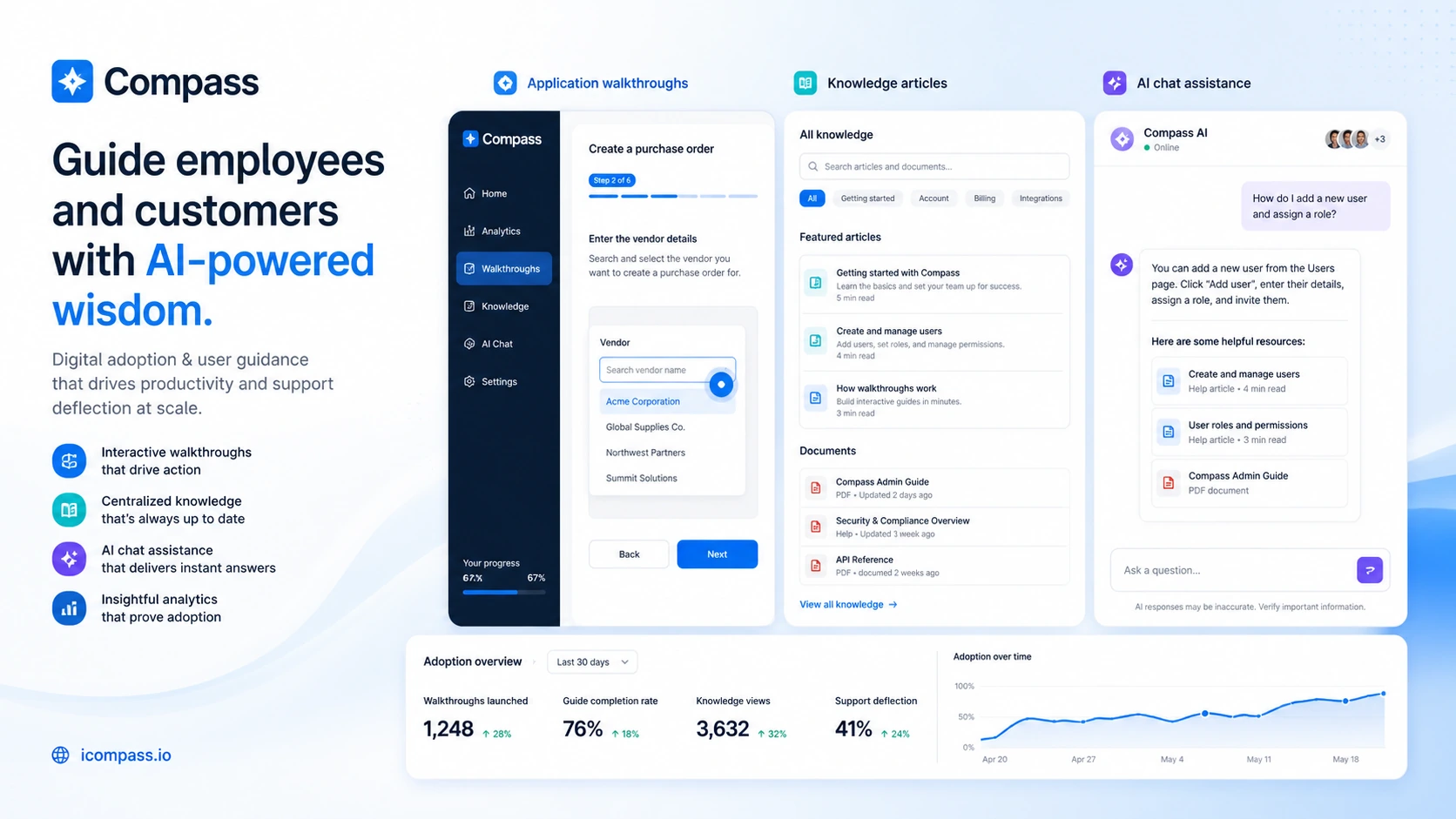
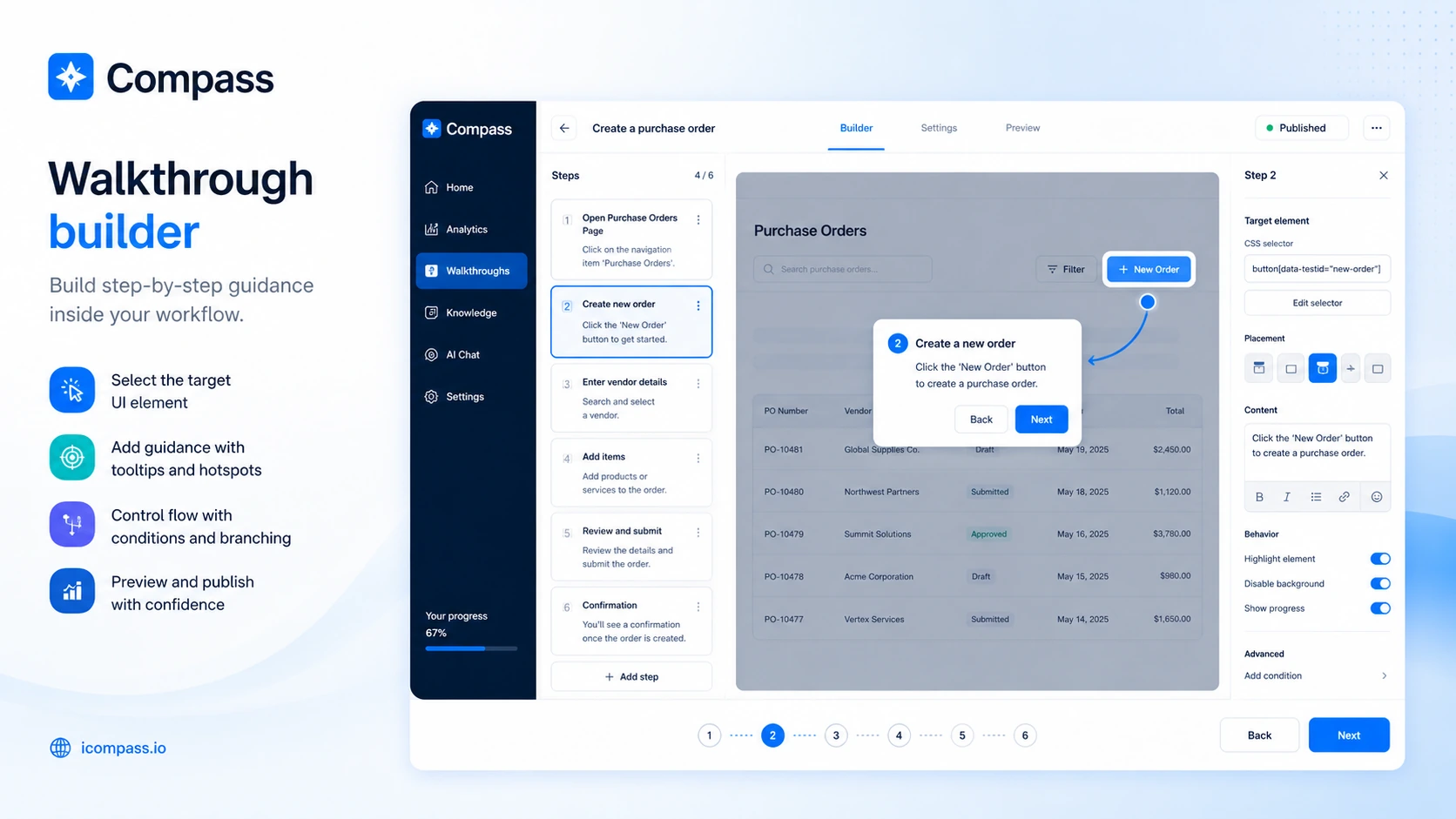
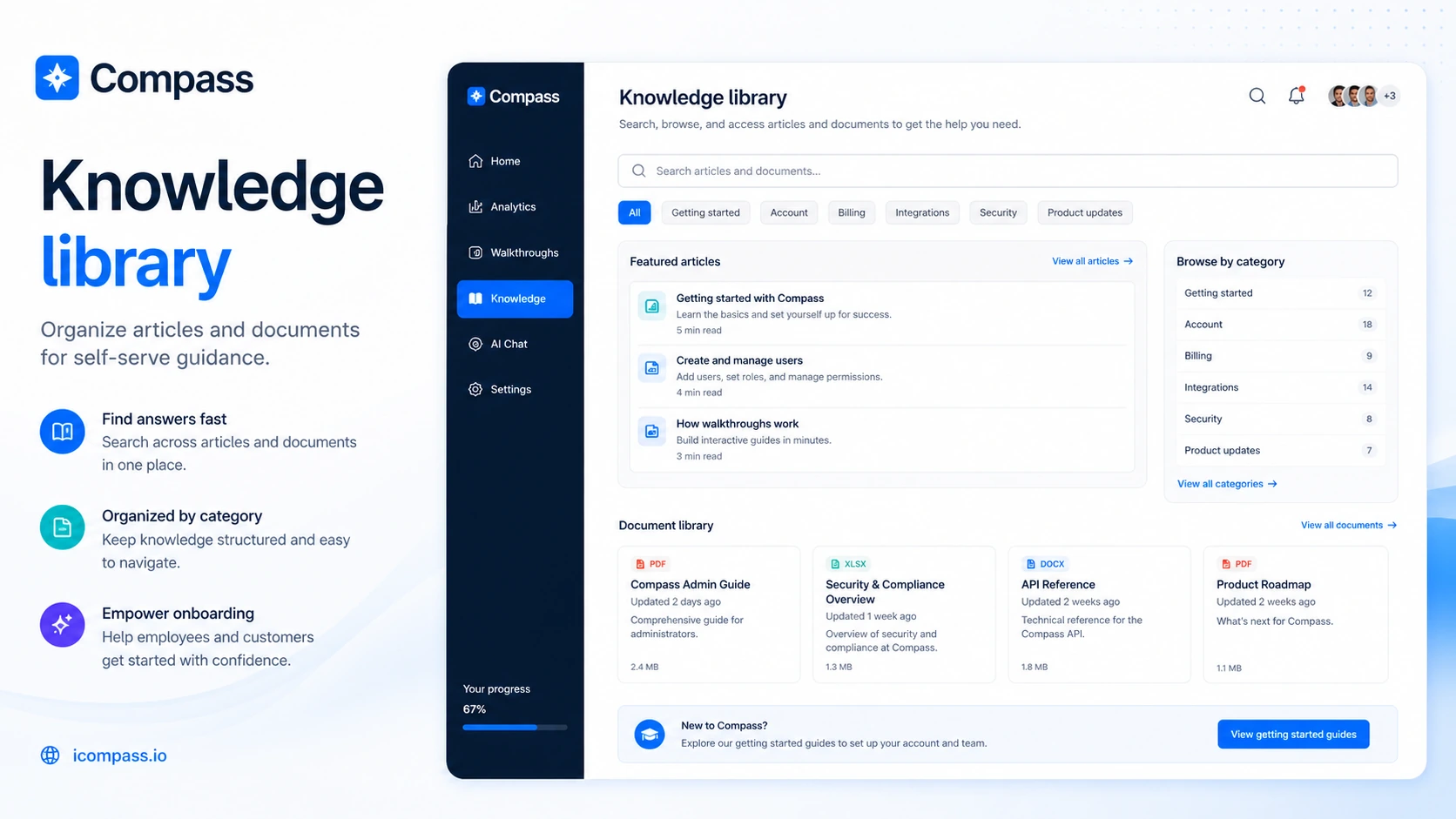
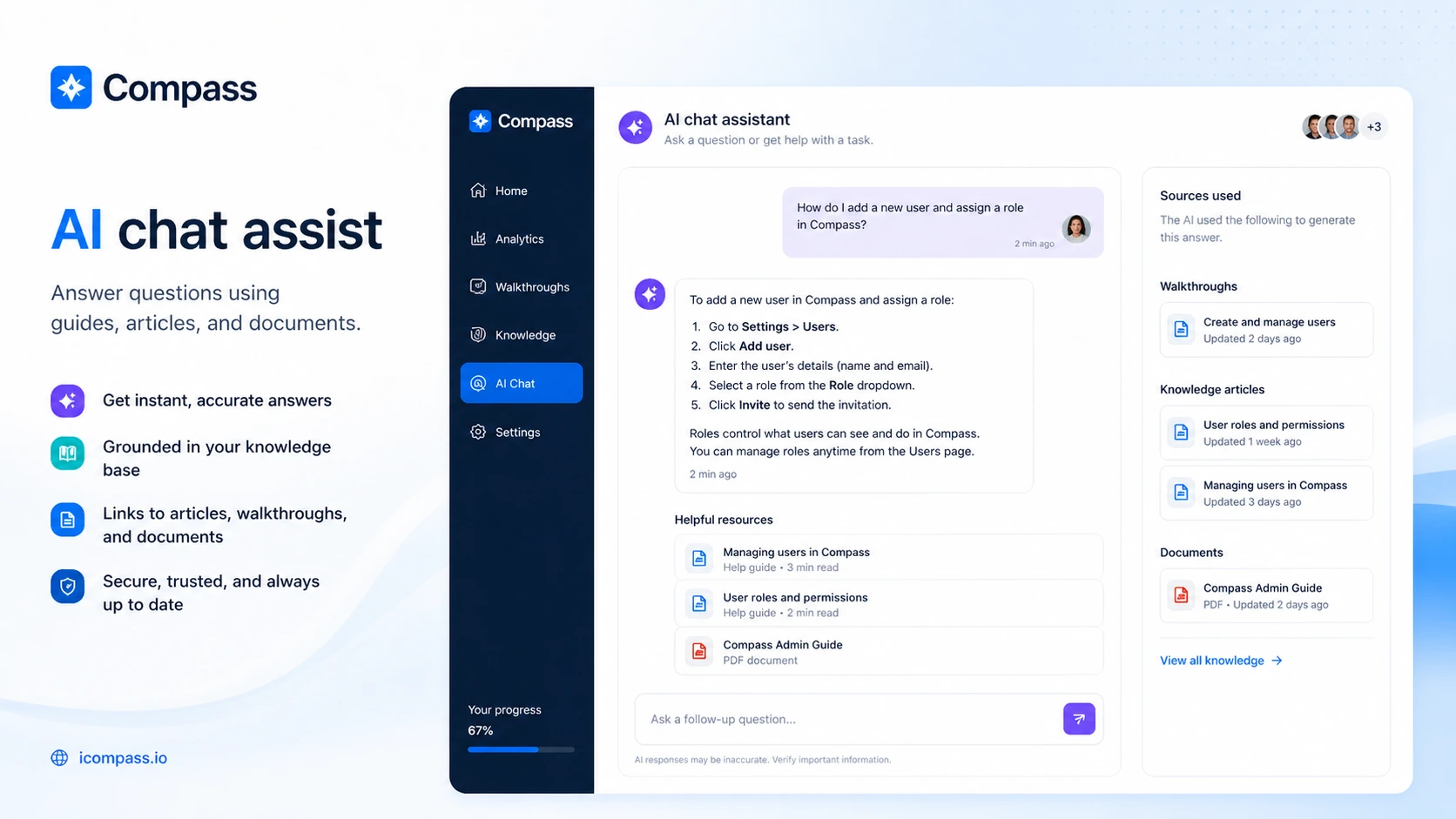
Compass helps businesses create guided walkthroughs, knowledge articles, document resources, and AI-assisted help for users inside software workflows. That makes it closer to tools like product tour, onboarding, and digital adoption platforms than to a personal AI assistant. The value is clearest when the buyer has a complex application, recurring support questions, or employee training processes that are too slow to handle manually.
- Application walkthroughs guide users through complex procedures step by step.
- Knowledge articles and documents give users a self-help layer inside the workflow.
- AI chat assist uses the stored guides, articles, and documents to answer user questions.
- Analytics and adoption signals help teams understand whether guidance content is being used.
Who Compass is best for
Compass makes the most sense for teams that already know where users get stuck. A SaaS company may use it to onboard customers, a customer success team may use it to reduce repeat support questions, and an internal operations team may use it to guide employees through business software. It is less urgent for a small product with simple screens, a short help center, or low onboarding friction.
Pricing needs a careful read
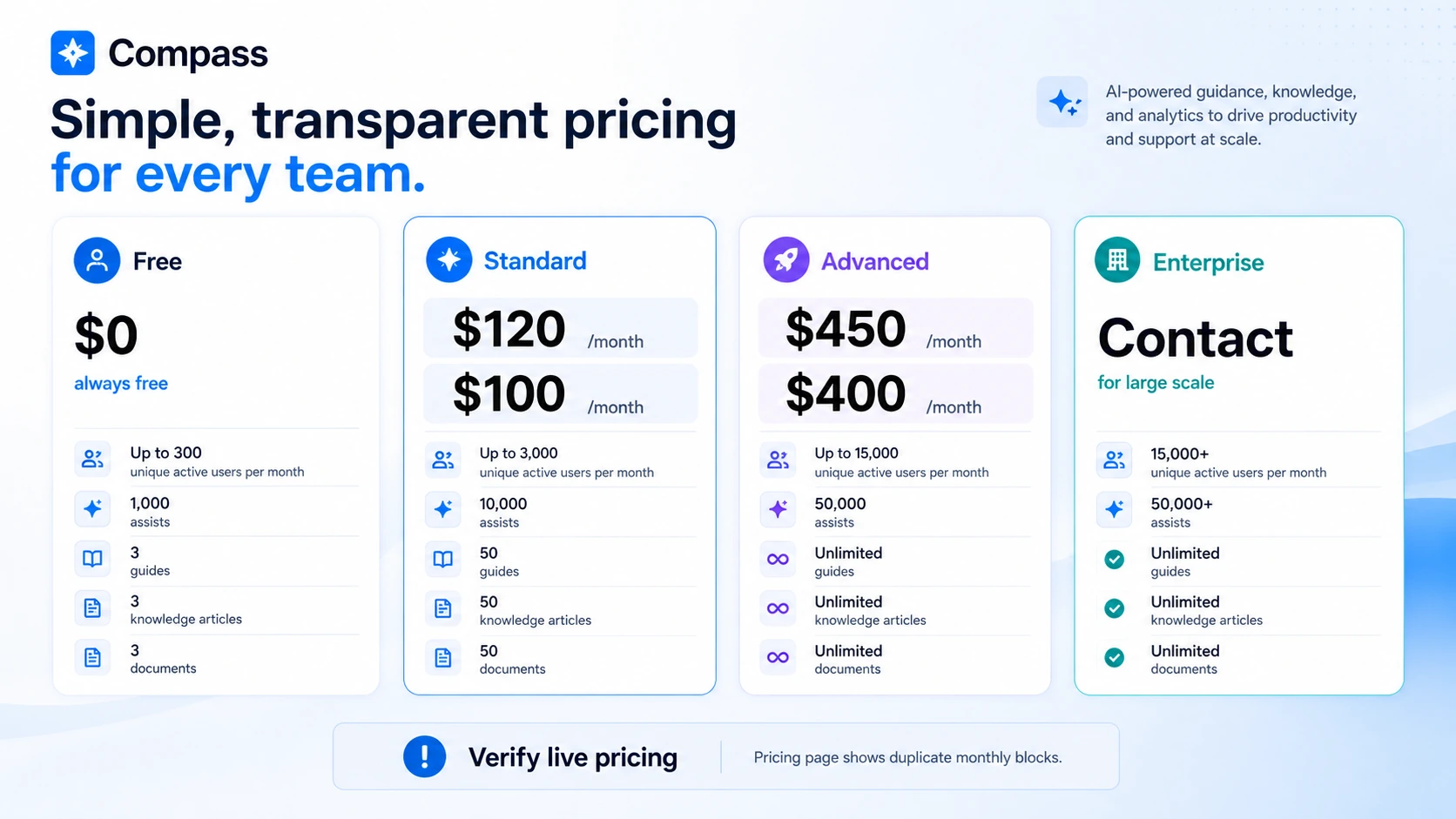
The free plan is useful for testing because it gives a buyer a practical way to validate guides, articles, documents, and assists before budget approval. Paid-plan comparison needs more care. The public pricing page currently shows duplicated monthly blocks with different Standard and Advanced amounts, so the safest approach is to verify the live billing view before publishing or paying. The buyer should also compare limits around users, assists, guides, knowledge articles, and documents because those limits decide whether the plan scales.
- Free plan is available, but it has usage limits.
- Standard and Advanced plan amounts should be checked live because the pricing page shows duplicate monthly blocks.
- Enterprise is a contact-based path for larger deployments.
- Refund and renewal terms should be confirmed before paid rollout.
Installation method matters before price
Compass says it can be integrated by adding a script to an application header or by deploying a browser extension. That detail should be checked before comparing paid tiers. A customer-facing SaaS product may prefer a script-based approach, while an internal employee rollout may depend on whether IT can push a browser extension. If neither path is realistic, the pricing discussion becomes premature.
What to watch in the extra video
The second video is not a Compass-specific demo. It is included to help buyers understand the broader digital adoption platform category before they judge Compass only by price. Watch it with one question in mind: do your users need help inside the product at the moment of work, or would normal documentation and training be enough?
Alternatives to compare first
Compass should be compared against tools that solve onboarding, product adoption, and in-app guidance from different angles. A buyer who wants a simple customer-facing tour may not need the same platform as an internal IT team rolling out complex employee software. The most useful comparison is not which product has the longest feature list, but which one matches installation method, content workload, analytics needs, and monthly usage.
Safest next step
The safest next step is to open the official pricing page, confirm the current plan amounts, then test the free plan against one real onboarding or support workflow. After that, read the full review if workflow fit is still unclear, or use the coupon route only to check whether a current DealBestDaily offer exists. Do not start with a coupon hunt if the team has not confirmed installation, content maintenance, and usage limits.
- Use the free plan to build or test one real guide.
- Confirm installation method with product or IT owners.
- Compare plan limits against expected user volume.
- Only check coupon routing after Compass still makes sense as a workflow fit.
Best savings path from this store page
This is the clearest savings route to check once the product already looks like a fit.
Compass lists a free plan with active-user, assist, guide, knowledge-article, and document limits. It is the safest way to test the product before moving into paid adoption.
Standard monthly path
Advanced monthly path
Use comparison routes when the category fit is still open
Use these comparison routes when the product still looks plausible, but the category fit is not fully settled.
Better fit for buyers who want a broad personal or team AI workspace rather than software adoption guidance.
Better fit for builders who want to launch or customize an AI SaaS product instead of guiding users inside an existing app.
Worth comparing if the buyer mainly needs SaaS onboarding tours, checklists, and in-app product adoption flows.
Worth comparing for larger enterprise digital adoption programs that need deeper governance, analytics, and implementation support.
Verification points worth checking before you click out
Where this store usually fits best in the workflow
Compass can help SaaS teams guide new users through key product actions, reduce early confusion, and support feature discovery without relying only on live training or static help docs.
Internal teams can use Compass to guide employees through complex applications when repeat training, process mistakes, or tool underuse are creating operational friction.
The combination of walkthroughs, articles, documents, and AI chat assist can reduce repeat support questions when the source material is accurate and regularly maintained.
Compass fits change-management situations where the company needs users to adopt new systems, follow workflows consistently, and access help inside the application.
Practical checkpoints before and after signup
- Choose one real workflow where users repeatedly get stuck.
- Confirm whether the target application supports script installation or requires browser extension deployment.
- Collect current support or training pain points so the test has a measurable goal.
- Build a small walkthrough, a few knowledge articles, and a document resource before judging the interface.
- Test whether AI chat answers are useful when source content is narrow and specific.
- Check whether internal users or customers actually engage with the guidance layer.
- Verify live plan amounts, billing interval, usage limits, and any discrepancy in Standard or Advanced pricing.
- Ask about refund, cancellation, renewal, and enterprise terms if the rollout affects a larger user base.
- Compare Compass with lighter onboarding tools if your needs are limited to simple tours.
Fast-read signals for workflow fit and buying friction
Questions readers usually ask before choosing this store
Is Compass an AI productivity tool or a digital adoption platform?
Compass is better understood as a digital adoption and user guidance platform. It uses AI chat assistance, but its core value is helping employees or customers use software through walkthroughs, articles, documents, and contextual support.
Does Compass have a free plan?
Yes. Compass publishes a free plan with limits on unique active users, assists, guides, knowledge articles, and documents. The free plan is best treated as a test path before committing to Standard, Advanced, or Enterprise.
What should buyers verify before paying for Compass?
Buyers should verify current plan pricing, billing interval, usage limits, installation method, refund terms, cancellation rules, and whether the team can maintain enough guidance content to make the platform valuable.
Are public Compass coupon codes available?
No reliable public coupon code was verified during this refresh. Buyers should treat the free plan, live pricing page, enterprise quote, and DealBestDaily offer route as the safer savings checks.
What is the simplest alternative if Compass feels too heavy?
If the team only needs basic onboarding, a lighter product tour tool, help center, recorded demo, or checklist may be enough. Compass makes more sense when guidance, knowledge content, AI assistance, and software adoption need to work together.
Choose the next route that matches what you still need to decide
The strongest next click depends on whether you still need product judgment, a savings route, or a broader category comparison.