Quick verdict
AutoShorts.ai is worth considering if you want to test a faceless short-form channel without filming, editing, recording voiceover, or manually posting every video yourself.
That is the useful part.
The caution is just as important: AutoShorts.ai is not a magic channel-growth machine. It can help you turn a topic into a vertical video and push that workflow toward a posting schedule, but it cannot decide whether your niche is strong, whether the script is actually interesting, or whether the finished video feels different enough from the flood of faceless AI content already on TikTok, YouTube Shorts, and Reels.
For my money, AutoShorts.ai makes the most sense as a low-risk channel experiment tool. Use the free one-video path, judge the output like a viewer, and only then decide whether Starter, Daily, or Hardcore matches your real publishing cadence. The mistake would be buying a higher-frequency plan because the pricing looks simple, then discovering that you do not have enough topic strategy or review capacity to keep the videos useful.
The strongest reason to consider it is workflow simplicity: topic or prompt in, faceless video out, then scheduling and posting. The biggest reason to slow down is creative sameness. A faceless video can be fast and still feel disposable.
Next step: If AutoShorts.ai still fits your faceless-channel idea, test the current buyer route before choosing a monthly posting cadence.
Review snapshot
| Review point | Practical take |
|---|---|
| Best for | Creators testing faceless YouTube Shorts, TikTok, or Reels channels |
| Not ideal for | Personal-brand creators, heavy editors, or teams with existing footage to repurpose |
| Main use case | Turning topics, prompts, or simple scripts into faceless short-form videos |
| Free path | Free one-video entry point for first-output testing |
| Paid path | Starter, Daily, and Hardcore plans are mainly a posting-frequency decision |
| Main strength | Simple end-to-end faceless video workflow with scheduling and posting |
| Main concern | Generated output can feel repetitive if the niche, prompt, and review process are weak |
| Direct alternatives | StoryShort, Revid-style short-form generators |
| Adjacent routes | Klap for clipping existing footage; Submagic for captions and editing polish |
| Best next step | Create one free test video, then decide whether a paid cadence is justified |
What is AutoShorts.ai?
AutoShorts.ai is a faceless short-form video automation tool. The practical job is simple: help a creator go from a topic or prompt to a vertical video without filming themselves.
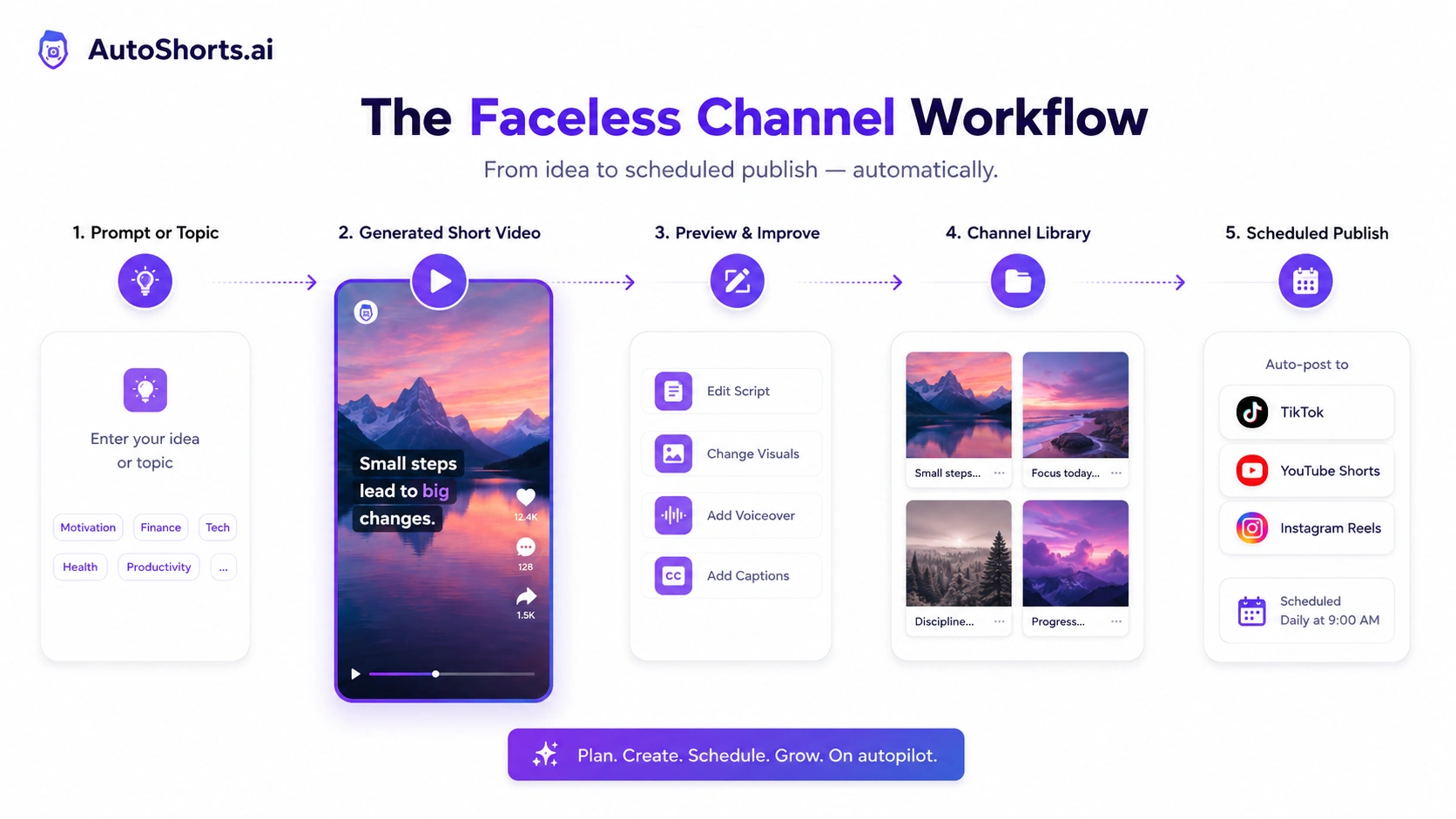
The product sits closer to a faceless channel workflow than a traditional video editor. A normal editor gives you control over footage, cuts, transitions, captions, sound, and creative direction. AutoShorts.ai is more about automation: generate the video, preview the output, then schedule or post it to short-form platforms.
That difference matters because buyers often compare video tools by feature lists. I would not do that here. The better question is whether you want to create original-looking video assets yourself, repurpose footage you already have, or build a faceless channel from generated scripts, stock-style visuals, AI voiceover, captions, and automated posting.
AutoShorts.ai is built around the third path.
The current public positioning emphasizes faceless videos on autopilot for TikTok and YouTube-style channels. Its FAQ describes automatic creation, scheduling, and posting of customized faceless videos. That supports the core buyer angle: AutoShorts.ai is not primarily for cinematic editing, long-form production, or a creator who wants to build audience trust around their own face and voice.
Our review approach compares public product pages, pricing details, FAQ language, terms and privacy pages, buyer workflow fit, and nearby video-creation alternatives. A low monthly price or free entry point is useful, but it is not proof that the product fits your channel.
Who should use AutoShorts.ai?
AutoShorts.ai fits creators who already understand the tradeoff of faceless content: speed and volume are easier, but differentiation is harder.
A niche YouTube Shorts creator is the clearest fit. If you want to test facts, listicles, explainers, simple educational topics, motivational snippets, or story-style faceless shorts, AutoShorts.ai can reduce the production barrier. The condition is that you still need a niche angle. Random topics plus automated visuals rarely build a strong channel by themselves.
A TikTok experimenter may also find it useful. If the goal is to validate a content lane quickly, a free video and a low-frequency paid test can be enough to see whether the format has potential. I would be careful about jumping straight into daily posting before the first few videos prove they feel watchable.
A small marketing team can use AutoShorts.ai for lightweight content experiments. For example, a team might test educational tips, product-adjacent explainers, or simple awareness videos without booking a video editor. That works only if someone reviews the claims, visuals, and tone before publishing.
A beginner creator may like the simplicity. If editing software feels intimidating and the goal is to understand how faceless video workflows behave, AutoShorts.ai is easier to approach than a full editing suite.
Who should avoid AutoShorts.ai?
I would avoid AutoShorts.ai if your audience needs to trust you as a person. Coaches, consultants, founders, creators, and experts who rely on face, voice, and presence may weaken their brand by replacing themselves with generic faceless output.
I would also be careful if you already have long-form video footage. In that case, a clipping tool is usually the more natural route. Klap-style workflows make more sense when you want to turn podcasts, webinars, YouTube videos, or interviews into shorts. AutoShorts.ai is more useful when you want new faceless videos from topics or prompts.
Buyers who need deep manual editing control should slow down too. AutoShorts.ai may let you preview and adjust parts of the output, but its main value is automation. If your standards require custom motion design, complex brand systems, precise pacing, or highly directed visuals, a broader video editor will be a better fit.
I would not use it as a shortcut around content judgment. Faceless automation can make publishing easier, but it can also make low-trust volume easier. If you cannot review scripts, facts, visuals, and captions before a video goes live, the workflow may create more noise than value.
Finally, avoid buying only because a coupon or offer route appears. A discount can improve a purchase, but it should not decide whether a faceless channel is worth building.
How AutoShorts.ai fits into a real workflow
The best AutoShorts.ai workflow starts before you open the tool.
First, choose a niche and a repeatable format. “Interesting facts about space” is a start, but it is not enough. A better channel test might be “60-second weird astronomy facts for students” or “daily finance myths explained for beginners.” The more specific the angle, the easier it is to judge whether the generated video fits.
Then create a test video. Use a topic that reflects the kind of content you would actually publish. Do not test with a throwaway prompt and then judge the tool unfairly. The test should include the same quality standard you would apply to the channel.
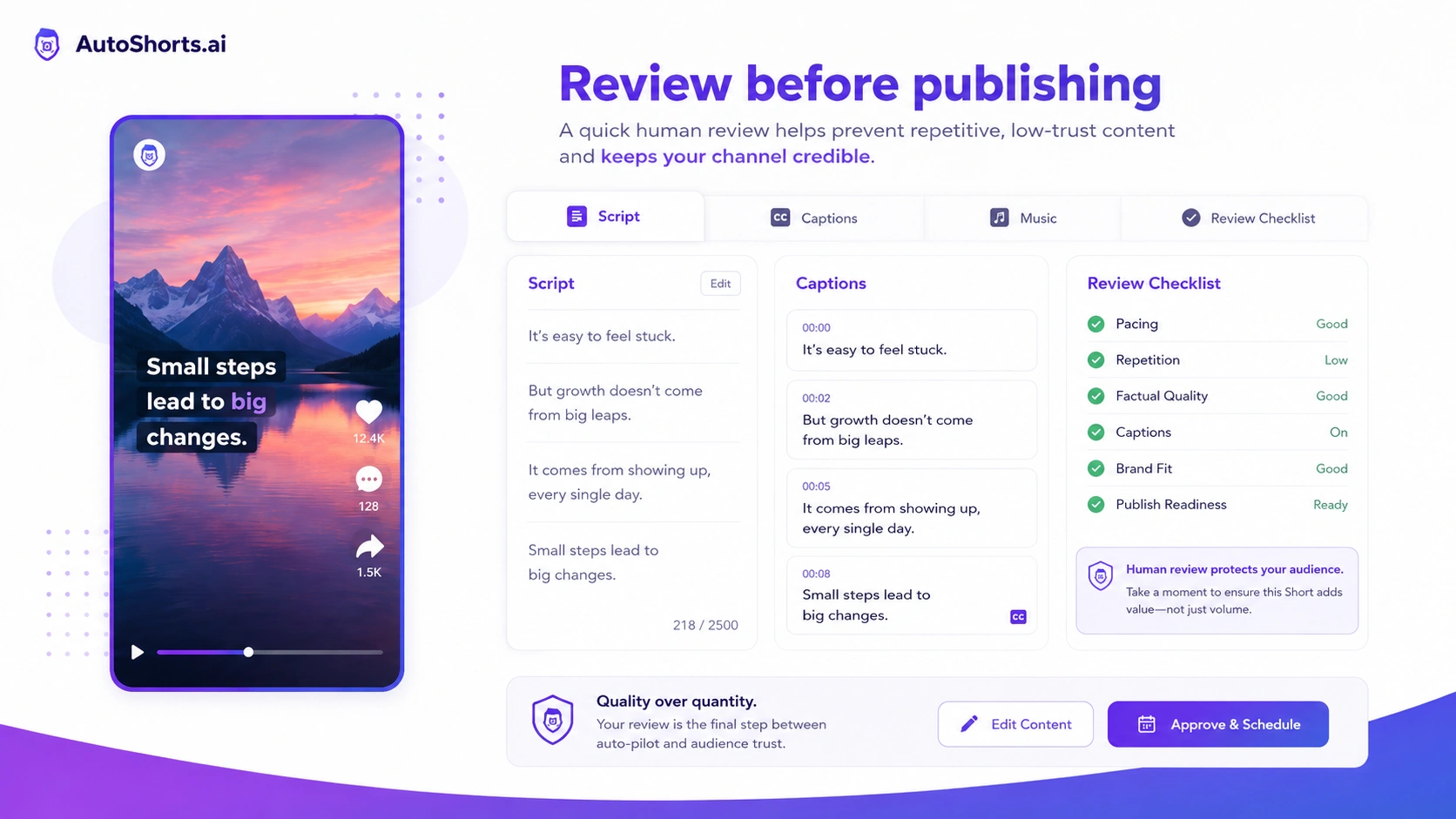
After generation, review the output in layers:
- Is the script accurate and clear?
- Does the voiceover fit the niche?
- Do the visuals match the topic or feel random?
- Are the captions readable and timed well?
- Does the pacing feel like a short-form video people would finish?
- Would this video look too similar to generic faceless content?
Only after that should scheduling matter. Posting cadence is useful when the content is good enough to repeat. It is risky when the first output is already weak.
Workflow check: Use AutoShorts.ai only after you know which faceless format you want to test and how often you can review output before posting.
Real-world buyer scenarios
A beginner faceless-channel creator is the most obvious scenario. This buyer wants to test whether a channel idea can turn into regular short-form content without learning editing first. AutoShorts.ai can help, but the buyer should not mistake video creation for audience validation. The first test is output quality. The second test is whether viewers actually respond.
A marketer testing social formats has a different problem. They may not need a full faceless channel. They may need quick awareness clips around simple topics. AutoShorts.ai can help with speed, but brand safety matters more. If the generated visuals or voice feel generic, the time saved may not be worth the loss of brand tone.
A niche publisher may use AutoShorts.ai to support a content site, newsletter, or affiliate project with short-form distribution. This can work if the videos point back to real expertise or curated content. It becomes weaker if the publisher only produces mass generic shorts that do not reinforce authority.
A creator with existing long-form footage should compare before buying. If you already record podcasts, tutorials, webinars, or talking-head videos, a clipping tool may be the better first purchase. AutoShorts.ai generates faceless content from ideas; it is not the cleanest fit for extracting the best moments from existing footage.
Key features that actually matter
Topic-to-video generation
The core feature is turning a topic, prompt, or simple script direction into a short faceless video. This matters because it removes the hardest first step for many beginners: moving from an idea to something watchable.
Buyer note: judge the generated script and visuals, not just the fact that a video exists. A finished video can still be too generic to publish.
AI voiceover, captions, and music
AutoShorts.ai combines narration, subtitles, and background sound into the workflow. For short-form content, these pieces matter because many viewers watch quickly, silently, or with low patience.
Buyer note: check whether the voice and caption style fit your niche. A finance explainer, mystery story, and motivation clip do not need the same pacing or tone.
Scheduling and auto-posting
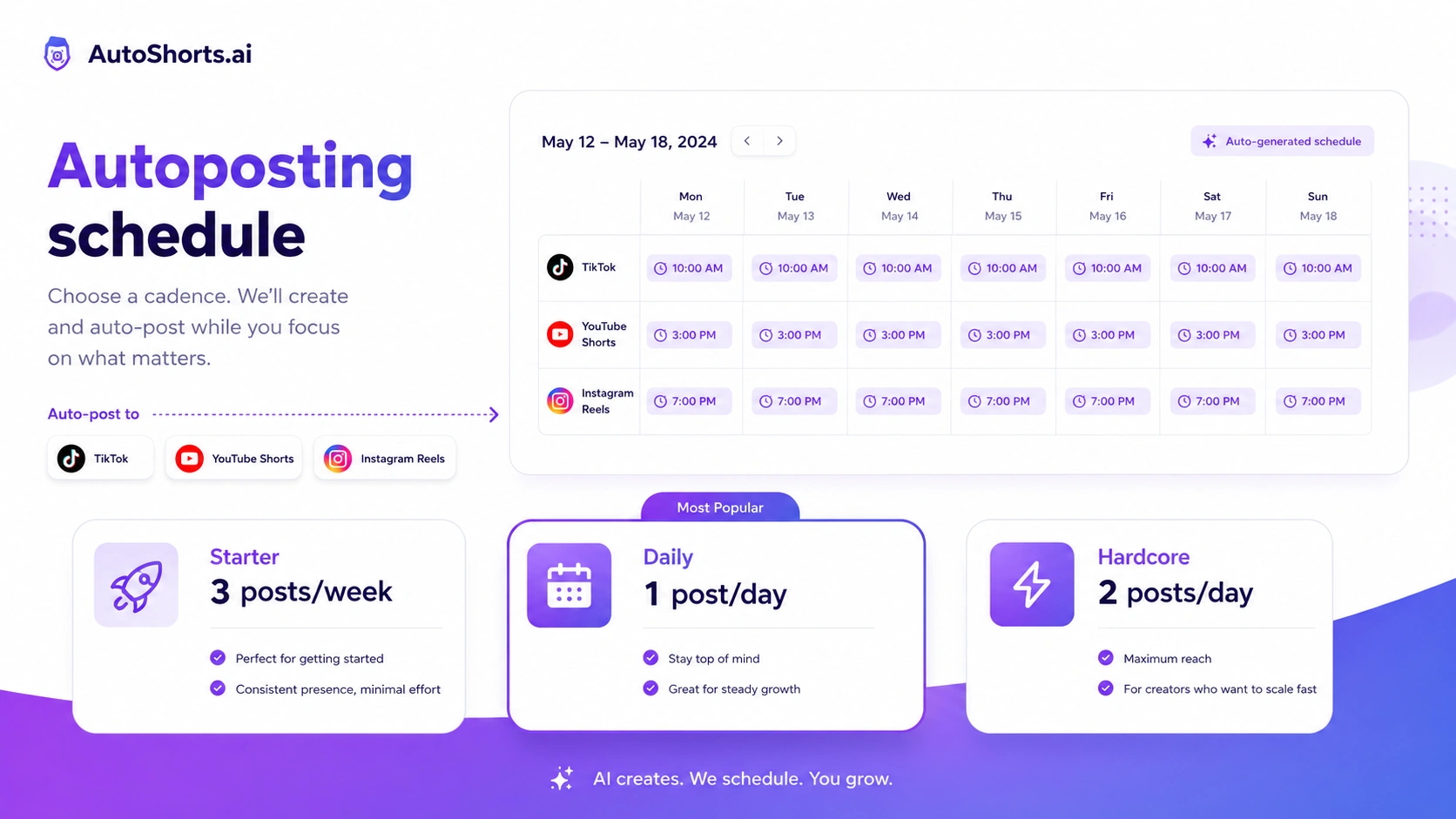
The scheduling layer connects the product directly to its pricing model. Starter, Daily, and Hardcore are not only feature tiers; they represent different publishing rhythms.
Buyer note: posting more often is not automatically better. If you cannot review the videos, improve topics, and learn from results, higher cadence may only create more average content.
Free one-video entry point
The free path is important because it lets buyers see the real output style before paying. This is better than judging the product only from the homepage.
Buyer note: one video is enough to test output feel, not enough to prove channel growth. Treat it as a quality check, not a business case.
Simple pricing ladder
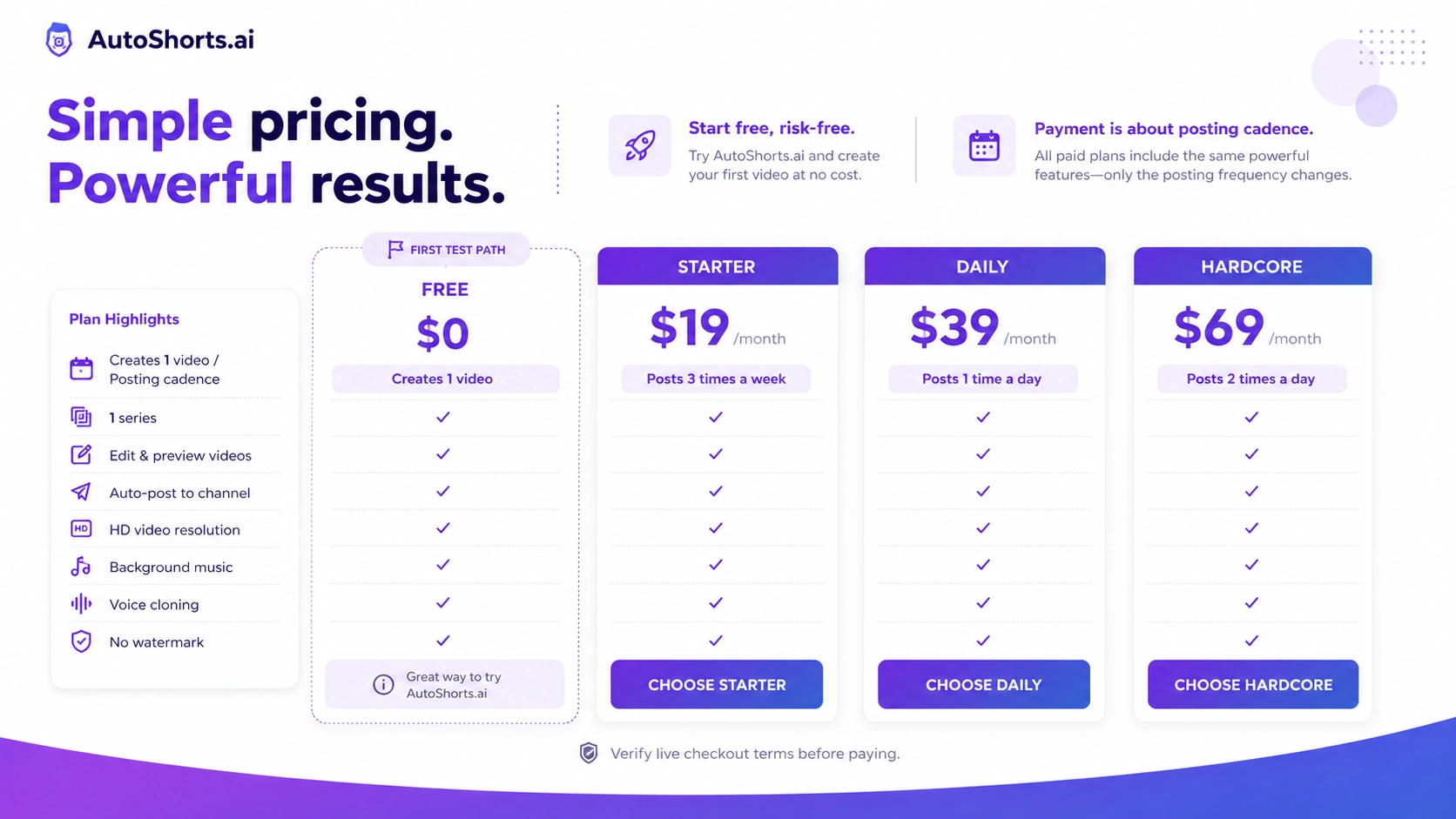
Compared with credit-heavy AI tools, AutoShorts.ai is easier to understand: Free, Starter, Daily, Hardcore. The plan decision is mainly about posting frequency.
Buyer note: simple pricing can still lead to overbuying. Choose the plan that matches your actual review and publishing capacity, not your most optimistic channel plan.
Pricing and plan value
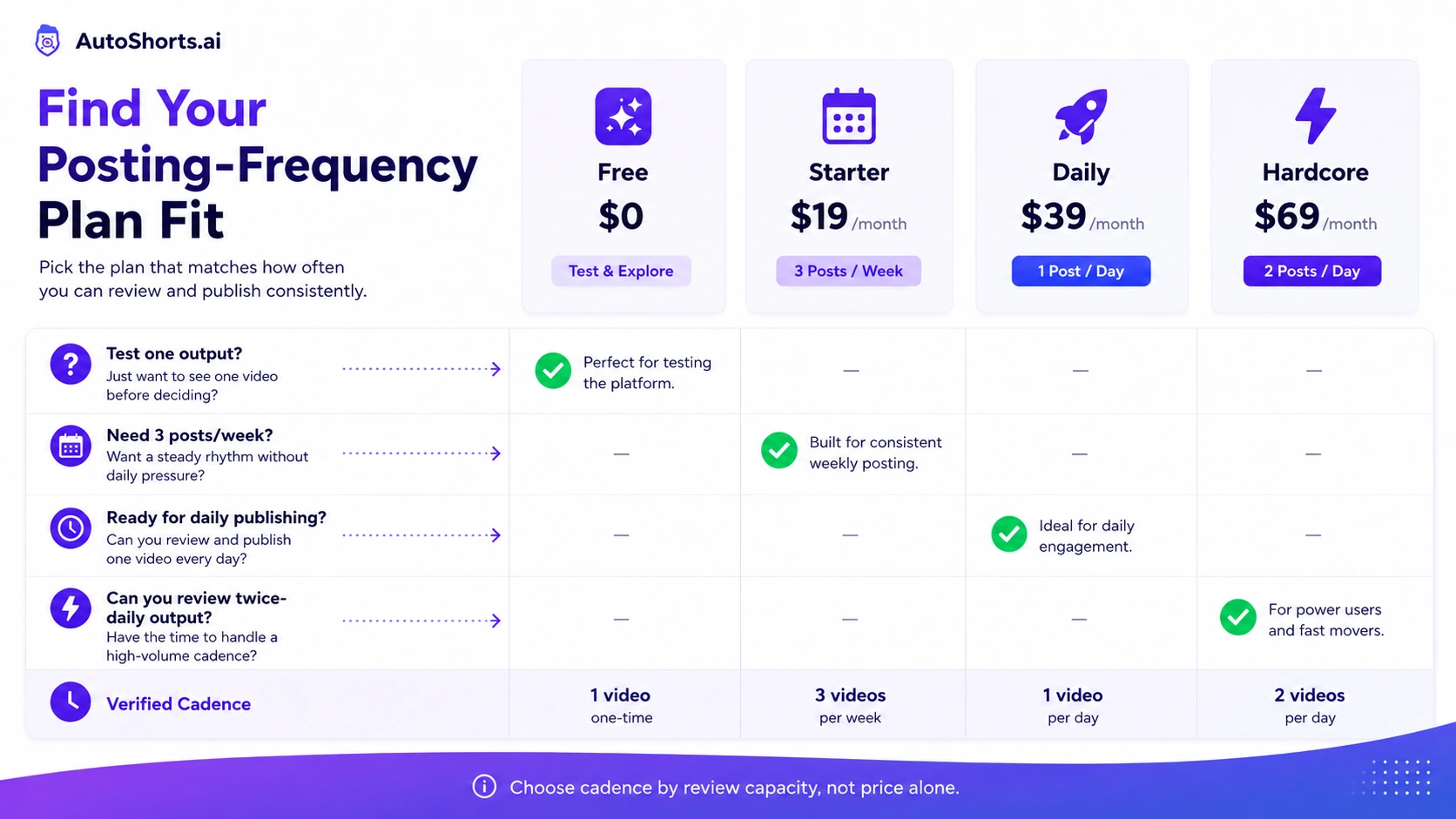
At the time of review, AutoShorts.ai publicly presents a free option that creates one video, then paid monthly plans around posting cadence: Starter at $19 per month for three posts per week, Daily at $39 per month for one post per day, and Hardcore at $69 per month for two posts per day.
That pricing is easy to understand. The harder part is choosing the right cadence.
The free plan is not a full business test. It is a first-output test. Use it to answer: does the generated script make sense, do the visuals feel relevant, does the voice sound acceptable, and would you publish something like this under your channel name?
Starter is the most reasonable first paid step for most buyers. Three posts per week is enough to test whether the workflow fits without forcing daily output. If you are new to faceless channels, this is where I would start before considering a higher cadence.
Daily makes sense only when you have a repeatable topic strategy and enough review time. One post per day sounds attractive, but it also creates a quality-control habit. Someone still has to check the videos.
Hardcore is the most aggressive route. Two posts per day can work for high-volume faceless-channel experiments, but I would not choose it until the niche, prompt system, and output review process already work.
Pricing check: Before choosing a paid cadence, verify the current plan limits, checkout price, platform support, and cancellation terms.
Free plan, trial, coupon, and checkout notes
AutoShorts.ai’s free one-video path is the best first savings route. I would use that before worrying about coupon codes.
The reason is simple: the biggest buying risk is not the first-month price. The biggest risk is paying for a posting cadence before knowing whether the output is good enough for your channel. A coupon can lower the cost, but it cannot make generic videos perform better.
A careful checkout order looks like this:
- Create the free video.
- Watch it as a real viewer, not as the person who made it.
- Check whether the niche, script, visuals, voice, captions, and pacing are publishable.
- Compare Starter, Daily, and Hardcore against your actual posting plan.
- Check the current coupon page only after the workflow makes sense.
- Verify cancellation and refund terms before paying.
A reliable public coupon code was not confirmed strongly enough to make it the center of the buying decision. The safer wording is “current offers” or “checkout path,” not guaranteed discount.
Offer caution: Treat the free video as the first test. Check active offers only after AutoShorts.ai proves it fits your channel workflow.
What I would check before buying AutoShorts.ai
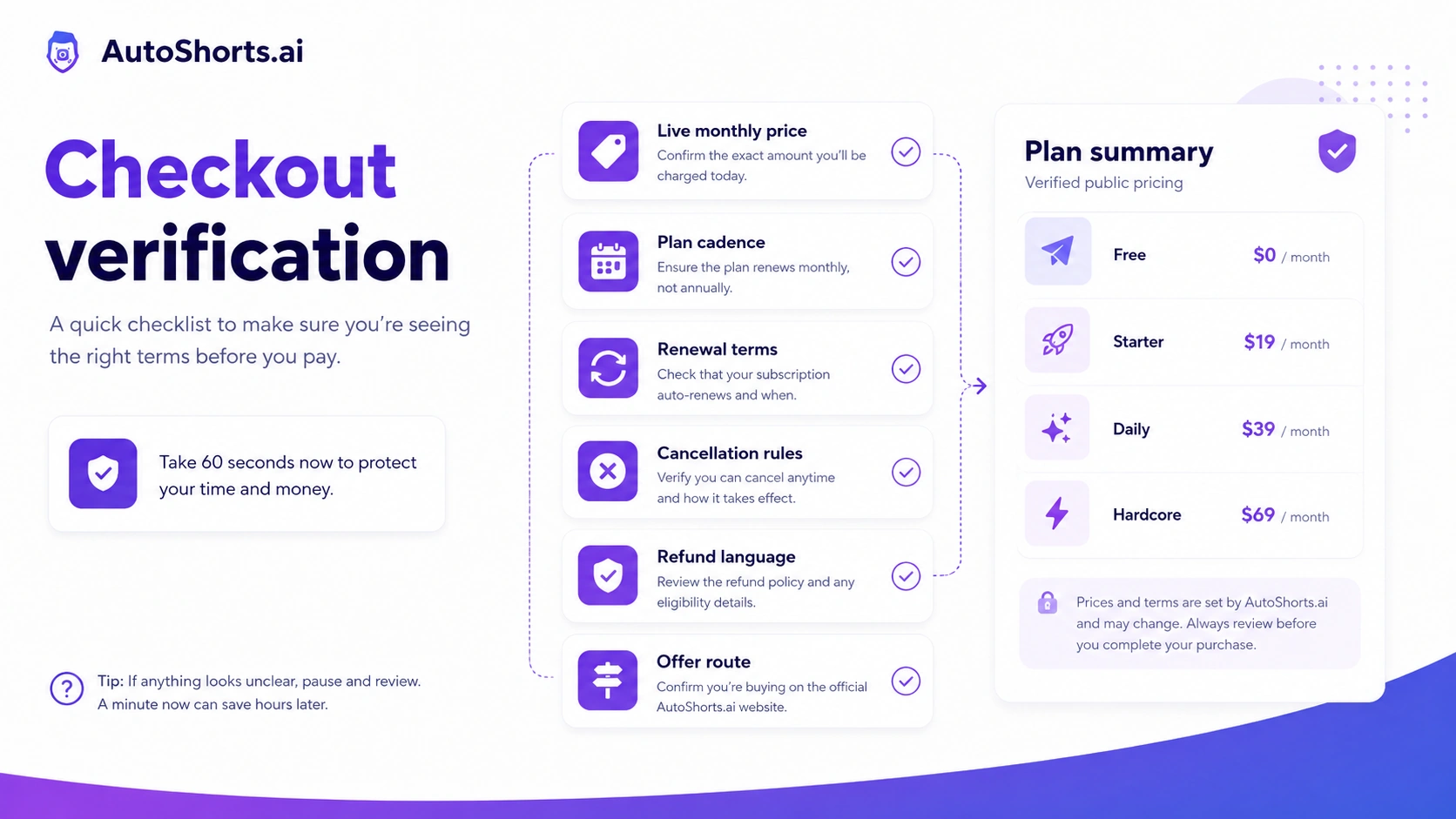
If I were buying AutoShorts.ai for a real faceless-channel workflow, I would check these points before paying:
- Whether the first generated video is actually publishable, not just technically complete.
- Whether the plan cadence matches the number of videos I can review each week.
- Whether the platform connections match the channel I care about most.
- Whether watermark, export, scheduling, or series limits affect the intended workflow.
- Whether the content style will become repetitive after several videos in the same niche.
- Whether cancellation and refund rules are clear enough before starting a paid plan.
- Whether a clipping, captioning, avatar, or broader AI video tool would fit the real use case better.
The easy mistake is thinking “I need more videos” when the real problem is “I need better content ideas.” AutoShorts.ai can help with production speed. It cannot fix a weak niche, vague prompts, or a channel strategy built only around volume.
A simple test before paying
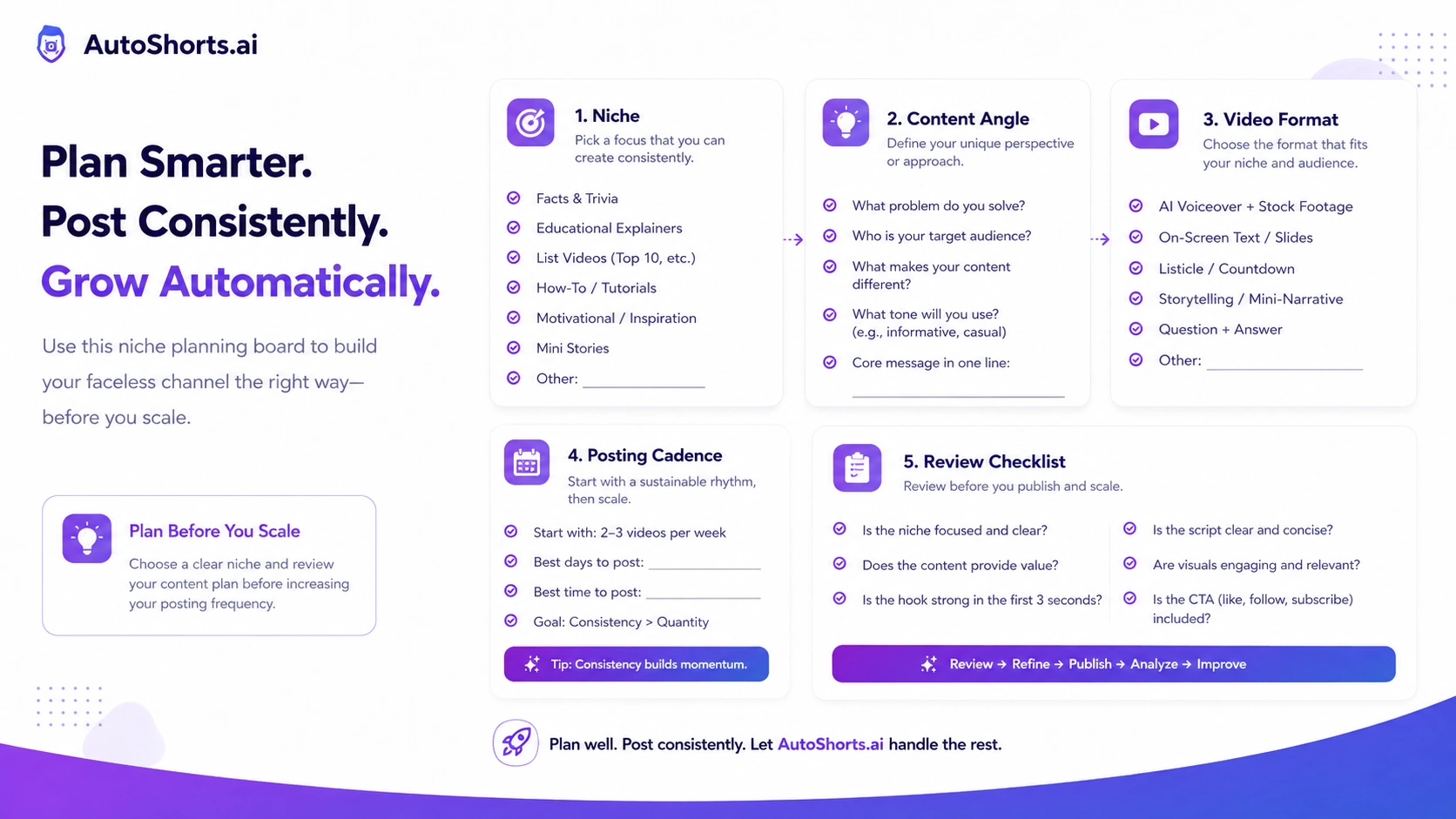
Before paying, I would run a small test like this:
- Pick one niche you would seriously publish in for 30 days.
- Write a specific topic prompt, not a broad idea.
- Generate one free video.
- Review the script for accuracy and watchability.
- Check whether the visuals match the topic or feel generic.
- Watch the video without looking at the tool and ask whether it would hold attention.
- Decide whether three posts per week would teach you enough before upgrading cadence.
This test is deliberately small. You do not need a full channel launch to know whether the output style fits. You need one honest sample and a clear standard.
If the first video looks close, Starter may be worth a controlled test. If the first video feels disposable, do not assume more videos will solve the problem.
Pros explained
The first real advantage is speed. AutoShorts.ai removes much of the friction between idea and publishable short. For creators who are stuck before production even begins, that matters.
The second advantage is workflow completeness. Script, voice, footage, captions, music, scheduling, and posting all live in the same buying promise. That is more convenient than stitching together separate AI writing, voiceover, stock footage, caption, and scheduler tools.
The third advantage is the free first step. A one-video free path is useful because the buyer can judge the actual output before paying. I like that more than forcing a paid trial before the buyer understands the product style.
The fourth advantage is pricing clarity. The plan names map to posting cadence. That makes AutoShorts.ai easier to evaluate than tools where every action consumes unclear credits.
But each strength has a limit. Speed matters only when the output is good enough. Workflow completeness matters only when the buyer wants faceless generation. Pricing clarity matters only when the cadence matches the channel.
Cons explained
The biggest weakness is creative sameness. Faceless stock-style videos can work, but they are easy to imitate. If many creators use similar scripts, voices, clips, and captions, the channel has little defensibility.
The second weakness is limited fit for personal brands. A coach, consultant, educator, or founder may get more long-term value from content that includes their own face, voice, and point of view. AutoShorts.ai can produce videos quickly, but it does not automatically create authority.
The third weakness is that one free video is not enough to prove paid value. It helps you judge the workflow. It does not prove that daily or twice-daily posting will grow an audience.
The fourth weakness is refund uncertainty. Public terms and privacy pages exist, but a fixed buyer-friendly refund window was not clear enough to treat as guaranteed. That does not mean buyers should avoid the product. It means they should verify cancellation and refund terms before paying.
Green flags and red flags
A green flag is a clear niche. If you know the audience, topic angle, and repeatable format, AutoShorts.ai has a better chance of becoming a useful production assistant.
Another green flag is a buyer who can review output. Faceless automation is safer when a human checks scripts, claims, visuals, and pacing before posting.
A third green flag is starting small. Free first, then Starter, then higher cadence only after the workflow proves itself.
The red flags are different.
If you do not know your niche, AutoShorts.ai may only help you produce random content faster. If you need original footage, personal presence, or brand authority, a faceless workflow may be the wrong direction. If you are tempted by daily posting before reviewing one good sample, the plan may be ahead of the strategy.
The biggest red flag is buying volume before proving quality.
AutoShorts.ai vs alternatives
AutoShorts.ai should be compared by content job, not just by price.
StoryShort vs AutoShorts.ai
StoryShort is a direct comparison if your goal is faceless short-form generation. I would compare it when you want to see another workflow for turning topics into shorts before committing to AutoShorts.ai.
AutoShorts.ai may still make sense if its pricing cadence, setup flow, and posting model feel simpler for your channel. The tradeoff is less about which tool sounds more exciting and more about which one produces better samples for your niche.
For a safer route, compare the StoryShort store guide if it is already part of your shortlist.
Revid vs AutoShorts.ai
Revid-style workflows are another direct creative-generation route when you want broader short-form creation options. This may be useful if your goal is not only faceless autoposting but also more flexible viral-video formats or creative variations.
AutoShorts.ai may still be better if you want a simple faceless-channel cadence without learning a broader creation system. The tradeoff is simplicity versus creative range.
You can review the Revid store guide when you want a broader short-form creation comparison.
Klap vs AutoShorts.ai
Klap is an adjacent route, not a one-to-one replacement. It is more relevant when you already have long-form videos and want to repurpose them into shorts.
That distinction matters. If you have podcasts, interviews, webinars, or YouTube videos, clipping may preserve your real voice and content authority better than generating faceless clips from scratch.
AutoShorts.ai is stronger when you have topics but no footage. Klap is stronger when you have footage but need short-form extraction. See the Klap store guide if repurposing is the real job.
Submagic vs AutoShorts.ai
Submagic is also adjacent. It fits creators who already record video and need captions, editing polish, hooks, or social-ready enhancements.
AutoShorts.ai creates faceless videos. Submagic improves existing videos. Those are different buying decisions.
If you are building a personal brand or already film yourself, the Submagic store guide may be the more relevant route. If you want faceless output without filming, AutoShorts.ai remains the closer fit.
Trust, refund, and buyer-risk notes
AutoShorts.ai is easier to understand than many AI video tools because the pricing ladder is tied to posting cadence. That is a trust positive, but it does not remove the need to verify checkout details.
Before paying, check the live pricing page, cancellation process, refund language, watermark rules, posting-platform support, and whether the plan has any series, scheduling, or output limits that matter to your channel.
I would be especially careful with annual assumptions. If a third-party page mentions billing details, do not rely on it over the live checkout. Pricing and plan terms can change, and video-generation tools often update packaging as infrastructure costs shift.
Privacy also deserves a quick read. AutoShorts.ai has a public privacy policy, and the product may involve platform connections for posting. That means buyers should understand what account permissions are involved before connecting social channels.
The broader buyer risk is not technical. It is strategic. Faceless short-form content can become crowded fast. AutoShorts.ai may help you publish, but the channel still needs a reason to exist.
A simple rule works here: test output first, choose cadence second, check offers third.
Final verdict
I would consider AutoShorts.ai if you want to test a faceless short-form channel, you already have a niche idea, and you care more about automated publishing cadence than deep creative control.
I would start with the free one-video path. Not because free proves the product is valuable, but because it gives you the only evidence that matters at first: the real output style. If the generated script, footage, voice, captions, and pacing are not close enough, a paid plan will only create more of the same problem.
I would skip AutoShorts.ai if you are building a personal brand, already have long-form footage to repurpose, or need a polished video editor with granular control. In those cases, compare Klap, Submagic, or a broader AI video platform before paying.
The safest next step is not to chase a coupon first. The safer path is to create one video, judge it honestly, and only then decide whether Starter, Daily, or Hardcore matches the channel you are actually willing to run.
