
Photo AI Studio Pricing & Creator Fit
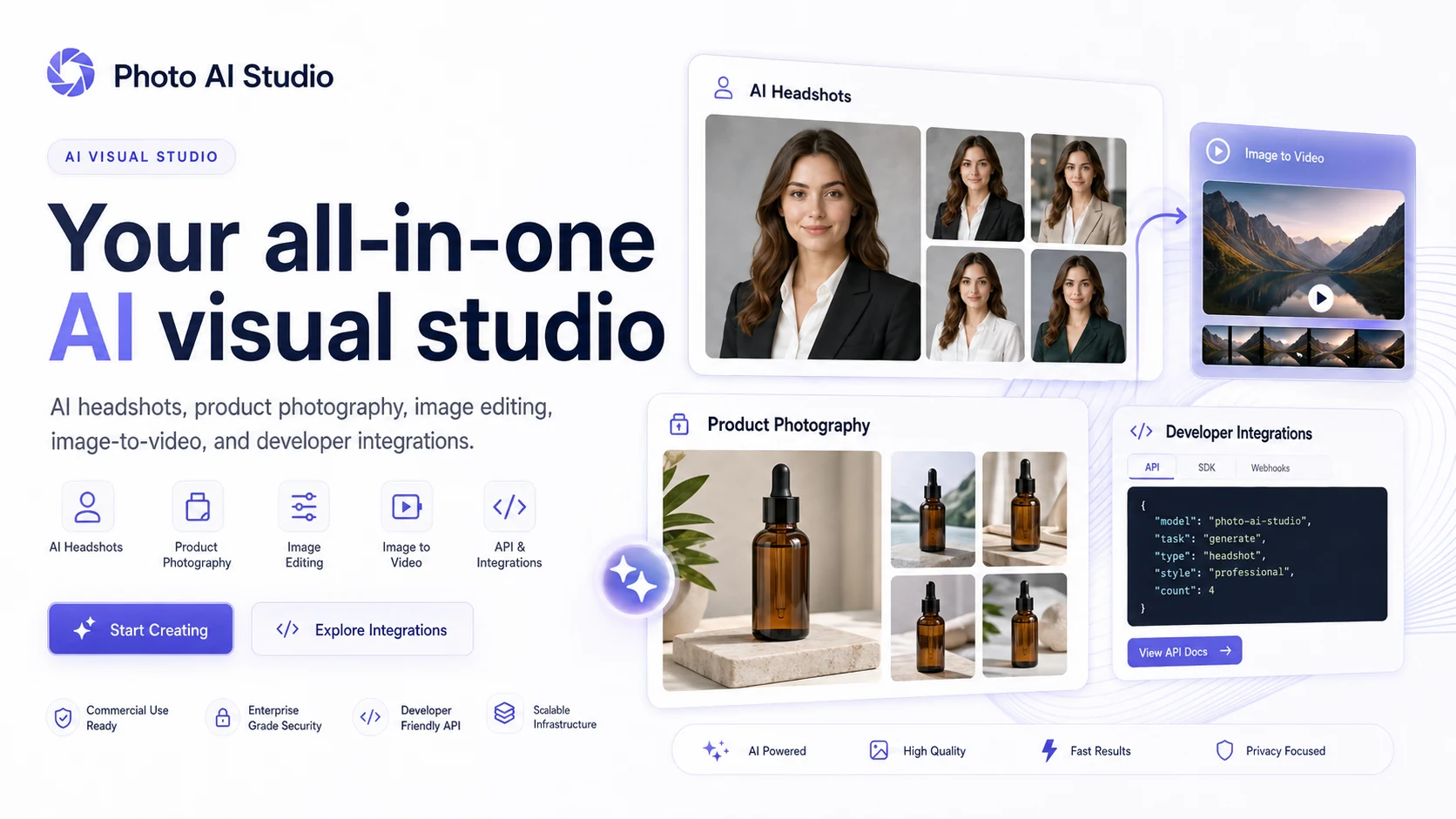
Photo AI Studio is an AI visual studio for turning selfies, portraits, products, pets, and brand assets into generated photos, headshots, product shots, virtual try-on images, edited images, and some video-style assets. It is strongest when a creator or small business needs many visual variations quickly and does not want to book a photographer for every idea.
Fit → price → checkout
Use these routes after the official-site check: coupon first, review for fit, compare if unsure.
Photo AI Studio pricing snapshot
Fast commercial checks before pricing, coupons, or a deeper review.
Photo AI Studio product tour
A useful Photo AI Studio tour should focus on the buyer flow: upload a selfie or product image, choose a photo or video tool, select a style, generate results, then decide whether the output quality justifies credits or a plan. The visuals below are planned around that decision path rather than generic AI art decoration.
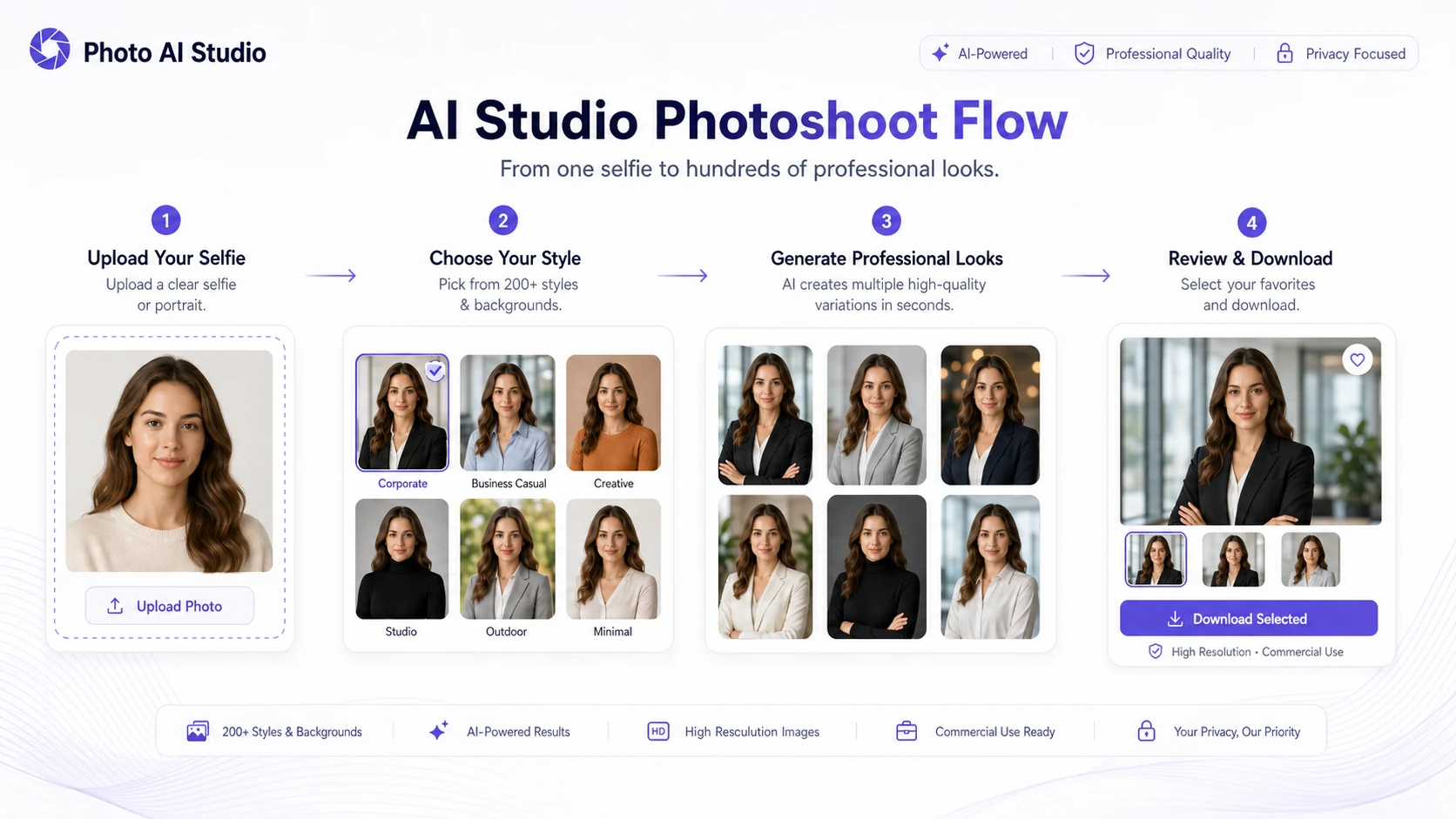
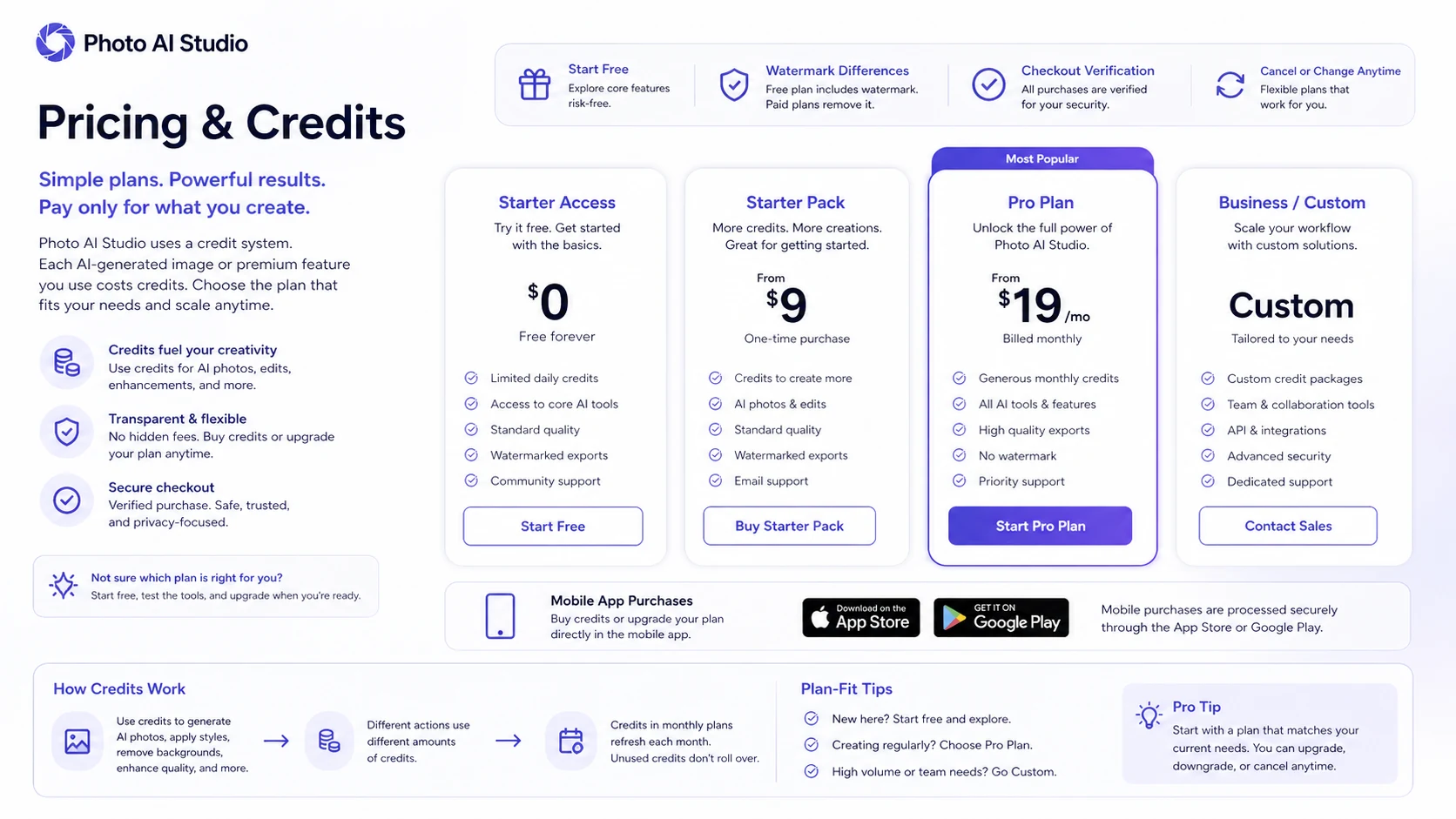
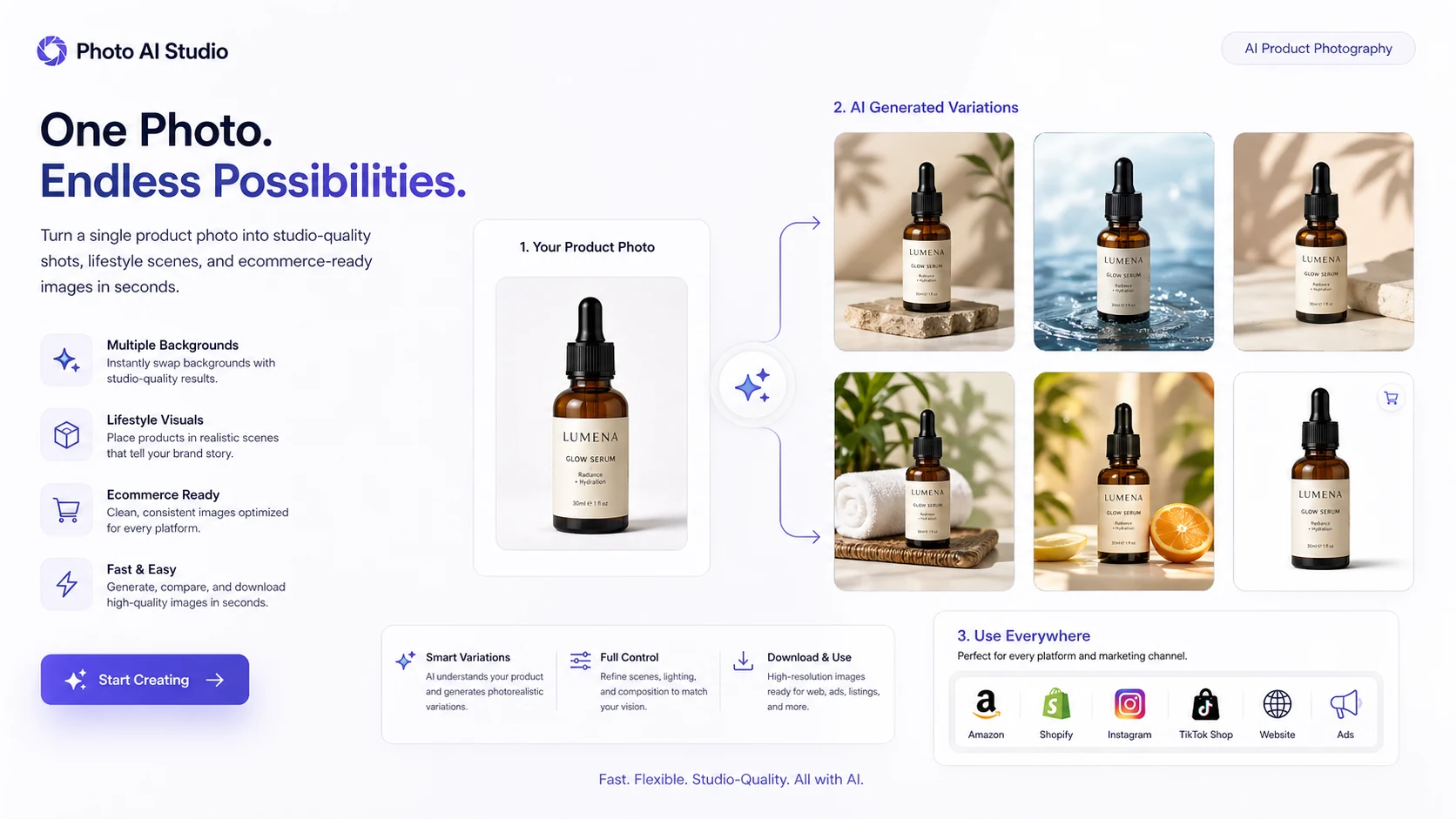
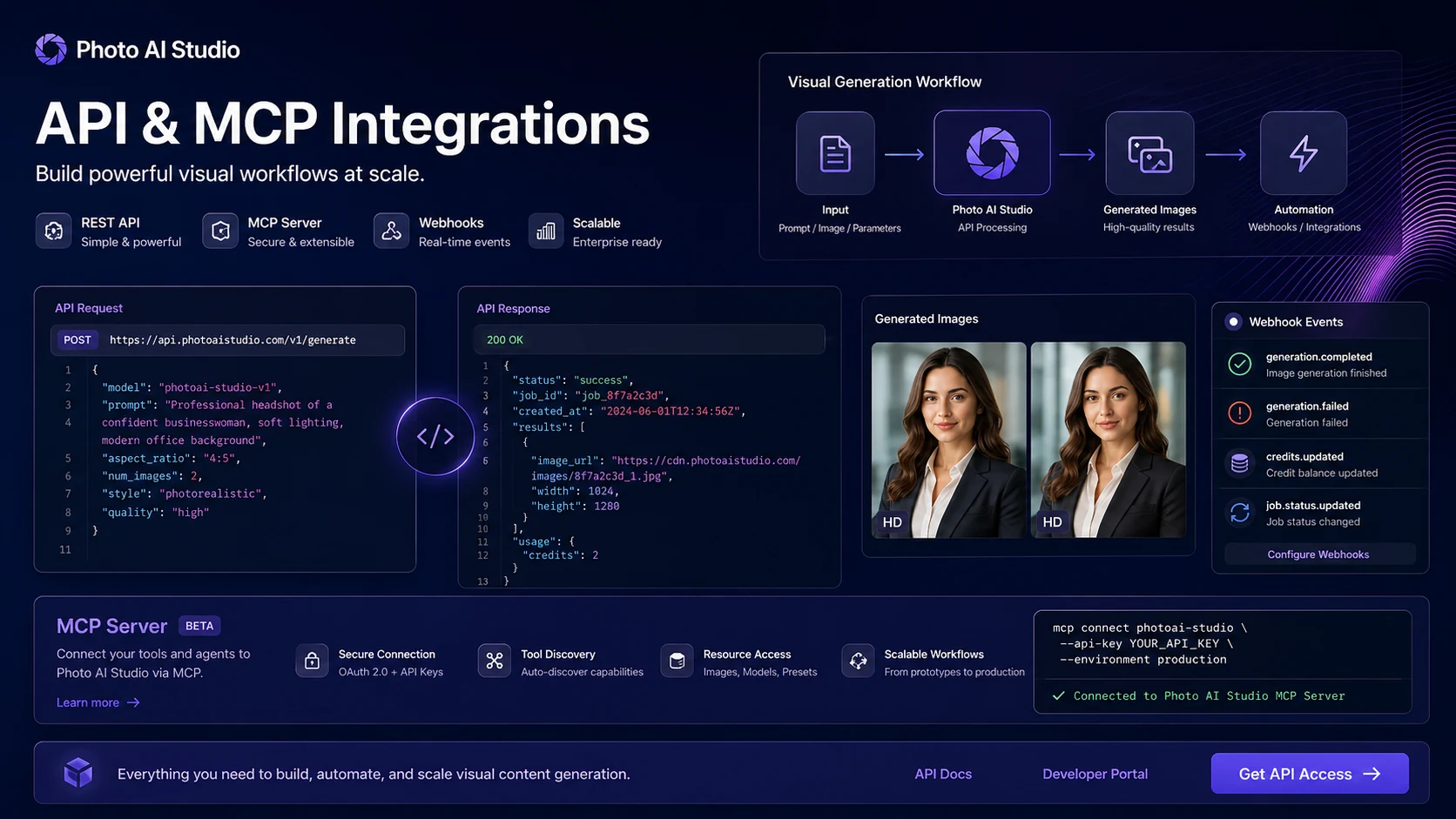
Photo AI Studio is best evaluated as a visual-production tool for people who need repeatable AI photos, headshots, product shots, and lightweight video-style creative assets. The store page should not sell it as a magic replacement for photography. A smarter buyer checks three things first: whether the generated likeness or product image is good enough, whether the credit model fits the expected volume, and whether refund or data rules are acceptable before uploading sensitive images.
What Photo AI Studio actually does
Photo AI Studio turns a photo, selfie, product image, or visual input into generated assets across several use cases. The official workflow includes studio photoshoots, professional headshots, product shots, clothes try-on, hairstyle changes, avatar-style visuals, face swap, image enhancement, restoration, and create-video tools such as product promotion and image-to-video. In plain buyer terms, it is for replacing small photo shoots and asset experiments, not for replacing a full creative director or retoucher.
- Use it for AI headshots, profile pictures, and personal branding images.
- Use it for product shots, lifestyle scenes, and lightweight ad visuals.
- Use editing tools when the task is background, face, restoration, enhancement, or style variation.
- Use developer access only if the business needs repeatable generation inside another workflow.
Pricing is mostly a credit and checkout decision
The pricing path is not as simple as one monthly SaaS tier. Public sources show a mix of low-cost entry pricing, credits, one-time purchases, monthly tiers, and mobile in-app purchases. That makes Photo AI Studio more flexible, but it also means buyers should calculate cost by asset volume. A creator who needs ten profile images has a different cost profile from an ecommerce seller generating dozens of product variations.
- Check the current web pricing page before relying on any stored price.
- Compare credits against monthly plans if you will generate assets every week.
- Check iOS or Android in-app prices when buying inside the app.
- Avoid a larger pack until one realistic test output looks usable.
The best fit is repeatable visual experimentation
Photo AI Studio makes the most sense when a buyer needs many controlled variations from the same person, product, pet, or brand visual. That could mean LinkedIn headshots, profile images, ecommerce product scenes, team-style portraits, thumbnails, or social media visuals. It is less convincing when the buyer needs a single flawless image with strong art direction, because AI generation can still drift in likeness, hands, product details, clothing, texture, and brand accuracy.
- Good fit for creators testing many visual styles.
- Good fit for professionals who need a quicker profile image upgrade.
- Good fit for ecommerce teams testing product-scene concepts.
- Weaker fit for buyers who need pixel-perfect control or guaranteed likeness.
Video tools are useful, but the core decision is still visual quality
Photo AI Studio includes create-video paths such as UGC generator, product promotion, image-to-video, and faceless video marked as coming soon in the visible dashboard navigation. That makes the product relevant to creator workflows, but a buyer should not assume it replaces full AI video platforms. Treat the video layer as a companion feature until the exact output length, motion quality, watermark rules, and credit cost are checked.
- Use image-to-video for light motion tests rather than full video production assumptions.
- Check whether product promotion videos keep the product accurate.
- Verify whether video exports consume credits differently from still images.
- Compare specialist AI video tools if video is the primary buying reason.
Privacy, consent, and refund limits matter here
AI photo tools require a higher trust check because the input may include faces, products, pets, team members, or client material. Photo AI Studio's app listings and official pages show privacy and data-handling disclosures, while its refund page makes clear that used generation resources are hard to reverse. Buyers should only upload images they have rights to use and should understand that generated outputs may not be eligible for a simple refund after meaningful use.
- Use only images where the buyer has upload and usage rights.
- Read the privacy and terms pages before uploading sensitive face or client assets.
- Do a small test before using many credits.
- Avoid downloading large batches before deciding whether the output quality is acceptable.
Developer access is real, but not the default buyer path
Photo AI Studio's developer page describes a REST API, MCP server, 19 edit operations, AI photo generation, and video creation workflows. That makes it more interesting for technical teams building creator agents, ecommerce workflows, or internal image operations. Still, most normal buyers should start with the web or mobile app first, then consider API access only if the same generation task needs to be repeated inside another product or workflow.
- Use the normal app first when the need is manual image creation.
- Consider API access when generation or editing must be automated.
- Check authentication, per-user handling, pricing, and allowed use before integration.
- Compare specialist image APIs if the workflow needs strict controls or high volume.
Best savings path from this store page
This is the clearest savings route to check once the product already looks like a fit.
Photo AI Studio uses a credit-buying path for users who want to create AI photos, headshots, avatars, try-on images, and related visual outputs without starting from a broad subscription decision.
Use this offer as a buyer-safe entry point. Pricing, plan limits, and promotional availability can change at checkout.
Official page says no credit card is required to browse
Official FAQ says one photo can typically be captured in about 15 seconds
Use comparison routes when the category fit is still open
Use these comparison routes when the product still looks plausible, but the category fit is not fully settled.
A more focused path for buyers who mainly need professional AI headshots rather than a broader photo, product, and video workflow.
Better suited to teams that want a dedicated business headshot workflow with clearer headshot-specific positioning.
A stronger comparison when video avatars, presenter videos, localization, and business video workflows are the main need.
More relevant when the buyer is comparing AI avatar, face swap, and marketing video workflows instead of still-photo generation.
Verification points worth checking before you click out
Where this store usually fits best in the workflow
Photo AI Studio can help individuals and small teams test LinkedIn, resume, profile, and personal-brand images without booking a full photoshoot. The buyer should judge likeness, expression, clothing realism, and download quality before paying for more outputs.
Creators can use it to generate social media profile images, thumbnails, campaign visuals, and themed portraits. The best fit is a repeatable content workflow where many variations are useful.
Ecommerce sellers can test product shots and lifestyle scenes, but they should verify product accuracy carefully before using generated images in listings or ads.
Technical teams can explore API and MCP access for AI photo generation, edits, and video creation, but should verify pricing, usage limits, and user-data obligations before implementation.
Practical checkpoints before and after signup
- Open the official pricing page and confirm whether the intended path is credits, a plan, one-time purchase, mobile in-app purchase, or API access.
- Read the refund policy before generating or downloading multiple assets.
- Prepare one high-quality test image that represents the real use case.
- Generate one narrow asset type first, such as a headshot, product shot, or thumbnail.
- Check likeness, realism, output resolution, watermark status, and whether the image is suitable for its final channel.
- Track how many credits the real workflow consumes.
- Compare monthly, credit-pack, and mobile purchase routes before generating at volume.
- Create a simple quality checklist before using AI-generated product or face images commercially.
- For API usage, confirm authentication, data handling, and per-operation pricing before rollout.
Fast-read signals for workflow fit and buying friction
Questions readers usually ask before choosing this store
What is Photo AI Studio best for?
Photo AI Studio is best for buyers who need AI-generated headshots, profile photos, product images, social visuals, or other creator assets from a quick photo-based workflow. It is strongest when many visual variations are useful and weaker when the buyer needs one pixel-perfect final image with heavy manual control.
Does Photo AI Studio have a free plan or trial?
Photo AI Studio publicly positions free access and starter testing, while paid usage appears to involve credits, one-time purchases, monthly plans, and mobile in-app purchases. Buyers should verify the current pricing page and app-store checkout before assuming the free path covers real production use.
Can I get a refund from Photo AI Studio?
Refunds appear limited. The dedicated refund policy says eligibility depends on conditions such as requesting within 3 days, generating fewer than 10 photos, not downloading generated photos, and not using more than half of purchased credits. Buyers should read the live refund policy before using credits.
Is Photo AI Studio better than a dedicated headshot tool?
It depends on the use case. Photo AI Studio is broader because it covers headshots, product shots, editing, and creator assets. A dedicated headshot tool may be simpler when the only goal is a polished LinkedIn or corporate headshot package.
Does Photo AI Studio support API or developer workflows?
Yes. The official developer page describes REST API, MCP server access, AI photo generation, edit operations, and video creation workflows. Technical buyers should still confirm live API pricing, authentication, output rights, and user-data responsibilities before building on it.
Choose the next route that matches what you still need to decide
The strongest next click depends on whether you still need product judgment, a savings route, or a broader category comparison.