Quick verdict
Photo AI Studio is worth considering if your real problem is not “I want an AI image generator,” but “I need many usable photo-style assets without booking a shoot every time.”
That distinction matters.
The product looks simple on the surface: upload a selfie, product image, or visual input, choose a style, and generate photos or light video-style assets. The buying decision is less simple. AI photo tools can save time, but they can also waste credits quickly if the likeness is off, the product detail drifts, the output is watermarked, or the refund window closes after a few generations.
Based on the public product pages, Photo AI Studio makes the most sense for creators, professionals, ecommerce sellers, and marketers who need repeatable visual experiments: headshots, profile images, product scenes, thumbnails, lifestyle shots, try-on ideas, and quick creative variations. It is less convincing if you need one perfect executive portrait, strict brand art direction, or a guaranteed product shot where every label, texture, and proportion must remain exact.
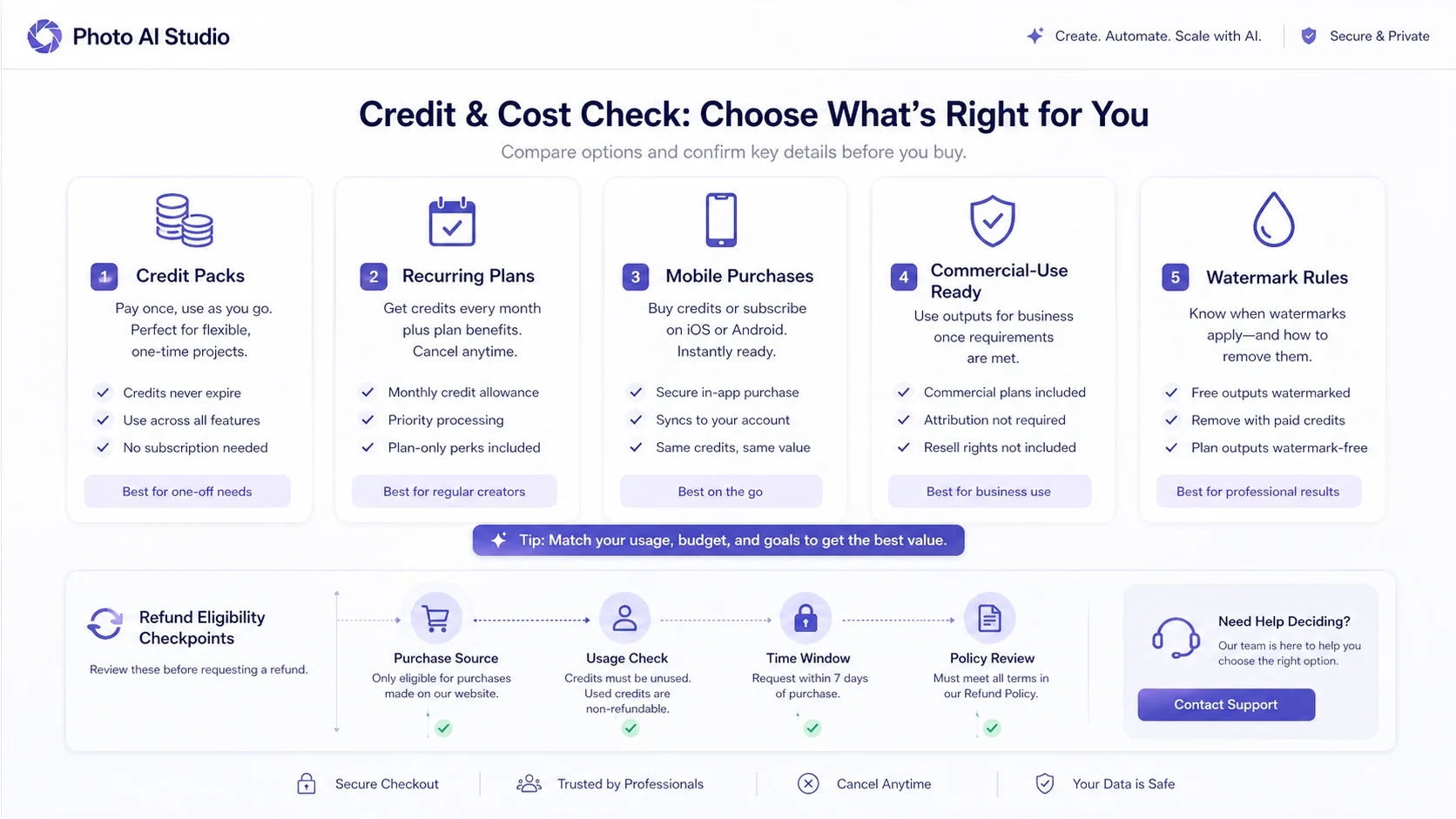
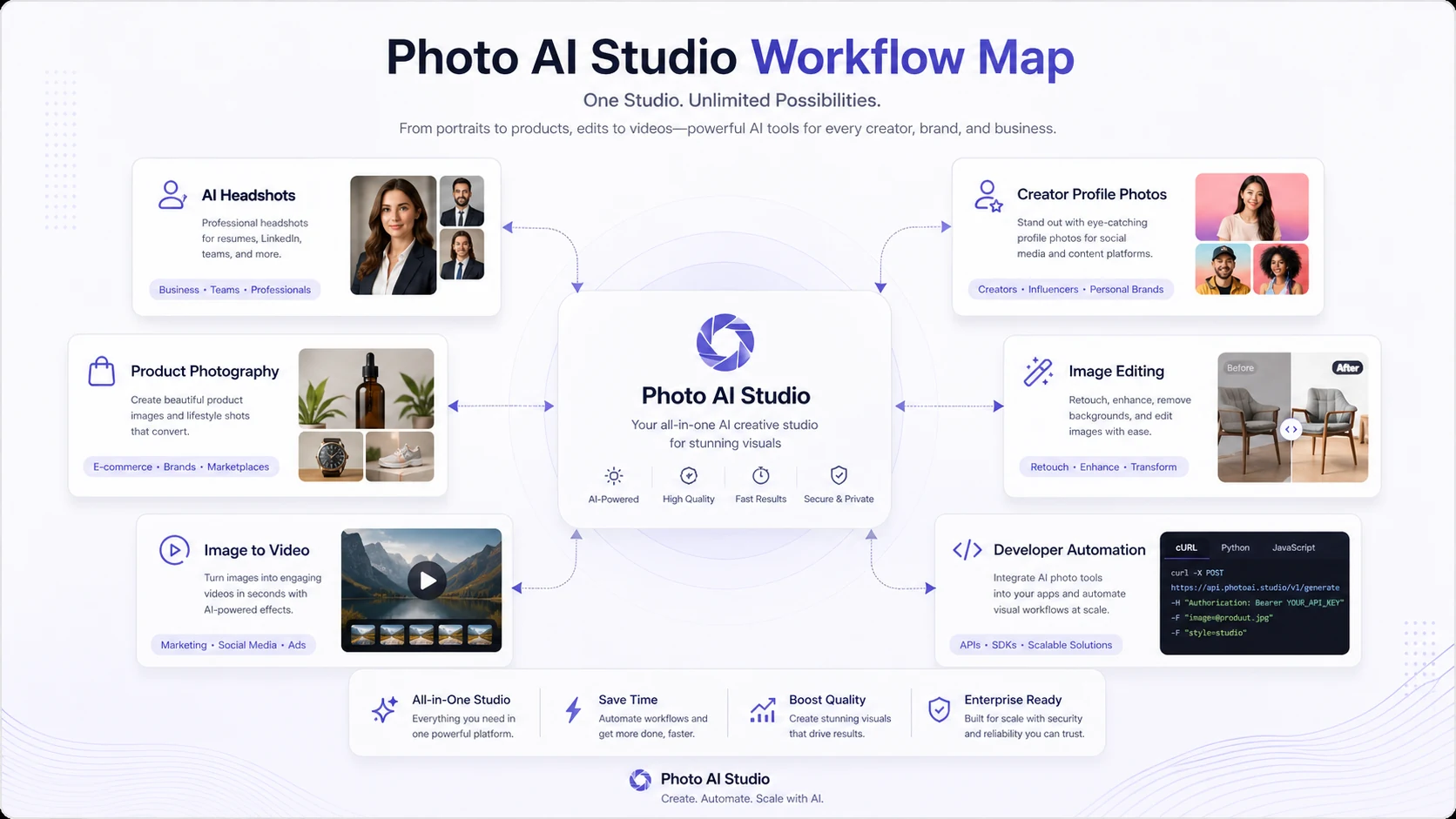
The strongest reason to consider it is scope. Photo AI Studio is not only a headshot tool. It covers studio photoshoots, professional headshots, product shots, clothes try-on, hairstyle changes, photo editing, face swap, restoration, image-to-video, product promotion, and developer access through REST API and MCP. The main caution is that the cost is a credit and checkout decision, not just a headline price decision.
I would test one real image first, check how many credits the result costs, and only then decide whether a bigger credit pack or recurring plan makes sense.
First check: If Photo AI Studio fits the visual asset you actually need, verify the live credit path before spending more than a small test amount.
Review snapshot
| Review point | Practical take |
|---|---|
| Best for | Creators, professionals, ecommerce sellers, and marketers who need repeatable AI photo variations |
| Not ideal for | Buyers who need guaranteed likeness, exact product accuracy, or full creative-director control |
| Main use case | Turning selfies, product images, and visual inputs into headshots, product shots, creator assets, and light video-style outputs |
| Pricing note | Public pages show credits, free testing, app purchases, and developer usage; verify the live checkout path |
| Free path | Developer page mentions 100 free credits for new accounts; free browsing/testing should be checked live |
| Main strength | Broad visual workflow with photo, editing, video-style, mobile, API, and MCP paths |
| Main concern | Refund eligibility becomes narrow after generation, download, or meaningful credit use |
| Direct alternatives | Aragon and HeadshotPro for headshot-first buyers |
| Adjacent routes | HeyGen and Akool for avatar, face-swap, and video-led creative workflows |
| Best next step | Test one real selfie or product image before buying a larger credit pack |
What is Photo AI Studio?
Photo AI Studio is an AI photo and visual-asset platform built around a simple promise: upload an image, pick a visual direction, and generate studio-style outputs without a traditional shoot.
The public site positions it around several practical categories: studio photoshoots, professional headshots, product shots, clothes try-on, model-style visuals, avatars, thumbnails, hairstyle changes, image editing, face swap, enhancement, restoration, UGC-style video, product promotion, and image-to-video. That makes it broader than a dedicated headshot generator, but also harder to judge from one feature list.
The better way to understand it is as a visual experimentation tool.
A freelancer may use it to improve a LinkedIn profile image. A creator may use it to test thumbnail or social profile concepts. An ecommerce seller may use it to explore product-scene ideas before hiring a photographer. A marketer may use it for quick campaign visuals. A developer may look at the REST API or MCP server if the same generation or editing task needs to be automated inside another workflow.
Our review approach compares public product pages, pricing and credit language, refund terms, privacy details, mobile listings, developer access, buyer workflow fit, and nearby alternatives. A low entry price, free credits, or polished demo image is not enough by itself. With AI photo tools, the real question is whether the generated output is usable for the buyer’s actual channel.
The common wrong expectation is assuming Photo AI Studio replaces a photographer. It can replace some lightweight visual experiments. It can reduce the need for a small shoot in narrow cases. But it does not remove the need to judge likeness, product accuracy, privacy, rights, and commercial suitability.
Who should use Photo AI Studio?
Photo AI Studio makes the most sense for buyers who know what kind of visual they need before opening the tool.
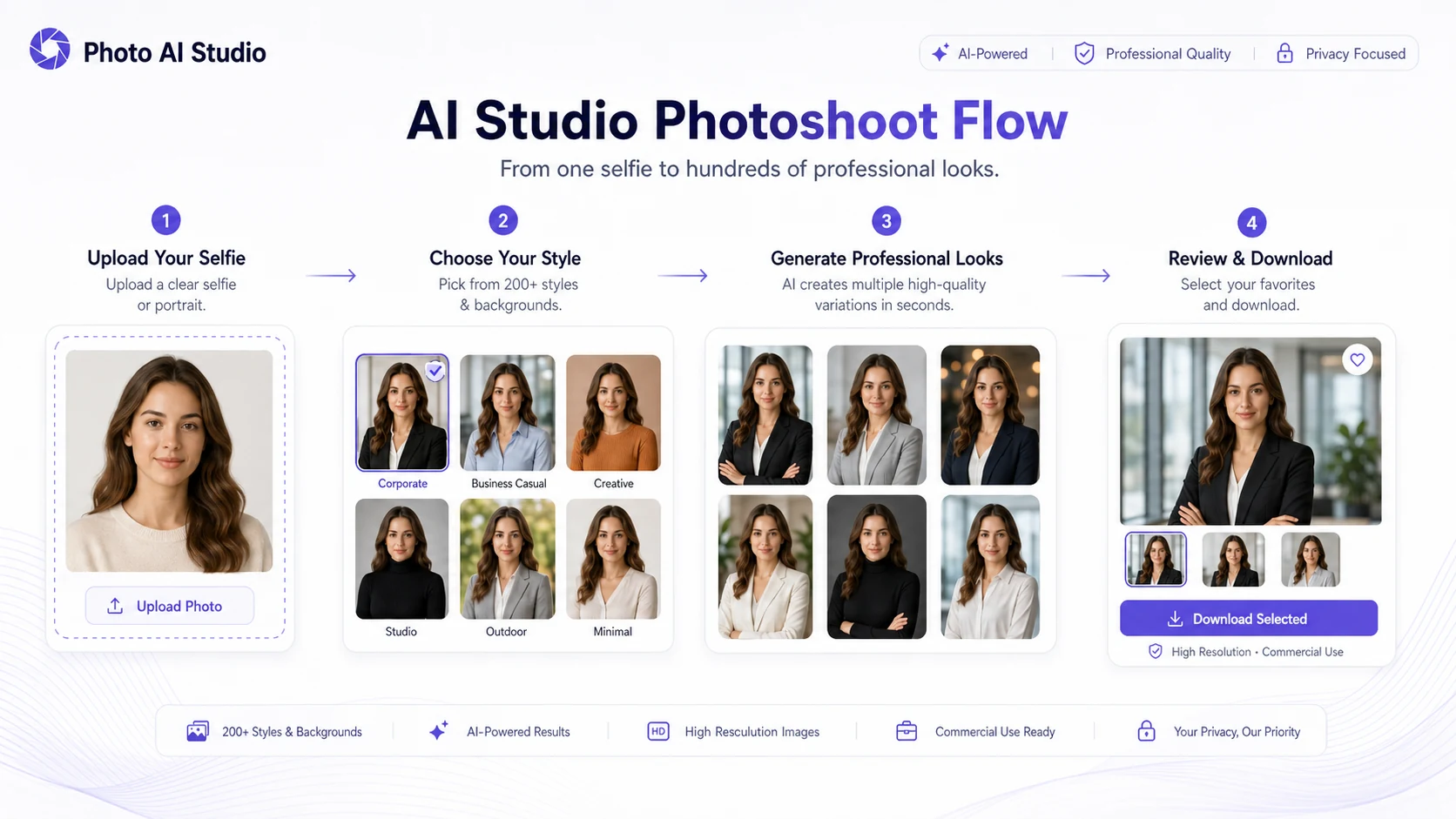
Professionals who need a profile refresh are a good fit. If the goal is a LinkedIn, resume, portfolio, or personal-brand image, the tool can be useful because it creates many styled variations from a small input. The condition is that the buyer must judge likeness and professional realism, not just whether the image looks polished.
Creators are another fit. YouTube thumbnails, TikTok profile assets, Instagram looks, dating-style photos, and themed portraits are all places where variation is useful. The product is more valuable when the buyer benefits from testing several looks, not when the buyer only wants one final approved image.
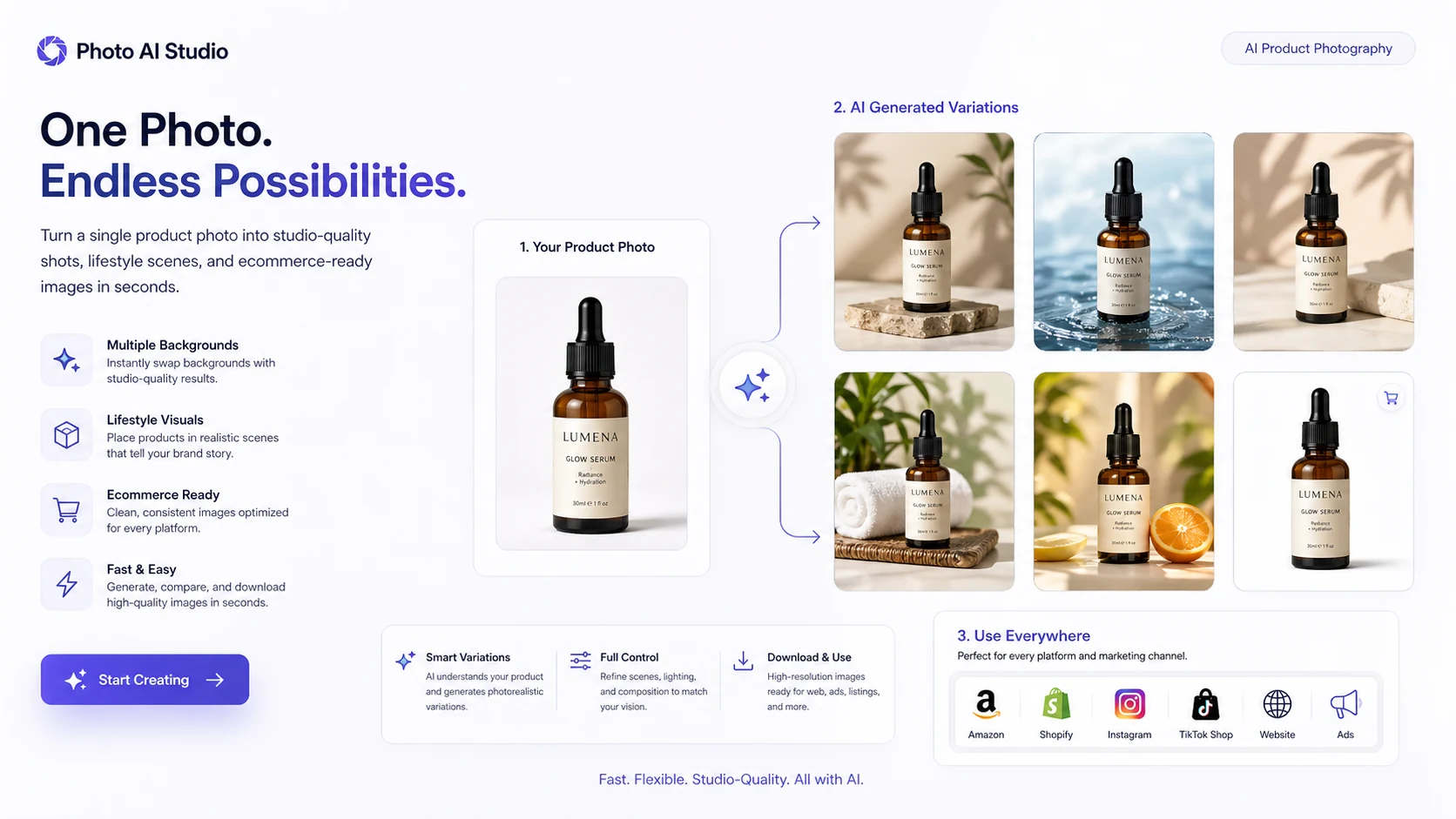
Ecommerce sellers may also find value in the product-shot path. A product image can be placed into lifestyle or studio-style contexts, which can help with early ad concepts or listing experiments. The caution is product accuracy. If the AI changes the shape, label, color, packaging, or texture, the image may be unsafe for commercial use.
Small marketing teams can use it when speed matters more than deep art direction. For internal concepts, rough campaign visuals, or quick creative testing, Photo AI Studio may reduce friction. For brand campaigns where every asset must be approved, it should be treated as a concept tool first.
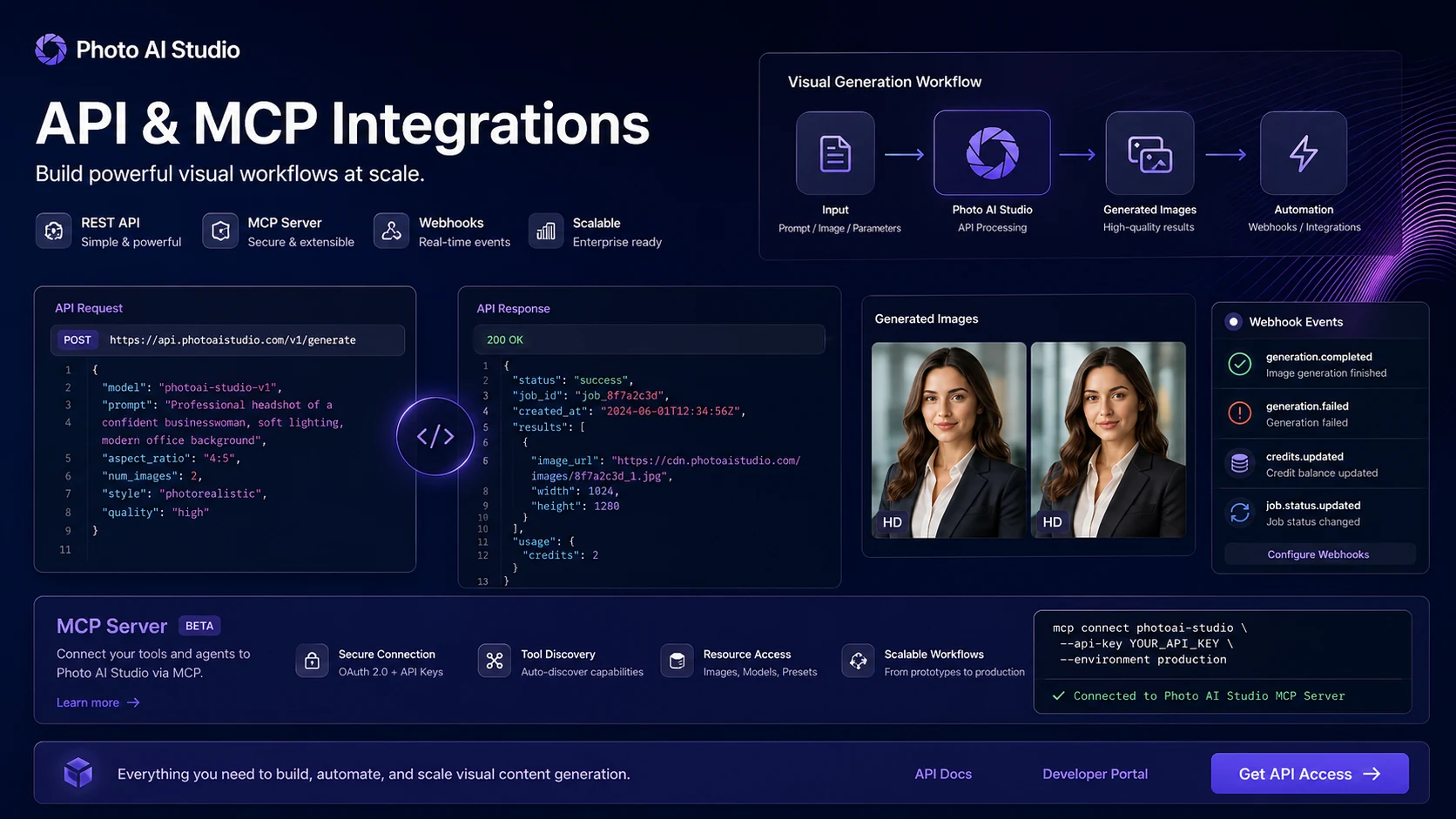
Developers and automation-minded buyers have a separate reason to look. The official developer page describes AI photo generation, edit operations, video creation, REST API, MCP integration, and real-time credit deduction. That is useful only if the buyer has a repeatable technical workflow and is ready to verify cost, authentication, output rules, and data responsibility.
Who should avoid Photo AI Studio?
I would avoid Photo AI Studio if you need guaranteed likeness before spending any credits. Face-based AI results can look impressive while still feeling slightly wrong to the person being represented. That matters for LinkedIn, team pages, dating profiles, client portraits, and any identity-sensitive use.
I would also be careful if you need exact product accuracy. AI product shots can create attractive scenes, but ecommerce use is risky if the product details drift. For product listings and ads, the image has to represent the actual item honestly.
Buyers who expect a flexible refund path should slow down. The refund policy is narrow: it depends on timing, number of generated photos, downloads, and credit usage. Once you generate, download, or consume a meaningful share of credits, the path becomes less forgiving.
This is not the best first choice for teams that need human retouching, brand review workflows, rights management, or a professional photography pipeline. In that case, Photo AI Studio may be useful for ideation, but not as the final production system.
I would also avoid uploading images of other people, clients, employees, or sensitive products unless you clearly have permission and understand the privacy terms. The fact that the tool is easy to use does not remove consent and usage responsibilities.
How Photo AI Studio fits into a real workflow
A careful Photo AI Studio workflow starts before the upload.
First, define the asset. Is it a LinkedIn headshot, a product scene, a social profile image, a YouTube thumbnail, a pet portrait, or a product promotion idea? The narrower the target, the easier it is to judge value.
Second, prepare a high-quality input image. For face-based work, use a clear, close-up selfie with good lighting and a clean angle. For product work, use an image where the object is easy to identify and has the details you cannot afford to lose.
Third, generate a small batch. Do not burn through a large credit pack immediately. Pick one style or workflow and judge the result against a simple checklist: likeness, realism, product accuracy, resolution, watermark, download quality, and final-channel fit.
Fourth, compare the output to the real use case. A photo that looks fun in a gallery may still be wrong for LinkedIn. A product scene that looks polished may still alter the product too much for ads.
Finally, decide whether the workflow is repeatable. If one test image produces several usable outputs and the credit cost makes sense, Photo AI Studio becomes more interesting. If the first test requires too much rerunning, the cheaper path may not be cheap anymore.
Workflow test: If you only need one image, start small. If the same type of asset will be generated repeatedly, then compare credits, mobile pricing, and app workflow fit.
Real-world buyer scenarios
A job seeker may use Photo AI Studio to create a cleaner LinkedIn headshot. This is one of the more natural use cases because the buyer needs a polished but not heavily art-directed result. The risk is likeness. A photo can look professional and still feel unlike the person.
A creator may use it for profile photos, thumbnails, and seasonal visual concepts. Here, variation matters. If the buyer needs fresh looks for social content, the tool can be useful. If the buyer needs a full brand system, a more controlled design workflow may be better.
An ecommerce seller may use Photo AI Studio to test product shots and lifestyle scenes. This can help with early ad angles, but it should not be used blindly for listings. Product shape, color, label, material, and packaging must be checked carefully.
A developer may use Photo AI Studio through API or MCP access to automate generation or editing. This is a stronger case if the buyer has repeated demand, such as product image variations, avatar generation, or internal creative tooling. It is a weaker case if the buyer has not confirmed per-operation credit cost or user-data responsibilities.
Key features that actually matter
Studio photoshoots and headshots
This is the feature most buyers will notice first. Photo AI Studio can turn a selfie into multiple professional or stylized portraits. The buyer value is speed and variety.
Buyer note: judge likeness, facial consistency, clothing realism, and whether the output feels safe for the channel where it will appear.
Product shots and lifestyle scenes
The product-shot workflow is useful for ecommerce and ad testing. A seller can explore lifestyle or studio-style product images without booking a shoot for every idea.
Buyer note: do not use generated product images commercially until the product details are checked. A beautiful scene is not enough if the product is inaccurate.
Editing and enhancement tools
Photo AI Studio includes editing and enhancement paths such as face swap, restoration, background-style edits, and other visual changes. These can make it more useful than a single-purpose headshot app.
Buyer note: editing tools are helpful when they reduce manual work, but they still need review for artifacts, over-smoothing, distorted details, and rights issues.
Image-to-video and product promotion tools
The create-video layer makes Photo AI Studio relevant for creator workflows, especially when still images need light motion or promotional framing.
Buyer note: treat this as a companion feature unless video is clearly your main need. If video quality, length, avatars, localization, or presenter workflows matter most, compare video-first tools.
API and MCP access
The developer path is a meaningful differentiator. Photo AI Studio publicly describes REST API, MCP server access, AI photo generation, 19 edit operations, video creation, and credits deducted in real time.
Buyer note: API buyers need a different checklist from casual photo buyers. Confirm authentication, rate behavior, per-operation credits, output rules, consent handling, and data retention before building around it.
Pricing and plan value
Photo AI Studio pricing should be treated as a credit and usage decision, not a simple monthly subscription decision.
The public pricing route points buyers toward buying credits, while the developer page says new accounts get 100 free credits and credit packages start at $9 for 500 credits. It also says most photo operations cost 100 credits each. That gives buyers a useful starting estimate, but I would still verify the live pricing page, mobile app checkout, and final payment screen before assuming the cost.
The reason is simple: buyers may encounter different paths depending on how they use the product. A web user buying credits is not always in the same situation as a mobile user buying in-app purchases. A developer using API or MCP access also needs to think in terms of per-operation cost and repeated usage.
For a one-time headshot refresh, the smallest practical credit path is the safer test. For a creator generating visuals weekly, a recurring path or larger credit pack may become more reasonable. For ecommerce, cost should be calculated by usable output, not generated output. If ten generated product images create only two usable assets, the real price per usable image is higher than the checkout number suggests.
Annual or larger purchases should come after proof, not before. I would not buy a bigger pack until one real workflow produces images that are good enough for the final use case.
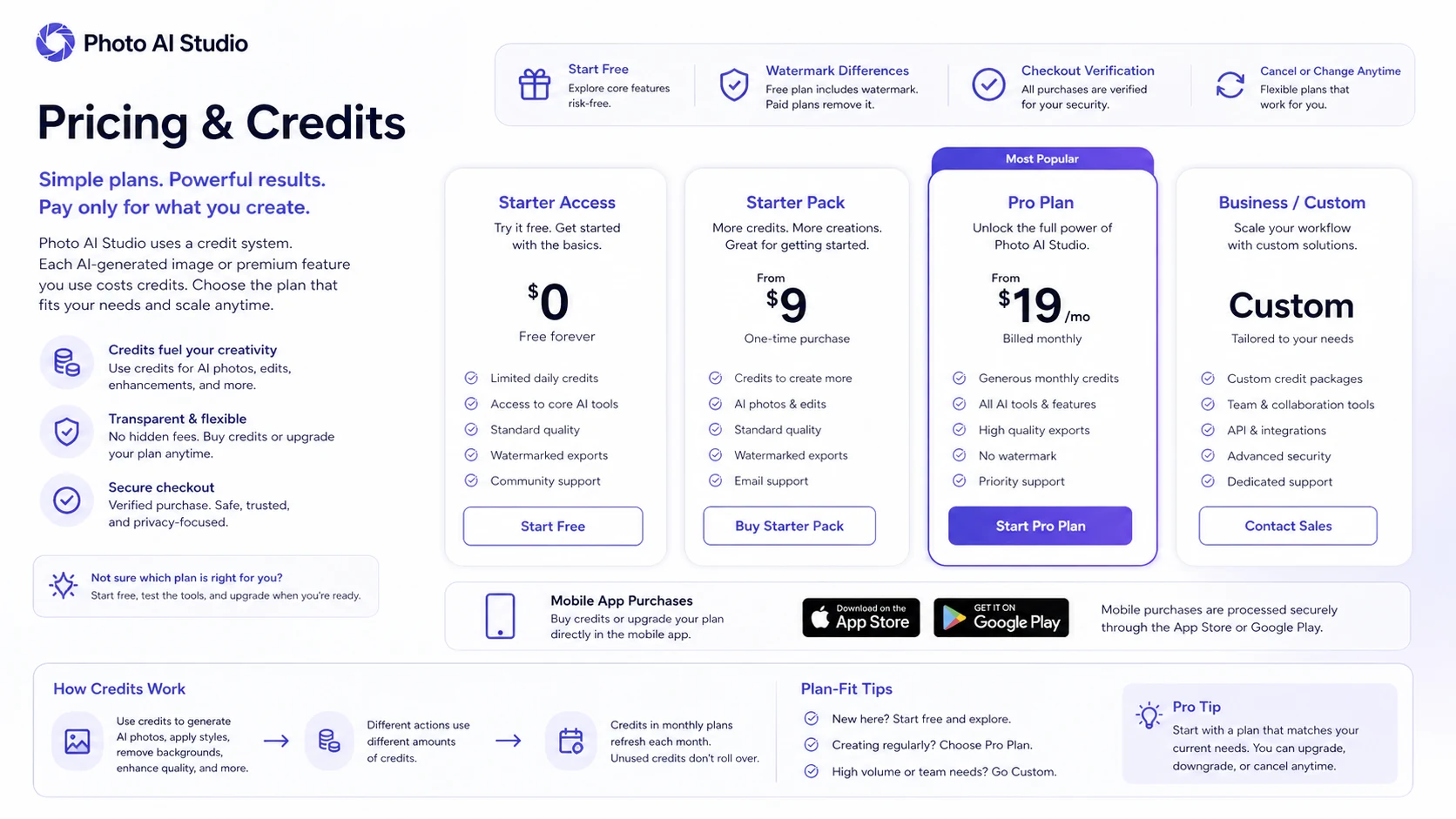
Pricing check: Before choosing a credit pack, compare the live web checkout, mobile in-app route, and expected number of usable outputs.
Free plan, trial, coupon, and checkout notes
Photo AI Studio has a useful testing angle, but buyers should be careful with how they interpret “free” or “low-cost.” The developer page mentions 100 free credits for new accounts, and the pricing page says browsing does not require a credit card. That is enough to support a test-first mindset.
It is not enough to assume the free path proves paid value.
A free or starter credit path should answer one question: can Photo AI Studio create a usable output for your real image? If the answer is no, a coupon will not fix the mismatch. If the answer is yes, then the next step is to compare how many credits are needed for the workflow.
The coupon path should stay secondary. Use the Photo AI Studio coupon page only after the workflow makes sense. Do not buy a larger pack because a deal appears to lower the price. With AI generation tools, the cheapest purchase is still expensive if the outputs are not usable.
Mobile buyers should also check the in-app purchase route. App store pricing, renewal behavior, and platform-specific cancellation rules can differ from what a buyer expects from the web checkout.
What I would check before buying Photo AI Studio
If I were buying this for a real workflow, I would check these points first:
- Whether one real selfie, product photo, or visual input produces a usable result.
- How many credits the actual workflow consumes, not just what the homepage example suggests.
- Whether downloads, watermark rules, resolution, or file quality affect the intended use.
- Whether the refund policy still applies after generation, download, or credit usage.
- Whether the uploaded image includes faces, products, or client material that require consent.
- Whether web pricing, mobile in-app pricing, and API credit usage differ.
- Whether a direct alternative is better for the main job, such as headshots, avatar video, or product visuals.

A simple test before paying
Before paying more than the smallest practical amount, I would run a small test like this:
- Choose one real target asset, such as a LinkedIn headshot, product ad image, or social profile photo.
- Upload only an image you have the right to use.
- Generate a small number of variations in one style category.
- Check likeness, product accuracy, artifacts, resolution, watermark, and download quality.
- Count how many credits were needed to get one usable result.
- Compare that cost against a larger pack, mobile purchase, or alternative tool.
- Read the refund policy before generating or downloading more assets.
This test is not complicated, but it prevents the easiest buyer mistake: buying a broad AI photo tool before proving one narrow output works.
Pros explained
The first real advantage is breadth. Photo AI Studio covers headshots, studio-style portraits, product shots, try-on, editing, restoration, image-to-video, product promotion, and developer routes. That makes it more flexible than a narrow headshot-only app.
The second advantage is speed. The public positioning emphasizes generating results quickly from a single selfie or product input. For creators and marketers, fast variation can be valuable when the alternative is waiting on a shoot, designer, or manual edit.
The third advantage is the test-first path. Free credits and smaller credit packages can help buyers evaluate output quality before committing. That matters because AI photo value is hard to judge without seeing your own image.
The fourth advantage is developer access. REST API and MCP support make Photo AI Studio more interesting for technical workflows than a simple consumer app. This does not matter to every buyer, but it matters for apps, agents, ecommerce experiments, and internal creative systems.
Cons explained
The biggest drawback is refund flexibility. The dedicated refund policy is narrow, especially after generating photos, downloading outputs, or using a meaningful share of credits. Buyers should read it before experimenting at scale.
The second drawback is pricing complexity. Credits, mobile purchases, subscriptions, and API usage can create different cost paths. A buyer who only sees a low entry price may underestimate the cost of repeated generation.
The third drawback is output uncertainty. AI-generated photos can look realistic and still miss the face, product, hand, label, texture, or brand detail that matters. This is normal for the category, but it is still a buying risk.
The fourth drawback is rights and consent. A tool that can generate photos from people and products requires more care than a generic text tool. Upload permission, commercial use, privacy, and deletion expectations should be checked before using it with client or team material.
Green flags and red flags
Green flags are clear here. Photo AI Studio is more interesting if you need multiple visual variations, you can test with your own source image, you understand credit usage, and you are comfortable treating the tool as a fast creative assistant rather than a guaranteed final-production system.
The developer page is another green flag for technical buyers. REST API, MCP, edit operations, and real-time credit deduction show that the product is not only a mobile novelty.
The red flags are also clear. Slow down if the first generated images do not look like the person, if product details change, if you do not understand the refund policy, or if you are buying a larger pack only because the examples look good.
Also slow down if you need to upload images of other people. Consent and usage rights are not optional just because the tool can process the photo.
Photo AI Studio vs alternatives
Photo AI Studio should not be compared with every creative AI platform in the same way. The strongest comparison depends on the buyer job.
Aragon vs Photo AI Studio
Aragon is the more direct comparison if the buyer mainly wants professional AI headshots. It is narrower, but that narrowness can be helpful when the goal is a business portrait rather than a broader creative image workflow.
Photo AI Studio may still make more sense if the buyer wants headshots plus product shots, style experiments, mobile creation, editing, video-style outputs, or developer access.
HeadshotPro vs Photo AI Studio
HeadshotPro is another direct headshot alternative. It is usually the better comparison for teams or professionals who want a dedicated business-headshot workflow and do not care about product photos or creator visuals.
Photo AI Studio is broader. That helps if the buyer wants many kinds of visual assets, but it can be less focused if the only job is a polished corporate headshot.
HeyGen vs Photo AI Studio
HeyGen is an adjacent route, not a direct replacement. It makes more sense when the buyer’s real need is avatar video, presenter videos, localization, or business video communication.
Photo AI Studio is the better fit when the main job is still-photo generation, headshots, product images, and light visual experimentation.
Akool vs Photo AI Studio
Akool is also an adjacent creative and video route. It becomes relevant when face swap, avatar-style marketing, video localization, or campaign video workflows matter more than still-photo generation.
Photo AI Studio remains the cleaner option when the buyer wants selfie-to-photo, product shots, and creator assets without committing to a video-first platform.
Trust, refund, and buyer-risk notes
Photo AI Studio deserves a careful trust check because it handles images that may include faces, products, pets, team members, or client assets.
On privacy, the public pricing FAQ says users retain ownership of uploaded photos and processed photos, and that photos are used to generate requested outputs. The privacy page also describes deletion rights and says identifiable information is deleted within 14 days after a confirmed deletion request. That is useful language, but buyers with sensitive material should still read the current privacy policy before uploading.
On refunds, the dedicated policy is narrow. Refund eligibility depends on requesting within 3 days, generating fewer than 10 photos, not downloading generated photos, and not using more than 50% of purchased credits. That makes a small test safer than a big initial purchase.
On pricing, the safest approach is to verify live checkout. The developer page provides a public signal that new accounts get 100 free credits and credit packages start at $9 for 500 credits, with many photo operations costing 100 credits. But pricing can still depend on route, platform, and intended workflow.
On commercial use, do not assume every generated image is safe for ads, product listings, client work, or identity-sensitive pages. Check output quality, rights, consent, and product accuracy before publishing.
Risk check: If Photo AI Studio still looks useful, read the refund and upload-rights rules before generating a large batch of photos.
Final verdict
Photo AI Studio is a useful tool to consider if you need fast AI-generated photos, headshots, product visuals, profile images, or creator assets from a repeatable workflow.
I would consider it if you can start small, test one real image, and judge the result against a practical checklist. I would be more cautious if you need exact likeness, strict product accuracy, predictable refunds, or full creative control.
The strongest buyer path is simple: do not start with the biggest pack. Start with a narrow output, confirm the credit cost, check whether downloads and quality match the final use case, then compare Photo AI Studio with a more focused alternative if your need is mainly headshots, product photography, or video.
Aragon and HeadshotPro are the cleaner comparisons for dedicated headshots. HeyGen and Akool are better adjacent routes if the real job is avatar or video-led creative work. Photo AI Studio sits in the middle: broad enough for many visual experiments, but still dependent on source image quality, credit math, and buyer judgment.
For my money, Photo AI Studio is not a tool I would judge by its best gallery examples. I would judge it by one real selfie, one real product image, or one real creator asset. If that test works, the tool can earn its place. If it does not, the safer move is to compare a more focused alternative before buying more credits.
