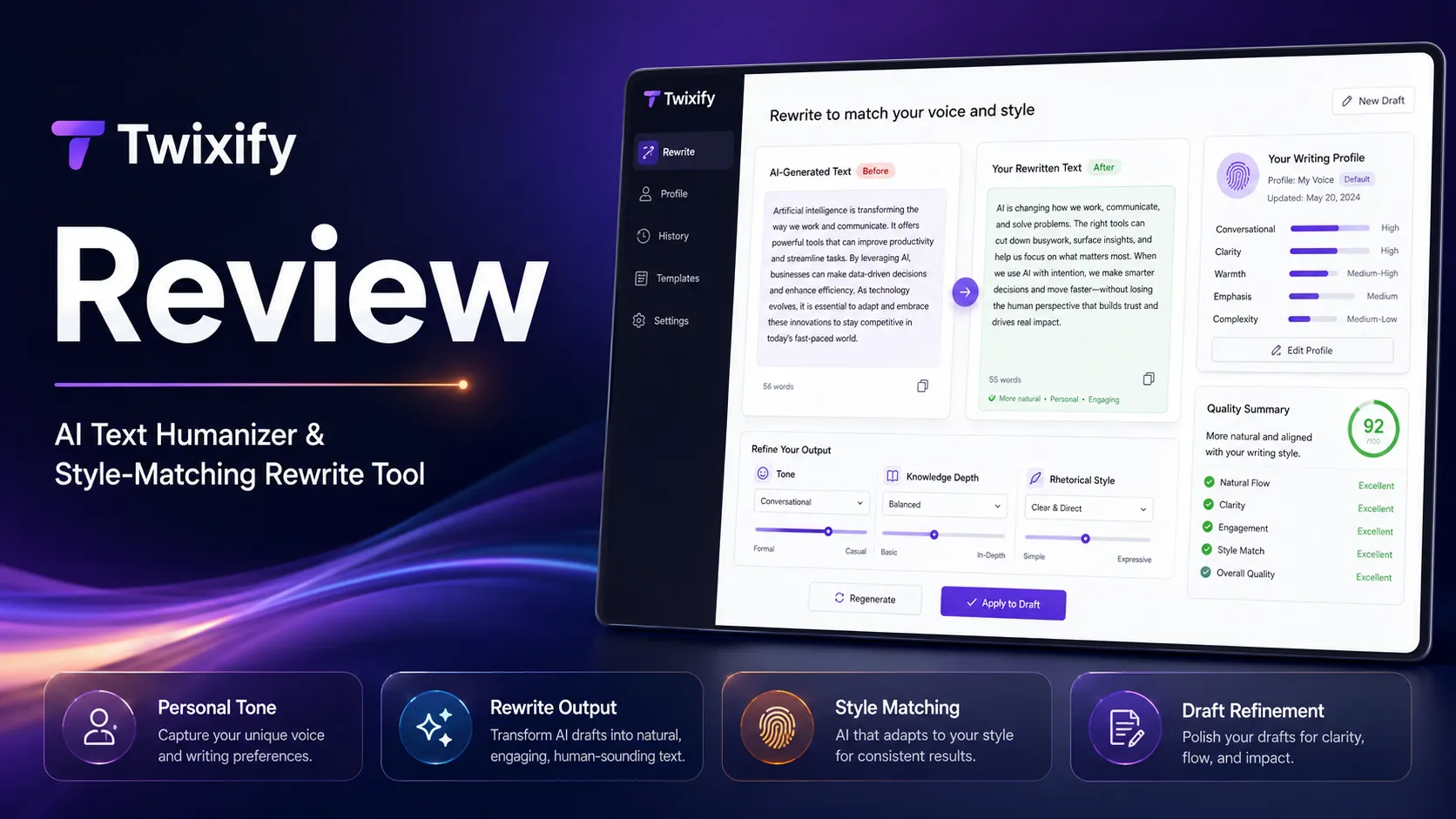
Quick verdict
Twixify is worth considering if your real problem is not “I need another AI writing tool,” but “this AI-assisted draft sounds too stiff, too generic, or too far from the voice I want.”
That is the useful version of the buying decision.
The risky version is buying Twixify because you saw a detector-resistance promise and assumed one rewriting tool can make every draft safe in every school, client, SEO, or editorial context. I would be careful there. Humanizer tools can help with phrasing, rhythm, and voice. They cannot remove the need for disclosure rules, human judgment, fact-checking, originality review, or a plain read-through by someone who understands the assignment.
The strongest reason to consider Twixify is its focused workflow: paste a working draft, choose or guide a writing style, rewrite, then review the result manually. The pricing is also easier to compare than some tools in this category because Twixify publicly shows monthly, annual-equivalent, and lifetime paths. The main caution is that the value depends heavily on output quality, request limits, refund terms, and whether your use case is actually allowed.
For my money, Twixify only makes sense after a real free-trial test. Use your own draft, not a throwaway paragraph. If the output still needs almost as much editing as before, a discount will not fix the mismatch. If the output saves meaningful revision time while preserving meaning, then the Twixify store guide and current offer route become worth checking.
Next step: If Twixify still fits your writing workflow, test the product before comparing longer billing options.
Review snapshot
| Review point | Practical take |
|---|---|
| Best for | Writers, freelancers, SEO editors, and repeat AI-writing users who need a faster style pass before manual review |
| Not ideal for | Buyers expecting guaranteed detector outcomes, academic-policy shortcuts, plagiarism review, API access, or team governance |
| Main use case | Rewriting AI-assisted drafts so they sound less stiff and closer to a chosen style |
| Starting price | Public pricing shows monthly entry pricing, lower annual-equivalent pricing, and a lifetime option |
| Free path | Free trial messaging is shown publicly, but buyers should verify the live allowance before judging value |
| Main strength | Simple humanizer workflow with style guidance rather than a generic one-click paraphrase |
| Main concern | Detector-resistance claims, refund clarity, and request limits need live verification |
| Direct alternatives to compare | Undetectable AI, AI To Human Text Converter, Phrasly, WriteHuman |
| Detection-first comparison routes | Originality.ai, Copyleaks, GPTZero |
| Best next step | Test one real draft, compare meaning and tone, then check pricing only if the output saves editing time |
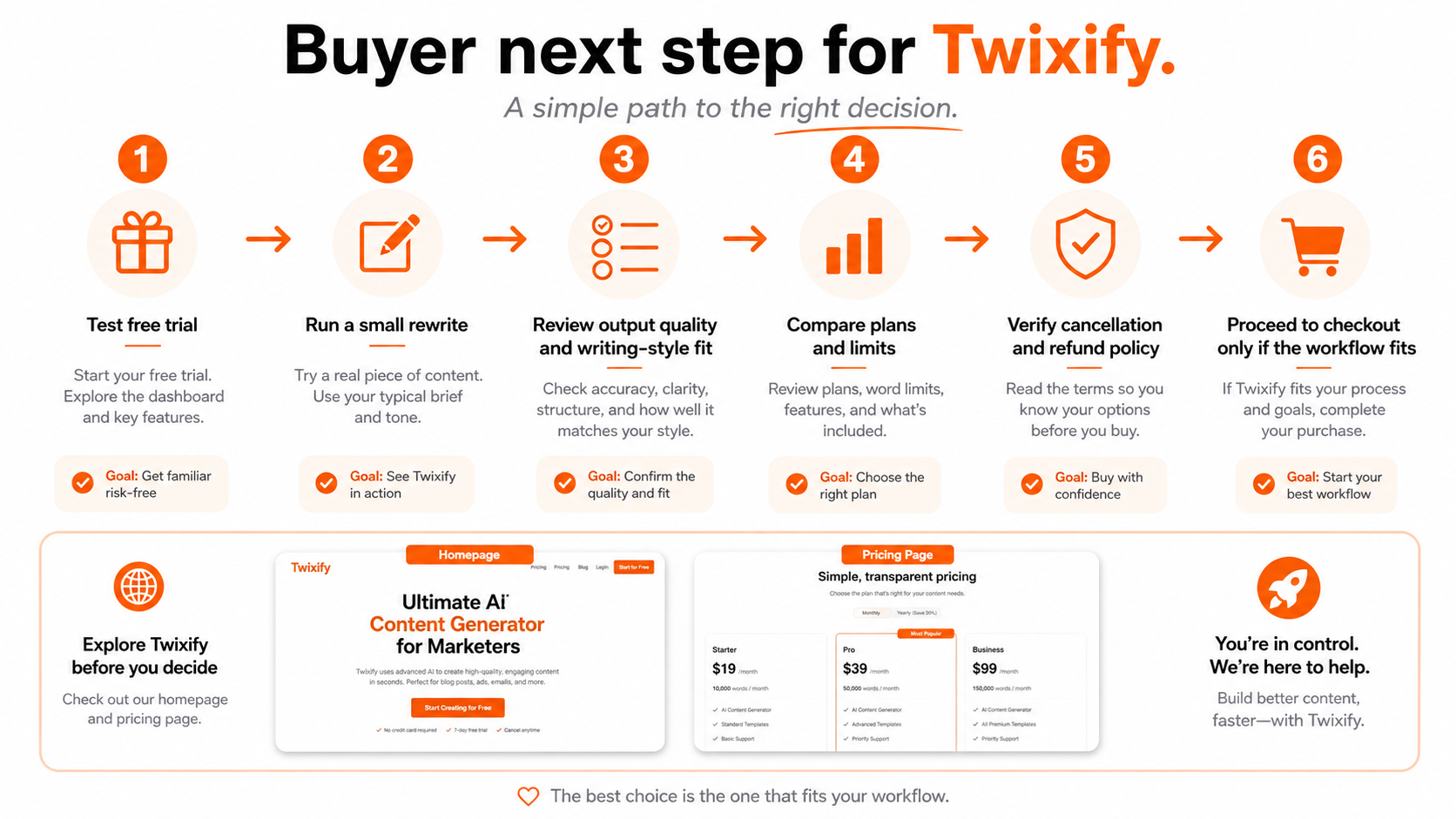
What is Twixify?
Twixify is best understood as an AI humanizer and rewriting tool for people who already have draft text and want it to sound more natural, less repetitive, and closer to a chosen voice.
It is not a full writing suite. It is not a mature originality platform. It is not a team governance system. And despite the product category it sits near, I would not treat it as a formal AI detector or plagiarism checker. The product’s real job is rewriting and style reshaping.
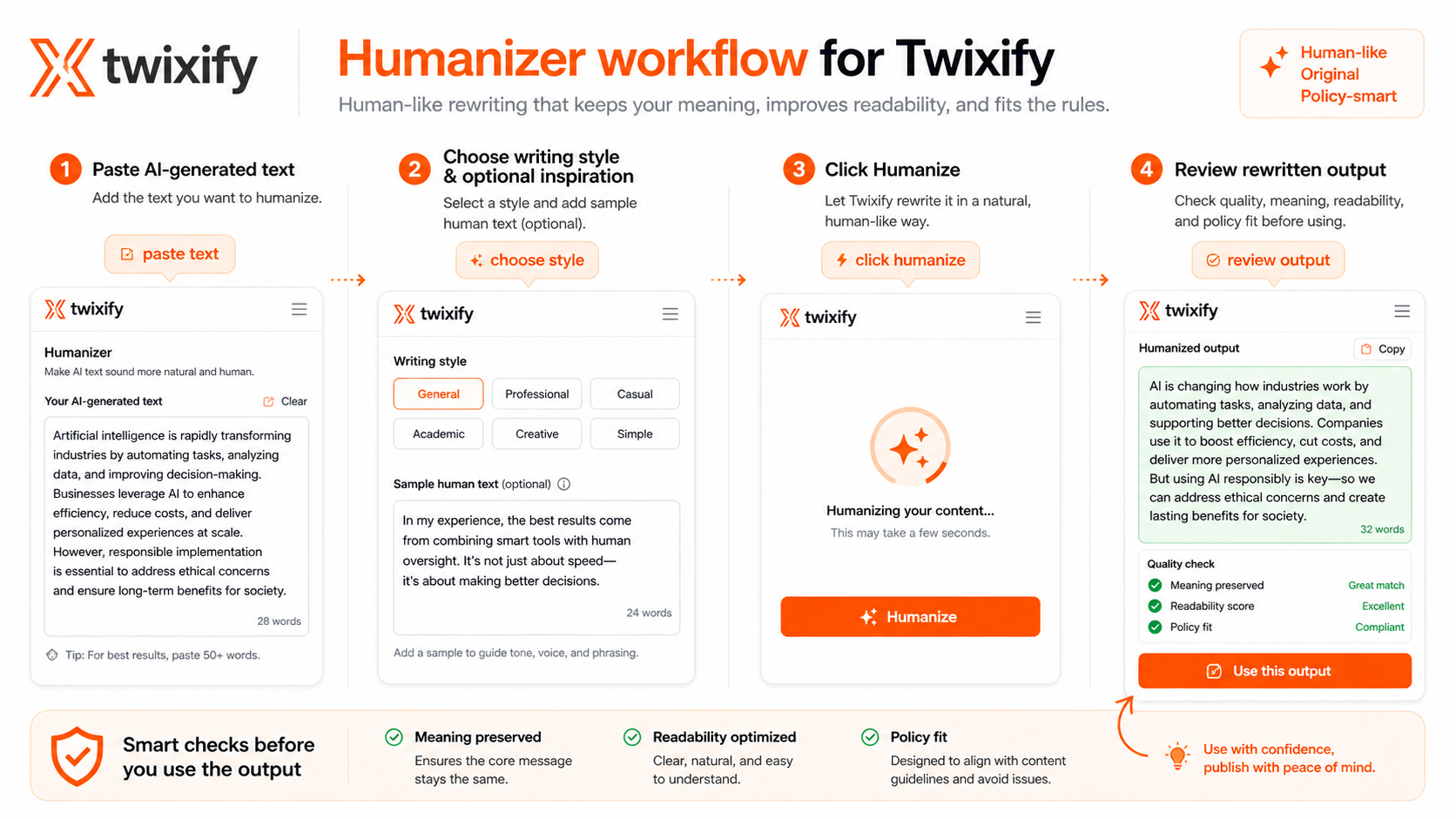
The basic workflow is simple: paste draft text, guide the writing style, generate a rewritten version, and decide whether the result is usable. That can be helpful when AI-assisted writing feels too polished in the wrong way. It can also disappoint if the buyer expects the output to become publication-ready without human review.
Our review approach: we compare public product pages, pricing details, terms, privacy language, buyer workflow fit, and nearby alternatives. We do not treat a coupon, lifetime price, or detector-resistance claim as proof that a product fits the buyer.
The common wrong expectation is that Twixify can turn any draft into a guaranteed “safe” document. That is not how I would judge it. A better question is whether Twixify gives you a useful revision layer before your final edit.
If it does, it can save time.
If it does not, it becomes another tool that changes words without improving the decision.
Who should use Twixify?
Twixify makes the most sense for buyers who already use AI-assisted writing and have a repeatable reason to polish the output.
Content editors polishing AI-assisted drafts are the clearest fit. If a draft has the right ideas but reads too flat, Twixify can act as a first style pass. The condition is important: the editor still needs to compare the before and after, check meaning, and decide whether the revision fits the brand or publication.
Freelancers preparing client drafts may also find it useful. A client-facing piece often needs to sound less generic than a raw AI draft. Twixify can help reshape wording, but the freelancer should still own the final voice, factual accuracy, and client policy compliance.
SEO writers working with repeated draft volume may benefit if the tool reduces repetitive phrasing. This does not replace SEO judgment. You still need to check search intent, structure, internal links, citations, and accuracy. The tool only helps if it reduces editing friction without damaging the article.
Buyers comparing humanizer tools should consider Twixify as one candidate in a shortlist, especially because it has monthly, annual-equivalent, and lifetime pricing paths. The useful test is not whether the homepage sounds confident. It is whether Twixify performs better than the humanizer alternatives on your own working text.
Non-technical users who want a simple interface may appreciate the direct workflow. If the goal is paste, guide style, rewrite, and review, Twixify is easier to understand than a broader writing platform. But simplicity is only valuable if the output is good enough.
Who should avoid Twixify?
I would avoid Twixify if you are trying to solve a policy problem with a writing tool.
If your school, employer, client, or publication has clear rules about AI use, read those rules first. A humanizer does not make a prohibited workflow acceptable. It only changes the text. That distinction matters more than the detector result.
I would also be careful if you need a formal originality workflow. Twixify sits closer to rewriting. If you need plagiarism checks, team reporting, institution-level review, or documented AI-detection records, a detection-first route such as Originality.ai, Copyleaks, or GPTZero may be better comparison routes for detection, plagiarism, or education-style review needs.
One-off users should be cautious too. If you only need to polish one paragraph, paying for a recurring plan or lifetime access may be more than the problem deserves. Try the free path first and stop if the value is not obvious.
Heavy content operators should not buy on price alone. Request limits and words per cycle can matter more than the headline monthly number. If your workflow involves long articles, batch rewriting, or multiple client deliverables, test realistic volume before choosing annual or lifetime billing.
Finally, avoid Twixify if you expect the tool to replace editing. It will not. A rewritten draft can still be inaccurate, awkward, too casual, too formal, or misaligned with the original intent.
How Twixify fits into a real workflow
A good Twixify workflow starts before the text is pasted into the tool.
The buyer should first choose a real sample. Not a tiny test paragraph. Not a generic demo. Use the kind of draft you actually produce: a blog section, client intro, product description, newsletter paragraph, or SEO draft that already has a clear purpose.
Then decide what “better” means. Does the text need to sound warmer? More concise? Less repetitive? Closer to a client’s voice? More natural without losing facts? If you cannot define the improvement, it becomes too easy to judge the tool by the wrong signal.
The practical workflow looks like this:
- Start with an AI-assisted draft that still needs editing.
- Decide the style goal before rewriting.
- Run Twixify on a limited sample.
- Compare the output with the original draft.
- Check whether meaning, facts, examples, and formatting survived.
- Edit manually for reader value and policy fit.
- Only then decide whether Twixify saved enough time to justify a plan.
The easy mistake is to use Twixify as a panic button after a detector gives an uncomfortable result. That workflow usually creates worse decisions. The better path is slower but safer: improve the writing first, then use any detection result as one signal among others.
Workflow check: Twixify is easier to judge when you test it with one real draft and compare the output manually before paying.
Real-world buyer scenarios
A freelancer polishing client work
A freelancer may use Twixify when a client draft has the right structure but sounds too AI-assisted. This is a reasonable use case if the freelancer still checks the final text against the client’s brief.
Where it can fail: the rewritten draft may sound smoother but drift from the client’s preferred wording. A careful freelancer should compare tone, claims, examples, and formatting before delivery.
An SEO writer editing repeated AI-assisted drafts
An SEO writer may use Twixify as a first pass to reduce stiff phrasing before doing a real editorial pass. That can save time if the output is close enough to use.
Where it can fail: SEO content is not only about natural wording. The final article still needs search intent, topic coverage, internal links, schema planning, factual checking, and original editorial value. Twixify cannot carry those jobs.
A student or academic user under policy pressure
This is where I would slow down. If the use case involves academic rules, disclosure requirements, or institutional review, the first question is not whether Twixify can rewrite the text. The first question is whether using a humanizer is allowed.
If the policy says no, the tool is not the solution. If the policy allows AI-assisted drafting with disclosure, the safer workflow is to use AI transparently and edit honestly, not to rely on a humanizer as a shield.
A buyer considering lifetime access
The lifetime option can look attractive if you expect repeated use. But I would not start there. A lifetime purchase only makes sense after the buyer has tested multiple real drafts, confirmed output quality, and read the live refund language.
A cheap long-term price is still expensive if the tool does not fit the work.
Key features that actually matter
Style-guided rewriting
Twixify’s most important feature is not simply replacing words. It is the idea that the output can move closer to a chosen voice or style.
That matters because basic paraphrasing often creates text that is technically different but still bland. A style-guided workflow is more useful when the buyer has a clear target voice.
Buyer note: test whether the rewritten draft actually sounds closer to your intended voice, not merely different from the original.
Custom mode and writing-style inputs
The custom style angle is one of the better reasons to test Twixify. If the tool can use sample writing or style direction to shape the output, it becomes more relevant for freelancers, SEO editors, and creators who care about voice consistency.
Where it may disappoint: if the style input is vague, the output can still feel generic. The buyer has to give the tool enough direction and then check the result manually.
Buyer note: use a sample that represents the tone you actually want, not a random paragraph.
Before-and-after rewriting workflow
Twixify is easiest to evaluate when you compare before and after text side by side. The before version should contain real problems. The after version should solve those problems without damaging meaning.
This is where many humanizer tools either prove useful or fall apart.
Buyer note: do not judge only by whether a sentence sounds more casual. Check whether the rewritten version is still accurate, readable, and appropriate for the audience.
Request and word-per-cycle limits
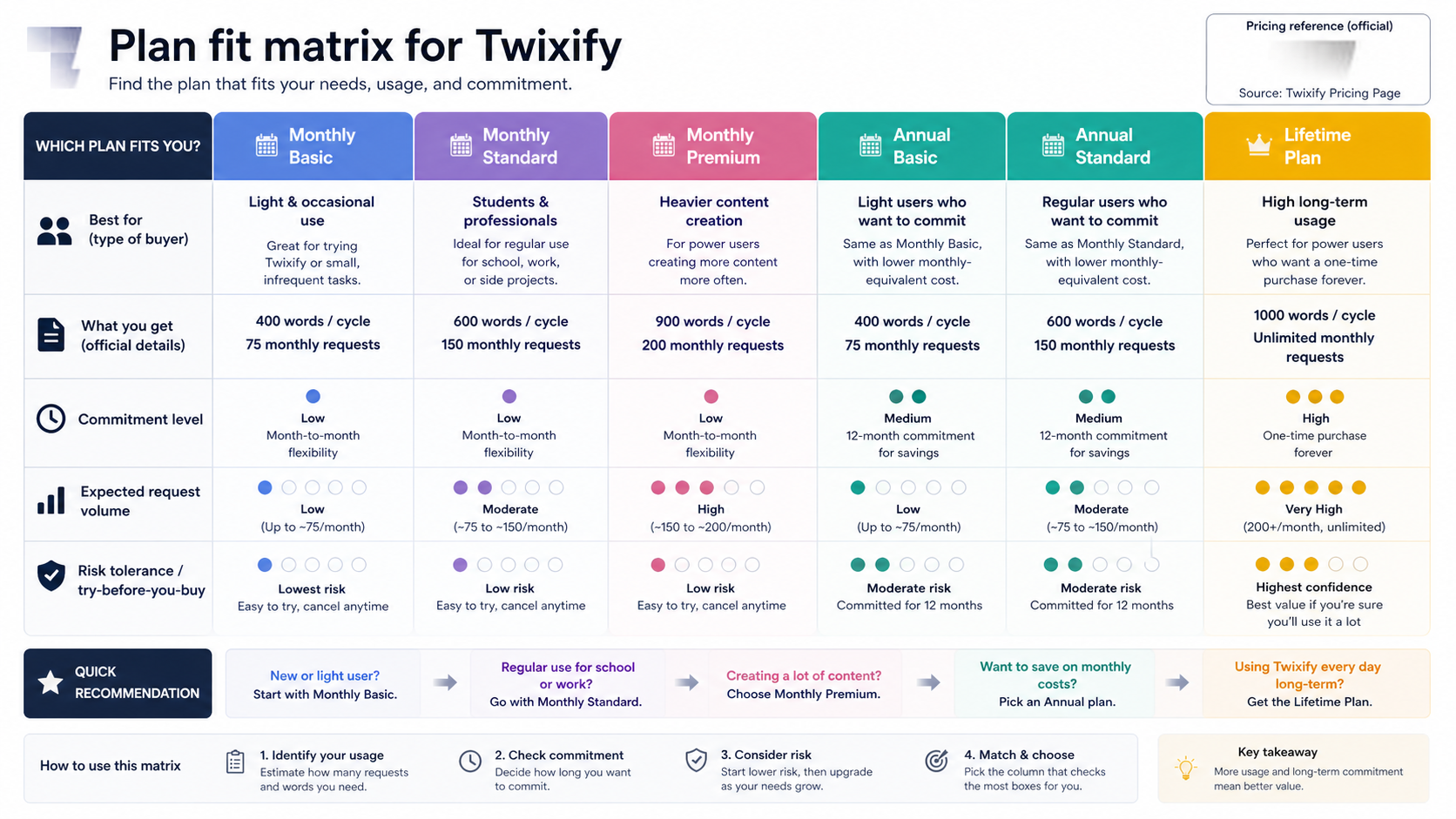
The pricing table matters because Twixify plans are tied to practical usage limits. Words per cycle and monthly requests affect whether the plan can handle your workload.
For occasional use, a lower plan may be enough. For long-form content, heavy SEO workflows, or multiple client drafts, those limits can become the real price of the product.
Buyer note: estimate how many rewriting requests you actually need per month before comparing prices.
Free trial path
The free trial is important because output quality cannot be judged from marketing copy. Humanizer tools are deeply sample-dependent. A tool can work well on one paragraph and feel awkward on another.
Buyer note: use the trial on your own writing. A demo sample tells you much less than a real client draft, article section, or working paragraph.
Pricing and plan value
Twixify’s pricing is more flexible than a simple single-tier subscription, but that does not automatically make it easy to choose.
Public pricing shows monthly plans, lower annual-equivalent pricing, and a lifetime option. The headline entry price can look small, especially on annual billing. But the better pricing question is not “what is the cheapest plan?” It is “which plan matches my real rewriting volume without forcing too much commitment too early?”
The Basic path is most relevant for occasional users who want to test whether Twixify belongs in their writing workflow. The Standard and Premium paths become more relevant if you rewrite more often, need higher per-cycle capacity, or process more working drafts each month. The lifetime option is the most tempting but also the one I would approach most carefully.
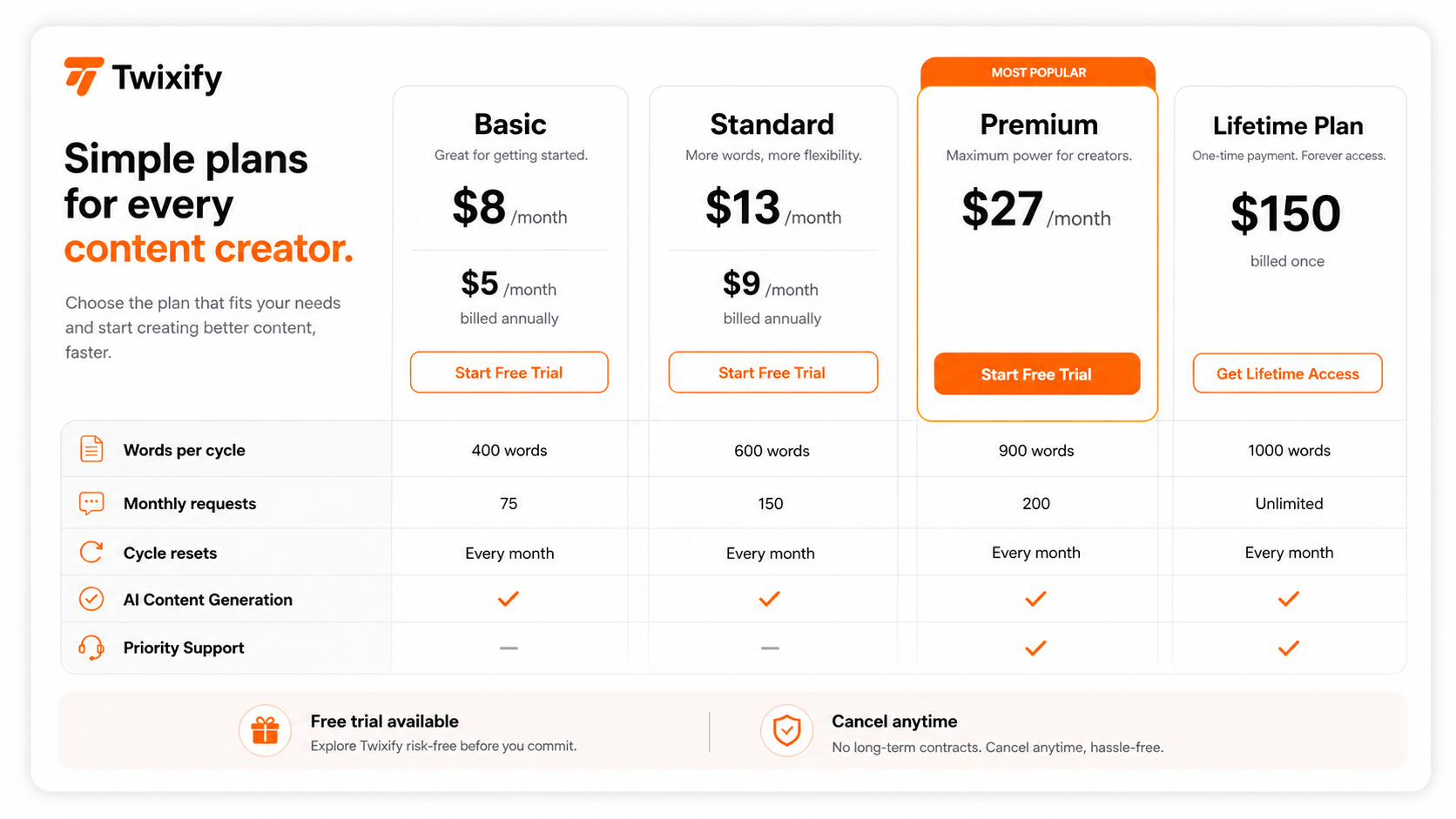
Annual billing may make sense after repeated successful tests. It does not make sense as the first move if you are still unsure about output quality. The same logic applies even more strongly to lifetime access. A one-time payment can be a good deal for a repeat user, but it is a poor first step for a buyer who has not tested the product under real conditions.
The refund language also affects pricing value. Twixify’s official pages contain refund and cancellation language, but the wording is not perfectly aligned across public pages. That does not mean buyers should assume the worst. It does mean buyers should verify the live rule before choosing annual or lifetime billing.
Pricing check: Compare Twixify’s monthly, annual, and lifetime paths only after the free trial proves the output is useful for your actual writing.
Free plan, trial, coupon, and checkout notes
Twixify is the kind of product where the free trial matters more than the coupon path.
A coupon can lower the cost. It cannot prove that the rewritten text is better, safer, clearer, or more compliant. The order matters: test first, compare plans second, check current offers third, and only then decide whether checkout makes sense.
Use the trial to answer practical questions:
- Does the output preserve the original meaning?
- Does it sound more natural or just more informal?
- Does it keep facts, names, citations, and examples intact?
- Does it still need heavy editing?
- Does the plan limit match how often you would use the tool?
- Would the same result be possible with a manual edit or a broader writing suite?
If Twixify passes those checks, the Twixify coupon page is worth checking for current offer routing. If it fails those checks, do not keep searching for a better discount. The workflow mismatch is the problem.
I would also verify cancellation and refund terms directly before choosing annual or lifetime billing. This is especially important because humanizer tools often create buyer emotion: the product looks cheap, the promise sounds strong, and the buyer wants a quick answer. That is exactly when slowing down is useful.
What I would check before buying Twixify
If I were buying Twixify for a real workflow, I would check seven things before paying.
- Trial output quality. I would test at least two real drafts, not one easy paragraph.
- Meaning preservation. I would compare the output against the original for factual drift, missing nuance, and changed intent.
- Voice fit. I would check whether the result sounds like my target voice or merely avoids obvious AI phrasing.
- Request limits. I would calculate expected monthly usage before trusting the headline price.
- Words per cycle. I would test whether the plan can handle the length of my normal drafts.
- Refund and cancellation terms. I would read the current Terms, Privacy, and support language before annual or lifetime billing.
- Policy fit. I would confirm that using a humanizer is allowed in the client, academic, workplace, or publishing context.
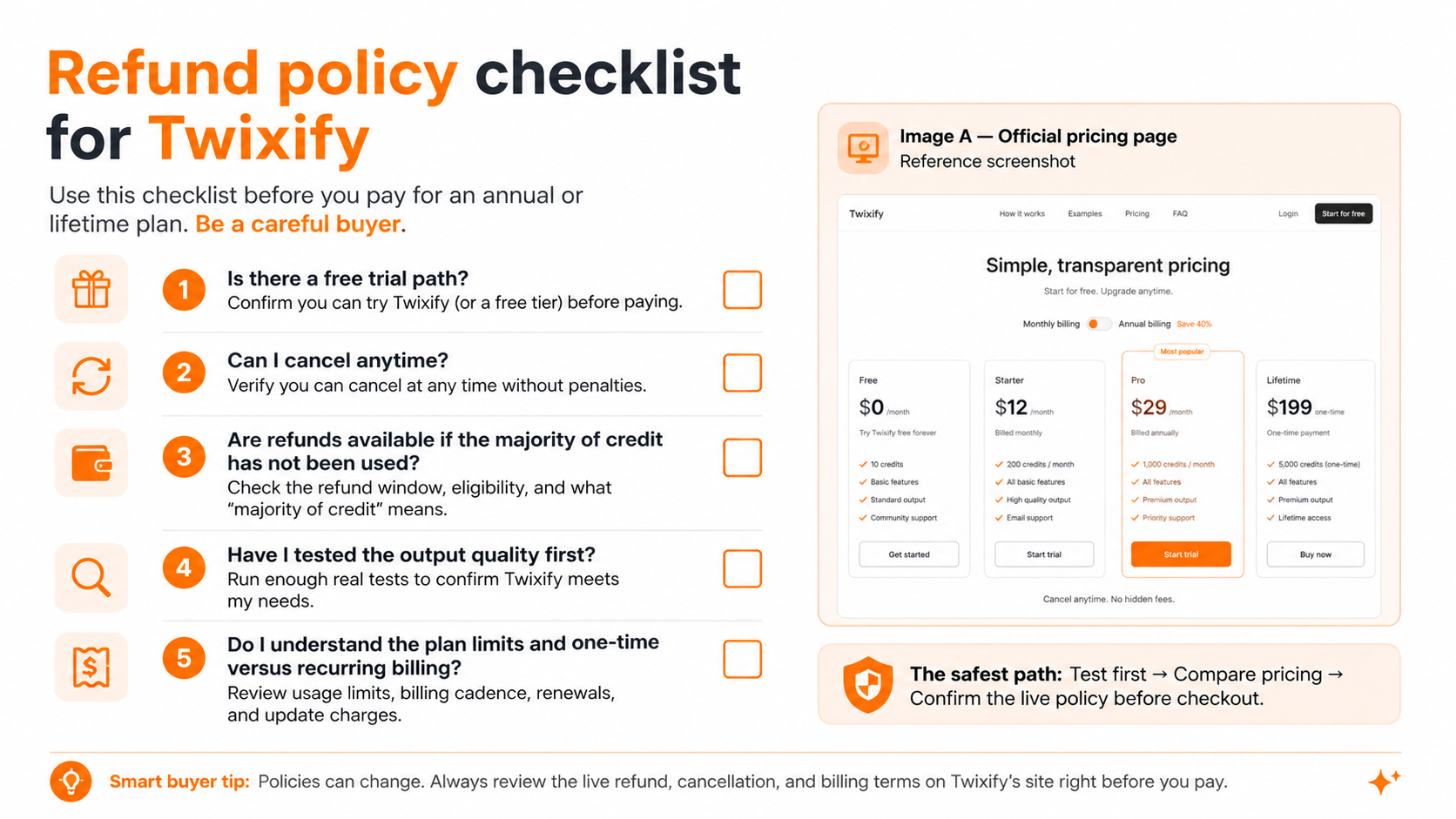
The biggest mistake is buying because the product promises a clean outcome. The better path is to decide what a good result looks like before the tool rewrites anything.
A simple test before paying
Before paying, I would run a small test like this:
- Pick one real draft that represents your normal writing work.
- Save the original version so you can compare changes.
- Run the draft through Twixify with a clear style target.
- Read the output aloud or slowly enough to catch awkward phrasing.
- Check whether facts, examples, citations, and formatting survived.
- Edit the result manually until it meets your real standard.
- Ask whether Twixify saved enough time to justify the plan.
This test is intentionally simple. You do not need a complex benchmark to learn whether a humanizer fits your workflow. You need one honest sample, one careful comparison, and one clear decision: did the tool make the editing process better?
If the answer is no, skip it.
If the answer is yes, then compare the plan limits.
Pros explained
The workflow is easy to understand
Twixify does not require a complicated setup. Paste draft text, guide style, rewrite, and review. For beginners, that simplicity is a real advantage.
It matters most when the buyer already knows the text needs a style pass. It matters less if the buyer is still looking for a full content creation system.
Style direction makes it more useful than a basic paraphraser
A humanizer needs more than synonym swapping. Twixify’s positioning around voice and style direction is useful because the buyer can shape the output toward a target.
This stops being enough when the output still feels generic or when the buyer cannot provide a good style signal.
Pricing paths are visible enough to compare
Twixify publicly shows multiple payment paths, which makes the first comparison easier. Monthly billing is safer for uncertain buyers. Annual and lifetime paths may appeal to repeat users.
The catch is that visible pricing is only one layer. Usage limits, refunds, and real output quality still decide value.
The free trial lowers the first-step risk
A free trial is helpful because humanizer quality is hard to predict from feature lists. Buyers can test their own draft before paying.
This advantage disappears if the buyer uses a weak sample or jumps to annual billing before testing real usage.
Cons explained
Detector-resistance claims can create false confidence
The biggest risk with Twixify is not that rewriting is useless. It can be useful. The risk is believing that a rewriting tool guarantees a safe outcome across every detector, client rule, school policy, or editorial process.
Buyers should treat detector-related results as signals, not promises.
Refund language needs live verification
Twixify has public refund and cancellation language, but a buyer should not rely on memory, screenshots, or old reviews. The safest move is to check the current policy and contact support if annual or lifetime billing is being considered.
This matters most for buyers with low risk tolerance.
Request limits can change the real price
A low monthly price is less attractive if you hit request limits quickly. Long-form writers and SEO teams should check words per cycle and monthly requests before assuming the entry plan is enough.
This is where heavy users can underestimate cost.
It is not a full editorial or originality platform
Twixify rewrites text. It does not replace plagiarism checking, team review, source verification, legal review, or a content editor.
If those workflows matter, compare a detection-first or originality-first route before buying.
Green flags and red flags
Green flags
- You already have AI-assisted drafts and need a faster style pass.
- You can test Twixify with real writing before paying.
- You understand that final editing remains your responsibility.
- You are choosing monthly first because long-term value is not proven yet.
- You care more about natural writing quality than chasing a single detector result.
Red flags
- You are buying only because of detector-related marketing language.
- You need the tool to solve an academic, client, or workplace policy issue.
- You have not checked request limits or words per cycle.
- You are considering lifetime access before testing multiple real drafts.
- You need API access, team controls, formal originality reporting, or plagiarism review.
My confidence is stronger around Twixify’s role as a rewriting and humanizer tool. I am more cautious around long-term value, refund flexibility, and detector-related promises because those depend on live terms, changing detection systems, and the buyer’s own policy environment.
Twixify vs alternatives
Twixify should be compared in two groups: direct humanizer alternatives and detection-first comparison routes.
That distinction matters. A humanizer tries to reshape draft text. A detector or originality platform helps evaluate text. Those are related problems, but they are not the same buyer job.
Undetectable AI vs Twixify
Undetectable AI is the more direct comparison if the buyer wants a humanizer-style workflow with detection-aware positioning. It may be the stronger next tab for buyers who want a more established humanizer category name.
Twixify may still make sense if the buyer prefers its style-control workflow, pricing shape, or lifetime path. The tradeoff is that both tools need the same buyer caution: test real drafts, do not trust one detector result, and verify policy fit.
AI To Human Text Converter vs Twixify
AI To Human Text Converter is another direct humanizer-style route if the buyer wants a simpler rewrite path. It may be better for buyers who want a lighter, more straightforward tool rather than a plan comparison with monthly, annual, and lifetime decisions.
Twixify may be more interesting if the buyer wants style guidance and expects repeated use. The main tradeoff is output quality versus plan commitment.
Phrasly or WriteHuman vs Twixify
Phrasly and WriteHuman are useful names to compare when the buyer wants humanizer tools that are often discussed alongside detector-aware writing workflows. These may be worth checking if the buyer wants integrated scoring, multiple rewrite outputs, or a different approach to draft polishing.
Twixify may still be a valid option if its output feels better on your samples. In this category, the best tool is often the one that performs best on your actual writing, not the one with the loudest claim.
Originality.ai vs Twixify
Originality.ai is not a direct humanizer replacement. It is a detection-first and originality-checking route for publishers, editors, and content teams that want evaluation rather than rewriting.
Choose Originality.ai-style tooling if your main problem is review, audit, or publishing confidence. Consider Twixify if your main problem is that draft text needs a style pass before human editing.
Copyleaks or GPTZero vs Twixify
Copyleaks is more relevant when the buyer needs broader detection, plagiarism, LMS, API, or institution-facing workflows. GPTZero is more relevant for education-style AI detection and writing feedback.
These are detection-first routes. They are useful comparisons when the buyer is trying to evaluate text, not when the buyer mainly wants to rewrite it.
Trust, refund, and buyer-risk notes
Twixify is a product where trust depends less on the homepage and more on the checkout details.
First, verify pricing on the live pricing page. Public pricing pages can change, and humanizer tools often promote discounts, annual equivalents, or trial messaging that looks simpler than the actual purchase decision.
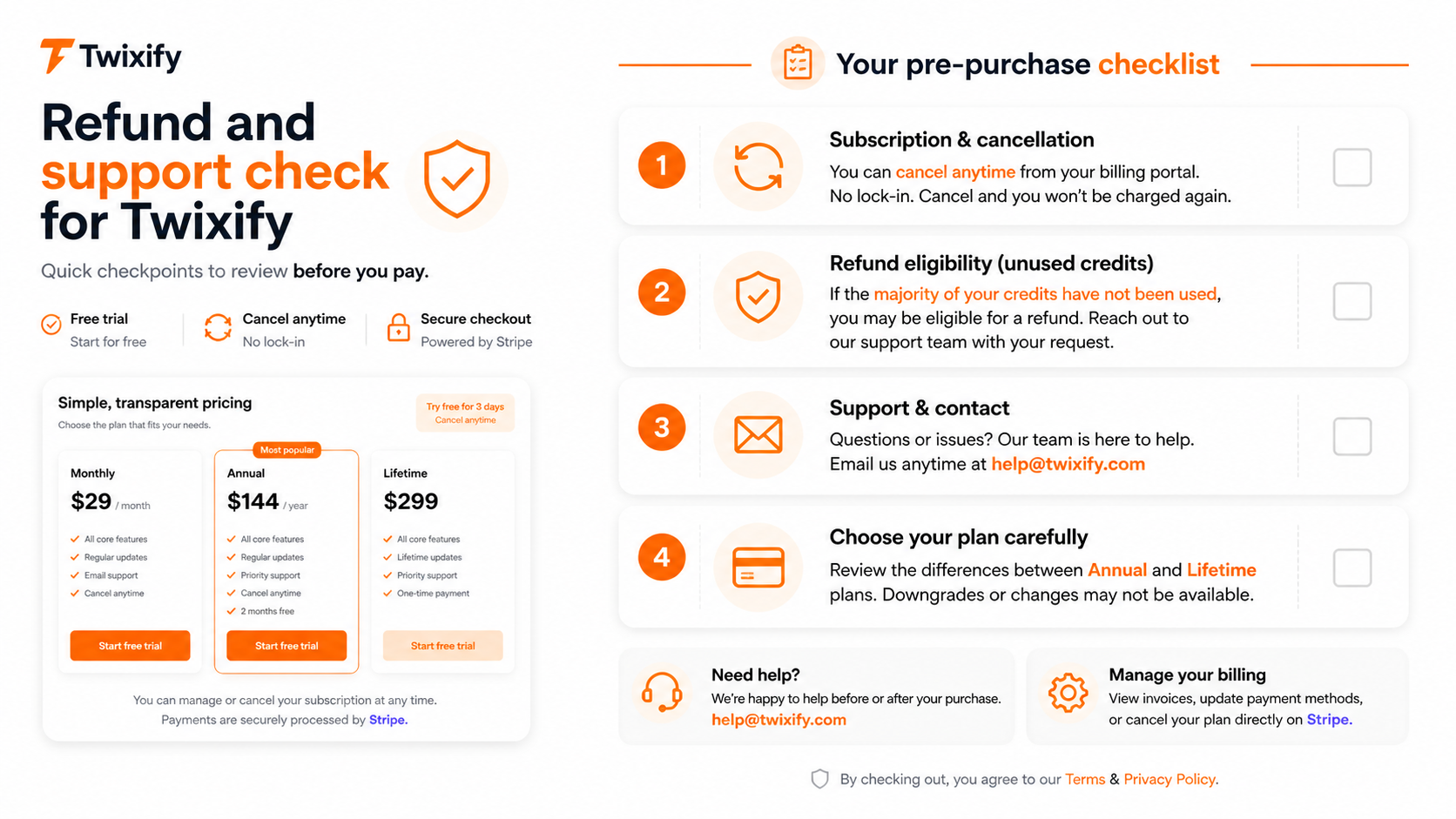
Second, verify cancellation and refund terms. Twixify’s public pages include refund-related language, but buyers should read the current Terms, Privacy, and support/contact wording before annual or lifetime billing. If refund flexibility matters, contact support before paying.
Third, check data sensitivity. Humanizer tools require you to paste text into a web workflow. Do not upload confidential client material, private academic work, legal drafts, or internal company content unless you are comfortable with the privacy terms and your own policy environment.
Fourth, treat detector-related results carefully. A lower score, smoother rewrite, or more natural paragraph does not automatically mean the content is accurate, ethical, compliant, or publication-ready.
Fifth, do not confuse a writing improvement tool with a permission slip. If your use case requires disclosure, approval, or original work standards, follow those rules first.
Final verdict
I would consider Twixify if you already use AI-assisted drafts and need a faster way to make working text sound less stiff before a final human edit. It is most convincing when the buyer has repeated writing volume, a clear voice target, and enough discipline to compare the rewritten output against the original meaning.
I would skip Twixify if you expect a guaranteed detector outcome, need a formal originality system, require team controls, or are trying to solve a policy problem with a rewriting tool. That is not a safe buying frame.
I would compare Twixify with direct humanizer alternatives first if rewriting is the real job. If your real need is detection, plagiarism review, editorial audit, or institutional reporting, compare it with detection-first routes such as Originality.ai, Copyleaks, or GPTZero instead.
The safest next step is boring, but it is the right one: test Twixify with a real draft, check whether it preserves meaning and improves voice, verify request limits, read the current refund language, and only then decide whether monthly, annual, or lifetime billing fits your workflow.
A discount can improve a good purchase. It should not be the reason you make one.
