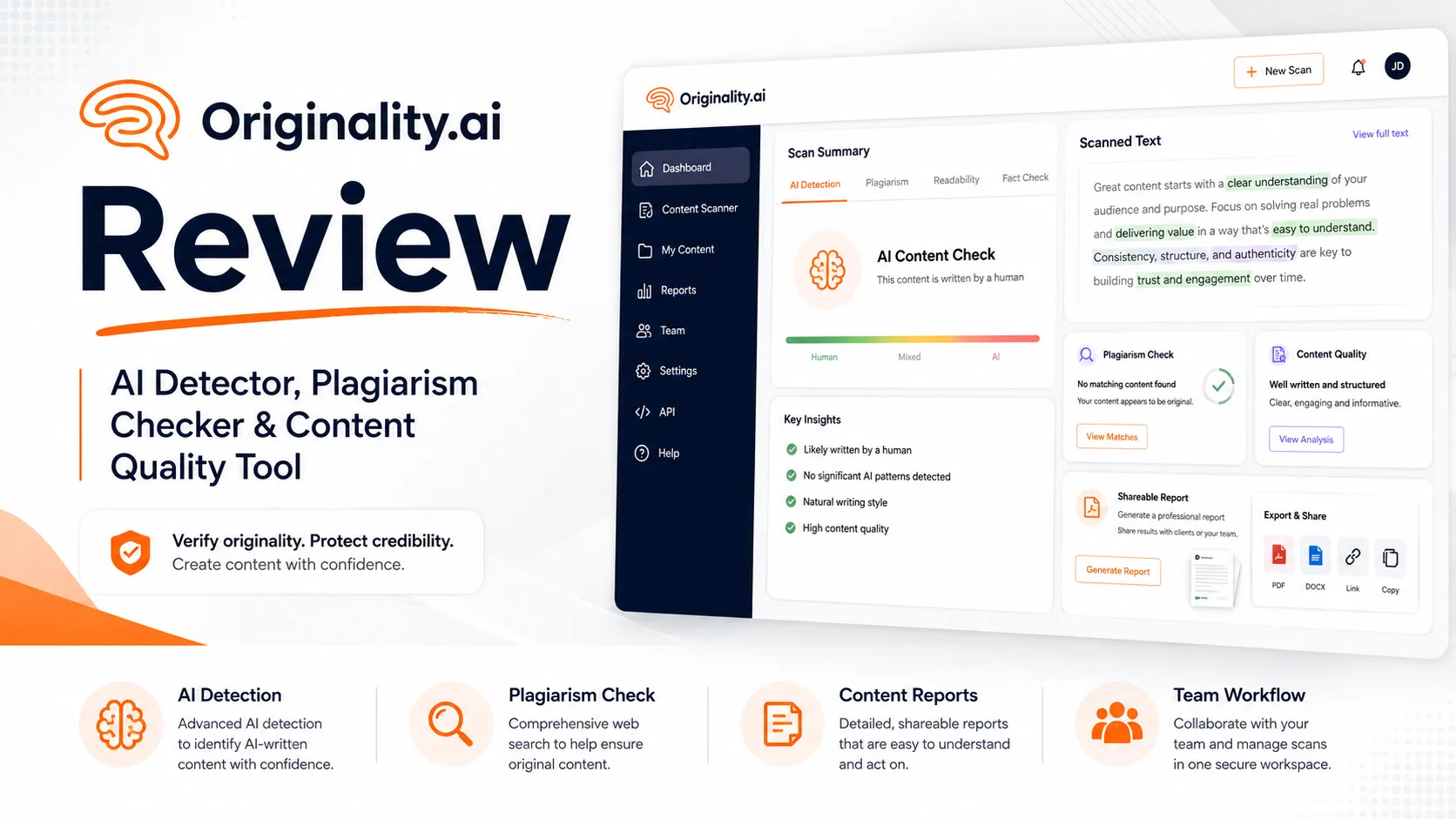
Quick verdict
Originality.ai is worth considering if you are not merely asking, “Is this text AI?” but trying to build a repeatable content review process before publishing, submitting, or accepting work from writers.
That distinction matters more than the headline score.
Originality.ai is strongest for publishers, agencies, SEO teams, educators, and content operations that need AI detection alongside plagiarism checking, readability, grammar, fact-checking support, reports, team workflow, WordPress scanning, Chrome or Google Docs review, and API access. It is not the first tool I would suggest for someone who only wants a free occasional scan or a quick emotional answer about one paragraph.
The main strength is workflow depth. Originality.ai is closer to a content QA platform than a lightweight detector. The main caution is that its credit model can look simple until you start thinking in monthly word volume, subscription credit expiry, combined scan types, annual billing, and refund flexibility.
I would not treat the score as proof by itself. A detector can help an editor decide where to look. It should not replace the editor, the teacher, the client conversation, or the publishing judgment.
Next step: If Originality.ai still fits your publishing or review workflow, verify the current credit model before choosing a plan.
Review snapshot
| Review point | Practical take |
|---|---|
| Best for | Publishers, agencies, SEO teams, educators, and content operations with recurring review volume |
| Not ideal for | One-off users, free-tool shoppers, or anyone expecting a score to prove authorship by itself |
| Main use case | AI detection, plagiarism checking, and content QA before publishing or accepting drafts |
| Pricing model | Credit-based, with Pay as you go, Pro, and Enterprise routes |
| Free plan/trial | No permanent free plan for the main paid platform workflow; Chrome/limited entry paths may help with initial testing |
| Main strength | Broader workflow depth than basic paste-and-scan AI detectors |
| Main concern | Credit expiry, annual billing, refund discretion, and overtrusting detection scores |
| Best alternatives to compare | Copyleaks, GPTZero, Winston AI, AI Detector Pro |
| Best next step | Estimate monthly word volume before choosing Pay as you go, Pro, or Enterprise |
What is Originality.ai?
Originality.ai is best understood as an AI detection and content integrity platform for people who need to review text before it goes live, gets submitted, or moves through a professional workflow.
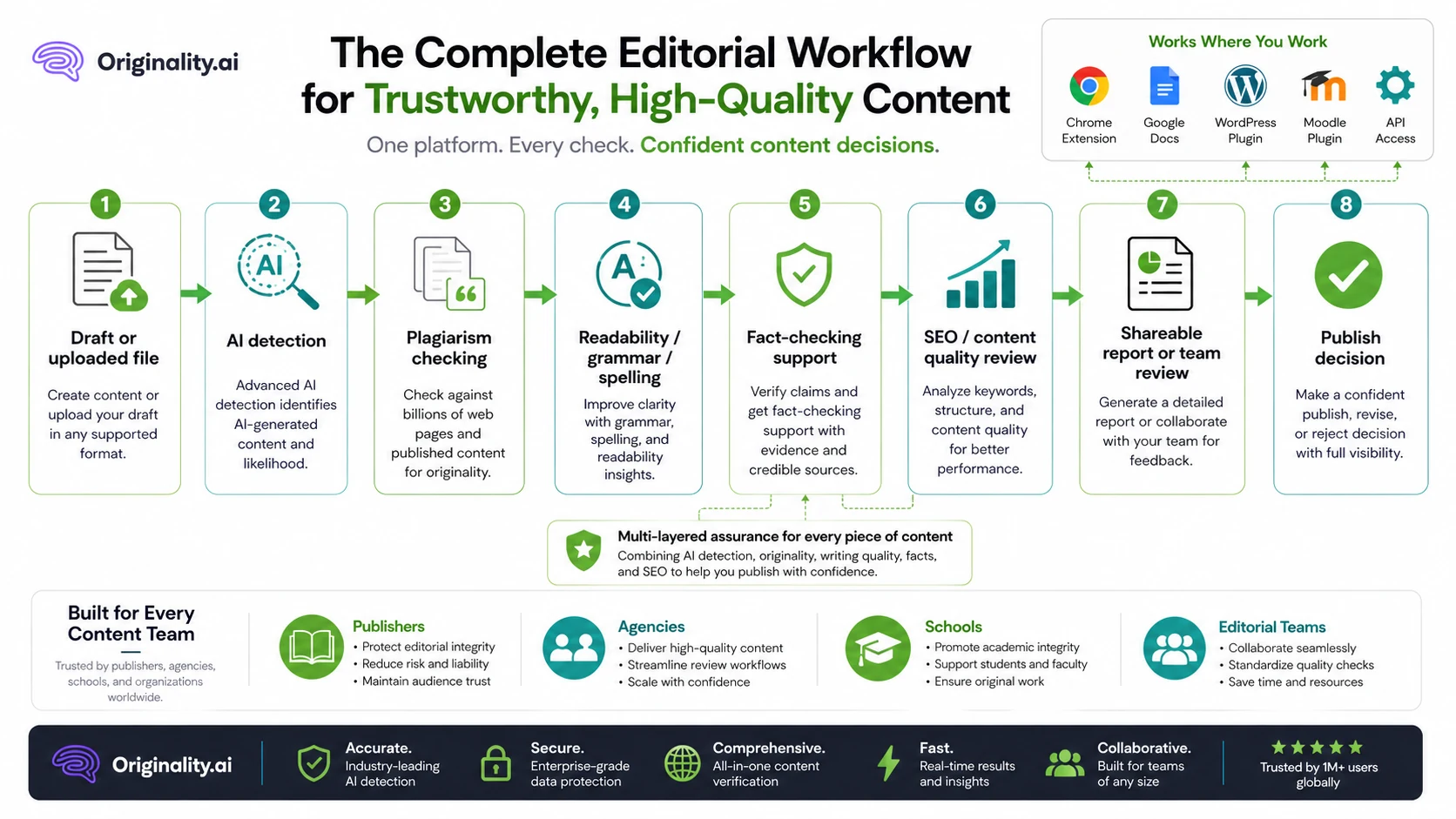
It is not only an AI detector. The public product positioning includes AI checking, plagiarism checking, readability, grammar, fact-checking support, content optimization, bulk or site scanning, reports, team features, Chrome and Google Docs workflows, WordPress scanning, Moodle support, and API access.
That broader scope is the point.
A solo user may look at Originality.ai and think, “I just need to know if this text is AI.” A publisher looks at it differently: “Can this become part of our editorial QA process before we publish or accept outsourced drafts?” Those are very different buying questions.
Our review approach compares public product pages, pricing details, help documentation, refund terms, buyer workflow fit, and nearby alternatives. I do not treat a detector score, a coupon route, or a low monthly price as proof that a product fits the buyer.
My confidence is strongest around Originality.ai’s product role and publisher workflow fit. I am more cautious around live checkout terms, refund outcomes, and long-term value because those depend on plan choice, usage volume, and how carefully the buyer interprets detection results.
Who should use Originality.ai?
Originality.ai makes the most sense for buyers who review content repeatedly.
A publisher or SEO team is the cleanest fit. If your team accepts drafts from freelancers, uses AI-assisted writing internally, updates older posts, or publishes at meaningful volume, Originality.ai can become a checkpoint before content goes live. The value is not only the AI score. It is the combination of AI detection, plagiarism review, readability, reporting, and workflow history.
A small agency may also find it useful. Agencies often need to review work across multiple writers and clients. In that setting, tags, reports, team workflows, and consistent scanning can matter more than the lowest price. The condition is volume: if the agency only reviews a few small documents each month, the credit model may be more than it needs.
WordPress site owners are another natural audience. Originality.ai’s WordPress route is useful if the buyer wants detection closer to the publishing process rather than copying text between tools. I would still test the setup and credit consumption before treating the plugin as a permanent workflow.
Educators and academic reviewers may consider it, especially with Chrome, Google Docs, writer replay, Moodle, multilingual detection, and plagiarism features. But this audience needs the most caution. AI detection scores can be useful signals, yet false positives and context matter. A score should support a review conversation, not become the whole judgment.
Developers or platforms may look at Originality.ai for API access. That is a more serious buying decision. API usage should be evaluated separately from casual dashboard pricing because volume, rate limits, and workflow integration can change the economics quickly.
Who should avoid Originality.ai?
I would be careful with Originality.ai if you only need a quick free check once in a while. In that case, GPTZero or another free-entry detector may be the more practical starting point.
I would also avoid buying it if you want a detector to function as a final truth machine. AI detection is probabilistic. Even when a tool is strong, the result should be read as a signal. If you are making a serious decision about a student, writer, employee, or contractor, a single score is not enough.
Very light users should be cautious with the Pro subscription. A monthly plan can look inexpensive, but unused subscription credits expiring at the end of the month changes the value calculation. If you do not know how many words you will scan, Pay as you go may be safer than recurring billing.
Buyers who mainly want a coupon code should slow down. Originality.ai is usually a plan-fit and credit-usage decision, not a classic coupon-code decision. The better savings path is matching the plan to your real workflow, not chasing a discount before you understand credit rules.
Large institutions should compare carefully before standardizing. Copyleaks may be the stronger comparison when LMS, institutional plagiarism workflow, compliance, and broader education administration matter more than publisher-side content QA.
How Originality.ai fits into a real workflow
A strong Originality.ai workflow starts before the scan.
The buyer first needs to define the job. Are you checking outsourced blog drafts? Student submissions? Existing WordPress posts? Client reports? SEO content before publishing? API-powered submissions inside another product?
Once the job is clear, the workflow is easier to judge:
- Gather the draft or URL that needs review.
- Choose the scan types that matter: AI, plagiarism, readability, grammar, fact-checking support, or optimization.
- Run the scan and inspect sentence-level or report-level output.
- Compare the result against human editorial judgment.
- Decide whether the text needs revision, documentation, a writer conversation, or no action.
- Track, tag, share, or store the report if the team needs auditability.
- Review credit usage before scaling the process.
That last step is easy to forget. A content team can like the product and still choose the wrong plan if it does not calculate word volume.
Workflow check: If you plan to use Originality.ai for recurring content QA, start with a real draft batch instead of judging it from one pasted paragraph.
The strongest fit is a repeatable editorial checkpoint. The weakest fit is panic scanning: paste text, see a number, assume the number is final, and overreact.
Real-world buyer scenarios
Publisher reviewing outsourced articles
A publisher working with multiple writers may use Originality.ai before uploading articles to WordPress. In that case, the tool can support AI checks, plagiarism review, readability checks, and report sharing.
The fit is strong when the team scans enough content to justify Pro or Enterprise. The risk is buying too much too early. If monthly volume is still unclear, I would calculate credit usage before annual billing.
SEO agency managing client content
An SEO agency may want a consistent review process before client delivery. Originality.ai can help standardize checks across writers and clients, especially when reports and scan tagging matter.
The caution is workflow discipline. A tool does not fix a vague editing process. The agency still needs rules for what happens after a flagged sentence, a plagiarism match, or a low readability score.
Educator or academic reviewer
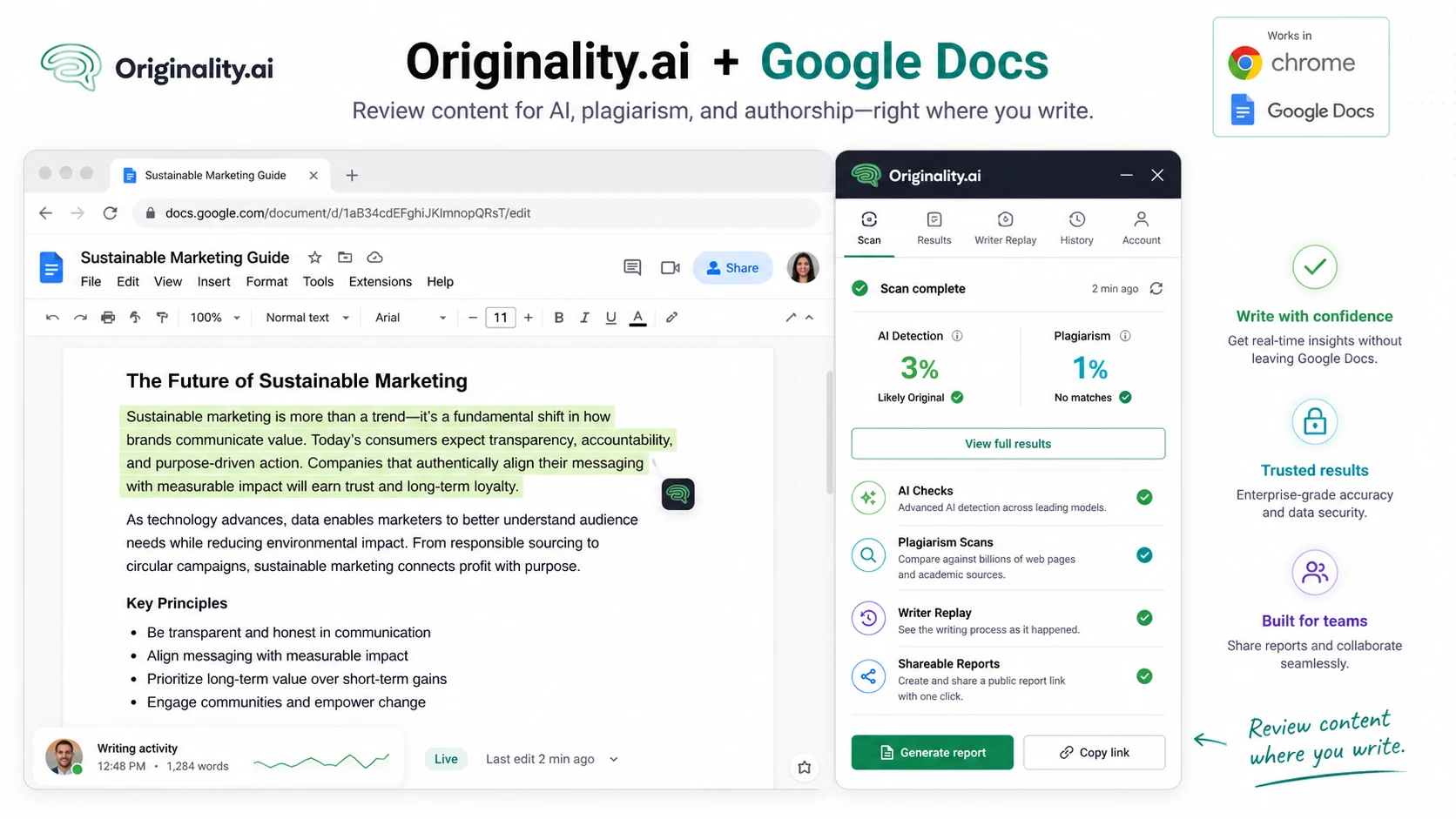
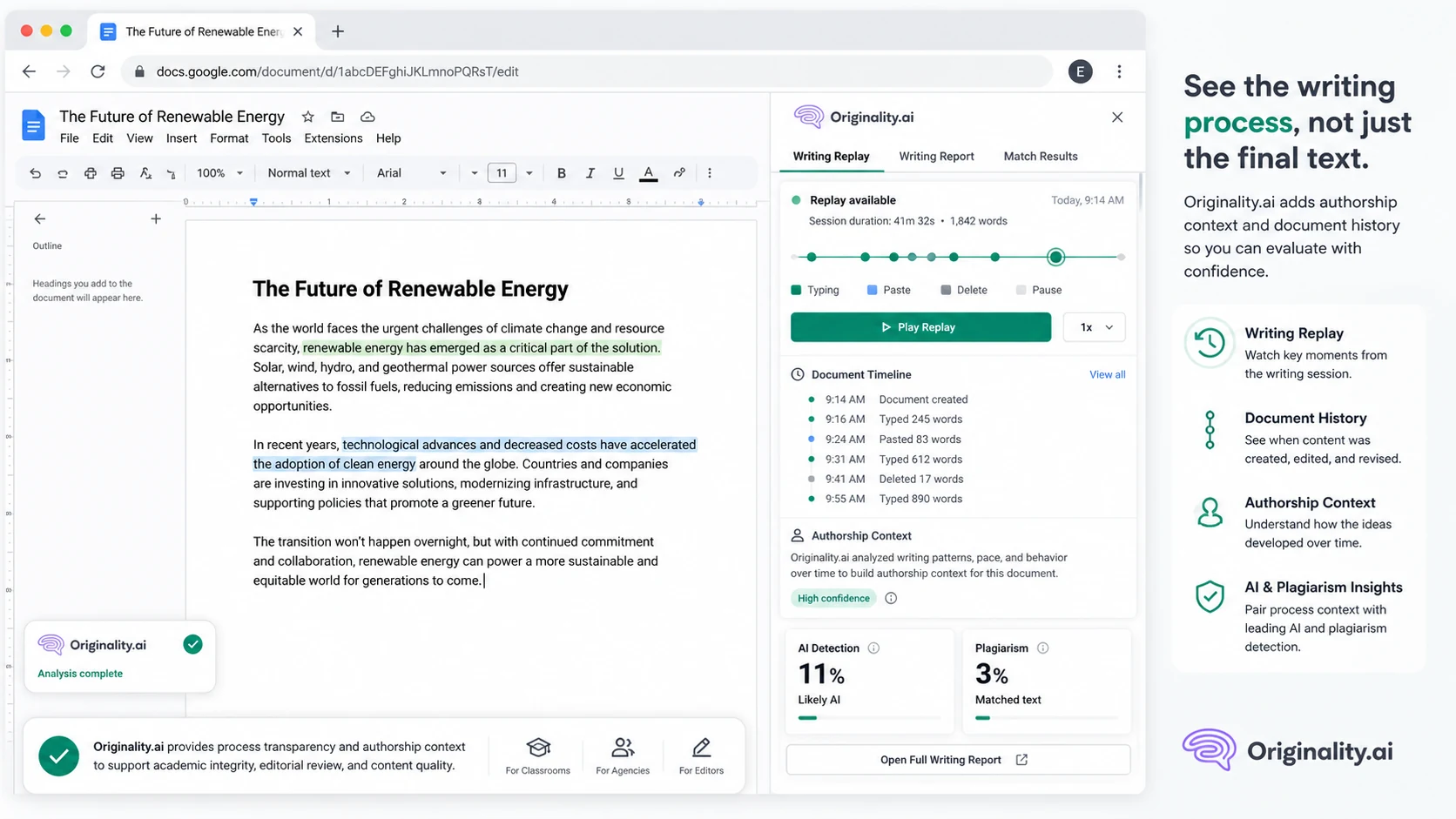
An educator may consider Originality.ai because it includes AI detection, plagiarism checking, Chrome and Google Docs workflows, and Moodle support. Writer replay can also help with context in Google Docs.
This is useful only if scores are handled carefully. A detection result should not be treated as guilt. For education-related use, I would want a documented review policy, a chance for the student to explain, and supporting evidence beyond one score.
Developer or platform owner
A developer may care less about the dashboard and more about API access. Originality.ai can fit if AI and plagiarism checks need to be embedded into another workflow.
This is not a casual plan choice. Before building around the API, I would review docs, rate limits, credit usage, error handling, and expected monthly volume. API economics can become expensive if the product scales faster than expected.
Key features that actually matter
AI detection models
AI detection is the headline feature, but I would not judge it by the headline alone. Originality.ai positions itself around accuracy, multiple use cases, and publisher workflows. The buyer question is narrower: does the detector produce signals that help you make better review decisions?
Buyer note: do not use a score as final proof. Use it to decide where to inspect, what to ask, and whether the draft needs a human editorial pass.
Plagiarism checking
The plagiarism checker is one reason Originality.ai feels more useful for content teams than a detector-only tool. Publishers and agencies often need to know whether text is AI-assisted and whether it overlaps too closely with existing sources.
Buyer note: if plagiarism checking is central to your workflow, compare Originality.ai against Copyleaks before choosing. The best fit depends on whether you need publisher QA, institutional coverage, or deeper LMS/compliance workflow.
Chrome and Google Docs workflow
Chrome and Google Docs support matters because a lot of review work happens inside documents, not dashboards. Writer replay, shareable reports, web-page scans, and document-level checks can reduce friction for writers, students, editors, and teachers.
Buyer note: test the workflow where your team actually writes. A feature is only valuable if it reduces review friction in the place your drafts already live.
WordPress and site scanning
For publishers, WordPress support can be more important than another accuracy claim. If the tool helps scan posts close to the publishing process, it can become part of the editorial workflow instead of a separate chore.
Buyer note: before depending on this path, check setup, site scan behavior, credit usage, and whether the results are easy for your editors to act on.
Team management and reports
Team roles, tags, report sharing, and scan history matter when more than one person reviews content. A solo user may not care. An agency or publisher might care a lot.
Buyer note: if you need accountability, do not compare only the monthly price. Compare how reports will be shared, how long history is kept, how writers are reviewed, and whether team seats add cost.
API access
API access is useful for platforms, agencies, and internal systems that need AI or plagiarism checks embedded into another workflow. It is also where buyers should be most careful.
Buyer note: API access belongs in a separate evaluation. Verify plan access, rate limits, credit consumption, support expectations, and what happens when volume increases.
Pricing and plan value
Originality.ai pricing is mostly a credit-usage decision.
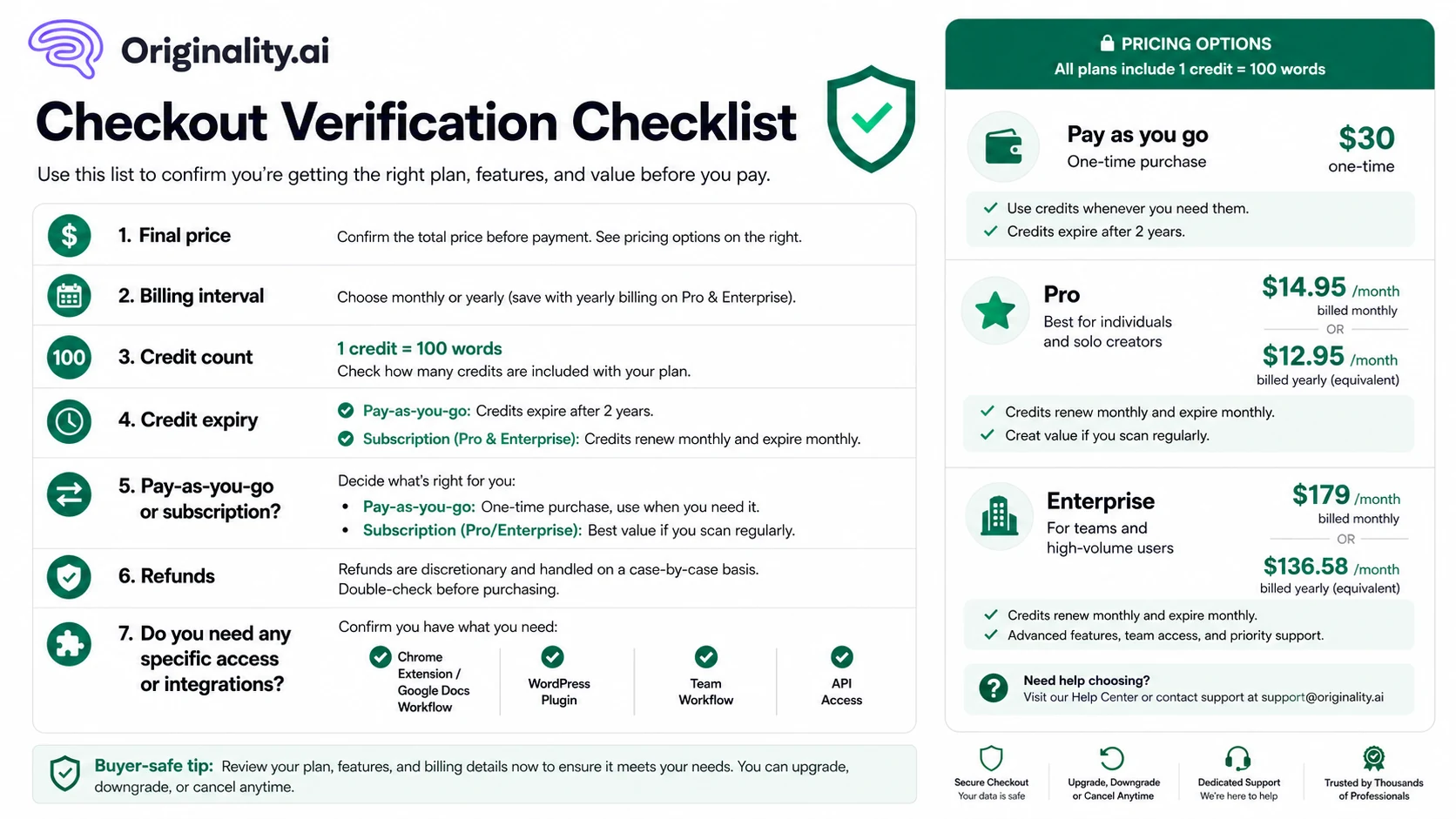
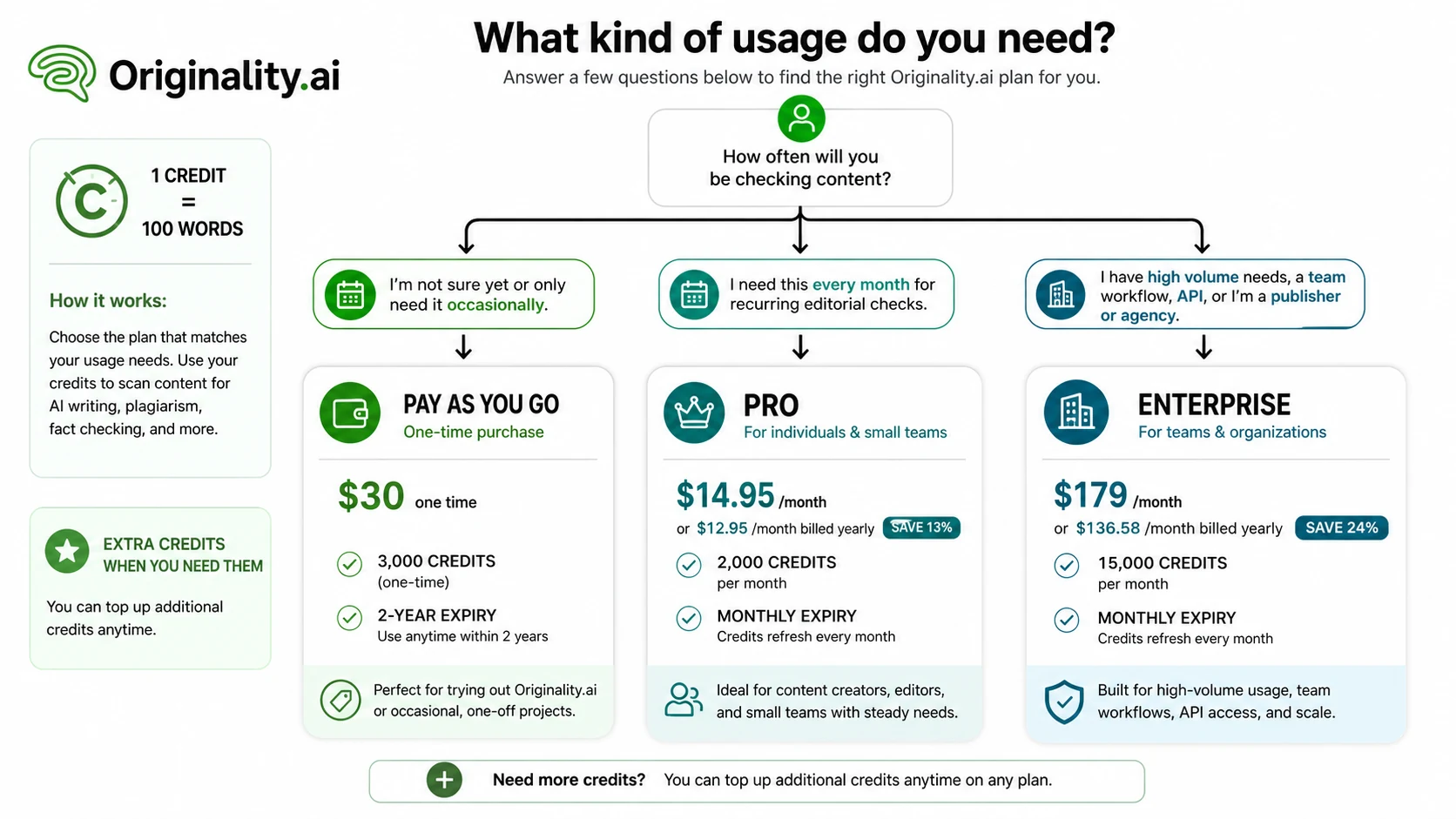
The public pricing page currently presents three main paths: Pay as you go, Pro, and Enterprise. Pay as you go is a one-time route for 3,000 credits. Pro is the monthly or annual subscription route for individuals and small teams. Enterprise is aimed at agencies and publishers with higher volume and deeper workflow needs.
The important detail is not only the price. It is how credits behave.
One credit equals 100 words for common scanning use cases, and subscription credits expire at the end of the monthly billing cycle. That means the Pro plan can be a good fit for recurring monthly checks, but a poor fit if your usage is sporadic. Pay-as-you-go credits last longer, which can make them safer for uncertain buyers.
Originality.ai’s Pro plan is publicly listed at $14.95/month or $12.95/month when billed yearly. Enterprise is listed at $179/month or $136.58/month when billed yearly, with 15,000 credits per month and added workflow depth. Buyers should verify live checkout before treating these numbers as permanent, because pricing pages and plan details can change faster than a review article.
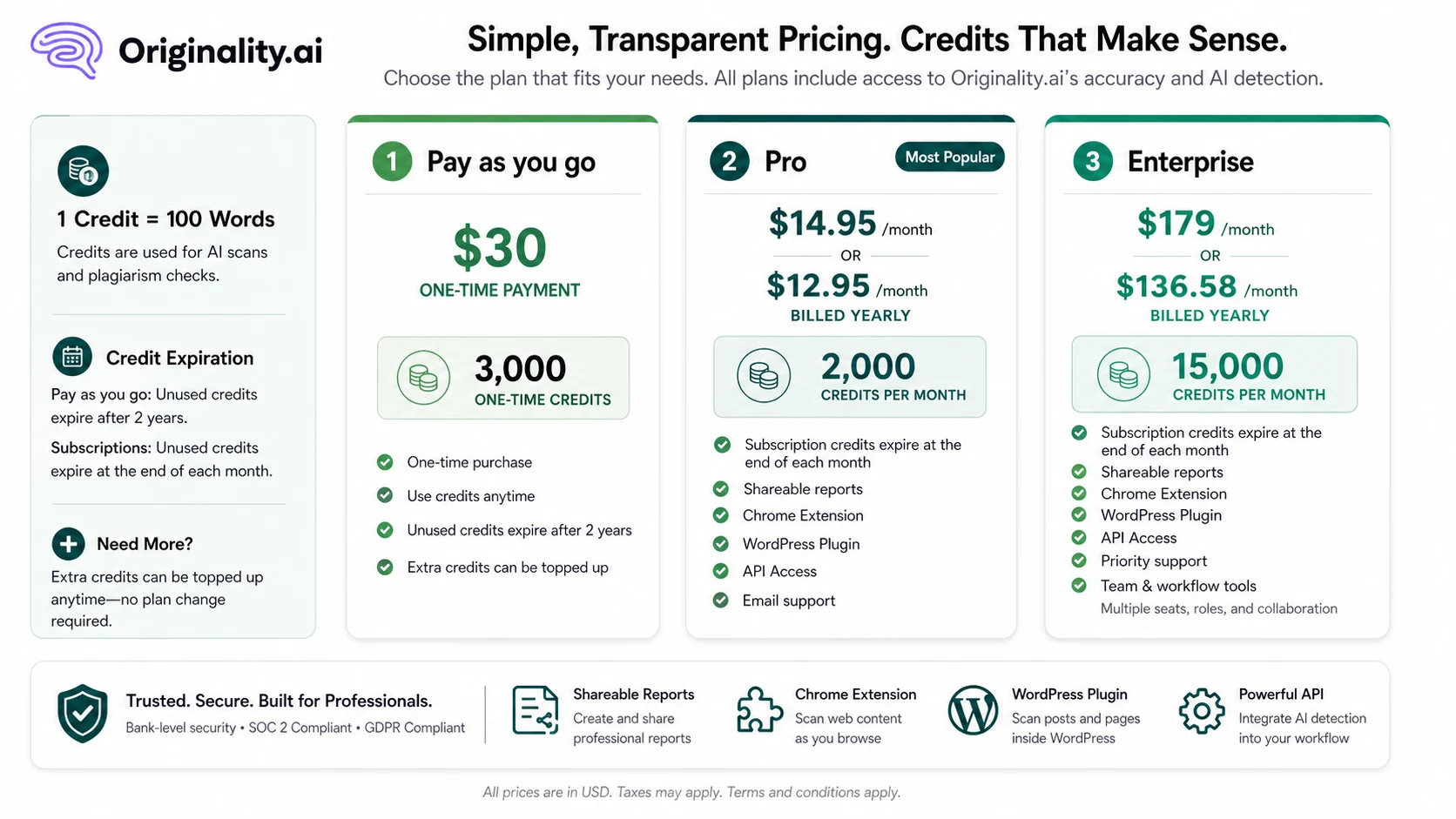
For my money, Pay as you go is the safer first test when volume is uncertain. Pro makes more sense when checks happen every month. Enterprise should be reserved for buyers who genuinely need higher credit volume, API access, longer history, team management, priority support, or agency/publisher scale.
The easy mistake is choosing annual billing because the monthly equivalent looks better. Annual only makes sense after you know Originality.ai will be part of your repeated workflow.
Pricing check: Before choosing Pro or Enterprise, estimate how many words you will scan each month and whether monthly credit expiry changes the real value.
Free plan, trial, coupon, and checkout notes
Originality.ai is not the kind of product I would buy because of a coupon first.
The stronger savings decision is plan fit: Pay as you go for controlled testing, Pro for recurring checks, Enterprise for scale and workflow depth. If a current offer exists, it can improve the purchase. It should not be the reason you buy.
There is also a difference between testing a browser extension or limited entry path and evaluating the full paid workflow. A buyer who only tests a tiny sample may not understand how credits behave across real content volume, plagiarism checks, reports, site scans, or team use.
Refunds deserve extra attention. Originality.ai publishes a refund policy, but it describes refunds as case-by-case and discretionary rather than a simple fixed-window guarantee. That does not mean refunds are impossible. It means buyers should not treat checkout as a no-risk trial unless the live terms clearly support that assumption.
Cancellation is also part of the buying decision. If you choose a subscription, check how cancellation works before paying, especially before annual billing.
Checkout caution: Treat active offers as secondary. First confirm plan fit, credit expiry, cancellation steps, and refund terms.
What I would check before buying Originality.ai
If I were buying Originality.ai for a real workflow, I would check seven things before paying.
First, monthly word volume. Estimate the number of drafts, pages, documents, or student submissions you need to scan each month. Then convert that into credits.
Second, scan type. AI detection alone is not the same buying decision as AI detection plus plagiarism plus readability plus fact-checking support. Combined workflows may consume value differently.
Third, credit expiry. Pay-as-you-go credits and subscription credits behave differently. Do not ignore that.
Fourth, publishing location. If your team works in WordPress, Google Docs, Moodle, or another system, test the workflow there rather than judging from the web app alone.
Fifth, team needs. Seats, reports, tags, scan history, API access, and support depth matter only if your team will actually use them.
Sixth, refund and cancellation terms. Read these before annual billing.
Seventh, alternative fit. Compare Copyleaks, GPTZero, Winston AI, and AI Detector Pro before assuming Originality.ai is the right default.
A simple test before paying
Before paying, I would run a small test like this:
- Pick three to five real documents from your workflow.
- Include different content types, such as a blog draft, outsourced article, edited AI-assisted draft, and older published page.
- Run the checks you actually plan to use, not every available scan type just because it exists.
- Review whether the sentence-level output helps you make a better decision.
- Check how many credits the test consumes.
- Decide whether reports, tags, plugins, or team features would reduce friction.
- Compare the same workflow with at least one alternative before committing.
The test should answer a practical question: does Originality.ai make your review process clearer, faster, or more consistent?
If the answer is no, the plan price does not matter much. If the answer is yes, then pricing becomes a volume calculation.
Pros explained
Originality.ai’s first major advantage is that it fits real publishing workflows better than many detector-only tools. A publisher rarely needs only one score. It needs a process for accepting, rejecting, revising, documenting, and publishing content.
The second advantage is the broader tool mix. AI detection, plagiarism checking, readability, grammar, fact-checking support, SEO optimization, and report sharing can sit in the same review flow. This matters when separate tools would create more switching and more inconsistent decisions.
The third advantage is integration depth. Chrome, Google Docs, WordPress, Moodle, and API access make Originality.ai more adaptable than a simple paste box. That does not mean every buyer needs every route, but it gives the product more room to fit professional workflows.
The fourth advantage is plan separation. Pay as you go, Pro, and Enterprise map to different buyer situations. I like that better than forcing everyone into one subscription path.
The fifth advantage is team usefulness. Reports, tags, history, team management, and API access matter when content review becomes operational rather than occasional.
Cons explained
The biggest downside is credit complexity. Even when the pricing page is public, the buyer still needs to understand word volume, scan types, credit expiry, top-ups, monthly renewal, and annual billing. That is not impossible, but it is more work than comparing two flat subscriptions.
The second downside is weak fit for casual users. If you only need a few checks, Originality.ai may be more platform than you need. GPTZero or a lighter detector may be a better first stop.
The third downside is refund uncertainty. A discretionary refund policy is not the same as a simple trial-style guarantee. This makes checkout verification more important, especially for annual plans.
The fourth downside is score overconfidence. This is not unique to Originality.ai, but it matters. Any AI detector can be misused if the buyer treats probability as proof. In education, hiring, freelance disputes, or sensitive client situations, that risk becomes serious.
The fifth downside is that Enterprise may be tempting before it is necessary. API access, long history, and team features are useful only if they solve a real operational problem. Otherwise, they are expensive complexity.
Green flags and red flags
Green flags:
- You scan content every week or every month.
- You need AI detection and plagiarism checking in the same review flow.
- Your team works in Google Docs, WordPress, Moodle, or a structured editorial process.
- You need shareable reports, tags, scan history, or team review.
- You can estimate monthly word volume before buying.
Red flags:
- You only need a free one-off detector.
- You are buying because of a current offer before checking credit usage.
- You expect the score to prove misconduct or authorship by itself.
- You cannot explain what happens after a piece of text is flagged.
- You are considering annual billing before testing real workflow volume.
The cleanest buyer is not the person most impressed by the homepage. It is the person who knows exactly where Originality.ai fits in the review process.
Originality.ai vs alternatives
Copyleaks vs Originality.ai
Copyleaks is the stronger comparison if the buyer needs broader institutional plagiarism checking, LMS coverage, enterprise governance, or education-style workflows. It may be a better fit for organizations that treat originality review as part of compliance or academic integrity infrastructure.
Originality.ai may still be the stronger choice for publisher-side content QA, especially when WordPress workflow, content optimization, AI detection, plagiarism, and team review all sit close to the publishing process.
For a broader institutional route, start with the Copyleaks store guide and check whether its LMS, plagiarism, and institutional workflow fit your buyer context better than Originality.ai.
GPTZero vs Originality.ai
GPTZero is often the easier first comparison for educators, students, and buyers who want a visible free-entry path before paying. It can feel more approachable when the buyer’s immediate question is whether a document looks AI-generated.
Originality.ai is the stronger comparison when the buyer needs a fuller content QA system with plagiarism checking, reports, team workflow, WordPress scanning, and publisher-oriented processes.
If you are unsure whether you need a full workflow or a simpler detection path, read the GPTZero review before choosing.
Winston AI vs Originality.ai
Winston AI may fit buyers who want a simpler detector and report workflow without the same publisher, WordPress, API, and credit-model depth. That can be a benefit if your needs are narrow.
Originality.ai becomes more persuasive when the buyer needs multiple quality checks around AI, plagiarism, readability, fact-checking support, team organization, and publishing workflow.
The tradeoff is simplicity versus operational depth.
AI Detector Pro vs Originality.ai
AI Detector Pro is worth comparing if the buyer wants a focused AI detection and humanization-style review checkpoint rather than a broader publisher content QA platform.
Originality.ai makes more sense if plagiarism checking, site scanning, WordPress workflow, team roles, reports, and API access are part of the buying reason.
For a narrower detection-first workflow, compare the AI Detector Pro review before assuming Originality.ai is the most efficient route.
Trust, refund, and buyer-risk notes
Originality.ai gives buyers enough public information to understand the product’s role, pricing structure, and workflow direction. That is a positive sign. Pricing pages, refund policy, cancellation help, Chrome/Google Docs pages, WordPress pages, Moodle pages, and API documentation all make the product easier to evaluate than a thin landing page.
Still, the buyer-risk layer is real.
Credit expiry matters. Subscription credits expiring monthly can make a plan less attractive for inconsistent usage.
Refund terms matter. A case-by-case refund policy is not a guaranteed safety net.
Score interpretation matters. AI detection can help identify risk, but false positives and context should always be considered.
Data and privacy review matter if your content is sensitive. Teams handling unpublished client work, student submissions, legal material, medical content, or confidential business drafts should read current privacy and terms before uploading.
Annual billing matters. The annual price can look cleaner, but it is only safer after workflow value is proven.
API access matters if you build around it. Do not treat API use as just another dashboard feature. Review docs, limits, and expected usage carefully.
Final verdict
I would consider Originality.ai if AI detection is only one part of a larger content quality process.
That is where the product makes the most sense: publishers checking drafts, agencies reviewing writer submissions, WordPress teams scanning before publication, educators needing more context than a raw score, and developers building checks into another workflow.
I would skip it if you only need a free occasional scan, if you cannot estimate monthly word volume, or if you want a detector to provide final proof by itself. That is too much trust to place in any AI detection tool.
I would compare it with Copyleaks if institutional plagiarism and LMS workflow matter more. I would compare it with GPTZero if free-entry education-style detection is the main need. I would compare it with Winston AI or AI Detector Pro if you want a narrower detection workflow without the same publisher-side platform depth.
The safest next step is not to buy the biggest plan. It is to run a small real workflow test, calculate credit usage, read the current refund and cancellation terms, and then choose the lowest plan that proves repeated value.
