Quick verdict
DetectGPT is worth a closer look if you need more than a quick AI score.
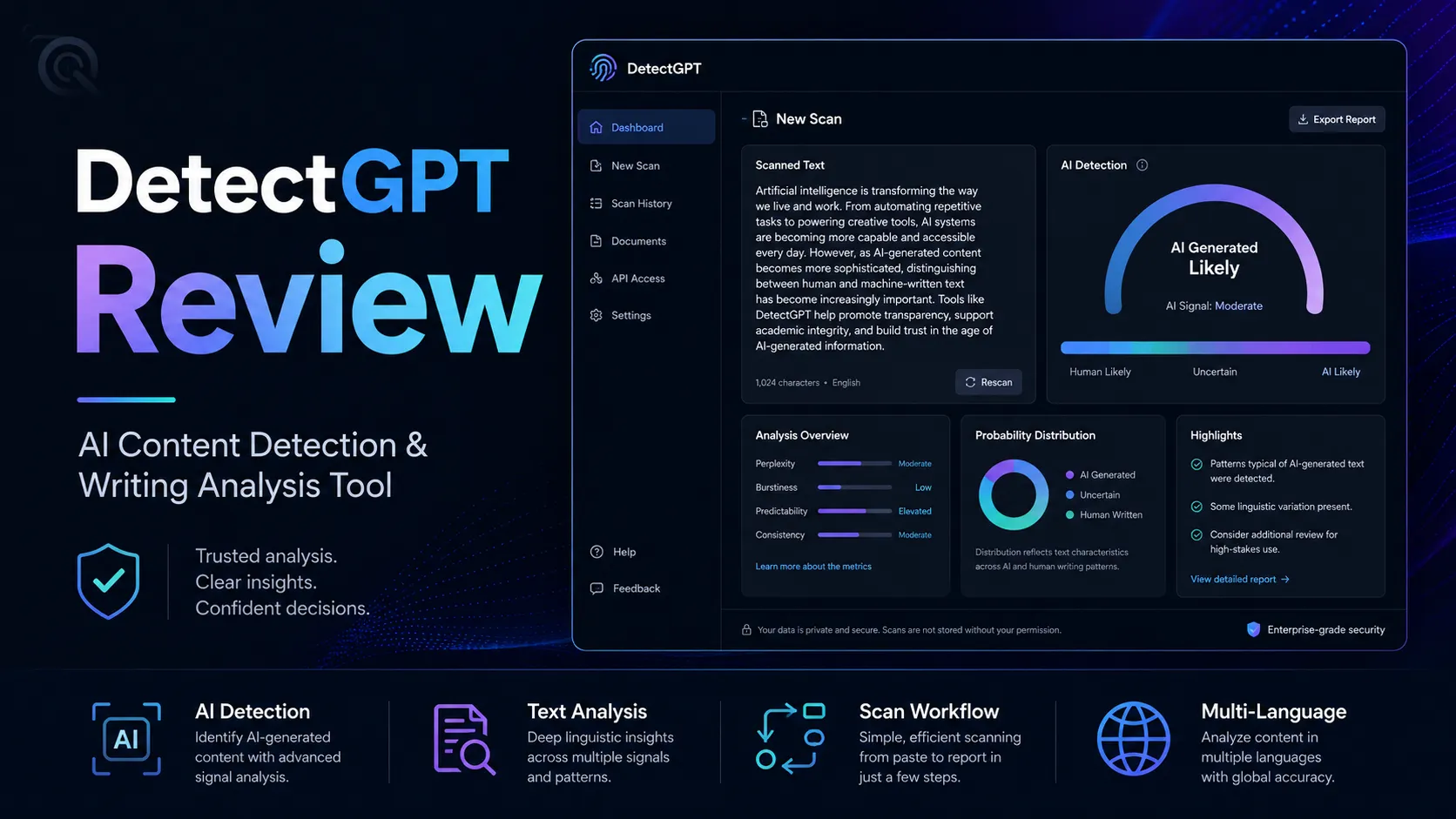
The product is currently presented as an AI detection and content-authenticity tool for teachers, students, writers, publishers, and teams. The useful part is not only the detector itself. It is the surrounding workflow: plagiarism checking, PDF reports, originality certificates, readability signals, batch checks, team limits, and an API path for buyers who want detection inside a larger process.
That sounds attractive, but this is also where I would slow down.
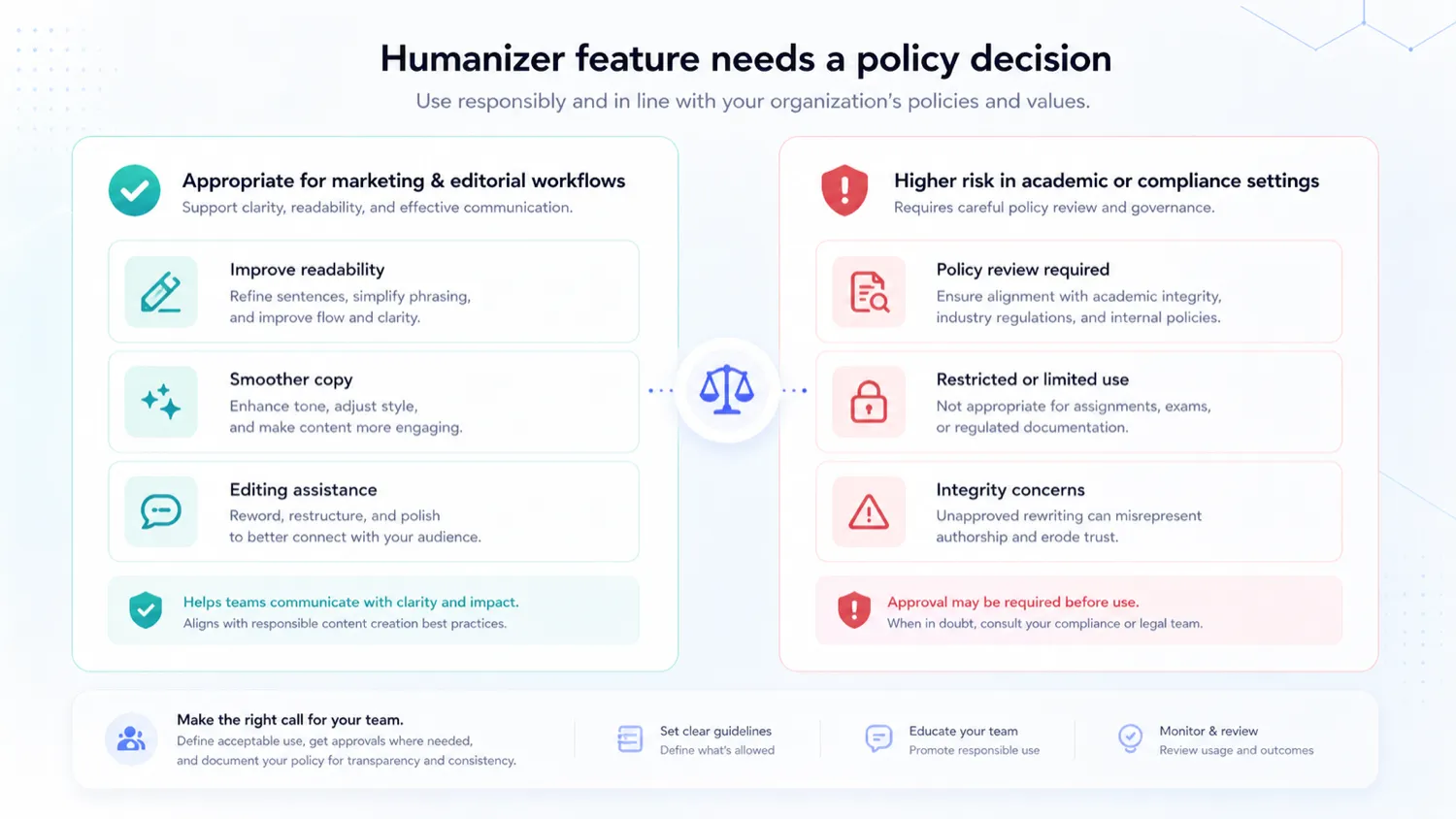
AI detection is not the kind of category where a buyer should treat one score as final proof. A detector can be useful as a signal, but it can also create problems if a school, editor, client, or manager uses the result without context. DetectGPT adds another layer of tension because it also promotes a humanizer feature. That may be useful in some marketing or draft-polishing workflows, but it can be awkward for academic integrity, compliance, or publisher policies.
For my money, DetectGPT makes the most sense if you need repeatable review documentation, not casual curiosity. Test the free path first, read the non-refundable billing terms, and compare it with GPTZero, Originality.ai, Copyleaks, and Winston AI before moving into yearly billing.
Next step: If DetectGPT still fits your review workflow, test the live scanner and check the current plan route before paying.
Review snapshot
| Review point | Practical take |
|---|---|
| Best for | Publishers, educators, agencies, and teams that need repeatable AI-content review |
| Not ideal for | Buyers who want a final authorship verdict from one detector score |
| Main use case | AI detection, plagiarism checking, reports, and authenticity documentation |
| Starting price | Public pricing starts at $15/month on the Essential plan |
| Free path | Free scan or free trial messaging is visible before payment |
| Main strength | Detection plus reports, certificates, plagiarism checks, and team/API positioning |
| Main concern | Strict refund terms and policy tension around the humanizer feature |
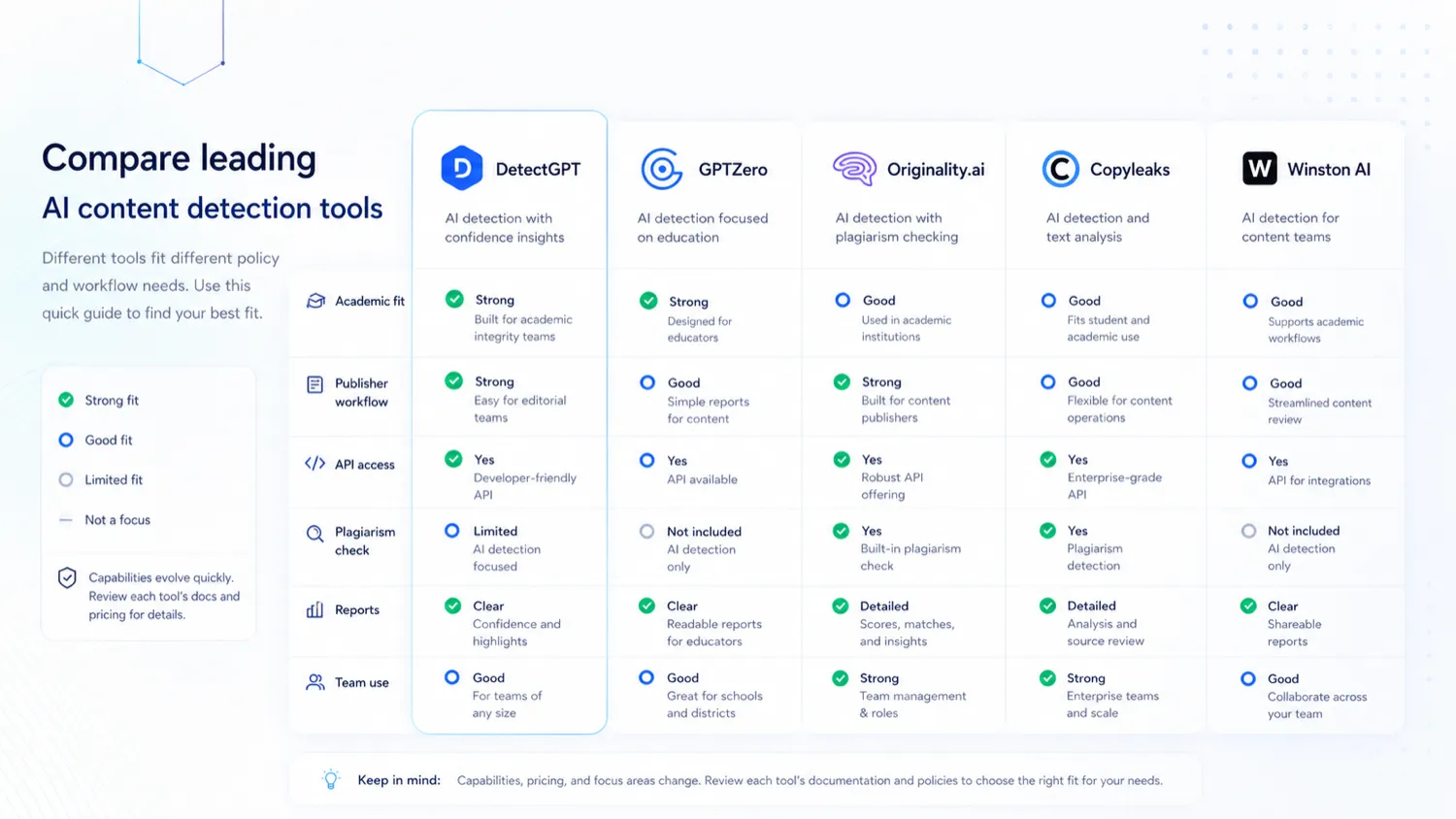
| Best alternatives to compare | GPTZero, Originality.ai, Copyleaks, Winston AI |
| Best next step | Run real samples through the free path before choosing a paid or yearly plan |
What is DetectGPT?
DetectGPT is best understood as an AI-detection and content-authenticity workflow for buyers who need to check whether text may have been AI-assisted, document the result, and decide what to do next.
The public product page positions it around AI detection for teachers, students, and writers, with support for text scanning, file upload, plagiarism checking, readability scoring, originality certificates, and PDF reports. Its pricing page also shows word allowances, user seats, batch file detection, and an AI Content Humanizer on each paid tier.
That combination matters.
A simple detector answers, “Does this text look AI-generated?” A workflow tool needs to answer a harder question: “What should a buyer do after the result?” DetectGPT becomes more useful when the answer involves reporting, internal review, client documentation, editorial checks, or repeatable team processes.
Our review approach compares public product pages, pricing details, policy pages, buyer workflow fit, and nearby alternatives. We do not treat a free scanner, coupon route, or headline detection claim as proof that the product fits every buyer. My confidence is strongest around DetectGPT’s current public positioning and pricing structure. I am more cautious around accuracy claims, refund flexibility, and how the humanizer feature should be governed inside schools or stricter editorial teams.
Who should use DetectGPT?
DetectGPT fits buyers who already know why they need AI detection.
A publisher or content site can use it as a pre-publication checkpoint for AI-assisted drafts, freelancer submissions, sponsored content, or contributor work. The value is not in accusing a writer based on a number. The value is in catching content that needs a second human review before it goes live.
An educator may find it useful as one signal in an academic-integrity workflow. The careful word is “signal.” If a school uses AI detection, it needs a fair process for review, discussion, and context. DetectGPT can support that process, but it should not become the entire process.
An agency may care about PDF reports and originality certificates. Client-facing work often needs documentation. If the agency is reviewing large amounts of draft text, the paid plans may become more relevant because of word limits, team seats, and batch file checks.
A small team may consider DetectGPT if the Essential plan is too narrow but the Pro or Team plan fits the monthly review volume. The Team plan’s unlimited-member language is worth checking if many people need access, but buyers should still model word volume and reporting needs before paying.
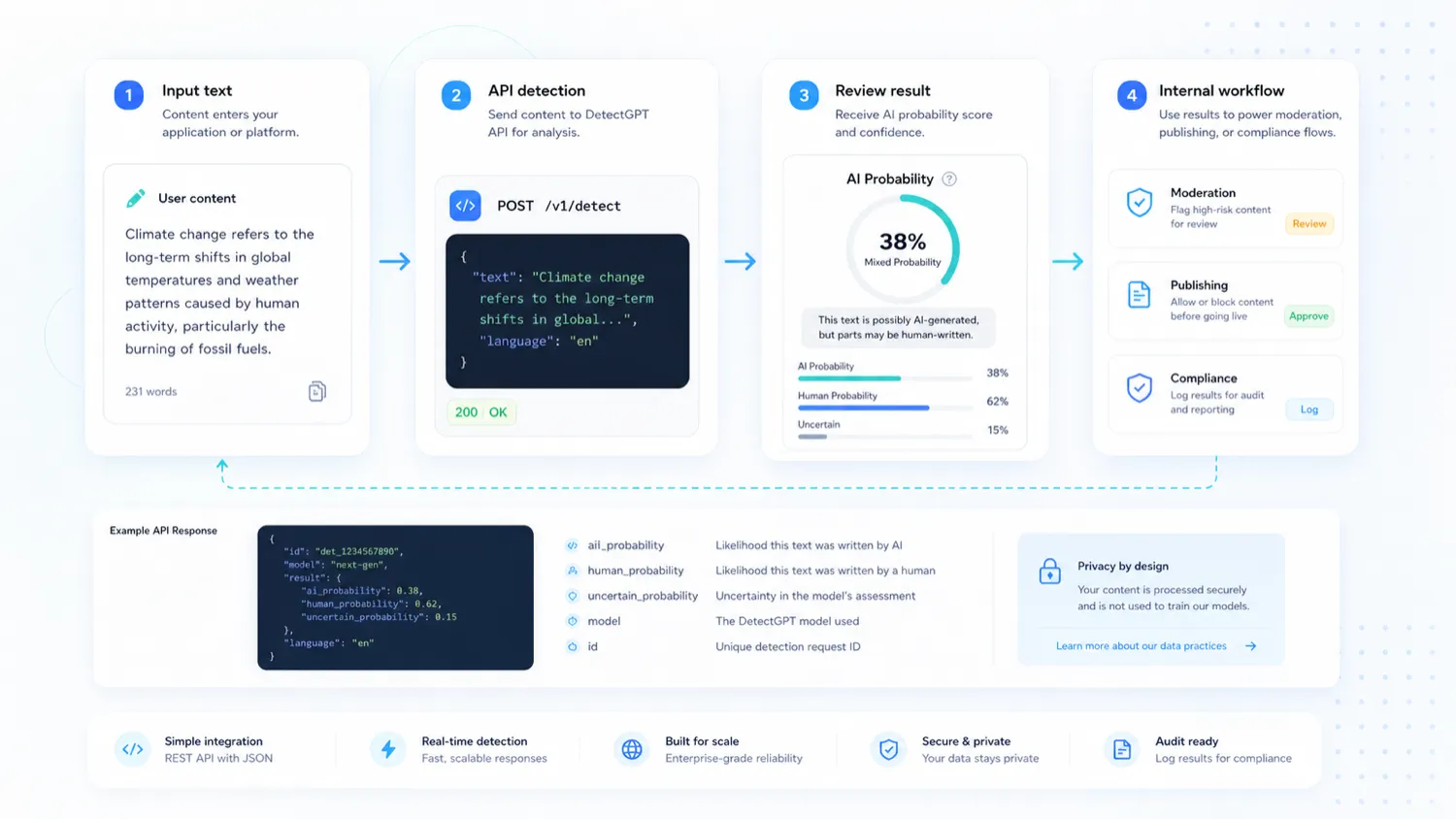
Technical buyers may also care about API positioning. DetectGPT publicly presents an API path for adding detection or humanizer capabilities into another workflow. I would treat that as a separate buyer check, not as something to assume from the web scanner alone.
Who should avoid DetectGPT?
I would avoid DetectGPT if you only need one or two occasional checks. The free path may be enough, and a paid plan may create more commitment than the use case deserves.
I would also be careful if your organization wants detection-only tooling with no humanizer tension. DetectGPT’s humanizer messaging may be useful for draft polishing in some content workflows, but it can be uncomfortable in a school, hiring, compliance, or strict publisher environment. That does not make the product unusable. It does mean the buyer needs a clear internal policy before rollout.
DetectGPT is also not the safest fit if you need a mature institutional workflow with LMS procurement, large admin controls, or formal enterprise review. In that situation, compare Copyleaks and GPTZero first. DetectGPT may still be useful, but the buying question changes from “Does it detect AI?” to “Does it fit institutional process and risk?”
I would not choose it if you need refund flexibility after paying. The public refund policy is strict. It says transactions are non-refundable, including mid-term cancellations. That makes the free scan and trial path more important than usual.
Finally, skip the paid plan if you cannot estimate monthly word volume. The plan table looks simple, but a detector becomes expensive when buyers underestimate how much text they need to check.
How DetectGPT fits into a real workflow
A healthy DetectGPT workflow starts before the scan.
First, define the reason for checking the content. Is the buyer reviewing student work, client content, a freelancer draft, SEO draft, guest post, or internal document? The answer changes how seriously the result should be treated.
Second, run a real sample through the tool. A short paragraph is not enough. Longer documents usually give a more useful review signal because the tool has more context to inspect.
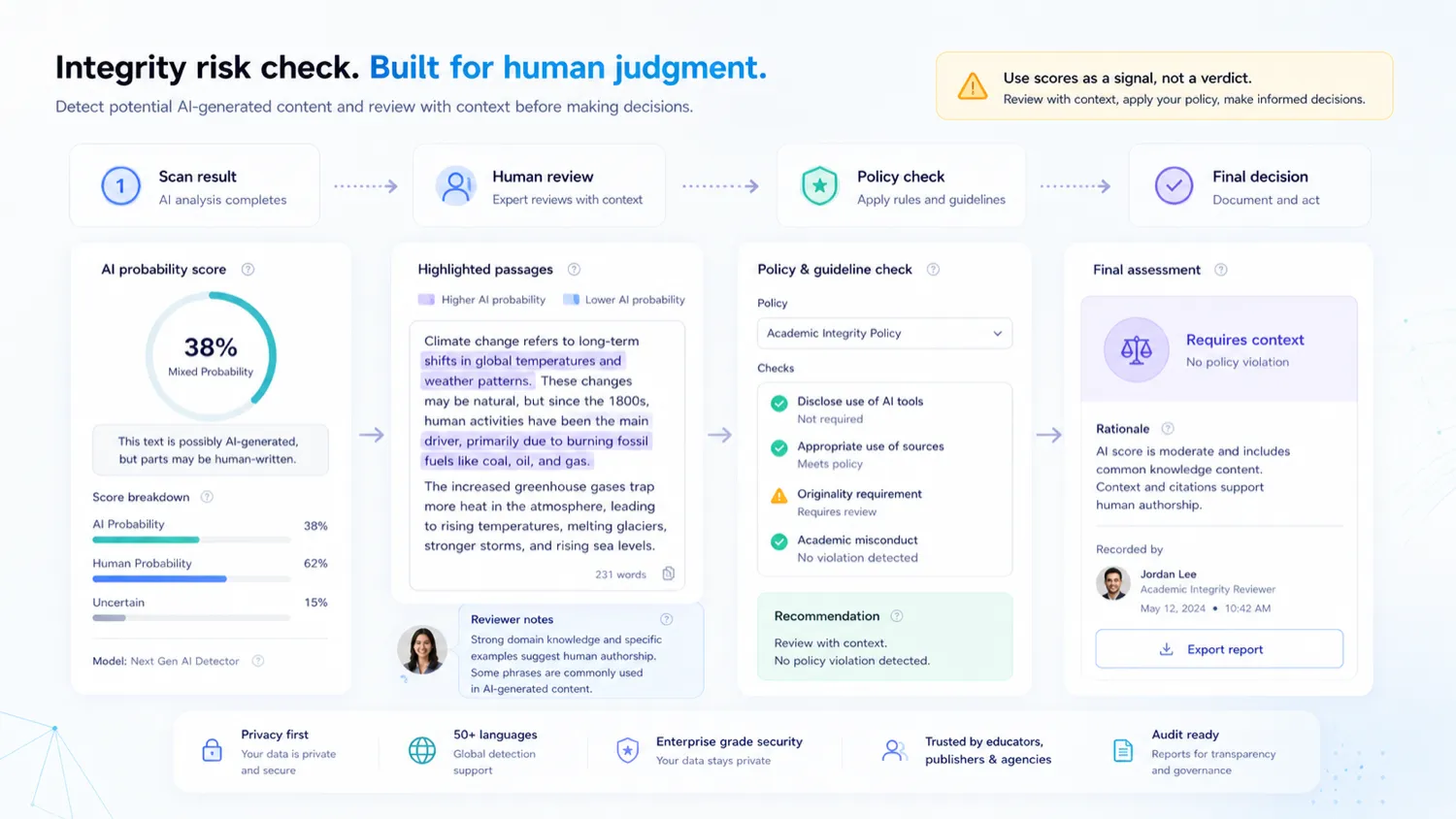
Third, look at the output as a decision point, not a verdict. If the result raises concern, the next step should be human review, a second tool if needed, and a written policy for what action follows. That matters especially in schools and client-facing editorial workflows.
Fourth, decide whether reports, certificates, plagiarism checks, or batch files are actually needed. If they are not, a lighter free detector may be enough. If they are, DetectGPT becomes more defensible as a paid workflow tool.
Workflow check: If you are evaluating DetectGPT for a team, test it with real samples before choosing a monthly or yearly plan.
Real-world buyer scenarios
A publisher reviewing contributor drafts
A publisher may use DetectGPT before accepting articles from contributors, freelancers, or sponsored-content partners. In that workflow, the result should trigger a closer editorial review, not an automatic rejection.
DetectGPT may fit because it combines detection with plagiarism checks and reports. It may fail if the publisher has no written policy for how results are interpreted. The safer route is to use it as a first-pass signal and keep a human editor in the final decision loop.
An educator checking submitted work
An educator might use DetectGPT when a submission feels inconsistent with a student’s normal writing. The tool can support a conversation, but it should not replace one.
This is where buyer caution matters most. False positives, short samples, edited drafts, ESL writing, and mixed human-AI writing can complicate the result. A school should compare DetectGPT with GPTZero and Copyleaks if academic workflow, documentation, or institutional expectations matter.
An agency documenting client content review
An agency may find value in PDF reports and originality certificates. If a client is concerned about AI-assisted content, the agency can use DetectGPT as part of a review process before delivery.
The plan decision depends on volume. One person checking a few drafts may not need much. A team checking many client pages may need Pro or Team. I would model monthly word volume before paying for annual billing.
A technical team evaluating API use
A technical team may want AI detection inside an internal moderation queue, content intake process, or publishing tool. DetectGPT’s API positioning makes that worth investigating.
The risk is assuming API fit too quickly. A public web scanner can prove basic interest, but production use depends on authentication, usage terms, throughput, error handling, cost, and support. Those details should be checked before development work starts.
Key features that actually matter
AI detection across pasted text and files
The central feature is AI detection. DetectGPT lets buyers check whether text is flagged as human, AI, or mixed, and its public page promotes support across major AI models.
Buyer note: useful detector output should lead to a review process. If your team uses the result as final proof, the tool may create more risk than clarity.
Plagiarism checking and readability signals
The plagiarism and readability pieces make DetectGPT more useful than a narrow score box. Publishers and agencies often need to know whether a draft has originality issues, unclear writing, or quality problems beyond AI probability.
Buyer note: treat these as review aids. They can help prioritize edits, but they do not replace editorial judgment.
PDF reports and originality certificates
Reports and certificates matter when the buyer needs documentation. A freelancer, agency, publisher, or teacher may need to share why content was reviewed and what the result suggested.
Buyer note: reports are useful only if the person receiving them understands their limits. A professional-looking report can still be misused if the policy behind it is weak.
Humanizer feature
DetectGPT includes an AI Content Humanizer on its public paid plans and promotes humanizer functionality separately. For some content teams, this may support draft polishing and readability work. For schools or compliance workflows, it can create a policy conflict.
Buyer note: decide before rollout whether the humanizer is allowed, who can use it, and whether it belongs in the same process as detection.
Batch checks, seats, and team workflow
The paid plans differ by monthly word allowance, number of users, and batch file limits. Essential is a one-seat plan. Pro adds more words and three team members. Team shows higher word volume and unlimited team members.
Buyer note: the plan decision should be based on real monthly volume, not the cheapest visible price.
API positioning
DetectGPT publicly presents an API for organizations that want detection or humanizer capabilities inside their own tools.
Buyer note: verify the API documentation and billing behavior before treating this as a production-ready integration path. API work deserves a separate technical check.
Pricing and plan value
DetectGPT’s public pricing is clearer than many tools in this category, but the buyer still needs to read it carefully.
The current public pricing page shows Essential at $15/month, Pro at $29/month, and Team at $59/month. The yearly toggle is promoted as six months free. The visible plan differences are not only price. They include monthly word limits, user seats, batch file detection limits, PDF report generation, humanizer access, and plagiarism checking.
Essential is the natural starting point for a single buyer who needs more than free checks but does not have team volume. It includes 50,000 words per month and one user seat, which may be enough for a freelancer or small publisher with light review needs.
Pro is more relevant when a small team needs more monthly word volume and more than one person involved. Its 250,000-word allowance and three-member structure make it a more realistic fit for agencies or content teams.
Team is the plan to inspect when many people need access or batch file volume matters. The unlimited-member language sounds strong, but the real constraint may still be word volume, file limits, reports, and internal policy.
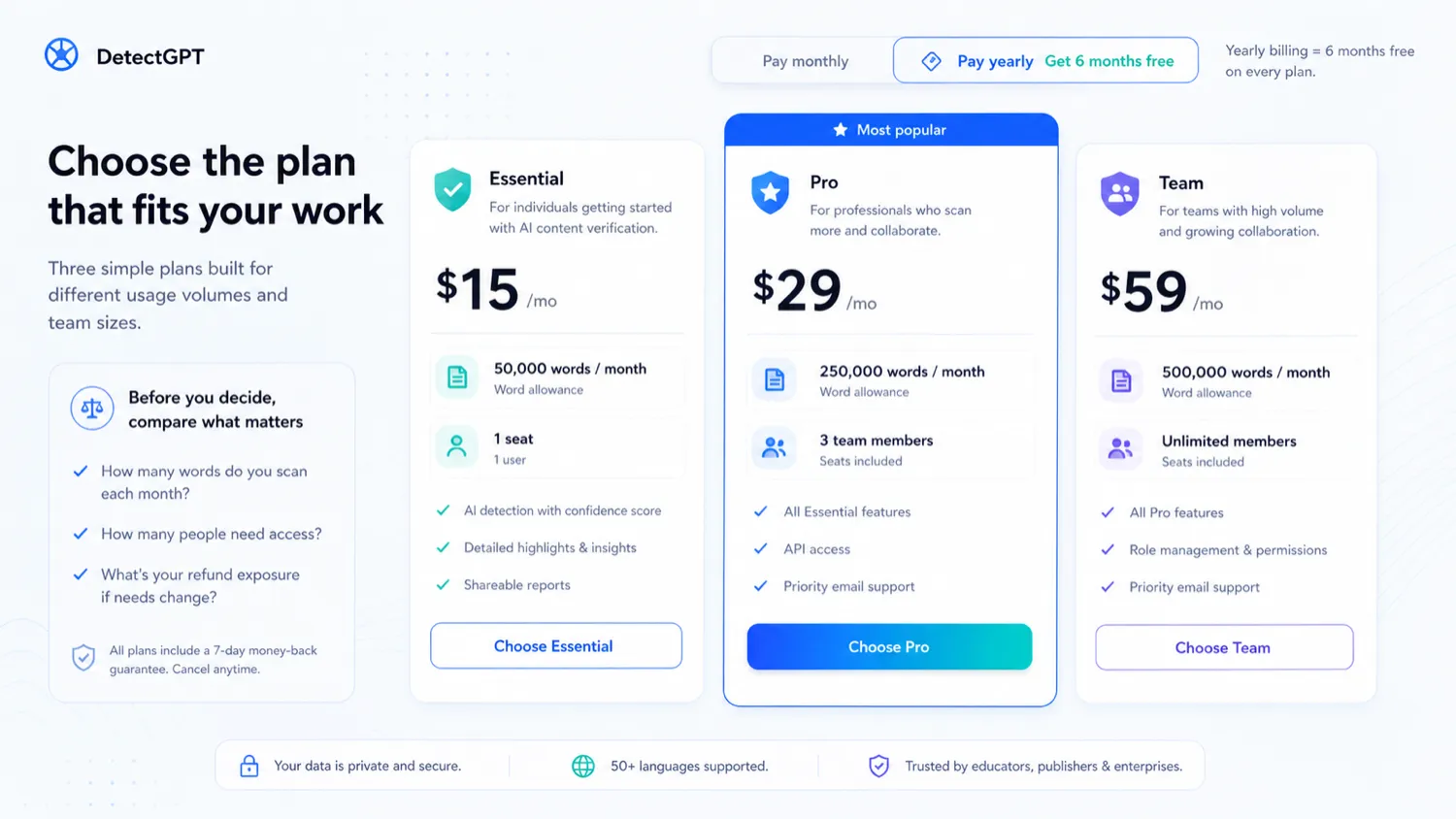
The annual savings message can look attractive, but I would not start yearly unless the workflow is already proven. With a non-refundable policy, the cheapest effective monthly price is not automatically the safest purchase.
Pricing check: Compare DetectGPT plans by monthly word volume and team needs before treating the annual savings message as the best deal.
Free plan, trial, coupon, and checkout notes
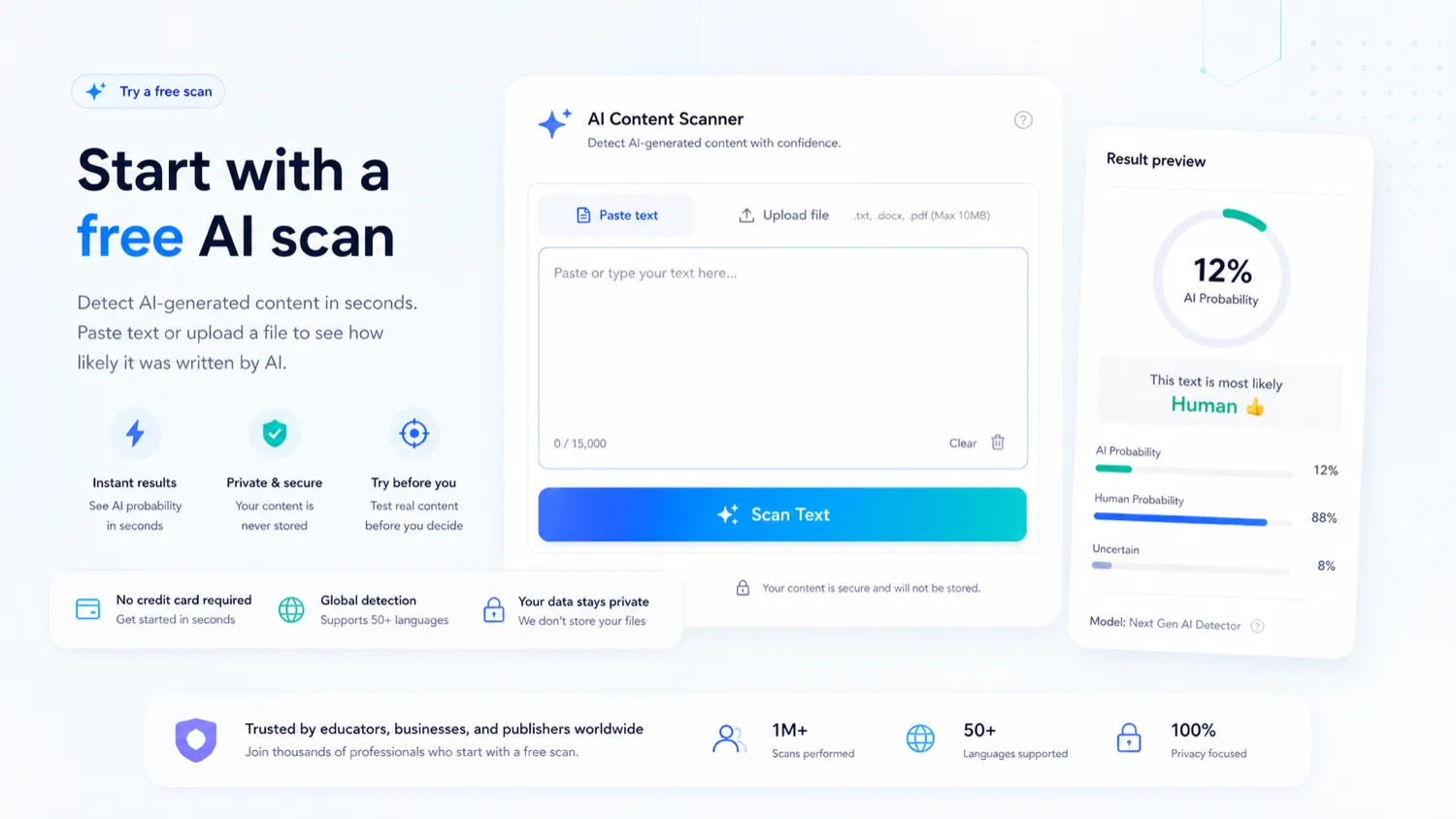
DetectGPT shows a no-credit-card scan path and free trial messaging. That is where most buyers should begin.
The free path should answer practical questions:
- Does the result make sense on a document where you know the writing process?
- Is the output easy enough to explain to an editor, student, client, or manager?
- Do the report features matter, or is the score enough?
- Does the humanizer feature fit your policy?
- How much text would you realistically check each month?
The coupon question should come later.
DetectGPT’s most visible savings angle is the yearly billing message, not a clearly verified public coupon code. The DetectGPT coupon page may help you check the current deal route, but I would not treat a coupon path as the reason to buy.
The right order is product fit first, policy fit second, plan fit third, and coupon or annual savings last.
Checkout order: Use the free path first, then check whether the live offer route changes the plan decision after the workflow fit is clear.
What I would check before buying DetectGPT
If I were buying DetectGPT for a real workflow, I would check seven things before paying.
- Real sample quality. Test documents where you already know the writing process. Do not judge the tool from one short paragraph.
- Policy fit. Decide whether the humanizer feature is acceptable in your organization.
- Word volume. Estimate monthly words, not just number of documents.
- Seat needs. Check whether one user, three team members, or unlimited members matches your workflow.
- Report value. Decide whether PDF reports or originality certificates are genuinely useful.
- Refund terms. Read the non-refundable policy before choosing yearly billing.
- Alternative fit. Compare GPTZero, Originality.ai, Copyleaks, and Winston AI before committing.
A simple test before paying
Before paying, I would run a small test like this:
- Choose three real documents: one human-written, one AI-assisted draft, and one edited mixed draft.
- Run each through the free scan or trial path.
- Compare the results with what you already know about the writing process.
- Check whether the result is understandable enough to share with a human reviewer.
- Export or inspect any report features you expect to use.
- Decide whether the humanizer feature fits your internal policy.
- Estimate monthly word volume before choosing Essential, Pro, Team, monthly, or yearly billing.
This test will not prove that DetectGPT is perfect. That is not the point. It will show whether the tool gives your workflow useful signals.
Pros explained
Clearer plan structure than many detector tools
DetectGPT’s plan table is easy to understand at a first pass. Essential, Pro, and Team have visible prices and usage differences.
That matters because buyers can compare word volume, user seats, batch file limits, reports, and team needs before checkout. The limit is that simple pricing does not remove refund risk. A wrong yearly plan can still be costly.
Useful combination of detection and documentation
The pairing of AI detection, plagiarism checking, reports, and certificates makes DetectGPT more interesting for professional workflows than a basic free checker.
This matters most for agencies, publishers, and educators that need documentation. It matters less for someone who only wants a quick personal check.
Free path before payment
The no-credit-card scan and trial messaging reduce the need to guess before paying.
That is especially important because refunds are strict. A cautious buyer should use the free path as the real evaluation lane, not as a small bonus.
Team and API potential
DetectGPT is not only framed as a consumer web scanner. It has team plan language and API positioning, which may matter for organizations.
This stops being enough if API documentation, throughput, cost, or support expectations do not match your technical use case. Verify that separately.
Cons explained
Detector results can be misused
The biggest risk is not that DetectGPT has no value. The risk is that buyers use the result as final proof.
That matters for schools, hiring, publishing, and client relationships. A detector should support a fair process, not replace one.
The humanizer feature creates policy tension
DetectGPT’s humanizer feature can be useful for draft polishing in some marketing or content workflows. But for education or compliance-heavy buyers, it raises a practical governance question.
If the same product is used to detect AI-assisted writing and reshape AI-assisted drafts, the organization needs to decide what is allowed before rollout.
Refund flexibility is weak
The public refund policy says transactions are non-refundable. Cancellation stops future billing but does not refund the current billing period.
This makes the free path and monthly testing more important. I would avoid yearly billing until the tool has proven value.
Plan value depends on real volume
A buyer who checks only a few documents may overpay. A buyer who checks a lot of content may hit plan limits faster than expected.
The safest plan choice comes from estimating monthly word volume and report needs, not from picking the middle tier by habit.
Green flags and red flags
Green flags
- You need repeatable AI detection, not one casual score.
- PDF reports or originality certificates help your workflow.
- You have a written policy for how results are interpreted.
- Your monthly word volume makes a paid plan defensible.
- You are willing to test the free path before choosing annual billing.
Red flags
- You expect one score to prove authorship.
- Your school or organization is uncomfortable with humanizer features.
- You cannot estimate monthly word volume.
- You need generous refund flexibility.
- You need an institutional LMS or enterprise procurement path before rollout.
DetectGPT vs alternatives
GPTZero vs DetectGPT
GPTZero is the stronger comparison if the buyer’s main concern is education-style AI detection, classroom trust, writing verification, and academic workflow. It has a clearer public identity around responsible detection and education.
DetectGPT may still make sense if the buyer wants a simpler plan table, PDF reports, originality certificates, and a combined detection-plus-humanizer environment. For academic teams, I would compare the GPTZero store page before paying for DetectGPT.
Originality.ai vs DetectGPT
Originality.ai is often the better comparison for publishers, SEO teams, and content operations that need AI detection plus plagiarism checking inside a recurring editorial process.
DetectGPT may feel more straightforward for buyers who want fixed monthly word limits and report-oriented review. Originality.ai may be the stronger route if a publisher needs deeper editorial operations, team management, or a more established content-originality workflow. Compare the Originality.ai store page if publishing-side review matters most.
Copyleaks vs DetectGPT
Copyleaks is a stronger comparison for institutions, API-heavy buyers, LMS contexts, and broader plagiarism or content-integrity coverage.
DetectGPT may be easier to evaluate for smaller teams because the public plan table is simpler. Copyleaks may be more appropriate when procurement, enterprise integrations, or institutional confidence are more important than quick setup. The Copyleaks store page is worth checking before choosing DetectGPT for a school or larger organization.
Winston AI vs DetectGPT
Winston AI is another detection-first route for buyers who want AI text detection, plagiarism checks, reports, and a different pricing model.
DetectGPT may be more attractive if the buyer prefers visible monthly word allowances and team seat language. Winston AI may be more appealing if the buyer wants to compare credit-based detector workflows and a different approach to classroom or content team usage. Use the Winston AI store page as a comparison route if plan structure is the main concern.
Humanizer-adjacent comparison routes
Because DetectGPT includes humanizer functionality, some buyers may also compare tools built mainly for draft polishing or AI-assisted text rewriting. I would keep those separate from detection-first alternatives.
For a school, publisher, or compliance team, the humanizer feature is not a direct replacement for AI detection. It is a policy question. For a marketer polishing AI-assisted drafts, it may be useful. The buyer should decide which job matters more before comparing tools.
Trust, refund, and buyer-risk notes
The trust question around DetectGPT has three layers.
First, AI detection itself needs caution. A detector result can be useful, but it should not become a punishment engine, hiring decision, or client accusation without review. For sensitive workflows, document how results are interpreted before using the tool widely.
Second, refund terms are strict. The public policy says paid transactions are non-refundable and that cancellation does not refund the current billing period. That means buyers should test free, start monthly if uncertain, and avoid annual billing until usage is proven.
Third, the humanizer feature needs governance. In a marketing workflow, draft-polishing may be acceptable. In a school or compliance workflow, the same feature may be uncomfortable. The product is not automatically wrong for having it, but the buyer should decide whether it fits the use case.
Privacy also deserves attention. DetectGPT’s privacy policy says it may collect account, usage, device, location, cookie, support, and other information connected with the service. Buyers handling sensitive submissions, student documents, client drafts, or internal company material should review privacy expectations before uploading real content.
Finally, do not rely on older third-party pricing references if they conflict with the current public pricing page. Detector tools and AI workflows change quickly. The live checkout route and current policy pages are the sources that matter before payment.
Final verdict
I would consider DetectGPT if you need a repeatable AI-detection workflow with plagiarism checks, reports, certificates, team plan options, and a visible pricing structure.
I would skip it if you only need a few occasional checks, if your organization is uncomfortable with humanizer features, or if you need refund flexibility after payment.
I would compare it with GPTZero if education workflow is the priority, Originality.ai if publishing-side content review matters most, Copyleaks if institutional or API-heavy coverage matters, and Winston AI if you want another detection-first pricing model.
The safest next step is simple: use the free path with real sample documents, decide whether the humanizer feature fits your policy, compare word volume against plan limits, and read the refund terms before you choose a paid or yearly route.
