
DetectGPT Pricing, Plans & Detection Fit
DetectGPT is best treated as an AI detection and content-authenticity workflow, not just another paste-and-scan checker. It combines AI detection, plagiarism checks, PDF reports, a humanizer, and an API, which makes it more relevant for publishers, educators, agencies, and teams that need repeatable documentation rather than a one-off score.
Fit → price → checkout
Use these routes after the official-site check: coupon first, review for fit, compare if unsure.
DetectGPT pricing snapshot
Fast commercial checks before pricing, coupons, or a deeper review.
DetectGPT product tour
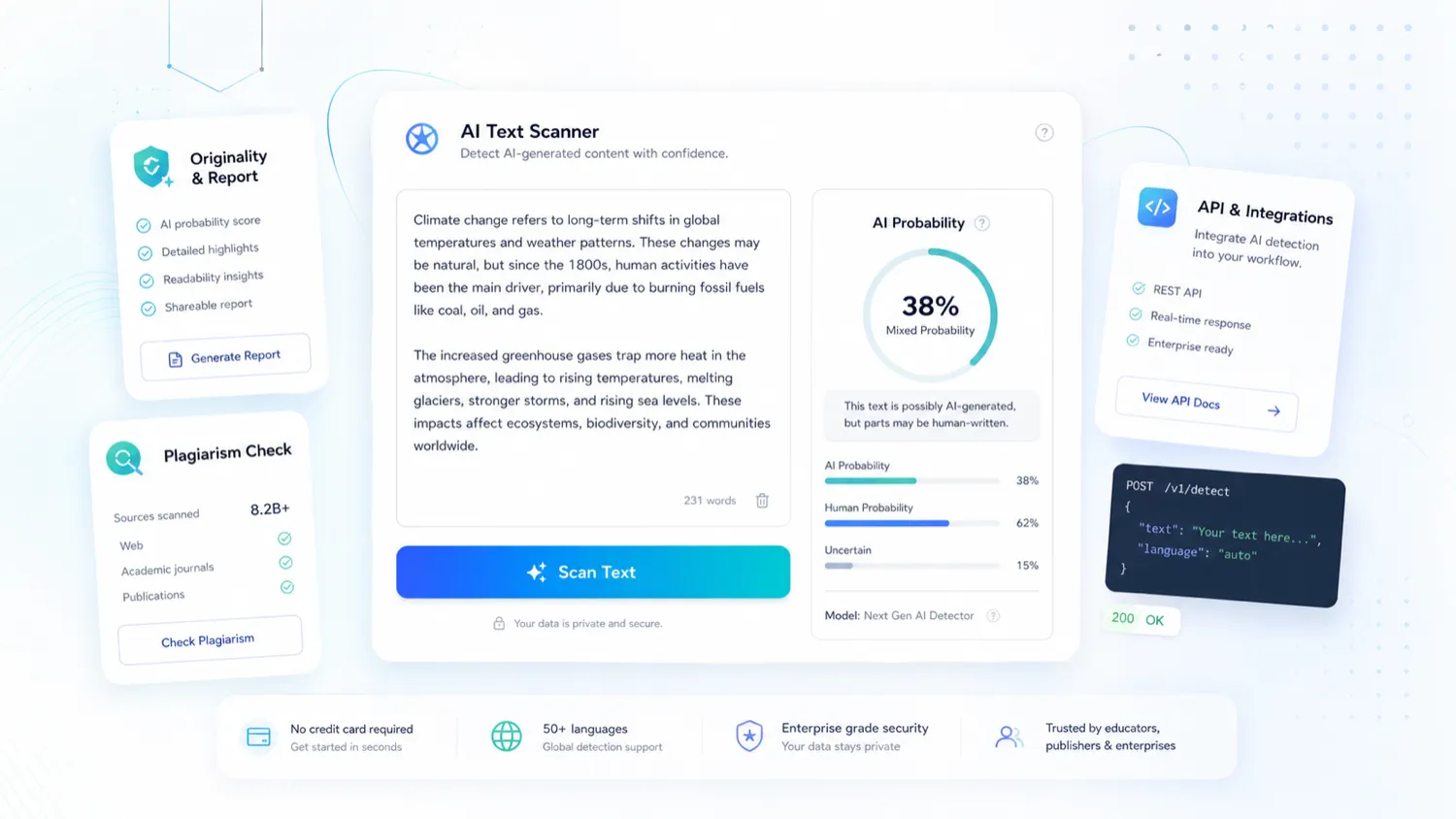
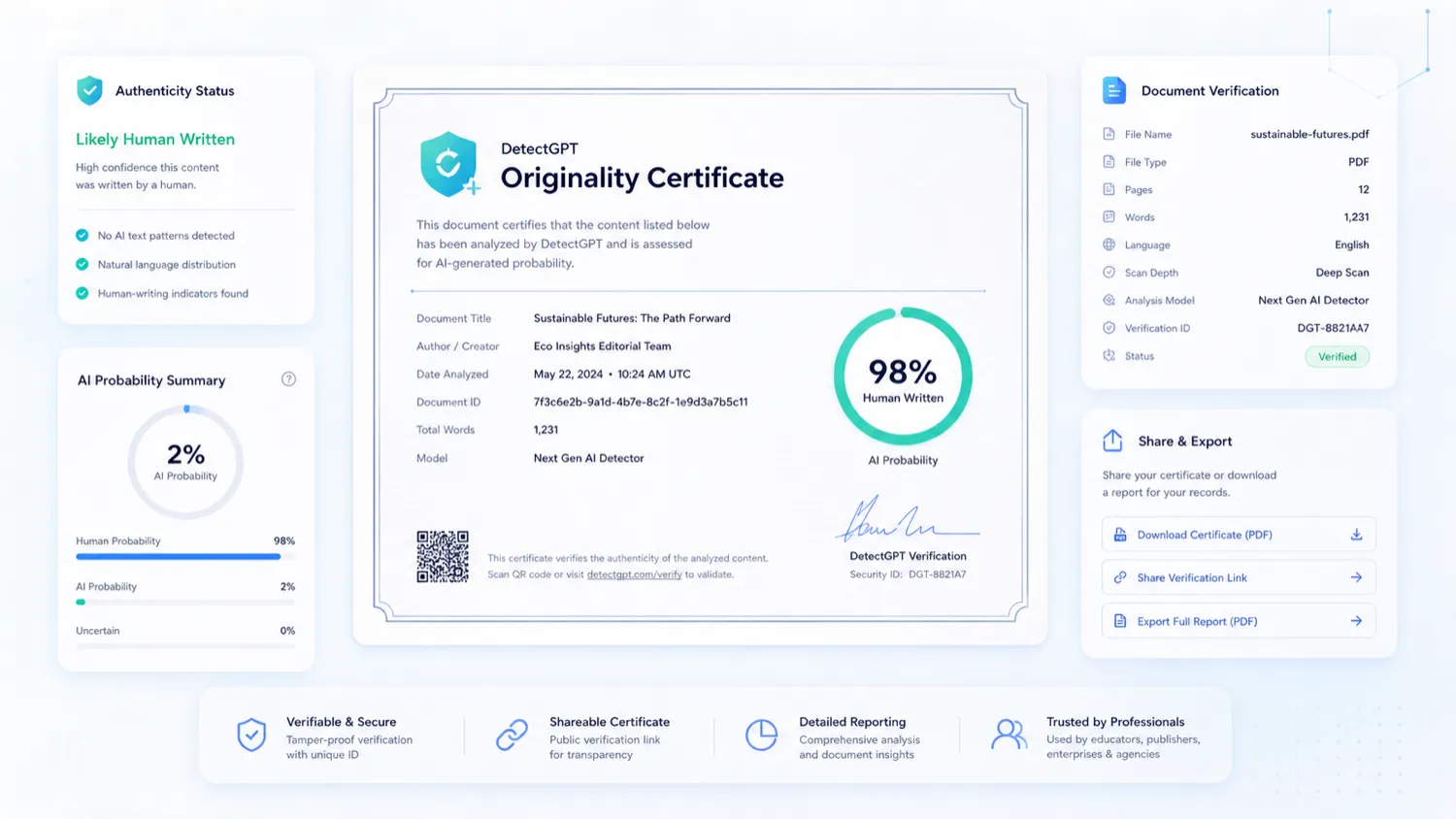
This tour should help buyers understand DetectGPT as a detection workflow, not just a single score box. The visuals focus on the scanner, originality proof, pricing tiers, and API path because those are the screens that affect whether the product fits a real editorial, academic, or agency process.
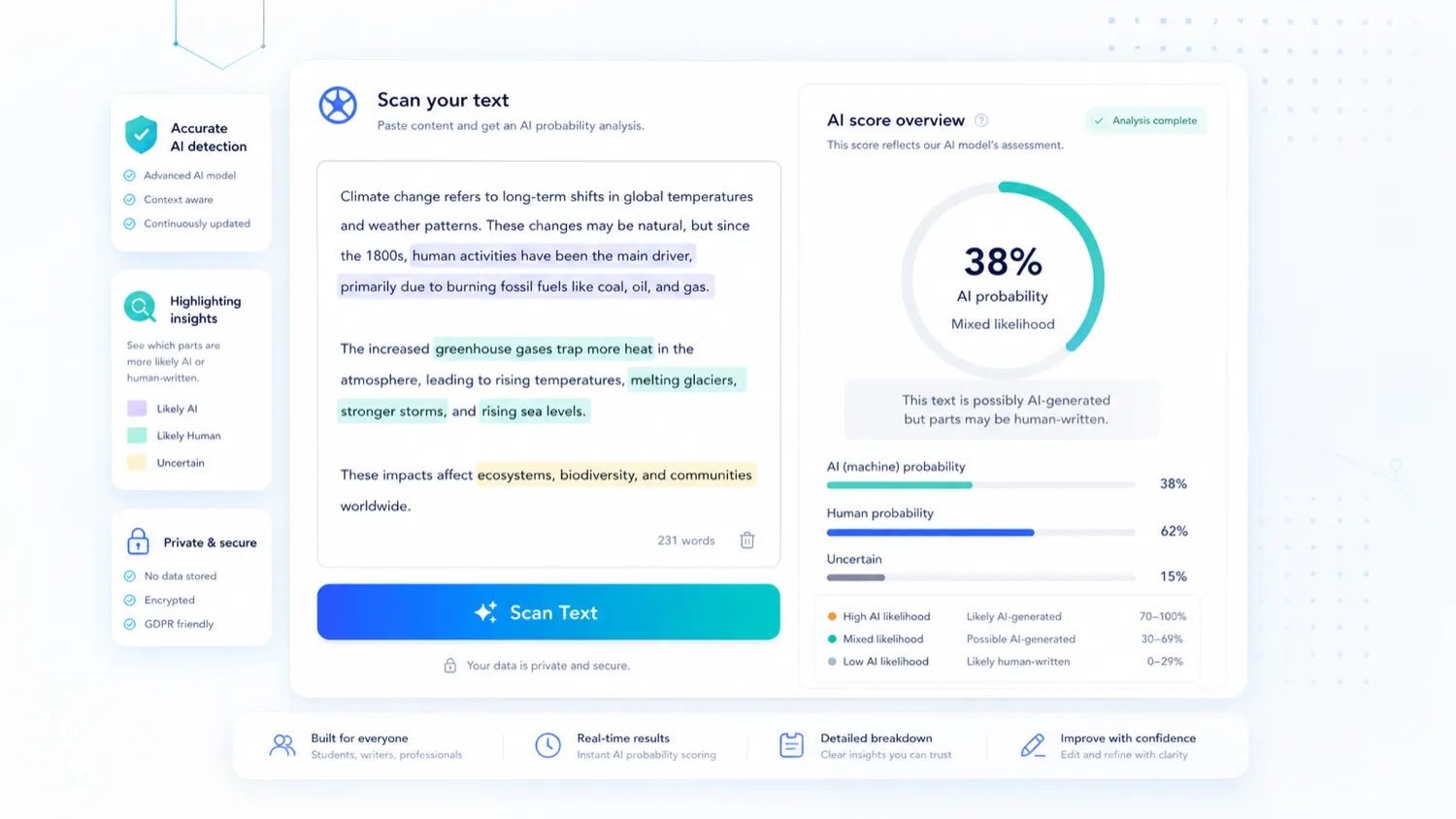
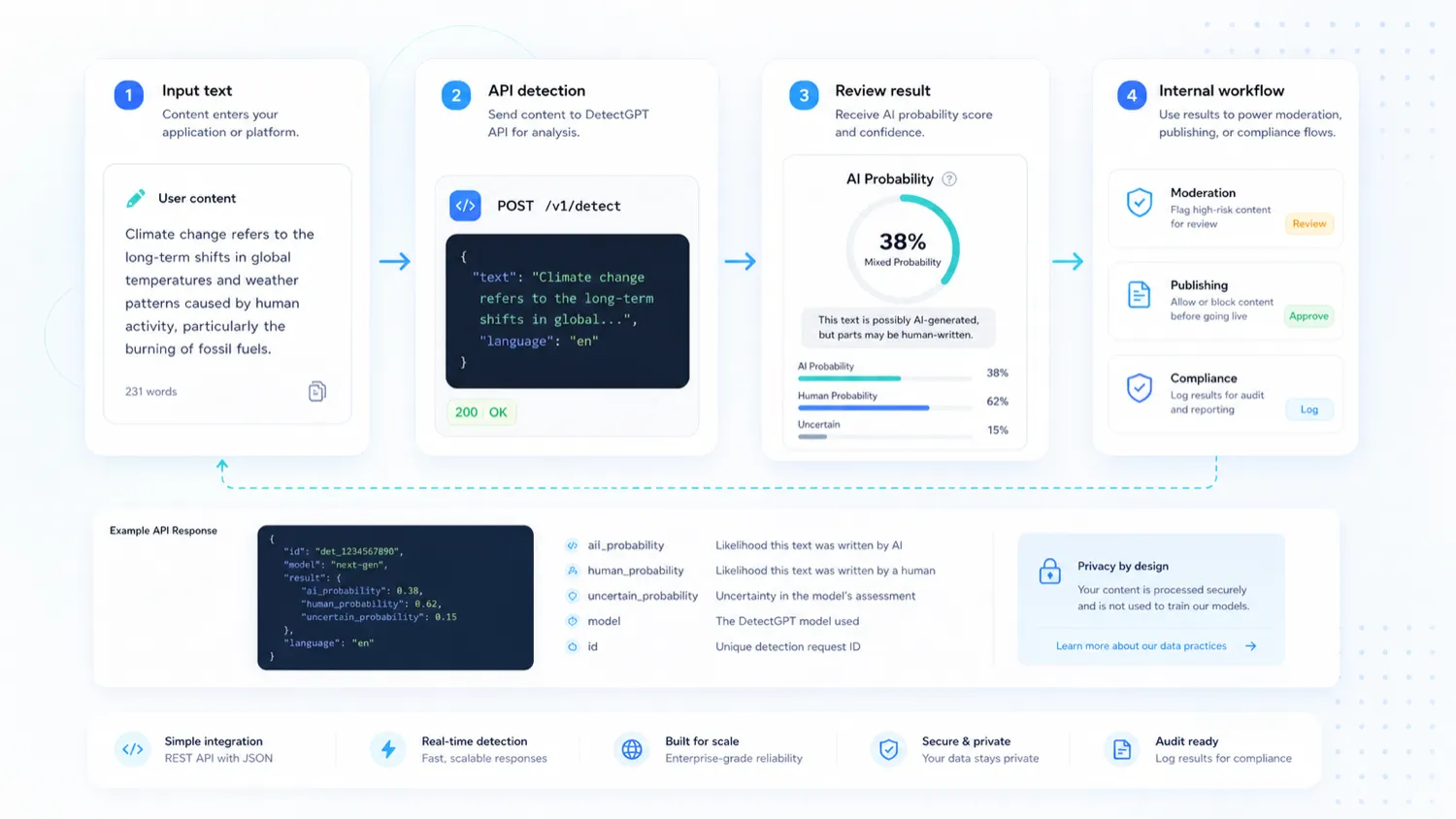
DetectGPT sits in a crowded AI-detector category, but its store page needs a more careful read than a simple “does it detect AI?” question. The product bundles detection, plagiarism checks, reports, humanizer features, team seats, and API positioning. That makes it potentially useful for publishers, schools, and agencies, but it also raises a policy question: do you want a tool that supports both content-authenticity checks and AI-humanization workflows?
What DetectGPT actually does
DetectGPT lets users scan text for AI-written signals, upload files, check plagiarism, generate reports, and evaluate readability. The public homepage also promotes originality certificates, which is useful when the buyer needs documentation rather than just a score on screen.
The practical value is strongest when the scan becomes part of a review process. A publisher might use it before accepting contributed content. An educator might use it as one signal before deciding whether to investigate further. An agency might use the PDF report to explain why a draft needs more human editing.
- AI-generated text detection
- Plagiarism checking
- PDF report generation
- Original content certification
Pricing and plan fit
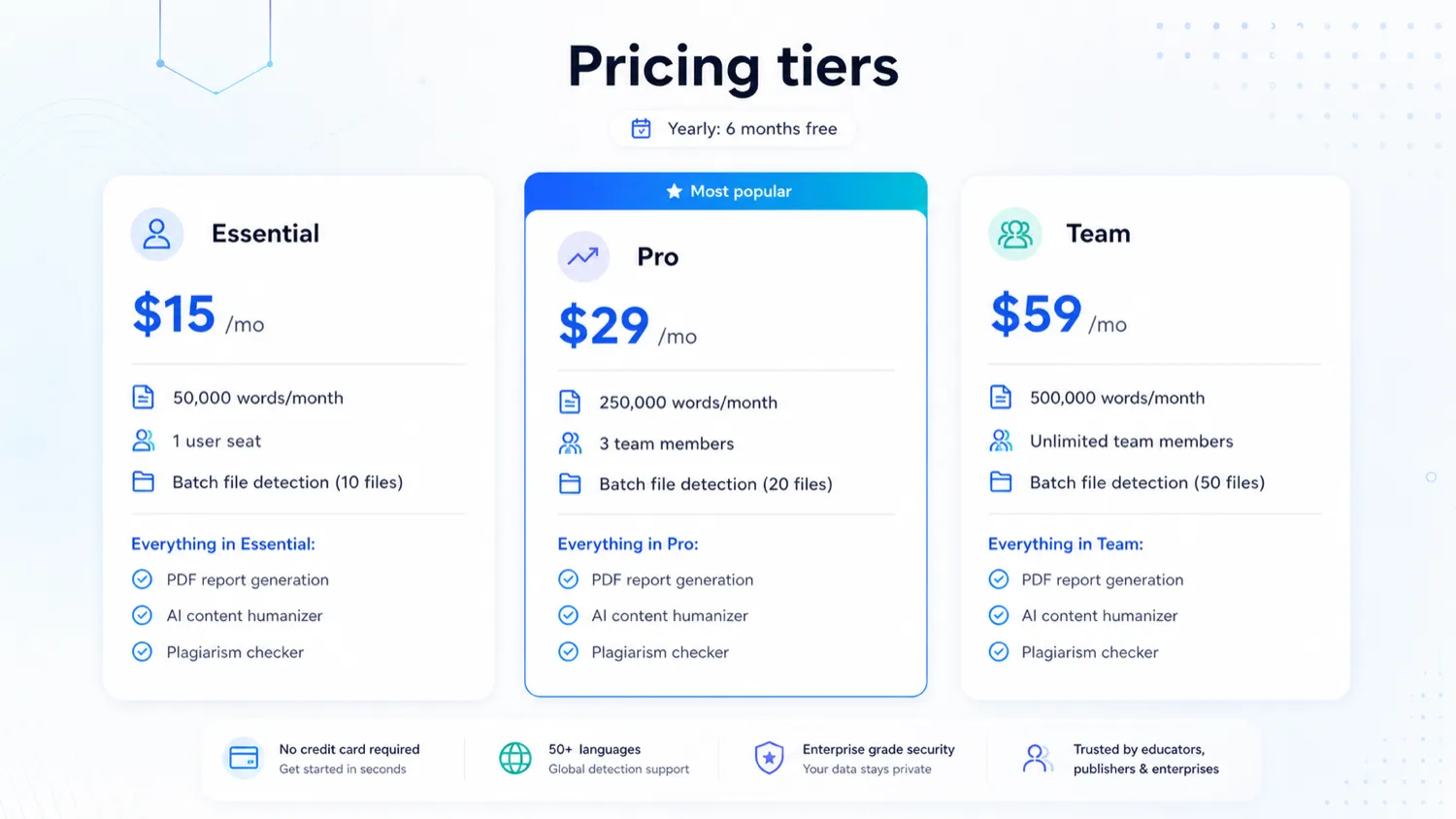
DetectGPT's public pricing is simple on the surface: Essential, Pro, and Team. The actual decision depends on word volume, seats, batch detection needs, and whether PDF reports or plagiarism checks are part of your normal workflow.
Essential is the lighter path for one user. Pro makes more sense when a small team needs more monthly words and three seats. Team is the safer plan to inspect when unlimited team members and higher file volume matter. The yearly billing message can reduce the effective monthly cost, but it also increases commitment because the refund policy is strict.
- Essential starts at $15/month with 50,000 words per month.
- Pro starts at $29/month with 250,000 words per month and 3 team members.
- Team starts at $59/month with 500,000 words per month and unlimited team members.
- Yearly billing is promoted as six months free.
Watch the workflow before trusting the score
A detector score is useful only when the buyer understands what happens after the scan. Does the team manually review highlighted passages? Does the score trigger a second check? Is the report shared with a client, student, or editor? DetectGPT becomes more credible when it supports a documented process instead of replacing human judgment.
The video below is better used as a workflow-orientation aid than a sales shortcut. Watch for how the detector concept is explained, then decide whether your team has a fair policy for interpreting results.
The humanizer feature needs a policy decision
DetectGPT's humanizer feature may be attractive to marketers or writers who want smoother output, but it changes the buying conversation. For a publisher or school, a product that both detects AI and helps humanize AI text can create internal policy tension.
This does not automatically make the product a bad fit. It means buyers should decide in advance whether the humanizer is allowed, who can use it, and whether the detector is being used for compliance, editing, or content-risk screening.
- Marketers may value rewriting and readability support.
- Educators may prefer to focus on detection and evidence handling.
- Publishers should define when humanizer use is acceptable or not acceptable.
API and team rollout
DetectGPT's API positioning matters for teams that want to add AI detection to an internal moderation, publishing, or content intake workflow. The public homepage references API access, and the paid plans also separate seat count and usage limits.
Technical buyers should verify the API route, authentication, rate limits, pricing, and expected monthly volume before assuming the public scanner experience will translate cleanly into production usage.
- Check API access before planning a product integration.
- Confirm whether your use case needs batch file detection or single-text checks.
- Model monthly cost against actual words scanned, not only user seats.
Best next step before checkout
The safest next step is not to jump straight to the highest discount. First, run real content through the free path. Second, decide whether the humanizer feature fits your policy. Third, compare Essential, Pro, and Team based on word volume, seats, and reports. Only after those checks should you open the deal or checkout path.
If DetectGPT still looks right after that, the coupon route can help you confirm whether the best live savings path is a code, automatic annual savings, or simply the current pricing page.
- Start with the free scanner or free trial.
- Check refund terms before choosing yearly billing.
- Compare GPTZero and Originality.ai if you need a stricter academic or publisher-focused benchmark.
Best savings path from this store page
This is the clearest savings route to check once the product already looks like a fit.
DetectGPT's official pricing shows a Team plan at $59/month with 500,000 words and unlimited team members, plus an AI Detection API for organizations.
Useful for buyers who need team seats or workflow integration rather than only a coupon.
Yearly plan discount
$15/mo entry plan
Use comparison routes when the category fit is still open
Use these comparison routes when the product still looks plausible, but the category fit is not fully settled.
GPTZero is the stronger comparison if your buyer question is academic workflow, free detector access, Google Docs or Chrome extension use, and institutional trust signals.
Originality.ai is more relevant when publishers need AI detection, plagiarism checking, team workflow, WordPress support, and credit-based pricing for recurring editorial operations.
Copyleaks is worth comparing when LMS, enterprise, API, and plagiarism-detection depth matter more than a simple web scanner.
Winston AI deserves a look when buyers want credit-based plans, classroom integrations, and a clearer split between AI text, plagiarism, and image-detection usage.
Verification points worth checking before you click out
Where this store usually fits best in the workflow
DetectGPT can help publishers create a first-pass check for contributed articles, sponsored posts, or freelancer drafts before deeper editorial review.
Students and educators can use DetectGPT as a preliminary signal, but decisions should still rely on policy, context, and human review rather than one detector score.
Agencies may find value in PDF reports and originality certificates when they need to document how content was reviewed before delivery.
Teams with technical resources can evaluate the API route if they want AI detection inside a content intake, publishing, or compliance workflow.
Practical checkpoints before and after signup
- Decide whether your use case is detection, plagiarism checking, reporting, humanizer-assisted editing, or API moderation.
- Prepare real sample documents instead of judging the tool on one short pasted paragraph.
- Test the scanner on content where you already know the writing process.
- Check whether the result is understandable enough to explain to a student, client, editor, or manager.
- Confirm whether reports and certificates add value to your workflow.
- Compare Essential, Pro, and Team by word volume, seats, batch checks, and reporting needs.
- Read the refund policy before choosing yearly billing.
- Verify whether any live offer is a real coupon code or an automatic pricing-page saving.
- Document how your team interprets detector scores.
- Review false positive risk before taking action based on a result.
- Re-check pricing and plan limits before renewal or team expansion.
Fast-read signals for workflow fit and buying friction
Questions readers usually ask before choosing this store
What does DetectGPT do?
DetectGPT checks text for AI-generated signals and also promotes plagiarism checking, readability support, PDF reports, originality certificates, a humanizer, and API access. It is most useful when those pieces support a repeatable review workflow.
Is DetectGPT free?
DetectGPT shows a no-credit-card scanning path and free trial messaging, but its paid plans start at $15 per month on the public pricing table. Buyers should test the free path first and then verify the live checkout terms before upgrading.
Does DetectGPT offer refunds?
The refund policy says subscriptions and transactions are non-refundable, including mid-term cancellations. Cancellation stops future billing but does not refund the current billing period.
Is DetectGPT good for schools?
It can be useful as a screening tool, but schools should be careful. AI detector scores should not be treated as final proof, and the product's humanizer feature may need a clear internal policy before use in academic settings.
What is the safest next step before buying DetectGPT?
Run real samples through the free scanner or trial, confirm whether the humanizer feature fits your policy, compare word limits and seat counts, read the refund policy, and then check whether the best live savings path is annual billing or a current DealBestDaily offer route.
Choose the next route that matches what you still need to decide
The strongest next click depends on whether you still need product judgment, a savings route, or a broader category comparison.