Quick verdict
SiteSpeakAI is worth a serious look if your website has the kind of repeated visitor questions that slow down support, sales, onboarding, course delivery, or lead qualification.
That is the clean use case.
I would not judge it as “just another chatbot.” The better question is whether it can become a reliable support layer trained on your own approved content. If your pages, help docs, PDFs, course material, or knowledge base are clean and current, SiteSpeakAI can make sense. If your source material is messy, outdated, or unapproved, the bot may simply automate confusion faster.
Based on the public product information and pricing structure, I would treat SiteSpeakAI as a website customer-service automation tool first. It is built around training an AI agent on business content, embedding a chat widget, capturing leads, keeping conversation history, adding live chat fallback, and connecting the agent to broader tools through integrations, API access, and MCP Server support.
That sounds useful. It can be.
But the buyer decision is not only about the homepage promise. The real pressure points are message credits, training-source limits, agent count, auto-sync, human handoff, API access, integrations, and refund risk. The public pricing page gives you a free plan and paid plans with 7-day trials. The terms, however, say payments already made are not refunded. That changes how I would buy it.
The safer path is simple: start with one narrow support problem, train one bot, ask real visitor questions, check whether the answers are reliable, and only then decide whether Starter, Pro, Growth, Business, or annual billing makes sense.
Next step: If SiteSpeakAI looks relevant, test the current free or trial path before committing to a paid support workflow.
Review snapshot
| Review point | Practical take |
|---|---|
| Best for | Websites with repeated support, sales, course, or knowledge-base questions |
| Not ideal for | Buyers who only need a static FAQ or do not want to maintain training sources |
| Main workflow | Train a chatbot on approved content, embed it on the site, monitor answers, and use human fallback when needed |
| Free path | Free plan with limited message credits, one AI agent, and a small source limit |
| Paid path | Paid plans become relevant when message volume, training sources, lead capture, integrations, API, or MCP Server access matter |
| Main strength | Practical website-support automation rather than a generic personal AI assistant |
| Main concern | No-refund terms and plan limits make testing before payment important |
| Alternatives to compare | Chatbase for a simpler chatbot path, Chaindesk for broader support-agent workflows |
| Safest next step | Test one narrow chatbot on real questions before annual billing |
What is SiteSpeakAI?
SiteSpeakAI is an AI customer-service chatbot platform for building website agents trained on your own business content.
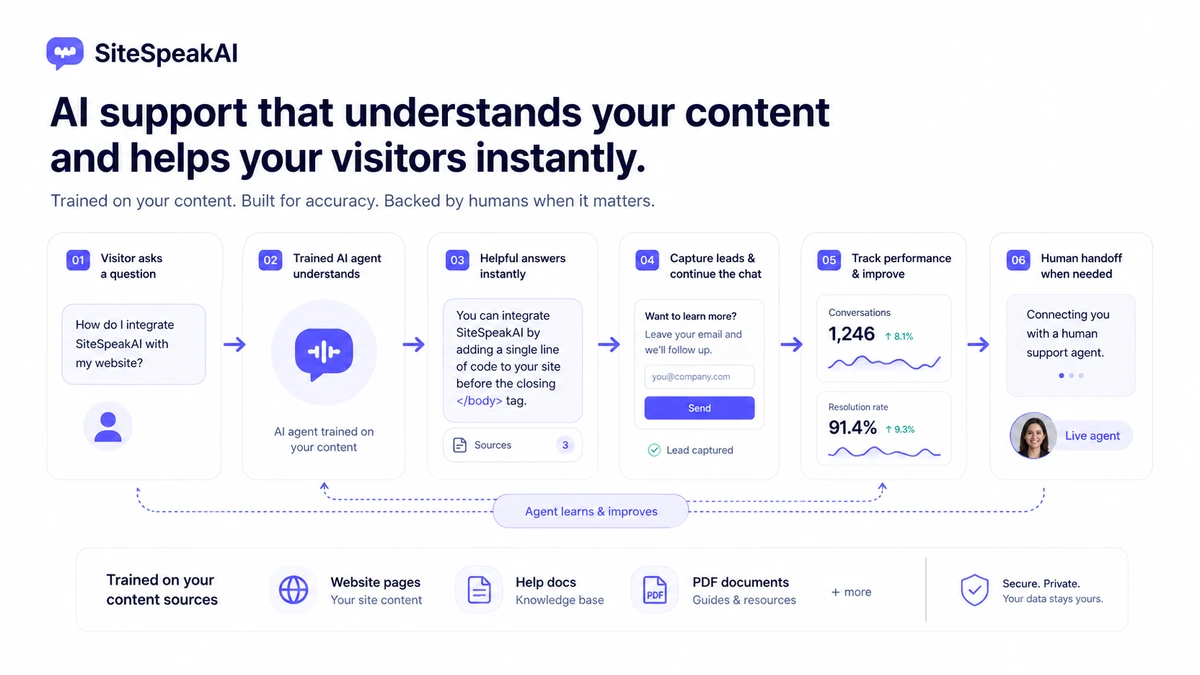
In plain language, you give it source material — website pages, help docs, PDFs, knowledge-base content, course material, or other approved information — and use that material to create a chatbot that can answer visitor questions. The bot can be embedded on a website, used for lead capture, connected to live chat fallback, and monitored through conversation history and analytics.
That positioning matters because SiteSpeakAI is not mainly a personal productivity assistant. It is not the same buying decision as Monica, ChatGPT, or a general AI writing app. The buyer is usually trying to solve a website problem: visitors ask the same questions, leads need basic qualification, customers need instant answers, course users need guidance, or a support team wants fewer repetitive tickets.
The homepage makes the outcome sound straightforward: automate support, answer instantly, reduce costs, and scale customer service. I understand the appeal. If a chatbot can accurately answer the same questions a human support person repeats all week, it can save real time.
The catch is that a support chatbot is only as useful as the system around it.
Good source material matters. Clear escalation matters. Plan limits matter. Human review matters. If the bot gives a confident but wrong answer about pricing, refund rules, shipping, course access, medical details, legal services, or account support, the website owner still owns the problem.
That is why I would evaluate SiteSpeakAI as a workflow tool, not just a widget.
Who should use SiteSpeakAI?
SiteSpeakAI makes the most sense for businesses that already know what their visitors keep asking.
A SaaS site might use it to answer questions about features, pricing pages, onboarding, integrations, or account setup. An ecommerce store might use it for product questions, policy guidance, order-related education, or pre-sale decision support. A course creator might use it to help students find information from course material, YouTube content, or support docs. A service business might use it to qualify leads before a human replies.
Those are realistic use cases because they have repeatable question patterns.
The product also makes sense for agencies that build support or lead-generation systems for clients. In that situation, the value is not just “make a chatbot.” The value is packaging a repeatable workflow: collect client source material, train an agent, embed it, review conversations, improve answers, and decide which client sites need higher usage limits or branded experiences.
A small team can also benefit if it wants live chat fallback. I like that direction because it keeps the buyer honest. The AI should not be the only support path. It should handle the questions it can answer well and pass the rest to a person.
The strongest buyer fit looks like this:
- You have repeated visitor questions.
- Your source content is already reasonably clean.
- You can test the bot with real questions before public rollout.
- You want a website widget plus conversation visibility.
- You care about lead capture, support handoff, or integrations.
- You are willing to monitor and improve the bot after launch.
If that sounds like your situation, SiteSpeakAI is worth testing.
Who should avoid SiteSpeakAI?
I would be careful with SiteSpeakAI if you do not have source material worth training on.
This is the part buyers can easily underestimate. A chatbot trained on weak content does not become a strong support system just because the model is smart. If your help docs are outdated, your product pages are vague, your pricing language is inconsistent, or your policies are buried in scattered pages, the first job is content cleanup.
I would also avoid paying too quickly if your website only receives a handful of support questions per month. In that case, a static FAQ, better navigation, a clearer pricing page, or a simple contact form might solve the problem without adding another tool.
SiteSpeakAI is not ideal if you need a very generous refund safety net. The public terms say payments are not refunded once made. That does not make the product bad, but it does mean the buying sequence should be cautious. Free plan first. Paid trial second. Annual billing later.
I would also slow down if you work in a sensitive category such as healthcare, legal, finance, education records, internal HR, or anything involving private customer data. SiteSpeakAI does publish privacy information and references service providers, but a buyer in a sensitive category should not treat that as enough by default. You should review privacy, data handling, source content, visitor data, and internal approval rules before embedding any customer-facing AI assistant.
Finally, solo users looking for a general AI assistant should probably look elsewhere. SiteSpeakAI is a website-support tool. Buying it for personal productivity would be a mismatch.
How SiteSpeakAI fits into a real workflow
A useful SiteSpeakAI workflow does not start with “add AI to the website.”
It starts with the support problem.
Here is the process I would use to evaluate it:
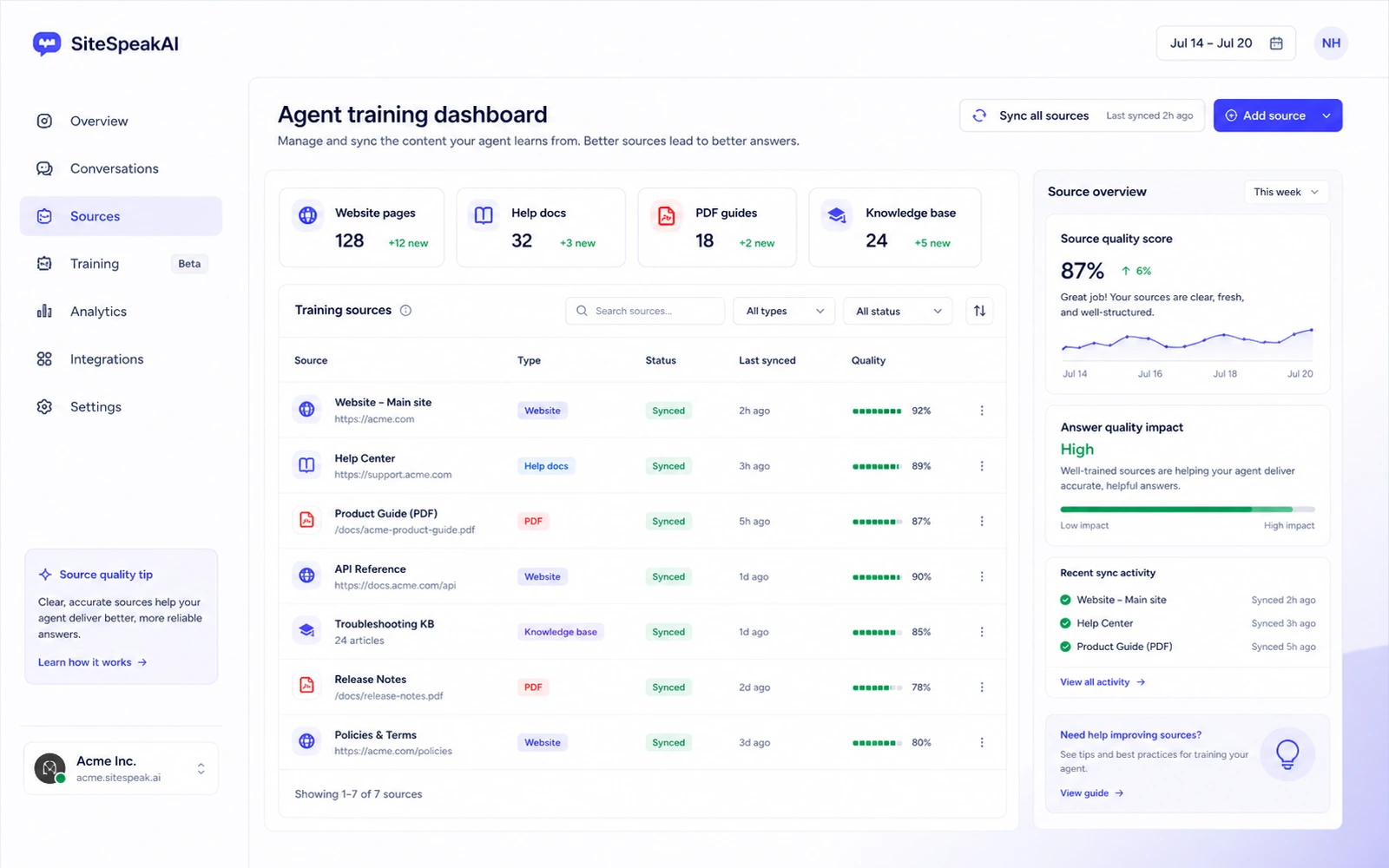
- List the 20 to 50 questions visitors ask most often.
- Identify where the approved answers already live.
- Clean or update those pages, files, docs, or course materials.
- Train one SiteSpeakAI agent on a narrow source set.
- Ask real questions, including edge cases and confusing wording.
- Review the answers for accuracy, tone, and missing context.
- Decide when the bot should answer and when it should hand off.
- Add it to a limited page or test environment before site-wide rollout.
- Monitor conversations and improve sources.
- Upgrade only when the workflow proves useful.
That workflow sounds slower than the homepage version. It is also safer.
The free plan is useful at this stage because you are not trying to prove volume yet. You are trying to prove fit. Can the bot understand your content? Does it answer cleanly? Does it hallucinate around gaps? Does it push visitors toward the right next step? Does the live chat fallback make sense for your team?
If those answers are positive, paid plans become easier to evaluate.
If those answers are weak, a higher plan will not automatically fix the problem.
Workflow test: Before comparing annual savings, use SiteSpeakAI on one narrow support problem and see whether the answers are strong enough for real visitors.
Key features that actually matter
SiteSpeakAI has a long feature surface, but not every feature matters equally for every buyer.
The first feature that matters is AI training. If the tool can connect to your content and create a useful agent from it, the product has a role. If source training is weak or the content itself is weak, the rest of the feature list becomes less important.
The second feature is the live chat widget. A customer-facing AI bot needs an escape hatch. SiteSpeakAI’s live chat and inbox direction is useful because it lets a human support flow remain part of the experience. I would not want a support bot that traps customers in a loop when the answer is unclear.
Lead capture also matters for service businesses, agencies, course sellers, and B2B sites. If the chatbot can answer first questions and collect useful contact information, it may support conversion rather than only deflect support.
Analytics and conversation history matter after launch. Buyers should not treat a chatbot as set-and-forget. Conversation data is how you learn which questions are unresolved, which sources need updating, and where the bot may be creating friction.
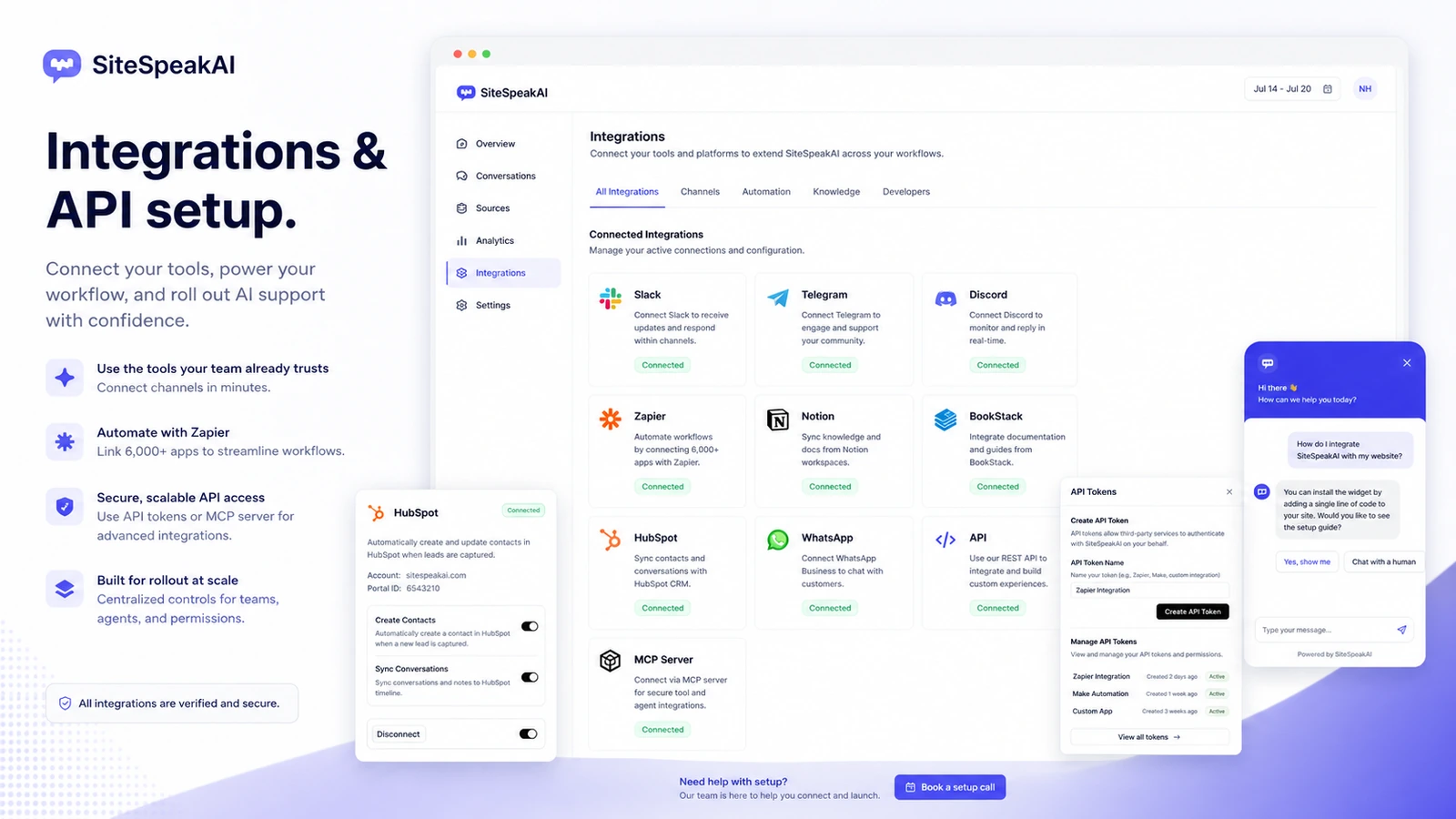
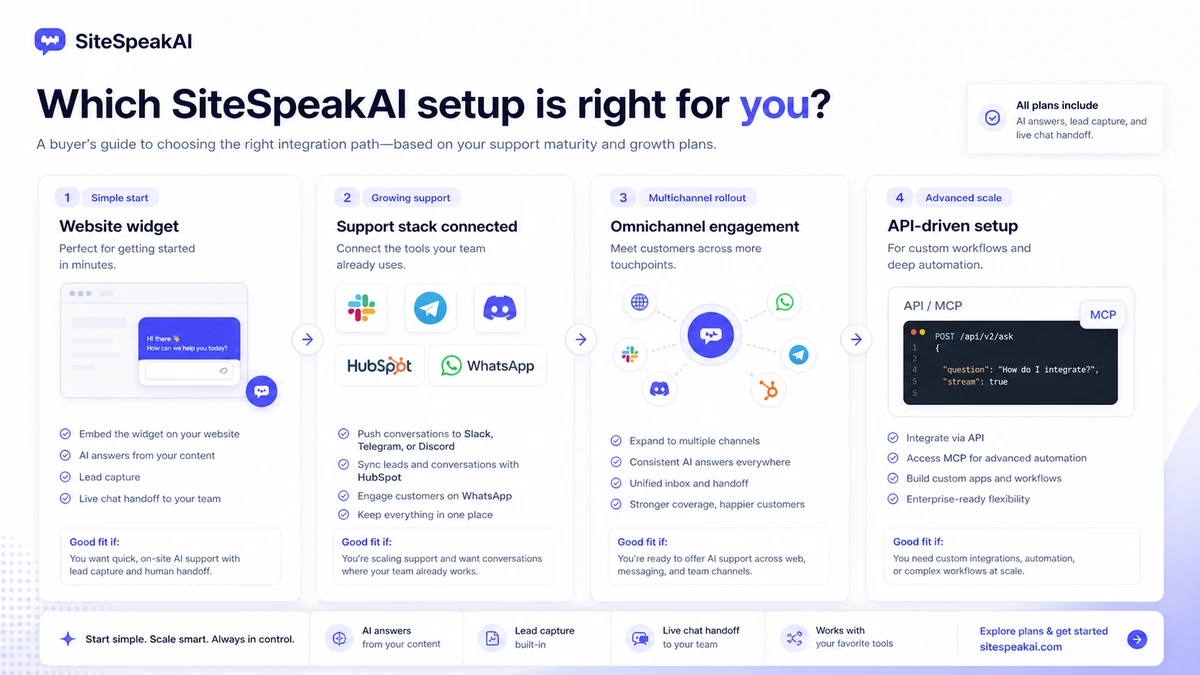
Integrations matter when SiteSpeakAI is part of a broader stack. The pricing and integration pages point to channels and tools such as Slack, Telegram, Discord, Zapier, Notion, BookStack, HubSpot, WhatsApp, API access, and MCP Server access. That can be valuable, but only if those connections match your real workflow.
The mistake is buying a higher tier because a feature sounds impressive.
A better approach is to ask: which feature reduces support time, improves lead quality, or makes the bot safer for real users?
Pricing and plan value
SiteSpeakAI pricing is easier to understand than many AI tools, but the buyer still needs to slow down.
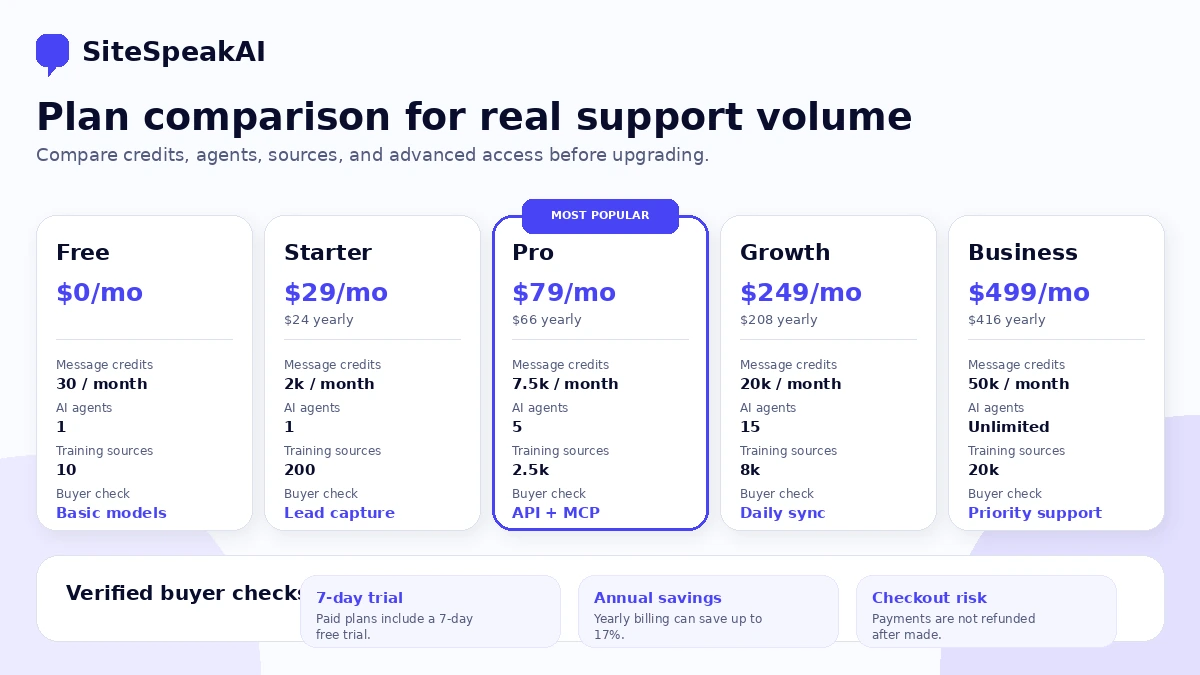
The free plan gives you a limited testing path with monthly message credits, one AI agent, a small number of training sources, basic AI models, and a live chat widget. That is enough to test setup and answer quality. It is not enough to prove production support volume.
Starter is the first paid path. It raises the monthly message credits and training-source count, adds lead capture, and removes the powered-by branding. For a small website with one focused chatbot, this may be enough.
Pro becomes more interesting when the buyer needs more agents, more training sources, advanced model access, bring-your-own-key flexibility, WhatsApp, HubSpot, API access, and MCP Server access. This is where SiteSpeakAI shifts from a simple website chatbot toward a deeper support and automation platform.
Growth and Business are more serious operational plans. They make sense only when message volume, training-source scale, actions, auto-sync, custom domain, onboarding, or priority support justify the cost.
The cheapest paid plan is not automatically the best deal.
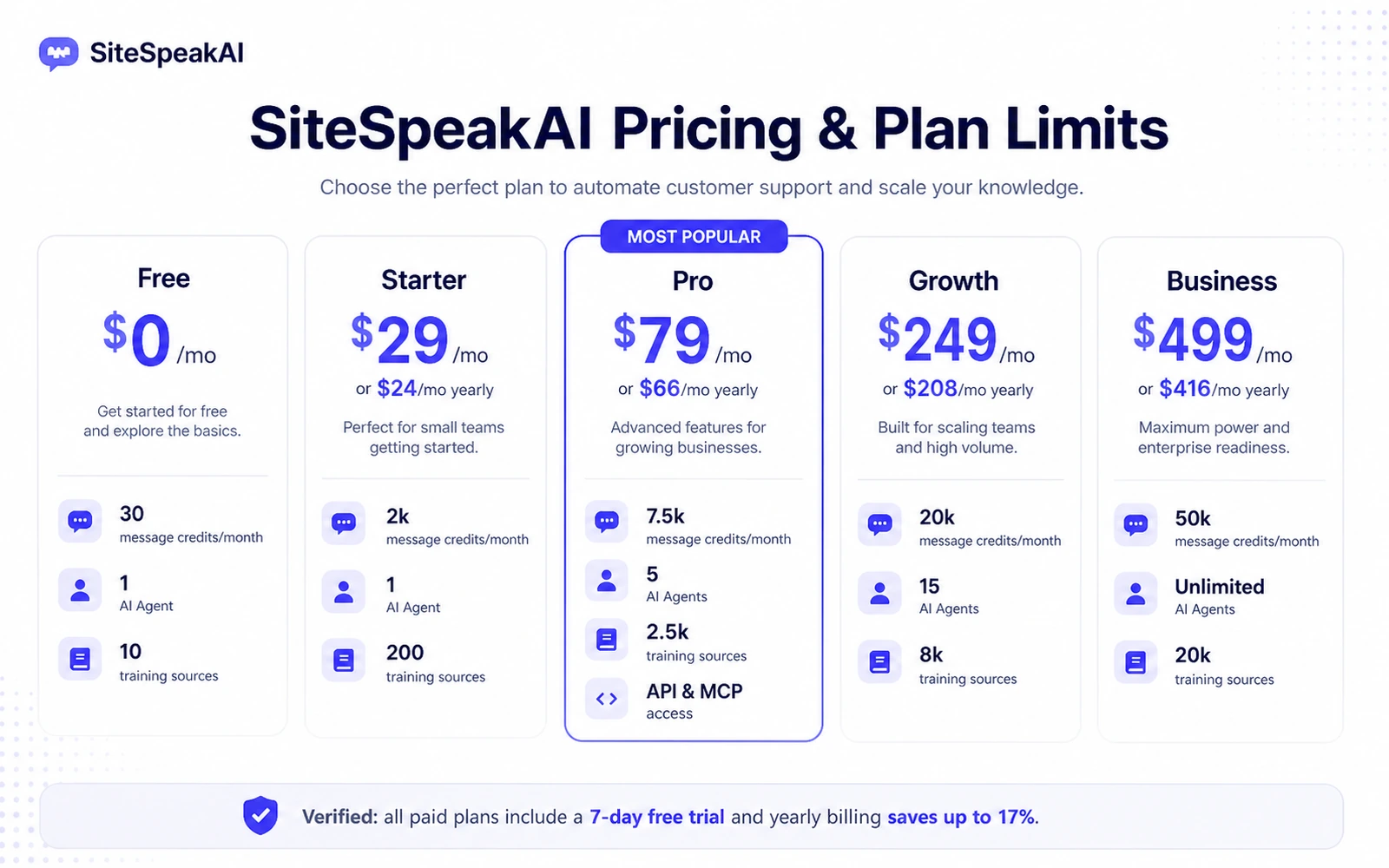
For example, Starter can be enough if your use case is one focused website bot with moderate traffic. But if you need API access, MCP Server support, HubSpot or WhatsApp, more agents, or advanced model flexibility, Pro or higher may become the real starting point.
That is not a negative point. It is a planning point.
The pricing page also promotes yearly billing savings. I would not start there unless the workflow has already proven itself. Annual savings only matter after you know the bot can answer your visitors accurately and handle the monthly volume you expect.
Pricing check: Compare message credits, training sources, API/MCP needs, integrations, and refund risk before choosing a SiteSpeakAI plan.
Free plan, trial, coupon, and checkout notes
The free plan is the best first step for most buyers.
Not because it proves everything. It does not. The free plan is limited. But it gives you enough room to answer the most important early question: can SiteSpeakAI understand your content and produce answers you would trust on a real website?
That is a better starting question than “which plan has the best discount?”
Paid plans show a 7-day free trial. I would use that only after the free plan shows promise or when a paid-only feature is required for a proper test. For example, if your real workflow needs more sources, specific integrations, API access, or a particular handoff setup, a paid trial may be necessary to evaluate the product honestly.
Coupon logic should come later. Public coupon claims are not the dependable savings path here. The stronger savings path is free testing, trial discipline, plan-fit comparison, and avoiding annual billing until the support workflow is proven.
The refund language is the part I would read before paying. SiteSpeakAI’s terms say payments are not refunded after they are made, although subscriptions can be canceled. That means checkout caution matters more than usual.
My practical buying sequence would be:
- Start free.
- Train one narrow bot.
- Ask real visitor questions.
- Review answer quality and handoff behavior.
- Start a paid trial only if needed.
- Choose monthly before annual unless the workflow is already proven.
- Check the current store or coupon route before checkout.
A discount can improve a purchase. It should not create the purchase.
What I would check before buying SiteSpeakAI
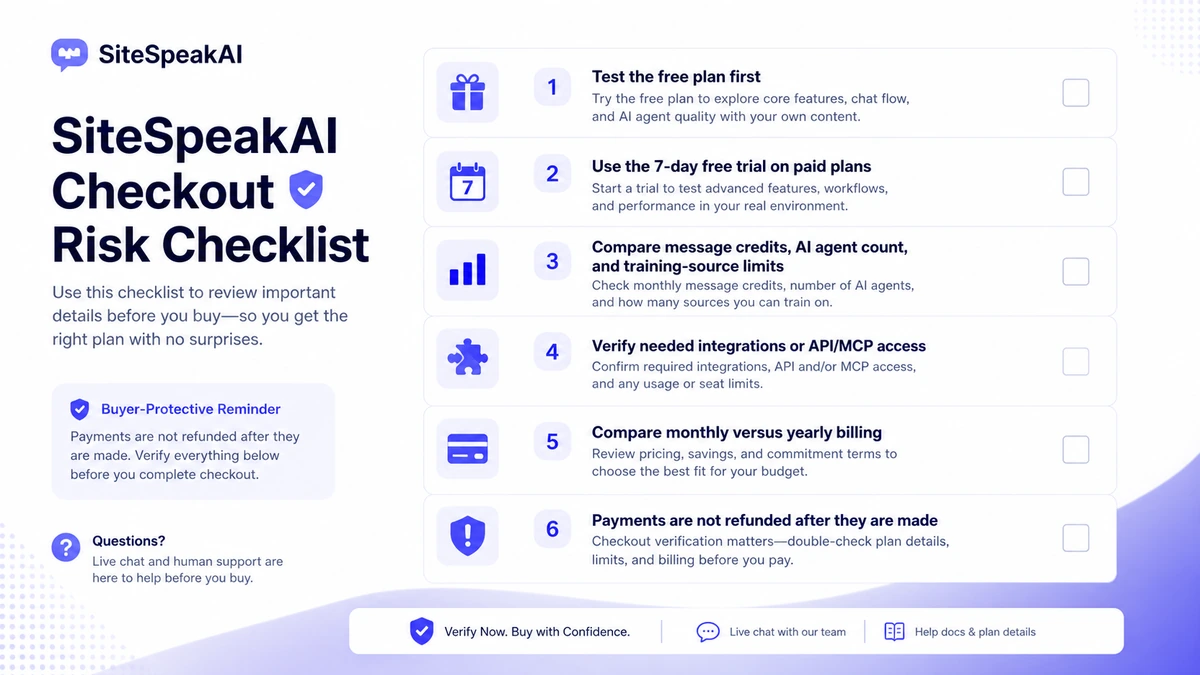
Before paying for SiteSpeakAI, I would check five things.
First, I would check source quality. Are the pages, docs, files, or course materials current enough for customer-facing answers? If not, the buyer should clean the content before judging the tool.
Second, I would check message volume. A plan that looks affordable can become a poor fit if real visitor usage exceeds the credit limit quickly. The plan needs to match actual support traffic, not just the setup demo.
Third, I would check escalation. Can the bot hand off to a human in the way your team actually works? A support bot without a realistic fallback can damage the customer experience.
Fourth, I would check integrations and API requirements. If you need HubSpot, WhatsApp, Slack, Zapier, API, MCP Server, Notion, or BookStack, confirm the exact plan and current limits before paying.
Fifth, I would check refund and annual billing risk. The public terms are not friendly to buyer regret after payment. So the buyer-safe path is to test first, pay monthly if needed, and move annual only after repeated value is clear.
If any of those checks fail, I would not rush the purchase.
That does not mean SiteSpeakAI is weak. It means support automation is operational. The tool can help, but the buyer still needs a support process.
Simple test before paying
Here is the simple test I would run before choosing a paid plan.
Create one chatbot for one narrow use case. Do not train it on the entire website immediately. Pick a small but meaningful source set: pricing page, FAQ, onboarding docs, service page, course module, or knowledge-base category.
Then ask it real questions.
Not perfect demo questions. Real questions. Confused questions. Short questions. Questions with missing context. Questions visitors actually ask before buying or asking for help.
Score the answers manually:
| Test area | What to look for |
|---|---|
| Accuracy | Does the bot answer from approved content without inventing details? |
| Completeness | Does the answer give enough context for a visitor to move forward? |
| Tone | Does it sound like your brand and not a generic AI answer? |
| Escalation | Does it know when to hand off or guide users to contact support? |
| Conversion support | Does it help visitors choose a next step without sounding pushy? |
| Maintenance | Can your team update sources when policies, pricing, or product details change? |
If the bot passes that test, a paid plan becomes a business decision.
If it fails, the next move is not always “upgrade.” Sometimes the next move is to improve source content, narrow the use case, or choose a different platform.
Pros and cons explained
The main strength of SiteSpeakAI is focus. It is built around customer-facing website support, not random AI productivity. That gives it a clearer role than many broad AI tools.
The free plan and paid trial path are also helpful. Because the terms are strict on refunds, the ability to test before paying matters. I would still keep the test narrow and practical.
Another strength is the combination of chatbot, live chat, lead capture, analytics, conversation history, integrations, and developer paths. Many buyers start with a website widget, but the product becomes more interesting when it connects to the rest of the support or sales workflow.
The first limitation is volume. Message credits matter. A bot that works well in a demo may need a higher plan when real visitors use it every day.
The second limitation is maintenance. SiteSpeakAI can train on your content, but it cannot magically make outdated support content safe. The buyer needs a source-update process.
The third limitation is refund flexibility. A no-refund policy after payment means mistakes can cost money. That is why I would avoid annual billing until the bot has proven value.
The fourth limitation is plan-feature fit. API access, MCP Server support, advanced models, WhatsApp, HubSpot, custom domain, auto-sync, and larger source limits may require higher plans. Buyers should confirm these before building a workflow around them.
Green flags and red flags
The green flags are fairly clear.
SiteSpeakAI has a specific use case, a free starting point, visible paid plan structure, public API documentation, tutorials, integrations, live chat direction, and an obvious role for businesses with repeated visitor questions.
That is better than an AI tool that only has vague productivity claims.
The red flags are not dealbreakers, but they matter.
The product depends on source quality. The refund terms are strict. Higher-value features may require higher plans. AI answers need monitoring. Sensitive industries need more careful privacy and compliance review. Public coupon claims should not be treated as confirmed unless the live route verifies them.
My read is that SiteSpeakAI is strongest when the buyer already has a support workflow and wants to improve it.
It is weaker when the buyer wants AI to create the workflow for them.
SiteSpeakAI vs alternatives
SiteSpeakAI is not the only product in this category. I would compare it with at least Chatbase and Chaindesk before committing, especially if the buyer is still unsure whether they need simplicity or broader automation depth.
Chatbase is the more obvious comparison if you want a simpler chatbot-builder experience. If your goal is mostly to train a bot, embed it, and answer visitor questions without building a larger support automation system, Chatbase may feel easier to evaluate. I would compare pricing, message limits, training-source behavior, branding, analytics, and live chat expectations before deciding.
Chaindesk is worth comparing when the buyer wants broader no-code support-agent workflows. If your support setup needs multiple sources, more automation thinking, or a deeper customer-service platform feel, Chaindesk may be the stronger alternative to evaluate.
I would also compare broader customer support platforms if your team already uses tools like Intercom, HubSpot, Zendesk, or other help desk systems. SiteSpeakAI may be useful as an AI layer, but teams with established support operations should check whether it complements or duplicates the stack they already have.
The important thing is to compare by job, not by category label.
- If you need a trained website support bot, SiteSpeakAI is relevant.
- If you need the simplest chatbot setup, compare Chatbase.
- If you need broader support-agent workflow depth, compare Chaindesk.
- If you need a full help desk with mature support operations, compare customer-support platforms too.
Comparison path: If SiteSpeakAI feels close but not obvious, compare it with nearby chatbot platforms before choosing a paid plan.
Read SiteSpeakAI store guide Compare Chatbase Compare Chaindesk
Trust, privacy, and support-risk notes
SiteSpeakAI asks buyers to trust it with business content and customer conversations. That is normal for this category, but it should not be ignored.
The privacy policy says the product can collect account information, website data used to train the chatbot, usage information, and analytics information. It also references service providers used to support the application. A typical small business may be comfortable with that after review. A regulated business should be more careful.
If you operate in healthcare, finance, legal, education, internal HR, or any sensitive customer-data environment, I would not embed a chatbot until your internal privacy and compliance checks are done.
I would also review the exact support expectations. The pricing page separates support and onboarding by plan. For a small site, basic support may be enough. For a business relying on the chatbot as a front-line support layer, onboarding, priority support, and plan-level reliability become more important.
The buyer should also define who owns the bot after launch. Someone needs to review conversations, update sources, adjust answers, and decide when the bot should stop answering and hand off.
This is where many AI support tools succeed or fail.
The product can create the agent. The business still needs to manage the support experience.
Final verdict
I would consider SiteSpeakAI if your website already has repeated support, sales, onboarding, course, or knowledge-base questions and you want a trained AI assistant that can answer from your own content.
The product is strongest when the buyer has a real workflow: clean sources, repeated questions, human fallback, conversation review, and a clear reason to move from free testing to a paid plan.
I would skip it, or at least delay paying, if your source content is not ready, your support volume is low, or you mainly want a simple FAQ replacement. A chatbot can make a strong support process faster. It can also expose a messy support process faster.
For my money, the right buying sequence is not complicated:
Start free. Test one narrow bot. Ask real questions. Review answer quality. Check handoff. Compare plan limits. Read the refund terms. Only then decide whether Starter, Pro, Growth, Business, or annual billing makes sense.
A discount can help after the workflow fit is clear.
It should not be the reason you buy.
