Quick verdict
Panda Video is worth considering if video is not just something you upload, but something your business depends on.
That is the line I would draw first. If you are selling courses, running a membership, delivering private training, embedding VSLs on sales pages, or building an EdTech product, Panda Video has a clearer role than a general social video platform. It gives you business-video controls around ad-free hosting, protected playback, player customization, analytics, VSL features, allowed domains, DRM watermarking, API access, and bandwidth-based planning.
I would be more careful if your main need is public reach. Panda Video is not trying to replace YouTube as a discovery engine. It is closer to private video infrastructure for people who already know where their audience is coming from and want more control over what happens after the viewer clicks play.
The strongest reason to consider it is workflow fit: course delivery, protected embeds, VSL funnels, and private libraries are exactly the kind of use cases where basic hosting starts to feel thin. The main caution is cost predictability. The lowest plan looks approachable, but storage, bandwidth, extra GB charges, team access, AI features, and launch traffic can change the real monthly value.
The safest next step is to test Panda Video with a real video workflow during the trial, then check the Panda Video store guide and current offer route only after the hosting fit is clear.
Next step: If Panda Video still matches your course, VSL, or private video workflow, verify the current buyer route before checkout.
Review snapshot
| Review point | Practical take |
|---|---|
| Best for | Course creators, VSL marketers, EdTech teams, membership sites, and businesses hosting private video libraries |
| Not ideal for | Public discovery creators, hobby projects, and teams that have not estimated storage or bandwidth |
| Main use case | Ad-free, protected video hosting with player controls, analytics, and conversion-focused embeds |
| Current public starting price | Bronze is presented at $14.90/month, but buyers should verify live pricing before checkout |
| Trial path | 14-day free access with trial bandwidth limits before paid billing starts |
| Main strength | Strong combination of private hosting, security controls, VSL tools, analytics, API, and course-friendly delivery |
| Main concern | Bandwidth, storage, add-ons, billing transition, and refund clarity need careful review |
| Direct alternatives | Vimeo, Wistia, Bunny Stream, Vidyard |
| Best next step | Upload a real course lesson or VSL during the trial and estimate monthly viewing volume before paying |
What is Panda Video?
Panda Video is a business video hosting platform for creators, course sellers, EdTech companies, marketers, and digital businesses that need more control than a public video site usually gives.
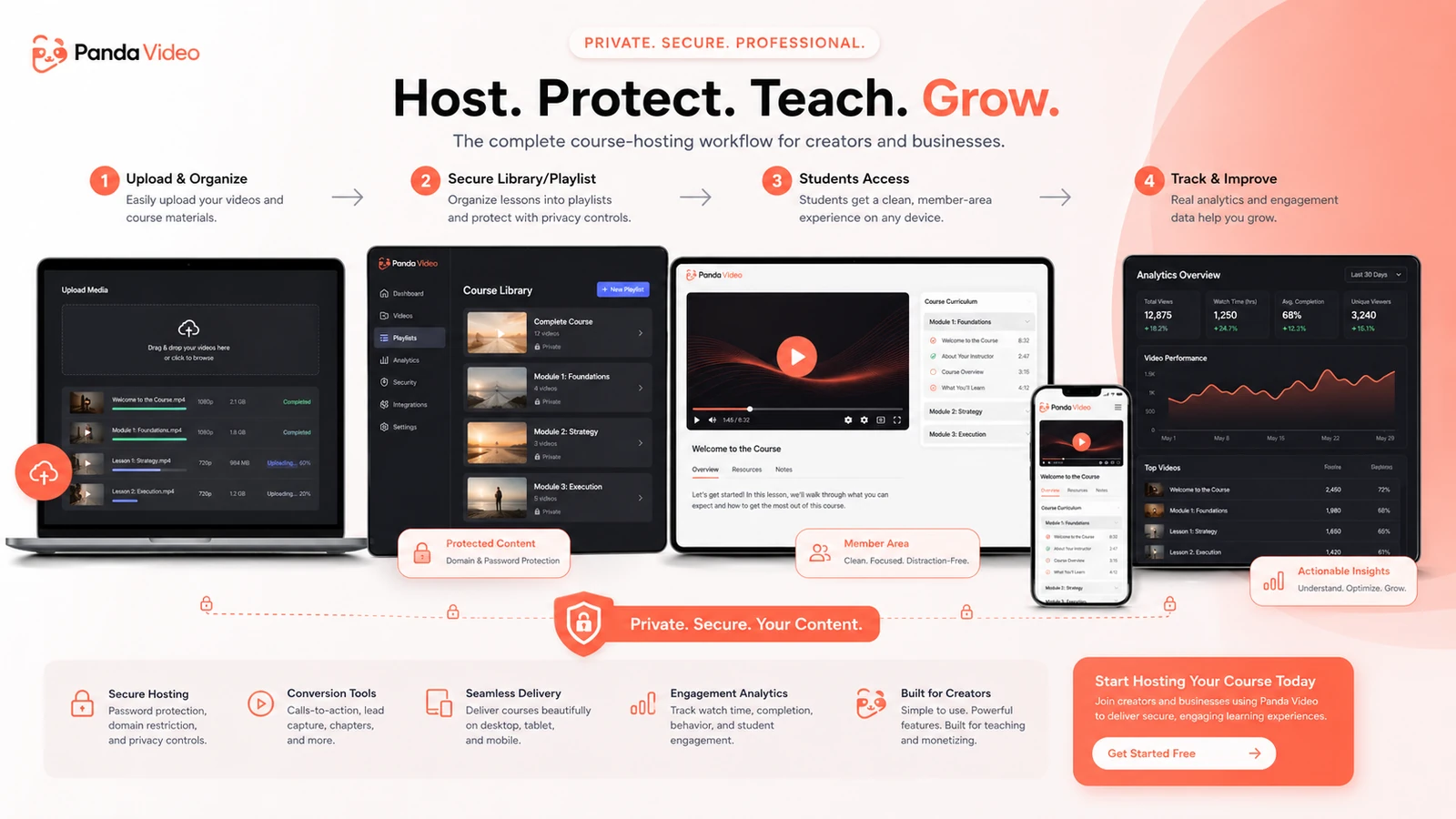
In plain language, it helps you host, protect, customize, analyze, and deliver videos inside your own business workflow. That can mean a paid course, a member area, a training portal, a sales page, a VSL funnel, a mobile app, or a private video library. The product is not only about storing files. Its value is in the layer around the video: the player, security controls, analytics, domains, VSL tools, AI extras, API, and viewer experience.
The common wrong expectation is thinking of Panda Video as “another YouTube alternative.” That comparison is only partly useful. YouTube is better if you want search discovery, recommendations, comments, and public audience growth. Panda Video is more relevant when you already have the audience and want the video to stay inside your funnel, course, platform, or private environment.
Our review approach compares public product pages, pricing details, help documentation, buyer workflow fit, and nearby alternatives. We do not treat a free trial, low starting price, or coupon route as proof that the platform fits the buyer. With video hosting, the real buying question is usually bandwidth, protection, embed control, viewer experience, and operational cost.
Who should use Panda Video?
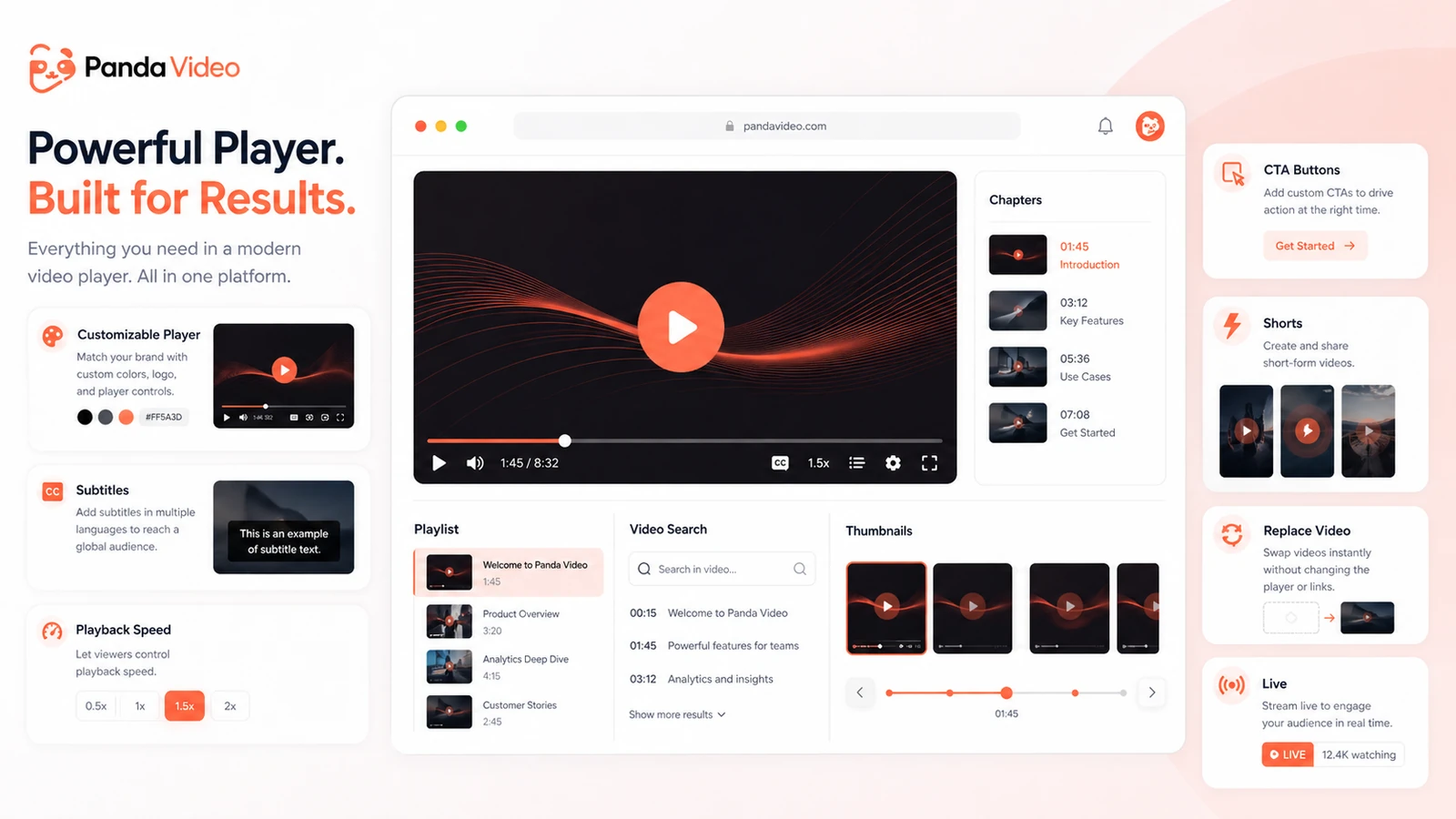
Course creators are the most obvious fit. If your paid lessons sit inside a membership area, you probably care about ad-free playback, fewer distractions, protection against casual downloading, and a player that feels like part of your own product. Panda Video fits that problem better than a public upload platform, especially if course content is a real asset rather than bonus material.
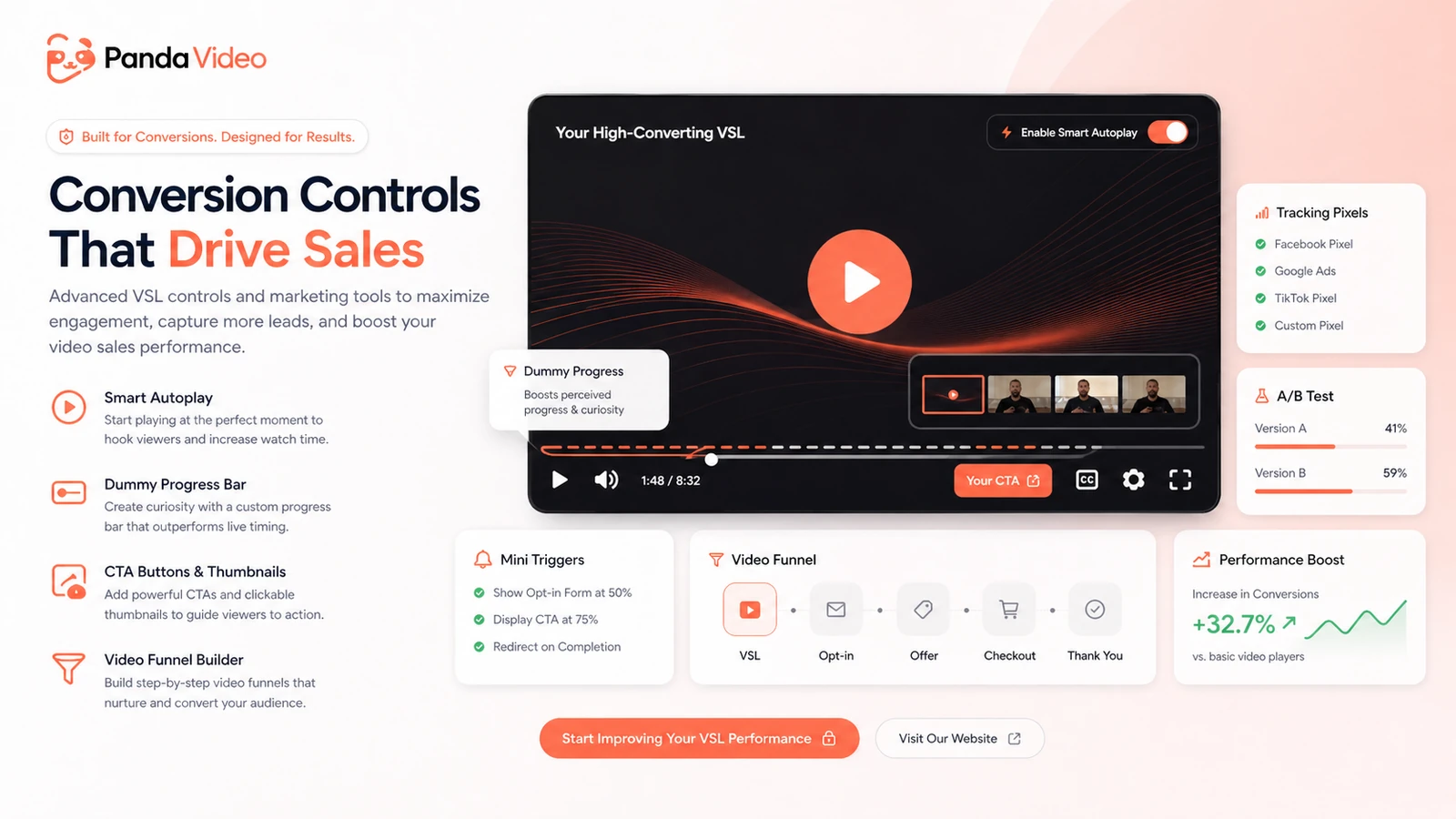
VSL marketers should also look closely. Panda Video includes player and funnel-oriented features such as smart autoplay, A/B testing, CTA buttons, tracking pixels, dummy progress bar, and analytics. Those tools only matter if you actually test sales videos, landing pages, and paid traffic. If your VSL is central to revenue, player behavior is not a minor detail.
EdTech and private training teams may benefit when they need controlled access, allowed domains, analytics, playlists, subtitles, live options, and a more structured learning experience. The condition is that the team should test the student or learner journey, not just the admin dashboard.
Developers and product teams may consider Panda Video if API access, programmable player behavior, mobile app delivery, or video infrastructure matters. I would still verify plan access, rate limits, implementation scope, and whether the built-in tools reduce enough work to justify choosing a packaged platform instead of lower-level infrastructure.
Businesses migrating from another host are another fit. If bandwidth costs, security concerns, or weak course controls are pushing you away from an existing solution, Panda Video deserves a trial. But migration should be staged. Move a small library or one funnel first before shifting the entire video operation.
Who should avoid Panda Video?
I would not start with Panda Video if your main goal is public discovery. If you need audience growth from search, recommendations, subscriptions, and social discovery, YouTube or another public video platform belongs in the conversation. Panda Video is stronger after the audience arrives.
Small hobby projects should also be careful. The entry price is not the whole cost question. Once bandwidth, storage, launches, extra usage, team needs, and paid traffic enter the picture, the buyer needs a real use case to justify the platform.
Teams that have not estimated monthly viewing volume should slow down. Video hosting cost can look simple until one campaign, course cohort, webinar replay, or viral sales page pushes bandwidth higher than expected. Guessing here can lead to the wrong plan.
Buyers who only want short-form clipping should not confuse the Clipper path with full video hosting. Clipper may be useful for turning longer videos into social clips, but it is not the same decision as choosing a course or VSL hosting tier.
I would also avoid Panda Video if the buyer expects a coupon to solve the decision. A lower checkout price can make a good fit better. It does not make weak workflow fit safe.
How Panda Video fits into a real workflow
A good Panda Video workflow starts before upload.
First, define what the video is doing. Is it a paid course lesson, a VSL, a customer training video, a webinar replay, an internal lesson, or a mobile-app asset? Each use case changes the plan decision.
Second, estimate usage. A 30-minute lesson watched by 200 students is a different hosting problem from a VSL sent to cold traffic. Storage is only one side of the cost. Bandwidth is the part that can surprise buyers when content starts getting real views.
Third, upload real content during the trial. Do not test with a tiny sample file and assume the platform is proven. Use a lesson, sales video, or training asset that reflects your actual format. Then configure player appearance, allowed domains, analytics, tracking, subtitles, and security controls.
Fourth, test the viewer experience. Watch on desktop and mobile. Test the embed inside your course platform or landing page. Check load behavior, player controls, resume playback, captions, CTA timing, and any restrictions you rely on.
Finally, decide whether Panda Video saves enough operational friction to justify the plan. The best result is not “the video plays.” That is the minimum. The better question is whether the platform gives you control, reporting, protection, and conversion support that your current setup lacks.
Real-world buyer scenarios
A course creator protecting paid lessons
A course creator with paid lessons behind a membership wall may find Panda Video useful because the platform is built around protected playback, allowed domains, playlists, analytics, subtitles, and a branded player experience.
Where it can fail is plan sizing. If the course has a small audience and a light video library, Bronze may be enough to test. If a launch brings many students into long lessons, bandwidth assumptions become more important than the headline monthly price.
A marketer running a VSL funnel
For a marketer, Panda Video is less about course delivery and more about player behavior. VSL pages often depend on watch time, CTA timing, tracking, A/B testing, and how the player behaves before a lead reaches the offer.
Panda Video can fit when the buyer already has a funnel to test. It is weaker if the buyer has no traffic, no sales process, and no plan for measuring whether video changes conversion.
An EdTech team delivering private training
An EdTech team may care about secure embeds, viewer analytics, subtitles, offline access, live options, and a learner experience that does not feel patched together. Panda Video can be useful here, but only if the organization tests the full learner path.
The alternative may be stronger if the team needs LMS-native assessment, deep compliance controls, or enterprise procurement support. Panda Video is video infrastructure, not a full learning management system by itself.
A business migrating away from another video host
A business leaving Vimeo, Wistia, or another host may like Panda Video if the pain is protection, bandwidth pressure, player control, or course workflow. The mistake would be migrating everything at once.
A safer migration is to test one course module, one sales page, or one high-traffic video first. If playback, analytics, security, and support all hold up under a realistic test, then a larger rollout becomes easier to justify.
Key features that actually matter
Protected business video hosting
Panda Video’s strongest feature cluster is protected hosting. DRM watermark, anti-download controls, allowed domains, and advanced access policies are valuable when videos are tied to paid education, private training, or gated content.
Buyer note: Protection features reduce casual leakage and improve control, but they do not remove every piracy or screen-recording risk. Buyers should verify which protections are included in the chosen plan and what costs apply.
VSL and conversion player tools
For marketers, features such as smart autoplay, A/B testing, tracking pixels, CTA buttons, video funnel behavior, and dummy progress bar can matter more than storage size. These are not decorative features. They affect how a sales video behaves inside a funnel.
Buyer note: These tools only have value if you measure conversion, retention, and buyer behavior. If you are not testing landing pages or sales videos, the VSL feature set may be more than you need.
Analytics and retention visibility
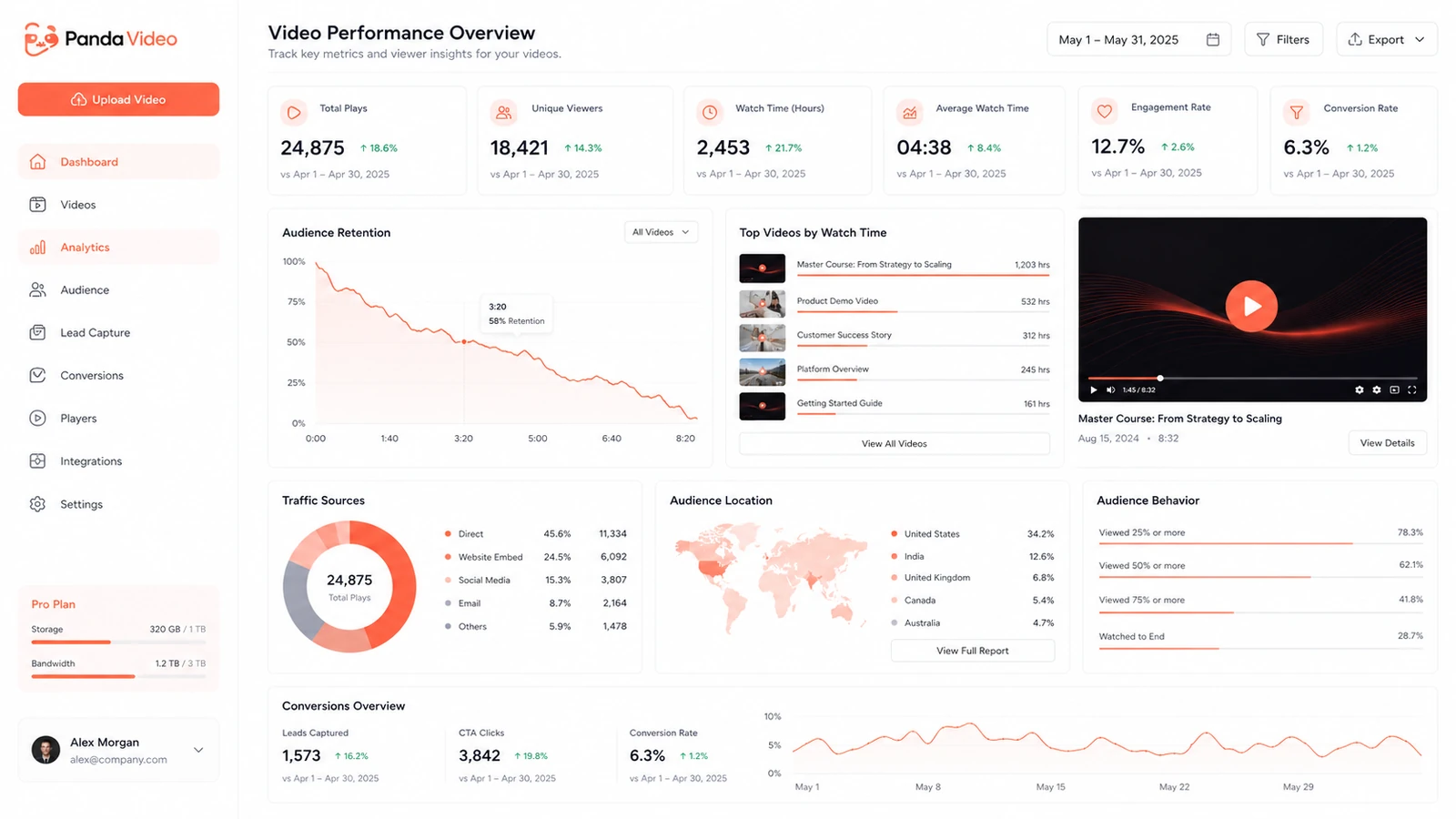
Analytics help buyers understand watch behavior, retention, performance, and audience engagement. This is useful for course creators who need to see lesson drop-off and for marketers who need to understand whether the video supports the funnel.
Buyer note: Analytics are only useful when someone acts on them. If your team will not review watch data, the feature may not change outcomes.
AI subtitles, dubbing, Panda AI, and Tutor
Panda Video’s AI layer can support subtitles, dubbing, content generation, and learning-oriented experiences. This can be useful for education and course businesses that want more accessibility or interaction around video content.
Buyer note: AI feature access should be checked by plan. Do not assume every AI feature is included in every tier or that it will replace course design, editing, or instructional planning.
API, player control, and integrations
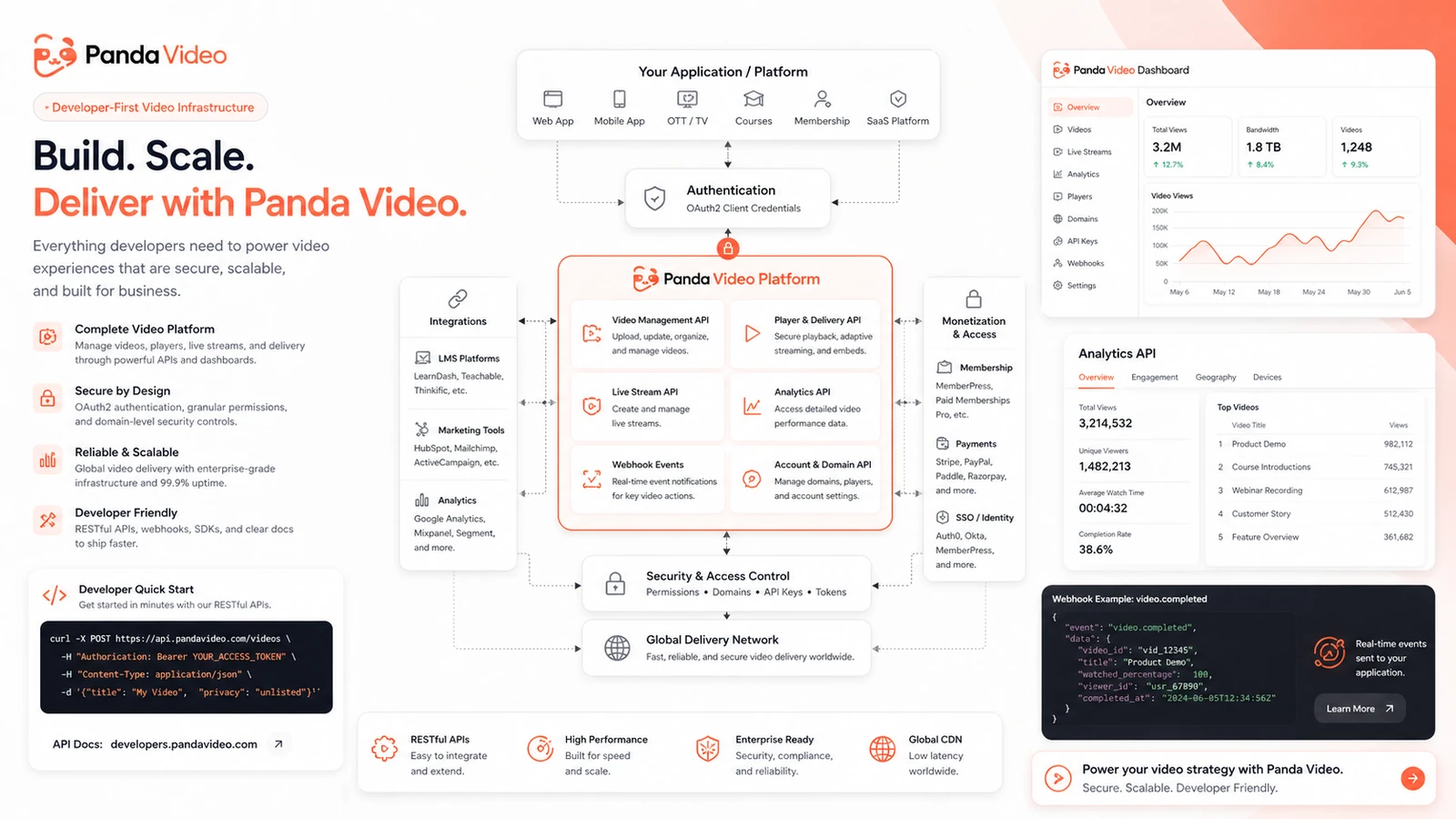
The developer documentation points to video management, player delivery, live streams, analytics, security, webhooks, OAuth, AI Tutor, shorts, and administration. That makes Panda Video more interesting for product teams than a basic embed host.
Buyer note: API access is valuable only if your team has a real integration plan. Verify access, rate limits, authentication flow, and technical effort before building around it.
Pricing and plan value
Panda Video’s pricing is more transparent than many video tools, but the buyer still needs to think beyond the plan name.
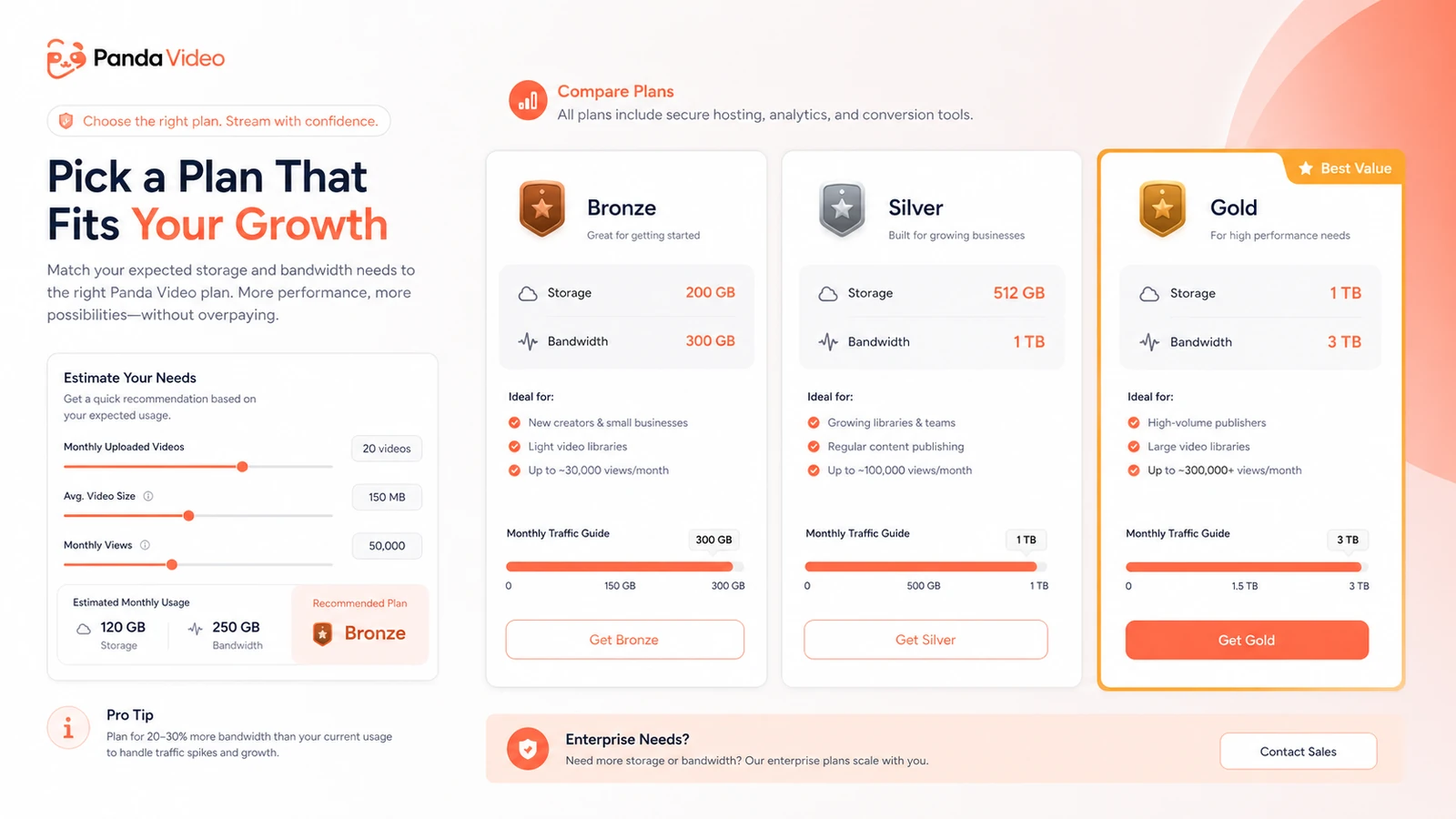
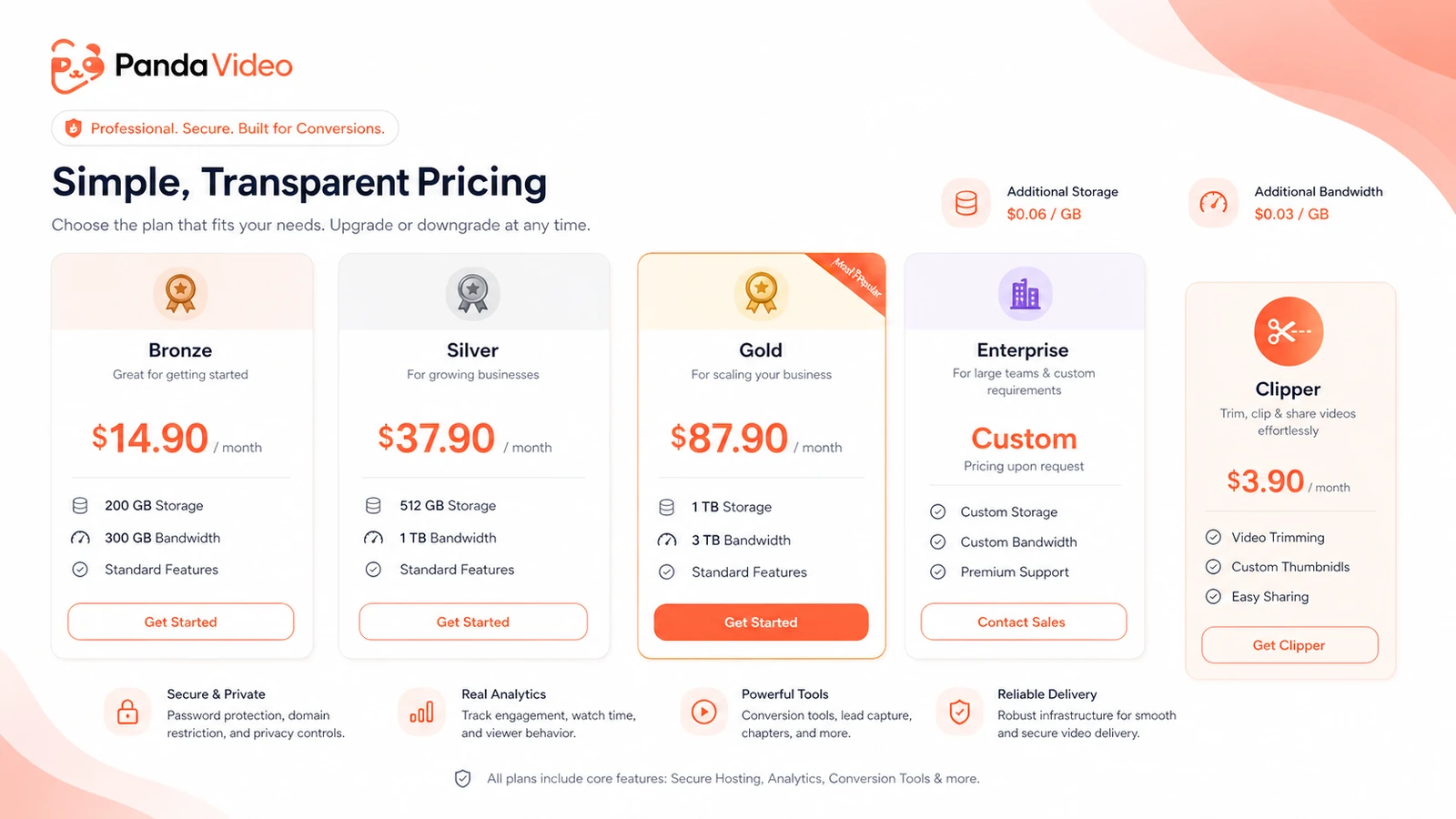
The current public pricing page presents Bronze at $14.90/month, Silver at $37.90/month, Gold at $87.90/month, and Enterprise by sales request. Bronze includes 200 GB storage and 300 GB bandwidth. Silver expands to 512 GB storage and 1 TB bandwidth. Gold expands to 1 TB storage and 3 TB bandwidth. The page also lists additional storage and bandwidth costs, plus DRM watermark cost, and a separate Clipper path at $3.90/month.
That looks straightforward, but the real buying decision is usage fit.
Bronze can be a sensible starting point for small audiences, early course libraries, or a first VSL test. It becomes weaker if you expect heavy student watch time, paid traffic, or large video libraries. Silver is more realistic for medium-volume creators or teams that want more room. Gold makes more sense when the business already has larger traffic, multiple team members, or higher-confidence video operations. Enterprise belongs in the conversation when migration, support, custom cost per GB, scale, or procurement matters more than self-serve pricing.
The separate Clipper path is different. It may help with short-form repurposing, but I would not treat it as a replacement for Panda Video’s full hosting plans.
My pricing take is simple: start with the trial, test a real workflow, then choose the smallest plan that gives enough storage, bandwidth, player features, and team access. Annual or larger commitments only make sense after the first real usage test.
Pricing check: If Panda Video still fits, compare current storage, bandwidth, add-on, and billing terms before choosing a plan.
Check Panda Video pricing Read store guide Check current offers
Free plan, trial, coupon, and checkout notes
A permanent free plan was not the main public path I would rely on here. Panda Video’s safer evaluation route is the 14-day trial.
The trial matters because video hosting cannot be judged from screenshots. You need to upload real content, embed it where viewers will actually watch, test playback, configure security, and inspect analytics. The public billing help also says the trial has a 100 GB bandwidth limit and that billing automatically begins on the registered card after the trial period unless the buyer cancels within that period.
That makes the trial valuable, but it also means timing matters. If you start the trial and do not test seriously, you lose the best risk-reduction window.
Coupon logic should come after workflow logic. Panda Video may have live offer routing through DealBestDaily, but I would not make the coupon the center of the decision. The better order is:
- Test the trial with real content.
- Estimate storage and bandwidth.
- Decide whether Bronze, Silver, Gold, Enterprise, or Clipper matches the use case.
- Check the Panda Video coupon page for current offers.
- Verify live checkout before paying.
If the tool does not fit your course, VSL, or private video workflow, a discount does not solve the problem.
What I would check before buying Panda Video
If I were buying Panda Video for a real video business, I would not start with the lowest monthly price. I would start with these checks:
- Monthly bandwidth: estimate real views, average video length, launch spikes, and course cohort behavior.
- Storage: compare current library size, future uploads, and extra storage charges.
- Trial timing: run a serious test before the 14-day window ends.
- Player fit: test embeds, player appearance, CTA behavior, tracking, and mobile playback.
- Security needs: verify allowed domains, DRM watermark, anti-download, private token, and plan-level access.
- Team and API access: check whether the chosen plan supports your users, app, platform, or developer workflow.
- Cancellation and refund expectations: treat cancellation timing as important because broad refund clarity is weaker than trial clarity.
A simple test before paying
Before paying, I would run a small but realistic Panda Video test like this:
- Upload one real course lesson, VSL, or training video.
- Embed it inside the actual page or platform where viewers will watch it.
- Configure player appearance, allowed domains, CTA behavior, and analytics.
- Watch it on desktop and mobile using a normal viewer flow.
- Check whether subtitles, AI features, live options, or security controls are needed for your use case.
- Estimate bandwidth from expected viewer count and video length.
- Decide whether the plan still makes sense before the trial converts into billing.
That test is more useful than comparing feature lists. A video platform either fits the real viewer journey or it does not.
Pros explained
The first real advantage is Panda Video’s focus on paid and private video use cases. A public video platform can host videos, but it often brings distractions, weak control, and less business-specific player behavior. Panda Video is more useful when your video sits inside a course, funnel, training flow, or private product.
The second advantage is the combination of security and marketing features. Allowed domains, DRM watermark, anti-download, tracking pixels, CTA buttons, VSL tools, and analytics solve different parts of the same problem: keeping the video controlled while making it useful for a business outcome.
The third advantage is pricing visibility. The pricing page gives plan tiers, storage, bandwidth, extra GB numbers, team member limits, and Enterprise direction. That does not remove the need to verify checkout, but it gives buyers more to work with than vague “contact sales” pricing.
The fourth advantage is technical room. API documentation, player controls, webhooks, analytics, live stream support, and administration features make Panda Video more than a basic embed tool. That matters for platforms, mobile apps, and businesses with custom video workflows.
The fifth advantage is the trial. A 14-day testing window is useful if the buyer uses it properly. It is less useful if the buyer signs up, waits, and then tries to decide from memory.
Cons explained
The main drawback is that the lowest plan can be misleading if the buyer has not estimated traffic. Video bandwidth is not an abstract limit. It can become a real cost issue when a course launches, a cohort grows, or a VSL receives paid traffic.
The second drawback is refund clarity. Public billing documentation makes the trial path clear, but I would not treat Panda Video as a risk-free paid purchase after billing starts unless current refund terms say so. This makes trial discipline important.
The third drawback is that Panda Video may be too much for simple publishing. If you only want to upload a few public videos, the security, player, analytics, VSL, and API features may be unnecessary.
The fourth drawback is feature complexity. The platform is useful partly because it gives buyers many controls. That also means buyers need to test the setup, not just assume every feature will be obvious or included in the right way.
The fifth drawback is that Clipper can blur the decision if buyers are not careful. Short-form clipping and protected video hosting are different jobs. Do not choose the hosting platform because the clipping price looks cheap.
Green flags and red flags
Green flags:
- Your video is part of paid course delivery, private training, or a sales funnel.
- You need ad-free embeds, allowed domains, analytics, and player control.
- You can estimate storage and bandwidth before paying.
- You are willing to use the trial with real content.
- You need API, live, AI, or player features that a basic host does not provide.
Red flags:
- You mainly need public discovery and audience growth.
- You have no estimate for monthly viewing volume.
- You are choosing the cheapest plan without checking limits.
- You expect a coupon to make the platform fit your workflow.
- You need a broad refund promise before committing, but cannot verify one at checkout.
The easy mistake is treating Panda Video like a simple file-hosting purchase. The better way to judge it is to test whether it improves the full video workflow: upload, embed, protect, analyze, convert, and scale.
Panda Video vs alternatives
Vimeo vs Panda Video
Vimeo is the broader comparison for professional video hosting, sharing, branding, and general business use. It may be the easier choice if you need a widely known platform for high-quality embeds, collaboration, and general publishing.
Panda Video is more specific. It makes more sense when the buyer cares about course protection, VSL behavior, allowed domains, anti-download options, and bandwidth planning for paid content.
Wistia vs Panda Video
Wistia is a strong comparison for B2B video marketing, brand experience, lead analytics, and polished marketing workflows. If your team is primarily using video for SaaS marketing, sales enablement, and website engagement, Wistia deserves a close look.
Panda Video may be stronger when the center of gravity is paid education, VSL sales pages, or protected course delivery.
Bunny Stream vs Panda Video
Bunny Stream is more infrastructure-oriented. It can appeal to technical teams that want cost-efficient video delivery and more control over the stack.
Panda Video is more packaged for creators and marketers who want hosting, player features, security, analytics, and video-business tools without assembling everything themselves.
Vidyard vs Panda Video
Vidyard is more sales and go-to-market oriented. It fits teams that use video for prospecting, sales communication, customer engagement, and enterprise revenue workflows.
Panda Video is not a direct sales outreach platform. It is a better fit when the video itself is the product asset, course asset, training asset, or VSL asset.
Trust, refund, and buyer-risk notes
Panda Video’s public information is strong enough to understand the product role and pricing structure, but buyers should still verify live checkout before paying.
The biggest trust-positive signal is clarity around plans, storage, bandwidth, extra GB charges, team member limits, security features, API documentation, and the trial. That gives buyers enough information to run a serious comparison.
The bigger caution is post-trial risk. Billing documentation makes the 14-day trial and automatic billing transition clear, and it explains bandwidth overages and prepaid bandwidth. What I would not do is assume a broad paid refund window unless the current checkout or support documentation clearly confirms it.
Data and privacy also matter. If you are uploading paid course content, internal training, or sensitive videos, review security features and internal handling rules before moving a whole library. Allowed domains and DRM watermark are useful, but they are not a substitute for a broader content-security policy.
For technical teams, API and integration claims should be tested early. A feature list is not the same as a production integration. Confirm authentication, rate limits, webhook behavior, analytics availability, live stream needs, and player behavior before choosing Panda Video as part of a product stack.
Final verdict
I would consider Panda Video if you sell courses, run VSLs, deliver private training, operate an EdTech workflow, or need more control than a public video platform gives you.
I would skip it if you mainly need public reach, occasional free uploads, or a simple place to host a few low-stakes videos. Panda Video’s strengths are real, but they matter most when video is part of a business system.
I would compare it with Vimeo if you want broad professional hosting, Wistia if marketing analytics and brand video matter more, Bunny Stream if low-level infrastructure control matters, and Vidyard if sales-team video workflows are the real priority.
The safest next step is not to buy on the lowest price or a possible offer route. Start with a real trial test, estimate storage and bandwidth, verify cancellation timing, and choose the plan only after Panda Video proves it fits the workflow you actually need to run.
