Quick verdict
Anymail Finder is worth considering if your real problem is narrow: you need verified B2B email addresses for sales, recruiting, or marketing outreach, and you would rather pay for confirmed contacts than burn credits on risky guesses.
That focus is the best part of the product.
It is also the boundary.
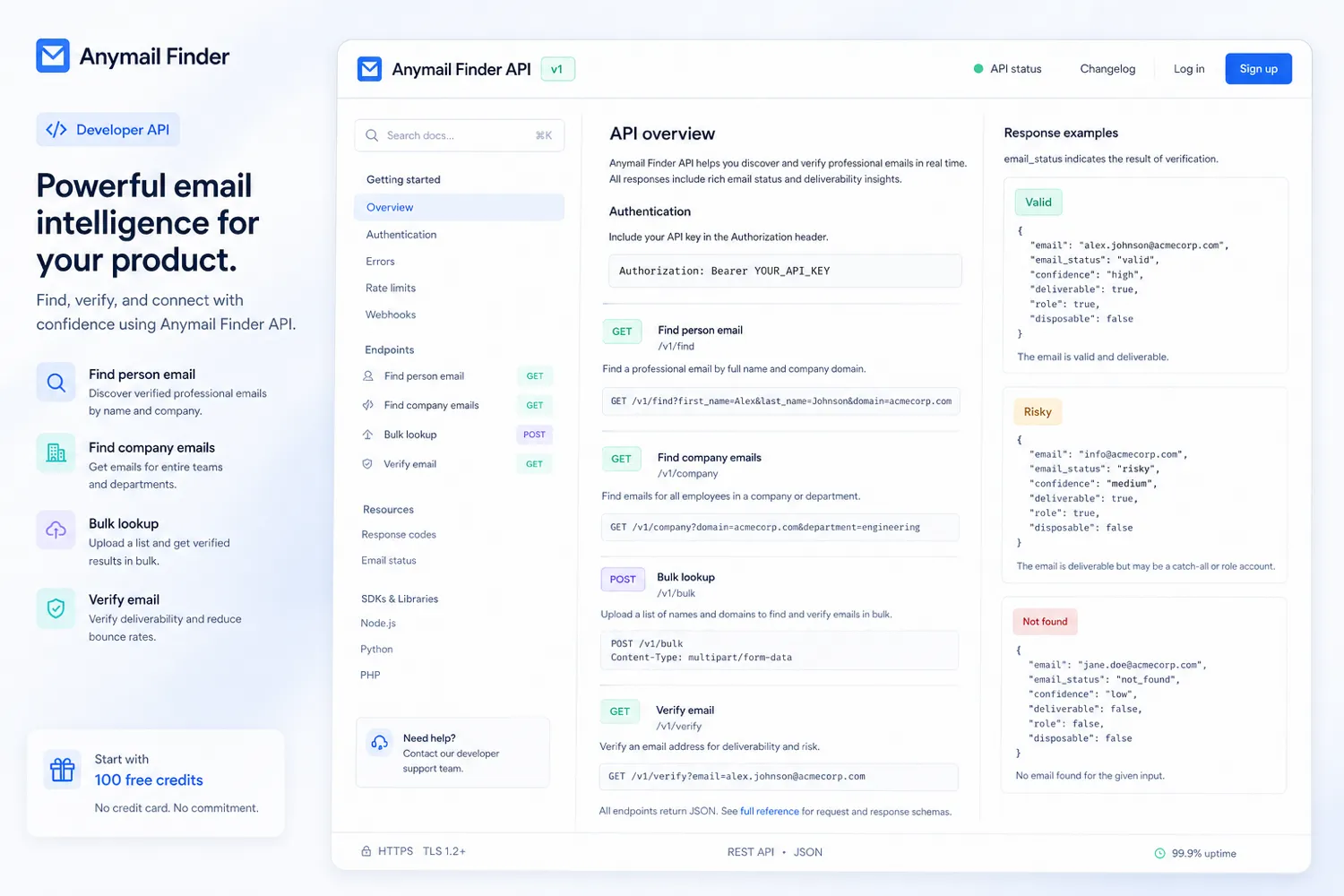
This is not the tool I would choose if I wanted a full outbound platform with campaign sending, mailbox warmup, CRM pipelines, intent data, phone numbers, LinkedIn automation, and a giant lead database in one place. Anymail Finder is more specific. It helps you find and verify professional email addresses through name, domain, company, decision-maker, LinkedIn URL, bulk, browser, and API workflows.
The buying question is not “does it find emails?” The better question is whether its verified-only credit model produces enough usable contacts for your exact list-building process.
For my money, Anymail Finder makes the most sense for buyers who already have a prospecting workflow and need a cleaner email-finding layer inside it. A recruiter who already knows the target company, an agency enriching a client list, or a developer adding email lookup to an internal tool may get more value from Anymail Finder than a casual user who only needs a few free searches.
The main caution is credit math. Public pricing is not just a monthly subscription question. You need to look at included credits, credit rollover, valid-result charging, free-credit expiry, annual billing, refund conditions, and whether your campaign volume is predictable enough to justify the plan.
Next step: If verified B2B email lookup is the actual job, test the current buyer route before choosing a paid credit plan.
Review snapshot
| Review point | Practical take |
|---|---|
| Best for | Sales, recruiting, agency, and developer workflows that need verified B2B email lookup |
| Not ideal for | Buyers who need a full outbound suite, CRM, intent database, phone enrichment, or campaign sending |
| Main use case | Finding and verifying professional emails before outreach or enrichment |
| Pricing model | Credit-based subscription with verified-only charging logic |
| Free entry path | 100 free credits are promoted for testing, with expiry and card-verification details to check |
| Main strength | Paying mainly for valid email results instead of risky or not-found searches |
| Main concern | Real value depends on hit rate, credit volume, refund terms, and outreach volume |
| Direct alternatives | Hunter, Findymail, Snov.io, Apollo |
| Best next step | Test a small real prospect list before moving to monthly or annual billing |
What is Anymail Finder?
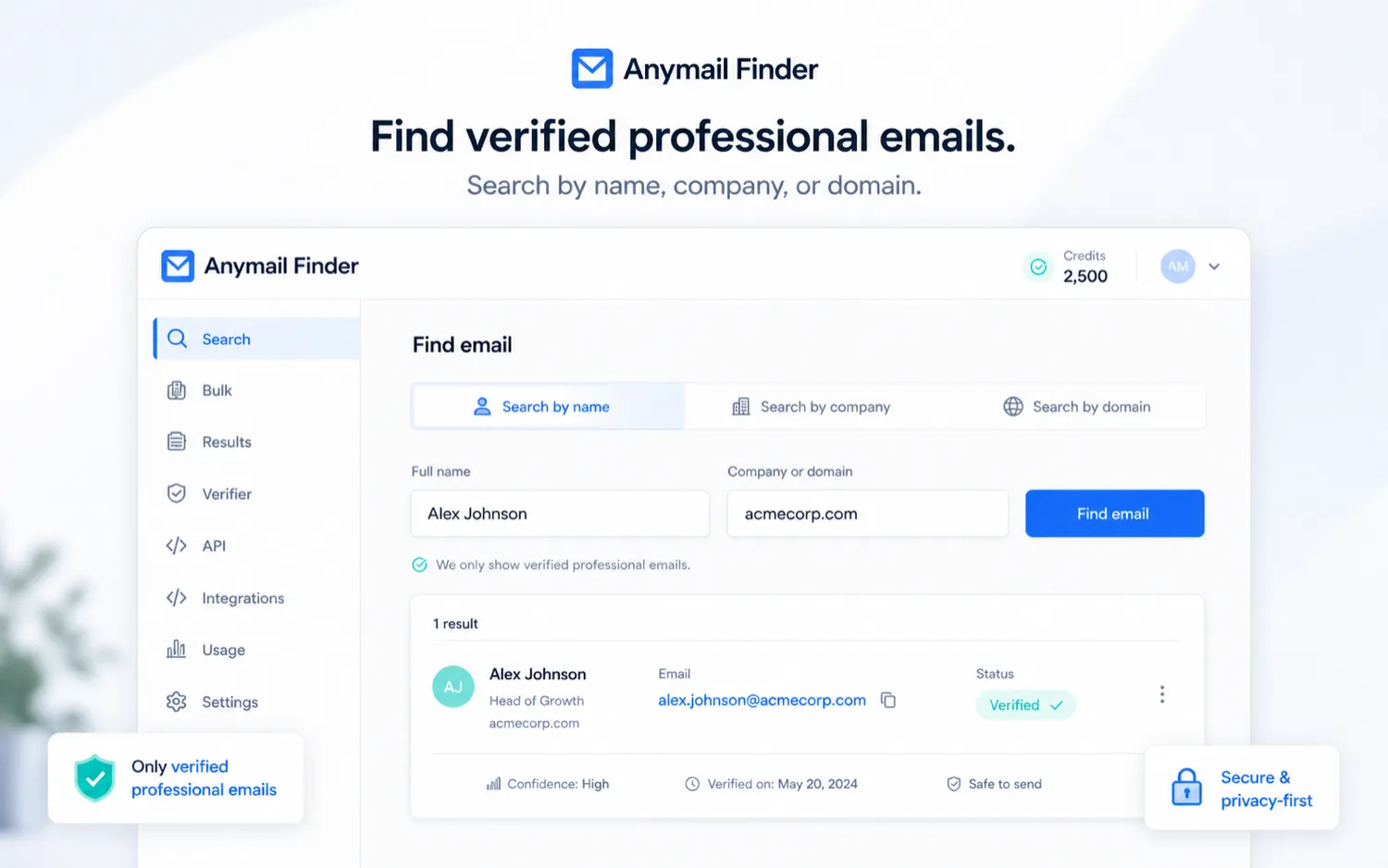
Anymail Finder is a B2B email finding and verification tool. In plain language, it helps you find professional email addresses for specific people, companies, domains, departments, LinkedIn profiles, bulk files, browser research, or API workflows.
The product’s core promise is not that it gives you the biggest list possible. It is that returned emails are verified before they are treated as valid. That matters because a cheap list-building workflow can become expensive if the contacts bounce, hurt sender reputation, or waste sales time.
The common misunderstanding is to judge Anymail Finder like a broad sales platform. I would not do that. It is better understood as a verified email lookup layer that can sit before your CRM, sequencer, spreadsheet, automation, or internal enrichment process.
Our review approach compares public product pages, pricing details, support and legal language, buyer workflow fit, and nearby alternatives. A low monthly plan, a free-credit path, or a coupon route does not prove the product is a good fit. The better test is whether it returns enough usable professional emails for the accounts you actually want to contact.
The product is also not an AI writing tool, video tool, or generic creator app. It belongs in the lead generation, email finder, sales outreach, and email verification category. That distinction matters because the alternatives, buyer risks, and pricing logic are completely different.
Who should use Anymail Finder?
Sales teams should consider Anymail Finder when they already know the target companies or prospects and need a cleaner way to find verified work emails before importing contacts into a CRM or outbound sequence. The fit is strongest when the team cares about deliverability and wants to avoid spending credits on risky or not-found results.
Recruiters can also make sense of it. If you already know the company, role, or person you want to contact, Anymail Finder’s name, domain, company, decision-maker, and LinkedIn URL lookup paths can support targeted outreach. The condition is that your recruiting process must still follow privacy, consent, and outreach rules. The tool finds emails; it does not remove compliance responsibility.
Agencies and consultants may find it useful when they enrich prospect lists for repeatable campaigns. In that case, the free-credit test should use real client-style prospects, not random examples. The decision should come down to valid-result rate, time saved, and cost per usable contact.
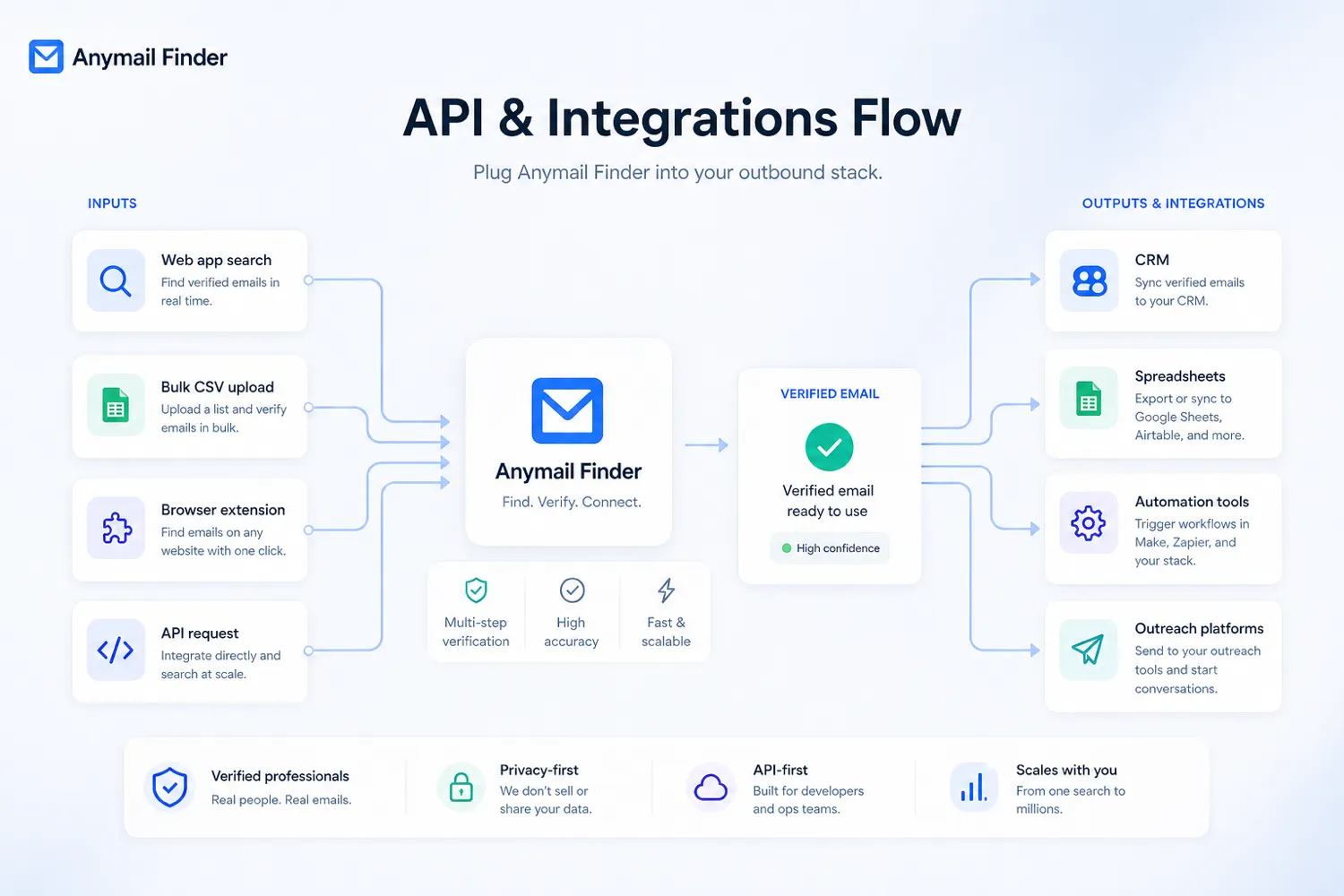
Developers and operations teams should look at Anymail Finder if email lookup needs to happen inside a product, spreadsheet, automation, or internal workflow. API access, bulk search, webhooks, and automation paths are more meaningful for this group than the browser UI alone.
Small teams that dislike wasted credits may also like the model. Paying only when a valid email is found can be attractive if your previous tools returned too many risky contacts. Still, I would compare the effective cost per usable contact before assuming this is the cheapest option.
Who should avoid Anymail Finder?
Avoid Anymail Finder if you want a complete sales engagement platform. It does not replace tools built for sequences, inbox rotation, deliverability warmup, CRM pipeline management, LinkedIn automation, intent signals, or account-level sales intelligence.
Be careful if you only need a tiny number of lookups. A free tool, a lighter plan elsewhere, or a broader platform you already pay for may be enough. Anymail Finder becomes more convincing when email finding is repeated often enough to justify credit planning.
I would also slow down if your team needs phone numbers, company enrichment, technographic filters, funding signals, or a large searchable database. In that case, Apollo, Findymail, or another enrichment-first platform may be a more natural comparison.
Do not buy it only because a coupon path exists. A discount can improve a purchase, but it should not be the reason you add another tool to a sales stack. The credit model has to work first.
Finally, avoid treating refund eligibility as automatic. Public pricing language may describe refund paths under specific conditions, while legal terms can still contain stricter non-refundable fee language. That does not mean the product is unsafe. It means you should verify the current refund and cancellation rules before relying on them.
How Anymail Finder fits into a real workflow
A good Anymail Finder workflow starts before the lookup.
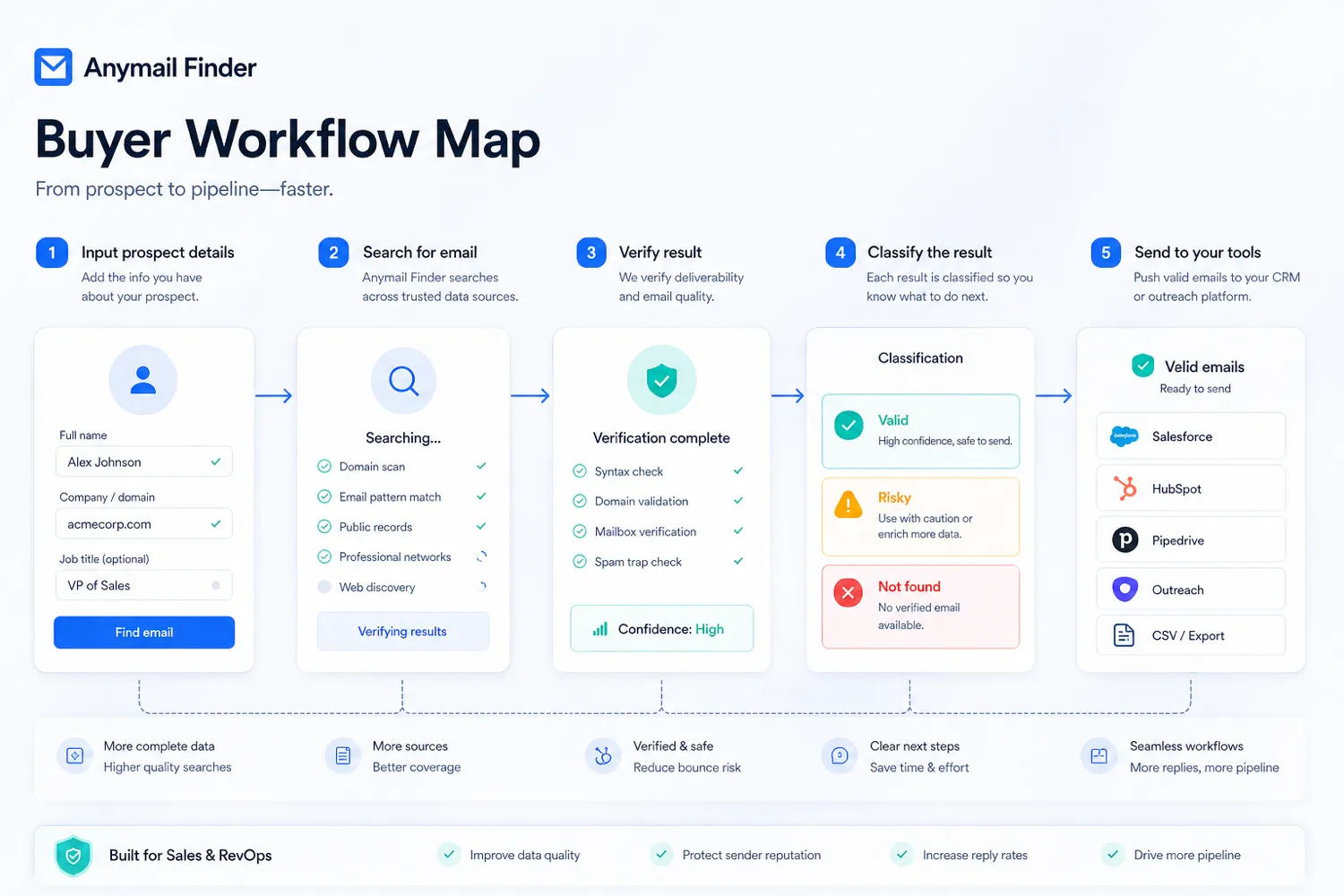
You need a real prospecting input: a company domain, a name and company, a target department, a LinkedIn URL, or a file of accounts. Then Anymail Finder becomes the verification layer between research and outreach.
A careful workflow might look like this:
- Build a small list of real target accounts.
- Search by person, company, domain, role, or LinkedIn URL.
- Separate valid results from risky or not-found cases.
- Track how many credits were consumed.
- Check whether the valid contacts match the roles you actually need.
- Import only usable contacts into your CRM, spreadsheet, or sequencer.
- Monitor bounce rate and replies after sending through your outreach tool.
This is where buyers can easily overestimate the value. If you only look at the number of emails returned, you may miss the more important question: how many contacts are usable enough to justify sending?
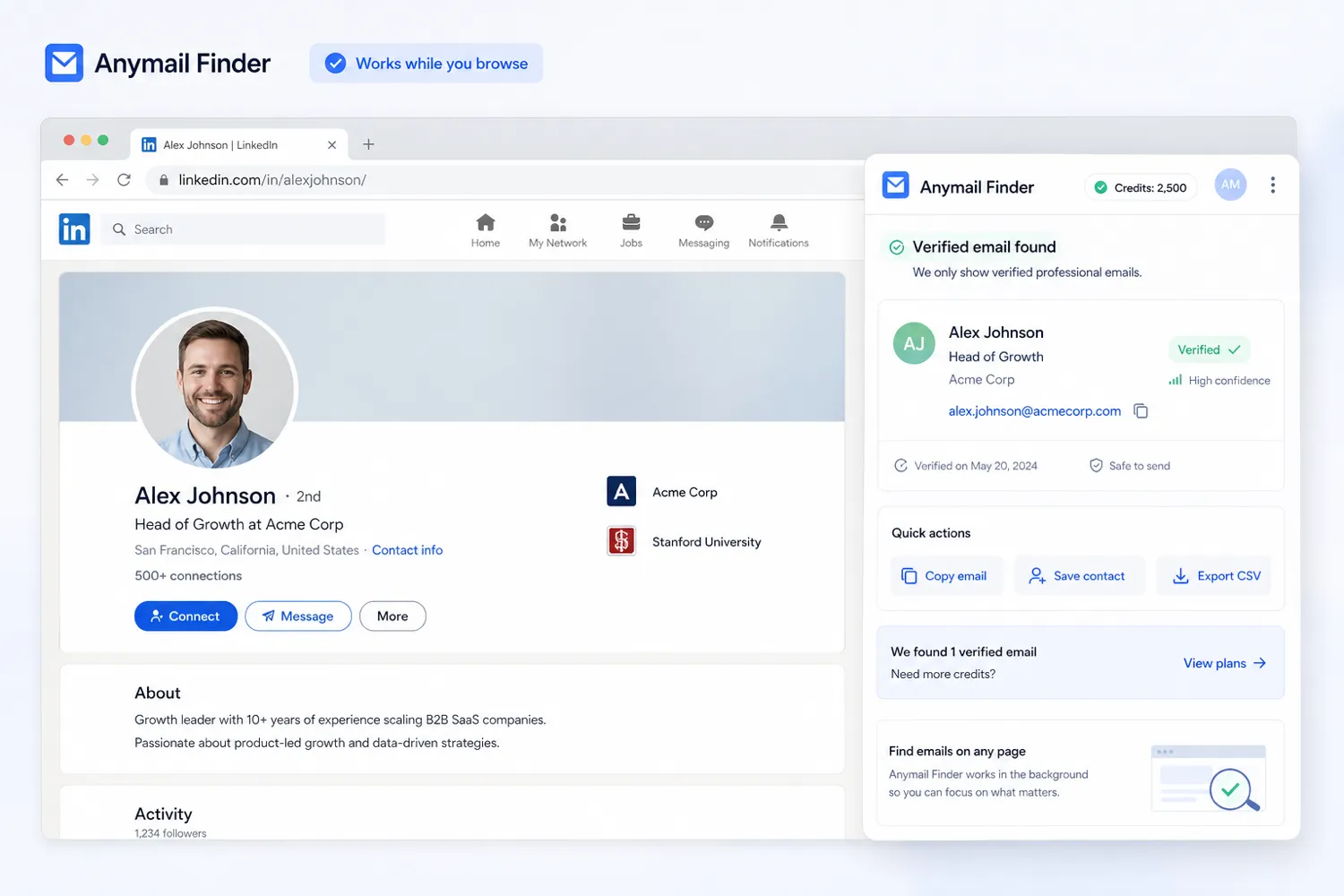
For a browser-heavy researcher, the Chrome extension may be the lighter path. For an agency or developer, bulk upload and API routes may matter more. For a small sales team, the decision may simply be whether the verified-credit model reduces waste compared with the tools they already use.
Workflow check: Use Anymail Finder with a small real prospect sample before treating a larger credit plan as the right move.
Real-world buyer scenarios
A small sales team might use Anymail Finder after building a target account list from LinkedIn, Google, directories, or a conference attendee list. The tool is useful if it turns known names and companies into verified work emails without wasting credits on risky results. It may fail if the team expects built-in sending, warmup, and CRM features.
A recruiter might use it to find hiring manager or candidate-adjacent contact details when they already know the company and role. The tool can help with targeted outreach, but the recruiter still has to manage message quality, legal basis, and respectful contact practices.
An agency may use Anymail Finder for client prospecting. This is where credit math matters. If a client campaign needs hundreds or thousands of valid contacts each month, the agency should test hit rate, credit usage, and bounce rate before choosing annual billing.
A developer may use the API to add email finding to an internal enrichment process. This can be a strong use case, but only if the team verifies request behavior, queueing, credit consumption, security expectations, and data handling before production use.
A founder doing one-off outreach might be the weaker fit. If the need is occasional, Anymail Finder may still be useful, but the free-credit path should be tested before paying for recurring access.
Key features that actually matter
Verified email lookup
The central feature is verified B2B email finding. Anymail Finder supports lookup by person name and company, domain, company name, decision-maker category, LinkedIn URL, bulk file, browser extension, and API.
Buyer note: this matters only if the returned contacts fit your outreach list. A verified email for the wrong person is still a bad lead.
Verified-only billing logic
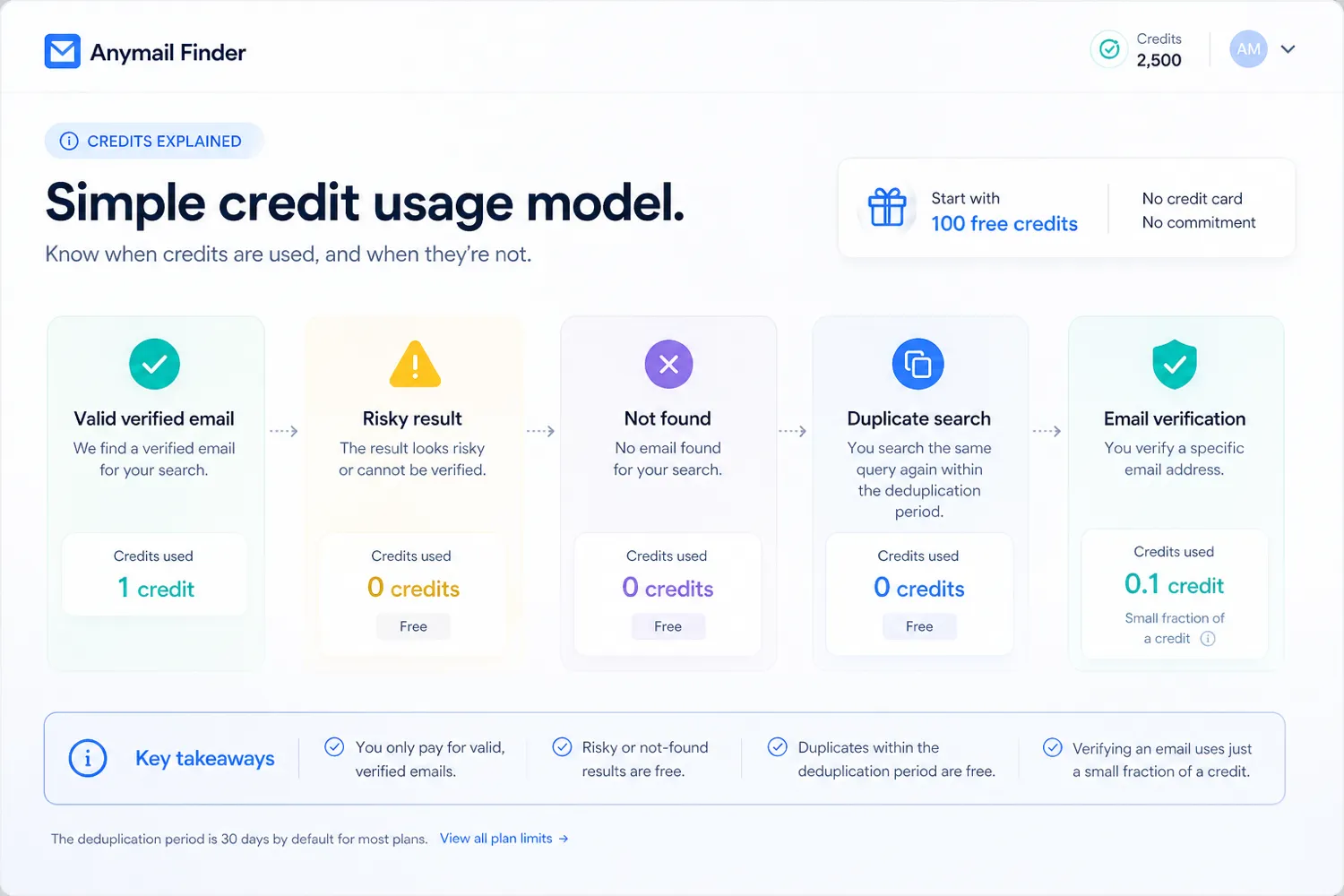
The credit model is one of the main reasons to compare Anymail Finder seriously. Risky and not-found results are presented as free, and the product charges around valid results rather than every attempted lookup.
Buyer note: this can reduce waste, but you should still calculate cost per usable contact. A plan can be fair on paper and still be wrong if your target niche has poor match rates.
Bulk search
Bulk lookup matters for agencies, recruiters, and sales teams that enrich lists in batches instead of searching one person at a time. It can turn Anymail Finder from a manual research tool into a repeatable list-enrichment step.
Buyer note: test a small sample first. Bulk features are only valuable when the inputs are clean and the output is reliable enough for your next workflow.
API and webhooks
The API route is useful for developers and operations teams that want email lookup inside a CRM, spreadsheet process, internal app, or automation system. API access also changes the buying decision from “can I use the website?” to “can this support repeatable infrastructure?”
Buyer note: verify authentication, rate behavior, credit usage, response timing, webhooks, data handling, and error states before building around it.
Chrome extension
The browser extension is useful for lighter prospect research. It gives buyers a way to find verified emails while browsing company websites or professional pages instead of switching fully into another workflow.
Buyer note: browser convenience is helpful, but it is not the same as a full sales engagement stack.
Pricing and plan value
Anymail Finder pricing should be judged through credit quality, not just monthly price.
At the time of review, the public pricing page presents plans around credits, monthly or yearly billing, and a verified-only charging model. It also promotes 100 free credits for testing, yearly savings, credit rollover up to a cap, and free risky or not-found results. Prices may localize by region and exclude sales tax, VAT, or GST, so the checkout page matters more than any static review copy.
The entry decision is simple: do not start with the biggest plan. Start with a sample list that looks like your real work. If you expect to enrich 500 to 1,000 prospects each month, the relevant question is not the cheapest plan. It is whether the plan returns enough valid contacts at a cost you can justify.
Annual billing can be attractive if the workflow is proven. It is risky if you are still unsure about hit rate, prospect quality, or monthly volume. A yearly discount does not help much if you later discover that your target market is difficult to match.
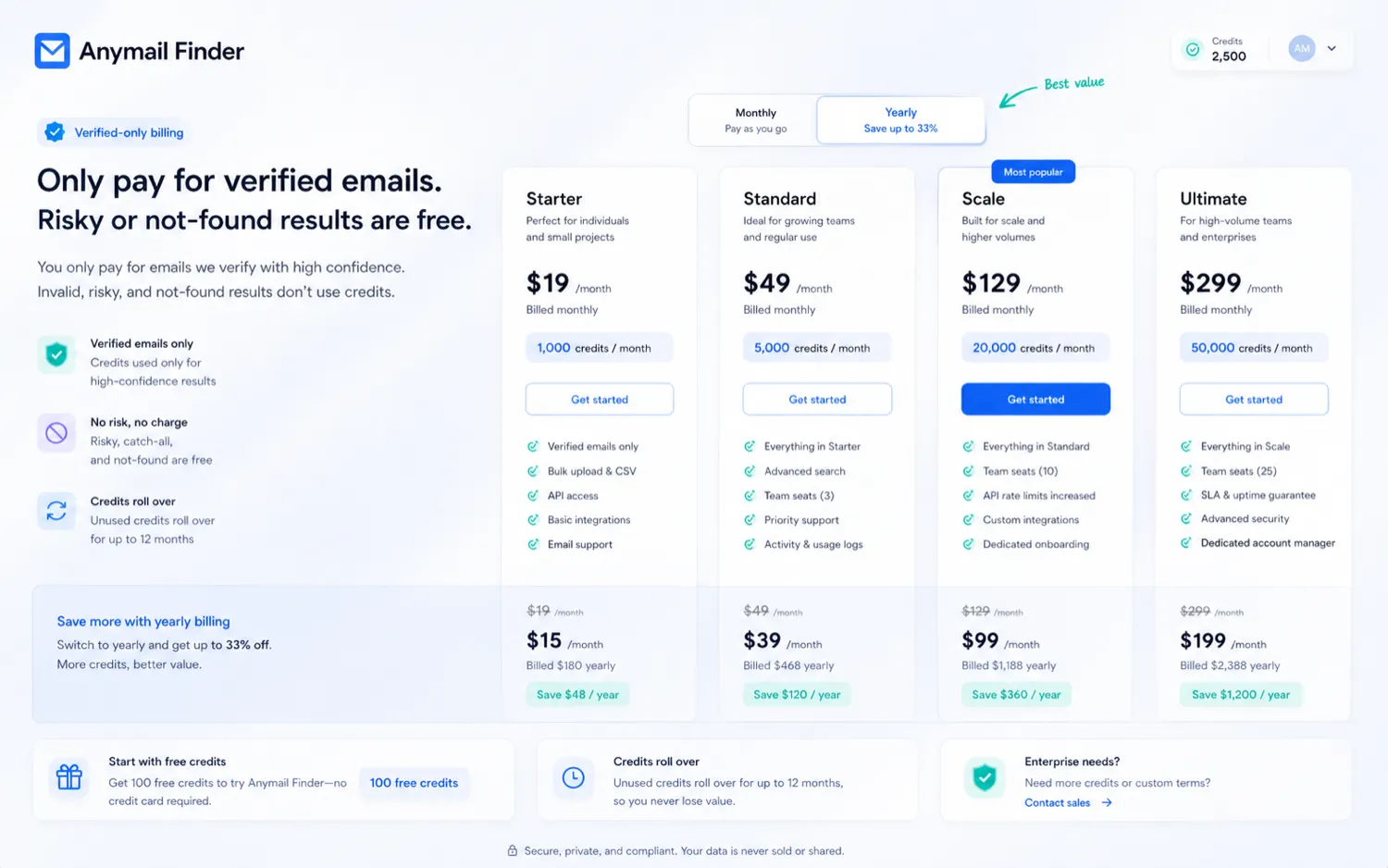
For teams, the shared-credit angle can be useful, but it also raises a management question: who controls credit usage, and how quickly can a team burn through a plan? For developers, API volume can become the real cost driver. For agencies, client campaigns can make usage unpredictable.
Pricing check: If the workflow fit is clear, verify live pricing, credit volume, currency, tax, and billing period before choosing a plan.
Check Anymail Finder pricing Check current offers Read store guide
Free plan, trial, coupon, and checkout notes
Anymail Finder is not the kind of product I would evaluate through a coupon first.
The smarter first step is the free-credit path. Use the free credits on real prospects, not made-up names. Try the exact inputs you expect to use later: domains, names, LinkedIn URLs, company names, and decision-maker categories.
A coupon page can still be useful before checkout, but it should be the final check, not the buying reason. The correct order is workflow fit first, credit math second, checkout route third.
The free-credit path also needs verification. Check whether a card authorization is required, how long credits last, whether there is any automatic enrollment, and what happens after credits expire. Public pages can change, so use the live pricing and signup flow as the source of truth.
For refunds, be careful. The pricing FAQ may describe refund eligibility under certain conditions, while terms can still describe fees and credits in stricter language. I would not treat refunds as automatic. If you are buying a larger plan, confirm the current policy before committing.
What I would check before buying Anymail Finder
If I were buying Anymail Finder for a real outreach workflow, I would check these points first:
- Whether the free-credit path lets me test the same prospect type I actually target.
- How many valid emails I get from a representative sample of names, domains, or LinkedIn URLs.
- Whether risky, not-found, duplicate, and valid results consume credits in the way I expect.
- Whether monthly credits, rollover rules, and team sharing fit my likely usage.
- Whether annual billing is sensible only after I know the tool will be used every month.
- Whether the API route is necessary, and how credit usage behaves in a real integration.
- Whether refund and cancellation rules are acceptable before I pay for a larger plan.
The mistake buyers often make here is comparing monthly price without comparing usable output. Email finders should be judged by cost per usable contact, not the number of credits printed on a pricing card.
A simple test before paying
Before paying, I would run a small test like this:
- Choose 25 to 50 real prospects from your actual target market.
- Include a mix of names, domains, company names, LinkedIn URLs, and decision-maker roles.
- Run the searches and track valid, risky, not-found, and duplicate results.
- Check how many credits were used.
- Review whether returned contacts match the people you would genuinely email.
- Send only through your normal outreach tool and monitor bounce behavior carefully.
- Compare the result against Hunter, Findymail, Snov.io, or Apollo if your team already uses one of them.
This test does not need to be complicated. It just needs to be real. A random sample from companies you would never contact tells you very little.
Pros explained
The first real advantage is the verified-only model. If risky or not-found results do not burn credits, Anymail Finder can feel more buyer-friendly than tools that charge heavily for uncertainty. This matters most when your outreach list includes companies where email patterns are hard to guess.
The second advantage is lookup flexibility. Name, domain, company, decision-maker, LinkedIn URL, bulk, extension, and API routes give different buyer types a way to use the product without forcing everyone into one interface.
The third advantage is workflow depth for technical teams. API access, bulk processing, and automation support make Anymail Finder more than a browser lookup tool. That is useful if email finding needs to happen repeatedly inside your operations.
The fourth advantage is a practical free-credit path. A small test can reveal whether the product fits before you pay. That is exactly how I would evaluate this category.
The fifth advantage is category focus. Anymail Finder does not try to be everything. For some buyers, that is a strength because it keeps the decision centered on verified professional emails.
Cons explained
The biggest limitation is that Anymail Finder is not a full outbound system. If you need sequences, deliverability warmup, inbox rotation, reply handling, CRM pipelines, LinkedIn automation, or intent data, you will still need other tools.
The second limitation is credit-value uncertainty. Even with verified-only charging, real value depends on your market, input quality, match rate, and outreach process. A product can be accurate and still not economical for your niche.
The third limitation is refund complexity. Public refund language should be treated as conditional. Buyers should confirm current terms instead of assuming a failed campaign can always be reversed.
The fourth limitation is data-scope mismatch. If you need phones, company enrichment, funding signals, or a large database, a tool like Apollo or Findymail may fit better.
The fifth limitation is that B2B outreach compliance stays with the buyer. Finding an email does not guarantee that every outreach use is appropriate in every region or situation.
Green flags and red flags
Green flags:
- You already have a repeatable prospecting process.
- You care more about valid professional emails than a massive raw database.
- You can test a real sample before paying.
- You need bulk or API lookup rather than only manual search.
- You have a separate CRM, sequencer, or outreach stack ready.
Red flags:
- You are buying because of a discount before proving workflow fit.
- You need campaign sending and deliverability tools inside the same product.
- You do not know your expected monthly lookup volume.
- You need phone data, company enrichment, or intent filters.
- You are relying on refunds without reading the current terms.
The cleanest buying signal is repeated usage. If email finding is something your team does every week, Anymail Finder is worth a serious test. If it is a one-time task, keep the test small.
Anymail Finder vs alternatives
Hunter vs Anymail Finder
Hunter is the cleaner comparison if you want a familiar email finder with domain search, verification, browser extensions, CRM integrations, and a lightweight free path. It may be easier for beginners who want a broader, well-known email-finding workflow.
Anymail Finder may still make sense if you prefer its verified-only credit logic, API simplicity, or specific lookup modes. I would compare both with the same prospect sample before deciding.
See the Hunter store guide if your main concern is a familiar email-finder workflow.
Findymail vs Anymail Finder
Findymail is a stronger comparison when the buyer cares about deliverability, CRM enrichment, phone or company data, and a more data-enrichment-oriented workflow. It is not just a one-to-one email lookup comparison for every buyer.
Anymail Finder may be better if your need is narrower: verified professional emails without paying for broader enrichment features you will not use.
See the Findymail store guide if enrichment depth matters more than a focused email-finder tool.
Snov.io vs Anymail Finder
Snov.io is the better comparison if you want email finding, verification, outreach campaigns, warmup, LinkedIn-related features, CRM-style workflows, and team outreach tools in one ecosystem.
Anymail Finder is more focused. It is the cleaner choice if you already have an outreach stack and only need verified email lookup before sending.
See the Snov.io store guide if built-in campaign execution matters.
Apollo vs Anymail Finder
Apollo is the heavier route for buyers who need a large sales database, filters, sales engagement, prospecting, and broader go-to-market workflows. It can be overkill if all you need is verified email lookup.
Anymail Finder may be the simpler fit for teams that already know who they want to reach and only need reliable email discovery before outreach.
See the Apollo store guide if your team needs a full sales intelligence workspace rather than a focused email finder.
GetProspect as an adjacent route
GetProspect is an adjacent option for buyers who want LinkedIn-oriented lead extraction and prospect management around email discovery. It is worth comparing if your list-building starts heavily from LinkedIn workflows.
Anymail Finder remains more focused on verified email lookup and API-friendly enrichment.
Trust, refund, and buyer-risk notes
There are a few risk points I would not ignore.
First, pricing can localize. The public pricing page may display different currencies, taxes, or plan layouts depending on region. Before publishing or purchasing based on a price, verify the live checkout page.
Second, credit rules matter. A plan that looks cheap can become expensive if your valid-result rate is lower than expected. A plan that looks expensive can be reasonable if it produces cleaner contacts with fewer bounces. Measure with real prospects.
Third, refund language is conditional. Do not describe Anymail Finder as risk-free. Buyers should read the current pricing FAQ and terms before depending on a refund.
Fourth, API use changes the risk profile. Developers should verify authentication, queue behavior, webhooks, request timing, credit consumption, and data handling before putting Anymail Finder into production.
Fifth, B2B outreach compliance remains the buyer’s responsibility. Anymail Finder can help find and verify professional emails, but it does not guarantee that every campaign, region, message, or data use is compliant.
Sixth, a coupon should stay secondary. If the product does not fit the workflow, a lower price does not make it a good purchase.
Final verdict
I would consider Anymail Finder if you need verified B2B email addresses, already know your target accounts, and want a focused lookup layer before outreach. It is especially worth testing if wasted credits, risky contacts, or API-based enrichment are pain points in your current process.
I would skip it if you need an all-in-one sales system. If your actual need includes sequences, CRM, warmup, phone numbers, intent data, LinkedIn automation, or a giant prospect database, compare broader platforms first.
I would compare it with Hunter if you want a familiar email-finder workflow, Findymail if deliverability and enrichment depth matter, Snov.io if campaign execution is part of the same buying decision, and Apollo if you need a full sales intelligence platform.
The safest path is simple: use the free-credit route on a real prospect sample, calculate cost per usable contact, verify refund and billing terms, and only then decide whether monthly or annual credits make sense. Anymail Finder can be useful, but only when verified email lookup is a repeated workflow, not a one-time curiosity.
