Quick verdict
Claspo is worth considering if your real problem is onsite conversion, not “marketing automation” in the broad, vague sense.
That distinction matters.
Claspo is not trying to replace your CRM, email platform, ecommerce analytics stack, or full funnel builder. Its clearer job is narrower: help you create popups, forms, bars, surveys, gamified offers, feedback widgets, and targeted onsite messages without asking a developer to build every campaign by hand.
For a small ecommerce store, SaaS site, agency, newsletter project, or content business, that can be useful. A good popup tool saves time when it helps you move from offer idea to live campaign quickly, then gives you enough targeting and testing control to avoid annoying every visitor with the same generic box.
The part I would check first is not the template count. It is pageview fit. Claspo’s pricing and upgrade decision are tied to traffic volume, billing interval, website needs, and Pro-level requirements such as custom domains or multiple sites. A small site may be able to test the free path for a while. A larger store should not assume the same plan math.
I would consider Claspo if you already know the campaign you want to run: newsletter capture, discount popup, cart exit offer, survey, quiz, product prompt, or a lightweight feedback widget. I would be more careful if you want deep ecommerce revenue attribution, web push, email automation, or funnel pages in the same purchase.
The safest next step is to build one real widget, connect it to the tool that receives the lead, and compare actual pageviews against the current pricing page before choosing paid or annual billing.
Next step: If Claspo fits your onsite conversion workflow, verify the current free path, pageview tier, and buyer route before checkout.
Review snapshot
| Review point | Practical take |
|---|---|
| Best for | Ecommerce stores, SaaS sites, agencies, and marketers that need popup, form, survey, or onsite campaign widgets |
| Not ideal for | Buyers who need full email automation, CRM, funnel pages, advanced revenue attribution, or ecommerce merchandising in one tool |
| Main use case | Building no-code onsite conversion campaigns such as lead capture, discount offers, feedback, quizzes, and gamified widgets |
| Pricing note | Free subscription is available; paid evaluation depends on pageviews, billing interval, website needs, and Pro-level options |
| Trial path | Public help content describes a 14-day Pro trial after hitting the Free plan pageview limit |
| Main strength | Claspo gives marketers a focused popup and widget layer with templates, targeting, A/B testing, integrations, and visitor-experience controls |
| Main concern | The wrong traffic tier or weak campaign strategy can make a cheap-looking popup tool feel less useful than expected |
| Direct alternatives | Wisepops, OptinMonster, Poptin, Popupsmart |
| Adjacent routes | ActiveCampaign for automation after capture; ClickFunnels for funnel and landing-page workflows |
| Best next step | Launch one real free-plan campaign, measure lead quality, then verify pricing before upgrading |
What is Claspo?
Claspo is a no-code popup and onsite widget builder for websites that need more ways to capture leads, show offers, collect feedback, promote discounts, and guide visitors without building every campaign from scratch.
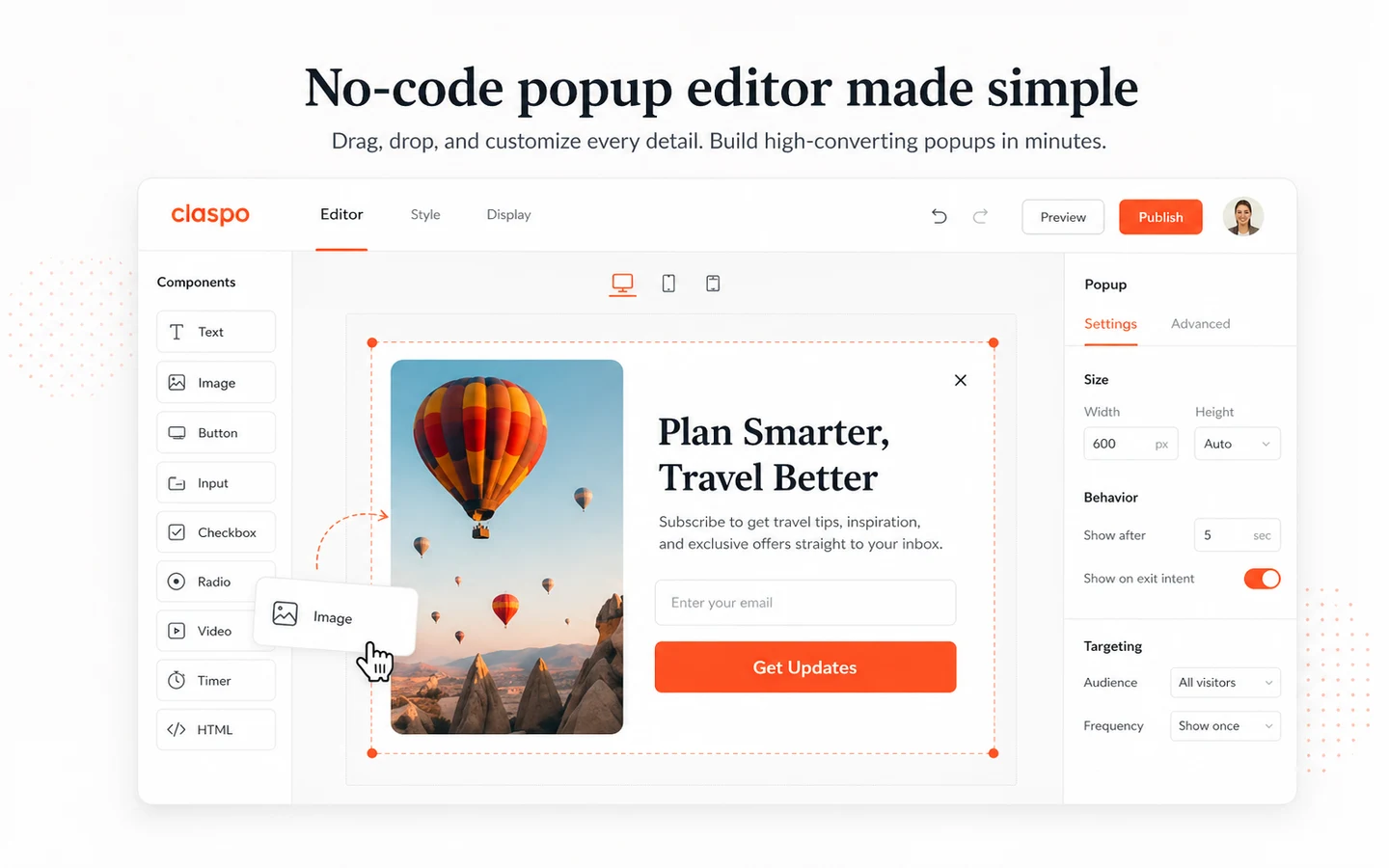
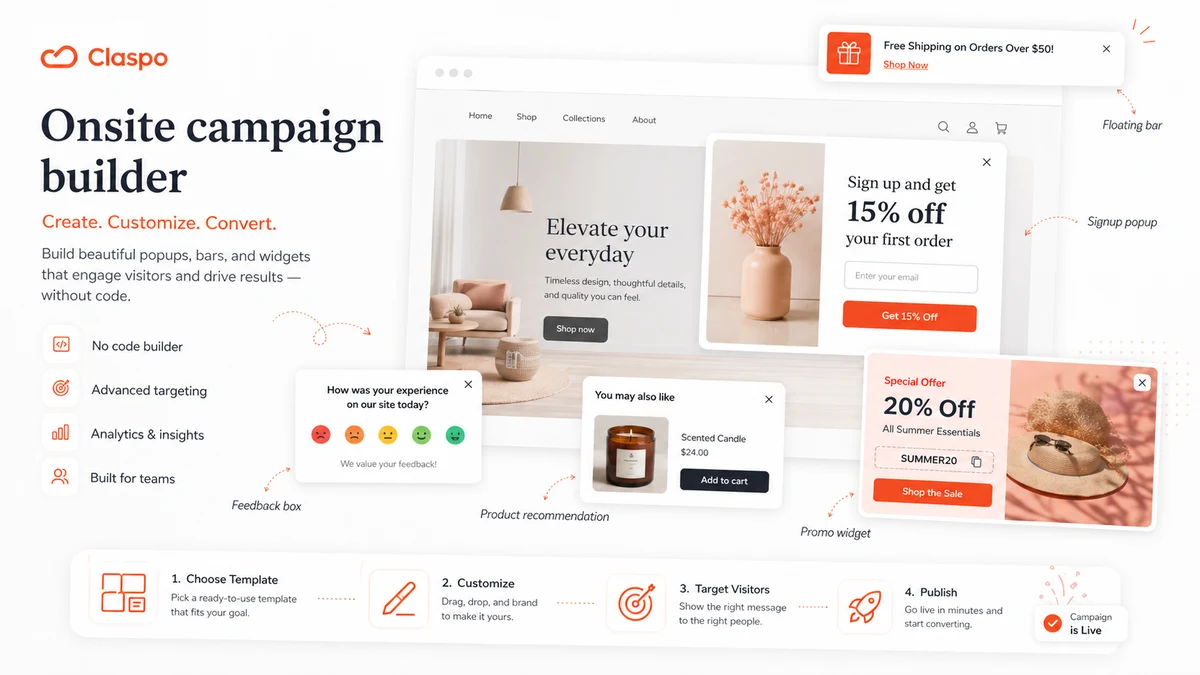
The current public product story is straightforward: choose a template, customize it in a drag-and-drop editor, choose when and where the widget appears, connect it to your site, and send captured data into marketing tools. Claspo supports common popup and onsite formats such as centered popups, floating boxes, floating bars, embedded widgets, teasers, content-blocking widgets, forms, surveys, gamified campaigns, and feedback prompts.
That makes Claspo a conversion layer, not a whole marketing department.
The common wrong expectation is to treat a popup builder as if it automatically improves revenue. It does not. The popup only works if the offer is right, the timing is reasonable, the audience targeting is thoughtful, and the lead or purchase path after submission is clean. A beautiful popup with a weak offer still fails.
Our review approach compares public product pages, pricing details, help documentation, integration coverage, refund terms, buyer workflow fit, and nearby alternatives. I would not treat a free plan, coupon path, template library, or annual discount as proof that Claspo fits the buyer. The better test is whether it helps you run a repeatable onsite campaign without hurting visitor experience.
Who should use Claspo?
Claspo makes the most sense for ecommerce teams that want to run lead capture, discount, cart-recovery, gamified, feedback, or product-promotion widgets on an existing store. The condition is simple: you need an actual offer and a way to measure results. If you only want a popup because competitors use one, the tool will not fix the strategy.
Small marketing teams can also use it well. If the team wants a no-code way to test newsletter signup forms, announcement bars, seasonal offers, surveys, and localized messages, Claspo is easier to justify than asking a developer to build each variation. Before paying, I would still confirm pageview tiers and the exact integration needed for email or CRM follow-up.
Agencies and freelancers may like Claspo when they need to launch client campaign widgets quickly. This is where multiple websites, user roles, custom domains, badge removal, and support expectations matter more than the first-plan price. A client workflow needs less guesswork.
SaaS and service businesses can use Claspo for demo requests, product feedback, callback forms, lead magnets, onboarding prompts, and feature announcements. The fit is strongest when the widget supports a clear conversion path, not when it becomes a random interruption.
Content sites and newsletter publishers may also find value in the free path. Exit intent forms, floating bars, lead magnet forms, and lightweight surveys can be useful if the site already has traffic and a follow-up plan for subscribers.
Who should avoid Claspo?
I would avoid Claspo if you expect one tool to replace your email automation, CRM, landing-page builder, analytics suite, and ecommerce merchandising stack.
Claspo can capture the lead or create the onsite prompt. It does not automatically nurture the lead, qualify the buyer, run a sales pipeline, or build a complete funnel. If the bigger need is email automation after capture, the ActiveCampaign store guide is a more relevant internal route to compare.
High-traffic sites should also slow down. Claspo may look easy to start, but paid value depends on pageviews. The buyer mistake here is choosing a plan from a low-traffic mental model, then discovering that the real site volume changes the cost. Before paying, I would compare the live pricing slider against actual monthly traffic.
Marketers without a testing cadence may be disappointed. Popups become useful when someone reviews impressions, submissions, conversion quality, visitor behavior, and downstream results. If nobody checks the campaign after launch, Claspo becomes another widget sitting on the site.
Ecommerce teams that need deep revenue attribution, onsite feeds, advanced product recommendation workflows, or broader enterprise personalization should compare direct onsite conversion alternatives before choosing. Claspo is more focused and accessible; that can be a strength, but it also means it should not be stretched into the wrong job.
Finally, buyers who only want a coupon should be careful. A discount can improve the purchase, but it should not decide the purchase. Workflow fit, pageview tier, and refund terms come first.
How Claspo fits into a real workflow
A strong Claspo workflow starts with the campaign goal, not the template library.
The buyer should know what they are trying to improve: email signups, cart recovery, first-purchase offers, survey responses, demo requests, product announcements, language-specific promotions, or visitor feedback. Once that is clear, Claspo becomes a builder for turning that goal into a live onsite message.
A practical workflow looks like this:
- Choose one campaign goal, such as newsletter capture or exit-intent discount.
- Pick a template that matches the offer and brand tone.
- Adjust layout, copy, fields, and visual style.
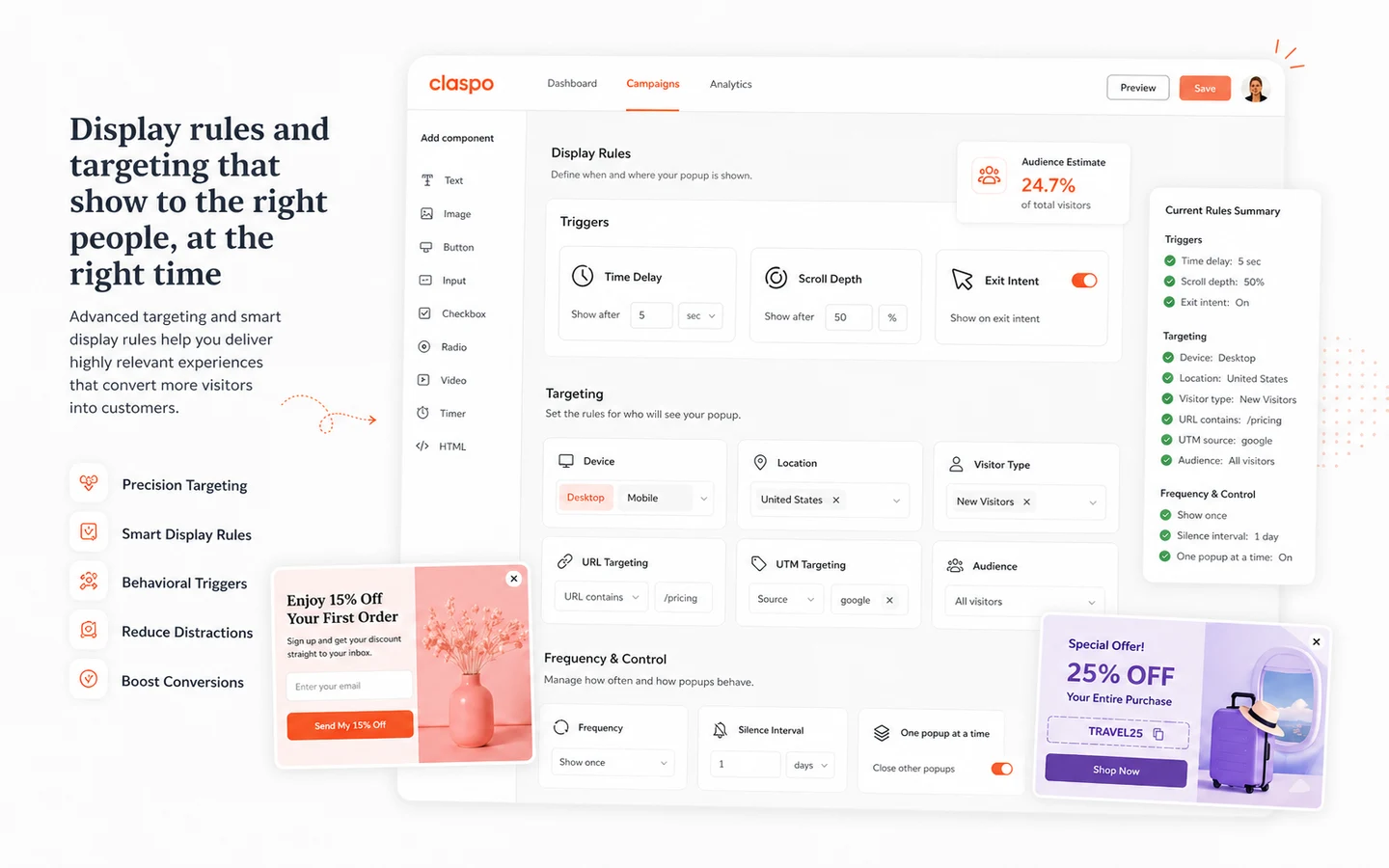
- Set display rules based on page, visitor behavior, language, geography, device, or timing.
- Connect submissions to the email, CRM, ecommerce, or webhook destination.
- Publish the widget with overlap and timing controls so it does not fight other messages.
- Watch results, not just impressions.
- A/B test the offer, timing, or creative if the first version is not strong enough.
This is where Claspo has a believable role. It gives non-technical marketers a way to test onsite conversion ideas without waiting on custom development.
But the human decision still matters. Claspo can help you build and target the widget. It cannot decide whether your offer is attractive, whether the discount makes financial sense, or whether the follow-up sequence is good enough to turn a submission into revenue.
Workflow check: If you can name one real campaign and one follow-up destination, Claspo is easier to evaluate without overbuying.
Real-world buyer scenarios
A small Shopify store might use Claspo to test a first-purchase discount popup. The fit is good when the store can measure email capture, coupon redemption, order value, and whether the widget annoys returning visitors. The risk is treating the popup as a magic revenue lever while ignoring offer economics.
A SaaS team might use Claspo for demo requests, product feedback, or feature announcements. In that case, the widget is not the whole workflow. The important question is whether the form submission lands in the right CRM, email tool, or support workflow with enough context for the team to act.
An agency might use Claspo across client websites. This can be practical because the builder, templates, and integrations reduce setup time. I would still verify multi-site support, user roles, client ownership, custom domains, branding rules, and refund terms before making it part of a recurring client package.
A content site or newsletter publisher might use Claspo for lead magnets, newsletter forms, floating bars, and reader surveys. The free path may be enough for early testing. Paid value begins when traffic volume, segmentation, and campaign cadence justify the upgrade.
Key features that actually matter
No-code popup and widget builder
Claspo’s builder matters because the buyer often needs speed more than novelty. A marketer can start from a template, change the design and copy, pick a widget type, and publish without custom campaign development.
Buyer note: speed is useful only if the team also has a review habit. A fast builder can produce fast clutter if every idea becomes a popup.
Templates and campaign formats
The template library is useful because onsite campaigns often repeat familiar jobs: email capture, discounts, cart exit, feedback, surveys, social proof, product prompts, and announcements. Templates reduce setup friction.
Buyer note: do not choose a tool only because it has many templates. Check whether the templates match your brand, offer types, and visitor experience.
Targeting, triggers, and visitor controls
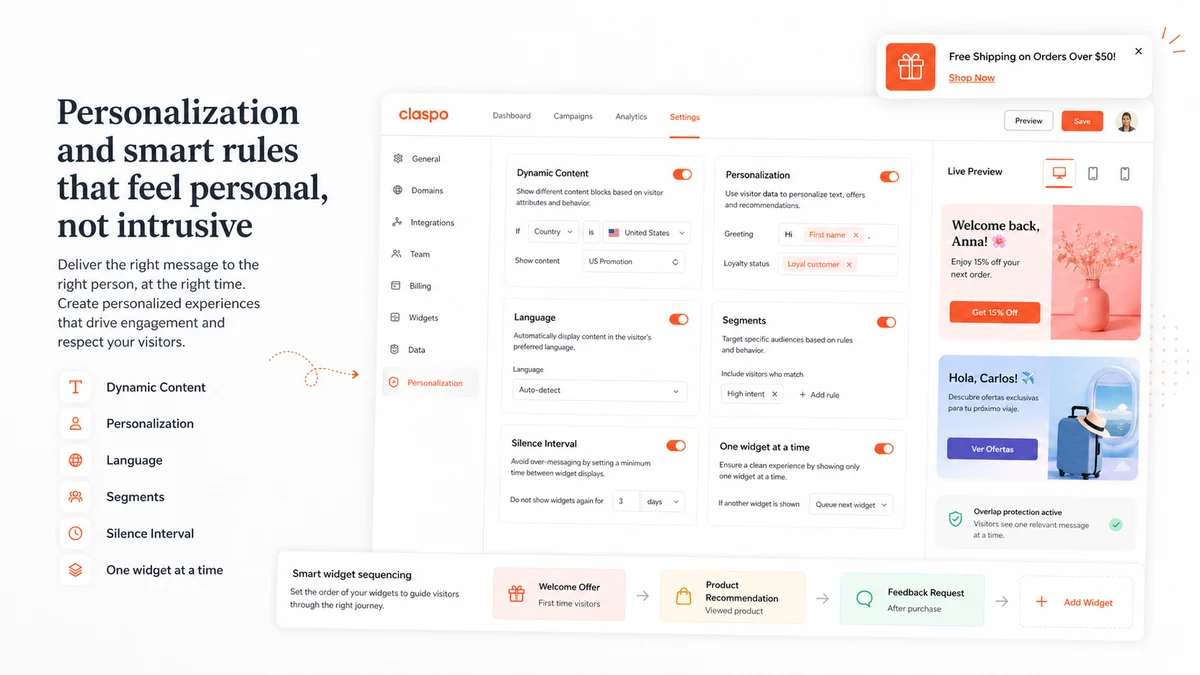
Display rules, timing, behavior triggers, geolocation, language support, sequencing, silence intervals, and overlap controls are the features that decide whether a popup feels helpful or irritating.
Buyer note: this is where I would spend the most evaluation time. A popup builder that cannot control who sees what will eventually hurt the visitor experience.
A/B testing and analytics
Claspo’s public materials highlight A/B testing and real-time analytics. That matters because a popup should be judged by results, not by whether the first design looks good in preview.
Buyer note: analytics are only valuable if the buyer knows the success metric. Submissions, revenue lift, list quality, and downstream conversions matter more than impressions.
Integrations, Zapier, Make, and webhooks
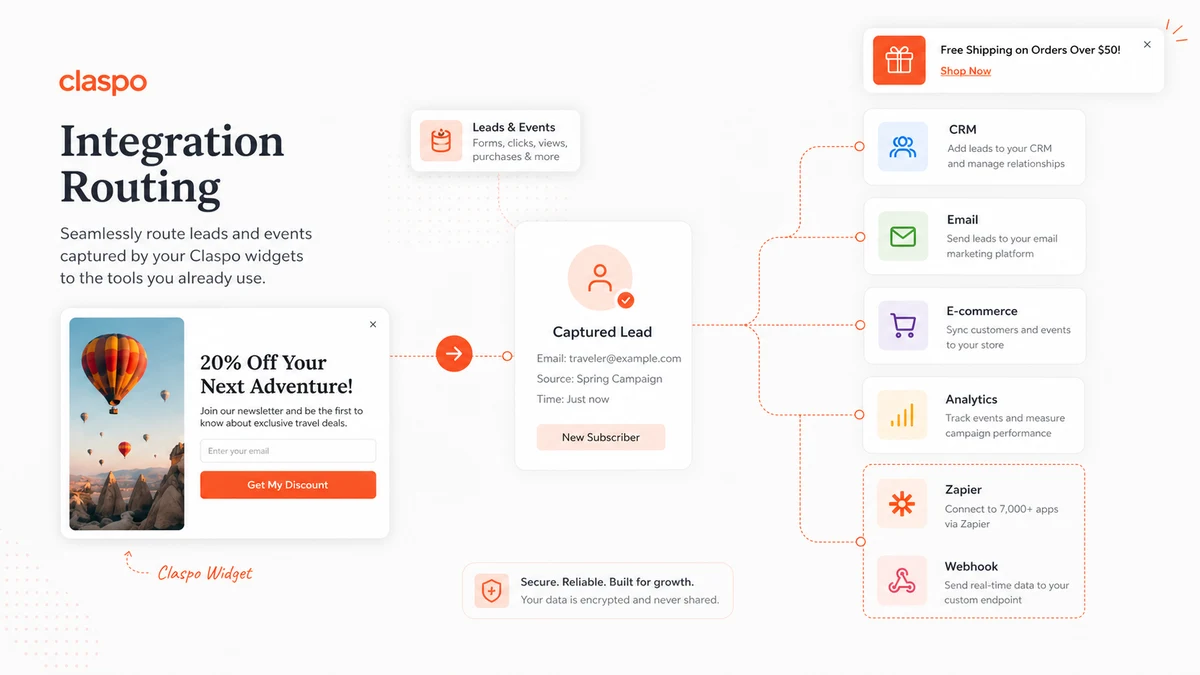
Claspo is more useful when it sends captured leads and events into the systems already used by the business. The help center lists many integrations, including email platforms, CRMs, analytics routing, Zapier, Make, Activepieces, Pabbly, and webhooks.
Buyer note: check the exact integration you need before paying. A popup that captures leads but creates manual export work is weaker than it looks.
Pricing and plan value
Claspo pricing should be judged in two layers: free testing value first, paid traffic fit second.
The public pricing route presents a free subscription path, and official help content says buyers can use a 14-day Pro trial after hitting the Free plan’s pageview limit. During that trial, buyers can test higher pageview limits and Pro-level options such as multiple active websites and custom domains. The Shopify App Store listing also shows paid examples tied to pageview levels, including 50,000 pageviews at $39/month, 100,000 pageviews at $69/month, and higher tiers.
That makes the buying question more practical than emotional.
If your site is small, the free path may be enough to validate whether Claspo fits your campaign workflow. If your traffic is larger, the pricing slider and pageview tier become the real decision. The cheapest-looking route is not automatically the best deal if it does not fit your actual monthly traffic.
Annual billing can improve the price if the tool is already proven. Claspo’s FAQ describes a 25% annual discount, but I would still verify the live checkout toggle because pricing pages, app marketplace listings, and support articles can present plan details differently over time.
I would not move to annual billing after one good-looking popup preview. The safer path is to launch a real campaign, check traffic, confirm the integration, review lead quality, and then decide whether monthly or annual billing makes sense.
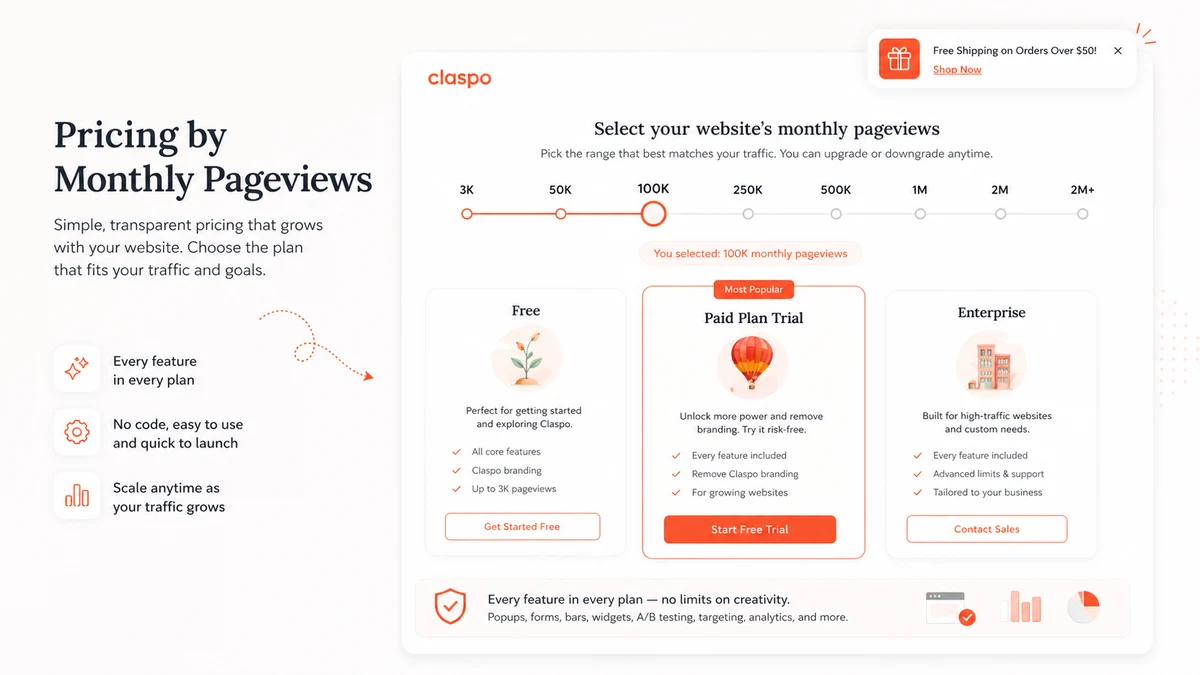
Pricing check: If Claspo still fits your campaign plan, compare the free path, Pro trial route, pageview tier, and annual billing before checkout.
Free plan, trial, coupon, and checkout notes
The safest Claspo savings path is not coupon-first.
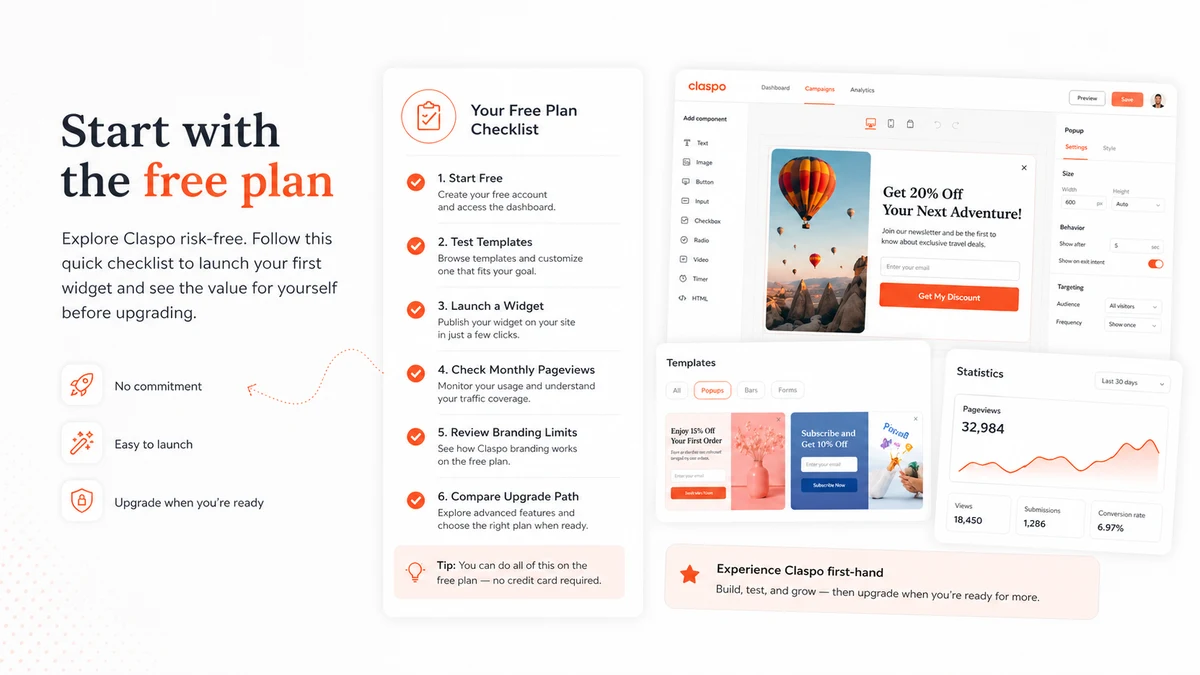
Start with the free subscription, build one real campaign, and check whether the limits match your site. That test should include the widget editor, targeting rules, integration routing, and live-site behavior. A popup that looks fine in preview can behave differently once it appears to real visitors.
The Pro trial path is useful when the free limits are not enough. Public help content says the 14-day Pro trial becomes available after the Free plan pageview limit is reached, and that the selected Pro plan continues as a paid subscription after the trial. That means buyers should understand the continuation terms before treating the trial as casual.
The coupon path should come later. If there is an active offer on the Claspo coupon page, use it only after the campaign and plan fit are clear. Do not expose or chase coupon codes as the reason to buy.
Refund language is unusually buyer-friendly in the public FAQ, which says refunds are available within 30 days on monthly plans or 100 days on annual plans by contacting Claspo. Still, I would read the current help article and checkout terms before annual billing because refund and cancellation wording can be updated.
What I would check before buying Claspo
If I were buying Claspo for a real site, I would check these points before paying:
- The site’s actual monthly pageviews, not a rough guess.
- Whether the free plan can support the first real campaign long enough to evaluate it.
- Whether the Pro trial continuation terms are clear before activating it.
- Whether the selected plan supports the number of websites, custom domains, branding needs, and user roles required.
- Whether the needed email, CRM, ecommerce, analytics, Zapier, Make, or webhook integration works before launch.
- Whether annual billing still makes sense after one campaign has produced usable data.
- Whether the refund and cancellation terms still match the current public FAQ and checkout flow.
The buyer mistake here is simple: launching a popup, seeing a few signups, and assuming the tool is already justified. The better question is whether those signups become useful leads, sales, demos, survey responses, or customer insights.
A simple test before paying
Before paying, I would run a small test like this:
- Choose one campaign goal: email capture, discount offer, feedback, demo request, or cart recovery.
- Build one widget from a template and adjust the design to match the site.
- Set conservative targeting rules so the widget appears only in the right context.
- Connect the form to the real email, CRM, ecommerce, or webhook destination.
- Publish to a limited page group or traffic segment if possible.
- Track submissions, conversion quality, complaints, page experience, and downstream results.
- Compare actual pageviews and campaign cadence against the paid plan before upgrading.
This test does not need to be dramatic. It needs to be honest. If Claspo saves setup time and produces useful results, the paid decision becomes clearer. If the widget feels easy to build but does not improve any meaningful outcome, the free path has done its job.
Pros explained
Claspo’s biggest advantage is focus. It does not make the buyer learn a giant marketing suite just to launch a popup, form, or onsite widget. That is useful for teams that already have the rest of the stack and only need the onsite campaign layer.
The free path is another real strength. A no-time-limit free subscription gives smaller sites a safer way to test templates, targeting, and integrations before paying. That matters because popup software is easy to overbuy before the buyer knows whether the campaign even works.
The integration coverage is also meaningful. Claspo becomes more valuable when captured leads and events can move into tools such as Mailchimp, Klaviyo, HubSpot, ActiveCampaign, Salesforce, Google Sheets, Zapier, Make, and webhooks. Without that path, the widget becomes a manual task generator.
I also like that the product story includes visitor-experience controls, not only “make popups.” Triggers, targeting, overlap protection, sequencing, silence intervals, localization, A/B testing, and analytics are the pieces that help prevent a popup strategy from becoming messy.
Finally, Claspo has enough public documentation to reduce some buying uncertainty. Pricing, subscription changes, integrations, refund FAQ, and app marketplace listings are easier to inspect than with many smaller popup tools.
Cons explained
The main downside is pricing complexity around pageviews. This is not necessarily unfair, but it does mean the buyer must know traffic volume. A plan that looks sensible for a smaller site can become less attractive as traffic or client count grows.
Claspo is also not a complete marketing system. It can support lead capture and onsite messages, but buyers still need email automation, CRM follow-up, ecommerce analytics, or funnel pages elsewhere. If that broader workflow is missing, Claspo may reveal the gap rather than solve it.
The free plan can create a false sense of full fit. Free testing is valuable, but the paid decision may depend on website count, custom domains, branding, pageviews, integrations, or agency workflows. Buyers should not assume the free setup proves the final paid setup.
Another limitation is strategic, not technical. Popups require restraint. Too many widgets, weak offers, aggressive triggers, or poor timing can damage visitor experience. Claspo gives controls, but the buyer still has to use them well.
For enterprise ecommerce teams, a more advanced onsite personalization platform may be a better fit. If revenue attribution, onsite feeds, product recommendation depth, web push, or advanced experimentation are central to the project, compare more specialized alternatives before paying.
Green flags and red flags
Green flags for Claspo include a clear campaign goal, enough traffic to measure results, an existing follow-up tool, and a team member responsible for reviewing performance. Claspo is easier to justify when the buyer can say, “We need this popup to collect this type of lead and send it to this system.”
Another green flag is a site that needs multiple widget types but not a giant suite. Newsletter forms, exit offers, floating bars, feedback buttons, localized announcements, and gamified discounts all fit the product’s natural territory.
Red flags start with vague intent. If the reason for buying is only “we should have popups,” wait. That is not a campaign plan.
Another red flag is high traffic without pricing clarity. Check the pageview tier first. Also slow down if the team has no way to measure downstream quality. More submissions are not automatically better if the leads do not convert or if visitors complain.
I would also be careful when an agency wants to make Claspo part of a client package before verifying website limits, ownership, support, custom domains, role permissions, and refund terms. Client work exposes small setup assumptions quickly.
Claspo vs alternatives
Claspo’s alternative set depends on the buyer job. I would separate direct popup and onsite conversion alternatives from adjacent tools that solve a different part of the marketing workflow.
Wisepops vs Claspo
Wisepops is a more direct comparison for ecommerce teams that want a deeper onsite conversion platform. It may be stronger when revenue attribution, broader personalization, web push, and more advanced ecommerce workflows matter. Claspo may still make more sense for buyers who want a focused, accessible popup and widget builder with a free testing path.
OptinMonster vs Claspo
OptinMonster is another direct route for lead generation campaigns, exit-intent popups, onsite offers, and conversion-focused forms. It may be stronger for buyers who already know that ecosystem or want a mature lead generation brand. Claspo may feel cleaner for teams that prefer its template style, free subscription path, and pageview-based evaluation.
Poptin or Popupsmart vs Claspo
Poptin and Popupsmart are closer direct comparisons for small teams that want simple popups, forms, and lead capture without enterprise complexity. Claspo’s edge depends on whether its templates, controls, integrations, gamified widgets, and free path fit the buyer’s real site better.
ActiveCampaign vs Claspo
ActiveCampaign is not a one-to-one replacement. It is an adjacent route for buyers whose bigger problem begins after the lead is captured. If the onsite widget is already solved but follow-up automation is weak, compare the ActiveCampaign store guide. Claspo is the onsite capture layer; ActiveCampaign is more about automation, segmentation, and nurture.
ClickFunnels vs Claspo
ClickFunnels is also adjacent, not a direct popup replacement. It is more relevant when the project needs landing pages, sales funnels, checkout paths, and offer flows. If that is the job, the ClickFunnels free trial route may be worth checking. Claspo is better when the website already exists and the buyer mainly needs popups, forms, bars, and onsite campaign widgets.
Trust, refund, and buyer-risk notes
Claspo has a more inspectable public footprint than many small marketing tools. The official site explains the popup builder, templates, triggers, A/B testing, analytics, and setup flow. The help center documents integrations, billing changes, annual discount language, Pro trial behavior, cancellation, and refund terms.
That is a positive signal.
But buyers still need to verify the live details that affect money. Pricing depends on pageviews and billing interval. Trial behavior can affect the next paid period. Annual billing can save money only if the tool is already proven in a real campaign. Refund terms look friendly in the public FAQ, but I would still check the current wording before paying for an annual plan.
Data and privacy also matter. Popup tools collect visitor inputs, email addresses, phone numbers, survey responses, behavioral context, or campaign events depending on how the buyer configures them. Before using Claspo on a serious site, confirm consent requirements, privacy notices, integration destinations, and whether the widget setup fits your compliance expectations.
For agencies, the risk is operational. Who owns the account? Who can edit widgets? Can client sites be separated cleanly? What happens if a client churns? Those questions matter more than a template screenshot.
For ecommerce teams, the risk is visitor fatigue. A good popup can recover intent. A bad popup can interrupt it. Use display rules, silence intervals, overlap protection, and measurement discipline.
Final verdict
Claspo is a strong candidate if you need a focused, no-code onsite conversion layer for popups, forms, bars, surveys, gamified campaigns, feedback widgets, and targeted website messages.
I would consider it if you already have a real campaign idea, a traffic source, a follow-up tool, and someone responsible for testing results. In that situation, Claspo’s templates, targeting, integrations, A/B testing, and free path make the buying decision safer than jumping directly into a heavier platform.
I would skip or delay it if you only want “more conversions” without knowing which visitor action you are trying to influence. I would also compare alternatives first if you need deep ecommerce attribution, web push, complex personalization, full email automation, or funnel pages.
For my money, the best way to judge Claspo is not from the homepage or a coupon route. Build one real widget, connect the data path, review the visitor experience, and compare actual pageviews with the live pricing page. If that test proves useful, the paid decision becomes much easier. If it does not, Claspo has at least given you a low-risk way to find out.