Quick verdict
ClickFunnels is worth considering if you are trying to build a real sales funnel, not just a prettier landing page.
That is the first filter I would use.
The product looks attractive because it bundles a lot into one platform: funnels, landing pages, websites, checkout, email, workflows, products, courses, appointments, customer records, analytics, and plan-level technical access. But the buying decision is not “does ClickFunnels have many features?” It is narrower: can it help you turn one offer into a working funnel faster than stitching together separate tools?
For my money, ClickFunnels makes the most sense when you already have an offer, a traffic source, a conversion goal, and a follow-up plan. If you start the trial with only curiosity, the dashboard can feel busy and the paid plan can arrive before you have learned anything useful. If you start with one funnel to build, the trial becomes a real evaluation.
The strongest reason to consider ClickFunnels is its funnel-first workflow. The main caution is price-to-use mismatch. The lowest public plan is still a serious monthly commitment, and the features that matter for bigger teams can sit behind higher tiers.
The safest next step is simple: prepare one funnel before you begin, use the trial to build it, then check the ClickFunnels store guide and current offer route only after the workflow fit is clear.
Next step: If ClickFunnels still fits your funnel plan, verify the live trial, pricing, and current buyer route before checkout.
Review snapshot
| Review point | Practical take |
|---|---|
| Best for | Offer-driven founders, marketers, coaches, course creators, agencies, and consultants building funnel-based sales paths |
| Not ideal for | Buyers who only need a simple page, low-cost form, basic brochure website, or lightweight email signup flow |
| Main use case | Turning traffic into leads, appointments, course buyers, product customers, or repeat follow-up sequences |
| Trial path | A trial can be useful if you enter with a real funnel plan and assets ready |
| Starting price | Public monthly pricing starts at Launch, with annual-equivalent pricing shown separately |
| Main strength | Funnel-first platform with pages, checkout, email, workflows, courses, CRM-style actions, and analytics in one environment |
| Main concern | Plan limits, learning curve, annual billing, cancellation timing, and higher-tier feature gates need checking |
| Best alternatives to compare | GoHighLevel for agency operations, ActiveCampaign for email automation depth, lightweight builders for single-page needs |
| Best next step | Build one real funnel during the trial before judging paid-plan value |
What is ClickFunnels?
ClickFunnels is best understood as a funnel-first online business platform for buyers who want to create commercial paths from traffic to conversion.
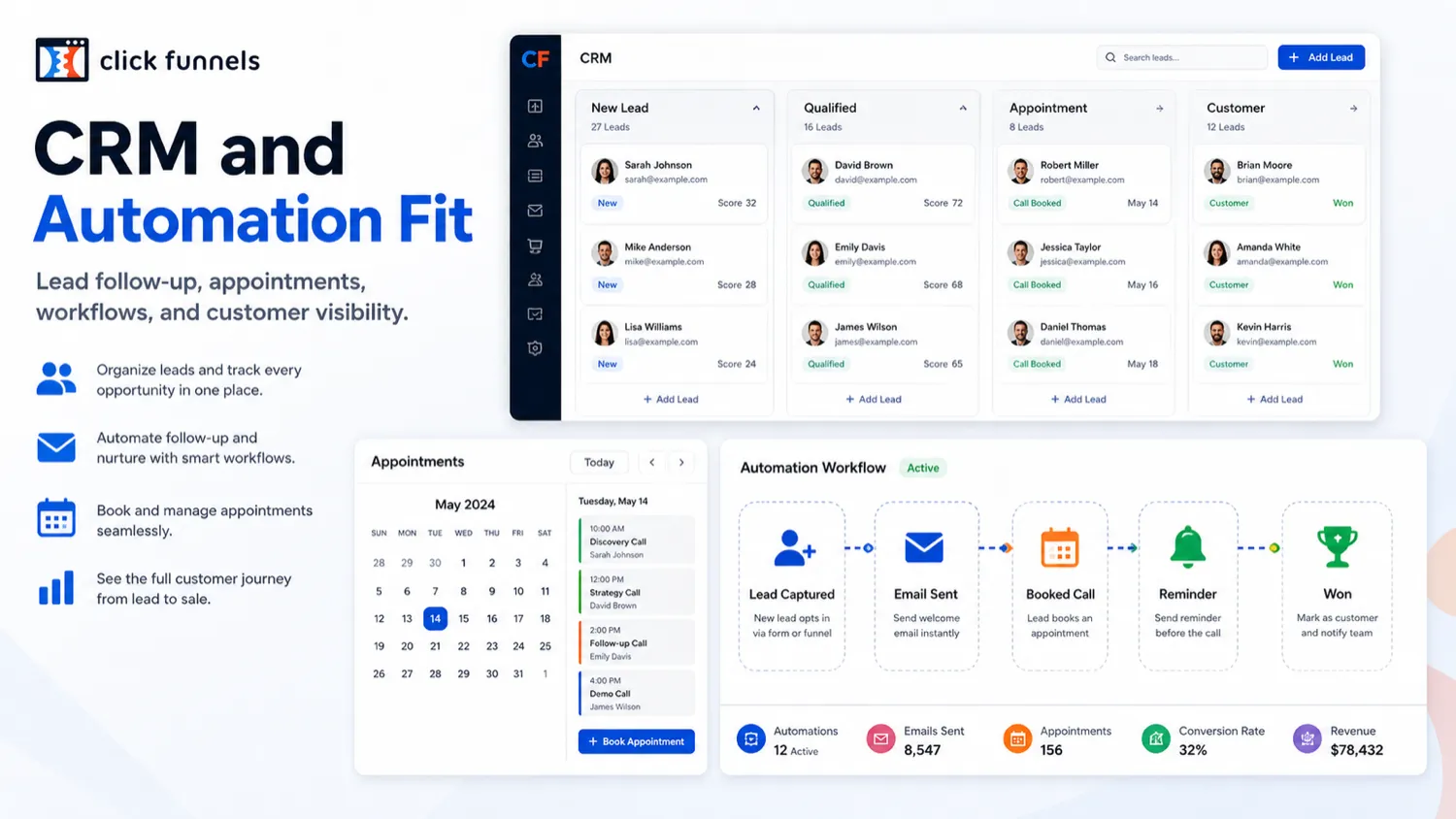
It is not only a landing page builder. It is also not the cheapest way to publish a simple website. The better way to think about ClickFunnels is as a connected workspace for landing pages, sales funnels, checkout, products, courses, email follow-up, workflow automation, appointment paths, customer activity, and analytics.
That broader role is both the appeal and the risk.
If you use several pieces of the platform, ClickFunnels can reduce tool-switching. A coach might build an appointment funnel, connect follow-up, sell a paid program, and manage leads in one place. A course creator might build an opt-in page, sales page, order form, course area, and email reminders. A small business might use it to test a single offer without hiring a developer to stitch together pages, payment tools, and automation logic.
But if you only need one page and one form, the platform may feel bigger than the problem. That is where buyers can overestimate value. All-in-one software is only cheaper when the “all” replaces tools you would actually use.
Our review approach: we compare public product pages, pricing details, support documentation, deal terms, buyer workflow fit, and nearby alternatives. We do not treat a trial, coupon path, or annual discount as proof that the product fits the buyer.
Who should use ClickFunnels?
ClickFunnels makes the most sense for buyers who have a funnel-shaped problem.
A founder with a defined offer may find it useful when the next job is not “build a website” but “turn traffic into leads and buyers.” That buyer should prepare the offer, copy, checkout logic, and follow-up before starting the trial.
A coach, consultant, or service provider may use ClickFunnels for appointment or application funnels. The product can help route people from landing page to booking, follow-up, and customer record. The buyer still needs to verify whether the appointment, notification, and follow-up workflow matches the way the business sells.
A course creator may consider it when they want sales pages, payment flow, course delivery, and email follow-up close together. This is stronger when the course funnel is already mapped. It is weaker if the buyer is still unsure what the course is, how it will be priced, or how students will be onboarded.
A marketer or agency may use ClickFunnels for fast campaign deployment, especially when the goal is to launch landing pages, upsells, checkout flows, and follow-up sequences without custom development. The condition is plan fit. Workspaces, team seats, contact limits, email volume, and technical access can matter quickly.
An ecommerce or product seller may find value when the product is sold through a focused funnel rather than a broad catalog experience. If the business needs deep inventory control or advanced commerce operations, a dedicated ecommerce platform may be a better first comparison.
Who should avoid ClickFunnels?
I would avoid ClickFunnels if you only need a basic landing page and a signup form. That job can often be handled by simpler, cheaper tools.
I would also slow down if you have no funnel strategy yet. A trial will not create your offer, audience, traffic plan, pricing, copy, checkout logic, or follow-up sequence for you. It can help you build the system after those pieces exist.
Budget-sensitive beginners should be careful. ClickFunnels can be valuable, but the entry price is not casual if the funnel is not already tied to a business goal. The easy mistake is treating the trial like a harmless experiment and then realizing you did not prepare enough to judge paid value.
Teams that need deeper CRM operations, agency subaccounts, client management, reputation tools, or service-business workflows should compare GoHighLevel before committing. ClickFunnels is funnel-first. GoHighLevel is often the more natural agency-operations comparison.
Buyers who care mainly about email automation, segmentation, deliverability workflows, and customer journeys should compare ActiveCampaign. ClickFunnels has email and automation pieces, but a dedicated email automation platform may fit better when the funnel page is not the main bottleneck.
Finally, avoid buying only because a trial or offer route looks attractive. A discount can improve the purchase. It should not be the reason you choose the platform.
How ClickFunnels fits into a real workflow
A good ClickFunnels trial does not begin inside ClickFunnels.
It begins with a funnel plan.
The workflow I would use is simple:
- Choose one offer to test.
- Define the visitor action: opt in, book, buy, register, apply, or start a course.
- Prepare page copy, product details, payment requirements, and follow-up messages.
- Build the funnel path in ClickFunnels.
- Connect checkout, email, appointment, course, or customer actions where needed.
- Test the path as a visitor.
- Check plan limits against the real funnel.
- Decide whether ClickFunnels saves enough time to justify paid billing.
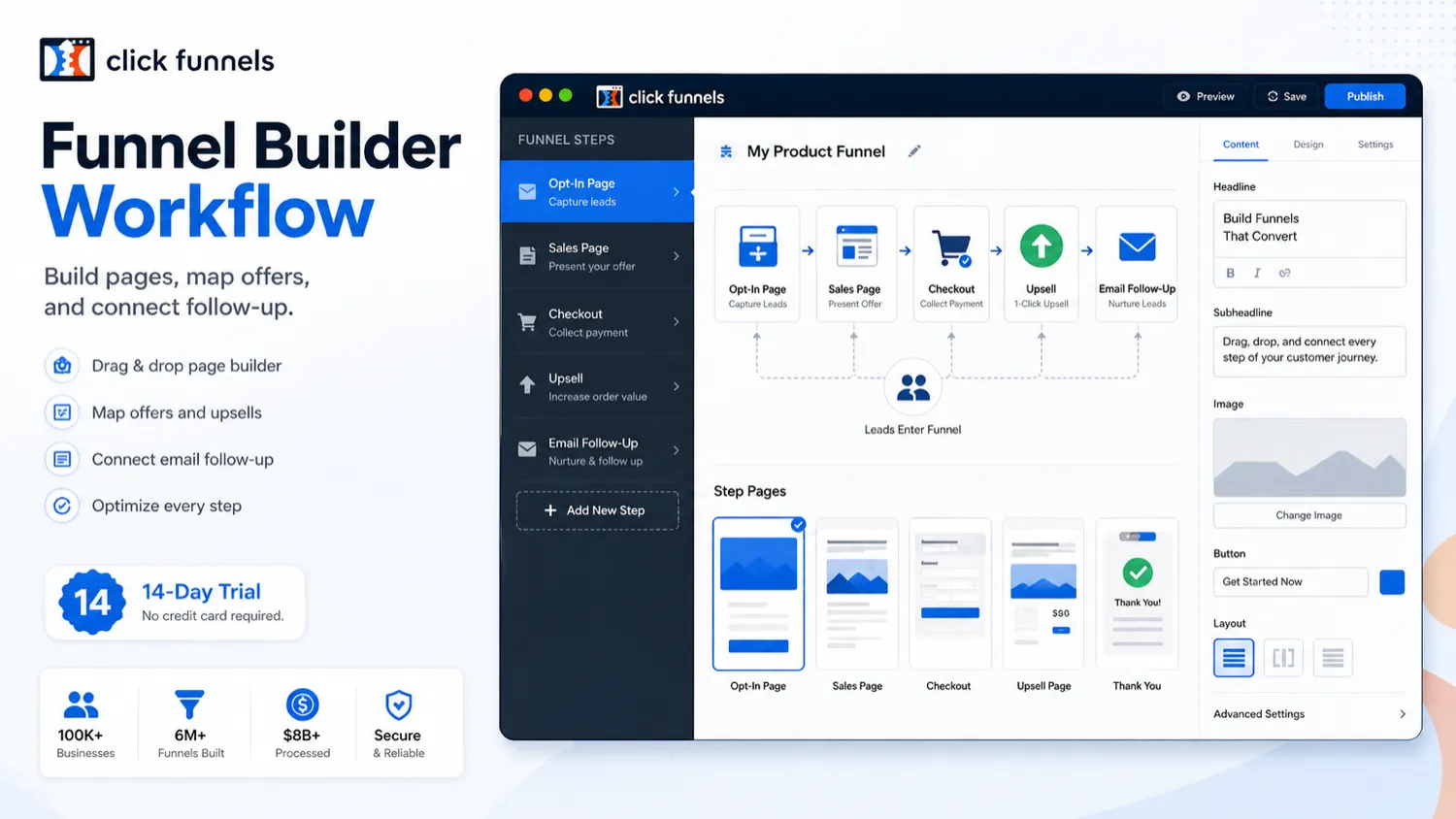
This is where the product can become useful. A page alone is not a funnel. A funnel needs a reason for the visitor to act, a next step after the action, and a way to measure whether the process works.
ClickFunnels is weaker when buyers treat it like a dashboard tour. Clicking through templates does not prove much. Building one real lead-generation funnel, appointment funnel, course funnel, product checkout, or webinar funnel proves far more.
Trial check: Start only when you have one funnel to build. The trial is more useful when it tests an actual offer instead of general curiosity.
Real-world buyer scenarios
A coach selling consultation calls
A coach who wants prospects to book a call can use ClickFunnels to build a landing page, explain the offer, collect lead details, route people toward an appointment, and follow up with emails or customer records.
This fits when the sales process is simple enough to map. It fails when the coach has not decided who the offer is for, what qualifies a lead, or what happens after someone books.
A course creator launching a paid program
A course creator may use ClickFunnels for the opt-in page, sales page, order form, course access, and follow-up reminders. This is one of the stronger ClickFunnels use cases because the funnel can connect content, checkout, and delivery.
The buyer should verify course limits, custom domains, email capacity, and student experience before committing to annual billing.
A small agency launching client campaigns
An agency may like the speed of funnel creation, templates, and connected conversion paths. The risk is team and workspace capacity. If the agency needs client subaccounts, deeper account separation, reporting, or operational CRM features, GoHighLevel may be a stronger comparison.
A founder testing one product offer
A founder with one clear product can use ClickFunnels to validate the funnel before investing in a bigger website or custom stack. The platform makes less sense if the product economics are still unclear. If the offer cannot profitably cover the software cost, the tool will not fix that.
Key features that actually matter
Funnel and landing page builder
The page builder matters because it is the visible part of the funnel. Buyers can create opt-in pages, sales pages, order forms, webinar pages, product pages, or appointment paths without custom development.
Buyer note: judge the builder by whether it helps you launch a conversion path, not whether it gives you every design freedom of a dedicated website platform.
Smart checkout and product selling
Checkout is where ClickFunnels becomes more than a page tool. If you sell courses, digital products, services, subscriptions, or focused ecommerce offers, the checkout flow can be central to the buying decision.
Buyer note: test the full customer path. A nice sales page is not enough if checkout, payment, order confirmation, delivery, or follow-up creates friction.
Email and workflow automation
Follow-up is often where funnel builders prove their worth. ClickFunnels includes email and workflow tools, which can help with lead nurturing, reminders, customer messages, and post-purchase actions.
Buyer note: do not assume “automation included” means your exact customer journey is easy. Test triggers, actions, segmentation needs, and email volume during the trial.
Courses, communities, and customer areas
ClickFunnels can support course and customer delivery paths, which matters for coaches, creators, and digital product sellers. This can reduce the need for a separate course platform in simpler setups.
Buyer note: if course experience is the main business, compare the learner experience carefully. A funnel-first platform may not feel as deep as a dedicated course platform for every use case.
Workspaces, teams, domains, and plan capacity
Plan limits are not minor details. Workspaces, team members, contacts, emails, courses, domains, support level, custom code, webhooks, and API access can change the real price of the tool.
Buyer note: the cheapest plan is not automatically the best deal. It is only the best deal if the funnel fits inside its limits.
API, webhooks, and integrations
ClickFunnels offers API and webhook paths on higher plans, plus no-code automation possibilities through tools like Zapier. That can matter for teams connecting funnels to external systems.
Buyer note: only treat this as a buying reason if you have a real integration need. API access sounds powerful, but it can also mean implementation work, testing, and maintenance.
Pricing and plan value
ClickFunnels pricing should be judged by plan fit, not by headline trial access.
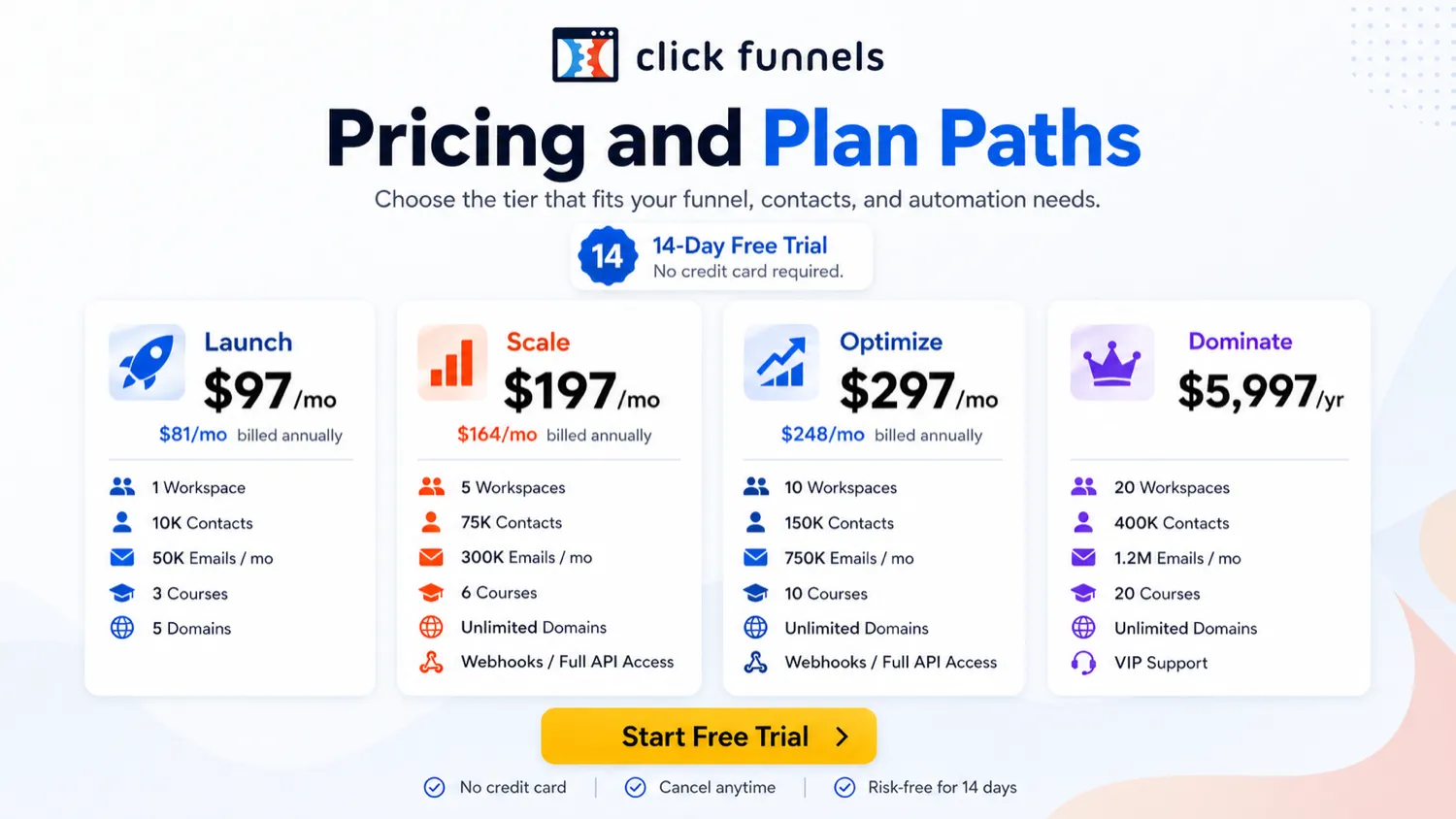
The public pricing page currently presents Launch, Scale, Optimize, and Dominate. Launch is the entry paid route, while Scale and Optimize add more capacity and advanced access. Dominate is positioned as an annual-only higher-end plan.
The important practical difference is not just price. It is capacity.
Launch may be enough for a buyer building a smaller funnel system with limited workspaces, team members, contacts, monthly emails, courses, and domains. Scale and Optimize become more relevant when the business needs more workspaces, more team members, more contacts, more email volume, more courses, broader domain use, priority support, custom code, webhooks, or full API access.
That is why I would not evaluate ClickFunnels by asking, “Can I start cheaply?” I would ask, “Which limit will I hit first?”
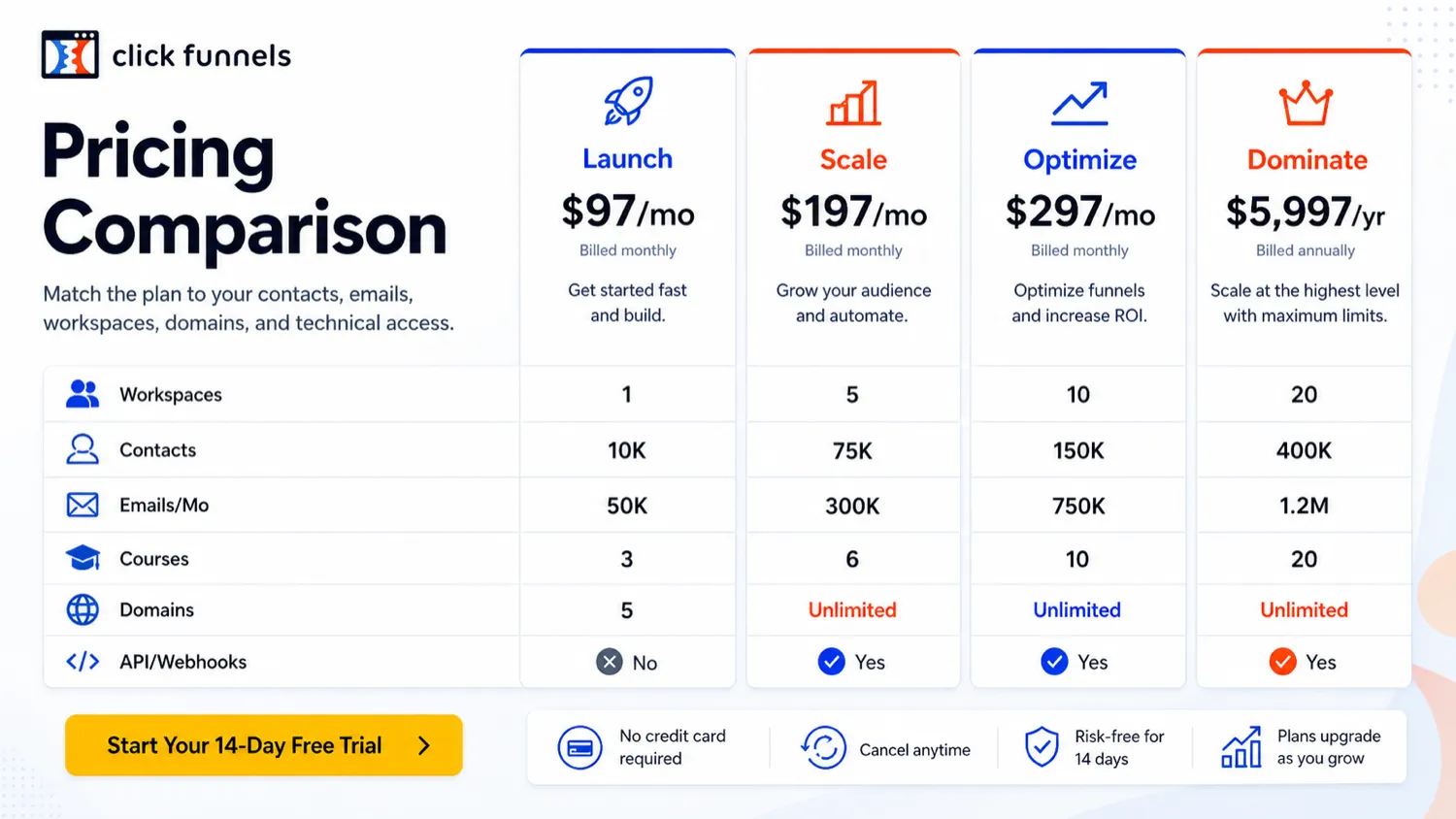
Annual billing can lower the effective monthly cost, but it also raises the commitment. I would not move to annual until one real funnel has been built, tested, and connected to the business outcome. The same goes for higher tiers. More capacity is useful only when your workflow needs it.
My pricing take: start with the trial after preparing one real funnel, use monthly before annual if the workflow is unproven, and upgrade only when the limits you hit are real rather than hypothetical.
Pricing check: Before choosing a plan, compare the funnel you want to build against contacts, email volume, workspaces, domains, courses, support level, and API or webhook needs.
Free plan, trial, coupon, and checkout notes
ClickFunnels is not a product I would buy first and understand later.
The trial is the correct first lane for most buyers, but only if the buyer uses it properly. A trial that starts before the offer is ready can expire before the real evaluation begins. That is especially true for funnels because a meaningful test requires copy, pages, payment setup, follow-up messages, domains, and sometimes email or automation configuration.
There is no permanent free-plan expectation here in the way some low-cost SaaS tools operate. Treat the trial as a decision window, not as a long-term free account.
The coupon path should come after the workflow test. If ClickFunnels fits, checking current ClickFunnels offers makes sense. If ClickFunnels does not fit, a checkout code or promotional route only makes the wrong purchase cheaper.
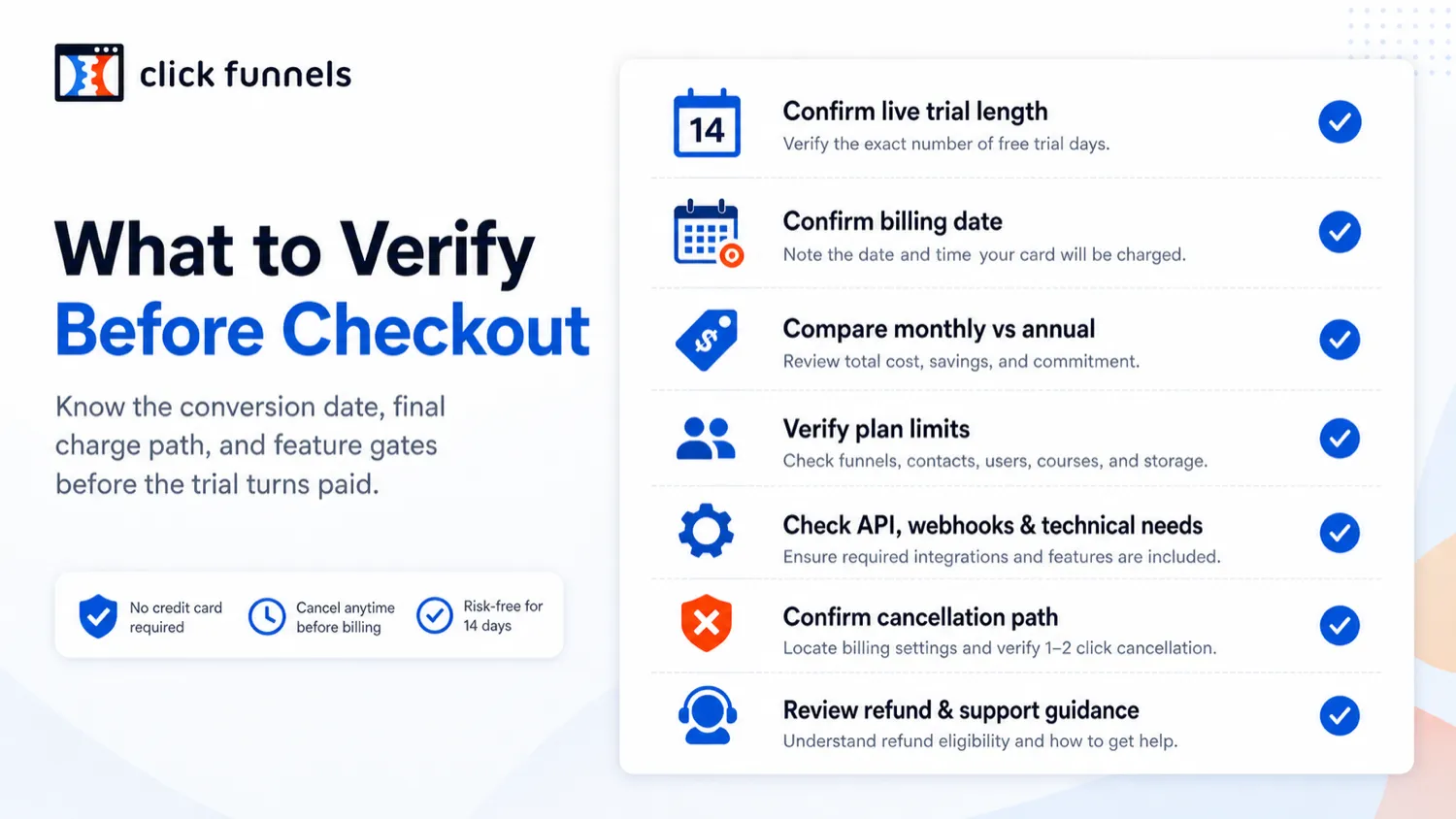
I would also check cancellation timing before starting. If the trial converts automatically, the buyer should know the billing date, cancellation steps, and what happens to account access at the end of the billing or trial period.
For refund expectations, use current official support and terms pages rather than old articles or third-party claims. Refund language can vary by product type, timing, and request process. The safer path is to verify before relying on a money-back assumption.
Offer path: Use the coupon route only after ClickFunnels has passed your workflow test and the plan limits are clear.
What I would check before buying ClickFunnels
If I were buying ClickFunnels for a real business workflow, I would check these points before paid billing:
- Whether the trial length and billing date are clear at checkout.
- Whether the funnel can be built inside the trial using real copy, offer details, and payment setup.
- Which plan limit matters first: contacts, emails, workspaces, team members, domains, courses, custom code, webhooks, or API access.
- Whether annual billing is justified by a tested funnel rather than optimism.
- Whether cancellation timing gives enough room to avoid accidental paid billing.
- Whether the support and onboarding level matches the buyer’s technical confidence.
- Whether GoHighLevel, ActiveCampaign, or a lightweight landing page builder would solve the real problem with less complexity.
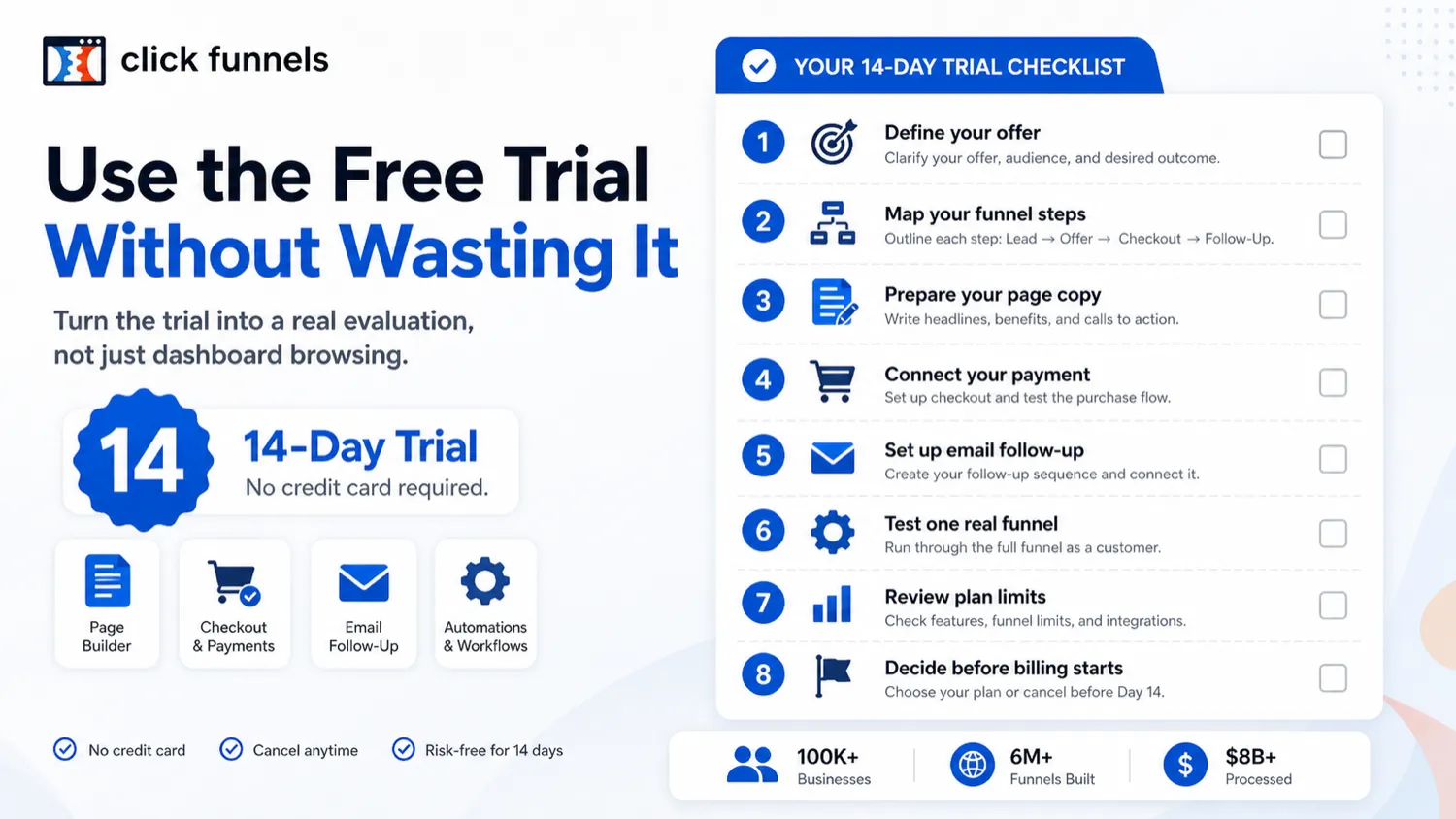
The easy mistake is starting the trial with no assets prepared. The better path is to enter the trial with one funnel goal and leave with a yes-or-no answer.
A simple test before paying
Before paying, I would run a small test like this:
- Choose one funnel: lead magnet, appointment, webinar, course sale, product checkout, or consultation offer.
- Prepare the page copy, pricing, images, product details, email follow-up, and payment requirements before starting.
- Build the landing page and next step inside ClickFunnels.
- Connect checkout, booking, email, course, or customer action where relevant.
- Test the path as if you were a real visitor.
- Note every point where the plan limit, setup friction, integration need, or support question appears.
- Decide whether the platform saves enough time to justify monthly or annual billing.
This kind of test is not glamorous, but it protects the buyer.
A funnel builder should be judged by the funnel it helps you launch. Not by the number of features in the sidebar.
Pros explained
The first pro is focus. ClickFunnels is built around conversion paths, not general website publishing. That matters when the buyer’s real job is to move a visitor from interest to lead, booking, checkout, or follow-up.
The second pro is consolidation. For the right buyer, having funnels, checkout, email, workflows, courses, customer actions, and analytics close together can reduce tool-switching. That benefit is real only when the buyer uses multiple parts of the system.
The third pro is the trial path. Prepared buyers can use the trial to test a real funnel before paying. That is a healthier buying motion than choosing a plan only from feature tables.
The fourth pro is plan progression. ClickFunnels gives a visible path from smaller use cases to more capacity, including higher contact limits, email volume, workspaces, team members, custom code, webhooks, and API access.
The final pro is category fit. If the buyer wants funnel execution more than design purity, ClickFunnels has a clearer role than a generic page builder.
Cons explained
The first con is cost sensitivity. ClickFunnels can be overkill if the buyer only needs a landing page, form, or basic website. In that case, the software may be solving a bigger problem than the buyer actually has.
The second con is trial readiness. A short trial is not automatically useful. Without prepared assets, the buyer may spend most of the trial learning the interface instead of testing business fit.
The third con is plan-limit pressure. Serious workflows may need features or capacity beyond the entry plan. That is not a flaw by itself, but it changes the budget conversation.
The fourth con is learning curve. All-in-one tools can reduce integrations, but they also add internal complexity. A buyer who expected a lightweight builder may feel slowed down by settings, workflows, domains, email, products, and customer logic.
The fifth con is expectation risk. ClickFunnels can help build a funnel, but it cannot guarantee the offer converts. Bad traffic, weak copy, unclear pricing, or poor positioning will still hurt performance.
Green flags and red flags
Green flags:
- You already know the offer, audience, traffic source, and conversion goal.
- You need more than a page: checkout, follow-up, course, booking, or customer actions also matter.
- You can use the trial to build one real funnel rather than explore randomly.
- You are replacing multiple tools you would otherwise pay for separately.
- You know which plan limits matter before the trial ends.
Red flags:
- You are buying because a trial or offer route looks good, not because the funnel workflow is clear.
- You only need a simple page or opt-in form.
- You have not prepared copy, product details, payment setup, email follow-up, or domain plans.
- You need advanced CRM or agency operations but have not compared GoHighLevel.
- You need deep email automation but have not compared ActiveCampaign.
- You are considering annual billing before one funnel has been tested.
ClickFunnels vs alternatives
GoHighLevel vs ClickFunnels
GoHighLevel is the stronger comparison if the buyer is an agency, local-service marketer, or team that needs client subaccounts, CRM operations, pipeline management, reputation tools, and service-business workflows.
ClickFunnels may still make more sense when the buyer’s main job is offer funnel creation, checkout, sales pages, and conversion flow. The tradeoff is focus. GoHighLevel often feels more agency-operations oriented. ClickFunnels feels more funnel-commerce oriented.
ActiveCampaign vs ClickFunnels
ActiveCampaign is the stronger comparison if email automation, segmentation, CRM depth, lead nurturing, and customer journeys are the center of the business.
ClickFunnels can support email and workflows, but it is not the tool I would pick only for sophisticated email marketing. If the landing page is easy and the email logic is hard, ActiveCampaign deserves a serious look.
3 months of ClickFunnels for $99 vs the standard trial route
The 3-month ClickFunnels offer route is not a direct product alternative. It is an adjacent buying path for people specifically comparing promotional access, extended evaluation, or a different paid-entry route.
I would not choose it before checking product fit. Use the standard ClickFunnels review logic first: build a funnel, know the plan limits, and understand the billing path.
Lightweight landing page builders vs ClickFunnels
A lightweight landing page builder can be better if the buyer needs one page, one form, and one simple integration. That route may be cheaper and easier.
ClickFunnels becomes more attractive when the buyer needs a full commercial path: page, lead capture, checkout, upsell, follow-up, customer management, and measurement.
Course platforms vs ClickFunnels
Dedicated course platforms may offer a deeper learner experience, student management, or education-first features. ClickFunnels is stronger when the course is part of a sales funnel and the buyer cares about the conversion path around the course.
The tradeoff is delivery depth versus funnel control.
Trust, refund, and buyer-risk notes
My confidence is strongest around ClickFunnels’ product role: it is a funnel-first platform for building commercial paths from traffic to leads, customers, appointments, courses, and follow-up.
I am more cautious around live pricing, checkout terms, refund expectations, and promotional routes because those can change faster than a review article. Before paying, verify the current pricing page, checkout screen, cancellation steps, and refund request process.
The cancellation timing matters. If billing occurs in advance and the account cancels at the end of the current billing or trial period, the buyer should not wait until the last minute to decide.
Refund language also deserves care. Some support pages describe request handling and processing times, but refund eligibility depends on current terms and the product or service purchased. Do not rely on old third-party “risk-free” wording without checking the current ClickFunnels support and checkout pages.
Data and integrations are another buyer-risk area. If the funnel depends on domains, email sending, payment setup, custom code, webhooks, API access, or external tools, test those pieces during the trial. A funnel that looks finished visually can still fail operationally if the follow-up or payment path is not connected.
Finally, remember what ClickFunnels can and cannot do. It can help you build a funnel. It cannot guarantee traffic quality, offer-market fit, conversion rate, or profit.
Final verdict
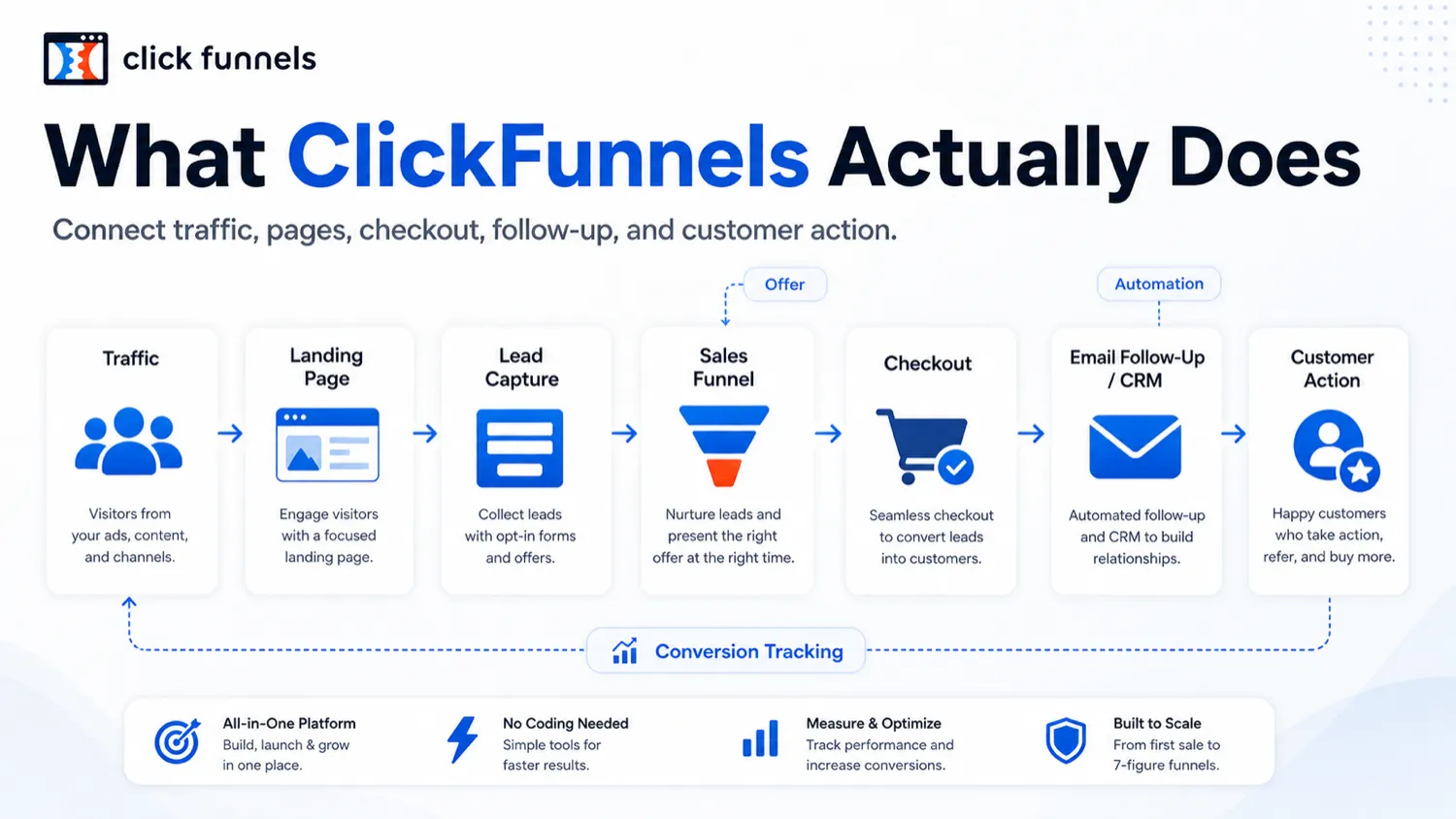
I would consider ClickFunnels if you have a real offer to sell, a funnel to build, and a reason to use more than a basic page builder. It is especially worth testing when you need landing pages, checkout, follow-up, courses, appointments, and customer actions connected around one commercial workflow.
I would skip ClickFunnels if you only need a simple opt-in page, if your offer is not clear yet, or if the subscription cost would create pressure before the funnel has any chance to earn back the spend.
I would compare it with GoHighLevel if agency operations matter more than funnel pages. I would compare it with ActiveCampaign if email automation and customer journeys matter more than the funnel builder. I would compare lighter page builders if you only need a simple landing page.
The safest next step is not to chase the offer first. Prepare one funnel, test ClickFunnels with that funnel, check the plan limits, then decide whether the trial, current store route, or coupon path makes sense.
