Quick verdict
NetHunt CRM is worth considering if your sales team already lives in Gmail and the real problem is not “we need more CRM features,” but “we need people to actually use the CRM while selling.”
That is the buying tension here.
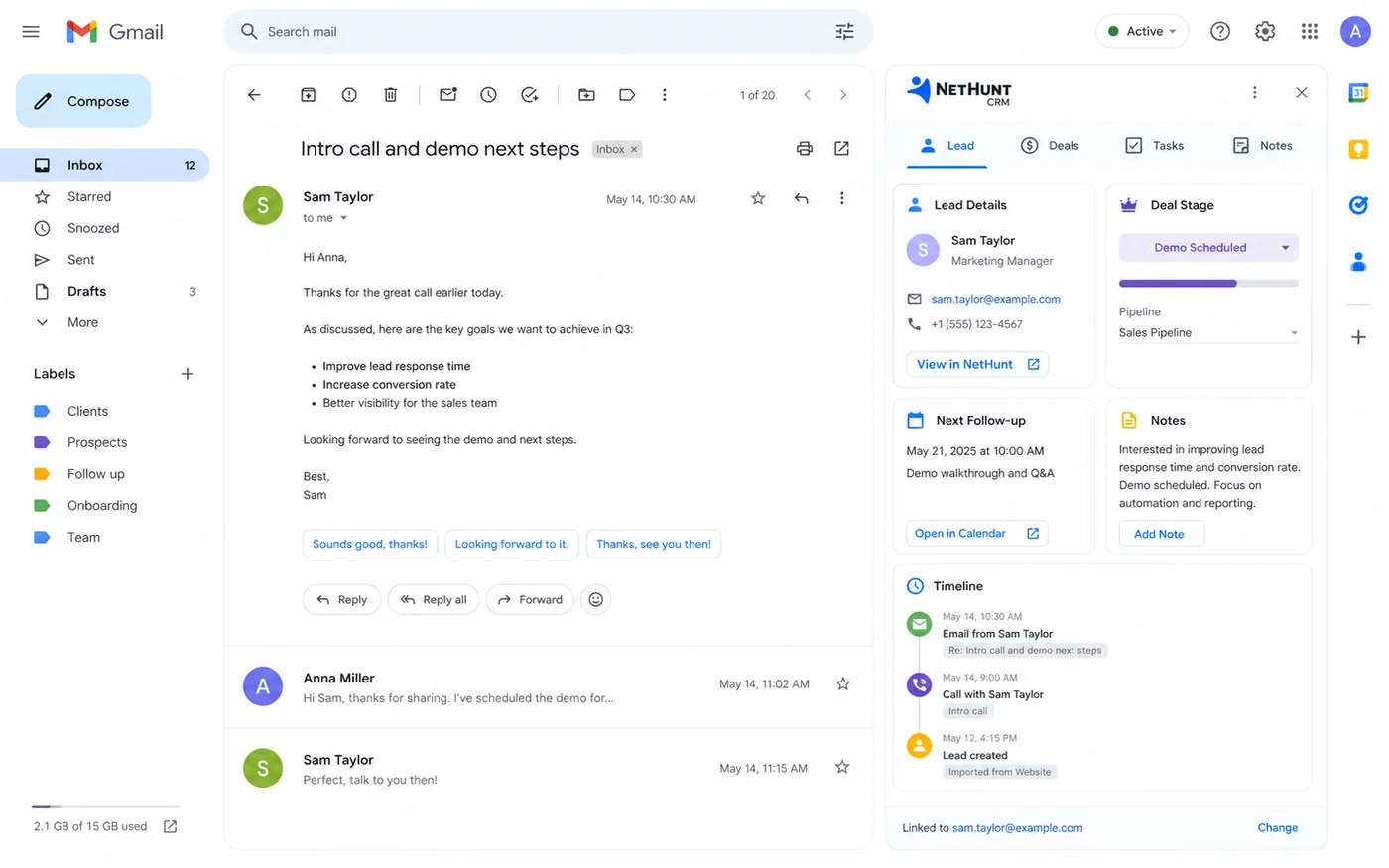
A lot of CRM software looks useful in a feature table. The harder question is whether salespeople will update records, follow tasks, track deals, and review customer history when they are moving fast. NetHunt CRM tries to solve that problem by keeping CRM work close to Gmail and Google Workspace, then adding pipeline management, lead capture, email activity, tasks, reports, automation, messengers, VoIP, and API access as the team matures.
I would not judge it only by the homepage. The product makes the most sense when Gmail is already the daily sales workspace. If the team uses Outlook, prefers a standalone CRM, or needs a broad enterprise suite, NetHunt CRM may feel narrower than the alternatives.
The biggest reason to test it is adoption. The biggest reason to slow down is pricing commitment. NetHunt has a 14-day trial, but no permanent free plan was verified. Its refund language is also strict, so I would use the trial like a real implementation test before moving into paid seats, annual billing, or higher plans.
Next step: If NetHunt CRM fits your Gmail-based sales workflow, verify the current plan route before committing seats.
Review snapshot
| Review point | Practical take |
|---|---|
| Best for | Gmail-heavy sales teams that need lead, deal, task, and follow-up discipline close to the inbox |
| Not ideal for | Buyers who need a permanent free CRM, non-Google teams, or deeply enterprise CRM implementation |
| Main use case | Turning Gmail and Google Workspace into a structured sales CRM workspace |
| Trial path | 14-day free trial, then a paid plan is needed to continue using the workspace |
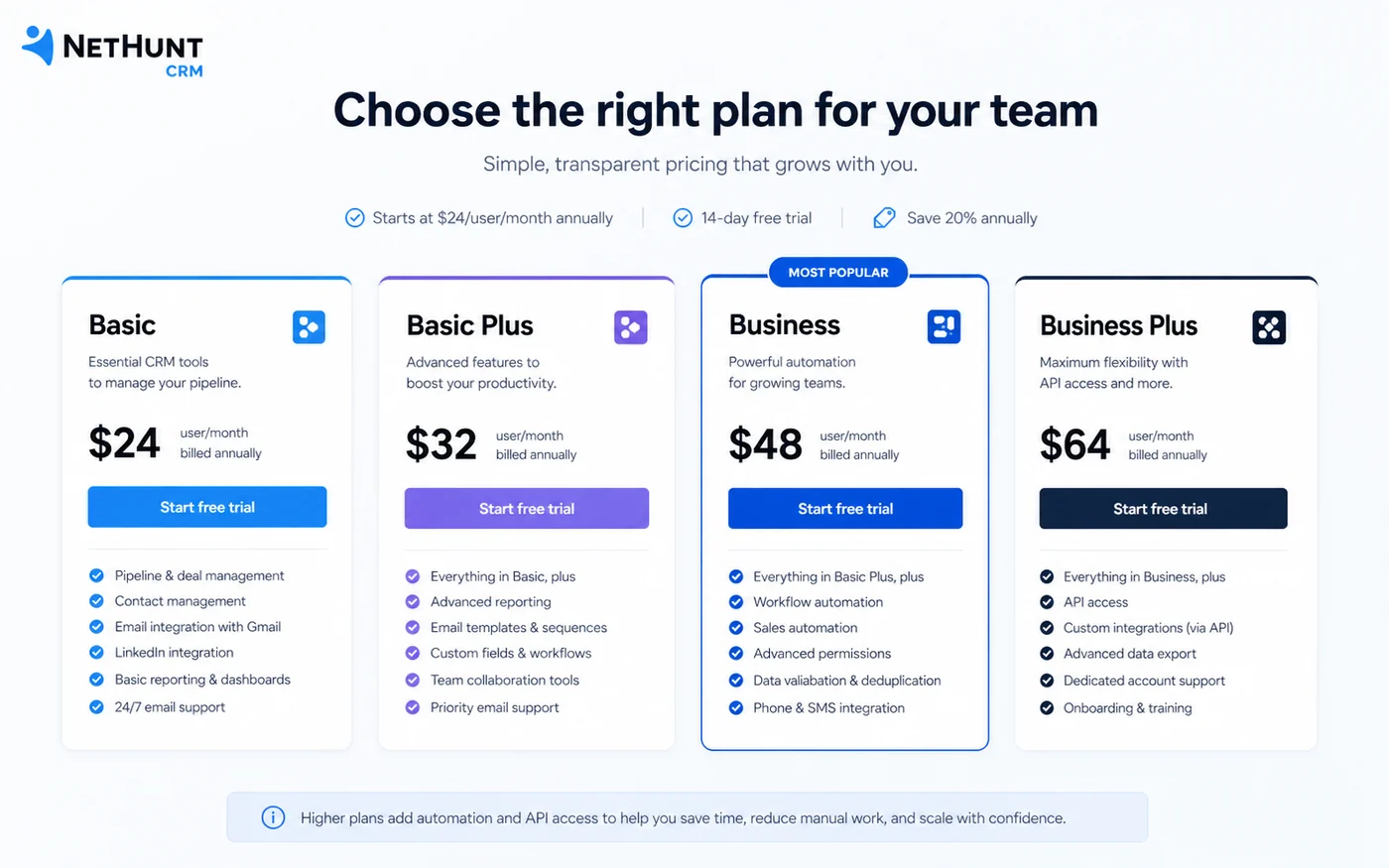
| Pricing note | Basic starts at $24/user/month annually or $30/user/month monthly, with higher plans adding campaigns, automation, reporting, and API depth |
| Main strength | Inbox-native CRM adoption for teams that already sell through Gmail |
| Main concern | Plan feature gates, refund language, automation limits, and seat-based pricing need careful review |
| Direct alternatives | Streak, Pipedrive, HubSpot CRM |
| Adjacent route | ActiveCampaign when lifecycle marketing automation matters more than Gmail-native sales CRM |
| Best next step | Test one real pipeline during the trial before annual billing or adding the full team |
What is NetHunt CRM?
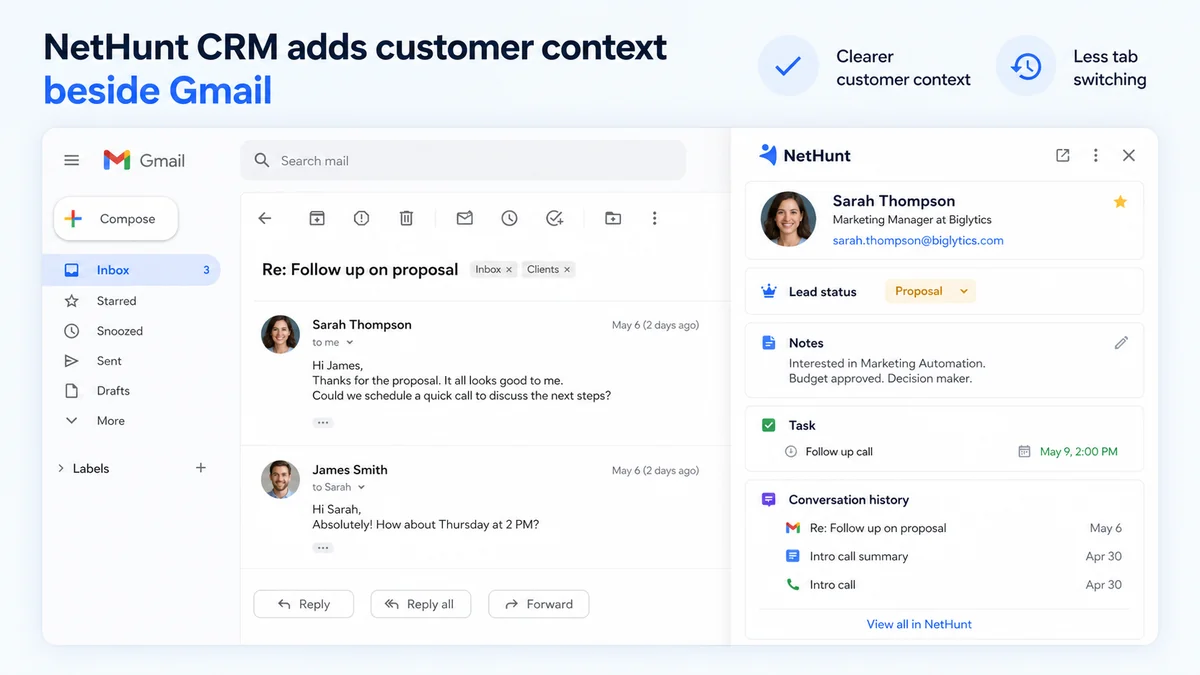
NetHunt CRM is a Gmail-native sales CRM for teams that want leads, deals, tasks, customer history, follow-up activity, and sales communication closer to the inbox.
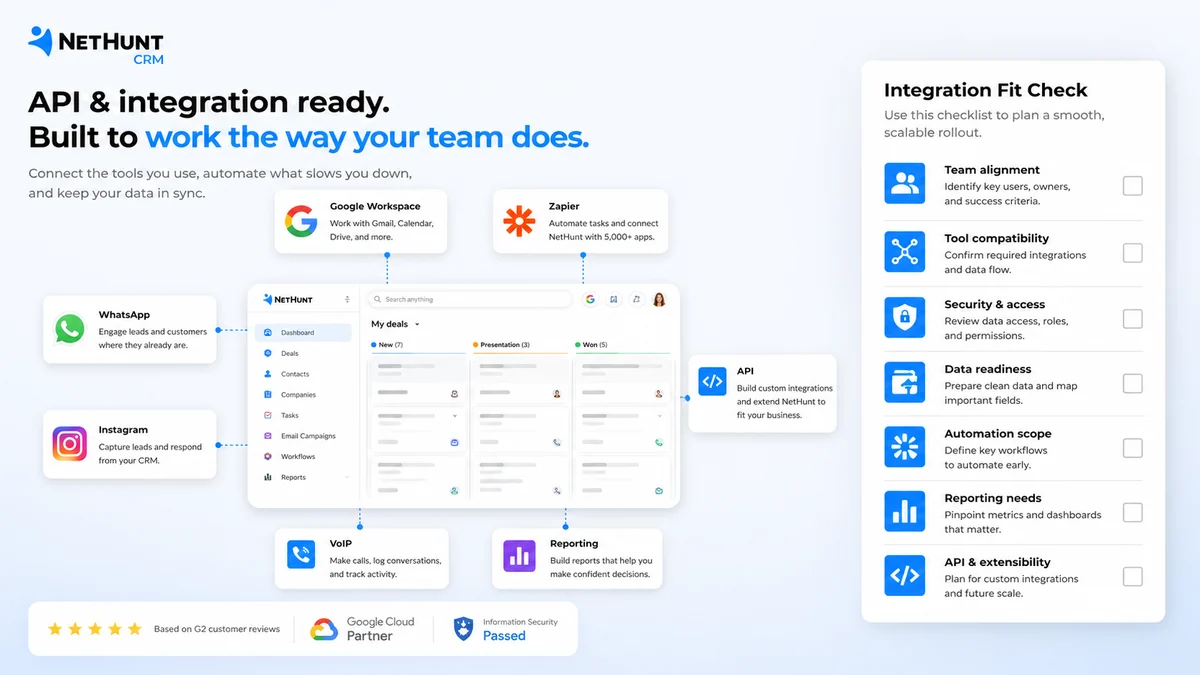
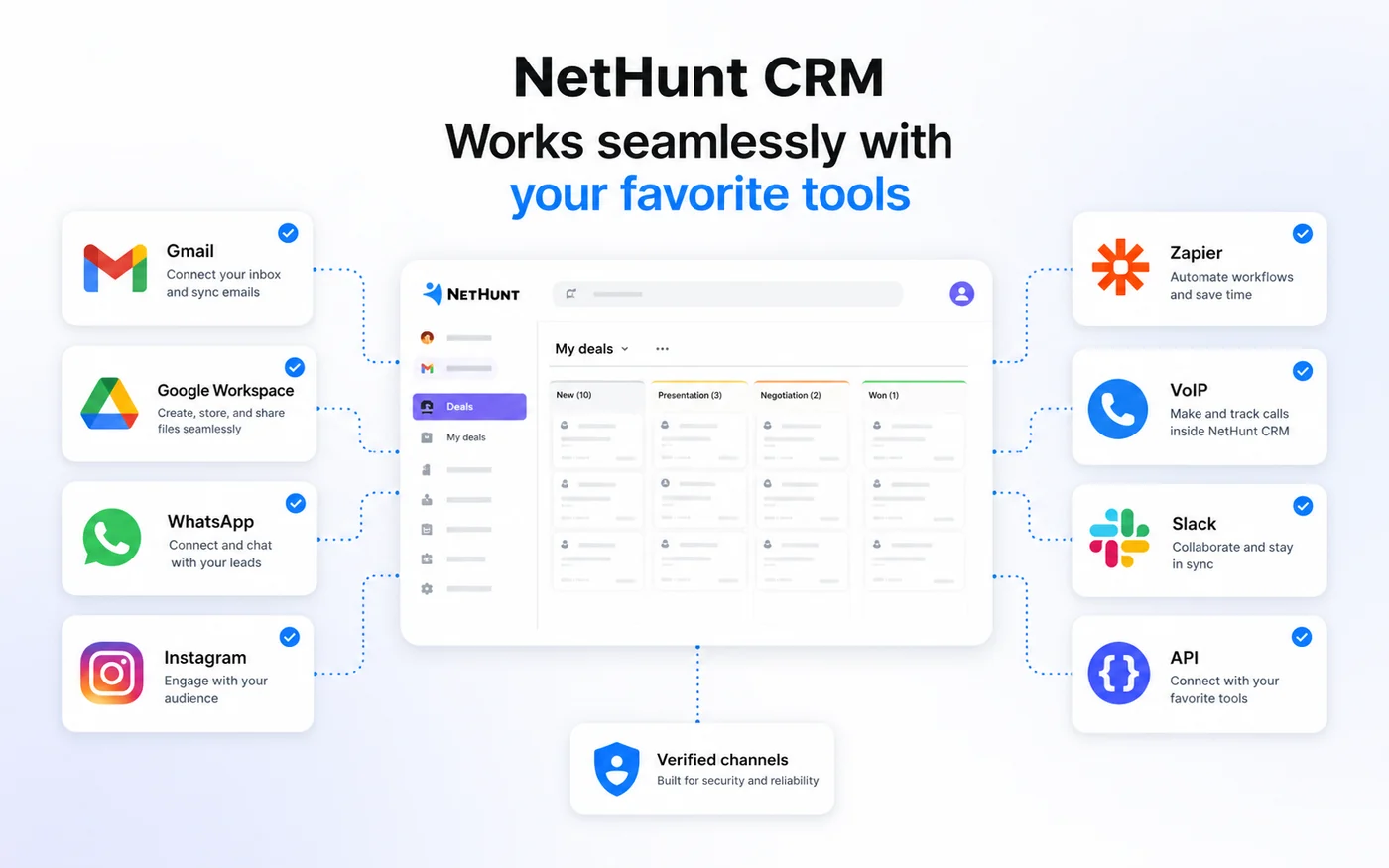
The current public positioning is clear: NetHunt is not trying to be only a simple contact manager. It presents itself as a sales CRM that connects Gmail, Professional Network, WhatsApp, Instagram, VoIP, and other sales channels into a shared workflow. The Google Workspace and Chrome listings reinforce the same idea: manage leads, sales, and communications without leaving Gmail.
That matters because CRM adoption is often less about the number of features and more about where the work happens. If the seller has to leave the inbox, open a separate database, update records manually, and remember follow-up tasks somewhere else, the CRM can become shelfware. NetHunt CRM’s bet is that Gmail proximity reduces that friction.
The common wrong expectation is thinking NetHunt CRM is just “Gmail plus notes.” It is more structured than that. The pricing table includes leads and deals, multiple pipelines, tasks, Google Workspace integration, messenger accounts, email campaigns, personalized emails, sales automation, contact enrichment, multi-channel sequences, VoIP integrations, sales activity reports, and API access depending on plan.
Our review approach compares public product pages, pricing details, help documentation, deal terms, buyer workflow fit, and nearby alternatives. A low monthly price, startup discount, or coupon path is not enough by itself. The real test is whether NetHunt CRM improves the sales process your team already runs.
Who should use NetHunt CRM?
Gmail-based sales teams are the strongest fit. If your team already handles most prospect and customer communication inside Gmail, NetHunt CRM has a believable advantage because records, activities, reminders, and email context can sit close to the work.
Small B2B teams moving away from spreadsheets should also look at it. A founder-led sales process often starts with Gmail, Google Sheets, calendar reminders, and memory. NetHunt CRM can make sense when that setup starts losing leads, follow-ups, or deal visibility.
Growing sales teams that need more structure may find the Basic Plus or Business tiers more relevant. The fit becomes stronger when email campaigns, WhatsApp, custom roles, automation workflows, multi-channel sequences, reporting, or API access are part of the actual buying reason.
Google Workspace-centered businesses are another natural audience. If Gmail, Google Calendar, Google Drive, Google Chat, and shared inbox habits are already part of daily work, NetHunt CRM may feel less disruptive than a standalone CRM rollout.
Managers who need follow-up visibility should consider it if the current pain is not only “we need a CRM,” but “we need to know who owns each lead, what stage each deal is in, and what happens next.” That is where CRM adoption starts to become measurable.
Who should avoid NetHunt CRM?
I would be careful if you need a permanent free CRM. NetHunt CRM offers a trial path, but a free ongoing plan was not verified on the current public pricing page. If free forever is the priority, you may want to compare other CRM options first.
I would also avoid it if your team does not work in Gmail. The Gmail-native angle is a strength only when Gmail is already central. If your sales process lives in Outlook, Slack, a standalone CRM, or a vertical sales platform, NetHunt’s main advantage may not matter enough.
Solo users with a very simple contact list should slow down. NetHunt CRM is more persuasive when there is a real sales process: leads, deals, stages, reminders, team handoffs, email activity, and reporting. If you only need names and notes, this may be more CRM than you need.
Larger teams that need heavy enterprise controls should compare carefully. NetHunt CRM has roles, reporting, integrations, support tiers, and API access on higher plans, but complex enterprise buyers should verify permissions, security expectations, implementation support, data migration, and custom plan terms before choosing it over broader CRM platforms.
Finally, do not buy only because a coupon or annual discount appears. CRM switching costs are real. If the team will not use the system, the cheaper plan is still wasted spend.
How NetHunt CRM fits into a real workflow
A good NetHunt CRM workflow starts before the trial begins.
First, define the sales process you actually want to run. That means lead sources, pipeline stages, deal owners, follow-up tasks, required fields, and reporting needs. If the process is vague, the CRM will inherit the mess.
Then connect Gmail and build one real pipeline. Import a small set of contacts or deals instead of dumping the whole database into the tool. The first test should be simple: can a seller receive an email, attach that conversation to a customer record, move a lead forward, create a task, and see the next step without leaving the work rhythm?
After that, test team behavior. Invite one or two people who will actually sell. Watch whether they update records naturally or only when reminded. That is the difference between a useful Gmail CRM and another admin layer.
Only then should you test deeper features: email campaigns, WhatsApp or messenger accounts, automations, multi-channel sequences, reports, VoIP, custom roles, and API access. Those are valuable only if the base workflow is already working.
Real-world buyer scenarios
A founder-led sales team leaving spreadsheets
This is one of the cleanest NetHunt CRM scenarios. The founder handles prospects in Gmail, tracks deals in a sheet, and forgets follow-ups when the week gets busy. NetHunt CRM may help by putting deal stages, reminders, and customer context closer to the inbox.
The risk is overbuilding too soon. Start with a small pipeline and a few required fields. If the founder will not update records during the trial, the paid plan will not fix the habit.
A small sales team that needs shared visibility
A team of two to ten sellers may need shared pipelines, owner clarity, activity history, and task follow-up. NetHunt CRM can make sense if the team already communicates through Gmail and wants less tab switching.
The pricing check is important here. Seat-based CRM cost grows quickly. Before paying, compare Basic, Basic Plus, and Business against what the team actually used during the trial.
A growth team using email campaigns and sales sequences
NetHunt CRM becomes more interesting when outreach, email campaigns, follow-up sequences, and reporting matter. Basic Plus and Business-level plans are more relevant here because the entry plan may not unlock the full workflow.
The buyer should verify email campaign limits, automation actions, messenger accounts, reporting depth, and whether extra automation actions may add cost.
A team comparing Gmail CRM against broader CRM platforms
NetHunt CRM should be on the list if Gmail-native adoption is the priority. But if the team wants a larger marketing, service, operations, or enterprise CRM suite, HubSpot or another broader platform may be the stronger comparison.
The deciding factor is not feature count. It is operating style.
Key features that actually matter
Gmail-native CRM workspace
The core feature is not glamorous, but it is the main reason to care. NetHunt CRM brings CRM records into the Gmail workflow so salespeople can manage customer context, activities, and follow-ups closer to email.
Buyer note: this matters only if your team already uses Gmail heavily. If Gmail is not central, the main advantage weakens.
Leads, deals, and multiple pipelines
The entry CRM value comes from turning scattered leads and follow-up notes into structured records. Multiple pipelines can help when a team handles different products, regions, services, or deal types.
Buyer note: test pipeline stages during the trial. A CRM with bad stages will not create sales discipline.
Email campaigns and personalized outreach
Basic Plus adds more growth-oriented capability, including mass email campaigns, campaign analytics, personalized emails, extra folders and views, personal messengers, WhatsApp integration, and custom roles.
Buyer note: do not assume the entry plan is enough if outbound campaigns or WhatsApp are part of the buying reason.
Sales automation and multi-channel sequences
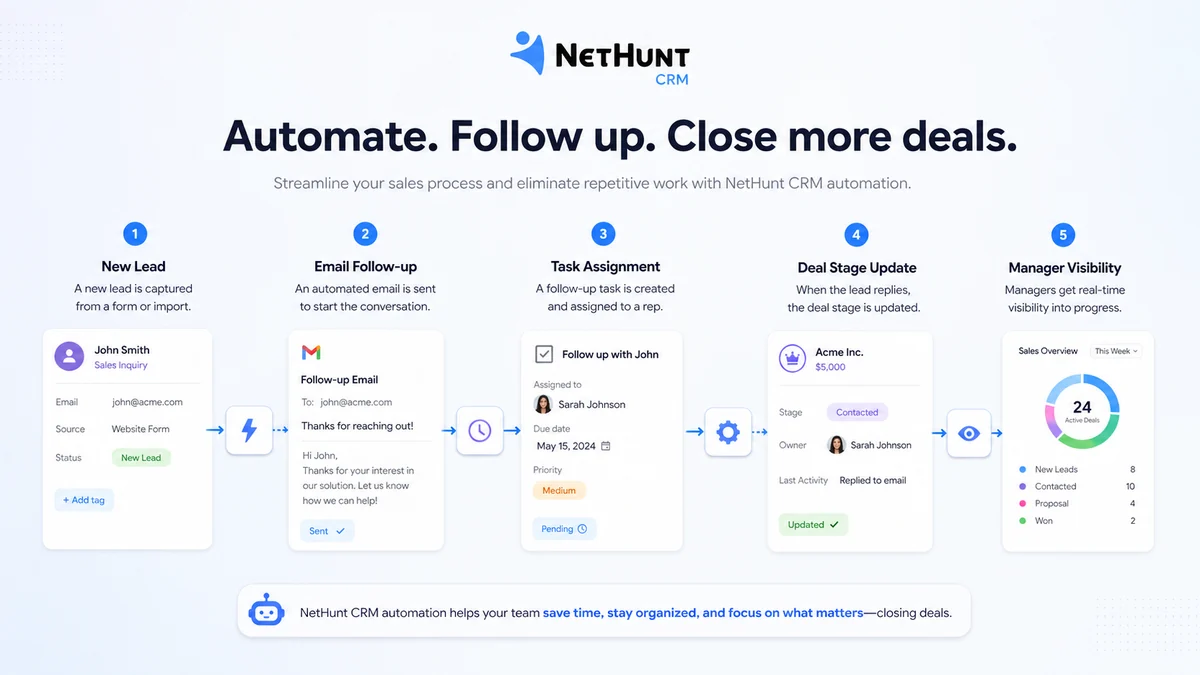
Business-level plans are where NetHunt CRM becomes more automation-oriented. Sales automation, contact enrichment, multi-channel sequences, VoIP integrations, Professional Network integration, reports, and API access can support a more mature sales process.
Buyer note: automation is useful only after the process is defined. Otherwise, you automate confusion.
Reporting, roles, and API access
For managers and technical buyers, reporting, team activity, permissions, and API access can be the difference between a simple inbox CRM and a real operating system for sales.
Buyer note: verify the exact plan that includes the reporting, roles, API calls, support, and integrations your team needs. Do not infer access from a broad feature headline.
Pricing and plan value
NetHunt CRM’s current public pricing is reasonably clear, but plan fit takes more work than reading the first price.
At the time of review, the pricing page shows Basic at $24 per user/month when billed annually or $30 per user/month monthly. Basic Plus is listed at $34 annually or $42 monthly. Business and Business Plus show monthly references of $60 and $84 per user/month, with annual pricing handled through a quote-style route. Custom is positioned for teams of 10 users or more.
The trial is also important. NetHunt says the 14-day free trial has no user limitations and gives access to all features except custom SMTP for email campaigns. After the trial, the workspace requires a paid subscription to continue.
That makes the trial valuable, but also time-sensitive. A CRM trial should not be a casual dashboard tour. You should test Gmail connection, pipeline setup, real contacts, user roles, follow-up tasks, and one sales process that would actually happen after payment.
The plan decision usually works like this:
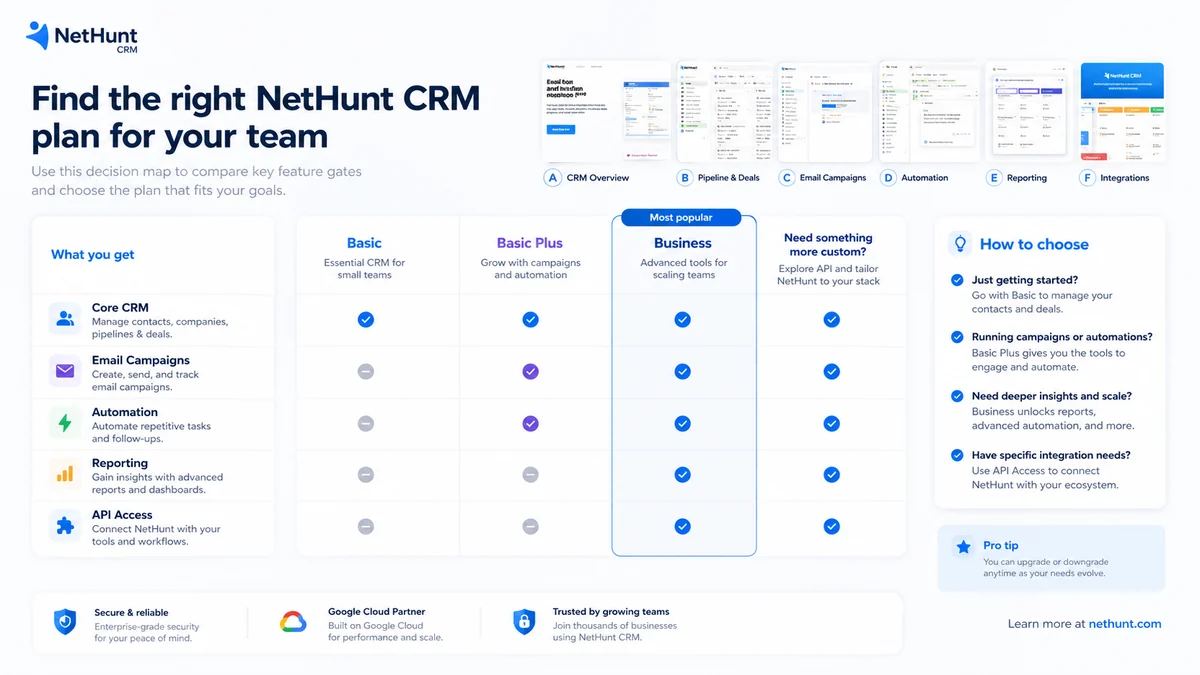
- Basic makes sense when leads, deals, tasks, multiple pipelines, Google Workspace integration, and one messenger account are enough.
- Basic Plus is more realistic when email campaigns, WhatsApp, personal messengers, extra folders/views, and custom roles matter.
- Business becomes relevant when automation, multi-channel sequences, contact enrichment, reporting, VoIP, Professional Network integration, and API access are part of the buying reason.
- Business Plus or Custom should be considered only after the team knows it needs deeper automation, support, role control, or tailored plan terms.
The cheapest plan is not automatically the best deal. It is the best deal only if it includes the workflow you will use every week.
Pricing check: If NetHunt CRM still looks like a fit, verify the current plan table and trial terms before adding users or choosing annual billing.
Check NetHunt CRM pricing Read store guide Check current offers
Free plan, trial, coupon, and checkout notes
A permanent free plan was not verified for NetHunt CRM. The safer way to think about the free path is this: you get a 14-day trial to test whether the product belongs in your sales workflow, then you need to choose a paid plan if you want to continue.
That is not a bad model, but it changes how you should evaluate the tool.
Do not start the trial on a week when nobody has time to set up the CRM. Use it when the team can test a real sales process. Build one pipeline, invite the right users, import a small contact set, run a few live follow-ups, and check whether the team actually works from the CRM.
For savings, the official paths are more reliable than random coupon claims. Annual billing is presented as a 20% discount compared with monthly billing. Startups founded less than three years ago can apply for a 75% first-year discount on the Business plan, and nonprofits can apply for a 25% discount.
A coupon page can still be worth checking before checkout, but it should come after workflow fit. A discount can improve the purchase. It should not be the reason you buy a CRM your team will not use.
Offer check: Use the trial first. Then check the current offer path only if NetHunt CRM fits your sales process and plan needs.
What I would check before buying NetHunt CRM
If I were buying NetHunt CRM for a real sales workflow, I would check these points before paying:
- Gmail dependence: Is Gmail truly where the sales team works every day?
- Plan feature gates: Does the selected plan include campaigns, WhatsApp, automation, API access, reports, roles, and integrations you actually need?
- User count: How many paid seats will you need after the trial?
- Trial behavior: Did the team update records without constant reminders?
- Automation limits: Do included workflow actions cover your process, or will extra actions become a recurring cost?
- Refund and cancellation terms: Are you comfortable with strict non-refund language before annual billing?
- Alternatives: Is NetHunt CRM better for your workflow than Streak, Pipedrive, HubSpot, or ActiveCampaign?
A simple test before paying
Before paying, I would run a focused test like this:
- Create one real sales pipeline with stages your team already understands.
- Import a small group of live contacts or deals instead of a full messy database.
- Connect Gmail and check whether customer context appears where sellers need it.
- Create tasks and reminders for real follow-ups due that week.
- Invite one or two teammates and watch whether they update records naturally.
- Test one campaign, messenger, automation, or report only if that feature is part of the buying reason.
- At the end of the trial, compare the features actually used with Basic, Basic Plus, Business, and Business Plus.
The result should be practical. If the team used NetHunt CRM during the trial and follow-up became cleaner, it may justify payment. If people ignored it, choosing annual billing because it is cheaper would be the wrong lesson.
Pros explained
Gmail-native adoption is the real advantage
NetHunt CRM’s strongest argument is not that it has every CRM feature. It is that salespeople who live in Gmail may be more likely to use a CRM that appears close to their inbox.
That matters because CRM failure is often an adoption problem, not a software problem.
The feature ladder is practical
Basic can cover core CRM work. Basic Plus adds more campaign and messaging value. Business moves toward automation, reporting, multi-channel sequences, VoIP, and API access. That gives buyers a path from simple CRM structure to more advanced sales operations.
The value depends on choosing the right tier, not simply buying the cheapest one.
The trial can reveal real workflow fit
A 14-day CRM trial is useful when treated as an implementation test. NetHunt’s trial can help teams test whether Gmail connection, pipeline setup, reminders, and shared visibility actually change how they sell.
That is more useful than a polished demo.
Integrations support a broader sales workflow
Gmail and Google Workspace are the core, but the public materials also point to WhatsApp, Instagram, VoIP, Slack, Zapier, Hunter, Intercom, and API access on higher plans. For teams with multi-channel sales activity, that can matter.
The buyer should still verify exact plan access before building around those integrations.
Cons explained
No permanent free plan changes the decision
NetHunt CRM is not the kind of product I would casually keep as a free utility. The trial is temporary. After that, the workspace needs a paid subscription.
That is fair for a serious CRM, but it means the trial period needs to be planned.
Refund flexibility is limited
The pricing FAQ and terms are not positioned like a flexible money-back policy. The current language says NetHunt does not issue refunds for unused subscription portions, with limited exceptions in the terms.
That does not make the product bad. It means annual billing should come after proof of fit.
Plan selection can be easy to misjudge
A buyer may assume Basic is enough because it starts cheaper, then discover that email campaigns, WhatsApp, automation, reporting, API access, or custom roles require a higher plan.
This is why the plan-feature check matters more than the starting price.
It is less compelling outside Gmail
NetHunt CRM’s identity is tied to Gmail and Google Workspace. If your team does not want CRM inside Gmail, the core advantage weakens quickly.
In that case, Pipedrive, HubSpot, or another CRM may be easier to justify.
Green flags and red flags
Green flags:
- Your team already sells from Gmail every day.
- Follow-ups are being lost because leads live in email threads, spreadsheets, and memory.
- You need shared customer context, pipeline stages, and reminders without forcing a heavy CRM rollout.
- Basic Plus or Business features match workflows you already know you need.
- The trial shows that sellers update records naturally.
Red flags:
- You are looking for a free forever CRM.
- You are buying mainly because of a discount or annual savings.
- Your team does not use Google Workspace as a core sales environment.
- You need deep enterprise CRM customization before validating daily adoption.
- You cannot explain which plan features matter before checkout.
NetHunt CRM vs alternatives
NetHunt CRM should not be compared against every CRM in the same way. The right alternative depends on the operating style you want.
Streak vs NetHunt CRM
Streak is the closest comparison when the buyer wants a lighter Gmail CRM. It may be better if you want a simpler inbox-native system with less CRM depth.
NetHunt CRM may make more sense if you need a more structured sales CRM with stronger pipeline, campaigns, automation, messenger, reporting, and Google Workspace expansion.
Pipedrive vs NetHunt CRM
Pipedrive is a strong comparison for teams that care most about visual pipeline management and deal discipline. It is less tied to Gmail as the product identity.
NetHunt CRM may be the better fit when inbox-native adoption is the bigger buying reason. If the team wants sellers to work from Gmail and update CRM records close to email conversations, NetHunt has a more specific angle.
HubSpot CRM vs NetHunt CRM
HubSpot is usually the broader platform comparison. It can make sense when a company wants CRM, marketing, sales, service, automation, content, reporting, and operations in a larger ecosystem.
NetHunt CRM is narrower but may be easier to adopt for a Google Workspace sales team that does not want to move into a heavier all-in-one platform yet.
ActiveCampaign vs NetHunt CRM
ActiveCampaign is an adjacent route, not a one-to-one Gmail CRM replacement. It becomes relevant when lifecycle marketing automation, email journeys, customer segmentation, and campaign logic matter more than inbox-native sales records.
NetHunt CRM is stronger when the center of gravity is sales pipeline, Gmail communication, deal tracking, and follow-up ownership.
Trust, refund, and buyer-risk notes
The public evidence base for NetHunt CRM is stronger than many smaller CRM tools. The official site, pricing page, help center, legal terms, Chrome Web Store listing, Google Workspace Marketplace listing, G2 coverage, and Capterra coverage all point to a real, established Gmail CRM product.
That does not remove buying risk.
The biggest buyer-risk note is refund flexibility. NetHunt’s pricing FAQ says it does not issue refunds and that cancellation does not provide a refund for unused subscription portions. The terms also state that charges are final, non-cancelable, and nonrefundable, except for a limited pro-rated refund if NetHunt terminates the account without cause.
The second risk is plan mismatch. Automation actions, roles, folders, reports, API access, support levels, and integrations can influence which plan makes sense. If you buy the wrong tier, the CRM may either feel underpowered or more expensive than expected.
The third risk is adoption. CRM software does not create sales discipline by itself. NetHunt CRM can reduce friction because it works close to Gmail, but your team still needs clear stages, clean data, ownership rules, reminders, and reporting habits.
My buyer-side view is simple: use the trial seriously, avoid annual billing until adoption is visible, and compare alternatives if your workflow is not Gmail-centered.
Final verdict
I would consider NetHunt CRM if your sales team already works in Gmail, needs stronger pipeline visibility, and wants CRM records, follow-ups, and customer context closer to daily email activity.
I would skip it if you need a permanent free CRM, do not use Google Workspace, or want a broader enterprise CRM platform before validating inbox-native adoption.
I would compare it with Streak if you want something lighter inside Gmail. I would compare it with Pipedrive if pipeline selling is the main job. I would compare it with HubSpot if you want a broader CRM and marketing ecosystem. I would compare it with ActiveCampaign only if lifecycle marketing automation is the real priority.
The safest next step is not to chase a coupon first. Start with the trial, build one real sales workflow, watch whether the team actually uses it, and only then decide whether NetHunt CRM deserves monthly seats, annual billing, or a higher automation plan.
