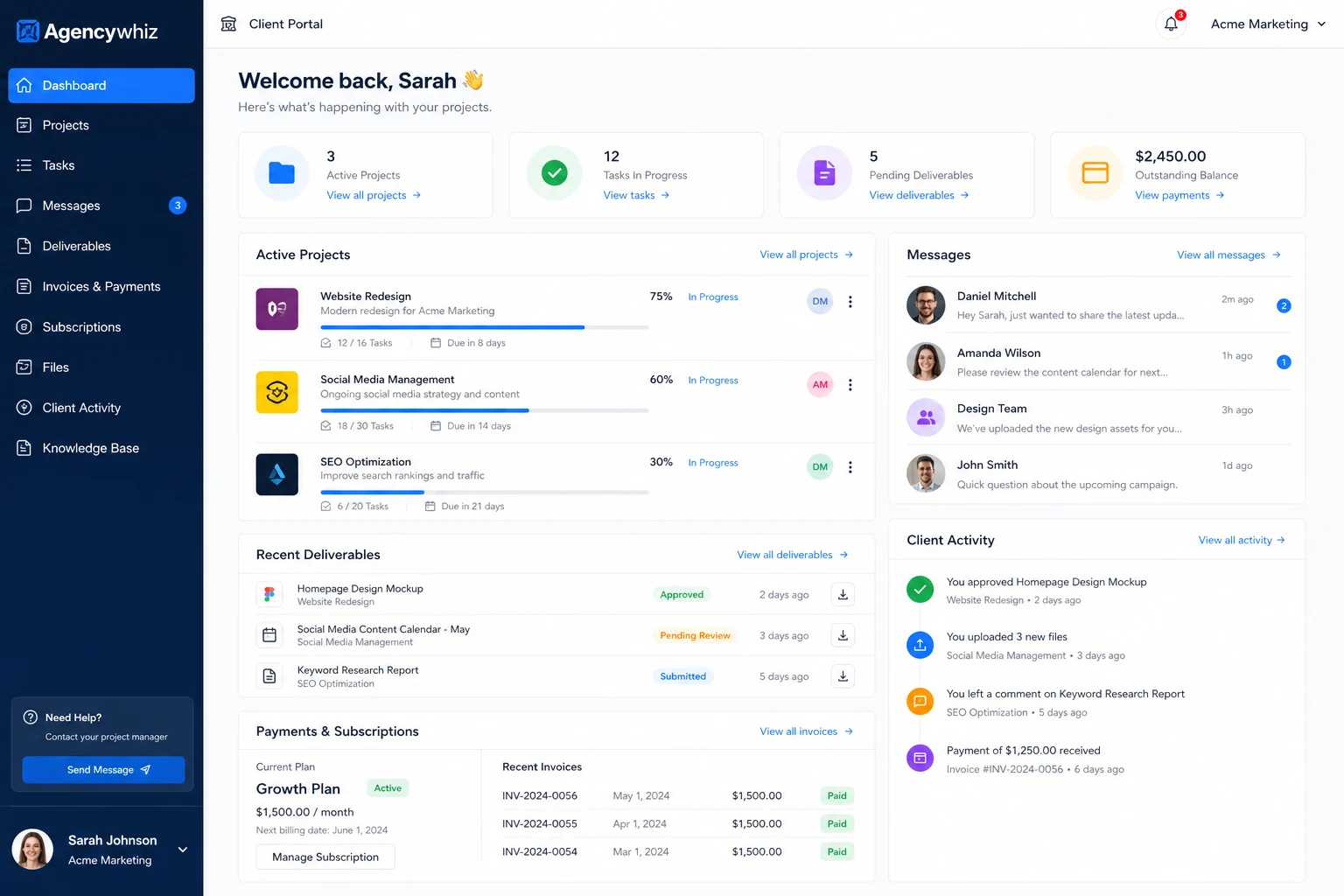
Quick verdict
Agencywhiz is worth a closer look if your real problem is not “I need another landing page,” but “I need a cleaner way to package, sell, and deliver client services.”
That is the useful buying frame.
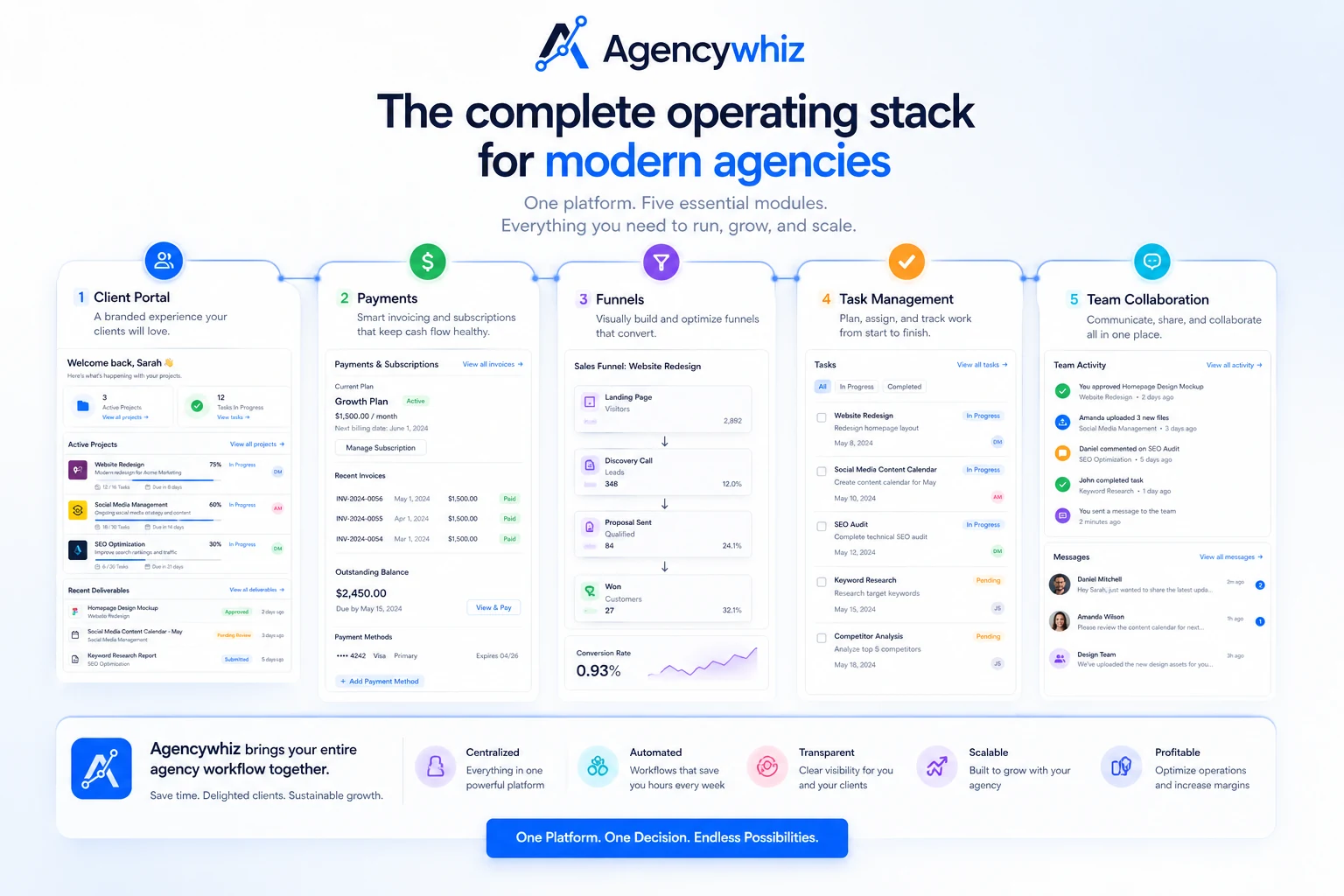
The product appears to sit in the agency-operations space: client portal, service storefront, payments, funnels, tasks, and team access. For freelancers and small agencies, that can sound attractive because the normal service stack gets messy fast. One tool for pages, one for payment links, one for tasks, one for client files, one for updates, one for team notes — and suddenly a simple productized offer becomes a pile of disconnected software.
Agencywhiz is trying to reduce that friction.
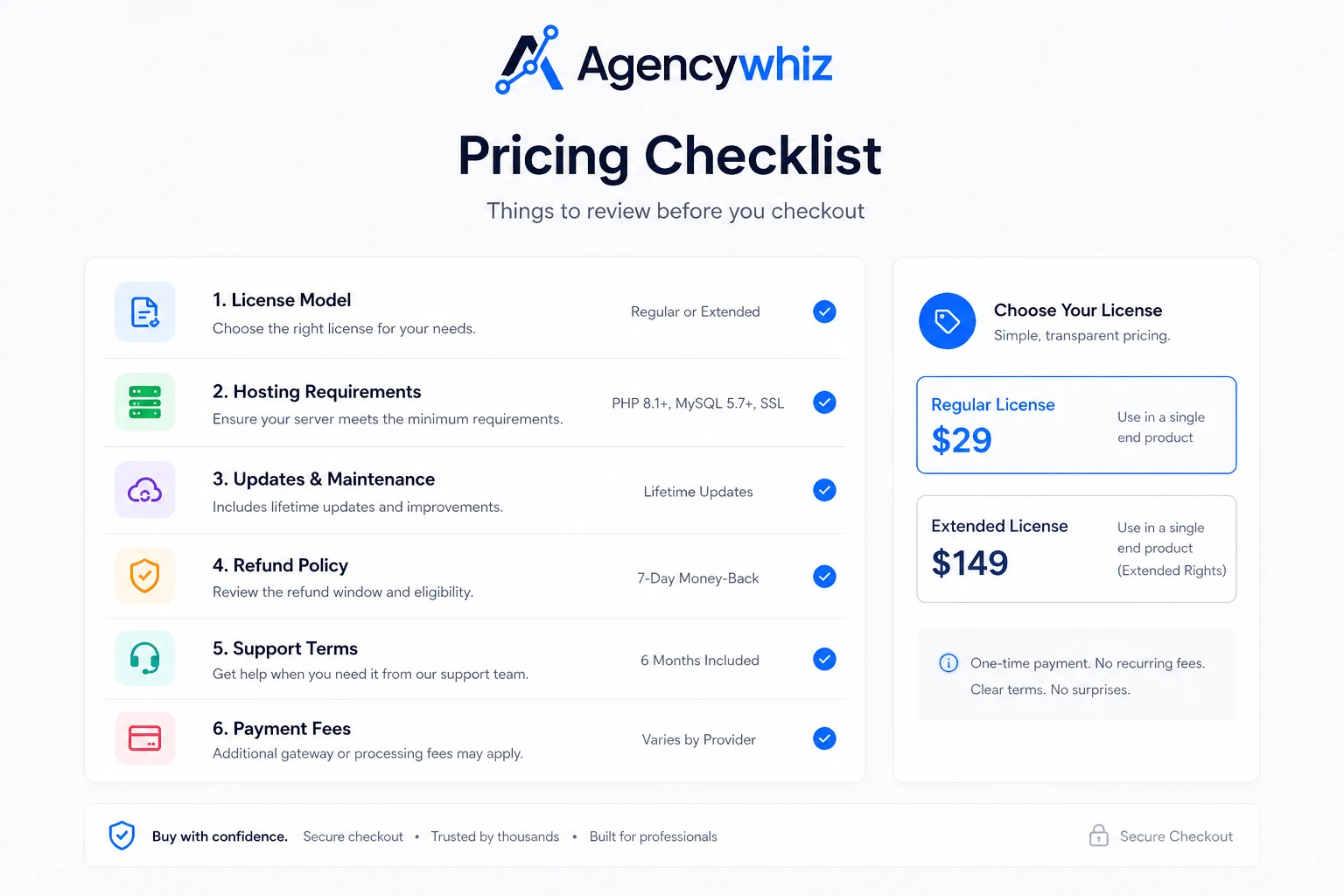
I would still be careful here. The public footprint is thinner than established agency platforms, and the commercial details need live verification before you build a client-facing operation around it. Pricing, license model, hosting responsibility, refund terms, update support, and payment setup matter more than the surface promise of an all-in-one portal.
For my money, Agencywhiz makes the most sense if you already have a repeatable service package and want a portal-first delivery workflow. It is weaker if you are still figuring out your offer, need deep CRM automation, or want a mature hosted system with extensive documentation and public proof.
The safest next step is not a full migration. Build one internal service package, run it through the portal, payment, task, and delivery flow, and only then decide whether Agencywhiz deserves a serious role in your agency stack.
Next step: If Agencywhiz still matches your client-delivery problem, verify the current buyer route before using it with real clients.
Review snapshot
| Review point | Practical take |
|---|---|
| Best for | Freelancers, consultants, and small agencies turning repeated services into packaged offers |
| Not ideal for | Buyers who need a mature CRM, deep email automation, or fully verified hosted platform terms before evaluation |
| Main use case | Packaging a service, taking payment, onboarding the client, managing tasks, and giving the client a portal-style delivery view |
| Pricing clarity | Public pricing was not clear enough to quote as final |
| Free plan or trial | Not reliably verified from public information |
| Main strength | Portal-first workflow for productized service delivery |
| Main concern | License, hosting, refund, support, and maintenance terms need live verification |
| Direct alternatives to compare | GoHighLevel for broader agency CRM, ActiveCampaign for email automation, NetHunt CRM for sales follow-up |
| Best next step | Test one internal service package before moving paying clients into the system |
What is Agencywhiz?
Agencywhiz is best understood as a portal-first agency operating layer for freelancers, consultants, and small agencies that want to package and deliver services more cleanly.
The product is not just a generic website builder, and it is not a full replacement for every CRM, automation platform, project management tool, or client communication system. Its value depends on whether the portal, payment, storefront, funnel, task, and team pieces can support one real service workflow.
A landing page is easy to promise. A real service workflow is messier: offer, intake, payment, onboarding, deliverables, revisions, team permissions, support, and client visibility all have to work together.
Our review approach compares public product positioning, directory signals, pricing clarity, portal workflow fit, checkout risk, and nearby alternatives. I would not treat a launch listing, a low headline price, or a coupon path as proof that the product fits your agency. The better question is narrower: can it help you sell and deliver one repeatable service package with less operational friction?
That is where Agencywhiz deserves evaluation.
Who should use Agencywhiz?
Agencywhiz makes the most sense for buyers who already have some service clarity.
A freelancer moving from custom work to packaged services is the cleanest fit. If you repeatedly sell the same audit, setup, design, content, consulting, or implementation service, a portal-first tool can help make the offer feel more like a product. The condition is that the service must already be clear. Agencywhiz can organize the workflow, but it cannot invent a strong offer for you.
A small agency may also find it useful if client delivery is scattered across too many tools. The portal angle matters when clients need one place to log in, view updates, access deliverables, and move through the process. Before buying, I would check whether team permissions, task flow, and client visibility match your actual delivery model.
A productized service founder is another reasonable buyer. If you are building a repeatable service storefront, the combination of package presentation, payment intake, and delivery workflow could be useful. The risk is overbuilding the platform before the offer is validated. Start with one package, not your entire future agency catalog.
A technically comfortable operator may be a better fit than a pure beginner if the self-hosted or technical setup remains part of the purchase. I would not assume hosting, updates, backups, and configuration are all handled for you unless the current checkout and support terms clearly say so.
Finally, Agencywhiz can make sense for buyers who want stack replacement value. If it can replace a page builder, client portal, basic task tool, and payment intake flow, the economics may become more interesting. If it replaces nothing and adds setup work, the purchase is harder to defend.
Who should avoid Agencywhiz?
I would avoid Agencywhiz if you are still unclear about what service you sell. A client portal cannot fix vague packages, unclear deliverables, weak pricing, or undefined fulfillment steps.
I would also be cautious if you need a mature hosted CRM with a long public track record, deep documentation, many integrations, and established support expectations. Teams that primarily need email automation should compare ActiveCampaign, while sales-heavy teams should compare CRM-first tools like NetHunt CRM.
The other buyer I would slow down is the deal-driven buyer. A launch-style price or coupon path can make a good tool cheaper, but it should not be the reason you commit your client delivery workflow to a product whose pricing, refund, support, and hosting expectations you have not verified.
How Agencywhiz fits into a real workflow
A realistic Agencywhiz workflow starts before the platform.
First, you define one repeatable service. That means the promise, deliverables, timeline, price, client inputs, revision rules, and fulfillment steps are written down. Without that, the portal becomes a polished container for an unclear process.
Then you build the client-facing offer. This is where the storefront or page-builder angle matters. The buyer should be able to explain the service clearly, show what is included, and route the client toward payment or inquiry without a custom proposal every time.
Next comes checkout and onboarding. This is the part I would test carefully. Can the client pay cleanly? Do you need an external payment processor? Are there transaction fees? Does the client receive the right access after purchase? Is there a clean handoff from payment to delivery?
After that, the delivery workflow begins. Tasks, team access, portal updates, client communication, and deliverable visibility all matter. Agencywhiz is more useful if it makes this stage easier to manage. It is less useful if you still need to duplicate every step in another project management tool.
Finally, there is the client experience. From the client side, the portal should answer basic questions: What did I buy? What happens next? What do I need to provide? Where are my updates? Where are my files? Who do I contact?
That is the real test.
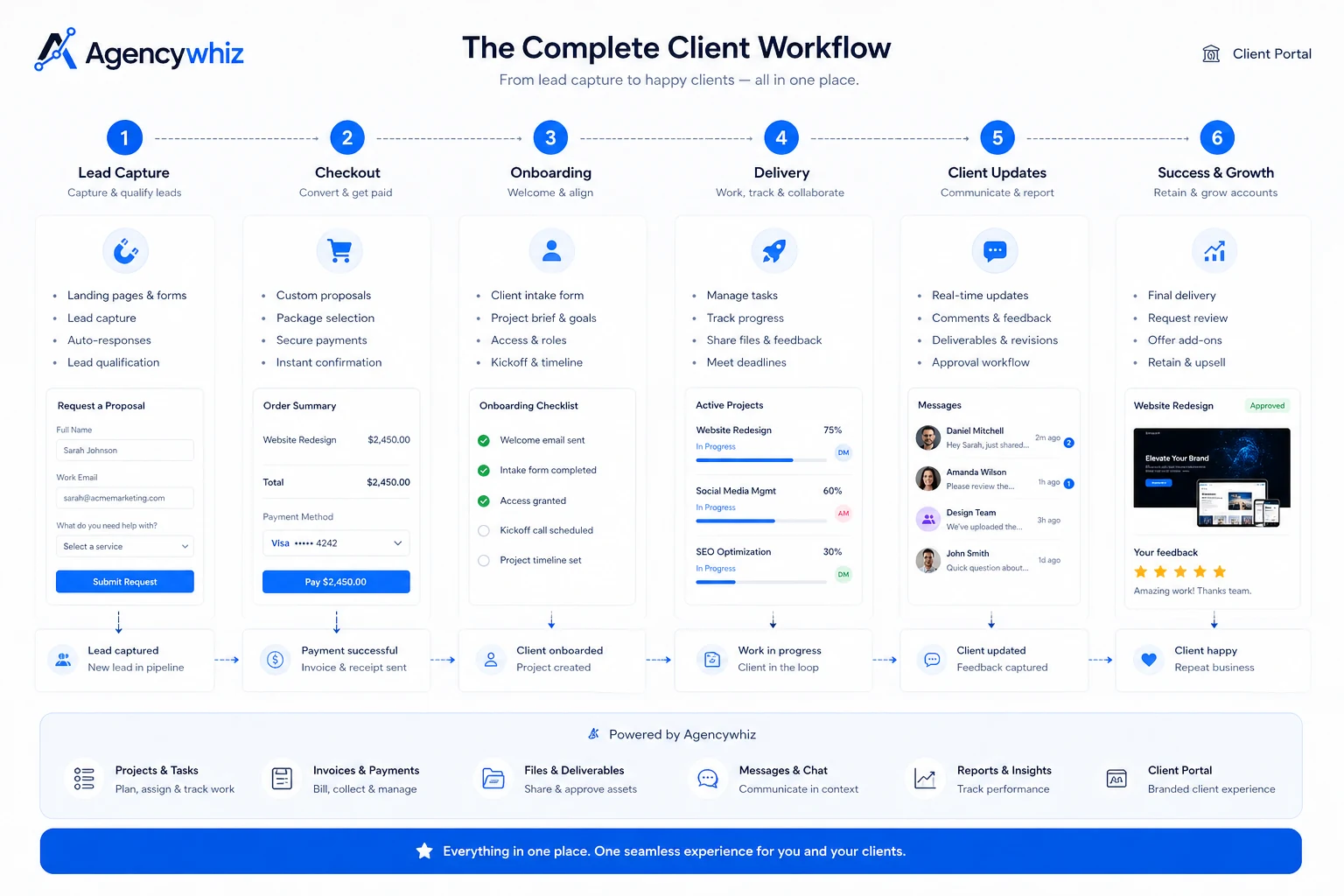
Workflow check: If you can map one real service package into this flow, Agencywhiz is worth a closer look before checkout.
Real-world buyer scenarios
A freelancer productizing a repeated service
A freelancer who keeps selling the same setup, audit, design package, copywriting bundle, or consulting sprint may want a cleaner way to present the offer and manage delivery. Agencywhiz may fit if the portal makes the business look more organized and reduces back-and-forth.
It may fail if the freelancer does not yet have a clear delivery process. Before paying, I would build one offer on paper first and make sure the tool supports that exact journey.
A small agency that wants a branded client hub
A small agency may already have clients but still manage updates through email, spreadsheets, payment links, and task boards. A white-labeled portal can give clients a more professional front door.
The risk is that the portal adds another system without replacing anything. If the team still duplicates every task elsewhere, Agencywhiz becomes a wrapper rather than a workflow improvement.
A productized service founder testing an offer
For a founder building a service around a clear problem, Agencywhiz could be a useful test bed. The founder can package the service, create a simple storefront, accept payment, and use the portal to manage early customers.
The caution is scale. Start with one package and one controlled workflow before moving more client delivery into the platform.
Key features that actually matter
White-labeled client portal
The portal is the feature to judge first. A branded client space can make a small agency feel more professional and reduce scattered communication.
Buyer note: test the portal from the client side, not only the admin side.
Productized service storefront
Agencywhiz is more interesting when you want to package services instead of sending custom proposals every time. The storefront angle matters if it helps explain the offer, collect the order, and start delivery cleanly.
Buyer note: write the offer first, then use the software to package it.
Payments and checkout flow
Payment support can be valuable, but buyers should verify the processor, fees, checkout behavior, and what happens after payment.
Buyer note: run a test purchase flow before inviting clients.
Task and delivery management
Tasks matter because agencies do not only sell services. They have to deliver them. Agencywhiz is stronger if the task flow connects naturally with the portal and team workflow.
Buyer note: check whether your real fulfillment process fits the task structure.
Team access
Team access can help small agencies, but only if permissions, internal visibility, and client access are handled cleanly.
Buyer note: test staff and contractor access before rollout.
Pricing and plan value
Pricing is the biggest caution in this Agencywhiz review.
Public information was not clear enough to quote a reliable current starting price. That does not automatically make the product weak, but it changes how buyers should evaluate it. When pricing is unclear, the safe move is to verify the live checkout page, license model, refund language, and support terms before treating the product as affordable.
The main pricing question is not just “How much does it cost?”
The better question is: what does the total setup cost look like?
For a portal-first or self-hosted agency platform, total cost can include the license, hosting, domain setup, payment processor fees, maintenance, backups, updates, support, and your own configuration time. A low sticker price can still become expensive if the buyer has to handle too much setup without enough documentation or support.
A paid plan or one-time license may make sense if Agencywhiz replaces several tools. For example, if it replaces a client portal, basic service storefront, payment intake flow, task tracker, and delivery workspace, the stack-replacement value becomes more believable.
It is less compelling if it replaces nothing.
I would also be careful with annual or lifetime-style buying logic. A long-term deal only makes sense after the workflow has been tested. If you have not confirmed the portal, checkout, payments, task flow, support, and client experience, the discount is premature.
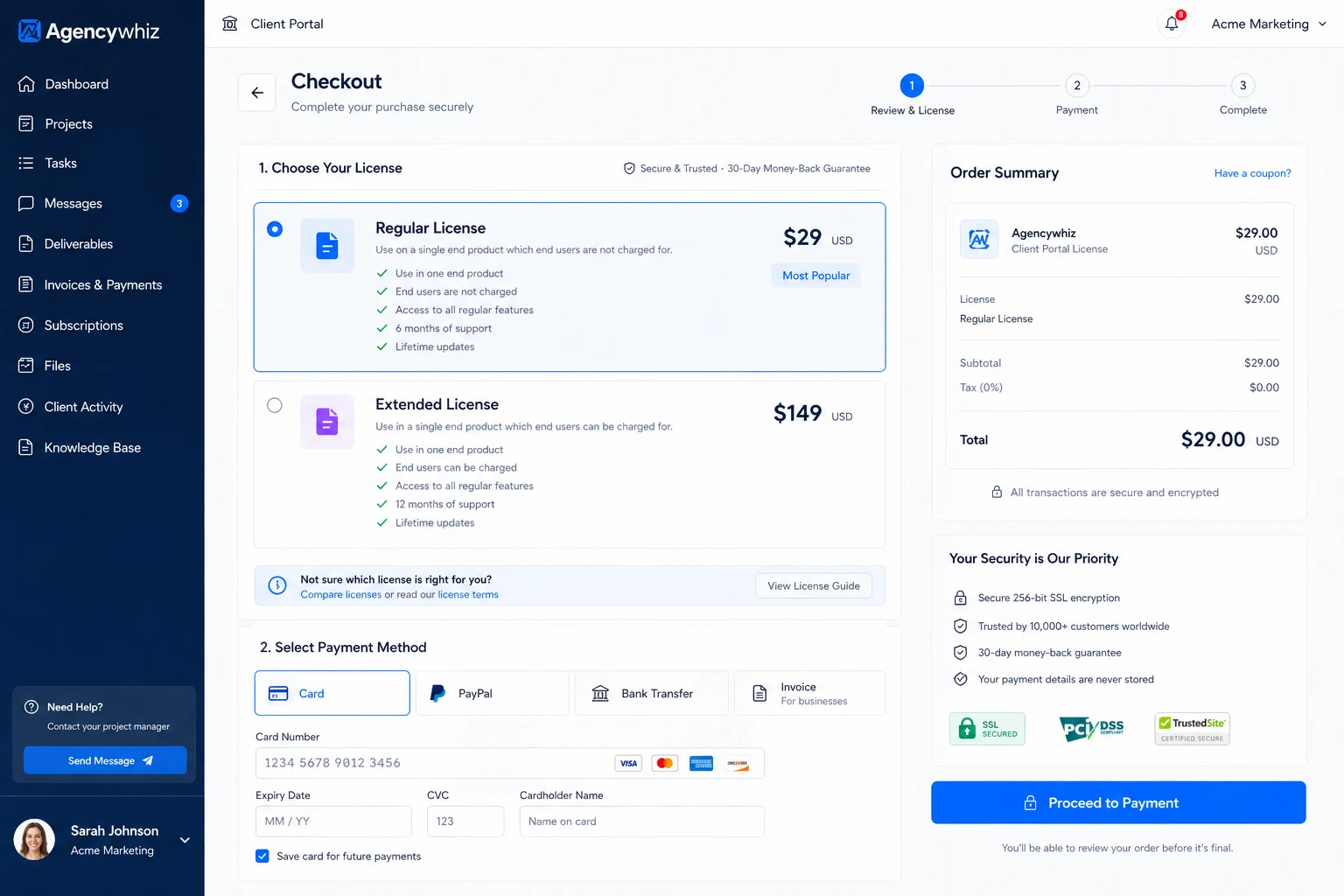
Pricing check: Treat Agencywhiz as a workflow purchase first. Verify the live checkout, license model, and setup responsibilities before paying.
Free plan, trial, coupon, and checkout notes
A reliable public free plan or trial was not clear enough to treat as confirmed.
That means buyers should not make the decision around a “free test” unless the current official checkout path clearly provides one. If a trial, demo, or launch offer appears, use it to validate the workflow — not just to click around the dashboard.
The coupon path should also stay secondary. A coupon may improve the purchase if the product already fits, but it should not drive the decision. With Agencywhiz, the bigger questions are practical:
- Can you build a real service package?
- Can a client understand the offer?
- Can checkout work reliably?
- Can the portal support delivery?
- Can your team manage tasks and permissions?
- Can you get support if something breaks?
- Are refund and cancellation terms clear enough?
If those answers are weak, a discount does not solve the problem.
Use the Agencywhiz coupon page only after the workflow fit makes sense. If a current deal path exists, verify the checkout details live and do not rely on old launch-page references.
What I would check before buying Agencywhiz
If I were buying Agencywhiz for a real client-service workflow, I would check these points before paying:
- Live checkout price and license model. Is it subscription, one-time, launch-based, self-hosted, hosted, or something else?
- Hosting and setup responsibility. Who handles hosting, domain setup, updates, backups, and maintenance?
- Payment processor requirements. Which payment systems work, what fees apply, and what happens after a client pays?
- Client portal experience. Can a non-technical client log in, understand the project, see deliverables, and know the next step?
- Team permissions. Can staff or contractors access only what they should access?
- Refund and support terms. What happens if setup fails, the product does not fit, or support is slow?
- Alternative fit. Would a mature CRM, email automation tool, or client portal platform solve the real bottleneck better?
The easy mistake is buying the platform because it seems to combine many things. The better approach is to test whether the combined workflow is actually easier than your current stack.
A simple test before paying
Before paying, I would run a small test like this:
- Pick one service you already understand well.
- Write the service package, deliverables, timeline, price, and client inputs outside the tool first.
- Build the offer flow inside Agencywhiz or its current demo path.
- Walk through checkout as if you were a client.
- Check what happens after payment or inquiry.
- Create the delivery tasks and client updates for that package.
- Ask whether the workflow is easier than your current mix of tools.
This test keeps the evaluation grounded.
Do not test Agencywhiz with an imaginary future agency. Test it with one real service you could sell now. If the tool makes that service easier to package and deliver, it deserves more attention. If the setup feels fragile at the one-package stage, do not move your whole client operation into it.
Pros explained
It focuses on a real agency pain point
Agencywhiz addresses a believable problem: the messy gap between selling a service and delivering it cleanly. That matters for freelancers and small agencies that already have repeatable offers but still rely on scattered pages, payment links, task boards, and email threads.
The limit is service clarity. A portal can make a good process feel professional, but it cannot turn a vague offer into a strong productized service.
The portal-first angle is commercially useful
A branded portal can improve the client experience because clients get one place to check updates, deliverables, and next steps. That can make a small service business feel more organized.
The buyer check is simple: test the portal from the client side. If clients still feel confused, the feature list does not matter much.
It may replace several small tools
Agencywhiz becomes more interesting if it can replace a basic page builder, payment intake path, client portal, and task workflow. That stack-replacement value is the real pricing argument.
If it replaces nothing and still requires setup work, the value weakens quickly.
It encourages productized-service thinking
The product pushes buyers toward clearer offers, repeatable packages, and structured delivery. That is useful.
But the strategy still has to come from the buyer. Software can organize the process; it cannot define your promise, scope, or fulfillment model for you.
Cons explained
Pricing clarity is limited
The biggest drawback is commercial uncertainty. When public pricing is not reliable enough to quote, buyers have to verify the current checkout, license model, support terms, and refund language before paying.
This matters because the total cost may include hosting, setup time, payment fees, updates, and maintenance.
Setup may add responsibility
If the product is self-hosted or technically involved, do not assume everything is handled for you. Verify hosting, domain setup, backups, updates, and support before you invite real clients into the system.
I would not name exact technical requirements unless current docs confirm them. The practical buyer rule is enough: verify the setup path before checkout.
Public proof depth is thinner than mature platforms
Agencywhiz does not have the same public proof depth as larger agency platforms. That does not disqualify it, but it raises the caution level.
Support responsiveness, documentation, product maintenance, roadmap stability, and refund terms matter more when the public footprint is limited.
It may not replace a real CRM or automation stack
Agencywhiz is not the obvious answer if your main problem is lead management, email automation, or complex customer journeys. A portal-first product can help with delivery, but acquisition and nurturing may require a different stack.
Green flags and red flags
| Signal | What it means |
|---|---|
| Green flag: you have one repeatable service package | Agencywhiz is easier to judge when the offer is already defined |
| Green flag: clients need a clearer delivery portal | The portal angle can improve professionalism and reduce scattered communication |
| Green flag: your current stack is fragmented | Stack replacement may justify the purchase if Agencywhiz can replace multiple small tools |
| Red flag: pricing or license terms are unclear at checkout | Do not move forward until the commercial model is fully understood |
| Red flag: you need enterprise-level CRM automation | A broader agency CRM or automation platform may be safer |
| Red flag: you are buying only because of a discount | A deal does not reduce setup, hosting, support, or workflow mismatch risk |
| Red flag: your service offer is vague | Software cannot fix unclear positioning or undefined deliverables |
Agencywhiz vs alternatives
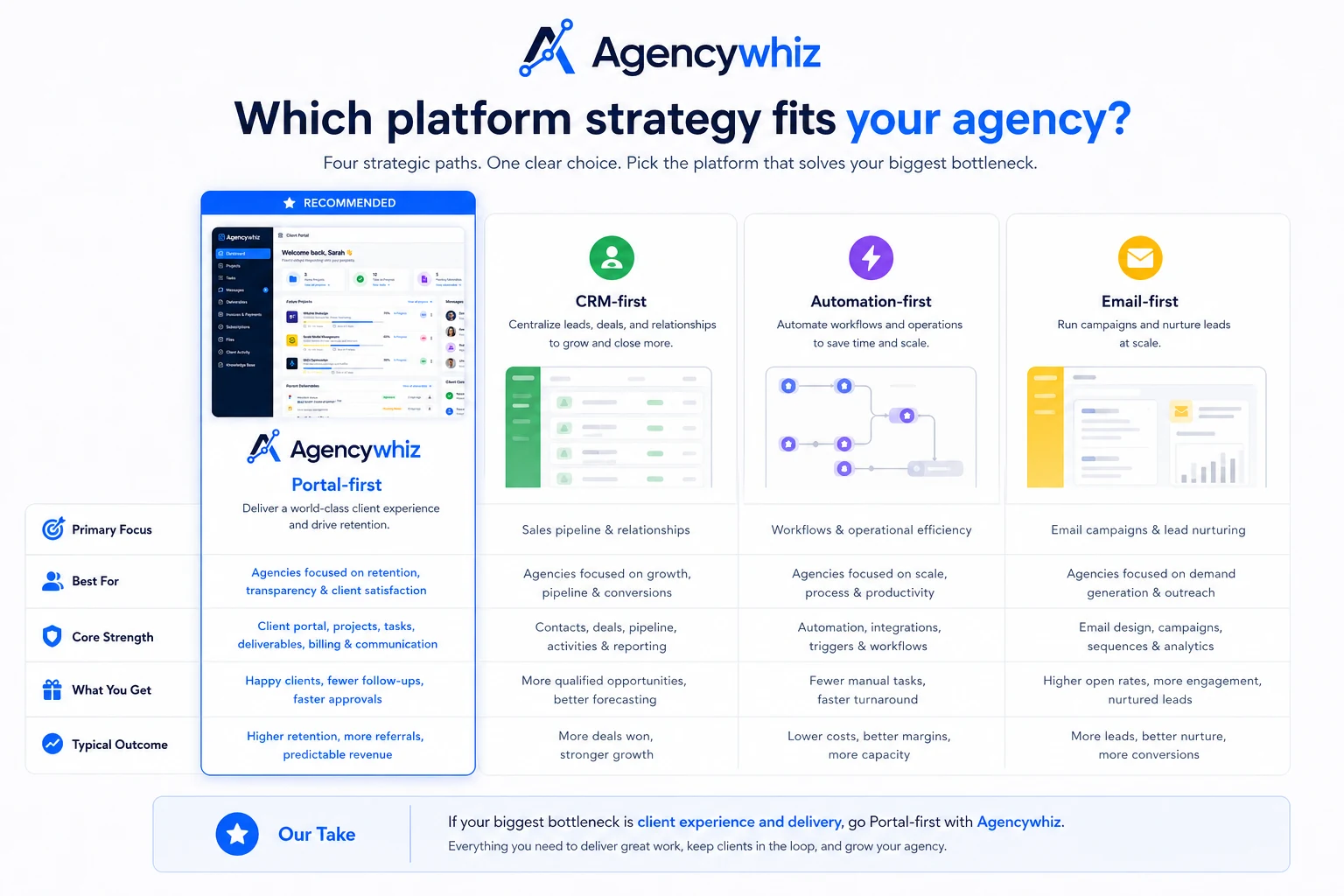
Agencywhiz should be compared by bottleneck.
If the bottleneck is client delivery, Agencywhiz is more relevant. If the bottleneck is lead capture, CRM, email automation, or sales follow-up, the alternatives may be safer.
GoHighLevel vs Agencywhiz
GoHighLevel is the stronger comparison if you want a broader agency CRM, funnel, automation, reputation, and client-management stack.
Agencywhiz may still make sense if you want a lighter, portal-first productized-service workflow. The tradeoff is maturity and breadth. GoHighLevel is likely more established for agencies that need a large operating platform. Agencywhiz is more interesting when the buyer wants a narrower service packaging and client delivery path.
If your business depends on client acquisition, automation, and CRM depth, compare the GoHighLevel store guide before choosing Agencywhiz.
ActiveCampaign vs Agencywhiz
ActiveCampaign is not a direct portal replacement. It is an adjacent route for buyers whose main need is marketing automation.
If you need email sequences, customer journeys, segmentation, and lifecycle follow-up, ActiveCampaign is the better category fit. Agencywhiz is more relevant after a client is ready to buy or has already bought a service package.
The simple distinction: ActiveCampaign helps nurture and automate communication. Agencywhiz aims to package and deliver client services.
NetHunt CRM vs Agencywhiz
NetHunt CRM is a better comparison when the workflow lives close to Gmail and sales follow-up.
If your team needs pipeline structure, lead records, and relationship tracking, NetHunt CRM may be a better fit. Agencywhiz makes more sense when the buyer wants a client-facing portal and productized service delivery flow.
This is not a “which tool is better?” decision. It is a “which workflow is broken?” decision.
ManyRequests, SuperOkay, and other client portal tools
Some buyers should also compare dedicated client portal platforms.
Tools in that category may be more mature for client communication, project visibility, branding, permissions, and agency delivery. Agencywhiz may appeal more if the storefront, payment, funnel, and productized-service angle matter as much as the portal itself.
This is where direct and adjacent alternatives need separation. A dedicated client portal is a closer alternative for delivery experience. A CRM or email platform is adjacent unless your real bottleneck is sales or automation.
Trust, refund, and buyer-risk notes
Agencywhiz is the kind of product where trust checks matter more than usual.
The main reason is simple: if you use it seriously, clients may interact with it. That raises the standard. A private writing tool can be replaced quietly. A client-facing portal becomes part of your service experience.
Before using Agencywhiz with clients, buyers should verify:
- current pricing and checkout terms
- whether the product is hosted, self-hosted, or license-based
- hosting, backup, update, and maintenance responsibilities
- payment processor setup and fees
- refund or cancellation language
- support availability and response expectations
- team permissions and client access controls
- data handling and privacy expectations
- whether the product is actively maintained
I would also check how easy it is to leave. If you build your client delivery process inside a platform, you should understand whether you can export important data, move clients back to another system, or continue delivery if the tool no longer fits.
Do not buy on headline price alone.
Do not treat a coupon as proof of fit.
Do not move active clients into a new system before running one controlled internal workflow.
The safer path is boring, but it protects you: verify the commercial terms, test the setup, simulate the client experience, then decide whether the product earns a place in your operating stack.
Final verdict
Agencywhiz is interesting because it points at a real pain: freelancers and small agencies often need a cleaner bridge between selling a service and delivering it professionally.
I would consider Agencywhiz if you already have a repeatable service, want a portal-first workflow, and can verify the current license, setup, hosting, payment, support, and refund terms before using it with clients. The product makes the most sense when it can replace several scattered pieces of your service stack.
I would skip it if your real need is mature CRM automation, advanced email journeys, enterprise-grade agency operations, or a fully proven hosted platform with extensive public documentation. I would also skip it if the only reason you are interested is a launch-style deal.
I would compare it with GoHighLevel if you need a broader agency CRM and funnel system, ActiveCampaign if lifecycle automation is the real bottleneck, and NetHunt CRM if sales follow-up matters more than client portals.
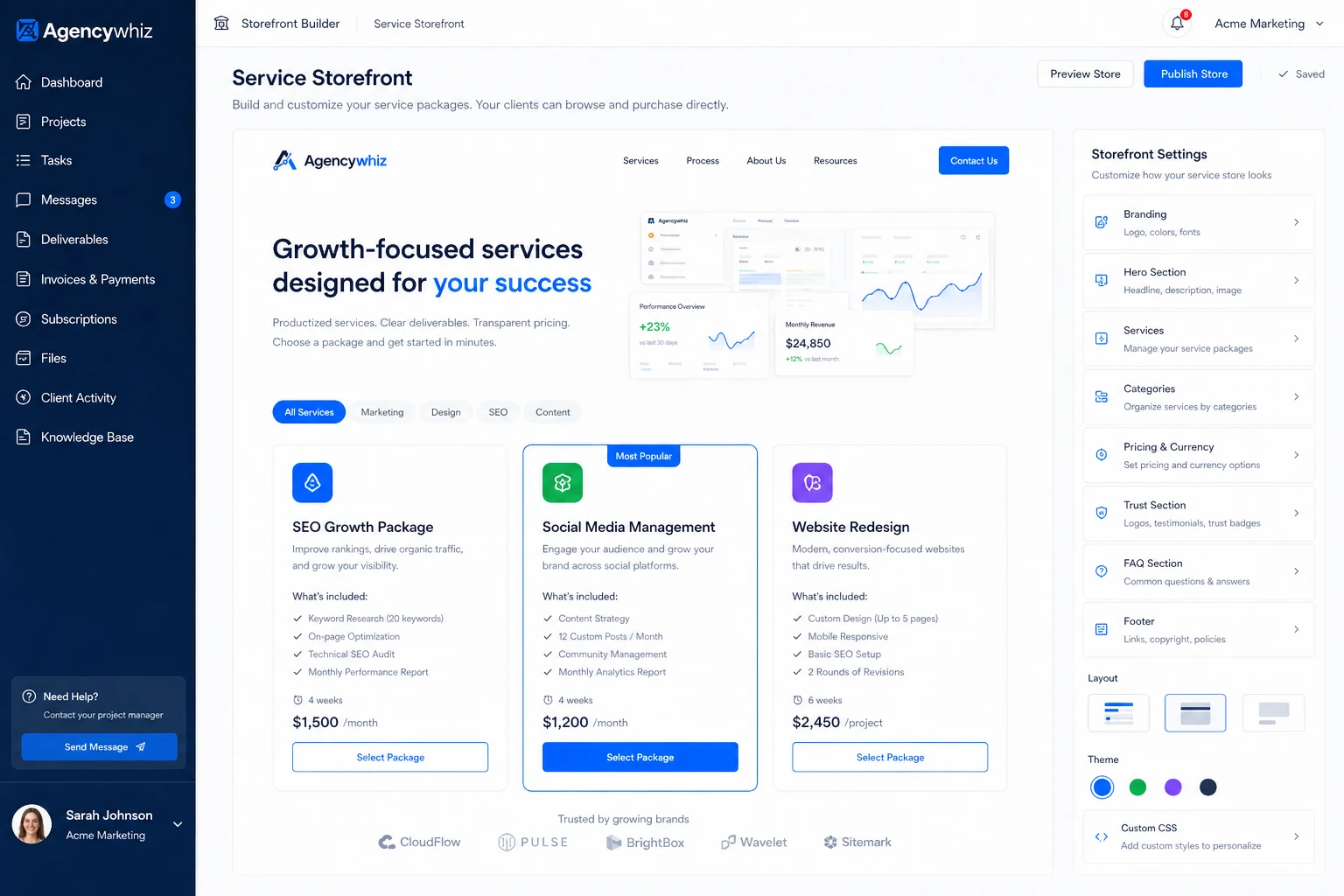
The safest next step is a small rollout. Build one productized offer, test the portal and checkout flow internally, review the support and refund terms, and only invite real clients after the workflow holds together.
