Quick verdict
KeywordsPeopleUse is worth considering if your SEO work begins with questions, clusters, and content briefs rather than a flat list of keywords.
That is the real buying distinction.
If you only want a traditional rank tracker, a massive competitive database, or a cheap keyword-volume lookup tool, this is probably not the first product I would open. KeywordsPeopleUse is more useful when you want to understand what people are asking across search and discussion sources, group those ideas into usable structures, and hand them to a writer, editor, agency client, or refresh workflow.
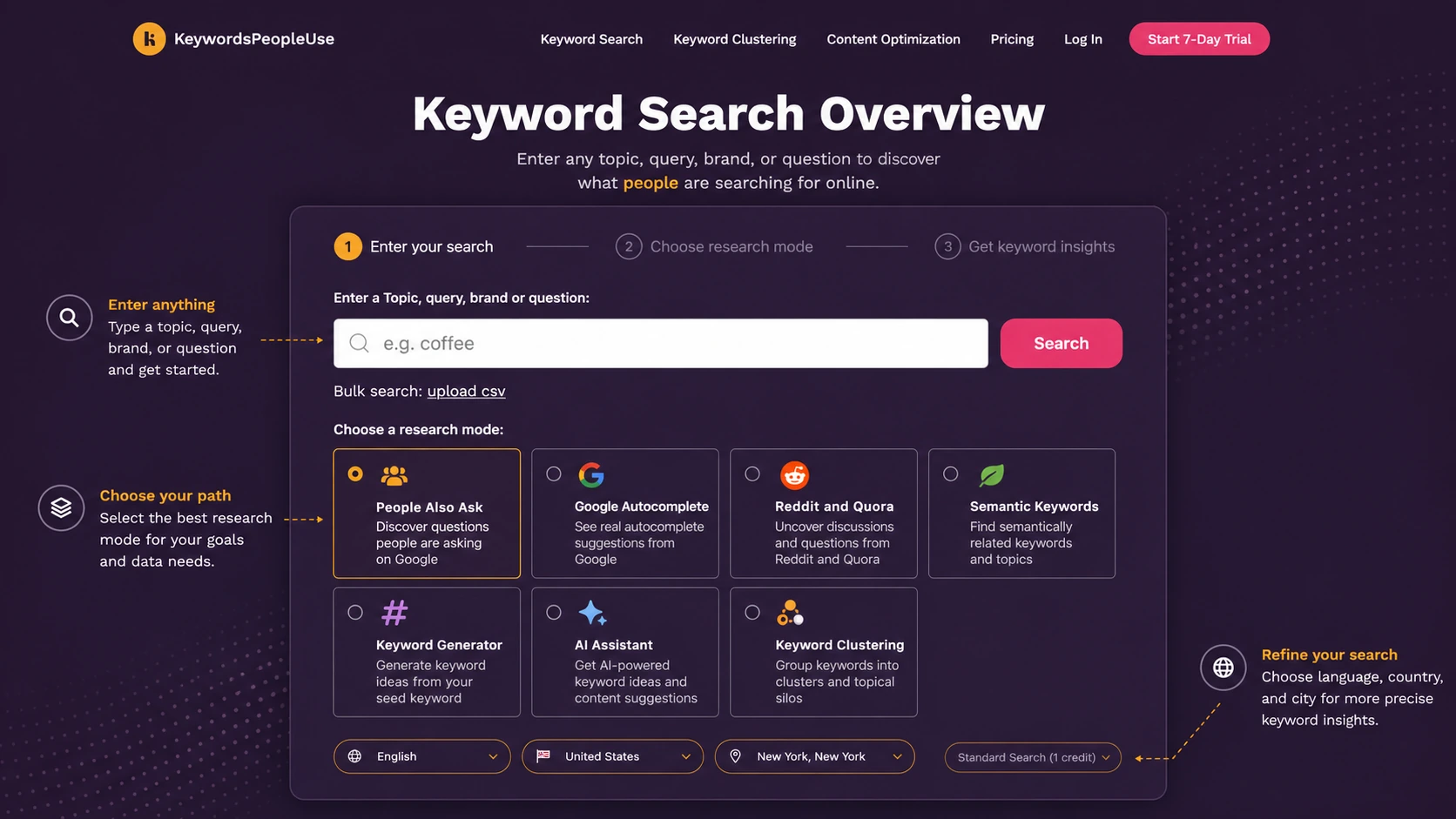
The strongest reason to consider it is workflow focus. It connects People Also Ask, Google Autocomplete, Reddit and Quora ideas, semantic keywords, keyword generation, clustering, Search Console-informed optimization, exports, and AI assistance into a practical research loop.
The main caution is plan fit. The official pricing path uses monthly credits, a 7-day trial, annual-billing savings, API access, and a higher Unlimited tier. Credits reset monthly, so the cheapest plan is not automatically the smartest plan, and the larger plans are not automatically better. You need to know how often you will search, cluster, export, and refresh content.
For my money, the safest path is simple: test one real content workflow first, then choose a monthly plan only if the tool helps you move from research to publishable decisions.
Next step: If KeywordsPeopleUse looks like a fit for your SEO workflow, verify the live pricing route before choosing a credit tier.
Visit KeywordsPeopleUse Read store guide Check current offers
Review snapshot
| Review point | Practical take |
|---|---|
| Best for | SEO teams, bloggers, agencies, and content marketers building question-led content plans |
| Not ideal for | Buyers who only want rank tracking, one-off keyword checks, or a permanent free tool |
| Main use case | Turning audience questions into clusters, briefs, refresh priorities, and topical authority plans |
| Starting price | Lite starts at $15/month on the current monthly pricing page |
| Trial path | 7-day trial with payment details required |
| Plan model | Monthly credits, exports, alerts, history, API access, and annual-billing decisions matter |
| Main strength | Question discovery plus clustering and content optimization workflow |
| Main concern | Credit usage, refund language, and annual billing need careful verification |
| Best direct alternatives to compare | AlsoAsked, AnswerThePublic, KeywordTool.io, Semrush Keyword Magic Tool, LowFruits |
| Best adjacent routes | AISEO or Balzac AI if the buyer wants more AI writing and optimization support |
| Safest next step | Run one real topic through the trial before choosing monthly or annual billing |
What is KeywordsPeopleUse?
KeywordsPeopleUse is best understood as a question-led SEO research and content planning tool.
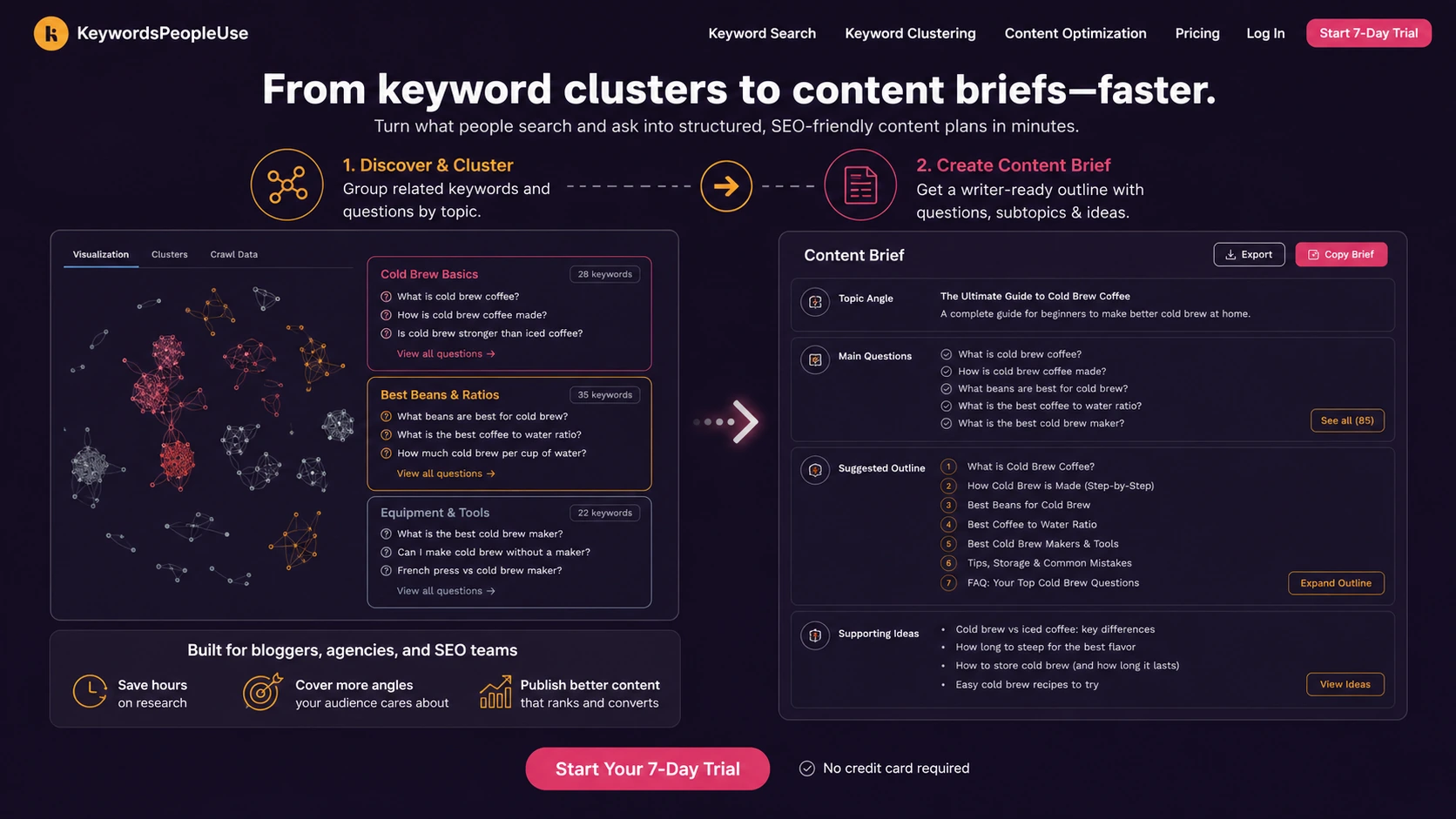
Its core job is not just to give you another keyword list. The better use case is discovering what people ask, grouping related ideas, and turning those patterns into content plans. That can include People Also Ask research, Google Autocomplete ideas, Reddit and Quora angles, semantic keywords, keyword generation, AI-assisted research, clustering, and Search Console-based content optimization.
The product sits somewhere between a question research tool, a topic-clustering tool, and a content refresh assistant. That makes it different from broad SEO suites like Semrush or Ahrefs, and also different from AI writing tools that start with content generation instead of audience research.
Our review approach: we compare public product pages, pricing details, help documentation, terms, workflow fit, and nearby alternatives. We do not treat a trial, annual discount, or coupon route as proof that the product fits the buyer.
The common wrong expectation is thinking KeywordsPeopleUse will replace a full SEO stack. It will not handle every SEO job. You may still need rank tracking, backlink analysis, technical SEO crawling, competitive research, editorial review, and content production elsewhere.
The better expectation is narrower: can it help you understand questions and intent before you build or refresh content?
If yes, it has a clear role. If no, it can become another research dashboard that produces interesting data but not enough action.
Who should use KeywordsPeopleUse?
Bloggers who need article ideas from real questions
KeywordsPeopleUse can fit bloggers who struggle to turn broad topics into specific article angles. The value is not just finding keywords. It is seeing how people phrase problems, what related questions appear, and how those questions could become subtopics, FAQs, or cluster pages.
The condition is that the blogger must actually publish from the research. If the output becomes a saved list that never turns into content, even the lower-tier plan can feel wasteful.
SEO teams building topical maps
SEO teams may find KeywordsPeopleUse useful when planning topical authority around a category. Question clusters can help reduce overlap, spot missing coverage, and decide which pages deserve their own articles.
The buyer check is volume. A team running many client, category, or market searches should estimate monthly credits before choosing a plan. A good cluster workflow can use more credits than expected once the team starts testing multiple seed topics.
Agencies creating client-ready research
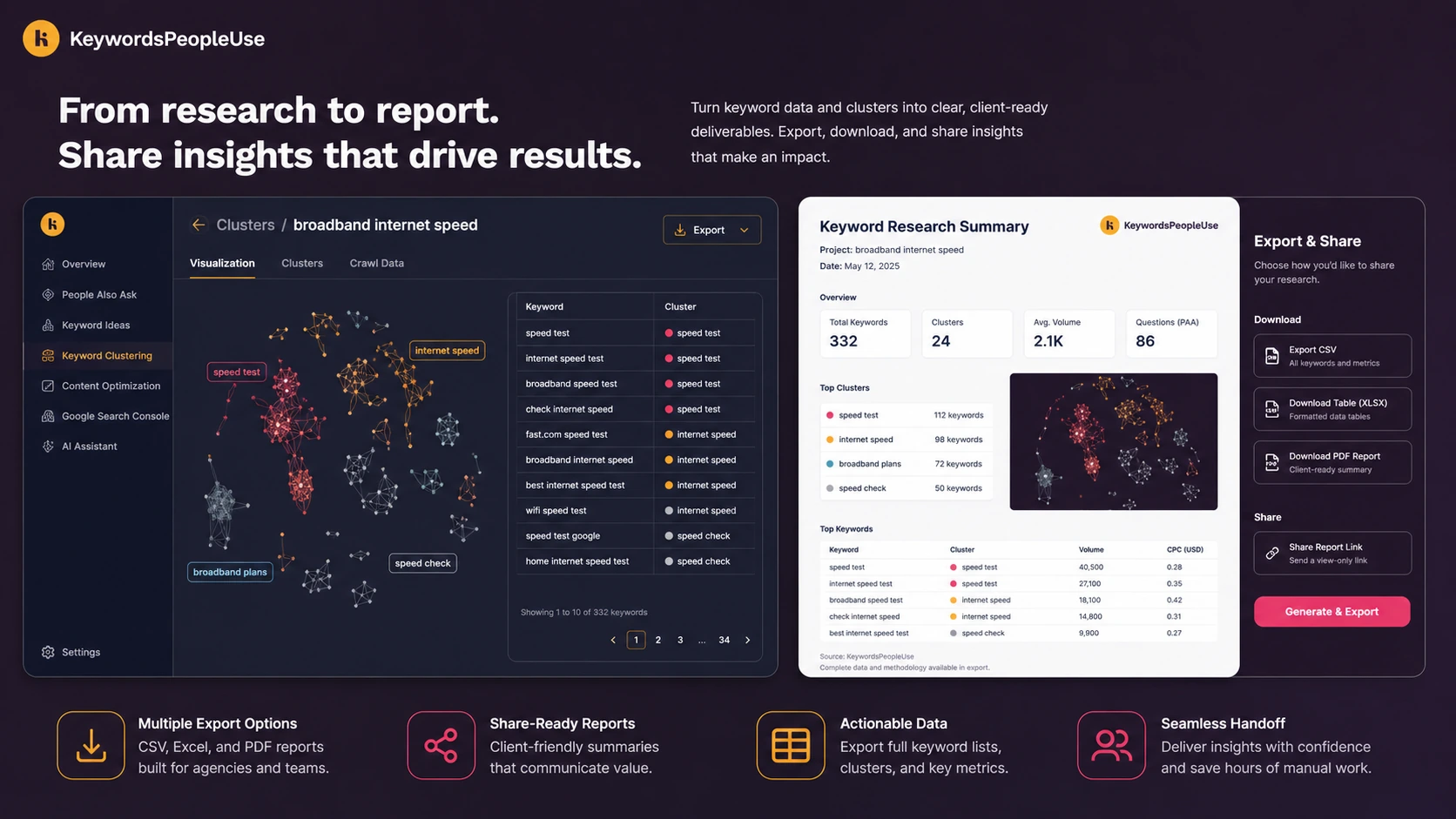
Agencies are one of the stronger fits because the tool supports visual research, exports, keyword lists, alerts, and unlimited users on paid plans. That matters when research needs to move from strategist to client, editor, writer, or account manager.
The key condition is repeatability. If an agency uses question maps for every client brief, the tool may justify itself. If it only uses the dashboard once during onboarding, the plan decision becomes weaker.
Content teams refreshing existing pages
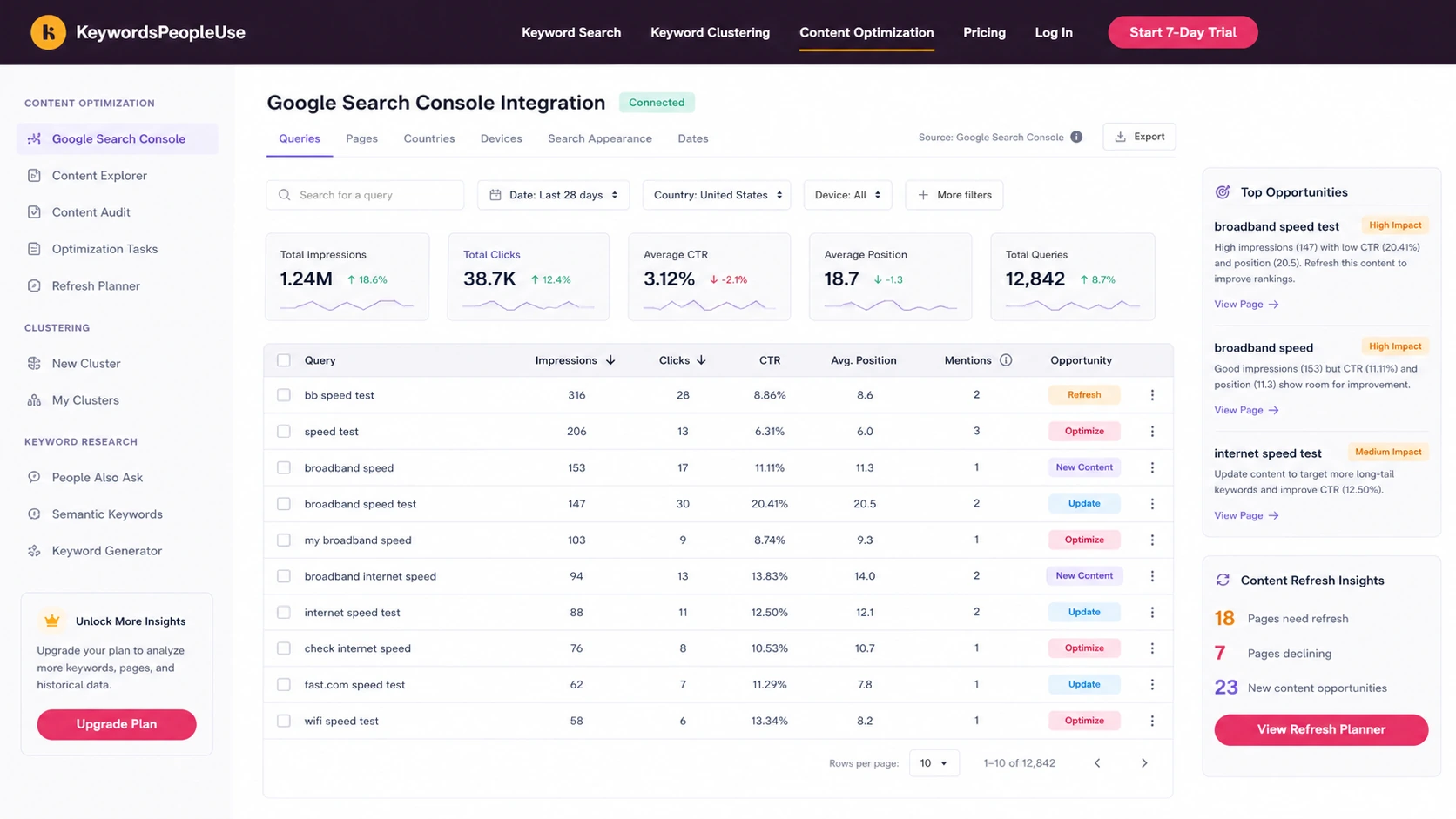
The Search Console optimization side matters for teams with existing traffic. If you already have pages ranking, KeywordsPeopleUse can help connect queries, pages, mentions, and optimization opportunities.
This is a different buying case from new content planning. Existing content teams should test whether the tool helps prioritize refresh decisions, not just whether the keyword research view looks useful.
Who should avoid KeywordsPeopleUse?
You should avoid KeywordsPeopleUse if you only want a rank tracker. This is not the product I would choose if the main job is daily ranking reports, competitor position tracking, or broad SERP monitoring.
You should also be careful if you judge keyword tools only by search volume. KeywordsPeopleUse is more intent and question-oriented. If your workflow depends heavily on volume, difficulty, CPC, backlink context, and competitive metrics, a larger SEO suite may still be necessary.
One-off users should be cautious. A 7-day trial can answer whether the tool feels useful, but a paid plan needs repeated work to make sense. Occasional curiosity searches are not the same as a content workflow.
Solo buyers should check credit usage closely. The Lite plan may be enough for light research, but larger plans can become overbuying if you do not use clusters, exports, alerts, Search Console optimization, or API access.
I would also slow down before annual billing. The annual price angle can be attractive, but a longer commitment only makes sense after the monthly workflow is proven.
How KeywordsPeopleUse fits into a real workflow
A useful KeywordsPeopleUse workflow starts before the search box.
The buyer should already have a content problem: a topic cluster to build, a blog category to expand, an existing page to refresh, a client brief to prepare, or a publishing calendar to shape. Without that problem, the tool can feel interesting without becoming essential.
A realistic workflow looks like this:
- Choose one real seed topic or existing page.
- Pull question-led ideas from search and discussion sources.
- Review related questions, autocomplete ideas, semantic terms, and community angles.
- Cluster the ideas into groups that could become articles, subheadings, FAQs, or briefs.
- Export or save the research if a writer, client, or editor needs it.
- If you have Search Console data, check whether existing pages already cover the demand.
- Decide whether to create, update, merge, or skip content.
The point is not to admire a cluster map. The point is to make a better publishing decision.
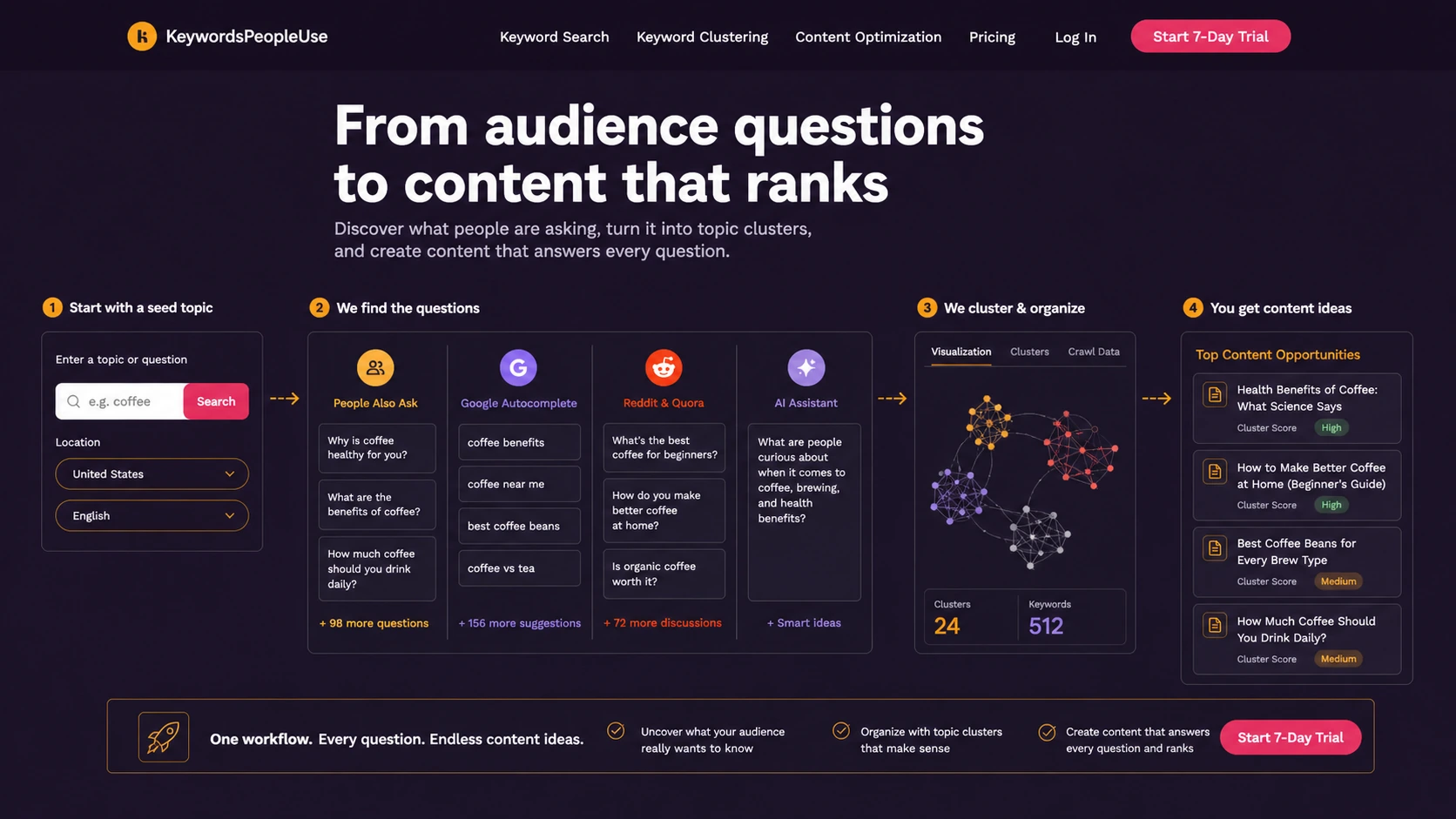
The tool is strongest when it shortens the path from “we need content around this topic” to “these are the questions, clusters, and pages we should work on.”
It becomes weaker when buyers run random searches, export data, and never connect the results to briefs or publishing actions.
Workflow check: Use one real topic during the trial. If KeywordsPeopleUse helps you create a clearer brief or refresh plan, then pricing becomes easier to judge.
Real-world buyer scenarios
A blogger planning a new topical cluster
A blogger building a new category may use KeywordsPeopleUse to find the questions people actually ask before writing. That can help avoid generic posts and create a more useful cluster structure.
The risk is chasing every question. A good blogger still needs judgment: which question deserves a full article, which belongs inside an existing post, and which is not worth targeting yet?
A small agency preparing a client brief
An agency can use the tool to turn a seed topic into a visual research map, exportable data, and a writer-ready outline. This is a stronger use case because the research has a destination: client strategy, writer handoff, or content planning.
The buyer check is whether the team will use enough credits and exports to justify the tier. If the agency only creates one brief per month, it should start lower and move up only after volume is clear.
An SEO manager refreshing existing content
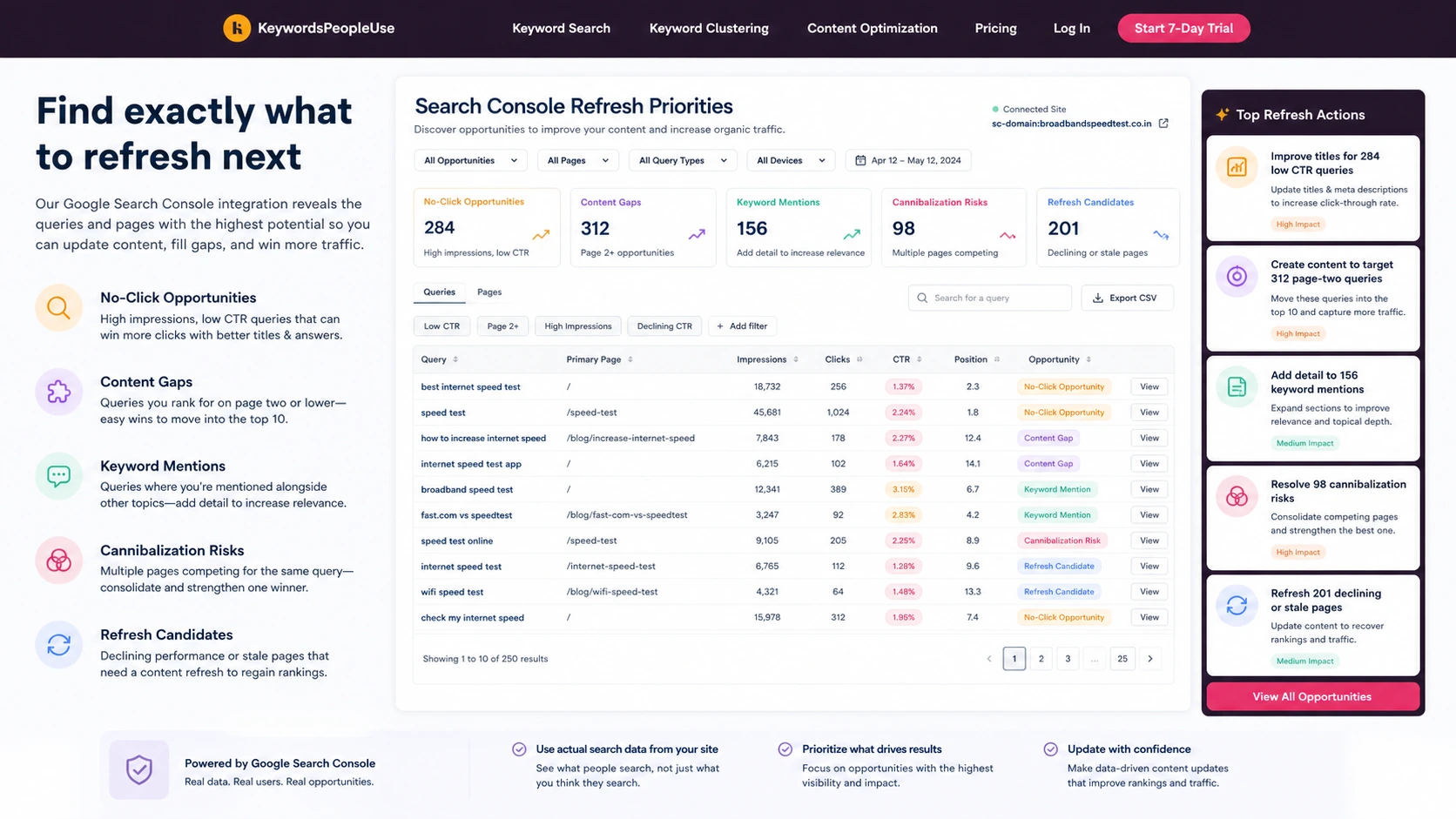
An SEO manager with Search Console data may care less about new keyword discovery and more about improving pages that already have impressions. The content optimization workflow can help surface query gaps, page opportunities, no-click terms, and possible cannibalization issues.
The practical test is whether the tool changes refresh priorities. If it only confirms what the team already knew, the paid value is weaker.
A founder building content from scratch
A founder may like KeywordsPeopleUse because it makes audience questions visible. That can be useful when a product category is early and the founder does not yet know how buyers phrase the problem.
The caution is bandwidth. If the founder does not have time or a writer to turn research into pages, the tool may create a backlog instead of momentum.
Key features that actually matter
Question-led keyword discovery
The main feature is finding what people ask around a topic, brand, product, or problem. This is useful because informational SEO often starts with questions, not polished keyword phrases.
Buyer note: this matters most when you create content that answers buyer questions. If your strategy is mainly product pages, ads, or technical SEO fixes, the value may be more limited.
Multi-source research inputs
KeywordsPeopleUse pulls from areas such as People Also Ask, Google Autocomplete, Reddit and Quora, semantic keyword data, and keyword generation. The appeal is that it can bring several research angles into one workflow.
Buyer note: do not treat every source equally. A Reddit or Quora angle may reveal buyer language, but it still needs editorial judgment before becoming an article plan.
Keyword clustering
Clustering is one of the more important decision features. A flat keyword list can be difficult to act on. Clusters help a strategist decide whether related questions belong together, deserve separate pages, or reveal a larger topic hub.
Buyer note: clustering is valuable only if your team uses it to make content architecture decisions. If you still write one-off posts without a plan, the feature loses strength.
Search Console content optimization
The content optimization path gives KeywordsPeopleUse a second use case beyond new research. For existing sites, Search Console data can help identify queries, pages, keyword mentions, no-click opportunities, and refresh actions.
Buyer note: this is more valuable for sites with existing impressions. If your site is brand new, this feature may matter later but not on day one.
Exports, lists, alerts, and team use
Exports and lists matter for agencies and teams because SEO research rarely stays with one person. It often needs to move to writers, clients, editors, or spreadsheets.
Buyer note: paid plans include unlimited users, which is useful, but plan choice still depends on credits, history, alerts, API access, and monthly research volume.
API and bulk search
API access and bulk search can matter for heavier workflows. This is not the first thing a casual blogger needs, but it may be relevant for agencies, internal tools, or larger research pipelines.
Buyer note: verify current API limits, daily request caps, and plan requirements before building a workflow around it.
Pricing and plan value
KeywordsPeopleUse is not hard to understand at the headline level, but the plan decision still deserves care.
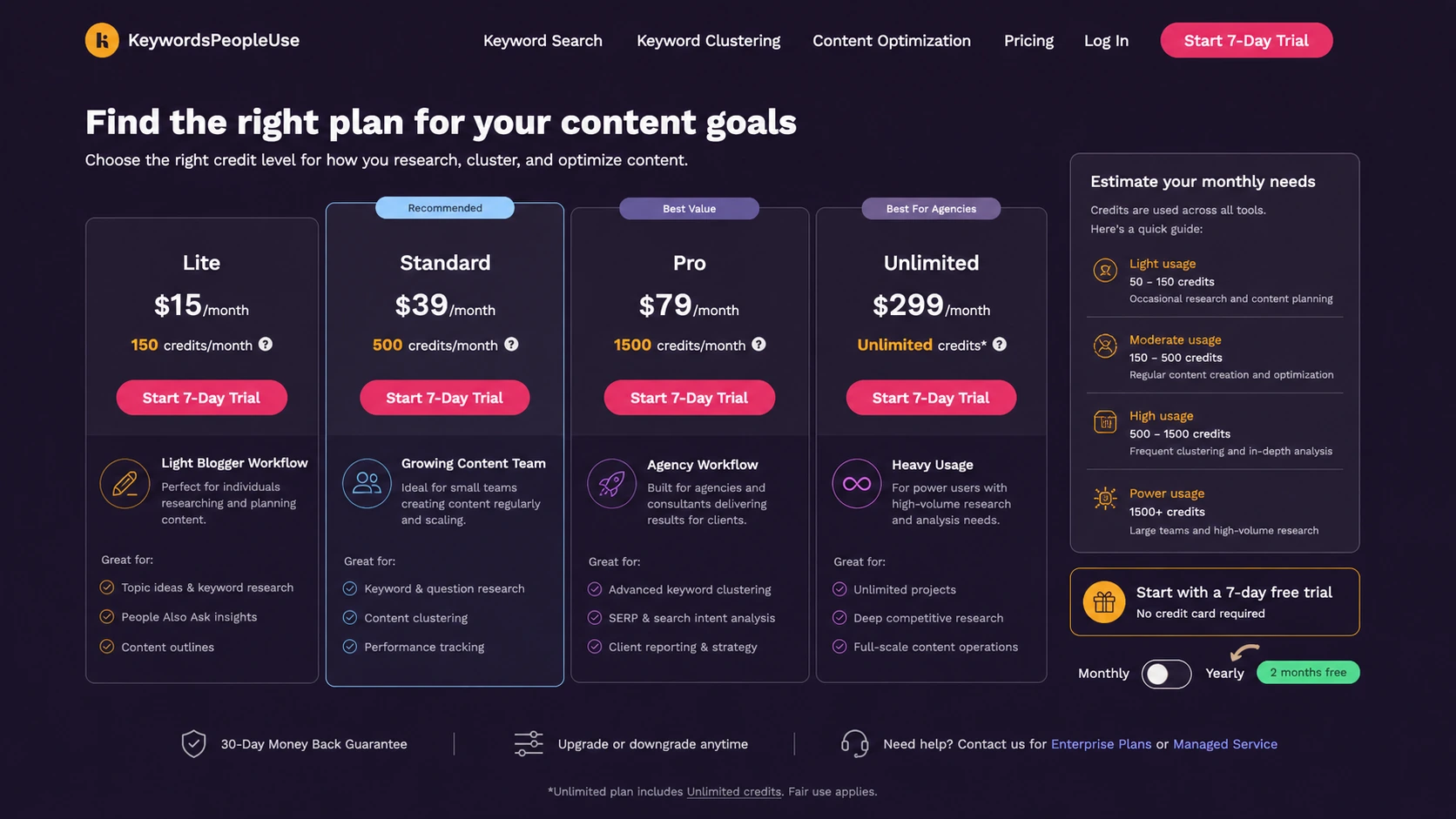
The current monthly pricing page lists Lite at $15/month with 150 credits, Standard at $39/month with 500 credits, Pro at $79/month with 1,500 credits, and Unlimited at $299/month with unlimited credits subject to plan notes. It also shows a 7-day trial, monthly billing that can be canceled any time, yearly billing with two months free, API access, and an Unlimited note around clustering and daily API requests.
The first pricing question is not “which plan sounds best?” It is “how many real research actions will I run each month?”
A blogger testing a few topics may start with Lite. A content team working across several categories may reach Standard or Pro faster. An agency running multiple clients, exports, alerts, and cluster maps may need a higher tier. A technical buyer considering API use should verify limits before assuming Unlimited means unlimited in every practical sense.
The 7-day trial is useful, but it is short. I would not spend it exploring random topics. Use it on one real project: a seed topic, a cluster, a brief, and a Search Console refresh check if you have existing data.
The annual discount can be sensible for a team that already knows its monthly research rhythm. It is less sensible as a first move. Start monthly if the workflow is unproven.
The refund point is the one I would read carefully. The pricing page presents a 30-day money-back guarantee, while the terms use broader non-refundable language with case-by-case discretion. That does not mean the refund path is bad, but it does mean buyers should verify the live checkout and current terms before relying on a refund assumption.
Pricing check: Before choosing a tier, compare your expected searches, clusters, exports, alerts, and refresh work against the live credit limits.
Free plan, trial, coupon, and checkout notes
KeywordsPeopleUse should be evaluated trial-first, not coupon-first.
The official path emphasizes a 7-day trial rather than a clear permanent free plan. That is enough time to run a focused workflow, but not enough time to casually browse and decide later. A credit card is required for the trial, so cancellation timing matters if you do not want the paid subscription to begin.
A useful trial test should answer five questions:
- Does the tool find questions you would not have collected as quickly yourself?
- Do the clusters make your content plan clearer?
- Can you turn the output into a writer brief or refresh task?
- Do exports or visual maps help your handoff process?
- Does your credit usage suggest Lite, Standard, Pro, or a heavier plan?
The coupon path should come after those questions. If the workflow fits, current offers can make the purchase better. If the workflow does not fit, a discount only makes the wrong tool cheaper.
For annual billing, I would be stricter. Use annual only after the trial and at least one real monthly cycle prove that KeywordsPeopleUse is part of your operating rhythm.
Deal path: Check active offers only after KeywordsPeopleUse passes your workflow test. A lower price should support the decision, not create it.
What I would check before buying KeywordsPeopleUse
If I were buying KeywordsPeopleUse for a real SEO workflow, I would check these points before paying.
- Monthly credit needs. Estimate how many searches, clusters, alerts, and exports you will run in a normal month.
- Trial timing. Since the trial is short and requires payment details, use it on a real project immediately.
- Annual billing risk. Do not choose annual just because it looks cheaper. Choose it only after usage is predictable.
- Refund language. Read both the pricing guarantee and the terms page so the refund expectation is clear.
- Search Console value. If you have existing traffic, test whether the optimization workflow changes refresh decisions.
- Team workflow. If multiple people will use the tool, confirm how unlimited users, exports, lists, and handoffs fit your process.
- API or bulk search needs. Technical buyers should verify current limits before building any process around the API.
The easy mistake is treating keyword research as productive by itself. It is not. It becomes productive when it changes what you publish, refresh, combine, or skip.
A simple test before paying
Before paying for KeywordsPeopleUse, I would run a small test like this:
- Pick one topic you actually plan to publish or refresh.
- Run the topic through the question research workflow.
- Review People Also Ask, autocomplete, semantic terms, and community-style angles.
- Cluster the ideas into possible article sections or separate pages.
- Turn one cluster into a short writer brief.
- If you have Search Console data, check whether an existing page already covers part of the demand.
- Count how many credits and exports the workflow used.
The test should produce a decision, not just data.
A good outcome might be: “We need one pillar page, three supporting articles, and a refresh of an older post.” A weak outcome might be: “We found many interesting questions, but we still do not know what to write next.”
That difference matters more than the feature list.
Pros explained
Strong fit for question-led SEO planning
KeywordsPeopleUse is useful because many SEO plans begin too late in the process. Teams jump into writing before they understand the questions people are asking. This tool pushes the research stage back toward user intent.
That matters for bloggers, SEO teams, and agencies that want content to answer real demand instead of simply matching a head keyword.
It stops being enough if the buyer does not convert the research into briefs, page updates, or content architecture decisions.
Helpful clustering for content structure
Clustering is one of the clearer advantages. It helps buyers move from “lots of ideas” to “possible content groups.” For topical authority work, that structure can be more useful than a long spreadsheet.
It matters most when you are building a hub, planning a cluster, or trying to avoid overlapping pages.
It is less valuable if your workflow is only one-off posts with no internal linking or content architecture plan.
Search Console optimization extends the use case
The Search Console workflow gives the product more depth for existing sites. A tool that only helps with new ideas can lose value after the first research sprint. A tool that also helps refresh existing pages can stay useful longer.
This matters for publishers with impressions, pages, and older content to improve.
It is not as useful for a brand-new site with no Search Console data yet.
Unlimited users can help small teams
Paid plans listing unlimited users is a practical benefit for agencies and teams. It avoids the seat-count frustration that can make research tools more expensive once more people need access.
The limitation is that unlimited users do not mean unlimited value. Credit limits, history, alerts, exports, and API needs still determine the real plan fit.
Cons explained
Credits reset each month
Monthly credits reset rather than roll over, so unused capacity can disappear. This is a meaningful buyer risk if your research volume is inconsistent.
A low-volume blogger may not need to move beyond Lite. An agency with seasonal client demand should be careful before overbuying.
The way to avoid the issue is to track credit usage during the trial and first paid month before moving up or going annual.
It does not replace a full SEO suite
KeywordsPeopleUse is not a full replacement for Semrush, Ahrefs, Screaming Frog, Search Console, or dedicated rank tracking. It has a narrower job.
That is not a criticism if you know why you are buying it. It is a problem only if you expect it to become your entire SEO platform.
Buyers should compare by job-to-be-done, not by the number of features on each homepage.
Refund expectations need verification
The pricing page and terms create different buyer expectations around refunds. That is exactly the kind of detail I would check before annual billing.
The safer path is to assume that checkout terms matter more than old screenshots, older reviews, or coupon pages.
If refund comfort matters to you, verify the current wording before paying.
The trial can be wasted easily
A 7-day trial sounds useful, but it can disappear quickly if you do not enter with a real task. Random testing will not reveal whether the tool fits your work.
The better trial is focused: one topic, one cluster, one brief, one refresh decision, and a note on credit usage.
Green flags and red flags
Green flags
- You already publish or refresh content every month.
- You need question research, not just keyword volume.
- Your team can turn clusters into briefs or page updates.
- You share research with writers, editors, clients, or stakeholders.
- You have Search Console data and want better refresh priorities.
Red flags
- You only want a rank tracker.
- You are buying because of annual savings before proving monthly usage.
- You will run occasional curiosity searches but not publish from them.
- You need deep backlink, technical SEO, or competitive-suite features.
- You are not comfortable with the current refund and subscription wording.
KeywordsPeopleUse vs alternatives
KeywordsPeopleUse has a clearer role when you compare it by buyer job instead of category labels.
AlsoAsked vs KeywordsPeopleUse
AlsoAsked is one of the more natural direct comparisons if your main interest is People Also Ask and question mapping. It can be a strong choice for buyers who want a clean, focused question research workflow.
KeywordsPeopleUse may make more sense if you want a broader mix of inputs, clustering, exports, Search Console optimization, and related workflow features in one place.
AnswerThePublic vs KeywordsPeopleUse
AnswerThePublic is a familiar option for visual question discovery and content ideation. It can be useful for early-stage topic brainstorming, especially when you want fast question inspiration.
KeywordsPeopleUse may be stronger if you want to move from questions into clusters, lists, exports, and content optimization rather than stopping at idea discovery.
KeywordTool.io vs KeywordsPeopleUse
KeywordTool.io is a better comparison if your main goal is broad autocomplete keyword expansion across platforms. It fits buyers who want many suggestions quickly.
KeywordsPeopleUse is more interesting when the buyer wants question intent, topic structure, and SEO planning logic rather than a large keyword dump.
Semrush or Ahrefs vs KeywordsPeopleUse
Semrush and Ahrefs are broader SEO suites. They are stronger if you need competitive research, backlink analysis, rank tracking, keyword difficulty, domain research, and broader SEO operations.
KeywordsPeopleUse is narrower and more content-planning focused. It can work alongside a larger SEO suite, but it should not be expected to replace one.
AISEO and Balzac AI as adjacent routes
AISEO and Balzac AI are not one-to-one replacements for KeywordsPeopleUse. They are more relevant when the buyer wants AI writing, optimization, or content production support after the research stage.
If you already know the topic and need help creating or optimizing content, check the AISEO store guide or Balzac AI store guide as adjacent routes. If the problem is still question discovery and topical planning, KeywordsPeopleUse is the cleaner fit.
Trust, refund, and buyer-risk notes
My confidence is strongest around the product’s role: KeywordsPeopleUse is clearly positioned around question discovery, clustering, and content planning for SEO workflows.
I am more cautious around long-term value because it depends on buyer behavior. A team that turns the tool into briefs, refreshes, and content maps can get value. A buyer who only browses ideas may not.
Pricing also needs a live check. The current public pricing is clear enough to compare tiers, credits, trial access, annual savings, and API notes, but pricing pages can change faster than review copy.
Refund language deserves special attention. The pricing page presents a 30-day guarantee, while the terms page uses broader subscription language. Before relying on a refund window, read the current checkout terms and the terms page yourself.
Data and account access matter too. If you connect Search Console, involve a team, export data, or build around the API, check access permissions, account ownership, and technical limits before making the tool part of a business workflow.
The safest buyer posture is not suspicion. It is discipline.
Use the trial with a real topic. Track credits. Create one useful brief or refresh decision. Then decide.
Final verdict
I would consider KeywordsPeopleUse if your content workflow depends on discovering real questions, grouping related ideas, and turning research into publishable briefs or refresh actions.
I would especially consider it for bloggers, SEO teams, and agencies that already have a repeatable content process. In that situation, the tool can help create structure before writing begins, and it can make research easier to share with clients, editors, or writers.
I would skip it if you only need a rank tracker, a broad SEO suite, or a few occasional keyword ideas. I would also be careful if you are tempted to jump straight into annual billing before testing monthly credit usage.
I would compare it with AlsoAsked or AnswerThePublic if question research is the main job. I would compare it with Semrush or Ahrefs if you need a broader SEO platform. I would look at AISEO or Balzac AI only as adjacent routes if your bigger need is AI-assisted content creation or optimization after the research is done.
The safest next step is to run a focused trial with one real topic. If the tool helps you move from scattered search questions to a clearer content decision, then a paid plan becomes worth considering. If the trial only gives you interesting data without changing what you publish, stay smaller, compare alternatives, or pause before checkout.
