
KeywordsPeopleUse Pricing & SEO Workflow Fit
KeywordsPeopleUse is a practical SEO research platform for finding real search questions, Google Autocomplete ideas, Reddit and Quora angles, semantic keywords, clusters, and content optimization opportunities. It fits buyers who care less about a generic keyword list and more about turning audience questions into topical maps, briefs, refresh priorities, and client-ready research.
Fit → price → checkout
Use these routes after the official-site check: coupon first, review for fit, compare if unsure.
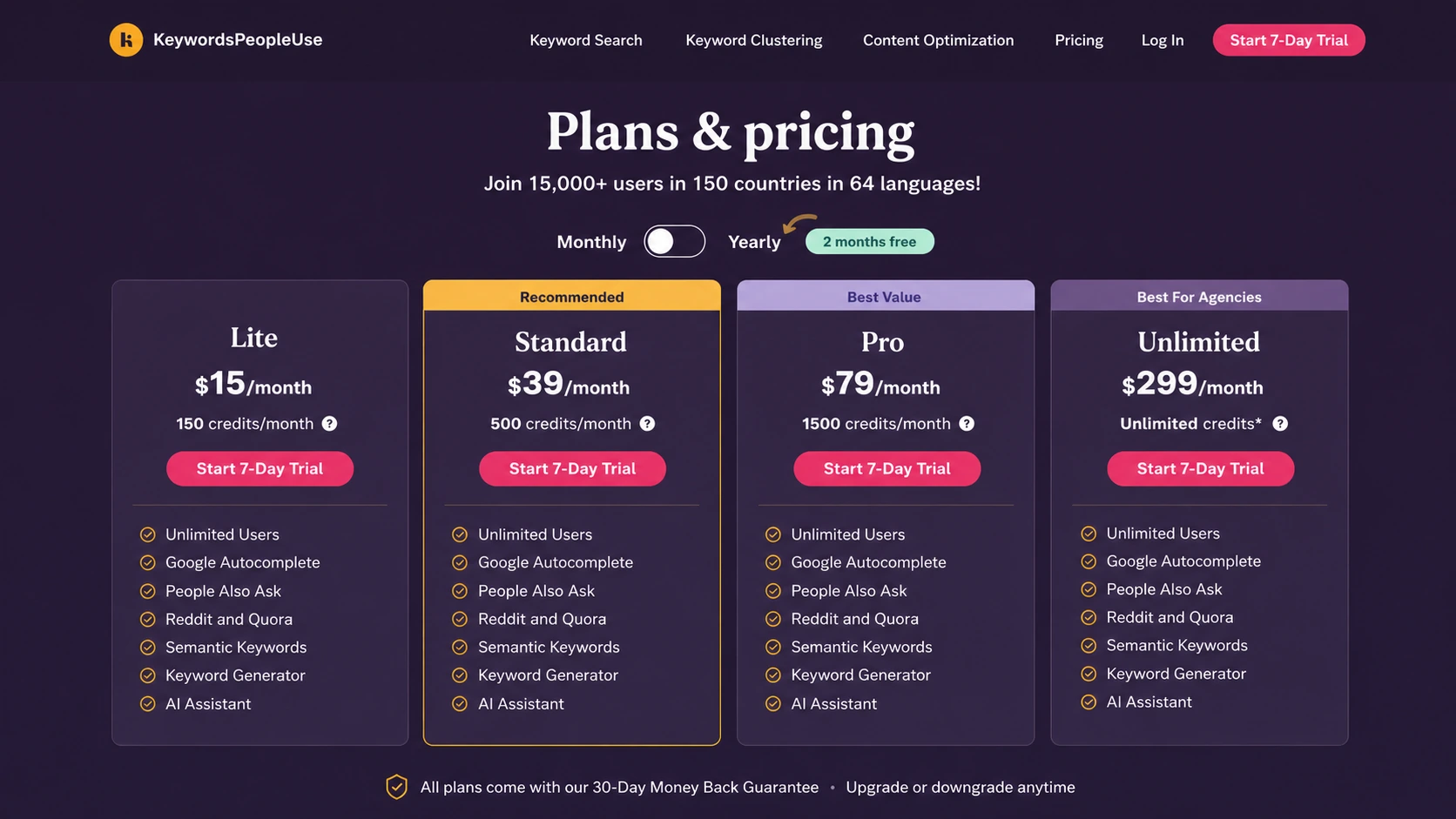
KeywordsPeopleUse pricing snapshot
Fast commercial checks before pricing, coupons, or a deeper review.
KeywordsPeopleUse product tour for SEO workflow buyers
The product tour video is useful for buyers who need to see how keyword ideas turn into clusters instead of staying as a flat export. Watch for whether the workflow feels practical for your next content brief: seed keyword, related questions, grouped ideas, and a clearer path from research to article planning. That is the buying question, because the tool only pays off when the buyer can turn research into published or refreshed content.
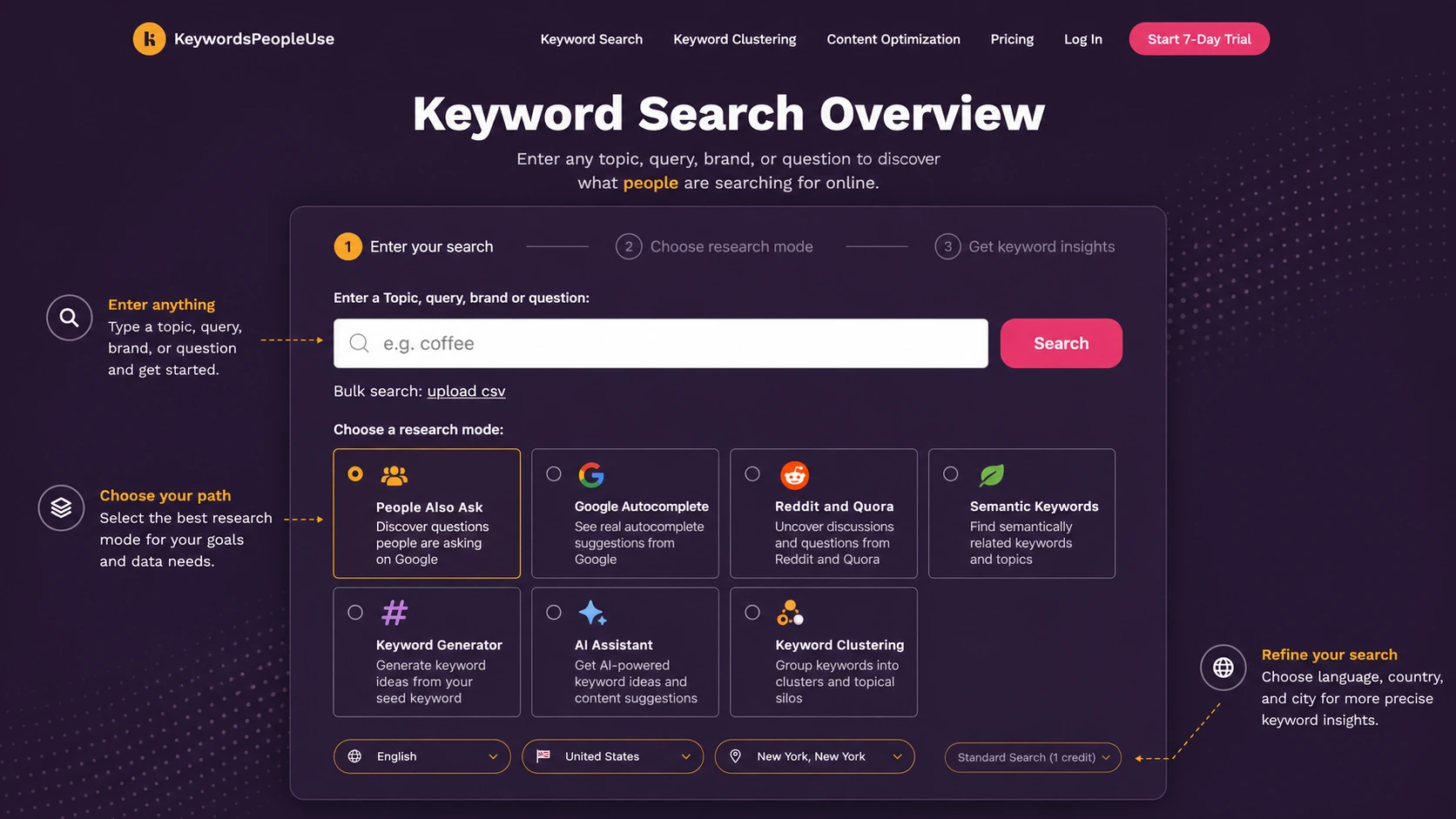
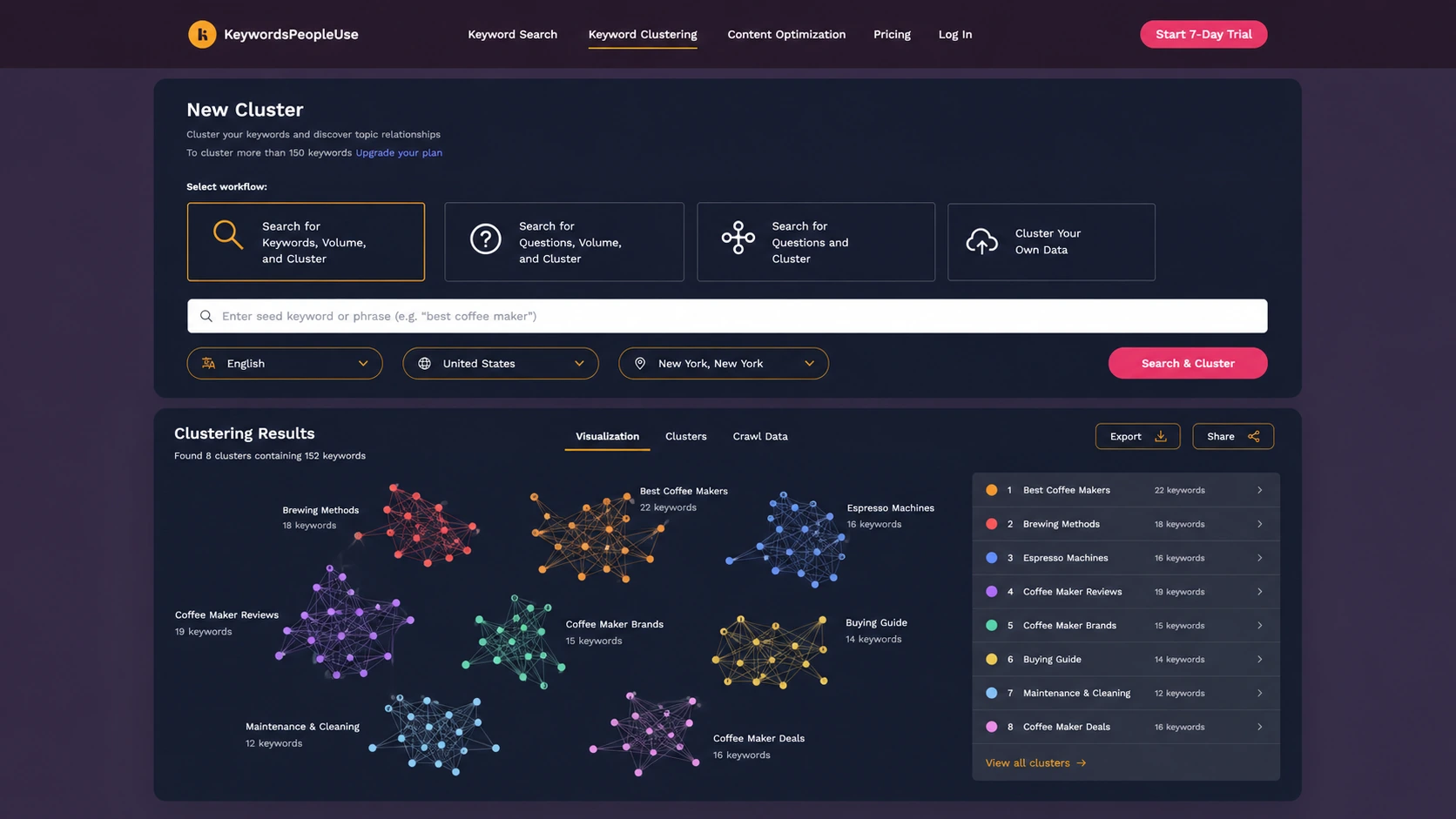
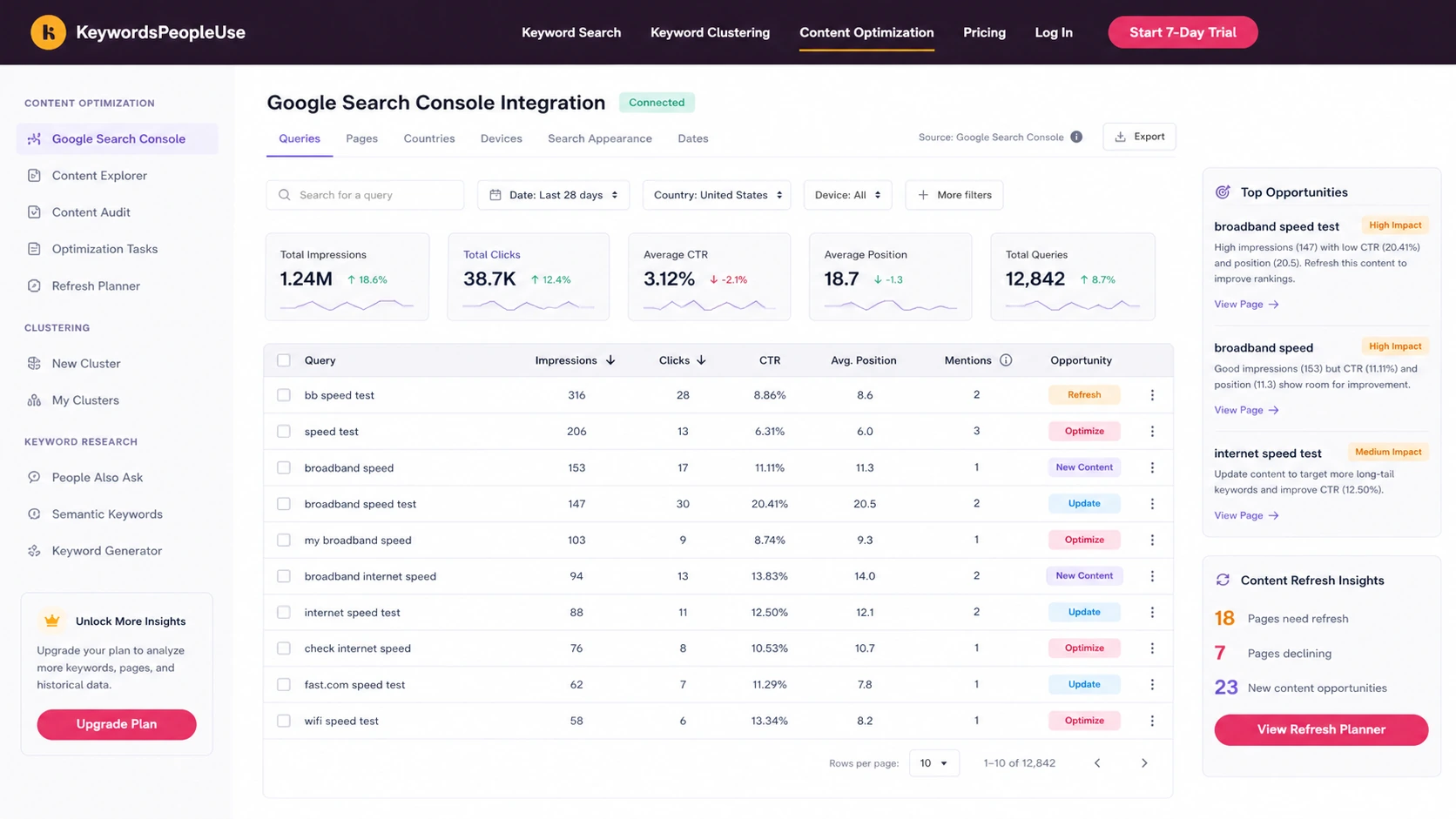
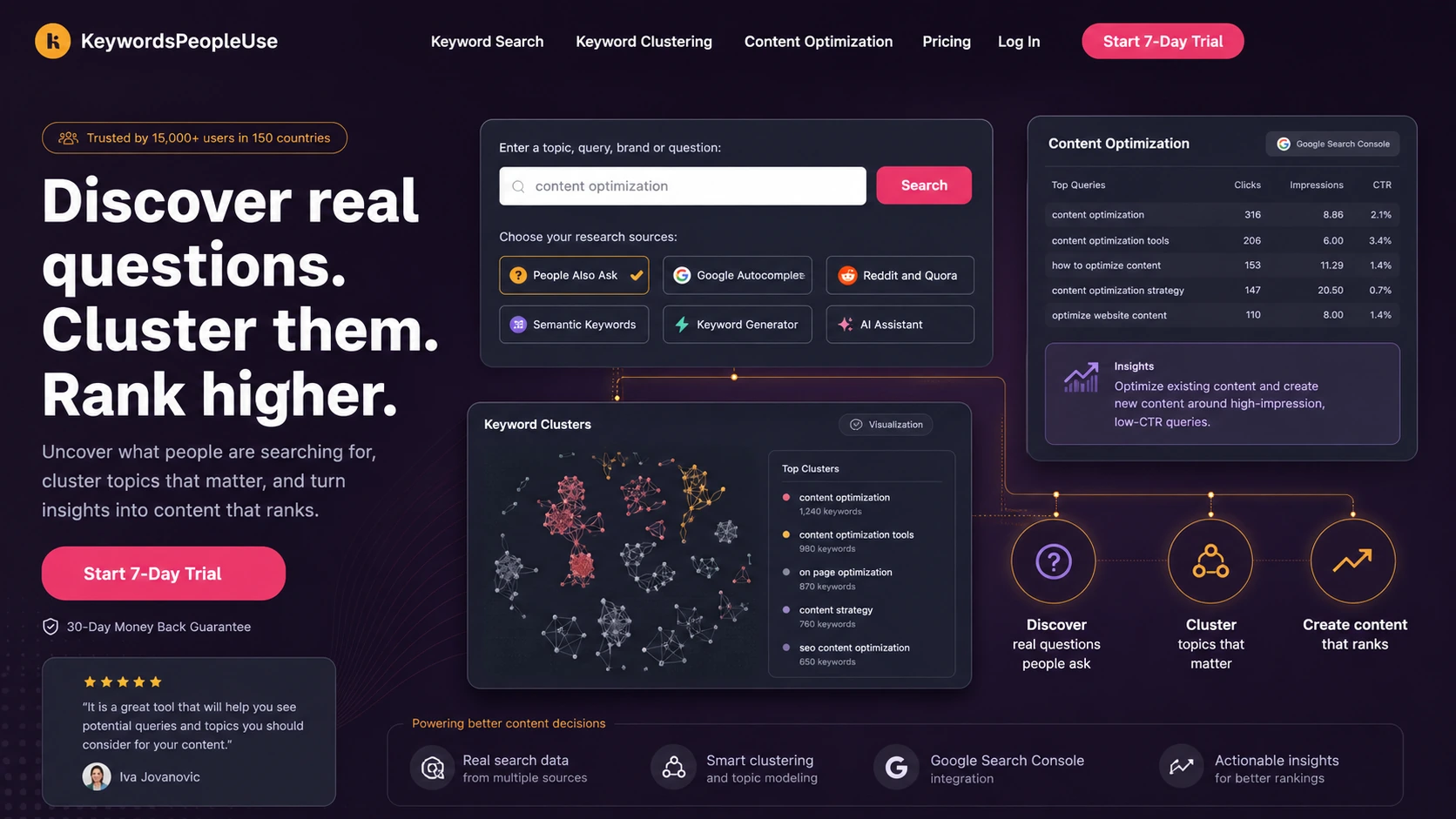
KeywordsPeopleUse should be evaluated as an SEO research and content planning workflow, not just another keyword scraper. Its strongest promise is helping buyers discover what people ask, group those questions into useful structures, and turn that research into briefs, refresh priorities, and topical authority work.
The buying decision is mostly about workflow fit. A blogger may care about topic ideas and question keywords. An agency may care about exports, visual maps, unlimited users, and client-ready research. A content team with existing traffic may care more about Search Console optimization and cannibalization checks than brand-new keyword discovery.
What KeywordsPeopleUse actually does
KeywordsPeopleUse collects and organizes audience search behavior across areas such as People Also Ask, Google Autocomplete, Reddit and Quora, semantic keywords, keyword generation, AI assistance, and keyword clustering. That makes it more useful for content planning than for a buyer who only wants a quick rank-tracking dashboard.
The practical use case is straightforward: start with a topic, uncover what people are asking, group the questions into usable clusters, and then decide which pages or briefs should exist. Buyers should judge the tool by whether it improves that planning loop, not by the number of features listed on the homepage.
- Use it to find real questions and related search angles.
- Turn research into clusters, lists, briefs, and content refresh ideas.
- Treat it as a planning tool, not a replacement for editorial judgment.
Pricing, credits, and trial fit
The official pricing page lists Lite at $15/month with 150 credits, Standard at $39/month with 500 credits, Pro at $79/month with 1,500 credits, and Unlimited at $299/month with unlimited credits subject to plan notes. The page also shows a 7-day trial and yearly billing with two months free.
The plan decision should start with credit usage. A blogger testing a few topics may not need a large plan. An agency running many client searches, exports, and clusters may move up faster. Since subscription credits reset each month, buyers should estimate realistic monthly research volume before choosing a tier.
- Lite is the entry paid plan on the monthly pricing view.
- Standard and Pro increase monthly credits and research capacity.
- Unlimited is positioned for heavier agency-style usage.
- Yearly billing may reduce effective cost, but creates a longer commitment.
How content teams can use Search Console data
KeywordsPeopleUse also has a content optimization workflow that connects to Google Search Console. This matters for buyers who already have pages ranking but need to decide what to refresh. The official content optimization material describes query views, page views, no-click filters, cannibalization checks, keyword mentions, position metrics, and CSV export.
The video below is useful because it shows the buyer what connecting Search Console can change in the workflow. Watch for whether the tool helps you prioritize real refresh actions, not just admire another dashboard.
Best fit for bloggers, agencies, and SEO teams
Bloggers will likely value the tool when it turns vague article ideas into question-led outlines. Agencies may value visual exports, unlimited users, lists, search alerts, and the ability to hand research to clients or writers. SEO teams can use it to build topical maps and reduce duplicated content ideas before production starts.
The product is less attractive for teams that only want raw volume numbers or a rank tracker. Its real value appears when the buyer wants to understand search intent, group related questions, and brief content with a clearer structure.
- Bloggers can use it for article ideas and FAQ-led content planning.
- Agencies can use clusters and exports for client research workflows.
- SEO teams can use it to reduce overlap and build topical authority.
Coupon and savings reality
The most reliable savings signals are not random public coupon claims. KeywordsPeopleUse already gives buyers a few practical paths to check: trial first, monthly plan fit, annual billing with two months free, and enterprise or managed-service contact for larger needs.
If a DealBestDaily coupon page exists for this store, use it as a final checkout check, not the first buying reason. The store page should answer whether the product fits your workflow before the coupon page tries to reduce the price.
- Use the trial to test workflow fit before relying on an annual discount.
- Use annual billing only if monthly credit usage is predictable.
- Use the coupon page after fit is clear, not before.
Safest next step before checkout
The safest path is to open the live pricing page, estimate how many searches and clusters you actually need each month, then use the trial to test a real content workflow. A good test is one seed topic, one cluster map, one writer brief, and one refresh decision from Search Console if you already have data.
If the tool helps you move from scattered questions to a sharper content plan, the paid tier becomes easier to judge. If the trial only produces interesting but unused data, stay on a smaller plan or compare alternatives before paying annually.
- Run one real content-planning task during the trial.
- Compare credits, API access, and export needs before choosing a plan.
- Read refund and cancellation terms before annual billing.
- Move to the review page when workflow fit is still uncertain.
Best savings path from this store page
This is the clearest savings route to check once the product already looks like a fit.
The pricing page states that KeywordsPeopleUse offers a 7-day free trial with full access to all features. A credit card is required, and billing starts after the trial if the buyer continues.
This is the safest first step for buyers who are not sure which credit tier they need.
$15/month for 150 credits
$39/month for 500 credits
Use comparison routes when the category fit is still open
Use these comparison routes when the product still looks plausible, but the category fit is not fully settled.
AISEO is a better next tab when the buyer wants writing and optimization in a more AI-content-centered workflow, while KeywordsPeopleUse is stronger for question discovery, clusters, and SEO research planning.
Balzac AI deserves a look when the buyer wants broader AI writing support, while KeywordsPeopleUse is the cleaner fit for teams that start from search questions and topic clusters.
Verification points worth checking before you click out
Where this store usually fits best in the workflow
Use KeywordsPeopleUse to turn People Also Ask, autocomplete, Reddit, Quora, and semantic keyword ideas into a topic plan before assigning content.
Agencies can use visual maps, CSV exports, keyword lists, and clusters to make research easier to share with clients, editors, and writers.
Teams with Search Console data can use content optimization views to spot no-click queries, content gaps, and pages that need sharper refresh work.
SEO teams can group related questions into content clusters so one topic area becomes easier to plan, brief, and expand without creating overlap.
Practical checkpoints before and after signup
- Choose one real topic or existing page to test, not a random keyword.
- Decide whether you need question research, clustering, content optimization, exports, API access, or all of them.
- Open the pricing page and note which credit tier matches your expected monthly workflow.
- Run a full workflow from seed topic to cluster to content brief.
- If you have Search Console data, test whether the optimization view surfaces practical refresh actions.
- Track how quickly credits are used so plan selection is based on real usage.
- Compare monthly and yearly billing against actual content volume.
- Read refund and cancellation terms before choosing an annual plan.
- Check the coupon or offer path only after workflow fit is clear.
Fast-read signals for workflow fit and buying friction
Questions readers usually ask before choosing this store
What is KeywordsPeopleUse best for?
KeywordsPeopleUse is best for SEO teams, bloggers, and agencies that want to discover real audience questions, group them into topic clusters, and turn search intent into content plans or refresh decisions.
Does KeywordsPeopleUse have a free plan?
The current official pricing page emphasizes a 7-day trial rather than a clear permanent free plan. Buyers should treat the trial as the safer evaluation path and verify live account limits before assuming free ongoing access.
How much does KeywordsPeopleUse cost?
The official monthly pricing view starts at $15/month for Lite, then lists Standard at $39/month, Pro at $79/month, and Unlimited at $299/month. Yearly billing is presented as two months free.
Is KeywordsPeopleUse good for agencies?
Yes, it can fit agencies well when they need visual research maps, CSV exports, keyword lists, clusters, Search Console optimization, unlimited users, and repeatable client research workflows. Agencies should still estimate credit usage before choosing a higher plan.
What should I verify before buying KeywordsPeopleUse?
Verify the live pricing table, monthly credit needs, annual billing commitment, API or managed-service requirements, and refund language. The pricing page and terms page should both be checked before checkout.
Choose the next route that matches what you still need to decide
The strongest next click depends on whether you still need product judgment, a savings route, or a broader category comparison.