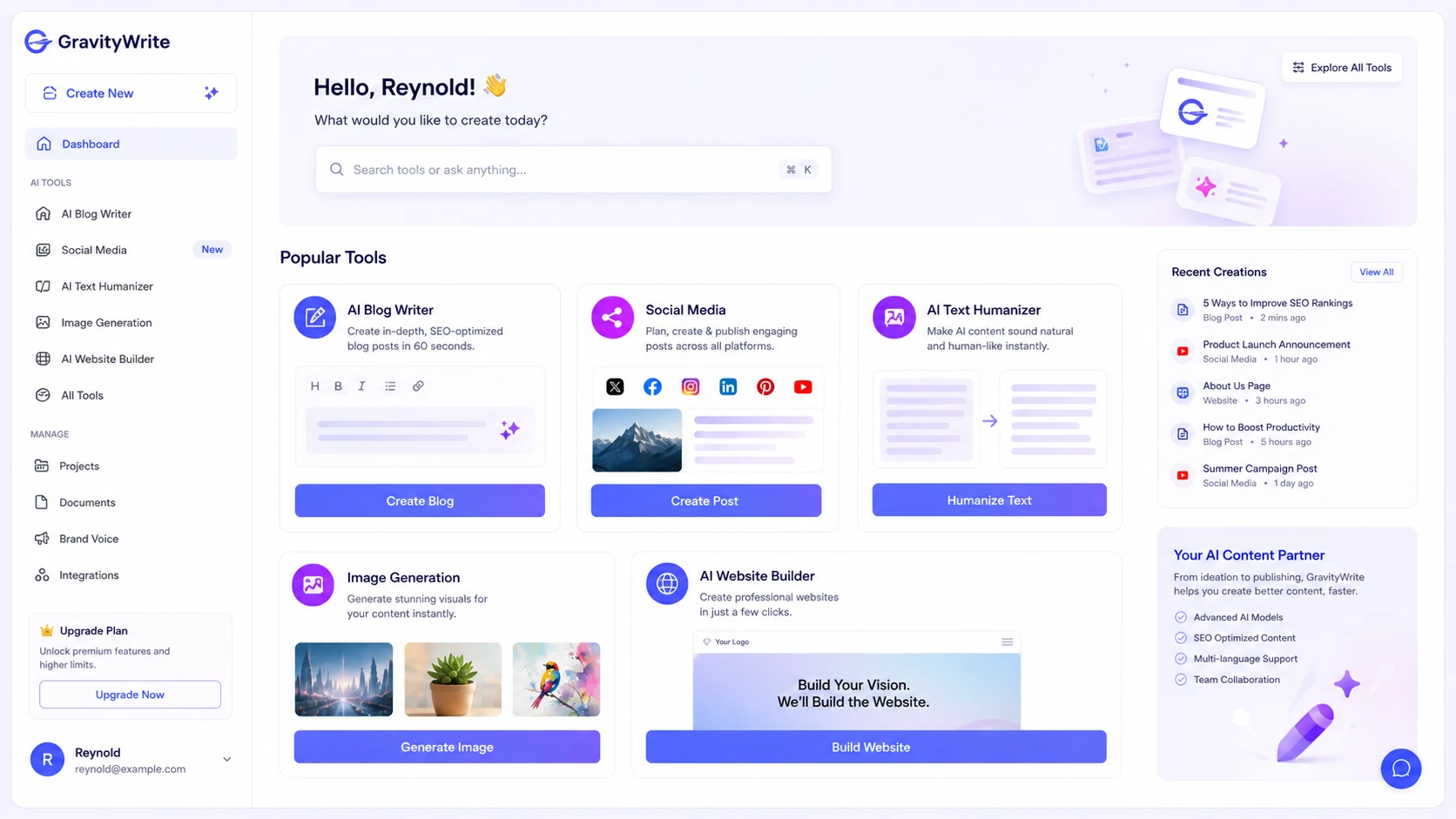
Quick verdict
GravityWrite is worth considering if you want one AI workspace for a messy creator workflow: blog drafts, marketing copy, images, social posts, summaries, light video-related assets, and some website-oriented work.
I would be more cautious if you only need a simple text writer.
That is the real buying tension here. GravityWrite looks attractive because the entry price is low and the feature list is broad. But a broad feature list can hide the harder question: will you actually use enough of those tools every month to make the credits, plan limits, and checkout terms work in your favor?
For my money, GravityWrite makes the most sense for solo creators, bloggers, freelancers, and small content operators who publish repeatedly and want guided templates instead of building every content instruction from scratch. It is less convincing for teams that need mature collaboration, API access, content governance, or a deeply established enterprise content platform.
The strongest reason to consider GravityWrite is workflow breadth. The main caution is that credits are shared across features, so the headline plan price is not the whole decision. You need to estimate monthly output before deciding between the free entry path, Plus, Pro, or the annual Bundle.
The safest next step is simple: test the workflow first, then compare credits and refund terms, then check current offers only after the product still fits.
Next step: If GravityWrite still fits your content workflow, verify the current plan route before checkout.
Review snapshot
| Review point | Practical take |
|---|---|
| Best for | Solo bloggers, creators, freelancers, and small content teams with recurring multi-format content needs |
| Not ideal for | Teams needing enterprise governance, deep collaboration, API access, or a narrow text-only tool |
| Main use case | Moving from content ideas to guided drafts, visuals, social posts, summaries, and light site workflows |
| Starting paid path | Plus is publicly shown at $8/month at the time of review |
| Scale-up path | Pro is publicly shown at $49/month for higher credits and larger monthly output |
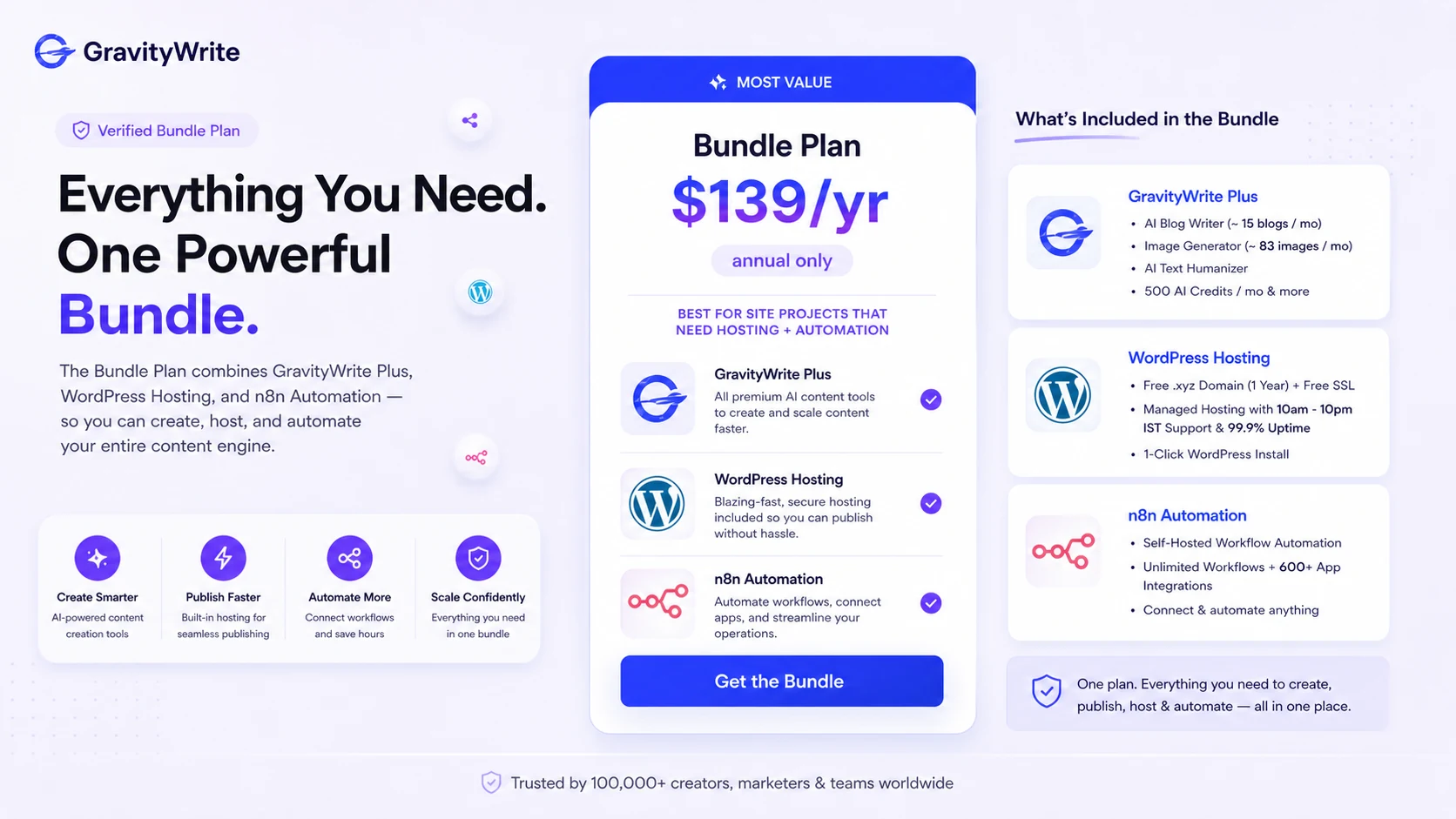
| Bundle path | $139/year bundle route combines GravityWrite Plus with WordPress hosting and n8n automation |
| Main strength | Broad creator workflow in one guided platform |
| Main concern | Shared credits, refund restrictions, and bundle rules need careful checkout verification |
| Best alternatives to compare | Jasper, Writesonic, Copy.ai |
| Best next step | Test one real weekly workflow before choosing Plus, Pro, or Bundle |
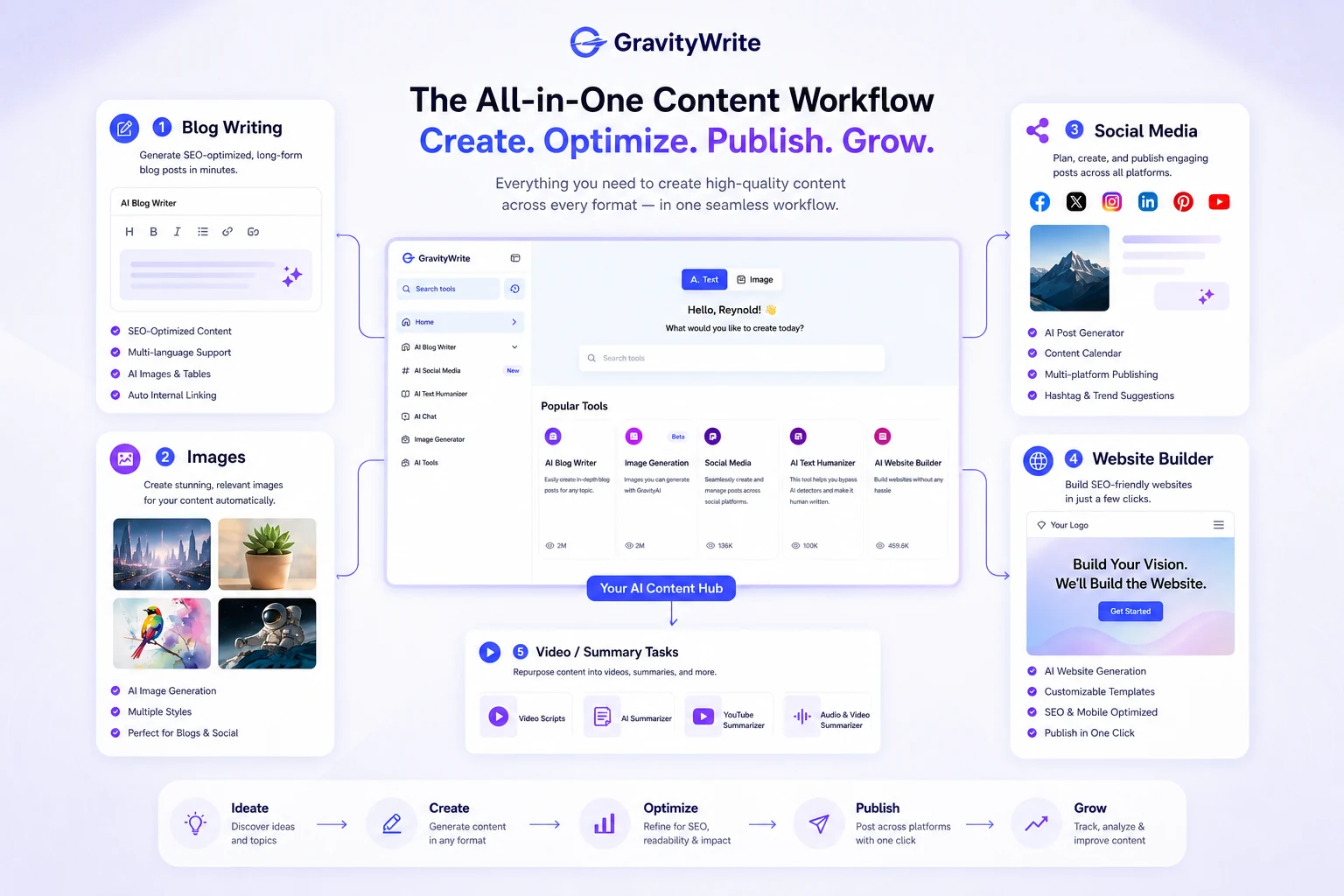
This snapshot helps buyers separate real workflow fit from surface-level interest before checking the pricing or coupon path. GravityWrite becomes easier to judge when you know whether you need broad creator tooling or only a narrower writing assistant.
What is GravityWrite?
GravityWrite is best understood as a multi-format AI content creation platform for people who want guided help with blogs, marketing copy, images, social posts, summaries, and website-oriented content tasks.
It is not just a blank chatbot.
That matters because the buyer is not only paying for AI output. The buyer is paying for a structured way to move from task to output without thinking through every content brief manually. If you are the kind of creator who opens a tool and thinks, “I need a blog outline, a social post, a thumbnail idea, and maybe a short summary from a video,” GravityWrite’s broad tool set makes more sense.
If you mainly want one clean writing assistant for occasional paragraphs, the product may be more than you need.
Our review approach: we compare public product pages, pricing details, legal and refund terms, buyer workflow fit, and nearby alternatives. We do not treat a discount, bundle, or low monthly price as proof that the product fits the buyer.
The common wrong expectation is thinking GravityWrite replaces content judgment. It does not. It may help you draft faster, build more creative variations, and reduce blank-page friction. You still need to check facts, edit for voice, remove weak AI phrasing, and decide whether the output is actually worth publishing.
That is where the product becomes more interesting. GravityWrite is strongest when it saves time inside a process you already repeat. It becomes weaker when a buyer expects it to magically create publish-ready content without editing.
Who should use GravityWrite?
GravityWrite fits buyers who know they need content volume, but do not want to manage separate tools for every format.
A solo blogger may use it to turn a topic idea into an outline, draft, image concept, and social post. This is a practical fit if the blogger publishes often enough to make credits matter. The condition is that the draft still gets edited before publishing.
A creator who works across platforms may also benefit. If your week includes blog copy, Instagram captions, YouTube descriptions, thumbnail ideas, and occasional visual content, GravityWrite’s value is less about one feature and more about reducing context switching.
A freelancer may use it for first drafts, idea expansion, client content variations, and repeatable marketing copy. The buyer note is simple: do not deliver raw AI output. Use the tool to accelerate the first pass, then do the human editing work that clients actually pay for.
A small business owner may find it useful when content is important but not worth hiring a full team yet. GravityWrite can act as a lightweight content support layer for blog posts, social publishing, and marketing copy. It should not be mistaken for a complete brand strategy or SEO operation.
A buyer considering the Bundle may fit only if the project also needs WordPress hosting and n8n automation. This is not just a bigger GravityWrite plan. It is a different buying decision.
Who should avoid GravityWrite?
I would be careful with GravityWrite if you only need one or two pieces of copy per month. A free entry path or a simpler tool may be enough.
I would also slow down if your team needs advanced editorial approval, roles, API access, governance, compliance review, or a mature brand management layer. GravityWrite is more creator-friendly than enterprise-heavy. That can be a strength for beginners and a weakness for larger teams.
Buyers who choose tools mainly because of a coupon should also pause. A discount can improve a good purchase, but it cannot fix a workflow mismatch. If you do not know how many blogs, images, social posts, summaries, or site assets you need each month, the first decision is not the discount. It is usage.
Bundle buyers should be especially careful. The annual bundle may be useful for a real site-and-automation project, but it carries different risk because the published refund terms exclude bundle plans. I would not choose it just because the percentage saving looks high.
Finally, GravityWrite is not a replacement for human editing. If the buyer expects AI output to be final, the product will disappoint. AI writing tools can speed up the draft stage, but they can also produce generic phrasing, thin claims, and factual mistakes if no one reviews the result.
How GravityWrite fits into a real workflow
A sensible GravityWrite workflow starts before you open the tool.
First, list the content formats you actually create. Blog posts? Social captions? Product descriptions? Images? Video summaries? Website copy? Automation ideas? This matters because GravityWrite’s value depends on whether the broad tool set matches your real week.
Then run one real content task through the product. Start with a blog idea or campaign angle. Use a guided template to create the first draft. Generate supporting variations only if they serve the same project. Review the output for facts, voice, structure, and usefulness. Then decide whether the tool saved enough time to justify repeat use.
That last part matters.
The tool is not valuable because it can generate many things. It is valuable only if the generated work reduces friction without creating too much cleanup.
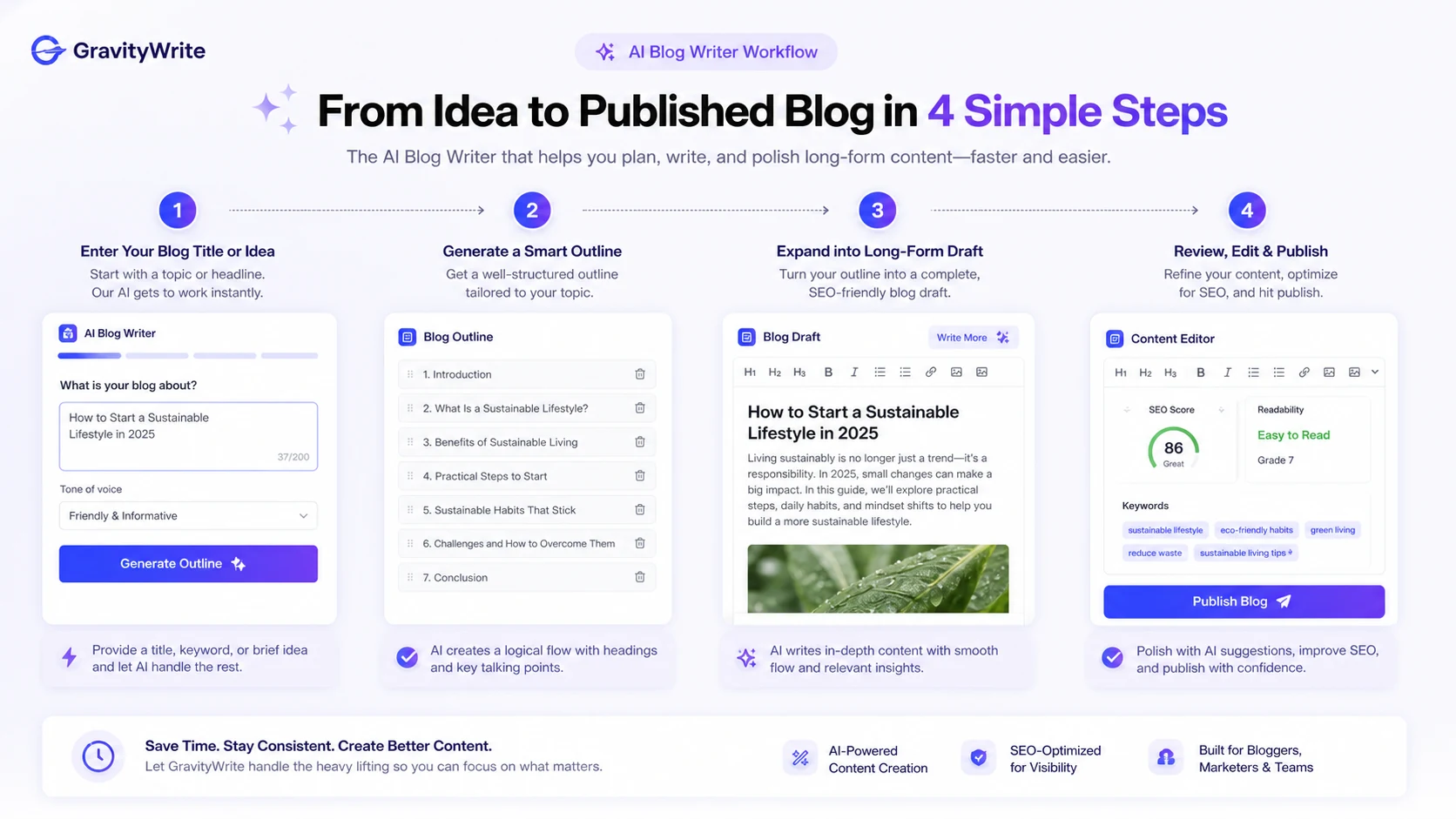
This workflow map shows where GravityWrite belongs in a real content process: idea input, guided generation, format expansion, human editing, and publishing decision. Buyers should pay attention to the editing step because that is where AI convenience either becomes real productivity or turns into cleanup work.
For a blogger, the workflow may be topic idea → outline → draft → image brief → social snippets → manual editing. For a creator, it may be campaign idea → post variations → visual assets → scheduling. For a small business, it may be landing copy → blog support → social distribution.
The easy mistake is treating GravityWrite like a vending machine for finished content. The better test is whether it becomes a repeatable assistant inside a process you already understand.
Workflow check: Use GravityWrite only after you know which recurring content task it should speed up.
Real-world buyer scenarios
Solo blogger building weekly content
A solo blogger publishing every week may find GravityWrite useful because the workflow is broad enough to support outlines, drafts, images, and social snippets from one place.
The risk is thinking the first draft is the final article. It should not be. The buyer should test whether GravityWrite gets them to a stronger first draft faster, then still edit for clarity, examples, internal links, and SEO intent.
Plus is usually the more logical first paid checkpoint here. Pro only makes sense if the blogger is producing enough monthly content to use the larger credit pool.
Creator publishing across multiple channels
A creator who needs captions, blog support, thumbnails, short-form video ideas, and content repurposing may get more value from GravityWrite than a buyer who only writes articles.
This is where the platform’s breadth helps. One week may include a blog post, a YouTube summary, a LinkedIn post, and an image concept. The more formats you actually use, the more GravityWrite can reduce switching between separate tools.
The thing to verify is credit use. If images, video-related assets, summaries, and social posts all draw from the same credit pool, the real monthly volume may be lower than it first appears.
Small business trying to publish without a content team
A small business may use GravityWrite as a lightweight content production layer. That can work when the goal is draft speed, basic social consistency, and simple marketing content.
It is weaker if the business needs strategic SEO research, a full editorial calendar, brand governance, content approvals, or deep collaboration across a team. In that case, Jasper, Writesonic, or a more structured content workflow may deserve comparison.
Bundle buyer starting a site-and-automation project
The Bundle is a separate scenario. It combines GravityWrite Plus with WordPress hosting and n8n automation. That may be useful for someone building a content site and automation workflow from scratch.
But I would not treat it as a casual upgrade from Plus. The refund risk is different, and the extras only matter if hosting and automation are already part of the project.
Key features that actually matter
Guided writing templates
The template layer is one of GravityWrite’s most practical strengths. A blank AI chat can be flexible, but it also forces the user to know what to ask. Guided tools reduce that friction.
This matters for bloggers, creators, and small businesses that want repeatable outputs without becoming AI workflow specialists.
Buyer note: templates help only if they match your real tasks. A long template library is less useful if you only rely on three tools every month.
Blog and long-form content support
GravityWrite’s blog workflow is likely the first serious test for many buyers. If it can help you move from a topic idea to a usable outline or draft faster, it may justify a lightweight plan.
The disappointment risk is output sameness. AI-generated drafts often need stronger examples, sharper structure, source checking, and a more natural editorial voice.
Buyer note: judge the tool by the amount of editing it saves, not by how quickly it fills the page.
Image and creative asset generation
GravityWrite includes image-generation features for banners, thumbnails, blog headers, ads, and social posts. That expands the product beyond writing.
This is valuable for creators who need visuals often but do not want a separate design workflow for every idea. It is less valuable if your brand already has a dedicated design process or if your content rarely needs visuals.
Buyer note: images can consume credits quickly. Estimate your monthly visual workload before assuming the Plus plan is enough.
Social media workflow
The social scheduling and post-generation angle makes GravityWrite more useful for buyers who publish across channels. Plus lists a smaller account and post path, while Pro expands social account and post limits.
This matters if social distribution is part of your content system. It matters less if you only need blog drafts.
Buyer note: confirm whether the social workflow fits your actual platforms and posting rhythm before upgrading.
Website and bundle-related tools
GravityWrite’s website builder path and annual Bundle can be interesting for buyers who want content creation, hosting, and automation in one project route.
This is where I would be the most cautious. The Bundle may be valuable for the right project, but it is not the safest path for someone who only wants an AI writing assistant.
Buyer note: choose the Bundle only if WordPress hosting and n8n automation are already needed, not because the discount looks impressive.
Pricing and plan value
GravityWrite’s pricing is easier to understand when you ignore the discount banner for a moment and look at plan fit.
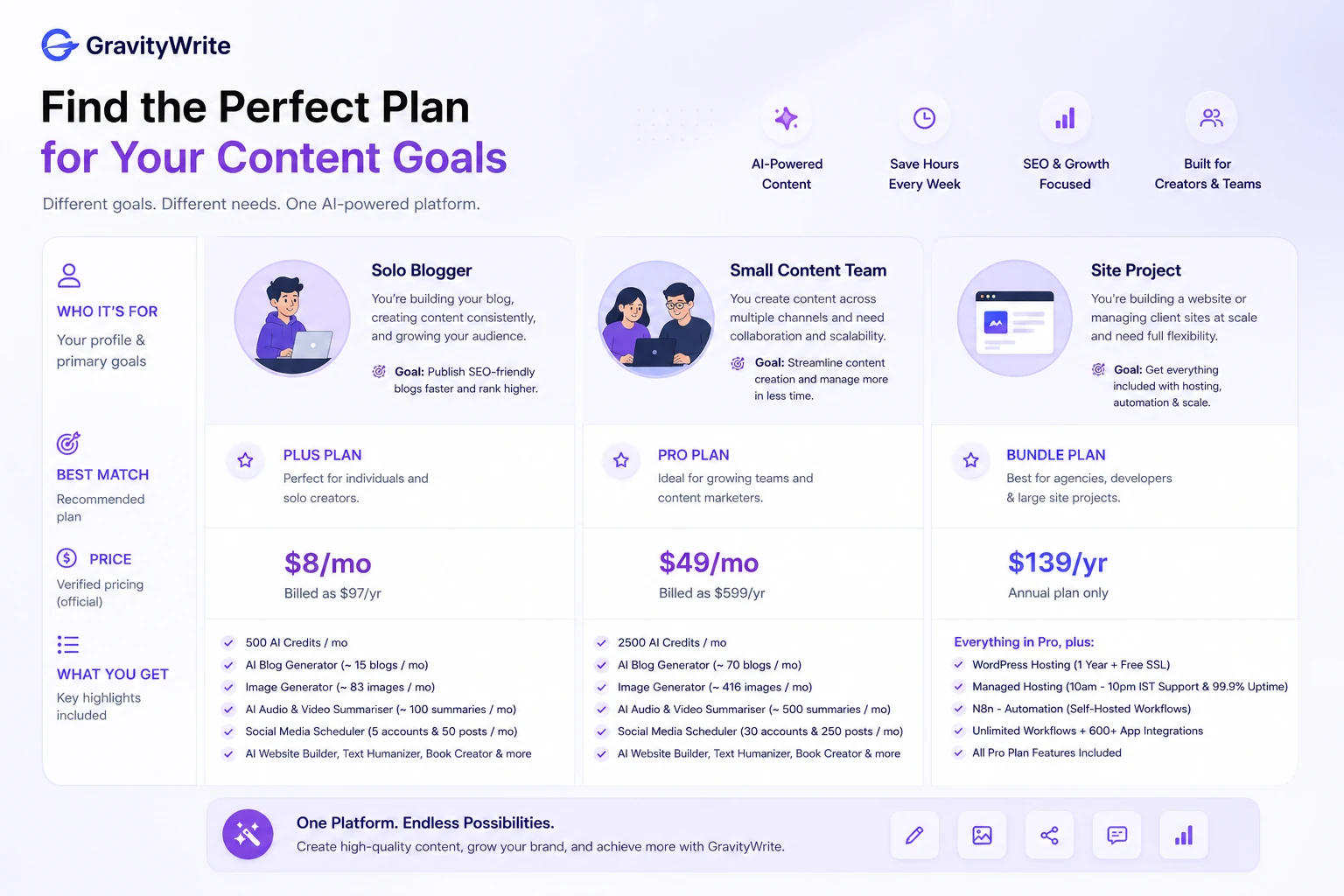
At the time of this review, the public pricing page shows Plus at $8/month and Pro at $49/month. Plus is positioned for individual bloggers or small creators and lists 500 AI credits per month. Pro is positioned for brands scaling content production and lists 2,500 AI credits per month.
The same pricing page explains an important detail: credits are shared across features, and content estimates depend on how credits are used. That means a buyer should not look only at the monthly price. A content mix with blogs, images, videos, summaries, social posts, and website generations can spend credits differently than a simple blog-only workflow.
There is also a separate annual Bundle route at $139/year. That includes GravityWrite Plus along with WordPress hosting and n8n automation. It may be a good fit for someone building a site-and-automation project. It is not automatically the best path for a buyer who only needs writing help.
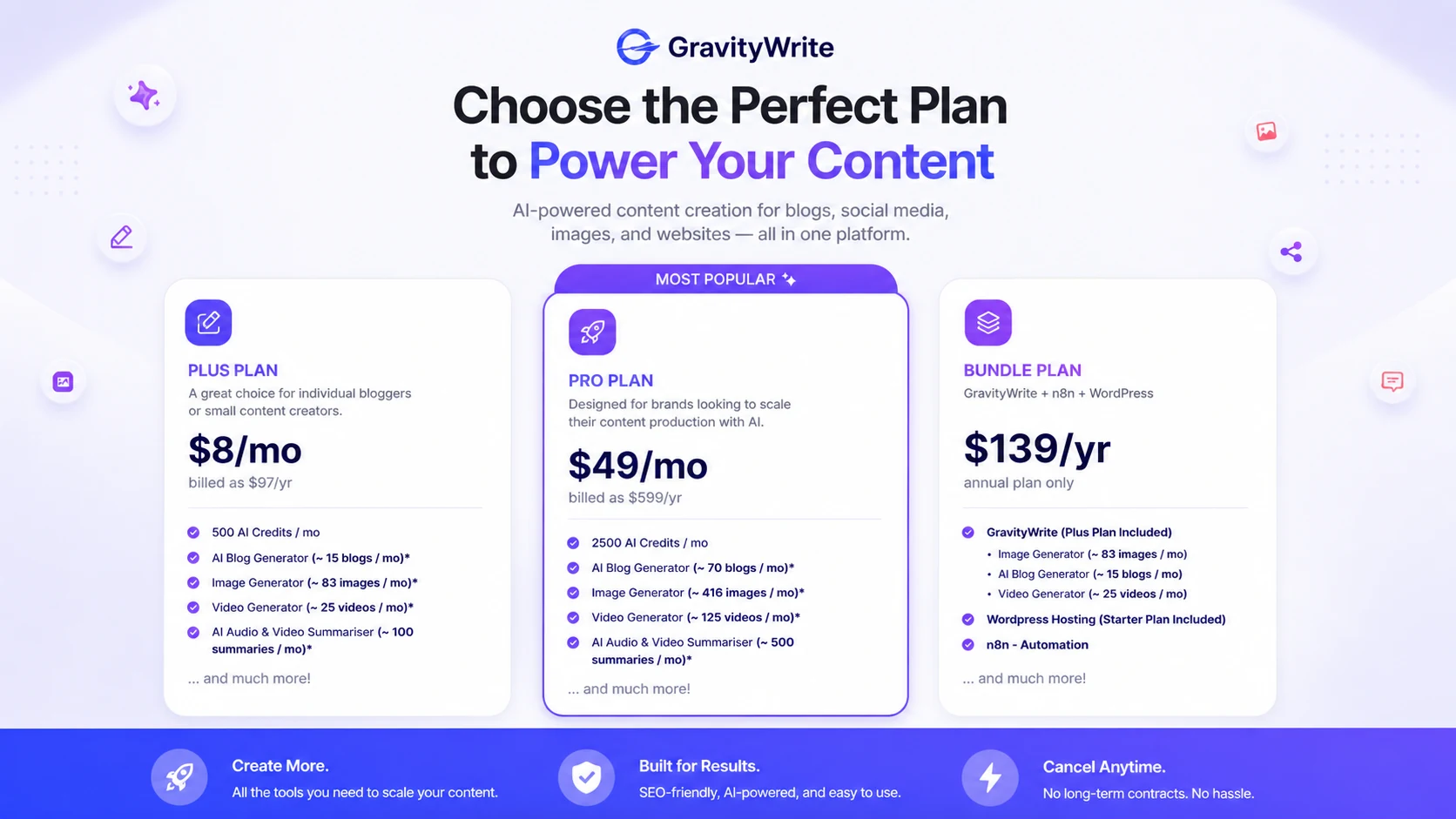
This pricing decision map helps buyers compare Plus, Pro, and Bundle by real workload instead of headline price. The useful question is how many blogs, images, social posts, summaries, and site assets you will actually create each month.
My pricing take is straightforward: start lower unless your monthly volume is already clear. Plus is the safer first paid step for lighter creators. Pro makes more sense when your publishing schedule is predictable. Bundle should be treated as a separate project purchase because it adds hosting and automation, but reduces refund flexibility.
The cheapest plan is not automatically the best deal. The best deal is the plan that matches the work you will actually repeat.
Pricing check: Before choosing Plus, Pro, or Bundle, compare the plan limits against your real monthly content workload.
Free plan, trial, coupon, and checkout notes
GravityWrite has a free entry path, but I would treat it as a testing lane rather than a proof of paid value.
A free start is useful for answering practical questions: does the interface feel clear, do the templates match your workflow, does the output save editing time, and do you understand how credits are consumed? Those questions matter more than whether the tool can generate a few impressive samples.
I would not assume a traditional free trial unless the current checkout flow clearly says so. Public pricing can change faster than editorial copy, so the live pricing and account screens should be treated as the final source before payment.
The coupon path is also secondary. GravityWrite does not need to be judged by a public coupon code first. The better order is product fit, plan fit, then current offer. If the tool does not fit your workflow, a checkout code does not make it a better purchase.
The annual Bundle deserves its own caution. It may be attractive because it combines GravityWrite, WordPress hosting, and n8n automation. But the published refund language excludes bundle plans, so buyers should not treat it like a low-risk trial.
If GravityWrite still fits after your workflow check, the GravityWrite coupon page is the right place to review current savings routes before checkout. Just do not let the deal path decide for you.
Checkout order: Confirm product fit first, plan fit second, and current offers last.
What I would check before buying GravityWrite
If I were buying GravityWrite for a real content workflow, I would check these points before paying:
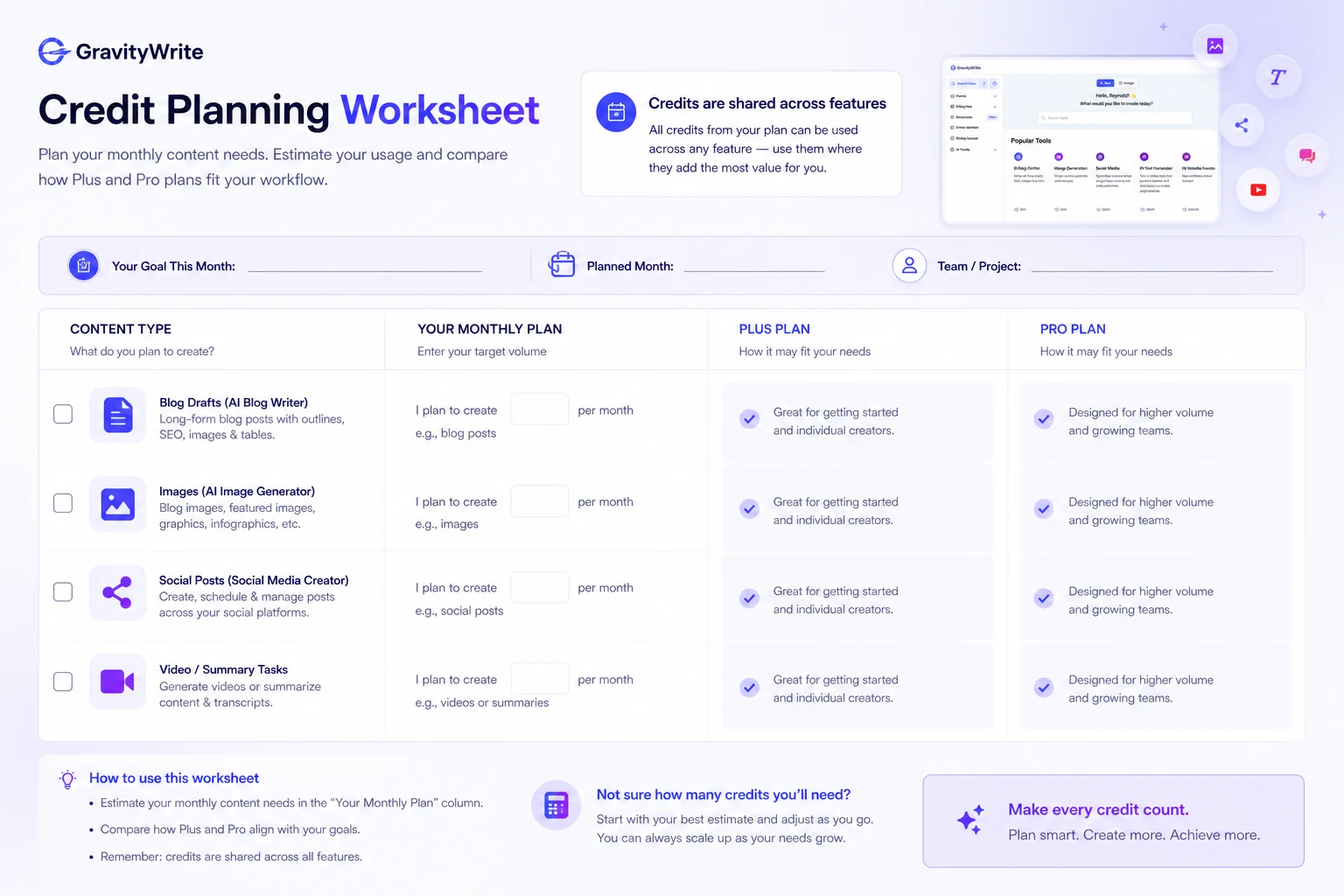
- Whether Plus gives enough monthly credits for my actual mix of blogs, images, summaries, social posts, and site assets.
- Whether Pro is justified by predictable volume, not just by fear of running out.
- Whether the free entry path is enough to test the interface and output quality.
- Whether the refund conditions still match the current checkout and usage rules.
- Whether Bundle extras are genuinely needed for the project.
- Whether the social accounts, website generations, and content estimates match my publishing plan.
- Whether a nearby tool would fit better for SEO, brand-team workflows, or go-to-market campaigns.
This checklist helps buyers slow the decision down before paying. GravityWrite looks more attractive when the plan is matched to real content volume, refund risk, and the formats a buyer will actually use every month.
The biggest mistake would be choosing a plan based only on price. The better way is to map one normal month of work: articles, images, social posts, summaries, and site tasks. Then choose the smallest plan that can handle that workload without forcing you into a bigger commitment too early.
A simple test before paying
Before paying for GravityWrite, I would run a small test like this:
- Choose one real topic you would actually publish.
- Use GravityWrite to create an outline or first draft.
- Generate one supporting social post or image idea for the same topic.
- Track how many credits or usage units the task consumes.
- Edit the draft manually and judge how much time was truly saved.
- Compare the result with your normal writing workflow.
- Decide whether the same process would be useful every week.
This test is intentionally boring.
That is the point. The goal is not to see whether GravityWrite can create something. Almost every AI writing tool can create something. The goal is to see whether it creates the right kind of starting point often enough to become part of your workflow.
If the tool saves time on a real task, Plus may be worth considering. If it creates more cleanup than momentum, a coupon will not fix the problem.
Pros explained
Broad workflow coverage can reduce tool switching
GravityWrite’s biggest advantage is that it covers more than basic writing. Blogs, images, social content, summaries, website-oriented work, and video-related assets can live closer together.
That matters when the buyer is a creator rather than a pure writer. A blog post often needs a title, outline, draft, image, summary, and social distribution. GravityWrite can support that broader content loop.
It stops being enough if the buyer only uses one format. In that case, a narrower specialist may be cheaper or cleaner.
Guided templates help beginners move faster
Templates are useful because they reduce brief-writing friction. Beginners often do not struggle because AI is unavailable. They struggle because they do not know how to ask for the right output.
GravityWrite is easier to justify when those guided flows help the buyer move from idea to usable draft with less hesitation.
The limit is originality. Templates can also make output feel familiar. Human editing still matters.
Plus gives a lower-risk paid starting point
The Plus plan gives lighter creators a more realistic first paid step than jumping straight to a larger plan.
That matters for buyers who want to test repeated use but do not yet have a heavy publishing calendar. It also makes sense for solo bloggers and small creators who want to explore multiple features without committing to Pro immediately.
It stops being enough if the buyer’s monthly content volume is already high.
Bundle can be useful for the right project
The Bundle is interesting because it connects AI writing with WordPress hosting and n8n automation. For a buyer building a new site workflow, that may create a cleaner project path.
But the Bundle is not a universal upgrade. It is useful only when the extra pieces solve an existing problem.
This is where buyers need discipline. A bundle is not a bargain if two-thirds of it will sit unused.
Cons explained
Shared credits make usage planning more important
GravityWrite’s credit system is not difficult to understand, but it does require planning. If different content types draw from the same credit pool, your actual usage depends on what you create.
A buyer who generates mostly text may experience the plan differently from someone using images, summaries, video-related tools, and website features.
The safest move is to test one real workflow and watch usage before upgrading.
Refund safety is conditional
The published refund policy includes a 7-day window and a usage condition, and bundle plans are excluded.
That does not make the product bad. It simply means buyers should avoid heavy testing before deciding whether to keep the plan. If you burn through usage quickly and then change your mind, refund flexibility may be lower than expected.
This matters most for annual and bundle decisions.
Not ideal for mature team governance
GravityWrite is creator-friendly, but that does not automatically make it the strongest fit for teams with formal approval chains, complex brand governance, API needs, or large-scale editorial controls.
Those buyers should compare Jasper, Writesonic, Copy.ai, or broader content operations tools before committing.
GravityWrite may still help with production, but it should not be judged as a full enterprise content system unless the current product and plan details support that need.
Output quality still depends on human review
The product can help create drafts, but AI output still needs review. Factual checks, structure, brand voice, originality, and reader usefulness remain human responsibilities.
This is not unique to GravityWrite. It is a category-wide issue.
The buyer risk is overestimating what any AI writing platform can do without editing.
Green flags and red flags
Green flags
- You publish across several formats every month.
- You want guided templates instead of starting from blank instructions.
- You can estimate your monthly content workload before choosing a plan.
- Plus is enough to test your real workflow before upgrading.
- The Bundle solves an actual site-and-automation project need.
Red flags
- You are buying only because the discount looks strong.
- You cannot estimate credit usage yet but want to jump to a larger plan.
- You need enterprise collaboration, API access, or formal editorial governance.
- You expect publish-ready content without human editing.
- You want the Bundle mainly because it appears cheaper, not because you need hosting and automation.
My confidence is strongest around GravityWrite’s product role and plan-fit logic. I am more cautious around live discounts, checkout conditions, and long-term support expectations because those can change faster than a review page.
GravityWrite vs alternatives
GravityWrite should be compared by workflow, not by category label alone.
This alternatives map helps buyers compare by use case instead of assuming every AI writing tool solves the same problem. GravityWrite is the broader creator route, while Jasper, Writesonic, and Copy.ai may fit better when marketing structure, SEO workflows, or go-to-market operations matter more.
Jasper vs GravityWrite
Jasper is usually the stronger comparison for buyers who care about structured marketing workflows, brand-oriented content, and a more established business content platform.
GravityWrite may still make more sense for solo creators who want a lighter, broader creator dashboard at a lower starting price. The tradeoff is depth. Jasper may feel more mature for teams, while GravityWrite may feel easier for a creator who wants multiple content tools without a heavier platform.
Writesonic vs GravityWrite
Writesonic deserves comparison when SEO content, AI writing breadth, chat-style workflows, and content automation matter more than a simple guided creator workspace.
GravityWrite may be easier to approach if your main use is blog drafts, social content, images, and light creative output. Writesonic may be the stronger path when search-focused writing and broader content operations become more important.
Copy.ai vs GravityWrite
Copy.ai is a closer comparison for buyers who care about go-to-market workflows, campaign support, sales copy, and structured marketing operations.
GravityWrite is more creator-facing. Copy.ai is more interesting when content is tied to GTM motions rather than general publishing.
Adjacent routes to consider
If your real need is SEO optimization rather than content generation, a dedicated SEO writing or optimization tool may be a better route. If your main need is visual design, a design-first platform may fit better than using an AI writing platform with image features.
This distinction matters. A tool can be good and still not be the right first purchase.
Compare before committing: GravityWrite is not the only route if your workflow leans toward SEO, brand-team content, or go-to-market campaigns.
Trust, refund, and buyer-risk notes
The biggest buyer-risk note is not that GravityWrite is hard to understand. It is that the product appears simple enough to buy quickly.
That is where mistakes happen.
The public pricing page shows clear plan paths, but the plan choice depends on credits and content mix. Plus may look inexpensive, yet your real workload may require more credits. Pro may look safer, yet you may not need it if your publishing volume is light. Bundle may look like the strongest saving, yet it is only sensible when the hosting and automation extras are genuinely useful.
Refund terms deserve careful attention. GravityWrite’s published refund policy lists a 7-day window, a limited usage condition, and a bundle-plan exclusion. That means buyers should avoid treating the purchase as risk-free.
I would also be careful with claims around output quality. Third-party coverage generally frames GravityWrite as easy to use and beginner-friendly, but that does not remove the need for editing. AI writing tools can produce useful drafts and still require human review before publishing.
Data and privacy expectations should also be checked if you plan to upload sensitive client material. For normal marketing drafts, this may not be a major concern. For confidential documents, it becomes part of the buying decision.
The practical rule is simple: do not buy on headline price alone. Verify live plan limits, test the workflow, read current refund terms, and compare alternatives if your use case is not obvious.
Final verdict
This final verdict card helps buyers decide whether to test GravityWrite, compare alternatives, or stop before checkout. The strongest buying signal is not the discount; it is a repeatable content workflow that matches the plan limits.
I would consider GravityWrite if you are a creator, blogger, freelancer, or small business owner who regularly needs more than plain text. The product is most convincing when blog drafts, visuals, social content, summaries, and light website tasks are part of the same weekly workflow.
I would skip it if you only need occasional writing help, if you expect AI output to be publish-ready without editing, or if your team needs mature governance, API support, and deeper operational controls.
I would compare it with Jasper if brand-team content matters more, Writesonic if SEO writing and broader content workflows are the bigger need, and Copy.ai if go-to-market or campaign workflows are closer to your actual use case.
The safest next step is to test GravityWrite with one real content workflow before paying for a larger plan. If the tool saves time and the credit math still works, Plus may be the cleanest first paid route. Pro should be tied to predictable monthly volume. Bundle should be chosen only when hosting and automation are already part of the project.
GravityWrite can be useful. Just do not let the broad feature list or visible discount make the decision for you.
