Quick verdict
Copy.ai is worth considering if you are buying it for GTM workflow automation, not just because you remember it as a quick AI copywriting tool.
That distinction matters more than the price.
The current Copy.ai buying decision is really two different decisions. The first is whether a small team needs a shared AI Chat plan for writing, research, drafts, and everyday GTM work. The second is whether a sales, marketing, RevOps, or content team has a repeatable workflow that can justify workflow credits, seats, integrations, and a more serious rollout.
I would be careful if your use case is still vague. Copy.ai can look impressive on the homepage because the positioning is now much bigger than “write me an ad.” It talks about GTM AI, workflows, actions, agents, tables, Infobase, Brand Voice, integrations, and API-connected automation. That is useful when your team has a process worth codifying. It is also a warning sign if you only need occasional copy.
The strongest reason to consider Copy.ai is that it has moved beyond one-off prompts. The main caution is that the more valuable parts of the product are also the parts that require planning: workflow credits, team adoption, integrations, and annual billing risk.
For most buyers, the safer path is simple: test one real GTM workflow before treating Copy.ai as a platform purchase. If you only need a lighter writing route, compare it with Jasper, Writesonic, or GravityWrite before paying.
Next step: If Copy.ai still matches your GTM workflow needs, verify the current plan path before choosing monthly, annual, or workflow-credit pricing.
Review snapshot
| Review point | Practical take |
|---|---|
| Best for | GTM, sales, marketing, RevOps, and content teams with repeatable processes |
| Not ideal for | Solo writers who only need low-cost AI drafting |
| Main use case | Shared AI chat plus workflow automation for revenue-facing teams |
| Pricing note | Chat is public self-serve; larger workflow tiers depend on seats and monthly workflow credits |
| Free path | Useful for evaluation when available, but not proof that a larger plan fits |
| Main strength | More operational depth than a basic AI writing assistant |
| Main concern | Cost and value depend heavily on workflow-credit planning and adoption |
| Best alternatives to compare | Jasper, Writesonic, GravityWrite |
| Safest next step | Test one real GTM process before annual billing or larger workflow plans |
What is Copy.ai?
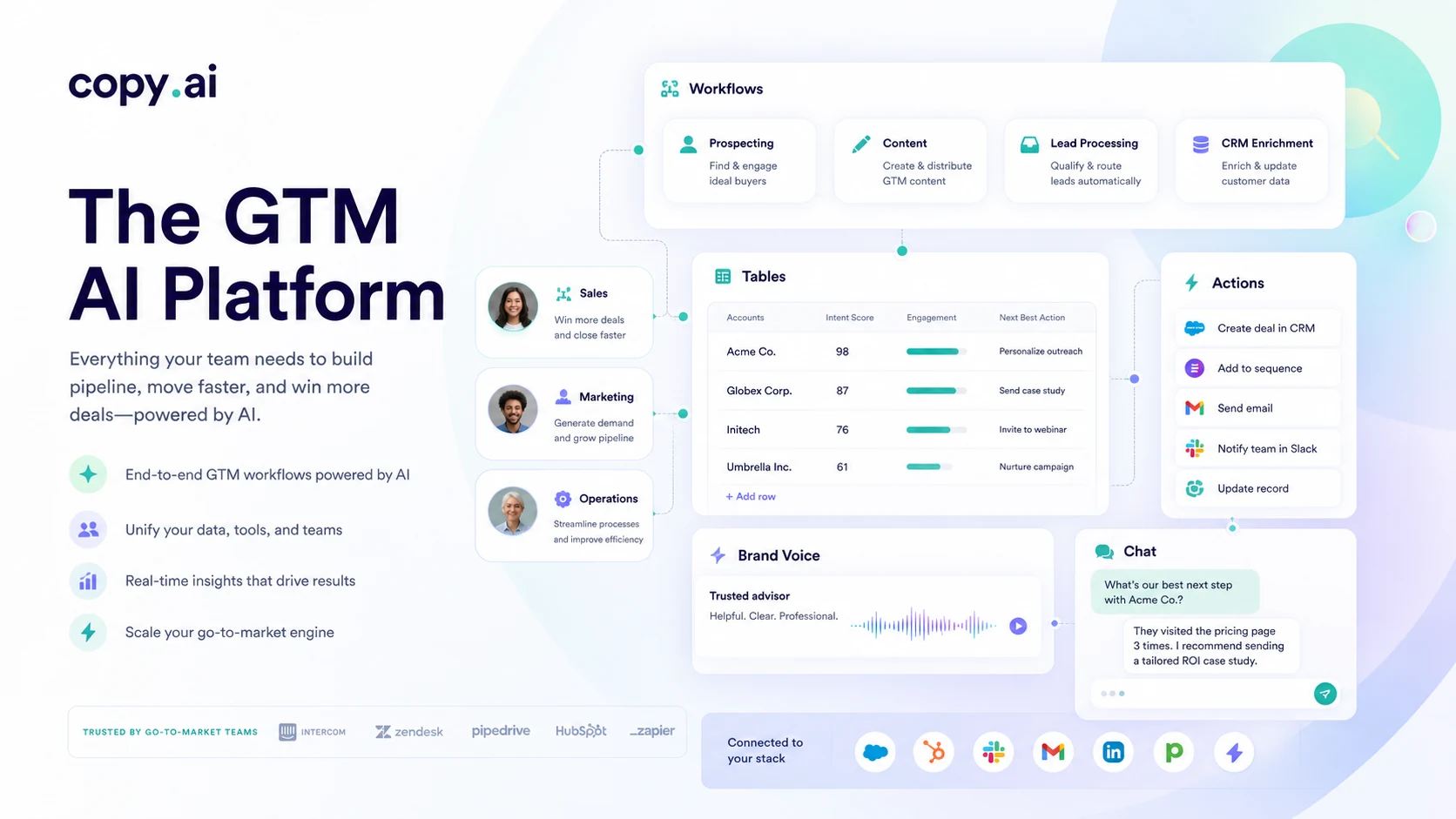
Copy.ai is currently best understood as a GTM AI platform for revenue teams that want to automate repeatable sales, marketing, operations, and content workflows.
It still has writing use cases. It still has Chat. It still helps with drafts, campaigns, emails, social content, product copy, and other marketing assets. But the product’s current public positioning is broader than a classic “AI writer.” Copy.ai now frames itself around GTM bloat, workflows, actions, agents, tables, Infobase, Brand Voice, platform integrations, and business process automation.
That shift changes how I would judge it.
If you arrive expecting a simple tool for writing blog intros or social captions, Copy.ai may feel heavier than necessary. If you arrive with a recurring GTM process — account research, outbound preparation, inbound lead handling, localization, ABM content, sales enablement, content operations — it becomes more interesting.
The common mistake is judging Copy.ai by old review habits. A buyer sees “AI writing,” checks the monthly price, looks for a coupon, and decides from there. That is too shallow for the current product. The better question is whether Copy.ai can turn a repeated business process into a reusable workflow with enough value to justify the plan.
Our review approach: we compare public product pages, pricing details, terms, privacy information, product updates, buyer workflow fit, and nearby alternatives. We do not treat a coupon, annual discount, or impressive GTM claim as proof that the product fits the buyer.
Who should use Copy.ai?
Copy.ai makes the most sense for teams that already feel friction in GTM execution.
A marketing team may use it when content production is not just a writing problem, but a coordination problem. If the team needs brand context, repeatable campaign workflows, and reusable inputs, Copy.ai has more room to help than a plain prompt box.
A sales or SDR team may consider it when research and outreach prep are repetitive enough to standardize. The value is not one AI-written email; it is a repeatable process that can produce more consistent prep across the team.
A RevOps or GTM operations buyer may be an even stronger fit. Copy.ai’s workflow, integration, table, and action language matters most when someone owns process design and adoption.
A content team can also use Copy.ai, but I would narrow the use case first. If the main need is brand-led campaign production and team content operations, Copy.ai is relevant. If the need is only long-form SEO writing, compare writing-first tools before paying.
Who should avoid Copy.ai?
I would avoid Copy.ai if you only need a cheap writing assistant.
That does not mean Copy.ai cannot write. It means you may be buying the wrong layer of value. If your work is mostly occasional captions, ad variations, email drafts, or short blog sections, a simpler AI writing tool may be enough.
I would also slow down if your team cannot name the first workflow it wants to improve. “We want to use more AI” is not a buying case. A defined process, owner, and review loop are much stronger signals.
Annual billing deserves caution too. The public pricing page shows a lower monthly-equivalent Chat price when billed yearly, but the terms describe a short five-calendar-day refund window for the initial purchase.
Finally, buyers comparing old pricing screenshots or old “copywriting tool” reviews should be careful. Copy.ai has shifted. The current pricing page and current positioning matter more than older references.
How Copy.ai fits into a real workflow
A practical Copy.ai workflow starts before anyone opens the tool.
The team should first identify a repeated GTM process. For example: research target accounts, summarize context, generate outreach angles, draft emails, create campaign assets, enrich CRM notes, localize messaging, or turn a content idea into multiple channel-ready drafts.
Then the team should decide whether the task belongs in Chat or in a workflow. Chat is better for flexible, one-off work. Workflows are better when the same process happens again and again.
The real test is whether Copy.ai reduces repeated manual work without making review harder. Good automation still needs judgment. Someone has to check the output, confirm facts, preserve brand voice, and make sure the final message fits the audience.
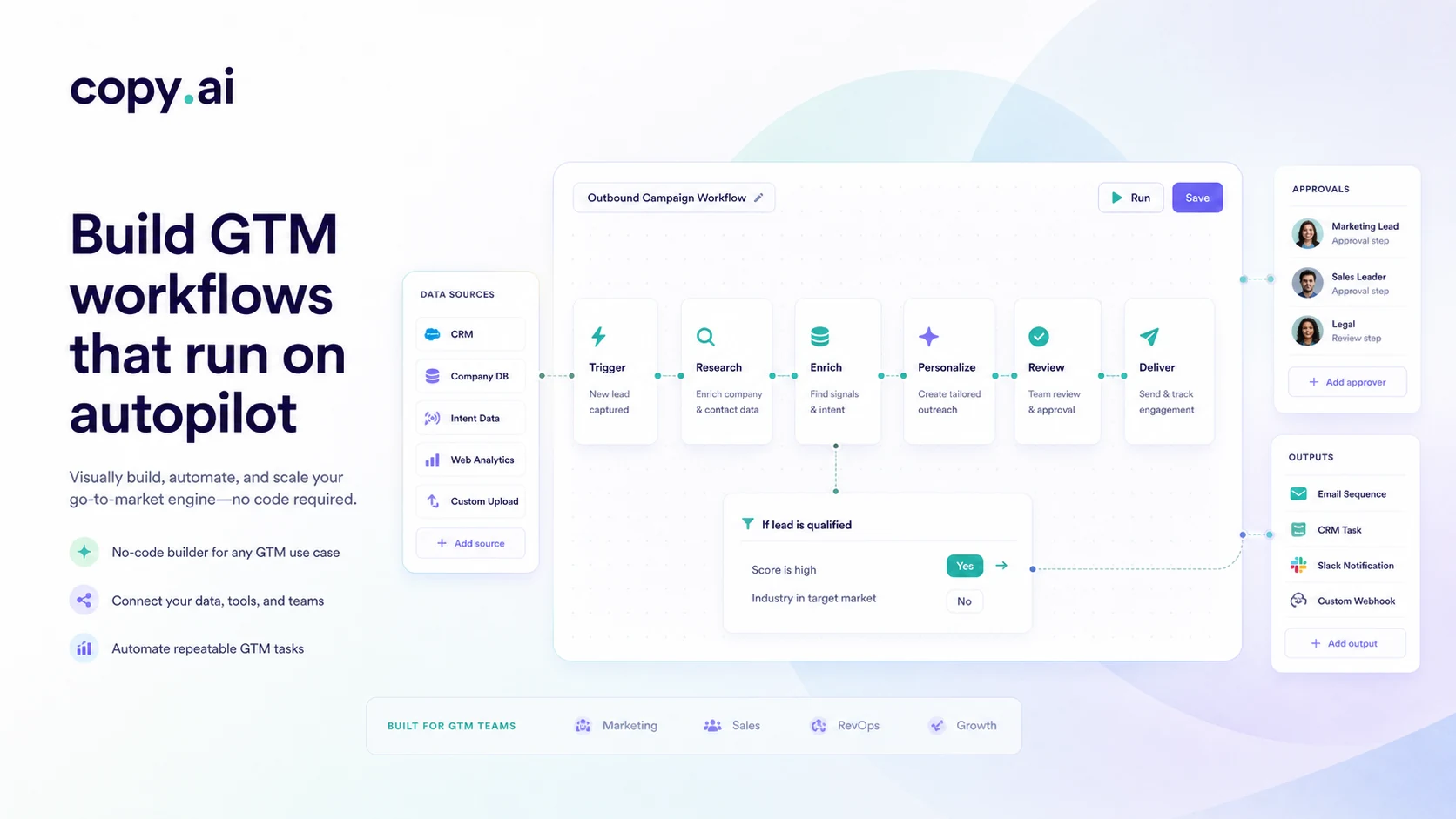
The useful part of Copy.ai is not that it can generate text. Many tools can do that now. The useful part is the possibility of codifying a process so the team is not rebuilding the same prompt or manual task every week.
The weak fit is the opposite: opening Copy.ai with no defined process, generating a few drafts, and then wondering why the platform feels expensive. That is not a product failure by itself. It is a buying mismatch.
Workflow check: Before treating Copy.ai as a platform purchase, test whether one real GTM process can be repeated clearly enough to justify the next plan step.
Real-world buyer scenarios
A small marketing team that needs shared AI chat
A small marketing team may start with Copy.ai Chat when the buying question is still practical: can the team create better first drafts, campaign angles, emails, and social ideas without every person inventing a separate prompt routine?
This is the cleanest self-serve case. The team should test Chat with a real campaign, not random samples. If the outputs save time and stay close enough to the brand, Chat may be enough.
A sales team automating account research
A sales team may care less about writing “copy” and more about preparing outreach at scale. Copy.ai’s current GTM positioning fits this better than its older writing-tool reputation.
The buyer should test one account research process: inputs, summary, outreach angle, draft, human review. If that sequence saves time and improves consistency, the workflow path becomes more credible.
A RevOps team evaluating rollout
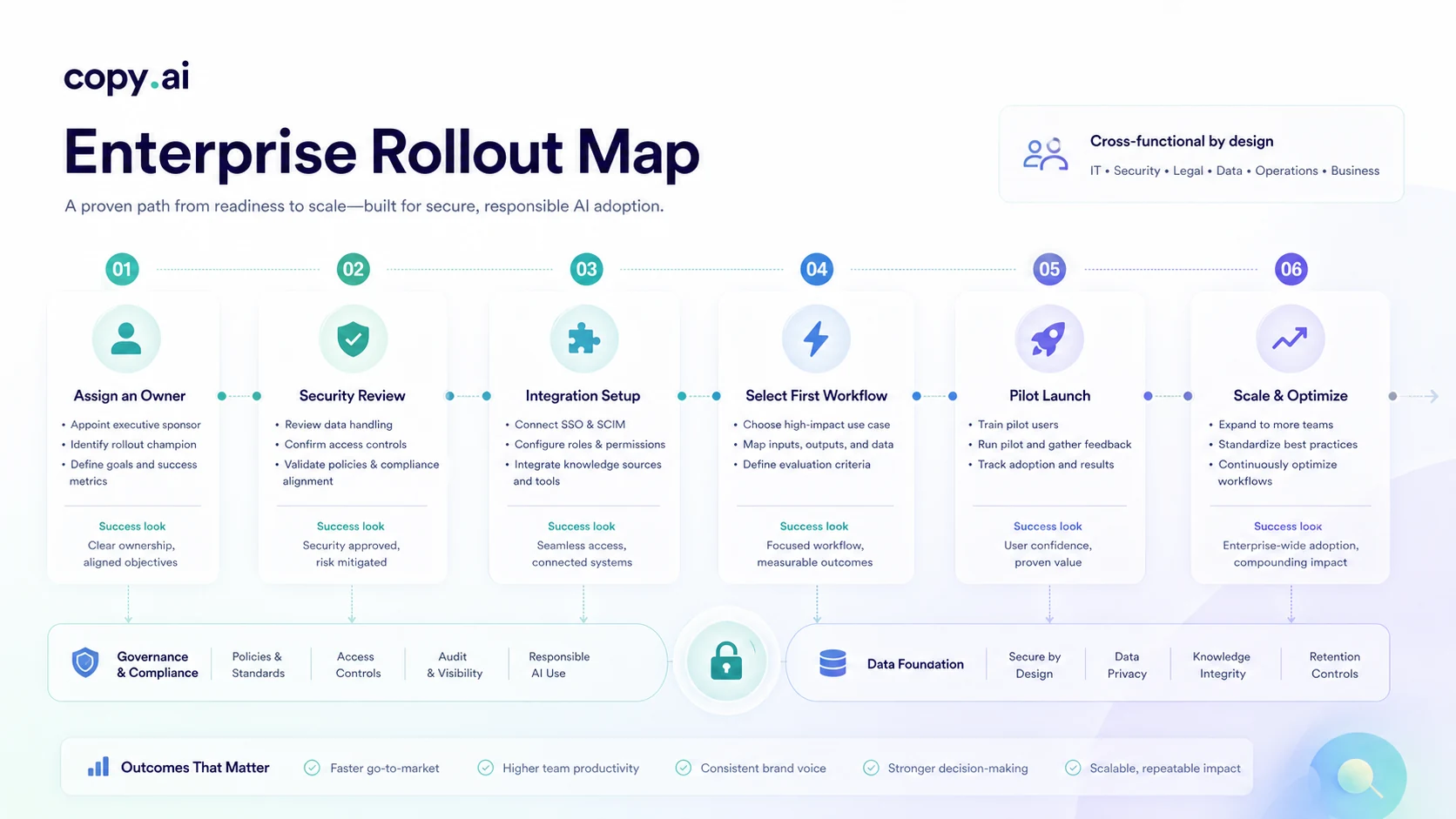
A RevOps buyer should treat Copy.ai as a workflow and adoption decision. The questions are ownership, data flow, integrations, workflow design, security review, usage volume, and success metrics.
Where this can fail is simple: buying platform depth before assigning a workflow owner.
A solo creator who just wants content ideas
A solo creator may still get value from Copy.ai, but the risk is overbuying. If the job is idea generation, short copy, or occasional drafting, the current platform may be more than needed.
Key features that actually matter
Chat for shared AI work
Copy.ai Chat is the lighter entry point. It matters because not every buyer needs workflow automation on day one. For small teams, Chat can support drafts, messaging, research, and everyday GTM tasks without a full rollout.
Buyer note: use Chat to test real work, not just sample prompts. If every user works differently and no shared process emerges, the value may stay limited.
Workflows for repeatable GTM processes
Workflows are the feature that makes Copy.ai more than a writing app. They matter when the same sales, marketing, or operations process happens often enough that manual prompting becomes inefficient.
Buyer note: evaluate workflows by one repeated job, not by feature count. If you cannot name the process, workflow credits may be premature.
Tables, actions, and process structure
Tables and actions point toward operational use. They help teams move from “ask AI for help” to “run a structured process across rows, steps, or data points.”
Buyer note: start narrow. Structured automation can expose messy inputs just as easily as it can save time.
Infobase and Brand Voice
Infobase and Brand Voice matter because generic AI output is often too bland for business use. They help teams reuse company context and keep outputs closer to approved messaging.
Buyer note: these features work better when the team already has useful source material, brand guidelines, and review standards.
Integrations, API access, and security signals
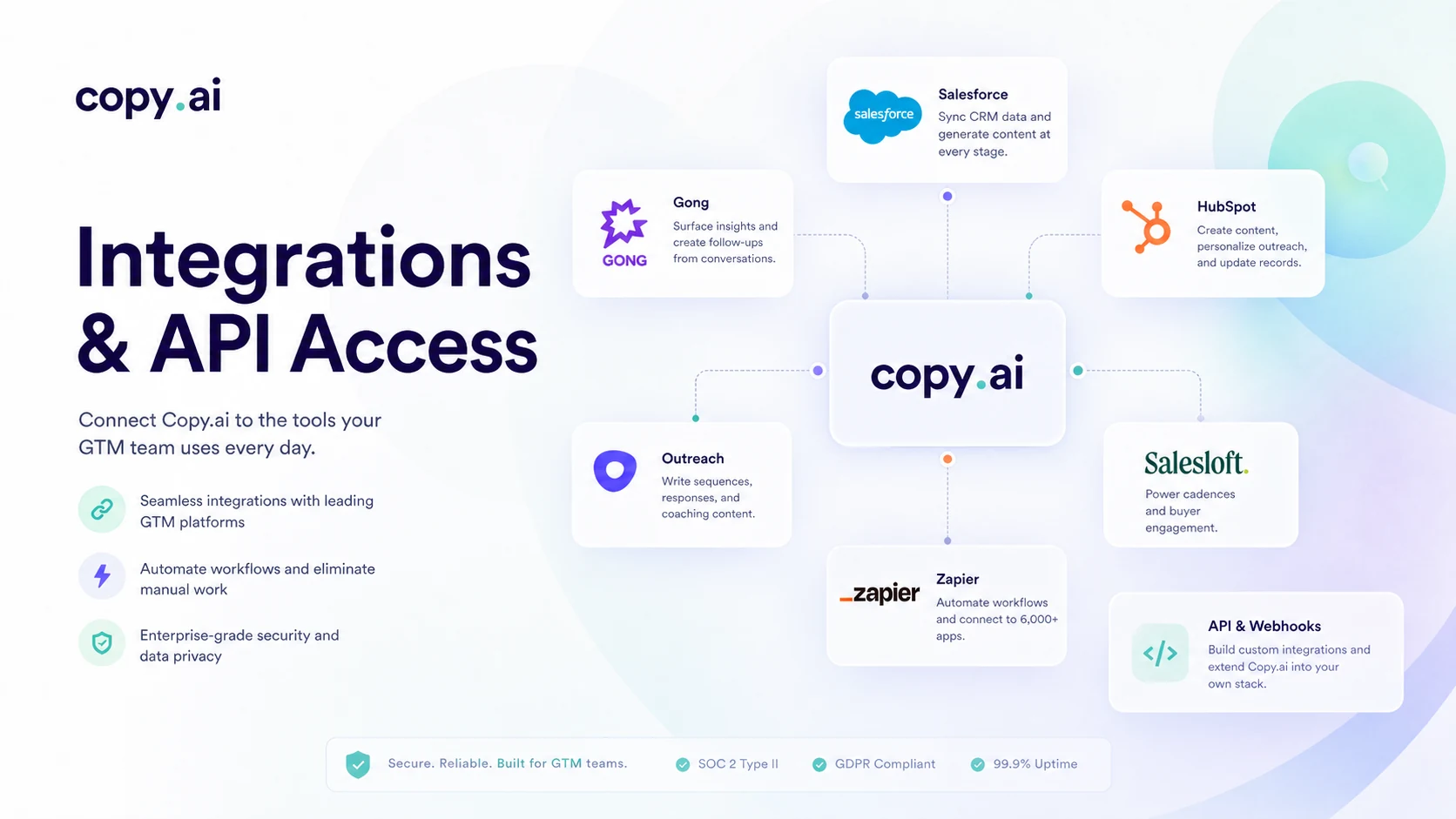
Copy.ai publicly discusses integrations, Zapier connectivity, API access, and SOC 2 Type II positioning. These are more relevant to GTM teams than to casual writers.
Buyer note: verify the current integration and API details before assuming Copy.ai fits your stack, and review privacy/security materials before uploading sensitive business data.
Pricing and plan value
Copy.ai pricing should not be judged from the Chat price alone.
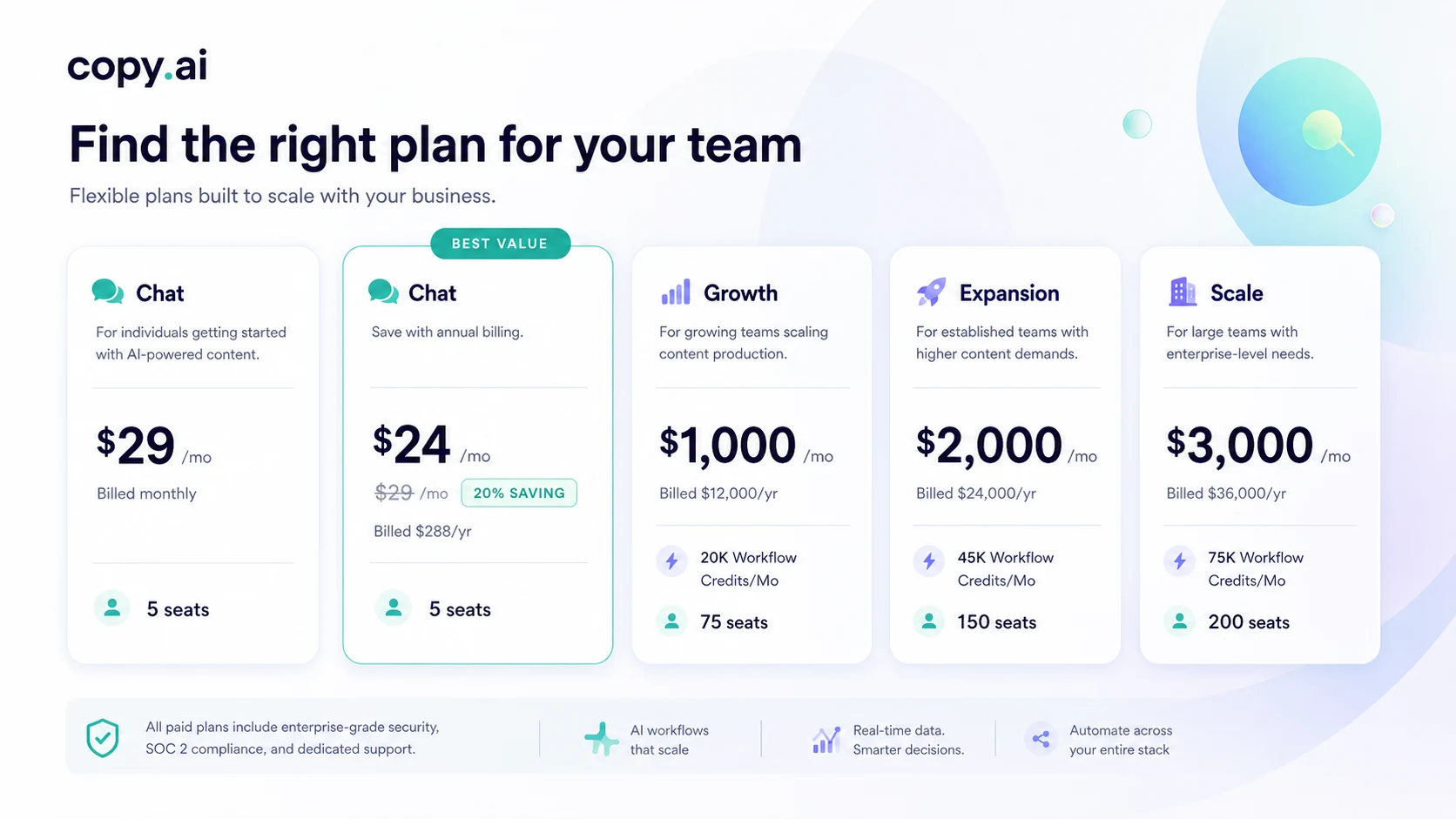
The current public pricing page shows the Chat plan at $29 per month billed monthly, or $24 per month when billed yearly. That plan includes five seats, unlimited words in Chat, unlimited Chat projects, and access to OpenAI, Anthropic, and Gemini models.
The larger plans change the buying conversation. Growth is publicly listed at $1,000 per month billed yearly with 75 seats and 20K workflow credits per month. Expansion is listed at $2,000 per month billed yearly with 150 seats and 45K workflow credits per month. Scale is listed at $3,000 per month billed yearly with 200 seats and 75K workflow credits per month.
That gap is the entire review.
If you only need Chat, Copy.ai competes with AI writing and team productivity tools. If you need workflows, it becomes a GTM automation platform with a very different budget logic.
I would treat the annual Chat price as a discount only after proving usage. A lower monthly-equivalent number is not helpful if the team stops using the product after a few weeks.
For workflow plans, the buyer should estimate expected runs, users, integrations, and review time. Workflow credits are not just a billing detail. They are the unit that turns “this platform looks useful” into “this will or will not fit our monthly operating pattern.”
Pricing check: If Copy.ai still looks right, compare Chat pricing against workflow-credit needs before choosing annual billing or a larger GTM plan.
Free plan, trial, coupon, and checkout notes
Copy.ai publishes free-path messaging, and the pricing page gives a clear self-serve Chat route. I would use the free path for evaluation, not as proof that the paid product is worth it.
The trial and refund language deserve careful reading. Copy.ai’s terms say a subscription can be canceled for a full refund within five calendar days of the initial purchase. After that, the purchase is final, and cancellation takes effect at the end of the then-current subscription period. The terms also describe free trials as being subject to the specific signup terms provided at the time.
That means the checkout order matters.
First, test fit. Second, check the current plan table. Third, decide whether monthly or annual billing makes sense. Only after that should buyers look at a coupon page or active offer route.
Copy.ai is not a product I would buy because of a random coupon listing. A discount can improve a good purchase, but it cannot make an undefined GTM workflow suddenly valuable.
Checkout note: Treat active offers as the last step, not the first. Confirm workflow fit and refund timing before relying on any current deal path.
What I would check before buying Copy.ai
If I were buying Copy.ai for a real team workflow, I would check seven things before entering payment details:
- The first workflow. What exact GTM process are you trying to improve?
- The plan type. Are you buying Chat access, workflow automation, or a larger rollout?
- Workflow-credit usage. How many runs or automated tasks will your team realistically need each month?
- Seat needs. Will five Chat seats be enough, or are you evaluating a team plan because adoption is broader?
- Integration requirements. Do you need CRM, sales engagement, content, document, Zapier, or API-connected workflows?
- Refund timing. Is five calendar days enough to test the product before the purchase becomes final?
- Alternative fit. Would Jasper, Writesonic, or GravityWrite solve the real job with less platform weight?
The easy mistake is to check the price before checking the process.
For Copy.ai, I would reverse that order. Process first. Plan second. Coupon or annual savings third.
A simple test before paying
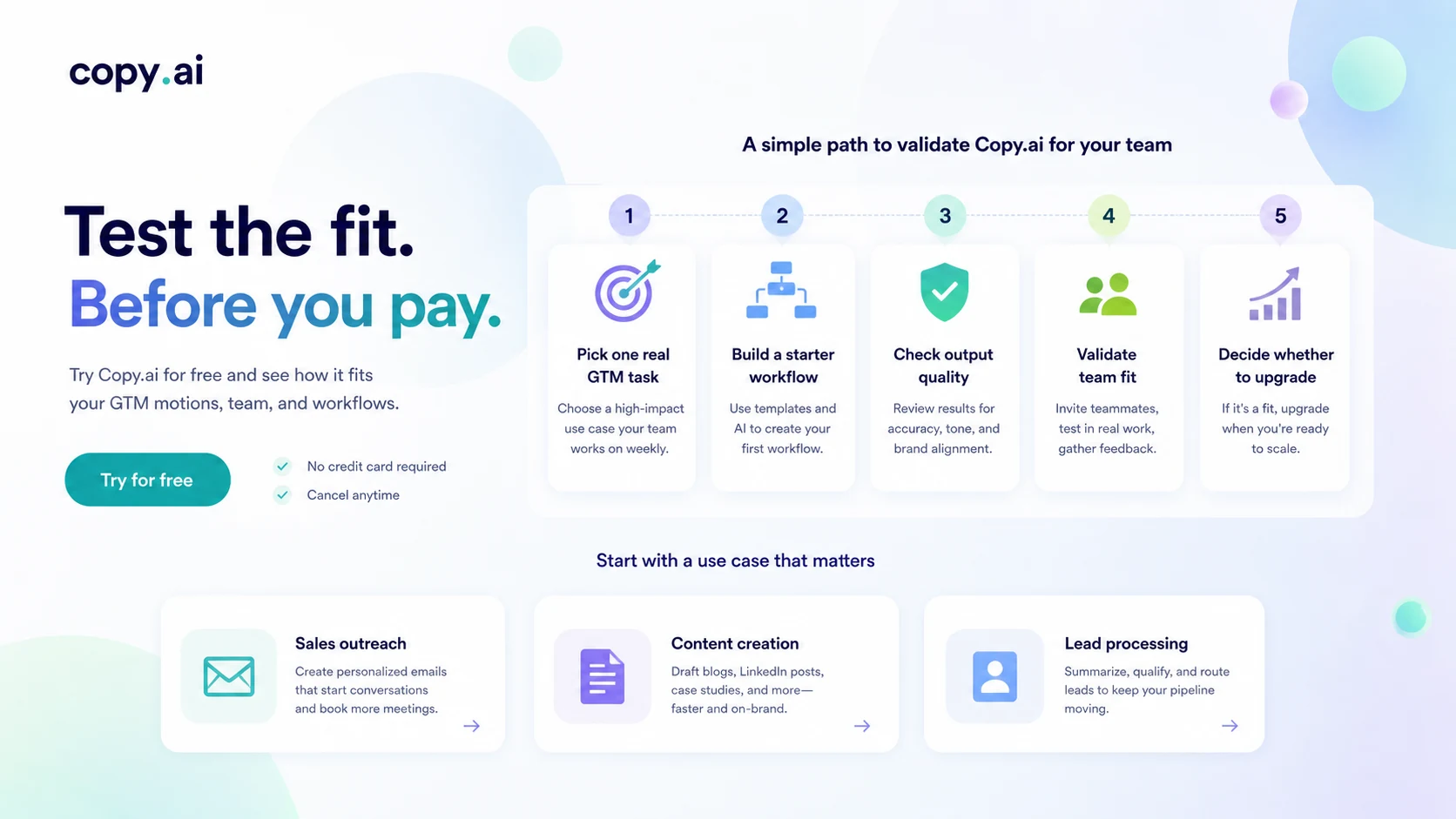
Before paying for Copy.ai, I would run a small test like this:
- Pick one real GTM workflow that your team repeats at least weekly.
- Gather the actual inputs your team normally uses.
- Run the task through Copy.ai Chat or a workflow path.
- Compare the output against your normal manual process.
- Measure whether the result saves time after human review.
- Estimate how often the workflow would run each month.
- Decide whether the needed plan fits that usage.
This test is intentionally narrow. It is not about proving that Copy.ai can do everything. It is about proving that Copy.ai can improve one process enough to deserve the next buying step.
For a content team, that process might be turning a brief into several on-brand campaign assets. For sales, it might be researching accounts and preparing outreach angles. For RevOps, it might be enriching and summarizing records before routing.
If the test does not save time, do not upgrade because the platform looks strategic. A strategic-looking AI tool can still be a poor purchase if it does not change daily execution.
Pros explained
Copy.ai has moved beyond basic AI copywriting
The biggest pro is that Copy.ai now has a clearer team and workflow angle. Basic AI writing is crowded; Copy.ai is more interesting when the buyer wants repeatable GTM processes, shared context, and team execution.
This stops being enough if the buyer does not need that depth.
The Chat plan creates a lower-friction entry point
The Chat plan lets smaller teams test Copy.ai without immediately making a platform decision. That is useful for drafts, messaging, research, and shared AI access.
This stops being enough when the real value depends on workflow automation rather than flexible chat.
Workflow credits make operational use possible
Workflow credits are a pro when a team has repeatable work and enough volume. They are a risk when the team has not estimated usage.
The buyer should treat credits as part of the real cost model, not a footnote.
Integrations and business-readiness signals help larger teams
Integrations, API access, and security positioning make Copy.ai more credible for business buyers. Still, the buyer should verify exact requirements before assuming rollout will be simple.
Cons explained
Copy.ai can be too heavy for simple writing
A solo writer who only wants blog ideas, ad copy, or email drafts may not need workflows, tables, actions, integrations, or enterprise security.
The fix is to compare lighter writing tools before paying.
Pricing jumps from Chat to workflow tiers
The Chat plan is easy to understand. The larger tiers are a different category of decision because they involve seats, workflow credits, annual billing, and rollout expectations.
Buyers should not treat workflow plans as a casual upgrade.
The refund window is short
The terms describe a five-calendar-day refund window for the initial subscription purchase. That is a meaningful caution for teams that need time to test workflows and adoption.
Monthly testing is safer than annual billing when usage is unproven.
Older reviews can mislead buyers
Copy.ai has shifted positioning and packaging over time. Current pricing, current terms, and current platform materials should matter more than older third-party pricing screenshots.
Green flags and red flags
Green flags
Copy.ai is a stronger fit when your team can name a specific GTM process.
It is also a good sign if someone owns the workflow, if the inputs are clear, and if the output can be reviewed without creating extra work. Teams with repeatable sales, marketing, or operations tasks will have an easier time judging value.
Another green flag is existing process pain. If your team is already losing time to repetitive research, content adaptation, outreach prep, localization, or campaign asset creation, Copy.ai has a clearer role.
Red flags
The biggest red flag is vague interest.
If the buying reason is “we should use AI more,” slow down. Copy.ai is too operational to buy from that impulse alone.
Another red flag is price-first thinking. If the buyer starts with annual savings or coupon hunting before defining workflow fit, the purchase may be backwards.
A third red flag is no review owner. AI-generated output still needs judgment. If nobody owns QA, brand standards, or process improvement, Copy.ai can produce more material without improving the actual workflow.
Copy.ai vs alternatives
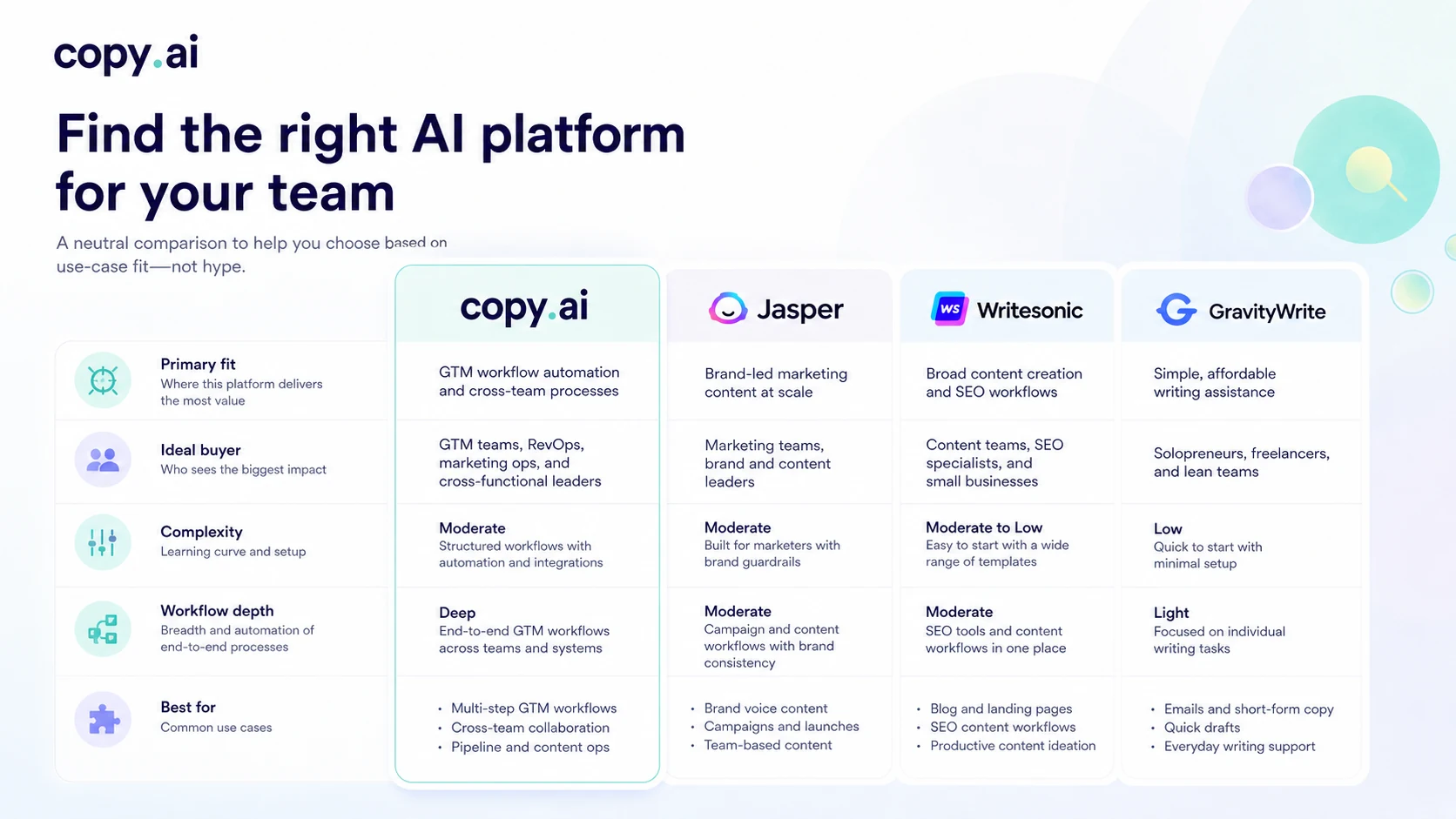
Jasper vs Copy.ai
Jasper is the cleaner comparison if your main need is brand-led marketing content and content team workflows.
Copy.ai may be stronger when the buyer wants GTM workflow automation across sales, marketing, and operations. Jasper may feel more natural when the work is campaign copy, brand voice, content production, and creative marketing workflows.
If your team is mostly content-led, start with the Jasper store guide. If your team is trying to automate GTM processes, Copy.ai deserves a closer look.
Writesonic vs Copy.ai
Writesonic is a useful comparison when the buyer wants broader AI writing, SEO content, and marketing output without committing to a heavier GTM workflow platform.
Copy.ai is more interesting when the workflow itself is the product value. Writesonic may be easier to evaluate if the buyer wants content tools first and operational automation second.
If your decision is still content-production focused, compare the Writesonic store guide before paying for Copy.ai.
GravityWrite vs Copy.ai
GravityWrite is more of a simpler content-generation route.
That can be a better fit for buyers who want speed, templates, and easier drafting without building GTM workflows. Copy.ai may be more capable, but capability only matters if the buyer needs it.
If simplicity is the priority, the GravityWrite store guide may be the better next tab.
Adjacent workflow routes
There are also adjacent workflow and automation tools that may matter depending on the buyer’s stack. These are not always direct replacements for Copy.ai because they may focus more on automation infrastructure, content operations, or sales systems than AI-native GTM workflow design.
The practical question is not “which tool has more features?” It is “which tool owns the job we actually need solved?”
Trust, refund, and buyer-risk notes
My confidence is strongest around Copy.ai’s current public positioning, pricing structure, and GTM workflow direction. I am more cautious around long-term value for a specific buyer because that depends on adoption, credit usage, review quality, and integration fit.
There are four risk areas to check.
First, refund timing. The terms describe a five-calendar-day refund window for the initial subscription purchase. That is short for a team trying to evaluate workflows.
Second, annual billing. Annual pricing can reduce the monthly-equivalent cost, but it raises the stakes if usage is unproven.
Third, data and privacy. Copy.ai’s privacy notice says it collects account information and may collect personal data included in prompts, files, or feedback. Business buyers should review privacy and security materials before using sensitive GTM or customer data.
Fourth, rollout ownership. Copy.ai’s integrations, API access, and workflow depth are useful only if the team has someone responsible for turning them into operating behavior.
The safer buyer mindset is to treat Copy.ai as a GTM workflow decision, not a coupon decision.
Final verdict
I would consider Copy.ai if your team has a real GTM workflow to improve and someone is ready to own the process.
I would start with the lighter path if the current need is shared AI chat, campaign drafts, messaging, or early testing. I would move toward workflow-credit plans only after proving that one repeated process saves time after human review.
I would skip Copy.ai if your use case is only occasional writing. The platform may be too heavy, and the larger plans may not make sense.
I would compare it with Jasper if brand-marketing workflows matter more, Writesonic if you want broader content and SEO tooling, and GravityWrite if you want a simpler drafting path.
The safest next step is to test fit before optimizing for price. For Copy.ai, workflow clarity matters more than the first discount you see.
