Quick verdict
GetGenie is worth considering if your content workflow already lives in WordPress and you want AI writing, keyword research, SERP analysis, content scoring, and SEO tracking closer to the editor.
It is not the first tool I would choose if you only need a clean browser-based AI writer, a dedicated rank tracker, or a mature standalone SEO platform. The strongest reason to consider GetGenie is workflow convenience: it tries to bring the early content process into one place, from keyword to outline to draft to optimization. The main caution is that the buying decision is not only about features. It is about limits.
A low annual price can look attractive. So can a coupon route. But with GetGenie, the better question is narrower: will your plan include enough AI words, SERP competitor analyses, keyword analyses, topical maps, image generations, and SEO Insights tracking for the way you actually publish?
If the answer is yes, GetGenie can make sense for bloggers, niche site owners, agencies, and WordPress-focused SEO teams. If the answer is no, even a cheaper plan may feel cramped after a few real articles.
The safest next step is to test one real keyword inside your actual workflow before choosing a paid tier. Start with the GetGenie store guide if you want the current buyer route, then check the live pricing or offer path only after the workflow fit is clear.
Next step: If GetGenie still fits your WordPress SEO workflow, verify the current plan limits before you choose a monthly or annual plan.
Review snapshot
| Review point | Practical take |
|---|---|
| Best for | WordPress bloggers, niche site owners, agencies, and SEO teams that want writing plus optimization in one workflow |
| Not ideal for | Buyers who only need a plain AI writer, a full enterprise SEO suite, or unlimited low-cost content production |
| Main use case | Research a keyword, build an outline, generate a draft, optimize with SERP/NLP guidance, and publish through WordPress |
| Free path | Free plan with limited monthly credits for testing the workflow |
| Paid path | Starter, Writer, Pro, and Agency tiers with different word, SERP, keyword, topical-map, image, and tracking limits |
| Main strength | WordPress-first AI SEO workflow rather than disconnected draft generation |
| Main concern | Plan-limit complexity and the risk of choosing by headline price instead of real monthly usage |
| Best alternatives to compare | NeuronWriter, Frase, and Balzac AI depending on whether you need optimization, briefs, or agent-style SEO publishing |
| Best next step | Run one real keyword through Blog Wizard and compare the output against your current SEO process |
What is GetGenie?
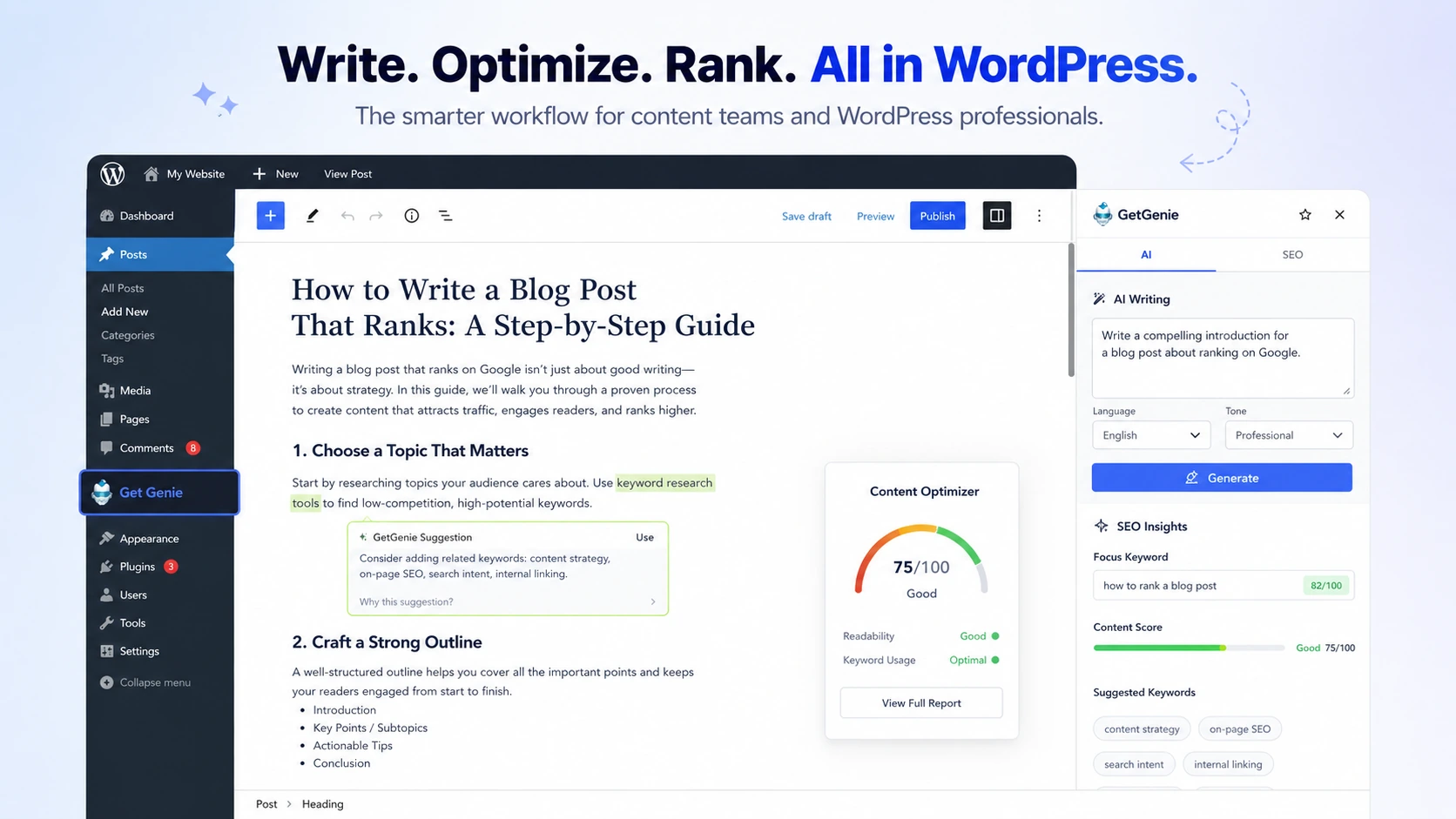
GetGenie is best understood as a WordPress-first AI SEO and content assistant for people who want to research, write, optimize, and track content closer to where they publish.
Its official positioning centers on merging content creation, keyword intelligence, and competitor analysis inside the WordPress editor. That is the important part. GetGenie is not just trying to be a blank AI writing box. It is trying to sit in the content production workflow: keyword, SERP research, title, intro, outline, article draft, NLP suggestions, content score, and follow-up SEO insights.
That workflow angle makes it more specific than a generic AI copywriter.
The product also has a Playground for non-WordPress users. That matters because not every buyer wants to install a plugin before testing. Still, I would not treat the Playground as proof that GetGenie is equally strong for every non-WordPress workflow. The product’s clearest fit remains WordPress publishing.
Our review approach compares public product pages, pricing details, help documentation, refund terms, buyer workflow fit, and nearby alternatives. I do not treat a low annual price, a promotional offer, or a coupon path as proof that the product fits a buyer. For GetGenie, my confidence is strongest around its WordPress SEO role. I am more cautious around live pricing, quota fit, and whether non-WordPress buyers will like the Playground enough to build a daily process around it.
The easy mistake is judging GetGenie by the number of features. The better way to judge it is by the quality of one real publishing workflow.
Who should use GetGenie?
GetGenie makes the most sense for WordPress publishers who want fewer handoffs between writing and optimization.
A solo blogger can use it when keyword research, outline building, draft generation, and on-page optimization are happening in the same publishing environment. This is useful only if the blogger still reviews the output manually. AI-generated SEO content can speed up the first draft, but it does not replace fact-checking, intent matching, brand voice, or editorial judgment.
A niche site owner may like GetGenie because content velocity matters. If you are planning dozens of informational pages, the Blog Wizard and SERP analysis workflow can reduce friction. The condition is that your plan must include enough credits for the number of articles you actually publish. A low-cost plan that runs out too quickly is not a low-cost plan in practice.
An agency can use GetGenie for repeatable client content if the team already has a WordPress-first process. The value becomes clearer when writers, editors, and SEO reviewers can work from the same structure: keyword, outline, draft, scoring, and tracking. Before paying for higher tiers, I would check whether the plan’s quotas match client volume and whether the team has a clear editing process.
A local business marketer or WooCommerce site owner may find value in the product’s templates and product-copy support. That use case is different from long-form blogging, though. The buyer should test the exact content type they care about instead of assuming the blog workflow proves every template.
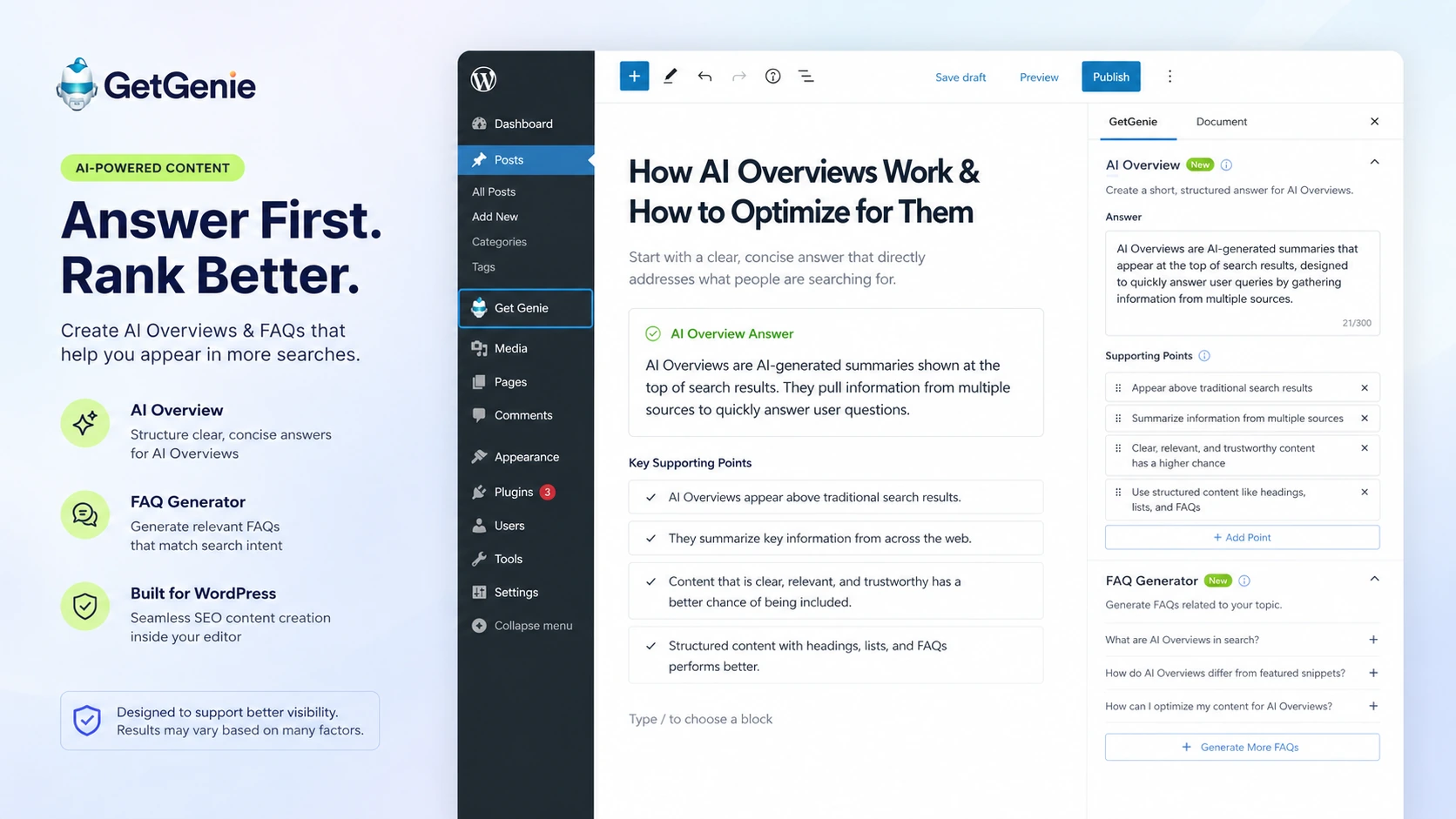
A content team watching AI Overview behavior may also be curious about GetGenie’s answer-first tools. That can be useful, but I would keep expectations grounded. Structured answers help only when the content is accurate, useful, and specific enough to deserve visibility.
Who should avoid GetGenie?
I would be careful with GetGenie if you do not use WordPress and do not want to build a workflow around the Playground.
The Playground gives non-WordPress users a route into templates and content generation, but the product’s strongest pitch is still closer to WordPress content operations. If your team already writes in Google Docs, optimizes in another SEO tool, and publishes through a separate CMS, GetGenie may add another layer rather than remove one.
I would also avoid choosing GetGenie if you need a dedicated rank-tracking or enterprise SEO suite. SEO Insights is useful as part of the content loop, but buyers should compare its depth against the tracking, reporting, and analytics tools they already use. A WordPress-friendly insight layer is not automatically a replacement for a full SEO platform.
GetGenie is not ideal for buyers who expect unlimited low-cost AI output. The plan table matters. AI words, SERP analyses, keyword analyses, topical maps, image generation, and tracking quotas can all shape real value. If you publish heavily, the cheapest plan may become limiting faster than expected.
I would also be cautious if you plan to publish AI output with minimal human review. GetGenie can help generate and optimize content, but it cannot guarantee originality, accuracy, or topical authority on its own. A draft that scores well can still miss the point, sound generic, or make claims that need checking.
And if the only reason you are interested is a discount, slow down. A coupon can improve a good purchase. It should not create the purchase reason.
How GetGenie fits into a real workflow
A good GetGenie workflow starts before the writing screen.
The first decision is the keyword. If the keyword is weak, too broad, badly matched to the site, or outside your expertise, no AI SEO assistant can fix the strategy completely. GetGenie becomes more useful when the buyer already has a topic plan and wants help turning one target keyword into a structured article.
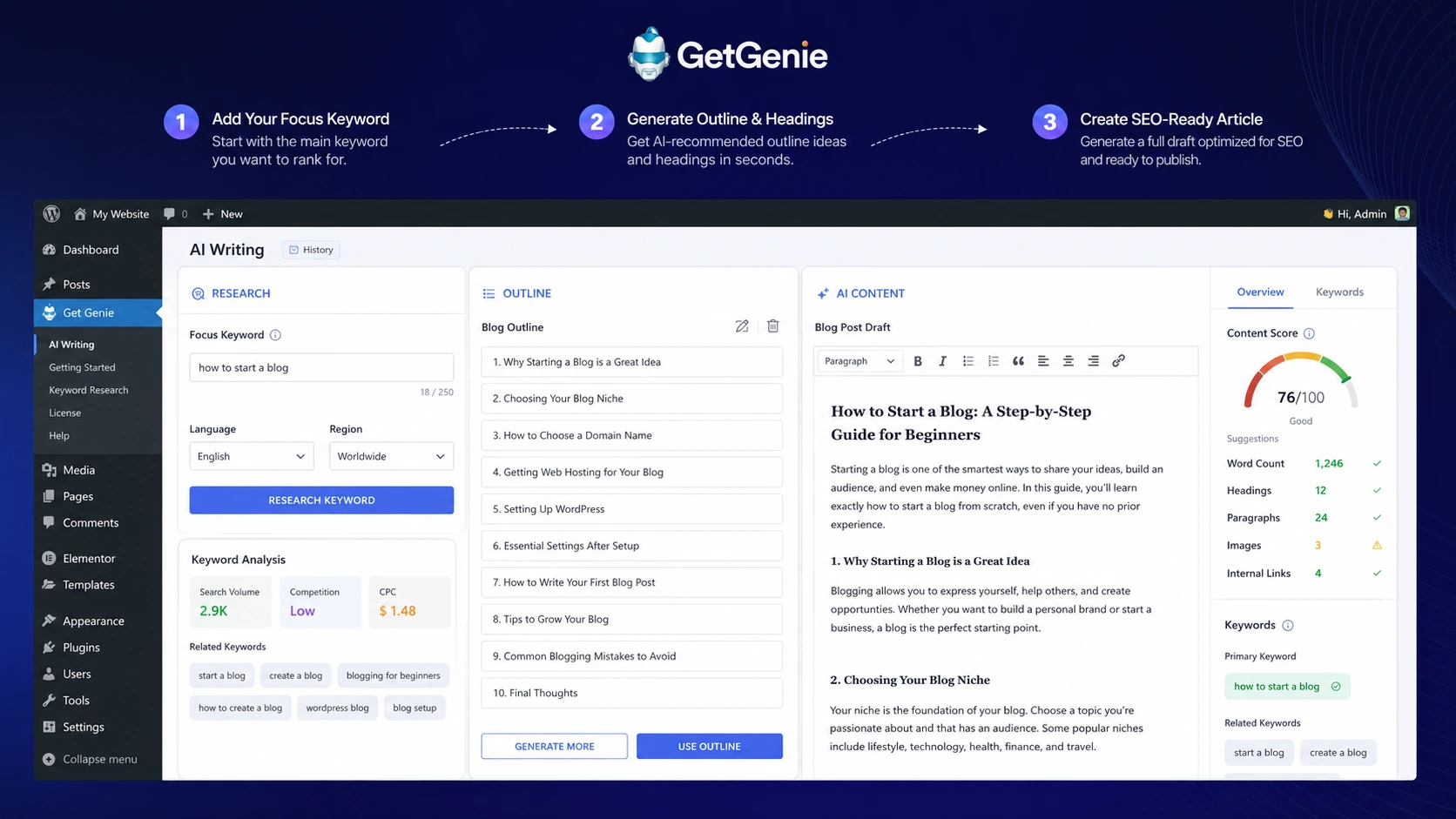
The workflow I would use to evaluate it looks like this:
- Choose one real keyword from your current content plan.
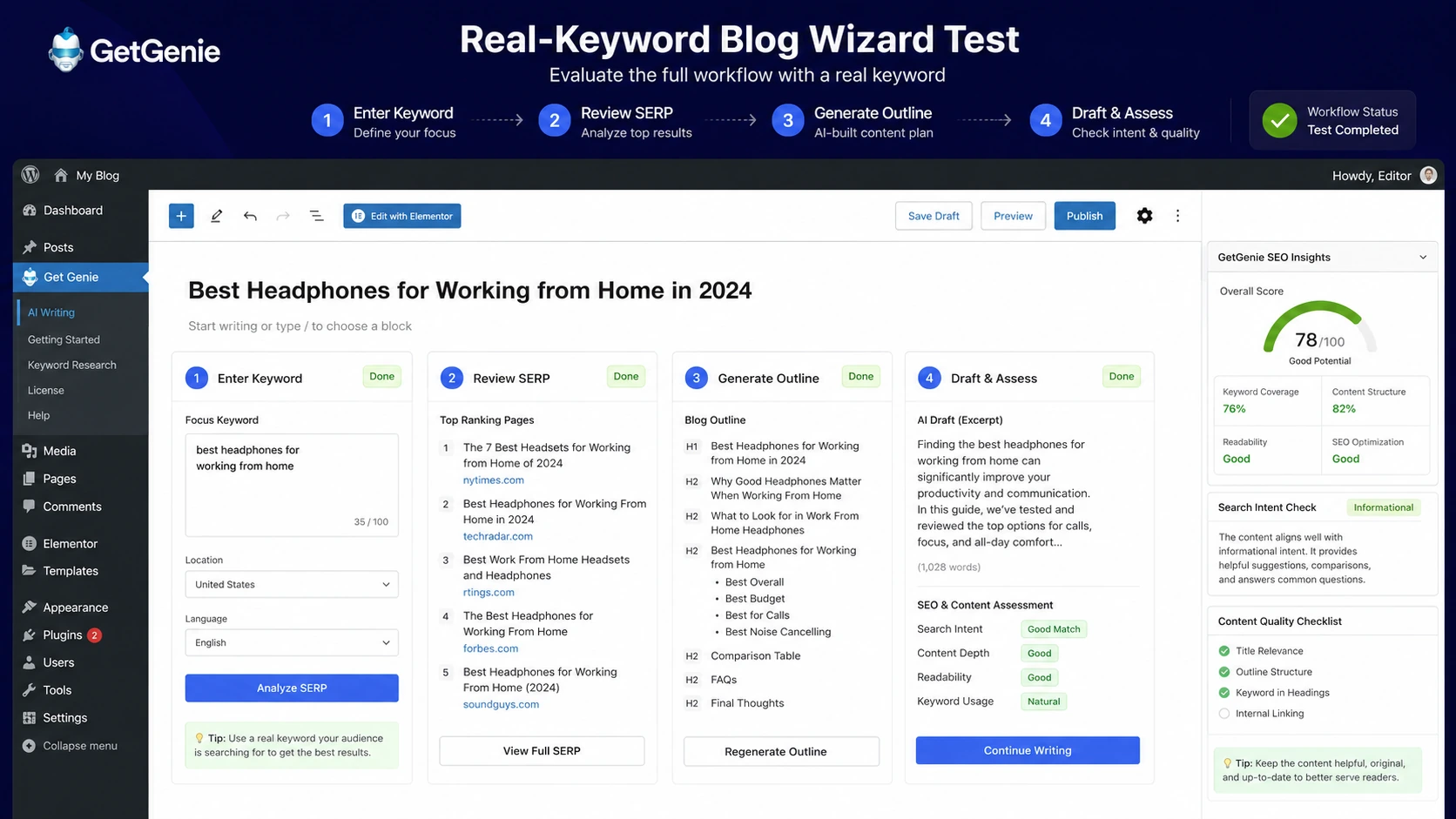
- Run the keyword through Blog Wizard.
- Review the title and outline suggestions before generating the article.
- Compare SERP competitor context against what you already know about the query.
- Draft the article, but do not publish it blindly.
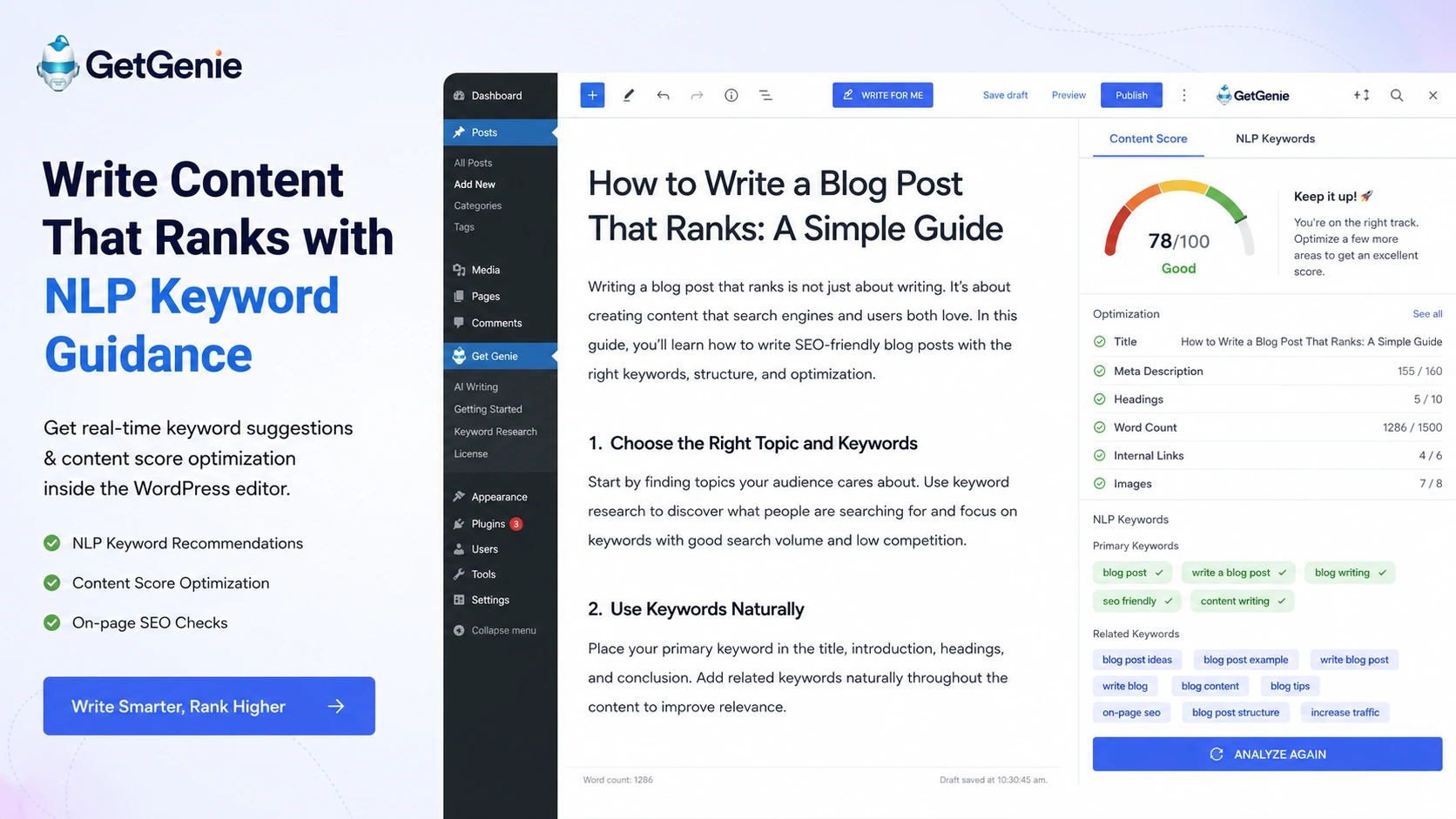
- Use content scoring, NLP terms, headings, internal link checks, and related questions as editing inputs.
- Add human expertise, examples, product judgment, screenshots, and original context.
- Publish only after the article satisfies the reader, not only the tool.
- Use SEO Insights or your existing analytics stack to monitor what happens later.
That is where GetGenie makes sense. It supports the loop. It does not replace the loop.
For a buyer who already publishes in WordPress, this can save time. For a buyer who has no keyword process, no editorial standards, and no review habit, GetGenie may simply help produce more unfinished drafts.
Workflow check: Test GetGenie with one real target keyword before judging the paid plan. A sample prompt is not enough to reveal whether the tool fits your publishing process.
Real-world buyer scenarios
A WordPress blogger publishing two to four articles per month has the cleanest GetGenie use case. The buyer can start with the free path, test Blog Wizard on a real keyword, and decide whether the workflow reduces research and drafting friction. The main thing to verify is whether the lower paid tier has enough SERP and keyword analysis credits for the actual publishing calendar.
A niche site operator publishing many articles per month has a different decision. In that case, the writing speed matters less than quota pressure. If the site needs repeated SERP checks, topical maps, image generation, SEO tracking, and content scoring across many pages, the buyer should compare Writer, Pro, and Agency carefully. The cheapest plan may not survive the workload.
An agency managing client blogs may like GetGenie if WordPress is already the operational center. The tool can create a more repeatable process for briefs, drafts, optimization, and performance follow-up. The risk is team discipline. If nobody owns keyword research, editorial review, and final QA, the tool can make content production faster without making it better.
A non-WordPress marketer should be more cautious. The Playground route is useful, and it gives access to templates outside the plugin workflow. But if the buyer’s daily process happens in another CMS, an external optimization tool, or a dedicated content operations platform, GetGenie needs to prove it reduces friction rather than adding another workspace.
An AI Overview-focused content team may want to test GetGenie’s newer answer-first templates. That is a reasonable experiment, especially for FAQ and structured answer workflows. I would still judge it by final content quality. AI Overview formatting is not a shortcut around expertise, clarity, or source-aware writing.
Key features that actually matter
Blog Wizard
Blog Wizard is the feature I would test first. It is the clearest expression of GetGenie’s promise: start with a keyword, then move into title ideas, intro options, outline generation, competitor context, and draft creation.
The practical question is not whether the wizard can generate an article. Most AI writing tools can generate an article. The practical question is whether the structure matches search intent closely enough that an editor can turn it into something worth publishing.
SERP and competitor analysis
SERP analysis is what separates GetGenie from a plain writing assistant. A draft created without competitor context may sound polished and still miss the query. Competitor analysis gives the writer a better starting point for headings, coverage, and angle.
I would use it as a research input, not as a formula. Copying the structure of ranking pages too closely can make content feel derivative. The better use is to understand the field, then add clearer judgment, examples, and buyer-specific context.
NLP keywords and content scoring
NLP terms and content scoring can help editors notice gaps before publishing. This is useful for WordPress teams because it keeps optimization close to the article.
The caution is score-chasing. A score can push the writer toward better coverage, but it can also tempt the writer to add terms that do not improve the reader experience. I would treat the score as a review signal, not the final editor.
SEO Insights
SEO Insights adds a post-publish angle. GetGenie positions it around tracking rankings, top pages, SEO gaps, and opportunities from inside the WordPress ecosystem. That matters because content does not end at publication. The better workflow is publish, measure, revise, and improve.
Still, buyers should compare the depth against any analytics or rank-tracking stack they already trust. SEO Insights may be enough for some WordPress publishers. It may not be enough for teams that need heavy reporting.
Playground and templates
The Playground matters for buyers who do not want to work only inside WordPress. GetGenie’s docs describe it as a SaaS-style webview for non-WordPress users, with templates and Blog Wizard access.
That gives the product more flexibility, but it does not erase the WordPress-first nature of the brand. Non-WordPress buyers should test the Playground directly before building a paid workflow around it.
AI Overview and FAQ tools
GetGenie’s newer answer-first tools are worth watching because SEO content is shifting toward direct answers, entity clarity, FAQs, and structured summaries. These tools can support that format.
The caution is that answer-first content still needs substance. A thin answer with clean formatting is still thin. If you use GetGenie for AI Overview-style content, the human layer has to add accuracy, specificity, and original insight.
Pricing and plan value
GetGenie pricing should be judged by quotas, not plan names.
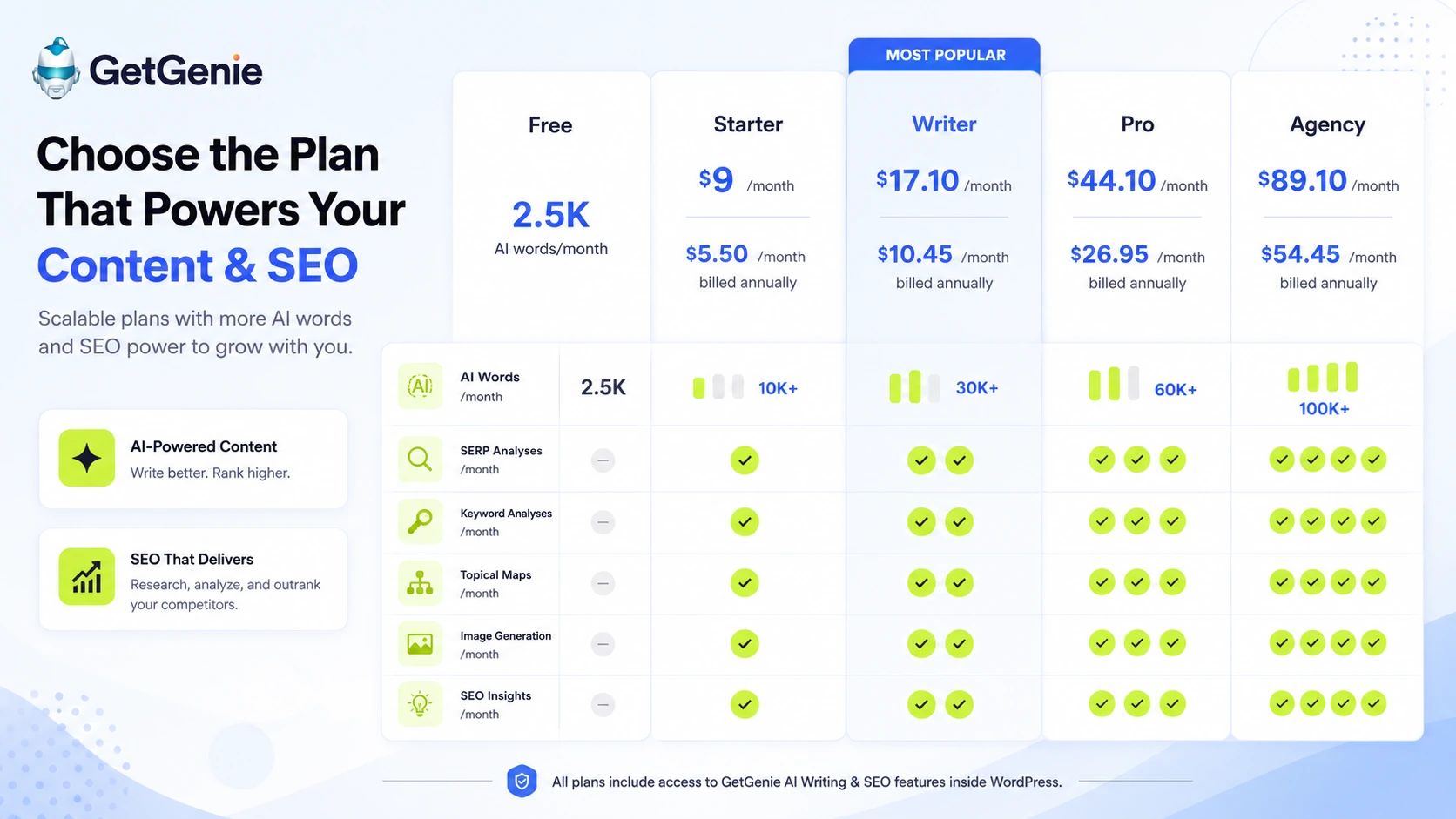
The official pricing page currently shows a free plan and paid tiers such as Starter, Writer, Pro, and Agency. The page also presents monthly prices, annual-billing rates, and promotional discounts. That is useful, but it also means buyers should check the live pricing page before relying on old numbers.
At the time of this review, the stored buyer data and the official pricing page aligned around a free path with limited credits, Starter beginning at $9 per month or $5.50 per month when billed annually, Writer at $17.10 per month or $10.45 annually, Pro at $44.10 per month or $26.95 annually, and Agency at $89.10 per month or $54.45 annually. I would still verify the checkout page before publishing or buying because promotional pricing can change.
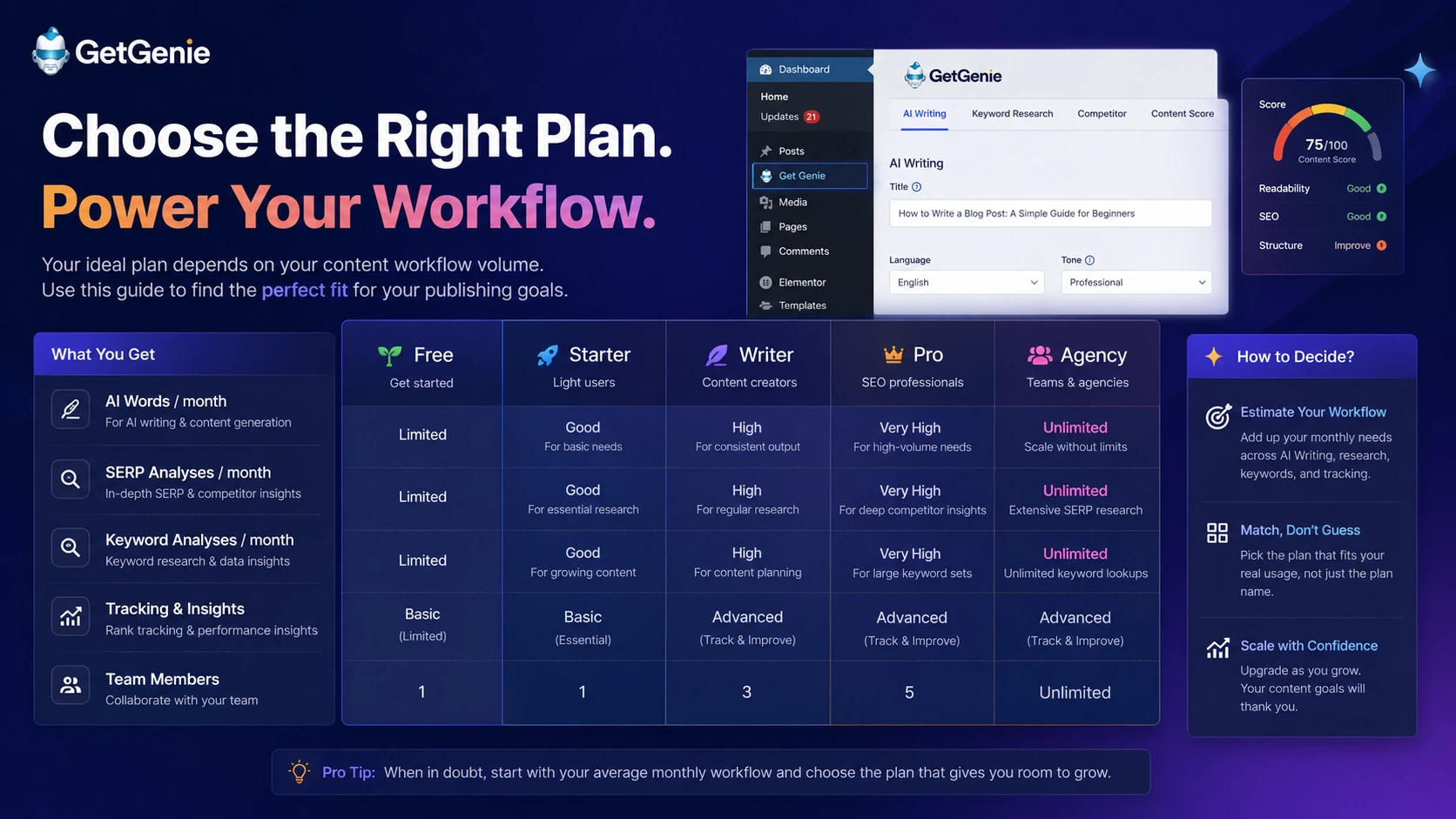
The free plan is useful as a workflow test. It gives you a way to check whether Blog Wizard, content scoring, templates, and the editing flow make sense before paying. I would not treat the free plan as proof that a paid plan will fit a higher-volume workflow.
Starter is attractive on price, especially with annual billing, but it is best for lighter workflows. If your content calendar is small and you only need occasional SERP or keyword analysis, it may be enough. If you publish often, it may become the plan you outgrow first.
Writer and Pro are more realistic for buyers who produce content regularly. The question is whether the extra words, keyword analyses, SERP analyses, topical map capacity, image generation, and SEO Insights limits align with your actual month.
Agency makes sense only when volume or client work justifies it. I would not jump there because it looks more complete. I would move there only after proving that the workflow saves time, improves article quality, and supports enough client or publishing activity to justify the larger quota.
Pricing check: Do not choose by the lowest annual number alone. Compare AI words, SERP credits, keyword analyses, topical maps, image generation, and SEO tracking before paying.
Check GetGenie pricing Check current offers Read store guide
Free plan, trial, coupon, and checkout notes
The cleanest buying path is free test first, paid plan second, coupon path last.
GetGenie’s free plan is useful because this product needs a workflow test. You should not judge it by a generic sample article. Use a real keyword, a real WordPress draft, and a real publishing standard. If GetGenie cannot improve that process, the paid plan will not become better just because the checkout price looks lower.
The coupon question is separate. GetGenie may show promotional pricing or annual savings on the official pricing page, and DealBestDaily may route buyers to current offer checks through the GetGenie coupon page. That does not mean every buyer should wait for or rely on a public coupon code.
I would use this order:
- Test the free path or low-risk workflow path.
- Identify the plan that matches your real monthly usage.
- Check monthly versus annual pricing.
- Read the refund terms.
- Use the coupon or offer route only after the product fit is clear.
A discount can improve the purchase. It should not make the decision for you.
Offer check: If GetGenie fits your workflow, check the current offer path before checkout. Do not let a discount override plan-limit fit.
What I would check before buying GetGenie
If I were buying GetGenie for a real content workflow, I would check seven things before paying.
First, I would estimate monthly article volume. Not the dream number. The real number. If you publish four articles a month, the plan decision is different from an agency publishing across ten client sites.
Second, I would check AI word limits. Word credits can disappear faster than expected when you generate titles, intros, outlines, drafts, rewrites, product descriptions, and social content.
Third, I would check SERP and keyword analysis credits. These are more important than they look because they shape the SEO side of the workflow. If you run multiple keyword ideas before choosing one, the lower plans may feel tighter.
Fourth, I would check topical map and AI Overview-related usage if those are part of your strategy. These newer features sound useful, but they should be tied to actual publishing needs.
Fifth, I would check SEO Insights tracking limits. If you expect GetGenie to support post-publish monitoring, make sure the tracked page and keyword limits match your site.
Sixth, I would read refund and cancellation language before annual billing. A 14-day window can be reasonable, but only if you test quickly and understand the process.
Seventh, I would compare GetGenie with at least one focused optimization tool and one broader content workflow tool. That keeps the decision honest.
A simple test before paying
The best test is one real article.
Pick a keyword you genuinely plan to publish. Do not use a random keyword just to see whether the tool works. A weak test produces weak evidence.
Run that keyword through Blog Wizard. Look at the title ideas, outline, intro, competitor context, and draft. Then ask five questions:
- Does the outline match the real search intent?
- Does the draft need less editing than your normal process?
- Do the NLP and content score suggestions improve the article, or just add terms?
- Does the workflow save time inside WordPress?
- Can the plan you are considering support this process every month?
This test is simple, but it protects you from the most common mistake: buying a tool because the demo looks efficient, then discovering your real content process is messier.
If the tool helps with that one real article, keep testing. If it only creates a generic draft that still needs heavy rewriting, compare alternatives before paying.
Pros explained
Strong WordPress workflow fit
GetGenie’s biggest advantage is that it fits naturally into a WordPress publishing process. If you already write, optimize, and publish in WordPress, keeping AI writing and SEO guidance close to the editor can reduce friction.
That is more meaningful than it sounds. Many AI tools create another workspace. GetGenie tries to sit where the article is already being built.
Useful combination of writing and SEO inputs
Blog Wizard, SERP analysis, NLP keywords, content scoring, templates, and SEO Insights give GetGenie a fuller workflow than a plain AI writer. This makes it more useful for buyers who care about search visibility, not only draft speed.
The value is strongest when these pieces are used together. If you only use the writing templates, you may miss the reason GetGenie exists.
Free path lowers the first test risk
I like the free path because GetGenie is the kind of tool that should be tested with real content before payment. The buyer can check whether the workflow feels natural before choosing Starter, Writer, Pro, or Agency.
That does not mean the free path proves paid value. It simply gives you a safer starting point.
Good fit for repeatable content teams
GetGenie can make sense for small teams and agencies that repeat similar SEO content workflows. If you produce briefs, drafts, optimization passes, and post-publish reviews often, the tool may save time.
The buyer still needs roles. Someone has to own keyword strategy. Someone has to edit. Someone has to decide whether the output is publishable.
Cons explained
Plan limits are the real buying issue
The plan table is not just pricing decoration. It is the product decision.
AI words, SERP analyses, keyword analyses, topical maps, images, and tracking limits can all affect whether GetGenie feels useful. A buyer who publishes lightly may be fine on a lower tier. A buyer with heavy output may hit limits quickly.
Non-WordPress buyers need extra caution
The Playground gives GetGenie a non-WordPress path, but the product is still easiest to understand as a WordPress-first tool. If your main workflow happens elsewhere, test the Playground directly before assuming it will replace your current setup.
Frase or NeuronWriter may feel more natural for buyers who want a dedicated browser-based brief or optimization workflow.
AI output still needs human editing
GetGenie can help with structure, speed, and optimization, but it cannot remove editorial responsibility. AI-generated SEO content can sound confident while missing facts, nuance, examples, or search-intent depth.
The buyer who gets the most value is not the buyer who publishes fastest. It is the buyer who uses the tool to get to a better edited article faster.
Pricing and refund details require live verification
GetGenie’s official pricing page can show monthly prices, annual rates, and promotional discounts together. That is useful, but it also means old screenshots or articles can become stale.
Refund terms are also time-sensitive. If you are considering annual billing, read the current refund and support process before paying.
Green flags and red flags
Green flags
- You publish in WordPress regularly.
- You need both draft generation and SEO optimization support.
- You already have a keyword process and want to speed up execution.
- You are willing to edit AI output carefully before publishing.
- You can test the free path with a real keyword.
- Your chosen plan has enough SERP, keyword, word, image, and tracking capacity.
- You want a content workflow tool, not only a chatbot.
Red flags
- You are buying only because the annual price looks low.
- You expect AI output to replace human editing.
- You need a full enterprise SEO platform.
- You publish outside WordPress and dislike plugin-style workflows.
- You need unlimited content production on a small budget.
- You have not checked refund terms before annual billing.
- You cannot explain how GetGenie will improve your current process.

GetGenie vs alternatives
GetGenie’s direct comparison set depends on the buyer’s real job.
If your main job is WordPress-first content creation and optimization, GetGenie deserves a serious look. If your main job is broader content optimization, briefing, or AI-assisted SEO publishing outside WordPress, the alternatives become more important.
GetGenie vs NeuronWriter
NeuronWriter is the cleaner comparison if your main need is focused content optimization. It is usually the route I would check when the buyer cares more about optimization workflow than WordPress-native writing convenience.
GetGenie is more attractive if you want the SEO assistant close to the WordPress editor. NeuronWriter may be more attractive if your writing and editing process is already happening outside WordPress and you want a dedicated optimization environment.
For an internal route, compare the NeuronWriter store guide before you commit to a WordPress-first setup.
GetGenie vs Frase
Frase is a stronger comparison for content briefs, topic research, and web-based SEO content workflows. It may fit teams that want structured research and briefs before writing, especially when WordPress is not the center of the process.
GetGenie feels more convenient when the buyer wants to generate and optimize inside WordPress. Frase may feel more natural when the team separates research, briefing, writing, and publishing.
If briefs matter more than plugin convenience, review the Frase store guide before choosing GetGenie.
GetGenie vs Balzac AI
Balzac AI is more of an adjacent route than a simple direct replacement. It is worth comparing if the buyer is exploring agent-style SEO publishing, automation, CLI, MCP, or API-driven workflows.
That is a different buyer direction. GetGenie is easier for a WordPress publisher who wants a plugin-based workflow. Balzac AI may be more relevant for a technical buyer who wants a more automated SEO production layer.
Use the Balzac AI store guide only if your buying question is moving beyond plugin-based content assistance.
Trust, refund, and buyer-risk notes
GetGenie has a better evidence base than many small AI writing tools because it publishes official pricing, documentation, refund policy, terms, privacy information, and a WordPress.org plugin listing. That does not remove buyer risk, but it gives buyers more to verify.
The refund policy is important. GetGenie states that refunds are not processed after 14 days post-purchase, and the terms say refund requests can be submitted by opening a support ticket. That means buyers should test quickly, especially before committing to annual billing.
Pricing should also be treated as live information. The official pricing page may show monthly prices, annual discounts, and promotional savings. Before paying, check the live checkout amount and whether the plan renews at the same or a different rate.
For privacy, remember that AI writing and SEO tools may process prompts, drafts, keywords, and site-related data to provide functionality. That may be normal for the category, but teams handling sensitive client content should read the privacy policy before uploading material.
The third-party evidence is mostly positive but not perfect. G2 shows strong user feedback around WordPress workflow, SEO features, and time savings, while also surfacing some practical complaints around pricing or workflow friction. Capterra has a smaller evidence base and may not reflect the latest official pricing details. That is why I would treat official pages as the source of truth for plans, and third-party reviews as pattern signals rather than final proof.
The buyer-risk summary is simple: GetGenie is not risky because it lacks features. The risk is buying the wrong tier, expecting AI to replace editing, or assuming a WordPress-first tool fits a non-WordPress process without testing.
Final verdict
GetGenie is a strong candidate if you publish in WordPress and want AI writing, SEO research, content scoring, and post-publish insight closer to the editor.
I would consider it if you already have a content workflow and want to reduce friction between keyword research, drafting, optimization, and publishing. I would also consider it if you run a niche site, blog, small agency, or WordPress content operation where repeating the same SEO workflow every month is part of the business.
I would skip it if you only need a plain AI writer, if your team already has a dedicated SEO stack that works well, or if you do not want WordPress or Playground to become part of the daily process.
I would compare it with NeuronWriter if optimization depth matters most, Frase if briefs and content research matter most, and Balzac AI if you are exploring a more technical or agent-style SEO publishing direction.
The safest next step is not to buy the biggest plan first. Test one real keyword, check whether the workflow saves time without lowering quality, then verify the current pricing and offer route through the GetGenie store or coupon page.
